UNICOS
®
Basic Administration
Guide for CRAY J90
™
and
CRAY
EL
Series
SG-24168.0.3.2
Copyright © 1995 Cray Research, Inc. All Rights Reserved. This manual or parts thereof may not be reproduced in any form unless permitted by contract or by written permission of Cray Research, Inc.
Portions of this product may still be in development. The existence of those portions still in development is not a commitment of actual release or support by Cray Research, Inc. Cray Research, Inc. assumes no liability for any damages resulting from attempts to use any functionality or documentation not officially released and supported. If it is released, the final form and the time of official release and start of support is at the discretion of Cray Research, Inc.
Autotasking, CF77, CRAY, Cray Ada, CRAYY-MP, CRAY-l, HSX, SSD, UniChem, UNICOS, and X-MP EA are federally registered trademarks and CCI, CF90, CFT, CFT2, CFT77, COS, Cray Animation Theater, CRAY C90, CRAY C90D, Cray C++ Compiling System, CrayDoc, CRAY EL, CRAY J90, Cray NQS, CraylREELlibrarian, CraySoft, CRAY T90, CRAY T3D, CrayTutor, CRAY X-MP, CRAY XMS, CRAY-2, CRlnform, CRIITurboKiva, CSIM, CVT, Delivering the power ... , DGauss, Docview, EMDS, HEXAR, lOS, LibSci, MPP Apprentice, ND Series Network Disk Array, Network Queuing Environment, Network Queuing Thols, OLNET, RQS, SEGLDR, SMARTE, SUPERCLUSTER, SUPERLINK, Trusted UNICOS, and UNICOS MAX are trademarks of Cray Research, Inc.
Anaconda is a trademark of Archive Technology, Inc. EMASS and ER90 are trademarks of EMASS, Inc. EXABYTE is a trademark ofEXABYTE Corporation. GL and OpenGL are trademarks of Silicon Graphics, Inc. Heurikon is a trademark of Heurikon Corporation. HP is a trademark of Hewlett-Packard company. HYPERchannel and NSC are trademarks of Network Systems Corporation. IBM is a trademark ofInternational Business Machines Corporation. Kerberos is a trademark ofthe Massachusetts Institute of Technology. NFS, Sun, SunOS, and Sun Workstation are trademarks of Sun Microsystems, Inc. PostScript is a trademark of Adobe Systems, Inc. Sabre is a trademark of Seagate Technology, Inc.
SPARCstation is a trademark of SPARC International, Inc., licensed exclusively to Sun Microsystems, Inc. Solaris, Sun, and Sun Workstation are trademarks of Sun Microsystems, Inc. StorageTek, STK, and WolfCreek are trademarks of Storage Technology Corporation. UNIX is a registered trademark in the United States and other countries, licensed exclusively through x/Open Company, Ltd. UniTree is a trademark of General Atomics, licensed
exclusively through X/Open Company, Ltd. WYSE is a trademark ofWyse Technology, Inc. X Window System is a trademark of X Consortium, Inc.
The UNICOS operating system is derived from UNIX® System V. The UNICOS operating system is also based in part on the Fourth Berkeley Software Distribution (BSD) under license from The Regents of the University of California.
Requests for copies ofCray Research, Inc. publications should be sent to the following address: Cray Research, Inc.
Distribution Center 2360 Pilot Knob Road Mendota Heights, MN 55120 USA
~.
Cray Research Software Documentation Map ..
; - - - .
The illustration on the following pages highlights the major body of documentation available for Cray Research (CRI) customers. The illustration is organized into categories by audience designation: Audience End users Application and system programmers System administrators System analysts Operators Description
Those who use the UNICOS operating system, products, applications, or networking software
Those who write or modify system or application code on a CRI
system for the purpose of solving computer system, scientific, or engineering problems
Those who perform system administration tasks, such as installation, configuration, and basic troubleshooting
Those who perform advanced troubleshooting, tuning, and customization
Those who perform operational functions, such as performing system dumps, and those who administer an operator workstation
To use the map. find the audience designation closest to your specific needs or role as a CRI
system user. Note that manuals under other audiences may also be of interest to you; manuals are listed only once, underneath the audience to which they most directly apply. Some manual titles are abbreviated. The date in the map's footer tells you when the information was last revised.
For more information
In addition to the illustration, you can use the following publications to find documentation specific to your needs:
.. Software Documentation Ready Reference, publication S0-2122, seNes as a general index to the CRI documentation set. The booklet lists documents and man pages according to topiC.
• Software Overview for Users, publication SG-2052, introduces the UNICOS operating system, its features, and its related products. It directs you to documentation containing user-level information.
• User Publications Catalog, publication CP-0099, briefly describes all CRI manuals available to you, including some not shown on the map, such as training workbooks and other
supplementary documentation.
Ordering
To obtain CRI publications, order them by publication number from the Distribution Center:
Cray Research, Inc. Distribution Center 2360 Pilot Knob Road Mendota Heights, MN 55120
Introductory
Software Overview for Users (SG-2052)-* User's Guide to Online
Information (SG-2143)-* General Software Documentation Ready Reference (S0-2122>* User Commands Reference (SR-2011). User Commands Ready
Reference (S0-2056).
ROS User's Guide (SG-2405)
UNICOS Shells Ready Reference (S0-2116) UNICOS Environment
Variables Ready Reference (S0-2117) UNICOS Index for Man
Pages (SR-2049) Visual Interfaces Guide
(SG-3094)-*
I Tape Subsystem GUide (SG-2051 )-* Security (MLS) Guide
(SG-2111). MPP Software Guide (SG-250S)-*
UNIX Link
NOE User's Guide (SG-214S). NOE Ready Reference
(S0-2149) Introducing NOE
(IN-2153).
• Available online with CrayDoc
*
Available online with DocviewA Man pages available with the man command
CRL User's Guide (SG-2126>*
Networking
NOS Guide (SG-21 05)-* TCP/IP and OSI Network
Guide (SG-2009)-* FTA Guide (SG-2144)-*
ROS User's Guide (SV-3151)
Text Editors Primer (SG-2050)
vi Reference Card (S0-2054) ed Reference Card
(S0-2055)
APPLICATION AND SYSTEM PROGRAMMERS
Cray Ada Reference (SR-30i4)* Cray Ada Programming
Guide (SR-3082)*
C
Cray Standard C
Reference (SR-2074)-* Cray Standard C Ready
Reference (S0-2076) Cray Standard C for
MPP (SR-2506)-*
System Libraries (SR-2080).
System Libraries Ready Ref. (S0-2147). Scientific Libraries
(SR-2081).
Math Library (SR-2138). Application Programmer's
1/0 Guide (SG-2168).
Application Programmer Library Ref. Manual (SG-2165). Introducing CrayLibs
(IN-2167). PVM and HeNCE Ref.
(SR-2501 )-*
OWS-EJIOS-E Reference (SR-3077).
OWS-EJIOS-E Ready Reference (50-3080) OWS-EJIOS-E Operator's Guide (SG-3078) OWS-EJIOS-E Administrator's Guide (SG-3079)
Reference (SR-3i 08). Symbolic Machine
Instructions (SR-3109) Ready Reference
(S0-3110) UNICOS Macros and
Opdefs (SR-2403).
Cray Assembler for MPP
CAM Reference (SR-2510l-* Loaders Loader Reference (SR-0066)-* SEGLDR Ready Reference (SQ-0303)
Loader for MPP
Cray MPP Loader Guide (SG-2514).
Networking
RPC Reference (SR-2089)-* Kerberos User's Guide
(SG-2409)~
• Available online with CrayDoc
*
Available online with Docview.. Man pages available with the man command
CF77 Ready Reference CF90 Commands and (S0-3770) Directives (SR-390i)-* CF77 Commands and CF90 Fortran Language
Directives (SG-3771)-* Reference (SR-3902)-* CF77 Fortran Reference CF90 Ready Reference
(SR-3772)-* (S0-3900)
cm
Optimization Introducing CF90 SPARC Guide (SG-3773)* Prog. Env. (IN-2155).cm
Message Manual Introducing OPE (SR-3774) (IN-2i63). Cray MPP FortranReference (SR-2504)-*
Programming Tools MPP Apprentice Tool UNICOS Message (IN-2511).
System Programmer's Introducing Cray TotalView Guide (SG-2i21)-* Debugger (IN-2502). Compiler Information Simulators
File (CIF) Reference
Cray MPP Simulator Guide (SR-2401 )-*
(SG-2503). CDBX Debugger
Source Control
Reference (SR-2091)-*
CDBX Debugger User's USM User's Guide Guide (SG-2094)-* (SG-2097)-* CDBX Reference Card System Calls
(S0-2110) System Calfs (SR-2012). Program Browser X Window System
(xbrowse) (IN-2140).
Reference (SR-21 01 l-* Tuning Guide to Parallel
Ready Reference Vector Applications
(S0-2123)
SYSTEM ADMINISTRATORS AND ANALYSTS
UNICOS Installation Guide (SG-2112) Installation Ref. Card
(SQ-2411)
UNICOS Installation Tool Menus and Help Files (SG-2412)
UNICOS System Administration 1C:::::~_"1-t":l\_-'---\ __ _ I IV,.,..
CRL Administrator's Guide (SG-2127)* DMF DMF Administrator's Guide (SG-2135)* Security and Licensing
UNICOS System Security Ovarview (SG-214il*'
Administrator Commands FLEXlm Guide Reference (SR-2022). (SG-2181 ).* Administrator Commands UNICOS under
Ready Ref. (SQ-2413). UNICOS
ROS Administrator's Guide (SG-2406)
VAXNMS Link ROS Administrator's
Guide (SV-3152)
UuU Administrator's Guide (SG-2156)~
UNIX Link ROS Administrator's Guide (SG-2120) NOE Administration (SG-2150). NOE Installation (SG-5236).
• Available online with CrayDoc
*
Available online with Docview... Man pages available with the man command
lOS Commands Reference (SR-2408). lOS Commands Ready
Ref. (SQ-2162) UNICOS Basic Administration Guide
(SG-2416)~
UNICOS Installation Guide for CRAY Y-MP EL Systems (SG-5201) lOS Messages (SQ-2402)
Networking fy Driver Administrator's
Guide (SG-2132)
MPP
CRAY T3D Administrator's Guide (SG-2507).
Analysts USCP
File Formats and Special Front-end Protocol Files Reference Intemals (SM-0042~
(SR-2014). USCP Optimization Data Migration MSP (SN-21 03)
Writer's Guide
(SN-2098~
UNICOS Tuning Guide (SR-2099). UNICOS nrnake Card
(SQ-2146) Installation and
Configuration Tool Reference (SR-3090)
Nev.." Features
NIS
• Minor changes and NQE references were added to section 14, and the "Configuring and starting your local host NQS system" procedure was corrected.
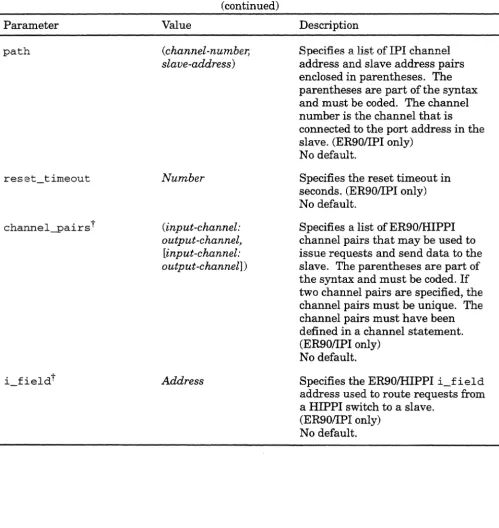
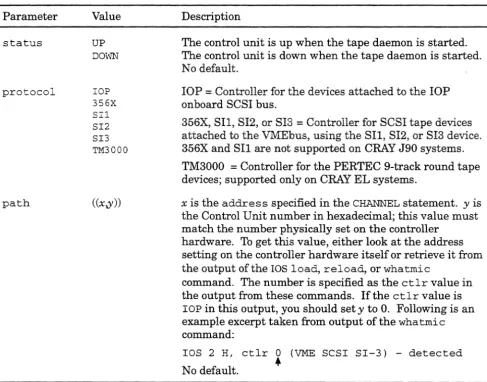
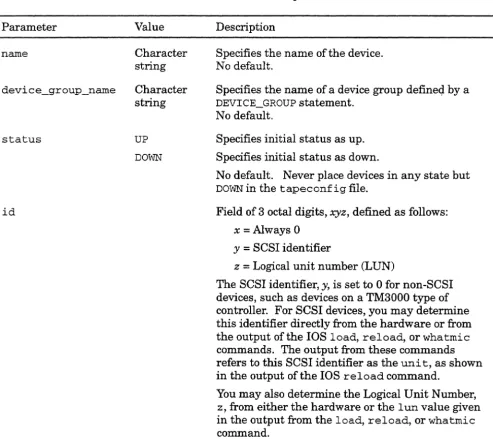
• Support for the new character special tapes interface using tpdaemon, SI-3 SCSI controllers, and EMASS, Inc. ER90 devices was added to section 15, as well as the following: STK 9914 9-track tape device type m was added, the minor number type was corrected to be 0-31, a type
LOADER statement parameter value was corrected to be STKACS, the lOP statement cluster parameter description was corrected, the BANK statement number parameter value and
description was corrected, the SLAVE statement is now supported only for ER90 devices, three new DEVICE statement parameters were added to support ER90 devices, the
user_exi t_mask OPTIONS statement parameter was added, and the "Installing an autoloader" procedure was revised.
• A summary of the content of appendix A was added at the beginning of the appendix, and the subsection on restoring a configuration was revised.
• The /sys/config. uni command was changed to be /sys/paramin appendix B.
• DD-5I specifications were corrected in appendix E, and specifications were added for DD-5S, DD-6S, and DD-7S disk drives.
• Appendix H was added, which provides a strategy for file version numbering.
The UNICOS 8.0.2.3 update includes the online version of the UNIGOS Basic Administration Guide for the GRAY EL Series. The following minor corrections were made for this online
version:
• References to / etc / setdev were removed (SPR 78095); options -r in and -n were added to the backup and restore procedures notes describing the use of the tpront command (SPR 77271).
• Description of the -A altfile dump command option was added to subsection 6.4.
• Description of the -v restore command option was added to subsection 6.6.
• Subsection 5.2.1 was revised as follows: definition of a partition was revised to be one slice on one physical device, additional information about minor device number ranges was added, and reference to / dev /mkdev . sh was removed.
• Information about setfs was added to subsection 5.2.2.
• Reference to /ce/bin/olhpa was added to subsection 5.3.
• Subsection 5.8.2.5.3 text was revised to state that a slice is the name of a logical device, and a note was added to the "Procedure: Identifying devices on your system and their file system allocation. "
• A note was added to appendix A stating that you can modify your .profile or . cshrc PATH
Record of Revision
The date of printing or software version number is indicated in the footer. Changes in rewrites are noted by revision bars along the margin of the page.
Version
8.0
8.0.2.3
8.0.3
8.0.3.2
SG-2416 8.0.3.2
Description
March 1994. Original printing.
This basic administration guide supports the CRAY EL series of systems that run the UNICOS 8.0 release.
June 1994. The online version of this guide is provided; minor corrections are included with the UNICOS 8.0.2.3 update. For details about changes within this manual, see the New Features page.
October 1994. The online version of this guide is provided to support the UNICOS 8.0.3 revision release. For details about changes within this manual, see the New Features page.
February 1995. Reprint of this guide is provided to support the CRAY J90 series of systems for the UNICOS 8.0.3.2 update release. For details about changes within this manual since the original printing, see the New
Features page.
Recommended
prerequisite skills
Online
information
SG-24168.0.3.2
Preface
This guide describes procedures that system administrators of CRAY J90 and CRAY EL systems running UNICOS frequently perform.
Note
For detailed information about specific topics described in this guide, see "Related Documentation" in each section.
To get the most out of this guide, you should have the following skills:
• User experience with UNICOS or UNIX file structure and utilities and using man pages (see "Online information") .
• Ability to read and understand UNICOS or UNIX shell scripts.
• Familiarity with a UNIX text editor, such as vi or ed.
• Experience with the administration of at least one operating system.
The following types of online information products are available to Cray Research customers:
• CrayDoc online documentation reader, which lets you see the text and graphics of a manual online. The CrayDoc reader is available on workstations. To start the CrayDoc reader at your workstation, use the cdoc(l) command.
Preface
Conventions
iv
UN/COS Basic Administration Guide for CRAY J90 and CRAY EL Series
• Docview text-viewer system, which lets you see the text of a manual online. The Docview system is available on the Cray Research mainframe. To start the Docview system, use the
docview(l) command.
• Man pages, which describe a particular element of the UNICOS
operating system or a compatible product. To see a detailed description of a particular command or routine, use the man(l)
command.
• UNIC08 message system, which provides explanations of error messages. To see an explanation of a message, use the
explain(l) command.
• Cray Research online glossary, which explains the terms used in a manual. To get a definition, use the define(l) command.
• xhelp help facility. This online help system is available within tools such as the Program Browser (xbrowse) and the MPP Apprentice tool.
For detailed information on these topics, see the User's Guide to
Online Information, publication 8G-2143.
The following conventions are used throughout this manual:
Convention
command
Meaning
This fixed-space font denotes literal items such as commands, files, routines, path names, signals, messages, and programming language structures.
UNIGOS Basic Administration Guide for GRAY J90 and GRAY EL Series Preface
SG-24168.0.3.2
Convention manpage(x)
routineO
variable
user input
abbreviation
[ ]
Meaning
Man page section identifiers appear in parentheses after man page names. The following list describes the identifiers:
1 User commands
IB User commands ported from BSD
2 System calls
3 Library routines, macros, and opdefs
4 Devices (special files)
4P Protocols
5 File formats
7 Miscellaneous topics 7D DWB-related information 8 Administrator commands
Routine names followed by an empty set of parentheses designate a library or kernel routine; for example, ddcntlO. Kernel routines do not have man pages associated with them.
Italic typeface denotes variable entries, words or concepts being defined, and explanatory comments in examples and screens.
This bold fixed-space font denotes literal items that the user enters in interactive sessions. Output is shown in nonbold, fixed-space font.
Underlining indicates the shortest possible abbreviation for a command.
Brackets enclose optional portions of a command line.
Ellipses indicate that a preceding command-line element can be repeated.
This convention indicates a key on the keyboard.
Preface
Ordering
publications
VI
UN/COS Basic Administration Guide for CRAY J90 and CRAY EL Series
Convention Meaning
<KEY> This convention indicates a key on the keyboard.
Command lines All command lines you enter that using I/O redirection inciude TiO redirection, such as 2>.
require that you use either the ksh or
sh shell; the csh shell will not accept the same 110 redirection command syntax as the ksh and sh shells.
It is the objective of Cray Research to become compliant with IEEE Std 1003.1-1990 (PO SIX. 1) and IEEE Std 1003.2-1992 (POSIX.2). This manual reflects those ongoing efforts.
POSIX.2 uses utility to refer to executable programs that Cray Research documentation usually refers to as commands. Both terms appear in this document.
The User Publications Catalog, publication CP-0099, lists all Cray Research hardware and software manuals that are available to customers.
To order a manual, use one of the following methods:
• Call the Distribution Center in Mendota Heights, Minnesota, at (612) 683-5907.
• Use the CRInform system (CRlnform is an online,
menu-driven information and problem-reporting service for Cray Research customers).
• Send a facsimile of your request to fax number (612) 452-0141.
• Contact your CRAY J90 or CRAY EL service representative.
• Cray Research employees may choose to send electronic mail to orderdsk (UNIX system users).
UNICOS Basic Administration Guide for CRAYJ90 and GRAY EL Series Preface
Reader comments
SG-24168.0.3.2
If you have comments about the technical accuracy, content, or organization of this manual, please tell us. You can contact us in any of the following ways:
• Send us electronic mail from a UNICOS or UNIX system, using the following UUCP address:
uunet!cray!publications
• Send us electronic mail from any system connected to Internet, using the following Internet addresses:
pubs2416@tirnbuk. cray. com (comments specific to this manual)
[email protected]. com (general comments)
• Contact your Cray Research representative and ask that a Software Problem Report (SPR) be filed. Use PUBLICATIONS
for the group name, PUBS for the command, and NO- LICENSE
for the release name.
• Call our Software Publications Group in Eagan, Minnesota, through the Technical Support Center, using either of the following numbers:
(800) 950-2729 (toll free from the United States and Canada)
(612) 683-5600
• Send a facsimile of your comments to the attention of "Software Publications Group" in Eagan, Minnesota, at fax number (612) 683-5599.
• Use the postage-paid Reader's Comment Form at the back of this manual.
We value your comments and will respond to them promptly.
Contents
Preface ... iii
Recommended prerequisite skills .. . . iii
Online information . . . iii
Conventions . . . iv
Ordering publications ... vi
Reader comments .. . . vii
Introduction [1] ...
If • • • • • • • • • • • • • • • • • • • • • • • • • • • • • • • • • • • • • • • • 1 The role of a system administrator ... 1Create and maintain a log book ... 2
Major characteristics ofUNICOS ... , ... '" ... , .. " .. ... . . .. . . . .. ... 3
High-performance I/O ... 3
File systems ... 3
Disk devices ... 3
File system quotas ... 3
User database (UDB) ... 4
Resource control ... 4
Fair-share scheduler . . . 4
System accounting ... 4
TCPIIP ... 5
Network Queuing System (NQS)... 5
Menu system ... 5
Data migration . . . 5
How this guide will help you ... . . . 5
Where to look for more information . . . 7
Accessing online documentation by using CrayDoc ... ... ... .. .. . .. .... ... .. ... ... .. 9
Accessing online documentation by using Docview ... 10
UNICOS online glossary. . . 11
Basic System Security [2] ... 13
Related basic system security documentation . . . 13
Superuser privileges ... 14
Password security for superuser ... 14
Physical security ... 15
setuid programs ... 15
root PATH . . . . . . . . . . 16
User security . . . 17
The umask command ... 17
Default PATH variable ... 18
User groups ... , ... , ... " 18 File-owner fraud ... 19
Login attempts. . . 19
Partition security. . . .. . . .. . . .. . . .. . . . .. . . .. . . . 19
Contents UN/COS Basic Administration Guide for CRAY J90 and CRAY EL Series
Tape device access ... 20
Startup and Shutdown [3] ... 21
Related startup and shutdown documentation . . . 21
Procedure: Starting up the system... .. .. ... . . .. . . .. .... . . .. .. ... .. .... . . ... .. . .. . 23
Procedure: Shutting down IJNICOS and the lOS ... 27
Shutdown information ... 29
Startup, shutdown, and configuration files and scripts for lOS and UNICOS ... 30
Start-up scripts . . . 32
The / etc / ini t command ... 32
The / etc / ini t tab file . . . 33
Interaction between /ete/init and /ete/ inittab .. , ... , ... , . .. ... 36
/ete/beheckre script ... 37
/ete/brc script ... 38
The multiuser start-up script /ete/rc .... ... . ... .... . ... . ... .. . .. .... . 39
Using rcoptions to modify the actions of /etc/bcheckrc, /etc/brc, and /etc/rc ... 39
To add site-specific code to the start-up process ... 40
Run-level configuration. . . 41
Changing run level ... 41
Strategies for using run levels .... . . 41
Single-user mode ... 42
Multiuser mode. . . 43
Typical tasks you can perform while in multiuser mode ... 44
Dedicated system ... . . . 45
lOS prompts, and permissible actions. ... . .. ... .. .. .. . . . .. ... .... . .. ... . .. . ... . . .. . . . .. . 45
lOS boot prompt ... 46
lOS prompt ... 47
'UNICOS System. Daemons [4] ... 49
Related UNICOS system daemons documentation ... 49
Procedure: Starting and stopping UNICOS system daemons ... 51
File System.s [5] ... 57
x Related file systems documentation. . . 58
An overview of file systems ... 59
Terminology ... 60
UNICOS file system structure .. . . 62
Commands for examining files and file systems . . . 63
File system planning . . . 64
The root (f) file system. . . ... . . .. . . .. . . .. .. . . 65
The /usr file system ... 65
The /usr / src file system. . . 66
The / tmp file system ... 66
The swap device. . . 66
The dump device. . . 67
The back-up root (f) and back-up /usr file systems. . . 67
UNIGOS Basic Administration Guide for GRAY J90 and GRAY EL Series Contents
The /home file system. .. .. . . .. ... . . ... . . .. . .. ... ... .... . . ... .. ... .. . . .. . 67
Disk device characteristics . . . 67
Disk striping ... 68
Disk banding ... . . . 68
Configuring your devices and their file system allocation ... . . . 68
CSL syntax ... . . . 69
Placement of CSL statements ... 70
Revision section ... 71
ios_e section. . . ... . . . .. . . .. . . 71
Mainframe section . . . 72
UNICOS section . . . 73
File system section . . . 73
Physical device definition ... . . . 73
Logical device definition. . . .. . . .. . . .. . . .. . . . 75
Special system devices. . . 75
Network section ... '" ... 76
Checking your disk configuration parameter file . . . 77
Procedure: IdentifYing devices defined on your system and their file system allocation . . . 83
Procedure: Modifying your configuration file . . . 87
Creating file systems . . . 89
Step 1: Building the file system ... 91
Step 2: Labeling the file system ... 93
Step 3: Checking a file system ... 95
Step 4: Creating a mount point for the file system ... 99
Step 5: Mounting the file system ... " . .. ... . . .... . . . ... 101
/ete/mnttab and /ete/fstab files.. ... .. .. ... . .. .. .. .. ... . . .. . .. ... ... . .. . .. ... 103
/ete/mnttab . ... .. .... . ... ... .... .... . . .. ... ... ... ... . ... .... . .. . . .. . ... 103
/ete/fstab ... , ... " . .. . . ... . ... 103
Procedure: Configuring a file system to be mounted automatically at the initialization of multiuser mode . . . .. 105
Procedure: Unmounting file systems ... 107
Backing Up and Restoring File Systems [6] ...
109Related backup and restore documentation. . . .. 110
CRAY EL tape devices referenced in / dev . . . .. 111
Backup and restore utilities. . . .. 111
dump and restore utilities ... 111
rdump and rrestore utilities ... '" ... , . . . ... 112
dd utility ... 112
tar and epio utilities ... " . . .. . . . .. . . .. . . .. . . ... . . .. . .. 112
jete/dump utility. .... ... ... .. .... ... . . .. ... ... . ... ... . . . .... ... .. . .. ... 113
Routine backup (dump) strategy ... 114
Restoring file systems ... 115
Increasing and decreasing file system space ... 116
Procedures included in this section ... 117
Procedure: Backing up (dumping) a file system without tpdaemon ... " 119 Procedure: Restoring a file system without tpdaemon ... 123
Contents UNICOS Basic Administration Guide for CRAY J90 and CRAY EL Series
Procedure: Backing up (dumping) a file system by using tpdaemon ... 129
Procedure: Restoring a full file system by using tpdaemon ... . . . .. 135
Procedure: Restoring a partial file system by using tpdaemon . . . .. 143
Maintaining Users [7] ...
149Related user accounts documentation ... , , , . . . .. 150
The user database (UDB) ... . . .. 15.0 Using the UDB ... 151
UDB files and commands . . . .. 152
Procedure: Determining settings for UDB fields ... 155
Procedure: Adding a group to jete/group ... ... ... ... .. ... 161
Procedure: Adding an accounting group to jete/acid ... ... ... 163
Using the /ete/nu utility... ... ... ... 165
Procedure: Changing /ete/nu configuration parameters ... 167
Procedure: Creating a file system to use with /ete/nu ... 169
Procedure: Adding a user record to /ete/udb by using /ete/nu ... 171
Procedure: Modifying user records by using / ete /nu . . . .. 177
Procedure: Deleting a user record by using /ete/nu ... 181
Using /ete/udbgen ... 185
Proc~dure: Adding users to /ete/udb by using /ete/udbgen ... 187
Procedure: Transferring initial files to the login directory when using / ete/udbgen ... 195
Procedure: Updating user logins in the UDB by using /ete/udbgen ... ... ... .... ... 197
Procedure: Deleting a user from the UDB by using I ete /udbgen ... 201
Maintaining user environment files ... 203
Procedure: Setting up an jete/profile file ... 205
Procedure: Setting up an /ete/eshre file... ... .... ... . ... 207
Procedure: Transferring user accounts to another file system . . . .. 209
Communicating with Users [8] ...
211Related user communication documentation... .. .. . ... 212
Issuing emergency messages only ... 212
Issuing critical messages ... 213
Issuing special messages (message of the day) ... 214
Issuing noncritical communication to all users. . . .. 215
Using the wri te command ... 216
Using the mail command ... 218
Log Files [9]...
219Related log files documentation ... 220
/ ete /boot . log file ... 220
lete/re.logfile ... 221
/ete/syslog.conf file ... 221
System logs ... 221
Message sources ... 222
Priority levels . . . .. 223
syslog daemon startup ... 223
UNICOS Basic Administration Guide for CRAY J90 and CRAY EL Series Contents
/usr / adm/ sulog ... . . . .. 226
/ete/dump.log ... 226
/usr /adm/nu.log ... '" ... '" ... , 227
/usr/adm/sa/saDD ... 228
/usr/adm/sl/slogfile ... 229
/usr/spool/msg/msglog.log ... 229
/usr /lib/ eron/ eronlog ... 230
/usr /tmp/nqs .log . . . .. . . .. . . .. . . .. 231
/usr /adm/errfile ... " . .. ... 232
/usr/spool/dm/* ... 233
Cleaning up system logs ... 234
Log files recycled during each reboot ... 234
Small accumulative log files . . . .. 235
Large accumulative log files . . . .. 235
Accounting [10] ... 237
Related accounting documentation ... 238
Concepts and terminology ... 238
Unique features of CSA ... 240
Accounting directories and files ... 241
Daily operation overview of CSA ... 246
Customizing your system billing procedure . . . .. 249
The esarun command. . . .. 249
CSA accounting states.. .... . .. . ... . ... .... . .. . .... .. . .. .. . . . .. .. ... .... ... ... .. . . . .... 250
Fixing wtmp errors ... . . . .. 253
Verifying data files . . . .. 254
Editing data files ... 254
Data recycling ... . . . .. 255
Procedure: Setting up CSA . . . .. 257
Daily CSA reports. . . .. 263
Adding Your Cray Research System to Your Network [11]... 277
Related network information . . . .. 277
Procedure: Adding a CRAY J90 or CRAY EL system to an existing TCPIIP network ... 279
Common TCPIIP configuration files. . . .. 283
Configuring NIS [12] ...
285Related NIS documentation . . . .. 285
What is NIS? ... 285
Procedure: Using the menu system to configure your CRAY J90 or CRAY EL system as an NIS slave server ... 289
Procedure: Configuring your CRAY J90 or CRAY EL system as an NIS slave server without using the menu system ... . . . .. 293
Procedure: Configuring user accounts to use NIS .. , . .... . . ... .... .... ... .. ... .. . .. .... . ... 295
Configuring NFS [13] ...
297Related NFS documentation ... 297
Contents UNIGOS Basic Administration Guide for GRAY J90 and GRAY EL Series
What is NFS? . . . .. 297 What is ID mapping and when would I use it? . . . .. 299 Procedure: Configuring a CRAY J90 or CRAY EL system as an NFS client ... 301 Procedure: Configuring a CRAY J90 or CRAY EL system as an NFS server ... 307
NQS [14] ... ~ ~ ~ '= e e :;;. .. • ... .. • • • • • • • • • • • • • • • • • • • 311
Related NQS documentation. . . .. . . .. . . .. . .. . . .. 313 Accessing NQS ... 313 Manager and operator authorities within the NQS qrngr subsystem.... ... ... .... ... . . . .... 314 Sample NQS configuration steps ... 315 Submitting NQS configuration directives to the NQS software. . . .. 317 Types of directives necessary for a basic NQS configuration ... 317 Telling NQS your machine ID . . . .. 317 Creating the types of queues NQS uses ... 318 Making the connection between the pipe queue and the batch queues ... 322 Setting limits for the batch queues . . . .. 323 Individual queue limits. . . .. 323 Queue complex limits ... 324 Global queue limits ... 325 Setting the NQS log file . . . .. 326 Setting the debug level ... 326
What if a user submits a job with no qsub directives? ... 327
Turning on and stopping the queues ... 328 Recognizing a "good" NQS configuration . . . .. 329 Setting job limits for a job .. . . .. 329 Sample NQS directives file . . . .. 330
Sample NQS. startup file ... '" ... , .. ... ... 334
Procedure: Configuring and starting your local host NQS system ... 339 Procedure: Adding and removing qrngr managers and operators ... 343 Procedure: Obtaining an image of the NQS configuration ... 345 Procedure; Shutting down NQS ... 347 NQS periodic checkpointing . . . .. 349 Periodic checkpoint file restrictions ... 349 Periodic checkpoint modes ... 350 Conditions for recovery ofNQS requests ... 350 NQS user commands... 351 NQS qsta t -a command ... 353 NQS user messages ... 354 NQS user exits ... 355
Tape Subsystem [15] ... 357
Related tape subsystem documentation ... 360 The Ibin/file command... 360
Creating character special files on CRAY EL systems by using the I etc/mknod command ... 362
Components of character special files ... 363 Tape special file naming convention ... 364
Tape special file mknod fields ... 365
UNIGOS Basic Administration Guide for GRAY J90 and GRAY EL Senes Contents
Sample character special files ... 367
UNICOS tpdaemon tape subsystem overview ... 368
Tape daemon commands ... 369 Tape and message daemon directories ... , 370 Procedure: Setting up the tape daemon . . . .. 371 Tape configuration parameters ... , ... " .. , 375
LOADER statement . . . .. 382
DEVICE_GROUP statement ... 385
lOP statement ... 386
CHANNEL statement ... " 387
BANK statement ... 388
SLAVE statement . . . .. 389
CONTROL_UNIT statement.. .. .... . .. .. . .. .... . .. .. .. . .. . ... . .. .. ... .. .. .. . ... 391
DEVICE statement ... 392
OPTIONS statement . . . .. 394 Procedure: Configuring tape hardware available for use by using the tpconfig command ... 403
Operator display utility: /usr !lib /msg / oper ... 409
Default operator commands file, oper . rc . . . .. 410
Autoloader support ... '" .... . ... ... ... .. . ... 412 Stacker devices ... 412 Random-access devices ... 412
Procedure: Installing an autoloader ... " 413
UNICOS
MenuSystem Overview [A] ....•..•...
415 Accessing and initiating the menu system. . . .. 416 Selecting components to maintain by using the menu system ... 416 Menu prompts . . . .. 418 Menu keys ... 419 Menu definition files ... 420 Sample process of using a menu ... '" ... '" . ... . .... 421 Restoring a configuration . . . .. 422Viewing the / etc / install / install. log log file ... 422
Frequently Used Com.m.ands [B] ...
423Commands available from the lOS console ... 423 Commands available from the UNICOS console ... 425
File Version Numbers [C] ...
429Cleaning Tape Units [D] ... 431
Cleaning the EXB-8500 . . . .. 431 Cleaning the Digital Audio Tape (DAT) ... 433 Cleaning the QIC tape (Anaconda 2750) ... 434 Cleaning the 3480 (StorageTek 4220) ... 434 Cleaning the 9-track tape (StorageTek 9914) ... 435
Contents UNIGOS Basic Administration Guide for GRAY J90 and GRAY EL Series
Disk Capacities and Transfer Rates [E] ...
437Disk devices for formatted drives (CRAY EL systems) ... 437 File storage devices (CRAY EL systems) . . . .. 438 DD-51 disk drives (CRAY J90 and CRAYEL systems) ... 440 DD-5S disk drives (CRAY J90 and CRAY EL) ... 441
DD-6S disk drives (CPW;~JO.Y J90 3j~Stems) ... C • • • 0 * • • • • • • • • • • • • • • • • • • • • • • 441
DD-7S disk drives (CRAY J90 systems) ... 442
Disk Flaw Handling [F] ...
443Preparing disks for flaw handling ... 444 DD-2 and DD-3 ESDI disk drives for CRAY EL systems. . . .. 444 DD-4 IPI disk drives for CRAY EL systems ... 445 Examples ... 445
dsurf utility ... 446
dslip utility ... 447
Logical Device Cache Process [G] ... . .
449Setting up ldcache by using letc/ldcache ... 450
Assigning ldcache . . . .. 451
Flushing data by using letc/ldsync ... 453
CRAY
J90/CRAYEL Software Differences [H] ...
455Main software components differences between CRAY J90 systems and CRAY EL systems ... 455 Feature differences between a CRAY J90 IOS-V and a CRAY EL lOS ... 457 Peripherals supported on CRAY EL systems but not supported on CRAY J90 systems ... 459 CRAY J90 IOS-ViCRAY EL lOS commands differences ... 460 CRAY J90 series IOS-V new commands ... 460 New command options... 461 Renamed commands. . . .. 461 Unsupported command options... ... ... . .. ... .. . . . .. .. ... .. .... .... . .. . ... 462 Unsupported commands ... 462
Power Up and Down Procedures [1] ...
463Powering up/down a CRAY Y-MP EL or CRAY EL98 system ... 463 Powering up a CRAY Y-MP EL or CRAY EL98 system ... 463 Powering down a CRAY Y-MP EL or a CRAY EL98 system ... 468 Powering up/down a CRAY EL92 or CRAY EL94 system . . . .. 469 Powering up a CRAY EL92 or CRAY EL94 system. . . .. 469 Powering down a CRAY EL92 or CRAY EL94 system ... 472
IOS-V Comm.and Shell Overview
[J] ... 473ICONTROL-C I functionality ... 473 ICONTROL-zi functionality ... , ... .. . .. . . ... .. ... ... .. .... .. .. 473 ICONTROL-xl functionality ... ,... 474 Shell history ... , 474
UNICOS Basic Administration Guide for CRAY J90 and CRAY EL Series Contents
Index .'...
475List of Procedures
Procedure: Starting up the system ... . Procedure: Shutting down UNICOS and the lOS ... . Procedure: Starting and stopping UNICOS system daemons ... . Procedure: Identifying devices defined on your system and their file system allocation ... . Procedure: Modifying your configuration file ... . Procedure: Configuring a file system to be mounted automatically at the initialization of
multiuser mode ... . Procedure: Unmounting file systems ... . Procedure: Backing up (dumping) a file system without tpdaemon ... . Procedure: Restoring a file system without tpdaemon ... . Procedure: Backing up (dumping) a file system by using tpdaemon ... . Procedure: Restoring a full file system by using tpdaemon ... . Procedure: Restoring a partial file system by using tpdaemon ... . Procedure: Determining settings for UDB fields ... . Procedure: Adding a group to /ete/group ... . Procedure: Adding an accounting group to /ete/aeid ... . Procedure: Changing /ete/nu configuration parameters ... . Procedure: Creating a file system to use with / ete / nu ... . Procedure: Adding a user record to lete/udb by using /ete/nu ... . Procedure: Modifying user records by using / ete Inu ... . Procedure: Deleting a user record by using lete/nu ... . Procedure: Adding users to lete/udb by using lete/udbgen ... . Procedure: Transferring initial files to the login directory when using / etc I udbgen ... . Procedure: Updating user logins in the UDB by using /ete/udbgen ... . Procedure: Deleting a user from the UDB by using letc/udbgen ... . Procedure: Setting up an /ete/profile file ... . Procedure: Setting up an /ete/eshrc file ... " ... . Procedure: Transferring user accounts to another file system ., ... . Procedure: Setting up CSA ... . Procedure: Adding a CRAY J90 or CRAY EL system to an existing TCPIIP network ... . Procedure: Using the menu system to configure your CRAY J90 or CRAY EL system as an NIS slave server ... . Procedure: Configuring your CRAY J90 or CRAY EL system as an NIS slave server without using the menu system ... . Procedure: Configuring user accounts to use NIS ... . Procedure: Configuring a CRAY J90 or CRAY EL system as an NFS client ... . Procedure: Configuring a CRAY J90 or CRAY EL system as an NFS server ... . Procedure: Configuring and starting your local host NQS system ... . Procedure: Adding and removing qmgr managers and operators ... . Procedure: Obtaining an image ofthe NQS configuration ... " .... , ... . Procedure: Shutting down NQS ... . Procedure: Setting up the tape daemon ... . Procedure: Configuring tape hardware available for use by using the tpeonfig command .... . Procedure: Installing an autoloader ... .
80-2416 8.0.3.2 Cray Research, Inc.
Contents UN/GOS Basic Administration Guide for GRAY J90 and GRAY EL Series
Figures
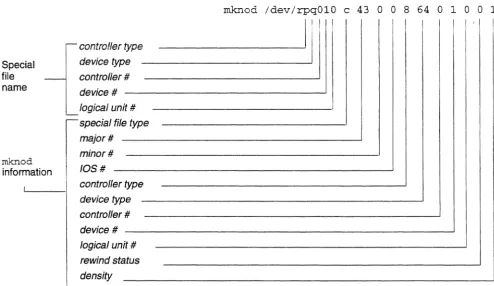
Figure 1. Daily operation overview of CSA ... 248 Figure 2. Special file name and roknod components. . . 363 Figure 3. CRAY Y-MP EL control panel LEDs . . . 466 Figure 4. EPO button ... - _ 467 Figure 5. CRAY Y-MP EL and CRAY EL98 systems circuit breakers ... 467 Figure 6. CRAY Y-MP EL and CRAY EL98 systems control panel door ... 468 Figure 7. Autoboot switch. . . 469 Figure 8. Circuit breaker ... 470 Figure 9. System Ready LED ... 471
Tables
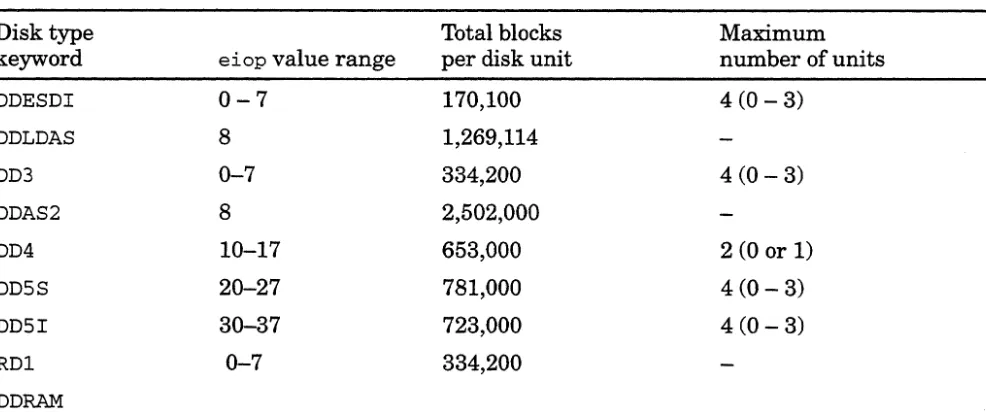
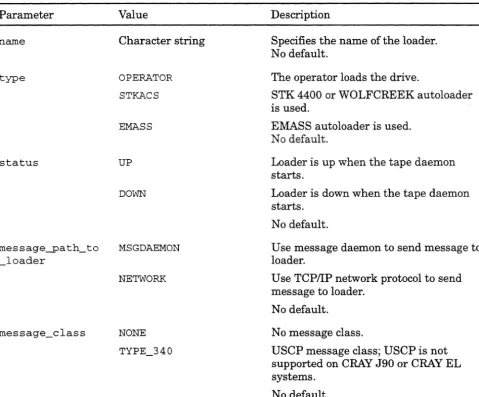
Table 1. Disk device types and their values ... 74 Table 2. TCPIIP configuration files ... 283 Table 3. Example special character file command lines ... 367 Table 4. LOADER statement parameters ... 383 Table 5. DEVICE_GROUP statement parameters ... 386 Table 6. lOP statement parameters ... 387 Table 7. CHANNEL statement parameters ... 388 Table 8. BANK statement parameters ... 389
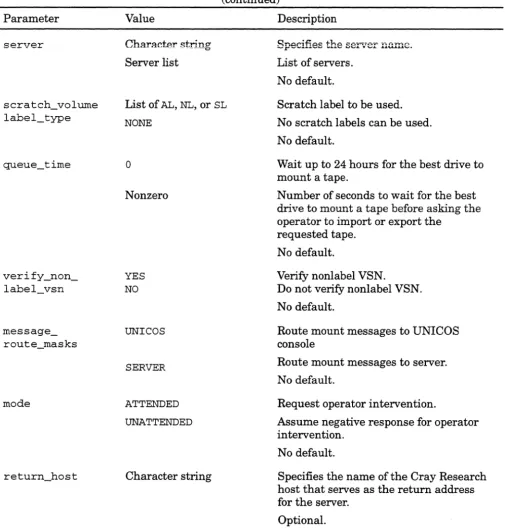
Table 9. SLAVE statement parameters ... 389 Table 10. CONTROL_UNIT statement parameters ... 391 Table 11. DEVICE statement parameters ... . . .. 392 Table 12. OPTIONS statement parameters ... 394 Table 13. OPTIONS that CRAY J90 and CRAY EL systems do not support ... 400 Table 14. Disk devices for formatted drives (CRAY EL systems only) ... 437 Table 15. Main file storage devices on CRAY EL systems . . . .. 438 Table 16. DD-51 specifications (CRAY J90 and CRAY EL systems) ... 440 Table 17. DD-5S specifications (CRAY J90 and CRAY EL systems) ... 441 Table 18. DD-6S specifications (CRAY J90 systems only) ... 441 Table 19. DD-7S specifications (CRAY J90 systems only) ... 442 Table 20. Main software components differences between CRAY J90 systems and
CRAY EL systems ... 456 Table 21. Differences between a CRAY J90 10S-V and a CRAY EL lOS ... 458
The role ofa
system
administrator
1.1
SG-24168.0.3.2
Introduction [1]
Warning
This manual does not contain any Trusted UNICOS information. If your site is running a Trusted UNICOS system, you must refer to UNICOS System Administration, publication S0-2113, and remain within the constraints outlined there, to maintain the Trusted UNICOS environment.
This section discusses the system administrator's role, the log books you need to administer the system smoothly, and the characteristics of UNICOS. It provides a brief overview of the tasks explained in this manual and tells you how to find more information and documentation.
A UNICOS system administrator provides, maintains, and ensures efficient and effective access to the Cray Research
UNICOS computing environment. Users typically expect system administrators to have a broad base of skills and insight into many components of UNICOS. A system administrator of a Cray Research supercomputer running UNICOS may be responsible for some or all of the following tasks:
• Getting the system up and running and available for job submissions.
• Making the appropriate site-specific configuration changes.
• Resolving hardware and software problems.
• Taking care of the day-to-day administrative duties necessary to maintain a system and its users.
Introduction [11
Create and
maintain a log
book
1.2
2
UNIGOS Basic Administration Guide for GRAY J90 and GRAY EL Series
Daily administrative duties may consist of the following functions:
• Configuring and maintaining system accounting
• Backing up and restoring file systems (dumps and restores) • Adding and deleting users
• Maintaining file systems and structures • Tracking, analyzing, and resolving problems • Configuring and administering the network • Tuning the system and monitoring performance • Upgrading and modifying the system
• Maintaining system security
To help you and your staff administer your system, it is essential that you create and maintain a log book, which should contain the following kinds of information:
• An incident report log, noting any problems that occurred and how the problem was resolved.
• Backup logs, including any scripts used to perform backups, the location of backup tapes, and any other pertinent details that relate to backups. (A script is a group of commands that are stored in a file and executed sequentially.)
• System crash log and crash recovery procedures.
• Local documentation, detailing site-specific procedures, such as operator procedures, backup procedures, and so on.
• Listings and full path names for any essential scripts or files (especially the current configuration and parameter files).
• Emergency phone numbers, the names of any contact people, and any other emergency procedures that are relevant for the site.
Always keep the log book as current as possible; when you are trying to troubleshoot system problems, an up-to-date log book can be invaluable.
UNIGOS Basic Administration Guide for GRAY J90and GRAY EL Series Introduction [1]
Major
characteristics of
UNICOS
1.3
High-performance 110
1.3.1
File systems
1.3.2
Disk devices
1.3.3
File system quotas
1.3.4
SG-2416 8.0.3.2
Based on the UNIX System V operating system with Berkeley extensions, UNICOS is both an interactive and batch operating system that offers many advantages in performance,
functionality, application portability, and connectivity.
UNICOS combines all of the inherent strengths of UNIX, such as its familiar user interface, with production-oriented features, including high-performance 110, multiprocessing support, ANSIIIBM tape support, resource allocation and control,
enhanced process scheduling, and an advanced batch processing subsystem called the Network Queuing System (NQS).
The following subsections describe the major characteristics of UNICOS.
UNICOS can perform asynchronous 110 operations, used in multitasking applications, allowing an I/O request to proceed while the main processing continues to execute. List I/O permits a linked list of 110 requests by using either synchronous or asynchronous control. Another type, known as raw I/O, moves data directly into a user's process space, bypassing kernel system buffers.
UNICOS modifies the regular UNIX System V file system with an improved disk block allocation scheme and the ability to create file systems that can span multiple physical disk devices.
UNICOS permits the use of disk striping and banding
techniques for improving file system performance and reliability. A unique language, called the configuration specification
language (CSL), is used to define the physical and logical characteristics of your UNICOS disk devices.
File system quotas have been implemented under UNICOS to control the amount of file system space consumed. You may set quotas for three different ID classes (user, group, and/or account IDs). Two different types of quotas are supported (file and inode).
Introduction [1]
User database (UDB) 1.3.5
Resource control 1.3.6
Fair-share scheduler 1.3.7
System accounting 1.3.8
4
UNIGOS Basic Administration Guide for GRAY J90 and GRAY EL Series
UNICOS uses a data file, called the user database (j etc /udb), that holds comprehensive resource allocation and control information about users. The UNIX equivalent is the
/ etc /passwd file.
Resource control was added to UNICOS to permit a system administrator to set limits on CPU, memory, tapes, and file allocation. User limits are applied to processes or jobs, and they establish the maximum amount of a resource that can be
consumed. You can specify limits for interactive and batch workloads, as well as for per process and per job. This lets a system provide restricted resources for interactive use, without limiting a user's batch resources to the same degree.
The fair-share scheduler is a process scheduler that works with the standard System V scheduler to distribute system CPU resources more equitably. The fair-share scheduler adjusts the scheduling priorities of all running processes on a regular interval, based on a user's recent usage and hislher "share" of the available CPU resource.
UNICOS supports two kinds of system accounting; the standard System V version and Cray system accounting (CSA). CSA is designed to meet the unique accounting requirements of Cray Research customers. Like the standard System V accounting package, CSA provides a method to collect per-process resource usage data, record connect sessions, monitor disk usage, and charge fees to users. CSA also permits sites to perform per-job and device accounting, along with daemon accounting.
Individual sites can select which accounting system they want to use simply by starting the appropriate shell scripts and
programs.
UNIGOS Basic Administration Guide for GRAY J90 and GRAY EL Series Introduction [1]
TCPIIP
1.3.9
Network Queuing System (NQS)
1.3.10
Menu system
1.3.11
Data migration
1.3.12
How this guide
will help you
1.4
80-2416 8.0.3.2
The Transmission Control ProtocollInternet Protocol (TCPIIP) Suite provides network communications that use the TCPIIP family of protocols and applications. It allows Cray Research systems to become a peer node of any established TCPIIP network and permits other users and networks to access the UNICOS environment.
NQS lets users submit, terminate, monitor, and control jobs submitted to either the local system or another appropriately configured computer system within your network.
UNICOS contains a set of shell scripts, parameter files, and a user interface written in menu specification language (MSL). You may use the menu system to perform configuration changes after you have installed UNICOS. For information about using the menu system, see appendix A, page 415.
The optional UNICOS data migration facility (DMF) tries to ensure the availability of file system space by moving selected files from online disks to an offline storage device. The files remain cataloged in their original directories and behave in most ways as though they were still disk resident. Online disk can be considered a cached copy of a larger virtual disk space. UNICOS DMF is not included as part of the standard UNICOS software package; it is available as an optional software package.
After you boot your lOS and UNICOS software and bring it to multiuser mode by following your UNICOS installation guide
(UNICOS Installation Guide for the GRAY J90 Series,
publication SG-5271, or UNIGOS Installation Guide for the GRAY EL Series, publication SG-5201) or your Open First
documentation, this guide will enable you to perform each of the following tasks:
• Establish and maintain basic system security; see section 2.
• Start up and shut down the lOS and UNICOS; see section 3.
Introduction [1]
6
UNIGOS Basic Administration Guide for GRAY J90 and GRAY EL Series
• VerifY and change date and time of both the lOS and UNICOS; see section 3.
• Start and stop UNICOS system daemons; see section 4.
• Determine existing file systems; see section 5.
• Plan and configure file systems; see section 5.
• Create, label, mount, and check the integrity of a file system; see section 5.
• Monitor disk usage; see section 5.
• Back up and restore a file system; see section 6.
• Create and maintain user accounts; see section 7.
• Communicate with your system users; see section 8.
• Interpret system logs and determine when to "clean up" logs; see section 9.
• Set up Cray system accounting (CSA) and monitor accounting functions; see section 10.
• Add your CRAY J90 or CRAY EL system to an existing network; see section 11.
• Configure NIS; see section 12.
• Configure NFS; see section 13.
• Create and maintain the Network Queuing System (NQS), a batch facility; see section 14.
• Initiate and monitor the tape subsystem; see section 15.
Note
Each procedure that you must follow begins on a right-hand (odd-numbered) page. You can remove procedures from the manual without disturbing additional explanatory text.
This guide also contains several appendixes that may be of interest to you, including basic information about how to use the UNICOS menu system and a summary of software differences between CRAY J90 and CRAY EL systems.
UNICOS Basic Administration Guide for CRAY J90 and CRAY EL Series Introduction [1]
Where to look for
more information
1.58G-24168.0.3.2
This guide also refers you to other publications for additional information you may need to perform more advanced system administration tasks, such as setting file system quotas.
The following publications contain additional information you will need to administer a CRAY J90 or CRAY EL system:
• CRAY IOS-V Commands Reference Manual, publication 8R-2170
• CRAY IOS-V Messages, publication 8Q-2172
• CRAY EL Series IDS Commands Reference Manual,
publication 8R-2408
• CRAY EL Series IDS Messages, publication 8Q-2402
• UNICOS System Administration, publication 8G-2113
• UNICOS Administrator Commands Reference Manual,
publication 8R-2022
• UNICOS User Commands Reference Manual, publication 8R-2011
• UNICOS File Formats and Special Files Reference Manual,
publication 8R-2014
• Flexible License Manager (FLEXlm) Administrator's Guide,
publication 8G-2181
• UNICOS Installation Guide for the CRAY J90 Series,
publication 8G-5271
• UNICOS Installation Guide for the CRAY EL Series,
publication 8G-5201
Although each topic described in this guide includes a list of documentation you can read to get a greater understanding of the topic, the following list identifies some additional topics not covered in this guide that you may want to learn about to
determine whether you should use the functions to administer your CRAY J90 or CRAY EL system.
Introduction [1]
8
UN/COS Basic Administration Guide for CRAY J90 and CRAY EL Series
Note
Where UNICOS publications provide information for Cray Research systems that have an I/O subsystem (Model E (IOS-E), this information also applies to CRAY.T90 and CRAY EL
systems, unless noted otherwise.
For information about
File system space monitoring
File system quotas
System activity monitoring
Cray Research system activity monitor (SAM)
Automated incident reporting (AIR)
Job and process recovery
Reinstalling your system software
Updating your system software
Using the cron and at utilities
Configuring network interfaces
Monitoring networks
Cray Research, Inc.
Read
SG-2113; df(l) and duel) man pages
SG-2113
SG-2113; sag(l), sar(8), sdc(8), tsar(8),and timex(l) man pages
csam(8), sam(8),
samdaemon(8), and xsam(8) man pages
SG-2113; aird(8),
airdet(8), airprconf(8), airsum(8), airtsum(8) man pages
SG-2113; chkpnt(1), chkpnt(2), and crash(8) man pages
SG-520l
SG-520l
SG-2113; at(l) and cron(8) man pages
SG-2113
SG-2113
UNICOS Basic Administration Guide for CRAY J90 and CRAY EL Series Introduction [1]
Accessing online
documentation by
using CrayDoc
1.6
8G-2416 8.0.3.2
For information about Unified Resource Manager (URM) centralizes resource allocation with a formal method of communication
Fair-share scheduler
Memory scheduling
Read SG-2113
SG-2113; shradmin(8) and
shrdis t(8) man pages
SG-2113; mschedv(8) man page
Multilevel security (MLS) SG-2113
UNICOS message system SG-2113
Data migration facility (DMF) SG-2113
CrayDoc is a workstation-based electronic documentation reader that includes graphics, hypertext links, and quick information retrieval searches. You can use CrayDoc to view documentation at your workstation, to print selected sections of a book, to print an entire book, to print to a PostScript file for viewing by using a PostScript viewer, or to export the Standard Generalized
Markup Language (SGML)-tagged information for further filtering or viewing.
CrayDoc is delivered on a CD-ROM disk that contains the reader and the associated documentation.
The cdoc(1) man page provides the information you need to set up your workstation so that you can use CrayDoc. After you have set up your workstation appropriately, enter one of the following commands to start the reader:
For Motif:
$ cdoc
Introduction [1]
Accessing online
documentation
by
using Docview
1.7
10
UNIGOS Basic Administration Guide for GRAY J90 and GRAY EL Series
For Open Windows on a Sun workstation:
$ cdoc.ol
You do not have to be in any particular directory to run the reader.
After you enter the cdoc or cdoc . 01 command, the CrayDoc
copyright window appears briefly on your screen. After the copyright window disappears, the cursor changes to a watch icon to indicate that the reader and the online books are being
loaded. After a few seconds the CrayDoc Library window appears. You are now ready to use CrayDoc.
For more information about CrayDoc, see the following documents:
• CrayDoc Reference Card, publication SQ-6101
• CrayDoc Installation Guide, publication S0-6103
• Reader Guide to UNIX (available online in CrayDoc)
• User's Guide to Online Information, publication SG-2143
(available online in CrayDoc)
• cdoc(1) man page
Most of the documentation you need to administer and use your system is available online as either man pages (for an
explanation of man page, use the man command) or as Docview files. The Docview utility provides online access to an ASCII
version ofCray Research documents. The User's Guide to Online
Information, publication SG-2143, and Docview help screens
will guide you through the process of viewing a document online.
To enter the Docview program, enter the following command at
the system prompt:
$ docview
UNIGOS Basic Administration Guide for GRAY J90 and GRAY EL Series Introduction [1]
The following command menu will appear:
DOC v lEW
On-line Documentation System Command Menu Please enter a command at the menu> prompt.
a[list] c[list] d[list]
f lind] [string]
List docnames in alphabetical order List docnames by subject category List docnames by date last submitted Find keywords and corresponding docnames associated with "string"
p[revious] Return to the previous command mode
v[iew] [docname] [keyword] View passage "keyword" in document "docname" w[rite] [docname] [keywords] Write passages specified by "docname"
h[elp] [topic] m[enu]
q[uit]
and "keywords"
Display help for the current screen or a Docview topic or command
Display this menu Quit from Docview
Enter "help quick" for a quick look at how to use Docview menu>
The a command lists the manuals (docnames) available under Docview. The vi ew docname a index command lists the keywords ofthe selected manual (docname).
UNICOS
online
glossary
The define command allows quick, online retrieval of Cray Research technical terms and their definitions, and terms added by your site that match a specified search term. See the
following example for definitions retrieved for the word stripe:
1.8
Introduction [1]
12
UNIGOS Basic Administration Guide for GRAY J90 and GRAY EL Series
$ define stripe
striped disk slice
A logical disk device composed of two or more physical disk slices (al~o known as members) .
striped group
The set of disk devices that are written to as a single group with data blocks
interleaved among the members for maximum throughput at very high bandwidth.
For more information, see the define(l) man page. For
information on how to add your own terms and definitions to the glossary, see the builddefs(l) man page.
Related basic
system security
documentation
2.1
SG-24168.0.3.2
Basic System Security [2]
Note
This manual does not contain any Trusted UNIC08 information. If your site is running a Trusted UNICOS system, you must refer to UNICOS System Administration, publication 80-2113,
and remain within the constraints outlined there, to maintain the Trusted UNICOS environment.
This section does not apply to systems that use the UNICOS
multilevel security feature (ML8) or to Trusted UNICOS systems. For information on using the UNICOS ML8 system and Trusted UNIC08, see UNICOS System Administration,
publication 80-2113.
Maintaining security on UNICOS systems is largely a matter of vigilance on the part of the system administrator, who should maintain constant surveillance for potential security problems and for evidence of past security breaches. UNICOS includes programs that provide the necessary tools for the creation of a set of procedures that lets you automate much of the daily work of monitoring system security_ This section discusses security issues in four areas: system security (ensuring that the superuser privileges are safe), user security, partition security, and tape device access.
The following documentation contains more detailed information about the material presented in this section:
• UNICOS Administrator Commands Reference Manual,
publication 8R-2022: diskusg(8) man page
• UNICOS System Administration, publication S0-2113
• UNICOS User Commands Reference Manual, publication
SR-2011: chown(l), duel), find(l), login(l) su(l), and umask(l) man pages
Basic System Security [2]
Superuser
privileges
2.2Password security for superuser
2.2.1
14
UN/COS Basic Administration Guide for CRAY J90 and CRAY EL Series
AF, in standard UNIX systems, in the UNICOS operating system, the user identification number (user ID) of 0, associated with the account named root, has special privileges and may override the security features that govern the activity of normal users. Such a user is referred to as a superuser, and the superuser's
powers allow the administrator great flexibility in responding to system problems and keeping the system running smoothly. The dominant security concern for a UNICOS administrator is
ensuring that access to superuser privileges remains solely in the hands of the administrator and the administrator's staff. Failure to guard this access allows unauthorized users to acquire superuser privileges. At best, one user could then look at other users' sensitive files without authorization and, at worst, an outside intruder (knowingly or unknowingly) could cause damage to the entire system.
The password to the superuser (root) account is the first line of defense against security breaches. Anyone logging in as root or using the su command to acquire superuser privileges uses this password.
To maintain secure access to the root account, you should use the following steps:
• Ensure that the root password is not obvious and is very difficult to guess. Do not use a normal word in any language that might be known to a majority of the system's users. Additionally, capitalizing a random letter or two (not the first letter of the password), or including a punctuation character or a numeral in the password, or both, helps to keep superuser privileges safe from an intruder who is trying to guess the
root password.
• Change the root password frequently, at least once a month.
• Do not write down the root password.
• Ensure that the root password is known to as few people as possible; generally, these should be the system administrator and the administrator's staff.
You can monitor the use of the root password, and catch potential security breaches, by checking the /usr / adm/ sulog
file. (For information about system logs, see section 9, page 219.) You can compare the log entries against the names of