DIGITAL -7-2-S
PDP-7 FORTRAN II
PROGRAMMING MANUAL
DIGITAL -7-2-S
Copyright 1966 by Digital Equipment Corporation
Chapter
2
3
CONTENTS
SECTION 1
PDP-7 FORTRAN II
INTRODUCTION TO THE FORTRAN II LANGUAGE ...•..•..•.••.•.
Introduction ....•.•••••••..•.•••.•...••.••••...••.•...•..•.••.
FORTRAN II Language ••••.••.•.•...•.•.•..•....•.••.•.•..•.•...••• 1
Preparing the FORTRAN Program ••.•.•.••.••.•.••...••..••..•.•• 2
Required Statements •••.••••.•..•.•..•..•.••...•..•.••.•••..•..
4
FORTRAN II Words.. • • • . • • • • . • . • • . • . . • . • • . . . . • . • . . • . • . . • • . • . • . 4
ARITHMETIC AND DATA-SPECIFICATION STATEMENTS .•..•..•.••.•...• Arithmetic Expressions ••.•..•.•.•.•...•.••.•.•..•.•..•...•••... 9 9 Evaluation of an Expression... . .•. .••. .. •• .• .• .• . .• ..• • . .•. .• 11
Use of Parantheses • • . . • • . . . . • . . . • . . • • . . . • . . . . • • . • • • . • 11
The Replacement (Equals) Sign... 12
Internal Arithmetic Statement.. .• .•• .• .•• .. . .. . •. . . .• . .• . •• .•.•. 12
Mode of Computation .•....••.•.••..•••.•....•...•....••.• 13
Data-Specification Statements... 14
Dimension Statements ...•...•.•.•..•.•....•••...•....•..•.• 14
Floating-Point Storage Specifications .•.•.••.•...•..•.•. 15
PROGRAM CONTROL ••••...•.•..•...•.•...•..•.•..•••... 17
Branches and Loops •...•.••.•....••.••••.•.•..•....•..•.••••••.. 1 7 Unconditional GOTO Statements. • • . . . • • . • • . • . . . . • . • • . . . • • . • . . 17
DO Loops.... ...••. ..••.••. .. .. .• .. . .. ... .• ... ..•.. ... .. 19
The CONTINUE Statement .•...•••.•....••.•.••.•....•...••.. 22
Computed GOTO .••...•...••.•..•.••...•...•....•.•..•.•• 22
Assi gned GOTO .•..••.•..•...•..•..•.••...•.•....•...•. 23
Program Termination ...••••...••...•...•....•...•....•.• 23
The STOP Statement. • • . . . • . . . • . . • . • . . . . • . . . 23
The PAUSE Statement.. .. . . .• . . . ... . •. .. .. . .. . . .. . ... .. . . 24
Chapter
4
5
CONTENTS
0(continued)
INPUT/OUTPUT STATEMENTS
Page
25
Input/Output Assignments •.••..•...••.•••••. 0 0 0 . 0 0 " 0 0 0 0 0 0 o • • 0 0 . 0 . 0 0 25
The I/O Data List o. 0 0 • • 0 • • 0 0 0 • 0 0 0 0 • 0 0 0 0 • 0 0 0 0 0 0 0 0 0 .' • 0 0 0 0 0 0 0 • • 0 • 0 • • 0
I/O Specification Statements 0 0 0 0 • • • 0 • 0 0 0 0 . , . 0 • • 0 • • • " • O • • 0 0 • • • • • • 0 0 0 . 28
Data Fie Ids ...•...• 41 • • • • • • • • • • • • • • • • 28
Data Fie Id Formats • 0 O • • 0 0 0 • 0 • • • 0 • • 0 0 0 0 • • 0 0 • 0 . . . 0 0 0 0 0 0 0 0 • 0 0 0 0 • 0 0 28
The Format Statement 0 " 0 • • • • 0 • 0 0 • • • • • • 0 • • 0 • • 0 " 0 • • • • • • 0 • • • • • " • • 29
Format Speci fi cattons ••• 0 0 0 • 0 • 0 • 0 0 0 . 0 0 0 0 0 • 0 0 0 0 " 0
0
" 0 0 0 • • 0 0 0 • • • • • 0 30
Input/Output Devices ..• 0 0 . 0 0 . 0 0 0 0 0 . 0 0 0 0 0 0 . . 0 • • • 0 0 . " 0 0 . 0 0 0 0 0 • • 0 • • 0 0 0 35
Data Organ izati on . 0 0 0 0 0 • • 0 0 0 • 0 0 0 0 0 0 0 0 0 0 0 0 • 0 0 .. 0 0 0 0 0 0 0 0 0 0 0 • 0 0 0 0 35
I/O Operations with Paper Tape and Keyboard 0 0 0 " . 0 0 0 • • 0 0 0 0 0 0 0 0 0 0 38
I/o Operations with Magnetic Tape • 0 0 0 0 0 0 0 . 0 0 0 " 0 0 0 0 0 0 • • 0 0 0 0 0 0 0 . 39
I/O Operation with DECtape ." 0 0 0 0 • • 0 0 • • • • 0 0 0 • " 0 0 0 0 0 0 0 0 0 0 0 0 0 0 0 0 41
SUBPROGRAMS: FUNCTIONS AND SUBROUTINES. 0 0 • • • " 0 • 0 • 0 0 • • 0 . 0 • • 0 0 .
Functi ons .•..•..•.••.•.•••..••••••••••••••.••.•. 41 • • • • • • • • • • • • • • • •
43
43
The FUNCTION Definition Statement •. 0 0 0 0 . 0 0 • • • ' 0 0 0 • • 0 0 • • 0 0 0 0 0 0 .
43
RETURN Statements 0 0 0 0 • • 0 ' • • • 0 • • • • • • 0 0 0 • • • 0 0 • " 0 • • • • • 0 • • • 0 • 0 • • 0 44
Use of Functions .•...•...•....•.•..•..•. 41 • • • • • • • • • • • • • • • • 44
Library Functions. 0 • 0 0 0 0 0 • 0 0 0 0 0 0 0 0 0 0 0 • • 0 0 0 0 0 . 0 . ' . 0 0 0 0 0 . 0 0 0 0 0 0 0 0 0 45 S ubrou ti nes .•••••••..••.•••••.••••••••••.••••.•• 41 • • • • • • • • • • • • • • • • 46
The CALL Statement . 0 0 0 0 0 • 0 0 o • • 0 0 • 0 0 0 0 0 0 0 0 0 • • • ' 0 0 0 0 • 0 • • 0 0 • • o . 0 0 46
Common Storage 0 0 0 0 • 0 0 0 0 0 0 0 0 • 0 0 0 0 0 0 0 0 0 0 . 0 • • 0 .' 0 • 0 • • 0 0 0 0 0 0 0 0 0 0 • 47
Array Names Used in Subroutines 0 . 0 0 0 0 0 0 0 0 0 '
o.
0 " o . 0 0 0 0 0 0 0 0 0 0 0 0 • 0 48Machine Language Coding in a FORTRAN Context o . ~ 0 .. 0 • 0 0 0 . 0 0 0 0 0 0 0 0 o . 49 Handling of S Coding ••••.•• 0 0 0 . ' 0 . 0 • • • • • • • • • 0 . ' 0 • • • • • • • 0 • • • • • 0 0 49
Compi ler Generated Coding 0 0
o.
0 0 0 0 0 0o.
0 • • • 0 • • • ' 0 0 0 0 0 • 0 0 0 0 0 . • • • • 50Subprogram Linking •. 0 • • 0 • • • • 0 • • • 0 0 0 0 O . 0 • • 0 0 . 0 " • • • 0 0 • 0 • 0 • • • 0 0 0 • 52
Construction of Dimensioned Variables ..• 0 . 0 • • • • " • • • • 0 • • • • • • • 0 • 0 • 57
Allocation of Array Storage and the Subscript Calculator 0 . 0 0 0 0 • • • • • • 57
I/O Statements . 0 • • 0 • • • • 0 • 0 • • • 0 • • • 0 0 0 • • 0 0 0 0 • • • ' 0 0 0 0 • • 0 • 0 • • • • 0 • 0 58
Chapter
6
7
8
Appendix
2
[image:6.613.58.555.80.717.2]3
Figure
1
2 3
CONTENTS (continued)
SECTION 2
OPERATING PROCEDURES, DIAGNOSTICS, AND ERROR MESSAGES
OPERATING PROCEDURES •...•••••.•.•••...•....•...•....
Page
61
Procedure for Using FORTRAN with a PDP-7 Paper Tape System ..•... 61
DIAGNOSTICS .••.•.••.••.•....•.•...•...•..•.•...••...•. 67
ERROR MESSAGES (FORTRAN ASSEMBLER) .••.•.•.•...•....•.•. 71
CHARACTER CODE EQUiVALENCES... 73
USE OF EXTENDED MEMORY .••.••.•.•..•••..•..•...••.•...•••. 77
FORTRAN SUMMARY DESCRIPTION ... . 79
Character Set (ASCII) . . . • • . . • . . • . • . . • . • . • • . . . • . . . 79
Punched Paper Tape Conventions .•...••...•..•....•••. 79
Lega I Elements in Fie Id One ..•.•....•.•..•.•...•...••...•..•. 79
Fie Id Two ••••••..•••..•.••.•...••••.•.••.•.•..•..•.••.•.•.• 79
Number Representation. . • . • • . • . • . . • • • • . • . . • . • • • • • • • . . . • . . . . • • . . . 79
Library Functi ons . • . • . • • . • . . • . • • • • . • • • . . • • . • . • • . • . • • . • . . • • • . . . . • . . . 80
FOR TRAN Statements ..••.••....•..•....•.•....•...•.•....•....•. 80
Arithmeti c Statements (V = E) .•.••.•••.••..•.••... 80
Control Statements .••••..•..•.••.•••••.••...•..•••..•... 81
ILLUSTRATIONS
A FORTRAN Program .••..•...•...•..•...
Program Section with Comments ..•...
Example of the Continuation Character .•...•...
v
2
3
Figure 4 5
6
7 8 9 10 11 12 13 14 15 16 17 18 19 20 21 Table 2 3 4 5ILLUSTRATIONS (continued)
Example of a FORTRAN Program ••••.•.••.••.•.••••.••••..••...•••••••••••
Number Representation, Floating Point .•••••••.•..••••••..••••••••.•••.•••
Example of Subscripts •••.••.•••..•.•••.••••••.••••••••..•.••••.••••.••••
Arithmetic Statement
Examples of Ari thmeti c Expressions •••••••.•••.•••••••••...•.••••.••.•.••••
Schematic Representation of Program Branches ••••••.•.•••..•••••.••••••••••
Integer Summation ..••...•...•...••.••••.•. 4' • • • • • • • • • • • • • • • •
Use of IF Statement in Integer Summation Problem •••••••.•. , ••.•.••.•.•..••.
Fibonacci Series ..•...•.•....•..•...•••.••.. f l ' • • • • • • • • • • • • • • •
Fibonacci Series Calculation Programmed as a DO Loop •••.. ' ••.••..•.•••••••
Initialization of Array Storage •••••••.••••.•••••••.••••. ' •••••••••.••••.•
DO Loops .•..•.•...•....•...•.•.•...•.•...••..•.• 41 • • • • • • • • • • • • • • • •
Program Branching in DO Loops .••.•..••.••••••.•••••••..•••••.•••••.•.••
I/O Statement .•••••..••••••.••••••••••••••••••••.••• 4' • • • • • • • • • • • • • • • •
FORMA T Statements . . . 41 • • • • • • • • • • • • • • • •
Function Subprogram ••.•.••.•.•..•....•..•..•.••••••.• 41 • • • • • • • • • • • • • • • •
Example of Factorial Calculator •••••••••••.•••••••.••••. ' •••••••.•••••••.
Matrix Multiplication Subroutine •••••.•.••••••••••••••• " •••••••••••••••.
TABLES
Summary of Format Specification Letters ••••••••••••••••• " •.••.••••••.••••
Definition of a Physical Record for I/O Devices .••••••••• " .•.•.••.••.••.••
I nput Format ••.•.•••..•.•.•••.•.•••••••. ' ... .
Output Format .••....•••.•••••.•.••••.••.••.•..•.•••• 41 • • • • • • • • • • • • • • • •
Core Representations of the ASCII Characters, A and H Formats .•.•..••••.••
SECTION 1
CHAPTER 1
INTRODUCTION TO THE FORTRAN II LANGUAGE
I NTRODUCTI ON
FORTRAN II, like all compilers, relieves the programmer from exercising a detailed knowledge of the
computer language. It is problem oriented and thus accepts input closely related to the problem and
con-verts this input into an executable machine language program. For scientists and engineers, the PDP-7
FORTRAN II system provides, in easi Iy understood form, the means for writing PDP-7 FORTRAN II programs.
The compiler accepts input in the form of statements which resemble mathematical formulas, and compiles
the sequences of instructions needed to perform the procedures specified. Using this system, the
program-mer is able to concentrate on the problem rather than on detai led computer codes.
The PDP-7 FORTRAN II compi ler can compi Ie and run FORTRAN II programs written for other computers
provided that reasonable restrictions (such as sufficient memory capacity, use of acceptable terms and
expressions, and availabi lity of required peripheral equipment) are met. Included in the PDP-7
FOR-TRAN II system is a compiler, assembler, operating system, and subroutine library. Each of these
sub-sections is described in later chapters. This manual is intended as a reference manual and assumes that
the reader is familiar with the general principles of FORTRAN II programming.
FORTRAN II LANGUAGE
PDP-7 FORTRAN II is composed of symbols which combine to form words or are used as punctuation, and
grouped into statements. These statements may be classified as follows:
1. Arithmetic Statements resemble algebraic formulas. They specify the
mathe-mati ca I operati ons to be performed.
2. Program Control Statements direct the sequence of operations of the program.
3. Specification Statements allocate data storage, determine variable and data
types, and specify input/output formats.
4. Input/Output Statements control the transfer of information into and out of
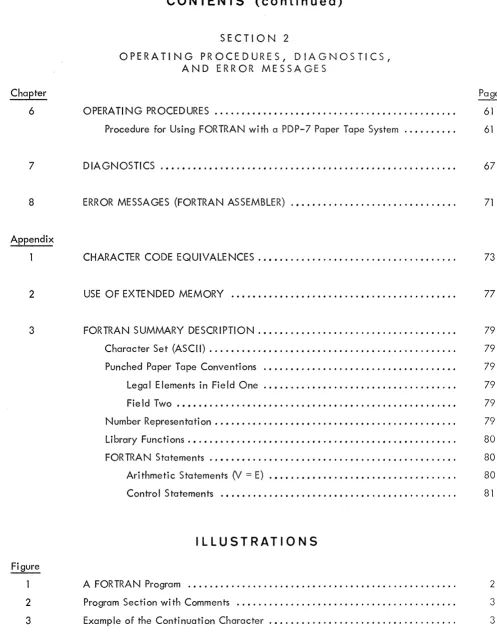
The rules of FORTRAN are somewhat stylized to permit ease in interpretation by the computer, as shown in Figure 1 •
FACTORIAL PROGRAM
C TH IS PROGRAM CALCULATES IX FACTORIAL FOR GIVE N IX 5 VVRITE 2, 100
10 READ 1, 200, IX IFACT
=
IY=
1 IF (IX) 5,32,30 30 IF (lX-IY) 41, 32, 33 32 WRITE 2, 300, IX, IFACTGO TO 10
33 IFACT
=
IFACT*
(lY=
IY+
1)GO TO 30 41 PAUSE 7777
GO TO 5
100 FORMAT (/30H PLEASE TYPE A POSITIVE NUMBER/) 200 FORMAT (14)
300 FORMAT (/14, 13H FACTORIAL IS, 17/) , END
Figure 1 A FORTRAN Program
Symbols which are meaningful to FORTRAN include letters, numbers, and v(lrious special characters. The complete set is listed in Appendix 3 . Since FORTRAN ignores spaces, t'hey may be used freely (ex-cept for two restrictions which wi II be noted in the text) to make a program Imore readable.
Preparing the FORTRAN Program
Each line of a FORTRAN program contains two fields as shown in Figure 2: the first is an identification field; the second, the statement proper.
The Identification Field - This field extends from the left-hand margin to the first tabulation, and may be left blank. If not, it may contain in the leftmost position one of the following types of identification:
1. The first' digit of a statement number, which may be any integer from 1 to 99999, inc lusive, identi fying the statement on that I ine for reference by other parts of the program. Statement numbers are used for program control or to assi st the programmer in identifying segments of his program.
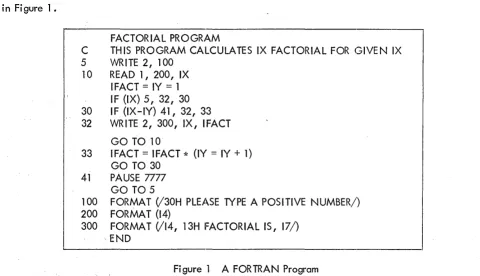
2. The letter C which identifies the remainder of the line as a comment. Although a FORTRAN program, using English words and mathematical symbols, can be read and understood more easily than a symbolic language program, comments throughout
[image:11.613.64.544.87.363.2]the program explain the procedures being used. Such comments, identified by a
C in the first position of the identification field, are not interpreted by the
com-piler and have no effect on the executable program. Figure 2 is a section of a
program wi th comments.
C CALCULATE PERCEN"):AGE OF CORRECT RESPONSES
C PERCENTAGE = -1 IF THERE ARE NO ITEMS IN CATEGORY
DO 47 I
=
1, 57 DO 48J
= 1, 6
IF (ITEMS (I, J)) 46, 46, 49 46 PERCEN (I, J) = -1.0
Figure 2 Program Section with Comments
3. The letter S, which identifies the remainder of the line as symbolic machine
instructions.
4. The continuation character
($),
which identifies the statement as a continuation ofthe preceding statement. Frequently a statement may be too long to fit on one line
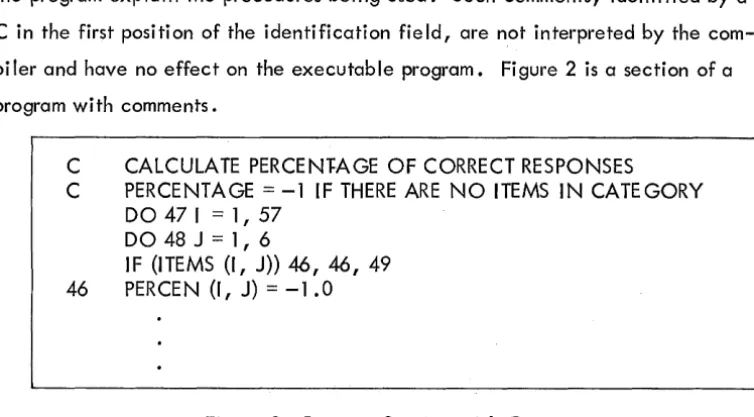
(this is especially true of format statements). If the character ($) begins the identi-fication field of a line, the statement field of that line is treated as a continuation
of a statement on the line above. A statement may be continued on as many lines as
necessary to complete it, but the maximum number of characters in the statement may
not exceed 300 (approximately 4-1/2 lines). Figure 3 is an example of the
continua-tion character.
3 X=X+(ARG1+2.* ARG2+2. *ARG3+
$ ARG4)/6
Figure 3 Example of the Continuation Character
The Statement Field - This field begins immediately after the first tabulation and extends through the next
carriage return. Thus, no more than one statement can be written on one line, but a single statement can
extend over one line using the continuation character. (See above.)
[image:12.617.116.493.84.292.2]Required Statements
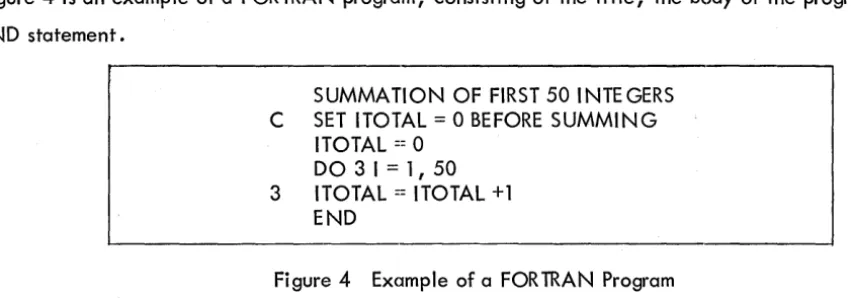
Figure 4 is an example of a FORTRAN program, consisting of the title, the body of the program, and the
END statement.
SUMMATION OF FIRST 50 INTEGERS C SET ITOTAL
=
0 BEFORE SUMMINGITOTAL == 0 DO 3 I = 1, 50 3 ITOTAL == ITOTAL +1
END
Figure 4 Example of a FORTRAN Program
The first line of the program is the title, which may be anything the programmer wishes to write to identify
his program. The title is not incorporated into the final executable program. Note that although a title
is necessary, it need not be preceded by a C.
The body of the program is a series of statements, each of which specifies a sequence of mathematical
operations, controls the flow of the program, or performs other tasks related j"O the proper working of the
program.
The END statement is a required statement and must be the last statement of every FORTRAN program. Its
function is to indicate to the compiler that nothing more connected with the preceding program is to
follow.
FORTRAN II Words
Words fall into three categories: numbers, variables, and commands. Numbers and variables are
deter-mined by the programmer and dealt with here, and commands are discussed in succeeding chapters.
Number Representati on
In mathematics, there are many ways to categorize numbers. They may be positive or negative, rational
Qr imaginary, whole numbers or fractions. In PDP-7 FORTRAN II, the treatment of numbers is separated
into integers and real numbers (single decimals or numbers in decimal exponent form), distinguished as
follows:
Integers are constants which are written without a decimal point. Typical integers are: 9, 17, -8192,
131071. The number 131071 (217 -1) is the largest magnitude that can be expressed as a FORTRAN
in-teger. Fractional quantities and numbers larger than ±131071 require real numbers.
[image:13.620.74.500.107.256.2]Rea I numbers* have two forms. They are simple decima Is such as: 0.0025, .4, - 57., 2.71828; or they
are numbers in decimal exponent form, a number multiplied by a power of 10. Examples:
Mathematical Form
6.023 x 10²³
- 1 .66 x 1 0-16
72 x 1012
FORTRAN Form
6.023E23
-1.66E-16
72E12
In general, a real number in decimal exponent form i"s expressed as ±nE±K where n may be an integer or
simple decimal, and K is an integer exponent from 0 to 99, inclusive.
Storage Modes - Another difference between PDP-7 FORTRAN II integers and real numbers is the manner
in which each is represented in core memory.
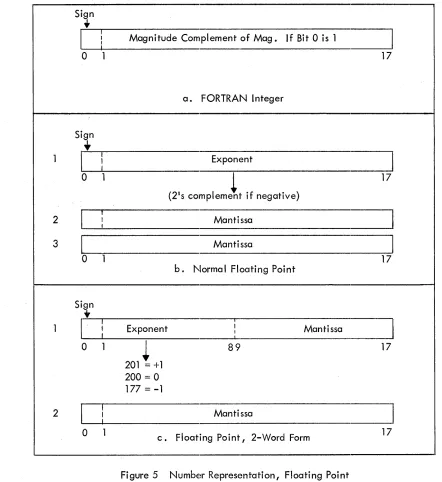
A FORTRAN integer is stored as a binary number in one 18-bit computer word. This representation, shown
schematically in Figure 5a. is called fixed point, because the decimal point is always considered to be
to the right of the rightmost digit. Negative numbers are stored as the l's complement of their magnitude,
the leftmost bit being the sign bit.
A FORTRAN real number is stored as a binary number in floating-point representation. In this form, the
number consists of two parts: an exponent and a mantissa. The mantissa is a decimal fraction with the
decimal point assumed to be to the left of the leftmostdigit. The mantissa is always normalized; that is,
it is stored with leading O's eliminated in its binary form, so that the high order bit is always 1. The
ex-ponent as stored represents the power of 2 by which the mantissa is multiplied to obtain the value of the
number for use in computation.
There are two versions of the floating-point representation: normal, or three-word, mode and two-word
mode. They differ in the number of words of core storage required, and, hence, in precision of the number.
The normal mode requires three 18-bit words of memory for each number. The exponent, a signed 17-bit
integer (2's complement if negative), is stored in the first word. The mantissa is a 35-bit number stored
in the second and third words. The sign of the mantissa is kept in the high-order bit of the second word.
A negative mantissa involves a change of sign. Figure 5b. is a schematic representation of a three-word
floating-point number.
*This use of the term real should not be confused with the mathematical usage; in PDP-7 FORTRAN II real applies only in the limited sense described above.
The second floating-point mode requires only two words of memory and can be used where space is at a
premium and precision can be sacrificed. The exponent and its sign occupy the first nine bits of the first
word; the mantissa occupies the rest of that word and all of the second. The sign of the mantissa is in the
high-order bit of the second word. A negative mantissa involves a change of si gn. Figure 5c. is a
sche-matic representation of a two-word floating-·point number.
Sign
+
I
I
Magnitude Complement of Mag. If Bi t 0 is 1I
0 1 17
a. FORTRAN Integer
Sign
+
1
I
!
ExponentI
0 1
(2', comPlemett if negative)
17
I
fI
2 I Mantissa
I
3
I
MantissaI
0 1 17
b. Normal Floating Point
Sign
+
[
fI
I
1
,
Exponent I MantissaI
I I
0 1
~
89
17 201=
+1200
=
0 177=
-12
I
!
MantissaI
0 1 Floating Point, 2-Word Form 17
c.
Figure 5 Number Representation, Floating Point
[image:15.612.69.511.154.636.2]Variable Representation
The term "var iable,1I as used in FORTRAN, means a quantity which may assume different values during
different executions of a program or at different stages of a program1s execution, hence, a variable name
is a symbolic representation of this quantity. A variable name is composed of one or more characters
according to three rules:
1. The only characters used in a variable name are A through Z and 0 through 9.
2. The first character must be alphabetic.
3. Only the first six characters of any variable name are meaningful; all characters
after the sixth are ignored by the compi ler.
Some examples of acceptable variables names are K, P51, ROB ROY, and EPSILON. The name ROB ROY
represents one variable, not two, because blank spaces are ignored by FORTRAN. Thus, ROB ROY,
ROBROY, or even ROBR OY are identical names and reference the same variable.
The compiler interprets the name EPSILON as EPSILO, since only the first six characters are meaningful.
Care is necessary in selecting variable names. For example, the two names, GEORGEl and GEORGE 2
are considered identical because of the six-character restriction.
Some incorrect variable names are 9S0RT (first character not alphabetic)and GO#5 (illegal character
included).
Since variables represent numeric quantities, the type of representation must be specified. In normal
programming, variable types are specified using the standard FORTRAN conventions, as follows:
Integer variable names must begin with one of the letters I,
J,
K, L, M, or N.Real variables are designated by names beginning with any other letter.
Typical integer variable names are INDEX, KDATA, M359, L1ST8. Typical real variable names are
XZERO , COUNT, FICA.
Subscripted Variables - An array is a grouping of data. A column of figures, the elements of a vector,
a list, and a matrix are all arrays. In mathematics, an element of an array is referenced by a symbol
denoting the array and subscripts identifying the position of the element. For example, the sixth element
in a vector v is designated v 6. Likewise, the fourth element in the tenth column of a matrix b is identified
as b
4
,
10· In general, an element of an n-dimensional array m is designated by m.11'1 2'1 3····,l
. • •n•
In'PDP-7 FORTRAN II, array elements are similarly identified. The array is provided with a name,
sub-ject to the same rules as the names of variables. The name determines the mc)de, integer or real, of all
the elements in the array. The subscripts which identify an element of the array are enclosed in
paren-theses and separated by commas. The two elements, v6 and b
4
,
10' in FORTRAN would have the following form:V (6) B(4,10)
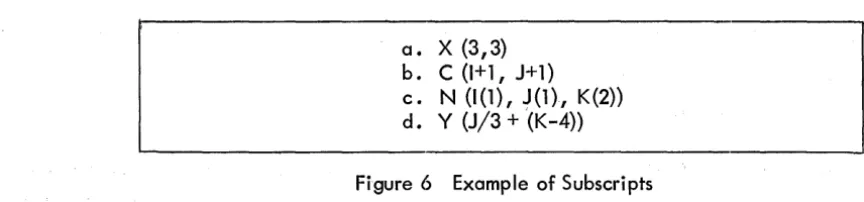
Subscripts may be quite diverse in form; in fact, a subscript may be any acceptable FORTRAN arithmetic
expression as long as it is integer-valued (i.e., floating-point quantities are not allowed).
a. X
(3,3)
b. C(I+1,J+1) c. N (1(1), J(1), K(2))
d. Y (J/3
+
(K-4))Figure 6 Example of Subscripts
Note that certain subscripts in Figure 6 are themselves subscripted. Subscripting may be carried to four
levels, although it is unusual to do so to more than two levels. Each subscripted subscript in Figure 6,
i.e., 1(1), and K(2), is itself treated as a subscripted variable.
[image:17.618.59.491.287.388.2]CHAPTER 2
ARITHMETIC AND DATA-SPECIFICATION STATEMENTS
The arithmetic statement relates a variable (V) to an arithm~tic expression (E) by means of the equal sign (=),
thus:
V=E
Such a statement looks I ike a mathematical equation, but it is treated differently. The equal sign does
not merely represent a relation between left and right members, but specifies an operation to be performed;
namely, replace the value of V with the value of E. A few illustrations of the arithmetic statement are
given in Figure 7.
a. VMAX=VO+A* TO
b. T = 2*PI*SQRTF(L/G)
c • PI =3. 14159
d. THETA = OMEGAO*T + ALPHA*Tt2/2
e. MIN=MINO
f. INDEX = INDEX +2
Figure 7 Ari thmeti c Statements·
ARITHMETIC EXPRESSIONS
The elements of an arithmetic expression are of four types: constants, variables, functions, and operators.
An expression may consist of a single constant, a single variable, a function, or a string of constants,
variables, and functions connected by operators.
Constants are explicit numerical quantities. They may be integers, decimals, or numbers in decimal
ex-ponent form.
Variables represent quantities whose values are not implicit; they may be redefined during execution of
the program.
[image:18.612.67.555.213.523.2]Functions are special forms of variables consisting of a name immediately followed by an argument enclosed
in parentheses. The function name represents a mathematical operation to be performed on the argument
such as finding the square root of a number or determining the sine or cosine of an angle. Certain basic
functions are provided by the FORTRAN system and are called library functions. A detailed discussion of
functions is found in Chapter 5. Of interest here, however, is their treatment within an arithmetic
ex-pression: .
Whenever a function is encountered, it is evaluated and the result is treated as a
variable in the evaluation of the expression in which the function occurs.
Figure Se. and
f.
illustrate the use of functions as variables in an arithmetic: expression. Included inthes~
examples are SINF(THETA) and COSF(THETA-1 .5), corresponding to the trigonometric functions sine andc~sine,
and SQRTF(X), the square root operation.Operators are symbols representing the common arithmetic operations:
b.
c.
d.
e.
f.
Algebraic Expression
2
az + bz + c
(a2 _b2)
(a+b)2
4nr2
-3-2
3z -2 (z+y) 4.25 Exponentiation Multiplication Division Addition Subtraction Equiva lence
*
/
+FORTRAN Expression
(A t2-B t2)/(A+B)t 2
(3*Zt2 - 2* (Z+Y))/4.25
a sin 9 + 2a cos (9-1.5)
2rz
A*SI NF(THETA)+2*A*COSF(THETA-l .5)
2* SQRTF(Z)/3
3
-Figure S Examples of Arithmetic Expressions
[image:19.613.61.553.322.666.2]The important rule about operators in the FORTRAN arithmetic expression is that every operation must be
expl icitly represented by an operator symbol. In particular, the multipl ication sign (*) must never be
omitted. Likewise, since no superscript notation is available, a symbol for exponentation (t) is provided.
Figure 8 demonstrates the properties of arithmetic expressions. Each expression is shown with its
corre-sponding algebraic form.
Evaluation of an Expression
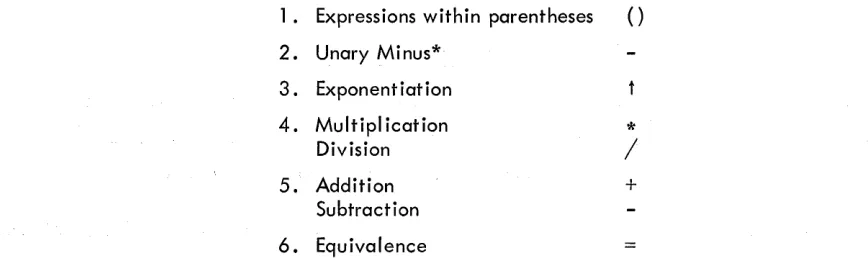
Normally, a FORTRAN expression is evaluated from left to right just as an algebraic formula.
As
inal-gebra, however, there are exceptions. Certain operations are always performed before others, regardl ess
of order. This priority of evaluation is as follows:
1. Expressions within parentheses ()
2. Unary Minus*
3. Exponentiation
4. Multipl ication Division
5. Addition Subtraction
6. Equivalence
*
/
+
=
The term "binding strength" refers to an operator's relative position in a table such as the one above. In
it the operations are I isted in the' order of descending binding strength. Thus, exponentiation has a greater
binding strength than addition, and multipl ication and division have equal binding strength.
The left-to-right rule can now be stated a I ittle more precisely:
Operations are performed in order of decreasing binding strength. A sequence of
operations of equivalent binding strength is evaluated from left to right.
Use of Parentheses
To change the order of evaluation, parentheses are required. Thus, the FORTRAN expression, A-B+C is
algebraically evaluated as (a-b)+c, whereas A-(B+C) is evaluated as a-(b+c).
*The unary minus is th~ operator which precedes a quantity whose value is to be negated. A unary minus is recognized by the fact that it is preceded by another operator, not by an operand. Example:
A
+
B
t-2/C - D
The first minus (indicating a negative exponent) is unary; the second (indicating a subtraction) is binary.
[image:20.612.93.527.281.413.2]The expression is evaluated as
A/B/C
A tBtC
Figure 8d. illustrates the use of parentheses for grouping subexpressions within an expression. In algebra
several devices are available for distinguishing between levels when nesting subexpressions, such as square
brackets ([ J) and rococo brackets
(i
r).
In FORTRAN, only parentheses are: available, so the programmer must be especially careful to make certain that parentheses are properly paired; that is, in a givenexpres-si on, the number of left parentheses must be equa I to the number of ri ght parentheses.
The Replacement (Equals) Sign
The equal sign has the lowest binding strength of all the operators; the whole of the expression on the
right is evaluated before the replacement operation is performed. In an arithmetic statement, the value
of the expression to the right of the equal sign replaces the value of the variable on the left.
By this definition the statement in Figure 7f. would mean, "Add two to the current value of INDEX. The
resu It is the new value of INDEX. II
All variables occurring to the right of an equal sign must have been previously defined. If the variable
on the left of the equal sign was previously undefined, it will be defined by the arithmetic statement.
Internal Arithmetic Statement
The most important result of treating the equal sign as an operator is that it may be used more than once
in an arithmetic statement. Consider the following:
Q = A/(V=SQRTF(2* G*Y))
The interna I arithmetic statement, V=SQRTF(2* G* Y), is separated from the rest of the statement by
paren-theses. The complete statement in this i "ustration is a concise way of expressing the following type of
mathemati ca I procedure:
II Let q = a/v
where v
=
I29Y7'
In the single FORTRAN statement, both of these equations are evaluated and values are assigned to Q
and V.
[image:21.615.79.557.66.181.2]Another result of treating the equal sign as an operator is that there may be a series of replacements,
A=B=C=D, in a single FORTRAN statement. Note that since the operand to the left of an equal sign must
be a variable, only the rightmost operand, represented by D above, may be an arithmetic expression.
The statement is interpreted as follows: "Let the value of expression D replace the value of variable C,
which then replaces the value of variable B" and so on*. In other words, the value of the rightmost
expression is given to each of the variables in the string to the left. A common use for this construction
is in setting up initial values:
VZER O=5ZER O=AZER 0=0
T=T 1 =T2=T3=60
P=P0=4*ATM-K
Mode of Computation
PDP-7 FORTRAN II does not restrict the use of variable types within an arithmetic expression. Integer and
real variables and constants may be freely mixed. The order in which the quantities are encountered during
the left-to-right evaluation determines the mode of computation; however, the result is always stored in
the mode of the left-hand variable of the arithmetic statement. In general, the following rules apply:
1. For any expression, computations are carried out in fixed point until a
floating-point quantity appears; thereafter, all computations are carried out in floating floating-point.
2. An expression in parentheses is considered separately from the main computation;
thus if a subexpression contains only integers, it is evaluated in fixed point. If
necessary, the result is converted into floating point.
3. The value of an expression on the right of an equal sign is converted to the mode
of the left-hand variable before storage, if necessary.
The following example illustrates the method of performing calculations in an arithmetic statement.
*This may seem at first to violate the left-to-right rule. Whenever an equal sign is encountered in scan-n iscan-ng a statemescan-nt, it cascan-nscan-not be executed uscan-ntil all operatioscan-ns of higher biscan-ndiscan-ng strescan-ngth have beescan-n performed. Thus, execution of each equal sign (replacement) is deferred until the expression on the right has been evaluated. The replacements then occur in reverse order as the evaluation works back to the leftmost variable.
In evaluating the statement
A = C*V* (J+2)
let Tl = C*V floating point T2
=
J+2 fixedthe resu It, T2, is converted to floating point; then
A = T1*T2 floating
DATA-SPECIFICATION STATEMENTS
Data-specification statements fall into two categories: those relating to data handl ing and storage; and
those deal ing with input/output operations. This section discusses the first clctegory (except for the
COMMON statement which is directly related to subprograms and is describE~d in Chapter 5); the other
is discussed in Chapter 4.
Dimension Statements
Array names must be identified as such to the FORTRAN compiler. Three items of information must be
provided in any program using arrays:
1. Which are the subscripted variables?
2. How many subscripts does each have?
3. What is the maximum dimension of each subscript? (When an alrray is used, a
certain amount of storage space must be set aside for its elements, hence, this
requirement. )
All the above information is provided by the following specification statement type:
DIMENSION A(I,J,K,L), B(I,J,K,L), C(I,J,K,L), ....
where A, B, and C are array names, and the integer constants I, J, K, L, are the maximum dimensions
of each subscript.
The rule governing the ~se of array names and the DIMENSION statement is as follows: All array names
must appear in a DIMENSION statement, and the DIMENSION statement must precede the first use of
any of the names appearing in its list.
DIMENSION LlST2 (30), MAT3(10,20), RE GRES(2, 2, 5)
In the statement above (under normal FORTRAN variable naming conventions), the names LlST2 and MAT3
designate integer arrays; that is, each element is an integer. The third name, RE GRES, designates a real
array. The first array is a I ist of 30 el ements maximum, so that 30 words of storage are set aside for its use.
The second array is a matrix of 10 rows and 20 columns, making a total of 200 elements requiring 200 words
of space. The third array is three-dimensional and real. There are 2 x 2 x 5 = 20 elements, each requiring 3 words of storage for floating-point representation, so that 60 words will be set aside for the array. A
maximum of 4000 words is normally set aside for storage of arrays.
If a subscript is subscripted, the name of the higher-level subscript must also appear in a DIMENSION
statement. For example, a program in which the following statement appears:
A(I(l), J(2), K(l 0)) = B(I(l 0), J(2), K(l)) could contain a DIMENSION statement like the following:
DIMENSION A (5,5, 10),B(10,5,5),1(10),J(10),K(10)
If an array name is to be passed as an argument from one program to another (e. g., a subroutine provides values to a variable array in the call ing program), both the call ing program and the subroutine must agree
in floating point storage mode (three-word or two-word). This restriction does not apply when the argument
is a specific array element rather than an array name.
When referencing dimensioned variables, use the correct number of subscripts. For example:
DIMENSION A(lO,
10,
10)A(3,4,6) = 42 (correct). A(705)
A= 3.
42. (will cause haphazard results at object time) .
. (will also cause undesired resul ts).
Floating-Point Storage Specification
Unless otherwise indicated, all real numbers in a given program are stored in three-word form where 35 bits
are reserved for the magnitude of each variable or constant. If the two-word form is desired (27 bits
re-served for magnitude), the following specification statement must appear as the first statement of the
pro-gram to which it appl ies:
2WORD
The two modes may not be mixed within anyone program or subprogram, and they may only be mixed
be-tween programs when the level (depth) of call is at most one; e. g., a subprogram does not call other
subprograms. (Refer to page 5 for a discussion of storage modes.)
CHAPTER 3
PROGRAM CONTROL
Ordinari Iy, FORTRAN statements are executed in the order in which they are written unless contrary
instructions are given. The instructions provided by the program control statements a II ow the programmer
to alter the sequence, repeat sections, suspend operations, or halt the program.
BRANCHES AND LOOPS
Unconditional GOTO Statements
There are various ways in which program flow may be directed. As shown schematically in Figure 9, a
program may have a straight-line sequence a. , branch to an entirely different sequence b., return to an
earlier point c. I or skip to a later point d.
c.
b •
....---1
d.
a.
Fi gure 9 Schematic Representation of Program Branches
All of the branches can be performed in several ways, but the simplest is by the statement
GOTO n
where n isa statement number used in the program. This statement is described in the following example,
which also illustrates the construction of a loop, the name given to program branches of the type shown
in Figure 9c.
SUM OF FIRST N INTEGERS BY ITERATION KSUM=O
INUM=l
2 KSUM=INUM+KSUM
INUM=INUM+1 GOTO 2 END
Fi gure 10 Integer Summati on
In Figure 10, the sum of successive integers is accumulated by repeated additiion. The main computation
is provided by the three-instruction loop beginning with statement 2. The statements preceding this loop
provide the starting conditions; this is called the initialization. The partial sum (KSUM) is set to 0, and
the first integer is given the value of 1. The loop then proceeds to add the integer value to the partial
sum, increment the integer, and repeat the operation.
The IF Statement
The program shown in Figure 10 performs the required computation, but there is one flaw: the loop is
endless. To get out of the loop, iteration must be stopped an~ the next step must be determined.
The IF statement fulfills both requirements. It has the following form:
IF(e)k,l,m
where e is any arithmetic expression, and k, I, and m are statement numbers. The IF statement is
inter-preted in this way:
If the value of e is less than 0, go to statement k.
If the value of e is equal to 0, go to statement I.
If the value of e is greater than 0, go to statement m.
Thus, the IF statement makes the decision of when to stop by evaluating an expression, and also provides
program branch choices which can depend on the results of the evaluation. Figure 11 illustrates the use
of the IF statement in the integer summation problem of Figure 10.
SUM OF THE FIRST 50 INTEGERS KSUM=O
INUM:=l
2 KS UM:=I N UM+KS UM INUM:=INUM+l IF (lNUM-50) 2,2,3 3 STOP
END
Figure 11 Use of IF Statement in Integer Summation Pr()blem
[image:27.613.128.430.64.195.2]In this example, the initialization and main loop are the same as for Figure 10, except that the GOTO
statement of the earlier program has been replaced by an IF statement. This statement says: If the value
of the variable INUM is less than or equal to 50 (which is the same as saying that the value of the
ex-pression INUM-50 is less than or equal to 0), go to statement 2 and continue the computation. If the
value is greater than 50, stop.
A loop may also be used to compute a series of values. The following example is a program to generate
terms in the Fibonacci series of integers, in which each succeeding member of the series is the sum of
the two members preceding it: k =k n n-l+k ·2.
n-FIBONACCI SERIES, 100 TERMS DIMENSION FIB (100)
FI B (1)=1 FIB (2)=1 K=3
5 FI B(K)=FI B(K ... l) + FI B(K-2) K=K+l
I F (K - 1 00) 5, 5, 1 0 10 STOP
END
Figure 12 Fibonacci Series
In this program, initialization includes a DIMENSION statement to reserve space in memory for the
re-sults, and two statements which provide the starting values necessary to generate the series. Each time
a term is computed, the subscript is indexed so that each succeeding term is stored in the next location in
the table. As soon as the subscript becomes greater than 100, the calculation stops.
DO Loops
Iterative procedures such as the loop in Figure 12 are so common that a more concise way of implementing
them is warranted. In that example, three statements were required to initialize the subscript, increment
it, and test for termination. The DO statement combines a II these functions:
DO n i=kl,k2,k3
where n is a statement number, i is a simple integer variable, and kl, k2, and k3 are simple integer
var-iables or constants used as indexing parameters to provide, respectively, the initial values of i, the final
(terminating) value of i, and the indexing increment of i. The DO statement may be paraphrased as:
liDO through statement n for i = kl; after statement n is completed, increment i by k3; if i is less than or equal to k2, repeat the sequence; otherwise exit from the DO loop and continue on in the program. II
Upon normal exit from a DO loop, the value of the DO variable (i) will be the one generated at the final test, that is, greater than k2. If k3 is equal to 1, it may be omitted. Figure 13 shows the Fibonacci series
calculation programmed using a DO loop.
[image:28.613.77.524.167.409.2]FI BONACCI SERIES, 100 TERMS DIMENSION FIB(100)
FIB (1 )== 1 FI B (2)==1
DO 5 K=3, 100
5 FI B(K)=FI B(K -1 )+FI B(K-2) STOP
END
Figure 13 Fibonacci Series Calculation Programmed as a DO Loop
The DO statement is interpreted thus: Do the sequence of statements up to and including statement 5,
then index K by 1. If the new value of K is greater than 100, go to the statement following statement 5.
DO loops are commonly used in computations with multiple- subscripted variables. In these cases, it is
usually necessary to perform loops within loops. Such nesting of loops is permitted in FORTRAN. A
simple illustration is the initialization of array storage, shown in Figure 14.
Initialize two 30 x 50 matrices and one 30-element vector, by setting the allotted storage space to O.
Note that in PDP-7 FORTRAN II, the initial condition of variable storageisneverimplicitly cleared.
C INITIALIZATION OF STORAGE
DIMENSION MATl (30,50), MAT2(30,50), VEC~3(30)
DO 20 1=1, 30 DO 10 J=l, 50 MA Tl (I, J)=O .10 MAT2(1,J)=0
20 VEC3(1)=0
Figure 14 Initialization of Array Storage
This sequence causes storage to be cleared in the inner loop column by column for each matrix, while the
outer loop advances the column index and clears the elements of the vector.
Genera I Ru I es for DO Loops
The following general rules about DO loops must be observed:
1. DO loops may be nested, but they may not overlap. Nested loops may end on
the same statement, but an inner loop may not extend beyond the IOlst statement
of an outer loop. Figure 15 schemcltically illustrates permitted and forbidden
arrangements.
[image:29.613.178.544.61.198.2] [image:29.613.155.454.370.518.2]Those in 150. are permitted; loops 5, 6, and 7 end on the same statement.
The arrangements in 15 b. are not permitted; loop 2 ends on a DO statement,
loop 3 extends beyond outer loop 1 •
1 2
~~
,....--- 2~>---3· II""
a.
b.
Figure 15 DO Loops
2. A program branch may not occur from a point outside a DO loop to a point inside,
or from an outer DO to within an inner DO. Branches out of DO loops are permissible,
however. Figure 16 illustrates this rule.
4
l~
[I)
r;, ....
~I---'
~~
6)
7
Figure 16 Program Branching in DO Loops
Branches 2, 5, 6, and 7 are permitted; branches 1, 3, and 4 are not.
3. A DO loop may not end on a program branching stat~ment (GOTO, IF) or another
DO statement.
[image:30.613.154.519.69.344.2] [image:30.613.212.412.417.638.2]The CONTI NUE Statement
Since a DO loop may contain alternate courses of action (such as branches tOI other parts of the loop, or
out of the loop entirely), programmers frequently wish to make the last executable statement of the loop
a test to determine which of the alternatives is to be taken. However, rule ~3 of the above section forbids
a DO loop to end on an IF or GOTO statement. To avoid this, the CONTINUE statement is provided as
a dummy statement. It performs no action or computation, but provides a termination for any DO loop:
n CONTINUE
where n is the statement number specified by the DO statement that initiated the loop.
A CONTI NUE statement is not restricted to terminating DO loops; it may be used anywhere in a program;
e.g., to provide points at which future program segments may be inserted.
Computed GOTO
The GOTO statement described previously is unconditional and provides no c:dternatives. The IF
state-ment offers a maximum of three branch points. One way of providing a greater number of alternatives is
by using the computed GOTO, which has the following form:
GOTO (k 1, k2, k3, ..• kn),
i
where the k's are statement numbers, and
i
is a simple interger variable which may take on values of 1, 2, 3, ••• n according to the results of some previous computation. For example,GOTO (5,7,5,7,5,7,10), IVAR
causes a branch to statement 5 when IVAR=l, 3, or 5, to statement 7 when IVAR=2,
4,
or6,
and tostate-ment 10 when IVAR=7. If IVAR is not one of the possible (legal) values, the GOTO will be ignored and control wi II pass to the next statement.
If an argument of a subroutine is used as the argument of a computed GOTO statement in the subroutine, the argument must be redefined (with a different name) in the subroutine; e. g.:
CALL SUB(JAY)
SUBROUTI NE SUB(KAY)
.
MAY = KAY
GO TO (1,2), MAY
Otherwise, the address of JAY wi II be used rather than the contents of JAY.
Assigned GOTO
A slightly different way of providing a multibranched switch is by the assigned GOTO, which has the
following form:
where
i
is a simple integer variable and the k's are statement numbers. In use, the variablei
is assigned a value of one of the numbers in the list by an ASSIGN statement of the formASSIGN k to
i
where k is one of the statement numbers in the list. The ASSI GN statement must precede the GOTO in
order of execution. For example,
ASSIGN 30 TO IFORK
25 GOTO IFORK (20,30,40,50) 30 ASSIGN 40 TO IFORK
GOTO 25 40 A=B+C
The first time statement number 25 is executed, the program branches to statement 30 where I FOR K is
altered so that the next execution of statement 25 initiates a branch to statement 40. An alternate form
of the ASSIGNED GOTO dispenses with a list of statement numbers. It consists of the following:
GOTO
i
where
i
is an integer variable whose value is established by an assign statement. This value must corres-pond to one of the statement numbers in the program.PROGRAM TERMINATION
The STOP Statement
A program which is arranged so that the last written statement is the final and only stopping place needs
no specia I termination indicator. The END statement automatically produces the fina I ha I t. Most
pro-grams, however, contain loops and branches so that the last executed statement is often somewhere in the
middle of the written program. Often, there may be more than one stopping point. Such terminations
are indicated by the statement:
STOP
This causes a final, complete halt; no further computation is possible. If mOire than one final halt is
possible, each can be identified by a number as follows:
STOP n
where n is an octal integer which is displayed in the console ACCUMULATOR lights when the program
stops. This feature is very useful when several stops are possible, such as stops in error routines, and it
is desirable to know which one was reached.
The PAUSE Statement
The PAUSE statement allows suspension of operation for a time and then restal"ting the program by manual
control. This is frequently necessary when the operator loads and unloads tapes in the middle of a program.
This kind of temporary halt is provided by the following statement:
PAUSE n
The octal integer n appears in the AC lights when the pause is effected. Depressing the CONTINUE
switch on the console resumes operation of the program.
CHAPTER 4
INPUT/OUTPUT STATEMENTS
In previous examples, all necessary information has been in the computer memory. Of course, these
programs are read in by a spec ial loader, but the programmer must provide for the input of data and the
output of results associated with his program.
For any input or output procedure, several items of information must be specified:
1. The direction of transfer (READ or WRITE).
2. The I/O device.
3. The amount, type, and location of the information to be transferred.
4. The arrangement of the data. In FORTRAN terms, the order and format of the
in-coming or outgoing data must be specified.
To provide a" of the information listed above, two statements are required for every data transfer between
core memory and an external device. The first three items are suppl ied by the input/output statement, an
example of which is shown in Figure 17; the fourth is specified by the FORMAT statement.
device
data list
number
+
~
A _ _
_
READ 3, 100,
tA,
B(5) ,I, ((C(J, K) ,J=M, N, I), K=M, N)\L
Format Statementt
operation
Number
Figure 17 I/o Statement
INPUT/OUTPUT ASSIGNMENTS
The direction of the data transfer is desi gnated by the first word in the I/O statement. A" incoming
transfers are initiated by a READ statement; all outgoing transfers by a WRITE statement.
[image:34.618.159.464.449.646.2]The use of a device number, which follows the first word and specifies the external device involved in the
transfer, eliminates the need for additional commands such as PUNCH, PRINT, etc. These device
num-bers are as follows:
Device Number
3
5
INPUT
Device
Keyboard
Perforated Tape Reader
Card Reader
Device Number
2
4
6
7
OUTPUT
Device
Teleprinter
Perforated Tape Punch
PDP-4 Line Printer
PDP-7 Line Printer
The numbers 100-999 are assigned to magnetic tape; DECtape (microtape) is clssigned the numbers from
1000 up. These two devices require special forms of an I/o statement, described later in this section.
The format statement number is the third item in the I/O statement. It refers to a FORMAT statement
which determines the arrangement of the data being transferred. The format statement number is separated
from the device number and from succeeding items by commas. Except for trcJnsfers of binary data to or
from magnetic tape or DECtape all I/O transfers must be accompanied by a FORMAT statement. The
re-maining items in the I/O statement are components of the data list.
THE I/O DATA LIST
The last part of the I/O statement is a list, the elements of which spec ify the locations in memory and the
number of data elements being transferred. These elements, separated by commas, may be of four types:
Variables (unsubscripted)
Array elements (subscripted variables)
Array transfer express ion
Constants (output lists only)
The list in the statement in Figure 17 contains four elements. These are, in order, a real variable, an
array element, an integer variable, and an array transfer expression enclosed in parentheses.
The array transfer expression transfers whole arrays or sections thereof, under control of a single I/O
statement. The expression consists of an array name with subscripts and a series of internal arithmetic
statements which specify the lower and upper I im its of each subscript and the increment between elements.
The upper limit must not exceed the maximum value for that subscript given in the DIMENSION statement
in which that array name appears. If the increment is 1, it may be omitted.
The function of the array transfer expression is shown in the I/O statement in Figure 17. The elements
of array C are to be read into core. Every element in the K dimension between the limits M and N, and
every Ith element in the J dimension between the I imits of M and N, are read into the computer. When
the loops are exhausted, the reading stops. The limit parameters I, M, and N, must be defined before
they can be used in the expression.
The array transfer expression is a sequence of nested DO loops; the operations described in the preceding
paragraph would have to be programmed as follows if the array transfer expression were not available:
DO 15 K=M, N DO 15 J=M, N, I 15 READ 3, 100, C(J,K)
The following forms produce the indicated results:
READ 3,100, (C(I,J), 1=1, 10)
Result C(l, 1) C(2,2) C(3,3) C(4,4) ... C(l 0, 10)
READ 3, 100, (CC(I), B(I), 1=1, 10)
Result FORTRAN diagnostic errors
Ordering of Data Within an Array
In the language of matrix algebra, the data ordering specified by this array transfer expression is by columns.
If M=l, N=5, and 1=2, the elements of C must be ordered:
Note that should one reverse the left-to-right arrangement of the arithmetic expressions defining K and J
in the array transfer expression of Figure 17, the data must be ordered by columns:
That is, the ordering of the subscript defining expressions in an array transfer expression is independent
of the subscript ordering in the array variable. The subscript encountered in the first definition expression,
proceeding from left to right, varies most.
I/O SPECIFICATION STATEMENTS
Data Fields
The space allotted to an item of data is called t~e data field. The width of the data field is the number
of character positions occupied by the item. The width may be greater than jrhat required to hold all the
characters of the item of data including the sign, but no more than one item may appear in a field. For
example, a five-digit integer may appear in a field eight positions wide {empty positions are denoted by
the letter b, for blank}:
bbb34729
An item of data may be numeric {numbers}, non-numeric {alphanumeric test or coded characters}, or blank.
Data Field Formats
Information may be read in or written out in one of six data field formats: three numeric and three
non-numeric. Each format is designated by a single letter contained in the format specification. The format
specification indicates the type of data field {numeric or alphanumeric}, the length of the data field, the
form of the item it contains, and the storage mode of the item in the computer. The properties of the six
format specification letters are summarized in Table 1; each specification type is described in detail in
this chapter.
TABLE 1 SUMMARY OF FORMAT SPECIFICATION LETTERS
Format Type of
Input Storage Output
Spec. Letter Field Mode
E numeric decimal, floating point decimal exponent
decimal exponent number
F numeric decimal, floating point decimal,
decimal exponent number decimal exponent
numeric integer fixed point integer
number
X non-numeric any characters none blank space
and/or blanks
H non-numeric text packed Flexowriter text
FIODEC
A non-numeric text packed Line Prinl"er text
FIODEC
[image:37.613.63.553.454.688.2]The Format Statement
Each format specifi cation provides informati on about one data fie Id. To determi ne the arrangement of these
fields, for both input and output, the format specifications must be combined in a FORMAT statement, as
shown in Figure 18.
a. 100 FORMAT (2E 12 .2,3X, F5 .2) - numeric fields
b. 200 FORMAT (8HRAW DATA,5A3) - alphanumeric fields
Fi gure 18 FORMAT Statements
Following the word FORMAT is a statement list made up of format specifications, separated from each other
by commas, and the whole enclosed in parentheses. Formats of all six types may be freely combined;
how-ever, the format specification, the item of data, and (H, X expected) the variable type in the I/O
state-mentl ist must all correspond.
If successive data fields have identical formats, it is not necessary to write out each specification in full; instead, the format specification may be preceded by a repetition count, equal to the number of identical
data fields. The repetition count may not be larger than 15. For example, the first member of the I ist in
Figure 18a. is:
2E12.2
This indicates that the next two data fields have identical E-formats. Likewise, 3X indicates three
suc-cessive characters of X-format. However, groups of more than one data field may not be repeated by
preceding the group with a repetition number. For example 6(F5 .2, 3X) is illegal.
Every FORMAT statement must be identified by a statement number so that it can be referenced by an
I/O statement. When an I/O statement is executed, its data I ist and the list of format specifications in
the corresponding FORMAT statement are scanned from left to right. Each item of data is matched with
a format specification and transferred according to the format specified. This procedure continues until
the I/O data I ist is exhausted. If the format I ist runs out before the I/O operation is completed, the
format scan returns to the last previous left parenthesis and continues from that point.
If there are no internal parentheses in a format list, the scan would return to the beginning and repeat
the format I ist. If the I/O I ist is exhausted before the format list, the remainder of the format I ist is
simply ignored.
[image:38.615.90.523.91.220.2]