Aegis
Command
Reference
002547-AOO
Aegis Command Reference
Apollo Computer Inc. 330 Billerica Road Chelmsford. MA 01824
Confidential and Proprietary. Copyright © 1988 Apollo Computer, Inc., Chelmsford, Massachusetts. Unpublished - rights reserved under the Copyright Laws of the United States. All Rights Reserved.
First Printing: July 1988
Apollo and Domain are registered trademarks of Apollo Computer Inc.
UNIX is a registered trademark of AT&T in the USA and other countries.
3DGMR, Aegis, D3M. DGR. Domain/Access, Domain/Ada. Domain/Bridge. Domain/Co Domain/ComController. Domain/CommooLISP. Domain/CORE. Domain/Debug. Domain/DFL. Domain/Dialogue. Domain/DQC, Domain/IX. Domain!Laser-26. Domain/LISP, Domain/PAK. Domain/PCC. Domain/PCI. Domain/SNA. Domain X.25. DPSS. DPSS/Mail. DSEE. FPx, GMR. GPR. GSR. NLS. Networlt Computing Kernel, Networlt Computing System. Networlt Ucense Server, Open Dialogue. Open Networlt Toolkit, Open System Toolkit, Personal Supercomputer. Personal Super Worltstation. Personal Worltstation. Series 3000. Series 4000. Series 10000. and VCD-8 are trademarks of Apollo Computer Inc.
Apollo Computer Inc. reserves the right to make changes in specifications and other information contained in this pUblication without prior notice, and the reader should in all cases consult Apollo Computer Inc. to determine whether any such changes have been made.
TIlE TERMS AND CONDmONS GOVERNING TIlE SALE OF APOLLO COMPUTER INC. HARDWARE PRODUCTS AND TIlE LICENSING OF APOLLO COMPUTER INC. SOFTWARE PROGRAMS CONSIST SOLELY OF THOSE SET FORTH IN TIlE WRITTEN CONTRACTS BETWEEN APOLLO COMPUTER INC. AND ITS CUSTOMERS. NO REPRESENTATION OR OTHER AFFIRMATION OF FACT CONTAINED IN THIS PUBLICATION. INCLUDING BUT NOT LIMITED TO STATEMENTS REGARDING CAPACITY. RESPONSE-TIME PERFORMANCE. SUITABILITY FOR USE OR PERFORMANCE OF PRODUCTS DESCRIBED HEREIN SHALL BE DEEMED TO BE A WARRANTY BY APOLLO COMPUTER INC. FOR ANY PURPOSE. OR GIVE RISE TO ANY LIABILITY BY APOLLO COMPUTER INC. WHATSOEVER.
IN NO EVENT SHALL APOLLO COMPUTER INC. BE LIABLE FOR ANY INCIDENTAL. INDIRECT. SPECIAL OR CONSEQUENTIAL DAMAGES WHATSOEVER (INCLUDING BUT NOT LIMITED TO LOST PROFITS) ARISING OUT OF OR RELATING TO THIS PUBLICATION OR TIlE INFORMATION CONTAINED IN IT. EVEN IF APOLLO COMPUTER INC. HAS BEEN ADVISED. KNEW OR SHOULD HAVE KNOWN OF TIlE POSSIBILITY OF SUCH DAMAGES.
Preface
The Aegis Command Reference provides complete reference infonnation on all the AegisTM conunands that are available to you. We assume that you are already fami-liar with the material in Getting Started with Domain/OS. Basics like file structure and usage are taken for granted here: this manual tells you how to use conunands, not why you might want to use them.
We've divided the manual into two parts. Chapter 1 sununarizes the basic concepts that apply to the Aegis conunands; Chapter 2 describes each conunand individu-ally.
Documentation Conventions
This manual uses the following symbolic conventions:
commands and keywords Bold words or characters in fonnats and conunand descriptions represent commands or keywords that you must use literally. Bold words in text indicate the first use of a new tenn. Filenames and pathnames are also in bold.
user-slip plied va/lies
e'l(ample user input
output
Italic words or characters in fonnats and conunand descriptions represent values that you must supply.
In examples, infonnation that the user enters appears in bold typeface.
Square brackets enclose optional items in formats and command descriptions.
Braces enclose a list from which you must choose an item in formats and command descriptions.
A vertical bar separates items in a list of choices.
Related Manuals
The file linstall/doc/apollo/os.v.latest software release number manuals lists current titles and revisions for all available manuals. For example, at SRIO.O refer to linstall/doc/apollo/os. \".10.0_ manuals to check that you are using the correct version of manuals. You may also want to use this file to check that you have ordered all of the manuals that you need. (If you are using the Aegis environment, you can access the same information through the Help system by typing help manuals.
Refer to the Domain Documentation Quick Reference (002685) and the Domain Documentation Master Index (011242) for a complete list of related documents. Refer to the following documents for more information on Domain@/OS, Aegis, BSD, and SysV:
Getting Started with Domain/OS
Domain/OS Display Manager Command Reference
Domain/OS Programming Environment Reference
DomainlOS Call Reference, Volume 1
Domain/OS Call Reference, Volume 2
Managing Domain Routing and Domain/OS in an Internet
Domain Distributed Debugging Environment
Using the Open Systems Toolkit to Extend the Streams Facility
DPSS/Mail User's Guide
Writing Device Drivers with GPIO Calls
Using Your Aegis Environment
Managing Aegis System SofMare
(2348)
(11418)
(1101O)
(7196)
(12888)
(5694)
(11024)
(863)
(3660)
(959)
(11021 )
Using Your BSD Environment
Using YourSysV Environment
BSD Command Reference
SysV Command Reference
Problems, Questions,
andSuggestions
(11020)
(11022)
(5800)
(5798)
We appreciate comments from the people who use our system. In order to make it easy for you to conununicate with us, we provide the Apollo® Product Reporting (APR) system for software-related conunents, and the Reader's Response form for documentation conunents. By using these formal channels you make it easy for us to respond to your conunents.
You can get more information about how to submit an APR by consulting the Domain System Command Reference. Refer to the mkapr shell conunand descrip-tion. You can view the same description online by typing:
$ help mkapr
Contents
Chapter 1
Shell Basics
1.1 Command Fonnat ... 1-1 1.1.1 Arguments ... 1-1 1.1.2 Separators ... 1-2 1.1.3 Node Specifications ... 1-2 1.2 Using Special Characters ... 1-4 1.3 The Command Line Parser ... ... ... ... ... ... ... ... 1-6 1.3.1 Standard Command Options ... 1-7 1.3.2 Command Line Parser Options ... 1-7
Chapter 2
Aegis Commands
scrattr .••..•..•..•...••...•....•...••..•..••...•..•.••....•.••...•...••.••.••..•• screen attributes scrto ...••...•...•...•...•...•...•.•...•....•..•...••.. set/show screen timeout select .••....•.•.••..•...••...•..•...•.•...•.••....•..•... execute a select statement send_alarm ... send messages to alarm servers server ...•...•...•...•...•...• run a server process set ...•....•...•...•...•... set current shell conditions setvar .•....•...•...•....•...•...•...• set the value of a variable sh •.•..••..•...•.••...•...••...•...••...•...• invoke a shell, command line interpreter show _Ie ••••••••••••••....•••••. shell script to indicate obsoleted system calls in a binary file shutspm .•.•...•...•...•...•..•... shut down SPM on a node sigp ..•....•.•...•..•...•...•...•...•...•....••...••...•.••.... signal a process siorf ...•...•....•..•...•... receive a file from a remote host siotf •..••....•...••...•..•...••... transmit a file to a remote host source ...•...•...•..• execute a shell script at the current shell level srf ....••...•...•...•...•...•... sort and/or merge text files stcode ....•..•...•..••...•...•...• translate status code value to text message subs ..•...•....•...•...•...•... set or display subsystem attributes swedish_to_iso ... convert files to ISO format swiss_to_iso ... convert files to ISO format syncids .•.•••....•...•...• fix or verify file owners in a file system tb •...•....•....•....•...•... print process traceback tcpstat ....•.•...•...•...•... show network status tct!.. ...••...•....•...•...•...•...•. set or display SIO line characteristics tee ... copy input to output and to natned files telnet ... user interface to the TELNET protocol tic ...•...•..•...•...•...•.... replace characters tpm ..•.•...•..•.•...•...•... set/display touchpad and mouse characteristics
tr~font. ..••...•...•...•...•... transliterate characters within a font ts ... display the module natne and time statnp tz ...•...•...• set or display system time zone uctnode ...•.•...•...•...•...•... uncatalog a node uctob ...•...• uncatalog the specified pathname, without deleting the associated object uk_to_iso ... convert files to ISO format ulkob ...•...•...•..•... unlock an object umask •.•...•...•...•...•.. set UNIX file-creation-mode mask
PERMUTED INDEX
em3270 emulate an IBM abtsev set or display the abort-severity level
salad salvage an
acl list or copy an edacl edit or list an device aqdev rldev release device bon eon von xon esa display list objects mapped into the rtchk test traffic hetween IData Replication Manager Ib_admin Location Broker rgy _admin registry server file for printing by Domain/OS send_alarm send messages to salvol verify and correct stats netmain srf sort mkapr make an PBU device release device acquired with
file arcf maintain an convert Ibr libraries to SRIO arguments args echo command line dcalc evaluate logical and ftp
find a text pattern in an control os convert pathname, without deleting the scrattr screen subs set or display subs ystem boff deactivate the shell's bon activate the shell's or index a magnetic media wbak create a magnetic media netmain_chklog clean up Icreate registry entries obsoleted system calls in a into an executable file a type object module for
system was built dump contents of tcp control
patterns fpatb find and correct allocation of disk -bflag
flag
not negate a Boolean value ... not cpbnot copy the system boot file sysboot ... cpbnot
lb_admin Location Broker Administrative Tool ...•... lb_admin glbd Global Location Broker Daemon ... glbd
llbd Local Location Broker Daemon ... llbd mbd dump usage info on tep buffer pool ... mbd lime operating system was built bldt display ... bldt
clock calendar set system calendar ... calendar calendar set system calendar clock ... calendar /to indicate obsoleted system calls in a binary file ... show_Ie ios_test test ios_$ calls ... ios_test os convert ASCn to FORTRAN carriage control ... , ... os
ctnode catalog a node in the network ...•... ctnode ctob catalog an object ... ctob 6111Corphans locate and catalog uncataloged objects ... 6nd_orphans
to standard output catf read file(s) and write ...•... catf edfont edit a character font ... edfont kbm set/display keyboard characteristics ... kbm tcd set or display SIO line characteristics ... tcd set/display touchpad and mouse characteristics tpm ... tpm set/display VT100 terminal characteristics vcd ... vcd tlen count lines, words, and characters in a file ... Oen set variables equal to input characters readc ... readc
dc replace characters ... de trjont transliterate characters within a font ... trjont
object existf check for existence of an ... exislf existvar check that a variable is set ...•... existvar directOly chhdir change a log-in home ... chhdir
chn change an object's name ... chn password chpass change a log-in ... chpass
file chpat replace pattern in text ... chpat netmain_chklog clean up bad log files ... netmain3hldog calendar set system calendar clock ... calendar
among files cmf identify differences ... cmf two files cmsrf 6nd lines common to ... cmsrf target tree cmt compare source tree to ... emt stcode translate status code value to text message ... steode {convert OBI format modules to COfF format modules ... obj2eoff
netmain_srvr collect network error stats ... netmain_srvr
and lowercase and preserve colons {between upper ... cvtname lem load a color map ... lem fmc format text into multiple columns ... fmc library lbr combine object modules into a ... lbr executable 6le bind combine object modules into an ... bind xdmc execute a DM command from the shell ... xdmc
args echo command line arguments ... args
sh invoke a shell, command line interpreter ... sh csr set or display command search rules ... esr provide help on shell and DM commands help ... help
cmsrf 6nd lines common to two files ... cmsrf tree emt compare source ttee to target ... emt
eqs compare strings for equality ... eqs if execute a conditional statement ... if set set cunent shell conditions ... set
fpatb find blocks of text Id list 1st list blocks dtcb dump dtcb dump contents of tcp salacl salvage an access lprotect aqdev acquire ASCII to FORTRAN carriage carriage control os cvCrec_uasc french_to_iso
containing patterns ... , .... '" ... , ... fpatb contents of a directory ... Id contents of a storage tree ... 1st contents oftcp control ... dtcb control blocks ... dtcb control list ... salacl control local protection ... Iprotect control of a PBU device ... aqdev control os convert ... os convert ASCII to FORTRAN ... os convert file types ... cvCrec_uasc convert files to ISO fonnat ... french_to_iso gennan_to_iso convert files to ISO fonnat ... gennan_to_iso
iso convert files to ISO fonnat ... iso
nor.dan_lo_iso
swedish_to_iso swiss_to_iso uk_to_iso SR 10 format cvtjont archive libraries Ibr2ar COFF format modules obj2coff upper and lowercase/ cvtname and SRIO fonnats cvtrgy cpt cpf cpl acl list or named files tee file cpscr sysboot cpboot blocks salvol verify and characters in a file flen hpc program file sysboot
display to a file
modify a device descriptor/ crd
crf cd file wbak crty node crp crsubs window crpad for binding crtyobj device descriptor file crddf on group and! import_passwd rgy _create registry in a file
file crefs
remote node and window subsystem
module for binding search rules network
date display the cpscr copy the set set return return from execute a shell script at the wd set or display the pre-SRIO to SRlO format between upper and lowercase! types between SR9.x and SRIO! glbd Global Location Broker
llbd Local Location Broker exfld manipulate fields of Administrative! drm_admin edit the network registry rgy _merge merge registry and time date display the current
arithmetic expressions Debugging Environment /lag boff /lag eoff /lag voff /lag xoff dde Domain Distributed macro expand macro dll dlt dlty dlf variables dlvar specified pathuame, without display, or modify a device edmtdesc edit magtape rldev release acquire control of a PB U !create, display, or modify a mkcon set console mkdev shell script to make cmf identify chhdir change a log-in home crd create a edsd edit mail subscriber ld list contents of a nd set or display naming sald salvage a cpt copy a or display the current working
and correct allocation of invol initialize dmtvol symbol esa csr set or probenet probe network and information rtstat information lenet service rtsvc set or nd set or netsvc set or netstat descriptor/ crddf create, ppri set or graphically dspst characteristics tctl set or subs set or tz set or level abtsev set or time date directory wd set or time stamp ts obty set or was built bldt cpscr copy the current Environment dde Domain from a file
specified variables xdmc execute a provide help on shell and volume Environment dde /queue a file for printing by Manager Administrative Tool
graphically control blocks emt emulate a
blocks dtcb pool mbd eoff deactivate the shell's eon activate the shell's args
edfont edstr edmtdesc directory edsd edad database edrgy ed invoke line
edns invoke editor for ns.)lelper ... edns descriptor file edmtdesc edit magtape ... edmtdesc
ns_helper edns invoke editor for ... edns registry database edrgy edit the network ... edrgy
directory edsd edit mail subscriber ...•....•.•... edsd edsIr edit a stream ... edstr tenninal em3270 emulate an mM 3270 ... em3270
emt emulate a dumb tenninal ... emt emt emulate a dumb tenninal ... emt em3270 emulate an mM 3270 tenninal ...•..•... em3270 VllOO VT I 00 tenninal emulator ... VllOO
subsystem ensubs enter a protected ... ensubs ensubs enter a protected subsystem ... eosubs import-JlllSSwd create registry entries based on group and! ... import_passwd
system environment environment inquire about ... environment Domain Distributed Debugging Environment dde ...•...•... dde
inquire about system environment environment ... environment a shell variable into an environment variable !cbange ... export
-e flag eolf deactivate the sbell's ... eoff flag eon activate the shell's -e ... eon equality eqs compare strings for ... eqs readln set a variable equal to an input value ... readln
readc set variables equal to input characters ... readc read set variables equal to input values ... read eqs compare strings for equality ... eqs place message in network error log netmain_note ... netmain_note probe network and display error statistics probe net ... probenet netmain_srvr collect network error stats ... netmain_srvr
fserr find spelling errors ... fserr extemal symbol esa display address of ... esa arithmetic expressions dealc evaluate logical and ••••••••.•••.•...••••...••..•.••••. dcalc combine object modules into an executable file bind ... bind
statement if execute a conditional ... if shell xdmc execute a DM command from the ... xdmc
for execute a for statement ... for select execute a select statement ... select current shell level source execute a shell script at the ... source
while execute a while loop ... while data exftd manipulate fields of ... exftd existf check for existence of an object ... existf
an object existf check for existence of ... existf variable is set existvar check that a ... existvar
exit exit from a loop ... exit exit exit from a loop ... exit macro expand macro definitions ... macro variable into an environment! export change a shell ... export logical and arithmetic expressions dealc evaluate ... dcalc esa display address of external symbol ...•... esa
Cst print fault status infonDation ... r.,t arcf maintain an archive file ... arcf modules into an executable file bind combine object ... bind chpat replace pattern in text file ., ... chpat
err
create a strip repeated lines from a edit magtape descriptor words, and charactelS in a fmt format a text Aegis print! prf queue a a text pattern in an ASCII siorf receive a mvf move a syncids fix or verify pagf paginate a index a magnetic media backup revl reveISe each line in a system calls in a binary cpboot copy the system boot fix or verify file ownelS in a siotf transmit a ftp ARPANET cvcrec_uasc convert create a magnetic media backup umask set UNIX output calf read identify differences among find lines common to two dlf delete one or more based on group and password Iamf laminate clean up bad log srf sort and/or merge text input to output and to named french_to_iso convert german_to_iso convert iso convert nor.dan_to_iso convert swedish_to_iso convert swiss_to_iso convert uk_to_iso convert ASCII file fpat patterns fpatb files cmsrf fserr catalog uncataloged objectsfile system syncids deactivate the sheD's -b bon activate the sheD's-b deactivate the sheD' s ~ eon activate the sheD' s ~ deactivate the sheD's -v von activate the sheD's -v deactivate the sheD's -x xon activate the sheD's -x charactelS in a file
columns
edfont edit a character charactelS within a
file ... crf file dldupl ... dldupl file edmtdesc ... edmtdesc file lien count lines, ... lien file ... fmt file for printing by Domain/OS ... prf file fpat find ... fpat file from a remote host ... siorf file ... mvf file ownelS in a file system ... : ... syncids file ... pagf file rbak restore or ... rbak file ... revl file /to indicate obsoleted ... show _Ic file sysboot ... cpboot file system syncids ... syncids file to a remote host ... siotf file transfer program ... ftp file types ... , ... cvcrec_uasc file wbak ... wbak file-creation-mode mask ... umask file(s) and write to standard ... catf filescmf ... cmf files cmsrf ... cmsrf files ... dlf
files /registry entries ... import_passwd files ... lamf files netmain_chldog ... netmain_chldol files ... srf
foonat cvtjont convert rwmt read/write fmt fonts from pre-SR I 0 to SR I 0 convert files to ISO convert files to ISO iso convert files to ISO OBJ foonat modules to COFF obj2coff convert OBJ convert files to ISO convert files to ISO convert files to ISO columns fmc convert files to ISO between SR9.x and SRIO os convert ASCII to an ASQIfile containing patterns Ivolfs list to ISO foonat dldupl strip repeated lines
exit exit siorf receive a file return return cvtjont convert fonts xdmc execute a DM command
infoonation progrnm uuid-l\en UUID
to ISO foonat Daemon glbd dspst display process status /registry entries based on and DM commands
help provide scripts h1pver provide hpc program counter for shell scripts chhdir change a log-in receive a file from a remote transmit a file to a remote histogram em3270 emulate an
files cmf entries based on group and!
file rbak restore or show _Ic shell script to mbd dump usage invol library readc set variables equal to
files tee copy set a variable equal to an read set variables equal to
fonts from pre-SRIO to SRIO ... cvCfont foreign magtapes ... rwmt foonat a text file ... fmt foonat cvtjont convert ... cvt_font foonat french_to_iso ... french_to_iso foonat geonan_to_iso ... geonan_to_iso foonat ...•... iso foonat modules /convert ... obj2coff foonat modules to COFF foonatl ... obj2coff foonat nor.dan_to_iso ... nor.dan_to_iso foonat swedish_to_iso ... swedish_to_iso foonat swiss_to_iso ... swiss_to_iso foonat text into multiple ... fmc foonat uk_to_iso ... uk_to_iso foonats /convert registry ... cvtrgy FORTRAN carriage control ... os fpat find a text pattern in ... fpat fpatb find blocks of text ... fpatb free space on logical volumes ... Ivolfs french_to_iso convert files ... french_to_iso from a file ... dldupl from a loop ... exit from a remote host ... siorf from current shell level ... return from pre-SRIO to SRIO foonat ... cvtjont from the shell ...•... xdmc fserr find spelling errors ... fserr fst print fault status ... fst ftp ARPANET file transfer ... ftp generating progrnm ... uuid-l\en gennan_to_iso convert files ... gennan_to_iso glbd Global Location Broker ... glbd Global Location Broker Daemon ... glbd graphically ... dspst group and password files ... import_passwd help provide help on shell ... help help on shell and DM commands ... help help support for shell ... h1pver histogram ... hpc h1pver provide help support ... h1pver home directory ... chhdir host siorf ... siorf host siotf ... siotf hpc program counter ... hpc IBM 3270 tenninal ... em3270 identify differences among ... cmf import_passwd create registry ... import_passwd index a magnetic media backup ... rbak indicate obsoleted system/ ... show_Ie
in~~ o~ tcp. buffer pool ... ~bd
environment environment inty intm library inlib lIib list Ity list protocol telnet user pst list process rtstat display Icnet display rtsvc set or display invoke a shell, command line
interpreter sh edns ed volumes ios_test test
format convert files to convert files to iso convert files to convert files to convert files to swiss_to_iso convert files to uk_to_iso convert files to characteristics kbm set/display
lamf the address space Administrative Tool into a library libraries Ibr2ar convert to SRIO archive libraries
routing information to the network directory or display the abort-severity
return from current shell script at the current shell Ibr libraries to SRlO archive lIib list installed Ibr2ar convert Ibr inlib install a user-supplied combine object modules into a args echo command tctl set or display SIO ed invoke revl reverse each sh invoke a shell, command cmsrf find dldupl strip repeated
in a file ften count cpl copy a cd create a
dli delete a edad edit or Id tree 1st volumes Ivolfs variables Ivar IIib Ity Ukob lusr networlc lcnode address space las lopstr ad information pst salvage an access control
Daemon libraries
Icm objects find_orphans Tool Ib_admin glbd Global IIbd Local Ikob Ilkob list netmain_cbklog clean up bad place message in networlc error lusr list expressions dcalc evaluate dmtvol dismount a mtvol mount a Ivolfs list free space on chhdir change a chpass change a exit exit from a next return to the top of a while execute a while
Ipathnames between upper and protection storage tree
set variables logical volumes definitions macro expand rbak restore or index a wbak create a edmtdesc edit rwmt read/write foreign
edsd edit mail subscriber directory ... edsd arcf maintain an archive file ... arcf netmain analyze network
mkapr mkdev shell script to drm_admin Data Replication intm install a type prmgr start the print run shell-script subsystem exfld Icm load a color las list objects set UNIX file-creation-mode buffer pool restore or index a magnetic
wbak create a magnetic rgy_merge srf sort and/or netmain_note place rdym set system ready status code value to text send_alarm send report
devices crddf create, display, or crtyobj create a type object ts display the Ibr combine object file bind combine object format modules to COFF format obj2coff convert OBI format mtvol tpm set!display touchpad and mvf
finc format text into
copy input to output and to nd set or display directory
not maintenance stats
log files network error log error stats statistics services statistics probenet probe ctnode catalog a node in the netmain_note place message in netmain_srvr collect list nodes connected to the netmain analyze edrgy edit the rgyd
netsvc set or display netstat display nS show create a process on a remote ctnode catalog a shutspm shut down SPM on a uctnode uncatalog a network lcnode list to ISO foonat
edns invoke editor for foonat! obj2coff convert modules to COFF formatl
ctob catalog an check for existence of an Ikob lock an crtyobj create a type lbr combine executablel bind combine set or display the type of an deleting the associated ulkob unlock an locate and catalog uncataloged llkob list locked address space las list chn change an Ishell script to indicate of an Object
lopstr list bldt display time carriage control tee copy input to file( s) and write to standard syncids fix or verify file crpad create a transcript
pagf chpass change a log-in entries based on group and
uetob uncatalog the specified lowercasel cvtname convert fpat find a text chpat replace
find blocks of text containing aqdev acquire control of a dump usage info on tcp buffer priority upper and lowercase and cvtjont convert fonts from by Domain/OS Aegis print! infoonation fst
prmgr start the tb prsvr start the printing by Domain/OS Aegis print! prf queue a file for
network services ... netsvc network statistics ... netstat network status ... tcpstat node crp ... crp node in the network ... ctnode node ... shutspm node ... uctnode nodes connected to the ... lcnode nor.dan_to_iso convert files ... nor.dan_to_iso nS show network status ... tcpstat ns_helper ... edns OBJ format modules to COFF ... obj2coff obj2coff convert OBJ foonat ... obj2coff Object ... ctob object existf ... existf Object ... Ikob object module for binding ... crtyobj object modules into a library ... lbr object modules into an ... bind object obty ... obty object Ipatbname, without ... uctob object ... ulkob objects find_orphans ... find_orphans Objects ... llkob objects mapped into the ... las object's name ... chn obsoleted system calls in
at ...
show_Ie obty set or display the type ... obty open streams ... lopstr operating system was built ... bldt os convert ASCII to FORTRAN ... os output and to named files ... tee output catf read ... calf owners in a file system ... syncids pad and window ... crpad pagf paginate a file ... pagf paginate a file ... pagf password ... chpass password files lregistry ... import_passwd patbname, without deleting thel ... uClob patbnames between upper and ... cvtname pattern in an ASCII file ... fpat pattern in text file ... cbpat patterns fpalb ... fpatb PB U device ... aqdevpool mbd ... mbd
ppri set or display process manager error statistics probenet
display error statistics information pst list
crp create a ppri set or display
server run a server
sigp signal a dspst display tb print mkapr make an Apollo crsubs create a ensubs enter a !protect control local user interface to the TELNET commands help scripts hlpver
state information Domain/OS Aegis print! prf magnetic media backup file
message input values standard output catf
input characters to an input value rwmt rdym set system host siorf SR I 0 formats cvtrgy convert rgy_create edrgy edit the network: rgy _merge merge groupl import_passwd create tool rgy _admin rgyd network: aqdev rldev siorf receive a file from a siotf transmit a file to a crp create a process on a dldupl strip tic chpat drm_admin Data mkapr make an Apollo product media backup file rbak shell level level return
next revl 6le adminislrJlive tool utility database
priority ... ppri prmgr start the print ... prmgr probe network: and display ... probenet probenet probe network: and ... probenet process internal state ... pst process on a remote node ... crp process priority ... ppri process ... server process ... sigp process status graphically ... dspst process traceback ... tb product report ... mkapr protected subsystem ... crsubs protected subsystem ... ensubs protection ... Iprotect protocol telnet ... telnet provide help on shell and DM ... help provide help support for shell ... hlpver prsvr start the print server ... prsvr pst list process internal ... pst queue a file for printing by ... prf rbak restore or index a ... rbak rdym set system ready ... rdym read set variables equal to ... read read file(s) and write to ... catf readc set variables equal to ... readc readln set a variable equal ... readln read/write foreign magtapes ... rwmt ready message ... rdym receive a file from a remote ... siorf registry between SR9.x and ... cvtrgy
with aqdev nstat display internet test traffic between adjacent Icnet display internet nsvc set or display internet adjacent routers router infonnation routing service set or display command search
server manager xsubs magtapes control list
said list salacl allocation of disk blocks
scraltr scrto set/show source execute a shell system calls/ show _Ic shell mkdev shell provide help support for shell timeout csr set or display command
statement select execute a servers send_alarm alarm servers
rldev ~Iease d~vice acquired ... rldev router tnfonnatton ... rtstat routers ncbk ...•... rtcbk routing infonnation ... Icnet routing service ... rtsvc ncbk test traffic between '" ... rtcbk rtstat display internet ... rtstat rtsvc set or display internet ... rtsvc rules csr ... csr run a server process ... server run shell-script subsystem ... xsubs rwmt. read/write foreign ... rwmt salac1 salvage an access ... salad said salvage a directory ... said salvage a directory ... said salvage an access control ... salad salvol verify and correct ... salvol serattr screen attributes ... scrattr screen attributes ... scranr screen timeout ... scrto script at the current sheIV ... source script to indicate obsoleted ... show_Ie script to make devices ... mkdev scripts h1pver ... h1pver serto set/show screen ... '" ... scrto search rules ... csr select execute a select ... select select statement ... select send messages to alarm ... send_alarm send_alarm send messages to ... send_alarm server run a server process ... server rgy_admin registry server administrative tool ... rgy_admin
server run a prsvr start the print rgyd network registry send messages to alarm characteristics kbm characteristics tpm characteristics vctl settings vsize
" scrto set/display VT 100 window variable line interpreter help provide help on interpreter sh invoke a set set current return return from current a shell script at the current shell/ source execute a obsoleted system! show_lc mkdev provide help support for environment/ expon change a execute a DM command from the boff deactivate the
boo activate the eoff deactivate the
eo~ activate the voff deactivate the voo activate the xoff deactivate the xoo activate the manager xsubs ruo indicate obsoleted system/
shutspm node
sigp
tcll set or display remote host remote host srf at the current shell level
cmt compare mapped into the address lvolfs list free deleting! uctob uncatalog the dIvar deletes all of the fserr find shutspm shut down by Domain/OS Aegis priot /convert lbr libraries to convert fonts from pre-SRIO to registry between SR9.x and /convert registry between files the module name and time
read file(s) and write to prmgr prsvr for execute a for if execute a conditional select execute a select netstat display network network and display error analyze network maintenance collect network error message stcode translate dspst display process fst print fault nS show network value to text message
1st list contents of a edstr edit a lopstr list open eqs compare file dldupl attributes edsd edit mail subs set or display crsubs create a protected
sheU's -b flag ... bon sheU's -e flag ... eoff sheU's -e flag ... eon sheU's -v flag ... voff sheU's -v ftag ... von sheU's -x ftag ... xoff sheU's -x flag ... xon sheU-script subsystem ... xsubs show_lc sheU script to ... show_lc shut down SPM on a node ...•... shutspm shutspm shut down SPM on a ... shutspm signal a process ... sigp sigp signal a process ... sigp SIO line characteristics ... tcll siorf receive a file from a ... siorf siotf transmit a file to a ... siotf sort and/or merge text files ... srf source execute a shell script ... source source tree to target tree ... cmt space las list objects ... las space on logical volumes ... lvolfs specified pathname, without ... uctob speCified variables ... dIvar spelling errors ... fserr SPM on a node ... shutspm spooler /a file for printing ... prf SR 10 archive libraries ... Ibr2ar SRIO format cvtjont ... cvtjont SR 10 formats cvtrgy convert ... cvtrgy SR9.x and SRlO formats ... cvtrgy srf sort and/or merge text ... srf stamp ts display ... ts standard output catf ... catf start the print manager ... prmgr start the print server ... prsvr statement ... for statement ... if statement ... select statistics ... netstat statistics prohenet probe ... probe net stats netmain ... netrnaio stats netmain_srvr ... netmaio_srvr status code value to text ... stcode status graphically ... d~pst
status information ... Cst
ensubs enter a protected xsubs run shell-script hlpver provide help to ISO fonnat
ISO fonnat display address of external
crefs cross-reference owners in a file system copy the system boot file cmt compare source tree to
mbd dump usage info on dtcb dump contents of characteristics
to named files TELNET protocol tel net user interface to the
vct! set/display VT100 em3270 emulate an IBM 3270 emt emulate a dumb vt100 VT100 ios_test routers nchk !patb find blocks of chpat replace pattern in fmt fonnat a srf son and/or merge fmc fonnat translate status code value to !pat find a display the current date and built bldt display display the module name and tz set or display system seno set/show screen
Manager Administrative Location Broker Administrative registry server administrative next return to the tpm set/display mouse characteristics
tb print process routers nchk test crpad create a ftp ARPANET file text message stcode within a font trjont host siotf compare source tree to target cpt copy a directory dlt delete a list contents of a storage cmt compare source characters within a font
and time stamp
CIty create a new dIty delete a inty install a new intm install a binding cItyobj create a obty set or display the cvCrec_uasc convert file Ity list installed
zone
patbname. without deleting! ISO fonnat
file-creation-mode mask uctnode patbname. without/ uctob /locate and catalog ulkob /convert patbnames between mbd dump protocol telnet lusr list logged on inlib install a rgy _create registry creation uuid-!]en program voff deactivate the shell's
von activate the shell's not negate a Boolean setvar set the a variable equal to an input stcode translate status code set variables equal to input value readln set a variable into an environment export change a shell existvar check that a seIVar set the value of a deletes all of the specified characters readc set values read set list infonnation about set tenninal characteristics
of disk blocks salvol system syncids fix or -v flag dmtvol dismount a logical
mtvol mount a logical invol initialize disk list free space on logical flag window settings emulator vctl set/display
vt100 vsize set/display
backup file
woddng dilectolY
create a transcript pad and vsize sel/display VT100
file flen count lines, wei set or display the CUITent
catf read file(s) and
xoff deactivate the sbeII's XOll activate the sbeII's
from the sbeII -xftag flag
subsystem manager
tz set or display system time
wbak create a magnetic media ... wbak wd set or display the current ... wd
=:
~~~.:::::::::::::::::::::::::::::::::::::::::::: ~~::
words, and characters in a ... flen
woddng dilectOJY ... wd
write to standard output ... catf -x flag ... xoff -x flag ... xon xdmc execute a DM command ... xdmc xoff deactivate the shell's ... xoff xon activate the shell's -x ... xon xsubs run shell-script ... xsubs
Chapter 1
Shell Basics
This chapter sununarizes the basic concepts that apply to the shell commands described individually in the following chapter. See Using Your Aegis Environment for a detailed discussion of these concepts.
1.1
Command Format
In the most general sense, the operating system has no commands. There are sim-ply files that the shell looks for and executes. When you type "date" in the shell input window, the shell looks for a file called date (following its command search rules) and executes it. This means that you can give any files that you create to the shell for execution. Of course, if you tell the shell to execute a file containing non-binary data -- like the text of a memo -- you get an error message. The point is that you can give any file, no matter where it comes from, to the shell for interpretation
and execution.
The simplest command line consists of a command name followed by arguments to
the command, separated by spaces:
commcmd argJ arg2 ... argn
1.1.1 Arguments
~ ~d ~y _ ~ir -len
1 1 1 1 _ _ Option (command modifier)
1 1 1 Argument (object of command action)
1 1 Command (list_directory)
1 Shell prompt
Figure 1-1. Typical Shell Command Format
1.1.2 Separators
Normally, you separate shell commands from each other by carriage returns (new-line characters). You can place multiple commands on the same (new-line by separating them with semicolons, up to a total of 256 characters per line. For example,
$ wd Ilmydirisubi ;ld
This command line sets your working directory to the directory Ilrnydirlsubl and then lists the contents of that directory.
You can also put multiple commands on a single line when you use pipes and filters.
1.1.3 Node Specifications
Many shell commands require you to identify a target node on which the com-mands are to operate. For example, the crp command needs to know which node will host the new process. Use a node specification to identify nodes.
A node specification permits a node's communications software to locate other nodes in a local ring or in an internet (a network composed of individual network rings joined via Domain/Bridges™. This node specification can be either an inter-net address or a node name.
1.1.3.1 Internet Addresses
An internet address has the following format:
The net represents a network number and the node _id represents a hexadecimal node ID. A network number of 0 refers to the local network.
only the node ID, Domain/OS gets the network number from either your local cache or the ns _helper database. However, if you provide a complete internet address, Aegis attempts to locate the node only on the network you specify. Thus, if you specify an incorrect network number, Domain/OS looks for the node only on the network that you specify and then reports an error; Domain/OS does not attempt to locate the node on another network.
If a node is not cataloged, Domain/OS cannot get a network number if you omit it. In this case, Domain/OS assumes that the node is on the local ring. Thus, for an uncataloged node on the local network, you must provide the node ID, but the net-work number is optional. However, you must provide both the netnet-work number and node ID for an uncataloged node on a remote network.
l.l.3.2 Node Names
A node name has the format:
Ilnode name
You can use a node name as a node specification only if the node is cataloged (in either your local cache or the the ns _helper database.) When you use a node name, Aegis gets the internet address associated with that name. If a node is not
cataloged, you must use an internet address to specify the node.
Note that you can catalog and name both disked and diskless nodes.
1.l.3.3 Node Specification Examples
The following examples illustrate ways you can specify a node with an ID of AI05, a name of IIcasey, and a network number of 405 I 237A. (These examples assume that IIcasey is cataloged in the ns_helper database.)
$Iusr -n OA105
Note that hex IDs that start with a letter must be preceded by a '0' for the shell to parse them correctly.
$ lusr -n IIcasey
$Iusr -n 4051237A.AI05
If you are using a node on ring 4051237A, you can also use the following internet address to refer to IIcasey:
1.2
Using Special Characters
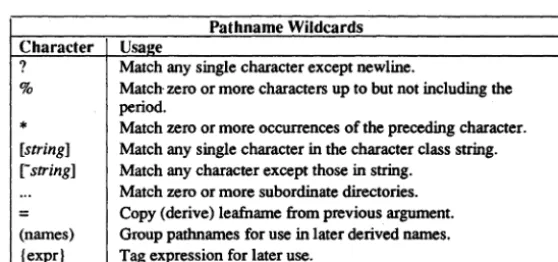
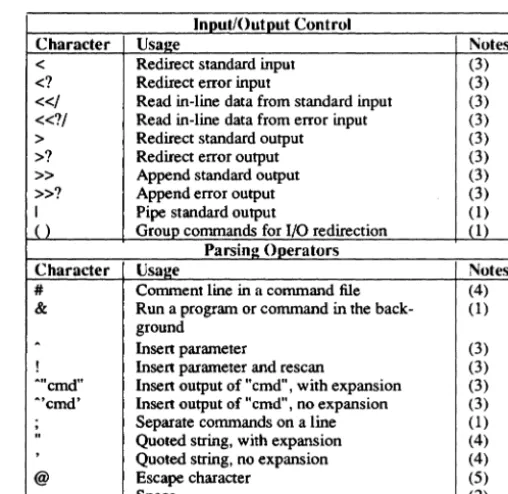
The shell recognizes a variety of special characters that allow you to change the action of commands. The characters in Table 1-1 have special meanings when they appear on a command line. Note that while some of these characters have been dis-cussed as having special meanings in Display Manager (OM) commands, regular expressions, and so forth, those meanings do not necessarily carry over to the Aegis environment. Please be careful to keep the different meanings !iistinct: for exam-ple, you should enclose regular expressions appearing in Aegis commands in quota-tion marks to avoid confusion.
The at sign (@) is the shell's escape character. You can place an "@" anywhere on the command line to suppress the special meaning of the next character (including the "@" character itselt). See Using Your Aegis Environment for a full discussion of the usage of shell special characters.
Table 1-1. Command Shell Special Characters
Pathname Wildcards Character Usa2e
? Match any single character except newline.
% Match zero or more characters up to but not including the period.
*
Match zero or more occurrences of the preceding character. [string] Match any single character in the character class string. [-string] Match any character except those in string.... Match zero or more subordinate directories .
=
Copy (derive) leafname from previous argument. (names) Group patbnames for use in later derived names. {expr} Tag expression for later use. [image:35.440.90.369.272.403.2]Table 1-1 Command Shell Special Characters (Cont.)
Input/Output Control
Character Usa~e Notes
<
Redirect standard input (3)<1
Redirect error input (3)«I
Read in-line data from standard input (3)«11 Read in-line data from error input (3)
>
Redirect standard output (3)>1
Redirect error output (3)»
Append standard output (3)»1
Append error output (3)I Pipe standard output (1)
() Group commands for I/O redirection (1)
Parsinl! Operators
Character Usal!e Notes
# Comment line in a command file (4)
& Run a program or command in the back- (1) ground
A
Insert parameter (3)
! Insert parameter and rescan (3)
"'cmd" Insert output of "cmd". with expansion (3) .... 'cmd' Insert output of "cmd". no expansion (3)
.
Separate commands on a line (1)" Quoted string, with expansion (4)
,
Quoted string. no expansion (4)
@ Escape character (5)
Space (2)
Notes:
1. Special anywhere; causes a new command to start.
2. Special anywhere; causes a new argument to start.
3. Special anywhere; does not start a new argument.
4. Special only at the beginning of an argument.
[image:36.441.105.359.127.374.2]1.3 The Command Line Parser
Many shell commands that we supply share a standard command line parsing pro-cedure that detennines how each command processes command line infonnation. Chapter 2, Shell Commands, and the online help files identify commands that use the command line parser. These commands suppon the following features:
1. You can use wildcards to specify existing pathnames.
2. You can use derived names to specify logically-related pathnames, and parentheses to create several derived names with one command line. (See Table I-I)
3. When peninent, you can include multiple pathnames as command line arguments. For example, prf file 1 file2 file3.
4. You can use the asterisk character (*) to cause commands to read path-names from standard input or from another file. For example, $ prf */fred/names _file
prints the files listed in Ifred/names _file. Also,
$ prf*
$ file I file2 file3 ***EOF***
reads the names file I, file2, and file3 from standard input, and prints each file. When using the keyboard for standard input, a newline and an end-of-file character must follow the last name. By default, CTRL/Z generates an end-of-file character.
If you include more than one name on an input line, in standard input or in a names file, the command interprets all names except the first one on each line as derived names. For example,
$chn
*
aa.oldis equivalent to
$chn
*
=.old a$
b
c
**EOF***
Do not confuse the action of the" *" character with that of the input redirec-tion symbol" <". The "*" character causes a shell command to read path-names from standard input or from another file. The" <" symbol causes a shell command to read data from a file.
1.3.1 Standard Command Options
All shell commands that we supply support the following standard options:
-help
-usage
-version
Display detailed usage information.
Display brief usage summary.
Display software version number.
NOTE: Using any of these three standard options precludes using any other options within the same command.
1.3.2 Command Line Parser Options
Commands that use the command line parser also support the following options:
-ae
-nq
-qw
-qa
Abort if a name in pathname cannot be found. If omitted, pro-cessing continues to the next name.
Do not issue query to verify wildcard names.
Issue query to verify wildcard names.
Issue query to verify all names.
- (hyphen alone) Read further data from standard input. End input with CTRLJZ.
*
[pathnamel Read file specified for further pathname arguments. Ifpath-name is omitted, read standard input for further pathname argu-ments.
When you select a query option, the command writes the selected names to the error output stream with a ? to prompt you for a response. Then it reads your response from the error input stream (normally the keyboard).
If you respond: The command:
h Displays help information.
y Operates on the name.
n Ignores the name.
q Quits immediately.
g Operates on the name and suppresses further name queries.
d new _default Resets the default. The shell performs the default action when it receives a null line query response (that is, when you simply press RETURN). To change the default, enter d followed by "yes", "no", or "none". The initial default is "none", which means that the command ignores null line
responses, and requires explicit yes or no responses.
Chapter 2 describes each shell command in detail. Those commands that use the command line parser refer you to this section for information on the standard options to avoid repetition in the text.
-Chapter
2
ABTSEV Aegis ABTSEV
NAME
a btsev - set or display the abort -severity level
SYNOPSIS
a btsev [options]
DESCRIPTION
The abtsev command lets you set the severity level at which a shell command or pro-gram aborts. The abort-severity level is initially set to -error when a shell is created. If any command returns a severity level greater than or equal to the abort-severity level, then that shell program, and all its ancestors, are inunediately tenninated.
The abort-severity level is on a per-shell basis. A new level is established every time a shell program or a new shell is invoked. A shell program inherits the abort-severity level of the preceding level. The severity level is restored when you exit from the shell program.
abtsev is an intemal shell command.
See the pgm_$set_severity description in the Domain/OS System Call Reference for further infonnarion on severity levels.
Every shell command or program returns a completion status message to its caller. The message may indicate that the program completed successfully, or it may infonn its caller of a fatal internal error. Completion status messages vary in their severity. The following completion status messages appear in order of their severity:
ok Program completed successfully and perfonned the requested action.
true Program completed successfully; its purpose was to test a con-dition, and the value of that condition was true.
false Program completed successfully; its purpose was to test a con-dition, and the value of that condition was false.
warning Program completed successfully and perfonned the requested action. However, an unusual (but nonfatal) condition was detected.
error Program could not perfonn the requested action because of an error in the input. The output, however, is sound.
ABTSEV Aegis ABTSEV
internal fatal Program detected an internal fatal error and stopped. The state of the output is unknown.
OPTIONS
Specifying abtsev without options displays the current abort-severity level.
-f[alse] Set level to false.
-w[arning]
-e[rror]
-o[utinv]
-i[ntfatal]
-p[gmtlt]
-m[ax_severity]
EXAMPLES
Show initial setting.
$ abtsev
error
$
Set level to waming.
$ abtsev-w
Show new level.
$ abtsev warning
$
Set level to waming.
Set level to error.
Set level to output invalid.
Set level to internal fatal error.
Set level to program fatal error.
ACL Aegis ACL
NAME
ad - list or copy an ACL
SYNOPSIS
ad [target_object [source _object]] [options]
DESCRIPTION
Every directory and file has an associated access control list (ACL) that lists users and their rights to the object. ad lets you copy an ACL from one object to another, or display an ACL. For a detailed discussion of ACL structure and usage, please refer to help edacl.
ARGUMENTS
target_object (optional) Specify the object whose ACL you want to set or display. You may use a wildcard to specify this argument. Do not, however, specify $ acl /... (anything) because this may render your node unusable. This wildcard sequence includes files in the /sys tree, which require special ACL set-tings in order for system software to run.
Default if omitted: use current working directory.
source_object (optional) Specify the file or directory whose ACL(s) is to be used to set the ACL(s) of the target object(s).
Default if omitted: display target_abject's ACL
OPTIONS
The following options confine the acl conunand's operation to target objects of the given type.
-d
-f
Set or display ACLs of only those target objects that are directories. If
used with -i, -id, or -if options, set or display initial ACLs for subdirec-tories.
Set or display ACLs of only those target objects that are files.
The following options control the ad command's effect on target objects. If the target object is a directory, they cause ad to operate only on the initial ACLs stored within that directory for use on newly created objects, not on the ACL of the directory itself. Note that this does not imply that all the target object(s) are directories. (That is what -d specifies.)
ACL
-id
-if
Aegis ACL
If the target object is a file (or if a wildcarded target list includes files) and the source is a directory, you get an error unless you also specify -is (so that the initial file ACL in the source directory, rather than the ACL of the directory itself, can be copied to target files). If both source and target are files, then the source file's ACL is applied to the target file, as you would expect. You must run said (salvage_directory) on target directories that have never contained initial ACLs (that is, those direc-tories created using software prior to SR 4.1).
Set or display only the initial ACLs inside those target objects that are directories that apply to new subdirectories created in those directories.
Set or display only the initial ACLs inside those target objects that are directories that apply to new files created in those directories. (Specify-ing both -id and -if is the same as -i. Specifying neither implies -d.)
The following option specifies that one (or both) of the initial ACLs inside the source object is to be copied to the target, rather than the ACL of the source itself. This assumes that the source object is a directory, not a file, since files cannot contain initial ACLs for subordinate objects.
-is Copy the initial ACL(s) in the source object (which must be a directory) to the target. If there is a single target object (either a file or a directory), then the appropriate initial ACL inside the source is applied to the target.
If the -i option is also specified, then both initial ACLs in the source are copied to the initial ACLs inside those target objects that are directories.
The following option specifies that all the ACLs of the target object(s) are to be set or displayed.
-all Set or display all ACLs of the target object(s). If you are using wild-cards to specify the target, you may qualify this action by also specifying
-d or -f. If the source object is a directory, then all of its ACLs (both its own and the two initial ACLs that it applies to newly created subordinate objects) are used to set the corresponding ACLs of the target object(s).
If -is is also specified, however, the ACL of the source object itself is not used, although all three ACLs of the target directories are still set. Thus you can use -all (with or without -is) to propagate new ACLs throughout subtrees.
The following options perform miscellaneous tasks:
ACL Aegis ACL
-I List object names as the command sets ACLs.
-br Display ACLs only, not object names. acl uses the command-line parser, and so also accepts the standard command options listed in help cI
EXAMPLES
Assign old_file's ACL to new_file.
Set the initial ACLs inside joe using the initial ACLs inside mary (which must be a directory) .
$ ad joe mary -i -is
Set the initial file ACL in all subdirectories of the current working directory whose names begin with abc to the ACL of filet.
$ ad abc?* file! -d -if
Set the ACLs of all files in the current working directory whose names begin with abc to the initial file ACL inside dir2.
$ ad abc?* dir2 -f -is
Set the initial ACLs in all subdirectories of the current working directory whose names begin with abc, using the initial ACLs in dir2, and the ACLs of all files whose names begin with abc, using the initial file ACL in dir2. (Adding -d confines the operation to directories. )
ACL Aegis . ACL
Set the ACLs of all files matched, using the initial file ACL in dir2. The ACLs of all
directories matched using tre ACL of dir2 itself. The initial ACLs inside those matched directories are set using the initial ACLs inside dir2.
$ acl abc?* dir2 -all
Set the ACLs of all files matched using the initial file ACL in dir2. The ACLs of all directories matched using the initial directory ACL in dir2. The initial ACLs inside those matched directories using the initial ACLs inside dir2.
$ acl abc?* dir2 -all -is
SEE ALSO
More information is available. Type
help acls For a list of ACL-related commands
help protection For general information on Domain protection mechanisms
help protection acls For detailed information on ACL structure and usage
help protection sids For information on subject identifiers
AQDEV Aegis AQDEV
NAME
aqdev - acquire control of a PBU device
SYNOPSIS
aqdev pathname [-d[b]] [-c program argl arg2 ... ]
DESCRIPTION
NOTE
aqdev acquires control of a peripheral bus unit (PBU) device. aqdev creates a new shell level in which the PBU device driver runs. Release the device by closing this shell level (i.e., type CTRL/Z).
This command is valid only if our General Pwpose Input/Output (GPIO) software pack-age is installed on your network. See the Writing Device Drivers with GPIO Calls for details.
ARGUMENTS
pathname (required)
OPTIONS -d[b]
-c[program argl arg2 ... ]
EXAMPLES
$ aqdev /dev/my-dev Device 0 acquired.
Specify the Device Descriptor File (DDF) for the PBU unit device to be acquired. You can create a DDF by using the crddf (create ddf) command.
Specify debug mode. Display addresses of the mapped DDF, library, etc., along with any errors.
Specifies a program to run after acquiring the device. This program is run instead of the shell. aqdev releases the device after the program returns. This option also allows you to use aqdev in a shell script.
$ (Run your program using the device.)
$ CTRL/Z
***
EOF •••Device 0 released.
$
$ aqdev /dev/my-dev -c driver_application Device 0 acquired.
(driver_application runs using the device.) Device 0 released.
ARCF Aegis ARCF
NAME
arcf - maintain an archive file
SYNOPSIS
arcf command arcname [pathname ... ]
DESCRIPTION
NOTE
arcf collects sets of files into one large file and maintains that file as an archive. You can extract files from the archive, add new ones, delete or replace old ones, and list data about the contents. Only text files can be archived.
Files to be added to an archive must exist as files with the name given. Files that are extracted from an archive are written to files with the name given. Files that are added to archives can, of course, be archive files themselves. Any number of files can be nested this way. Thus, you can use arcf to maintains tree-structured file ditectories.
When you use the update and print commands, the files are updated and printed in the order they appear in the archived file, not in the order listed on the command line.
ARGUMENTS
arcname (required) Specify the name of archive file being created or maintained. pathname (optional) Specify the name of file to be added or deleted from the archive.
Multiple names are permitted, separated by blanks. Specifying a hyphen as a filename causes further names to be read from stan-dard input, one per line.
Default if omitted: perform action on all files in the archive (except -d, which requires you to give names explicitly).
COMMANDS
command (required) Specify the operation to perform on the archive file arcname.
-d
-p
-t
-u
Follow the command with 0 get verbose output. Possible com-mands include the following:
Delete the named files from the archive. If you use the v option, filenames are displayed on the standard output as they are deleted from the archive.
Write the contents of the named files on standard output. The \' option causes the filenames to precede the file.
Write a table of contents for the archive file. Normally, the table contains only the filename. If the v option is used, the table also includes the file's length, type, and date and time of the last change.
ARCF
-x
v
Aegis ARCF
files in the archive are updated with files of the same name in the current directory. If the archive file dOes not exist, it is created with the name given. If you use the v option, filenames are displayed on standard output as files are written to the new archived file.
Extract the named files from archive. Write each to a file with the same name. If the file already exists, the new version replaces the old. If you add the v option, filenames are displayed on standard output as files are extracted.
Request veIbose output. This command can follow any of the
other commands (see example below), and causes the archiver to print additional information, generally filenames, on standard output. Its specific action for each command has already been described.
EXAMPLES
Update arc~ve file my_archive with a new copy of the file stamps, retuming verbose output.
$ arcf -uv my-archive stamps stamps
$
Report on the contents of the archive.
$ arcf -tv my-archive
stamps 330 local 03/02/88 13:53:07
ARGS Aegis ARGS
NAME
args - echo command line arguments
SYNOPSIS
args [-err[out]] string ...
DESCRIPTION
args writes its arguments, one per line, to standard output unless you specify -err. Use it to write to files by redirecting standard output into a file with the >pathname expres-sion. The args command is useful for inserting messages and diagnostics to be reported to the display to shell scripts and for inserting lines of text into files.
ARGUMENTS
string (required) Specify the string of characters to be written. Multiple strings are permitted; separate strings with blanks. Strings are written one per line. To write phrases containing literal blanks, enclose strings in quo-tation marks.
OPTIONS
-err[out] Write the string(s) to error output instead of to standard output. This option is useful for writing to the transcript pad (where error output is usually directed) from an args command inside a pipeline, since stan-dard output is then connected to the pipe.
EXAMPLES
$ args Hi there Hi
< there
$
$ args "Hi there" "Mary" Hi there
Mary
$
Write "Hi there, Mary." into the file my_file in the current working directory.
BIND Aegis BIND
NAME
bind - combine object modules into an executable file
SYNOPSIS
bind pathnamel ... [pathnameN] [option] ...
DESCRIPTION
bind combines two or more object modules into one executable object module. It resolves external references to global symbols and combines sections that have the same name. For full details on the binder, see the Domain/OS Programming Environ-ment Reference manual.
The command line simply consists of the word bind, one or more pathnames, and zero or more options.
The binder uses the object modules stored in pathnamel through pathnameN to create an executable object file. Each pathname must be the name of a valid object file or library file. (A compiler creates an object file, and the librarian creates a library file.) You may use wildcards in pathnames. The binder automatically loads all object modules stored in object files, but conditionally loads the object modules stored in library files.
Options modify the binder's actions. Of all the binder's options, -binary is the most important. You must use this option to get an executable output object file.
The following is a summary of the bind options. See the Domain/OS Programming Environment Reference manual for complete descriptions of each option.
OPTIONS
-align section-name long
Aligns the named section on a 32-bit boundary at run time.
-align section-name quad
Aligns the named section on a 64-bit boundary at run time.
-align section-name page
-allkeepmark
-allmark
-allocbss
-allres[olved]
Aligns the named section on an 8,192-bit boundary at run time.
Preserves all marks.
Marks all global symbols in the input object files that appear after the option on the bind command line.
Gathers all unitialized global data from C programs and allo-cates then all to a section named .bss.
BIND Aegis BIND
-allunmark (default) Urunarks all global symbols in the input object files that appear after the option on the bind command line.
-bdir directory_name Adds a pathnarne to the list of directories the binder searches for input object files.
-b[inary] pathname Creates an output object module and stores it at pathname.
-end Signifies end of a command that is spread over several lines.
-entry global_symbol Specifies a nondefault start address.
-exactcase Makes the binder case-sensitive to all variable names and
sec--glo[bals]
-h[elp]
-incl[ude] module-name
-incl[ude] -all
-inlib pathname
-Iocalsearch
-Iooks[ection] name
-Iooks[ection] -all
-mak[ers)
tionnames.
Writes currently defined global symbols to error output.
Prints this list of commands.
Unconditionally loads the named object module from a library file into the output object file.
Unconditionally loads all object modules from a library file into the output object file.
Specifies that the object modules in pathname are to be "installed" when the output object file is invoked. (This is an alternative to the -inlib utility.)
Forces the binder to make another search through a library file
if the previous search loaded an object module containing an unresolved external reference.
Makes the named section available for sharing with a public section in an installed library.
Makes all subsequent sections available for sharing with their counterpart public sections in an installed library.
Lists the version numbers of the compilers, binders, etc. that were used to create the input object files.
-map Writes a complete binder map to standard