Motorola reserves the right to make changes without further notice to any products herein to improve reliability, function or design. Motorola does not assume any liability arising out of the application or use of any product or circuit described herein; neither does it convey any license under its patent rights nor the rights of others. Motorola products are not designed, intended, or authorized for use as components in systems intended for surgical implant into the body, or other applications intended to support or sustain life, or for any other application in which the failure of the Motorola product could create a situation where personal injury or death may occur. Should Buyer purchase or use Motorola products for any such unintended or unauthorized application, Buyer shall indemnify and hold Motorola and its officers, employees, subsidiaries, affiliates, and distributors harmless against all claims, costs, damages, and expenses, and reasonable attorney fees arising out of, directly or indirectly, any claim of personal injury or death associated with such unintended or unauthorized use, even if such claim alleges that Motorola was
CRG
Block User Guide
V04.05
Original Release Date: 29 Feb. 2000 Revised: 2 August 2002
Revision History
Version Number
Revision Date
Effective
Date Author Description of Changes
1.0 02/16/00 02/16/00 Initial Release
2.0 11/09/00 10/18/00 Initial SRS2.0 compliant release 2.01 03/03/01 03/03/01 Added RSBCK bit.
2.02 03/22/01 Make the content SRS compliant (usable as a customer document) 3.00 10 May
2001
10 May 2001
Modified according to new Pierce Oscillator feature and different PLLSEL bit write conditions
3.01 13 July 01 13 July 01 Minor corrections
3.02 30 July 01 30 July 01 Enhanced Block diagram (VREG, POR), Corrected register figure CRGINT to read and write
V03.03 2 Aug. 01 2 Aug. 01 Enhanced Clock Quality Check Diagram. Corrections in Reset section
V03.04 27 Aug. 01 27 Aug. 01 Improved description of exiting Wait and Pseudo Stop Mode. Enhanced SCME Bit description.
V03.05 5 Sept. 01 5 Sept. 01 Corrected CDC position in Colpitts Oscillator Connections diagram. V03.06 1 Oct. 01 1 Oct. 01 Motorola internal: spec tagging
V04.00 10 Oct. 01 10 Oct. 01 Added Low Voltage Reset feature
V04.01 21 Nov. 01 21 Nov. 01 Added Interrupts to Block Diagram. Corrected LVRF flag description.
V04.02 22 Nov. 01 22 Nov. 01 Re-Corrected LVRF flag description. V04.03 11 Mar 02 11 Mar 02
Removed document number from all pages except cover page Replaced fVCOMIN by fSCM.
Added Bus Clock formulas close to PLLCLK formulas. Spelling improvements
V04.04 03 May 02 03 May 02
Corrected in COPCTL register description: RSBCK is write once EXTAL signal description: mentioning pull-down resistor which is active in full stop mode
Table of Contents
Section 1 Introduction
1.1 Overview. . . .9
1.2 Features . . . .9
1.3 Modes of Operation . . . .9
1.4 Block Diagram . . . .10
Section 2 Signal Description
2.1 Overview. . . .132.2 Detailed Signal Descriptions. . . .13
2.2.1 VDDPLL, VSSPLL . . . .13
2.2.2 XFC . . . .13
2.2.3 RESET . . . .13
Section 3 Memory Map and Registers
3.1 Overview. . . .153.2 Module Memory Map . . . .15
3.3 Register Descriptions . . . .15
3.3.1 CRG Synthesizer Register (SYNR) . . . .15
3.3.2 CRG Reference Divider Register (REFDV) . . . .16
3.3.3 Reserved Register (CTFLG) . . . .16
3.3.4 CRG Flags Register (CRGFLG). . . .17
3.3.5 CRG Interrupt Enable Register (CRGINT) . . . .18
3.3.6 CRG Clock Select Register (CLKSEL). . . .19
3.3.7 CRG PLL Control Register (PLLCTL) . . . .21
3.3.8 CRG RTI Control Register (RTICTL) . . . .23
3.3.9 CRG COP Control Register (COPCTL) . . . .24
3.3.10 Reserved Register (FORBYP) . . . .25
3.3.11 Reserved Register (CTCTL) . . . .26
3.3.12 CRG COP Timer Arm/Reset Register (ARMCOP). . . .26
4.2.1 Phase Locked Loop (PLL) . . . .29
4.2.2 System Clocks Generator . . . .32
4.2.3 Clock Monitor (CM) . . . .33
4.2.4 Clock Quality Checker . . . .33
4.2.5 Computer Operating Properly Watchdog (COP) . . . .35
4.2.6 Real Time Interrupt (RTI) . . . .36
4.3 Operation Modes . . . .37
4.3.1 Normal Mode . . . .37
4.3.2 Self Clock Mode . . . .37
4.4 Low Power Options . . . .37
4.4.1 Run Mode. . . .37
4.4.2 Wait Mode . . . .37
4.4.3 CPU Stop Mode . . . .42
Section 5 Resets
5.1 General. . . .475.2 Description of Reset Operation . . . .47
5.2.1 Clock Monitor Reset. . . .48
5.2.2 Computer Operating Properly Watchdog (COP) Reset . . . .49
5.2.3 Power On Reset, Low Voltage Reset. . . .49
Section 6 Interrupts
6.1 General. . . .516.2 Description of Interrupt Operation . . . .51
6.2.1 Real Time Interrupt . . . .51
6.2.2 PLL Lock Interrupt . . . .51
List of Figures
Figure 1-1 Block diagram of CRG . . . .11
Figure 2-1 PLL Loop Filter Connections . . . .13
Figure 3-1 CRG Synthesizer Register (SYNR) . . . .16
Figure 3-2 CRG Reference Divider Register (REFDV) . . . .16
Figure 3-3 Reserved Register (CTFLG) . . . .17
Figure 3-4 CRG Flags Register (CRGFLG) . . . .17
Figure 3-5 CRG Interrupt Enable Register (CRGINT). . . .19
Figure 3-6 CRG Clock Select Register (CLKSEL) . . . .19
Figure 3-7 CRG PLL Control Register (PLLCTL) . . . .21
Figure 3-8 CRG RTI Control Register (RTICTL) . . . .23
Figure 3-9 CRG COP Control Register (COPCTL) . . . .24
Figure 3-10 Reserved Register (FORBYP). . . .26
Figure 3-11 Reserved Register (CTCTL) . . . .26
Figure 3-12 ARMCOP Register Diagram . . . .27
Figure 4-1 PLL Functional Diagram . . . .29
Figure 4-2 System Clocks Generator . . . .32
Figure 4-3 Core Clock and Bus Clock relationship . . . .33
Figure 4-4 Check Window Example . . . .34
Figure 4-5 Sequence for Clock Quality Check . . . .34
Figure 4-6 Clock Chain for COP . . . .35
Figure 4-7 Clock Chain for RTI . . . .36
Figure 4-8 Wait Mode Entry/Exit Sequence . . . .39
Figure 4-9 Stop Mode Entry/Exit Sequence . . . .43
Figure 5-1 RESET Timing . . . .48
Figure 5-2 RESET pin tied to VDD (by a pull-up resistor). . . .49
List of Tables
Table 3-1 CRG Memory Map . . . .15
Table 3-2 RTI Frequency Divide Rates . . . .23
Table 3-3 COP Watchdog Rates . . . .25
Table 4-1 MCU configuration during Wait Mode . . . .38
Table 4-2 Outcome of Clock Loss in Wait Mode . . . .40
Table 4-3 Outcome of Clock Loss in Pseudo-Stop Mode . . . .44
Table 5-1 Reset Summary . . . .47
Table 5-2 Reset Vector Selection . . . .47
Section 1 Introduction
1.1 Overview
This specification describes the function of the Clocks and Reset Generator (CRG).
1.2 Features
The main features of this block are:
• Phase Locked Loop (PLL) frequency multiplier
– Reference divider
– Automatic bandwidth control mode for low-jitter operation
– Automatic frequency lock detector
– CPU interrupt on entry or exit from locked condition
– Self Clock Mode in absence of reference clock
• System Clock Generator
– Clock Quality Check
– Clock switch for either Oscillator or PLL based system clocks
– User selectable disabling of clocks during Wait Mode for reduced power consumption.
• Computer Operating Properly (COP) watchdog timer with time-out clear window.
• System Reset generation from the following possible sources:
– Power on reset
– Low voltage reset
Refer to device specification for availability of this feature.
– COP reset
– Loss of clock reset
– External pin reset
• Real-Time Interrupt (RTI)
1.3 Modes of Operation
This subsection lists and briefly describes all operating modes supported by the CRG.
All functional parts of the CRG are running during normal Run Mode. If RTI or COP functionality is required the individual bits of the associated rate select registers (COPCTL, RTICTL) have to be set to a non zero value.
• Wait Mode
This mode allows to disable the system and core clocks depending on the configuration of the individual bits in the CLKSEL register.
• Stop Mode
Depending on the setting of the PSTP bit Stop Mode can be differentiated between Full Stop Mode (PSTP=0) and Pseudo Stop Mode (PSTP=1).
– Full Stop Mode
The oscillator is disabled and thus all system and core clocks are stopped. The COP and the RTI remain frozen.
– Pseudo Stop Mode
The oscillator continues to run and most of the system and core clocks are stopped. If the respective enable bits are set the COP and RTI will continue to run, else they remain frozen.
• Self Clock Mode
Self Clock Mode will be entered if the Clock Monitor Enable Bit (CME) and the Self Clock Mode Enable Bit (SCME) are both asserted and the clock monitor in the oscillator block detects a loss of clock. As soon as Self Clock Mode is entered the CRG starts to perform a clock quality check. Self Clock Mode remains active until the clock quality check indicates that the required quality of the incoming clock signal is met (frequency and amplitude). Self Clock Mode should be used for safety purposes only. It provides reduced functionality to the MCU in case a loss of clock is causing severe system conditions.
1.4 Block Diagram
Figure 1-1 Block diagram of CRG
CRG
Registers
Clock and Reset
COP
RESET
RTI
PLL
XFC VDDPLL VSSPLL
Oscil-EXTAL XTAL
Control
Bus Clock System Reset
Oscillator Clock
PLLCLK OSCCLK
Core Clock
Clock Monitor
CM fail
Clock Quality Checker
Reset Generator
XCLKS
Power on Reset Low Voltage Reset1
COP timeout
1) Refer to device specification for availability of the low voltage reset feature.
Real Time Interrupt PLL Lock Interrupt Self Clock Mode
Interrupt
Section 2 Signal Description
2.1 Overview
This section lists and describes the signals that connect off chip.
2.2 Detailed Signal Descriptions
2.2.1 VDDPLL, VSSPLL
These pins provides operating voltage (VDDPLL) and ground (VSSPLL) for the PLL circuitry. This allows the supply voltage to the PLL to be independently bypassed. Even if PLL usage is not required VDDPLL and VSSPLL must be connected to properly.
2.2.2 XFC
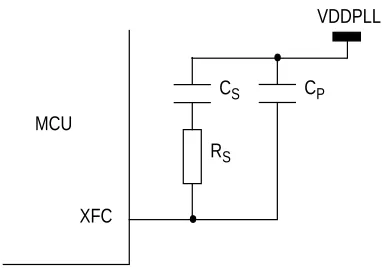
A passive external loop filter must be placed on the XFC pin. The filter is a second-order, low-pass filter to eliminate the VCO input ripple. The value of the external filter network and the reference frequency determines the speed of the corrections and the stability of the PLL. Refer to device specification for
calculation of PLL Loop Filter (XFC) components. If PLL usage is not required the XFC pin must be
[image:13.595.215.406.400.534.2]tied to VDDPLL.
Figure 2-1 PLL Loop Filter Connections
2.2.3 RESET
RESET is an active low bidirectional reset pin. As an input it initializes the MCU asynchronously to a known start-up state. As an open-drain output it indicates that an system reset (internal to MCU) has been triggered.
MCU
XFC
RS CS
VDDPLL
Section 3 Memory Map and Registers
3.1 Overview
This section provides a detailed description of all registers accessible in the CRG.
[image:15.595.106.491.230.466.2]3.2 Module Memory Map
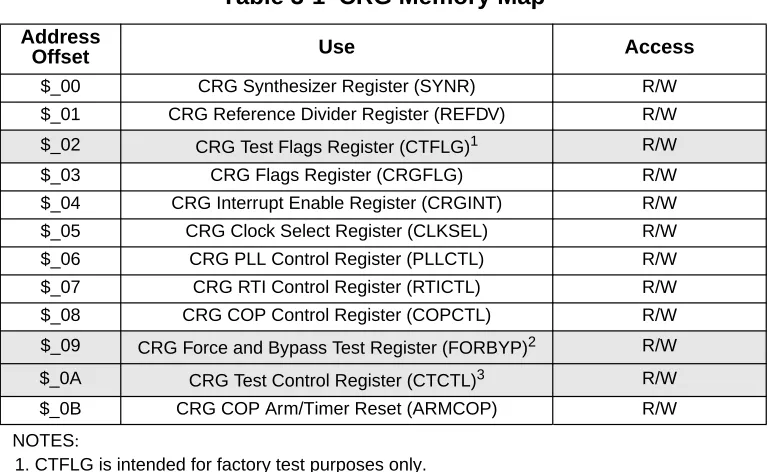
Table 3-1 gives an overview on all CRG registers.
NOTE: Register Address = Base Address + Address Offset, where the Base Address is defined at the MCU level and the Address Offset is defined at the module level.
3.3 Register Descriptions
This section describes in address order all the CRG registers and their individual bits.
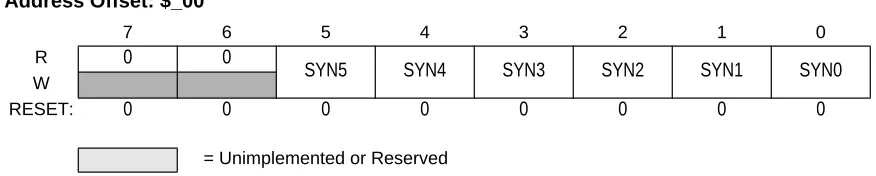
3.3.1 CRG Synthesizer Register (SYNR)
The SYNR register controls the multiplication factor of the PLL. If the PLL is on, the count in the loop divider (SYNR) register effectively multiplies up the PLL clock (PLLCLK) from the reference frequency by 2 x (SYNR+1). PLLCLK will not be below the minimum VCO frequency (fSCM).
Table 3-1 CRG Memory Map Address
Offset Use Access
$_00 CRG Synthesizer Register (SYNR) R/W
$_01 CRG Reference Divider Register (REFDV) R/W $_02 CRG Test Flags Register (CTFLG)1
NOTES:
1. CTFLG is intended for factory test purposes only.
R/W
$_03 CRG Flags Register (CRGFLG) R/W
$_04 CRG Interrupt Enable Register (CRGINT) R/W $_05 CRG Clock Select Register (CLKSEL) R/W $_06 CRG PLL Control Register (PLLCTL) R/W $_07 CRG RTI Control Register (RTICTL) R/W $_08 CRG COP Control Register (COPCTL) R/W $_09 CRG Force and Bypass Test Register (FORBYP)2
2. FORBYP is intended for factory test purposes only.
R/W $_0A CRG Test Control Register (CTCTL)3
3. CTCTL is intended for factory test purposes only.
R/W
NOTE: If PLL is selected (PLLSEL=1), Bus Clock = PLLCLK / 2
[image:16.595.79.517.143.231.2]Bus Clock must not exceed the maximum operating system frequency.
Figure 3-1 CRG Synthesizer Register (SYNR)
Read: anytime
Write: anytime except if PLLSEL = 1
NOTE: Write to this register initializes the lock detector bit and the track detector bit.
3.3.2 CRG Reference Divider Register (REFDV)
The REFDV register provides a finer granularity for the PLL multiplier steps. The count in the reference divider divides OSCCLK frequency by REFDV+1.
Figure 3-2 CRG Reference Divider Register (REFDV)
Read: anytime
Write: anytime except when PLLSEL = 1
NOTE: Write to this register initializes the lock detector bit and the track detector bit.
3.3.3 Reserved Register (CTFLG)
This register is reserved for factory testing of the CRG module and is not available in normal modes.
Address Offset: $_00
7 6 5 4 3 2 1 0
R 0 0
SYN5 SYN4 SYN3 SYN2 SYN1 SYN0
W
RESET: 0 0 0 0 0 0 0 0
= Unimplemented or Reserved
Address Offset: $_01
7 6 5 4 3 2 1 0
R 0 0 0 0
REFDV3 REFDV2 REFDV1 REFDV0
W
RESET: 0 0 0 0 0 0 0 0
= Unimplemented or Reserved
PLLCLK 2xOSCCLKx (SYNR+1) REFDV+1
( )
[image:16.595.79.524.416.504.2]
Figure 3-3 Reserved Register (CTFLG)
Read: always reads $00 in normal modes
Write: unimplemented in normal modes
NOTE: Writing to this register when in special mode can alter the CRG fucntionality.
3.3.4 CRG Flags Register (CRGFLG)
[image:17.595.83.518.79.159.2]This register provides CRG status bits and flags.
Figure 3-4 CRG Flags Register (CRGFLG)
Read: anytime
Write: refer to each bit for individual write conditions
RTIF — Real Time Interrupt Flag
RTIF is set to 1 at the end of the RTI period. This flag can only be cleared by writing a 1. Writing a 0 has no effect. If enabled (RTIE=1), RTIF causes an interrupt request.
1 = RTI time-out has occurred.
0 = RTI time-out has not yet occurred.
PORF — Power on Reset Flag
Address Offset: $_02
7 6 5 4 3 2 1 0
R 0 0 0 0 0 0 0 0
W
RESET: 0 0 0 0 0 0 0 0
= Unimplemented or Reserved
Address Offset: $_03
7 6 5 4 3 2 1 0
R
RTIF PORF LVRF LOCKIF LOCK TRACK SCMIF SCM
W
RESET: 0 1
NOTES:
1. PORF is set to 1 when a power on reset occurs. Unaffected by system reset.
2
2. LVRF is set to 1 when a low voltage reset occurs. Unaffected by system reset.
0 0 0 0 0
PORF is set to 1 when a power on reset occurs. This flag can only be cleared by writing a 1. Writing a 0 has no effect.
1 = Power on reset has occurred. 0 = Power on reset has not occurred.
LVRF — Low Voltage Reset Flag
If low voltage reset feature is not available (see device specification) LVRF always reads 0.
LVRF is set to 1 when a low voltage reset occurs. This flag can only be cleared by writing a 1. Writing a 0 has no effect.
1 = Low voltage reset has occurred. 0 = Low voltage reset has not occurred.
LOCKIF — PLL Lock Interrupt Flag
LOCKIF is set to 1 when LOCK status bit changes. This flag can only be cleared by writing a 1. Writing a 0 has no effect.If enabled (LOCKIE=1), LOCKIF causes an interrupt request.
1 = LOCK bit has changed. 0 = No change in LOCK bit.
LOCK — Lock Status Bit
LOCK reflects the current state of PLL lock condition. This bit is cleared in Self Clock Mode. Writes have no effect.
1 = PLL VCO is within the desired tolerance of the target frequency. 0 = PLL VCO is not within the desired tolerance of the target frequency.
TRACK — Track Status Bit
TRACK reflects the current state of PLL track condition. This bit is cleared in Self Clock Mode. Writes have no effect.
1 = Tracking mode status. 0 = Acquisition mode status.
SCMIF — Self Clock Mode Interrupt Flag
SCMIF is set to 1 when SCM status bit changes. This flag can only be cleared by writing a 1. Writing a 0 has no effect. If enabled (SCMIE=1), SCMIF causes an interrupt request.
1 = SCM bit has changed. 0 = No change in SCM bit.
SCM — Self Clock Mode Status Bit
SCM reflects the current clocking mode. Writes have no effect.
1 = MCU is operating in Self Clock Mode with OSCCLK in an unknown state. All clocks are derived from PLLCLK running at its minimum frequency fSCM.
0 = MCU is operating normally with OSCCLK available.
Figure 3-5 CRG Interrupt Enable Register (CRGINT)
Read: anytime
Write: anytime
RTIE — Real Time Interrupt Enable Bit.
1 = Interrupt will be requested whenever RTIF is set. 0 = Interrupt requests from RTI are disabled.
LOCKIE — Lock Interrupt Enable Bit
1 = Interrupt will be requested whenever LOCKIF is set. 0 = LOCK interrupt requests are disabled.
SCMIE — Self Clock Mode Interrupt Enable Bit
1 = Interrupt will be requested whenever SCMIF is set. 0 = SCM interrupt requests are disabled.
3.3.6 CRG Clock Select Register (CLKSEL)
[image:19.595.81.520.78.160.2]This register controls CRG clock selection. Refer to Figure 4-2 System Clocks Generator for more details on the effect of each bit.
Figure 3-6 CRG Clock Select Register (CLKSEL)
Read: anytime
Write: refer to each bit for individual write conditions
PLLSEL — PLL Select Bit
Address Offset: $_04
7 6 5 4 3 2 1 0
R
RTIE 0 0 LOCKIE 0 0 SCMIE 0
W
RESET: 0 0 0 0 0 0 0 0
= Unimplemented or Reserved
Address Offset: $_05
7 6 5 4 3 2 1 0
R
PLLSEL PSTP SYSWAI ROAWAI PLLWAI CWAI RTIWAI COPWAI
W
RESET: 0 0 0 0 0 0 0 0
Write anytime. Writing a one when LOCK=0 and AUTO=1, or TRACK=0 and AUTO=0 has no effect This prevents the selection of an unstable PLLCLK as SYSCLK. PLLSEL bit is cleared when the MCU enters Self Clock Mode, Stop Mode or Wait Mode with PLLWAI bit set.
1 = System clocks are derived from PLLCLK (Bus Clock = PLLCLK / 2). 0 = System clocks are derived from OSCCLK (Bus Clock = OSCCLK / 2).
PSTP — Pseudo Stop Bit
Write: anytime
This bit controls the functionality of the oscillator during Stop Mode.
1 = Oscillator continues to run in Stop Mode (Pseudo Stop). The oscillator amplitude is reduced.
Refer to oscillator block description for availability of a reduced oscillator amplitude.
0 = Oscillator is disabled in Stop Mode.
NOTE: Pseudo-STOP allows for faster STOP recovery and reduces the mechanical stress and aging of the resonator in case of frequent STOP conditions at the expense of a slightly increased power consumption.
Lower oscillator amplitude exhibits lower power consumption but could have adverse effects during any Electro-Magnetic Susceptibility (EMS) tests.
SYSWAI — System clocks stop in Wait Mode Bit
Write: anytime
1 = In Wait Mode the system clocks stop.
0 = In Wait Mode the system clocks continue to run.
NOTE: RTI and COP are not affected by SYSWAI bit. ROAWAI — Reduced Oscillator Amplitude in Wait Mode Bit.
Refer to oscillator block description for availability of a reduced oscillator amplitude. If no such feature exists in the oscillator block then setting this bit to one will not have any effect on power consumption!
Write: anytime
1 = Reduced oscillator amplitude in Wait Mode. 0 = Normal oscillator amplitude in Wait Mode.
NOTE: Lower oscillator amplitude exhibits lower power consumption but could have adverse effects during any Electro-Magnetic Susceptibility (EMS) tests.
PLLWAI — PLL stops in Wait Mode Bit
Write: anytime
If PLLWAI is set, the CRG will clear the PLLSEL bit before entering Wait Mode. The PLLON bit remains set during Wait Mode but the PLL is powered down. Upon exiting Wait Mode, the PLLSEL bit has to be set manually if PLL clock is required.
1 = PLL stops in Wait Mode.
0 = PLL keeps running in Wait Mode.
CWAI — Core stops in Wait Mode Bit
Write: anytime
1 = Core clock stops in Wait Mode.
0 = Core clock keeps running in Wait Mode.
RTIWAI — RTI stops in Wait Mode Bit
Write: anytime
1 = RTI stops and initializes the RTI dividers whenever the part goes into Wait Mode. 0 = RTI keeps running in Wait Mode.
COPWAI — COP stops in Wait Mode Bit
Normal modes: Write once
Special modes: Write anytime
1 = COP stops and initializes the COP dividers whenever the part goes into Wait Mode. 0 = COP keeps running in Wait Mode.
3.3.7 CRG PLL Control Register (PLLCTL)
This register controls the PLL functionality.
Figure 3-7 CRG PLL Control Register (PLLCTL)
Read: anytime
Write: refer to each bit for individual write conditions
CME — Clock Monitor Enable Bit
CME enables the clock monitor. Write anytime except when SCM = 1.
1 = Clock monitor is enabled. Slow or stopped clocks will cause a clock monitor reset sequence or Self Clock Mode.
0 = Clock monitor is disabled.
NOTE: Operating with CME=0 will not detect any loss of clock. In case of poor clock quality this could cause unpredictable operation of the MCU!
Address Offset: $_06
7 6 5 4 3 2 1 0
R
CME PLLON AUTO ACQ 0 PRE PCE SCME
W
RESET: 1 1 1 1 0 0 0 1
In Stop Mode (PSTP=0) the clock monitor is disabled independently of the CME bit setting and any loss of clock will not be detected.
PLLON — Phase Lock Loop On Bit
PLLON turns on the PLL circuitry. In Self Clock Mode, the PLL is turned on, but the PLLON bit reads the last latched value. Write anytime except when PLLSEL = 1.
1 = PLL is turned on. If AUTO bit is set, the PLL will lock automatically. 0 = PLL is turned off.
AUTO — Automatic Bandwidth Control Bit
AUTO selects either the high bandwidth (acquisition) mode or the low bandwidth (tracking) mode depending on how close to the desired frequency the VCO is running. Write anytime except when PLLWAI=1, because PLLWAI sets the AUTO bit to 1.
1 = Automatic Mode Control is enabled and ACQ bit has no effect.
0 = Automatic Mode Control is disabled and the PLL is under software control, using ACQ bit.
ACQ — Acquisition Bit
Write anytime. If AUTO=1 this bit has no effect. 1 = High bandwidth filter is selected.
0 = Low bandwidth filter is selected.
PRE — RTI Enable during Pseudo Stop Bit
PRE enables the RTI during Pseudo Stop Mode. Write anytime. 1 = RTI continues running during Pseudo Stop Mode. 0 = RTI stops running during Pseudo Stop Mode.
NOTE: If the PRE bit is cleared the RTI dividers will go static while Pseudo-Stop Mode is active. The RTI dividers will not initialize like in Wait Mode with RTIWAI bit set.
PCE — COP Enable during Pseudo Stop Bit
PCE enables the COP during Pseudo Stop Mode. Write anytime. 1 = COP continues running during Pseudo Stop Mode
0 = COP stops running during Pseudo Stop Mode
NOTE: If the PCE bit is cleared the COP dividers will go static while Pseudo-Stop Mode is active. The COP dividers will not initialize like in Wait Mode with COPWAI bit set.
SCME — Self Clock Mode Enable Bit
Normal modes: Write once
Special modes: Write anytime
SCME can not be cleared while operating in Self Clock Mode (SCM=1).
0 = Detection of crystal clock failure causes clock monitor reset (see 5.2.1 Clock Monitor Reset). 1 = Detection of crystal clock failure forces the MCU in Self Clock Mode (see 4.3.2 Self Clock
3.3.8 CRG RTI Control Register (RTICTL)
[image:23.595.87.514.130.211.2]This register selects the timeout period for the Real Time Interrupt.
Figure 3-8 CRG RTI Control Register (RTICTL)
Read: anytime
Write: anytime
NOTE: A write to this register initializes the RTI counter. RTR[6:4] — Real Time Interrupt Prescale Rate Select Bits
These bits select the prescale rate for the RTI. SeeTable 3-2. RTR[3:0] — Real Time Interrupt Modulus Counter Select Bits
These bits select the modulus counter target value to provide additional granularity.Table 3-2shows all possible divide values selectable by the RTICTL register. The source clock for the RTI is OSCCLK.
Address Offset: $_07
7 6 5 4 3 2 1 0
R 0
RTR6 RTR5 RTR4 RTR3 RTR2 RTR1 RTR0
W
RESET: 0 0 0 0 0 0 0 0
= Unimplemented or Reserved
Table 3-2 RTI Frequency Divide Rates
RTR[3:0] RTR[6:4] =
000 (OFF)
001 (210)
010 (211)
011 (212)
100 (213)
101 (214)
110 (215)
111 (216)
0000 (÷1) OFF* 210 211 212 213 214 215 216
0001 (÷2) OFF* 2x210 2x211 2x212 2x213 2x214 2x215 2x216
0010 (÷3) OFF* 3x210 3x211 3x212 3x213 3x214 3x215 3x216
0011 (÷4) OFF* 4x210 4x211 4x212 4x213 4x214 4x215 4x216
0100 (÷5) OFF* 5x210 5x211 5x212 5x213 5x214 5x215 5x216
0101 (÷6) OFF* 6x210 6x211 6x212 6x213 6x214 6x215 6x216
0110 (÷7) OFF* 7x210 7x211 7x212 7x213 7x214 7x215 7x216
[image:23.595.53.546.453.698.2]3.3.9 CRG COP Control Register (COPCTL)
[image:24.595.52.544.69.274.2]This register controls the COP (Computer Operating Properly) watchdog.
Figure 3-9 CRG COP Control Register (COPCTL)
Read: anytime
Write: WCOP, CR2, CR1, CR0: once in user mode, anytime in special mode
Write: RSBCK: once
WCOP — Window COP Mode Bit
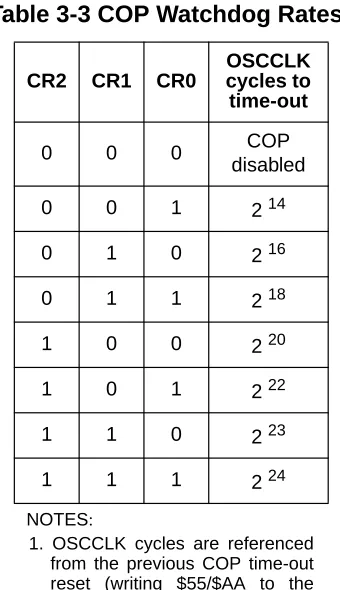
When set, a write to the ARMCOP register must occur in the last 25% of the selected period. A write during the first 75% of the selected period will reset the part. As long as all writes occur during this window, $55 can be written as often as desired. Once $AA is written after the $55, the time-out logic restarts and the user must wait until the next window before writing to ARMCOP. Table 3-3 shows the exact duration of this window for the seven available COP rates.
1000 (÷9) OFF* 9x210 9x211 9x212 9x213 9x214 9x215 9x216
1001 (÷10) OFF* 10x210 10x211 10x212 10x213 10x214 10x215 10x216
1010 (÷11) OFF* 11x210 11x211 11x212 11x213 11x214 11x215 11x216
1011 (÷12) OFF* 12x210 12x211 12x212 12x213 12x214 12x215 12x216
1100 (÷13) OFF* 13x210 13x211 13x212 13x213 13x214 13x215 13x216
1101 (÷14) OFF* 14x210 14x211 14x212 14x213 14x214 14x215 14x216
1110 (÷15) OFF* 15x210 15x211 15x212 15x213 15x214 15x215 15x216
1111 (÷16) OFF* 16x210 16x211 16x212 16x213 16x214 16x215 16x216
* Denotes the default value out of reset.This value should be used to disable the RTI to ensure future backwards com-patibility.
Address Offset: $_08
7 6 5 4 3 2 1 0
R
WCOP RSBCK 0 0 0 CR2 CR1 CR0
W
RESET: 0 0 0 0 0 0 0 0
= Unimplemented or Reserved
Table 3-2 RTI Frequency Divide Rates
0 = Normal COP operation
RSBCK — COP and RTI stop in Active BDM mode Bit
1 = Stops the COP and RTI counters whenever the part is in Active BDM mode. 0 = Allows the COP and RTI to keep running in Active BDM mode.
CR[2:0] — COP Watchdog Timer Rate select
These bits select the COP time-out rate (see Table 3-3). The COP time-out period is OSCCLK period divided by CR[2:0] value. Writing a nonzero value to CR[2:0] enables the COP counter and starts the time-out period. A COP counter time-out causes a system reset. This can be avoided by periodically (before time-out) reinitializing the COP counter via the ARMCOP register.
3.3.10 Reserved Register (FORBYP)
[image:25.595.212.382.213.508.2]NOTE: This reserved register is designed for factory test purposes only, and is not intended for general user access. Writing to this register when in special modes can alter the CRG’s functionality.
Table 3-3 COP Watchdog Rates1
NOTES:
1. OSCCLK cycles are referenced from the previous COP time-out reset (writing $55/$AA to the ARMCOP register)
CR2 CR1 CR0
OSCCLK cycles to time-out
0 0 0 COP
disabled
0 0 1 214
0 1 0 216
0 1 1 218
1 0 0 220
1 0 1 222
1 1 0 223
Figure 3-10 Reserved Register (FORBYP)
Read: always read $00 except in special modes
Write: only in special modes
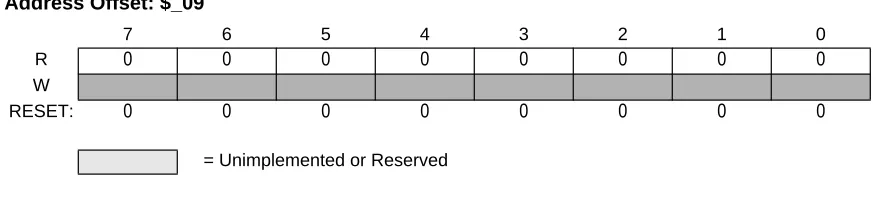
3.3.11 Reserved Register (CTCTL)
[image:26.595.79.517.76.175.2]NOTE: This reserved register is designed for factory test purposes only, and is not intended for general user access. Writing to this register when in special test modes can alter the CRG’s functionality.
Figure 3-11 Reserved Register (CTCTL)
Read: always read $80 except in special modes
Write: only in special modes
3.3.12 CRG COP Timer Arm/Reset Register (ARMCOP)
This register is used to restart the COP time-out period.
Address Offset: $_09
7 6 5 4 3 2 1 0
R 0 0 0 0 0 0 0 0
W
RESET: 0 0 0 0 0 0 0 0
= Unimplemented or Reserved
Address Offset: $_0A
7 6 5 4 3 2 1 0
R 1 0 0 0 0 0 0 0
W
RESET: 0 0 0 0 0 0 0 0
Figure 3-12 ARMCOP Register Diagram
Read: always reads $00
Write: anytime
When the COP is disabled (CR[2:0] = “000”) writing to this register has no effect.
When the COP is enabled by setting CR[2:0] nonzero, the following applies:
Writing any value other than $55 or $AA causes a COP reset. To restart the COP time-out period you must write $55 followed by a write of $AA. Other instructions may be executed between these writes but the sequence ($55, $AA) must be completed prior to COP end of time-out period to avoid a COP reset. Sequences of $55 writes or sequences of $AA writes are allowed. When the WCOP bit is set, $55 and $AA writes must be done in the last 25% of the selected time-out period; writing any value in the first 75% of the selected period will cause a COP reset.
Address Offset: $_0B
7 6 5 4 3 2 1 0
R 0 0 0 0 0 0 0 0
W Bit 7 Bit 6 Bit 5 Bit 4 Bit 3 Bit 2 Bit 1 Bit 0
RESET: 0 0 0 0 0 0 0 0
Section 4 Functional Description
4.1 General
This section gives detailed informations on the internal operation of the design.
4.2 Functional Blocks
4.2.1 Phase Locked Loop (PLL)
The PLL is used to run the MCU from a different time base than the incoming OSCCLK. For increased flexibility, OSCCLK can be divided in a range of 1 to 16 to generate the reference frequency. This offers a finer multiplication granularity. The PLL can multiply this reference clock by a multiple of 2, 4, 6,... 126,128 based on the SYNR register.
CAUTION: Although it is possible to set the two dividers to command a very high clock frequency, do not exceed the specified bus frequency limit for the MCU. If (PLLSEL=1), Bus Clock = PLLCLK / 2
The PLL is a frequency generator that operates in either acquisition mode or tracking mode, depending on the difference between the output frequency and the target frequency. The PLL can change between acquisition and tracking modes either automatically or manually.
The VCO has a minimum operating frequency, which corresponds to the self clock mode frequency fSCM.
PLLCLK 2 OSCCLK [SYNR+1] REFDV+1
[image:29.595.71.526.461.672.2]4.2.1.1 PLL Operation
The oscillator output clock signal (OSCCLK) is fed through the reference programmable divider and is divided in a range of 1 to 16 (REFDV+1) to output the REFERENCE clock. The VCO output clock, (PLLCLK) is fed back through the programmable loop divider and is divided in a range of 2 to 128 in increments of [2 x (SYNR +1)] to output the FEEDBACK clock. See Figure 4-1.
The phase detector then compares the FEEDBACK clock, with the REFERENCE clock. Correction pulses are generated based on the phase difference between the two signals. The loop filter then slightly alters the DC voltage on the external filter capacitor connected to XFC pin, based on the width and direction of the correction pulse. The filter can make fast or slow corrections depending on its mode, as described in the next subsection. The values of the external filter network and the reference frequency determine the speed of the corrections and the stability of the PLL.
4.2.1.2 Acquisition and Tracking Modes
The lock detector compares the frequencies of the FEEDBACK clock, and the REFERENCE clock. Therefore, the speed of the lock detector is directly proportional to the final reference frequency. The circuit determines the mode of the PLL and the lock condition based on this comparison.
The PLL filter can be manually or automatically configured into one of two possible operating modes:
• Acquisition mode
In acquisition mode, the filter can make large frequency corrections to the VCO. This mode is used at PLL start-up or when the PLL has suffered a severe noise hit and the VCO frequency is far off the desired frequency. When in acquisition mode, the TRACK status bit is cleared in the CRGFLG register.
• Tracking mode
In tracking mode, the filter makes only small corrections to the frequency of the VCO. PLL jitter is much lower in tracking mode, but the response to noise is also slower. The PLL enters tracking mode when the VCO frequency is nearly correct and the TRACK bit is set in the CRGFLG register.
The PLL can change the bandwidth or operational mode of the loop filter manually or automatically.
In automatic bandwidth control mode (AUTO = 1), the lock detector automatically switches between acquisition and tracking modes. Automatic bandwidth control mode also is used to determine when the PLL clock (PLLCLK) is safe to use as the source for the system and core clocks. If PLL LOCK interrupt requests are enabled, the software can wait for an interrupt request and then check the LOCK bit. If CPU interrupts are disabled, software can poll the LOCK bit continuously (during PLL start-up, usually) or at periodic intervals. In either case, only when the LOCK bit is set, is the PLLCLK clock safe to use as the source for the system and core clocks. If the PLL is selected as the source for the system and core clocks and the LOCK bit is clear, the PLL has suffered a severe noise hit and the software must take appropriate action, depending on the application.
The following conditions apply when the PLL is in automatic bandwidth control mode (AUTO=1):
• The TRACK bit is set when the VCO frequency is within a certain tolerance,∆trk, and is clear when the VCO frequency is out of a certain tolerance,∆unt.
• The LOCK bit is a read-only indicator of the locked state of the PLL.
• The LOCK bit is set when the VCO frequency is within a certain tolerance,∆Lock, and is cleared when the VCO frequency is out of a certain tolerance,∆unl.
• CPU interrupts can occur if enabled (LOCKIE = 1) when the lock condition changes, toggling the LOCK bit.
The PLL can also operate in manual mode (AUTO = 0). Manual mode is used by systems that do not require an indicator of the lock condition for proper operation. Such systems typically operate well below the maximum system frequency (fsys) and require fast start-up. The following conditions apply when in manual mode:
• ACQ is a writable control bit that controls the mode of the filter. Before turning on the PLL in manual mode, the ACQ bit should be asserted to configure the filter in acquisition mode.
• After turning on the PLL by setting the PLLON bit software must wait a given time (tacq) before entering tracking mode (ACQ = 0).
4.2.2 System Clocks Generator
Figure 4-2 System Clocks Generator
The clock generator creates the clocks used in the MCU (see Figure 4-2). The gating condition placed on top of the individual clock gates indicates the dependencies of different modes (STOP, WAIT) and the setting of the respective configuration bits.
The peripheral modules use the Bus Clock. Some peripheral modules also use the Oscillator Clock. The memory blocks use the Bus Clock. If the MCU enters Self Clock Mode (see 4.3.2 Self Clock Mode) Oscillator clock source is switched to PLLCLK running at its minimum frequency fSCM. The Bus Clock is used to generate the clock visible at the ECLK pin. The Core Clock signal is the clock for the CPU. The Core Clock is twice the Bus Clock as shown inFigure 4-3. But note that a CPU cycle corresponds to one Bus Clock.
PLL clock mode is selected with PLLSEL bit in the CLKSEL register. When selected, the PLL output clock drives SYSCLK for the main system including the CPU and peripherals. The PLL cannot be turned
OSCILLATOR PHASE LOCK LOOP EXTAL XTAL SYSCLK RTI OSCCLK PLLCLK CLOCK PHASE GENERATOR Bus Clock Clock Monitor 1 0
PLLSEL or SCM
÷2
Core Clock
COP
Oscillator
Oscillator
of 4 OSCCLK plus 4 PLLCLK cycles to make the transition. During the transition, all clocks freeze and CPU activity ceases.
Figure 4-3 Core Clock and Bus Clock relationship
4.2.3 Clock Monitor (CM)
If no OSCCLK edges are detected within a certain time, the clock monitor within the oscillator block generates a clock monitor fail event. The CRG then asserts self clock mode or generates a system reset depending on the state of SCME bit. If the clock monitor is disabled or the presence of clocks is detected no failure is indicated by the oscillator block.The clock monitor function is enabled/disabled by the CME control bit.
4.2.4 Clock Quality Checker
The clock monitor performs a coarse check on the incoming clock signal. The clock quality checker provides a more accurate check in addition to the clock monitor.
A clock quality check is triggered by any of the following events:
• Power on reset (POR)
• Low voltage reset (LVR)
• Wake-up from Full Stop Mode (exit full stop)
• Clock Monitor fail indication (CM fail)
A time window of 50000 VCO clock cycles1 is called check window.
A number greater equal than 4096 rising OSCCLK edges within a check window is called osc ok. Note that osc ok immediately terminates the current check window. SeeFigure 4-4 as an example.
NOTES:
CORE CLOCK:
Figure 4-4 Check Window Example
The Sequence for clock quality check is shown inFigure 4-5.
1 2 49999 50000
VCO clock
check window
1 2 3 4 5
4095 4096
3
OSCCLK
osc ok
check window
osc ok ?
SCM
active? Switch to OSCCLK
Exit SCM Clock OK
num=0
num<50 ? num=num+1
yes
no
yes
SCME=1 ? no
Enter SCM
SCM active?
yes Clock Monitor Reset
no
yes no
num=50
yes
no
POR exit full stop
CM fail
[image:34.595.60.510.322.644.2]NOTE: Remember that in parallel to additional actions caused by Self Clock Mode or Clock Monitor Reset1 handling the clock quality checker continues to check the OSCCLK signal.
NOTE: The Clock Quality Checker enables the PLL and the voltage regulator (VREG) anytime a clock check has to be performed. An ongoing clock quality check could also cause a running PLL (fSCM) and an active VREG during Pseudo-Stop Mode or Wait Mode
[image:35.595.109.473.243.482.2]4.2.5 Computer Operating Properly Watchdog (COP)
Figure 4-6 Clock Chain for COP
The COP (free running watchdog timer) enables the user to check that a program is running and sequencing properly. The COP is disabled out of reset. When the COP is being used, software is
responsible for keeping the COP from timing out. If the COP times out it is an indication that the software is no longer being executed in the intended sequence; thus a system reset is initiated (see 5.2.2 Computer
Operating Properly Watchdog (COP) Reset). The COP runs with a gated OSCCLK (see Figure 4-6 Clock Chain for COP). Three control bits in the COPCTL register allow selection of seven COP time-out
periods.
When COP is enabled, the program must write $55 and $AA (in this order) to the ARMCOP register during the selected time-out period. Once this is done, the COP time-out period is restarted. If the program
NOTES:
OSCCLK
CR[2:0]
COP TIMEOUT 0:0:0
0:0:1
0:1:0
0:1:1
1:0:0
1:0:1
1:1:0
1:1:1
÷ 4
÷ 4
÷ 2
÷ 4
÷ 2
÷ 16384
÷ 4
CR[2:0]
= Clock Gate
WAIT(COPWAI), STOP(PSTP,PCE),
COP enable
fails to do this and the COP times out, the part will reset. Also, if any value other than $55 or $AA is written, the part is immediately reset.
Windowed COP operation is enabled by setting WCOP in the COPCTL register. In this mode, writes to the ARMCOP register to clear the COP timer must occur in the last 25% of the selected time-out period. A premature write will immediately reset the part.
If PCE bit is set, the COP will continue to run in Pseudo-Stop Mode.
4.2.6 Real Time Interrupt (RTI)
The RTI can be used to generate a hardware interrupt at a fixed periodic rate. If enabled (by setting RTIE=1), this interrupt will occur at the rate selected by the RTICTL register. The RTI runs with a gated OSCCLK (see Figure 4-7 Clock Chain for RTI). At the end of the RTI time-out period the RTIF flag is set to one and a new RTI time-out period starts immediately.
A write to the RTICTL register restarts the RTI time-out period.
If the PRE bit is set, the RTI will continue to run in Pseudo-Stop Mode.
.
OSCCLK
RTR[6:4] 0:0:0
0:0:1
0:1:0
0:1:1
1:0:0
1:0:1
1:1:0
1:1:1
÷ 2
÷ 2
÷ 2
÷ 2
÷ 2
÷ 2
COUNTER (RTR[3:0]) 4-BIT MODULUS
÷ 1024
RTI TIMEOUT = Clock Gate
WAIT(RTIWAI), STOP(PSTP,PRE),
RTI enable
[image:36.595.118.485.339.689.2]4.3 Operation Modes
4.3.1 Normal Mode
The CRG block behaves as described within this specification in all normal modes.
4.3.2 Self Clock Mode
The VCO has a minimum operating frequency, fSCM. If the external clock frequency is not available due to a failure or due to long crystal start-up time, the Bus Clock and the Core Clock are derived from the VCO running at minimum operating frequency; this mode of operation is called Self Clock Mode. This requires CME=1 and SCME=1. If the MCU was clocked by the PLL clock prior to entering Self Clock Mode, the PLLSEL bit will be cleared. If the external clock signal has stabilized again, the CRG will automatically select OSCCLK to be the system clock and return to normal mode. See 4.2.4 Clock Quality
Checker for more information on entering and leaving Self Clock Mode.
NOTE: In order to detect a potential clock loss the CME bit should be always enabled (CME=1)!
If CME bit is disabled and the MCU is configured to run on PLL clock (PLLCLK), a loss of external clock (OSCCLK) will not be detected and will cause the system clock to drift towards the VCO’s minimum frequency fSCM. As soon as the external clock is available again the system clock ramps up to its PLL target frequency. If the MCU is running on external clock any loss of clock will cause the system to go static.
4.4 Low Power Options
This section summarizes the low power options available in the CRG.
4.4.1 Run Mode
The RTI can be stopped by setting the associated rate select bits to zero.
The COP can be stopped by setting the associated rate select bits to zero.
4.4.2 Wait Mode
The WAI instruction puts the MCU in a low power consumption stand-by mode depending on setting of the individual bits in the CLKSEL register. All individual Wait Mode configuration bits can be
Mode.Table 4-1lists the individual configuration bits and the parts of the MCU that are affected in Wait Mode.
After executing the WAI instruction the core requests the CRG to switch MCU into Wait Mode. The CRG then checks whether the PLLWAI, CWAI and SYSWAI bits are asserted (see Figure 4-8 Wait Mode
Entry/Exit Sequence). Depending on the configuration the CRG switches the system and core clocks to
[image:38.595.119.478.93.222.2]OSCCLK by clearing the PLLSEL bit, disables the PLL, disables the core clocks and finally disables the remaining system clocks. As soon as all clocks are switched off Wait Mode is active.
Table 4-1 MCU configuration during Wait Mode
PLLWAI CWAI SYSWAI RTIWAI COPWAI ROAWAI
PLL stopped - - - -
-Core - stopped stopped - -
-System - - stopped - -
-RTI - - - stopped -
-COP - - - - stopped
-Oscillator - - - reduced1
NOTES:
Figure 4-8 Wait Mode Entry/Exit Sequence
There are five different scenarios for the CRG to restart the MCU from Wait Mode:
• External Reset
Enter Wait Mode PLLWAI=1
?
Exit Wait w. CMRESET Exit Wait w. ext.RESET Exit Wait Mode Enter SCM Exit Wait Mode Core req’s Wait Mode. CWAI or SYSWAI=1 ? SYSWAI=1 ? Clear PLLSEL, Disable PLL Disable core clocks Disable
system clocks CME=1
? INT ? CM fail ? SCME=1 ? SCMIE=1 ? Continue w. normal OP no no no no no no no yes yes yes yes yes no yes yes yes
Wait Mode left due to external reset
Generate SCM Interrupt
(Wakeup from Wait) SCM=1
?
Enter SCM
no
• Clock Monitor Reset
• COP Reset
• Self Clock Mode Interrupt
• Real Time Interrupt (RTI)
If the MCU gets an external reset during Wait Mode active, the CRG asynchronously restores all
configuration bits in the register space to its default settings and starts the reset generator. After completing the reset sequence processing begins by fetching the normal reset vector. Wait Mode is left and the MCU is in Run Mode again.
If the clock monitor is enabled (CME=1) the MCU is able to leave Wait-Mode when loss of
oscillator/external clock is detected by a clock monitor fail. If the SCME bit is not asserted the CRG generates a clock monitor fail reset (CMRESET). The CRG’s behavior for CMRESET is the same compared to external reset, but another reset vector is fetched after completion of the reset sequence. If the SCME bit is asserted the CRG generates a SCM interrupt if enabled (SCMIE=1). After generating the interrupt the CRG enters Self-Clock Mode and starts the clock quality checker (see 4.2.4 Clock Quality
Checker). Then the MCU continues with normal operation.If the SCM interrupt is blocked by SCMIE=0,
the SCMIF flag will be asserted and clock quality checks will be performed but the MCU will not wake-up from Wait-Mode.
If any other interrupt source (e.g. RTI) triggers exit from Wait Mode the MCU immediately continues with normal operation. If the PLL has been powered-down during Wait-Mode the PLLSEL bit is cleared and the MCU runs on OSCCLK after leaving Wait-Mode. The software must manually set the PLLSEL bit again, in order to switch system and core clocks to the PLLCLK.
If Wait Mode is entered from Self-Clock Mode the CRG will continue to check the clock quality until clock check is successful. The PLL and voltage regulator (VREG) will remain enabled.
Table 4-2 summarizes the outcome of a clock loss while in Wait Mode.
Table 4-2 Outcome of Clock Loss in Wait Mode
CME SCME SCMIE CRG Actions
0 X X Clock failure -->
No action, clock loss not detected. 1 0 X Clock failure -->
1 1 0
Clock failure -->
Scenario 1: OSCCLK recovers prior to exiting Wait Mode. – MCU remains in Wait Mode,
– VREG enabled, – PLL enabled, – SCM activated,
– Start Clock Quality Check, – Set SCMIF interrupt flag.
Some time later OSCCLK recovers. – CM no longer indicates a failure,
– 4096 OSCCLK cycles later Clock Quality Check indicates clock o.k., – SCM deactivated,
– PLL disabled depending on PLLWAI,
– VREG remains enabled (never gets disabled in Wait Mode). – MCU remains in Wait Mode.
Some time later either a wakeup interrupt occurs (no SCM interrupt) – Exit Wait Mode using OSCCLK as system clock (SYSCLK), – Continue normal operation.
or an External Reset is applied.
– Exit Wait Mode using OSCCLK as system clock, – Start reset sequence.
Scenario 2: OSCCLK does not recover prior to exiting Wait Mode. – MCU remains in Wait Mode,
– VREG enabled, – PLL enabled, – SCM activated,
– Start Clock Quality Check, – Set SCMIF interrupt flag,
– Keep performing Clock Quality Checks (could continue infinitely) while in Wait Mode.
Some time later either a wakeup interrupt occurs (no SCM interrupt) – Exit Wait Mode in SCM using PLL clock (fSCM) as system clock, – Continue to perform additional Clock Quality Checks until OSCCLK is o.k. again.
or an External RESET is applied.
– Exit Wait Mode in SCM using PLL clock (fSCM) as system clock,
– Start reset sequence,
[image:41.595.51.544.64.657.2]– Continue to perform additional Clock Quality Checks until OSCCLK is o.k.again.
Table 4-2 Outcome of Clock Loss in Wait Mode
4.4.3 CPU Stop Mode
All clocks are stopped in STOP mode, dependent of the setting of the PCE, PRE and PSTP bit. The oscillator is disabled in STOP mode unless the PSTP bit is set. All counters and dividers remain frozen but do not initialize. If the PRE or PCE bits are set, the RTI or COP continues to run in Pseudo-Stop Mode. In addition to disabling system and core clocks the CRG requests other functional units of the MCU (e.g. voltage-regulator) to enter their individual powersaving modes (if available). This is the main difference between Pseudo-Stop Mode and Wait Mode.
After executing the STOP instruction the core requests the CRG to switch the MCU into Stop Mode. If the PLLSEL bit is still set when entering Stop-Mode, the CRG will switch the system and core clocks to OSCCLK by clearing the PLLSEL bit. Then the CRG disables the PLL, disables the core clock and finally disables the remaining system clocks. As soon as all clocks are switched off Stop-Mode is active.
If Pseudo-Stop Mode (PSTP=1) is entered from Self-Clock Mode the CRG will continue to check the clock quality until clock check is successful. The PLL and the voltage regulator (VREG) will remain enabled. If Full-Stop Mode (PSTP=0) is entered from Self-Clock Mode an ongoing clock quality check will be stopped. A complete timeout window check will be started when Stop Mode is left again.
Wake-up from Stop-Mode also depends on the setting of the PSTP bit.
1 1 1
Clock failure --> – VREG enabled, – PLL enabled, – SCM activated,
– Start Clock Quality Check, – SCMIF set.
SCMIF generates Self Clock Mode wakeup interrupt.
[image:42.595.56.542.70.237.2]– Exit Wait Mode in SCM using PLL clock (fSCM) as system clock, – Continue to perform a additional Clock Quality Checks until OSCCLK is o.k. again.
Table 4-2 Outcome of Clock Loss in Wait Mode
Figure 4-9 Stop Mode Entry/Exit Sequence 4.4.3.1 Wake-up from Pseudo-Stop (PSTP=1)
Wake-up from Pseudo-Stop is the same as wake-up from Wait-Mode. There are also three different scenarios for the CRG to restart the MCU from Pseudo-Stop Mode:
Exit Stop w. CMRESET Exit Stop Mode Enter SCM Exit Stop Mode Core req’s Stop Mode. Clear PLLSEL, Disable PLL CME=1 ? INT ? CM fail ? SCME=1 ? SCMIE=1 ? Continue w. normal OP no no no no yes yes yes yes yes Generate SCM Interrupt (Wakeup from Stop)
Enter Stop Mode Exit Stop w.
ext.RESET
Wait Mode left due to external reset
Clock OK ? SCME=1 ? Enter SCM yes no yes
• External Reset
• Clock Monitor Fail
• Wake-up Interrupt
If the MCU gets an external reset during Pseudo-Stop Mode active, the CRG asynchronously restores all configuration bits in the register space to its default settings and starts the reset generator. After completing the reset sequence processing begins by fetching the normal reset vector. Pseudo-Stop Mode is left and the MCU is in Run Mode again.
If the clock monitor is enabled (CME=1) the MCU is able to leave Pseudo-Stop Mode when loss of oscillator/external clock is detected by a clock monitor fail. If the SCME bit is not asserted the CRG generates a clock monitor fail reset (CMRESET). The CRG’s behavior for CMRESET is the same compared to external reset, but another reset vector is fetched after completion of the reset sequence. If the SCME bit is asserted the CRG generates a SCM interrupt if enabled (SCMIE=1). After generating the interrupt the CRG enters Self-Clock Mode and starts the clock quality checker (see 4.2.4 Clock Quality
Checker). Then the MCU continues with normal operation. If the SCM interrupt is blocked by SCMIE=0,
the SCMIF flag will be asserted but the CRG will not wake-up from Pseudo-Stop Mode.
If any other interrupt source (e.g. RTI) triggers exit from Pseudo-Stop Mode the MCU immediately continues with normal operation. Because the PLL has been powered-down during Stop-Mode the PLLSEL bit is cleared and the MCU runs on OSCCLK after leaving Stop-Mode. The software must set the PLLSEL bit again, in order to switch system and core clocks to the PLLCLK.
Table 4-3 summarizes the outcome of a clock loss while in Pseudo-Stop Mode.
Table 4-3 Outcome of Clock Loss in Pseudo-Stop Mode
CME SCME SCMIE CRG Actions
0 X X Clock failure -->
No action, clock loss not detected. 1 0 X Clock failure -->
1 1 0
Clock Monitor failure -->
Scenario 1: OSCCLK recovers prior to exiting Pseudo-Stop Mode. – MCU remains in Pseudo-Stop Mode,
– VREG enabled, – PLL enabled, – SCM activated,
– Start Clock Quality Check, – Set SCMIF interrupt flag.
Some time later OSCCLK recovers. – CM no longer indicates a failure,
– 4096 OSCCLK cycles later Clock Quality Check indicates clock o.k., – SCM deactivated,
– PLL disabled, – VREG disabled.
– MCU remains in Pseudo-Stop Mode.
Some time later either a wakeup interrupt occurs (no SCM interrupt) – Exit Pseudo-Stop Mode using OSCCLK as system clock (SYSCLK), – Continue normal operation.
or an External Reset is applied.
– Exit Pseudo-Stop Mode using OSCCLK as system clock, – Start reset sequence.
Scenario 2: OSCCLK does not recover prior to exiting Pseudo-Stop Mode. – MCU remains in Pseudo-Stop Mode,
– VREG enabled, – PLL enabled, – SCM activated,
– Start Clock Quality Check, – Set SCMIF interrupt flag,
– Keep performing Clock Quality Checks (could continue infinitely) while in Pseudo-Stop Mode.
Some time later either a wakeup interrupt occurs (no SCM interrupt) – Exit Pseudo-Stop Mode in SCM using PLL clock (fSCM) as system clock – Continue to perform additional Clock Quality Checks until OSCCLK is o.k. again.
or an External RESET is applied.
– Exit Pseudo-Stop Mode in SCM using PLL clock (fSCM) as system clock
– Start reset sequence,
[image:45.595.62.538.56.713.2]– Continue to perform additional Clock Quality Checks until OSCCLK is o.k.again.
Table 4-3 Outcome of Clock Loss in Pseudo-Stop Mode
4.4.3.2 Wake-up from Full Stop (PSTP=0)
The MCU requires an external interrupt or an external reset in order to wake-up from Stop-Mode.
If the MCU gets an external reset during Full Stop Mode active, the CRG asynchronously restores all configuration bits in the register space to its default settings and will perform a maximum of 50 clock check_windows(see 4.2.4 Clock Quality Checker). After completing the clock quality check the CRG starts the reset generator. After completing the reset sequence processing begins by fetching the normal reset vector. Full Stop-Mode is left and the MCU is in Run Mode again.
If the MCU is woken-up by an interrupt, the CRG will also perform a maximum of 50 clock
check_windows (see 4.2.4 Clock Quality Checker). If the clock quality check is successful, the CRG will release all system and core clocks and will continue with normal operation. If all clock checks within the Timeout-Window are failing, the CRG will switch to Self-Clock Mode or generate a clock monitor reset (CMRESET) depending on the setting of the SCME bit.
Because the PLL has been powered-down during Stop-Mode the PLLSEL bit is cleared and the MCU runs on OSCCLK after leaving Stop-Mode. The software must manually set the PLLSEL bit again, in order to switch system and core clocks to the PLLCLK.
NOTE: In Full Stop Mode the clock monitor is disabled and any loss of clock will not be detected.
1 1 1
Clock failure --> – VREG enabled, – PLL enabled, – SCM activated,
– Start Clock Quality Check, – SCMIF set.
SCMIF generates Self Clock Mode wakeup interrupt.
[image:46.595.53.540.63.240.2]– Exit Pseudo-Stop Mode in SCM using PLL clock (fSCM) as system clock, – Continue to perform a additional Clock Quality Checks until OSCCLK is o.k. again.
Table 4-3 Outcome of Clock Loss in Pseudo-Stop Mode
Section 5 Resets
5.1 General
This section describes how to reset the CRG and how the CRG itself controls the reset of the MCU. It explains all special reset requirements. Since the reset generator for the MCU is part of the CRG this section also describes all automatic actions that occur during or as a result of individual reset conditions. The reset values of registers and signals are provided in Section 3 Memory Map and Registers. All reset sources are listed inTable 5-1. Refer to MCU specification for related vector addresses and priorities.
5.2 Description of Reset Operation
The reset sequence is initiated by any of the following events:
• Low level is detected at the RESET pin (External Reset).
• Power on is detected.
• Low voltage is detected.
• COP watchdog times out.
• Clock monitor failure is detected and Self-Clock Mode was disabled (SCME=0).
Upon detection of any reset event, an internal circuit drives the RESET pin low for 128 SYSCLK cycles (seeFigure 5-1). Since entry into reset is asynchronous it does not require a running SYSCLK. However, the internal reset circuit of the CRG cannot sequence out of current reset condition without a running SYSCLK. The number of 128 SYSCLK cycles might be increased by n=3 to 6 additional SYSCLK cycles depending on the internal synchronization latency. After 128+n SYSCLK cycles the RESET pin is released. The reset generator of the CRG waits for additional 64 SYSCLK cycles and then samples the RESET pin to determine the originating source.Table 5-2 shows which vector will be fetched.
Table 5-1Reset Summary
Reset Source Local Enable
Power on Reset None
Low Voltage Reset None
External Reset None
Clock Monitor Reset PLLCTL (CME=1, SCME=0) COP Watchdog Reset COPCTL (CR[2:0] nonzero)
Table 5-2 Reset Vector Selection sampled RESET pin
(64 cycles after release)
Clock Monitor Reset pending
COP Reset
pending Vector fetch
1 0 0 POR / LVR / External Reset
1 1 X Clock Monitor Reset
NOTE: External circuitry connected to the RESET pin should not include a large
capacitance that would interfere with the ability of this signal to rise to a valid logic one within 64 SYSCLK cycles after the low drive is released.
The internal reset of the MCU remains asserted while the reset generator completes the 192 SYSCLK long reset sequence. The reset generator circuitry always makes sure the internal reset is deasserted
[image:48.595.102.490.68.139.2]synchronously after completion of the 192 SYSCLK cycles. In case the RESET pin is externally driven low for more than these 192 SYSCLK cycles (External Reset), the internal reset remains asserted too.
Figure 5-1 RESET Timing
5.2.1 Clock Monitor Reset
The CRG generates a Clock Monitor Reset in case all of the following conditions are true:
• Clock monitor is enabled (CME=1)
• Loss of clock is detected
• Self-Clock Mode is disabled (SCME=0).
The reset event asynchronously forces the configuration registers to their default settings (see Section
Section 3 Memory Map and Registers). In detail the CME and the SCME are reset to logical ‘1’ (which
0 X X POR / LVR / External Reset
[image:48.595.114.505.266.485.2]with rise of RESET pin
Table 5-2 Reset Vector Selection sampled RESET pin
(64 cycles after release)
Clock Monitor Reset pending
COP Reset
pending Vector fetch
) ( ) (
)
( )
SYSCLK
128+n cycles 64 cycles
with n being min 3 / max 6 cycles depending on internal synchronization delay
CRG drives RESET pin low
immediately enters Self Clock Mode and starts its internal reset sequence. In parallel the clock quality check starts. As soon as clock quality check indicates a valid Oscillator Clock the CRG switches to OSCCLK and leaves Self Clock Mode. Since the clock quality checker is running in parallel to the reset generator, the CRG may leave Self Clock Mode while still completing the internal reset sequence. When the reset sequence is finished the CRG checks the internally latched state of the clock monitor fail circuit. If a clock monitor fail is indicated processing begins by fetching the Clock Monitor Reset vector.
5.2.2 Computer Operating Properly Watchdog (COP) Reset
When COP is enabled, the CRG expects sequential write of $55 and $AA (in this order) to the ARMCOP register during the selected time-out period. Once this is done, the COP time-out period restarts. If the program fails to do this the CRG will generate a reset. Also, if any value other than $55 or $AA is written, the CRG immediately generates a reset. In case windowed COP operation is enabled writes ($55 or $AA) to the ARMCOP register must occur in the last 25% of the selected time-out period. A premature write the CRG will immediately generate a reset.
As soon as the reset sequence is completed the reset generator checks the reset condition. If no clock monitor failure is indicated and the latched state of the COP timeout is true, processing begins by fetching the COP vector.
5.2.3 Power On Reset, Low Voltage Reset
[image:49.595.137.459.501.645.2]The on-chip voltage regulator detects when VDD to the MCU has reached a certain level and asserts power on reset or low voltage reset or both. As soon as a power on reset or low voltage reset is triggered the CRG performs a quality check on the incoming clock signal. As soon as clock quality check indicates a valid Oscillator Clock signal the reset sequence starts using the Oscillator clock. If after 50 check windows the clock quality check indicated a non-valid Oscillator Clock the reset sequence starts using Self-Clock Mode.
Figure 5-2 and Figure 5-3 show the power-up sequence for cases when the RESET pin is tied to VDD
and when the RESET pin is held low.
Figure 5-2 RESET pin tied to VDD (by a pull-up resistor)
RESET
Internal POR
128 SYSCLK
64 SYSCLK Internal RESET
Clock Quality Check (no Self-Clock Mode)
Figure 5-3 RESET pin held low externally
Clock Quality Check RESET
Internal POR
Internal RESET
128 SYSCLK
64 SYSCLK (no Self Clock Mode)
) (
) (
Section 6 Interrupts
6.1 General
The interrupts/reset vectors requested by the CRG are listed inTable 6-1. Refer to MCU specification for related vector addresses and priorities.
6.2 Description of Interrupt Operation
6.2.1 Real Time Interrupt
The CRG generates a real time interrupt when the selected interrupt time period elapses. RTI interrupts are locally disabled by setting the RTIE bit to zero. The real time interrupt flag (RTIF) is set to1 when a timeout occurs, and is cleared to 0 by writing a 1 to the RTIF bit.
The RTI continues to run during Pseudo Stop Mode if the PRE bit is set to 1. This feature can be used for periodic wakeup from Pseudo Stop if the RTI interrupt is enabled.
6.2.2 PLL Lock Interrupt
The CRG generates a PLL Lock interrupt when the LOCK condition of the PLL has changed, either from a locked state to an unlocked state or vice versa. Lock interrupts are locally disabled by setting the LOCKIE bit to zero. The PLL Lock interrupt flag (LOCKIF) is set to1 when the LOCK condition has changed, and is cleared to 0 by writing a 1 to the LOCKIF bit.
6.2.3 Self Clock Mode Interrupt
[image:51.595.156.438.175.280.2]The CRG generates a Self Clock Mode interrupt when the SCM condition of the system has changed, either entered or exited Self Clock Mode. SCM conditions can only change if the Self Clock Mode enable bit (SCME) is set to 1. SCM conditions are caused by a failing clock quality check after power on reset (POR) or low voltage reset (LVR) or recovery from Full Stop Mode (PSTP=0) or Clock Monitor failure. For details on the clock quality check refer to 4.2.4 Clock Quality Checker. If the clock monitor is enabled (CME=1) a loss of external clock will also cause a SCM condition (SCME=1).
Table 6-1 CRG Interrupt Vectors Interrupt Source CCR
Mask Local Enable
Real time interrupt I bit CRGINT (RTIE) LOCK interrupt I bit CRGINT (LOCKIE)
FINAL PAGE OF
54