JIREN HIGH SCHOOL MANAGEMENT SYSTEM
Teka Bogale
ARTICLE INFO ABSTRACT
This software project will help us, to automate the existing manual system of Jiren senior secondary school. To automate the system of the school we use object oriented software engineering methodologies such as use case model, class diagram and
requirements for automating the system are collected by using techniques like interview, observation and document review. The objective of the project is to automate the manual system of Jiren senior secondary school
customers.
Copyright©2017, Teka Bogale and Aknaw Hailemariam
permits unrestricted use, distribution, and reproduction in any medium, provided the original work is properly cited.
1. INTRODUCTION
1.1 Background of the Study
Jiren Senior Secondary school is one of the high schools found in Oromia regional state, Jimma town, south western Ethiopia. It was established by the year 1980 E.C / 1988 G.C. school had total 2648 numbers of students who were learning in the academic year 2008 E.C. Education is central to the development. It is one of the most powerful instr
reducing poverty and inequality and lays a foundation for sustainable economic growth. With this aim currently our government has given special emphasis to the educational sector and school improvement activities such as continuous professional development for teachers, training and upgrading teachers and capacitating schools with manpower and materials are among the major actions which have been taken in both primary and secondary schools. In order to facilitate and simplify these actions one of the major tool is to have automated school management system.
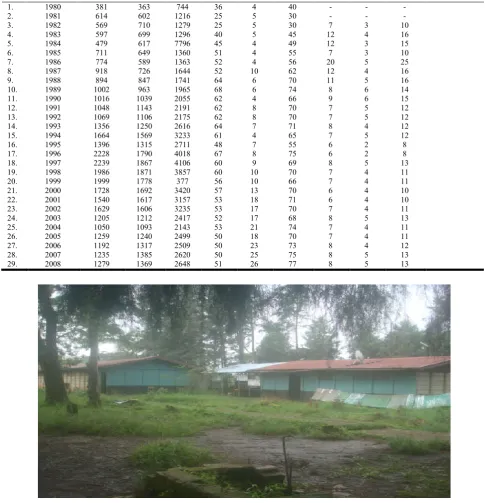
As we observe the above table the number of students is increasing at an alarming rate from year to year. In addition the school is keeping the record of all these students by using the old file system which is entirely paper based. So to provide quality service to the customers (students) it is advisable if we
*Corresponding author: Aknaw Hailemariam,
Jimma University, Ethiopia.
ISSN: 0975-833X
Article History:
Received 18th February, 2017 Received in revised form 07th March, 2017 Accepted 26th April, 2017 Published online 19th May,2017
Citation: Teka Bogale and Aknaw Hailemariam, 2017. 50073-50090.
Key words:
Use case model, Class diagram, Sequence diagrams, ER diagram, RAD, Deployment diagram.
RESEARCH ARTICLE
JIREN HIGH SCHOOL MANAGEMENT SYSTEM
Teka Bogale and *Aknaw Hailemariam
Jimma University, Ethiopia
ABSTRACT
This software project will help us, to automate the existing manual system of Jiren senior secondary school. To automate the system of the school we use object oriented software engineering methodologies such as use case model, class diagram and sequence diagrams and Er
requirements for automating the system are collected by using techniques like interview, observation and document review. The objective of the project is to automate the manual system of Jiren senior secondary school which is very much useful to provide fast, realiable and quality service to the customers.
Teka Bogale and Aknaw Hailemariam. This is an open access article distributed under the Creative Commons Att use, distribution, and reproduction in any medium, provided the original work is properly cited.
Jiren Senior Secondary school is one of the high schools found town, south western Ethiopia. It was established by the year 1980 E.C / 1988 G.C. The school had total 2648 numbers of students who were learning Education is central to the development. It is one of the most powerful instrument for reducing poverty and inequality and lays a foundation for sustainable economic growth. With this aim currently our government has given special emphasis to the educational sector and school improvement activities such as continuous evelopment for teachers, training and upgrading teachers and capacitating schools with manpower and materials are among the major actions which have been taken in both primary and secondary schools. In order to facilitate the major tool is to have
As we observe the above table the number of students is increasing at an alarming rate from year to year. In addition the school is keeping the record of all these students by using the e system which is entirely paper based. So to provide quality service to the customers (students) it is advisable if we
automate the registration, Exam Administration ,Time table and the record keeping system of the school.
Summary table
Year Total number students 1980-2008 E.C 72391
For all these students their file is kept with old file system; which is very much difficult to retrieve the documents, especially for the earlier students. More over the documents are exposed for damage such as fire, theft
1.2 Statement of the problem
1. In the existing system, it is very much difficult to undertake the registration of students.
2. Since the school is providing education to many students, preparing schedule for class as well as exam Administration is very much difficult.
3. Transcripts of students are prepared manually by the record officer; therefore it will lead to delay and corruption.
4. In the existing system retrieval of students information is very difficult. Because the current system has no well organized database system.
5. Loss of historical data by disasters like fire, flood etc, risky for the existing system.
International Journal of Current Research Vol. 9, Issue, 05, pp.50073-50090, May, 2017
INTERNATIONAL
OF CURRENT RESEARCH
Teka Bogale and Aknaw Hailemariam, 2017. “JIREN high school management system”, International Journal of Current Research
This software project will help us, to automate the existing manual system of Jiren senior secondary school. To automate the system of the school we use object oriented software engineering sequence diagrams and Er-diagram. The requirements for automating the system are collected by using techniques like interview, observation and document review. The objective of the project is to automate the manual system of Jiren senior which is very much useful to provide fast, realiable and quality service to the
is an open access article distributed under the Creative Commons Attribution License, which
the registration, Exam Administration ,Time table and the record keeping system of the school.
Total number students Remark
Since establishment
For all these students their file is kept with old file system; which is very much difficult to retrieve the documents, especially for the earlier students. More over the documents
for damage such as fire, theft and flood.
problem
In the existing system, it is very much difficult to undertake the registration of students.
Since the school is providing education to many students, preparing schedule for class as well as exam Administration is very much difficult.
Transcripts of students are prepared manually by the record officer; therefore it will lead to delay and
In the existing system retrieval of students information is very difficult. Because the current system has no well
em.
Loss of historical data by disasters like fire, flood etc, risky for the existing system.
INTERNATIONAL JOURNAL OF CURRENT RESEARCH
1.3 Objectives
1.3.1 General objective
To automate the Jiren senior secondary school management System.
1.3.2 Specific objective
To automate the student registration system of the School.
To manage & automate the Exam Administration and class schedule system of the School.
To automate the record keeping system of the School.
To reduce retrieval time of data
To reduce overloading of job from the employee of the school
1.4 Requirement gathering methods
[image:2.595.59.537.73.617.2]For this project the requirements are collected by using observation, document review and interview.
Table 1. Number of students, teachers and administrative staff from 1980-2008
No Year
Students Teachers Admin staff Remark
Male Femal
e
To
tal
Male Femal
e
To
tal
Male Femal
e
To
tal
1. 1980 381 363 744 36 4 40 - - -
2. 1981 614 602 1216 25 5 30 - - -
3. 1982 569 710 1279 25 5 30 7 3 10
4. 1983 597 699 1296 40 5 45 12 4 16
5. 1984 479 617 7796 45 4 49 12 3 15
6. 1985 711 649 1360 51 4 55 7 3 10
7. 1986 774 589 1363 52 4 56 20 5 25
8. 1987 918 726 1644 52 10 62 12 4 16
9. 1988 894 847 1741 64 6 70 11 5 16
10. 1989 1002 963 1965 68 6 74 8 6 14
11. 1990 1016 1039 2055 62 4 66 9 6 15
12. 1991 1048 1143 2191 62 8 70 7 5 12
13. 1992 1069 1106 2175 62 8 70 7 5 12
14. 1993 1356 1250 2616 64 7 71 8 4 12
15. 1994 1664 1569 3233 61 4 65 7 5 12
16. 1995 1396 1315 2711 48 7 55 6 2 8
17. 1996 2228 1790 4018 67 8 75 6 2 8
18. 1997 2239 1867 4106 60 9 69 8 5 13
19. 1998 1986 1871 3857 60 10 70 7 4 11
20. 1999 1999 1778 377 56 10 66 7 4 11
21. 2000 1728 1692 3420 57 13 70 6 4 10
22. 2001 1540 1617 3157 53 18 71 6 4 10
23. 2002 1629 1606 3235 53 17 70 7 4 11
24. 2003 1205 1212 2417 52 17 68 8 5 13
25. 2004 1050 1093 2143 53 21 74 7 4 11
26. 2005 1259 1240 2499 50 18 70 7 4 11
27. 2006 1192 1317 2509 50 23 73 8 4 12
28. 2007 1235 1385 2620 50 25 75 8 5 13
[image:2.595.53.539.117.621.2]29. 2008 1279 1369 2648 51 26 77 8 5 13
1.5 Scope
The scope of this project is automating the registration, record keeping, transcript, report card and class & exam schedule of Jiren senior secondary school.
1.6 Limitation
The system do not automate the library of the school
The system needs consistent internet service
1.7 Time table
Activity Duration
From To
Requirement gathering 05/09/2016 G.C 10/12/2016 G.C RAD 11/01/2017 G.C 18/08/2016 G.C
2. The Proposed system
2.1 Overview
This project is conducted to automate student registration, record keeping, transcript, report card and class & exam
administration schedule system of Jiren senior secondary school. The student can login to register at the terminal according to the school schedule. The registration form has to be filled by the student online. The original document and registration fee receipt is checked and verified, then confirmed by the officer. The application will perform registration and store student’s information in a database. This will help to provide better information and quality service for the users of the system.
2.1.1 System Specification
Hardware Requirements
Pentium-IV (Processor).
256 MB Ram
512 KB Cache Memory
Hard disk 10 GB
Microsoft Compatible 101 or more Key Board
Software Requirements
Web-Technology: PHP
Front-End: HTML,CSS,JAVASCRIPT
Back-End: MySQL
Web Server: Apache SERVER.
2.2 Functional Requirements
The system registers a student
The system accepts and stores as an input the student name, id number, address, sex and grade level.
The system lets the Students to upload their scanned documents.
The system confirms the registration success.
The system should store the result that the student scored in each subject.
The system computes the result and produces the report card and transcript as an output; at the end of the year (for card) & after completing grade 10 (for transcript)
The system produce schedule for the courses.
2.3 Non Functional Requirements
The system should be reliable, Available as well as robust.
The system should provide room for modification if necessary.
The system interface should be attractive and not over animated.
The system should provide error handling mechanism.
Security requirements are important factors in this system as classified data will be stored in the database.
2.4 Constraints (domain requirements)
The implementation language must be HTML/CSS & JAVASCRIPT
Availability of consistent, quality and reliable internet service
Cost to replace the existing system by a new automated system
3. The System Models
3.1 Identifying the Actors of the System
The actors of this System are students, teachers, record officer, unit leader, home room teacher, parent and director of the school.
Actors
Student: person who register to attend grade 9 and 10 education.
Teacher: person who teach courses.
Record officer: person who maintains student registration system and Responsible to manage all important records of the school.
Director: person who administer the school.
Unit Leader: a person who generates and monitors time table.
Home room teacher: a responsible teacher to a specific class to take an Attendance and receive results from subject teachers and Arrange and send it to the record officer.
Parent: is father, mother or any other relative to the student
3.2 Use Case Model
The use case model is the set of all use cases. It is a complete description of the functionality of the system and its environment. It is a description of sequence of actions, including variants, that a system performs that yields an observable result of value of an actor. The use case diagram helps us for determining requirements, communicating with the clients and to generate test cases.
An actor and Use case are represented respectively by:
3.2.1 Use Case description
Name Give Courses Actor Teacher Description Teaches courses
Precondition The Teacher must be a graduate of a given subject matter and must be staff of the school
Flow of Events
1. Receives schedule of time and class from Unit Leaders 2. Deliver courses to students
3. Use Case ends
Post condition students are ready for exam
Name ViewSchedule Actor Teacher
Description Know Schedule for teaching lessons and exams
Precondition The Unit leader must generate the time schedule
Flow of Events
1. View schedule of time and class from Unit Leaders
2. Use Case ends
Post condition teacher is ready for work according to the schedule
Name Generates Exam Actor Teacher
Description prepare tests, mid and final exams
Precondition Tests are given to student who attended the subject and exams must be according to the
Schedule of the school
Flow of events 1.Prepare exams 2.Evaluate exams
3.Gives the score to the students and home room teacher 4.Use case ends
Alternative if the student didn’t take subjects the system will notify
Name Verify Student Actor Record Officer
Description Every Newly coming and existing student are registered
Precondition The student is eligible
Flow of Events
1. Student wants to be registered as a student of the school 2. Registration form is given to the student
3. The record officer verifies that the student is eligible 4. The student completes the registration form that
contains student’s full name, address, parent name, emergency person names and addresses and other detail information.
5. Record officer of the school checks whether the contents of the registration form is properly completed and checks it with the original document
6. System registers 7. Use case ends
Post Condition Student registered
Alternative if the student didn’t fill the requirements the system will notify or reject
Name Update Records
Actor Record Officer
Description scores are recorded for all subjects every semester
Precondition Home room teacher accepts scores from subject teachers and give to Record officer
Flow of Events
1. Teachers give scores to home room teacher
2. Home room teacher collects results from subject teacher 3. Home room teacher gives the results to the record
officer
4. Record officer inserts students’ result to the system 5. System updates
6. Use case ends
Post condition students’ record updated
Name Report card Actor Record Officer
Description The card explains weather the student is promoted or not and it will help for next year Registration
Precondition The student must learn all subjects and the system will ignore if incomplete
Flow of Events
1. The system computes the results of the student Director
ManageSchool ConfirmTranscript
GeneratesTimeTable
VerifyStudent UpdateRecord
GenerateTranscript
GiveCourses
Unit Leader
RecordAttendance
Result GeneratesExam
ViewReport
Register ReportCard
Record Officer
Teacher
Home room teacher Parent
Student
<<extend>>
<<include>>
<<include>>
<<include>>
<<include>> sendReport
<<include>>
<<include>>
ConfirmReportCard
<<include>>
Report
ViewReport
<<include>>
viewSchedule
<<include>>
CourseItem
ExamType <<include>>
[image:5.595.58.540.62.441.2]ExamRoom
2. Generates and print card of student 3. Use case end
Post condition card is offered Name Generate Transcript Actor Record Officer
Description Transcript contains the scores, average, ranks of each student for grade 9 & 10 and
Offered when the student leaves the school for once and for all
Precondition The student must attend and complete grade 9 and 10 in the school
Flow of Events
1. Student attends grade 9 2. Student attends grade 10 3. Generate transcript
4. Transcript checked by Director of the school 5. Print transcript
6. Use case ends
Post condition Transcript offered to the student Name Send Report
Actor Record Officer
Description The Record officer prepares report and sends it to the director for further management Precondition Record Officer must get full data from inputs
like home room teacher
Flow of Events
1.Gets data from home room teachers 2.Arranges data as a report
3.send the report to the director 4.use case ends
Post condition Send the report Name Generate Time table Actor Unit Leader
Description The Unit Leader prepares time table and follows the class, exam is going on according to the schedule
Precondition Unit Leader is a teacher in the school who is assigned by the director
Flow of Events
1. Prepare time table
2. Posts the time table and notify to the teachers and students
3. supervises classes and teachers 4. use case ends
Post condition ensures teaching-learning processes are going according to the schedule
Name Send Report Actor Unit Leader
Description The Unit Leader prepares report and sends it to the director for further management Precondition Unit Leader must inspect and collect proper
data
Flow of Events
1. Visits class rooms as well as teachers
2. Collects important data 3. Prepare report
4. Send the report to the director 5. Use case ends
Post condition Send the report Name Record Attendance Actor Home room teacher
Description a home room teacher is a teacher who have a responsibility of taking attendance daily Precondition home room teacher is assigned by the
director or unit leader
Flow of Events
1. Takes student list from record office 2. Take attendance on the daily basis 3. Gives attendance to the record officer
4. Record officer will fill the student’s information to prepare report
5. Use case ends
Post condition differentiate students who attended regularly or not
Name Collect Result Actor Home room teacher
Description a home room teacher is a teacher who have a responsibility collect result for specific Class room
Precondition home room teacher is assigned by the director or unit leader
Flow of Events
1. Receive result of each subject from subject teachers 2. Send the result to the record officer
3. Use case ends
Post condition ready result input to record officer
Name Manages School System Actor Director
Description The director is a person who is manages the overall activities of the school
Precondition The director is nominated by zonal education office
Flow of Events
1. Prepares plan for teaching-learning activities
2. Assigns Unit leaders, record officer and home room teachers
3. Give job description for assigned people 4. Monitors each activities in the school 5. Use case end
Post condition teaching-learning process runs smoothly. Name confirms transcript
Actor Director
Description The director must verify the transcript in order to prevent corruption
Precondition The record officer must send the transcript to the director
Flow of Events
2. He/she sends the transcript to the director 3. The director verifies the document 4. Use case end
Post condition error & corruption-free transcript production Name confirms report card
Actor Director
Description The director verifies the report card and sends it back to record officer for student Precondition The record officer must send the report card
to the director
Flow of Events
1. Record officer generates report card 2. He/she sends the report card to the director 3. The director verifies the document 4. Use case end
Post condition error & corruption-free report card production Name View report
Actor Director
Description The director accepts reports from the record officer and uses it for management
Precondition The record officer must send the report to the director
Flow of Events
1. Record officer prepares report 2. He/she sends the report to the director 3. The director uses the document 4. Use case end
Post condition error & corruption-free report card production
Name View report Actor Parent
Description To view the status of the student
Precondition The parent must have the students’ username and password
Flow of Events
1. A parent wants to view status of his/her student 2. Parent logs in to the system by supplying user name and
password of the student
3. Parent selects to view the required report 4. System displays the appropriate report 5. Use case ends
Post condition Parents know the status of their student Alternative Parents may ask the school about their student Name Register, Learn
Actor Student
Description student is a person who attends the school education
Precondition must be eligible
Flow of Events
1. Student registers 2. Know his/her class room 3. View schedule
4. Attend the class regularly 5. Take exams
6. See results 7. Take documents 8. Use case end
Fig.3.2. Class diagram for Jiren senior secondary school system Student +register() +takeExam() +viewSchedule() +studId:String +name:String +age:Int +sex:String +nationality:String +address:String -tel: String Teacher +teacherId:String +name:String +age:Int +sex:String +nationality:String +address:String -tel: String +subject: String +giveCourse() -generateExam() +viewSchedule() Director +directorID:String +name:String +age:Int +sex:String +nationality:String +address:String -tel: String +subject: String +officeNumber:Int -manageSchool() -confirmTranscript() -confirmReportCard() -viewReport() RecordOfficer +verifyStudent() -generateTranscript() -updateRecord() -generateReportCard() -report() +employeeID:String +name:String +age:Int +sex:String +nationality:String +address:String -tel: String UnitLeader +teacherId:String +name:String +age:Int +sex:String +nationality:String +address:String -tel: String +subject: String -generateTimeTable() -sendReport() Parent -password:String -username: String -address:String -tel:String -viewReport() HomeRoomTeacher +recordAttendance() +result() +teacherId:String +name:String +age:Int +sex:String +nationality:String +address:String -tel: String
M M
M 1
Post condition student acquires necessary knowledge and skill
3.3 Class Diagram
Class is nothing but a structure that contains both variables and methods. The Class Diagram shows a set of classes, interfaces, and collaborations and their relationships. It is most common diagram in modeling the object oriented systems and are used to give the static view of a system. It shows the dependency between the classes that can be used in our system. The interactions between the modules or classes of our projects are shown below. Each block contains Class Name, Variables and Methods.
3.4 Sequence Diagrams
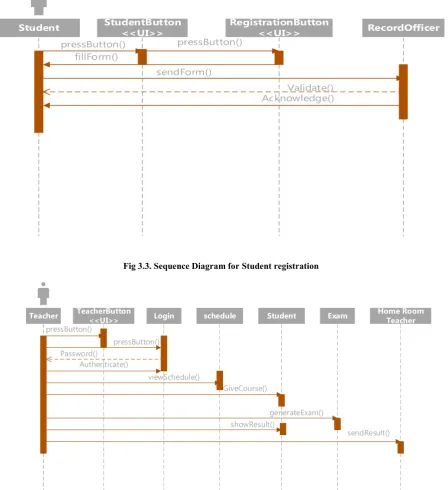
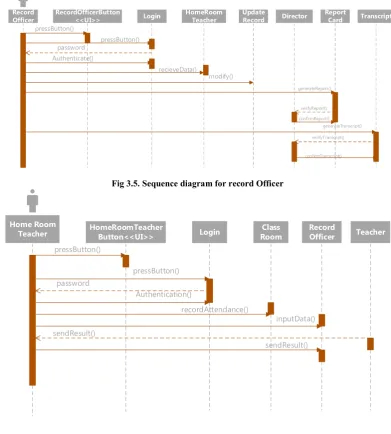
Sequence diagrams show the interaction between participating objects in a given use case. They are helpful to identify the missing objects that are not identified in the analysis object model. To see the interaction between objects, the following describe the sequence diagram of each identified use cases. In general a sequence diagram
Shows what messages go where, and which ones cause things to happen, and in what order
Describes the flow of events of a use case
Time progresses from top to bottom
Objects involved are listed left to right
Messages are sent left to right between objects in sequence
Student StudentButton
<<UI>>
RegistrationButton
<<UI>> RecordOfficer
pressButton() pressButton() fillForm()
sendForm()
Validate()
[image:8.595.78.527.269.760.2]Acknowledge()
Fig 3.3. Sequence Diagram for Student registration
Teacher TeacherButton schedule Student
<<UI>> Login
Password() Authenticate()
viewSchedule()
GiveCourse() pressButton()
pressButton()
Exam
generateExam() showResult()
Home Room Teacher
[image:8.595.109.508.567.767.2]sendResult()
Record Officer
RecordOfficerButton
<<UI>> Login
HomeRoom Teacher
pressButton()
pressButton() password
Authenticate()
Director Report
Card Transcript
recieveData()
generateReport()
verifyTranscript() confirmReport()
confirmTranscript() verifyReport() Update
Record
modify()
[image:9.595.101.493.65.500.2]generateTranscript()
Fig 3.5. Sequence diagram for record Officer
Home Room
Teacher HomeRoomTeacherButton<<UI>> Login Class
Room
pressButton()
pressButton() password
Authentication()
recordAttendance()
Record OfficerRecord
Officer
inputData()
Teacher
sendResult()
[image:9.595.117.479.379.750.2]sendResult()
Fig 3.6. Sequence diagram for recording attendance and exam result
Director DirectorButton
<<UI>> Login
Record Officer
pressButton()
pressButton()
password()
Authenticate()
viewReport()
Unit Leader
sendReport() Comment()
viewReport()
sendReport() Comment()
Unit Leader
UnitLeaderButton <<
pressButton() pressButton
Authenticate
Prepares()
Parent
pressButton
studPassword
Fig.3.10. User interface diagram for Jiren senior secondary school of
UnitLeaderButton
<<UI>> Login TimeTable Teacher
pressButton() Password() Authenticate()
Student
()
Post()
sendReport Post()
commentReport()
Fig.3.8. Sequence diagram for Unit Leader
ParentButton
<<UI>> Login
Record Officer
pressButton()
pressButton()
studPassword()
Authentication()
viewReport() comment()
Fig.3.9. Sequence diagram for Parent
User interface diagram for Jiren senior secondary school of Jimma
Director
sendReport()
Record Officer
3.5 User Interface-navigational paths and Screen mock-ups
The Jiren High school management system Application users are provided with a user-friendly and convenient Graphical User Interface. It is important that the GUI is easy to use and gives only relevant details so as to not distract the user or take more time to understand. The first screen of the GUI gives the user the option of choosing what he/she wants to access; at his current location or some other address. Once the application has figured out the user’s required page, the GUI shows the relevant links of the system. The GUI also provides options for changing the level of detail in the system. It also offers visual directions when the user opts for the Navigation mode.
System Design
4.1 Introduction
System design has a great part which describes the first solution of the system problem. So designing a system is the necessary step in any computer system. System design provides a clear description of the overall design of Jiren Senior Secondary School system, bridging the gap between the desired and existing system in a manageable way. We have identified the functional and non-functional requirements of the system and produced the analysis model. The following are discussed in this chapter: design goals, system architecture, system decomposition, deployment and database design.
4.2 Purpose of the document
The purpose of the system design document is to provide a plan how the system should meet the customer’s needs. It decomposes the system into subsystem and shows how system performs its functions.
4.3 Design Goals
Design goals describe the qualities of the system that developers should optimize. Such goals are normally derived from the non-functional requirements of the system.
Design goals are grouped into five categories. These are
• Performance • Dependability • Maintenance
Cost
• End User Criteria
4.3.1 Performance Criteria
The part of the system to be used for the record office should have a fast response time (real time) with maximum throughput. Furthermore, the system should not be taking up too much space in memory. The record officer has chosen fast response time over throughput and hence the system should try to be more interactive. In the case of the record subsystem, the system should be more reliable in order to satisfy the constraints than fast response time.
4.3.2 Dependability
The school needs the system to be highly dependable as it is expected to be used by non-IT professionals. The system
should be robust and fault tolerant. Furthermore, as the system is handling sensitive data of the school, high emphasis should be given with regards to security, as there are subsystems to be accessed through web.
4.3.3 Maintenance
The system should be easily extensible to add new functionalities at a later stage. It should also be easily modifiable to make changes to the features and functionalities.
4.4 End User Criteria
[image:11.595.367.496.341.538.2]Usability: Usability is the extent to which a product can be used by specified users to achieve specified goals with effectiveness, efficiency and satisfaction in a specified context of use. From the end users’ perspective the system should be designed in such a way that it is easy to learn and use, efficient and having few errors if any. Trade-off is inevitable in trying to achieve a particular design goal. One best case is the issue of security versus response time. Checking User-Id and Password before a member can enter to the SMS (School Management System) creates response time problem/overhead. The other case is the issue of response time versus quality.
Fig 4.1 Architecture of the system
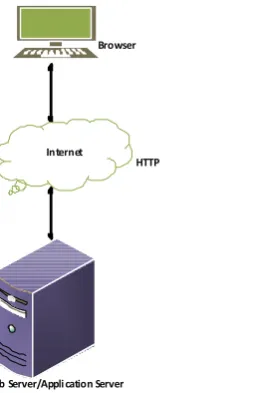
The proposed system is expected to replace the existing manual system by an automated system. It is mainly based on the system Analysis document. The architecture used for the system is a 3 tier Client/Server Architecture where a client can use Internet browsers to access the online report provided by the system within the local area network of the school or any where using the Internet. Figure 4.1 shows the architecture of the proposed system.
The data tier maintains the applications data such as student data, teacher data etc. It stores these data in a relational database management system (RDBMS).
The middle tier (web/application server) implements the business logic, controller logic and presentation logic to control the interaction between the application’s clients and data. The controller logic processes client requests such as requests to view student’s result, to record attendance or to retrieve data from the database. Business rules enforced by the business logic dictate how clients can and cannot access
Browser
HTTP
Web Server/Appli cation Server
application data and how applications process data. A web server is a program that runs on a network server (computer) to respond to HTTP requests. The most commonly used web servers are Internet Information Server (IIS) and Apache. The web server used in this system is Apache. HTTP is used to transfer data across the Internet. It is the standard protocol for moving data across the internet.
The client tier is the applications user interface containing data entry forms and client side applications. It displays data to the user. Users interact directly with the application through user interface. The client tier interacts with the web/application server to make requests and to retrieve data from the database. It then displays to the user the data retrieved from the server.
4.5. Subsystem Decomposition
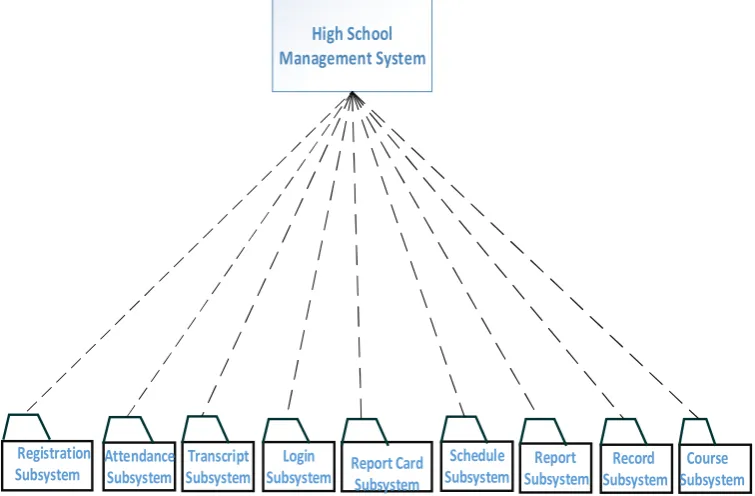
Subsystem decompositions will help to reduce the complexity of the system. The subsystems can be considered as packages holding related classes/objects. The Jiren High School Management System under consideration is decomposed into subsystems as shown in Figure 4.2. These subsystems are further decomposed into other subsystems. The major subsystems identified are “StudentRegistration”, “Login”, “Attendance”, “ReportCard”, “Transcript”, “Schedule”,
“Course”, “Record” and “Report” subsystems. Users are
classified in to roles. The “Login” subsystem authenticates a user to grant access based on the role of the user. The “StudentRegistration” subsystem registers a student online. It allows recording the detail information of the student including parental and emergency person.
“Transcript” and “ReportCard” subsystems are used to generate transcript and report card respectively. The “Schedule” subsystem is for timetable, which involves posting and allocating a time slot to a subject teacher for a class of students. The “Attendance” subsystem facilitates recording absent students on the school day by the homeroom teacher to control absentees and to report to parents and the administrator to take corrective measures. The “Report” subsystem generates reports to parents and teachers in order to facilitate
viewing students’ status and course achievement online. The “Record” subsystem accepts all inputs and keeps it as a record; then data can be retrieved and modified or deleted. The “course” sub system displays course items that are given by the teacher to the student.
4.6 Hardware/Software Mapping
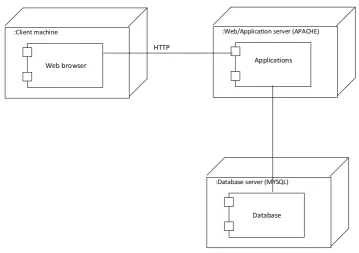
One of the major tasks in system design deals with hardware/software mapping which deals with which components would be part in which hardware and so on. The High School Management system is a broad system that performs many functions. It consists of web based system used by homeroom teachers to record attendance. The web based system also assists parents and officials to get or view status and report on students’ achievement and progress. The system assists the record officer to generate transcript and report cards. So the web based part is expected to run on a networked environment on different Operating System platforms. The client/server architecture of the system enables different clients to connect to the server remotely through Internet connection. The system has two nodes such as the Web server and Clients. These nodes are shown as UML Deployment diagrams in Figure 4.4. The nodes can represent specific instances (workstations) or a class of computers (web server), which is a virtual machine. The applications of the system will run on the web server connected to the database server. The system has two applications to be developed on the same database, Windows and Web applications. When dealing with windows applications, there is compiled program that must be distributed to the user’s desktop before they can use it.
Users merely need to start their browsers and enter the URL of the application Web site. The server hosting the Web site is responsible for allocating all the resources the Web application requires.
4.7. Persistent Data Management
Persistent data management deals with how the persistent data (file, database, etc) are stored and managed and it outlives a
Login Subsystem
Report Card
Subsystem
Report Subsystem
Record Subsystem
Course Subsystem
Registration
Subsystem Attendance Subsystem SubsystemTranscript SubsystemSchedule High School
[image:12.595.114.492.423.671.2]Management System
single execution of the system. Information related to student basic information, student’s attendance and result, the schedule produced and other related information are persistent data and hence stored on a database management system. This allows all the programs that operate on the High school Management system data to do consistently. Moreover, storing data in a database enables the system to perform complex queries on a large data set. The school registers students every year in thousands per grade level. For complex queries over attributes and large dataset Microsoft SQL Server is implemented, which is a Relational Database Management System.
4.7.1 Mapping
In order to store information persistently we map objects into tables and the attributes into fields to the specific table based on the objects found on the system. Therefore, we identified the major tables that will be implemented on the selected DBMS.
[image:13.595.58.541.55.336.2]For this reason, some of the mapping of objects to tables is displayed as in Fig 4.6.
Fig.4.3. Subsystem decomposition diagram
:Client machine
Web browser
:Web/Application server (APACHE)
Applications
:Database server (MYSQL)
Database HTTP
Fig 4.4. Deployment diagram of the system
Login Subsystem
Director Record Officer
Student Teacher
Parent Unit Leader
Report Card Subsystem
Record
Officer Director
Student Report
card
Report Subsystem
Record Officer
Parent Director
Report
Record Subsystem
Course Subsystem
Home Room Teacher
Record Officer
Report card Transcript
Teacher
Student subjects
Student Registration Subsystem
Student Record Officer
Attendance Subsystem
Home room
teacher Home page
Login Attendance
Transcript Subsystem
Record
Officer Director
Tramscript Student
Schedule Subsystem
Unit Leader Teacher
[image:13.595.79.523.197.613.2] [image:13.595.119.479.369.622.2]<<Executable>> Report <<Executable>>
Transcript
Attendance
Persistent data storage
Database
<<Executable>> Report card <<Executable>>
Attendance
Student Registration
Login
Schedule <<Executable>>
Schedule
<<Executable>> Login <<Executable>>
Student Registration
<<Executable>> Course
<<Executable>> Record
Report Card
Transcript
Record Course Report
<<HTTP>> <<PHP>>
Database: mysql
Fig.4.5. The General Architecture of the System
Teacher
+teacherId:String +name:String +age:Int +sex:String +nationality:String +address:String -tel: String +subject: String +giveCourse() -generateExam() +viewSchedule()
Teacher <<Table>>
teacherId:PK name age sex nationality address tel subject
Student
+register() -insert() +takeExam() +viewSchedule() +studId:String +name:String +age:Int +sex:String +nationality:String +address:String -tel: String
Student <<Table>>
studId:PK name age sex nationality address tel
Director
+directorID:String +name:String +age:Int +sex:String +nationality:String +address:String -tel: String +subject: String +officeNumber:Int -manageSchool() -confirmTranscript() -confirmReportCard() -viewReport()
Director <<Table>>
UnitLeader
+teacherId:String +name:String +age:Int +sex:String +nationality:String +address:String -tel: String +subject: String
-generateTimeTable() -sendReport()
UnitLeader <<Table>>
teacherId:PK name age sex nationality address tel subject
HomeRoomTeacher
+recordAttendance() +result()
+teacherId:String +name:String +age:Int +sex:String +nationality:String +address:String -tel: String
HomeRoomTeacher <<Table>>
teacherId:PK name age sex nationality address tel
RecordOfficer
+verifyStudent() -update() -report() -view() -delete()
+employeeID:String +name:String +age:Int +sex:String +nationality:String +address:String -tel: String
RecordOfficer <<Table>>
employeeID:PK name age sex nationality address tel
Parent
-password:String -username: String -address:String -tel:String -viewReport()
Parent <<Table>>
password:PK username address tel
Course
+courseId:String +coursename:String
-listCourse() -giveCourse()
Course <<Table>>
courseId:PK coursename:
Exam
+examType:String +examNo:Int
-takeExam() -viewResult()
Room
+RoomNo:Int
-allocateRoom()
Exam <<Table>>
+examType:String +examNo:Int
Room <<Table>>
+RoomNo:Int
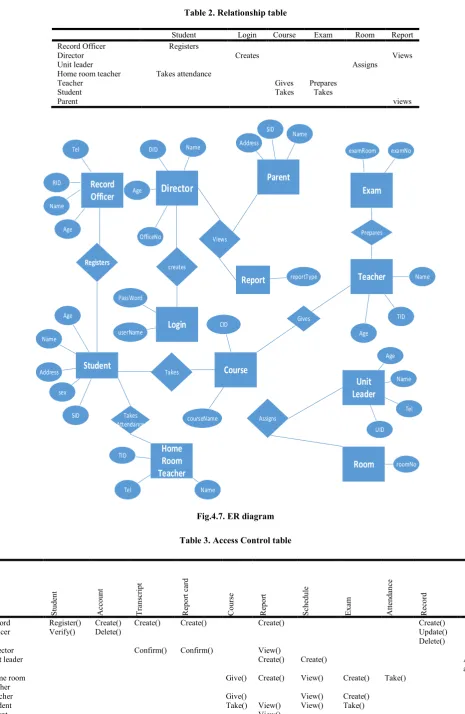
Table 2. Relationship table
Student Login Course Exam Room Report Record Officer Registers
Director Creates Views
Unit leader Assigns
Home room teacher Takes attendance
Teacher Gives Prepares
Student Takes Takes
Parent views
Record Officer
Unit Leader
Home Room Teacher
Director
ParentTeacher Exam
Course Login
Room Report
Name
Age RID
Tel DID Name
Age
OfficeNo
Name Tel
Name
TID
Age
TID
UID Name Age
Tel examNo examRoom
roomNo Name
SID Address
reportType
userName PassWord
CID
courseName
Registers
Student
Name Age
SID Address
sex
creates
Views
Assigns Takes
Attendance
Prepares
Takes
Gives
Fig.4.7. ER diagram
Table 3. Access Control table
Stude
n
t
Accou
nt
Tran
scri
pt
Repo
rt
card
Course Repo
rt
Sched
u
le
Ex
am
Atten
danc
e
Re
co
rd
Room
Record Officer
Register() Verify()
Create() Delete()
Create() Create() Create() Create()
Update() Delete()
Director Confirm() Confirm() View()
Unit leader Create() Create() Alloc
ate() Home room
teacher
Give() Create() View() Create() Take()
Teacher Give() View() Create()
Student Take() View() View() Take()
4.8. Access Control and security
We model access by examining the object model, by determining which objects are shared among actors, and by defining how actors can control access. We model access on classes with an access matrix. The rows of the matrix represent the actors of the system. The columns represent classes whose access we control.
4.9. Algorithmic Design for the Timetable
The algorithm tries to assign lessons to periods and a teacher to a particular class at a given time while satisfying a set of constraints in order to produce a feasible timetable. Table 4 below shows the number of lessons for each subject per week to be distributed in the time slots of the school days. There are five school days starting from Monday to Friday and in each of these days there are seven periods for each class.
Table 4. Number of lessons for each subject
Subjects No.of lessons per week
Amharic 2
English 5
Mathematics 5
Physics 2
Chemistry 3
Biology 3
Geography 2
History 2
Civics 4
HPE 1
Afaan Oromo 2
[image:17.595.310.554.171.259.2]A class of students is given a room which is fixed for the class throughout the academic year. To each class, a subject teacher is assigned for each of the ten subjects Let C = {c1, c2… cm}, S = {s1, s2… s11} and T = {t1, t2… tn} be the set of all classes, subjects and teachers respectively. A teacher teaches only one type of subject from the ten subjects while a subject can be taught by many teachers. Table 5 illustrates some examples of assignment of teachers to subjects and classes.
Table 5. An example of the relationship among classes, subjects and teachers
Class Subject Teacher
C1 S1 t1
C1 S2 t2
C1 S3 t5
C2 S1 t1
C2 S3 t6
C3 S2 t3
C4 S2 t4
… … …
Ci Sj, 1≤ j ≤ 11 tk
Let D = {d1, d2, d3, d4, d5} and P = {p1, p2, p3, …, p6} be the sets of days and time slots (periods) where |D| = 5 and |P| = 6. Let M (muv) be a 2D matrix in which each column v
corresponds to a class c where c ∈ C and each row u corresponds to one combination of (d, p) where d ∈ D and p ∈
P. The value of cell muv is determined as:
• muv = sjtk, if this cell is assigned to subject-teacher
combination sjtk.
• muv = ‘#’, if this cell is available for assignment. The
subject-teacher code sjtk uniquely identifies the subject
teacher assigned to the class. For example sjtk could be
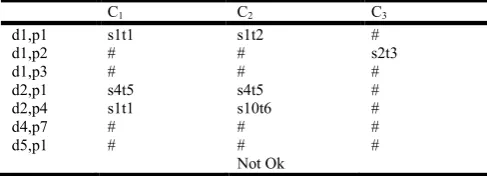
E5, to identify an English teacher or it could be M3, to identify a Mathematics teacher and so on. Assigning a teacher to more than one class at the same period leads to violation of one of the hard constraints and hence the time table will not be feasible. Table 6. shows an example of time slot assignment to a lesson.
Table 6. An example of time slot assignment
C1 C2 C3
d1,p1 s1t1 s1t2 #
d1,p2 # # s2t3
d1,p3 # # #
d2,p1 s4t5 s4t5 #
d2,p4 s1t1 s10t6 #
d4,p7 # # #
d5,p1 # # #
Not Ok
The maximum and minimum loads assigned to a teacher are 30 and 6 periods respectively. The Teacher and Teacher Code
tables in the database design as shown in Figure 2 contain the following fields to help scheduling.
Teacher’s Name
Subject Code that the teacher teaches
Grade level (Grade 9 or Grade 10)
Class
Teacher’s code
The database consists of other additional tables containing important scheduling information. The timetabler selects a teacher from the teachers table and reads the subject that the teacher teaches, number of lessons of the subject, and all the classes which have been assigned to the teacher. The load of the teacher is calculated which cannot be greater than the maximum load. The system parses the Teacher table row by row until all the teachers are visited or to the end of the rows. Taking a subject-teacher code of the teacher retrieved, the system selects one of the days (Monday, Tuesday, …, Friday) randomly based on the number of lessons of the subject per week, searches a free slot on the selected day for each class assigned to the teacher, checks if the teacher has been assigned to another class in the same period. If appropriate free slot has been found then the lesson is assigned to the slot. If appropriate slot has not been found then moving previously assigned lesson to a free slot or swapping two or more lessons has been done. If all the slots in the selected day are filled and swapping couldn’t solve the problem, another day is selected. The process continues until the load of the teacher becomes zero. The algorithmic design of the timetable is shown in Algorithm 4.1.
Algorithm 4.1
Loop until all the teachers in the database are visited Select a teacher from the Teacher table
Retrieve the Subject-Teacher code, Grade-Level, Number of lessons of the subject and all the classes assigned to the teacher
Calculate load of the teacher If load is greater than maxLoad Display Error Message Exit Application
[image:17.595.52.273.565.663.2]Select a Day uniquely and randomly from the school days based on the number of lessons of the subject
For Each Day of the week selected For Each class assigned to the teacher
If allocatedLesson of the subject to the class is greater than zero
If timeslot is not ‘#’, move to the next slot
If teacher is assigned in the period, move to the next slot If appropriate slot is not found swap previously assigned classes
Assign lesson to the slot
Decrease allocatedLesson of the subject Decrease load of the teacher
End For End For End While End Loop
Conclusion and Recommendations
5.1 Conclusion
In this project, we developed an automated school management system that facilitates the various activities taking place at schools. The system developed in the project consists of windows and web applications. These are two different applications on the same database. The windows application takes most of the activities such as student registering, transcript and report card generation and producing the timetable. The web application facilitates attendance recording by the homeroom teachers and to view reports, to view status of students by students, teachers and parents. Our solution of the timetabling problem is very simple. Data structures are used to implement the timetable designed. The scheduler selects a subject-teacher from the database, retrieves all the classes assigned to the teacher, calculates the load of the teacher which cannot be greater than the maximum load and selects one of the days randomly based on the number of lessons of the subject, searches a free appropriate time slot and assigns the slot to the lesson. The scheduler repeats the process until the load of the teacher becomes zero and all the teachers in the database are visited. Finally the result generated is stored in a database. The prototype has been tested with data from Jiren Secondary School. It has been shown that the system effectively registers students along with parental information, easily retrieves information about a student and generates the required reports such as transcript, report card and timetable. In addition to generating a feasible master timetable it produces a timetable for each teacher. Furthermore it has been shown that the web application of the system helps attendance recording by the homeroom teacher and parents can view the status of their children using the Internet or Intranet of the school.
5.2 Recommendations
To enhance the efficiency of the system, in the following we have listed some recommendations and future works. As education is central to development there should be a good facility to make stakeholders participate in school improvement programs and decision making. Parents and Education Bureaus are among the stake holders. To facilitate easy information access to such bodies the web application could be further enhanced by incorporating additional reports required by Parents and Education Bureaus and any concerned governmental or non governmental bodies. Such facilities will increase participants in decision making at educational activities and students achievement. We also believe that timetables should be flexible. In real world situations there are preferences. A restriction of the sort that every teacher should have some specific free periods or some part of days off requires an efficient search technique. Efficiency of the timetable could be further enhanced by improving the search technique so that such constraints as preferences could be taken into consideration. In addition we can incorporate SMS (short message service) with the help of Android system.
REFERENCES
Burke E. and W. Erben. 2000. Practice and Theory of Automated Timetabling, Third International Conference, Germany, Springer Private Limited, August.
Hedberg J. G. et al. 1992. Educational information systems: Problems of the small educational organisation. Australian
Journal of Educational Technology, 8(2), 132-160. http://
www.ascilite.org.au/ajet/ajet8/hedberg.html
Marte. M. 2002. Models and Algorithms for School Timetabling, A Constraint-Programming Approach, Ph.D dissertation, an der Fakult¨at f¨ur Mathematik, Informatik und Statistik der Ludwig-Maximilians-Universit ¨at M¨unchen, July.
Petrovic S. and E. 2002. Burke. University Timetabling, School of Computer Science and Information Technology, University of Nottingham, pp. 1-4
Timothy C. Lethbridge, Robert Laganiere, Object Oriented Software Engineering, Second edition.
Willemen. R.J. 2002. School Timetable Construction: Algorithms and Complexity, Thesis, Faculty of Mathematics and Computer Science, Technische Universiteit Eindhoven.
Willis T. and B. Newsome. 2006. Beginning Visual Basic 2005, Wiley Publishing, Inc.