599
©IJRASET: All Rights are Reserved
OCR based Image Processing with Audio Output
for Visually Challenged People
A. Shankar Ganesh1, A. Mangalambigai2, V. Swarna3, Ba. Anandh4, R. Sakthivel5, A. Ranisangeetha6
1, 3, 4, 5, 6
Department of Electronics, P S G College of Arts and Science, Coimbatore-14. 2
Assistant Professor, Department of Education, Avinashilingam Institute for Home Science and Higher Education for Women, Coimbatore-43
Abstract: Image Processing is a technique which is used to find the text in a captured image. Visually challenged people face many problems in day to day life. One of the important problems is reading the text. A digital speech synthesizer is used for doing the same. But most of the printed works doesn’t have audio version. So the technology of Optical Character Recognition (OCR) and the technology of speech synthesis (TTS) is used. TTS will convert the text of the captured image into spoken form of that text which is easy to understand. MSER algorithm is further used for better accuracy and the image is processed to get an audio output. It can be listened through headset. Tesseract is an open source OCR engine which is useful in text detection. Open CV (Open Source Computer Vision) is a library of programming functions through which the required algorithm is selected. Application of this project is virtual reading environment is possible for visually challenged people. This can also help out the older people with their partial eye-sight or people with diseases like Bleitz where they can see things hazy. This provides a virtual environment for reading text in front of them and is outputted through a headphone.
Keywords:Optical Character Recognition (OCR), Tesseract, Computer Vision, TTS, MSER algorithm.
I. INTRODUCTION
Optical Character Recognition (OCR) is the process of recognizing the text from an image and converting it into machine-encoded text. This project is useful for visually challenged people. Old method for them is to read the text through Braille method. But it is not helpful in all circumstance. This project will help them to connect with the world virtually and understand the real time events. So they need not depend on others every time which is very impossible. The process involves converting the text in the image and processing it in the raspberry pi and producing an audio output. [1]
II. PROPOSEDSYSTEM
Digital Processing has evolved its application that could raise the standards of the people. The image is captured using a camera when a key or switch is pressed. This captured image is then processed for text recognition using a complex algorithm and the text is extracted from the image. High resolution camera would be opted for better accuracy and easy processing. Although the algorithm doesn’t provide 100% accuracy, it still manages to eliminate the background noises to its maximum. Since practical or real world images can be erroneous and noisy, it has still been difficult to remove the noises completely and no such algorithm has been framed. The text is then written onto a file which is then converted into an audio file for which the text to speech system is used. This helps the visually challenged people or partially blind to read the text in front of them virtually ( Fig.1). The software includes the python open CV software which serves to be the platform for processing the images and to apply several algorithms or techniques to the image which is represented as a 2D matrix. The hardware part consists of a camera of resolution say 20 Megapixel which can be used to capture images whenever needed and is processed in a raspberry pi which is either held in hand or fixed on the glasses for easy handling and convenience. Audio output can be heard either through the loudspeaker or a headphone provided for a comfort surrounding. This could help the visually challenged people virtually read texts and not follow the old method of reading texts through Braille method, where patterns of holes represents each character that they have to feel and analyze the alphabet to read.
600
©IJRASET: All Rights are Reserved
A. Technology Details (Text Analysis)
1) Text Extraction: Optical Character Recognition (OCR) will recognize the characters automatically. This involves four steps namely, pre-processing, segmentation, feature extraction, post processing. Pre-processing involves binarization. It also filters the noise in the image. In segmentation, text and other parts are separated. Then the characters and words are localized. Feature extraction is used to minimize the redundant information in order to compress the data. Post processing is used to improve the accuracy by correcting the errors in OCR. [2], [3], [4], [5], [6]
[image:2.612.136.486.278.408.2]2) Speech Synthesis (Text to Speech Conversion): The artificial production of human speech is called speech synthesis. A computer system is called a speech computer or speech synthesizer. It is used for this purpose. It can be implemented in software or hardware products. A text-to-speech (TTS) system is used to convert normal language text into speech (Fig.2). It consists of two parts: a front-end and a back-end. The front-end has two major tasks. The first task is to convert raw text containing symbols like numbers and abbreviations into the equivalent of written words. This process is called text normalization, pre-processing, or tokenization. The second task is to assign phonetic transcriptions to each word, and divide the text into prosody units like phrases, clauses, and sentences. This process is called text-to-phoneme or grapheme-to-phoneme conversion. Phonetic transcriptions and prosody information make up the symbolic linguistic representation that is outputted by the front-end. The back-end then converts the symbolic linguistic representation into sound. [7], [8]
Fig. 2 Text to Speech Conversion System
B. Hardware Description
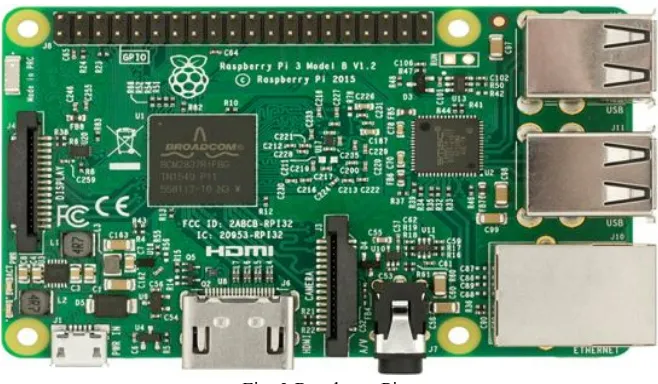
1) Raspberry Pi: Raspberry Pi is a small computer that is capable of doing all the work of a desktop computer. In this project Raspberry Pi 3 model b is used (Fig.3). It is the operating system of the device. Its processor is Broadcom BCM2387 chipset. Memory is 1GB LPDDR2. Its dimension is 85 x 56 x 17 mm. 16 GB SD card is used in this project. The performance of the pi 3 is roughly 50-60% faster than the pi 2. [9]
Fig. 3 Raspberry Pi
[image:2.612.146.475.512.704.2]601
©IJRASET: All Rights are Reserved
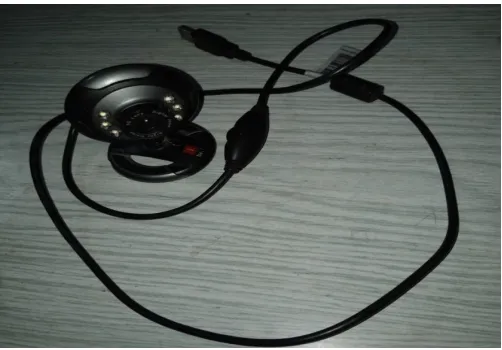
[image:3.612.187.438.131.306.2]2) Camera Module: Fig. 4 shows the input module which is a 20 MP camera is used through which an image is captured. The further process is done with the text of that image. Since lighting, clarity and font styles are a major factor, predefined images are preferred more because the audio output will be more accurate for the same.
Fig. 4 Camera Module
3) Headphones: Headphones are used to hear the audio output.
C. Software Description
1) Raspbian OS: Raspbian is a Debian-based computer operating system for Raspberry Pi. It uses pixel, pi improved Xwindows environment and lightweight as its desktop environment. [10]
2) Open CV in Python: Open CV (Open Source Computer Vision) is a library of programming functions mainly aimed at real-time computer vision. It has a set of algorithms which can be used to detect the text from the image. In this study, MSER algorithm is used.
3) MSER Algorithm: MSER is an abbreviation for Maximally Stable Extremal Regions. The image is first captured through the camera module and then sent into the Raspberry pi 3 model B for further processing. MSER algorithm is used to differentiate the text from the image. Several processes like Otsu’s binarization and other filtering processes are done to extract the maximally stabilized regions in the images from the set minimum and maximum area. Then each of the detected stable regions is bounded by a rectangle which is later combined into one big rectangle. This is the cropped image which is given as an input to neural networks.
Image is a mapping I: D C Z * Z → SI: D C Z* Z → S. Extrernal regions are defined exactly on images when:
1) S is totally ordered (total, anti symmetric and transitive binary relations exist).
2) An adjacency relation A C D * D is defined.
Region Q is a contiguous subset of D. (For each p,q’ ϵ Q p,q ϵ Q,there is a sequence a1, a2,…, an, q and pAa1, aiAai+1, anAq pAa1,
aiAai+1, anAq.)
(Outer) Region Boundary: ∂Q = { q ϵ D Q : ᴲp ϵ Q :q A p} , it means the boundary ∂Q of Q is set of pixels adjacent to one pixel of
Q but it should not belong to Q.
Extremal Region: Q C D is a region which is either for all pϵ Q, q ϵ ∂Q:I(p) > I(q) p ϵ Q, q ϵ ∂Q:I(p) > I(q) (maximum intensity
region) or for all p ϵ Q, q ϵ ∂Q: I(p) < I(q) (minimum intensity region).
Maximally Stable Extremal Region: Let Q1,... ..., Qi-1, Q1, .... Q1, ... ..., Qi-1,Qi, .... is a sequence of nested extremal regions (Qi
C Qi+1Qi C Qi+1). Extremal region Qi* Qi* is maximally stable only if has a local minimum at i
*i *. (Here | . |denotes cardinality.) ∆ ϵ S ∆ ϵ S is a parameter of the method.
These equation checks all regions that are stable over a certain number of thresholds. If Qi+∆ Qi+∆ region is not larger than Qi- ∆ Qi-
602
©IJRASET: All Rights are Reserved
The pictures in the image is just considered to be noise since our approach only analyses text and reads it. All the pixels below the minimum value is considered as black and those above are considered as white. Eventually, the black spots corresponding to the local intensity minima will appear and grow larger. These black spots will merge and these set of connected components in the sequence is the set of all extremal regions. Extremal regions have two important properties:
a) Continuous Transformation Of Image Coordinates: This means it is affine invariant. It doesn't matter if the image is warped or skewed.
b) Monotonic Transformation Of Image Intensities: The approach is sensitive to natural lighting effects.
Because the regions are defined by the intensity function in the region and the outer border, the local binarization is stable in certain regions, Invariance to affine transformation, covariance to adjacency preserving continuous transformation, multiscale detection, and the worst case of all extremal regions is O(n), where n is the number of pixels in the image. The trained neural network then converts the text image into a text format. The letters and fonts are individually trained to be read in various surrounding and environment and added as a trained database. This focuses in unsupervised learning of the machine. The accuracy depends on several factors like the pixels, lighting errors, perspective errors and various other errors. The output of the neural network is read through the earphones by the python offline text to speech engine. [11], [12], [13]
4) Tesseract: Tesseract is an Open Source OCR engine which is useful in text detection. It is the first engine to provide this type of image processing. First process is Adaptive Thresholding in which the input image is converted into binary image. Second process is to extract the character outlines. Then these are converted into blobs where the text lines are arranged in easy manner to find the equivalent text size. Text recognition involves two main steps. First is to find each word from the text. Second step is to extract the text from that image. Command of Tesseract has two arguments: image file name and output text file. Image file name has text. The extracted text will be stored in output-text file. In simple images, tesseract will give the output with 100% accuracy. In complex images, the accuracy is better only if the images are in gray scale. [14], [15]
III.OUTPUT
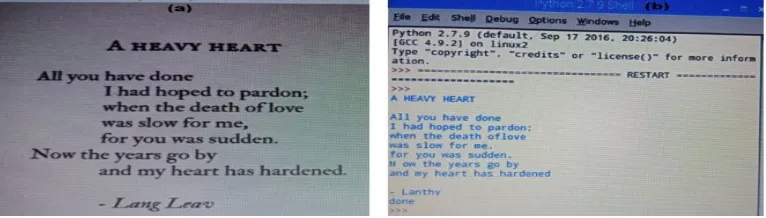
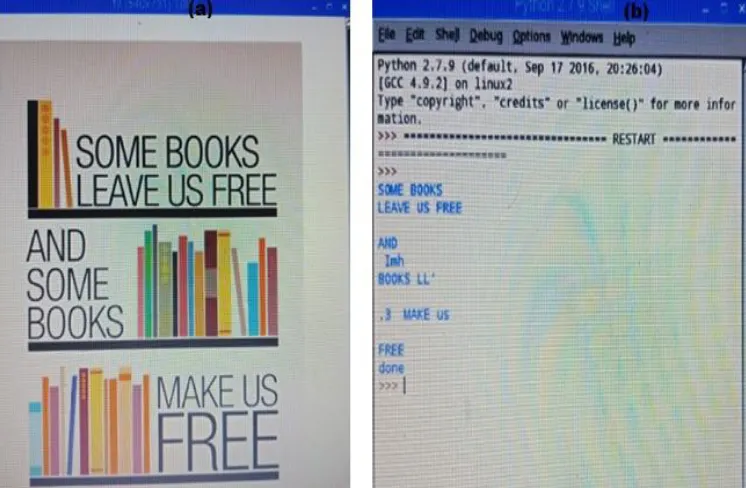
[image:4.612.112.502.460.551.2]Fig. 5 - Fig. 7 shows the original image on the left side (a). The real time image which is taken through a camera module is fixed on the spectacles worn by the visually challenged. The Python shell output is on the right side (b). The text area is localized and analyzed through a neural network algorithm which is then printed as output. The text output is then written into a file for the text to speech conversion to take place so that the visually challenged can understand what it says.
Table I
Percentage Of Accuracy For Different Images
Sample No. of Characters in the
original image No. of Characters recognized Percentage of Accuracy Approximate Size of the
file
1 136 131 85 53.1 KB
2 171 165 82 109.8 KB
[image:4.612.121.504.615.724.2]3 42 38 87 52.9 KB
Table 1 clearly gives the details about number of characters in the original image, number of characters recognized, percentage of accuracy and approximate audio file size for different samples. The approximate average accuracy of the system is 85%. Different file sizes can be stored depending on the Memory capacity of the SD card used in raspberry pi. Overall accuracy is 81% with the processing time being less than one minute.
603
[image:5.612.120.503.77.275.2]©IJRASET: All Rights are Reserved
Fig. 6 Sample 2 (a) Original image (b) Python shell Output
Fig. 7 Sample 3 (a) Original image (b) Python shell Output
IV.CONCLUSION
[image:5.612.126.499.304.548.2]604
©IJRASET: All Rights are Reserved
REFERENCES
[1] V.Mahalakshmi, Dr.M.Anto Bennet, Hemalatha R, Jenitta J, Vijayabharathi K, “Implementation of OCR using Raspberry Pi for Visually impaired Person”, International Journal of Pure and Applied Mathematics, vol.119 No.15 2018,111-117.
[2] K.Kalaivani, R.Praveena, V.Anjalipriya,R.Srimeena, “Real Time Implementation of Image Recognition and Text to Speech Conversion”, International Journal of Advanced Engineering Research and Technology (IJAERT),volume2, Issue6, September2014,ISSN No.:2348-8190.
[3] Boris Epshtein, EyalOfek, Yonatan Wexler, (2010) “Detecting Text in Natural Scenes with Stroke Width Transform”, IEEE Conference on Computer Vision and Pattern Recognition.
[4] K.N. Natei, J. Viradiya, S. Sasikumar,” Extracting Text from Image Document and Displaying Its Related Information”, K.N. Natei Journal of Engineering Research and Application, ISSN : 2248-9622, Vol. 8, Issue 5 (Part -V) May 2018, 27-33.
[5] Shivananda V. Seeri, J. D. Pujari, P. S. Hiremath, “ Text Localization and Character Extraction in Natural Scene Images using Contourlet Transform and SVM Classifier”, I.J. Image, Graphics and Signal Processing, 2016, 5, 36-42.
[6] Archana A.Shinde, D.G.Chougule, “Text Pre-processing and Text Segmentation for OCR”, IJCSET| January 2012| Vol 2, Issue 1, 810-812. [7] https://en.wikipedia.org/wiki/Speech_synthesis.
[8] Malti Bansal, ShivamSonkar,” Text Image to Speech Conversion using Matlab and Microsoft SAPI,” International Journal of Electronics, Electrical and Computational System(IJEECS), Vol 6, Issue 11, November 2017,ISSN 2348-117X.
[9] www.terraelectronica.ru/pdf/show?pdf_file=%252Fds%252Fpdf%252FT%252FTechicRP3.pdf
[10] http://www.kscst.iisc.ernet.in/spp/42_series/41S_awarded_&_selected_projs_further_devpt/41S_BE_1506.pdf [11] https://www.researchgate.net/publication/307953283_MSER_on_Text_Images.
[12] Geetanjali Adlinge1, Shashikala Kashid2, Tejasvini Shinde3, Virendrakumar Dhotre4,” Text Extraction from image using MSER , Volume: 03 Issue: 05 | May-2016.
[13] http://www.micc.unifi.it/delbimbo/wp-content/uploads/2011/03/slide_corso/A34%20MSER.pdf
[14] Chirag Patel, Atul Patel, Dharmendra Patel, “Optical Character Recognition by Open Source OCR Tool Tesseract:A Case Study”, International Jounal of Computer Applications(0975-8887) volume 55, No.10, October 2012.