Click or Type: An Analysis of Wizard’s Interaction for Future Wizard
Interface Design
Srinivasan Janarthanam1, Robin Hill2, Anna Dickinson2, Morgan Fredriksson3 1 School of Mathematical and Computer Sciences, Heriot-Watt University
2School of Informatics, University of Edinburgh 3 Liquid Media AB, Stockholm
Abstract
We present an analysis of a Pedestrian Navigation and Information dialogue cor-pus collected using a Wizard-of-Oz inter-face. We analysed how wizards preferred to communicate to users given three differ-ent options: preset buttons that can gen-erate an utterance, sequences of buttons and dropdown lists to construct complex utterances and free text utterances. We present our findings and suggestions for future WoZ design based on our findings.
1 Introduction
Wizard-of-Oz environments (WoZ) have been be-come an essential tool for collecting and studying dialogue between humans pretending to be ma-chines and human users in various domains. It is an effective way to collect dialogues between real users and dialogue systems before actually imple-menting the dialogue system. In this framework, participants interact with an expert human oper-ator (known as “Wizard”) who is disguised as a dialogue system. These Wizards replace one or more parts of the dialogue system such as speech recognition, natural language understanding, di-alogue management, natural language generation modules and so on. Real users interact differently with humans and computers. While their expecta-tions with human interlocutors are high and varied, they are ready to adapt and “go easy” on comput-ers during interaction (Pearson et al., 2006). So, in a WoZ framework, the conversation between real users and the Wizards (pretending to be dialogue systems) are of an appropriate type to be used for dialogue system design and not as complex as in human-human conversation.
In order to provide a speedy response, most WoZ systems are designed in such a way that re-sponses are hard wired to buttons so that they can
be sent to the synthesizer at the touch of a button. However, in order to handle unexpected situations, most WoZ interfaces also have a free text interface that allows the Wizard to type any text to be syn-thesised by the synthesizer. Are free text interfaces used only under unexpected situations? In this pa-per, we analyse how free text interfaces are used by Wizards in a pedestrian tourist navigation and information dialogue and discuss how the results of our analysis be used to inform future WoZ de-signs. These dialogues were collected as a part of SpaceBook EU FP7 project.
In Section 2, we present previous work in WoZ interfaces and the domain of pedestrian navigation and information. We then present our WoZ setup and data collection in Section 3 and 4. In Section 5, we present our analysis of the corpus, issues and suggestions in Sections 6 and 7.
2 Related work
Wizard-of-Oz (WoZ) frameworks have been used since early 90s in order to collect human-computer dialogue data to help design dialogue systems (Fraser and Gilbert, 1991). WoZ systems have been used extensively to collect data to learn di-alogue management policies (Rieser and Lemon, 2011) and information presentation strategies (Demberg et al., 2011).
Pedestrian navigation and information systems is a domain of interest to many mobile phone applications. Applications such as Siri, Google Maps Navigation, or Sygic deal with the task of navigation while TripAdvisor, Triposo, etc . focus on the tourist information problem. Additionally, several research prototypes have been built to gen-erate navigation instructions (Bartie and Mack-aness, 2006; Shroder et al., 2011) and to have con-versations with tourists (Janarthanam et al., 2013). WoZ experiments enable the collection of realis-tic data to assist in the development and testing of these systems.
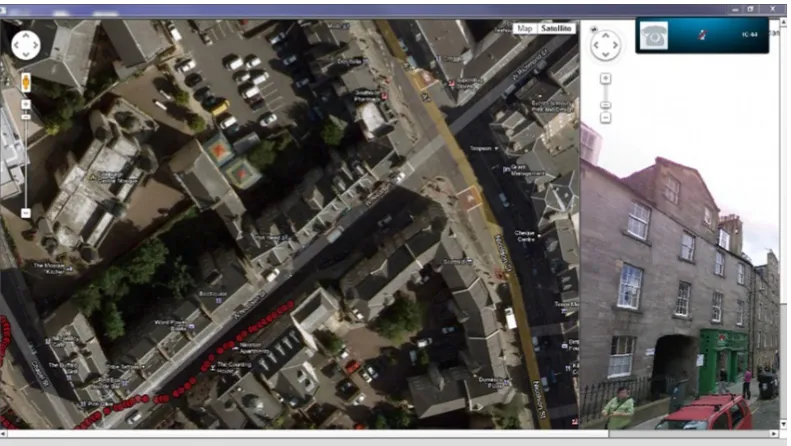
Figure 1: Wizard of Oz interface - Google Satellite Map and StreetView
3 WoZ setup
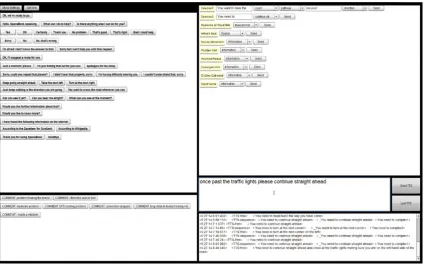
The wizard interface consisted a browser window showing a Google Map and Street View with the Tourists position. Google StreetView showed the Tourist’s point of view (see Figure 1). The Wizard was able to communicate information to the Tourist in three different ways in the Wizard Response Panel (see Figure 2):
Hot buttons: By clicking on one of several buttons with commonly used phrases (e.g. “OK. I’ll suggest a route for you”, “You want to cross the road whenever you can”, “Would you like further information about that?”). Buttons were organised thematically in sections such as: con-firmations, ways of asking the Tourist to repeat what they had said, ways to indicate to the Tourist that the Wizard was doing something and they should wait (“Just a moment, please”, “I’m just finding that out for you now” and “Apologies for the delay”) and directions. The range of choices available via the buttons (there were nine different confirmations) was intended to allow the Wizard to mimic the variability of human speech; they were grouped to facilitate rapid identification and selection.
Sequences: By generating text from a sequence of drop-down menus, e.g. (where items in square brackets are drop-down lists): “You want to take the [count] [pathway] on your [direction]).
Free text:By typing free text into a text editor.
Pre-entered phrases for Hot Buttons were se-lected following two previous Wizard of Oz exper-iments where the Tourist and the Wizard commu-nicated by voice; common expressions used dur-ing these sessions were summarised and presented on an initial evaluation interface which was evalu-ated with 15 dyads. Results from that experiment fed into the WoZ interface above.
At the bottom right of the screen, there was a scrollable record of the Wizard’s output in case the participant needed to confirm what had been sent to the Tourist. Finally, there was a selection of system comments the Wizard could make, for example to note system problems such as prob-lems hearing the Tourist. This information was recorded by the system but not sent to the Tourist. Additionally, screen capture software was used to record all the on-screen interaction. As a back-up, the lab was videoed on DV cassette using a tripod-mounted camcorder.
Figure 2: Wizard of Oz interface - Wizard response panel
can’t remember the exact name but you are sure it had the word “Bell” in the title.”
The Tourist was equipped with an Android mo-bile phone (Samsung Galaxy Note) and headset. The phone ran a custom-built app that sent live GPS, satellite and accelerometer data back to the WoZ system while receiving the Wizards text mes-sages and converting them to speech. As a back-up, and to ensure the reliability of the position-ing data, a GPS loggposition-ing application (My Tracks) also recorded the data every two seconds on the phone. Time-stamping within the files permits off-line synchronisation with the speech data.
4 Data collection
Participants were enrolled using an events organ-ising website called EventBrite1. Two participants attended each experimental session and were as-signed to one of two roles: the Tourist or the Wiz-ard. At the end of the experiment each received
£10. Ten dyads (twenty people) completed the experiment. They were aged between 19 and 26 (mean 22), and had lived in Edinburgh between 0.7 and 10 years (mean 2.9). 8 were male, and 12 female.
After participants had arrived at the lab, they signed a consent form and provided demographic
1www.eventbrite.com
information (age, sex, and length of time in Ed-inburgh). The task descriptions were handed out and roles were assigned. The Wizard was given supplementary information about some of the lo-cations and Google Map print-outs, but was in-structed to make up any answers to questions asked by the Tourist if necessary.
After an initial equipment test and training, the Tourist dialled a standard Edinburgh landline number on the mobile phone which connected to a Skype account and the experiment began. If the call dropped, the Tourist would redial and con-tinue. There was a basic set of tasks assigned to the Tourist, but they were encouraged to expand and adapt this and were free to ask any tourist or navigation-based questions that they thought of on the way.
The Tourist traversed Edinburgh on their own; the Wizard and experimenter remained in a labo-ratory. The Wizard used GPS information and dia-logue with the Tourist to establish location. For the Wizard, the Tourist’s view had to be reconstructed using the display software available. These di-alogue sessions ranged between 41:56 to 66:43 minutes. The average dialogue duration (accord-ing to the transcriber) for the 10 dyads was 51min 46s.
Wiz-ard and Tourist were used. WizWiz-ards were not re-tained to do more than one run because we wanted to collect data from a variety of human wizards in order to study variations in how each wizard dealt with the navigation task.
5 Corpus analysis
We analysed the corpus collected based on the three types of response generation mechanisms: hot buttons, sequences and free text, to under-stand their relative utility. We wanted to explore whether pre-configured text was used when avail-able, or whether the user’s interaction with the pre-configured and free text sections of the inter-face were influenced by other considerations than availability.
Analysis showed that buttons corresponding to preset utterances were used only 33% (+/- 14) of the time. Although wizards had the option of constructing complex utterances using a sequence of drop down lists, they only used such sequences 9% (+/- 9) of the time. 58% (+/-19) of Wizard utterances were generated using the free text inter-face. This may imply that the buttons did not offer what the Wizards wanted to say; in which case, we would anticipate that their self-created utterances would be very different from those pre-configured.
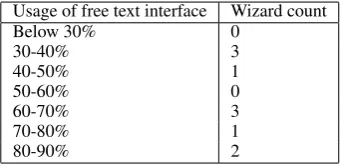
Individual differences: Use of the button inter-face varied between Wizards, with some using it very rarely and others depending on it when it pro-vided a feature they required. The highest was 82.7% while the lowest use of free text was 31.7%. Table 1 shows that 6 out of 10 Wizards used the free text interface more than 60% of the time. It is likely that these differences were due to individ-ual variations such as speed of typing and comfort with using an array of buttons.
Usage of free text interface Wizard count
Below 30% 0
30-40% 3
40-50% 1
50-60% 0
60-70% 3
70-80% 1
[image:4.595.308.536.445.581.2]80-90% 2
Table 1: Usage of free text interface
As an example of these individual differences, one Wizard used the button-press interface only once during the first navigation task (to ask “What can you see at the moment?”), choosing to direct
the Tourist almost exclusively through use of the free text interface. By contrast, of the twelve Wiz-ard utterances in another session’s initial naviga-tion task, only two were free text. It is interesting to note, however, that the Tourist commented “I’ve a feeling (the Wizard) is laughing at me right now.”
5.1 Hot button interface
We analysed how frequently each hot button in the interface was used by Wizards. We also counted how frequently the same text as the buttons was generated using the free text interface. This will show us if Wizards tend to type the same text that can effectively be generated at the push of a hot button. The following table shows the frequency of each hot button used over the 10 dialogues that we analysed.
There were forty buttons in total. Two initial buttons intended to be used at the start of the ex-periment or when the call was restarted after a problem: “Okay, we are ready to go. Please pre-tend to have just dialed Space Book and say hello.” and “Hello, SpaceBook speaking.” (These were used 29 times) and two intended for the end of the call: “Thank you for using SpaceBook” and “Goodbye” (10 times). Table 2 shows the fre-quency of usage for other hot buttons.
Utterance type Frequency
Confirmation (e.g. Yes, Okay, Certainly) 168 Navigation (e.g. “Keep going straight ahead”) 114 Filler (e.g. “Just a moment please”) 60 Repeat request (e.g. “Sorry, could you repeat
that please?”) 34
Visual checks (“Can you see it yet?”/
“What can you see at the moment?”) 32 Offer of further information/ help 30 References (e.g. “According to Wikipedia”) 20 Negation (“No”, “No, that’s wrong”) 18 Failure (“I’m afraid I don’t know the
answer to that”) 8
Table 2: Usage of Hot Buttons
[image:4.595.96.267.592.676.2]text-generated utterances.
5.2 Free text utterances
We analysed the free text utterances generated by the Wizards. This analysis, we believe, could show us how to build better Wizard interfaces for collecting dialogue data for pedestrian navigation. First, we counted the number of free text utter-ances that duplicated Hot Button text. Then, we analysed the other utterances generated using the free text interface.
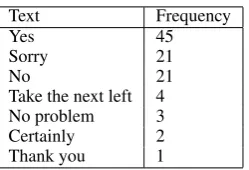
Table 3 presents the frequency of utterances that were generated using the free text interface but were the same as hot button text. The table shows that even though there are hot buttons for utter-ances such as “Yes”, “Sorry”, Wizards tended to type them into the free text interface. In some cases these words were followed by a more com-plex utterance which the Wizard had chosen to de-liver as a single statement (e.g. “Yes, that’s the way to go.”, “no, you should turn around”), and second, these utterances are short and could easily be typed rather than searching for the correspond-ing hot button. Also, Wizards sometimes used alternative spellings for words such as “Okay” which could be produced using a hot button. The word “Ok” was used 15 times in 10 sessions.
Text Frequency
Yes 45
Sorry 21
No 21
Take the next left 4
No problem 3
Certainly 2
[image:5.595.121.246.433.518.2]Thank you 1
Table 3: Usage of Free Text for utterances same as Hot Buttons
In addition, Wizards use free text to generate utterances that are paraphrases of hot button utter-ances, such as:
• “Keep going”, “Just keep walking”, etc • “Great”, “Excellent”, etc
• “One moment”, “Wait a second please”, etc • “Of course”
• “Okay cool”
These analyses imply that free text is not ac-cessed only in the last resort because the user can-not find the hot button that says what they’d like
to say. Clearly, the interaction is more complex and concerns both speed (the contrast of typing a short utterance such as “Yes” compared with the time needed to discover the correct button on a dis-play and navigate to it with a mouse) and the user’s imposition of their own identity on the conversa-tion; where the hot button interface offered sev-eral confirmatory utterances, users often used their own (e.g. “Great, “Excellent”, “Cool”), utterances which were, presumably, part of the way these Wizards more normally interacted with peers.
In this section, we present the other types of utterances Wizards generated using the free text interface.
1) Check user’s location:
Wizards asked several free text questions to check where the user was, given that the positioning system on smartphones was not entirely accurate. They framed most questions as yes/no check questions and enriched them with situational cues (e.g.“Is the Pear Tree on your right?”, “Have you reached the Royal Mile yet?”, “Can you see Nicolson Square?”, “Have you passed the primary school on your left?”).
2) Informing user’s location:
Wizards sometimes informed users of their loca-tion. e.g. “This is West Nicolson Street”.
3) Complex navigation instructions:
Using the free text interface, Wizards generated a variety of complex navigation instructions that were not covered by the hot buttons. These include instructions where the subject was asked to carry out two instructions in sequence (e.g. “Turn left, and keep walking until you get to Chapel Street”), orienting the user (e.g. “You want the road on your right”, “Please go back in the direction you came from”), signaling to the user that he/she was walk-ing in the wrong direction (e.g. “You’re gowalk-ing the wrong way”), a priori instructions to destination (e.g. “To get there you will need to keep going up the Royal Mile. Then turn left at the junction between North and South Bridge. Walk up South Bridge, and it will change to Nicolson Street. Sur-geon’s Hall will be on the left hand side.”).
the Wizard told the Tourist to follow a footpath. Tourist: “One of the footpaths banks to the right, and the other goes straight forward. Which one?”, the Wizard answered: “You want the one that is straight forward.”
The navigation directions on hot buttons were necessarily very general (e.g. Keep going straight ahead/ Take the next left) and Wizards frequently used the free text to enrich the directions and make them more specific, e.g. (dyad 09) “Walk down Crichton Street towards the Mosque.” In the ini-tial navigation task, this Wizard used the free text interface 7 times, and the navigation hot buttons only 4 times. Each segment of free text enriched the interaction by providing specific navigational information, so where the Wizard could have se-lected the hot button for “Keep going straight”, instead she chose to add value to the interaction through the use of place names and typed, “Con-tinue straight onto West Richmond Street”.
A similar pattern can be seen in the interaction in dyad 10 where the Wizard used the free text op-tion to navigate the Tourist according to objects in his environment. e.g. “Turn right at the traffic lights” and “Walk straight down past the Bingo on your left.”. Of the 22 Wizard utterances in the first navigation task in the dyad, only 5 were hot but-tons. 14 were navigation instructions, of which 3 were button-presses and one (“Walk straight on”) paraphrased an existing button. The Tourist got lost in this task, so there was also some checking on his location.
These are not isolated examples. In total, over the ten dyads, 308 utterances from the total 927 free text utterances were Wizards “enriching” their navigation directions by adding contextual cues, most commonly the name of the street or a land-mark to help situate the Tourist. For example, “You can reach it by turning right down Holyrood Road at the junction.”, “Please head towards the Mosque”.
Although 33% of overall free text utterances were enriched navigation instructions, this over-all pattern varied depending on the dyad, ranging from dyad 03 where 62.5% were enriched instruc-tions, to dyad 08, where only 8% were enriched.
These value-added uses of the free text suggest that the addition of contextual cues is regarded as important by the individuals acting as Wizards. An improved WoZ interface might seek to support such utterances.
4) Reassuring user:
Wizards presented information such as landmarks users can see as they walk along to reassure them that they are on the right track (e.g. “You will pass Richmond Place on your left”, “You will walk past the Canongate Kirk on your right beforehand”).
5) Informing time/distance to destination:
Wizards presented how long it will take to reach the destination to set the right expectation in the user’s mind (e.g. “It will be about a two minute walk”, “the gym is 200 metres along this road on your right”).
6) Providing destination information:
Wizards provided information about the location of destination in reference to the user (e.g. “And Bonsai Bar Bistro will be on the left, just before you reach The Pleasance”, “The Museum of Edinburgh will be on the left”) or other landmarks (e.g. “The Scottish Parliament is next to Our Dynamic Earth”, “The entrance is on the other side”). Note that this interaction, too, is normally enriched by situational cues.
7) Informing destinations that match search criteria:
Some tasks presented to subjects did not specify the actual name of the destination. Hence when they asked the Wizard for a matching destination, Wizards used free text to suggest destinations that match the search criteria (e.g. “There is a restaurant called Bonsai Bistro”, “There are three museums to visit. They are Museum of Edinburgh, People’s Story Museum, and Museum of Childhood”).
8) Check if destination reached and identified:
Wizards checked whether users had reached their destination by asking them to confirm if they had (e.g. “Have you reached it?”, “Have you found the sports centre?”). The hot button ”Can you see it yet?” covered this functionality, but once more, free text allowed the user to increase situational specificity by identifying the target.
9) Additional information about landmarks:
par-liament is in fact 2 hills, the rocky cliffs you can see are called crags”, “behind that is arthurs seat”), the year it was built/opened (e.g. “it was opened in 1999”), what it functions as (e.g. “offices for a newspaper publisher”).
In some cases such free text utterances were produced in response to questions asked by Tourists. For example, when the Tourist of dyad 05 passed the Fringe office, they asked, “Do you know what dates the Fringe is on this year?”. The Wizard used free text to answer the question. Later in the same experiment, the Tourist identi-fied Vodka Rev as a landmark (“Down past Vodka Rev?”) and the Wizard responded with free text about the landmark: “Vodka Rev does half price food on Mondays.”.
10) Signalling connection problems:
Wizards informed users when they lost the user’s GPS signal (e.g. “hold on 1 second, gps connec-tion gone”) and to establish contact and check user’s attention (e.g. “hello?”, “I can’t hear you at the moment”).
Further, some Wizards used the free text to hu-manise the person-to-person element of the inter-action. They would chat to Tourists, make jokes (“I cannot answer rhetorical questions, as I am both a computer and aware they are not meant to be answered.”) and in one case, invite the Tourist out for a drink.
6 Issues with free text
As one can imagine, there are issues with free text utterances generated by Wizards.
Spelling:
Several words used in free text utterances were misspelled. e.g. “roundabaout”, “entrace”, “ple-sae”, “toewards”, “You want ot cross the roD”) etc. These ranged from 0 to 13 errors per session with a mean of 3.6 (+/- 3.9) errors per session. Adjacent words were sometimes joined together (e.g. “atyour”, “upahead”, etc) and sometimes incorrectly segmented with space (e.g. “collection sof”, “hea ryou”, etc). Some entity names were misspelled as well (e.g. “Critchon”, “Dyanmic Earth”, “artthurs seat”, etc). Spelling errors can reflect poorly when the utterances are synthesized and the misspelled words mispronounced.
Syntax:
We also found a few syntactic errors in utterance construction (e.g. “Continue going Chambers street”). Similar to spelling errors, utterances with improper syntax can sound weird to the Tourist and could lead to confusion and misunderstanding instructions.
Incorrect entity names:
Wizards did not always get street names correct, e.g. in dyad 02, the Wizard directed the Tourist to “Nicholas Square” and the Tourist needed to seek clarification that he meant “Nicolson Square”.
Time and effort:
It takes time and can slow the interaction with the user, leading to issues like interruptions and the flow of the conversation being upset.
7 Suggestions
Based on the above analysis, we propose a list of suggestions to build a better Wizard of Oz in-terface for collecting dialogues concerning pedes-trian navigation and exploration. The objective of the WoZ system is to provide an effective inter-face to Wizards to interact with Tourists while pre-tending to be dialogue systems. One of the impor-tant requirements is that Wizards should be able to generate context appropriate utterances quickly to make the dialogue appear more natural with-out unnecessary lag between a user’s requests and the system’s responses. Hot buttons are designed so that the utterance can generated at the push of a button. However as our data shows, Wizards tended to use the free text interface about 60% of the time.
While there are situations in which free text is necessary, in general it risks slowing the interac-tion and potentially confusing the Tourist when words are mis-spelled or omitted. In addition, supporting the Wizard more effectively with an improved WoZ interface is likely to permit them to spend more time supporting and informing the Tourist. Free text utterances can lead to slow system response and there is therefore a need to find a compromise between the two. We have the following suggestions:
1. More hot buttons:
but-tons or the sequences. These include reassuring users, informing them of the time/distance to des-tination, informing them of search results, etc. While free text is a useful interface to Wizards to generate unforeseen utterances, more hot buttons covering new functionality can be faster to use.
However, introducing additional hot buttons would add complexity to the interface, which is likely to have the undesireable effect of encourag-ing users to avoid the cluttered display in favour if the straightforward free text interface. One partial solution is to ensure that buttons are organised and grouped in ways that are intuitive for the Wizard. This, and the optimum number of buttons for the display, should be investigated experimentally.
2. Multi functional hot buttons:
Some free text utterances were complex versions of simple utterances that were already covered by hot buttons. For instance, utterances like “Keep going up Nicolson Street” or “Keep walking until you get to Chapel Street” can be seen as a version of “Keep going straight ahead” but with some ap-pended information (i.e. street name, landmark).
The interface could be designed so that hot button utterances could be modified or appended with more information. For example, a single click the hot button might send the utterance to the free text editor, allowing the Wizard to add more information, whereas a double click would send the utterance directly to the TTS.
3. Spell check, grammar check and auto cor-rection:
To ensure that the speech synthesizer works as ef-fectively as possible, the utterances typed in the free text editor must be correctly spelled. One so-lution to the frequent mis-spelling made by Wiz-ards typing at speed is to automatically spell check and correct text typed in the free text interface.
Ensuring that text is correct would reduce the risk of the speech synthesizer mispronouncing misspelt names and words. Similarly, a grammar check would mean that the synthesised utterances felt more natural.
Since there is the danger of an automatic spell checker making mistakes, the spell check and cor-rection should happen when the Wizard finishes typing a word or utterance and the auto corrected word or utterance be shown to the Wizard before it is sent to the TTS.
4. Autocomplete:
Autocomplete is a feature that predicts the next words the user intends to type based on those already typed. It is currently used by search engines such as Google to complete users’ search queries based on their search history and profile. A similar feature that can complete utterances taking into account the user’s request, dialogue history, and the spatial context could speed up the response time of the Wizard.
5. Location aware WoZ interface:
The WoZ system could be “aware” of the user’s surroundings. Such a solution might enable the interface to have dynamically changing buttons, so when the user is headed up Nicolson Street, the “Keeping going” button could have Nicolson Street on it. Information about entities around the user can also be assigned to hot buttons dy-namically. However, hot buttons with dynamically changing labels and functionality could be cogni-tively overloading to Wizards.
Of course, the addition of such functionality to the WoZ interface must be carefully evaluated. A dynamic interface may be harder to learn, and increasing the number of buttons may, counter-intuitively, mean that users are less likely to select hot buttons because the effort to scan the array of buttons is greater than the effort needed to type ut-terances, particularly short ones, into a free text box.
8 Conclusion
In this paper, we presented a Wizard of Oz system that was used to collect dialogues in the domain of pedestrian navigation and information. We anal-ysed the corpus collected to identify how Wizards preferred to interact with the pedestrian users and why. We identified issues with free text interfaces that was used by majority of Wizards and sug-gested improvements towards future Wizard inter-face design.
Acknowledgments
References
P. Bartie and W. Mackaness. 2006. Development of a speech-based augmented reality system to support explo-ration of cityscape.Transactions in GIS, 10:63–86. Vera Demberg, Andi Winterboer, and Johanna D. Moore.
2011. A strategy for information presentation in spo-ken dialog systems. Comput. Linguist., 37(3):489–539, September.
N. Fraser and G. N. Gilbert. 1991. Simulating speech sys-tems.Computer Speech and Language, 5:81–99. S. Janarthanam, O. Lemon, P. Bartie, T. Dalmas, A.
Dick-inson, X. Liu, W. Mackaness, and B. Webber. 2013. Evaluating a city exploration dialogue system combining question-answering and pedestrian navigation. In Proc. ACL 2013.
J. Pearson, J. Hu, H. P. Branigan, M. J. Pickering, and C. Nass. 2006. Adaptive language behavior in HCI: how expectations and beliefs about a system affect users’ word choice. InProceedings of the SIGCHI conference on Hu-man Factors in computing systems, Montral.
V. Rieser and O. Lemon. 2011. Learning and Evaluation of Dialogue Strategies for new Applications: Empirical Methods for Optimization from Small Data Sets. Compu-tational Linguistics, 37:1.