Guidelines for the Design of Personal Document
Management User Interfaces
Sarah Henderson
Department of Information Systems and Operations Management
University of Auckland Private Bag 92019, Auckland, NZ
ABSTRACT
Personal document management describes the activities performed by an individual in creating, acquiring, organizing and maintaining collections of their documents. A study involving 10 in-depth interviews and a survey of 115 participants was conducted in order to better understand the approaches people take to document management in order to inform the development of better user interfaces. These were used to develop an understanding of issues and concepts in personal document management, and a description of three major approaches to personal document management: a piling strategy, a filing strategy and a structuring strategy. From the findings, some general guidelines are proposed for the development of personal document management user interfaces, along with specific user interface guideline to support each of the three identified approaches to personal document management.
Categories and Subject Descriptors
H.5.2 [Information Interfaces and Presentation (e.g. HCI)]: User Interfaces
General Terms
Design, Human Factors.
Keywords
Personal document management, personal information management, document management strategy.
1.
INTRODUCTION
Personal document management is the activity of managing a collection of digital documents. The unit of analysis in personal document management is an individual user and the collection of digital documents he or she owns. The process of document management incorporates the creation/acquisition, retrieval, organizing and maintenance activities described above, provided they are performed by the document owner. Personal document management is an activity that is performed intermittently, embedded in the daily life of users.
Most people store their documents in the hierarchical file system
provided by their computer‟s operating system, and manage these documents through a hierarchical file browser (such as Windows Explorer) [9]. These file browsers were intended to allow a systems administrator to manage files on a computer (at a time when there were generally only a few hundred files). Additionally, when these were developed, computers were not used by the general public, but by highly trained technicians with a thorough understanding of computer technology. The basic paradigm of the tool has not changed in the decades since its introduction, although the user interface to it significantly improved with the widespread introduction of graphical user interfaces in the Macintosh and Windows operating systems. Despite these improvements, the user interfaces of these systems were not designed for modern document management tasks. A basic principle of user interface design is that the design of a tool should be thoroughly grounded in an understanding of how the users work, what tasks they perform and how those tasks are carried out. However, with personal document management, very little research has been done into how people are managing their documents and what the requirements are for document management tools. This knowledge gap needs to be addressed before better tools can be developed.
2.
BACKGROUND
The seminal work in the field of personal information management is Tom Malone‟s 1983 study titled „How Do People Organize Their Desks?‟ [13]. He studied how people used paper files in their offices and identified two distinct strategies: „neat‟ and „messy‟. In a neat office, the person tried to designate a category for every document and place it the location corresponding to that category. The location may have been a folder inside a filing cabinet, a paper tray, or a named pile. In the messy office, the person would tend to pile up documents over time, in a less structured way. In both offices, files and piles are the basic building blocks of paper document management. Several studies have attempted to classify styles of email use in a similar way to Malone‟s „neat‟ and „messy‟ classifications. One of the earliest was Mackay [12], who identified „prioritizers‟, „archivers‟ and „requesters and responders‟. The requesters and responders use email for task delegation; prioritizers concentrate on managing incoming messages while archivers use email to archive information for future use. Whittaker and Sidner [18] also looked at organizing behavior in email, identifying „no filers‟, „frequent filers‟ and „spring cleaners‟. The „no filers‟ were the email equivalent of pilers, allowing all their email to pile up in the inbox, while the filers attempted to place all their emails into folders. The spring cleaners occupied a middle position between the other two groups, using a „no-filing‟ strategy most of the time, Permission to make digital or hard copies of all or part of this work for
personal or classroom use is granted without fee provided that copies are not made or distributed for profit or commercial advantage and that copies bear this notice and the full citation on the first page. To copy otherwise, or republish, to post on servers or to redistribute to lists, requires prior specific permission and/or a fee.
Conference’04, Month 1–2, 2004, City, State, Country. Copyright 2004 ACM 1-58113-000-0/00/0004…$5.00.
but periodically attempting to put their documents into files. Without the folders that others use to aid retrieval, „no filers‟ rely on full text search and temporal ordering to retrieve their information. This categorization was extended by Bälter [2] to subdivide „no filers‟ in to „folderless cleaners‟ and „folderless spring-cleaners‟ depending on how often they deleted information from their inbox. A more recent study of email behavior identified two major approaches: „cleaners‟ and „keepers‟ [11]. Cleaners have specific times for dealing with email, and don‟t keep events or to-do items in their email. Keepers read email constantly, allowing tasks to be interrupted by email. They keep events and to-do items, and search their email archives.
Studies of organizing approaches taken with respect to web bookmarks have found similar results to the studies of email, identifying „no-filer‟, „creation-time filer‟, „end-of-session filer‟ and „sporadic filer‟, depending on whether and when the user saved web bookmarks during a browsing session [1].
Another more recent study to look at digital documents was conducted by Richard Boardman [5]. He analyzed information behavior across three collections: documents, email and web bookmarks with the intention of analyzing difficulties people had in managing their information collections across tools. He found that people could be categorized as either „pro-organizing‟ or „organizing neutral‟, but that people didn‟t always adopt the same strategy across all collections. People were more likely to be „pro-organizing‟ in their document collection and email than they were in their web bookmarks.
Table 1: Classifications of organizing strategies Reference Information Type Classifications
Malone [13] paper documents neat, messy
Mackay [12] Email prioritizers, archivers, requesters and responders Whittaker &
Sidner [18]
Email no-filers, frequent-filers, spring-cleaners Bälter [2] Email folderless cleaners,
folderless spring-cleaners, spring-cleaners, spring-cleaners Gwizdka [11] Email cleaners, keepers Abrams, Baecker
& Chignell [1]
web bookmarks no-filer, creation-time filer, end-of-session filer, sporadic filer Boardman & Sasse [6] documents, email and web bookmarks pro-organizing, organizing neutral
3.
RESEARCH DESIGN
This study into personal document management practices consisted of a field study and a survey. In the field study, 10 knowledge workers were interviewed about their personal document management practices. The participants were all employees of a large university environment, and included researchers, teachers and professional staff. Such an environment
is particularly helpful for work of this nature because it encompasses a wide variety of usage situations coupled with a good mix of individuals with varying requirements. All participants were using the Windows XP operating system. The interviews were largely unstructured and took place in the participant‟s offices so their document management practices could be seen in their natural context. Participants were asked to give a tour of their documents, and the interview was centered on the participant‟s practices. Participants were encouraged to demonstrate their structures and processes during the interview. This technique of interviewing participants in their offices and using their computers as a questioning point for the interview has been used many times in investigation of related aspects of personal information management [8, 13, 17, 18], and was used in prior studies of personal document management [3, 4]. These interviews were analyzed using thematic analysis, and an initial conceptual model of document management concerns was developed.
In order to validate this conceptual model, a questionnaire was used in a survey of knowledge workers designed to gather more generalized data about personal document management practices. The questions were derived from the conceptual model, and were delivered as a web-based survey. The sample frame was the staff of the commerce faculty of the university. The survey was completed by 115 participants (out of 490 people invited). In addition, a snapshot of each participant‟s file system was taken so that their document structures could be quantitatively analyzed. All field study participants and 72 survey participants provided a file system snapshot. These were analyzed and a number of metrics were calculated to describe the overall shape of the structure. The metrics included:
Overall size (number of files and folders) Tree characteristics (depth, breadth and balance) Duplication (of file and folder names)
Top level files and folders
The field study indicated that there were three primary strategies that the participants adopted in order to manage their document: piling, filing and structuring. The three strategies seemed to differ in the following attributes:
Overall level of organization (self-assessment) When folders are created (self-reported) Preferred retrieval strategy (self-reported) Preferred document view (self-reported) Use of tree (self-reported)
Depth of structure (from snapshot) Breadth of structure (from snapshot)
Unfiled documents in top level (from snapshot) Folders in top level (from snapshot)
In order to validate this finding with a wider population, a K-means cluster analysis was performed on the survey data to see if particular combinations of these attribute values tended to group together. This analysis resulted in three distinct clusters. Analysis of variance indicated that several metrics were not contributing to discrimination between any clusters. These included the questions on when folders are created, retrieval strategy for old files, use of tree and the breadth of the structure. These were removed one at a time and the cluster analysis
repeated until all remaining variables differed significantly across the clusters. Table 2 below shows the resulting variables and the typical values for each cluster.
4.
RESULTS
The findings from the studies are grouped into four main areas: general attitudes to personal document management, approaches to finding documents, issues surrounding creating folders and documents and strategies for document management. The following sections elaborate on the finding in each of these areas, integrating the findings from the field studies and the survey.
4.1
Attitudes to document management
4.1.1
People want to be "organised" not "messy"
Many of the participants‟ responses indicated that they felt that being organized was a desirable state. Those who consider themselves organized expressed pride in their file structures, for instance, one participant spoke with pride of her colleagues being
“surprised that they can come into my office and they can ask for
an article and I will know where it is,” adding “thank God for the
power of computers.” In contrast, several participants referred to
their documents as being messy, or a mess. Others mentioned that they find they tend to organize some documents but not others, with more effort being put into managing documents perceived as more important.
Many participants seemed to have an idea of a hypothetical „perfect organization‟ against which people measure themselves. Trying to attain that level of organization was seen to be a good thing. The opposite end of the spectrum was „messy‟, and people do not want to be considered messy. This was confirmed in the study with over 90% of people agreeing that they think it is important to have well organized documents. Since it was noted in the field study that people often compared themselves with others, or were interested in learning how other people performed document management, it seems that people may feel less satisfied with the document management structures simply because they perceive it to be messy or poorly organized, even if the actual amount of time or effort they spend organizing their documents isn‟t impacted.
4.1.2
Hierarchies are intuitive
The folder hierarchy is intuitive to many people and reflects the way they think about their documents. One participant said that folder structures are “second nature, and I probably don’t feel things that someone who is new to them would find puzzling and annoying. I’m reasonably happy with this hierarchical tree
structure of Windows Explorer.” Another noted that “it seems to
fit in with my mindset.” This finding from the field study was
reinforced in the survey, with the number of people in free-form comments mentioning they liked ability to create a folder structure and appreciating the flexibility to create their own organisation scheme within it.
4.1.3
Sense of file ownership
People need to feel they have control and ownership over the folders and files in the collection. One participant had a particularly strong conception of file ownership. She related a past experience where she was assigned a computer that previously belonged to someone else and still had the previous user‟s files and folders on it. She was very careful not to move, rename or delete or in any way interfere with that person‟s files. Windows XP automatically creates a number of folders for each
user, including folders for Application Data, Local Settings, Templates, and known network computers and printers. Several times she referred to these as being someone else‟s folders that she didn‟t touch, seemingly not knowing they were system created. She mentioned being very careful not to use them or touch them. She also feels that she doesn‟t have the right to rename files that she didn‟t create herself. Any files she saves into her folders that were emailed to her or that she downloaded from the web always keep their original names. She explains that even though they are on her computer in her folder structure, she doesn‟t feel she has the right to rename them because she didn‟t name them and she doesn‟t own them.
This theme was reinforced in the survey with people commenting that one reason why they didn‟t like the system provided My Documents folder was that they didn‟t create it and therefore didn‟t have full control over it.
4.1.4
Variable willingness to change practices
Most people are willing to change their document management practices in order to be more organized, however some people are resistant to change. One participant said he would like to change
“if you could tell me after this research what is a good way or
better way to organize files, that means is easy to name it and
easy to retrieve it.” This was confirmed in the survey, with
approximately three-quarters of the respondents agreeing they would be willing to change if they were shown a better way to doing things.
Habit is a very powerful force, with several people giving habit as the reason for various document management practices they engage in. Once someone has a reliable way of doing something, they are comfortable with that and may not be willing to change unless there is a compelling reason to do so (or unless they are forced to by the change of a system). One participant mentioned that she was quite annoyed at having to open My Computer and then drill down through folders from My Computer to C drive and down to her document folders every single time she opened a document. At the end of the interview, the interviewer mentioned that it was possible for her to create a shortcut to her documents folder and put it on the Desktop for fast access with a single-double click. She politely said thank you, but was not interested in creating a shortcut, explaining that she was used to doing things a certain way and wanted to stick to the methods she was used to as she knew they were reliable.
A related theme that came up several times in the survey was participant‟s lack of knowledge. Many suggested the addition of features in Windows XP that were in fact already available. And several indicated that they hadn‟t availed themselves of available view options because they hadn‟t known it was possible. People don‟t tend to receive any training in personal document management. They are generally left to themselves to figure it out. For instance, the university has run professional development courses teaching people how to deal with their email, manage tasks and projects and manage their time, there are no courses teaching people how to use their documents. Basic computing courses teach the basics of creating folders, saving and opening documents, but usually don‟t discuss any more advanced features like changing views, sorting, advanced search options, and how to change the Desktop to enable spatial layout of items. Very few people would consider it worth spending time investigating the topic themselves, since people are generally more concerned with getting on with their tasks.
4.2
Finding documents
4.2.1
Browsing more common than searching
The majority of the participants reported that if they need to locate a document, they would browse to it in their folder structures. This browsing technique is also known as location based search. As one participant puts it: “I usually know where I put stuff.” The survey confirmed this predominance of a tendency to browse rather than search. This cannot be construed as a clear preference in all cases, since many people weren‟t familiar with the ability to do full text search in Windows XP, and others complained about how slow search is.
A minority reported using search as their primary means of finding a document, with keywords from filename being the most common way of trying to locate it. 62% of respondents reported experiencing search failure. Most believed the file was on their computer somewhere and they just couldn‟t find it..
When asked about their use of a search tool, the majority of respondents said they would use a search tool only if they hadn‟t quickly found their document through other means. More than a quarter said it would be a last resort, while those who would search first or never search were a small minority.
4.2.2
Sorting is an important search technique
Sorting proved to be a very important was of locating documents, either in search results or in folder views while browsing. As one participant explains: “If I’m looking for a particular file here, sometimes it’s useful to sort by type, cause I know it’s a text file and I can go to text files and then find it immediately, [foo].txt for example. Sometimes I know that it’s the most recent file so I scroll down to the bottom and there it is. Sometimes it’s by name and sometimes it’s the biggest file that I’m looking for, so I can
know relative what’s the most efficient way for me to find it.”
Sorting by anything other than name is only possible in the details view (which is the mostly commonly used view). Changing between names, date and file type sorts were very common, with size being much less common. This fact was confirmed in the survey. Sorting can be viewed as a sort of „quick and dirty‟ way of searching or filtering within a folder. Users often change the name of their documents to force a specific sort order inside a folder. For example: “That’s one thing I am careful with though,
because it’s a 12 week course, I always put the zero in [Module
01 not Module 1] so they actually stay in order.” Other
participants also mentioned using certain prefixes to force a certain sort order within their folders.
4.2.3
Tree view useful for overview and navigation
Many people in the field study use the tree view when navigating, although the perceived time taken to click down through the levels is an annoyance for some. The survey confirmed this, with 70% of respondents reporting they use the tree to navigate. 65% report using the „Up one level‟ button to go to the parent folder of the current folder, and 50% use the back and forward buttons to navigate between folders. Some participants in the field study had the tree visible, but didn‟t usually use it for navigation, instead double-clicking through files in the details or list view in the right hand side.
Those that didn‟t use the tree tended to have very shallow file systems with a large number of files in each folder. One of these participants describes himself as “tree averse”, pointing to his My
Documents folder which contains 32 folders and 170 files and
saying “that’s ridiculous, how can any sane person possibly cope
with that? That much vertical stuff.”
4.3
Creating folders and documents
4.3.1
Document creation is application-centric
The field study observed that people mainly create documents through the appropriate application rather than through their file system. This was confirmed in the survey, with the majority of people opening the application to create a new document. Less than 10% of respondents create their files directly in Windows Explorer. Although using Windows Explorer is still important for the 27% who use it to locate an existing document to open and reuse, the majority of people name and place their files through the Save dialog boxes of applications. This is important since it means that designing a document management interface doesn‟t only involve creating a file management interface, but also a coherent set of Open/Save dialog boxes. This also means that any unified interface can easily be disrupted if applications are able to use their own custom dialog boxes.
4.3.2
Periodic reorganizations are common
Many participants spoke of cleaning up, organizing or reorganizing their files. It is frequently done on a periodic basis (such as every semester or annually), but may also be done in response to rising level of mess, or continually.
Several participants mentioned they clean up every six months or so, with one saying “I look at all the stuff that hasn’t been saved
into a folder, and I figure out if I need to delete or move it or
whatever.” Others say they wish they could reorganize their
documents but never have the time to do so. One participant says she sometime starts and gets partway through but always something else comes up that prevents her from finishing. She describes it as a constant guilt that she knows she should do something but never does. She does say that maybe once a month or so something will annoy her about a certain folder and she‟ll try to delete old items or move things to better locations, however she usually never finishes.
4.3.3
Implicit limits on folder structures
Many participants remarked that reorganization activities such as splitting a folder into multiple folders or creating subfolders were prompted by a folder reaching some limit. One participant says “I’m reacting to the fact that it’s building up and I’ll think well I’ll subdivide at this point. And that could be something in the order of ... and again, it will depend upon the topics that are there. No point in differentiating them if there’s only one topic. If there are two quite distinct topics, you might think that. And that
might be something on the order of 10 to 15 I guess.” This is
supported by the fairly consistent and low average number of files and folders people keep in their folders.
4.3.4
Three folder creation tactics
Folders are created for a number of different reasons. They can be created before there are files to be placed within them, created ad hoc to contain files needing to be saved, or created in order to clean up and move existing documents. Most participants reported using multiple folder creation tactics depending on the circumstances. In-advance creation sometimes involves the creation of entire folder structures, often similar to or duplicating existing folder structures. The survey confirmed this, with just-in-time creation being the most prevalent (reported by 56% of respondents). Folder creation in response to cleanup was reported by 28% of respondents, with the remaining 16% creating
in advance. Note that as suggested in the field study, it is quite likely that many people use a combination of these techniques at different times. The survey asked which technique they would usually employ. The survey also found that those who create in advance tend to be happier with their file system overall.
4.4
Approaches to document management
From the field study and survey data, three distinct clusters of strategies have been identified. Following previous researchers, these have been named piling, filing and structuring. The piler strategy identified here is analogous to messy, no-filers, keepers, and organizing neutral strategies identified by other researchers. Filer and structurer are variants of the pro-organizing, frequent-filer and keeper categories identified by others but have some distinct features that mean they are likely to require different user interfaces for optimal support.
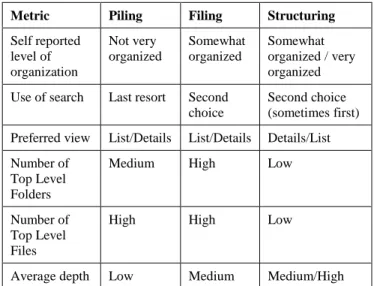
Table 2 summarizes the results of the cluster analysis:
Table 2: Summary of quantitative features of personas
Metric Piling Filing Structuring
Self reported level of organization Not very organized Somewhat organized Somewhat organized / very organized Use of search Last resort Second
choice
Second choice (sometimes first) Preferred view List/Details List/Details Details/List Number of
Top Level Folders
Medium High Low
Number of Top Level Files
High High Low
Average depth Low Medium Medium/High
The following sections briefly summarize the main characteristics of each of these three strategies, combining the quantitative data from the survey and the qualitative data from the field studies.
4.4.1
Piling
The piling cluster perceive themselves as relatively disorganized, preferring a list view, with a medium number of top level folders and a high number of top level files and relatively shallow system. A person adopting a piling strategy doesn‟t really file his documents; he just lets them pile up in various convenient locations. Folders are usually created in order to dump a large group of old documents that are no longer needed. Because folders are rarely created, the folder structure tends to be fairly shallow, with many folders and files at the top level of the structure. Because recently used files are always easily available, they are retrieved through browsing, with sorting often used to locate the most recent document. A piler may make periodic half-hearted attempts to delete things or organize them into folders, but more because he feels this is how he is supposed to do it than any perceived usefulness. It's peer pressure. Someone adopting a piling strategy tends to be a high Desktop user, since one of the key concerns is least effort and maximum availability. Minimizing visual clutter isn't really an issue, nor does he feel any
need or desire to organize documents in order to get an overview of his stuff.
4.4.2
Filing
The second cluster is perceived as more organized, with just in time folder creation, combination of browsing and searching only as a last resort. The structure is medium in depth and width and has a moderate number of unclassified top level folders.
Someone adopting a filing strategy creates folders in order to split up collections of documents. They split folders up if the number of documents grows so large that they cannot easily spot items within them anymore. They tend to create folders either during cleanups or just-in-time as they need to save a folder that doesn‟t fit an existing category. They do have a hierarchy, although it is moderately broad and not particularly deep. They are likely to have some files in the top level (pending cleanups), and quite a few folders as well, resulting in a tree of moderate depth but high breadth. There is no particular preference for view, but they are much more likely to locate files by browsing their structures than searching. They would generally consider themselves to be relatively organized.
4.4.3
Structuring
Members of the third cluster have high depth, low level of unclassified files, in-advance or just-in-time creation and consider themselves to be fairly organized.
Someone adopting a structuring strategy intensively organizes their files, creating deep and meaningful document structures, often before there are documents to put in them. Related folders are typically grouped together into more levels of nesting, in order to hide complexity and indicate their relationship. This results in a fairly narrow and deep tree, often with fewer than 3 or 4 top level folders and very few or no files at the top level of their folder structures. They are more likely to browse through their structures although because there are so many folders to inspect, if they can‟t remember where something is they will readily search, particularly for older files. Browsing is often done using the tree, since the tree gives them an overview of how everything fits together. The parent folders give context to the subfolders. They get frustrated with views that don't show them the full context. For instance, search that only shows them the file name is very irritating. Showing the parent folder is even better, but they really would prefer to see the full path for context. Folders are often created in advance, as soon as a new responsibility, project, course or something appeared on their horizon, to have a place to store the documents. They tend to consider themselves very well organized.
5.
USER INTERFACE GUIDELINES
The following table lists some general user interface guidelines based on the findings described in the previous section. The following sections describe these in more detail.
Table 3: Summary of user interface guidelines General Guidelines
Provide usable, fast, powerful full text search Integrate Open/Save dialog boxes into the UI Support flexible sorting and custom sort order Do not mess with the user‟s folders or documents
Guidelines for Piling strategy
Do not require containment Support a time-based interface Provide optional tagging
Guidelines for Filing strategy
Support containment Provide a cleanup interface
Guidelines for Structuring strategy
Support hierarchies with multiple classification Support dynamic containers
Provide relationships between items Provide optional tagging and color coding.
5.1
General User Interface Guidelines
5.1.1
Provide usable, fast, powerful full text search
All users rely on search tools to sometimes locate documents and thus need a very fast and robust full text search. Although users of piling and filing strategies don‟t rely heavily on search tools for accessing their documents, they do use it sometimes, particularly to find old documents or documents in their archives.
5.1.2
Integrate Open/Save dialog boxes into the UI
All users interact with their document collection through applications‟ Open/Save dialog boxes, and filers perform most creation, acquisition and locating activities this way. Thus, these need to be considered first class citizens in a personal document management user interface. They should present the same interface the user would normally use to access their files, including preferences for views, sorting or other customizations. For filers and structurers this dialog will probably need to be much larger than they currently are in order to provide a useful view of the file system. For adopters of a piling strategy, the dialog should be as minimal as possible with perhaps simply a field to specify the filename (which ideally should default to something sensible suggested by the document). Since pilers don‟t usually specify a place, there is no need for a large view of a folder structure for them to select one. There should be an option to switch views, since most users do not operate exclusively according to type.
5.1.3
Support flexible sorting and custom sort order
Sorting is a very important mechanism used to locate documents, and sorting on any visible attribute should be easy to accomplish. In addition, it should be possible to specify a custom sort for a folder or container, in which the user can reorder folders and documents to appear as they wish. This should be remembered so that if the user switches to another sort order, they can switch back and have their custom sort presented again. This should prevent people from using file naming techniques to force documents to sort in particular ways.
5.1.4
Do not mess with the user’s stuff
Users need a sense of ownership over their files, and so the general principle is that the system should not interfere with their structures unless absolutely necessary. For instance, the system should not create the pseudo-folders My Music and My Pictures. Rather, the user should be allowed to create as many folders for their pictures and music as they want, wherever they want and name them however they want. They should be able to select a custom view (pictures view or music view) for those folders, and this custom view could also be reused in displaying search results for the appropriate type of file. Likewise, the system should not move documents around or take any actions without the user‟s knowledge and consent. User settings related to the operating system and applications should be stored elsewhere, either a designated settings folder for each user or in the Registry. These should not be intermixed with user folders and documents.
5.2
Piling Strategy Guidelines
5.2.1
Do not require containment
Pilers don‟t need a folder-like containment mechanism in order to group their documents, since they are interested in expending as little up-front effort as possible. This doesn‟t mean that folder or a grouping mechanism needs to be completely absent, just that if present, it should be optional. It should be entirely possible to use the interface without ever having to think about where to put something or in what to contain it.
The attempt to take literally the piling paradigm to create a user interface that supports piles is misguided when it comes to the personal document management piler. Electronic implementations of piles (e.g. [14]) are a containment mechanism just like folders. Conceptually, they operate exactly as folders although with a slightly richer visual representation, one which folders views could easily match (and with picture folders starting to show thumbnails of contents, this is getting closer). The nature of the piling strategy is that followers don‟t really want to group and organize things. They adopt piling because it involves the least initial effort. This doesn‟t mean that a containment or grouping or folder needs to be completely absent, just that if present, it should be optional. It should be entirely possible to use the interface without ever having to think about where to put something or what to contain it in.
5.2.2
Support a time based interface
Time based retrieval is more important to users of a piling strategy than users of other document management strategies. The piler naturally has (or maybe is forced to have) some sense of chronology, since their pile stacks up in order of creation/acquisition. While they don‟t need to remember absolute times or time spans, they need to have a relative idea how far back through the Desktop stack to look, or how many cleanup folders back to look for something. An interface such as Lifestreams [10], provided it had very strong search support, would probably suit the piling strategy very well.
One way of leveraging this tendency is to ensure the default document view shows all recent files ordered by either when they were most recently used or when they were created. The Desktop could potentially use the same view, making the view easier to access. This view should be dynamic, rather than the static view currently offered by the Desktop. Items that have not been used recently should just disappear from view. Thus, the default view might show an item that was added a month ago but which was
used three days ago, while an item added two weeks ago but not used since may not be visible.
Rather than having items disappear after a certain time, the view should simply show as many recent documents as possible. This takes advantage of the common practice of sorting by date to find the most recent document, and eliminates the need for periodic cleanups or dumps of files. There should be an option to „jump back‟ or scroll back to show earlier sets of documents as well, giving this interface something in common with the TimeScape software [15], although without the spatial element.
All dates and times should be shown as relative times by default (although the option of switching to absolute times should be available), since few people have sufficiently good recall to pinpoint exactly when they created or worked with a document. Examples of relative times include ‟30 minutes ago‟, „5 hours ago,‟ „yesterday‟ and „2 weeks ago.‟
5.2.3
Provide optional tagging
If someone adopting a piling strategy wants to do any kind of categorization at all in order to make sure that he is more easily able to retrieve stuff, the easiest way to support this would be to allow tags to be specified when saving the document (or added later). These can be free-form comma separated tags in which he can just type additional keywords that he might want to use to search for it but that don‟t appear in the document itself. This provides a way of being able to group related documents without the containment semantics, since it is easy to create a view of all documents sharing the same tag or tags. The advantage of tagging is that it lets the user add words they associate with the documents, but which might not appear within it. This makes future searching more effective.
5.3
Filing Strategy Guidelines
5.3.1
Support containment
Users adopting a filing strategy need a containment mechanism in order to group their files into manageable locations. The standard folder metaphor would probably work very well, although there are many other ways of implementing containment semantics, which would also work. Different means of visualizing containers should be explored. One place to start would be developing views that allow more of the hierarchy to be seen at once, since a common complaint is the time taken to click down the levels. Within containers, items should be able to be viewed with or without details, since name is probably the most important dimension. If other dimensions are used, file type, date created and date last used would be the most useful.
While the ability to change sorting is important, there should also be a custom sort or user defined sort. In this way, filers could organize things into the exact order they wanted and know things wouldn‟t change. This creates a sense of stability and permanence and makes finding items through known paths easier and more reliable. It also obviates the need to change the „common sense‟ file names in order to force a sort order.
5.3.2
Provide a cleanup interface
While most of the time a user of this strategy is interacting with documents through Open/Save dialog boxes, they do want a larger view of their file structure when doing a cleanup. During a cleanup, they are going through files in a temporary location (e.g. top level folder or Desktop) and placing them into their permanent folder home. To do this effectively they need to be able to see the
list of files they are cleaning up, as much of their folder structure as possible (expanded tree view), and ideally a preview, in case they need to be reminded what the document is before they can decide where to put it. In this view it must be easy to create new folders and to reorder folder contents in the tree.
5.4
Structuring Strategy Guidelines
Followers of a structuring strategy need the ability to express containment just as filers do, but they also need richer containment semantics.
5.4.1
Support hierarchies with multiple classification
Systems must provide the ability to create hierarchies of containment, since many people appreciate the ability to create folder structures. Multiple classifications enable a document to live in more than one location. Previous means of approximating this such as shortcuts or copies are not sufficient – the document actually needs to have one location but appear in multiple locations. Regardless of the location from which the file is viewed and accessed, any changes to the document or its metadata should be immediately effective in all locations. When a file is deleted, if it exists in multiple locations the user will need to be prompted whether the file should be deleted from that location only or from all locations. A user interface should support collapsing or hiding of levels of information, to enable the ability to see an overview and drill down to detail on demand.
5.4.2
Support dynamic containers
Providing dynamic containers is another way of providing some of the same functionality as multiple classifications. Dynamic containers don‟t have a predefined set of contents, but rather display the contents based on a search. The containers in the Presto system [7] are an example of this, as are Outlook 2003‟s Search Folders. For instance, an expense report could be stored in a folder with other trip information, but a dynamic folder could be created to view all expense reports together. The dynamic folder can be organized into folders like any other folder.
5.4.3
Provide relationships between items
To a structurer, the file system is more than simply a place to store things; it is a representation of the structure of his information. For this reason, the ability to make arbitrary relationships between things would be a useful extension. This can be partly automatic and partly manual. For instance, the system could track which documents are opened with other documents or emailed together with other documents and therefore infer relationships between documents. This could be presented by having a „Related items‟ panel that displayed the other documents related to the currently selected document, enabling them to be quickly accessed. In addition, there should be an ability to manually create relationships between items, thereby choosing the items that appear in the „related items‟ view.
5.4.4
Provide optional tagging and color coding
Other methods to provide the structuring filer with richer abilities to organize files include allowing the ability to tag documents or files with keywords (as described for Nathan), and to color code files and folders. These should be entirely optional but if used are entirely user-generated. The organizer can use any colors they want, and can assign an optional descriptive label to the color, or just simply use the color.
6.
DISCUSSION
Since some people are using their document management tools sub-optimally due to lack of knowledge, one valid question is whether or not we need to change the tools or whether we merely need to train the users to use them more effectively? However principles of usability would suggest that a good software tool would not require extensive training in order to be effective – it should either be designed so it is effective without training, or it should incorporate training of the user as they use the system. Some results from the classification model differed from the strategies described based on the field study. For example, it was anticipated users of a piling strategy would make greater use of search tools to compensate for their lack of folder structure. However, it is possible that their piling strategy means that most of the time they can browse through their top level documents, assisted by sort options until they find their target document. In this way, they are predominantly relying on a browsing technique rather than search. In contrast, adopters of a structuring strategy were not expected to be heavy users of search, since the effort they expended in structuring their folders should pay off by providing more effective browsing. However the survey results showed that structurers were more likely to search in their own documents. This result has also been independently observed in a study of email [16].
It is unclear whether more frequent searches mean the document management system is less effective. It is possible that the folder hierarchy makes the search much more useful through being able to search only a related subset of the documents, and because the metadata provided by the folder path makes recognizing found documents easier. More research would need to be done examining the amount of time spent in document management activities by adopters of the various strategies before a determination can be made.
7.
CONCLUSION
This paper has presented some of the key findings from a study of personal document management, including an identification of three approaches to document management: piler, filer and structurer. From these findings, suggested guidelines for personal document management user interfaces have been developed, along with guidelines specific to each of the approaches.
It is necessary to remember that although these strategies and the personas that illustrate them are useful tools to guide user interface development, people do not necessarily neatly fit these three strategies all the time. People will at times adopt one or the other depending on the circumstances, although there is usually a dominant preference. These three categories collectively cover the spectrum of personal document management behavior observed in this study and therefore an interface that can accommodate all three should be useful to everyone.
8.
REFERENCES
[1] Abrams, D., Baecker, R. and Chignell, M., Information Archiving with Bookmarks: Personal Web Space Construction and Organization. in CHI'98 Conference on Human Factors in
Computing Systems, (Los Angeles, California, USA, 1998), ACM
Press.
[2] Bälter, O. Strategies for Organising Email Proceedings of
HCI on People and Computers XII, Springer-Verlag, 1997.
[3] Barreau, D.K. Context as a Factor in Personal Information Management Systems. Journal of the American Society for
Information Science, 46 (5). 327-339.
[4] Barreau, D.K. and Nardi, B.A. Finding and Reminding: File Organization from the Desktop. SIGCHI Bulletin, 27 (3). 39-43. [5] Boardman, R. Improving Tool Support for Personal Information Management Dept. of Electronic and Electrical
Engineering, Imperial College, London, England, 2004.
[6] Boardman, R. and Sasse, M.A., "Stuff Goes into the Computer and Doesn't Come Out" A Cross-tool Study of Personal Information Management. in CHI'2004 Conference on
Human Factors in Computing Systems, (Vienna, Austria, 2004),
583-590.
[7] Dourish, P., Edwards, W.K., LaMarca, A. and Salisbury, M. Presto: An Experimental Architecture for Fluid Interactive Document Spaces. ACM Transactions on Computer-Human
Interaction, 6 (2). 133-161.
[8] Ducheneaut, N. and Bellotti, V. E-mail as Habitat: An Exploration of Embedded Personal Information Management.
Interactions, 8 (5). 30-38.
[9] Faichney, J. and Gonzalez, R. Goldleaf Hierarchical Document Browser. Australian Computer Science
Communications, 23 (5). 13-20.
[10] Fertig, S., Freeman, E. and Gelernter, D. "Finding and Reminding" Reconsidered. SIGCHI Bulletin, 28 (1). 66-69. [11] Gwizdka, J., Email Task Management Styles. in CHI'2004 Conference on Human Factors in Computing Systems Extended
Abstracts, (Vienna, Austria, 2004), 1235-1238.
[12] Mackay, W.E., More than just a communication system: diversity in the use of electronic mail. in CSCW'88 Conference on
Computer-Supported Cooperative Work, (Portland, Oregon, USA,
1988), ACM Press, 344-353.
[13] Malone, T.W. How do people organize their desks? Implications for the design of office information systems. ACM
Transactions on Office Information Systems, 1 (1). 99-112.
[14] Mander, R., Salomon, G. and Wong, Y.Y., A 'Pile' Metaphor for Supporting Casual Organization of Information. in
CHI'92 Conference on Human Factors in Computing Systems,
(Monterey, California, USA, 1992), 627-634.
[15] Rekimoto, J., Time Machine Computing: A time-centric approach for the information environment. in UIST'99 Symposium
on User Interface Software and Technology, (Asheville, North
Carolina, USA, 1999), 45-54.
[16] Teevan, J., Alvarado, C., Ackerman, M.S. and Karger, D.R., The Perfect Search Engine Is Not Enough: A Study of Orienteering Behaviour in Directed Search. in CHI'2004
Conference on Human Factors in Computing Systems, (Vienna,
Austria, 2004), 415-422.
[17] Whittaker, S. and Hirschberg, J. The Character, Value, and Management of Personal Paper Archives. ACM Transactions on
Computer-Human Interaction, 8 (2). 150-170.
[18] Whittaker, S. and Sidner, C., Email Overload: exploring personal information management of email. in CHI'96 Conference
on Human Factors in Computing Systems, (Vancouver, Canada,
![Table 1: Classifications of organizing strategies Reference Information Type Classifications Malone [13] paper documents neat, messy](https://thumb-us.123doks.com/thumbv2/123dok_us/454333.2552803/2.918.74.516.564.932/classifications-organizing-strategies-reference-information-classifications-malone-documents.webp)