Lenoir City, TN 37772
Tactical Radio Adapter
Document P/N 200-002-0002 Revision 5, February 2009
Part number 12100
Installation and Operation Manual
PS Engineering, Inc. 2009 ©
Copyright Notice
Any reproduction or retransmittal of this publication, or any portion thereof, without the expressed written permission of PS En-gineering, Inc. is strictly prohibited. For further information contact the Publications Manager at PS EnEn-gineering, Inc., 9800 Mar-tel Road, Lenoir City, TN 37772. Phone (865) 988-9800.
In certified aircraft, warranty is not valid unless this product is installed by an Authorized PS Engineering dealer.
Installation Manual
200-002-0002 Page ii Rev. 5, Feb. 2009
Table of Contents
1. Section I GENERAL INFORMATION ... 1-1
1.1 INTRODUCTION... 1-1 1.2 SCOPE ... 1-1 1.3 EQUIPMENT DESCRIPTION... 1-1 1.4 APPROVAL BASIS–FAA- None ... 1-1 1.5 SPECIFICATIONS ... 1-2 1.6 EQUIPMENT SUPPLIED ... 1-2 1.7 EQUIPMENT REQUIRED BUT NOT SUPPLIED... 1-2 1.8 LICENSE REQUIREMENTS ... 1-2
2. Section II - Installation ... 2-1
2.1 GENERAL INFORMATION ... 2-1 2.1.1 SCOPE ... 2-1 2.2 Unpacking and Preliminary Inspection ... 2-1 2.3 Equipment Installation Procedures ... 2-1 2.3.1 Cooling Requirements ... 2-1 2.3.2 Mounting Requirements... 2-1 2.3.3 Mounting Hole configuration... 2-1 2.3.4 Connector Assembly ... 2-2 2.3.5 Physical Installation ... 2-2 2.4 Cable Harness Wiring ... 2-2 2.4.1 Noise ... 2-3 2.4.2 Power ... 2-3 2.4.3 Interface to aircraft audio system ... 2-3 2.4.4 Interface to non-aviation transceiver... 2-3 2.5 Adjustments ... 2-4 2.6 Operational Checkout ... 2-7 2.7 Final Inspection... 2-7
3. Section III- Operation... 3-8 4. Section IV- Warranty and Service ... 4-8
4.1 Warranty... 4-8 4.2 Factory Service... 4-8
5. Appendix A- Installation Information and Connector Layout...A 6. Appendix B Unit Wiring ...A 7. Appendix C -Instructions for Continuing Airworthiness ...B
Installation Manual
200-002-0002 Page 1-1 Rev. 5, Feb. 2009
Section I
GENERAL INFORMATION
1.1 INTRODUCTION
The Radio Adapter (12100) Radio Adapter Interface is a solution for the interface re-quirements of general aviation avionics and non-aviation communications radios. Before installing and/or using this product, please read this manual completely.
1.2 SCOPE
This manual provides detailed installation and operation instructions for the PS Engineer-ing Radio Adapter Interface unit. This includes the followEngineer-ing part number:
Model Description Part Number
Radio Adapter Interface Tactical Radio adapter 12100
1.3 EQUIPMENT DESCRIPTION
The Radio Adapter (12100) is designed to interface general aviation aircraft audio sys-tems to either a commercial 2-way business transceiver or a public service communica-tion transceiver.
NOTE:
Because of the variety and inconsistency between different equipment manufacturers, models and configurations, PS Engineering makes no expressed or implied guarantee that the Radio Adapter will work satisfactorily in all cases. If the equipment fails to perform, you may return the unit to PS Engineering for a refund without a restocking charge within 30 days of the invoice date. PS Engineering is not responsible for any engineering or re-moval costs.
1.4 APPROVAL BASIS – FAA-None
The Radio Adapter (12100) is designed and manufactured to exacting quality standards. However it is designed as a specialty unit for specific applications outside of the existing Technical Standard Orders.
It is the installers’ responsibility to ascertain and procure the necessary approvals. PS En-gineering makes no assertions that the Radio Adapter (12100) is approved for installation in certified aircraft.
Operation is subject to the following conditions: 1. This device may not cause harmful interference.
2. This device must accept any interference received, including interference that may cause undesired operation.
Installation Manual
200-002-0002 Page 1-2 Rev. 5, Feb. 2009
1.5 SPECIFICATIONS
Input Power: 12 or 28 VDC, Current drain: <250 mA
Aircraft Radio Impedance: 510
Weight: 10 Oz.
Dimensions: 1.5” h x 4.0” W x 5.50” D
Including mounting flange
1.6 EQUIPMENT SUPPLIED
A. 1 ea. of the following units:
Model Part Number
Radio Adapter 12100
B. Radio Adapter (12100) Installation Kit:
Part Number Description Quantity
425-025-0006 DB25 Female 1
1.7 EQUIPMENT REQUIRED BUT NOT SUPPLIED
A. Interconnect Wiring
G. Circuit Breaker: 1 ea. 1 Amp.
1.8 LICENSE REQUIREMENTS
None
NOTE:
The radio transceiver interfaced through the Radio Adapter may require special operator and/or Radio Station License. Consult the specific transceiver operation manual or the Federal Communication Commission for more details.
Installation Manual
200-002-0002 2-1 Rev. 5, Feb. 2009
Section II - Installation
2.1 GENERAL INFORMATION
2.1.1 SCOPE
This section provides detailed installation and interconnect instructions for the PS Engi-neering Radio Adapter (12100)-Series Interface.
Please read this manual carefully before beginning any installation to prevent damage and post installation problems. Installation of this equipment requires special tools and knowledge. The equipment must be installed by an appropriately rated Certified Repair Station or other certified agency, in accordance with applicable regulations.
2.2 Unpacking and Preliminary Inspection
Use care when unpacking the equipment. Inspect the units and parts supplied for visible signs of shipping damage. Examine the unit for loose or broken items, etc. Verify the correct quantity of components supplied with the list in Section 1.6 (B). If any claim is to be made, save the shipping material and contact the freight carrier. Do NOT return units damaged in shipping to PS Engineering. If the unit or accessories shows any sign of ex-ternal shipping damage, contact PS Engineering to arrange for a replacement. Under no circumstances attempt to install a damaged unit in an aircraft. Equipment returned to PS Engineering for any other reason should be shipped in the original PS Engineering pack-aging, or other UPS approved packaging.
2.3 Equipment Installation Procedures
2.3.1 Cooling Requirements
Forced air cooling of the Radio Adapter (12100) is not required. However the unit should be kept away from heat producing sources (i.e. defrost or heater ducts, dropping resistors, heat producing avionics) without adequate cooling air provided.
2.3.2 Mounting Requirements
The Radio Adapter (12100) must be rigidly mounted to the aircraft structure. Mounting orientation is not important, however we do recommend that the unit be close to the communications transceiver and that the wiring runs should be as short as practicable. Installation must comply with FAA Advisory Circular AC 43.13-2A. The unit may be mounted in any area where adequate clearance for the unit and associated wiring bundle exist.
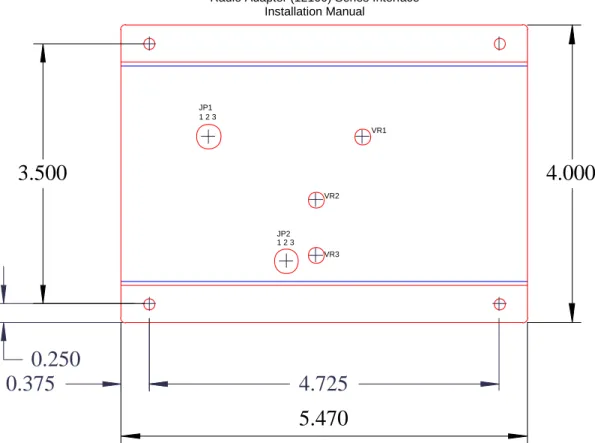
2.3.3 Mounting Hole configuration
Installation Manual 200-002-0002 2-2 Rev. 5, Feb. 2009
0.375
4.725
0.250
3.500
4.000
5.470
JP1 1 2 3 JP2 1 2 3 VR3 VR2 VR1Figure 2-2-1 Mounting Diagram (not to scale)
2.3.4 Connector Assembly
The unit connector is DB25 type. The unit has a male connector, with the female on the harness.
2.3.5 Physical Installation
1. The unit is mounted using the flanges, in any position. Bolt the mounting flanges to the avionics shelf or other appropriate mounting surface, in accordance with AC-43.13-2B.
2. See Figure 2-1 for hole locations.
3. Fabricate an installation wiring harness in accordance with Appendix C.
2.4 Cable Harness Wiring
Referring to Appendix C, assemble a wiring harness as required for the installation. All wires must be MIL-SPEC in accordance with current regulations. Two- and three-conductor with shield wire must be used where indicated, and be MIL-C-27500 or equiv-alent specification. Proper stripping, shielding and soldering technique must be used at all times. It is imperative that correct wire be used.
The shield should not be used as ground return. Terminate the shields with a short jumper to the appropriate pin as shown as close to the unit connector as practical.
Installation Manual
200-002-0002 2-3 Rev. 5, Feb. 2009
Refer to FAA Advisory Circular 43.13-2A for more information. Failure to use correct techniques may result in improper operation, electrical noise or unit failure. Damage caused by improper installation will void the PS Engineering warranty.
2.4.1 Noise
Due to the variety and the high power of radio equipment often found in today's general aviation aircraft, there is a potential for both radiated and conducted noise interference. Ground loop noise occurs when there are two or more ground paths for the same signal (i.e., airframe and ground return wire). Large cyclic loads such as strobes, inverters, etc., can inject noise signals onto the airframe that are detected by the audio system. Follow the wiring diagram very carefully to help ensure a minimum of ground loop potential. Use only Mil Spec shielded wires (MIL-C-27500, or better).
Do not run microphone audio and headphone audio in the same, shielded jacket, use sepa-rate shielded pair. Do not use the shield as a conductor, (audio low, etc) as this will create potential noise sources.
Radiated signals can be a factor when low level microphone signals are "bundled" with current carrying power wires. Keep these cables physically separated.
2.4.2 Power
The Radio Adapter (12100) is compatible with both 13.8 and 28 Volt DC systems. A one (1) Amp circuit breaker is required. Fourteen-volt aircraft supply power through Pin 2, 28VDC aircraft through pin 1. Pins 14 and 15 are aircraft ground. Keep ground wires as short as possible.
2.4.3 Interface to aircraft audio system
The aircraft-audio output from the Radio Adapter is pin 4 with respect to (WRT) pin 17. This is a standard 500audio output, similar to a VHF Communications transceiver. The microphone audio input is pin 3, WRT 16. This is an aviation-standard dynamic mic input, similar to a VHF Communications transceiver input. The PTT input on pin 7 is ground-seeking, like an aviation microphone.
2.4.4 Interface to non-aviation transceiver
The Radio Adapter audio input is transformer-coupled, pin 6, WRT pin 19. This can be configured for either a 150or 8speaker output from the transceiver.
The Microphone output from the Radio Adapter to the transceiver mic input is pin 5 WRT 18. This can be configured for either an 8 or 150 mic, which is amplified or non-amplified, or 150, passed directly to the radio. The ground can be either audio low, or airframe ground referenced.
Many transceivers with hand microphones do not have a mic bias source, necessary for an aviation headset. Install the jumper at JP1 across pins 1 and 2 to generate a mic bias
Installation Manual
200-002-0002 2-4 Rev. 5, Feb. 2009
source, which will be connected to the aircraft microphone when the transceiver is select-ed for transmit.
Transceivers with built-in speakers also do not provide sidetone, so VR2 can be adjusted to cause sidetone to be present during transmission.
The audio input to the radio adapter (pin 6 hi, pin 19 low) is transformer isolated. In some installations, it may be required to have a common ground to prevent loss of signal or dis-tortion. In this case, connect pin 19 to pin 15.
2.4.4.1 Push to talk interface
The Radio Adapter is configurable for hi-seeking, low-seeking, or 2-pin contact push-to-talk (PTT) systems.
Pin 7 is the key-line input from the aircraft audio system. Grounding this line in PTT causes a 2-pole relay to change states.
For instance, if the tactical radio has a ground seeking PTT line, you ground the common #1of the relay, Pin 10, and connect the normally open connection, Pin 9 to the unit PTT input. Keying the aircraft PTT then grounds Pin 9.
Connecting Pin 10 to logic high will pull Pin 9 high in PTT, and so on. If there are two PTT contacts, one can be connected to common, and the other to NO.
10 22 24 9 12 11 +V + Pin 7 Connector Pin
Figure 2 Mic Keying Relay Detail 2.5 Adjustments
The unit can be configured for several different interface combinations. Remove the unit from its mounting bracket by removing the four screws at corners near the upper edge.
Installation Manual
200-002-0002 2-5 Rev. 5, Feb. 2009
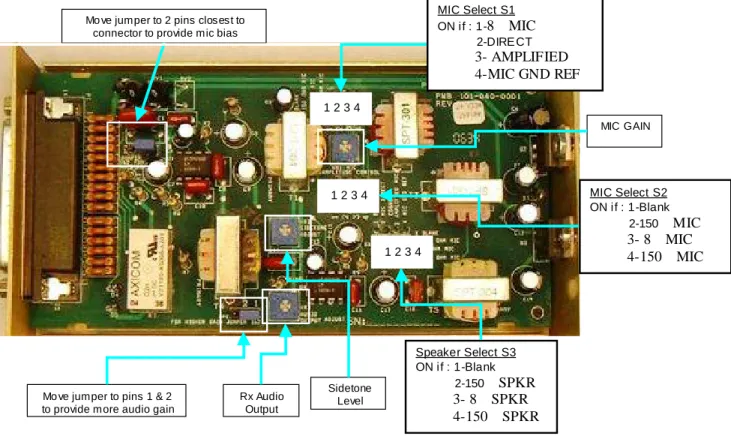
The following adjustments are available, and marked on the silkscreen:
VR1 Mic Amplitude Control
VR2 Sidetone Adjust
VR3 Audio Output Adjust
The following switch positions are available to configure the unit for specific trans-ceiver types.
S 1
Switch 1 ON if 8microphone
Switch 2 ON if microphone
direct connect Switch 3 ON if amplified mic Switch 4 ON if Mic output
ground referenced (or 8)
S2
Switch 1 Not Used
Switch 2 ON for 150mic Switch 3 ON for 8mic Switch 4 ON for 150mic
S 3
Switch 1 Not Used
Switch 2 ON for 150speaker Switch 3 ON for 8speaker Switch 4 ON for 150speaker
The JP 1 header is connected to provide internal mic bias. These are the pins closest to the unit connector.
Installation Manual
200-002-0002 2-6 Rev. 5, Feb. 2009
Mo ve jumper to 2 pins closest to connector to provide mic bias
Mo ve jumper to pins 1 & 2 to provide more audio gain
Rx Audio Output Sidetone Level 1 2 3 4 Speaker Select S3 ON if : 1-Blank 2-150Ω SPKR 3- 8Ω SPKR 4-150Ω SPKR MIC Select S2 ON if : 1-Blank 2-150Ω MIC 3- 8Ω MIC 4-150Ω MIC 1 2 3 4 MIC Select S1 ON if : 1-8Ω MIC 2-DIRE CT 3- AMPLIFIED 4-MIC GND REF 1 2 3 4 MIC GAIN
Figure 2-3 Internal Adjustments and settings
12100 Unit Top 12100 Bottom
S1 S2 S3 Speaker Select S3 ON if: 1-Blank 2-150Ω SPKR 3- 8Ω SPKR 4-150Ω SPKR MIC Select S2 ON if : 1-Blank 2-150Ω MIC 3- 8Ω MIC 4-150Ω MIC MIC Select S1 ON if : 1-8Ω MIC 2-DIRECT 3- AMPLIFIED 4-MIC GND REF MIC Gain Sidetone Level Rx Audio Level
Installation Manual
200-002-0002 2-7 Rev. 5, Feb. 2009
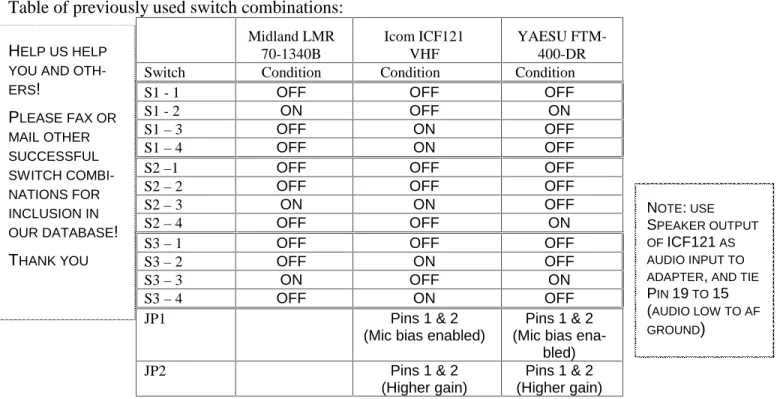
Table of previously used switch combinations:
Midland LMR 70-1340B Icom ICF121 VHF YAESU FTM-400-DR
Switch Condition Condition Condition
S1 - 1 OFF OFF OFF
S1 - 2 ON OFF ON
S1–3 OFF ON OFF
S1–4 OFF ON OFF
S2–1 OFF OFF OFF
S2–2 OFF OFF OFF
S2–3 ON ON OFF
S2–4 OFF OFF ON
S3–1 OFF OFF OFF
S3–2 OFF ON OFF
S3–3 ON OFF ON
S3–4 OFF ON OFF
JP1 Pins 1 & 2
(Mic bias enabled)
Pins 1 & 2 (Mic bias
ena-bled)
JP2 Pins 1 & 2
(Higher gain)
Pins 1 & 2 (Higher gain)
Use the table above as a worksheet. If you will send us your successful combination, we can add to the list. Fax to: (865) 988-6619.
2.6 Operational Checkout
NOTE:
Because the Radio Adapter is designed to interface with commercial or public service/safety transceivers, your testing may affect other radio services. Verify frequencies and operating procedures before attempting
to transmit on unknown radios.
1. Verify that aircraft power is present only on Pin 1 (28 VDC) or pin 2 (14 VDC). 2. Apply power to the avionics and tactical transceiver.
3. Verify that the receive audio from the tactical radio is present in the aircraft audio sys-tem when selected.
4. With the transceiver connected to a dummy load, or to an antenna, and operated by properly rated personnel, press the aircraft PTT, and verify that the transceiver switches to transmit mode.
5. Verify that there is microphone audio through the system by making a radio check with an appropriate facility.
2.7 Final Inspection.
Verify that the wiring is bundled away from all controls and no part of the installation in-terferes with aircraft control operation. Move all controls through their full range while examining the installation to see that no mechanical interference exists. Verify that the cables are secured to the aircraft structure in accordance with good practices, with ade-quate strain relief. Ensure that there are no kinks or sharp bends in the cables. Verify that HELP US HELP
YOU AND OTH-ERS! PLEASE FAX OR MAIL OTHER SUCCESSFUL SWITCH COMBI-NATIONS FOR INCLUSION IN OUR DATABASE! THANK YOU NOTE:USE SPEAKER OUTPUT OFICF121AS AUDIO INPUT TO ADAPTER,AND TIE
PIN19TO15
(AUDIO LOW TO AF GROUND)
Installation Manual
200-002-0002 4-8 Rev. 5, Feb. 2009
the cables are not exposed to any sharp edges or rough surfaces, and that all contact points are protected from abrasion. Complete log book entry, FAA Form 337, weight and balance computation and other documentation if required. Return completed warranty registration application to PS Engineering.
Section III- Operation
There are no operational controls in this unit.
Section IV- Warranty and Service
4.1 Warranty
In order for the factory warranty to be valid, the installations in a certified aircraft must be accomplished by an FAA- certified avionics shop and authorized PS Engineering dealer. If the unit is being installed by in an experimental aircraft by the owner/builder, a factory-made harness must be installed for the warranty to be valid.
PS Engineering, Inc. warrants this product to be free from defect in material and work-manship for a period of one (1) year from the date of sale. PS Engineering, Inc., at its op-tion, will send a replacement unit at our expense if the unit should be determined to be defective after consultation with a factory technician.
This warranty is not transferable. Any implied warranties expire at the expiration date of this warranty. PS Engineering SHALL NOT BE LIABLE FOR INCIDENTAL OR CON-SEQUENTIAL DAMAGES. This warranty does not cover a defect that has resulted from improper or unreasonable use or maintenance as determined by us. This warranty is void if there is any attempt to dissemble this product without factory authorization. This war-ranty gives you specific legal rights, and you may also have other rights which may vary from state to state. Some states do not allow the exclusion of limitation of incidental or consequential damages, so the above limitation or exclusions may not apply to you.
4.2 Factory Service
The unit is covered by a one-year limited warranty. See warranty information. Call PS Engineer-ing, Inc. at (865) 988-9800 before you return the unit. This will allow the service technician to provide any other suggestions for identifying the problem and recommend possible solutions. After discussing the problem with the technician and you obtain a Return Authorization Number, ship product to:
Service Department PS Engineering, Inc. 9800 Martel Rd Lenoir City, TN 37772 Phone (865) 988-9800 FAX (865) 988-6619 Email:[email protected]
Installation Manual
200-002-0002 A Rev. 5, Feb. 2009
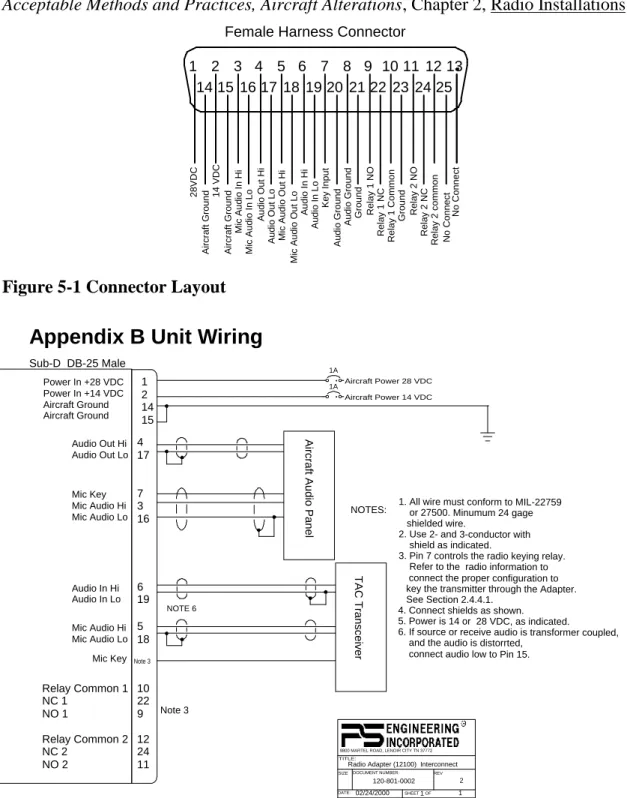
Appendix A- Installation Information and Connector Layout
The Radio Adapter can be installed in any orientation in a convenient location. Mount the unit using the flanges to a permanent aircraft structure, in accordance with AC 43.13-2B,
Acceptable Methods and Practices, Aircraft Alterations, Chapter 2, Radio Installations.
Relay 1 NC Relay 1 NO Ground Audio Ground Audio Ground Relay 2 NO Audio In Lo
Mic Audio Out Hi
Audio Out Lo Audio Out Hi No Connect Relay 2 common Relay 1 Common Ground Mic Audio In Lo Aircraft Ground Mic Audio In Hi 14 VDC Relay 2 NC Key Input Audio In Hi
Mic Audio Out Lo
Aircraft Ground 28VDC No Connect 13 25 12 11 24 23 10 22 21 20 19 9 8 7 6 18 17 16 15 14 5 4 3 2 1
Female Harness Connector
Figure 5-1 Connector Layout
Appendix B Unit Wiring
1A Aircraft Power 28 VDC 1 2 14 15 Sub-D DB-25 Male Power In +28 VDC Power In +14 VDC Aircraft Ground Aircraft Ground Audio Out Hi Audio Out Lo 4 17 REV DATE: ECO SHEET OF TITLE: DOCUMENT NUMBER: SIZE
Radio Adapter (12100) Interconnect 120-801-0002 2 02/24/2000 1 1
9800 MARTEL ROAD, LENOIR CITY TN 37772
1A Aircraft Power 14 VDC NOTES: Mic Key Mic Audio Hi Mic Audio Lo 7 3 16
Aircraft Audio Panel
Mic Audio Hi Mic Audio Lo 5 18 Audio In Hi Audio In Lo 6 19 TAC Transceiver Mic Key 10 22 9 12 24 11 Relay Common 1 NC 1 NO 1 Relay Common 2 NC 2 NO 2
1. All wire must conform to MIL-22759 or 27500. Minumum 24 gage shielded wire.
2. Use 2- and 3-conductor with shield as indicated.
3. Pin 7 controls the radio keying relay. Refer to the radio information to connect the proper configuration to key the transmitter through the Adapter. See Section 2.4.4.1.
4. Connect shields as shown. 5. Power is 14 or 28 VDC, as indicated. 6. If source or receive audio is transformer coupled, and the audio is distorrted,
connect audio low to Pin 15.
Note 3
Note 3
NOTE 6
Installation Manual
200-002-0002 B Rev. 5, Feb. 2009
Appendix C -Instructions for Continuing Airworthiness
The Radio Adapter (12100) is considered an “on-condition” maintenance item. It should be checked prior to each flight during normal operation. There are no additional considerations for continuing airworthiness other than the practices detailed in AC 43.13-1B, Chapter 11. This includes inspecting the unit to be sure it is securely fastened in its location, and that the wiring harness is not chafed or pinched, and remains secure. All connections should be checked at each periodic inspection to ensure that they are tight and not in contact with other items in the aircraft.