Pivotal
™
Greenplum
Database
®
Version 4.3
Administrator Guide
Rev: A06
Notice
Copyright
Copyright © 2015 Pivotal Software, Inc. All rights reserved.
Pivotal Software, Inc. believes the information in this publication is accurate as of its publication date. The information is subject to change without notice. THE INFORMATION IN THIS PUBLICATION IS PROVIDED "AS IS." PIVOTAL SOFTWARE, INC. ("Pivotal") MAKES NO REPRESENTATIONS OR WARRANTIES OF ANY KIND WITH RESPECT TO THE INFORMATION IN THIS PUBLICATION, AND SPECIFICALLY DISCLAIMS IMPLIED WARRANTIES OF MERCHANTABILITY OR FITNESS FOR A PARTICULAR PURPOSE.
Use, copying, and distribution of any Pivotal software described in this publication requires an applicable software license.
All trademarks used herein are the property of Pivotal or their respective owners. Revised January 2015 (4.3.4.1)
Contents
Preface: About This Guide... viii
About the Greenplum Database Documentation Set... ix
Document Conventions... x
Text Conventions... x
Command Syntax Conventions... xi
Getting Support... xii
Product information and Technical Support...xii
Part I: Greenplum Database Concepts...13
Chapter 1: About the Greenplum Architecture... 14
About the Greenplum Master... 15
About the Greenplum Segments... 15
About the Greenplum Interconnect... 16
About Management and Monitoring Utilities... 17
About Parallel Data Loading... 19
About Redundancy and Failover in Greenplum Database...20
Part II: Managing a Greenplum System... 22
Chapter 2: Starting and Stopping Greenplum Database...23
Starting Greenplum Database... 23
Restarting Greenplum Database... 23
Uploading Configuration File Changes Only... 23
Starting the Master in Maintenance Mode... 24
Stopping Greenplum Database... 24
Chapter 3: Accessing the Database... 25
Establishing a Database Session...26
Supported Client Applications... 27
Greenplum Database Client Applications...28
Connecting with psql... 29
pgAdmin III for Greenplum Database... 30
Installing pgAdmin III for Greenplum Database...31
Documentation for pgAdmin III for Greenplum Database...31
Performing Administrative Tasks with pgAdmin III... 31
Database Application Interfaces...33
Third-Party Client Tools...34
Troubleshooting Connection Problems...35
Chapter 4: Configuring the Greenplum System... 36
About Greenplum Master and Local Parameters...37
Setting a Local Configuration Parameter... 38
Setting a Master Configuration Parameter... 38
Viewing Server Configuration Parameter Settings... 40
Configuration Parameter Categories... 41
Runtime Statistics Collection Parameters...41
Automatic Statistics Collection Parameters... 41
Lock Management Parameters...41
Workload Management Parameters... 42
External Table Parameters... 42
Database Table Parameters...42
Database and Tablespace/Filespace Parameters... 42
Past PostgreSQL Version Compatibility Parameters...43
Greenplum Master Mirroring Parameters... 43
Greenplum Database Extension Parameters... 43
Connection and Authentication Parameters... 43
System Resource Consumption Parameters...44
Query Tuning Parameters... 45
Error Reporting and Logging Parameters... 46
System Monitoring Parameters... 47
Client Connection Default Parameters... 47
Greenplum Array Configuration Parameters... 48
Chapter 5: Enabling High Availability Features... 50
Overview of Greenplum Database High Availability...51
Overview of Segment Mirroring... 53
Overview of Master Mirroring... 54
Overview of Fault Detection and Recovery... 54
Enabling Mirroring in Greenplum Database... 56
Enabling Segment Mirroring... 56
Enabling Master Mirroring...57
Detecting a Failed Segment...58
Enabling Alerts and Notifications...59
Checking for Failed Segments... 59
Checking the Log Files...60
Recovering a Failed Segment... 61
Recovering From Segment Failures...62
Recovering a Failed Master... 65
Restoring Master Mirroring After a Recovery... 65
Chapter 6: Backing Up and Restoring Databases... 67
Backup and Restore Operations... 67
Backing Up a Database... 69
Restoring From Parallel Backup Files...81
Chapter 7: Expanding a Greenplum System...84
Planning Greenplum System Expansion... 84
Preparing and Adding Nodes... 89
Initializing New Segments... 92
Redistributing Tables... 95
Removing the Expansion Schema... 97
Chapter 9: Monitoring a Greenplum System...104
Monitoring Database Activity and Performance... 104
Monitoring System State... 104
Viewing the Database Server Log Files...113
Using gp_toolkit... 114
Greenplum Database SNMP OIDs and Error Codes... 115
Chapter 10: Routine System Maintenance Tasks... 124
Routine Vacuum and Analyze... 124
Routine Reindexing... 126
Managing Greenplum Database Log Files...126
Chapter 11: Recommended Monitoring and Maintenance
Tasks...128
Database State Monitoring Activities...128
Database Alert Log Monitoring...130
Hardware and Operating System Monitoring... 131
Catalog Monitoring...132
Data Maintenance...133
Database Maintenance... 134
Patching and Upgrading... 134
Part III: Managing Greenplum Database Access... 136
Chapter 12: Configuring Client Authentication...137
Allowing Connections to Greenplum Database...137
Limiting Concurrent Connections... 139
Encrypting Client/Server Connections... 140
Using LDAP Authentication with TLS/SSL... 142
Using Kerberos Authentication... 144
Chapter 13: Managing Roles and Privileges... 150
Security Best Practices for Roles and Privileges... 150
Creating New Roles (Users)... 151
Role Membership...152
Managing Object Privileges...153
Encrypting Data... 154
Encrypting Passwords... 154
Time-based Authentication... 156
Part IV: Working with Databases... 157
Chapter 14: Defining Database Objects... 158
Creating and Managing Databases...159
Creating and Managing Tablespaces...192
Creating and Managing Tables... 197
Choosing the Table Storage Model... 200
Partitioning Large Tables...211
Creating and Using Sequences... 221
Creating and Managing Views... 222
Chapter 15: Managing Data... 223
About Concurrency Control in Greenplum Database... 223
Inserting Rows... 224
Updating Existing Rows...225
Deleting Rows...225
Working With Transactions...225
Vacuuming the Database... 227
Chapter 16: Loading and Unloading Data... 228
Greenplum Database Loading Tools Overview...229
External Tables... 229
gpload...230
COPY... 230
Loading Data into Greenplum Database...231
Accessing File-Based External Tables... 231
Using the Greenplum Parallel File Server (gpfdist)... 234
Using Hadoop Distributed File System (HDFS) Tables... 237
One-time HDFS Protocol Installation...237
Creating and Using Web External Tables... 243
Handling Load Errors...251
Loading Data...254
Optimizing Data Load and Query Performance... 256
Command-based Web External Tables... 257
URL-based Web External Tables...258
Using a Custom Format... 259
Unloading Data from Greenplum Database... 260
Defining a File-Based Writable External Table...260
Defining a Command-Based Writable External Web Table...261
Unloading Data Using a Writable External Table... 262
Unloading Data Using COPY... 262
Handling Load Errors...263
Loading Data with gpload...264
Loading Data with COPY... 265
Optimizing Data Load and Query Performance... 266
Transforming XML Data... 267
Determine the Transformation Schema...267
Write a Transform... 268
Write the gpfdist Configuration... 268
Load the Data... 270
Transfer and Store the Data...270
XML Transformation Examples... 273
Formatting Data Files... 276
Formatting Rows... 276
Formatting Columns...276
Representing NULL Values... 276
Escaping...276
Character Encoding... 278
Installing the External Table Protocol...279
Chapter 17: Querying Data... 285
About Greenplum Query Processing...286
Defining Queries... 290
Using Functions and Operators...300
Query Performance... 317
Managing Spill Files Generated by Queries... 318
Query Profiling... 319
Part V: Managing Performance... 323
Chapter 18: Defining Database Performance...324
Understanding the Performance Factors... 324
Determining Acceptable Performance... 325
Chapter 19: Common Causes of Performance Issues... 326
Identifying Hardware and Segment Failures... 326
Managing Workload... 326
Avoiding Contention...326
Maintaining Database Statistics... 327
Optimizing Data Distribution... 327
Optimizing Your Database Design... 328
Chapter 20: Managing Workload and Resources... 329
Overview of Greenplum Workload Management... 329
Configuring Workload Management... 332
Creating Resource Queues... 334
Assigning Roles (Users) to a Resource Queue... 336
Modifying Resource Queues... 337
Checking Resource Queue Status... 337
Chapter 21: Investigating a Performance Problem...341
Checking System State... 341
Checking Database Activity...341
Troubleshooting Problem Queries... 342
About This Guide
This guide describes system and database administration tasks for Greenplum Database. The guide consists of five sections:
• Greenplum Database Concepts describes Greenplum Database architecture and components. It introduces administration topics such as mirroring, parallel data loading, and Greenplum management and monitoring utilities.
• Managing a Greenplum System contains information about everyday Greenplum Database system administration tasks. Topics include starting and stopping the server, client front-ends to access the database, configuring Greenplum, enabling high availability features, backing up and restoring databases, expanding the system by adding nodes, monitoring the system, and regular maintenance tasks.
• Managing Greenplum Database Access covers configuring Greenplum Database authentication, managing roles and privileges, and setting up Kerberos athentication.
• Working with Databases contains information about creating and managing databases, schemas, tables and other database objects. It describes how to view database metadata, insert, update, and delete data in tables, load data from external files, and run queries in a database.
• Managing Performance describes how to monitor and manage system performance. It discusses how to define performance in a parallel environment, how to diagnose performance problems, workload and resource administration, and performance troubleshooting.
This guide assumes knowledge of Linux/UNIX system administration and database management systems. Familiarity with structured query language (SQL) is helpful.
Because Greenplum Database is based on PostgreSQL 8.2.15, this guide assumes some familiarity with PostgreSQL. References to PostgreSQL documentation are provided throughout this guide for features that are similar to those in Greenplum Database.
This guide provides information for system administrators responsible for administering a Greenplum Database system.
• About the Greenplum Database Documentation Set
• Document Conventions
About the Greenplum Database Documentation Set
The Greenplum Database 4.3 documentation set consists of the following guides.
Table 1: Greenplum Database documentation set
Guide Name Description
Greenplum Database Administrator Guide Describes the Greenplum Database architecture and concepts such as parallel processing, and system administration and database administration tasks for Greenplum Database. System administraiton topics include configuring the server, monitoring system activity, enabling high-availability, backing up and restoring databases, and expanding the system. Database administration topics include creating databases and database objects, loading and manipulating data, writing queries, and monitoring and managing database performance.
Greenplum Database Reference Guide Reference information for Greenplum Database systems: SQL commands, system catalogs, environment variables, character set support, datatypes, the Greenplum MapReduce specification, postGIS extension, server
parameters, the gp_toolkit administrative schema, and SQL 2008 support.
Greenplum Database Utility Guide Reference information for command-line utilities, client programs, and Oracle compatibility functions. Greenplum Database Installation Guide Information and instructions for installing and
Document Conventions
The following conventions are used throughout the Greenplum Database documentation to help you identify certain types of information.
• Text Conventions
• Command Syntax Conventions
Text Conventions
Table 2: Text Conventions
Text Convention Usage Examples
bold Button, menu, tab, page, and field names in GUI applications
Click Cancel to exit the page without saving your changes.
italics New terms where they are defined
Database objects, such as schema, table, or column names
The master instance is the
postgres process that accepts client connections.
Catalog information for
Greenplum Database resides in the pg_catalog schema.
monospace File names and path names
Programs and executables Command names and syntax Parameter names
Edit the postgresql.conf file. Use gpstart to start Greenplum Database.
monospace italics Variable information within file paths and file names
Variable information within command syntax
/home/gpadmin/config_file
COPY tablename FROM 'filename'
monospace bold Used to call attention to a particular part of a command, parameter, or code snippet.
Change the host name, port, and database name in the JDBC connection URL:
jdbc:postgresql://
host:5432/mydb
UPPERCASE Environment variables
SQL commands Keyboard keys
Make sure that the Java /bin directory is in your $PATH .
SELECT * FROM my_table;
Command Syntax Conventions
Table 3: Command Syntax ConventionsText Convention Usage Examples
{ } Within command syntax, curly braces group related command options. Do not type the curly braces.
FROM { 'filename' | STDIN }
[ ] Within command syntax, square brackets denote optional arguments. Do not type the brackets.
TRUNCATE [ TABLE ]name
... Within command syntax, an
ellipsis denotes repetition of a command, variable, or option. Do not type the ellipsis.
DROP TABLE name [, ...]
| Within command syntax, the
pipe symbol denotes an "OR" relationship. Do not type the pipe symbol.
VACUUM [ FULL | FREEZE ]
$ system_command
# root_system_command
=> gpdb_command
=# su_gpdb_command
Denotes a command prompt -do not type the prompt symbol. $ and # denote terminal command prompts. => and =# denote Greenplum Database interactive program command prompts (psql or gpssh, for example).
$ createdb mydatabase # chown gpadmin -R /datadir => SELECT * FROM mytable; =# SELECT * FROM pg_
Getting Support
Pivotal/Greenplum support, product, and licensing information can be obtained as follows.
Product information and Technical Support
For technical support, documentation, release notes, software updates, or for information about Pivotal products, licensing, and services, go to www.gopivotal.com.
Additionally, you can still obtain product and support information from the EMCSupport Site at: http:// support.emc.com
I
Greenplum Database Concepts
This section provides an overview of Greenplum Database components and features such as high availability, parallel data loading features, and management utilities.
This section contains the following topics: • About the Greenplum Architecture
• About Redundancy and Failover in Greenplum Database
• About Parallel Data Loading
Chapter 1
About the Greenplum Architecture
Pivotal Greenplum Database is a massively parallel processing (MPP) database server with an
architecture specially designed to manage large-scale analytic data warehouses and business intelligence workloads.
MPP (also known as a shared nothing architecture) refers to systems with two or more processors that cooperate to carry out an operation, each processor with its own memory, operating system and disks. Greenplum uses this high-performance system architecture to distribute the load of multi-terabyte data warehouses, and can use all of a system's resources in parallel to process a query.
Greenplum Database is based on PostgreSQL open-source technology. It is essentially several
PostgreSQL database instances acting together as one cohesive database management system (DBMS). It is based on PostgreSQL 8.2.15, and in most cases is very similar to PostgreSQL with regard to
SQL support, features, configuration options, and end-user functionality. Database users interact with Greenplum Database as they would a regular PostgreSQL DBMS.
The internals of PostgreSQL have been modified or supplemented to support the parallel structure of Greenplum Database. For example, the system catalog, query planner, optimizer, query executor, and transaction manager components have been modified and enhanced to be able to execute queries simultaneously across all of the parallel PostgreSQL database instances. The Greenplum interconnect (the networking layer) enables communication between the distinct PostgreSQL instances and allows the system to behave as one logical database.
Greenplum Database also includes features designed to optimize PostgreSQL for business intelligence (BI) workloads. For example, Greenplum has added parallel data loading (external tables), resource management, query optimizations, and storage enhancements, which are not found in standard PostgreSQL. Many features and optimizations developed by Greenplum make their way into the
PostgreSQL community. For example, table partitioning is a feature first developed by Greenplum, and it is now in standard PostgreSQL.
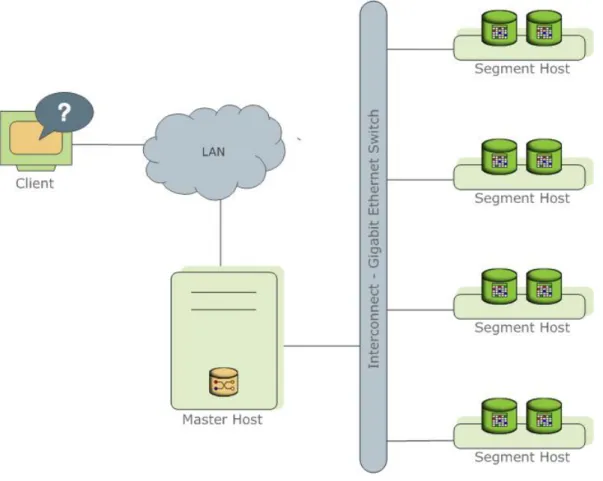
Greenplum Database stores and processes large amounts of data by distributing the data and processing workload across several servers or hosts. Greenplum Database is an array of individual databases based upon PostgreSQL 8.2 working together to present a single database image. The master is the entry point to the Greenplum Database system. It is the database instance to which clients connect and submit SQL statements. The master coordinates its work with the other database instances in the system, called
Figure 1: High-Level Greenplum Database Architecture
The following topics describe the components that make up a Greenplum Database system and how they work together.
About the Greenplum Master
The Greenplum Database master is the entry to the Greenplum Database system, accepting client connections and SQL queries, and distributing work to the segment instances.
Greenplum Database end-users interact with Greenplum Database (through the master) as they would with a typical PostgreSQL database. They connect to the database using client programs such as psql or application programming interfaces (APIs) such as JDBC or ODBC.
The master is where the global system catalog resides. The global system catalog is the set of system tables that contain metadata about the Greenplum Database system itself. The master does not contain any user data; data resides only on the segments. The master authenticates client connections, processes incoming SQL commands, distributes workloads among segments, coordinates the results returned by each segment, and presents the final results to the client program.
About the Greenplum Segments
Greenplum Database segment instances are independent PostgreSQL databases that each store a portion of the data and perform the majority of query processing.
When a user connects to the database via the Greenplum master and issues a query, processes are created in each segment database to handle the work of that query. For more information about query processes, see About Greenplum Query Processing.
User-defined tables and their indexes are distributed across the available segments in a Greenplum Database system; each segment contains a distinct portion of data. The database server processes that
serve segment data run under the corresponding segment instances. Users interact with segments in a Greenplum Database system through the master.
Segments run on a servers called segment hosts. A segment host typically executes from two to eight Greenplum segments, depending on the CPU cores, RAM, storage, network interfaces, and workloads. Segment hosts are expected to be identically configured. The key to obtaining the best performance from Greenplum Database is to distribute data and workloads evenly across a large number of equally capable segments so that all segments begin working on a task simultaneously and complete their work at the same time.
About the Greenplum Interconnect
The interconect is the networking layer of the Greenplum Database architecture.
The interconnect refers to the inter-process communication between segments and the network
infrastructure on which this communication relies. The Greenplum interconnect uses a standard Gigabit Ethernet switching fabric.
By default, the interconnect uses User Datagram Protocol (UDP) to send messages over the network. The Greenplum software performs packet verification beyond what is provided by UDP. This means the reliability is equivalent to Transmission Control Protocol (TCP), and the performance and scalability exceeds TCP. If the interconnect used TCP, Greenplum Database would have a scalability limit of 1000 segment instances. With UDP as the current default protocol for the interconnect, this limit is not applicable.
About Management and Monitoring Utilities
Greenplum Database provides standard command-line utilities for performing common monitoring and administration tasks.
Greenplum command-line utilities are located in the $GPHOME/bin directory and are executed on the master host. Greenplum provides utilities for the following administration tasks:
• Installing Greenplum Database on an array • Initializing a Greenplum Database System • Starting and stopping Greenplum Database • Adding or removing a host
• Expanding the array and redistributing tables among new segments • Managing recovery for failed segment instances
• Managing failover and recovery for a failed master instance • Backing up and restoring a database (in parallel)
• Loading data in parallel
• Transferring data between Greenplum databases • System state reporting
Greenplum provides an optional system monitoring and management tool that administrators can install and enable with Greenplum Database. Greenplum Command Center uses data collection agents on each segment host to collect and store Greenplum system metrics in a dedicated database. Segment data collection agents send their data to the Greenplum master at regular intervals (typically every 15 seconds). Users can query the Command Center database to see query and system metrics. Greenplum Command Center has a graphical web-based user interface for viewing system metrics, which administrators can install separately from Greenplum Database. For more information, see the Greenplum Command Center documentation.
About Parallel Data Loading
This topic provides a short introduction to Greenplum Database data loading features.
In a large scale, multi-terabyte data warehouse, large amounts of data must be loaded within a relatively small maintenance window. Greenplum supports fast, parallel data loading with its external tables feature. Administrators can also load external tables in single row error isolation mode to filter bad rows into a separate error table while continuing to load properly formatted rows. Administrators can specify an error threshold for a load operation to control how many improperly formatted rows cause Greenplum to abort the load operation.
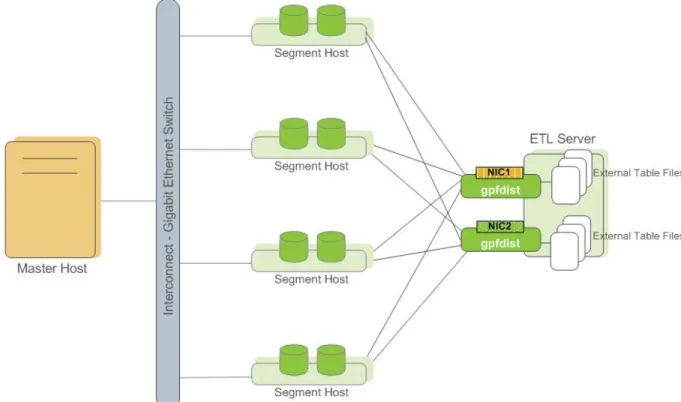
By using external tables in conjunction with Greenplum Database's parallel file server (gpfdist), administrators can achieve maximum parallelism and load bandwidth from their Greenplum Database system.
Figure 2: External Tables Using Greenplum Parallel File Server (gpfdist)
Another Greenplum utility, gpload, runs a load task that you specify in a YAML-formatted control file. You describe the source data locations, format, transformations required, participating hosts, database destinations, and other particulars in the control file and gpload executes the load. This allows you to describe a complex task and execute it in a controlled, repeatable fashion.
About Redundancy and Failover in Greenplum Database
This topic provides a high-level overview of Greenplum Database high availability features.
You can deploy Greenplum Database without a single point of failure by mirroring components. The following sections describe the strategies for mirroring the main components of a Greenplum system. For a more detailed overview of Greenplum high availability features, see Overview of Greenplum Database High Availability.
About Segment Mirroring
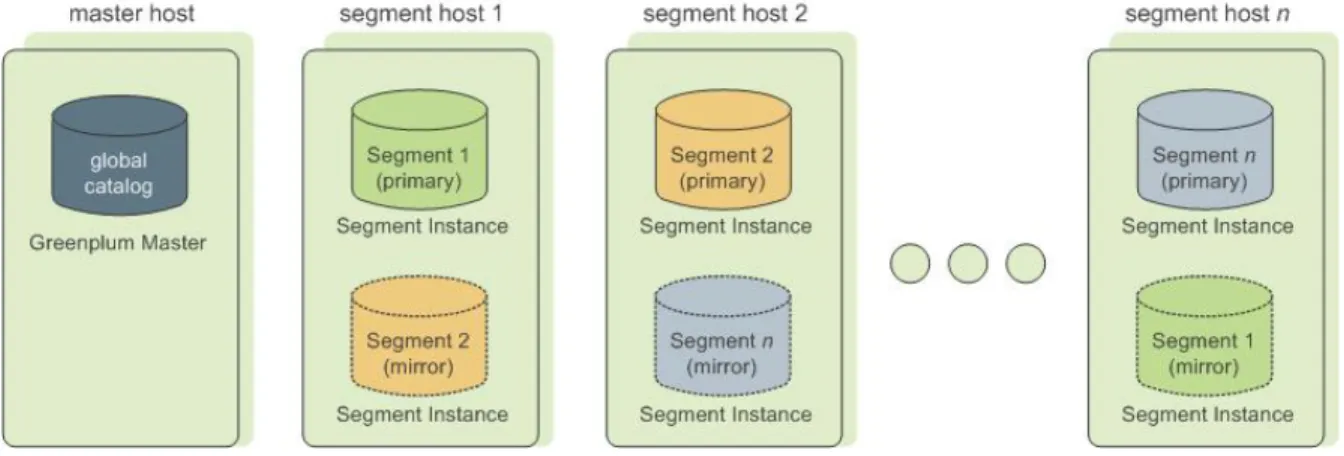
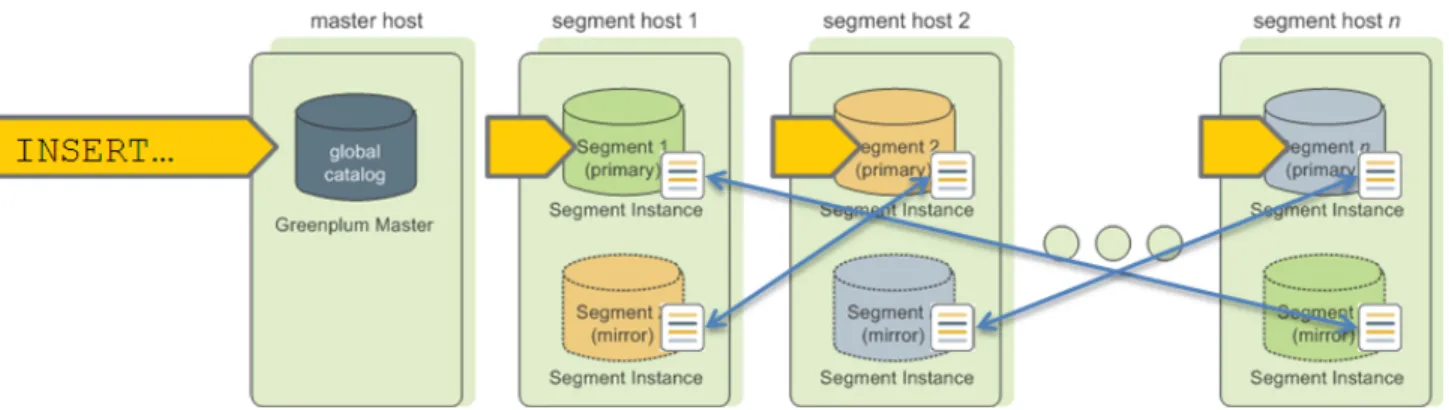
When you deploy your Greenplum Database system, you can optionally configure mirror segments. Mirror segments allow database queries to fail over to a backup segment if the primary segment becomes unavailable. To configure mirroring, you must have enough hosts in your Greenplum Database system so the secondary (mirror) segment always resides on a different host than its primary segment. Figure 3: Data Mirroring in Greenplum Database shows how table data is distributed across segments when mirroring is configured.
Figure 3: Data Mirroring in Greenplum Database
Segment Failover and Recovery
When mirroring is enabled in a Greenplum Database system, the system will automatically fail over to the mirror copy if a primary copy becomes unavailable. A Greenplum Database system can remain operational if a segment instance or host goes down as long as all the data is available on the remaining active
segments.
If the master cannot connect to a segment instance, it marks that segment instance as down in the Greenplum Database system catalog and brings up the mirror segment in its place. A failed segment instance will remain out of operation until an administrator takes steps to bring that segment back online. An administrator can recover a failed segment while the system is up and running. The recovery process copies over only the changes that were missed while the segment was out of operation.
If you do not have mirroring enabled, the system will automatically shut down if a segment instance becomes invalid. You must recover all failed segments before operations can continue.
About Master Mirroring
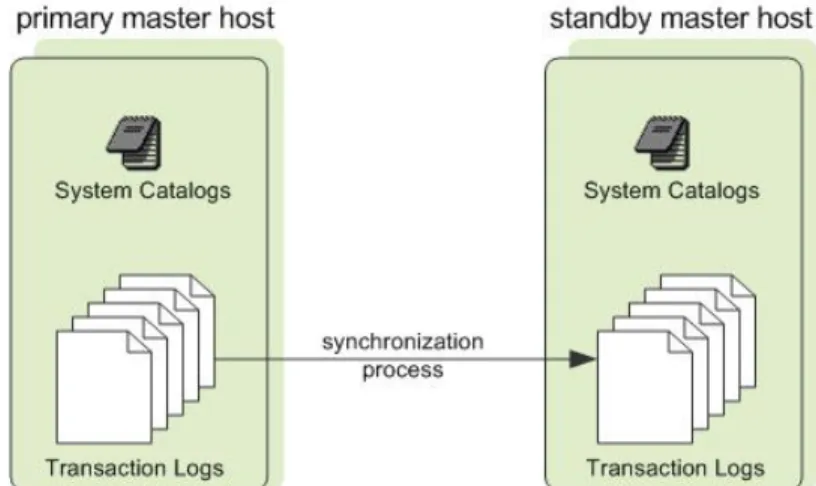
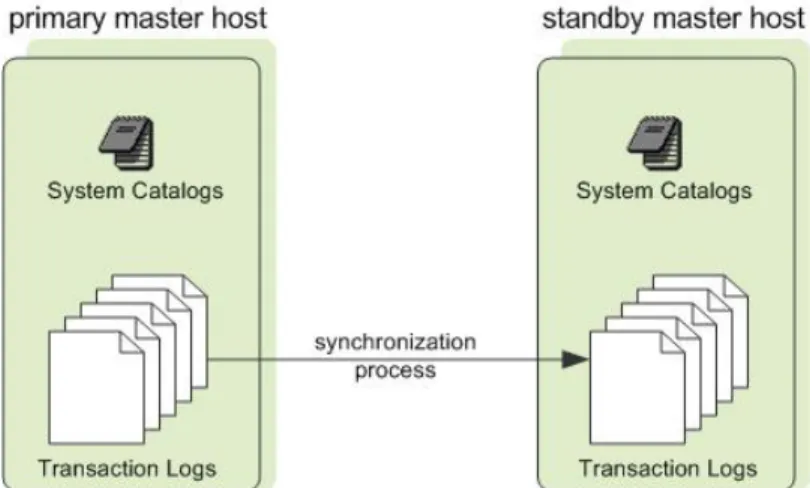
You can also optionally deploy a backup or mirror of the master instance on a separate host from the master node. A backup master host serves as a warm standby in the event that the primary master host becomes unoperational. The standby master is kept up to date by a transaction log replication process, which runs on the standby master host and synchronizes the data between the primary and standby master hosts.
If the primary master fails, the log replication process stops, and the standby master can be activated in its place. Upon activation of the standby master, the replicated logs are used to reconstruct the state of the master host at the time of the last successfully committed transaction. The activated standby master effectively becomes the Greenplum Database master, accepting client connections on the master port (which must be set to the same port number on the master host and the backup master host).
Since the master does not contain any user data, only the system catalog tables need to be synchronized between the primary and backup copies. When these tables are updated, changes are automatically copied over to the standby master to ensure synchronization with the primary master.
Figure 4: Master Mirroring in Greenplum Database
About Interconnect Redundancy
The interconnect refers to the inter-process communication between the segments and the network infrastructure on which this communication relies. You can achieve a highly available interconnect using by deploying dual 10-Gigabit Ethernet switches on your network and redundant 10-Gigabit connections to the Greenplum Database host (master and segment) servers.
Part
II
Managing a Greenplum System
This section describes basic system administration tasks performed by a Greenplum Database system administrator.
This section contains the following topics: • Starting and Stopping Greenplum Database
• Accessing the Database
• Configuring the Greenplum System
• Enabling High Availability Features
• Backing Up and Restoring Databases
• Expanding a Greenplum System
• Migrating Data with Gptransfer
• Defining Database Objects
Starting and Stopping Greenplum Database
In a Greenplum Database DBMS, the database server instances (the master and all segments) are started or stopped across all of the hosts in the system in such a way that they can work together as a unified DBMS.
Because a Greenplum Database system is distributed across many machines, the process for starting and stopping a Greenplum database management system (DBMS) is different than the process for starting and stopping a regular PostgreSQL DBMS.
Use the gpstart and gpstop utilities to start and stop the Greenplum database, respectively. These utilities are located in the $GPHOME/bin directory on your Greenplum Database master host.
Important:
Do not issue a KILL command to end any Postgres process. Instead, use the database command
pg_cancel_backend().
For information about gpstart and gpstop, see the Greenplum Database Utility Guide.
Starting Greenplum Database
Start an initialized Greenplum Database system by running the gpstart utility on the master instance. Use the gpstart utility to start a Greenplum Database that has already been initialized by the
gpinitsystem utility, but has been stopped by the gpstop utility. The gpstart utility starts the Greenplum Database by starting all the Postgres database instances on the Greenplum Database cluster. gpstart orchestrates this process and performs the process in parallel.
• Run gpstart on the master host to start Greenplum Database:
$ gpstart
Restarting Greenplum Database
Stop the Greenplum Database system and then restart it.
The gpstop utility with the -r option can stop and then restart Greenplum Database after the shutdown completes.
• To restart Greenplum Database, enter the following command on the master host:
$ gpstop -r
Uploading Configuration File Changes Only
Upload changes to Greenplum Database configuration files without interrupting the system.
The gpstop utility can upload changes to the pg_hba.conf configuration file and to runtime parameters in the master postgresql.conf file without service interruption. Active sessions pick up changes when they reconnect to the database. Many server configuration parameters require a full system restart (gpstop
-r) to activate. For information about server configuration parameters, see the Greenplum Database
• Upload runtime configuration file changes without restarting using the gpstop utility:
$ gpstop -u
Starting the Master in Maintenance Mode
Start only the master to perform maintenance or administrative tasks without affecting data on the segments.
Maintenance mode should only be used with direction from Pivotal Technical Support. For example, you could connect to a database only on the master instance in maintenance mode and edit system catalog settings. For more information about system catalog tables, see the Greenplum Database Reference
Guide.
1. Run gpstart using the -m option:
$ gpstart -m
2. Connect to the master in maintenance mode to do catalog maintenance. For example: $ PGOPTIONS='-c gp_session_role=utility' psql template1
3. After completing your administrative tasks, stop the master in utility mode. Then, restart it in production
mode.
$ gpstop -m Warning:
Incorrect use of maintenance mode connections can result in an inconsistent system state. Only Technical Support should perform this operation.
Stopping Greenplum Database
The gpstop utility stops or restarts your Greenplum Database system and always runs on the master host. When activated, gpstop stops all postgres processes in the system, including the master and all segment instances. The gpstop utility uses a default of up to 64 parallel worker threads to bring down the Postgres instances that make up the Greenplum Database cluster. The system waits for any active transactions to finish before shutting down. To stop Greenplum Database immediately, use fast mode.
• To stop Greenplum Database:
$ gpstop
• To stop Greenplum Database in fast mode:
Accessing the Database
This topic describes the various client tools you can use to connect to Greenplum Database, and how to establish a database session.
Establishing a Database Session
Users can connect to Greenplum Database using a PostgreSQL-compatible client program, such as psql. Users and administrators always connect to Greenplum Database through the master; the segments cannot accept client connections.
In order to establish a connection to the Greenplum Database master, you will need to know the following connection information and configure your client program accordingly.
Table 4: Connection Parameters
Connection Parameter Description Environment Variable
Application name The application name that is connecting to the database. The default value, held in the
application_name connection parameter is psql.
$PGAPPNAME
Database name The name of the database to which you want to connect. For a newly initialized system, use the
template1 database to connect for the first time.
$PGDATABASE
Host name The host name of the Greenplum Database master. The default host is the local host.
$PGHOST
Port The port number that the Greenplum Database master instance is running on. The default is 5432.
$PGPORT
User name The database user (role) name to connect as. This is not necessarily the same as your OS user name. Check with your Greenplum administrator if you are not sure what you database user name is. Note that every Greenplum Database system has one superuser account that is created automatically at initialization time. This account has the same name as the OS name of the user who initialized the Greenplum system (typically gpadmin).
Supported Client Applications
Users can connect to Greenplum Database using various client applications:
• A number of Greenplum Database Client Applications are provided with your Greenplum installation. The psql client application provides an interactive command-line interface to Greenplum Database. • pgAdmin III for Greenplum Database is an enhanced version of the popular management tool pgAdmin
III. Since version 1.10.0, the pgAdmin III client available from PostgreSQL Tools includes support for Greenplum-specific features. Installation packages are available for download from the pgAdmin download site .
• Using standard Database Application Interfaces, such as ODBC and JDBC, users can create their own client applications that interface to Greenplum Database. Because Greenplum Database is based on PostgreSQL, it uses the standard PostgreSQL database drivers.
• Most Third-Party Client Tools that use standard database interfaces, such as ODBC and JDBC, can be configured to connect to Greenplum Database.
Greenplum Database Client Applications
Greenplum Database comes installed with a number of client utility applications located in the $GPHOME/
bin directory of your Greenplum Database master host installation. The following are the most commonly used client utility applications:
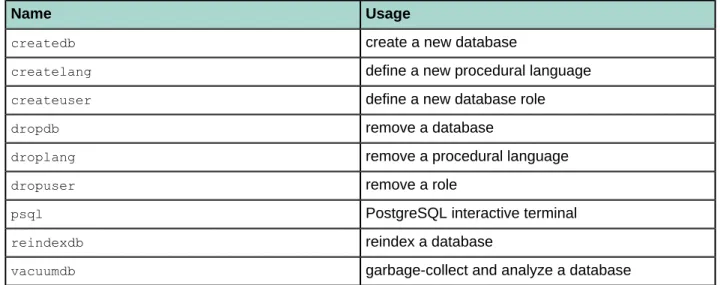
Table 5: Commonly used client applications
Name Usage
createdb create a new database
createlang define a new procedural language
createuser define a new database role
dropdb remove a database
droplang remove a procedural language
dropuser remove a role
psql PostgreSQL interactive terminal
reindexdb reindex a database
vacuumdb garbage-collect and analyze a database
When using these client applications, you must connect to a database through the Greenplum master instance. You will need to know the name of your target database, the host name and port number of the master, and what database user name to connect as. This information can be provided on the command-line using the options -d, -h, -p, and -U respectively. If an argument is found that does not belong to any option, it will be interpreted as the database name first.
All of these options have default values which will be used if the option is not specified. The default host is the local host. The default port number is 5432. The default user name is your OS system user name, as is the default database name. Note that OS user names and Greenplum Database user names are not necessarily the same.
If the default values are not correct, you can set the environment variables PGDATABASE, PGHOST, PGPORT, and PGUSER to the appropriate values, or use a psql~/.pgpass file to contain frequently-used passwords. For information about Greenplum Database environment variables, see the Greenplum Database
Connecting with psql
Depending on the default values used or the environment variables you have set, the following examples show how to access a database via psql:
$ psql -d gpdatabase -h master_host -p 5432 -U gpadmin
$ psql gpdatabase $ psql
If a user-defined database has not yet been created, you can access the system by connecting to the
template1 database. For example:
$ psql template1
After connecting to a database, psql provides a prompt with the name of the database to which psql is currently connected, followed by the string => (or =# if you are the database superuser). For example:
gpdatabase=>
At the prompt, you may type in SQL commands. A SQL command must end with a ; (semicolon) in order to be sent to the server and executed. For example:
=> SELECT * FROM mytable;
See the Greenplum Reference Guide for information about using the psql client application and SQL commands and syntax.
pgAdmin III for Greenplum Database
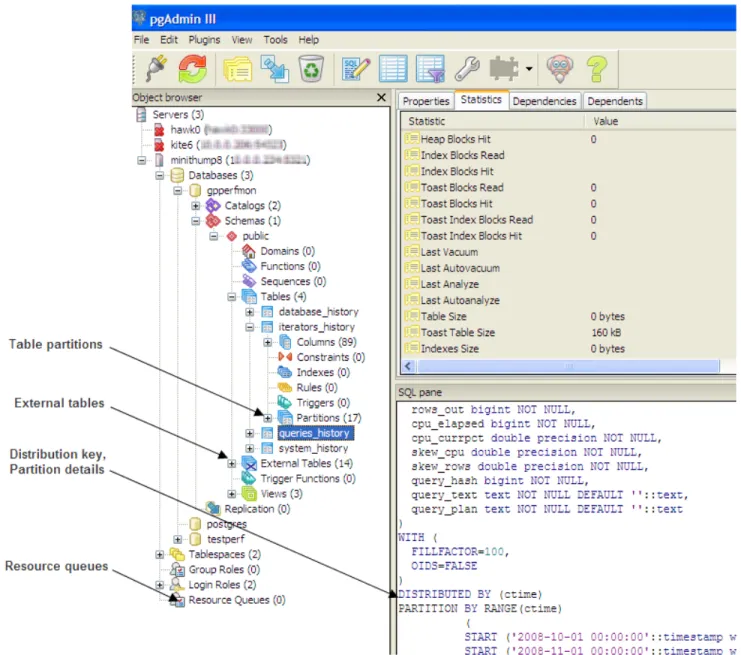
If you prefer a graphic interface, use pgAdmin III for Greenplum Database. This GUI client supports PostgreSQL databases with all standard pgAdmin III features, while adding support for Greenplum-specific features.
pgAdmin III for Greenplum Database supports the following Greenplum-specific features: • External tables
• Append-optimized tables, including compressed append-optimized tables • Table partitioning
• Resource queues
• Graphical EXPLAIN ANALYZE
• Greenplum server configuration parameters
Installing pgAdmin III for Greenplum Database
The installation package for pgAdmin III for Greenplum Database is available for download from the official pgAdmin III download site (http://www.pgadmin.org). Installation instructions are included in the installation package.
Documentation for pgAdmin III for Greenplum Database
For general help on the features of the graphical interface, select Help contents from the Help menu. For help with Greenplum-specific SQL support, select Greenplum Database Help from the Help menu. If you have an active internet connection, you will be directed to online Greenplum SQL reference documentation. Alternately, you can install the Greenplum Client Tools package. This package contains SQL reference documentation that is accessible to the help links in pgAdmin III.
Performing Administrative Tasks with pgAdmin III
This topic highlights two of the many Greenplum Database administrative tasks you can perform with pgAdmin III: editing the server configuration, and viewing a graphical representation of a query plan.
Editing the Server Configuration
The pgAdmin III interface provides two ways to update the server configuration in postgresql.conf: locally, through the File menu, and remotely on the server through the Tools menu. Editing the server configuration remotely may be more convenient in many cases, because it does not require you to upload or copy postgresql.conf.
To edit server configuration remotely
1. Connect to the server whose configuration you want to edit. If you are connected to multiple servers,
make sure that the correct server is highlighted in the object browser in the left pane.
2. Select Tools > Server Configuration > postgresql.conf. The Backend Configuration Editor opens,
displaying the list of available and enabled server configuration parameters.
3. Locate the parameter you want to edit, and double click on the entry to open the Configuration settings
dialog.
4. Enter the new value for the parameter, or select/deselect Enabled as desired and click OK.
5. If the parameter can be enabled by reloading server configuration, click the green reload icon, or select File > Reload server. Many parameters require a full restart of the server.
Viewing a Graphical Query Plan
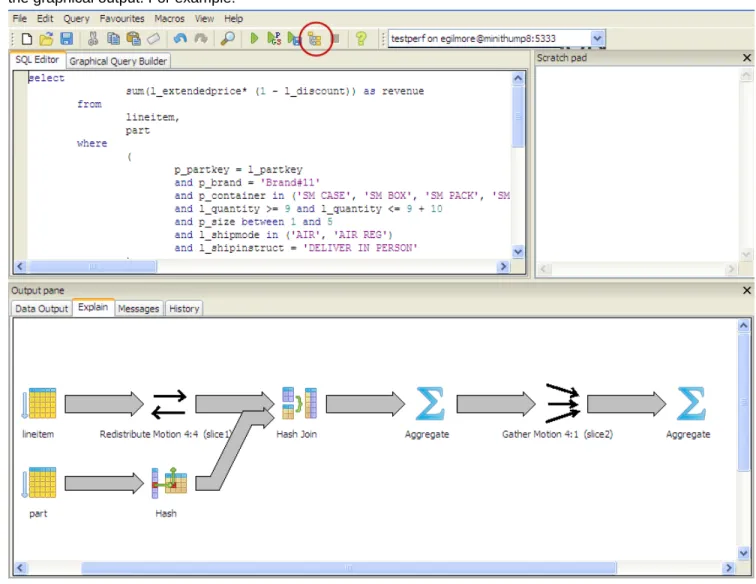
Using the pgAdmin III query tool, you can run a query with EXPLAIN to view the details of the query plan. The output includes details about operations unique to Greenplum distributed query processing such as plan slices and motions between segments. You can view a graphical depiction of the plan as well as the text-based data output.
1. With the correct database highlighted in the object browser in the left pane, select Tools > Query tool. 2. Enter the query by typing in the SQL Editor, dragging objects into the Graphical Query Builder, or
opening a file.
3. Select Query > Explain options and verify the following options:
Option Description
Verbose this must be deselected if you want to view a graphical depiction of the query plan
Option Description
Analyze select this option if you want to run the query in addition to viewing the plan
4. Trigger the operation by clicking the Explain query option at the top of the pane, or by selecting Query > Explain.
The query plan displays in the Output pane at the bottom of the screen. Select the Explain tab to view the graphical output. For example:
Database Application Interfaces
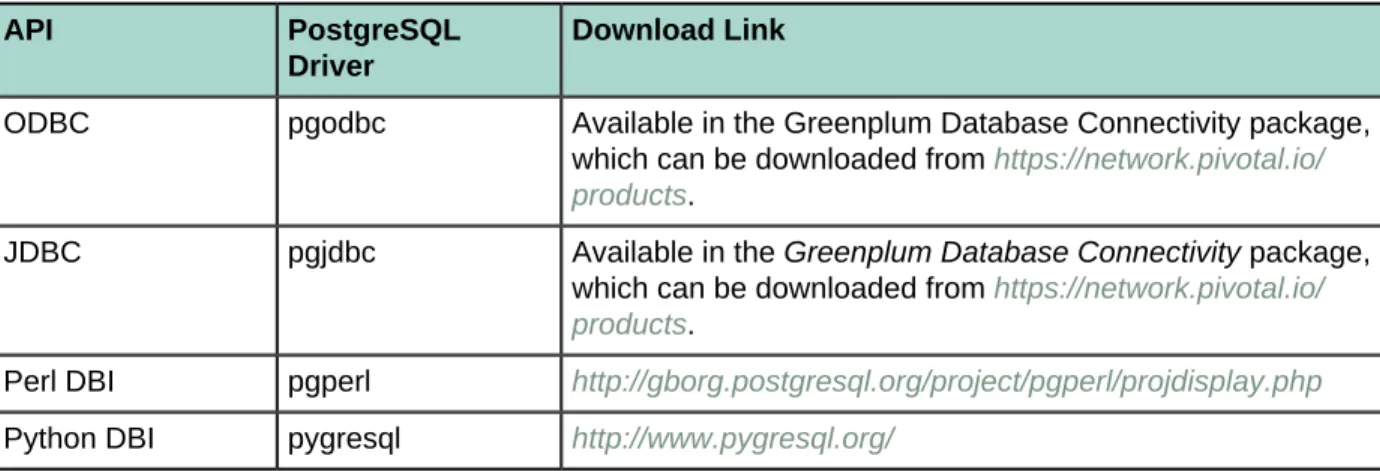
You may want to develop your own client applications that interface to Greenplum Database. PostgreSQL provides a number of database drivers for the most commonly used database application programming interfaces (APIs), which can also be used with Greenplum Database. These drivers are not packaged with the Greenplum Database base distribution. Each driver is an independent PostgreSQL development project and must be downloaded, installed and configured to connect to Greenplum Database. The following drivers are available:
Table 6: Greenplum Database Interfaces
API PostgreSQL
Driver
Download Link
ODBC pgodbc Available in the Greenplum Database Connectivity package, which can be downloaded from https://network.pivotal.io/ products.
JDBC pgjdbc Available in the Greenplum Database Connectivity package, which can be downloaded from https://network.pivotal.io/ products.
Perl DBI pgperl http://gborg.postgresql.org/project/pgperl/projdisplay.php
Python DBI pygresql http://www.pygresql.org/
General instructions for accessing a Greenplum Database with an API are:
1. Download your programming language platform and respective API from the appropriate source. For
example, you can get the Java Development Kit (JDK) and JDBC API from Sun.
2. Write your client application according to the API specifications. When programming your application,
be aware of the SQL support in Greenplum Database so you do not include any unsupported SQL syntax. See the Greenplum Database Reference Guide for more information.
Download the appropriate PostgreSQL driver and configure connectivity to your Greenplum Database master instance. Greenplum provides a client tools package that contains the supported database drivers for Greenplum Database. Download the client tools package from Pivotal Network and documentation from
Third-Party Client Tools
Most third-party extract-transform-load (ETL) and business intelligence (BI) tools use standard database interfaces, such as ODBC and JDBC, and can be configured to connect to Greenplum Database. Pivotal has worked with the following tools on previous customer engagements and is in the process of becoming officially certified:
• Business Objects • Microstrategy
• Informatica Power Center
• Microsoft SQL Server Integration Services (SSIS) and Reporting Services (SSRS) • Ascential Datastage
• SAS
• IBM Cognos
Pivotal Professional Services can assist users in configuring their chosen third-party tool for use with Greenplum Database.
Troubleshooting Connection Problems
A number of things can prevent a client application from successfully connecting to Greenplum Database. This topic explains some of the common causes of connection problems and how to correct them.
Table 7: Common connection problems
Problem Solution
No pg_hba.conf entry for host or user
To enable Greenplum Database to accept remote client connections, you must configure your Greenplum Database master instance so that connections are allowed from the client hosts and database users that will be connecting to
Greenplum Database. This is done by adding the appropriate entries to the pg_hba.
conf configuration file (located in the master instance's data directory). For more detailed information, see Allowing Connections to Greenplum Database.
Greenplum Database is not running
If the Greenplum Database master instance is down, users will not be able to connect. You can verify that the Greenplum Database system is up by running the
gpstate utility on the Greenplum master host. Network problems
Interconnect timeouts
If users connect to the Greenplum master host from a remote client, network problems can prevent a connection (for example, DNS host name resolution problems, the host system is down, and so on.). To ensure that network problems are not the cause, connect to the Greenplum master host from the remote client host. For example: ping hostname .
If the system cannot resolve the host names and IP addresses of the hosts involved in Greenplum Database, queries and connections will fail. For some operations, connections to the Greenplum Database master use localhost and others use the actual host name, so you must be able to resolve both. If you encounter this error, first make sure you can connect to each host in your Greenplum Database array from the master host over the network. In the /etc/hosts file of the master and all segments, make sure you have the correct host names and IP addresses for all hosts involved in the Greenplum Database array. The 127.0.0.1 IP must resolve to
localhost. Too many clients
already
By default, Greenplum Database is configured to allow a maximum of 250 concurrent user connections on the master and 750 on a segment. A connection attempt that causes that limit to be exceeded will be refused. This limit is controlled by the max_connections parameter in the postgresql.conf configuration file of the Greenplum Database master. If you change this setting for the master, you must also make appropriate changes at the segments.
Chapter 4
Configuring the Greenplum System
Server configuration parameters affect the behavior of Greenplum Database. They are part of the PostgreSQL "Grand Unified Configuration" system, so they are sometimes called "GUCs." Most of the Greenplum server configuration parameters are the same as the PostgreSQL configuration parameters, but some are Greenplum-specific.
About Greenplum Master and Local Parameters
Server configuration files contain parameters that configure server behavior. The Greenplum Database configuration file, postgresql.conf, resides in the data directory of the database instance.
The master and each segment instance have their own postgresql.conf file. Some parameters are local: each segment instance examines its postgresql.conf file to get the value of that parameter. Set local parameters on the master and on each segment instance.
Other parameters are master parameters that you set on the master instance. The value is passed down to (or in some cases ignored by) the segment instances at query run time.
See the Greenplum Database Reference Guide for information about local and master server configuration parameters.
Setting Configuration Parameters
Many configuration parameters limit who can change them and where or when they can be set. For example, to change certain parameters, you must be a Greenplum Database superuser. Other parameters can be set only at the system level in the postgresql.conf file or require a system restart to take effect. Many configuration parameters are session parameters. You can set session parameters at the system level, the database level, the role level or the session level. Database users can change most session parameters within their session, but some require superuser permissions. See the Greenplum Database
Reference Guide for information about setting server configuration parameters.
Setting a Local Configuration Parameter
To change a local configuration parameter across multiple segments, update the parameter in the
postgresql.conf file of each targeted segment, both primary and mirror. Use the gpconfig utility to set a parameter in all Greenplum postgresql.conf files. For example:
$ gpconfig -c gp_vmem_protect_limit -v 4096MB
Restart Greenplum Database to make the configuration changes effective:
$ gpstop -r
Setting a Master Configuration Parameter
To set a master configuration parameter, set it at the Greenplum master instance. If it is also a session parameter, you can set the parameter for a particular database, role or session. If a parameter is set at multiple levels, the most granular level takes precedence. For example, session overrides role, role overrides database, and database overrides system.
Setting Parameters at the System Level
Master parameter settings in the master postgresql.conf file are the system-wide default. To set a master parameter:
1. Edit the $MASTER_DATA_DIRECTORY/postgresql.conf file.
2. Find the parameter to set, uncomment it (remove the preceding # character), and type the desired value.
3. Save and close the file.
4. For session parameters that do not require a server restart, upload the postgresql.conf changes as follows:
$ gpstop -u
5. For parameter changes that require a server restart, restart Greenplum Database as follows: $ gpstop -r
For details about the server configuration parameters, see the Greenplum Database Reference Guide.
Setting Parameters at the Database Level
Use ALTER DATABASE to set parameters at the database level. For example:
When you set a session parameter at the database level, every session that connects to that database uses that parameter setting. Settings at the database level override settings at the system level.
Setting Parameters at the Role Level
Use ALTER ROLE to set a parameter at the role level. For example:
=# ALTER ROLE bob SET search_path TO bobschema;
When you set a session parameter at the role level, every session initiated by that role uses that parameter setting. Settings at the role level override settings at the database level.
Setting Parameters in a Session
Any session parameter can be set in an active database session using the SET command. For example:
=# SET statement_mem TO '200MB';
The parameter setting is valid for the rest of that session or until you issue a RESET command. For example:
=# RESET statement_mem;
Viewing Server Configuration Parameter Settings
The SQL command SHOW allows you to see the current server configuration parameter settings. For example, to see the settings for all parameters:
$ psql -c 'SHOW ALL;'
SHOW lists the settings for the master instance only. To see the value of a particular parameter across the entire system (master and all segments), use the gpconfig utility. For example:
Configuration Parameter Categories
Configuration parameters affect categories of server behaviors, such as resource consumption, query tuning, and authentication. The following topics describe Greenplum configuration parameter categories. For details about configuration parameter categories, see the Greenplum Database Reference Guide. • Configuration Parameter Categories
• System Resource Consumption Parameters
• Query Tuning Parameters
• Error Reporting and Logging Parameters
• System Monitoring Parameters
• Runtime Statistics Collection Parameters
• Automatic Statistics Collection Parameters
• Client Connection Default Parameters
• Lock Management Parameters
• Workload Management Parameters
• External Table Parameters
• Database Table Parameters
• Database and Tablespace/Filespace Parameters
• Past PostgreSQL Version Compatibility Parameters
• Greenplum Array Configuration Parameters
• Greenplum Master Mirroring Parameters
• Greenplum Master Mirroring Parameters
Runtime Statistics Collection Parameters
These parameters control the server statistics collection feature. When statistics collection is enabled, you can access the statistics data using the pg_stat and pg_statio family of system catalog views.
stats_queue_level track_activities
track_counts
update_process_title
Automatic Statistics Collection Parameters
When automatic statistics collection is enabled, you can run ANALYZE automatically in the same transaction as an INSERT, UPDATE, DELETE, COPY or CREATE TABLE...AS SELECT statement when a certain threshold of rows is affected (on_change), or when a newly generated table has no statistics (on_no_stats). To enable this feature, set the following server configuration parameters in your Greenplum master
postgresql.conf file and restart Greenplum Database: • gp_autostats_mode
• log_autostats
Warning: Depending on the specific nature of your database operations, automatic statistics
collection can have a negative performance impact. Carefully evaluate whether the default setting of on_no_stats is appropriate for your system.
Lock Management Parameters
• max_locks_per_transaction
Workload Management Parameters
The following configuration parameters configure the Greenplum Database workload management feature (resource queues), query prioritization, memory utilization and concurrency control.
gp_resqueue_priority gp_resqueue_priority_cpucores_per_ segment gp_resqueue_priority_sweeper_ interval gp_vmem_idle_resource_timeout gp_vmem_protect_limit gp_vmem_protect_segworker_cache_ limit max_resource_queues max_resource_portals_per_ transaction resource_cleanup_gangs_on_ wait resource_select_only runaway_detector_activation_percent stats_queue_level
External Table Parameters
The following parameters configure the external tables feature of Greenplum Database. See External Tables for more information about external tables.
gp_external_enable_exec gp_external_grant_privileges gp_external_max_segs gp_initial_bad_row_limit gp_reject_percent_threshold readable_external_table_timeout
Database Table Parameters
The following parameter configures default option settings for Greenplum Database tables. See Creating and Managing Tables for more information about Greenplum Database tables.
• gp_create_table_random_default_distribution • gp_default_storage_options
Append-Optimized Table Parameters
The following parameters configure the append-optimized tables feature of Greenplum Database. See
Append-Optimized Storage for more information about append-optimized tables. • gp_default_storage_options
• max_appendonly_tables • gp_appendonly_compaction
• gp_appendonly_compaction_threshold
Database and Tablespace/Filespace Parameters
The following parameters configure the maximum number of databases, tablespaces, and filespaces allowed in a system.
• gp_max_tablespaces • gp_max_filespaces • gp_max_databases
Past PostgreSQL Version Compatibility Parameters
The following parameters provide compatibility with older PostgreSQL versions. You do not need to change these parameters in Greenplum Database.
add_missing_from array_nulls backslash_quote escape_string_warning regex_flavor standard_conforming_strings transform_null_equals
Greenplum Master Mirroring Parameters
The parameters in this topic control the configuration of the replication between Greenplum Database primary master and standby master.
• keep_wal_segments
• repl_catchup_within_range • replication_timeout
• wal_receiver_status_interval
Greenplum Database Extension Parameters
The parameters in this topic control the configuration of Greenplum Database extensions. • pgcrypto.fips
• pljava_classpath
• pljava_statement_cache_size
• pljava_release_lingering_savepoints • pljava_vmoptions
Connection and Authentication Parameters
These parameters control how clients connect and authenticate to Greenplum Database. See Managing Greenplum Database Access for information about configuring client authentication.
Connection Parameters
gp_connection_send_timeout gp_vmem_idle_resource_timeout listen_addresses max_connections max_prepared_transactions superuser_reserved_connections tcp_keepalives_count tcp_keepalives_idle tcp_keepalives_interval unix_socket_directory unix_socket_group unix_socket_permissionsSecurity and Authentication Parameters
db_user_namespace krb_caseins_users krb_server_keyfile password_encryption ssl ssl_ciphers
System Resource Consumption Parameters
Memory Consumption Parameters
These parameters control system memory usage. You can adjust gp_vmem_protect_limit to avoid running out of memory at the segment hosts during query processing.
gp_vmem_idle_resource_timeout gp_vmem_protect_limit gp_vmem_protect_segworker_cache_limit gp_workfile_limit_files_per_query gp_workfile_limit_per_query gp_workfile_limit_per_segment max_appendonly_tables max_prepared_transactions max_stack_depth shared_buffers temp_buffers
Free Space Map Parameters
These parameters control the sizing of the free space map, which contains expired rows. Use VACUUM to reclaim the free space map disk space. See Vacuum and Analyze for Query Optimization for information about vacuuming a database.
• max_fsm_pages • max_fsm_relations
OS Resource Parameters
• max_files_per_process • shared_preload_libraries
Cost-Based Vacuum Delay Parameters
Warning: Pivotal does not recommend cost-based vacuum delay because it runs asynchronously
among the segment instances. The vacuum cost limit and delay is invoked at the segment level without taking into account the state of the entire Greenplum array.
You can configure the execution cost of VACUUM and ANALYZE commands to reduce the I/O impact on concurrent database activity. When the accumulated cost of I/O operations reaches the limit, the process performing the operation sleeps for a while, Then resets the counter and continues execution
vacuum_cost_delay vacuum_cost_limit vacuum_cost_page_dirty
vacuum_cost_page_hit vacuum_cost_page_miss
Transaction ID Management Parameters
• xid_stop_limit • xid_warn_limit
Query Tuning Parameters
Query Plan Operator Control Parameters
The following parameters control the types of plan operations the query planner can use. Enable or disable plan operations to force the planner to choose a different plan. This is useful for testing and comparing query performance using different plan types.
enable_bitmapscan enable_groupagg enable_hashagg enable_hashjoin enable_indexscan enable_mergejoin enable_nestloop enable_seqscan enable_sort enable_tidscan gp_enable_adaptive_nestloop gp_enable_agg_distinct gp_enable_agg_distinct_pruning gp_enable_direct_dispatch gp_enable_fallback_plan gp_enable_fast_sri gp_enable_groupext_distinct_ gather gp_enable_groupext_distinct_ pruning gp_enable_multiphase_agg gp_enable_predicate_ propagation gp_enable_preunique gp_enable_sequential_window_ plans gp_enable_sort_distinct gp_enable_sort_limit
Query Planner Costing Parameters
Warning: Greenplum recommends that you do not adjust these query costing parameters. They
are tuned to reflect Greenplum Database hardware configurations and typical workloads. All of these parameters are related. Changing one without changing the others can have adverse effects on performance. cpu_index_tuple_cost cpu_operator_cost cpu_tuple_cost cursor_tuple_fraction effective_cache_size gp_motion_cost_per_row gp_segments_for_planner random_page_cost seq_page_cost
Database Statistics Sampling Parameters
These parameters adjust the amount of data sampled by an ANALYZE operation. Adjusting these parameters affects statistics collection system-wide. You can configure statistics collection on particular tables and columns by using the ALTER TABLESET STATISTICS clause.
• gp_analyze_relative_error
Sort Operator Configuration Parameters
• gp_enable_sort_distinct • gp_enable_sort_limit
Aggregate Operator Configuration Parameters
gp_enable_agg_distinct gp_enable_agg_distinct_pruning gp_enable_multiphase_agg gp_enable_preunique gp_enable_groupext_distinct_ gather gp_enable_groupext_distinct_ pruning gp_workfile_compress_algorithm
Join Operator Configuration Parameters
join_collapse_limit
gp_adjust_selectivity_for_outerjoins gp_hashjoin_tuples_per_bucket
gp_statistics_use_fkeys
gp_workfile_compress_algorithm
Other Query Planner Configuration Parameters
• from_collapse_limit
• gp_enable_predicate_propagation • gp_max_plan_size
• gp_statistics_pullup_from_child_partition
Error Reporting and Logging Parameters
Log Rotation
log_rotation_age log_rotation_size log_truncate_on_rotationWhen to Log
client_min_messages log_error_verbosity log_min_duration_statement log_min_error_statement log_min_messagesWhat to Log
debug_pretty_print debug_print_parse debug_print_plan log_executor_stats log_hostname log_parser_statsdebug_print_prelim_plan debug_print_rewritten debug_print_slice_table log_autostats log_connections log_disconnections log_dispatch_stats log_duration log_planner_stats log_statement log_statement_stats log_timezone gp_debug_linger gp_log_format gp_max_csv_line_length gp_reraise_signal
System Monitoring Parameters
SNMP Alerts
The following parameters send SNMP notifications when events occur.
gp_snmp_community gp_snmp_monitor_address
gp_snmp_use_inform_or_trap
Email Alerts
The following parameters configure the system to send email alerts for fatal error events, such as a segment going down or a server crash and reset.
gp_email_from
gp_email_smtp_password gp_email_smtp_server
gp_email_smtp_userid gp_email_to
Greenplum Command Center Agent
The following parameters configure the data collection agents for Greenplum Command Center.
gp_enable_gpperfmon
gp_gpperfmon_send_interval
gpperfmon_log_alert_level gpperfmon_port
Client Connection Default Parameters
Statement Behavior Parameters
check_function_bodies default_tablespace default_transaction_isolation default_transaction_read_only search_path statement_timeout vacuum_freeze_min_age
Locale and Formatting Parameters
client_encoding DateStyle extra_float_digits IntervalStyle lc_collate lc_ctype lc_messages lc_monetary lc_numeric lc_time TimeZoneOther Client Default Parameters
dynamic_library_path explain_pretty_print
local_preload_libraries
Greenplum Array Configuration Parameters
The parameters in this topic control the configuration of the Greenplum Database array and its components: segments, master, distributed transaction manager, master mirror, and interconnect.
Interconnect Configuration Parameters
gp_interconnect_fc_method gp_interconnect_hash_multiplier gp_interconnect_queue_depth gp_interconnect_snd_queue_depth gp_interconnect_setup_ timeout gp_interconnect_type gp_max_packet_size
Dispatch Configuration Parameters
gp_cached_segworkers_threshold gp_connections_per_thread gp_enable_direct_dispatch
gp_segment_connect_timeout gp_set_proc_affinity
Fault Operation Parameters
gp_set_read_only gp_fts_probe_interval
gp_fts_probe_threadcount
Distributed Transaction Management Parameters
Read-Only Parameters
• gp_command_count • gp_content • gp_dbid • gp_num_contents_in_cluster • gp_role • gp_session_idChapter 5
Enabling High Availability Features
The fault tolerance and the high-availability features of Greenplum Database can be configured.For information about the Greenplum Database utilities that are used to enable high availability, see the