AN3308
Application note
LIS3DH: MEMS digital output motion sensor
ultra low-power high performance 3-axis “nano” accelerometer
Introduction
This document describes the low-voltage 3-axis digital output linear MEMS accelerometer provided in an LGA package.
The LIS3DH is an ultra low-power high performance 3-axis linear accelerometer belonging to the “nano” family, with a digital I2C/SPI serial interface standard output.
The device features ultra low-power operational modes that allow advanced power saving and smart sleep-to-wake-up and return-to-sleep functions.
The LIS3DH has dynamic user selectable full scales of ±2g/±4g/±8g/±16g and it is capable of measuring accelerations with output data rates from 1 Hz to 5 kHz.
The device may be configured to generate interrupt signals by an independent inertial wake-up/free-fall event as well as by the position of the device itself. Thresholds and timing of the interrupt generator are programmable by the end user on the fly.
Automatic programmable sleep-to-wake-up and return-to-sleep functions are also available for enhanced power saving.
The LIS3DH has an integrated 32-level first in first out (FIFO) buffer allowing the user to store data for host processor intervention reduction.
The LIS3DH is available in a small thin plastic land grid array package (LGA) and it is guaranteed to operate over an extended temperature range from -40 °C to +85 °C. The ultra small size and weight of the SMD package make it an ideal choice for handheld portable applications such as cell phones and PDAs, or any other application where reduced package size and weight are required.
Contents AN3308
Contents
1
Registers table . . . 7
2
Operating modes . . . 9
2.1
Power-down mode . . . 10
2.2
Normal mode . . . 10
2.3
Low power mode . . . 10
2.4
Switch mode timing . . . 11
3
Startup sequence . . . 12
3.1
Reading acceleration data . . . 12
3.1.1 Using the status register . . . 12
3.1.2 Using the data-ready (DRY) signal . . . 13
3.1.3 Using the block data update (BDU) feature . . . 13
3.2
Understanding acceleration data . . . 14
3.2.1 Data alignment . . . 14
3.2.2 Big-little endian selection . . . 14
3.2.3 Example of acceleration data . . . 14
4
High-pass filter . . . 15
4.1
Filter configuration . . . 15
4.1.1 Normal mode . . . 16 4.1.2 Reference mode . . . 16 4.1.3 Autoreset . . . 175
Interrupt generation . . . 18
5.1
Interrupt pin configuration . . . 18
6
Inertial interrupt . . . 20
6.1
Duration . . . 20
6.2
Threshold . . . 21
6.3
Free-fall and wake-up interrupts . . . 21
6.3.1 Inertial wake-up . . . 23
AN3308 Contents
6.3.3 Using the HP filter . . . 24
6.4
Free-fall detection . . . 25
7
6D/4D orientation detection . . . 27
7.1
6D orientation detection . . . 27
7.2
4D direction . . . 29
8
Click and double click recognition . . . 30
8.1
Single click . . . 30
8.2
Double click . . . 31
8.3
Register description . . . 32
8.3.1 TAP_CFG (38h) . . . 32 8.3.2 TAP_SRC (39h) . . . 33 8.3.3 TAP_THS (3Ah) . . . 34 8.3.4 TIME_LIMIT (3Bh) . . . 34 8.3.5 TIME_LATENCY (3Ch) . . . 34 8.3.6 TIME WINDOW (3Dh) . . . 358.3.7 CTRL_REG3 [Interrupt CTRL register] (22h) . . . 35
8.4
Examples . . . 35
8.4.1 Playing with TAP_TimeLimit . . . 36
8.4.2 Playing with TAP_Latency . . . 37
8.4.3 Playing with TAP_Window . . . 38
9
First in first out (FIFO) buffer . . . 39
9.1
FIFO description . . . 39
9.2
FIFO registers . . . 40
9.2.1 Control register 5 (0x24) . . . 40
9.2.2 FIFO control register (0x2E) . . . 41
9.2.3 FIFO source register (0x2F) . . . 42
9.3
FIFO modes . . . 43
9.3.1 Bypass mode . . . 43
9.3.2 FIFO mode . . . 43
Contents AN3308
10
Auxiliary ADC . . . 50
10.1
Temperature sensor . . . 50
AN3308 List of tables
List of tables
Table 1. Registers table . . . 7
Table 2. Operating mode selection . . . 9
Table 3. Data rate configuration . . . 9
Table 4. Power consumption (mA) . . . 9
Table 5. Switch mode timing. . . 11
Table 6. Output data registers content vs. acceleration (FS = 2 g) . . . 14
Table 7. High-pass filter mode configuration . . . 15
Table 8. Low power mode - high-pass filter cut-off frequency [Hz]. . . 16
Table 9. Reference mode LSB value . . . 16
Table 10. CTRL_REG3 register . . . 18
Table 11. CTRL_REG3 description . . . 18
Table 12. CTRL_REG6 register . . . 18
Table 13. CTRL_REG6 register . . . 18
Table 14. Interrupt mode configuration . . . 20
Table 15. Duration LSB value in normal mode . . . 20
Table 16. Threshold LSB value . . . 21
Table 17. INT1_SRC register in 6D position. . . 29
Table 18. TAP_CFG register . . . 32
Table 19. TAP_CFG description . . . 32
Table 20. Truth table. . . 33
Table 21. TAP_SRC register . . . 33
Table 22. TAP_SRC description . . . 33
Table 23. TAP_THS register. . . 34
Table 24. TAP_SRC description . . . 34
Table 25. TIME_LIMIT register . . . 34
Table 26. TIME_LIMIT register . . . 34
Table 27. TIME_LATENCY register . . . 34
Table 28. TIME_LATENCY description . . . 34
Table 29. TIME_WINDOW description . . . 35
Table 30. TIME_LATENCY description . . . 35
Table 31. CTRL_REG3 register . . . 35
Table 32. CTRL_REG3 description . . . 35
Table 33. FIFO buffer Full Representation (32nd sample set stored). . . 39
Table 34. FIFO Overrun Representation (33rd sample set stored and 1st sample discarded) . . . 40
Table 35. FIFO enable bit in CTRL_REG5 . . . 40
Table 36. FIFO_CTRL_REG . . . 41
Table 37. FIFO_SRC_REG . . . 42
Table 38. FIFO_SRC_REG behavior assuming FTH[4:0] = 15 . . . 42
Table 39. CTRL_REG3 (0x22) . . . 42
List of figures AN3308
List of figures
Figure 1. Data ready signal . . . 13
Figure 2. High-pass filter connections block diagram . . . 15
Figure 3. HP_FILTER_RESET readings . . . 16
Figure 4. Reference mode . . . 17
Figure 5. Autoreset . . . 17
Figure 6. Interrupt signals and interrupt pins . . . 19
Figure 7. Free-fall, wake-up interrupt generator . . . 22
Figure 8. FF_WU_CFG high and low. . . 22
Figure 9. Inertial wake-up interrupt . . . 23
Figure 10. Free-fall interrupt . . . 25
Figure 11. ZH, ZL, YH, YL, XH, and XL behavior . . . 27
Figure 12. 6D movement vs. 6D position . . . 28
Figure 13. 6D recognized positions . . . 28
Figure 14. Single click event with non latched interrupt . . . 30
Figure 15. Single and double click recognition . . . 31
Figure 16. Double click recognition . . . 32
Figure 17. Short TimeLimit. . . 36
Figure 18. Long TimeLimit . . . 36
Figure 19. Short latency . . . 37
Figure 20. Long latency . . . 37
Figure 21. Short window . . . 38
Figure 22. Long window . . . 38
Figure 23. FIFO_EN connection block diagram . . . 41
Figure 24. FIFO mode behavior . . . 44
Figure 25. Stream mode fast reading behavior . . . 45
Figure 26. Stream mode slow reading behavior . . . 45
Figure 27. Stream mode slow reading zoom . . . 46
Figure 28. Stream-to-FIFO mode: interrupt not latched . . . 47
Figure 29. Stream-to-FIFO mode: interrupt latched . . . 47
Figure 30. Watermark behavior - FTH[4:0] = 10 . . . 48
AN3 308 Doc ID 1 8198 R e v 1
1 Registers
table
Table 1. Registers table
Register name Address Bit7 Bit6 Bit5 Bit4 Bit3 Bit2 Bit1 Bit0
STATUS_REG_AUX 07h 321OR 3OR 2OR 1OR 321DA 3DA 2DA 1DA
OUT_ADC1_L 08h A1D7 A1D6 A1D5 A1D4 A1D3 A1D2 A1D1 A1D0
OUT_ADC1_H 09h A1D15 A1D14 A1D13 A1D12 A1D11 A1D10 A1D9 A1D8
OUT_ADC2_L 0Ah A2D7 A2D6 A2D5 A2D4 A2D3 A2D2 A2D1 A2D0
OUT_ADC2_H 0Bh A2D15 A2D14 A2D13 A2D12 A2D11 A2D10 A2D9 A2D8
OUT_ADC3_L 0Ch A3D7 A3D6 A3D5 A3D4 A3D3 A3D2 A3D1 A3D0
OUT_ADC3_H 0Dh 3A3D15 C2 A3D13 A3D12 A3D11 A3D10 A3D9 A3D8
INT_COUNTER_REG 0Eh C7 C6 C5 C4 C3 C2 C1 C0
WHO_AM_I 0Fh 0 0 1 1 0 0 1 1
TEMP_CFG_REG 1Fh ADC_PD TEMP_EN 0 0 0 0 0 0
CTRL_REG1 20h ODR3 ODR2 ODR1 ODR0 LPen Zen Yen Xen
CTRL_REG2 21h HPM1 HPM0 HPCF2 HPCF1 FDS HPCLICK HPIS2 HPIS1
CTRL_REG3 22h I1_CLICK I1_AOI1 0 I1_DRDY1 I1_DRDY2 I1_WTM I1_OVERRUN
-CTRL_REG4 23h BDU BLE FS1 FS0 HR ST1 ST0 SIM
CTRL_REG5 24h BOOT FIFO_EN - - LIR_INT1 D4D_INT1 0 0
CTRL_REG6 25h I2_CLICKen I2_INT1 0 BOOT_I1 0 - H_LACTIVE
-REFERENCE 26h REF7 REF6 REF5 REF4 REF3 REF2 REF1 REF0
Re gi st ers t a bl e 8 /52 Doc ID 1 8198 R e v 1 OUT_Z_L 2Ch ZD7 ZD6 ZD5 ZD4 ZD3 ZD2 ZD1 ZD0 OUT_Z_H 2Dh ZD15 ZD14 ZD13 ZD12 ZD11 ZD10 ZD9 ZD8 FIFO_CTRL_REG 2E FM1 FM0 TR FTH4 FTH3 FTH2 FTH1 FTH0 FIFO_SRC_REG 2F WTM OVRN_FIFO - FSS4 FSS3 FSS2 FSS1 FSS0
INT1_CFG 30h AOI 6D ZHIE ZLIE YHIE YLIE XHIE XLIE
INT1_SRC 31h - IA ZH ZL YH YL XH XL
INT1_THS 32h 0 THS6 THS5 THS4 THS3 THS2 THS1 THS0
INT1_DURATION 33h 0 D6 D5 D4 D3 D2 D1 D0
CLICK_CFG 38h - ZD ZS YD YS XD XS
CLICK_SRC 39h - IA DCLICK SCLICK Sign Z y x
CLICK_THS 3Ah - Ths6 Ths5 Ths4 Ths3 Ths2 Ths1 Ths0
TIME_LIMIT 3Bh - TLI6 TLI5 TLI4 TLI3 TLI2 TLI1 TLI0
TIME_LATENCY 3Ch TLA7 TLA6 TLA5 TLA4 TLA3 TLA2 TLA1 TLA0
TIME_WINDOW 3Dh TW7 TW6 TW5 TW4 TW3 TW2 TW1 TW0
ACT_THS 3Eh - ATHS6 ATHS5 ATHS4 ATHS3 ATHS2 ATHS1 ATHS0
INACT_DUR 3Fh ADUR7 ADUR6 ADUR5 ADUR4 ADUR3 ADUR2 ADUR1 ADUR0
Table 1. Registers table (continued)
AN3308 Operating modes
2 Operating
modes
The LIS3DH provides three different operating modes, respectively reported as power-down mode, normal mode, and low power mode. While normal mode guarantees higher
resolution, low power mode further reduces the current consumption.
After power supply is applied, the LIS3DH performs a 5 ms boot procedure to load the trimming parameter. After the boot is completed, the device is automatically configured in power-down mode.
Referring to the LIS3DH datasheet, output data rate (ODR) and low power enable (LPen) bits of CTRL_REG1 and HR bits of CTRL_REG4 are used to select the operating modes (power-down mode, normal mode and low power mode) and output data rate (Table 2 and
Table 3).
Table 4 shows the typical values of the power consumption for the different operating modes.
Table 2. Operating mode selection
Operating mode CTRL_REG1[3] (LPen bit)
CTRL_REG4[3]
(HR bit) BW [Hz]
Turn-on time [ms]
Low power mode 1 0 ODR/2 1
Normal mode 0 1 ODR/9 7/ODR
Table 3. Data rate configuration
ODR3 ODR2 ODR1 ODR0 Power mode selection
0 0 0 0 Power-down mode
0 0 0 1 Normal/low power mode (1 Hz)
0 0 1 0 Normal/low power mode (10 Hz)
0 0 1 1 Normal/low power mode (25 Hz)
0 1 0 0 Normal/low power mode (50 Hz)
0 1 0 1 Normal/low power mode (100 Hz)
0 1 1 0 Normal/low power mode (200 Hz)
0 1 1 1 Normal/low power mode (400 Hz)
1 0 0 0 Low power mode (1.5 kHz)
1 0 0 1 Normal (1.250 kHz)/low power mode (5 kHz)
Operating modes AN3308
2.1 Power-down
mode
When the device is in power-down mode, almost all internal blocks of the device are switched off to minimize power consumption. Digital interfaces (I2C and SPI) are still active to allow communication with the device. The configuration registers content is preserved and output data registers are not updated, therefore keeping the last data sampled in memory before going into power-down mode.
2.2 Normal
mode
In normal mode, data are generated at the data rate (ODR) selected through the DR bits and for the axis enabled through Zen, Yen, and Xen bits of CTRL_REG1. Data generated for a disabled axis is 00h.
Data interrupt generation is active and configured through the INT1_CFG register.
2.3
Low power mode
While normal mode guarantees higher resolution, low power mode further reduces the current consumption.
In low power mode, data are generated at the data rate (ODR) selected through the DR bits and for the axis enabled through the Zen, Yen, and Xen bits of CTRL_REG1. Data
generated for a disabled axis is 00h.
Data interrupt generation is active and configured through the INT1_CFG register.
10 4 3 25 6 4 50 11 6 100 20 10 200 38 18 400 73 36 1250 185 -1600 - 99 5000 - 184
Table 4. Power consumption (μA) (continued)
AN3308 Operating modes
2.4
Switch mode timing
Switch mode time is shown in Table 1.
Table 5. Switch mode timing
Starting mode Target mode Turn on time - TYP (ms)
Power-down Low power 2/ODR
Power-down Normal 7/ODR
Normal Power-down 0
Low power Power-down 0
Low power Normal 7/ODR
Startup sequence AN3308
3 Startup
sequence
Once the device is powered-up, it automatically downloads the calibration coefficients from the embedded flash to the internal registers. When the boot procedure is completed, i.e. after approximately 5 milliseconds, the device automatically enters power-down mode. To turn on the device and gather acceleration data, it is necessary to select one of the operating modes through CTRL_REG1 and to enable at least one of the axes. The following general purpose sequence can be used to configure the device:
3.1
Reading acceleration data
3.1.1
Using the status register
The device is provided with a STATUS_REG which should be polled to check when a new set of data is available. The reading procedure should be the following:
1. Write CTRL_REG1 2. Write CTRL_REG2 3. Write CTRL_REG3 4. Write CTRL_REG4 5. Write CTRL_REG5 6. Write CTRL_REG6 7. Write Reference 8. Write INT1_THS 9. Write INT1_DUR 10. Write INT1_CFG 11. Write CTRL_REG5 1. Read STATUS_REG 2. If STATUS_REG(3) = 0 then go to 1
3. If STATUS_REG(7) = 1 then some data have been overwritten
4. Read OUTX_L 5. Read OUTX_H 6. Read OUTY_L 7. Read OUTY_H 8. Read OUTZ_L 9. Read OUTZ_H 10. Data processing
AN3308 Startup sequence
The check performed at step 3 allows to understand whether the reading rate is adequate compared to the data production rate. In case one or more acceleration samples have been overwritten by new data, because of a too slow reading rate, the ZYXOR bit of
STATUS_REG is set to 1.
The overrun bits are automatically cleared when all the data present inside the device have been read and new data have not been produced in the meantime.
3.1.2
Using the data-ready (DRY) signal
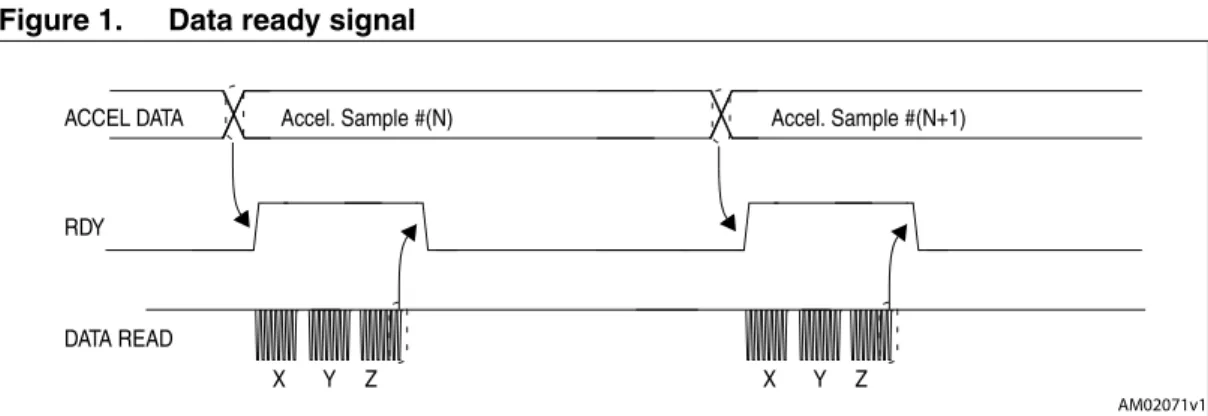
The device may be configured to have one HW signal to determinate when a new set of measurement data is available for reading. This signal is represented by the XYZDA bit of STATUS_REG. The signal can be driven to INT1 pin by setting the I1_DRDY1 bit of
CTRL_REG3 to 1 and its polarity set to active-low or active-high through the H_LACTIVE bit of CTRL_REG6.
The data-ready signal rises to 1 when a new set of acceleration data has been generated and it is available for reading.The interrupt is reset when the higher part of the data of all the enabled channels has been read (29h, 2Bh, 2Dh).
Figure 1. Data ready signal
3.1.3
Using the block data update (BDU) feature
If the reading of the acceleration data is particularly slow and cannot be synchronized (or it is not required) with either the XYZDA bit present inside the STATUS_REG or with the RDY signal, it is strongly recommended to set the BDU (block data update) bit in CTRL_REG4 to 1.
This feature avoids the reading of values (most significant and least significant parts of the acceleration data) related to different samples. In particular, when the BDU is activated, the data registers related to each channel always contain the most recent acceleration data produced by the device, but, in case the reading of a given pair (i.e. OUT_X_H and OUT_X_L, OUT_Y_H and OUT-Y_L, OUT_Z_H and OUT_Z_L) is initiated, the refresh for that pair is blocked until both MSB and LSB parts of the data are read.
Note: BDU only guarantees that OUT_X(Y, Z)_L and OUT_X(X,Z)_H have been sampled at the same moment. For example, if the reading speed is too low, it may read X and Y sampled at T1 and Z sampled at T2. ".W 2$9 $!4!2%!$ . E L P M A 3 L E C C ! . E L P M A 3 L E C C ! ! 4 ! $ , % # # ! 8 9 : 8 9 :
Startup sequence AN3308
3.2
Understanding acceleration data
The measured acceleration data are sent to OUTX_H, OUTX_L, OUTY_H, OUTY_L, OUTZ_H, and OUTZ_L registers. These registers contain, respectively, the most significant part and the least significant part of the acceleration signals acting on the X, Y, and Z axes. The complete acceleration data for the X (Y, Z) channel is given by the concatenation OUTX_H & OUTX_L (OUTY_H & OUTY_L, OUTZ_H & OUTZ_L) and it is expressed as a 2’s complement number.
3.2.1 Data
alignment
Acceleration data are represented as 16-bit numbers and are left justified.
3.2.2
Big-little endian selection
The LIS3DH allows to swap the content of the lower and the upper part of the acceleration registers (i.e. OUTX_H with OUTX_L), to be compliant with both little-endian and big-endian data representations.
“Little Endian” means that the low-order byte of the number is stored in memory at the lowest address, and the high-order byte at the highest address. (The little end comes first). This mode corresponds to bit BLE in CTRL_REG4 reset to 0 (default configuration). On the contrary, “Big Endian” means that the high-order byte of the number is stored in memory at the lowest address, and the low-order byte at the highest address.
3.2.3
Example of acceleration data
Table 6 provides a few basic examples of the data that is read in the data-registers when the device is subject to a given acceleration. The values listed in the table are given under the hypothesis of perfect device calibration (i.e. no offset, no gain error,....) and practically show the effect of the BLE bit.
Table 6. Output data registers content vs. acceleration (FS = 2 g)
Acceleration values BLE = 0 BLE = 1 Register address 28h 29h 28h 29h 0 g 00h 00h 00h 00h 350 mg E0h 15h 15h E0h 1 g 00h 04h 04h 00h -350 mg 20h EAh EAh 20h -1g 00h C0h C0h 00h
AN3308 High-pass filter
4 High-pass
filter
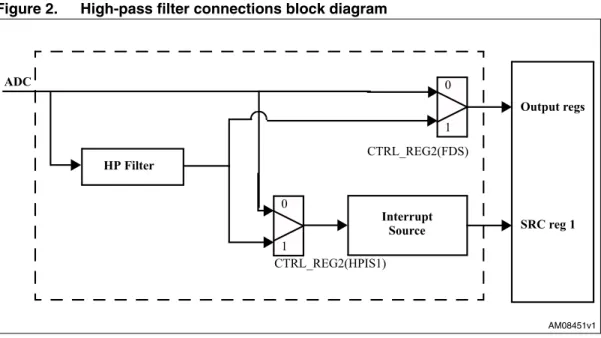
The LIS3DH provides an embedded high-pass filtering capability to easily delete the DC component of the measured acceleration. As shown in Figure 2, through FDS, HPen1, and HPen2 bits of CTRL_REG2 configuration, it is possible to independently apply the filter on the output data and/or on the interrupts data. This means that it is possible, i.e., to get filtered data while interrupt generation works on unfiltered data.
Figure 2. High-pass filter connections block diagram
4.1 Filter
configuration
Referring to Table 7, two operating modes are possible for the high-pass filter:
The bandwidth of the high-pass filter depends on the selected ODR and on the settings of HPCFx bits of CTRL_REG2. The high-pass filter cut-off frequencies (ft) are shown in
Table 8. !-V +3)LOWHU ,QWHUUXSW &75/B5(*+3,6 &75/B5(*)'6 2XWSXWUHJV 65&UHJ 6RXUFH $'&
Table 7. High-pass filter mode configuration
HPM1 HPM0 High-pass filter mode
0 0 Normal mode (reset reading HP_RESET_FILTER)
0 1 Reference signal for filtering
1 0 Normal mode
High-pass filter AN3308
4.1.1 Normal
mode
In this configuration the high-pass filter can be reset reading the reference register, instantly deleting the DC component of the acceleration.
Figure 3. HP_FILTER_RESET readings
4.1.2 Reference
mode
In this configuration the output data is calculated as the difference between the input acceleration and the content of the reference register. This register is in 2’ complement representation and the value of 1 LSB of these 7-bit registers depends on the selected full scale (Table 9).
Table 8. Low power mode - high-pass filter cut-off frequency [Hz]
HPC ft [Hz] @ 1Hz ft [Hz] @ 10Hz ft [Hz] @ 25Hz ft [Hz] @ 50Hz ft [Hz] @ 100Hz ft [Hz] @ 200Hz ft [Hz] @ 400Hz ft [Hz] @ 1.6 kHz ft [Hz] @ 5 kHz 00 0.02 0.2 0.5 1 2 4 8 32 100 01 0.008 0.08 0.2 0.5 1 2 4 16 50 10 0.004 0.04 0.1 0.2 0.5 1 2 8 25 11 0.002 0.02 0.05 0.1 0.2 0.5 1 4 12 !-V &ILTERED$ATA (0?&),4%2?2%3% 4
Table 9. Reference mode LSB value
Full scale Reference mode LSB value (mg)
2 ~16
4 ~31
AN3308 High-pass filter
Figure 4. Reference mode
4.1.3 Autoreset
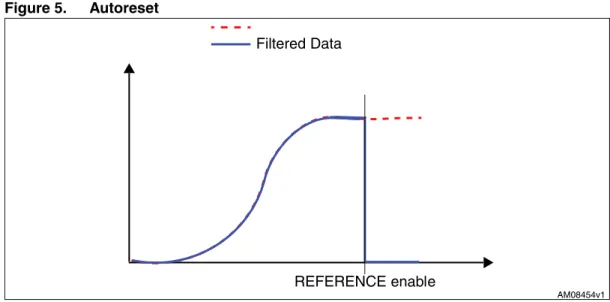
In this configuration the filter is automatically reset when the configured interrupt event occurs.HP_RESET is, however, used to set the filter instantaneously.
Note: XYZ dataset used to reset the filter is the one after the interrupt. Figure 5. Autoreset ".W )NPUT!CCELERATION &ILTERED$ATA 2%&%2%.#%ENABLE 2%&%2%.#% !-V &ILTERED$ATA 2%&%2%.#%ENABLE
Interrupt generation AN3308
5 Interrupt
generation
The LIS3DH interrupts signal can behave as free-fall, wake-up, 6D and 4D orientation detection, and click detection. Those signals can be driven to the two interrupt pins (INT1 and INT2).
5.1 Interrupt
pin
configuration
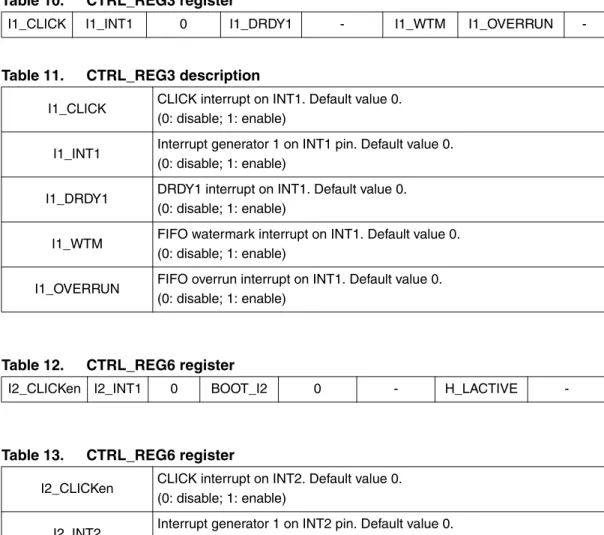
The device is provided with two pins which can be activated to generate either the data-ready or the interrupt signals. The functionality of the pins is selected through
CTRL_REG3(22h) and CTRL_REG6(25h). Refer to Table 10 and Table 11 and to the block diagram given in Figure 6.
Table 10. CTRL_REG3 register
I1_CLICK I1_INT1 0 I1_DRDY1 - I1_WTM I1_OVERRUN
-Table 11. CTRL_REG3 description
I1_CLICK CLICK interrupt on INT1. Default value 0. (0: disable; 1: enable)
I1_INT1 Interrupt generator 1 on INT1 pin. Default value 0. (0: disable; 1: enable)
I1_DRDY1 DRDY1 interrupt on INT1. Default value 0. (0: disable; 1: enable)
I1_WTM FIFO watermark interrupt on INT1. Default value 0. (0: disable; 1: enable)
I1_OVERRUN FIFO overrun interrupt on INT1. Default value 0. (0: disable; 1: enable)
Table 12. CTRL_REG6 register
I2_CLICKen I2_INT1 0 BOOT_I2 0 - H_LACTIVE
-Table 13. CTRL_REG6 register
I2_CLICKen CLICK interrupt on INT2. Default value 0. (0: disable; 1: enable)
I2_INT2 Interrupt generator 1 on INT2 pin. Default value 0. (0: disable; 1: enable)
BOOT_I2 BOOT status on INT2. Default value 0. (0: disable; 1: enable)
AN3308 Interrupt generation
Figure 6. Interrupt signals and interrupt pins
!-V ,17SDG &75/B5(* &/,&. &75/B5(* $2, &75/B5(* $2, &75/B5(* '5'< &75/B5(* '5'< &75/B5(* :70 &75/B5(* 29(5581 ,17SDG &75/B5(* &/,&. &75/B5(* $2, &75/B5(* %227 &75/B5(* &75/B5(*
Inertial interrupt AN3308
6 Inertial
interrupt
The LIS3DH can provide two inertial interrupt signals and offers several possibilities to personalize those signals. The registers involved in the interrupt generation behavior are INT1_CFG, INT1_THS and INT1_DURATION.
Whenever an interrupt condition is verified the interrupt signal is generated and by reading the INT1_SRC register it is possible to understand which condition happened.
6.1 Duration
The content of the duration registers sets the minimum duration of the interrupt event to be recognized. Duration steps and maximum values depend on the ODR chosen.
Duration time is measured in N/ODR, where N is the content of the duration register and ODR is 50, 100, 400, 1000 Hz.
Table 14. Interrupt mode configuration
AOI 6D Interrupt mode
0 0 OR combination of interrupt events
0 1 6 direction movement recognition
1 0 AND combination of interrupt events
1 1 6 direction position recognition
Table 15. Duration LSB value in normal mode
ODR (Hz) Duration LSB value (ms)
1 1000 10 100 25 40 50 20 100 10 200 5 400 2.5 1000 1 1344 0.744 1620 0.617
AN3308 Inertial interrupt
6.2 Threshold
Threshold registers define the reference accelerations used by interrupt generation circuitry. The value of 1 LSB of these 7-bit registers depends on the selected full scale (Table 16).
6.3
Free-fall and wake-up interrupts
The LIS3DH interrupts signal can behave as free-fall and wake-up. Whenever an interrupt condition is verified, the interrupt signal is generated and by reading the INT1_SRC register it is possible to understand which condition happened.
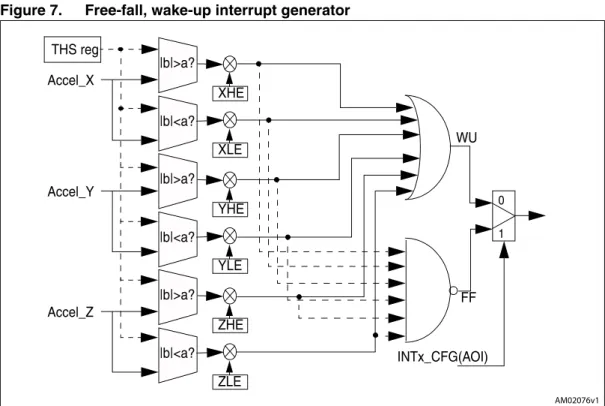
The free-fall signal (FF) and wake-up signal (WU) interrupt generation block is represented in Figure 7.
The FF or WU interrupt generation is selected through the AOI bit in the INT1_CFG register. If the AOI bit is ‘0’, signals coming from comparators for the axis enabled through the INT1_CFG register are put in logical OR. In this case, interrupt is generated when at least one of the enabled axes exceeds the threshold written in module in INT1_THS registers. Otherwise, if the AOI bit is ‘1’, signals coming from comparators enter a “NAND” port. In this case an interrupt signal is generated only if all the enabled axes are passing the threshold written in the INT1_THS register.
LIR1 bits of CTRL_REG3 allow to decide if the interrupt request must be latched or not. If LIR1 bit is ‘0’ (default value), the interrupt signal goes high when the interrupt condition is satisfied and returns to low immediately if the interrupt condition is no longer verified. Otherwise, if the LIR1 bit is ‘1’, whenever an interrupt condition is applied the interrupt signal remains high even if the condition returns to a non-interrupt status until a reading to the INT1_SRC register is performed.
The ZHIE, ZLIE, YHIE, YLIE, XHIE, and HLIE bits of the INT1_CFG register allow to decide on which axis the interrupt decision must be performed and on which direction the threshold must be passed to generate the interrupt request.
Table 16. Threshold LSB value
Full scale Threshold LSB value (mg)
2 ~16
4 ~31
8 ~63
Inertial interrupt AN3308
Figure 7. Free-fall, wake-up interrupt generator
The threshold module which is used by the system to detect any free-fall or inertial wake-up event is defined by the INT1_THS register. The threshold value is expressed over 7 bits as an unsigned number and is symmetrical around the zero-g level. XH (YH, ZH) is true when the unsigned acceleration value of the X (Y, Z) channel is higher than INT1_THS. Similarly, XL (YL, ZL) low is true when the unsigned acceleration value of the X (Y, Z) channel is lower than INT1_THS. Refer to Figure 8 for more details.
Figure 8. FF_WU_CFG high and low
".W 4(3REG \B\A \B\A !CCEL?8 8(% 8,% 75 && ).4X?#&'!/) \B\A \B\A 9(% 9,% \B\A \B\A :(% :,% !CCEL?9 !CCEL?: !-V &ULL3CALE &ULL3CALE GLEVEL 4HRESHOLDMODULE 4HRESHOLDMODULE 89: HIGH 89: HIGH 89 : LOW 0OSITIVE .EGATIVE ACCELERATION ACCELERATION
AN3308 Inertial interrupt
6.3.1 Inertial
wake-up
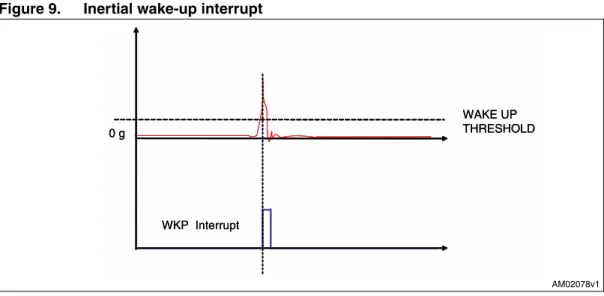
Wake-up interrupt refers to a specific configuration of the INT1_CTRL register that allows interrupt generation when the acceleration on the configured axis exceeds a defined threshold (Figure 9).
Figure 9. Inertial wake-up interrupt
6.3.2
HP filter bypassed
This paragraph provides a basic algorithm which shows the practical use of the inertial wake-up feature. In particular, with the code below, the device is configured to recognize when the absolute acceleration along either the X or Y axis exceeds a preset threshold (250 mg used in the example). The event which triggers the interrupt is latched inside the device and its occurrence is signalled through the use of the INT1 pin.
!-V G 7!+%50 4(2%3(/,$ 7+0)NTERRUPT G 7!+%50 4(2%3(/,$ 7+0)NTERRUPT
1 Write A7h into CTRL_REG1 // Turn on the sensor and enable X, Y, and Z // ODR = 100 Hz
2 Write 00h into CTRL_REG2 // High-pass filter disabled 3 Write 40h into CTRL_REG3 // Interrupt driven to INT1 pad 4 Write 00h into CTRL_REG4 // FS = 2 g
5 Write 08h into CTRL_REG5 // Interrupt latched 6 Write10h into INT1_THS // Threshold = 250 mg 7 Write 00h into INT1_DURATION // Duration = 0
8 Write 0Ah into INT1_CFG // Enable XH and YH interrupt generation
9 Poll INT1 pad; if INT1=0 then go to 8 // Poll RDY/INT pin waiting for the // wake-up event
10 Read INT1_SRC // Return the event that has triggered the // interrupt
Inertial interrupt AN3308
6.3.3
Using the HP filter
The code provided below gives a basic routine which shows the practical use of the inertial wake-up feature performed on high-pass filtered data. In particular the device is configured to recognize when the high-frequency component of the acceleration applied along either the X, Y, or Z axis exceeds a preset threshold (250 mg used in the example).
The event which triggers the interrupt is latched inside the device and its occurrence is signalled through the use of the INT1 pin.
At step 8, a dummy reading at the HP_FILTER_RESET register is performed to set the current/reference acceleration/tilt state against which the device performed the threshold comparison.
This reading may be performed any time it is required to set the orientation/tilt of the device as a reference state without waiting for the filter to settle.
1 Write A7h into CTRL_REG1 // Turn on the sensor, enable X, Y, and Z // ODR = 100 Hz
2 Write 09h into CTRL_REG2 // High-pass filter enabled on data and interrupt1 3 Write 40h into CTRL_REG3 // Interrupt driven to INT1 pad
4 Write 00h into CTRL_REG4 // FS = 2 g 5 Write 08h into CTRL_REG5 // Interrupt latched 6 Write10h into INT1_THS // Threshold = 250 mg 7 Write 00h into INT1_DURATION // Duration = 0
8 Read HP_FILTER_RESET
// Dummy read to force the HP filter to // current acceleration value
// (i.e. set reference acceleration/tilt value) 9 Write 2Ah into INT1_CFG // Configure desired wake-up event
10 Poll INT1 pad; if INT1 = 0 then go to 9
// Poll INT1 pin waiting for the // wake-up event
11 (Wake-up event has occurred; insert your code here)
// Event handling
12 Read INT1_SRC // Return the event that has triggered the // interrupt and clear interrupt
13 (Insert your code here) // Event handling 14 Go to 9
AN3308 Inertial interrupt
6.4 Free-fall
detection
Free-fall detection refers to a specific configuration of INT1_CTRL registers that allows to recognize when the device is free falling: the acceleration measure along all the axes goes to zero. In a real case a “free-fall zone” is defined around the zero-g level where all the accelerations are small enough to generate the interrupt (Figure 10).
Figure 10. Free-fall interrupt
This paragraph provides the basics for the use of the free-fall detection feature. In particular, the SW routine that configures the device to detect free-fall events and to signal them is the following:
1 Write A7h into CTRL_REG1 // Turn on the sensor, enable X, Y, and Z // ODR = 100 Hz
2 Write 00h into CTRL_REG2 // High-pass filter disabled 3 Write 40h into CTRL_REG3 // Interrupt driven to INT1 pad 4 Write 00h into CTRL_REG4 // FS = 2 g
5 Write 08h into CTRL_REG5 // Interrupt latched
6 Write 16h into INT1_THS // Set free-fall threshold = 350 mg 7 Write 03h into INT1_DURATION // Set minimum event duration 8 Write 95h into INT1_CFG // Configure free-fall recognition
9 Poll INT1 pad; if INT1 = 0 then go to 10 // Poll INT1 pin waiting for the free-fall event
10 (Free-fall event has occurred; insert your code here)
// Event handling
11 Read INT1_SRC register // Clear interrupt request 12 Go to 9 !-V G &2%%&!,, :/.% 8 9 : &&)NTERRUPT
Inertial interrupt AN3308
The code sample exploits a threshold set at 350 mg for free-fall recognition and the event is notified by the hardware signal INT1. At step 7, the INT1_DURATION register is configured like this to ignore events that are shorter than 3/DR = 3/100 ~= 30 msec in order to avoid false detections.
Once the free-fall event has occurred, a reading of the INT1_SRC register clears the request and the device is ready to recognize other events.
AN3308 6D/4D orientation detection
7
6D/4D orientation detection
The LIS3DH provides an advanced capability to detect the orientation of the device in the space, enabling easy implementation of an energy saving procedure and automatic image rotation for handheld devices.
7.1 6D
orientation
detection
The 6D orientation direction function can be enabled through AOI and 6D bits of the INT1_CFG register. When configured for 6D function, the ZH, ZL, YH, YL, XH, and XL bits of INT1_SRC give information about the value of the acceleration generating the interrupt when it is greater than the threshold, and about its sign. In more detail:
● ZH (YH, XH) is 1 when the sensed acceleration is bigger than the threshold in the positive direction
● ZL (YL, XL) is 1 when the sensed acceleration is bigger than the threshold in the negative direction.
Figure 11. ZH, ZL, YH, YL, XH, and XL behavior
There are two possible configurations for the 6D direction function:
● 6D movement recognition: In this configuration the interrupt is generated when the device moves from a direction (known or unknown) to a different known direction. The interrupt is active only for 1/ODR
● 6D position recognition: In this configuration the interrupt is generated when the device is stable in a known direction. The interrupt is active as long as position is maintained (Figure 12, (a) and (b)).
Referring to Figure 12, the 6D movement line shows the behavior of the interrupt when the device is configured for 6D movement recognition on the X and Y axis (INT1_CFG = 0x4Ah), while the 6D position line shows the behavior of the interrupt when the device is configured for 6D position recognition on the X and Y axis (INT1_CFG = 0xCAh). INT1_THS is set to 0x21.
Referring to Figure 13, the device has been configured for 6D position function on X, Y, and Z axes. Table 17 shows the content of the INT1_SRC register for each position.
!-V &ULL3CALE &ULL3CALE GLEVEL 4HRESHOLD 4HRESHOLD 8(9(:( 8,9,:, 0OSITIVE .EGATIVE ACCELERATION ACCELERATION 8(9(:( 8,9,:,
6D/4D orientation detection AN3308
Figure 12. 6D movement vs. 6D position
Figure 13. 6D recognized positions
!-V 8 9 : $0OSITION $-OVEMENT A B !-V 8 9 : "OTTOM 8 9 : 8 9 : 8 9 : 8 9 : 8 9 : 8 9 : 8 9 : 8 9 : 9 8 : 8 9 : 4OP 8 9 : 4OP B A D C F E
AN3308 6D/4D orientation detection
7.2 4D
direction
The 4D direction function is a subset of the 6D function especially defined to be implemented in handheld devices. It can be enabled by setting the D4D_INT1 bit of CTRL_REG5 to 1 when the 6D bit on INT1_CFG is set to 1. In this configuration, Z axis position detection is disabled, therefore reducing position recognition to cases (a), (b), (c), and (d) of Table 17.
Table 17. INT1_SRC register in 6D position
Case IA ZH ZL YH YL XH XL (a) 1 0 0 0 1 0 0 (b) 1 0 0 0 0 1 0 (c) 1 0 0 0 0 0 1 (d) 1 0 0 1 0 0 0 (e) 1 1 0 0 0 0 0 (f) 1 0 1 0 0 0 0
Click and double click recognition AN3308
8
Click and double click recognition
The single click and double click recognition functions featured in the LIS3DH help to create a man-machine interface with little software loading. The device can be configured to output an interrupt signal on a dedicated pin when tapped in any direction.
If the sensor is exposed to a single input stimulus, it generates an interrupt request on inertial interrupt pin INT1 and/or INT2. A more advanced feature allows the generation of an interrupt request when a double input stimulus with programmable time between the two events is recognized, enabling a mouse button-like function.
This function can be fully programmed by the user in terms of expected amplitude and timing of the stimuli by means of the dedicated set of registers described in Section 8.3. Single and double click recognition works independently on the selected output data rate.
8.1 Single
click
If the device is configured for single click event detection, an interrupt is generated when the input acceleration on the selected channel exceeds the programmed threshold, and returns below it within a time window defined by the TimeLimit register.
If the LIR bit of the TAP_CFG register is not set, the interrupt is kept high for the duration of the latency window. If the LIR bit is set, the interrupt is kept high until the TAP_SRC register is read.
Figure 14. Single click event with non latched interrupt
In Figure 14(a) the click has been recognized, while in Figure 14(b) the click has not been recognized because the acceleration goes under the threshold after the TimeLimit has expired.
AN3308 Click and double click recognition
8.2 Double
click
If the device is configured for double click event detection, an interrupt is generated when, after a first click, a second click is recognized. The recognition of the second click occurs only if the event satisfies the rules defined by the latency and windows registers.
In particular, after the first click has been recognized, the second click detection procedure is delayed for an interval defined by the latency register. This means that after the first click has been recognized, the second click detection procedure starts only if the input
acceleration exceeds the threshold after the latency window but before the window has expired (Figure 15(a)), or if the acceleration is still above the threshold after the latency has expired (Figure 16 (b)).
Once the second click detection procedure is initiated, the second click is recognized with the same rule as the first: the acceleration must return below the threshold before the TimeLimit has expired.
It is important to appropriately define the latency window to avoid unwanted clicks due to spurious bouncing of the input signal.
Figure 15. Single and double click recognition
Figure 15 illustrates a single click event (a) and a double click event (b). The device is able to distinguish between (a) and (b) by changing the settings of the TAP_CFG register from single to double click recognition.
(a)
Click and double click recognition AN3308
Figure 16. Double click recognition
In Figure 16(a) the double click event has been correctly recognized, while in Figure 16(b) the interrupt has not been generated because the input acceleration exceeds the threshold after the window interval has expired.
8.3 Register
description
8.3.1 TAP_CFG
(38h)
(a)
(b)
Table 18. TAP_CFG register
- - ZD ZS YD YS XD XS
Table 19. TAP_CFG description
ZD
Enable interrupt double tap-tap on Z axis. Default value: 0
(0: disable interrupt request; 1: enable interrupt request on measured accel. value higher than preset threshold)
ZS
Enable interrupt single tap-tap on Z axis. Default value: 0
(0: disable interrupt request; 1: enable interrupt request on measured accel. value higher than preset threshold)
YD
Enable interrupt double tap-tap on Y axis. Default value: 0
(0: disable interrupt request; 1: enable interrupt request on measured accel. value higher than preset threshold)
YS
Enable interrupt single tap-tap on Y axis. Default value: 0
(0: disable interrupt request; 1: enable interrupt request on measured accel. value higher than preset threshold)
AN3308 Click and double click recognition
8.3.2 TAP_SRC
(39h)
XD
Enable interrupt double tap-tap on X axis. Default value: 0
(0: disable interrupt request; 1: enable interrupt request on measured accel. value higher than preset threshold)
XS
Enable interrupt single tap-tap on X axis. Default value: 0
(0: disable interrupt request; 1: enable interrupt request on measured accel. value higher than preset threshold)
Table 20. Truth table
DZ / DY / DX SZ / Y / X Click output
0 0 0
0 1 Single
1 0 Double
1 1 Single or double
Table 19. TAP_CFG description (continued)
Table 21. TAP_SRC register
- IA Dtap Stap Sign Z Y X
Table 22. TAP_SRC description
-
-IA
Interrupt active. Default value: 0
(0: no interrupt has been generated; 1: one or more interrupts have been generated)
Dtap Double tap-tap enable. Default value: 0
(0: double tap-tap detection disable, 1: double tap-tap detection enable)
Stap Single tap-tap enable. Default value: 0
(0: single tap-tap detection disable, 1: single tap-tap detection enable) Sign Tap-tap sign. 0: positive detection, 1: negative detection
Z Z tap-tap detection. Default value: 0
(0: no interrupt, 1: Z high event has occurred)
Y Y tap-tap detection. Default value: 0
(0: no interrupt, 1: Y high event has occurred)
X X tap-tap detection. Default value: 0
Click and double click recognition AN3308
8.3.3 TAP_THS
(3Ah)
1 LSB = full scale/128.
THS6 through THS0 define the threshold which is used by the system to start the click detection procedure. The threshold value is expressed over 6 bits as an unsigned number.
8.3.4 TIME_LIMIT
(3Bh)
1 LSB = 1/ODR.
TLI7 through TLI0 define the maximum time interval that can elapse between the start of the click detection procedure (the acceleration on the selected channel exceeds the
programmed threshold) and when the acceleration goes back below the threshold.
8.3.5 TIME_LATENCY
(3Ch)
1 LSB = 1/ODR.
TLA7 through TLA0 define the time interval that starts after the first click detection where the click detection procedure is disabled, in cases where the device is configured for double click detection.
Table 23. TAP_THS register
- THS6 THS5 THS4 THS3 THS2 THS1 THS0
Table 24. TAP_SRC description
THS6-THS0 Tap-Tap threshold. Default value: 000 0000
Table 25. TIME_LIMIT register
- TLI6 TLI5 TLI4 TLI3 TLI2 TLI1 TLI0
Table 26. TIME_LIMIT register
TLI7-TLI0 Tap-Tap Time Limit. Default value: 000 0000
Table 27. TIME_LATENCY register
TLA7 TLA6 TLA5 TLA4 TLA3 TLA2 TLA1 TLA0
Table 28. TIME_LATENCY description
AN3308 Click and double click recognition
8.3.6
TIME WINDOW (3Dh)
1 LSB = 1/ODR.
TW7 throughTW0 define the maximum interval of time that can elapse after the end of the latency interval in which the click detection procedure can start, in cases where the device is configured for double click detection.
8.3.7 CTRL_REG3
[Interrupt CTRL register] (22h)
8.4 Examples
The following figures show the click interrupt generation in different conditions. The illustrations have been captured on a PC running the demonstration kit GUI interface with ODR set to 400 Hz and full scale to 4 g. The content of the LIS3DH registers have been Table 29. TIME_WINDOW description
TW7 TW6 TW5 TW4 TW3 TW2 TW1 TW0
Table 30. TIME_LATENCY description
TW7-TW0 Tap-Tap Time Window
Table 31. CTRL_REG3 register
I1_TAP I1_INT1 - I1_DRDY1 I1_DRDY2 I1_WTM I1_OVERRUN
-Table 32. CTRL_REG3 description
I1_TAP Tap interrupt on INT1. Default value 0. (0: disable; 1: enable)
I1_INT1 Interrupt generator 1 on INT1 pin. Default value 0. (0: disable; 1: enable)
I1_DRDY1 DRDY1 interrupt on INT1. Default value 0. (0: disable; 1: enable)
I1_DRDY2 DRDY2 interrupt on INT1. Default value 0. (0: disable; 1: enable)
I1_WTM FIFO watermark interrupt on INT1. Default value 0. (0: disable; 1: enable)
I1_OVERRUN FIFO overrun interrupt on INT1. Default value 0. (0: disable; 1: enable)
Click and double click recognition AN3308
8.4.1 Playing
with
TAP_TimeLimit
Figure 17 shows an acquisition carried out with TAP_TimeLimit = 01h (2.5 ms). With this setting, the single click recognition window is short and often the acceleration does not return below the threshold in time.
In Figure 18 an acquisition done with TAP_TimeLimit = 33h (127 ms) is shown. With this setting the single click recognition window is longer, and it is easier for the event to be recognized.
Figure 17. Short TimeLimit
AN3308 Click and double click recognition
8.4.2 Playing
with
TAP_Latency
Figure 19 illustrates an acquisition done with TAP_Latency =15h (52 ms). With this setting the device recognizes nearly every acceleration peak as a click.
In Figure 20 an acquisition carried out with TAP_Latency = FFh (637 ms) is displayed. With this setting the device recognizes one peak in every two as a click.
Figure 19. Short latency
Click and double click recognition AN3308
8.4.3 Playing
with
TAP_Window
In cases of double click recognition, the TAP_Latency + TAP_Window defines the maximum distance between two consecutive clicks to be recognized as a double click event. By fixing the latency to avoid spurious bouncing of the signal, it is possible to play with the
TAP_Window as with the “double click speed” settings of the mouse properties on the PC.
Figure 21 shows an acquisition done with TAP_Window = 42h (1065 ms). With this setting the two consecutive peaks of acceleration are too far apart and the second one occurs outside of the window.
In Figure 22 an acquisition carried out with TAP_Window = FFh (637 ms) is shown. With this setting the device correctly generates the double click interrupt after the second acceleration peak.
Figure 21. Short window
AN3308 First in first out (FIFO) buffer
9
First in first out (FIFO) buffer
In order to decrease the host processor interaction and facilitate post processing data for events recognition, LIS3DH embeds a first in first out buffer (FIFO) for each of the three output channels, X, Y, and Z.
FIFO use allows a consistent power saving for the system, it can wake-up only when needed and burst the significant data out from the FIFO.
The FIFO buffer can work according to four different modes that guarantee a high-level of flexibility during application development: Bypass mode, FIFO mode, Stream mode, and Stream-to-FIFO mode.
The programmable watermark level and FIFO overrun event can be enabled to generate dedicated interrupts on the INT1 pin.
9.1 FIFO
description
The FIFO buffer is able to store up to 32 acceleration samples of 10 bits for each channel; data are stored in the 16-bit 2’s complement left justified representation.
The data samples set consists of 6 bytes (Xl, Xh, Yl, Yh, Zl, and Zh) and they are released to the FIFO at the selected output data rate (ODR).
The new sample set is placed in the first empty FIFO slot until the buffer is full, therefore, the oldest value is overwritten.
Table 33. FIFO buffer Full Representation (32nd sample set stored)
Output Registers
0x28h 0x29h 0x2Ah 0x2Bh 0x2Ch 0x2Dh
Xl(0) Xh(0) Yl(0) Yh(0) Zl(0) Zh(0)
FIFO INDEx FIFO Sample Set
FIFO(0) Xl(0) Xh(0) Yl(0) Yh(0) Zl(0) Zh(0)
FIFO(1) Xl(1) Xh(1) Yl(1) Yh(1) Zl(1) Zh(1)
FIFO(2) Xl(2) Xh(2) Yl(2) Yh(2) Zl(2) Zh(2)
FIFO(3) Xl(3) Xh(3) Yl(3) Yh(3) Zl(3) Zh(3)
... ... ... ... ... ... ...
First in first out (FIFO) buffer AN3308
Table 33 represents the FIFO full status when 32 samples are stored in the buffer while
Table 34 represents the next step when the 33rd sample is inserted into FIFO and the 1st sample is overwritten. The new oldest sample set is made available in the output registers. When FIFO is enabled and mode is different from bypass, the LIS3DH output registers (28h to 2Dh) always contain the oldest FIFO sample set.
9.2 FIFO
registers
The FIFO buffer is managed by three different accelerometer registers, two of these allow to enable and configure the FIFO behavior, the third provides information about the buffer status.
9.2.1 Control
register 5 (0x24)
The FIFO_EN bit in CTRL_REG5 must be set to 1 in order to enable the internal first in first out buffer; while this bit is set, the accelerometer output registers (28h to 2Dh) don’t contain the current acceleration value but they always contain the oldest value stored in FIFO. Table 34. FIFO Overrun Representation (33rd sample set stored and 1st sample
discarded)
Output Registers
0x28h 0x29h 0x2Ah 0x2Bh 0x2Ch 0x2Dh
Xl(1) Xh(1) Yl(1) Yh(1) Zl(1) Zh(1)
FIFO INDEx Sample Set
FIFO(0) Xl(1) Xh(1) Yl(1) Yh(1) Zl(1) Zh(1)
FIFO(1) Xl(2) Xh(2) Yl(2) Yh(2) Zl(2) Zh(2)
FIFO(2) Xl(3) Xh(3) Yl(3) Yh(3) Zl(3) Zh(3)
FIFO(3) Xl(4) Xh(4) Yl(4) Yh(4) Zl(4) Zh(4)
... ... ... ... ... ... ...
... ... ... ... ... ... ...
FIFO(30) Xl(31) Xh(31) Yl(31) Yh(31) Zl(31) Zh(31)
FIFO(31) Xl(32) Xh(32) Yl(32) Yh(32) Zl(32) Zh(32)
Table 35. FIFO enable bit in CTRL_REG5
b7 b6 b5 b4 b3 b2 b1 b0
AN3308 First in first out (FIFO) buffer
Figure 23. FIFO_EN connection block diagram
9.2.2
FIFO control register (0x2E)
This register is dedicated to FIFO mode selection and watermark configuration.
FM[1:0] bits are dedicated to define the FIFO buffer behavior selection: 1. FM[1:0] = (0,0): Bypass mode
2. FM[1:0] = (0,1): FIFO mode 3. FM[1:0] = (1,0): Stream mode
4. FM[1:0] = (1,1): Stream-to-FIFO mode
The trigger used to activate stream-to-FIFO mode is related to the IA bit value of the selected INT1_SRC register and does not depend on the interrupt pin value and polarity. The trigger is generated also if the selected interrupt is not driven to an interrupt pin. FTH[4:0] bits are intended to define the watermark level; when FIFO content exceeds this value the WTM bit is set to “1” in the FIFO source register.
!-V
&)&/
"UFFER
!$#
/UTPUT2EGISTERS
#42,?2%'&)&/?%.-EASUREMENT
#HAIN
&)&/
"UFFER
!$#
/UTPUT2EGISTERS
#42,?2%'&)&/?%. Table 36. FIFO_CTRL_REG b7 b6 b5 b4 b3 b2 b1 b0 FM1 FM0 0 FTH4 FTH3 FTH2 FTH1 FTH0First in first out (FIFO) buffer AN3308
9.2.3
FIFO source register (0x2F)
This register is updated at every ODR and provides information about the FIFO buffer status.
● WTM bit is set high when FIFO content exceeds watermark level.
● OVRN bit is set high when FIFO buffer is full, this means that the FIFO buffer contains 32 unread samples. At the following ODR a new sample set replaces the oldest FIFO value. The OVRN bit is reset when the first sample set has been read.
● EMPTY flag is set high when all FIFO samples have been read and FIFO is empty.
● FSS[4:0] field always contains the current number of unread samples stored in the FIFO buffer. When FIFO is enabled, this value increases at ODR frequency until the buffer is full, whereas, it decreases every time that one sample set is retrieved from FIFO.
Register content is updated synchronous to the FIFO write and read operation.
The watermark flag and FIFO overrun event can be enabled to generate a dedicated interrupt on the INT1 pin by configuring CTRL_REG3.
● I1_WTM bit drives watermark flag (WTM) on the INT1 pin.
● I1_OVRN bit drives overrun event (OVRN) on the INT1 pin. Table 37. FIFO_SRC_REG
b7 b6 b5 b4 b3 b2 b1 b0
WTM OVRN EMPTY FSS4 FSS3 FSS2 FSS1 FSS0
Table 38. FIFO_SRC_REG behavior assuming FTH[4:0] = 15
WTM OVRN EMPTY FSS[4:1] Unread FIFO samples Timing
0 0 1 00000 0 t0 0 0 0 00001 1 t0 + 1/ODR 0 0 0 00010 2 t0 + 2/ODR ... ... ... ... ... ... 0 0 0 01111 15 t0 + 15/ODR 1 0 0 10000 16 t0 + 16/ODR ... ... ... ... ... ... 1 0 0 11110 30 t0 + 30/ODR 1 0 0 11111 31 t0 + 31/ODR 1 1 0 11111 32 t0 + 32/ODR Table 39. CTRL_REG3 (0x22) b7 b6 b5 b4 b3 b2 b1 b0 X X X X X I1_WTM I1_OVRN X
AN3308 First in first out (FIFO) buffer
If both bits are set to “1”, the INT1 pin status is the logical OR combination of the two signals.
9.3 FIFO
modes
The LIS3DH FIFO buffer can be configured to operate in four different modes selectable by the FM[1:0] field in FIFO_CTRL_REG. Available configurations ensure a high-level of flexibility and extend the number of functions usable in application development. Bypass, FIFO, Stream, and Stream-to-FIFO modes are described in the following paragraphs.
9.3.1 Bypass
mode
When bypass mode is enabled, FIFO is not operational: buffer content is cleared, output registers (0x28 to 0x2D) are frozen at the last value loaded, and the FIFO buffer remains empty until another mode is selected.
Follow these steps for bypass mode configuration:
1. Turn on FIFO by setting the FIFO_En bit to “1” in control register 5 (0x24). After this operation the FIFO buffer is enabled but isn’t collecting data, output registers are frozen to the last samples set loaded.
2. Activate bypass mode by setting the FN[1:0] field to “00” in the FIFO control register (0x2E). If this mode is enabled, FIFO source register (0x2F) is forced equal to 0x20. Bypass mode must be used in order to stop and reset the FIFO buffer when a different mode is operating. Note that placing the FIFO buffer into bypass mode clears the whole buffer content.
9.3.2 FIFO
mode
In FIFO mode, the buffer continues filling until full (32 sample set stored,) then it stops collecting data and the FIFO content remains unchanged until a different mode is selected. Follow these steps for FIFO mode configuration:
1. Turn on FIFO by setting the FIFO_En bit to “1” in control register 5 (0x24). After this operation the FIFO buffer is enabled but isn’t collecting data, output registers are frozen to the last samples set loaded.
2. Activate FIFO mode by setting the FN[1:0] field to “01” in the FIFO control register (0x2E).
By selecting this mode, FIFO starts data collection and source register (0x2F) changes according to the number of samples stored. At the end of the procedure, the source register is set to 0xDF and the OVRN flag generates an interrupt if the I1_OVRN bit is selected in control register 5. Data can be retrieved when OVRN is set to”1”, performing a 32 sample set reading from the output registers, data can be retrieved also on the WTM flag instead of OVRN if the application requires a lower number of samples. Communication speed is not so important in FIFO mode because data collection is stopped and there is no risk of overwriting acquired data. Before restarting FIFO mode, at the end of the reading procedure
First in first out (FIFO) buffer AN3308
1. Set FIFO_En = 1: Enable FIFO
2. Set FN[1:0] = (0,1): Enable FIFO mode 3. Wait OVRN or WTM interrupt
4. Read data from accelerometer output registers 5. Set FN[1:0] = (0,0): Enable bypass mode 6. Repeat from point 2
Figure 24. FIFO mode behavior
If FIFO mode is enabled, the buffer starts to collect data and fill all the 32 slots (from F0 to F31) at the selected output data rate. When the buffer is full, the OVRN bit goes up and data collection is permanently stopped; the user can decide to read FIFO content at any time because it is maintained unchanged until bypass mode is selected. The reading procedure is composed of a 32 sample set of 6 bytes for a total of 192 bytes and retrieves data starting from the oldest sample stored in FIFO (F0). The OVRN bit is reset when the first sample set has been read. The bypass mode setting resets FIFO and allows the user to enable FIFO mode again.
9.3.3 Stream
mode
In stream mode FIFO continues filling, when the buffer is full, the FIFO index restarts from the beginning and older data is replaced by the current. The oldest values continue to be overwritten until a read operation makes free FIFO slots available. Host processor reading speed is most important in order to free slots faster than new data is made available. FM[1:0] bypass configuration is used to stop this mode.
Follow these steps for FIFO mode configuration:
1. Turn on FIFO by setting the FIFO_En bit to “1” in control register 5 (0x24). After this operation the FIFO buffer is enabled but isn’t collecting data, output registers are frozen to the last samples set loaded.
2. Activate stream mode by setting the FN[1:0] field to “10” in the FIFO control register (0x2E).
As described, for FIFO mode, data can be retrieved when OVRN is set to”1” performing a 32 sample set reading from output registers, data can be retrieved also on the WTM flag if the application requires a smaller number of samples.
!-V
W
),)2PRGH HQDEOH ),)2 VWRS2951
),)20RGH HQDEOH),)25HDGLQJ
6WDUW),)2 5HDGLQJ ),)2 %\SDVV«
«
«
«
«
)
)
)
)
«
)
«
«
)
)
)
)
)
)
W
VWRS2951
),)25HDGLQJ
«
«
«
«
«
)
)
«
)
«
«
)
)
)
)
)
)
AN3308 First in first out (FIFO) buffer
Figure 25. Stream mode fast reading behavior
In stream mode, the FIFO buffer is continuously filling (from F0 to F31) at the selected output data rate. When the buffer is full the OVRN flag goes up and the suggested solution is to read all FIFO samples (192 bytes) faster then 1*ODR, in order to make free FIFO slots available for the new acceleration samples. This allows to avoid loss of data and to decrease the host processor interaction increasing system efficiency. If the reading procedure is not fast enough, three different cases can be observed:
1. FIFO sample set (6 bytes) reading faster than 1*ODR: data are correctly retrieved because a free slot is made available before new data is generated.
2. FIFO sample set (6 bytes) reading synchronous to 1*ODR: data are correctly retrieved because a free slot is made available before new data is generated but FIFO benefits are not exploited. This case is equivalent to read data on data ready interrupt and does not reduce the host processor interaction compared to the standard accelerometer reading.
3. FIFO sample set (6 bytes) reading slower than 1*ODR: in this case some data is lost because data recovery is not fast enough to free slots for new acceleration data
Figure 26. The number of correctly recovered samples is related to the difference between the current ODR and the FIFO sample set reading rate.
Figure 26. Stream mode slow reading behavior
!-V
W
6WUHDP HQDEOH2951
),)25HDGLQJ
6WDUW),)2 5HDGLQJ 6WDUW),)2 5HDGLQJ«
«
«
«
«
«
«
)
)
)
«
)
)
)
«
«
)
)
)
)
)
)
W
2951
),)25HDGLQJ
«
«
«
«
«
«
«
)
)
)
«
)
)
)
«
«
)
)
)
)
)
)
W
2951
),)25HDGLQJ
«
\\
[[
«
NNo\\ MMo[[«
«
«
)"
)"
«
)
)
)
)"
)"
)
)
«
«
)
)
)
)
W
2951
),)25HDGLQJ
«
\\
[[
«
NNo\\ MMo[[«
«
«
)"
)"
«
)
)
)
)"
)"
)
)
«
«
)
)
)
)
First in first out (FIFO) buffer AN3308
In Figure 26, due to slow reading, data from “jj” are not retrieved because they are replaced by the new accelerometer samples generated by the system.
Figure 27. Stream mode slow reading zoom
After stream mode enable, FIFO slots are filled at the end of each ODR time frame. The reading procedure must start as soon as the OVRN flag is set to “1”, data are retrieved from FIFO at the beginning of the reading operation. When a read command is sent to the device, the output registers content is moved to the SPI/I2C register and the current oldest FIFO value is shifted into the output registers in order to allow the next read operation. In the case of a reading slower than 1*ODR, some data can be retrieved from FIFO after that new sample is inserted into the addressed location. In Figure 27 the fourth read command starts after the refresh of the F3 index and this generates a disconnect in the reading data. The OVRN flag advises the user that this event has taken place. In this example, three correct samples have been read, the number of correctly recovered samples is dependent on the difference between the current ODR and the FIFO sample set reading timeframe.
9.3.4 Stream-to-FIFO
mode
This mode is a combination of the stream and FIFO modes described above. In stream-to-FIFO mode, the stream-to-FIFO buffer starts operating in stream mode and switches to stream-to-FIFO mode when the selected interrupt occurs.
Follow these steps for stream-to-FIFO mode configuration:
1. Configure desired interrupt generator using register INT1_CFG (0x30).
2. Set TRen bit in the FIFO control register (0x2E) according to the configured interrupt generator: TRen = “0” in order to select interrupt 1, TRen = “1” in order to select interrupt 2.
3. Turn on FIFO by setting the FIFO_En bit to “1” in control register 5 (0x24). After this operation the FIFO buffer is enabled but isn’t collecting data, output registers are frozen to the last samples set loaded.
4. Activate stream-to-FIFO mode by setting the FN[1:0] field to “11” in the FIFO control register (0x2E).
The interrupt trigger is related to the IA bit in the INT1_SRC register and it is generated even if the interrupt signal is not driven to an interrupt pad. Mode switch is performed if both IA and OVRN bits are set high. Stream-to-FIFO mode is sensitive to the trigger level and not to
!-V 6WUHDP HQDEOH
W
2951
5),)25HDGLQJ
6WDUW),)2 5HDGLQJ 6DPSOHV RYHUZULWWHQ«
«
«
«
«
)
)
)
)
)
)
«
)
)
)
)
)
5 5 5 5 W WGW WGWW
2951
5),)25HDGLQJ
«
«
«
«
«
)
)
)
)
)
)
«
)
)
)
)
)
5 5 5 5 W WGW WGWAN3308 First in first out (FIFO) buffer
condition disappears, the FIFO buffer returns to stream mode because the IA bit becomes zero. It is suggested to latch the interrupt signal used as the FIFO trigger in order to avoid losing interrupt events. If the selected interrupt is latched, it is needed to read the register INT1_SRC to clear the IA bit; after reading, the IA bit takes 2*ODR to go low.
In stream mode the FIFO buffer continues filling, when the buffer is full, the OVRN bit is set high and the next samples overwrite the oldest. When trigger occurs, two different cases can be observed:
1. If the FIFO buffer is already full (OVRN = “1”), it stops collecting data at the first sample after trigger. FIFO content is composed of #30 samples collected before the trigger event, the sample that has generated the interrupt event and one sample after trigger. 2. If FIFO isn’t yet full (initial transient), it continues filling until it is full (OVRN = “1”) and
then, if trigger is still present, it stops collecting data.
Figure 28. Stream-to-FIFO mode: interrupt not latched
Figure 29. Stream-to-FIFO mode: interrupt latched
Stream-to-FIFO can be used in order to analyze the samples history that generate an
!-V
7ULJJHU,$ELW
W
6WUHDPWR),)2 HQDEOH ),)2 VWRS2951
),)25HDGLQJ
6WDUW),)2 5HDGLQJ 2'5«
«
)
)
)
,QWHUUXSWORVW7ULJJHU,$ELW
W
2951
),)25HDGLQJ
2'5«
«
)
)
)
!-V7ULJJHU,$ELW
W
6WUHDPWR),)2 HQDEOH ),)2 VWRS2951
6WUHDPWR),)2 HQDEOH 5HDG ,1765&),)25HDGLQJ
6WDUW),)2 5HDGLQJ ),)2 %\SDVV«
«
)
)
)
)
)
)
)
)
)
)
7ULJJHU,$ELW
W
2951
),)25HDGLQJ
«
«
)
)
)
)
)
)
)
)
)
)
First in first out (FIFO) buffer AN3308
9.4 Watermark
Watermark is a configurable flag that can be used to generate specific interrupt in order to know when the FIFO buffer contains at least the number of samples defined as the watermark level. The user can select the desired level in a range from 0 to 31 using the FTH[4:0] field in the FIFO control register while the FIFO source register FSS[4:0] always contains the number of samples stored in FIFO.
If FSS[4:0] is greater than FTH[4:0], the WTM bit is set high in the FIFO source register, on the contrary, WTM is driven low when the FSS[4:0] field becomes lower than FTH[4:0]. FSS[4:0] increases by one step at the ODR frequency and decreases by one step every time that a sample set reading is performed by the user.
Figure 30. Watermark behavior - FTH[4:0] = 10
In Figure 30, the first row indicates the FSS[4:0] value, the second row indicates the relative FIFO slot and last row shows the incremental FIFO data. Assuming FTH[4:0] = 10, the WTM flag changes from “0” to “1” when the eleventh FIFO slot is filled (F10). Figure 31 shows that the WTM flag goes down when the FIFO content is less than FTH[4:0], it means that nine unread sample sets remain in FIFO.
The watermark flag (WTM) can be enabled to generate a dedicated interrupt on the INT1 pin by setting the I1_WTM bit high in CTRL_REG3.
9.5
Retrieve data from FIFO
When FIFO is enabled and the mode is different to bypass, reading output registers (28h to 2Dh) return the oldest FIFO sample set.
Whenever output registers are read, their content is moved to the SPI/I2C output buffer. FIFO slots are ideally shifted up one level in order to release room for a new sample reception and output registers load the current oldest value stored in the FIFO buffer. The whole FIFO content is retrieved performing thirty two read operations from
accelerometer output registers, every other reading operation returns the same last value until a new sample set is available in the FIFO buffer.
![Table 8. Low power mode - high-pass filter cut-off frequency [Hz]](https://thumb-us.123doks.com/thumbv2/123dok_us/987708.2629790/16.892.184.791.437.740/table-low-power-mode-high-pass-filter-frequency.webp)