University of Arkansas – CSCE Department
Capstone I – Preliminary Report – Spring 2015
Brisk - Intelligent Time Management
Riley Turben, Daniel Pumford, Eric Hall, Ryan McAlister
Abstract
Managing teams of people is a difficult task. Often it is the responsibility of one person to ensure that everyone else on their team is working on the right things at the right times in order to keep deadlines and finish their projects on time. The purpose of Brisk is to simplify this job by creating a simple, portable, and intelligent time management application for managers and their teammates. With it being generalized enough, it’s possible that Brisk could also be effective for personal use.
To create Brisk, our team will synthesize the best features of other time management applications to find the strongest feature set that people tend to look for. We will then design additions to this feature set to make Brisk predictive and suggestive, allowing for the application to assist users in managing their time. Finally, we will implement the application across mobile and web. The significance of Brisk is that it will create better project time management for teams and do it in a way that is unobtrusive to the workflow of its users.
1.0 Problem
Time management is not a common skill. When a group of people who are not good time managers get together to work on a project, much of their time is spent on time
management tasks rather than the project tasks. While time management is very important, team members should be spending more time completing the project than managing their time.
If team members do not manage their time effectively, it will result in more work and longer completion times for the project. This in turn produces more disgruntled team members, higher project costs, and less satisfied customers. Because of this, the team does not reach its full quality and production potential.
While the ideal solution to this problem is to create a team of people with excellent time management skills, it is not realistic. Another possible solution is to assign one member of the team to perform all of the time management tasks for the entire team, while not working on any of the project tasks. This is a popular solution, but is not an efficient use of the time of the team.
2.0 Objective
The objective of this project is to provide groups of people with intelligent and cross-platform project management software. Brisk will allow teams to spend less time managing their time and more time completing their projects.
3.0 Background
3.1 Related Work
Basecamp, self-described as “everyone’s favorite project management app”, is a web company started in 1999 [1]. They offer a project management web app with services such as task lists, file sharing, multi-user collaboration, and project scheduling. In 2012, Basecamp launched a new version of their app which uses Ruby on Rails for the backend.
Wrike first released their project management web service in 2007 [2]. Similar to Basecamp. Wrike is a very successful company that provides services such as team collaboration and file sharing, with an emphasis on collaboration between multi-functional teams. It uses JSP as its backend and ExtJS as its frontend.
Both companies have been extremely successful, having customers such as Google, Fox Sports, Ebay, Etsy, and Nike. Their success shows a definite market for solid project management software. However, both products are also complicated and tailored to specific project management paradigms, which can be limiting to smaller teams. We want Brisk to be a project management solution that anybody can use by reducing the complexity of tasks and the complexity of team management.
4.0 Design
4.1 Use Cases
Use Case: Creating a Task
Author: Ryan McAlister
Primary Actor: Manager
Goal in context: Create a new task for use in the project
Preconditions: Project and user already created. User has required permissions.
Trigger: User clicks New Task button.
Scenario:
1. Manager: Presented with new task form 2. Manager: Enters information about the task
3. Application: Verifies all required information is present 4. Application: Adds task to the database
Exceptions:
1. Manager is missing required information, Form will then highlight missing information and ask for that information to be filled it.
2. The database is unavailable. In which case an alert is given and the manager must wait for the database to become available.
Priority: Medium
Channel to Actor: Graphical User Interface (GUI)
Usage Frequency: Weekly
Secondary Actors: Database, Brisk Application
Channels to secondary actors:
Database: Network
Brisk Application: Network
Open Issues:
Use Case: Add a user
Author: Ryan McAlister
Primary Actor: Manager
Goal in Context: To add a user to the list of users.
Preconditions: Manager has already been created. Manager has required permissions to add a user.
Trigger: Manager clicks new user button.
Scenario:
Manager: Is prompted with new user form.
Manager: Enters information based off of new user. Application: Verifies required information is present. Application: Adds user to database
Manager: Presented with alert declaring user was added successfully.
Exceptions:
1. Manager is missing required information, Form will then highlight missing information and ask for that information to be filled it.
2. The database is unavailable. In which case an alert is given and the manager must wait for the database to become available.
Priority: Medium
Channel to Actor: Graphical User Interface (GUI
Usage Frequency: Monthly
Secondary Actors: Database, Brisk Application
Channels to secondary actors:
Brisk Application: Network
Open Issues:
Use Case: Complete a Task
Author: Ryan McAlister
Primary Actor: Brisk Application
Goal in Context: Mark task as completed
Preconditions: Task has been completed. User has required permissions.
Trigger: Completed button on task was clicked.
Scenario:
Application: Ask user if they would like to add the task to another section Application: If yes, move a copy of the task to the other section
Application: Move task to archived task list on Database
Application: Prompts user with an alert declaring task has been completed.
Exceptions:
1. Database is unavailable. In which case an alert is given and the manager must wait for the database to become available.
Priority: High
Channel to Actor: Graphical User Interface (GUI)
Usage Frequency: Weekly
Secondary Actors: Database, User
Channels to secondary actors:
Database: Network
User: Graphical User Interface (GUI)
Open Issues:
Use Case: Browse All Tasks
Author: Daniel Pumford
Primary Actor: User
Goal in Context: View all tasks that are due today, or due in the future.
Preconditions: User has tasks. User has required permissions.
Trigger: User has browsed to their summary page.
Scenario:
User: Navigates to summary page Application: Displays all relevant tasks
1. Database is unavailable. In which case an alert is given and the manager must wait for the database to become available.
2. User has no tasks. The application should prompt the user to add some tasks.
Priority: High
Channel to Actor: Graphical User Interface (GUI)
Usage Frequency: Daily
Secondary Actors: Database, Server
Channels to secondary actors:
Database: Network Server: User
Open Issues:
4.2 Detailed Architecture
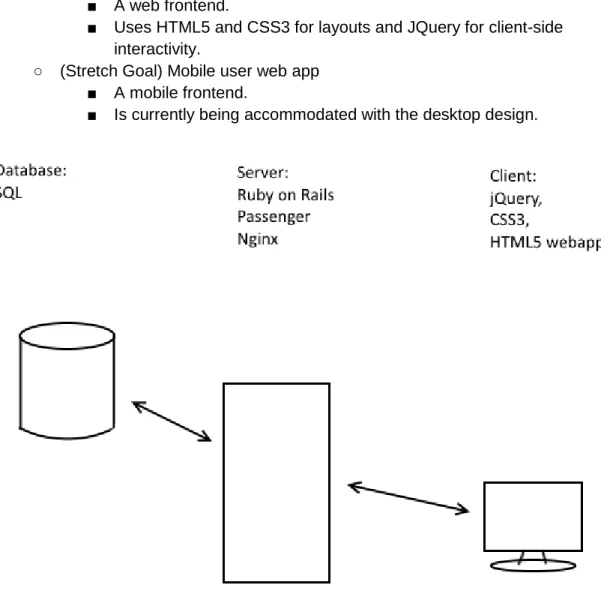
Brisk will be composed of several modules working together. Because it is web-based, there are components that will run on the client’s end and on the server.
● Server Modules
○ Ruby on Rails routing
■ Responsible for processing and routing client requests.
■ Responsible for accessing user-specific data and storing new data. Sends storage and retrieval requests to SQL database. Sends transform requests to Brisk task predictor.
■ Uses a set of models, controllers, helpers, and views to properly display and manipulate the users and tasks.
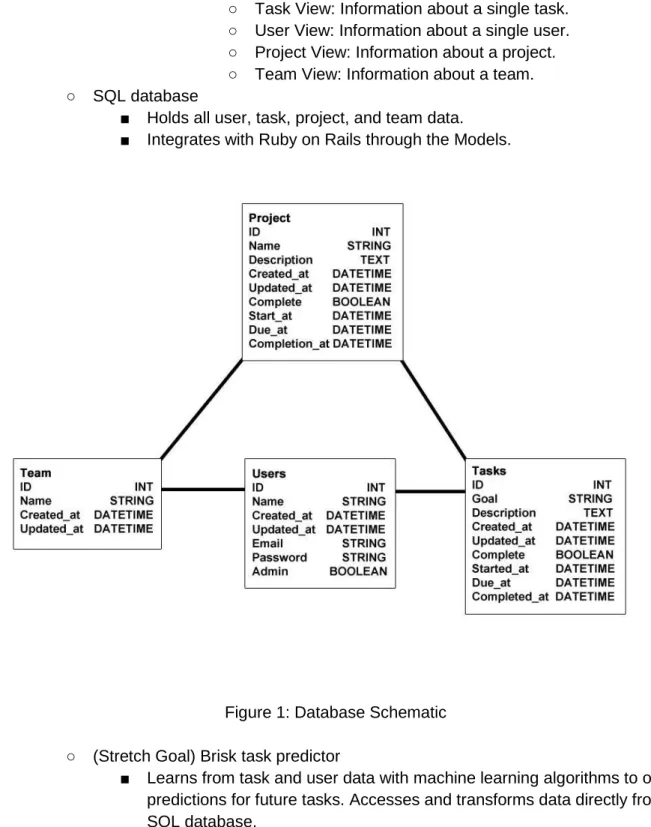
● Models: Defines the data and behavior for users, tasks, projects, and teams.
○ Task: Basic unit of Brisk. Has a goal, a set of users working on them, a set of dependencies, and other metadata.
○ User: Basic agent of Brisk. Has login credentials, a list of tasks, and other metadata.
○ Project: Group of tasks. ○ Team: Group of users.
● Controllers: Handles the routing for the server. Connects all other components together.
● Helpers: Contain any methods that need to be used by controllers or views.
● Views: HTML templates that define how the application should be displayed to the user.
○ Layout View: All other views inherit from a central layout. This is so that the website can easily add new pages
without having to re code the nav bar and other common items.
○ Profile View: Gives the user an overview of all their current tasks. Will allow the user to jump to more detailed pages. ○ Task View: Information about a single task.
○ User View: Information about a single user. ○ Project View: Information about a project. ○ Team View: Information about a team. ○ SQL database
■ Holds all user, task, project, and team data. ■ Integrates with Ruby on Rails through the Models.
Figure 1: Database Schematic ○ (Stretch Goal) Brisk task predictor
■ Learns from task and user data with machine learning algorithms to offer predictions for future tasks. Accesses and transforms data directly from SQL database.
● Client Modules
■ A web frontend.
■ Uses HTML5 and CSS3 for layouts and JQuery for client-side interactivity.
○ (Stretch Goal) Mobile user web app ■ A mobile frontend.
■ Is currently being accommodated with the desktop design.
Figure 2. Client and server components.
4.3 Tasks
- sentence on each task, tasks match schedule
● Milestones
○ Feature Set Definition - 2 Weeks ✓
■ Deciding which features have made it into the final project description. ✓ ○ Feature Prototype - 2 Weeks ✓
■ Create backend (Ruby on Rails, SQL) and frontend specifications. ✓ ○ Design Definition - 3 Weeks ✓
■ Finalize the back-end and front-end code design ✓ ■ Information Design - Riley ✓
■ Interface Design - Riley ✓
● Page wireframes - Riley ✓
■ Define program flow - Riley ✓
■ Coding templates for pages - Daniel ✓
○ Functional build - 4 Weeks ✓
■ Build a version of the project with all functional requirements met. ✓
■ Standalone Brisk Data Management (Skipped) ■ Database
● Start Database - Ryan ✓
● Relation Implementation - Ryan and Eric ✓
○ Design useful views - Ryan ✓
● Seed some dummy data - Ryan ✓
■ Server Code
● Start Ruby on Rails - Eric ✓
● User authentication - Eric ✓
● Set up site structure - Eric ✓
● Task dependencies - Eric ✓
● View Helpers
○ Summary Page - Daniel ✓
■ Today’s tasks per user, by project - Eric ✓
■ User’s projects - Eric ✓
■ User’s collaborators - Eric ✓
○ Show Pages - Daniel and Riley ✓
○ Edit Pages - Ryan and Eric✓
○ Aesthetic build - 1 Week
■ Create a build with the aesthetic design requirements met. ✓
■ Layout - Riley ✓
■ Styling - Riley ✓ ○ Final build - 1 Week
■ Create system with full feature set. ✓
● Report - Daniel ✓ ● Presentation - Daniel ✓
● Continuous
○ Documentation
■ Keep code comments up to date with useful information. ■ Maintain any relevant external documentation for class. ○ Milestone assessments
■ Take a look at our progress often to make sure we are on track with our plans.
○ Testing
■ Test new code and features as they are added.
4.4 Schedule
● Milestones
○ Feature Set Definition: November
■ Have meetings to find a solid overall approach to task management ○ Feature Prototype: December
■ Work on getting a server up and running
■ Experiment with the Mongo database to make sure it’s a good database system
○ Design Definition: December - January
■ Finalize the back-end and front-end code design ○ Functional Build: January - February
■ Code the functionality for the website
■ Continuously test the new functionality as it is added ○ Aesthetic Build: March
■ Design a user-friendly and powerful interface ○ Final Build: April
■ Deliver the final, stable build of the website
4.5 Deliverables
● Code
○ Live web build
■ Ruby on Rails server and website ■ SQL database
○ Code repository on GitHub for others to use ■ Copies of all major live build components ● Final Report
5.0 Key Personnel
Riley Turben - Turben is a senior Computer Science major in the Computer Science and Computer Engineering Department at the University of Arkansas. Look around
www.rileyturben.com to see his resume and relevant experience. He will be working on the front end technical design and its implementation.
Daniel Pumford - Pumford is a senior CS major at the University of Arkansas. Take a look at his website (www.dpumford.com) for full list of incredible accomplishments. He will likely do some of the backend systems coding, frontend systems coding, and user interface design. He plays Hearthstone.
Ryan McAlister - McAlisteris a senior Computer Science major in the Computer Science Engineering Department at the University of Arkansas. He has completed Software Engineering, Algorithms, and Programming Paradigms. He will be working on design.
Eric Hall - Hall is a senior Computer Engineering major in the Computer Science/Computer Engineering Department at the University of Arkansas. He has completed relevant courses. He has held an Application Development internship at J.B. Hunt Transport Inc., and currently holds a Web Development internship at Center for Mission Mobilization. He will be working on
frontend architecture design and implementation, as well as testing.
6.0 References
[1] Basecamp, http://www.basecamp.com [2] Wrike, http://www.wrike.com