Using a Data Warehouse to
Audit a Transactional System
Mike Glasser
Office of Institutional Research
Agenda
•
Introduction
•
Why Audit
•
How to Audit
–
The Setup
–
The Audit
•
Audit Results
•
Questions
– Located in suburban Baltimore County, between Baltimore, MD and Washington, DC
– One of the three public research campuses in the University of Maryland System
– 10K undergraduate and 2K graduate students
– 2,200 Employees; 715 full-time faculty
– 8 Pan-Am chess championships
UMBC
UMBC Data Warehouse
•
Custom HR and Student tables for IR
–
5 years
–
Oracle
–
Relational tables
•
Purchased
iStrategy
DW for Campus
–
Legacy student > 1 year
–
PS Student Admin live for 1 month
–
SQL Server 2005
–
15 fact tables
What is an “Audit”?
Need to identify and reconcile the
data that was changed yesterday
Why Audit in the DW?
•
Audit HR data entry
–
Piecing together 4 pages every day
•
Learn about changes to codes
•
Why in the Data Warehouse?
– Take pressure off OLTP
– No custom tables
Auditing at UMBC
•
10 tables
– PS_Job, PS_Citizenship, Tax_Data
– PS_Acad_Plan_Tbl (majors)
– Translation table
– Error Messages
•
Average 825,000 records audited per night
•
Average 1,000+ changes per night
•
Average about 45 seconds for complete audit
•
Max < 4 minutes with 825,000 changes
How to Audit
•
Make a copy of “yesterday”
•
Refresh the table with “today”
•
Compare “yesterday” with “today”
How We Audit
•
Nightly_YDAY_Tables
–
Copy Source tables to _YDAY
•
Refresh Source tables
•
Nightly_Audit
–
Load_Data_Changes for each table
•
Data_Changes_Staging
•
Parse updates by field
Setup
•
Create YDAY table
•
Create “Current” view (optional)
•
Index YDAY table
•
Add to Nightly YDAY procedure
YDAY table
•
Make a copy of “yesterday”
•
Setup is one time copy of the table to be
audited
–
Tablename with suffix _YDAY
–
Index on primary key
•
YDAY table populated every night
–
Copy of yesterday’s source table
–
Before nightly refresh of source tables
–
Truncated to preserve indexes
Setup
•
Create YDAY table
•
Create “Current” view (optional)
•
Index YDAY table
•
Add to Nightly YDAY procedure
Special Case
•
Transaction tables keep a history
•
Current data is based on effective date
•
New effective dated record inserted
when something is updated
•
Want to treat new record as UPDATE
“Current” View
•
Create view (virtual table) of rows
currently in effect
•
Populate YDAY table from view
•
Primary key does not include Effdt
•
Compare YDAY to view of rows
currently in effect
Effective Dating
Emplid (PK) Effdt (PK) Major
1000 2/3/2008 Mathematics
Emplid (PK) Effdt (PK) Major
1000 2/3/2008 Mathematics
1000 4/1/2009 English
Yesterday
Effective Dating
Emplid (PK) Effdt Major
1000 2/3/2008 Mathematics
Emplid (PK) Effdt Major
1000 4/1/2009 English
Yesterday
Today View
Setup
•
Create YDAY table
•
Create “Current” view (optional)
•
Index YDAY table
–
Create primary key
•
Add to Nightly YDAY procedure
Nightly YDAY Procedure
BEGIN TRANSACTION
TRUNCATE TABLE Stage.PS_Citizenship_YDAY
INSERT INTO Stage.PS_Citizenship_YDAY SELECT * FROM Source.PS_Citizenship
Nightly Audit Procedure
SELECT @table = 'PS_CITIZENSHIP'
EXECUTE Admin.Load_Data_Changes
@p_base_table = 'Stage.PS_Citizenship_YDAY', @p_comp_table = 'Source.PS_Citizenship',
@p_details = 'YES',
Setup
•
Created YDAY table
•
Created “Current” view (maybe)
•
Created Primary Key
•
Added to Nightly YDAY procedure
•
Added to Nightly Audit procedure
The Audit
SELECT @table = 'PS_CITIZENSHIP' EXECUTE Admin.Load_Data_Changes @p_base_table = 'Stage.PS_Citizenship_YDAY', @p_comp_table = 'Source.PS_Citizenship', @p_details = 'YES', @p_changes_tablename = @table
Delete, Add, Update?
Adds
Deletes
Updates
Compare Yesterday to Today
•
Read database metadata to determine
primary key
•
Read metadata to build dynamic SQL
•
Dynamic SQL is built for ADDs and
DELETEs
•
Dynamic SQL is built for UPDATEs
•
The dynamic SQL inserts records into
staging table
Sample Table
Column Name
Type
Key1
Varchar(4)
Key2
Integer
Field1
Varchar(10)
Field2
Datetime
Sample Data
Key1
Key2 Field1
Field2
UMBC 1
Update Me 7/8/2009 12:00 AM
UMBC 2
Delete Me
6/7/2009 12:00 AM
Key1
Key2 Field1
Field2
UMBC 1
Updated
5/1/2009 12:00 AM
UMBC 3
Add Me
3/4/2009 12:00 AM
Yesterday
Staging Audit Data
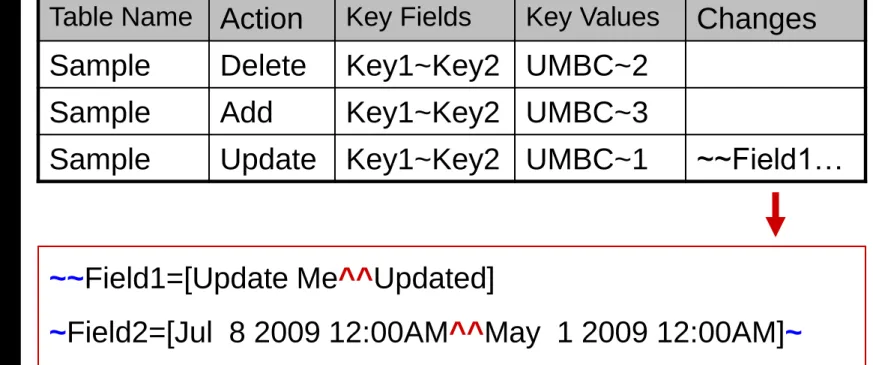
Table Name Action Key Fields Key Values Changes
Sample Delete Key1~Key2 UMBC~2 Sample Add Key1~Key2 UMBC~3
Sample Update Key1~Key2 UMBC~1 ~~Field1…
~~Field1=[Update Me^^Updated]
Audit SQL for Add
INSERT INTO Stage.DATA_CHANGES
(Tablename, Action, Key_Fields, Key_Values, Changes)
SELECT 'Sample' tname, 'ADD' action, 'Key1~Key2' kfields, convert(varchar,A.Key1) + '~' +
convert(varchar,A.Key2) kvalues, null FROM mglasser.Sample A
LEFT OUTER JOIN mglasser.Sample_YDAY B ON A.Key1 = B.Key1 and A.Key2 = B.Key2 WHERE B.Key1 is null
Create Dynamic SQL for Add
SET @SQL =
'INSERT INTO Stage.DATA_CHANGES
(Tablename,Action,Key_Fields,Key_Values,Changes) SELECT ''' + @p_changes_tablename + ''' tname, '‘ADD'' action, ''' +
@Key_Fields + ''' kfields, ' + @Key_Values + ' kvalues, null ' + @Outer_Join + ' ON ' + @Join_Keys + ' WHERE B.' +
substring( @Key_Fields,1,charindex('~',@Key_Fields+'~')-1) + ' is null‘
Primary Key Fields
•
Derived from Primary Key metadata
–
SQL Server
• Table_Constraints • Key_Column_Usage–
Oracle
• All_Indexes • All_Ind_Columns•
Tells us the name of the primary key
Primary Key SQL
SELECT
stuff(( select '~' + k1.column_name
from information_schema.key_column_usage k1 where k1.constraint_name = c.constraint_name order by ordinal_position
for xml path('')
), 1,1,'')
FROM INFORMATION_SCHEMA.Table_Constraints c WHERE c.table_schema = @Schema1
AND c.table_name = @Table1
AND c.constraint_type = 'PRIMARY KEY' GROUP BY constraint_name
Audit SQL for Add
INSERT INTO Stage.DATA_CHANGES
(Tablename, Action, Key_Fields, Key_Values, Changes)
SELECT 'Sample' tname, 'ADD' action, 'Key1~Key2' kfields, convert(varchar,A.Key1) + '~' +
convert(varchar,A.Key2) kvalues, null
FROM mglasser.Sample A
LEFT OUTER JOIN mglasser.Sample_YDAY B ON A.Key1 = B.Key1 and A.Key2 = B.Key2 WHERE B.Key1 is null
Staging Audit Data
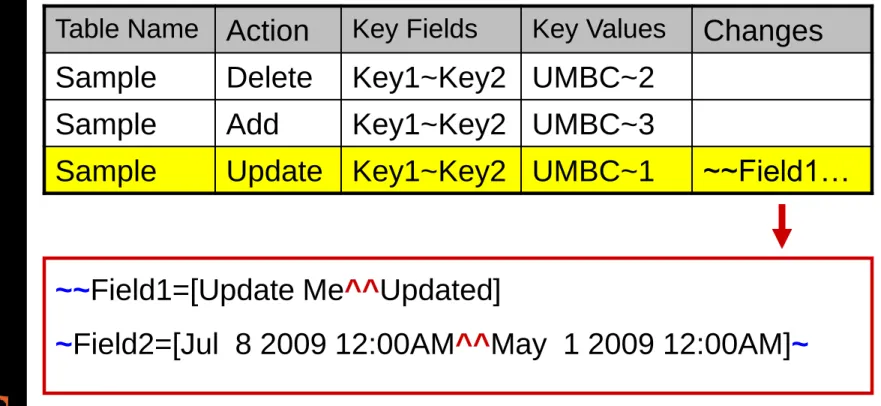
Table Name Action Key Fields Key Values Changes
Sample Delete Key1~Key2 UMBC~2 Sample Add Key1~Key2 UMBC~3
Sample Update Key1~Key2 UMBC~1 ~~Field1…
~~Field1=[Update Me^^Updated]
Audit for Update
•
Join tables by primary key
•
Compare each field in YDAY with same
field in today’s table
•
String together results of comparison
–
Delimited by ~
•
If fields are equal, results are empty
•
If not equal, then put fieldname and both
values
•
In one SQL insert statement
Comparison Results
•
No updates in Sample data
~~~~
•
Updates from Sample data
~~Field1~Field2~
•
Insert into staging table only those
records where result has
SQL for Comparison
SQL Server
CASE
WHEN YDAY.Field1 = TODAY.Field1 THEN '~'
ELSE
'Field1=['+ YDAY.Field1 + '^^' + TODAY.Field1 + ']~' END
Oracle
DECODE( YDAY.Field1, TODAY.Field1, null,
Create Dynamic SQL for Update
SELECT @Changes = stuff( (
select '+ case when isnull(convert(varchar,A.' + c1.column_name + '),'''') = isnull(convert(varchar,B.' + c1.column_name +
'),'''') then ''~'' else ''' + c1.column_name +
'=[''+isnull(convert(varchar,A.' + c1.column_name +
'),'''') + ''^^'' +isnull(convert(varchar,B.' + c1.column_name + '),'''') + '']~'' end '
from information_schema.columns c1 where c1.column_name not in
('LOAD_DTTM','LASTUPDDTTM','DW_LOAD_DTTM', 'UW_LOAD_DTTM','AGE','EFFDT','EFFSEQ')
and c1.table_schema = c2.table_schema
and c1.table_name = c2.table_name for xml path('') ) , 1,1,'')
Staging Audit Data
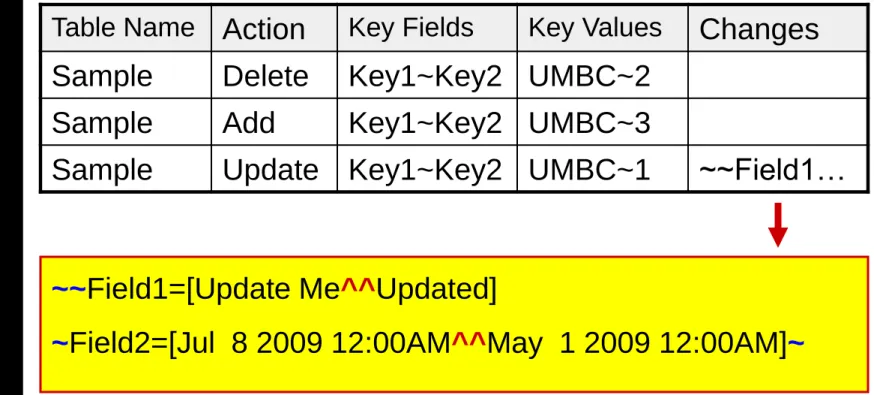
Table Name Action Key Fields Key Values Changes
Sample Delete Key1~Key2 UMBC~2 Sample Add Key1~Key2 UMBC~3
Sample Update Key1~Key2 UMBC~1 ~~Field1…
~~Field1=[Update Me^^Updated]
~Field2=[Jul 8 2009 12:00AM^^May 1 2009 12:00AM]~
~ field delimiter
Final Audit Data
Table Name Action Key Fields Key Values
Sample Delete Key1~Key2 UMBC~2 Sample Update Key1~Key2 UMBC~1 Sample Update Key1~Key2 UMBC~1
Fieldname Old Value New Value DW Load Dttm
4/15/2009 14:30 Field1 Update Me Updated 4/15/2009 14:30
Report the Differences
•
The audit is complete
–
The keys for deleted or new records
–
The old and new values for updated
fields
•
Notify users of summary results
Email Outputs
Records Add Delete Update Table Name --- --- --- --- --- 45 1 0 338 Employees_Cur 52 8 0 602 Jobs_Cur 23 19 1 3 PS_CITIZENSHIP 5 1 0 20 PS_FED_TAX_DATA 53 8 0 461 PS_JOB 19 15 0 8 PS_PERS_DATA_EFFDT 5 1 0 7 PS_STATE_TAX_DATA 12 8 0 6 PS_UM_JOB_INFO