I
NTEGRATED
R
EMOTE
M
ANAGEMENT FOR
B
IO
-
PROCESSING
E
XPERIMENTS
Ali Givmanesh, University of Houston; Rupa Iyer, University of Houston; Driss Benhaddou, University of Houston
Abstract
Biochemical engineering researchers have used bioreactors as the primary fermentation device to grow and analyze various cells and tissues in the context of cell culture experiments. The University of Houston’s biotechnology program currently uses the New Brunswick Scientific BioFlo 110 to grow transformed bacterial cells in two of its laboratory courses: BTEC 4301: Principles of Bio-processing Laboratory and BTEC 4350: Capstone Experience in Biotechnology. This paper details a theoretical study of the BioFlo 110 primary control unit and proposes a technique to enhance the functionality of the bioreactors as an educational tool by integrating remote monitoring capabilities. The software features presented in this research allow lab instructors and students to remotely view their experimental parameters and settings, thereby reducing the overall time spent in the laboratory and providing an additional layer of flexibility to the overall system.
Introduction
The BioFlo 110 is a modular fermentation structure for microbial and cell culture applications [1], which provides its users with a highly controlled environment in which to perform specific experiments. Modern techniques have inspired the development of genetically altered cells that create both new products and large quantities of scarce products including antibiotics, antigens, and enzymes [2]. In order to provide such an environment, the bioreactor’s primary unit monitors and controls the following parameters in each of the bioreactor vessels: temperature, agitation, pH value, dO2, O2 and gas value, in addition to supporting three separate pumping units. Although the equipment within the University of Houston laboratory is fairly new, the technology available to improve their capabilities already supersedes them.
Currently, students and instructors rely on live-feed information presented by the bioreactor unit. Unfortunately, the unit does not provide a method for archiving data related to the experiment and is limited to a one-time viewing of information. In situations where experiments are running overnight, any unexpected changes will remain undetected and unrecorded. The main idea of this study is to develop a system that uses web services and networking techniques to design a monitoring tool, which can be used to view the bioreactor’s parameters remotely over the Internet.
The initial research focused on understanding and deciphering the standard of communication used between a desktop computer and the primary control unit of the bioreactor. Once complete, the next phase of the project was to introduce and implement a method of remote monitoring that would allow students and instructors to view their respective experimental information on a dedicated website. This paper is organized first by an overview and explanation of the overall bioreactor system, followed by both the hardware and system requirements. Afterward is a review of the newly developed application design. The research concludes with an overview of the remote management web interface and its related functionalities.
System Overview
Producing new cell products requires lab instructors to perform small-scale experiments to test their procedures and chemical reagents. These initial tests have to be accurate, well-documented, and validated in order to reproduce successful results in larger quantities. The validation process uses the experimental results as proof that a particular process can consistently produce a product of the required quality, purity, and character, and that the bioreactors performance is acceptable during the production operation [2]. The system presented in this research aids in providing supplementary documents to help streamline the validation process and reduce the amount of time spent recording the necessary data.
A typical configuration of the BioFlo 110 module currently in use is depicted in Figure 1. The Primary Control Unit (PCU) acts as the operator interface that controls various parameters in each bioreactor growth chamber, and its functionality is similar to thermostats used to control air conditioning units found in many homes. Its main function is to set the operating point for each available parameter and manage the functions necessary to maintain the current value close to the operating point.
Figure 1. Bioreactor Setup [1]
The other control modules perform the assigned tasks by the PCU to achieve this goal. Lab instructors and students use the PCU’s display screen and touch pad to view and control various parameters in each bioreactor vessel. An example of the display screen and parameters are shown in Figure 2. The first and second columns on the PCU screen displays the name of each parameter, along with the current values being read in the bioreactor. The third and fourth columns depict the set points and control options defined by the user. These values are chosen based on the experimental description and requirements. Set points are environmental values chosen by the user that are controlled and maintained in the bioreactor vessel based on their control option.
Figure 2. PCU and Bioreactor’s Parameters [1]
Figure 3 represents the architecture of the overall bioreactor system and communication method used between each component. An alternative solution to access the PCU parameters is through a serial connection between the desktop and the bioreactor, which is setup and maintained by the newly proposed application in this paper. The desktop utilizes a pre-defined set of commands to capture and store the bioreactor information into text files on its hard drive.
Figure 3. System Network Architecture
The application converts the stored data into a unique format and transfers the new files through the University of Houston network to a web server housed in the College of Technology. Every time users connect to the bioreactor website, the server dynamically updates the webpage contents, and presents the users with a live view of the experimental data.
Hardware and Software Components
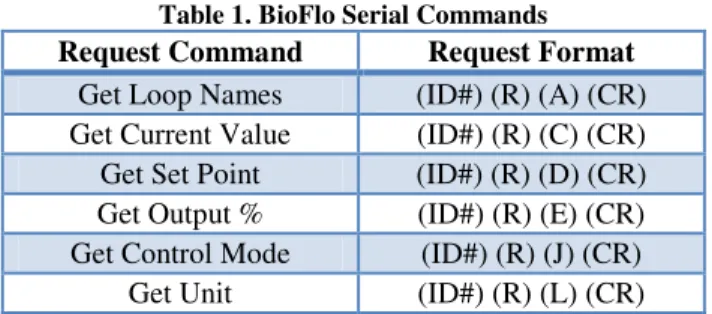
The hardware added to the pre-existing bioreactor technology includes a desktop computer and a web server provided by the College of Technology. The desktop computer runs the main communication program and stores the bioreactor data locally on its hard drive. It connects to the PCU via an RS-232 serial cable through conversion of the manufacturer’s proprietary AFS/ModBus 25-pin connector. There are several serial ports monitoring software platforms available to fully examine the data across the serial interface. The port monitoring program, ‘Hercules 3.2.3’, was chosen for this research because it is open source and provides an easy to use environment for testing multiple PCU request commands separately. This program was used to ensure the command messages sent to the bioreactor are in the right format and the messages received by the desktop are complete.Table 1 lists the commands that are used on the serial port in order to communicate with bioreactors. The request format consists of four hexadecimal values. The first value represents the unique ID number pre-assigned to each bioreactor. The following two values define the request commands. The last value contains a carriage return indicating the end of each request. The ID numbers for the three bioreactors are 00, 04, and 88, respectively, preset by the manufacturer. The responses from the six commands represent the bioreactor information displayed on the PCU screen.
Table 1. BioFlo Serial Commands
Request Command Request Format
Get Loop Names (ID#) (R) (A) (CR) Get Current Value (ID#) (R) (C) (CR) Get Set Point (ID#) (R) (D) (CR) Get Output % (ID#) (R) (E) (CR) Get Control Mode (ID#) (R) (J) (CR) Get Unit (ID#) (R) (L) (CR) One of the main objectives of this study was to implement a web-based access system that adds remote monitoring capability to the parameters associated with the bioreactors. In order to employ this functionality, the desktop located within the laboratory updates and transfers the locally stored files to the remote web server. During the bioreactor experiments, every time the data is captured onsite, it is stored, formatted, and sent to the server. The Secure Shell File Transfer Protocol (SFTP) is employed to ensure communication between the desktop and web server is protected. SFTP is the main protocol used to transfer files via encrypted messages between two external devices. The free and open-source software Windows Secure Copy, or WinSCP, is used due to the operating system and financial constraints of the project. WinSCP includes SFTP capabilities to provide a flexible environment whereby a remote file on a corresponding device can be accessed on a local machine [3]. Each data transfer session requires a host name, port number, username, password, and a secure private key file. The software communicates over port 22, the default port for SFTP. The additional input settings were provided by the University of Houston IT department and are assigned to the remote web server. WinSCP offers programmers the option of using a command-line interface, in addition to providing a simple graphical interface. Input commands prompt the main program on the desktop to automate the file transfer process.
A web server is typically a physical computer or virtual machine that provides clients with the content of a web page. The primary protocol used in this process, HTTP (Hypertext Transfer Protocol), is used to bridge communications between the browser and the server. When a client sends a request via HTTP, it will invoke the web server, which processes and then returns the requested HTML content to the client. Early servers were only able to provide information by implementing static HTML pages. The current state of web applications centers on delivering users dynamic content through database queries and executable scripts.
Students and instructors can view the bioreactor’s parameters by accessing the bioreactor website. Drupal, a
free and open-source content management system, is used to develop the web-based GUI and deliver the website content to the client in a user-friendly manner [4]. For security purposes, the website will be built and tested on a local host at the University of Houston. Because of Drupal’s modularity, the system can be easily ported from the local host to a remote domain provided by the IT department.
New Bioreactor Application
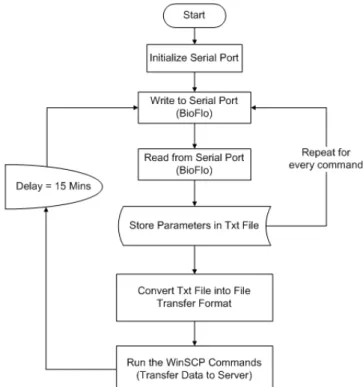
The BioFlo program follows a simple and reliable algorithm in order to provide the necessary functions to communicate with the PCU and send or receive data on the serial port. Developing a well-planned algorithm in the design phase of the program is critical for guaranteeing reliability of the application’s logic. The new bioreactor program is written in C# and is responsible for storing and converting the acquired data from the bioreactor experiments. After the bioreactor experiment has begun, the main program is started and runs simultaneously alongside the bioreactor experiments, archiving the appropriate parameters every 15 minutes. This time interval is chosen because it reduces the transmission load while keeping the data accurate for further analysis. The flowchart for this program is shown in Figure 4, whilst the algorithm and steps required to capture the data in C# are listed below.
1. Check the serial port
2. If not in use, open the port and initialize the communication settings
3. Write the appropriate commands to the serial port (using commands from Table 1)
4. Read the serial buffer 5. Store the data in a text file
6. Repeat step 3 and 5 for every command 7. Time stamp the text file and save it
8. Convert the text file into a file transfer format 9. Use WinSCP commands to transfer the bioreactor
files to the web server 10. Wait for 15 minutes 11. Repeat steps 3-11
Figure 2. Bioreactor Application Flowchart
There are several ways to achieve code-level communication between the desktop and the PCU. This program uses a controller module called SerialPort, which was originally launched as Microsoft Visual Studio 2005, and is a controller based on the method of P/Invoke call [5]. In order to communicate with the serial port, the program uses the code in Figure 5 to open the port and set the communication parameters.
Figure 5. Serial Port Initilazation Code (C#)
These standard RS-232 settings are defined in the BioFlo 110 manual. After initializing the serial port settings, main request commands are formatted for the bioreactors. The example shown in Figure 6 sends the RC command to ID# 88 and returns all the current values of parameters from the third bioreactor to the serial port buffer. Similarly, other messages in Table 1 are communicated through the serial port.
Figure 6. Example of the Bioreactor Command Code
Another function shown in Figure 7 included in the serial port library named, “Data Received Event Handler”, will read all the existing bytes arriving at the serial port. Upon reading the response from each bioreactor, the information is saved using a string variable called “data”. The following piece of code shows how this function is setup within the program.
Figure 7. Data Receive Handler Function
Each time the data is received, it is appended to a simple text file and converted to a unique format, shown in Figure 8. Each set of messages is converted to this new format using “|” as the uniform character separating each field in the response messages. Upon completion of message formatting, the full sets of messages are transferred to the web server to update the bioreactor website. The same text arrangement is implemented on the server side to provide both end devices with a unique and pre-defined format.
Figure 8. File Transfer Format
The script shown in Figure 9 runs simultaneously with each data-capture loop on the main program to transmit the formatted files across the University of Houston network. The WinSCP library should be included within the code to enable SFTP functions. WinSCP.com is the program executed to write the communication commands on the terminal. After setting the initial settings for WinSCP program, the C# application connects to the server named [email protected], which is set up and dedicated in the College of Technology for this project. Each file is sent to the server using the “put” command and, for security purposes, each session is terminated to finish the process. This process will be repeated every time the main program captures new sets of data. The implementation of the transferred data on the server side is explained in the next section.
Figure 9. WinSCP Transfer Script Code
Bioreactor Website
The bioreactor website is updated by a web server while the program is still running. The bioreactor experiments may take up to three days to complete, so it is important to access and monitor the data outside of the laboratory. The dedicated bioreactor website can be accessed using the following URL: http://tech.uh.edu/bteclab/. The initial webpage developed for bioreactors is shown in Figure 10.
Figure 10. Login Web Page
The website is hosted on a College of Technology web server and is maintained using Drupal as the content management framework. Drupal provides the website administrator with a powerful and flexible environment to perform different tasks through available modules. The design and layout also allows users to easily navigate and search through the website. Users are created by the administrator and must authenticate at a login page before gaining access to the web pages. After providing a username
and password at login, the user can access the three bioreactors’ web pages via links within the “Live View” menu shown in Figure 11. Two roles are defined in the Drupal system: Lab Instructor and Student. Each role can be modified and customized in order to give various permissions to each account. Student and lab instructors can freely access and view the information about their experiments. Additionally, the lab instructor may add comments or post new web contents.
Figure 11. Initial Introduction Web Page
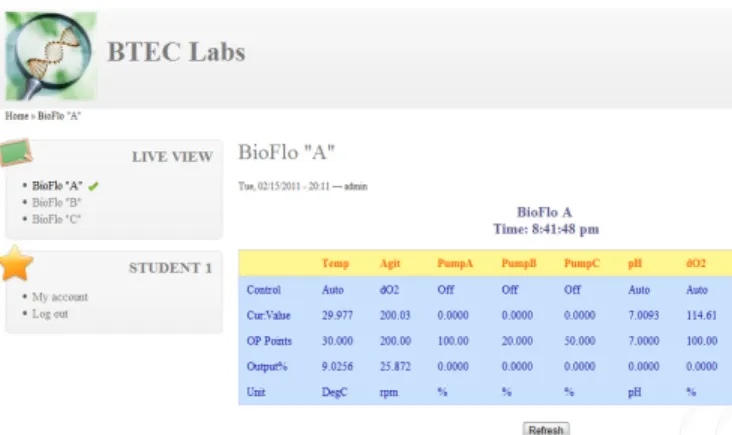
The dedicated bioreactor pages are designed to produce dynamic web content and provide the users with live experimental data. The example in Figure 12 shows the experiment parameters corresponding to the first bioreactor, BioFlo A. The time on the top of the page indicates actual time of the system, and the refresh button at the bottom can be used to retrieve the new table if the program in the laboratory has updated the web page.
Figure 12. Bioreactor Live View Example
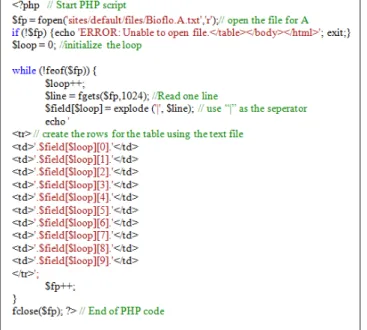
The web pages are created using standard HTML coding schemes combined with PHP scripts [6]. The PHP script is employed within the HTML code to provide the user with a live view of each bioreactor’s parameters in the dedicated table. The PHP code presented in Figure 13 accesses the files originating from the desktop in the laboratory to update
each page. After retrieving the information from the text files, basic table tags and commands are used to produce the table shown in Figure 12.
Providing students and instructors with remote monitoring through the bioreactor website reduces the unnecessary time spent in the laboratory and assures the experiment is running properly without onsite supervision. In case of any error, the logged data on the desktop can be used to identify and resolve any issues with the bioreactor run.
Figure 13. PHP Update Script Code
Conclusion
Bio-processing and growing cell cultures require both sensitive and accurate instruments, as well as a tightly controlled environment. An essential component for achieving both viable and reproducible results requires the tracking and archiving of all the parameters and procedures necessary to duplicate the results accurately and increase the yield of the cell product. The program introduced in this paper allows students and instructors to view and monitor the necessary data from the BioFlo 110 lab remotely, offering a better understanding of the fermentation process, increasing productivity and efficacy, and allowing for more efficient troubleshooting. This program also enables lab personnel to perform experiments overnight while maintaining access over the Internet to monitor the bioreactors’ performance. The flexibility introduced by the system will increase productivity of lab managers. The remote monitoring system invokes readily available communication technologies, which greatly improves the data analysis and study of bioreactor experiments.
References
[1] "BioFlo 110 Modular Benchtop Fermentor: Guide to Operations." New Jersey: New Brunswick Scientific Co., Inc., 2007, pp. 1,139-141.
[2] W. L. Hochfeld. (2006). Producing Biomolecular Substances with Fermenters, Bioreactors and
Biomolecular Synthesizers. Available:
http://EV7SU4GN4P.search.serialssolutions.com/? V=1.0&L=EV7SU4GN4P&S=JCs&C=TC0000228 257&T=marc
[3] X. Liu, et al., "Design of secure FTP system," in
Communications, Circuits and Systems (ICCCAS), 2010 International Conference on, 2010, pp. 270-273.
[4] J. Fu, et al., "A Multi-sites Scheme Based on Open Source CMS, Drupal," in Multimedia and Information Technology (MMIT), 2010 Second International Conference on, 2010, pp. 239-241. [5] Z. Yue-Qin and G. Wen, "- Design and
Implementation for Communicating between Computer Serial Port and Mobile Phone," vol. -, pp. - 186, 2009.
[6] T. Suzumura, et al., "Performance Comparison of Web Service Engines in PHP, Java and C," in Web Services, 2008. ICWS '08. IEEE International Conference on, 2008, pp. 385-392.
Biographies
ALI GIVMANESH received the B.S. degree in Electrical
Engineering from the University of Houston in 2008, the M.S. degree in Engineering Technology from the University of Houston, Texas, in 2011. He was involved in the IEEE student organization in his undergraduate program. His objective for his graduate thesis has been to integrate academic study and network communication solutions to enhance bio-processing equipments. His teaching and research areas include biotechnology, smart grids and solar energy, and programming. Ali Givmanesh may be reached at [email protected]
RUPA IYER, Ph.D., is an Associate Professor in the department of Engineering Technology, in the College of Technology at the University of Houston. She is the founding director of Biotechnology programs, and also directs the Center for Life Sciences Technology. In this capacity she has been responsible for developing the Biotechnology degree program and the core initiatives of the center that include, education, research workforce development and outreach. Her research interests are in environmental biotechnology and interdisciplinary research-based education. [email protected]
DRISS BENHADDOU, Ph.D., is an Associate Professor
with the University of Houston, Texas, where he is actively involved in optical networking and sensor networks research activities. He developed state of the art wireless and optical networking research lab at the engineering technology department (www.tech.uh.edu/won). Dr. Benhaddou was a senior technical staff member at Lambda Optical Systems Inc, where he played a key role in protocol development and systems integration activities. During his earlier tenure at Sprint, he implemented an extensive broadband test-bed for vendor equipment certification and research/development activities. He holds two doctoral degrees in optoelectronics and telecommunication engineering from the University of Montpellier II, France, in 1995, and the University of Missouri in 2002. [email protected]
![Figure 1. Bioreactor Setup [1]](https://thumb-us.123doks.com/thumbv2/123dok_us/856344.2609110/2.918.479.837.101.356/figure-bioreactor-setup.webp)