IDENTIFICATION OF MALICIOUS ANDROID
APPLICATIONS USING KERNEL LEVEL SYSTEM
CALLS
DHRUVJARIWALA
A THESIS
IN
THE CONCORDIAINSTITUTE FORINFORMATIONSYSTEMSENGINEERING
PRESENTED INPARTIALFULFILLMENT OF THEREQUIREMENTS
FOR THEDEGREE OF MASTER OFAPPLIED SCIENCE ININFORMATIONSYSTEMS SECURITY
CONCORDIA UNIVERSITY
MONTRÉAL, QUÉBEC, CANADA
OCTOBER2014 c
C
ONCORDIA
U
NIVERSITY
School of Graduate Studies
This is to certify that the thesis prepared
By: Dhruv Jariwala
Entitled: Identification of Malicious Android Applications Using Kernel Level System Calls
and submitted in partial fulfillment of the requirements for the degree of
Master of Applied Science in Information Systems Security
complies with the regulations of this University and meets the accepted standards with
re-spect to originality and quality.
Signed by the final examining committee:
Chair Examiner Examiner Examiner Supervisor Co-supervisor Approved
Chair of Department or Graduate Program Director
20
Dr. Amir Asif, Dean
Faculty of Engineering and Computer Science
Dr. N. Bouguila Dr. J. Bentahar Dr. K. Galal Dr. A. Youssef Dr. A. Youssef Dr. J Bentahar
ABSTRACT
Identification of Malicious Android Applications Using Kernel Level
System Calls
Dhruv Jariwala
With the advancement of technology, smartphones are gaining popularity by increasing their computational power and incorporating a large variety of new sensors and features
that can be utilized by application developers in order to improve the user experience. On the other hand, this widespread use of smartphones and their increased capabilities have also attracted the attention of malware writers who shifted their focus from the desktop
en-vironment and started creating malware applications dedicated to smartphones. With about 1.5 million Android device activations per day and billions of application installation from the official Android market (Google Play), Android is becoming one of the most widely
used operating systems for smartphones and tablets. Most of the threats for Android come from applications installed from third-party markets which lack proper mechanisms to de-tect malicious applications that can leak users’ private information, send SMS to premium
numbers, or get root access to the system.
In this thesis, our work is divided into two main components. In the first one, we provide a framework to perform off-line analysis of Android applications using static and dynamic
analysis approaches. In the static analysis phase, we perform de-compilation of the
an-alyzed application and extract the permissions from its ‘AndroidManifest’ file. Whereas in dynamic analysis, we execute the target application on an Android emulator where the ‘strace’ tool is used to hook the system calls on the ‘zygote’ process and record all the calls
invoked by the application. The extracted features from both the static and dynamic analy-sis modules are then used to classify the tested applications using a variety of classification algorithms.
In the second part, our aim is to provide realtime monitoring for the behavior of Android application and alert users to these applications that violate a predefined security policy by trying to access private information such as GPS locations and SMS related information. In
order to achieve this, we use a loadable kernel module for tracking the kernel level system calls.
The effectiveness of the developed prototypes is confirmed by testing them on popular
applications collected from F-Droid, and malware samples obtained from a third party and the Android Malware Genome Project dataset.
Acknowledgments
First of all, I would like to express my deepest gratitude to my supervisor, Dr. Amr Youssef, for his constant support, heartily guidance and enduring patience during my graduate stud-ies. This thesis would not have been possible without his help. His attitude and enthusiasm
for scientific and academic research will always be my role model.
I also wish to express my appreciation to all the faculty and people at Concordia In-stitute for Information Systems Engineering (CIISE) for having such a warm and cosy
working environment. To each of my professors, I owe a great debt of gratitude for the wonderful teaching, which has helped me in reaching this stage.
I am thankful to my parents, Mukesh Jariwala and Suchi Jariwala and my loving brother Chaitanya Jariwala for supporting me through every stage of my life and helping me when I need the most. I would not be able to achieve such heights without them.
Lastly, I thank my friends and collegues at Concordia University, specially, Jeet Jari-wala, Parth JariJari-wala, Jaspreet Singh, Saurabh Oberoi, Song Weilong and Maryam Asgari-azad for all the fun in Montreal and studies at the University memorable and pleasurable.
Contents
List of Figures ix List of Tables xi 1 Introduction 1 1.1 Motivation . . . 1 1.2 Objectives . . . 3 1.3 Contributions . . . 4 1.4 Thesis Organization . . . 5 2 Android Security 6 2.1 Android Overview . . . 6 2.1.1 Android Architecture . . . 82.1.2 Components of Android Applications . . . 9
2.1.3 Configuration of Android Applications . . . 11
2.2 Levels of Android Security . . . 11
2.2.2 Secure Android Operating System Development . . . 13
2.2.3 System and Kernel Level Security . . . 14
2.2.4 Application Level Security . . . 20
2.3 Evolution of Android Security . . . 24
2.4 Android Malware Attacks . . . 26
2.5 Android Security Analysis and Monitoring Tools . . . 31
3 System Design 38 3.1 Introduction . . . 38
3.2 System Analysis . . . 40
3.2.1 Static Analysis Module . . . 41
3.2.2 Dynamic Analysis Module . . . 42
3.2.3 Classification Module . . . 44
3.3 Monitoring System . . . 45
4 Experimental Results 52 4.1 Frequent System Calls and Permissions . . . 52
4.2 Malware Detection . . . 56
4.2.1 Classification using n-gram of system calls . . . 58
4.2.2 Classification using n-gram of system calls, and static permissions . 58 4.3 Clustering of Obfuscated Applications . . . 60
5 Conclusions and Future Work 65 5.1 Conclusion . . . 65
5.2 Future Work . . . 66
List of Figures
1 Android platform architecture [2] . . . 8
2 Layers of Android security [28]. . . 12
3 Example of the dialog box displayed at the time of installing Google Maps . 21 4 Main components of the off-line analysis system . . . 39
5 Main components of the monitoring system . . . 40
6 Static analysis module . . . 42
7 Dynamic analysis module . . . 43
8 Monitoring system . . . 45
9 A snapshot of the monitoring application . . . 49
10 A snapshot of monitoring application while accessing SMS Messages . . . 50
11 A snapshot of monitoring application while accessing GPS Locations . . . 51
12 Top 15 permissions used by malicious applications . . . 53
13 Top 15 permissions used by benign applications . . . 53
14 Top 10 distinguishing system calls observed in malicious applications . . . 55
15 Top 10 distinguishing system calls observed in benign applications . . . . 55
List of Tables
1 System calls based classification results . . . 58
2 Combined system calls and permissions based classification results . . . 59
3 Clustering results . . . 64
Chapter 1
Introduction
1.1
Motivation
Android is an open source Linux-based operating system led by Google. Many compa-nies such as Sony, HTC and Samsung have deployed the Android operating system on their smartphones and tablets. On July 2013, the Google Play store [15] officially reached about 1.3 million published applications (apps) and over 50 billion downloads.
As a result of the increased capabilities and widespread use of smartphones, the abrupt increase in the number of application downloads, and the open source nature of Android, attackers and malware writers who are seeking for easy and rapid financial gain have shifted their focus and started creating malware applications dedicated to smartphones which are arguably easier targets compared to desktop computers. By injecting malicious code into legitimate applications, hackers can breach the privacy of users by accessing their address book and GPS coordinates, stealing personal information such as passwords, credit cards information, bank account numbers, IMSI (International Mobile Subscriber Identity) and IMEI (International Mobile station Equipment Identity) numbers. Some of these malicious applications can send premium SMS and calls and get root access privileges.
Android applications can be installed from Google Play Store (https://play.google.com/), Amazon (http://www.amazon.com) as well as from plenty of open source sites such as 4shared (www.4shared.com) and filecrop (www.filecrop.com). This helps attackers to eas-ily spread their malicious applications by downloading clean applications, injecting their malicious code and then uploading them to third-party markets which lack proper mecha-nisms to detect malicious applications.
One of the important security aspects of Android is privilege separation, known as Appli-cation Sandboxing. In general, an Android appliAppli-cation cannot harm or get access to other installed applications. However, at the time of installation, the application requests ap-proval from the user to grant the required permissions. Once these permissions are granted, the application may have the ability to do other malicious activities that can be performed with these permissions. For example, an application with access rights to confidential data and eligible to expose data to public can easily steal the user’s personal information.
Android applications are developed using Java programming language and get executed on the top of Dalvik virtual machine (dvm) middleware, whereas JNI (Java Native Inter-face) invokes the lower level native code. The higher level Android based behavior can be well understood from the Dalvik level semantics whereas JNI based behavior can be un-derstood from OS-level, i.e., kernel level semantics such as reading or accessing files and executing a service or a process. Some analysts use Android’s debug monitor to collect information about an application but it fails to record each and every event occurring in the application. In addition, some malware writers avoid logging information in the system to eliminate any traces of malicious activities.
Analyzing lower level system calls, in order to examine the behavior of applications and detect malware, seems to be a very useful approach. Whenever the application performs
any task, it issues a specific system call related to that particular action. For instance, in order to access GPS locations, socket() system call is invoked. Therefore, throughout this work, we investigate the use of kernel level system calls for the purpose of identifying malicious Android applications.
1.2
Objectives
With the increased growth of cyber attacks on the Android platform, we aim to design a security mechanism on the top of the existing Android architecture. By collecting and analyzing lower level system calls that are invoked during the execution of the applications, we aim to identify malicious activities and hence reduce the attacks on Android mobile devices.
The main objectives of our work can be summarized as follows:
• Develop a simulated environment for analyzing Android applications. This envi-ronment should allow monitoring the kernel level system calls invoked during the execution of applications.
• Perform off-line analysis based on the collected kernel level system calls and permis-sions, and investigate features that can be used to identify malicious activities/appli-cations.
• Develop a real time monitoring that can be used to notify users for any malicious event occurring at the runtime of the applications.
1.3
Contributions
In Android operating system, all high-level Android-specific behaviors are indeed achieved via system call invocations. Android applications interact with the system via well-defined system call-initiated IPC (Inter-process Communication) and RPC (Remote Procedure Call) invocations to carry out their respective tasks. In order to track system calls such as read () and write (), we use loadable kernel module for hijacking the system calls invoked. This helps to trace all the Android applications for any malicious activities. Following are the main contributions of our work:
• The design and implementation of a prototype framework that can be used to per-form off-line analysis of Android applications using static and dynamic analysis ap-proaches. In the static analysis phase, we perform de-compilation of the analyzed application and extract the permissions from its ‘AndroidManifest’ file. Whereas in dynamic analysis, we execute the tested application on an Android emulator where the ‘strace’ tool is used to hook the system calls on the ‘zygote’ process and record all the calls invoked by the application. The extracted features from both the static and dynamic analysis modules are then used to classify the tested applications using a variety of classification algorithms.
• The design and implementation of a prototype that can be used to provide realtime monitoring for the behavior of Android applications and alert users to these applica-tions that violate a predefined security policy, for example by trying to access private information such as GPS locations and SMS related information. In order to achieve this, we use a loadable kernel module for tracking the kernel level system calls.
The effectiveness of the developed prototypes is confirmed by testing them on popular applications collected from F-Droid, and malware samples obtained from a third party and the Android Malware Genome Project dataset.
1.4
Thesis Organization
The rest of this thesis is organized as follows. Android security, malware attacks on An-droid and related works are reviewed in the next chapter. In Chapter 3, we present the design and implementation of our off-line analysis and real-time monitoring frameworks. In Chapter 4, we present our experimentation results. Finally, in Chapter 5, we present conclusions of our research and some suggestions for future work.
Chapter 2
Android Security
2.1
Android Overview
Android is an open source operating system typically used for mobile devices. The main blocks of the Android platform are as follows [4]:
1. Device Hardware: The Android platform is capable of running on a wide range of hardware devices including mobile phones and tablets. Android is processor-agnostic as it utilizes the benefits specific to the underlying hardware device.
2. Android OS: The base operating system is built on top of a Linux-based kernel. All the hardware resources such as camera, GPS, WI-Fi, Bluetooth, telephone features and network operation are allowed through the Android operating system.
3. Android Application Runtime: The applications in Android are written in the Java programming language and executes in a Dalvik virtual machine. All Android ap-plications execute within the security environment, enclosed within the application sandbox. Also, applications have some part of the filesystem where they can store their private application related data.
Android applications add extra features to the base Android platform. These applications can be classified into:
1. Pre-installed Android applications: Android has a set of pre-installed applications such as phone, message, web browser, maps and contacts. These are the basic func-tionalities of the Android operating system. These applications can also be used by other applications.
2. User installed Android applications: Google provides an open source development environment. This can help users install applications from the Android application market named Google Play store or from other third-part markets which contain thou-sands of applications in various categories.
The following series of cloud-based services are available from Google:
1. Google Play: It offers a variety of applications that users can install for free or pur-chase using their Android powered devices. Google Play provides a good place for developers to reach a large number of customers. Besides applications, it also of-fers services such as community review, license verification, and application security scanning.
2. Android Updates: The main function of this service is to notify users about the An-droid updates and new capabilities added to current version of the AnAn-droid operating system.
3. Application Services: This provide a framework for developers to make use of cloud services such as cloud to device messaging for push notification.
2.1.1
Android Architecture
Figure 1 shows the software stack of the Android architecture [2]. As depicted in the figure, the Linux kernel is situated at the bottom of the system and is used to resolve system calls related to hardware resources.
Figure 1: Android platform architecture [2]
The native libraries are used on the top of the Linux kernel. It includes various native libraries from surface manager to libc programmed in multiple languages.
Android runtime execution is based on DVM for handling process management. The JNI is not used because it requires heavy computational power, which degrades the system performance. In order to resolve this issue, DVM is used for the Android platform.
The application framework of Android consists of the system service and developer APIs. The system service includes various kinds of lower level functions. The developer APIs make use of lower level functions and create a unique feature that is made available to developers. Android also has a list of static permissions which is defined at this API level.
The Android Application layer of the architecture consists of all the applications installed on the system. Programmers can develop a variety of applications using these developer APIs. By default, Android comes with some basic functionality applications such as phone calls, message, contacts and calendar. There is some extra storage for users to install other applications, and data such as downloaded music and photos.
2.1.2
Components of Android Applications
An android application can have different types of components. In what follows, we briefly overview the use of each of these application components [1].
Activities
Activities [1] provide the user interface of Android applications. An activity displays the screen with which the user interacts with the application. Also, an activity has the responsibility of keeping track of ongoing operations and responding to actions performed by the users.
An activity has various life cycles. It starts with onCreate() and stops with onDestroy(). After an activity is created, it can be available to the user only when onStart() is called. When an activity is interrupted or placed in the background, it is in onPause() state. When an activity is brought back alive from a previous state, onResume() state is called. When an activity is in onStop() state, it remains alive but it cannot be resumed and gets disconnected
from the application manager window.
There can be more than one activity for an Android application, but the activity started at the time of launching an application is known as the main activity. Also, one activity can start another activity. However, once the new activity is started, the previous one runs in the background. The previous activity can be resumed by calling onResume or if the user performs back navigation.
Services
Services work in a similar fashion as activities [1]. However, services always execute in the background and keep running for a relatively longer time. Because services run in the background, they do not have a user interface. There are two ways for starting a service. The first one is by calling the startService() method. This is used when a particular task is to be performed and the service quits after that task is performed. The second approach is through application binding. This bound service is linked to an application where the application can start the service and kill it when needed.
Content Providers
Content providers act as data storage for applications [1]. The data stored in content providers can be private or made sharable across different applications. There is a default content provider available to any application by Google. In order to store data in a content provider, the developer needs to mention the data label using a valid Uniform Resource Identifier (URI).
Broadcast Receivers
Broadcast receivers [1] are capable of listening a specific state of the operating system or the application. They are usually used for activating a service at a specific state. Suppose we want some application to start after the phone is up and running. For such case, we have to first register a broadcast receiver that checks the state of the phone and notifies once the booting is finished. After that, the application can be signaled to launch.
In Android, the notification used for this purpose is termed Intent. The notification message consists of data along with the functionality to be preformed on it. Intent filters are used to get rid of unwanted Intents and help users get notification for important ones only.
2.1.3
Configuration of Android Applications
All the configurations of Android applications are stored in a configuration file named AndroidMainifest.xml[1]. It consists of all the application components used along with the external libraries. It also includes the list of requested Android permissions.
2.2
Levels of Android Security
2.2.1
Overview
Android has been designed with security as one of its cornerstone principles. As shown in Figure 2, Android utilizes a multi-layer security defense mechanism for protecting the user information. The presented defense strategy makes sure that processes do not collect more resources/information without having the required permissions.
Figure 2: Layers of Android security [28].
In order to install an application, it has to pass through various security checks. Ini-tially, upon the user’s consent to install the application, it passes through Google Play and “Unknown Source” warning. If successful, it has to go through the Google “Verify Apps” security feature, where Google checks the APK (Application Package Kit) file against its own database of known malwares before installing the application. At last, the application is sandboxed and restricted to the granted permissions. Android security can be divided into the following levels [4]:
• Secure Android operating system development
• System and kernel level security
2.2.2
Secure Android Operating System Development
For making and keeping an operating system secure, it is always necessary to think about security from the very first steps of the operating system development cycle. According to Google, the key steps in the development process of a secure Android operating system are summarized below:
• Design Review: The security process starts from the very first step in the operating system life cycle. Every important feature of the Android platform is examined by many security professionals. The development process of the Android operating system goes to the next steps only if the design passes all the security aspects of an operating system.
• Penetration Testing and Code Review: At the time of developing the Android plat-form, this task is performed by the Google information security team and other secu-rity consultants. Their main task is to do penetration testing to identify any vulnera-bilities in the system before its release.
• Open Source and Community Review: Google allows the Android operating
sys-tem to be reviewed by external security professionals, security developers, code re-viewers and secure code reviewing communities. Google Play also provides a blog for users to report any kind of problems, including security related ones, in the ap-plication.
• Incident Response: Even after deploying all the above precautions, there is still a possibility of security problems happening after shipping the operating system. For this reason, Android has a special response team to deal with vulnerabilities that are discovered once the operating system is live. This full-time security team monitors the security issues or any general discussion about potential vulnerabilities in the sys-tem. If any vulnerability is found, the Android security team has a strong response
process, which helps to get rid of that vulnerability, and ensures the minimum poten-tial risk to all Android users. These responses may include cloud based responses for updating the Android platform and removing infected applications from the Google Play store.
2.2.3
System and Kernel Level Security
Android is a Linux-based operating system, customized for mobile devices. Android applications are written in Java and compiled to Dalvik executable (Dex) bytecode. Appli-cation related activities such as making a phone call or sending SMS are executed by Linux kernel level system calls. Also, all the high level operations of Android are eventually per-formed by the low level kernel system calls. The Linux kernel consists of about 370 system calls which can be categorized into 4 categories [38] based on their functionalities, namely file system, network, inter-process or virtual machine, and miscellaneous. Examples of functions related to file system calls are read() and write(), which assign a file descriptor for reading and writing a file, for sending/receiving network configuration or reading/chang-ing the system configuration with the help of file ‘/proc’. The virtual filesystem calls are categorized depending upon the assigned file descriptor. System calls related to file system are also used to access data saved on the SD card and flash drive of the mobile device. In addition to the read() and write() system calls, the open() system call is also associated with file system. Network related system calls include mainly sendto() and recvfrom() calls on file descriptors related to network connection via connect() system call. IPC and virtual machine related system calls include some operations associated with processes such as scheduling, idling, process communication and timing. Examples of common system calls related to IPC and virtual machine are clock_getime(), getid(), getpid(), ioctl(), and futex(). The remaining system calls are related to GPS and other features on the Android device and are categorized as miscellaneous.
The Android platform performs security checks at the operating system level. The security aspects that covers the operating system level security of Android platform can be summarized as follows [4]:
• Linux Security: The base foundation of Android platform is the Linux kernel. An-droid uses all the security features of the widely used Linux kernel. The stability of the Linux kernel has undergone a constant process of research, and has improved by developers from all around the world. As a result, the underlying Linux kernel is considered to be secure and trusted by companies and security professionals. Some of the Linux kernel security features include:
– A user-based permission model
– Process isolation
– Extended mechanism for secure IPC
– Deleting unwanted and unsecured modules of the kernel.
• Application Sandbox:The Android platform makes use of Linux user based protec-tion mechanisms for identifying and isolating applicaprotec-tion related data. The Android system allocates a unique user ID (UID) to each Android application and runs it as a unique separate process. This is termed as kernel level application sandboxing. The security between the application and operating system is enforced at the process level. Every application is assigned a group and user IDs. An application cannot communicate with other applications and it has a restricted access to the operating system. For instance, if an application tries to access another application’s data or send message without having the required permission, then the operating system pre-vents these operations. As the application sandbox exists in the kernel, this security feature expands to the native code layer and the operating system application layer.
Since all the system libraries, application framework, application runtime environ-ment, and installed applications run inside the application sandbox, memory corrup-tion errors do not compromise the security of the device because only the applicacorrup-tion will be affected and not the complete device.
• System Partition and Safe Mode: In Android, the system partition consists of var-ious components such as Linux kernel, native core operating system libraries, appli-cation framework, appliappli-cation runtime and the installed appliappli-cations. This part of memory, i.e., the system partition, has read-only privilege. Hence, whenever the user boots the device in safe mode, only system related pre-installed Android applications are present. This enables users to boot their devices in a secure environment that has no third party applications installed in it.
• Filesystem Permissions: In Linux-based operating system such as Android, file
system permissions guarantee that no user or application can change, modify or read another user’s or application’s data. This is because, in Android, every application has a unique UID and it can only access other application’s data if that application explicitly declares that these files can be accessed by other applications also.
• Security-Enhanced Linux:Android makes use of Security-Enhance Linux [6] (SELinux) which enables mandatory access control (MAC) over all the processes. This also in-cludes the processes running as a root or as a superuser. SELinux helps in making Android secure. With the help of SELinux, Android protects the system services, controls access to applications’ resources and system logs, mitigates the effective-ness of malicious applications and protects users from any flaws in the device.
From Android 4.3 and later versions, the discretionary access control (DAC) policy has been replaced by a MAC policy. MAC does not allow an application with root privileges to write or modify data exterior to raw block device. Hence, overcoming
the limitation of the DAC policy.
• Cryptography: Android offers a set of cryptographic APIs which can be used by applications to keep the sensitive data, such as credentials and banking information, secure from any external or network intrusions. These techniques use cryptographic primitives such AES, SHA, RSA and DSA.
• Memory Management Security Enhancements: Many common exploits are
pos-sible through memory corruption.
The following enhancements were made to the memory management in the context of security:
– Android 1.5:
· Extensions to OpenBSD dlmalloc to prevent double free() vulnerabilities and to prevent exploits against heap corruption
· OpenBSD calloc to prevent integer overflows during memory allocation
· ProPolice to prevent stack buffer overruns
· safe_iop to reduce integer overflows
– Android 2.3:
· Hardware-based No eXecute (NX) to prevent code execution on the stack and heap
· Linux mmap_min_addr to mitigate null pointer dereference privilege esca-lation
· Format string vulnerability protections
– Android 4.0:
· Address Space Layout Randomization to randomize key locations in mem-ory
– Android 4.1:
· Avoid leaking kernel addresses
· Position Independent Executable support
– Android 4.2:
· FORTIFY_SOURCE for system code
– Android 4.3 [5]:
· ADB Authentication
· Android sandbox reinforced with SELinux
– Android 4.4 [5]:
· Per User VPN
· Device Monitoring Warnings
· Certificate Pinning
• Rooting of Devices: There are various methods to escalate from a normal user to gain root access. One of them is by unlocking the bootloader and installing a com-pletely new operating system that allows root access. Another way of gaining root privilege is by installing a new operating system by connecting a physical device through a USB cable.
Any application that gains root access is considered a dangerous security threat. In Android OS, some processes such as kernel and some core applications need root privilege for running. If any other application, other than the core applications, gains root access, then it may modify the working of operating system, kernel or any in-stalled application’s data. Encryption would not help against such threats because the encryption keys are also stored on the device. One of the solutions against such threats is that applications must add a layer of protecting data by encrypting with
the key stored on their respective servers rather than on the device. The other solu-tion for protecting data is to make use of the hardware resources. For instance, the equipment manufacturer may limit the access to specific data such as DRM (Digital Rights Management) for video playback or the NFC (Near Field Communication) related trusted storage for Google Wallet.
• Filesystem Encryption: From Android 3.0 and onward, the filesystem encryption
security feature is enabled. In this, all the user data is encrypted with dmcypt execu-tion of AES128 with CBC and ESSIV:SHA256. The encrypexecu-tion key is derived from the user password and is protected by AES128. Additionally, the password is com-bined with a random salt and is then hashed repeatedly with SHA1. This provides resistance against password guessing attacks. The wide range of characters used in the password also helps protecting against dictionary-based password guessing at-tacks.
• Password Protection: Android can enable the use of password before providing
access to the device. This helps to secure the device from unauthorized use. Also, it protects the cryptographic keys stored on to the device. There are six different ways of locking an Android device which include swipe, face unlock, face and voice, pattern, PIN and password.
• Device Administration: The Device Administration API is present in Android 2.2 and later versions. It enables a user with admin privileges on the device. An appli-cation can be granted admin privileges but it has to be activated by the user. Upon successful activation, this allows the user to erase data, change the password, lock the screen, set lock screen password expiration, monitor screen unlock patterns, set password rules, set storage encryption and disable camera. It can also wipe all the data from the device and restore it to a factory setting.
2.2.4
Application Level Security
• Android Permission Model: As explained earlier, each Android application runs in an application sandbox. There exists a set of APIs for accessing various system resources. These include:
– Bluetooth functions.
– Network or Data connections
– Camera functions.
– Telephony functions.
– SMS or MMS functions.
– Location data.
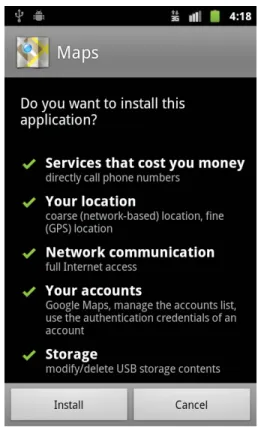
In order to make use of these APIs, the application must request the associated per-missions by specifying them in its AndroidManifest file. When the user installs an application, the system shows a dialog box describing the permissions requested by the application and asks for the user consent. Figure 3 shows an example of the dialog box displayed at the time of installing an application (Google Maps). Upon approval, the system installs the application. It is important to note that in order to install any application, the user has to agree upon all the permissions included by the developer. The user cannot deny any of the permission and continue installing the application. There are some system functionalities that can be disabled from the device settings such as GPS and WiFi. If the application requested GPS permission at the time of installation, the user can still restrict its use by disabling the GPS from the device settings.
Figure 3: Example of the dialog box displayed at the time of installing Google Maps
• Cost-Sensitive APIs: In Android, various functionalities are triggered by different APIs. A cost sensitive API is one that, upon execution, has a cost associated with it. These APIs are located among the set of protected APIs managed by the operating system. Upon installation, the user has to grant permissions to applications that require using these APIs. The following APIs have cost associated with them:
– Telephony:Android applications use this API to make calls or access telephone directories. If the application is malicious, it may call to a premium number to make money.
– NFC Access: Android applications make use of this API for Near Field Com-munication (NFC) related functionalities. For instance, the Google Wallet may use NFC for payments.
for trials only. In order to continue using these applications, the user has to purchase the application or any associated product from the application itself. In this case, it is necessary to make an in-app purchase. This is possible by issuing APIs related to In-App purchases.
– SMS or MMS: An Android application with malicious intent may send mes-sages to premium numbers.
– Network or Data: Some applications constantly download and upload data, causing user charge for using the Internet. In most of the cases, the user is un-aware about the activity running in background. For security reasons, Android 4.2 and later notifies the user for using APIs related to SMS. It informs the user that there might be a charge upon sending the SMS so that the user can decide to cancel it if it is not a legitimate one.
– Personal Information: Some personal information is stored in system appli-cations such as contacts, calendar and photos. In order for a third party applica-tions to access such information, this application has to be granted a permission from the user by indicating it in itsAndroidManifestfile.
– Sensitive Input Devices: There are various sensitive data related devices such as the camera, Bluetooth, WiFi and NFC. The use of these hardware compo-nents is restricted by the Android operating system. In order to make use of such devices by a third party application, the developer needs to explicitly indi-cate this in the applicationAndroidManifestfile. This will alert the user about the requested sensitive use of these devices. If approved, the requested device is then granted to the application.
– Device Metadata: Android has a feature of restricting access to sensitive data. However, other seemingly non sensitive data can indirectly identify unique fea-tures of the mobile device and then compromise the user privacy. The device
metadata security feature restricts the access to such data that may indirectly reveal information about the user characteristics and preferences. For instance, unless a permission is requested at installation time, an Android application is restricted from accessing the operating system logs, phone number, serial num-ber, hardware numnum-ber, browser history and network information.
– Application Signing:Every developer has to sign the application code in order to uniquely identify the authors of applications at the Google Play store. In case of security threats, developers can be identified easily based on their signatures and actions can be taken accordingly. In Android, every application runs in an application Sandbox environment where each application has a unique user ID UID and this helps in maintaining different users on the device through Inter-process communication. If there exists two applications from the same developer, then it is possible to access the data of one another. At the time of installing the Android application, the Android Package Manager verifies that the APK is actually signed with the certificate existing in the APK. If the certificate is already used by another application installed on the device, then it can share the same User ID.
– Application Verification: The Application verification feature is available in Android 4.2 and later versions. This feature enables Google to examine appli-cations before actually installing them. Users have the option of enabling or disabling the “Verify Apps” option at the time of installing the application. If it is enabled, it alerts the user if the application being installed is malicious and consequently blocks malware applications from being installed.
2.3
Evolution of Android Security
In what follows, we briefly review the advancements and changes made in improving the security of the Android platform.
1. Android Updates:Android releases OS updates for security enhancements and also for additional features on the mobile device. This helps to fix any security flaw in the previous version and keep the device secure. If a security flaw is found inside the organization, then it has to protect it from being disclosed to the public and fix the issue as soon as possible. On the other hand, if the vul-nerability is not known inside the organization and is posted on some security blogs, for example, then Google will start creating a patch for the system and once tested, it becomes available to the users. In general, if a vulnerability is discovered, the following measures are taken by the Google to fix it:
– Google will notify the organizations that have signed under non-disclosure agreement (NDA) about the flaw and start working on fixing the problem.
– The respective department where the flaw is found fixes the code.
– The Android security team will fix the security related issues.
– The patch is made available to NDA signed companies.
– The Android team will post the patch on the Android Open Source Project.
– The respective carrier pushes the update to their customers.
There are two methods for releasing patches and/or updates to the system: over-the-air (OTA), and side loaded updates. When using OTA, the update is pushed onto all compatible devices and is also made available to download manually for a specific interval of time. When using the side loaded approach, the user can either download the update/patch from Google on the actual device or download it on a desktop computer and then install it on the device.
2. Bouncer:Google Bouncer [3] is a malware scanner released in 2012 by Google and is compatible with Android 4.2 and later versions. It is used to scan the Google Play store applications, mark suspicious applications and alert users about them before installation. Google Bouncer was initially designed to scan the applications from Google Play store only. However, later on, it became capable of scanning third party applications installed on the mobile devices. It also notifies the user when any application tries to send SMS to premium numbers and blocks them from being sent until the user approves this action.
3. Android Device Manager: In August 2013, Google released its official
ad-ministration control manager named “Android Device Manager” (ADM) [3]. ADM allows users to have admin privileges over the mobile device. It is capa-ble of remotely wiping, tracking and locating stolen devices. It can also lock and ring the physical device in case the device is misplaced. It is compatible from Android version 2.2 and higher. In a 4 months span, Google also released an application on Google Play store having the same functionalities.
4. Security by Third Party Applications: Apart from the security enforced by Google, there exists many third party applications that can be used to add more layers of security to Android. For instance, MacAfee, AVG Technologies, Mo-bileIron and Lookout mobile security are some security applications available on the Google Play store. Their main focus is to protect sensitive informa-tion such as email, documents, applicainforma-tions and browser history, and settlings such as network configurations and WiFi passwords that are present on mo-bile devices. The following are some of the security measures taken by these applications [24]:
– OS Integrity: This feature notifies the user if the integrity of the Android OS is threatened, which happens, for example, in the case when the device
is rooted.
– Policy Enforcement: The security policy is enforced upon the range of characters used in selecting a password. This policy enforces a selection of strong passwords for locking the device, lost device protection and filesys-tem encryption.
– Data Containerization: This helps to prevent data access by unauthorized applications. Enforcing the authentication and encryption policy protects the sensitive information.
– Posture and Trust:The trust level is calculated for the device by continuous monitoring. This feature is used to assess the security feature of the device and calculate the level of trust. Depending on the level of trust, it decides whether the access to the sensitive information is blocked or not.
– Access Control: If the device fails to comply with any of the security fea-tures, all its access is revoked or blocked.
– Privacy Controls: Some actions and controls that affect the user privacy on the device are constantly monitored.
– Identity: The user identity and the device associated with it help determine the information access over network.
2.4
Android Malware Attacks
In this section, we briefly review some of the malware attacks on the Android plat-form [34].
– iBanking:iBanking [27] is a very powerful mobile banking Trojan which was distributed through HTML website injection on banking website pages. It de-ceives the target users by imitating itself as an anti-virus security application
for Android. It was able to bypass two way authentication factors used by some banking websites. Once installed on the victim’s device, iBanking can be con-trolled by the attacker either through HTTP or SMS control. The attacker can perform the following tasks using iBanking C&C server:
- Steal sensitive information
- Intercept, forward SMSs and phone calls to a server
- Upload contacts, GPS location and recorded audio to a server - Redirect a call to the attackerŠs number
- Prevent its removal or uninstallation - Restore device to factory defaults
According to ESET Security Software, when iBanking was removed from the Google Play store, a new version known as Android/Spy.Agent.AF which tar-geted Facebook users was released. It implemented webinject which injected a Java script into Facebook web pages, and created a fake Facebook verification page.
– Android Pjapps:The Android.Pjapps [7] is another famous malware code in-jected into legitimate applications and distributed via third party marketplaces. It is used to establish a back door between the Android device and the Bot server. The main aim was to build a large botnet controlled by a large num-ber of Command and Control (C&C) servers. Apart from these, it was able to remotely access web browsers’ history, send text messages, online Internet browsing and install applications. This malware runs as a service in the back-ground without the user’s consent. It constantly checks the C&C server for executing the following commands:
- note: This command is used in order to send messages to premium rate numbers.
- push: This command is used for blocking SMS messages from being sent. - soft: This command allows the application to be installed on the target
devices.
- window: This command is used for browsing the Internet on the web browser.
- mark: This command helps to add website as a bookmark on web browser. - xbox: This command is used for parsing code on the Android device.
– Android.Genimi: The trojan horse named Gemini [37] was injected into a
large number of original legitimate games available on the Google Play store. These injected applications were later published on Chinese third party markets and were used to remotely access users’ personal information and route it to the C&C server. When an application injected with Gemini [22] runs on a mobile device, a back door is created to collect sensitive information related to the user such as device serial number, hardware number, location of device, and phone information (e.g., IMEI, IMSI). Every 5 minutes, it tries to connect to the bot server and send the collected information to it. Also, it was capable of changing the list of remote servers as guided by the C&C server. Once the connection is strong and active, the trojan can perform the following actions:
- Call or send SMS to a specific number. - Display a map or web page.
- Change list of remote C&C servers. - Send contact information.
- Send SMS data to the server.
- Send phone identity information such as IMEI, IMSI and SIM Number. - Install or uninstall an application
- Change the wallpaper.
- Create a notification in the notification center.
– DroidDream:The DroidDream [18] malware not only infected application on third party markets but also managed to infect more than 50 applications on the Google Play store. The authors of this malware injected the code in the legitimate applications in such a manner that it cannot be detected. The main aim of DroidDream was to steal phone information by injecting malicious code inside the legitimate application and to obfuscate the code in order to prevent its detection. When an injected application runs on the device, it sends following sensitive information to its remote C&C server:
- SDK version of the device
- Device model name and unique ID - IMEI
- IMSI
Once the connection is established successfully, DroidDream [21] sends sensi-tive information and performs internal check of whether the device was infected by previous versions of DroidDream to avoid multiple infection for the same device. DroidDream used two methods to inject the device. One is ‘exploid’ and the other is ‘rageagainstthecage’ for getting past through the Android se-curity container. Once the device is rooted, it searches for a package named ‘com.android.providers.downloadsmanager’. If the package is found, it means that DroidDream already infected the device. Some variants of DroidDream are ‘Bowling Time’ and ‘Falling Down’.
– Android.Bgserv:The trojan named “Android.Bgserv” [36] [35] creates a back door in the background service and sends sensitive information to a remote C&C server. The infection is performed by changing the original code and
generating a repacked application. The information leaked to the bot server includes SMS messages, operating system version, phone number, IMEI and IMSI. All these information is uploaded to the remote server via HTTP POST method. The server controls the device by issuing a reply to the POST com-mand.
– GGTracker:This Android trojan was identified by Lookout security firm [20]. GGtracker automatically sends a number of premium messages to private num-bers. It was installed on the user’s device by clicking on in-app advertisements. After GGTracker is installed and run on the device, it registers the user for premium subscription services. The trojan contacts another server in the back-ground. This server is responsible for malicious behavior on the device and for intercepting the crucial approval of the data being sent. For instance, the service has to type the phone number and pin code received via SMS for successful reg-istration. This was preformed in the background without user’s consent. The charges was up to $9.99 for each SMS.
– DroidKungFu:DroidKungFu[19] was discovered in June 2011 by researchers at NC state University. Its later versions were released in July and August. These researchers were also able to identify the fourth, fifth and sixth versions of DroidKungFu codenamed DroidKungFu4, DroidKungFuSapp and Droid-KungFuUpdate, respectively. The mode of infection was through repackaged applications. This trojan was recognized as the most sophisticated family of Android malware attacks. It consists of shadow payloads, root exploits, C&C server and code obfuscation.DroidKungFuwas among the malware family that made use of encrypted root exploits, which prevents signature based detection of the malware. The encryption keys of encrypted root exploits kept on chang-ing with the malware version. DroidKungFu also has the capability to steal
sensitive information by remote C&C server and can control the mobile device. The attackers made many changes in order to avoid detection by researchers and security professional. They used encrypted server address with their own en-cryption algorithm. Another important component ofDroidKungFuis shadow payload. It consists of embedded application with malicious payload within the DroidKungFupackage. DroidKungFu installs the embedded application upon gaining root access by root exploit. The reason for installing two applications is that if the user uninstalls the first repackaged application, the other embedded application can still be effective.
2.5
Android Security Analysis and Monitoring Tools
In this section we briefly review some of the work related to analyzing Android applications for malicious activities.
Saint framework [26] is a modified version of Android application installer. This cus-tom installer, also known as AppPolicy provider, ensures that, at the time of installation, only applications that do not violate predefined policies in the AppPolicy provider can be installed. The Saint framework uses three policies: ‘Install-time Policy Enforcement’, ‘Run-Time Policy Enforcement’ and ‘Administrative Policy’. Saint uses install time policy to control permissions granted by the application. The run time policy helps to control the hardware and software interactions with the Android middleware layer. The last admin-istrative policy restricts the application to change its policy and assigns mandatory access control. The authors of Saint framework have gone to a great extent of checking existing applications’ permissions for any suspicious permission requests. The central components of Saint mostly work on assigning permissions statically to third party applications, thereby deciding which operations an application may or may not perform at runtime.
DroidScope [40] is a visualization based malware analysis of Android applications. DroidScope performs analysis by exporting 3-tiered APIs, namely: hardware, OS, and Dalvik Virtual Machine. DroidScope also collects API related activities and tracks sensi-tive information leakage and Dalvik level instructions. DroidScope is powerful enough to analyze the Java level and API calls used in the Android application. It has four differ-ent analysis tools: native instruction tracer, Dalvik instruction tracer, API tracer and taint tracer. For identifying the detailed information about the application’s execution, the native and Dalvik instruction tracer is used. For more high-level information about the API calls made by the application, the API tracer is used. The taint tracker is used track information leakage through both the Java and native components using taint analysis.
Apex [25] is a policy enforcement framework which uses a fine-grained permission granting model for installing Android applications. It allows users to select the permis-sions granted to the application and can also restrict access to resources. Apex uses ex-tended package installer for installing applications through a simple user interface. This installer allows users to specify security policies which specify the rules stating the con-dition to grant a specific permission. These policies are stored in a repository. Whenever any application requests a permission, Apex searches the repository for the security policy and grants or denies this permission accordingly. Another important thing to notice is that Apex has backward compatibility, which means that it can revert back to original Android security mechanism.
CopperDroid [30] is an out-of-the-box approach for dynamic analysis of Android ap-plications. CopperDroid is built on the top of Android QEMU Architecture. It performs analysis based on tracking system level calls, such as opening, reading, writing a file or executing a program, and Android specific high-level behavior, such as sending a SMS, and making a phone call. CopperDroid is capable of performing seemingly in the Android
platform. It was used to perform analysis on 1200 malware samples, and successfully iden-tified the behavior of these samples. CopperDroid also has a web interface for users to perform dynamic analysis of their samples for detecting any malicious behavior. Copper-Droid has three stages. The first one is system call invocation which uses VM Interpreter to track system calls. The second stage is binder analysis, where it dissects the communica-tion such as IPC to understand the high level Android related behavior. The last one is the path coverage, where the application is traversed through every path possible for inspecting any malicious behavior.
System Call Sequence Droid (SCSDroid) [17] is one of the techniques used for detecting malicious repackaged applications. SCSDroid makes use of the thread-grained sequence of system calls to identify the malicious behavior. It first prepares the most common subse-quence of malicious repackaged applications system calls belonging to same family. There are three claimed advantages for SCSDroid. First, it can detect malicious activities even if the malicious application sample is obfuscated or encrypted. Second, SCSDroid uses thread based system call tracking as opposed to process-based tracking. Finally, SCS-Droid does not require any original benign application to prepare a training set. SCSSCS-Droid reached a detection accuracy of 95.97% among the 149 analyzed applications.
CrowDroid [11] is another tool for detecting malware in the Android platform through dynamic analysis. The complete design of CrowDroid is integrated with the Android archi-tecture so that it can collect number of traces from real world users by crowdsourcing. All the data is collected on the central remote server and is divided into two sets, one contains the data collected from known malware and the other contains the artificial malware made for test cases. CrowDroid is mainly divided into three components. One is the data acqui-sition, which collects application data from real users using CrowDroid application. It uses ‘strace’ to track system calls. The second component is data manipulation, which parses
the collected information received fromstracesystem logs. It produces a feature vector for clustering data. The third component is the malware analysis and detection, for clustering and analyzing the feature vectors obtained from the previous step. It uses the k-means clus-tering algorithm for analyzing the data. The reported results show that CrowDroid is able to detect malwares from the pjApps family with 100% accuracy and from the HongToutou family with 82% accuracy.
YAASE [31] (Yet Another Android Security Extension) aims to protect information from being leaked by any malicious application. It provides an extension to the Android frame-work and usesTaintdroid architecture as a base for tainting and tracking data. On the top ofTaintdroid, YAASE supports user defined labels by enforcing filtering policy on the col-lected tainted data. YAASE has policies defined by the user stating all the applications authorized for labeling data. If any application tries to access data labels whose access is not granted in the defined policies, then its access to that data is denied.
AASandbox [9] performs static and dynamic analysis of Android applications. Static analysis engages searching malicious code in the application and it compares the scanned application with a know database of malware samples by matching the signatures of the application being analyzed. AASandbox installs a kernel module for intercepting system calls during the dynamic analysis process. When the application runs, Android ‘monkey’ is started to perform random gestures on the application. The final kernel log is used to analyze the malicious behavior of the application. AASandbox can also be deployed on the cloud.
Stowaway [14] is a another tool that applies static analysis on the analyzed applications. After that, the tool applies mapping of permission with each operation. The aim of Stow-away is to investigate excess privileged permissions. API mappings were built inside the
Android emulator to determine the permissions required to interact with system APIs.
Static analysis of Android applications was also performed using an extended version of Julia [29], which is static analysis tool for Java bytecode. Since Android applications are written in Java and shipped in Dalvik bytecode, they need to be converted into Java bytecode before applying this tool. This static analyzer tool keeps track of commonly used Java statements and generates an abstract overview of the application.
Bugiel et al. proposed a security framework named XManDroid [10] which monitors real-time communication between applications and verifies the inter-process communica-tion against a set of predefined security policies. The main aim behind this framework is to prevent privilege escalation. XManDroid maintains the system state of all the installed ap-plications and the communication links requested by the apap-plications. It also monitors the Inter-Component Communication traffic and checks it for any privilege escalation. XMan-Droid has the limitation that it cannot control communications related to the Internet.
In what follows, we briefly describe some techniques and tools that can be used for real time monitoring of Android applications.
Taintdroid [13] is one of the most feature-complete and well-documented security en-hancements made for Android. It is an extensive modification for the entire Android stack to track the flow of sensitive personal data from third party applications at runtime. The modification allowsTaintdroidto detect when sensitive data is leaked in various ways such as by sending an email or SMS containing personal data or by uploading a file directly. Taintdroid “taints” sensitive data to keep track of its use throughout the system. It logs the information about the application that transmits the data and its destination address. This realtime monitoring helps the users know about the intent of the application and to get rid of malicious ones. Taintdroid goes to the extent of controlling what may happen
with sensitive data at runtime. It has a high level of instrumentation which results in up to 27% runtime overhead. Taintdroidmade some changes in the Android’s architecture by modifying 4 modules: variable level, method level, message level and file level. The VM interpreter performs the variable-level tracking of the application code and provides mean-ingful information about the data and not the code. The message-level tracking between the application helps to track messages exchanged during IPC. Taintdroid uses method-level tracking for running the native code without instrumentation of taint propagation. It also uses file-level tracking, which guarantees the tainted information is persistent.
Isohara et al. proposed a kernel based behavior analysis [16] for inspecting Android malware. They used a behavior monitoring framework for auditing all security related activities performed by the applications. The system mainly consists of a log collector and a log analyzer. The log collector collects all the system calls related to an application and filters out events associated with the target application. Using regular expressions, the log analyzer searches the activities and the associated signatures of any suspicious behavior. This framework targets any information leakage related to smartphone identification such as phone number, Google accounts, SIM serial and IMEI numbers. Out of the 230 analyzed applications, it was found that 37 applications leaked such private information.
FireDroid [32] provides an efficient security mechanism by executing fine-grained se-curity policies without modifying any Android source code or the underlying Linux OS. FireDroid monitors the execution of all the processes in a secure environment. This makes it efficient as compared to other approaches. It can enforce strict security policy to stop attacks by exploiting the vulnerability of the application or the Android system services. FireDroid uses interposition of system calls produced from applications to enforce the se-curity policy. It also acts as a network firewall controlling the interactions made by system
calls. FireDroid uses theptracecommand for getting system calls interactions where pro-cesses are monitored and a policy is enforced for collecting required information.
Minet al.[23] proposed a runtime based dynamic analysis for detecting Android mal-ware. The complete design is based on monitoring the logs collected by executing the tested application in a customized environment capable of hooking system calls. Firstly, they performed static analysis of the application and obtained information such as list of all permissions, activities, broadcast receivers and services. The analyzed application is then executed in a controlled emulator with a modified (loadable) kernel modules to track the flow of sensitive data. This system uses Robotium for creating random events on the screen and performs monitoring of system logs for any malicious flow of information. Out of the 350 analyzed applications, 82 applications were responsible for data leakage and 8 applications sent SMS to premium numbers.
Baueret al.[8] proposed a dynamic security analysis technique based on runtime verifi-cation. The proposed system is capable of showing that the system is working securely and satisfying a specific security policy. It monitors the Android system passively and alerts the user in case of any breach in the specified policy. The user can specify sequences of events that are considered to be suspicious. For example, if an application checks the user’s location via GPS and then sends it via the Internet, then the system can be configured to alert the user by sounding an alarm when such sequence of events happen.
Chapter 3
System Design
3.1
Introduction
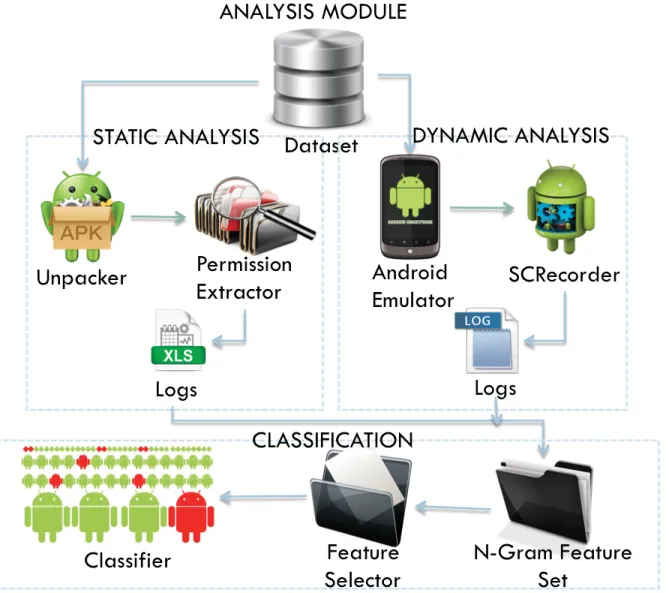
In this chapter, we describe the main contributions of our work which can be divided into two main components. The first one, as depicted in Figure 4, is a framework that can be used to perform off-line analysis of Android applications using static and dynamic anal-ysis approaches. In the static analanal-ysis phase, we perform de-compilation of the analyzed application and extract the requested permissions from its ‘AndroidManifest’ file. Whereas in dynamic analysis, we execute the tested application on an Android emulator where the stracetool is used to hook the system calls on the ‘zygote’ process and record all the calls invoked by the application. The extracted features from both the static and dynamic analy-sis modules are then used to classify the tested applications, as malicious or benign, using a variety of classification algorithms.
The second part is a realtime monitoring system that can be used for monitoring the behavior of Android applications and alerting users of applications that violate a predefined security policy by trying to access private information such as GPS locations and SMS related information. In order to achieve this, we use a loadable kernel module for tracking the kernel level system calls. As shown in Figure 5, the proposed monitoring system is
Figure 4: Main components of the off-line analysis system
composed of three modules. The first module is a configuration module which allows the Android device to be configured for enabling the monitoring of system calls. The second one is a kernel tracker which hooks the system calls on the Android device. Finally, the notifier module provides real-time notifications to the users in case of suspected malicious activities.
Figure 5: Main components of the monitoring system
3.2
System Analysis
As mentioned in the previous section, our off-line Android analysis tool is composed of three modules:
1. Static analysis module
2. Dynamic analysis module
3. Classification module
The static analysis module and dynamic analysis module generate different logs that are used to extract the features used by the classification module for determining whether the
tested application is malicious or benign. The complete working of each of these modules is explained in the following sections.
3.2.1
Static Analysis Module
Static analysis proved to be a very useful tool in identifying potential malicious behavior of Android applications. It aims to examine the Android applications without executing them, which makes this approach an attractive option in many malware analysis scenarios. The main rational of the static analysis of Android applications is that, in order to access any system related resources on the Android device, the Android application needs to specify all associated permissions in itsAndroidManifest file. Examining these permission, such as BLUETOOH, SEND_SMS, RECEIVE_SMS, CALL_PHONE, READ_CONTACTS, WIPE_DATA, BIND_DEVICE_ADMIN and CAMERA, implicitly reveals some of the intended functionality of the application. For instance, a typical gaming application should have no interest in requesting CAMERA permission.
As shown in Figure 6, all the applications to be analyzed are stored in a database. Just as there exists MSI packages in Windows, Android applications are packed in Application Package Kit (APK) files for installing them on the Android devices. The APK is similar to a ZIP compressed package consisting of compiled Linux libraries, application resources (such as icons, images , fonts, sound clips and configuration files), bytecode in ‘classes.dex’ file and an XML config file named ‘AndroidManifest’. TheAndroidManifestfile contains all the application activities and permissions. While, the ‘classes.dex’ file consists of the application bytecode. Any modification or change in these two files can lead to altering the behavior of the application. When performing the static analysis, the application to be analyzed is automatically fetched from this dataset. Then, the application APK is un-packed using the apktool, which is a third party reverse engineering tool used to decode
the resources of the APK package. After regenerating the AndroidManifest file included in the APK package file, the list of permissions, services, broadcast receivers and activi-ties that are specified in it are extracted and stored for later processing and analysis by the classification module.
Figure 6: Static analysis module
3.2.2
![Figure 1 shows the software stack of the Android architecture [2]. As depicted in the figure, the Linux kernel is situated at the bottom of the system and is used to resolve system calls related to hardware resources.](https://thumb-us.123doks.com/thumbv2/123dok_us/763052.2596528/19.918.160.814.265.733/figure-software-android-architecture-depicted-situated-hardware-resources.webp)
![Figure 2: Layers of Android security [28].](https://thumb-us.123doks.com/thumbv2/123dok_us/763052.2596528/23.918.232.745.111.516/figure-layers-of-android-security.webp)