Guide
IP Office 9.0
Release 9.0.3
Issue 01.02
December 2014
Notice
While reasonable efforts have been made to ensure that the information in this document is complete and accurate at the time of printing, Avaya assumes no liability for any errors. Avaya reserves the right to make changes and corrections to the information in this document without the obligation to notify any person or organization of such changes.
Documentation disclaimer
“Documentation” means information published by Avaya in varying mediums which may include product information, operating instructions and performance specifications that Avaya may generally make available to users of its products and Hosted Services. Documentation does not include marketing materials. Avaya shall not be responsible for any modifications, additions, or deletions to the original published version of documentation unless such modifications, additions, or deletions were performed by Avaya. End User agrees to indemnify and hold harmless Avaya, Avaya's agents, servants and employees against all claims, lawsuits, demands and judgments arising out of, or in connection with, subsequent modifications, additions or deletions to this documentation, to the extent made by End User.
Link disclaimer
Avaya is not responsible for the contents or reliability of any linked websites referenced within this site or documentation provided by Avaya. Avaya is not responsible for the accuracy of any information, statement or content provided on these sites and does not necessarily endorse the products, services, or information described or offered within them. Avaya does not guarantee that these links will work all the time and has no control over the availability of the linked pages. Warranty
Avaya provides a limited warranty on Avaya hardware and software. Refer to your sales agreement to establish the terms of the limited warranty. In addition, Avaya’s standard warranty language, as well as information regarding support for this product while under warranty is available to Avaya customers and other parties through the Avaya Support website: http://support.avaya.com or such successor site as designated by Avaya. Please note that if you acquired the product(s) from an authorized Avaya Channel Partner outside of the United States and Canada, the warranty is provided to you by said Avaya Channel Partner and not by Avaya.
Licenses
THE SOFTWARE LICENSE TERMS AVAILABLE ON THE AVAYA WEBSITE, HTTP://SUPPORT.AVAYA.COM/LICENSEINFO OR SUCH SUCCESSOR SITE AS DESIGNATED BY AVAYA, ARE APPLICABLE TO ANYONE WHO DOWNLOADS, USES AND/OR INSTALLS AVAYA SOFTWARE, PURCHASED FROM AVAYA INC., ANY AVAYA AFFILIATE, OR AN AVAYA CHANNEL PARTNER (AS APPLICABLE) UNDER A COMMERCIAL AGREEMENT WITH AVAYA OR AN AVAYA CHANNEL PARTNER. UNLESS OTHERWISE AGREED TO BY AVAYA IN WRITING, AVAYA DOES NOT EXTEND THIS LICENSE IF THE SOFTWARE WAS OBTAINED FROM ANYONE OTHER THAN AVAYA, AN AVAYA AFFILIATE OR AN AVAYA CHANNEL PARTNER; AVAYA RESERVES THE RIGHT TO TAKE LEGAL ACTION AGAINST YOU AND ANYONE ELSE USING OR SELLING THE SOFTWARE WITHOUT A LICENSE. BY INSTALLING, DOWNLOADING OR USING THE SOFTWARE, OR AUTHORIZING OTHERS TO DO SO, YOU, ON BEHALF OF YOURSELF AND THE ENTITY FOR WHOM YOU ARE INSTALLING, DOWNLOADING OR USING THE SOFTWARE (HEREINAFTER REFERRED TO INTERCHANGEABLY AS “YOU” AND “END USER”), AGREE TO THESE TERMS AND CONDITIONS AND CREATE A BINDING CONTRACT BETWEEN YOU AND AVAYA INC. OR THE
documentation does not expressly identify a license type, the applicable license will be a Designated System License. The applicable number of licenses and units of capacity for which the license is granted will be one (1), unless a different number of licenses or units of capacity is specified in the documentation or other materials available to you. “Software” means Avaya’s computer programs in object code, provided by Avaya or an Avaya Channel Partner, whether as stand-alone products, pre-installed , or remotely accessed on hardware products, and any upgrades, updates, bug fixes, or modified versions thereto. “Designated Processor” means a single stand-alone computing device. “Server” means a Designated Processor that hosts a software application to be accessed by multiple users. “Instance” means a single copy of the Software executing at a particular time: (i) on one physical machine; or (ii) on one deployed software virtual machine (“VM”) or similar deployment.
Licence types
Designated System(s) License (DS). End User may install and use each copy or an Instance of the Software only on a number of Designated Processors up to the number indicated in the order. Avaya may require the Designated Processor(s) to be identified in the order by type, serial number, feature key, Instance, location or other specific designation, or to be provided by End User to Avaya through electronic means established by Avaya specifically for this purpose.
Concurrent User License (CU). End User may install and use the Software on multiple Designated Processors or one or more Servers, so long as only the licensed number of Units are accessing and using the Software at any given time. A “Unit” means the unit on which Avaya, at its sole discretion, bases the pricing of its licenses and can be, without limitation, an agent, port or user, an e-mail or voice mail account in the name of a person or corporate function (e.g., webmaster or helpdesk), or a directory entry in the administrative database utilized by the Software that permits one user to interface with the Software. Units may be linked to a specific, identified Server or an Instance of the Software.
Database License (DL). End User may install and use each copy or an Instance of the Software on one Server or on multiple Servers provided that each of the Servers on which the Software is installed
communicates with no more than an Instance of the same database. CPU License (CP). End User may install and use each copy or Instance of the Software on a number of Servers up to the number indicated in the order provided that the performance capacity of the Server(s) does not exceed the performance capacity specified for the Software. End User may not re-install or operate the Software on Server(s) with a larger performance capacity without Avaya’s prior consent and payment of an upgrade fee.
Named User License (NU). You may: (i) install and use the Software on a single Designated Processor or Server per authorized Named User (defined below); or (ii) install and use the Software on a Server so long as only authorized Named Users access and use the Software. “Named User”, means a user or device that has been expressly authorized by Avaya to access and use the Software. At Avaya’s sole discretion, a “Named User” may be, without limitation, designated by name, corporate function (e.g., webmaster or helpdesk), an e-mail or voice mail account in the name of a person or corporate function, or a directory entry in the administrative database utilized by the Software that permits one user to interface with the Software.
Shrinkwrap License (SR). You may install and use the Software in accordance with the terms and conditions of the applicable license agreements, such as “shrinkwrap” or “clickthrough” license accompanying or applicable to the Software (“Shrinkwrap License”). Heritage Nortel Software
successor site as designated by Avaya. For Heritage Nortel Software, Avaya grants Customer a license to use Heritage Nortel Software provided hereunder solely to the extent of the authorized activation or authorized usage level, solely for the purpose specified in the Documentation, and solely as embedded in, for execution on, or (in the event the applicable Documentation permits installation on non-Avaya equipment) for communication with Avaya equipment. Charges for Heritage Nortel Software may be based on extent of activation or use authorized as specified in an order or invoice.
Copyright
Except where expressly stated otherwise, no use should be made of materials on this site, the Documentation, Software, Hosted Service, or hardware provided by Avaya. All content on this site, the documentation, Hosted Service, and the Product provided by Avaya including the selection, arrangement and design of the content is owned either by Avaya or its licensors and is protected by copyright and other intellectual property laws including the sui generis rights relating to the protection of databases. You may not modify, copy, reproduce, republish, upload, post, transmit or distribute in any way any content, in whole or in part, including any code and software unless expressly authorized by Avaya. Unauthorized reproduction, transmission, dissemination, storage, and or use without the express written consent of Avaya can be a criminal, as well as a civil offense under the applicable law.
Third Party Components
“Third Party Components” mean certain software programs or portions thereof included in the Software or Hosted Service may contain software (including open source software) distributed under third party agreements (“Third Party Components”), which contain terms regarding the rights to use certain portions of the Software (“Third Party Terms”). As required, information regarding distributed Linux OS source code (for those Products that have distributed Linux OS source code) and identifying the copyright holders of the Third Party Components and the Third Party Terms that apply is available in the Documentation or on Avaya’s website at: http://support.avaya.com/ Copyright or such successor site as designated by Avaya. You agree to the Third Party Terms for any such Third Party Components Note to Service Provider
The Product or Hosted Service may use Third Party Components subject to Third Party Terms that do not allow hosting and require a Service Provider to be independently licensed for such purpose. It is your responsibility to obtain such licensing.
Preventing Toll Fraud
“Toll Fraud” is the unauthorized use of your telecommunications system by an unauthorized party (for example, a person who is not a corporate employee, agent, subcontractor, or is not working on your company's behalf). Be aware that there can be a risk of Toll Fraud associated with your system and that, if Toll Fraud occurs, it can result in substantial additional charges for your telecommunications services. Avaya Toll Fraud intervention
If you suspect that you are being victimized by Toll Fraud and you need technical assistance or support, call Technical Service Center Toll Fraud Intervention Hotline at +1-800-643-2353 for the United States and Canada. For additional support telephone numbers, see the Avaya Support website: http://support.avaya.com or such successor site as designated by Avaya. Suspected security vulnerabilities with Avaya products should be reported to Avaya by sending mail to:
[email protected]. Trademarks
The trademarks, logos and service marks (“Marks”) displayed in this site, the Documentation, Hosted Service(s), and Product(s) provided by Avaya are the registered or unregistered Marks of Avaya, its
Documentation, Hosted Service(s) and Product(s) should be construed as granting, by implication, estoppel, or otherwise, any license or right in and to the Marks without the express written permission of Avaya or the applicable third party.
Avaya is a registered trademark of Avaya Inc.
All non-Avaya trademarks are the property of their respective owners. Linux® is the registered trademark of Linus Torvalds in the U.S. and other countries.
Downloading Documentation
For the most current versions of Documentation, see the Avaya Support website: http://support.avaya.com, or such successor site as designated by Avaya.
Contact Avaya Support
See the Avaya Support website: http://support.avaya.com for Product or Hosted Service notices and articles, or to report a problem with your Avaya Product or Hosted Service. For a list of support telephone numbers and contact addresses, go to the Avaya Support website:
http://support.avaya.com (or such successor site as designated by Avaya), scroll to the bottom of the page, and select Contact Avaya Support.
Chapter 1: Introduction...
7Purpose...7
Intended audience... 7
Related documents... 7
Chapter 2: IP Office Server Edition Solution...
9Overview... 9
IP Office Editions...9
Solution architecture... 10
Solution components...11
Server Edition Primary server... 12
Server Edition Secondary Server... 14
Server Edition Expansion System... 15
Server Edition Manager...17
Web Manager... 19
one-X Portal for IP Office Server Edition... 20
Chapter 3: Features...
21Business continuity... 21
Resilience...21
Backup and Restore...23
Security... 24
Remote access... 27
Licensing... 28
Centralized licensing... 28
Local licensing... 29
Server Edition licensing... 30
IP Office Server Edition Solution versus Avaya Aura Midsize Enterprise Solution... 32
IP Office Server Edition versus Preferred or Advanced Edition... 35
Chapter 4: Deployment...
39Chapter 5: IP Office Server Edition Solution specification...
41Server specifications... 41
Operating system support... 42
Chapter 6: Capacities and scalability...
45Purpose
This document describes a unique Avaya solution from a holistic perspective focusing on the strategic, enterprise, and functional views of the architecture. It includes a high-level
description of each verified reference configuration for the solution.
Intended audience
The primary audience for this document consists of sales engineers. It describes how the solution and its verified configurations meet customer needs at a high level. Sales engineers can use this document, in conjunction with the Reference Configuration and the Product Overview and Specification documents, when responding to customers' requirements. It can also be used by solution architects, implementation engineers, and support personnel.
Related documents
This section lists the related documents for the products and the solution components referenced in this document.
Document Document ID
1 IP Office Server Edition Reference Configuration 15–604135
2 IP Office Manager 15-601011
3 Deploying IP Office Server Edition Solution 15-604134 4 IP Office Web Manger for Server Edition and Standard
Mode
Overview
IP Office Server Edition provides IP Office telephony capabilities, unified communications, mobility and collaboration, provides high availability, ease of use, and low total cost of ownership (TCO). Targeted at the Midsize Enterprise,IP Office Server Edition supports up to 32 sites, 2000 users and comprehensive resilience.
Highlights of IP Office Server Edition Solution
• Supports 100 to 2000 users as a fully integrated solution.
• You can add Server Edition Expansion System to increase the capacity and capabilities
• You can deploy IP Office Server Edition Solution as a centralized or distributed set up
• Offers low Total Cost of Ownership: - Highly cost effective for an IP only or an
hybrid of IP and analog set up - Easy to install and manage - Centralized administration - Centralized licensing
• IP Office Server Edition supports extensive unified communications features
optimized for IP Telephony
• Supports native IP, digital, and analog trunks and extensions
• Integrates messaging, collaboration, mobility, and presence features • Offers out of the box resilience
• Supports all IP Office endpoints and trunks including Avaya Flare® Experience, video conferencing, DECT, and Wi-Fi
IP Office Editions
IP Office Server Edition is designed to complement the existing range of IP Office editions to enable Midsize Enterprise customers to benefit from the extensive IP Office features whilst adding integrity and capacity:
IP Office Edition Platform Business size (Users)
Market need
Basic Edition IP 500 V2 <25 Telephony
Essential Edition IP 500 V2 20–99 IP Telephony with
Essential Mobility
Preferred Edition IP 500 V2 21–250 Unified
Communications with Preferred Mobility
Advanced Edition IP 500 V2 21–250 Unified
Communications with Contact Center Server Edition Linux Server, IP 500
V2 and Linux Expansion 100 — 2000 Unified Communications with Preferred Mobility
Solution architecture
This section describes the architecture of IP Office Server Edition Solution.
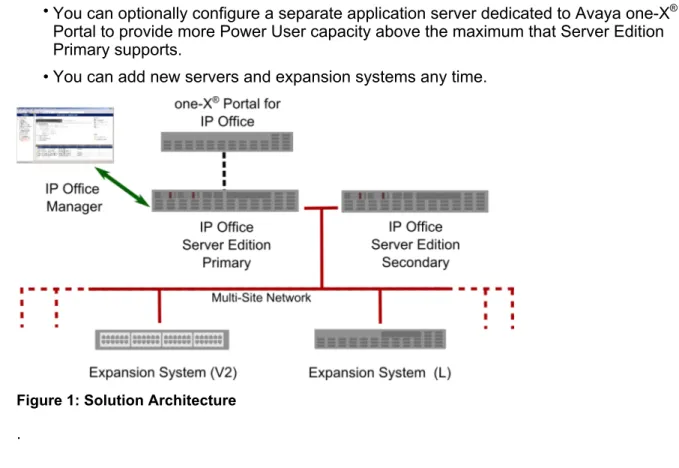
IP Office Server Edition Solution is based on a fixed star network topology that provides comprehensive features and their management. The solution provides a flexible and modular architecture which can scale up the number of users and sites by networking multiple servers. The components function as a single logical unit through an integrated management
system.
IP Office Server Edition Solution provides the following features:
• A single Server Edition Primary server provides IP Office Server Edition, Voicemail Pro, and Avaya one-X® Portal.
• You can optionally add a Server Edition Secondary server to increase the capacity and ensure resilience.
• IP Office Server Edition Solution supports up to 30 expansion systems which provide additional capacity, support analog or digital interfaces, and remote sites.
• Server Edition Expansion System can be an existing IP500 V2 or IP Office Server Edition server.
• TheIP Office Server Edition Solution users can be configured on IP Office Server Edition server or Server Edition Expansion System.
• You can set up Server Edition Secondary or Server Edition Expansion System either centrally or at a remote site.
• You can optionally configure a separate application server dedicated to Avaya one-X®
Portal to provide more Power User capacity above the maximum that Server Edition Primary supports.
• You can add new servers and expansion systems any time.
Figure 1: Solution Architecture .
Solution components
IP Office Server Edition Solution includes Server Edition Primary, Server Edition Secondary, Server Edition Expansion System, and Avaya one-X® Portal for IP Office. The following section
provides an overview of the individual components. Related topics:
Server Edition Primary server on page 12
Server Edition Secondary Server on page 14
Server Edition Expansion System on page 15
Server Edition Manager on page 17
Web Manager on page 19
Server Edition Primary server
Server Edition Primary is the only hardware component required for IP Office Server Edition Solution. All other components are optional. Avaya can also supply a software-only solution to Avaya customers and Business Partners.
Server Edition Primary server is available in two capacities and depends on the platform that you select.
Material Code Description
270393 HP DL360G7 IPO SERVER EDITION
302788 R210 II XL SRVR IPO SE EXP
Note:
The Dell R210 is a replacement for the HP DL120 and provides the same performance and capacity. The HP DL120 server will continue to be available until 2014. For more information about discontinuance of HP DL120, see end of sale notice.
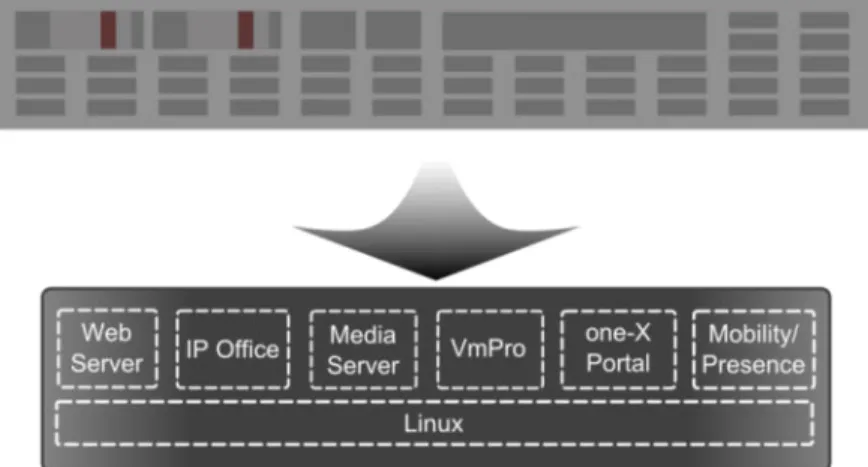
Server Edition Primary contains an integrated set of the following components and features: • IP Office feature server
• Voicemail Pro server
• Avaya one-X® Portal and Mobility server
• Solution Administration web portal
• IP Office Server Edition Manager, including System Status Application • Voicemail Pro client
• Client and DevConnect applications such as IP Office Softphone and DevLink • Acts as a central host for licensing, Solution directory and time server
• IP focused telephony capabilities to support 1500 users and extensions such as H.323, SIP, IP DECT, and Wi-Fi
• Backup server for up to 1500 IP extensions
• Supports voicemail recording and Text to speech (TTS) channels
• Supports remote worker including Avaya one-X® Portal, Avaya one-X® Mobile, and Flare
Experience clients
• Conference resources for ad-hoc and meet-me conferences
• Upgrade packages for all the components of the IP Office Server Edition Solution including phones.
Figure 2: IP Office Server Edition Highlights of Server Edition Primary
server Scaling (HP DL360)
• Up to 1500 users/extensions (H.323, SIP, IP DECT, Wi-Fi, SIP ATA) • Up to 250 IP trunks (H.323, SIP) • Supports failover for up to 1500 users/
extensions
• 150 Voicemail recording channels • 300 active one-X Portal for IP Office
users
• 256 conference channels
Scaling (HP DL120 / Dell R210)
• Up to 750 IP users/extensions (H.323, SIP, IP DECT, Wi-Fi, SIP ATA) • Up to 125 IP trunks (H.323, SIP) • Supports failover for up to 750 users/
extensions
• 75 Voicemail recording channels • 200 active one-X Portal for IP Office
users
• 128 Conference channels
• Integrated appliance
• Hardware resilience: Hot plug Hard drives and Power supplies (HP DL360 only) • Web based wizard for initial provisioning • Web Solution Administration Portal • Directory and Time server
• Efficient Media server • Dual LAN support • VLAN support
• Comprehensive Avaya IP Phone support including DHCP and upgrades
• All native Linux applications
• High integrity Linux OS (CentOS 6.x) • Full software distribution and solution
upgrade
• Backup and restore
Application support
• Telephony • Conferencing • Unified Messaging
Highlights of Server Edition Primary server
• Mobility • Presence • Receptionist
Server Edition Secondary Server
The Server Edition Secondary provides both capacity and resilience for the solution, and can be added to the Server Edition Primary at any time. The Server Edition Secondary need not be located in the same place as the Server Edition Primary. The Server Edition Secondary server is available in two capacities and depends on the platform that you select:
Material Code Description
270393 HP DL360G7 IPO SERVER EDITION
302788 R210 II XL SRVR IPO SE EXP
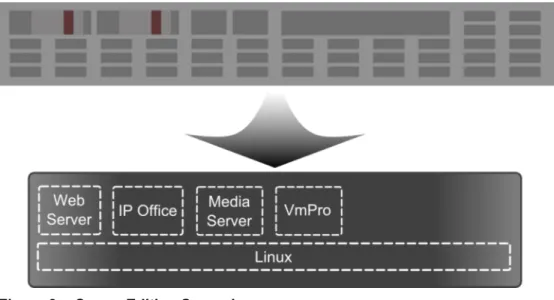
Server Edition Secondary contains the following IP Office components: • IP Office feature server, including backup hunt group processing • Media server – no hardware VCMs required
• Backup Voicemail Pro server for resilience • Backup solution administration web portal
• IP focused telephony capabilities to support 1500 users or phones such as H.323, SIP, IP DECT and Wi-Fi
• Backup server for up to 1500 IP extensions
• Supports 150 backup voicemail or recording channels
Figure 3: : Server Edition Secondary Highlights of Server Edition Secondary
server Scaling (HP DL360)
• Up to 1500 users/extensions (H.323, SIP, IP DECT, Wi-Fi, SIP ATA) • Up to 250 IP trunks (H.323, SIP) • Supports failover for up to 1500 failover
users/extensions
• 150 backup Voicemail recording channels
• 256 Conference channels
Scaling (HP DL120/ Dell R210)
• Up to 750 IP users/extensions (H.323, SIP, IP DECT, Wi-Fi, SIP ATA) • Up to 125 IP trunks (H.323, SIP) • Supports failover for up to 750 users/
extensions
• 75 backup voicemail recording channels
• 128 Conference channels
• Centrally Managed • Integrated appliance
• Hardware resilience: Hot plug Hard drives and Power supplies (HP DL360 only)
• Web based wizard for initial provisioning • Backup Web Administration Portal • Directory and Time server
• Efficient Media server • Dual LAN support • VLAN support
• Comprehensive Avaya IP Phone support including DHCP and upgrades
• All native Linux applications • High integrity Linux OS (CentOS)
Server Edition Expansion System
Server Edition Expansion System provide additional capacity, locations or analog or digital capabilities. Server Edition Expansion System can be added to the Server Edition Primary
server at any time. You can add a maximum of 30 Server Edition Expansion Systems and the Server Edition Expansion Systems need not be in the same location. There are two types of Server Edition Expansion Systems, and you can use these systems in any combination: Server Edition Expansion System (V2) to support IP, digital, and analog telephony
Material Code Description
700476005 IPO IP500 V2 CNTRL UNIT
Server Edition Expansion System (L) to support IP telephony
Material Code Description
302788 R210 II XL SRVR IPO SE EXP
Highlights of Server Edition Expansion System
Server Edition Expansion System (L) Scaling
• Up to 750 IP users/extensions (H.323, SIP, IP DECT, Wi-Fi, SIP ATA)
• Up to 125 IP trunks (H.323, SIP) • 128 Conference channels Application support • Telephony • Conferencing • Centrally managed • Centrally licensed
• Users or extensions on H.323 only, you can backup the users or extensions on a primary or secondary server
• Web based wizard for initial provisioning • Efficient Media server
• Dual LAN support • VLAN support
• Comprehensive Avaya IP Phone support including DHCP and upgrades
• All native Linux applications
• High integrity Linux OS (CentOS 6.x)
Server Edition Expansion System (V2) Scaling
• Up to 384 IP, digital or analog users/ extensions
• Up to 125 IP trunks (H.323, SIP) • Up to 204 analog trunks
• Up to 8 PRI and 16 BRI trunks • 128 Conference channels • 148 VCM channels
• Uses current IP Office IP500 V2 chassis, expansion modules and expansion units • Centrally managed
• Centrally licensed
• Users or extensions on H.323 only, you can backup the users or extensions on a primary or secondary server
Highlights of Server Edition Expansion System
Application support
• Telephony • Conferencing
• Comprehensive Avaya IP Phone support including DHCP and upgrades
• You can convert an existing IP500 V2 installation to IP Office Server Edition, including configuration and licenses
Server Edition Manager
Server Edition Manager is a specific mode of operation of the existing IP Office Manager.Server Edition Manager supports complete centralized administration for up to 2000 users or
extensions and up to 32 devices including one Server Edition Primary, one Server Edition Secondary, and 30 Server Edition Expansion Systems.Server Edition Manager also provides IP Office telephony and Unified Communications feature set.Server Edition Manager inServer Edition mode provides an effective solution management for all the components of the solution for activities such as:
• Single point of configuration for IP Office and Voicemail • Simple initial installation wizard
• Overview of the solution with inventory and status
• Common settings consolidated to the Server Edition Primary
• Supports online, offline administration, and configuring a complete solution • Integrated System Status, Voicemail Pro client, SystemMonitor
• Template operations
• Centralized configuration and template storage • Administrator account management utility • Retains existing IP Office expertise
Even though Server Edition Manager is a Windows application,Server Edition Manager can be installed directly from the Web administration portal of Server Edition Primary server. This enables you to use any Windows personal computer that has any IP Office Manager that is pre-installed immediately.
Using Server Edition Manager, the administrator can create templates for many management items such as users, extensions, Hunt Groups, and Lines. The administrator can then create any new item using the default settings or the template. You can create multiple users and extensions using one template.
Highlights of Server Edition Manager Scaling • Administration of up to 2000 users or extensions • Up to 32 devices Application
• Windows XP, Vista, 7, Server 2003/2008 • Installed through Web Manager or
Administration DVD
• Integrated Voicemail Proclient, System Status Application, and Linux Platform settings access
• Context sensitive help
Call Routing Support
• Full IP Office ARS and dial plan support • Default routing simplifies configuration • Solution wide auto line group numbering • Common incoming call routes provide
resilience
• Resilient Hunt Groups
Offline Operation
• Complete solution can be created and/or managed offline if required
• Can still manage when some deices offline
• On/offline configuration sync options to harmonize as required
Solution Management
• Complete solution view with status and inventory
• Users and Hunt Groups are solution wide • Centralized User Rights, feature short
codes, Time Profiles, Incoming Call Routes, and Account Codes
• Permits advanced per-device configuration if desired
• All configurations stored on primary server • Solution wide system directory
• Easy management of central and per-device licenses
Resilience management
• You can manage every device locally for ‘rainy day’ events
• You can manage the solution through a secondary server when the primary server fails or in a ‘split WAN’ setup
• On/Offline configuration sync options to harmonize as required
Add or Remove Devices
• Single process for addition or removal of device
• In-built Initial Configuration Utility (ICU) to simplify adding a new device
• Common configuration items from primary server is auto populated
• Can configure before you install a new device
Validation
• Configuration validation on read and any change.
Highlights of Server Edition Manager Localization
• English, French, Italian, LA Spanish, and German
Template
• Create a local and centralized template from an existing Line, Extension, User, Hunt Group, Time Profile, Firewall Profile, IP Route and Service entries
• Recreate multiple Extension and Users from one template
Remote access
• Supports access from service through SSL VPN
Security
• Single Sign On to all except one-X Portal administration
Web Manager
Web Manager is a web based solution management application that you can use for performing tasks such as upgrades, backup and restore, day to day user management, using a viewing syslog control, Linux platform administration, creating and modifying admin users.
The following table lists the various tasks that you can perform using the different management interfaces.
Task Server Edition Manager Web Manager
Installation Yes No
Initial configuration Yes (ICU) No
IPOSS on-boarding (SSL VPN) No Yes
Upgrades No Yes
Backup/Restore No Yes
Linux platform configuration No Yes
User administration Yes Yes
Hunt group, Line, Extension, License
Yes No
Call routing Yes No
Security Administration Yes Yes
Embedded File management Yes No
VMPro client launch Yes Yes
one-X Portal for IP Office Server Edition
You can add an Application Server with only Avaya one-X® Portal for IP Office to support more
than 300 users, or for higher call processing capacity on the primary server. You can add the server to the solution at any time from the same pre-installed distribution present on all Server Edition platforms.
You can activate Avaya one-X® Portal for IP Office on Server Edition:
Material Code Description
270393 HP DL360G7 IPO SERVER EDITION
302788 R210 II XL SRVR IPO SE EXP
Highlights of Avaya one-X® Portal for IP Office
Scaling
• Up to 750 active one-X Portal users on DL360 or up to 500 active one-X Portal users on DL120 / R210
• Allows up to 7200 BHCC on the Primary
• Web based wizard for initial provisioning • Dual LAN support
• VLAN support
Business continuity
This section describes the design of IP Office Server Edition Solution and the associated components that offer business continuity.
IP Office Server Edition Solution offers business continuity features to maintain a high level of service in the event of any network or device outage to ensure normal operation. A combination of the various remote access features, resilience, and redundancy ensures business
continuity.
Highlights of business continuity Remote access features
• Avaya one-X® Portal for IP Office • Avaya one-X® Mobile for IP Office • IP Office Softphone
• Remote worker phone
Resilience
• HP DL360 server supports hot swap able hard drives and Power Supply Units • Components such as IP Office, IP Phones,
Voicemail Pro, and Hunt Groups provide resilience
• The inter IP Office links or trunks provide resilience through network topology and PSTN backup
Resilience
This section provides an overview of the resilience that the various components of the IP Office Server Edition Solution offers.
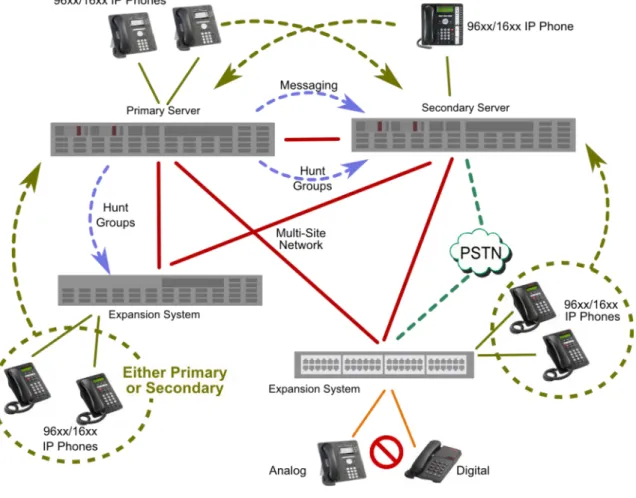
A single Server Edition Primary server supports redundant Hard Disk Drives and Power Supply Units. You can also configure it to use alternative trunks using the IP Office Alternate Route Selection feature when the trunks are busy or there is a failure of the trunk. To provide resilience at any level you need to add a Server Edition Secondary server.
Server Edition Secondary server provides resilience for hunt groups, messaging and all H.323 extensions or users of Server Edition Primary without any administration. Server Edition Secondary does not provide resilience forAvaya one-X® Portal for IP Office .
Adding an Server Edition Expansion System with H.323 extensions or users enables you to backup those on either the Server Edition Primary or Server Edition Secondary servers. The dual star Multi-Site Network topology when a Server Edition Secondary server is present supports diverse routing between all nodes.
At all times, no server hardware is forced to be idle, enabling you decide whether to provide true redundancy, or shared resource resilience.
IP Office Server Edition Solution provides IP extension resilience for Avaya H.323 16xx, 96xx and 96x1 phones. The Server Edition Expansion System with the integrated DHCP server enable upgrade and configuration support, installing and configuring resilient phone is a straightforward operation and can even support two systems on the same LAN subnet.
Figure 4: Resilience overview
Components that are resilient
The following components of IP Office Server Edition Solution are resilient: • IP Office Server Edition
• Voicemail Pro server • IP Phones
• Inter IP Office device links • Trunks
• Incoming Call Routes
Highlights of a resilient multi-site network
• Transparency for most of the features • Resilience of users and hunt groups • Back up system for Voicemail Pro
• Network topology provides resilience • None of the hardware is idle
• Simple to activate resilience
Resilience management
You can continue to administer and manage the failure of IP Office Server Edition server and devices in an IP Office Server Edition Solution network through the Server Edition Secondary server. This provides management without the offline capability, and a facility to realign the configuration after the outages have been resolved. The resynchronization feature highlights the time and source of configuration change and enables the administrator to decide which change set to retain. In addition, you can directly manage each device and application to allow configuration whilst isolated. You can use the resynchronization capability to realign the configurations after the devices are reconnected.
Backup and Restore
IP Office Server Edition supports a variety of backup and restore features to preserve and optionally reinstate both configuration and data in the event of an equipment failure. Server Edition Primary offers a flexible and secure, manual or scheduled solution backup to an external server which can optionally be Server Edition Secondary. Each server and expansion system including Application Server with Avaya one-X® Portal for IP Office can be configured
to copy configuration, mailbox, and call recordings data. In addition local daily backups are supported.
Highlights of backup and restore IP Office Server Edition Manager
• Saves all IP Office device configuration and templates on Server Edition Primary.
• Save IP Office device configuration and templates to a local drive of a computer. • Restore IP Office device configuration
from a local drive of the computer or Server Edition Primary.
Server Edition Primary
• Solution Backup or Restore using solution administration web portal for each
component or the whole solution. You can take a backup of up to 15 sets on a local drive
Highlights of backup and restore
or a remote SCP file server that can be another IP Office Server Edition server. • Recover a corrupted or failed server
configuration, application and user data. • Configure each local application backup to
the local drive, and use default or predefined directories.
Server Edition Expansion System (V2)
• Back up to the local SD card. • Back up manually through phone,
Manager or automated 24 hr - active by default.
• Back up configuration, security, and binary files as a single file set.
• Restore through IP Office Server Edition Manager or phone command or
automatically as a result of boot failure.
Voicemail Pro
• Back up to a local drive of Server Edition Primary server.
• Back up manually or periodically (daily, weekly, monthly) through Voicemail Pro Client.
• Options to backup content which can include configuration and messages
• Back up multiple backup file sets up to a maximum of 4 file sets.
• Restore through the Web Control Panel. The restore is a complete backup data set.
Server Edition Expansion System(L)
• Back up to the local hard drive. • Back up manually through Phone,
Manager or automated 24 hr - active by default.
• Back up configuration, security, and binary files as a single file set. • Restore through a Manager or phone
command, or as a result of boot failure.
Avaya one-X® Portal for IP Office
• Back up the Avaya one-X® Portal for IP Office database, Presence and Mobility settings to a local drive or an FTP server.
• Back up manually using Avaya one-X® Portal for IP Office by logging in as a Superuser. • Back up multiple backup file sets
(unlimited).
• Restore using Avaya one-X® Portal for IP Office by logging in as a Superuser.
Security
IP Office Server Edition Solution is a reliable and secure solution. For more information about security, see IP Office Security Guide.
Highlights of the security in IP Office Server Edition Solution
Platform
• IP Office for Linux Operating system is CentOS 6.3 based on Red Hat Enterprise Linux that is further hardened for defaults, packages, and users.
• Operating system of Server Edition Expansion System (L) is developed for IP Office. The operating system is simple, stable, and reliable.
• Components that are secure: - Software security engine for all the
components.
- Hardware security engine for Office Server Edition Expansion System (V2).
- Internal Access Control Engine polices for external service requests and internal applications.
IP Office Server Edition Manager
Most of the administrative data is in the IP Office
• Transport Layer Security (TLS) secures the communications between IP Office Manager and IP Office and insecure ciphers are disabled.
• Provides Role based user access control (RBAC).
• Provides comprehensive user account and password controls.
• You can enable a PKI Trust domain. • The system generates warnings
messages if administrative passwords are set to default. The system sends alarms or login failure.
• The system records all the accesses in the audit trail.
• You can disable unused services and ports such as HTTP.
Administration User Accounts
The Administration user accounts can be controlled for:
• Password complexity
• Previous password history (administrative accounts only)
• Change password on next login • Idle lockout and login failure lockout • Time and date the account expires
(administrative accounts only)
Single Sign On (SSO)
• Administration credentials to log in to Linux Platform settings are securely transferred to Manager, SSA,Voicemail Pro client.
• All administrative logins on all IP Office components including Voicemail Pro and Avaya one-X® Portal for IP Office use security settings of IP Office. • Server user management feature in
Web Manager synchronizes
administrative user credentials with all components of IP Office including Voicemail Pro and Avaya one-X® Portal for IP Office in IP Office Server Edition Solution.
Highlights of the security in IP Office Server Edition Solution
Audit trail
• Each IP Office system maintains an audit trail of access and configuration change.
• Linux Platform settings also maintains an audit trail.
• The IP Office system displays the audit trail in IP Office Server Edition Manager and SSA.
Note:
The system does not maintain an audit trail of Voicemail Pro and Avaya one-X® Portal for IP Office.
Public Key Infrastructure (PKI)
• IP Office supports X.509 certificates • The Trusted Certificate Store can be
configured and Identity certificate is available.
• The system performs a Certificate Signing Request (CSR) through Simple Certificate Enrollment Protocol
(SCEP).
• The system creates a self-signed Identity certificate that can be copied to all HTTPS/TLS interfaces.
• Flexible controls to enforce Trust domain on specific services. Extended trust controls for PKI .
• Web Management Console,Voicemail Pro and Avaya one-X® Portal for IP Office on Linux support X.509 certificates, but not PKI.
LAN
• The servers and expansion systems are thoroughly tested for resistance to Denial of Service and other attacks
Server Edition Expansion System (V2) supports a configure able Firewall
• Time profiles on Server Edition Expansion System (V2) only
• Static NAT and NAPT in Server Edition Expansion System (V2)
• ICMP Filtering
• L2TP/PPP VPN on Server Edition Expansion System (V2) only
• PAP or CHAP password exchange • Idle or quota timeout
• IPSec VPN on Server Edition Expansion System (V2) only
Endpoints
• Username and PIN or password or login code are in the IP Office
configuration, and you can administer these through IP Office Server Edition Manager
• You can use HTTP or HTTPS for settings and firmware upgrades • You cannot make calls unless you are
Highlights of the security in IP Office Server Edition Solution
Call Barring
• You can configure flexible call barring controls using login name or account code to allow internal, local, national or international calls on the basis of every user and system.
• You cannot use speed dials, transfers, forwarding, and conferences to bypass controls.
• You can enable trunk to trunk calls using IP Office Server Edition Manager. Trunk to trunk calls are disabled by default.
• SIP trunk configuration for incoming calls must match URIs..
• You can use SMDR (CDR) to create a record of all calls.
Voicemail Pro client
• You can enforce user login with Personal Identification Number (PIN) and configure complexity for the PIN. • You can enforce PIN change when the
user logs in for the first time. • Idle timeout.
Remote access
You can access IP Office Server Edition Solution remotely. Some of the components that can be accessed remotely are:
• System Status Application
- RBAC username and password - Password is securely exchanged - SSA port can be disabled
• System Monitor
- Access after password exchange • SSL VPN or IP Office Support Services
- The system uses HTTPS and TLS channel - Password is securely exchanged
- Prompts for periodic re keying • Mobility and Avaya one-X® Portal clients
- User name and password is the IP Office configuration, and administered through IP Office Server Edition Manager
Licensing
IP Office Server Edition Solution leverages the IP Office licensing method with a variety of enhancements to simplify management and operation. Many existing IP Office licenses are redundant in IP Office Server Editionas a new edition license enables a host of features that previously required many separate licenses.
• Centralized administration of all the licenses through IP Office Server Edition Manager enables you to configure the licenses in one place, and SSA gives a complete overview of current license status and operation.
• Server Edition Primary server acts as a central host for all common licenses • Central pool for efficient allocation and cost effective procurement
• Grace periods to support network outages
• Extensive alarms and status to provide visibility of operation
• Purchase the licenses online through Avaya Direct International (ADI)
Licensing in IP Office Server Edition Solution
Highlights of licensing in IP Office Server Edition Solution
• Centralized administration of the licenses through IP Office Server Edition Manager
• Centralized allocation for all common licenses • You need a Server Edition license for each of the
device to enable operation
• You need a Server EditionUpgrade license for each device to enable operation when you upgrade from release 8.1
• Server Edition Primary acts as a central host for all the licenses • You can purchase the licenses
online through Avaya Direct International (ADI)
• The system sends alarms through SSA, SNMP, Syslog, and email when you over allocate the license. The system also sends reminders at the beginning and end of the grace period.
Related topics:
Centralized licensing on page 28
Local licensing on page 29
Server Edition licensing on page 30
centralized licensing is designed to operate without any license shortfall and the Server Edition Primary allocates on a first come first served basis, after reserving all the licenses necessary for its own operation.
All central licenses are issued to the System ID (Feature Key Serial Number) of the Server Edition Primary server. All IP Office for Linux platforms have a System ID derived from a hardware signature. This section describes about how licensing is centralized in IP Office Server Edition Solution
Highlights of centralized licensing
• Common licenses such as Server Edition, endpoints, SIP trunk channels, Office Worker, Power User, and UMS Web Services are located in the Server Edition Primary
• Avaya IP Office System Status Application (SSA) provides detailed status of the licenses that are allocated
• Server Edition Primary allocates the licenses to Server Edition Secondary Server Edition Expansion System on request
Local licensing
Some of the licenses are located on the local device and are administered centrally through IP Office Server EditionManager. SSA provides the status of the licenses that are allocated on the devices.
Server Edition Expansion System (V2) • TAPI Wav
• PRI Channels • CTI Link Pro • IPSec Tunnelling • Receptionist
Note:
The TAPI Wav, PRI Channels, and IPSec Tunnelling cannot to allocated on a Server Edition Primary, Server Edition
Secondary, orServer Edition Expansion System (L).
Server Edition Primary and Server Edition Secondary
• Receptionist
Server Edition Primary • Messaging Ports
• Messaging Text To Speech (TTS) Pro • Messaging Recordings Administrators
Supported licenses
License Server Edition Primary License Location
Server Edition upgrade New On Server Edition Primary
Server Edition Existing On Server Edition Primary
Avaya/3rd Party IP Endpoint Existing On Server Edition Primary
Note:
In Server Edition, the system uses these licenses for configured endpoints rather than just the registered endpoints.
Power User Existing On Server Edition Primary
Office Worker Existing On Server Edition Primary
Office Worker to Power User upgrade
New On Server Edition Primary
Receptionist Existing On Server Edition Primary or
Server Edition Secondary or Server Edition Expansion System
SIP Trunk Channel Existing On Server Edition Primary
UMS Web Services Existing On Server Edition Primary
Additional Messaging Ports Existing On Server Edition Primary Messaging TTS Professional Existing OnServer Edition Primary Recordings Administrator Existing OnServer Edition Primary Additional PRI Channels Existing On Server Edition Expansion
System (V2)
CTI Pro Existing On associated device
CTI Wav users Existing On Server Edition Expansion
System (V2)
IPSec Tunnelling Existing On Server Edition Expansion
System (V2)
Material Code Description
275658 IPO R9 SE ADI LIC
You need oneServer Edition licence for each of the Server Edition Primary, Server Edition Secondary, and Server Edition Expansion System. Some of the features of theServer Edition license are:
• You can enable basic operation (without theServer Edition license you cannot make any calls)
• You can not make calls unless there are valid licenses.
• You can add two additional messaging ports to Server Edition Primary • You can enable unlimited voice networking channels
• You can enable meet-me conferencing, advanced messaging, automated attendant, call recording, conditional call routing, and queue announcements
• You can enable basic mobility features such as Mobile Twinning, call control, and callback.
Note:
You need one upgrade license for each node upgraded from Release 8.1 to Release 9.0. The upgrade license is centralized, located on Server Edition Primary.
User licenses
In addition to the separate Receptionist license, the following user features can be enabled: User License
Feature
Base User
Office Worker Power User Notes
Mobility Features Yes Yes Yes Mobile twinning, mobile call control.
One-X Mobile Essential one-X Portal
Services
- Yes Yes one-X Portal for IP Office
support for users
one-X Mobile Preferred (iOS/ Android)
UMS (voicemail) Services
- Yes Yes MAPI (Microsoft Exchange) or
SMTP voicemail integrations Flare Experience - Yes Yes Avaya Flare® Experience for iPad Devices or Avaya Flare® Experience for Windows TTS Email
Reading
- - Yes Listen to emails using TTS
Telecommuter options
- - Yes one-X Portal Telecommuter
User License Feature
Base User
Office Worker Power User Notes
Remote Worker - - Yes Remote H.323 extensions.
IP Office Softphone
- - Yes IP Office Video Softphone
Related topics:
Unsupported licenses on page 32
Unsupported licenses
License Reason
Small/Large System Upgrade First phase of Server Edition
Essential & Preferred Edition All relevant features enabled in the Server Edition license
IP500 Voice Networking Unlimited Voice Networking enabled in the Server Edition license
Teleworker, Mobile Worker licenses Simplification - features supported in Office Worker and Power User
Embedded Messaging Ports Embedded messaging not supported on Server Edition
CCR Agent and Supervisor CCR not yet supported on Server Edition Voicemail ProNetworked Messaging,
Database interface, Visual Basic Script
Not supported on Voicemail Pro for Linux CCC, Phone Manager, VCM channels,
Mobility
Legacy licenses
IP Office Server Edition Solution versus Avaya Aura Midsize
Enterprise Solution
The following table compares the key features ofIP Office Server Edition Solution and Avaya Aura® Midsize EnterpriseSolution:
Feature Avaya Aura Midsize Enterprise (with no
UC add-ons)
Server Edition Server Edition Comments
Capacity 250 locations 32 locations
2400 users on single server
2000 users per server
Performance BHCC 18,000 BHCC
2000 concurrent calls 1500 concurrent calls Concurrent calls direct media IP
Solution Complexity Medium Low Just single server for
1500 users, full UC, one Manager
CTI Solution wide via
AES
Per device using IPO CTI interfaces:
Future plan to support solution CTI using REST web services via one-X Portal
- TAPI 2/3 - TAPI 2/3
- CSTA - Custom (XO)
- ASAI - etc
Resilience Full HA for 5x 9’s plus availability
No HA Geo-redundancy for
all components except one-X Portal Typical 4x 9’s
availability
Security SRTP Security limited to
admin interfaces (TLS) SRTP planned for next release 802.1x No true SSO SSO
IP Networking IPv4/IPv6 IPv4
Telephony Networking CAC CAC Connection preservation Connection preservation
Topology Star with G450/
G430/B5800 gateways Single/double star Existing upgrade path Upgrade from CM/ G4x0 Upgrade from IP Office
Future evolution path Full Aura Server Edition only Endpoint support Mix of Avaya and 3rd
party endpoints:
Mix of Avaya and 3rd party endpoints:
Server Edition supports more
Feature Avaya Aura Midsize Enterprise (with no
UC add-ons)
Server Edition Server Edition Comments
- IP (H323+SIP) endpoint types than
any other product - IP (H323+SIP)
- TDM - TDM
- Analogue - Analogue
Administration tools Unified Aura Manager (SMGR) Unified IP Office Manager (IPO Manager) Software Only Solution No Yes (Controlled introduction at present) Virtualized environment
Yes (Xen) Yes (VMware)
Contact Centre Yes – 1000 agents. Integrated Contact Center (CC-Elite), Avaya Aura Contact Center via integrated AES Services
No
Audio Conferencing Max 6 party Note: Add AAM for higher capacity and Audio/Web/Video conferencing
Max 128 party/256 channels per server/ expansion
Max channels?
IP DECT Up to 1000 Up to 120 per Server
or Expansion system
3840 maximum Voicemail 1000 VM channels 150 VM channels
2400 mailboxes 2000 mailboxes
Web Conferencing With AACC No In roadmap
Video conferencing With AACC With Scopia Mobility One-X Mobile Lite,
CES for full mobile convergence
One-X Mobile Lite Rich UC with one-X Mobile Preferred Desktop clients/Soft
Clients
Flare Communicator for iPad, Flare Experience on ADVD, IP Office Video Softphone,
Flare Communicator for iPad and
Windows IP Office Video Softphone
Feature Avaya Aura Midsize Enterprise (with no
UC add-ons)
Server Edition Server Edition Comments
Desktop integration Outlook,
Salesforce.com, SAP, IBM Lotus
One-X Portal thin client Outlook plugin Salesforce plugin Presence and IM Integrated Avaya
Aura Presence Server XMPP based Presence server – telephony presence, calendar presence, custom presence status Presence and IM Federation
Google Talk and MS Lync
With Google Talk
IP Office Server Edition versus Preferred or Advanced
Edition
The following table compares the key features of IP Office Server Edition and Preferred or Advanced Edition.
Feature Preferred/Advanced Edition
Server Edition Server Edition Comments
Capacity 32 locations 32 locations
1000 users total 2000 users total
7200 BHCC 18000 BHCC
SCN/Multi-Site Free from Star, mesh, chain SCN trunks anywhere SCN trunk channels licensed
Single or double star No additional SCN trunks Unlimited SCN trunk channel licenses Restricted topology allows many optimizations Other H.323 trunk types still allowed Administration Limited centralized
(SCN Manager) Fully centralized (Server Edition Manager) Consolidated mode for complete centralization. Non-consolidated mode for per device configuration Licensing Individual or
distributed
Central pool All common licenses centralised.
Feature Preferred/Advanced Edition
Server Edition Server Edition Comments
Some still distributed. All administered centrally
User Profile Licenses Telecommuter Office Worker Mobile Worker Power User Office Worker
Power User
O/G Call Routing Complex, no default assistance
Simplified Server Edition Manager and default routes allow simpler O/G call routing I/C Call Routing Complex, no default
assistance
Simplified Common ICRs allow simpler I/C call routing and resilience Time Free form/complex Simplified by default,
can still be freeform
Primary Server acts as solution time server by default System directory Free form/complex Simplified by default,
can still be freeform
Primary Server acts as solution directory server by default Fax transport IP Office T.38 fax
transport
G.711 fax transport No need to configure codec sets to
enforce; G.711 fax transport used automatically SIP Trunk Direct
Media to remote device across SCN
None Direct media
supported to remote H.323 and IP DECT endpoints
Includes SIP Info and RFC 2833 support No in-band DTMF support
Hunt Groups Freeform Hunt groups only on
primary
Performance optimised for VMPro location (also on Primary)
Automatic resilience when secondary present.
SoftConsole Up to 4 per IP Office Up to 10 on Primary only, 4 per
Overcomes SoftConsole IP
Feature Preferred/Advanced Edition
Server Edition Server Edition Comments
maximum 32 per solution
connectivity and SCN limitations Add/remove device Manual Integrated through
Server Edition Manager
Auto population of Multi-Site links and common
configuration Device Status/
connectivity
Not checked Access and interconnects checked by SE Manager Immediate indication if device offline or incorrectly networked IP Office Initial configuration
Manual Automated with Initial Configuration Utility (ICU)
Remote install technician without IP Office knowledge
Upgrades Individual Centralized All expansion
systems upgraded at same time
Backup/restore Individual per IP Office and per application
Centralized
Voicemail Pro Ports 40 150 Voicemail, recording,
Auto attendants Voicemail Pro TTS
Ports
40 40
Embedded VM/AA Supported Not supported Central VMPro only Voicemail Pro VRL,
VRLA
Supported Supported
Visual Basic Scripts, Database access, Web campaign management Supported on Windows VMPro server
Not supported Campaigns are supported, but not the web access for management
CCR Supported Not supported
Software distribution Admin DVD + Apps DVD Single iso distribution, VMware OVA Non English TTS separate DVDs Software Only Solution No Yes (Controlled introduction at present) Single management portal
No Yes – Web Manager
on Primary Server
Backup portal on Secondary Server
Feature Preferred/Advanced Edition
Server Edition Server Edition Comments
IP Office
DevConenct/SDKs
Supported Supported as a set of individual IP Office devices
No whole-solution SDK supported at present
Templates Analogue and SIP trunks only, local to the Manager PC
Line, Extension*, User*, Hunt Group, Time Profile, Firewall Profile, IP Route, Service, Tunnel, ARS. Centrally stored *Multiple creation option
Hardware components
Server Edition Primary is the only hardware component you require:
• You can add Server Edition Secondary server anytime to increase user capacity and for resilience • The Server Edition Secondary server can be in a local or remote location
• Expand TDM, analog, and digital capabilities with an Server Edition Expansion System(V2) • The Server Edition Expansion System can be in a local or remote location
• The Server Edition Expansion System adds IP capacity
• You can add a separate Avaya one-X® Portal for IP Office at any time to increase the capacity of
Avaya one-X® Portal for IP Office and for higher Server Edition Primary BHCC
• Rest of solution engineering is the same as IP Office Multi-Site Network (SCN) with a star or double star topology
Example deployments
Centralized IP only
One Server Edition Primary located at the Head Quarters.
Distributed IP only
1. One Server Edition Primary located at the Head Quarters.
2. One Server Edition Secondary located at the remote site.
Centralized IP, Analog, and Digital
1. One Server Edition Primary located at the Head Quarters.
2. One Server Edition Expansion System (V2) located at the Head Quarters.
Distributed IP, Analog, and Digital
1. One Server Edition Primary located at the Head Quarters.
2. One Server Edition Expansion System located at the Head Quarters.
3. One Server Edition Expansion System located in each of the remote sites.
Software-only distribution
Software-only Server Edition (that is, no servers bought from Avaya) is available to customers only under exceptional circumstances; any exceptions will be approved on a case by case basis. You can use Software-only version by using the following Server Edition license and DVD:
Material Code Description
Material Code Description
specification
Server specifications
The following tables list the minimum server specifications for the IP Office Server Edition Solution:
Server option Large server #1 Large server #2 Large server #3
Chassis Dell R620 1U HP DL360G7 1U Dell R610 1U
Processor Xeon E5-2630, 2.3 GHz
2 x E5620, 2.4 GHz 2 x E5620, 2.4GHz Memory
(RAM)
32 GB 12 GB 12 GB
Hard disk drive 2 x 600 GB 2x 300 GB, 10K 2x 300 GB, 10K RAID RAID 1 Hot swap RAID 1 Hot swap RAID 1 Hot swap RAID
Controller
P410i H700
Power Supplies
2x 460W AC Hot swap 2x 502W AC Hot swap NICS 4x GB full duplex 4 Port, Motherboard 4 Port, Motherboard Optical Drive 1x DVD +/- RW 1x DVD+/-RW, SATA,
INTERNAL
1x DVD+/-RW, SATA, INTERNAL
PCI Type 1-LP X8 PCIe & 1-FL/FH
X16 PCIe Riser
2 x8 Gen2 Slots (PCIe)
Server option Small server #1 Small server #2
Chassis HP DL120G7 1U Dell R210 1U
Processor 1 x E3-1220, 3.1 GHz 1 x E3-1220, 3.1 GHz
Memory (RAM) 12 GB 12 GB
Server option Small server #1 Small server #2
RAID RAID 0 (none) RAID 0 (none)
RAID Controller P212, 256 MB On board
Power Supplies 1 x 400 W AC 1 x 502 W AC
NICS 2 Port, Motherboard 2 Port, Motherboard
Optical Drive 1x DVD+/-RW, SATA, INTERNAL 1x DVD+/-RW, SATA, INTERNAL PCI Type 1-HL/LP X8 PCIe & 1-FL/FH X16
PCIe Riser
1 x16 Gen2 Slots (PCIe)
Note:
In some geographies, where 12GB of RAM is not a standard Dell option use 16GB RAM. You can configure a DL360 as Server Edition Primary, Server Edition Secondary. You can also configure a DL360 as Server Edition Expansion System (L), or an Application Server with only Avaya one-X® Portal for IP Office to increase performance or capacity.
You can configure a DL360 as Server Edition Primary, Server Edition Secondary, Server Edition Expansion System, or a Application Server with only Avaya one-X® Portal for IP
Office.
The Server Edition Primary and Server Edition Secondary must be on the same platform. You can also configure an existing IP500 V2 as a Server Edition Expansion System (V2). You cannot configure an external Voicemail Pro to Server Edition Primary or Server Edition Secondary.
You can configure a combination of virtual and native nodes. However, Server Edition Primary or Server Edition Secondary must be the same.
You cannot configure a Avaya one-X® Portal for IP Office server or IP500 V1 as a component
of the solution. Related topics:
Operating system support on page 42
Operating system support
Server support
The following server operating systems support IP Office Server Edition Manager: • Windows Server 2012 (64 bit only)
Client support
The following client operating systems support IP Office Server Edition Manager: • Windows 7 (32 and 64 bit)
• Windows 8 (32 and 64 bit)
IP Office Server Edition Solution supports a maximum of 2000 users or extensions.
The following table lists the performance and capacity requirements when IP Office Server Edition Solutionis deployed on an appropriate platform as defined in the Reference Configuration guide.
Feature 9.0 Comments
Users
Maximum Solution Users 2000 ‘NoUser’ and RAS Users not counted
Note:
1100 Series and 1200 Series phones are not supported if the solution exceeds 1000 users. The minimum hardware
deployment required is a Primary Server and Secondary Server or a Primary Server and two IP500 v2 Expansion Servers.
A single, central SoftConsole can only see busy status updates for up to 1680 users. Above 1680 users, a local SoftConsole can be placed at each node to provide complete coverage.
Maximum users per DL360 (Primary/ Secondary)
1500 Maximum users per DL120/R210
(Primary/ Secondary)
750 Maximum users per DL120/R210
(Expansion)
750 Maximum users per IP500 V2 384
Extensions
Total Extensions 2000 Maximum extension per DL360
(Primary/ Secondary)
1500 96x1/16xx extension type Maximum extensions per DL120/R210
(Primary/ Secondary)
Maximum extensions per DL120/R210 (Expansion)
750 Maximum DECT R4 Extensions per
device
384 DL360, DL120/R210 or IP500 V2 Maximum additional button module
buttons per system, Linux
2048 Regardless of whether the buttons are configured for use or not Maximum additional button module
buttons per system, IP500 V2
1024 Regardless of whether the buttons are configured for use or not
Multi-Site Network
Maximum devices 32
Maximum servers 2 2 Core Servers (Primary and Secondary)
Maximum expansions 30
Trunks
Registered SIP Trunks, DL360 (Primary/Secondary)
250 Maximum number of SIP trunks not number of SIP trunk channels Registered SIP Trunks, DL120/R210
(Primary/Secondary)
125 Registered SIP Trunks, DL120/R210
(Expansion)
125 Registered SIP Trunks, IP500 V2 125
Maximum SIP Channels, DL360 (Primary/Secondary)
512 (direct media) 256 (indirect media)
See also concurrent VoIP call capacity below
Maximum SIP Channels, DL120/R210 (Primary/Secondary)
256 (direct media) 128 (indirect media)
See also concurrent VoIP call capacity below
Maximum SIP Channels, DL120/R210 (Expansion)
256 (direct media) 128 (indirect media)
See also concurrent VoIP call capacity below
Maximum SIP Channels, IP500 V2 128 (direct media) 120 (indirect media)
See also concurrent VoIP call capacity below
Maximum trunk channels per SCN, Linux
250 Links between Server Edition nodes Maximum trunk channels per SCN,
IP500 V2
250 Links between Server Edition nodes
Call Processing
DL360 Server call capacity (BHCC) 18000 with no one-X Portal users active,
or remote one-X Portal server
Maximum: 96x1 H.323 users/ extensions, total users/extension, active VM channels, active