A GROUPWARE INTERFACE TO A SHARED FILE SYSTEM
A Thesis by
TIMOTHY COLLIN FALTEMIER
Submitted to the Office of Graduate Studies of Texas A&M University
in partial fulfillment of the requirements for the degree of MASTER OF SCIENCE
December 2004
A GROUPWARE INTERFACE TO A SHARED FILE SYSTEM
A Thesis by
TIMOTHY COLLIN FALTEMIER
Submitted to Texas A&M University in partial fulfillment of the requirements
for the degree of MASTER OF SCIENCE
Approved as to style and content by: ________________________________ Du Li (Chair of Committee) ________________________________ Frank Shipman (Member) ________________________________ Don Halverson (Member) ________________________________ Valerie E. Taylor (Head of Department) December 2004
ABSTRACT
A Groupware Interface to a Shared File System. (December 2004) Timothy Collin Faltemier, B.S., University of Illinois – Urbana
Chair of Advisory Committee: Dr. Du Li
Current shared file systems (NFS and SAMBA) are based on the local area network model. To these file systems, performance is the major issue. However, as the Internet grows, so does the distance between users and the Local Area Network. With this increase in distance, the latency increases as well. This creates a problem when multiple users attempt to work in a shared environment. Traditionally, the only way to
collaborate over the Internet required the use of locks.
These requirements motivated the creation of the State Difference
Transformation algorithm that allows users non-blocking and unconstrained interaction across the Internet on a tree based structure. Fine Grain Locking, on the other hand, allows a user the ability to set a lock on a character or range of characters while using a form of the transformation algorithm listed above. This thesis proposes an
implementation that integrates these two technologies as well as demonstrating the effectiveness and flexibility of State Difference Transformation.
The implementation includes two applications that can be used to further research in both the transformation and locking communities. The first application allows users to create tests for SDT and Fine Grain Locking and verify the correctness of
the algorithms in any given situation. The second application then furthers this research by creating a real-world groupware interface to a shared file system based on a client-server architecture. This implementation demonstrates the usability and robustness of these algorithms in real world situations.
TABLE OF CONTENTS
Page ABSTRACT……… iii TABLE OF CONTENTS……… v LIST OF FIGURES……… vi CHAPTER I INTRODUCTION……….. 1 II RELATED WORK………. 3NFS (Network File System) / Samba……….. 3
AFS……….. 4
OT / SSD……….. 5
Fine Grain Locking………... 7
III CONCEPTUAL DESIGN / USER REQUIREMENTS………. 8
IV SDT ALGORITHM / FINE GRAIN LOCKING………... 12
SDT Algorithm……… 12
V INTERFACE FEATURES………. 21
SDT Situation Tester………. 21
SDT File System Server……… 23
SDT File System Client……… 26
VI CONCLUSION……….. 29
REFERENCES……….. 30
LIST OF FIGURES
FIGURE Page
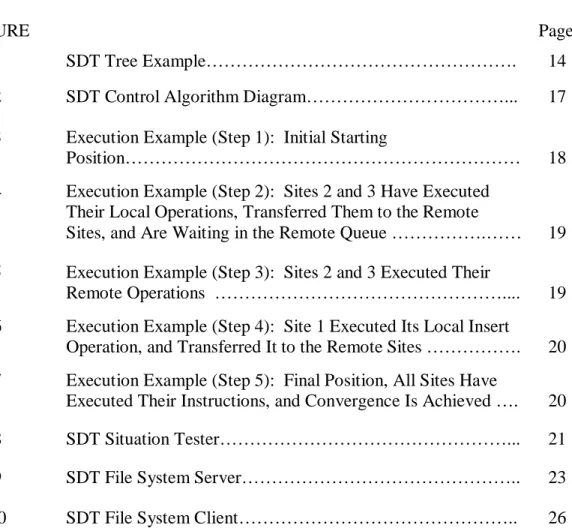
1 SDT Tree Example………. 14
2 SDT Control Algorithm Diagram………... 17
3 Execution Example (Step 1): Initial Starting
Position……… 18
4 Execution Example (Step 2): Sites 2 and 3 Have Executed Their Local Operations, Transferred Them to the Remote
Sites, and Are Waiting in the Remote Queue ……….…… 19 5 Execution Example (Step 3): Sites 2 and 3 Executed Their
Remote Operations ……….... 19
6 Execution Example (Step 4): Site 1 Executed Its Local Insert
Operation, and Transferred It to the Remote Sites ………. 20 7 Execution Example (Step 5): Final Position, All Sites Have
Executed Their Instructions, and Convergence Is Achieved …. 20
8 SDT Situation Tester………... 21
9 SDT File System Server……….. 23
CHAPTER I
INTRODUCTION
Current shared file systems NFS, Samba, and AFS, are based on the idea that you are on a network. To these file systems, performance is the major issue. Their purpose is to store and serve data to a network environment where the latency and delays are minimized. Today, this limited view of a network is becoming dated. As the Internet grows, so does the distance between users and the local area network model that we were accustom to is no longer sufficient for business today.
To move beyond these limits set by traditional network file systems, we must be able to communicate over long distances. In the past, this has caused numerous
problems due to the unknown latency that is inherent in the design of the Internet. Part of this problem is the fact that the file systems are implemented in a client server infrastructure. Communication follows the logic, a client makes a change, it is sent to the server where the change is executed, and then that information is sent to the remote users. Over long distances the latency for these operations can be immense [Ahuja 1990]. On the other hand, studies [Mauve 2000] have shown that local response is one of the most commonly cited criteria of a program by users.
Operational Transformation (OT) allows the users to execute commands instantly on their local machines (thereby allowing for a very responsive system), and then
transmits the change to the server (where it is kept in case late joiners arrive), and then ____________
This thesis follows the style and format of ACM Transactions on Computer-Human
the server transmits those changes to the remote sites (where they execute them as the arrive and concurrency issues are dealt with at that point locally). By using an algorithm based on OT, I believe that mitigating results can be shown.
This algorithm is interesting due to the fact that as long as users start at the same state, no matter what the latency of the network is, the data should eventually converge which is something that gives this approach appears to be more promising in its ability to solve these problems.
Another issue with current network file systems (NFS in particular) is their ineffectiveness in using locks [Suess 1995]. Their inability in certain implementations to lock remote directories and their lack of native concurrency control makes group work difficult [Li 2004a]. I believe that locking is not only possible in a distributed file system but is necessary. To accomplish this task, we plan to implement a new locking algorithm based on OT [Sun 2002b] and integrate it with the new file system that will allow users to lock files, directories, or a range of directories.
Finally to test these algorithms and theories in a working environment, we have created a flexible, user-friendly, and extendable framework that implements a version of the OT algorithm in a file system infrastructure. Currently there are no such applications available that demonstrate the theoretical ideas and algorithms listed throughout this paper.
CHAPTER II
RELATED WORK
This section of the thesis will describe the current work related to shared file systems and operational transformation. The first section describes how NFS, Samba and AFS operate as the basis of comparison to traditional shared file systems. The second section describes the current OT based work relevant to this thesis. The final section describes the difference between the type of locking that we have implemented and traditional locking that is available in current systems.
NFS (NETWORK FILE SYSTEM) / SAMBA
NFS and Samba are the current defacto standards for network file systems. First, NFS was created by Sun as a means of sharing drives over the Internet using TCP/IP. This was an incredibly novel approach in the 1980s. Distance no longer presented a problem when sharing data. The NFS UNIX only protocol is based on remote procedure calls (RPC) that allow users on local systems to interact with remote systems as if it was local. A major problem with this protocol is the fact that it is very inefficient [Raynal 2002] when it comes to communicating over the Internet. Primarily designed for Local Area Networks, NFS relies heavily on the ability to remain constantly connected to the remote host. This problem is further highlighted when the distance between the
Samba on the other hand is very similar to NFS in its desire to share files over the Internet. This file system, designed to link Windows and UNIX systems in a
seamless manner, allows a user on either system to work freely in their own environment with the remote files available. The issue with this system, like that of NFS, is that serious problems occur when multiple users attempt to work on the same files or in the same directories. This is a major reason why users have their own home directories where the majority of their file operations occur. Samba accomplishes this multi-user ability through the use of locks. Two types of locks are available, exclusive (only the locking user can access the file) and shared (users attempting to alter data receive a warning message and are asked to verify changes).
AFS
AFS is a Unix based distributed network file system that allows remote users to share and access files anywhere in the world as if they were on their local machine. The AFS file system works by creating a root shared directory /afs. By looking at the
contents of this directory, you will see all of the files that are located in the AFS cells. These cells can be stored either locally or remotely [Blackburn 1998] and the files can be operated on with traditional commands (cd, rm, cp, mkdir, rmdir, etc..). One of the great strengths of AFS is the fact that is has location independence. This means that unlike traditional file systems, where the user had to know the exact file server information (hostname, and mapping information), the user only needs to know the
pathname of the file. The following situation is an example of why AFS is superior to NFS.
To understand why such location independence is useful, consider having 20 clients and two servers. Let's say you had to move a filesystem "/home" from server a to server b.
Using NFS, you would have to change the /etc/filesystems file on 20 clients and take "/home" off-line while you moved it between servers.
With AFS, you simply move the AFS volume(s) which constitute "/home" between the servers. You do this "on-line" while users are actively using files in "/home" with no disruption to their work.
The locking however in AFS like NFS and Samba is very rigid. It allows you to lock by file, or set access restricts as to who can access which files, however it is unable to allow multiple users access to the same file. In addition, if a parent directory is locked, as are all of the children.
OT / SSD
OT was originally created to allow for concurrent word processing over the Internet. The main design goal of this algorithm was that local responsiveness is paramount when using an application. OT allows for the integration of remote
commands in a seamless manner without user interaction and without requiring the user to be constantly connected to the Internet. Designed for collaborative use, the OT algorithm was based around three major data manipulation goals.
1) Convergence: After all of the changes have been made at all of the
2) Causality Preservation: If two operations A and B are given, and A
comes before B, then that order must be reflected on all of the remote sites.
3) Intention Preservation: If two sites are working on the same
document, and site 1 changes the state of the tree, and site 2 changes the state of the tree before knowing that site 1 had already done so, the execution of the remote events must be preserved. For example, if site 1 wants to change the first node, but site 2 had already added a node there, the algorithm should take consider the change node and modify the incoming operation to reflect the new state.
Shared Semantic Directories (SSD) is another similar project. SSD allows multiple users to connect to a centralized server, and work in a manner similar to the Windows and UNIX file browser. This program gives users more options when dealing with the individual files, essentially giving the user an almost shared whiteboard feel. A user could upload a file to the server and annotate it for other users to see. This system however lacks an effective consistency control mechanism. Locking was implemented to prevent users from accessing certain files, but for the most part if multiple users worked together at the same time in the same location problems could occur. Due to its desire to be locally responsive, SSD utilized a replicated communication system. While this design is very responsive, synchronization and convergence can occasionally be an issue.
FINE GRAIN LOCKING
Traditional locking is used to ensure that only one user at a time is allowed to make updates to a certain piece of data. By nature, this prevents concurrent access and therefore presents a challenging problem for groupware applications. Fine grain locking [Sun 2002b] is a technique that extends traditional locking to alleviate some locking issues. Originally created for group text editing, it allows a user to update a certain piece of text immediately after requesting the lock (contrary to traditional locking mechanisms that wait for the server to respond with the go-ahead command). This algorithm, like OT, was made for use over the Internet with the knowledge that latency and delays may occur. What makes this algorithm so unique is shown in [Sun 2002b], “In contrast to existing locking schemes, the locking scheme proposed in this paper is optional in the sense that a user may update any (unlocked) region without necessarily requesting a lock on it. If a lock has been placed on a region, however, a user can update this region only if she/he owns a lock covering the region.” By eliminating the need to have exclusive ownership, fine grain locking is a perfect fit for OT.
CHAPTER III
CONCEPTUAL DESIGN / USER REQUIREMENTS
The major goal for this project is to create a system that will be completely functional over a potentially disconnected Internet and when users are eventually able to reconnect, their changes will eventually converge to a single state. In addition, we would like to give the user all of the options and features that would be available in a traditional workspace. This includes the ability to add and remove files and folders from a centralized location, modify those files, and generally interact with the other users that are connected to the space. Samba in contrast allows for very few of these features. It allows for a drive to be visible remotely, however it is not a groupware solution by any means. Through this implementation, we are attempting to demonstrate how
concurrency and convergence algorithms can be used to provide users with a real work environment.
When implementing this algorithm, we chose to use a traditional client-server architecture. This choice however makes absolutely no difference to the algorithm itself. We could just as easily have implemented a peer-to-peer or replicated architecture. Due to the nature of the algorithm, the implementation is not effected by latency delays or loss of connections between users. The only thing that matters is that at some point in time, everyone must be on the same initial state.
Note, in this implementation, we used a file system model to show the capabilities of the algorithm. This is only one of many possibilities that exist for the algorithm. A goal of the implementation was to make this model as general as possible to allow for future extensions and modifications. Essentially the algorithm does not care what it is ordering as long as a key and a tree structure are available.
A major goal of this application is to create an interface that is as similar to a traditional file system as possible. These file systems all contain normal file operations such as create, copy, move, delete, and execute. Each of these operations is enabled in our application.
The communication protocol is based on non-static connections. This means that each time a message is sent, a new connection to the server is made rather than having the server keep a steady open connection to the client. The following advantages are achieved by handling connections in this manner.
1) Connection malfunctions are inconsequential (you always know if your message / file was sent successfully because if you cannot connect the transaction will not occur.)
2) Fewer open connections result in less stress on the server.
3) Multiple messages can be sent back and forth at the same time. This is incredibly useful if a user is transferring files to the server and other users are attempting concurrent actions.
The main file system is virtual rather than physical (i.e. the users upload files to a directory specified on the server and the individual sites see only what the users
themselves have uploaded). This allows for a single server to run for multiple groups of people. Initially each user-space is blank. As users upload files to the server, their existence is propagated to each of the remote sites, which in turn updates their local TreeView controls. If users want to access certain files, they simply double click on the files (as if they were local) and the system downloads and executes it accordingly with the desired application. For example, if a user sees a Microsoft Excel file and wants to edit it,, a simple double click downloads the file (behind the scenes) and, when
complete, launches Microsoft Excel with the specified file for editing. When editing is finished, the user can choose to update the file from the client interface and once again the server holds the latest copy of the file with changes included.
The final part of this project is to incorporate awareness information about the various clients to improve usability. The system includes a list of online users each with a unique color-coded name. These color-coded names are used throughout the system to uniquely associate the user with various attributes. The three major sections where this color scheme is used are File Post-its, directory level awareness, and directory locking. For File Post-its, whenever a user creates a new post-it, it is created with that user’s associated color. The information contained as well as the color id will be sent to the server and to the remote clients that are connected. The second area utilizing this color scheme is awareness on a directory level. This awareness is crucial in situations where User A needs to manipulate a subdirectory of User B. User A is adding various files to
the subdirectory, at the same time User B is preparing to delete that directory. The third area where this color scheme is useful is when a user locks a directory or range of directories. The user’s unique color shows the remote users the action being performed and the status. This color-coding is used when a user wishes to lock a directory. The lock will show up with their color and a red X to signify that this file is in use by the user with the given color. Even though the system is prepared to handle the desired updates without throwing an error, it is better to know where your peers are working. The combination of these features allows everyone on the system to be aware of what other users are doing on the system.
CHAPTER IV
SDT ALGORITHM / FINE GRAIN LOCKING
SDT ALGORITHM
SDT and other OT algorithms are very theoretical in nature and the concept of mapping them to a real file system is not trivial. To make these operations possible in a
concurrent environment, we used the SDT algorithm based on Operational Transform functions that are described in many concurrency-based papers [Sun 2002a]. These functions essentially shift a command in relation to the previous commands that have been executed at the current site. For example if we received two commands that were concurrent to the first command, the other would need to be transformed to allow for the first operation to be consistent in the same context as the first. In addition to the actual implementation of the algorithm, additional modifications were made so that real-world commands could be accepted from the user in a file system environment. Users are provided abilities similar to those found in Windows File Explorer or Linux File Explorer. These include the ability to create a new file / folder, delete a file / folder, search for specific nodes, and expand / collapse the file system. Basic functions from the SDT that have been implemented and their descriptions are listed below. All of these operations are based on the OT algorithm and various low level commands such as Inclusion Transformation (IT), Exclusion Transformation (ET), Transform, etc. [Sun 2002].
Inclusion Transformation (IT) / Exclusion Transformation (ET)
The IT function is used to determinalistically shift node positions of certain instructions to account for instructions being inserted or deleted before (to the left of) the given instruction, thereby including the effects of the operation on the current
instruction. Instructions that are to the right of the node in question do not affect the algorithm, as it will simply be executed. If the instruction however happens to left of the same node, IT must decide if that node needs to be incremented (if the local instruction was an insert) or decremented (if the local instruction was a delete). Given that there are 4 different types of operations: Insert, Delete, Lock, and Unlock, there are a total of 16 IT functions available (i.e. ITii, ITid, ITdi, ITli, ITlu, etc..) and the function used is based on the two operations being examined at any one time. Below is the format of the IT function.
Oi’ = IT(Oi, Oj)
The ET is the inverse of IT. It is designed to allow the program to trace back its steps and get the operation to the point before the IT function has occurred. As you will see later, this is crucial when attempting to break ties (i.e. determine precedence when two instructions appear to be inserting at the same position). The format of the ET function is listed below.
Available Operations
InsNode(Target, Position, NewNode)
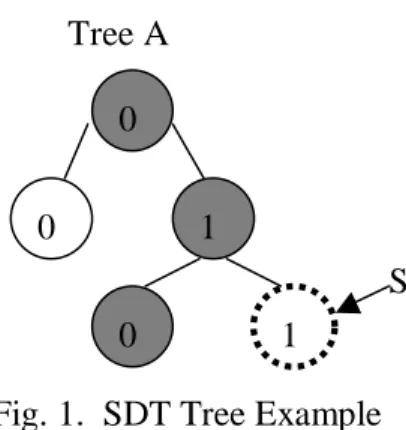
This operation inserts the new node into the existing tree. Target is the location (or path) in the tree where the insert will take place. For example [A, 0, 1] designates that the path to the target in tree A starts at the root, takes the 2nd child down (see below). The command InsNode([A,0,1], 1, S) would show Figure 1.
DelNode(Target, Position, Node)
This operation functions just like the InsNode mentioned above except it removes the selected node (and all of its subsequent children) from the tree. DelNode([A,0,1], 1, S) would remove the node highlighted below.
SDT Version of Fine Grain Locking
The following operation combines OT together with the concept of keeping the goals of a groupware system (Convergence, Causality Preservation, and Intention
Tree A 0 0 0 1 1 S
Preservation) in mind. These functions use many of the same utilities developed for the SDT algorithm.
LockNode(Target, StartPosition, EndPosition, SubDirectories)
This function is a bit more complicated than the previous ones. The locking mechanism must allow for a range of nodes to be locked according to the needs of the user and of the system. The user must elect to lock an individual node or a range of nodes. For example, if the user is working in multiple directories on the server, we would want the range of the directories that we was working in locked so that other users would not interfere. Given the file system C:\Tim\Dev\Test\Bin, and the fact that we was working in the Dev and Test directories, we would simply lock those two and NOT C:\Tim or \Bin. LockNode([A], [0], [0,1,0]) would lock all of the nodes along the path to the destination. So in this case the highlighted nodes would be locked. If the command were LockNode([A], [0,1], [0,1]) it would only lock the 2nd child of A.
UnlockNode(Target, StartPosition, EndPosition, SubDirectories)
This function is the inverse of the LockNode. Note that when you unlock nodes, you are not required to unlock all of the nodes that were previously locked. You can choose to unlock certain directories leaving the rest in their locked position.
SDT Control Algorithm
The SDT algorithm [Li 2004b] is the core of this project. Before this algorithm was created, the original OT algorithm was able to handle many of the concurrency problems. However, it was not complete and depended on only two sites existing.
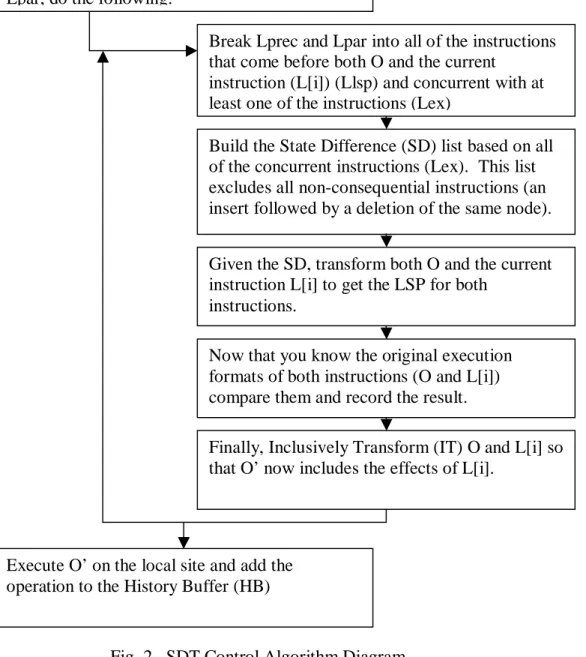
Under certain situations, shown below, it fails to give the correct result. Local operations are executed as soon as they are performed. This creates an illusion of complete local control. When a remote operation is executed, it is taken through a range of functions that transform the operation into its execution format for the local site. The flowchart below lists these functions. The basic idea of the SDT algorithm is to break the ties that occur when two operations point at the same object. Previous
implementations, i.e. OT [Sun, Davis, and Lu 2002], used the site id to break a tie; this however is incorrect when there are 3 or more sites. Ties are better resolved by tracing both instructions back to the Last Synchronization Point (LSP). By doing this, the algorithm is able to determine the original intentions of a certain instruction and which should get precedence. If they still point to the same position, then and only then are site ids relevant. This relationship is stored in a list for later use and to prevent unnecessary recalculations. A diagram of these operations can be seen in Figure 2.
A Remote
Instruction Arrives
Make a Copy of the History Buffer on local site.
Break the History Buffer (HB) into all of the instructions that come before O (Lprec) and all that are concurrent to O (Lpar), for each item in Lpar, do the following:
Break Lprec and Lpar into all of the instructions that come before both O and the current
instruction (L[i]) (Llsp) and concurrent with at least one of the instructions (Lex)
Build the State Difference (SD) list based on all of the concurrent instructions (Lex). This list excludes all non-consequential instructions (an insert followed by a deletion of the same node). Given the SD, transform both O and the current instruction L[i] to get the LSP for both
instructions.
Now that you know the original execution formats of both instructions (O and L[i]) compare them and record the result.
Finally, Inclusively Transform (IT) O and L[i] so that O’ now includes the effects of L[i].
Execute O’ on the local site and add the operation to the History Buffer (HB)
SDT Execution Example
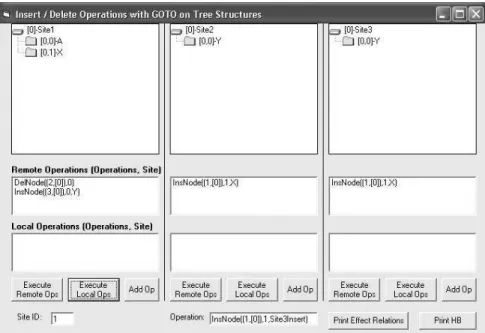
The following is an example that has not previously been solved. Given three sites all starting with one initial node (A), the following operations occur. For ease of explanation, screenshots have been included to demonstrate the results. These can be seen in Figures 3-7 below.
Fig. 4. Sites 2 and 3 Have Executed Their Local Operations, Transferred Them to the Remote Sites, and Are Waiting in the Remote Queue
Fig. 6. Execution Example (Step 4): Site 1 Executed its Local Insert Operation, and Transferred it to the Remote Sites
Fig. 7. Execution Example (Step 5): Final Position, All Sites Have Executed Their Instructions, and Convergence is Achieved
CHAPTER V
INTERFACE FEATURES
SDT SITUATION TESTER
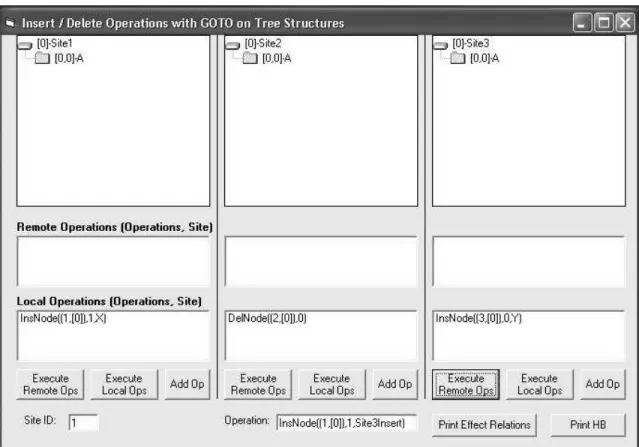
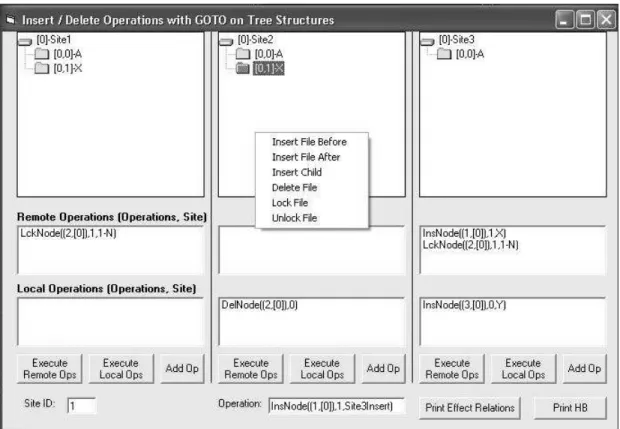
Fig. 8. SDT Situation Tester
The original intent of this application was to test the SDT algorithm before actually implementing it into the actual File System client. After seeing how useful it was in demonstrating situations and validating the algorithm, a decision was made to include it as part of the project. The prototype can be seen above in Figure 8.
The user can start this application in three different ways. A predetermined situation can be loaded for easy testing. In a plain text file, simply enter the site where you want the instruction to be listed as local, followed by the instruction itself. On startup, if a situation file exists, it will be loaded. The next manner to load instructions is via the command line entry. In the text box at the bottom of the screen, the user can enter commands manually and add them to whichever sites they desire by pressing the Add Op button. Finally the user can treat the situation tester as a real file system and right click for file operations. In this box you have the full capability of adding operations without having to type anything in. The operations themselves are
determined by the node and tree that the user has selected. In the example above, I have selected the second node in the second tree. Currently it is locked, if I wanted to unlock that node, I simply choose the unlock option from the menu. When that local operation is executed, no matter which way it is entered, it is then broadcast to all of the remote sites. At this point, the remote sites display the queue of waiting operations. At this point, the user can choose to execute the remote operations or continue with what they are doing and execute them at a later time. This will be further explained in the client interface implementation. The final two useful operations are Print Effect Relations and Print History Buffer (HB). These two operations are interesting because they show the two crucial lists in the system that allow the user to trace back operations visually and verify that the situation that is presented is actually correct, and repeatable.
SDT FILE SYSTEM SERVER
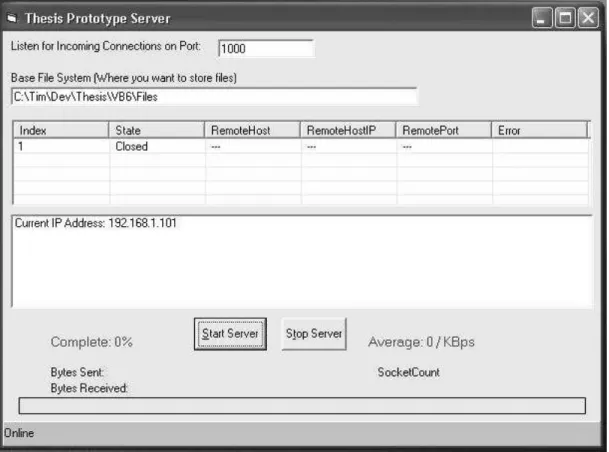
Fig. 9. SDT File System Server
The server as shown above in Figure 9, was designed to be very simplistic. As shown, there are really only three options that can be done as this system was designed to be very client-oriented. The user only needs to do three things, 1) specify the port to listen for incoming connections. This allows users behind firewalls to still use the system. Second is the location on the server where the user files will be stored. Initially you start with an empty space.
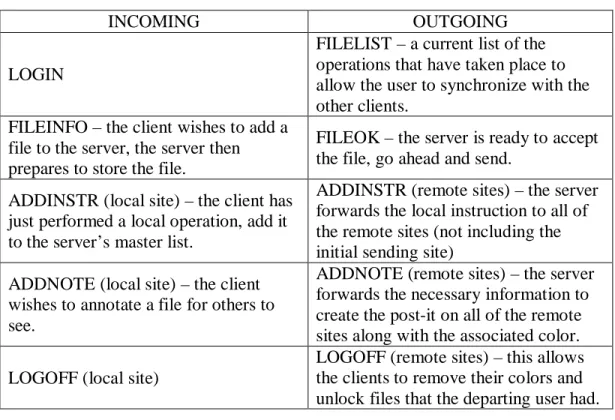
Due to the fact that this system allows late-joiners, the server must keep track of all operations that have been executed so that they can be transmitted to the new client and get them synchronized with the rest of the users. This ensures that all of the clients (no matter when they join) are on the same page. The last step is to simply start the server. After this point (from the operators perspective) the server becomes simply a log. It will visually keep track of the client communication in the top window. In the status window at the bottom, any client messages will be echoed. Finally because this is a file system, users must be able to upload files to the server. As files are coming in, the progress bar at the bottom lets the server operator know incoming transfer speed and which files are being transferred. The rest of the server operations occur behind the scenes and depend on client interaction. When the server receives a message, it decides what to do based on the instruction. Table I below outlines what instructions the server is setup to receive and their associated actions. Listed to the left is a list of the
instructions that the server receives, to the right is what it sends back to the client (if anything).
Table I. Server Message Action Table
INCOMING OUTGOING
LOGIN
FILELIST – a current list of the operations that have taken place to allow the user to synchronize with the other clients.
FILEINFO – the client wishes to add a file to the server, the server then prepares to store the file.
FILEOK – the server is ready to accept the file, go ahead and send.
ADDINSTR (local site) – the client has just performed a local operation, add it to the server’s master list.
ADDINSTR (remote sites) – the server forwards the local instruction to all of the remote sites (not including the initial sending site)
ADDNOTE (local site) – the client wishes to annotate a file for others to see.
ADDNOTE (remote sites) – the server forwards the necessary information to create the post-it on all of the remote sites along with the associated color. LOGOFF (local site)
LOGOFF (remote sites) – this allows the clients to remove their colors and unlock files that the departing user had.
SDT FILE SYSTEM CLIENT
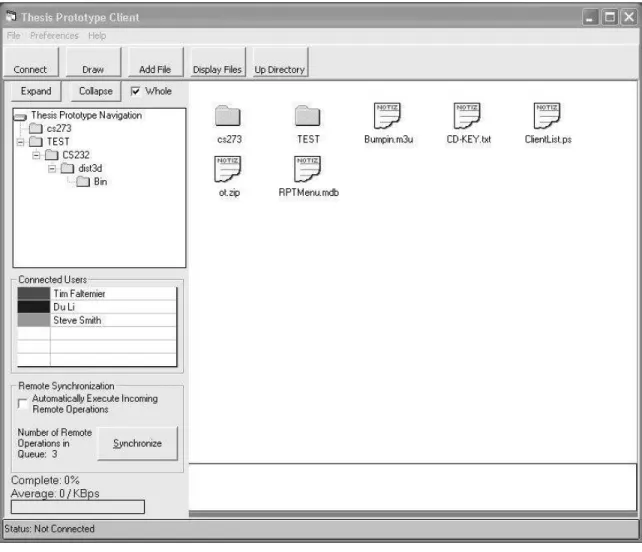
Fig. 10. SDT File System Client
The File System client (seen above as Figure 10) is the last part in this project. It allows the users to manipulate the remote data and layouts as they wish. Similar to the situation tester, this has the SDT algorithm built in. This application however is built more for practical real-world use rather than inventing and testing the possible situations that may exist. When the application first starts, the user must specify their server
information. Once this information is entered, they hit connect to get a list of the instructions that have been executed to this point (the list will be empty if they are the first client). At this point, the list populates both the navigation tree menu on the left, as well as opening a workspace for the current directory on the right. At this point, the user is free to download or upload files as they wish.
As described in the conceptual design, the user is able to do traditional file operations (create, copy, move, and delete) through our interface. These operations are based on the primitive operations available in SDT (Ins, Del, Lock, and Unlock). For example, if a user wishes to create a directory, they simply choose where they want to create it and select it on the menu. Behind the scenes, an InsNode operation is called with the appropriate parameters. Copy is achieved by taking the selected node, finding its position, and for itself and each of its child nodes, creating an InsNode instruction with the ending position parameters. This leaves the original folders in place, while creating a separate copy in an alternate location. To move a file, it works exactly the same as copy except after a copy has been made; a delete command is run on the originally selected position thereby leaving only one instance of the file or folder. The delete command is the easiest of them all because delete is natively supported with the DelNode function in SDT, therefore no additional work was required on our part. If a user wants to annotate the files, a Post-it can be made via clicking the draw button on the toolbar. This will allow the user to write additional information about the file in their user color. Both individual files and Post-its are entities in the application. This means that according to the SDT algorithm, both must be tracked as operations
(Insert, Delete, Lock, Unlock). This allows for easy synchronization for late joiners. The bottom of the client is the log. It keeps track of all user interaction with the server and any other miscellaneous messages or notifications the user must know about. The left side contains a list of the currently connected users with their system-defined color. Whenever an operation takes place, the client can easily see who executed it or whom a lock belongs to by looking at the associated color. To message an individual user, simply double click on their name and direct communication (i.e. not routed through the server) can take place. When remote operations occur, the user has two options. The first is to execute them as soon as they arrive. Checking the box on the left side menu signifies this option. The second is to allow the user the option to “synchronize” when they wish so as not to interrupt their activities. A running total is kept on the client’s screen showing how many remote operations are in the queue. Due to the correctness of the algorithm, either method will converge on the same result.
CHAPTER VI
CONCLUSION
The SDT File System implementation allows for a visual, easy to use, and effective interface to the SDT algorithm. As we have shown here, the SDT algorithm is now believed to be more complete and effective than its predecessor, OT. While we were not able to test this implementation in a real working environment, our initial tests proved very positive. Not only does it allow for any file interaction, it has created a system that is incredibly, locally responsive while at the same time robust enough to allow for any type of latency or delay and still converge.
While doing this project, the Client-Server implementation has proved very effective for a large group of users. However most of the time, the target audience will be around 5 to 7 users. In this situation, a Peer-to-Peer network would probably be more efficient. The algorithm does not care what network transport is used in it’s
implementation nor is response time an issue. In the future, a wonderful extension would be to create a mixed mode version of this system where it could use both a client-server architecture as well as peer
Overall this project has been extremely effective in what it set out to do. It proved that for any type of tree-based ordering, SDT is a definite solution, and it provided not only a way to prove this fact, but a system that allows groups to work together more effectively.
REFERENCES
AHUJA, E. 1990. A comparison of application sharing mechanisms in real-time desktop conferencing systems. In Proceedings of ACM Conference on Office Information
Systems: Cambridge. ACM, 238-248.
BLACKBURN, P. 1998. AFS Frequently Asked Questions. Technical Report. http://www.angelfire.com/hi/plutonic/afs-faq.html. Accessed July 2004.
CALDERA INTERNATIONAL INC. 2003. Distributed File Systems. Technical Report. http://docsrv.sco.com:507/en/NetAdminG/nfsC.distfs.html. Accessed July 2004.
LI, D. 2004a. State Difference Transformation on Trees. Technical Report. Department of Computer Science, Texas A&M University, College Station.
LI, D. 2004b. Optimistic Consistency Control in a Collaborative File System.
Technical Report. Department of Computer Science, Texas A&M University, College Station.
MAUVE, M. 2000. Consistency in replicated continuous interactive media. In
Proceedings of the 2000 ACM Conference on Computer Supported Cooperative Work:
Philadelphia. ACM, 181-190.
RAYNAL, F. 2002. NFS - Network File System. Translated by Philippe Trbich and Emmanuel Bonnel. Technical Report.
http://www.linuxfocus.org/English/November2000/article164.shtml. Accessed July 2004.
SUESS, J. 1995. System Administration Using NFS. Technical Report. University of Maryland, Baltimore County, College Park.
SUN, C. 2002a. Consistency maintenance in real-time collaborative graphics editing systems. ACM Transactions on Computer-Human Interactions, 9(1):1-41, March 2002.
SUN, C. 2002b. Optional and Responsive Fine-Grain Locking in Internet-Based
Collaborative Systems, IEEE Transactions on Parallel and Distributed Systems, Vol. 13, No. 9, September 2002.
SUN, C., DAVIS, A., LU, J. 2002. Generalizing Operational Transformation to the Standard General Markup Language, ACM 2002 Conference on Computer Supported
VITA
Name Timothy Collin Faltemier
Local Address 601 Luther Street West, Apt. No. 2135, College Station, TX 77840
Permanent Address 5090 Likini St, Apt 502E, Honolulu, HI 96818
Education M. S. Computer Science, Texas A&M University, 2004. B. S. Computer Science, University of Illinois – Urbana, Illinois, 2003.