Dawne E. Howard. The Finding Aid Container List Optimization Survey:
Recommendations for Web Usability. A Master’s Paper for the M.S. in L.S degree. November, 2006. 54 pages. Advisor: Helen R. Tibbo.
This paper examines the results of a usability study for finding aids from the Special Collections Research Center at North Carolina State University. In 2005, the Special Collections Research Center reformatted its finding aids so that the container
information, typically located on the left-hand side of the document, moved to the right-hand side of the document. The study tested the effectiveness of this change, and determined that traditional finding aids performed better. The analysis of the study’s results is followed by a discussion about Web usability guidelines for online finding aids.
Headings:
Cataloging of archival material -- Standards.
Encoded Archival Description (Document type definition) User interfaces (Computer systems) -- Testing.
Websites -- Design.
by
Dawne E. Howard
A Master’s paper submitted to the faculty of the School of Information and Library Science of the University of North Carolina at Chapel Hill
in partial fulfillment of the requirements for the degree of Master of Science in
Library Science.
Chapel Hill, North Carolina November 2006
Approved by
Table of Contents
Introduction...2
Literature Review...6
Rationale...12
Methodology...15
Results...18
Conclusions: Optimizing Finding Aids for Researchers...32
Notes...33
Bibliography...36
Appendices Appendix 1: Universities randomly selected to participate...40
Appendix 2: Survey/answer sheet ...42
Introduction
We knew our finding aids to be lucid and well-organized tools that had served our users well for years. – Dennis Meissner1
It is notable that user evaluation has rarely been mentioned as an integral aspect of [EAD] implementation. – Elizabeth Yakel2
As the standard archival reference tool, the finding aid has been praised and loathed amongst archivists and researchers. The Society of American Archivists’ A Glossary of Archival and Records Terminology gives two formal definitions for the term:
1. A tool that facilitates discovery of information within a collection, and
2. A description of records that gives the repository physical and intellectual control over the materials and that assists users to gain access to and understand the materials.
It also offers several narrower terms, including “guide,” “inventory,” and “register.”3
This loose definition demonstrates a major researcher complaint about finding aids: they exist in many forms. Particularly before the Internet age, finding aids varied greatly from repository to repository. Although many finding aids contained the same basic types of information, including provenance, a collection description, and a list of the collection’s contents, there was not a single, standardized format.4
least some archivists convinced themselves that their repositories’ finding aids were the crème de la crème of archival descriptive tools. Despite T. R. Schellenberg’s call for archival description standards in the 1960s, many archivists argued that each repository’s holdings were too unique to lend themselves to standardization.5
Although facing criticism from archivists throughout the United States, the Society of American Archivists (SAA) heavily endorsed “the development and implementation of standards” in the 1980s. SAA advocated participation in groups such as the National Information Standards Organization (NISO) and the National Information Systems Task Force (NISTF), and also endorsed the MARC AMC format for catalog records and the descriptive standard Archives, Personal Papers, and Manuscripts. Despite these standards, finding aids still varied widely from repository to repository.6
With the opening of the World Wide Web in the early 1990s, some archival institutions began posting their finding aids online. Like their paper predecessors, these finding aids largely lacked standardization from one institution to another. Recognizing that
standardization would increase resource discovery in the online environment, researchers at The Library in Berkeley, California, began the Berkeley Finding Aid Project in 1993. The goal of this project was to develop an SGML standard for encoding online finding aids. This project evolved into the Bentley Fellowship Program in 1995. After additional work by members of SAA and the Library of Congress, the standard Encoded Archival Description (EAD) appeared in alpha and beta versions in 1996.7
EAD forces standardization in two ways. First, it contains specific fields for information typically included in finding aids. For example, the <scopecontent> field holds scope and content note information, and the <bioghist> field contains biographical or historical note information. Second, the document type definition (DTD) specifies where in the finding aid each field can appear. For instance, the container list information cannot appear before the administrative information because the DTD will not allow it. Whereas the EAD DTD does not force all finding aids to look alike or have identical contents, it does force them to have the same general structure. Researchers using EAD finding aids can therefore predict structure across repositories, whereas in the past they had to learn a new structure each time they visited a different institution. A good analogy is to the standardization of the automobile industry. Although not all cars look alike, drivers in this country can expect that the steering wheel, brake, and gas pedals will always be in the same place. They do not need to learn the structure of each individual car.
Although EAD dictates finding aid structure, it does not ensure that finding aids comply with Web usability guidelines recommended by institutions such as the World Wide Web Consortium (W3C).8
Archivists can determine usability in several ways. The simplest method is to follow basic design usability guidelines and run the finding aids through online validation tools that evaluate accessibility. Such tools will catch major design problems, as well as accessibility issues such as color contrast in order to accommodate users who are
colorblind. The more difficult, yet more rewarding method is to conduct usability testing with volunteers from a repository’s core user base. Such testing allows archivists to catch design problems that online tools might miss.
In 2005, the Special Collections Research Center (SCRC) at North Carolina State University (NCSU) reformatted its finding aid template. The change was relatively minor: the container information, traditionally placed on the left side of the page, moved to the right side of the page. Therefore, the location of the items in the collections became secondary to the collections’ actual contents. The rationale behind the change was that listing collection contents first emphasized intellectual arrangement instead of physical arrangement. Although this logic, in theory, sounded like a good idea, there was no usability data to determine whether the change would benefit researchers. In
September 2006, I launched the Finding Aid Container List Optimization Survey in order to determine the format’s effectiveness.
Literature Review
As mentioned above, currently there is no literature supporting or disclaiming finding aids that have container information placed on the right side of the page. This fact does not mean that NCSU is the first institution to format its finding aids in such a manner. In 1978, the Queens Borough Public Library released their Manual for the Organization of Manuscripts, which includes examples of two inventories. Although neither inventory conforms to today’s perception of a neatly packaged, EAD product, one of them has the container list located on the right. Regardless, this layout clearly remains in the minority, as the literature is abundant with examples of container lists located on the left. This literature includes pre-EAD examples such as Katherine E. Brand’s “The Place of the Register in the Manuscripts Division of the Library of Congress” (1955), Ruth B. Bordin and Robert M. Warner’s The Modern Manuscripts Library (1966), and Frederic M. Miller’s Arranging and Describing Archives and Manuscripts (1990). In many cases, this trend has continued into today’s world of EAD, as evidenced by Meissner’s “First Things First: Reengineering Finding Aids for Implementation of EAD” (1997), and the Society of American Archivists’ Describing Archives: A Content Standard (2004).9
arrangement as “the basic internal activity of an archival establishment.”10
Most instructional books echo Holmes’ words, including the aforementioned Arranging and Describing Archives and Manuscripts, Gregory S. Hunter’s Developing and Maintaining Practical Archives: A How-To-Do-It Manual and Mary Jo Pugh’s Providing Reference Services for Archives & Manuscripts.11
In addition to Holmes’ five levels of description, archivists also adhere to the concepts of “provenance” and “respect du fonds.” In “Principles of Archival Inventory
Construction,” Richard C. Berner and Uli Haller stress the widely held belief that archival description should reflect arrangement.12
This belief is due to the fact that in many cases, a collection’s original arrangement reflects the intellect of its creator. Numerous archivists have echoed this assertion, including Kathleen D. Roe in Arranging & Describing Archives & Manuscripts, the update to Miller’s earlier work.13
In their landmark (and controversial) article “More Product, Less Process: Revamping
Traditional Archival Processing,” Mark A. Greene and Meissner assert that “the point of good description is to both reflect and explain the intellectual arrangement of the
materials—and to a lesser extent, their physical arrangement.”14
This statement perhaps epitomizes archivists’ feelings about the relationship between physical and intellectual arrangement.
few archival repositories have conducted such testing, for either their analog or digital finding aids. Two examples of literature about finding aid usability are Meissner’s “First Things First: Reengineering Finding Aids for Implementation of EAD” and Yakel’s “Encoded Archival Description: Are Finding Aids Boundary Spanners or Barriers for Users?” Meissner explains how the EAD DTD forced the Minnesota Historical Society (MHS) to create more usable finding aids. The MHS’ current finding aids contain features such as clearer headings and user instructions. The MHS made these changes with feedback from archivists, reference professionals, and researchers. Yakel’s article describes the results of her usability study for online finding aids from the Historic Pittsburgh Project. Yakel discovered that the layout confused many researchers, causing them to answer usability test questions incorrectly.15
In her article, Yakel notes that although much has been written about EAD theory and implementation, little has been written about usability testing. As mentioned above, not much has changed. In fact, Yakel’s brief literature review about the topic is so complete that it is difficult to write another literature review that does not smell of plagiarism. Although numerous books and articles have been written about Web usability as a whole over the past fifteen years, archivists have largely swept it under the table. The result is that many finding aids do not conform to basic usability standards. In Designing Web Usability: The Practice of Simplicity, Jakob Nielsen notes that most Web users do not scroll, and that designers should therefore avoid lengthy pages. Very few finding aids, however, follow this recommendation.16
Another problem, described by Harold
knowledge, and therefore often overlook the average user’s needs. This tendency of course applies to finding aids, as evidenced by the Meissner article, as well as archivists’ tendency to use “jargon” words and phrases such as “series,” “record group,” and “scope and content note.”
Most of the existing literature about online finding aids pertains to the context and theory surrounding EAD. In 1997, the American Archivist published two issues devoted entirely to EAD. The first issue, “Context and Theory,” includes articles from Daniel V. Pitti, Steven L. Hensen, Steven J. DeRose, Janice E. Ruth, Michael Fox, and Kris Kiesling. These articles describe such topics as EAD’s development, structure, and use as an archival descriptive standard.17
By contrast, the second issue, “Case Studies,” addresses issues related to actual implementation. As mentioned earlier in this paper, Meissner describes how his institution’s EAD implementation caused them to design better finding aids. The
remainder of the articles relate to various challenges associated with implementation, but do not address Web usability.
Other journals, including the Journal of Archival Organization and the Journal of Internet Cataloging, have devoted entire issues to EAD. Yakel’s article appears in such an issue. Most of these articles discuss important concepts, but not usability. For example, Elizabeth J. Shaw’s “Rethinking EAD: Balancing Flexibility and
Search for Manuscript Collections” and Helen R. Tibbo’s “Primarily History: Historians and the Search for Primary Source Materials” report findings about how researchers locate information. Other articles, including Christina J. Hostetter’s “Online Finding Aids: Are they Practical?” discusses the practicality of finding aids based on archivists’ experiences, but not usability based on users’ experiences. Additional articles include Tim Hutchinson’s “Strategies for Searching Online Finding Aids: A Retrieval
Experiment,” which discusses the recall and precision rates of full-text searching in finding aids as opposed to controlled vocabulary searches in catalog records.18
Articles too numerous to concisely discuss in this paper cover other issues related to EAD. These articles include Andrea Rosenbusch’s “Are Our Users Being Served?: A Report on Online Archival Databases,” which addresses user expectation and the usefulness of interface search functions. Although very closely related, they do not explore the issues Yakel does.19
Christopher J. Prom has published and presented information about usability testing he conducted at the University of Illinois. Finally, Anne J. Gilliland-Swetland’s “Evaluation Design for Large-Scale, Collaborative Online Archives: Interim Report of the Online Archive of California Evaluation Project” discusses feedback evaluation conducted by OAC staff in order to create a better online system.20
While conducting usability testing, it is important to keep in mind that how quickly participants answer the usability test questions is meaningless if they answer incorrectly. As mentioned earlier, Yakel addresses the problem with accuracy in her article.21
Mika Käki and Anne Aula discuss the distinction between speed and accuracy in “Findex: Improving Search Result Use through Automatic Filtering Categories.” Although this article evaluates the speed and accuracy of an automatic filtering system, some of the results can also apply to online finding aids. Increased speed does not necessarily indicate increased accuracy, and vice versa.22
Rationale
Why did the North Carolina State University Special Collections Research Center decide to reformat its finding aids? As mentioned earlier, the rationale was that moving the box and folder location to the right side of the page, following the folder contents,
emphasized intellectual arrangement over physical arrangement. This layout differs from the traditional inventory-style format, which emphasizes the physical arrangement of the collection, with the contents of Box 2 following the contents of Box 1, and so on. Figures 1 and 2 demonstrate the differences in the formats.
Figure 2. Guide to the Albert Krochmal Papers, 1939-1978, Special Collections Research Center, North Carolina State University. This figure reflects how the finding aid appears on the SCRC's website
Some SCRC staff members thought emphasizing intellectual arrangement was important due to perceived flaws in the traditional format. Despite the popularity of the inventory-style finding aid throughout the years, its layout can sometimes prove troublesome. Institutions that place the container list on the left usually do one of the following when faced with oversized materials that archivists cannot physically place in the same container:
are located elsewhere. This method is generally accepted and preferred to the next option.
2. Create an arbitrary “Oversize” series for the sake of keeping the container list in order. As this method does nothing to maintain intellectual order, archivists should avoid it at all costs. Whereas archivists might know to look for certain materials in the “Oversize” series, many researchers will not.
Although the first option is clearly better than the second, neither option is ideal. Some SCRC staff thought the format change would eliminate the problem altogether because processors would not need to encode the box list in numerical order. Instead, the processors would encode the box list in intellectual order, with the physical location of each entry listed to the right.
As an SCRC staff member at the time, I supported the format change with the following justifications: the reformatted finding aids more closely resemble tables of contents, indices, and itemized lists, where content comes before physical location. Not only does the format more closely adhere to archival arrangement theory, but it also allows
Methodology
In order to determine whether or not placing container lists on the right side of finding aids increases usability for researchers, I administered a usability test to 22 history master’s degree and PhD candidates from institutions throughout the United States. In general, I chose to survey students because of their easy accessibility, and because they are likely to be doing current research due to their degree requirements. More
specifically, I selected history master’s degree and PhD candidates for the study because they are more likely to use finding aids than students in other departments and at lower degree levels. The study was limited to institutions in the United States since archival description in the United States differs from archival description in Canada and other parts of the world.23
In order to recruit volunteers, I randomly selected 40 history programs listed on the American Historical Association’s Web site.24
I removed Canadian institutions and institutions not supporting PhD programs from the list.25
I then used the random number generator random.org to select the institutions for participation.26
I went to each selected history program’s Web site to determine a contact person. I sent an email to each contact person, and asked them to distribute an attached recruitment letter to their master’s degree and PhD candidates. Students willing to participate then contacted me for more information.
answers on the answer sheet and returned it to me. Since I relied on faculty and staff members to initiate contact with the students, it is impossible to know the number of students contacted or the participation rate. Of the 40 institutions selected, I know that students from at least 16 institutions volunteered to participate, and students from at least 15 institutions returned their surveys.27
Of the 25 students that volunteered, 22 returned the survey to me by the deadline.
The survey contained three parts and is found in Appendices 2 and 3:
1. Two demographic questions, one asking for degree level (master’s or PhD), and the other asking whether the participant had ever used finding aids. 2. A usability test in which I asked participants to time how long it took them to
complete assigned tasks using six finding aids.28
For this section, I divided the participants into four groups:
a. Survey 1: All six finding aids had container lists located on the right. b. Survey 2: All six finding aids had container lists located on the left. c. Survey 3: Three of the finding aids had container lists located on the
left, and three finding aids had container lists located on the right. d. Survey 4: Three of the finding aids had container lists located on the
left, and three finding aids had container lists located on the right. This group received the opposite of the finding aids Survey 3 participants received.
from the SCRC, but were redesigned so that the container lists were on the left. The finding aids and tasks selected for the survey were:
a. Finding aid #1: Guide to the papers of Aldos Cortez (A. C.) Barefoot, Jr., 1950-2001.29
Task: Write the box and folder numbers for the July 1960 Pakistan Observer.
b. Finding aid #2: Guide to the Arnold Krochmal papers, 1939-1978.30
Task: Write the box and folder numbers for the oversized Xerox copy
of Gardening in the Carolinas.
c. Finding aid #3: Guide to the Jerome Kohl collection, 1942-1995.31
Task: Write the box and folder numbers for the article "Exotic Power
Sources."
d. Finding aid #4: Guide to the David H. Howells papers, 1957-1995.32
Task: Write the box and folder numbers for the photograph of North
Carolina's "Eno River Trail."
e. Finding aid #5: Guide to the Walter Peter Baermann papers, 1903-1972.33
Task: Write the box and folder numbers for the biographical file relating to Waynesville, North Carolina.
f. Finding aid #6: Guide to the Jehu Dewitt Paulson papers, 1922-1972.34
Task: Write the box and folder numbers for the logo designs. 3. A brief exit interview allowing participants to give their opinions about the
Results
Of the 22 participants, five were master’s degree candidates, while the remaining 17 were doctoral students. Only three participants—one master’s degree and candidate two doctoral students—claimed to have never used finding aids before.
The survey results contain both qualitative and quantitative data. Both types suggest that archivists should keep the container information on the left side of the page.
Results from the Survey
Nineteen of the 22 participants answered all of the questions correctly. Two participants with container lists on the right incorrectly completed the task for Finding Aid #2, identifying the original copies of Gardening in the Carolinas instead of the oversized Xerox copy. One participant with a "left" finding aid incorrectly completed the task for Finding Aid #4, identifying the negatives of the Eno River Trail instead of the
photograph. In these three cases, the answers provided, although incorrect, were on the right track. The fact that most participants answered all the questions correctly suggests that the placement of the container information did not have an overwhelming effect on their ability to complete the tasks.
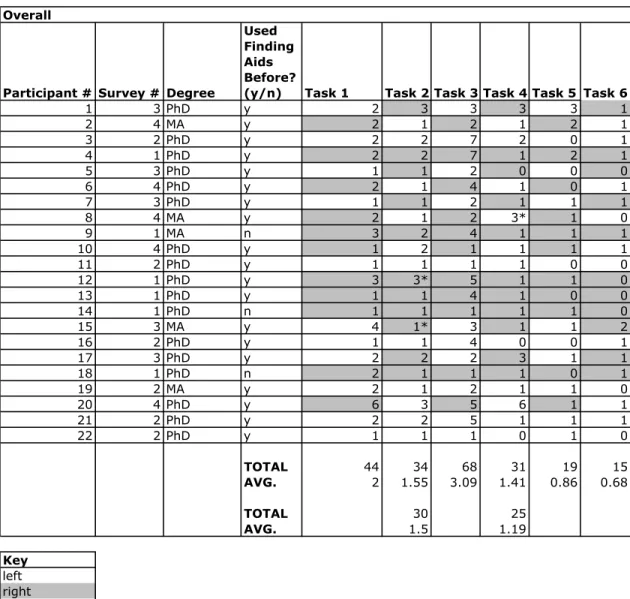
Other results from the survey were more significant. Participants consistently found the specified information faster when using the traditional format with the container
participants, on average, located the correct answer more quickly when using this format. Figures 3 through 10 below illustrate this finding.
Figure 3. Overall totals and averages (in minutes) for the six-question usability study. The second set of totals and averages exclude incorrect answers.
Overall
Participant # Survey # Degree
Used Finding Aids Before?
(y/n) Task 1 Task 2 Task 3 Task 4 Task 5 Task 6
1 3 PhD y 2 3 3 3 3 1
2 4 MA y 2 1 2 1 2 1
3 2 PhD y 2 2 7 2 0 1
4 1 PhD y 2 2 7 1 2 1
5 3 PhD y 1 1 2 0 0 0
6 4 PhD y 2 1 4 1 0 1
7 3 PhD y 1 1 2 1 1 1
8 4 MA y 2 1 2 3* 1 0
9 1 MA n 3 2 4 1 1 1
10 4 PhD y 1 2 1 1 1 1
11 2 PhD y 1 1 1 1 0 0
12 1 PhD y 3 3* 5 1 1 0
13 1 PhD y 1 1 4 1 0 0
14 1 PhD n 1 1 1 1 1 0
15 3 MA y 4 1* 3 1 1 2
16 2 PhD y 1 1 4 0 0 1
17 3 PhD y 2 2 2 3 1 1
18 1 PhD n 2 1 1 1 0 1
19 2 MA y 2 1 2 1 1 0
20 4 PhD y 6 3 5 6 1 1
21 2 PhD y 2 2 5 1 1 1
22 2 PhD y 1 1 1 0 1 0
TOTAL 44 34 68 31 19 15
AVG. 2 1.55 3.09 1.41 0.86 0.68
TOTAL 30 25
AVG. 1.5 1.19
Figure 4. Totals and averages (in minutes) for the six-question usability study. This chart shows the results for the left-sided container lists only. With the exception of Question #4, participants located the correct answer more quickly when using this finding aid format. The second set of totals and averages exclude incorrect
answers.
Left only
Participant # Survey # Degree
Used Finding Aids Before?
(y/n) Task 1 Task 2 Task 3 Task 4 Task 5 Task 6
1 3 PhD y 2 3 3
2 4 MA y 1 1 1
3 2 PhD y 2 2 7 2 0 1
5 3 PhD y 1 2 0
6 4 PhD y 1 1 1
7 3 PhD y 1 2 1
8 4 MA y 1 3* 0
10 4 PhD y 2 1 1
11 2 PhD y 1 1 1 1 0 0
15 3 MA y 4 3 1
16 2 PhD y 1 1 4 0 0 1
17 3 PhD y 2 2 1
19 2 MA y 2 1 2 1 1 0
20 4 PhD y 3 6 1
21 2 PhD y 2 2 5 1 1 1
22 2 PhD y 1 1 1 0 1 0
TOTAL 19 16 32 17 9 7
AVG. 1.73 1.45 2.91 1.55 0.82 0.64
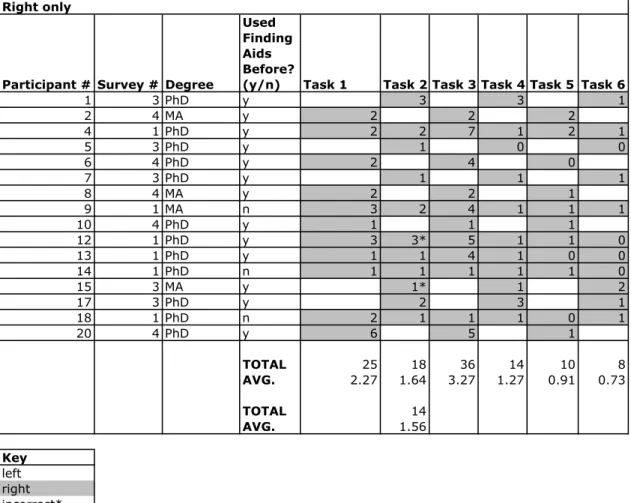
Figure 5. Totals and averages (in minutes) for the six-question usability study. This chart shows the results for the right-sided container lists only. With the
exception of Question #4, participants located the correct answer more slowly when using this finding aid format. The second set of totals and averages exclude
incorrect answers.
Right only
Participant # Survey # Degree
Used Finding Aids Before?
(y/n) Task 1 Task 2 Task 3 Task 4 Task 5 Task 6
1 3 PhD y 3 3 1
2 4 MA y 2 2 2
4 1 PhD y 2 2 7 1 2 1
5 3 PhD y 1 0 0
6 4 PhD y 2 4 0
7 3 PhD y 1 1 1
8 4 MA y 2 2 1
9 1 MA n 3 2 4 1 1 1
10 4 PhD y 1 1 1
12 1 PhD y 3 3* 5 1 1 0
13 1 PhD y 1 1 4 1 0 0
14 1 PhD n 1 1 1 1 1 0
15 3 MA y 1* 1 2
17 3 PhD y 2 3 1
18 1 PhD n 2 1 1 1 0 1
20 4 PhD y 6 5 1
TOTAL 25 18 36 14 10 8
AVG. 2.27 1.64 3.27 1.27 0.91 0.73
Figure 6. Totals and averages (in minutes), Survey 1 participants only. The second set of totals and averages exclude incorrect answers.
Survey 1
Participant # Survey # Degree
Used Finding Aids Before?
(y/n) Task 1 Task 2 Task 3 Task 4 Task 5 Task 6
4 1 PhD y 2 2 7 1 2 1
9 1 MA n 3 2 4 1 1 1
12 1 PhD y 3 3* 5 1 1 0
13 1 PhD y 1 1 4 1 0 0
14 1 PhD n 1 1 1 1 1 0
18 1 PhD n 2 1 1 1 0 1
TOTAL 12 10 22 6 5 3
AVG. 2 1.67 3.67 1 0.83 0.5
TOTAL 7
AVG. 1.4
Key
Figure 7. Totals and averages (in minutes), Survey 2 participants only.
Survey 2
Participant # Survey # Degree
Used Finding Aids Before?
(y/n) Task 1 Task 2 Task 3 Task 4 Task 5 Task 6
3 2 PhD y 2 2 7 2 0 1
11 2 PhD y 1 1 1 1 0 0
16 2 PhD y 1 1 4 0 0 1
19 2 MA y 2 1 2 1 1 0
21 2 PhD y 2 2 5 1 1 1
22 2 PhD y 1 1 1 0 1 0
TOTAL 9 8 20 5 3 3
AVG. 1.5 1.33 3.33 0.83 0.5 0.5
Key
Figure 8. Totals and averages (in minutes), Survey 3 participants only. The second set of totals and averages exclude incorrect answers.
Survey 3
Participant # Survey # Degree
Used Finding Aids Before?
(y/n) Task 1 Task 2 Task 3 Task 4 Task 5 Task 6
1 3 PhD y 2 3 3 3 3 1
5 3 PhD y 1 1 2 0 0 0
7 3 PhD y 1 1 2 1 1 1
15 3 MA y 4 1* 3 1 1 2
17 3 PhD y 2 2 2 3 1 1
TOTAL 10 8 12 8 6 5
AVG. 2 1.6 2.4 1.6 1.2 1
TOTAL 7
AVG. 1.75
Figure 9. Totals and averages (in minutes), Survey 4 participants only. The second set of totals and averages exclude incorrect answers.
Survey 4
Participant # Survey # Degree
Used Finding Aids Before?
(y/n) Task 1 Task 2 Task 3 Task 4 Task 5 Task 6
2 4 MA y 2 1 2 1 2 1
6 4 PhD y 2 1 4 1 0 1
8 4 MA y 2 1 2 3* 1 0
10 4 PhD y 1 2 1 1 1 1
20 4 PhD y 6 3 5 6 1 1
TOTAL 13 8 14 12 5 4
AVG. 2.6 1.6 2.8 2.4 1 0.8
TOTAL 9
AVG. 2.25
Figure 10. Averages (in minutes) at a glance. The numbers in parentheses exclude incorrect answers.
These trends held true despite the methods participants used to complete the tasks. For example, ten of the participants reported that they used their browser’s search function to answer some or all of the questions. Participants who used this function tended to locate the correct answers faster than the participants who did not; however, some participants who did not use the search function completed the tasks just as quickly. The number of people in each group who used the search function was almost equal: two participants in Groups 1 and 2, and three participants each in Groups 3 and 4. The fact that participants consistently completed the tasks more quickly when using the container lists on the left therefore cannot be attributed to an unequal number of people using the search function. Furthermore, the fact that participants used the search function did not necessarily mean that they answered the questions correctly. This finding verifies Käki and Aula’s conclusion that increased speed does not necessarily result in increased accuracy.
It is possible that participants completed tasks with the left-sided container lists more quickly because they were more familiar with that format. With the exception of Finding
Totals
Task 1 Task 2 Task 3 Task 4 Task 5 Task 6
Overall 2 1.55 (1.5) 3.09 1.41 (1.19) 0.86 0.69
Left only 1.73 1.45 2.91 1.55 (1.4) 0.82 0.64
Right only 2.27 1.64 (1.56) 3.27 1.27 0.91 0.73
Survey 1 2 1.67 (1.4) 3.67 1 0.91 0.73
Survey 2 1.5 1.33 3.33 0.83 0.5 0.5
Survey 3 2 1.6 2.4 1.6 1.2 1
Survey 4 2.6 1.6 2.8 2.4 1 0.8
Aid #3, the average amount of time it took participants to complete each task decreased over the set of finding aids they used. This suggests that average time decreased as the participants became more familiar with the layouts. It is possible that Finding Aid #3 did not conform to this rule due to its complexity; several participants noted that they found this document cumbersome to navigate. This problem will be discussed further later in this paper.
A final finding from the survey answer sheets has to do with the usability of the right-sided container lists. Five participants using this format reported that the July 1960
Pakistan Observer was located in Box 2, Folder 3 instead of the correct answer of Box 2, Folder 30.36
As Box 2, Folder 3 contains general correspondence from 1975 to 1990, it seemed odd that five people would record this as their answer. In addition, four people using right-sided container lists reported that the article “Exotic Power Sources” was located in Box 47, Folder 1 instead of Box 47, Folder 16. Box 47, Folder 1 contains the 1959 article “Radiation Techniques,” published in Advances in Petroleum Chemistry and Refining. Again, this repeated mistake seemed odd. It happened with enough frequency that I did not mark these answers as being incorrect.
misidentify the container information of the materials they are looking for. Such a problem highlights a major reason to conduct usability testing.
Results from the Exit Interview Questions
With Web usability in mind, we’ll now examine the comments from the survey’s exit interview questions. Of the ten participants that specified a format preference, six said that they would prefer the container list to stay on the left.37
The reasons for preferences varied, and were sometimes contradictory from person to person. For example, one participant said that the container list was more useful on the left because we are used to reading from left to right; another participant gave the same reason for placing the container list on the right.
Varying user preferences can make designing the “perfect” finding aid difficult. Whereas some participants made comments such as “these were some of the more well-organized finding aids I’ve seen,” and “I wish all archives had information organized this well,” others referred to the survey as “frustrating.” Although there is no one-size-fits-all solution for finding aid usability, some themes repeatedly arose in the exit interview questions. These themes are discussed more thoroughly below.
Consistency: When asked if they noticed a difference in their ability to find materials
they are using a consistent format. Even when using a template, online finding aids can vary within a repository. For example, some finding aids might be encoded using EAD 1.0, and others in EAD 2002. Other finding aids might be in a pre-EAD format, and not resemble EAD finding aids at all. This lack of consistency can be frustrating to
researchers using multiple finding aids, since it requires them to learn a different structure each time.
Clarity of organization: Several participants commented that the finding aids’
organization was as important or more important than the placement of the container list. Some specified a preference for chronological or alphabetical organization, while others simply called for clarity. In particular, participants noted that they had difficulty with Finding Aid #3 and Finding Aid #4. According to the participants, the arrangement for Finding Aid #4 was confusing, while the arrangement for Finding Aid #3 was
cumbersome. On the other hand, one participant referred to the container list for Finding Aid #6 as being “very clear, and nicely divided.” Another participant commented that archivists should always clearly number series. Finally, participants noted that finding aids were more usable when organization information was closer to the top of the finding aid.
Font size: Several participants commented that they would have preferred a larger font
to the number of people who mentioned it as a problem. The exit interview did not directly ask about font size. Participants took it upon themselves to mention it.
Prominence of Headings: Several participants also commented that they thought the
headings for the different sections (i.e. series names, as well as other sections such as the Biographical Note) of the finding aid should stand out more. Suggestions included increasing the space around them to make them stand out more, increasing the font size, and underlining.
Container List Spacing: While some participants recorded their preference for the left-
Search functions: As mentioned earlier in this paper, nearly half of the participants
reported that they used their browsers’ search function in order to complete the tasks. Based on some participants’ responses, there is a growing expectation for online finding aids to include a search box feature. One participant became increasingly frustrated when she could not find such a feature, and kept linking to an outside page that she did not find useful. Repositories such as the OAC provide search boxes on the left side of their finding aids.
Although many archivists do not have a great deal of experience with Web design, a quick Google search reveals that there are numerous tools available on the Web drawing attention to usability problems. Two examples are the validators available through the World Wide Web Consortium (W3C) and Bobby.38
Both of these validators check for basic deign usability issues, and also ensure that Web sites are accessible to various audiences, including the blind (with the help of screen reading software) and the color blind. In addition, the Department of Health and Human Services provides usability guidelines in an easy-to-use format.39
Conclusions: Optimizing Finding Aids for Researchers
Although some participants stated that they preferred the container list on the right side of the finding aid, overall results suggest that archivists should stick with the traditional practice of placing it on the left. There are two main findings supporting this conclusion: 1) participants consistently completed tasks more quickly when using traditional finding aids, and 2) the finding aids with container lists on the right presented unanticipated usability problems. A third, yet weaker reason is that more participants indicated a preference for the left than did the right.
Additional comments collected from the exit interview questions suggest that the organization and layout of finding aids is more important than the location of the container information. Archivists therefore need to adhere to accepted usability
guidelines expected of all Web sites. Archivists needing assistance conforming to these guidelines can refer to experts such as Jakob Nielsen, or use the online tools provided by organizations such as the World Wide Web Consortium.
In conclusion, archivists need to stay aware of changing online finding aid standards. For example, researchers are increasingly expecting repositories to provide a search box. In addition, archivists such as Yakel and Polly Reynolds are exploring “the next generation finding aid” in order to present information about archival collections, including digital materials, in a more accessible manner.40
1
Dennis Meissner, “First Things First: Reengineering Finding Aids for Implementation of EAD,” American Archivist 60, no. 4 (Fall 1997): 373.
2
Elizabeth Yakel, “Are Finding Aids Boundary Spanners or Barriers for Users?” Journal of Archival Organization no. 2, 1/2 (2004), 65.
3
Richard Pearce-Moses, A Glossary of Archival and Records Terminology. (Chicago: Society of American Archivists, 2005), 168.
4
See for example: David B. Gracy, Archives & Manuscripts: Arrangement &
Description (Chicago: Society of American Archivists, 1977) and Frederic M. Miller,
Arranging and Describing Archives and Manuscripts (Chicago: Society of American Archivists, 1990). In “Finding Finding Aids on the World Wide Web,” Helen R. Tibbo and Lokman I. Meho identify six elements commonly found in finding aids: title, inclusive dates, extent, scope and contents note, biographical or historical note, and arrangement statement. See: Helen R. Tibbo and Lokman I. Meho, “Finding Finding Aids on the World Wide Web,” American Archivist 64 (Spring/Summer 2001): 66.
5 Schellenberg, T. R., The Management of Archives (New York: Columbia University
Press, 1965). For a summary of arguments made against archival description standards, see: Working Group on Standards for Archival Description, “Report of the Working Group on Standards for Archival Description,” American Archivist 52 (Fall 1989): 440-461.
6
Working Group on Standards for Archival Description, “Recommendations of the Working Group on Standards for Archival Description,” American Archivist 52 (Fall 1989): 462-477; Steven L. Hensen, Archives, Personal Papers, and Manuscripts: A Cataloging Manual for Archival Repositories, Historical Societies, and Manuscript Libraries (Washington, D.C.: Library of Congress, 1983). Hensen released a second edition, published by SAA, in 1989.
7
Digital Publishing Corporation, EAD History,
http://www.lib.berkeley.edu/digicoll/bestpractices/ead_history.html#beta.
8
World Wide WebConsortium, http://www.w3.org/.
9
Katharine E. Brand, “The Place of the Register in the Manuscripts Division of the Library of Congress,” American Archivist 18 (January 1955): 59-67; Ruth B. Bordin and Robert M. Warner, The Modern Manuscript Library, New York: The Scarecrow Press, Inc., 1966; Frederic M. Miller, Arranging and Describing Archives and Manuscripts
(Chicago: Society of American Archivists, 1990; Dennis Meissner, “First Things First: Reengineering Finding Aids for Implementation of EAD,” American Archivist 60, no. 4 (Fall 1997): 372-387; Society of American Archivists, Describing Archives: A Content Standard (Chicago: Society of American Archivists, 2004).
10
Oliver W. Holmes, “Archival Arrangement—Five Different Operations at Five Different Levels,” American Archivist 27 (January 1964): 21-41.
11 Miller; Gregory S. Hunter, Developing and Maintaining Practical Archives: A
How-To-Do-It Manual, 2nd ed. (New York: Neal-Schuman Publishers, Inc., 2003); Mary Jo Pugh, Providing Reference Services for Archives & Manuscripts (Chicago: Society of American Archivists, 2005).
12
Richard C. Berner and Uli Haller, “Principles of Archival Inventory Construction,”
13
Kathleen D. Roe, Arranging & Describing Archives & Manuscripts (Chicago: Society of American Archivists, 2005).
14
Mark A. Greene and Dennis Meissner, “More Product, Less Process: Revamping Traditional Archival Processing,” American Archivist 68, no. 2 (Fall/Winter 2005): 208-263.
15
Meissner, “First Things First: Reengineering Finding Aids for Implementation of EAD”; Yakel, “Encoded Archival Description: Are Finding Aids Boundary Spanners or Barriers for Users?”
16
Jakob Nielsen, Designing WebUsability: The Practice of Simplicity (Indianapolis: New Riders Publishing, 2000). Some repositories, such as the Online Archive of California (OAC) and the Virginia Heritage database, break their finding aids into segments to avoid lengthy pages. Unfortunately, most other repositories have not followed these examples.
17
Daniel V. Pitti, “Encoded Archival Description: The Development of an Encoding Standard for Archival Finding Aids,” American Archivist 60, no. 3 (Summer 1997): 268-283; Steven L. Hensen, “‘NISTIF II’ and EAD: The Evolution of Archival Description,”
American Archivist 60, no. 3 (Summer 1997): 284-297; Steven J. DeRose, “Navigation, Access, and Control: Using Structured Information,” American Archivist 60, no. 3 (Summer 1997): 298-309. Janice E. Ruth, “Encoded Archival Description: A Structural Overview,” American Archivist 60 no. 3 (Summer 1997): 310-329; Michael J. Fox, “Implementing Encoded Archival Description: An Overview of Administrative and Technical Considerations,” American Archivist 60, no. 3 (Summer 1997): 330-343; Kris Kiesling, “EAD as an Archival Descriptive Standard,” American Archivist 60, no. 3 (Summer 1997): 344-354.
18
Elizabeth J. Shaw, “Rethinking EAD: Balancing Flexibility and Interoperability,” The New Review of Information Networking 7 (2001): 117-131; Helen R. Tibbo, “Primarily History: Historians and the Search for Primary Source Materials,” Proceedings of the 2nd ACM/IEEE-CS Joint Conference on Digital Libraries (2002): 1-10; Christina J. Hostetter, “Online Finding Aids: Are They Practical?” Journal of Archival Organization 2, no. 1/2 (2004): 117-145; Tim Hutchinson, “Strategies for Searching Online Finding Aids: A Retrieval Experiment,” Archivaria 44 (Fall 1997): 72-95.
19
Andrea Rosenbusch, “Are Our Users Being Served?: A Report on Online Archival Databases,” Journal of the Australian Society of Archivists 29, no. 1 (May 2001): 44-53.
20
Burt Altman and John R. Nemmers, “The Usability of On-line Archival Resources: The Polaris Project Finding Aid,” American Archivist 64, no. 1 (Spring/Summer 2001): 121-131; Wendy Duff and Penka Stoyanova, “Transforming the Crazy Quilt: Archival Displays from a Users’ Point of View,” Archivaria 45 (Spring 1998): 44-79; Christopher J. Prom, “The Usability of Electronic Finding Aids during Searches for Known Items: Remarks at Society of American Archivists Annual Meeting, August 22, 2003,”
http://web.library.uiuc.edu/ahx/workpap/UsabilityShort.pdf#search=%22“The%20Usabili ty%20of%20Electronic%20Finding%20Aids%20during%20Searches%20for%20Known %20Items%22%22; Anne J. Gilliland-Swetland, “Evaluation Design for Large-Scale, Collaborative Online Archives: Interim Report of the Online Archive of California Evaluation Project,” Archives and Museum Informatics 12 (1998): 177-203.
21 Yakel, “Encoded Archival Description: Are Finding Aids Boundary Spanners or
22
Mika Käki and Anne Aula, “Findex: Improving Search Result Use Through Automatic Filtering Categories,” Interacting with Computers 17, no. 2 (March 2005): 187-206.
23
Archivists in the United States use Describing Archives: A Content Standard (DACS) for guidelines about archival description, while Canadian archivists use Rules for
Archival Description (RAD). Efforts to standardize archival description between the two countries have proved unfruitful.
24
American Historical Association, History Doctoral Programs in the United States and Canada, http://www.historians.org/projects/cge/PhD/AlphaList.htm. See Appendix 1 for a list of selected institutions.
25 Despite the fact that the American Historical Association’s list is entitled History
Doctoral Programs in the United States and Canada, not all of the institutions on the list actually support PhD programs.
26
True Random Number Service, http://www.random.org/.
27
I could not determine several students’ institutional affiliation because they contacted me using email addresses from hotmail, yahoo, and sbcglobal. Since knowing a person’s institutional affiliation was not necessary for the survey, I did not follow up for
clarification.
28
Appendix 2 contains the survey instructions and answer sheet.
29
North Carolina State University, Guide to the papers of Aldos Cortez (A. C.) Barefoot, Jr., 1950-2001. http://www.lib.ncsu.edu/findingaids/mc00152/.
30
North Carolina State University, Guide to the Arnold Krochmal papers, 1939-1978,
http://www.lib.ncsu.edu/findingaids/mc00064/.
31
North Carolina State University, Guide to the Jerome Kohl collection, 1942-1995,
http://www.lib.ncsu.edu/findingaids/mc00142/.
32
North Carolina State University, Guide to the David H. Howells papers, 1957-1995,
http://www.lib.ncsu.edu/findingaids/mc00263/.
33
North Carolina State University, Guide to the Walter Peter Baermann papers, 1903-1972, http://www.lib.ncsu.edu/findingaids/mc00244/.
34
North Carolina State University, Guide to the Jehu Dewitt Paulson papers, 1922-1972,
http://www.lib.ncsu.edu/findingaids/mc00056/.
35
See Appendix 3.
36
One participant using a container list on the left side also made this mistake.
37
The remaining participants either found the container list placement irrelevant or did not comment on it.
38
World Wide WebConsortium, The W3C QA Toolbox – Validators, checkers and other tools for Webmasters and WebDevelopers, http://www.w3.org/QA/Tools/#validators; Watchfire Corporation, Watchfire WebXACT, http://webxact.watchfire.com/.
39
U. S. Department of Health and Human Services, Research-Based WebDesign & Usability Guidelines, http://usability.gov/pdfs/guidelines.html.
40
Bibliography
Altman, Burt and John R. Nemmers. “The Usability of On-line Archival Resources: The Polaris Project Finding Aid.” American Archivist 64, no. 1 (Spring/Summer 2001): 121-131.
American Historical Association. History Doctoral Programs in the United States and Canada. http://www.historians.org/projects/cge/PhD/AlphaList.htm.
Berner, Richard C. and Uli Haller. “Principles of Archival Inventory Construction.”
American Archivist 47, no. 2 (Spring 1984): 134-155.
Bordin, Ruth B. and Robert M. Warner. The Modern Manuscript Library. New York: The Scarecrow Press, Inc., 1966.
Brand, Katharine E. “The Place of the Register in the Manuscripts Division of the Library of Congress.” American Archivist 18 (January 1955): 59-67. California Digital Library. OAC Usability and Survey Results Study.
http://www.cdlib.org/inside/assess/evaluation_activities/OACUsabilitySummaryJ uly2002.pdf#search=%22%22finding%20aids%22%20%2Busability%20%2BOA C%22.
DeRose, Steven J. “Navigation, Access, and Control: Using Structured Information.”
American Archivist 60, no. 3 (Summer 1997): 298-309. Digital Publishing Corporation. EAD History.
http://www.lib.berkeley.edu/digicoll/bestpractices/ead_history.html#beta. Duff, Wendy and Penka Stoyanova. “Transforming the Crazy Quilt: Archival Displays
from a Users’ Point of View.” Archivaria 45 (Spring 1998): 44-79.
Falco, Nicholas. Manual for the Organization of Manuscripts in the Queens Borough Public Library. Jamaica, NY: Queens Borough Public Library, 1978.
Gilliland-Swetland, Anne J. “Evaluation Design for Large-Scale, Collaborative Online Archives: Interim Report of the Online Archive of California Evaluation Project.”
Archives and Museum Informatics 12 (1998): 177-203.
Gracy, David B. Archives & Manuscripts: Arrangement & Description. Chicago: Society of American Archivists, 1977.
Greene, Mark A. and Dennis Meissner. “More Product, Less Process: Revamping Traditional Archival Processing.” American Archivist 68, no. 2 (Fall/Winter 2005): 208-263.
Hamburger, Susan. “How Researchers Search for Manuscript and Archival Collections.”
Journal of Archival Organization 2, no. 1/2 (2004): 79-97.
Hensen, Steven L. Archives, Personal Papers, and Manuscripts: A Cataloging Manual for Archival Repositories, Historical Societies, and Manuscript Libraries.
Washington, D.C.: Library of Congress, 1983.
Hensen, Steven L. “‘NISTIF II’ and EAD: The Evolution of Archival Description.”
American Archivist 60, no. 3 (Summer 1997): 284-297.
Holmes, Oliver W. “Archival Arrangement—Five Different Operations at Five Different Levels.” American Archivist 27 (January 1964): 21-41.
Hostetter, Christina J. “Online Finding Aids: Are They Practical?” Journal of Archival Organization 2, no. 1/2 (2004): 117-145.
Hunter, Gregory S. Developing and Maintaining Practical Archives: A How-To-Do-It Manual, 2nd ed. New York: Neal-Schuman Publishers, Inc., 2003.
Hutchinson, Tim. “Strategies for Searching Online Finding Aids: A Retrieval Experiment.” Archivaria 44 (Fall 1997): 72-95.
Käki, Mika and Anne Aula. “Findex: Improving Search Result Use Through Automatic Filtering Categories.” Interacting with Computers 17, no. 2 (March 2005): 187-206.
Kiesling, Kris. “EAD as an Archival Descriptive Standard.” American Archivist 60, no. 3 (Summer 1997): 344-354.
Meissner, Dennis. “First Things First: Reengineering Finding Aids for Implementation of EAD.” American Archivist 60, no. 4 (Fall 1997): 372-387.
Nielsen, Jakob. Designing WebUsability: The Practice of Simplicity. Indianapolis: New Riders Publishing, 2000.
Pearce-Moses, Richard. A Glossary of Archival and Records Terminology. Chicago: Society of American Archivists, 2005.
Pitti, Daniel V. “Encoded Archival Description: The Development of an Encoding Standard for Archival Finding Aids.” American Archivist 60, no. 3 (Summer 1997): 268-283.
Prom, Christopher J. “The Usability of Electronic Finding Aids during Searches for Known Items: Remarks at Society of American Archivists Annual Meeting, August 22, 2003.”
http://web.library.uiuc.edu/ahx/workpap/UsabilityShort.pdf#search=%22“The%2 0Usability%20of%20Electronic%20Finding%20Aids%20during%20Searches%2 0for%20Known%20Items%22%22.
Pugh, Mary Jo. Providing Reference Services for Archives & Manuscripts. Chicago: Society of American Archivists, 2005.
Roe, Kathleen D. Arranging & Describing Archives & Manuscripts. Chicago: Society of American Archivists, 2005.
Rosenbusch, Andrea. “Are Our Users Being Served?: A Report on Online Archival Databases.” Journal of the Australian Society of Archivists 29, no. 1 (May 2001): 44-53.
Ruth, Janice E. “Encoded Archival Description: A Structural Overview.” American Archivist 60, no. 3 (Summer 1997): 310-329.
Schellenberg, T. R. The Management of Archives. New York: Columbia University Press, 1965.
Shaw, Elizabeth J. “Rethinking EAD: balancing flexibility and interoperability.” The New Review of Information Networking 7 (2001): 117-131.
Society of American Archivists. Describing Archives: A Content Standard. Chicago: Society of American Archivists, 2004.
Thimbleby, Harold. User Interface Design. New York: ACM Press, 1990.
Tibbo, Helen R. and Lokman I. Meho. “Finding Finding Aids on the World Wide Web.”
Tibbo, Helen R. “Primarily History: Historians and the Search for Primary Source Materials.” Proceedings of the 2nd ACM/IEEE-CS Joint Conference on Digital Libraries (2002): 1-10.
U. S. Department of Health and Human Services. Research-Based WebDesign & Usability Guidelines. http://usability.gov/pdfs/guidelines.html.
Working Group on Standards for Archival Description. “Recommendations of the Working Group on Standards for Archival Description.” American Archivist 52 (Fall 1989): 462-477.
Working Group on Standards for Archival Description. “Report on the Working Group on Standards for Archival Description.” American Archivist 52 (Fall 1989): 440-461.
World Wide Web Consortium. http://www.w3.org/.
Yakel, Elizabeth. “Encoded Archival Description: Are Finding Aids Boundary Spanners or Barriers for Users?” Journal of Archival Organization 2, no. 1/2 (2004): 63-77.
Appendix 1: Universities randomly selected to participate
1. University of Akron 2. University of Arizona 3. Boston College
4. Bowling Green State University 5. University of California, Irvine 6. Carnegie Mellon University 7. Case Western Reserve University 8. Claremont Graduate University 9. Columbia University
10. Duke University
11. George Washington University 12. Georgetown University
13. Georgia Institute of Technology (Georgia Tech) 14. University of Hawaii at Manoa
15. University of Idaho 16. Iowa State University
17. University of Massachusetts Amherst 18. University of Miami (FL)
19. Miami University (OH) 20.Montana State University
23. University of New Mexico
24. University of North Carolina at Chapel Hill 25. Northeastern University
26. Northern Illinois University
27. University of Oklahoma (History of Science) 28. University of Oregon
29. University of Pennsylvania 30. Princeton University 31. Stanford University
32. University at Albany, State University of New York (SUNY Albany) 33. Stony Brook University (SUNY Stony Brook)
Appendix 2: Survey instructions and answer sheet
Instructions (presented to researchers as a Web site):
Finding Aid Container List Optimization Survey Instructions
Before continuing, please open the Word document attached to your email. You will record your answers in this document. Once you have opened the document, please follow the instructions below in order. Note: some participants might find it easier to print out the Word document.
1. Answer Questions #1 and #2 located on Page 1 of your paper survey. 2. Scroll/turn to Page 2 of your survey.
3. Go to Finding Aid 1. The finding aid will open in a new window.
4. For Question #3, write the time located on the bottom right hand corner of your computer.
5. For Question #4, write the Box and Folder numbers for the July 1960 Pakistan Observer.
6. Once you are done, write the time located on the bottom right hand corner of your computer in the blank for Question #5.
7. Close the window containing the finding aid and continue below. 8. Scroll/turn to Page 3 of your survey.
9. Go to Finding Aid 2. The finding aid will open in a new window.
10. For Question #6, write the time located on the bottom right hand corner of your computer.
11. For Question #7, write the Box and Folder numbers for the oversized Xerox copy of
Gardening in the Carolinas.
12. Once you are done, write the time located on the bottom right hand corner of your computer in the blank for Question #8.
14. Scroll/turn to Page 4 of your survey.
15. Go to Finding Aid 3. The finding aid will open in a new window.
16. For Question #9, write the time located on the bottom right hand corner of your computer.
17. For Question #10, write the Box and Folder numbers for the article "Exotic Power Sources."
18. Once you are done, write the time located on the bottom right hand corner of your computer in the blank for Question #11.
19. Close the window containing the finding aid and continue below. 20. Scroll/turn to Page 5 of your survey.
21. Go to Finding Aid 4. The finding aid will open in a new window.
22. For Question #12, write the time located on the bottom right hand corner of your computer.
23. For Question #13, write the Box and Folder numbers for the photograph of North Carolina's "Eno River Trail."
24. Once you are done, write the time located on the bottom right hand corner of your computer in the blank for Question #14.
25. Close the window containing the finding aid and continue below. 26. Scroll/turn to Page 6 of your survey.
27. Go to Finding Aid 5. The finding aid will open in a new window.
28. For Question #15, write the time located on the bottom right hand corner of your computer.
29. For Question #16, write the Box and Folder numbers for the biographical file relating to Waynesville, North Carolina.
30. Once you are done, write the time located on the bottom right hand corner of your computer in the blank for Question #17.
32. Scroll/turn to Page 7 of your survey.
33. Go to Finding Aid 6. The finding aid will open in a new window.
34. For Question #18, write the time located on the bottom right hand corner of your computer.
35. For Question #19, write the Box and Folder numbers for the logo designs.
36. Once you are done, write the time located on the bottom right hand corner of your computer in the blank for Question #17.
37. Scroll/turn to Page 8 of your survey.
Answer sheet (presented to researchers as a Microsoft Word document):
By completing this survey, you are consenting to be a participant in the Finding Aid Container List Optimization Project Survey.
Hello,
My name is Dawne Howard and I am conducting research in the School of Information and Library Science at the University of North Carolina at Chapel Hill. As a historian, you might have used finding aids in archives and manuscript repositories, both in North Carolina and across the world. I am testing different finding aid formats in order to determine which style benefits researchers the most.
Specifically, I am testing the placement of the finding aid's container list; that is, the information that tells you where specific information is located. Each participant will test six finding aids. Some participants will test finding aids with container lists on the left side of the page. Others will test finding aids with container lists on the right side of the page. The remaining researchers will test both formats. The survey measures the
participants' speed and accuracy in finding materials. By completing the exit questions at the end of the survey, participants will be able to voice their opinions about the finding aids they viewed.
Your participation in this study is voluntary. You may stop participating at any time. You may skip any question you choose not to answer for any reason. Your answers are completely confidential.
A committee that works to protect your rights and welfare reviews all research on human volunteers. If you have questions or concerns about your rights as a research subject you may contact, anonymously if you wish, the Institutional Review Board at 919-966-3113 or by email to [email protected].
I welcome you to email me with any questions, comments, or concerns that you have at dhoward-at-email.unc.edu.
To begin the survey, click on the hyperlink and the Word document provided in the email, and follow the instructions.
Thank you very much for your participation!
1. I am a(n): 2. I have:
Questions for Finding Aid 1 3. Using your clock, please write the time in the blank below:
___:______
4. Please write the appropriate box and folder numbers in the blanks below: Box ____ Folder______
Questions for Finding Aid 2 6. Using your clock, please write the time in the blank below:
___:______
7. Please write the appropriate box and folder numbers in the blanks below: Box ____ Folder______
Questions for Finding Aid 3 9. Using your clock, please write the time in the blank below:
___:______
10. Please write the appropriate box and folder numbers in the blanks below: Box ____ Folder______
Questions for Finding Aid 4 12. Using your clock, please write the time in the blank below:
___:______
13. Please write the appropriate box and folder numbers in the blanks below: Box ____ Folder______
Questions for Finding Aid 5 15. Using your clock, please write the time in the blank below:
___:______
16. Please write the appropriate box and folder numbers in the blanks below: Box ____ Folder______
Questions for Finding Aid 6 18. Using your clock, please write the time in the blank below:
___:______
19. Please write the appropriate box and folder numbers in the blanks below: Box ____ Folder______
Appendix 3: Exit interview questions
1. Were you able to complete all of the tasks?
2. Did you use any search strategies to find the information? If yes, please explain what you did.
3. In general, did you feel comfortable locating information in the finding aids? If not, what do you think would have made them easier to use?
4. Did you think the placement of the container list helped or hindered you in any way? 5. Did you notice a difference in your ability to find materials when the container list switched sides? [This question was asked only to participants who took Surveys 3 and 4.]
6. If you could make one improvement to the finding aids you saw, what would it be?