Developing an Interactive Computer Interface for Elderly Patients
Table of Contents
A) Background... 3
A1) The Decision Aid ... 3
A2) Decision to Convert to Computer ... 3
A3) Development of the Interface ... 4
A3a) Technology ... 4
A3b) Theory and Development Plan ... 5
B) Design Testing ... 7
B1) Development Testing ... 9
B1a) Development Testing Final Report... 12
B2) Functionality Testing ... 15
B2a) Functionality Testing Final Report ... 16
C) Next Steps ... 19
C1) Completing the program ... 19
A) Background
A1)
The Decision Aid
Making a Decision about Colon Cancer Screening, a decision aid designed for
patients aged 75 and older, was developed and tested in paper form between
December 2005 and December 2007. Six versions, targeted by age group and
gender, were created and tested at the Cecil G Sheps Center for Health Services
Research in conjunction with the Lineberger Comprehensive Cancer Center.
A2)
Decision to Convert to Computer
The decision to convert this existing decision aid to a computer-based format was
based on a two-fold reasoning structure. First, with the oldest of the Baby Boomers
reaching their 60’s, computer programming with emphasis on the older users is
becoming more important.1 Several theories of likelihood of technology use for
health education cite as two of the constructs perceived usefulness and perceived
ease of use. As the population of older computer users transitions into one with
more computer experience, the likelihood of use of computer-based tools will
increase.2 Secondly, a computer-based system can tailor information more
specifically per patient with less possibility for error. Beyond the six different
versions based on age group and gender, algorithmic programs imbedded in the
interface can be utilized to tailor information to much more specific variables,
resulting in a large number of slightly different versions that would be impracticable
A3)
Development of the Interface
Theories of computer interface development, health education, and concerns
regarding age-related decline in fine motor control and visual acuity informed our
design of this computer interface. We utilized Adobe’s Flash CS3 to realize our
design.
A3a) Technology
We chose to create the computer program using Flash CS3, a powerful graphic
animation program that allows customizable interactivity and can be integrated with
automatic data collection applications such as MySQL and PHP. We chose to write
the background of the program in ActionScript 3.0, which is the programming
language that Flash is able to understand. Within the ActionScript, we embedded
PHP protocols that allow the program to send data regarding the user’s interaction
with the interface directly to a Microsoft Access database.
Over the course of the spring semester, 2008, I completed an independent study
learning Flash CS3 programming techniques and completing a literature search
regarding computer program design for the elderly. The purpose for this
independent study was to provide me with the skills to complete my practicum,
designing and building an interactive, computer-based decision aid for elderly
patients to assist in age-appropriate decision making regarding colon cancer
screening. For the programming component of my independent study, I followed
the book Flash CS3 Professional by Todd Perkins from the Hands-On Training series
of computer guidebooks.3 The topics covered ranged from an initial introduction to
interactive exercises to illustrate the techniques. I supplemented these lessons and
exercises with information regarding techniques necessary in my program design
from a variety of web-based resources.
A3b) Theory and Development Plan
In the literature search component of my independent study, my first goal was to
gain a working knowledge of the current understanding of human-computer
interaction with regards to elderly, impaired, and/or non-computer users. The
guiding model I will utilize in the theoretical design of the computer program is
called the Unified Theory of Acceptance and Use of Technology (UTAUT), outlined
by Viswanath Venkatesh.2 It is a combined theory utilizing constructs of the Theory
of Reasoned Behavior, the Technology Acceptance Model, the Innovation Diffusion
Theory, and Social Cognitive Theory, among others. The model, shown below, can
be employed practically in a similar fashion to the Health Belief Model, in which
appropriate positive or negative manipulation of the various constructs, in theory,
increases the likelihood of the desired behavior, in this case, computer use.
My second goal in this literature review was to gain an understanding of the design
process, particularly with regards to non-computer users and the elderly or
impaired.
David Norman’s seminal User Centered Design theory is the basis for all design
theory.4 It states that in order to create a program that is useful to the target
audience one must involve members of the target audience in the design process
for iterative feedback. This is particularly important in designing programs for
between the programmers and the users.5 Additionally, in designing for elderly
users, Eisma, et al found, during their UTOPIA (Usable Technology for Older People
– Inclusive and Appropriate) project, that the earlier older users are involved in the
process the more likely a programmer is to create a program that will be usable
and appropriate for elderly people.6
Figure 1. Unified Theory of Acceptance and Use of Technology From Phang, et al7
My final goal was to gain a working knowledge of the current body of literature
regarding aesthetic design for elderly users. I started this process with several
articles from Patricia Neafsey, et al regarding her design of an interactive program
for elderly patients for the purpose of finding unintentional drug interactions. 8, 9
Her research group used extensive focus group testing in all aspects of the design
of their Personal Education Program, from font color and size to graphic picture
Neafsey’s specific work to Andreas Holzinger’s more general work testing various
methods of functionality with regards to age-related motor and cognitive decline.
10-13
My conclusions to the actual layout of the program were bolstered by an article by
Reed and Monk that showed positive results when using familiar technologies in
new ways when working with the elderly.14 As one layout option for presentation to
members of the target audience in the initial stages of tier 1, development testing,
of my design process, I created an animated book that will allow the user to flip
through the decision aid as they would a printed book.
This independent study has been extremely successful for me, and has provided me
with the practical and theoretical knowledge base necessary to effectively complete
my field practicum. The first tier of development testing began in May 2008. The
third tier was scheduled to conclude in August 2008, but will continue into
December 2008.
B) Design Testing
In the development of the interface for the computer-based edition of Making a
Decision about Colon Cancer Screening, we employed an iterative design process,
involving members of the target audience early in the process as suggested in
David Norman’s seminal User Centered Design (UCD).4 This has been shown to be
particularly important in the design of computer programs for elderly people due to
both the large gap in technological familiarity and experience between the young
designers and the older users, and because of age-related loss of dexterity and
be effective with elderly users, working from commentary on paper-based
mock-ups of screen shots.12 We will employ the think aloud technique, as described by
Nielsen and as utilized by Holzinger, asking participants ―to verbalize and describe
their thoughts, feelings and opinions while interacting with the system.‖11, 15 As
Holzinger notes, the main benefit of this method in interface design is that we will
be able to better the mental models of our target audience with regard to our
program and their interaction with it, but we will also be able to identify some
common terminology utilized by our target audience regarding components of the
program which can be incorporated either into the program or into the methods we
eventually utilize to implement the program post-development. Program
prototypes will be reviewed in the three phases as Strickler and Neafsey did in
development of their interactive personal education program (PEP).9
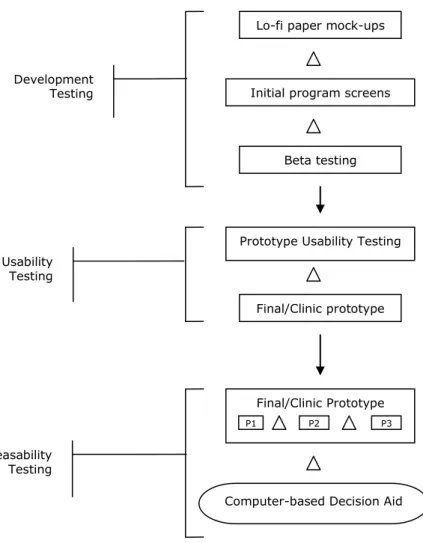
Based on these theories, and on other literature, I developed a three-tiered
development testing process, shown below.
This first phase of the testing process is comprised of three stages. The first two
were completed in the first round of testing, which we called Development Testing,
Figure 2. Brenner‟s three-tiered iterative process of design
B1)
Development Testing
Design testing took place over the course of two days at the Robert and Pearl
Seymour Senior Center in Chapel Hill, NC. We asked participants to complete three
tasks:
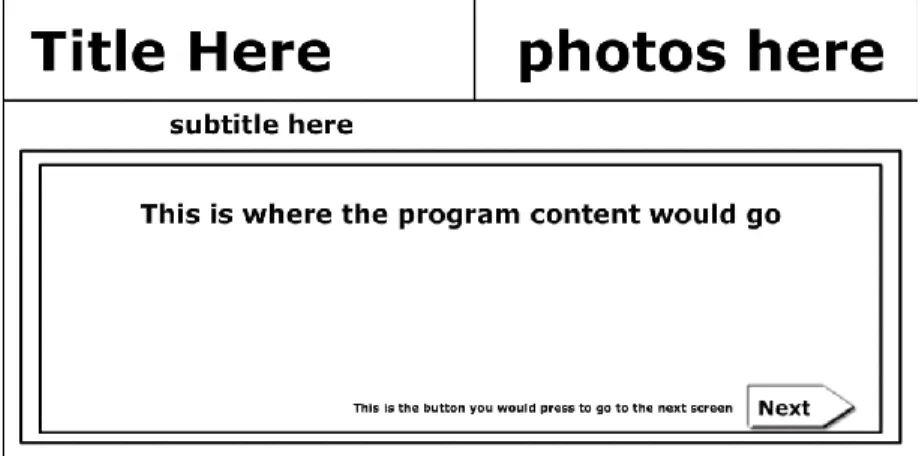
Pick a layout from amongst three shown to them on paper in black and
white.
Key
Indicates when changes to the program will be made
Lo-fi paper mock-ups
Initial program screens
Beta testing Development
Testing
Prototype Usability Testing Usability
Testing
Computer-based Decision Aid Final/Clinic prototype
Feasability Testing
Final/Clinic Prototype
Pick a color scheme from amongst three shown to them on paper in the
context of their layout of choice.
Choose from several title possibilities
Probes included asking about font sizes and picture placements.
Figure 3. Layouts.
Layout 1. Content frame
Layout 3. Book-style with title bar
Figure 4. Color Schemes
Color Scheme 1.
Color Scheme 2.
B1a)
Development Testing Final Report
Population:
Recruitment:
10 participants were recruited from the Seymour Senior Center in Chapel Hill, NC
on May 21-22, 2008, with 4 women and 6 men.
Computer use breakdown:
2 had never used a computer
1 had not used a computer in over 20 years
1 had not used a computer in 7 or 8 years
1 used computers less than once a week
1used computers 2-3 times per week
1 person used computers once a day
3 used computers more than once a day
Layouts:
Participants overwhelmingly (6/10) chose the L1 layout, modeled after CHOICE 6.0.
Among comments in its favor were:
It is more simple and self explanatory
One column for the text per page
Suggestions for improvement included:
Increase the size of the content text
Make the content screen more square
Increase the size of the photos—can’t see the faces
Participants who weighed in were equally divided regarding whether the title bar
should be there the whole time or if it should disappear after the first screen.
Colors:
Even more overwhelmingly (7/10), participants agreed with the literature and
chose the color scheme modeled after Neafsey’s findings; a light blue background
with heavy black text. Among comments in its favor were:
Black text on light background good
Blue is calming in a doctor’s office
Easy on the eyes
Titles:
Participants also generally agreed (5/10) that the title ―Making a decision about
colon cancer screening: What is the right choice for you?‖ was the best choice.
There was some debate about whether ―you‖ or ―me,‖ but more participants felt
that ―you‖ fit better. Key comments included:
―Decision‖ is a key word
―screening‖ is less intrusive than ―testing‖
Other comments:
Not all participants commented, but those who did were divided equally about
whether the content font size was just right or a bit too small (2 votes each). One
person thought both the content and title bar text were too big.
Other comments included:
Break up the paragraphs in the content
The touch screen is too complicated—have a mouse available too
B2)
Functionality Testing
Functionality testing took place over the course of 2 days, again at the Robert and
Pearl Seymour Senior Center in Chapel Hill, NC. Participants were, again, asked to
complete three tasks:
Attempt to navigate the program using the buttons that make the program go back and forth between the pages with no assistance.
Attempt to choose an answer to a survey question for which you would choose just ONE answer with no assistance.
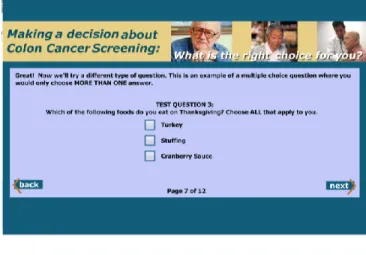
Attempt to choose answers for a survey question for which you would choose MORE THAN ONE answer with no assistance.
Figure 6. A survey question for which the user would choose just ONE answer.
Figure 7. A survey question for which you would choose MORE THAN ONE answer.
B2a) Functionality Testing Final Report
Population:
Recruitment
4 participants were recruited from the Seymour Senior Center in Chapel Hill, NC on
October 1-2, 2008, with 1 man and 3 women.
Computer use breakdown:
1 used a computer less than once per week.
1 used a computer 2-3 times per week.
1 used a computer once a day.
1 used a computer more than once a day.
Title Screen:
100% of participants felt that the length of time the title screen was programmed
to show for was adequate.
Navigation:
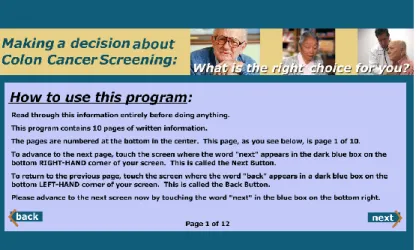
100% of participants were able to navigate between screens using the Next and
Back buttons with no instruction from the RA. Instructions read as follows:
One participant gave the following suggestion for the instructions:
“Instructions were good, but don‟t say „Go to next screen‟ until you are
ready for the person to go to the next screen. Be literal.”
Question Styles
Radio Buttons
100% of participants were able to use the radio buttons successfully without
additional instruction. 1 participant suggested that the radio buttons be a bit
larger.
The majority (75%) of participants liked the first layout better than the second.
100% of participants were able to use the checkboxes successfully without
additional instruction from the RA.
50% (2) preferred the first layout for the checkbox question to the second and one
did not have a preference. One preferred the second layout, which had the
checkboxes on the right instead of the left.
Likert Question
100% of participants were able to answer the Likert question without additional
instruction from the RA.
50% (2) preferred the second layout, shown below, to the first. One had no
preference, and one preferred the first. The first layout featured a double ended
arrow beneath the answer choices. Among reasons for preferring the second layout
were:
―The arrow might influence the answer‖
―The arrow is distracting‖
The participant who DID like the arrow felt that it might assist someone with lower
visual acuity.
Other Comments
Font sizing is big enough, even ―straining without glasses‖, for one
participant who self-reported very low visual acuity
Layouts on sample screens with pictures is good
―Touch areas are good.‖ The participant felt that the hit for the buttons was
Conclusions
The major questions—whether participants in the target audience will be able to use
the program at all, and whether participants in the target audience without
additional verbal instruction were overwhelmingly answered. All participants were
able to use all of the functionality without additional instruction.
Secondary measures in aesthetics were less firmly answered, but a majority answer
still arose with all questions.
C) Next Steps
C1)
Completing the program
In December, we will enroll several more participants in the functionality testing
component of the Development Testing phase. It is important that we thoroughly
test the program’s basic functionality early in the process because if we do not
create it so that it is usable by the target audience, all else is meaningless.
Once this phase of development testing is complete, we will create a beta version
for usability testing, followed iteratively by testing of an alpha version. Finally, we
will test it’s use in a clinical setting as part of a larger decision aid implementation
initiative.
C2)
Future plans
After the testing phases of this program are complete, we will create a final version
of this program, for possible integration into distribution as part of a larger decision
aid dissemination study being developed in our outpatient clinic.
Future iterations of this program might include further tailoring using conjoint
product development and marketing that separates a product into attributes, trying
to elicit what exactly is important to an individual consumer. In the case of medical
treatments, conjoint-style questioning techniques can elicit what characteristics
about a treatment are important to a patient—for example, if a patient has trouble
swallowing pills, an injection or liquid medication might be more suitable than a
References
1. Demographics of Internet Users [Internet]; c2008 [cited 2008 November 30]. Available from: http://pewinternet.org/trends/User_Demo_10%2020%2008.htm.
2. Venkatesh V. User acceptance of information technology: Toward a unified view. MIS Quarterly 2003;27(3):425.
3. Perkins T. Adobe flash CS3 professional: Hands-on training. Berkley, CA: lynda.com/books & Peachpit Press; 2008. .
4. Norman DA, Draper SW. User centered system design; new perspectives on human-computer interaction. Lawrence Erlbaum Associates, Inc. Mahwah, NJ, USA; 1986. . 5. HAWTHORN D. Interface design and engagement with older people. Behaviour &
Information Technology 2007;26(4):333-41.
6. Eisma R, Dickinson A, Goodman J, Syme A, Tiwari L, Newell A. Early user involvement in the development of information technology-related products for older people. Universal Access in the Information Society 2004;3(2):131-40.
7. Phang CW, Sutanto J, Kankanhalli A, Li Y, Tan BCY, Teo HH. Senior citizens’ acceptance of information systems: A study in the context of e-government services. Engineering Management 2006;53(4):555-69.
8. Strickler Z, Neafsey P. Visual design of interactive software for older adults: Preventing drug interactions in older adults. Visible Language 2002;36(1):4-29.
9. Neafsey PJ, Strickler Z, Shellman J, Chartier V. An interactive technology approach to educate older adults about drug interactions arising from over-the-counter self-medication practices. Public Health Nursing 2002;19(4):255-62.
10. Holzinger A. Finger instead of mouse: Touch screens as a means of enhancing universal access. Lecture Notes in Computer Science 2003;2615:387-97.
11. Holzinger A. User-centered interface design for disabled and elderly people: First
experiences with designing a patient communication system (PACOSY). Lecture Notes in Computer Science 2002;2398:467-84.
12. Holzinger A, Sammer P, Hoffman-Wellenhof R. Mobile computing in medicine: Designing mobile questionnaires for elderly and partially sighted people. Lecture Notes in
Computer Science 2006;4061:732-9.
13. Holzinger A, Searle G, Nischelwitzer A. On some aspects of improving mobile applications for the elderly. Lecture Notes in Computer Science 2007;4554:923-32. 14. Reed DJ, Monk A. Using familiar technologies in unfamiliar ways and learning from the