HANDBOOK on
SEQUENT 24
INDEX
0 - Introduction
0.1 - What is SEQUENT 24?
0.2 - Main differences with the previous SEQUENT systems
1 - Understanding the SEQUENT 24 system
1.1 - SEQUENT 24 ECU 1.2 - Changeover switch
1.2.1 - Changeover switch in its petrol position 1.2.2 - Changeover switch in its GAS position 1.2.3 - Error information
1.3 - Genius for SEQUENT 24
1.4 - Engine water temperature sensor 1.5 - Fuel “Rail”
1.6 - BRC injectors
1.7 - Gas pressure and temperature sensor 1.8 - MAP sensor
1.9 - Harness
1.9.1 - Injectors cut
2 - Programming
2.1 - File types
2.2 - Assisted personalised procedure
3 - Tune-up
3.1 - Changing over 3.2 - Self-mapping
4 - Utilities
4.1 - Information
5 - Problems and solutions
Annexes
1 List of the pins and their functions 2 Location of the ECU pins
3 General electrical diagram 4 Injectors cut diagram
3
0 - Introduction
0.1
- What is SEQUENT 24?
SEQUENT 24 is the BRC sequential injection system in the gaseous phase that is easy to install, quick to map and low-cost. Its installation gets simpler owing to the new philosophy adopted for sensors and emulators. The SEQUENT 24 actually does not contemplate any additional devices; the emulators are integrated in the ECU and the sensors are integrated in the main components (Genius and RAIL). The connections are quicker owing to the specific connectors; moreover, it is not necessary anymore to connect the TPS signal whereas the choice to connect the lambda oxygen sensor signal is still optional. For the RPM signal it will be possible to choose a coil signal too, in addition to a standard RPM signal or crankshaft position sensor signal. The new SEQUENT 24 PC programme is easier to use and completely separated from the standard SEQUENT and from the SEQUENT FAST, also as regards the filing of the mappings, but it anyway keeps their basic philosophy unchanged.
0.1
- Main differences with the previous SEQUENT systems
In the following table you will find the list of the main differences between standard SEQUENT / SEQUENT FAST and SEQUENT 24:
SEQUENT / SEQUENT FAST SEQUENT 24
Sensors < P1-MAP (case)
< Tgas on the reducer
< P1-Tgas integrated on rail < Twater integrated on the reducer < MANIFOLD PRESSURE ONLY WHILE SELF-MAPPING
Injectors Cut < Cut on the negative inside the ECU
< Emulation with the Modular LD
< Cut on the POSITIVE inside the ECU and simultaneous for the 4 injectors (the orange wires do not enter the ECU)
Key contact and Petrol Injectors Positive
< To connect to the key contact positive (brown) and to the petrol injectors positive (white-green)
The key contact positive becomes petrol injectors positive that goes into and out from the ECU. ECU ignition only if the petrol injectors positive is active
Communication < Active with key contact positive ON
< Active with the engine switched on; once it is connected it remains active even disconnecting the key contact (if the PC/ communication is not disconnected)
Changeover switch < 10 pins connected with the ECU < 3 pins connected with the ECU + one for the level on the changeover switch
Screen < Connected with the ECU case
with a specific pin
< Connected with the battery ground
TPS connection < Necessary or Optional < Not connected
RPM Connection < Necessary or Optional < It is possible to use the RPM counter signal, the crankshaft position sensor signal (only one wire) or the coils negative
Filing of the mappings < FSF+AAP file or only FSF for vehicle parameters and mapping
< FLS file for vehicle parameters and mapping.
< Separated from the previous Sequent systems
1
- Understanding the SEQUENT 24 system
The SEQUENT 24 system maintains, in general, the philosophy of the previous SEQUENT systems it derives from; it nevertheless introduces some changes and improvements as regards installation and operation, as well as some modifications in the components the BRC installer already knows well.
1.1
- SEQUENT 24 ECU
A detailed description of the ECU would be beside the point of this handbook. The main point is to underscore that it is the operational unit controlling the system. As the previous ones it complies with the automotive and EMC standards and is tight. What distinguishes it from the previous ones is the fully-plastic case and the much more compact dimensions advantaging its installation on the vehicle. For installation please carefully follow the indications given for the standard Sequent and Sequent Fast that are already familiar to the BRC installers.
1.2
- Changeover switch
Although it is similar to the typical two-position changeover switch provided with a buzzer, already used on Sequent and Sequent Fast, the differences distinguishing it from the previous ones are nevertheless substantial. This new changeover switch can be considered like a small ECU: it is not only a switch regulating the petrol-gas changing over, but it actually communicates with the ECU and controls the visualisation of the gas level in the tank on the 4 green LEDs.
1.2.1
- Changeover switch in its petrol position
With the button of the changeover switch in its petrol position, the vehicle works in forced petrol mode (as in all the previous systems). The rectangular red LED lit informs the user, while the gas level information disappears, that is to say the four level green LEDs are off.
1.2.2
- Changeover switch in its GAS position
In this position the vehicle starts up on petrol – the level LEDs are therefore off – and, with the changeover conditions configured by the programme attained (see chapter 3.1 for further information), automatically changes over to GAS. The user is informed by the rectangular LED that first becomes orange and then green (gas operation). Only while running on gas the gas level in the tank is visualised on the four green LEDs.
1.2.3
- Error information
As it has already been underscored, this changeover switch is an “intelligent” device communicating with the ECU. When the communication fails, the two level central green LEDs and the rectangular orange LED blinking inform the user of the malfunction.
In such conditions it is always possible to force the petrol operation turning the switch in its petrol position, as it is possible to run on gas with the changeover switch in its gas position, though losing the level information.
Figure 1.1
Kgjjgjadfgmjamgjakfgja
Amkjdfglkajglkajdmlfkjgkjadfmlkgj
5
In these cases it is recommended to make a diagnosis and, if need be, to repair/or replace the changeover switch.1.3
- Genius for SEQUENT 24
The pressure reducer is like the LPG GENIUS for SEQUENT, unlike it is provided with a new water temperature sensor, that is not compatible with the ones of the previous systems.
1.4
- Engine water temperature sensor
The water temperature sensor is directly fitted on the GENIUS on the water side. The sensor is of the resistive two-wire type, based on an NTC thermistore. The gas changing over strategies are grounded on the measurement of the engine water temperature. This sensor differs from the previous ones for its new mechanical structure: it is actually more compact and integrates inside it the part connected to the sensor and to the connector.
Figure 1.3
Kgjjgjadfgmjamgjakfgja
Amkjdfglkajglkajdmlfkjgkjadfmlkgj
amldkfjgadmlkjglkajdlfgjalkdjfgmlakjdf
glkjdafgjaldkfj
Figure 1.4 Figure 1.2
1.5
- Fuel “Rail”
It is the element bearing the injectors fitted. Unlike the previous sequential systems, the gas pressure and temperature sensor (not compatible with the previous systems) is also fitted on the rail in addition to the injectors (BRC type only).
1.6
- BRC injectors
The SEQUENT 24 equipment only uses BRC injectors. See in the following table the powers, for guidance:
LPG powers
Genius 800 Genius 1200 Genius 1500 Injectors
Max Type
Inducted - 26kW/cylinder 30kW/cylinder
Supercharged - 32kW/cylinder 36kW/cylinder
Injectors Normal Type
Inducted 17kW/cylinder 21kW/cylinder
-Supercharged 22kW/cylinder 26kW/cylinder
-1.7
- Gas pressure and temperature sensor
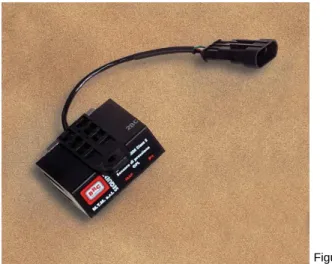
This sensor is absolutely new, in a compact body and already integrated with the connector; it contains the P1 gas pressure and temperature sensor. The sensor is directly fitted on the fuel rail. In this position the measurement of gas pressure and temperature is more careful and allows rectifying the gas mixtures more rapidly.
Figure 1.5
7
1.8
- MAP sensor
The MAP sensor is identical with the MAP sensor of the Standard SEQUENT, already familiar to the BRC installer. The material difference distinguishing it from the other systems is that in the SEQUENT 24 this sensor is used ONLY DURING THE SELF-MAPPING. During the vehicle’s normal operation, the MAP is estimated: an approximate value of the manifold pressure is therefore visualised on the SEQUENT 24 interface.
For the self-MAPPING the MAP sensor is provided with the pipes necessary for the connection on the vehicle, inside the SEQUENT 24 CALIBRATION KIT Code 09SQ10990001.
1.9
- Harness
The SEQUENT 24 harness is slenderer than the previous systems’ ones. The 56-pole connector harness of the Standard SEQUENT is replaced by the 24-pole connector harness of the SEQUENT 24. To make installation easier the main devices of the system are connected through a specific connector and the quantity of wires to weld is very small.
Shielded conductors have been used in order to comply with the EMC standards. The connectors on the harness are waterproof with the exception of the connector of the changeover switch that is however housed in the passenger’s compartment and is therefore protected from water. The injectors ought to be cut with great care: the injectors cut is the main novelty of the whole system and of the harness.
1.9.1
- Injectors cut
Unlike the previous systems, the injectors are cut on the positive: this allows having less wires entering the ECU.
Two wires are actually enough to cut all the injectors: the White/Green wire (injectors positive, original equipment side) and the White/Brown wire (injectors positive, injectors side).
On the other hand, it won’t be possible to change over from petrol to gas and vice versa injector by injector; the changing over could possibly be abrupt and we might change over only while decelerating on some vehicles.
Figure 1.8 Figure 1.7
The White/Green wire has also the key contact positive function, i.e. it is the wire that turns the gas ECU ON. It is proper to bear in mind, in this connection, that some vehicles do not actuate the injectors positive until the starting up: it is not therefore sufficient to turn the key contact on. In this case, the only way to turn the gas ECU on is to start up. As while programming, the gas ECU needs this wire to be high-potential, programming will be carried out with the vehicle running.
The injectors positive normally is not low-potential as soon as the engine and the key contact are switched off, but it can remain high for some seconds with the vehicle switched off. In this case, the ECU too will remain ON for some seconds.
The White/Brown wire is directly connected with the petrol injectors. It supplies tension on the injectors positive while running on petrol, whereas it takes this power supply off while running on gas, in order to cut injectors.
It is highly recommended to use right and left harnesses specifically conceived for Sequent 24 whenever it is possible. They actually allow making quick connections with the injectors, without welding and cutting down any error possibility.
It is necessary not to mix up the right with the left harnesses and to carefully follow the instructions supplied with these harnesses.
The exchange of the two harnesses brings about the vehicle’s malfunction both on petrol and on gas and the short-circuit of the injectors piloting outputs of the petrol ECU to the positive. This short-circuit strains the petrol ECU only when the engine is running (it is anyway not possible to start up). Furthermore, the petrol ECU is generally protected against this type of short circuit. Nonetheless it is recommended to act very cautiously. In particular, it is recommended not to insist excessively if the vehicle does not start up after reconnecting the injectors, but to check immediately whether the connection harness is correct.
Should the right and left harnesses not be used, it is anyway possible to use the universal harness, following the enclosed instructions with the utmost care.
In particular, bear in mind that:
• The White/Green wire can be generally connected only with a positive wire coming from the petrol original harness, even if it is best, in general, to reunify all the positives of the injectors (ECU side) on this wire, in order not to supply overcurrent to one single wire of the petrol original harness.
• All the positives of the petrol injectors ought to be cut, by disconnecting them from the original positive and connected only with the White/Brown wire. Indeed, should the original positive still get to a petrol injector, the injector will also work while running on gas and therefore provoke the bad combustion of the attendant cylinder.
• The petrol injectors positive to be cut ought to be as close as possible to the petrol injectors. If we cut the positive far from the petrol injectors, we actually run the risk of cutting, in addition to the injectors, other actuators or sensors of the vehicle supplied with the same wire of the original equipment.
• The injectors negatives ought to be cut and connected, as in the past, to the violet (petrol ECU side) and orange (injectors side) wires and ought to be connected in the same order, from 1 to 4, as the gas injectors.
At the end of this handbook ((Annex 4 on page 27) you will find an explanatory diagram regarding the injectors cut.
The petrol injectors are emulated through special coils similar to the coils used in the Modular LD of the Sequent systems that are fitted inside the ECU.
9
06LB50010121 – UNIVERSAL Harness06LB50010122 – RIGHT Harness 06LB50010123 – LEFT Harness
2
- Programming
The software structure is maintained as similar as possible to the BRC sequential systems already on the market and familiar to the BRC installer. Only the material differences introduced for SEQUENT 24 will be therefore here-after indicated.
2.1
- File types
The SEQUENT 24 ECU is programmed by downloading two different types of files: 1. File .S19
2. File .FSL
the information necessary for the vehicle’s operation is contained in the file. FSL.
2.2
- Assisted personalised procedure
Let’s find out, in brief, about the assisted personalised programming procedure. The procedure is to be carried out with the engine switched on and the changeover switch on petrol mode (the programme will show the installer when changing over to gas).
The steps to follow are not far removed from the ones analysed for the Standard SEQUENT and for the SEQUENT FAST, that’s why you are kindly requested to refer to the attendant handbooks for a more detailed description.
Assisted personalised procedure
Beginning of the procedure
Selection of the equipment and injectors type
RPM calibration
Save file
Save file Self-mapping
End of the procedure Lambda calibration
(optional)
STEP 1
STEP 2
STEP 3
STEP 4
STEP 5
STEP 6
The main novelties have been introduced in the equipment type screen and in the RPM calibration screen. The equipment type screen (figure 1.9) requires to enter an extra information: the vehicle volume.
The RPM calibration screen (figure 2.0) allows selecting a coil RPM signal besides selecting and calibrating a normal RPM signal or crankshaft position sensor. Warning: by selecting an RPM signal from the negative coil, the RPM won’t be correctly visualised in all the working conditions. In some of them as, for example, in the cut-off, the visualised RPM signal could not correspond to the vehicle’s real one; nevertheless it doesn’t affect the vehicle’s working.
Figure 1.9
11
3 - Tune-up
This chapter will only examine the differences with the previous SEQUENT systems, otherwise you are kindly requested to make reference to the handbooks on the Standard SEQUENT and SEQUENT FAST.
3.1 - Changing over
The changing over operation has substantial differences distinguishing it from the previous Sequent software, owing to the completely different injectors cut on Sequent 24. In particular, the injectors are simultaneously cut and changeover can be rough while in the Standard Sequent or Sequent Fast it was clean in all conditions. In these cases it is proper to avoid changing over in the most critical conditions that normally are idle speed or conditions requiring much torque to the engine.
It is obvious from the first screen (figure 2.1) that changing over is always a function of the engine water temperature measured through the special sensor positioned on the Genius Reducer for Sequent 24.
On Standard Sequent and Sequent Fast the changing over temperature was the gas one unless you connect to the vehicle’s original engine water temperature sensor.
As a rule, the changing over is divided into two sections according as you change over with the warm vehicle (temperature higher than 50°C) or the cool vehicle (temperature higher than 40°C).
In the referred example the changing over conditions are attained if:
1. 60 seconds at least have passed after the vehicle starting up and gas temperature ranges from 40° and 50°C.
2. 5 seconds at least have passed after the vehicle starting up and gas temperature is higher than 50°C.
By clicking on the ADVANCED button it is possible to set some parameters affecting changing over or changing back to petrol for lack of fuel.
In particular, it is possible to distinguish the conditions for changing over from petrol to gas (Box 1 of Figure 2.2) from the conditions for changing over from gas to petrol (Box 2 of Figure 2.2).
In particular, the following configurations are possible:
< “Changing over at the idle speed” indicates that changing over can be possible at RPM lower than 4000 and with a MAP value close to the idle speed one.
< “Changing over in deceleration” indicates that changing over can be possible in deceleration conditions, that is to say with RPM ranging between 2000 and 4000 and a MAP value close to the idle speed one. In these conditions the torque required to the engine is practically null; this obviously allows avoiding jerks during this phase. (This changing over is very similar to the Flying Injection system). Changing over in deceleration is suitable for vehicles whose OBD detects miss-fires. On these vehicles, petrol-gas changing over and gas-petrol changing back are particularly delicate and they are therefore recommended only in deceleration conditions. (NOTE: the manual action on the changeover switch has anyway priority on the software; by forcing the changeover switch on its petrol mode the gas-petrol changing over is therefore immediate even if the changing over in deceleration is configured in the software).
< “Always changing over” indicates that changing over is possible in all conditions and therefore at any RPM and engine load values.
The standard configurations are:
< Petrol-Gas changing over (Box 1 Figure 2.2): changing over in deceleration < Gas-Petrol changing over (Box 2 Figure 2.2): always changing over
In the “Changing back to petrol for lack of gas” Box there are all the parameters controlling this function. They are the same parameters already seen for the Standard Sequent and Sequent FAST. Every time a new mapping is created, some given values are already configured; normally they do not need any modification. The “Changing back to petrol at the idle speed” Box allows changing back to petrol every time the engine is below certain revs; this function is identical with the Sequent one and is only used on vehicles whose return to idle speed is so critical that it can provoke the engine stall as a consequence.
3.2 - Self-mapping
The self-mapping can be carried out from the tune-up function too. The procedure is the same as the assisted personalised one. The only novelty is the initial question (Figure 2.4) asking the installer to decide whether self-mapping from the CURRENT MAP, that is the one already existing in the ECU or from the BASIC MAP, that is by using the standard maps existing on the PC. WARNING: IT IS NECESSARY TO CONNECT THE MANIFOLD PRESSURE.
Figure 2.3
13
4 - Utilities
This chapter will only examine the differences with the previous SEQUENT systems, otherwise you are kindly requested to make reference to the handbooks on the Standard SEQUENT and SEQUENT FAST.
4.1 - Information
This section allows controlling the updating of the software versions existing on the PC that can be downloaded on the ECU, visualising the software name and version (Figure 2.5).
5 - Problems and solutions
This chapter supplies some useful indications for the installer to solve some problems that could arise with this new system.
Problem What’s happened? What to do
The ECU does not communicate 1.Lack of power supply to the ECU 2 . T h e c o m m u n i c a t i o n p o r t configured on the PC is not correct 3.The communication cable is faulty
1.Turn the engine on
2.Verify whether the configured COM port is correct in UTILITIES-COMMUNICATION
3.Replace the communication cable
The ECU does not switch off The communication with the PC is still active
Disconnect the communication cable or exit from the SEQUENT 24 programme and wait till the ECU is switched off
The changeover switch does not visualise the GAS level
1.The changeover switch is in its petrol position (level LEDs are switched off)
2.The changeover switch does not communicate (level central LEDs are blinking)
1.Changeover to gas and verify the level visualisation.
2.Verify the changeover switch harness or replace the changeover switch. In these cases, the cause could also be the ECU. Therefore v e r i f y w h e t h e r t h e E C U communicates with the PC interface and, if necessary, try to replace it.
The changeover switch does not The level green central LEDs and In this condition the vehicle goes Figure 2.5
communicate the orange rectangular LED are blinking
on running on petrol or on gas according to the changeover switch position. Nevertheless there is no information on the operation and it is therefore proper to verify the harness or replace the changeover switch.
The changeover switch does not switch on
1.The changeover switch harness is cut off
2.The 5A fuse is cut off 3.The changeover switch fails 4.The ECU does not switch on
1.Verify the changeover switch harness continuity.
2.Replace the 5A fuse
3.Replace the changeover switch. 4.Verify the ECU operation. The vehicle works wrongly on gas The injectors positives are not cut
correctly.
1.Make sure you have cut all the petrol injectors positives
2.Verify you have cut as close as possible to the injectors.
The Petrol and GAS injectors do not inject simultaneously (you will find it hard to make the self-mapping)
The injectors positives are not cut correctly.
Try to start the vehicle up with the gas injectors disconnected: if the vehicle starts up (even running bad) then there is a problem in the injectors positive cut.
The vehicle does not start up. Inversion between RIGHT and LEFT harness.
Verify whether the injectors are connected correctly. If the RIGHT harness and the LEFT harness are inverted, trying to start up, the tension on the White/Green wire is still low.
The vehicle does not change over to gas.
1.The injectors are not driven to the ground.
2.The battery bond fails.
1.Verify the connection of the B1 Pin injectors ground wire.
2. Verify the connection of the C8 Pin battery ground wire.
The ECU does not switch on or it resets itself in the gas operation.
1.The connection to the battery positive is lacking or is cut off. 2.The connection to the injectors positive is lacking or is cut off.
1.Verify the connection of the A1 Pin battery positive wire.
2. Verify the connection of the A7 Pin injectors positive wire.
The vehicle changes over to petrol in cut-off.
The RPM signal is taken from the coil negative.
This signal is set to zero in cut-off.
Take an RPM signal different from the coils one.
The vehicle stalls while changing over to gas.
1.The 15A fuse is cut off.
2.Any of the actuators relay wires is disconnected.
3.The relay fails.
4.The White/Green wire is inverted with the White/Brown one (in this case you will hear the relay ringing).
1.Verify the 15A fuse.
2.Verify the connections on the actuators relay.
3.Replace the relay.
4.Verify the connection of the White/Green and White/ Brown wires.
15
Annexes
1 List of the pins and their functions N. Pin of
the ECU
N. Pin of the remote connector
Wire colour Wire name Description
A1 Note 1 Red +VBATT ECU power supply from
battery / injectors current blow-by
B1 Ring Black GND-INJ Gas injectors ground
C1 1 Green/Black GAS SV Solenoid valve piloting outlet
A2 1 White/Green INJ1-GAS Gas injector 1 piloting outlet
B2 B1 Violet INJ1PET-IN Petrol injector 1 inlet
C2 2 Yellow WATER TEMP. Water temperature
A3 1 White/Green INJ2-GAS Gas injector 2 piloting outlet
B3 B2 Violet INJ2PET-IN Petrol injector 2 inlet
C3 4 White K-LINE K line diagnostic serial
communication
A4 1 White/Green INJ3-GAS Gas injector 3 piloting outlet
B4 C1 Violet INJ3PET-IN Petrol injector 3 inlet
C4 2 Green SWITCH LINE Changeover switch serial
communication
A5 1 White/Green INJ4-GAS Gas injector 4 piloting outlet
B5 C5 Violet INJ4PET-IN Petrol injector 4 inlet
C5 Note 2 Red SENSPOWER 5V power supply for sensors
and changeover switch
A6 A2 White/Brown COMINJPET-OUT Petrol injectors common
positive, injectors side
B6 - Yellow LAMBDA-AIN L a m b d a o x y g e n sensor
analog inlet
C6 - Light blue LAMBDA-AOUT Lambda oxygen sensor
analog outlet
A7 A1 White/Green COMINJPET-IN Petrol injectors common
positive, petrol ECU side (or +V key)
B7 4 White MAP-AIN MAP analog inlet
C7 4 White TGAS-AIN Temperature analog inlet
A8 - Grey RPM-IN RPM inlet
B8 2 Green P1-AIN Gas pressure analog inlet
C8 Note 3 Black GNDBATT ECU and sensors ground
Note 1: The A1 pin of the ECU (battery positive) is connected with the pin 3 of the connector for the communication with the PC.
Note 2: The C5 pin of the ECU (sensors positive) is connected with the following pins of the remote connectors:
< Pin 3 of the gas pressure and temperature sensor < Pin 4 of the changeover switch
< Pin 2 of the MAP sensor
Note 3: The C8 pin of the ECU (ECU and sensors ground) is connected with the following pins of the remote connectors:
< Pin 1 of the gas pressure and temperature sensor < Pin 3 of the changeover switch
< Pin 1 of the MAP sensor