Journal of Electrical Engineering,
Electronics, Control and Computer Science
JEEECCS, Volume 2, Issue 4, pages 7-12, 2016
Raspberry Pi 2 security system using Windows
10 IoT
Constantin-Florian STĂNESCU, Valeriu Manuel IONESCU
Dept. of Electronics and Computer Science University of Pitesti
Pitesti, Romania [email protected]
Abstract – This paper presents the implementation of a security system with proximity sensor, video camera, display, and keypad, controlled by a Raspberry Pi single board computer. The system will be controlled via keypad interaction, and is connected to a server from the network where it stores relevant data. The novelty consists in using Windows 10 IoT, presented by Microsoft in the summer of 2015 for ARM devices, as operating system. The paper presents challenges of this implementation, and of using Windows IoT in small scale projects.
Keywords-security system; Window 10 IoT; Raspberry Pi
I. INTRODUCTION
Security systems are ever-present in the current world. They are used to survey and protect areas, but also to send alerts when a certain event, determined by hardware of software constraints, happens.
Small scale security systems differ from professional security systems in implementation, and costs. They use low power devices, with or without an operating system, and only handle basic security features, such as: motion detection sensors, buttons, contacts, image and audio sensors, input devices, simple displays (LCD) or LEDs, and alarm systems (audio, lights, network, etc.). Professional security systems can implement more advanced features, such as video/audio recording, face recognition or smart device connectivity, but this comes at a price of needing more powerful hardware, and a complex installing.
For implementing a simple security system, an Arduino or similar board can be used [1] [2], however the possibilities of future extending such system with a new feature set, is limited. For some users there is also a barrier that the development environment is limited, as are the available libraries to be used. An alternative is to use single board computers (a system including all the necessary components for complete operation – from microcontroller to graphics card, and I/O ports – on a single PCB, except the power source).
Raspberry Pi, introduced in 2012, is a single board computer which offers not only great flexibility with the number of connectivity options, but has support for the operating systems with the capability of writing software solutions in high level languages. Its board
has a large online community, and maintains the code compatibility in recent versions, 2 (introduced in 2015), and 3 (introduced in 2016). A notable mention can be made for the Raspberry Pi Zero version that is very cheap, but has reduced connectivity options.
This system is used in many projects [3], and is a good choice for controlling a security system, due to the large number of general purpose Output/Input (GPIO) ports, its low price, and the low power consumption.
The operating system for Raspberry Pi is also the one to restrict the development options. While most projects favor Linux (and C, or Java, as programming languages), Microsoft offers Windows 10 IoT for this platform, with direct GUI support included, and many libraries to rapidly develop applications in Visual Studio development application (also available for free).
This paper presents the design and implementation of a security system centered on the Raspberry Pi 2 platform using Windows 10 IoT, and C#, as programming language. The hardware and software components are presented, and the problems of the implementation are outlined.
II. WINDOWS 10IOT AND RASPBERRY PI
Raspberry Pi 2 is a programming board with a 900MHz quad-core ARM Cortex-A7 CPU, 1 GB of RAM, and a VideoCore IV 3D graphics core.
The system keeps compatibility with older versions, which is also the case of Raspberry Pi 3, introduced in 2016. Keeping compatibility is good for developers, meaning that for better performance, they can simply swap the hardware while keeping the software solution the same.
For this platform there are multiple operating systems available: Linux (Raspbian, Debian, Ubuntu Mate 15.10, Fedora, Arch Linux), RISC OS (ARM), Snappy Ubuntu Core (IoT), and, finally, Windows 10 IoT. Compared to the other operating systems in the list, Windows 10 IoT is the newest, and includes the most radical changes when compared to the x86 versions.
core and multiple product sales. While the core is common, thus reducing the development costs, the commercial solutions offered to the users and businesses can differ. Windows 10 IoT family has multiple branches:
- Windows 10 IoT Enterprise: it is an x86 Windows version, a direct descendant of Window Embedded. It is used for POS terminal, kiosk or other outdoor display (unattended). It is based on Universal Windows (Metro), Classic Windows (desktop) Apps
- Windows 10 IoT Mobile Enterprise: relates to Windows 10 Mobile OS (Windows Phones), and can be found on Enterprise mobile (for example, handheld barcode scanners)
- Windows 10 IoT Core: it is the version that targets the hobbyist – simple, cheap, low-powered kit computers, such as Raspberry Pi 2, and 3, MinnowBoard MAX, DragonBoard 410c. These systems have a low amount of memory, are usually passively cooled, and the processing power is reduced. It runs only Windows Universal Apps (portability), and has a reduced WinRT stack.
The version targeted by the implementation presented in this paper is Windows 10 IoT Core.
While being an important step forward, because it is a Microsoft operating system dedicated to ARM devices, it is a timid one (due to the reduced community, and lack of some features available on Linux), and the novelty of this system posed a number of difficulties in the implementation.
Some of the problems to be named are: reduced cross-platform support for Windows ARM (Java, Mono); WindowsRT reduced feature set, security, and task oriented programming makes cross-platform programming difficult; no support for System.IO.Console.* functions, although they are supported by Mono ARM for Linux; no console support for C#; isolated application security: Windows.Storrage.* with async read/write functions; poor command-line monitoring support; capturing physical keyboard inputs in console applications; lack of TP client libraries for exporting files to the network; no VNC Server; Remote Display Experience only available from OS 10.0.14295.1000 onwards; CoreCLR ASP.NET 5 support from .Net Core is beta; limited hardware support (for example, with wireless dongles).
Another problem of this operating system is that an application must be designed to operate with user interface (headed), or without a user interface (headless). A on the fly change is not possible, and a reboot is necessary to change this behavior.
The advantages of this operating system are: it is possible to implement and test the solution from Visual Studio, having access to all the debugging environment features; there are, also, many tutorials from Microsoft [4] trying to increase the number of developers for this operating system.
III. HARDWARE DESIGN
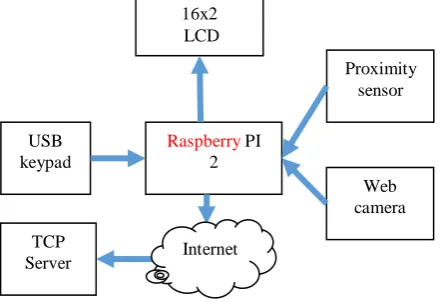
As shown by Fig. 1, the system’s hardware diagram points out that Raspberry Pi 2 controls all the other components:
- The proximity sensor sends information, if motion was detected by Raspberry Pi 2. - The LCD 16x2 is used to display information,
if motion was detected, and to display messages that will guide the user to enter the security code, and to select different menu options. The information is also replicated in the GUI that is sent via the HDMI connection, or can be accessed using the Remote Display. In this system, the GUI is only accessible for development, as there is no monitor attached. - The keypad allows the user to interact with
the system, being a USB connected device. - The web camera connected via the USB
connection is able to take a picture that will be sent to the web server, and saved for later inspection. The camera is a normal one, with the IR filter removed so that it is able to capture images with the light of an IP LED.
Figure 1. Web camera open with sensor and IR filter visible.
To connect to the server, Raspberry Pi 2 needs a permanent internet connection. When a motion was detected, Raspberry connects to the server, and sends information. The server writes the timestamp into a log file when motion was detected, and saves the received data. On the LCD, the message “Insert password” appears, and the user must enter the password to disable the alarm. If the password was correct, the alarm is not activated. If the password was incorrect, or enough time elapsed but the user did not enter the password, Raspberry connects to the server again, writes a corresponding message, and saves another picture taken by the web camera. At this point, the menu returns to the initial status, and is ready to be awakened by movement, or by keyboard interaction.
The wiring for the PIR motion sensor, and the LCD, is presented by Fig. 2.
Figure 2. Connecting the motion sensor and the LCD to the Raspberry Pi 2 system. The visible variable resistance is used to
adjust the LCD contrast.
As presented above, in order to be able to take images in dark environments, the IR filter, present in the web camera, had to be removed [5]. This is presented by Fig. 3.
Figure 3. A4 Tech PK-635 webcam with IR filter visible.
A webcam sample [6] was used as a model, and pictures were taken when an event had occurred. It is important to note that only certain versions of the
operating system (version 10.0.10586.0), and Visual Studio development environment (Visual Studio 2015 update 2 with Windows SDK: version 10586) can use this feature. The necessary (newer) versions were installed, and development was possible.
IV. SOFTWARE DESIGN
It is important to note that the functioning is based on asynchronous events. This is necessary in order to prevent the application from “locking up” when waiting for a processing loop, and to be able to process a different task during that time.
The program flow starts at powering up, when Raspberry Pi 2 initializes all pins and components to be used in the project. Particularly, the LCD needs a certain initialization sequence. The system is fully functional when “Stanescu RST411” and second line “* - activated” are displayed on the LCD.
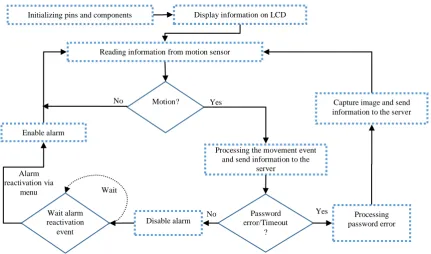
At this point, the main application loop is running, designed around the timer events, and the events generated by different sensors. Basically, the system waits for one of these events and progresses accordingly. The flow is presented by Fig. 4.
After the initialization, the alarm is enabled, and the Raspberry will poll the information from the motion sensor to see if movement has occurred. The decision block will determine if motion is present or not. If motion was detected, the algorithm will enter the “Processing the movement event” block. This will prompt the algorithm to display on the LCD the message to enter the password, and, at the same time, it will connect to the server, and it will send the message that moment was detected along with the web camera image. This was necessary in the case of brute force was used on the door, and the system operation would be stopped before the next step would occur. The server would have already received the image with the potential intruder.
Figure 4. Software system flow diagram. The dotted blocks are functions with multiple processing lines. Initializing pins and components Display information on LCD
Reading information from motion sensor
Motion?
Processing the movement event and send information to the
server
Password error/Timeout
?
Disable alarm password error Processing Yes
Yes No
No
Capture image and send information to the server
Enable alarm
Wait alarm reactivation
event
Wait Alarm
Figure 5. Using the PowerShell to add a statup Windows 10 IoT appliction. In yellow is the headed application name and in red the app startup command
In the next decision block, it is determined if the entered password was correct, or if a timeout occurred. If the password was correct, the alarm is disabled, and it stays like this until it is enabled via the application menu. In case of an incorrect password, it will enter the “Processing password error” block, that will establish a new connection to the server, and it will send another message along with another image. Finally, the algorithm will return to “Reading information from motion sensor” block.
The debugging was made by targeting the remote (Raspberry Pi) system, found by name or IP. This allows the running of the application on remote systems without actually installing it. In order to install the application as a startup app, it is necessary to find out the application name. This is done by opening in Visual Studio, in the Solution explorer window, the “Package.appxmanifest”, and from the
packaging tab, the “Package family name” can be observed. Headed applications are those having a user
interface, while headless are those designed to run in background (as services). As it was necessary to interact with the application, the headed mode was necessary to use. While the resources necessary to operate in headless mode are smaller, other tests [7] have shown that the gain is not substantial. Adding a startup program is presented by Fig. 5. The PowerShell command line: IoTStartup add was used [8].
Another problem that had to be solved was the user interaction by the means of the keypad. As the user was looking at the LCD, and not at the application’s GUI, it was necessary to capture all the pressed keys by focusing on the first control in the application (it is auto-focused by default, when the application started. Then, as the user pressed keys, an async OnKeyDown
event was associated, and all keys were handled there (the user never left that first control). The
e.KeyStatus.ScanCode from KeyRoutedEventArgs was provinding the correct keys used.
V. TESTING AND RESULTS
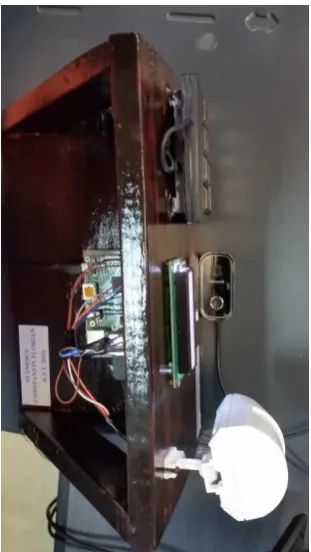
The hardware connections were made, and the system was installed as seen in Fig. 6, and Fig. 7.
Figure 6. Implemented system frontal view with keypad, LCD and motion sensor.
The problem faced at this stage was related to the system heat up due to the increased ambient temperature (the temperature in the laboratory reached 35° Celsius). Because of this, the system would often freeze. After ruling out other causes, such as SD card corruption, or incorrect software operation, and discovering the very hot integrated circuits on the board, there were two possible solutions: to add a cooling fan, or to place cooling pads on the processor.
In this case, the first solution was chosen and no more freezes appeared.
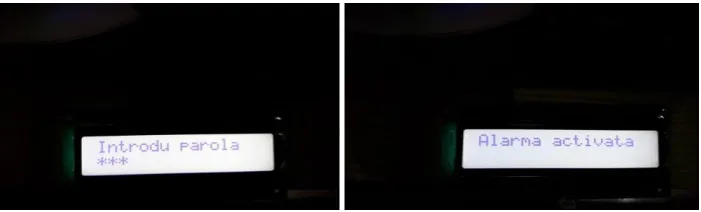
Figure 8. System’s LCD with messages that are used to interract with the user
The system was tested, and the LCD message prompted for the user to insert a password is presented by Fig. 8.
Other observations related to the implementation are:
- The various timeouts needed in used time implementation: await Task.Delay(TimeSpan.FromSeconds(1)), as async functions.
- For camera capture the MediaCapture class was used [6]. In order to have access to the web camera, the “Package.appxmanifest” tab
of this project, the needed capability had to be selected, otherwise an error would occur.
- Powering down the platform should be done by selecting the corresponding button in the user interface, or by typing shutdown /s /t 0 [9]. If a restart is necessary, the shutdown /r /t 0 should be used. This is important because when closed directly by disconnecting the power source, the system operation became erratic, and in a few cases the system refused to finish the booting process. This relates to observations made on similar platforms running Windows 10 IoT. If the Linux operating system was used, there is the same behavior, but in a smaller degree.
- The first idea on writing images to the server was by using a FTP client. As there is no implicit support for the FTP client in the libraries available for Windows 10 IoT, a TCP connection was used. The TCP connectivity to the server was also implemented using async:
_socket = new StreamSocket();
await _socket.ConnectAsync(hostName, Port.ToString());
CONCLUSION
This paper presented the implementation of a simple security system based on Windows 10 IoT running on Raspberry Pi 2.
The system reads motion information from a PIR sensor, interacts with the user by means of an LCD screen and a keypad, and it can send messages via TCP to a network server.
The implementation showed that the Windows 10 IoT is still at its early stages (instability, lack of software features in some versions), but if Microsoft
will continue to support the technology, it has the potential to evolve into a leading solution for small platform development. The convergent strategy created by Microsoft (Universal Windows Platform, Windows IoT, and Universal Windows App) is the foundation for performance and stability.
Using C# and the Visual Studio for the software development was an advantage, and allowed finding and solving the problems easily and quickly.
The most important hardware problems to be overcome were: the use of the UI (the application was running as a headed app) made the system use the graphics card, that in turn produced heat causing the system freeze; the web camera had to be disassembled in order to remove the IR filter, so that it can be used in dark environments; the initial USB keypad that was used had a bad hardware contact leading to repetition of the pressed keys.
In the future, this system can be improved by:
- adding more sensors (such as a fingerprint reader);
- switching to a headless operation (if the UI is no longer needed – by using the application
setbootoption.exe [headed | headless]) for reduced power consumption;
- using a better password as the current one uses only the keys available on the keypad;
- using face recognition for identifying users, in order to avoid entering a password.
REFERENCES
[1] Santoso Budijono, Jeffri Andrianto, Muhammad Axis Novradin Noor. Design and implementation of modular home security system with short messaging system, EPJ Web of Conferences, 2014, DOI 10.1051/epjconf/20146800025, pp. 1-5
[2] Chun-Pai Jimmy Hsieh, Yang Cao. Home Security System. Cornell University EE476 Final Project, May 5, 2004, Web. https://people.ece.cornell.edu/land/courses/ece4760/FinalProj ects/s2004/ch236/securitysystem.pdf, Available May 10, 2016 [3] VM Ionescu, F Smaranda, AV Diaconu. “Control System for Video Advertising based on Raspberry Pi”, Networking in Education and Research, RoEduNet, 2013, pp.1-4.
[4] Anders Lybecker, Sebastian Brandes. Developing IoT solutions with Windows 10 and Raspberry Pi 2, Web. http://goo.gl/4xA5jI, Available May 10, 2016.
[6] Microsoft. Web Camera Sample, 2015,
https://developer.microsoft.com/en-us/windows/iot/win10/samples/webcamsample, Available May 10, 2016.
[7] Alexandru-Catalin Petrini, Valeriu Manuel Ionescu, Implementation of the Huffman Coding Algorithm in Windows 10 IoT Core, Proceeding of the ECAI 2016, Romania, in press.
[8] Microsoft. Windows 10 IoT Core Command Line Utils, Web.
https://developer.microsoft.com/en-us/windows/iot/win10/tools/commandlineutils, Available May 10, 2016
[9] Anurag S. Vasanwala. Windows 10 IoT Core : Setting Startup
App, 2015, URL: