1.1 WHAT DOES “SECURE” MEAN?
How do we protect our most valuable assets? One option is to place them in a safe place, like a bank. We seldom hear of a bank robbery these days, even though it was once a fairly lucra-tive undertaking. In the American Wild West, banks kept large amounts of cash on hand, as well as gold and silver, which could not be traced easily. In those days, cash was much more commonly used than checks. Communications and transportation were primitive enough that it might have been hours before the legal authorities were informed of a robbery and days before they could actually arrive at the scene of the crime, by which time the robbers were long gone. To control the situation, a single guard for the night was only marginally ef-fective. Should you have wanted to commit a robbery, you might have needed only a little common sense and perhaps several days to analyze the situation; you certainly did not re-quire much sophisticated training. Indeed, you usually learned on the job, assisting other robbers in a form of apprenticeship. On balance, all these factors tipped very much in the favor of the criminal, so bank robbery was, for a time, considered to be a profitable business. Protecting assets was difficult and not always effective.
Today, however, asset protection is easier, with many factors working against the potential criminal. Very sophisticated alarm and camera systems silently protect secure places like banks whether people are around or not. The techniques of criminal investi-gation have become so effective that a person can be identified by genetic material
1 In this chapter:
• The risks involved in computing
• The goals of secure computing: confidentiality, integrity, availability
• The threats to security in computing: interception, interruption, modification, fabrication
• Controls available to address these threats: encryption, programming controls, operating systems, network controls, administrative controls, law, and ethics
1
Is There a Security Problem
in Computing?
(DNA), fingerprints, retinal patterns, voice, a composite sketch, ballistics evidence, or other hard-to-mask characteristics. The assets are stored in a safer form. For instance, many bank branches now contain less cash than some large retail stores because much of a bank’s business is conducted with checks, electronic transfers, credit cards, or debit cards. Sites that must store large amounts of cash or currency are protected with many levels of security: several layers of physical systems, complex locks, multiple-party systems requiring the agreement of several people to allow access, and other schemes. Significant improvements in transportation and communication mean that police can be at the scene of a crime in minutes; dispatchers can alert other officers in seconds about the suspects to watch for. From the criminal’s point of view, the risk and required sophistication are so high that there are usually easier ways than bank robbery to make money.
Protecting Valuables
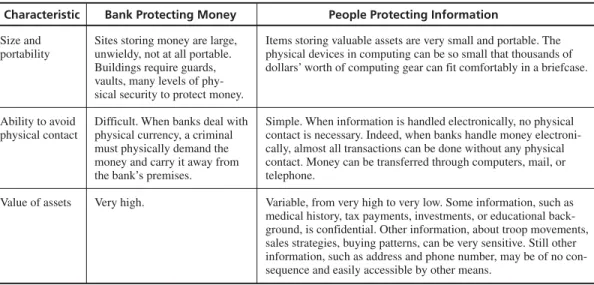
This book is about protecting our computer-related assets, not about protecting our money and gold bullion. That is, we plan to discuss security for computing systems, not banks. But we can learn from our analysis of banks because they tell us some gen-eral principles about protection. In other words, when we think about protecting valu-able information, we can learn a lot from the way we have protected other valuvalu-ables in the past. For example, Table 1-1 presents the differences between how people protect computing systems and how banks protect money. The table reinforces the point that we have many challenges to address when protecting computers and data, but the na-ture of the challenges may mean that we need different and more effective approaches than we have used in the past.
Protecting our valuables, whether they are expressed as information or in some other way, ranges from quite unsophisticated to very sophisticated. We can think of the
TABLE 1-1 Protecting Money vs. Protecting Information.
Characteristic Bank Protecting Money People Protecting Information
Size and Sites storing money are large, Items storing valuable assets are very small and portable. The portability unwieldy, not at all portable. physical devices in computing can be so small that thousands of
Buildings require guards, dollars’ worth of computing gear can fit comfortably in a briefcase. vaults, many levels of
phy-sical security to protect money.
Ability to avoid Difficult. When banks deal with Simple. When information is handled electronically, no physical physical contact physical currency, a criminal contact is necessary. Indeed, when banks handle money
electroni-must physically demand the cally, almost all transactions can be done without any physical money and carry it away from contact. Money can be transferred through computers, mail, or the bank’s premises. telephone.
Value of assets Very high. Variable, from very high to very low. Some information, such as medical history, tax payments, investments, or educational back-ground, is confidential. Other information, about troop movements, sales strategies, buying patterns, can be very sensitive. Still other information, such as address and phone number, may be of no con-sequence and easily accessible by other means.
Wild West days as an example of the “unsophisticated” end of the security spectrum. And even today, when we have more sophisticated means of protection than ever be-fore, we still see a wide range in how people and businesses actually use the protec-tions available to them.
In fact, we can find far too many examples of computer security that seem to be back in the Wild West days. Although some organizations recognize computers and their data as valuable and vulnerable resources and have applied appropriate protection, others are dangerously deficient in their security measures. In some cases, the situation is even worse than that in the Wild West; as Sidebar 1-1 illustrates, some enterprises do not even Sidebar 1-1 Protecting Software in Automobile Control Systems
T
he amount of software installed in an automobile grows larger from year to year. Most cars,especially more expensive ones, use dozens of microcontrollers to provide a variety of fea-tures to entice buyers. There is enough variation in microcontroller range and function that the Society of Automotive Engineers (Warrendale, Pennsylvania) has set standards for the U.S. auto-motive industry’s software. Software in the microcontrollers ranges through three classes:
• low speed (class A—less than 10 kb per second) for convenience features, such as radios • medium speed (class B—10 to 125 kb per second) for the general transfer of information,
such as that related to emissions, speed, or instrumentation
• high speed (class C—more than 125 kb per second) for real-time control, such as the power train or a brake-by-wire system
These digital cars use software to control individual subsystems, and then more software to con-nect the systems in a network [WHI01].
However, the engineers designing and implementing this software see no reason to protect it from hackers. Whitehorn-Umphres reports that, from the engineers’ point of view, the software is too complicated to be understood by a hacker. “And even if they could [understand it], they wouldn’t want to.”
Whitehorn-Umphres points out a major difference in thinking between hardware designers and software designers. “As hardware engineers, they assumed that, perhaps aside from bolt-on aftermarket parts, everything else is and should be a black box.” But software folks have a differ-ent take: “As a software designer, I assume that all digital technologies are fair game for being played with. . . . it takes a special kind of personality to look at a software-enabled device and see the potential for manipulation and change—a hacker personality.”
He points out that hot-rodders and auto enthusiasts have a long history of tinkering and tai-loring to make specialized changes to mass-produced cars. And the unprotected software beck-ons them to continue the tradition. For instance, there are reports of recalibrating the speedometer of two types of Japanese motorcycles to fool the bike about how fast it is really going (and thereby enabling faster-than-legal speeds). Whitehorn-Umphres speculates that soon you will be able to “download new ignition mappings from your PC. The next step will be to port the PC software to handheld computers so as to make on-the-road modifications that much easier.”
recognize that their resources should be controlled and protected. And as software con-sumers, we find that the lack of protection is all the more dangerous when we are not even aware that we are susceptible to software piracy or corruption.
The possibility of crime is bad enough. But worse yet, in the event of a crime, some orga-nizations neither investigate nor prosecute for fear that the revelation will damage their pub-lic image. For example, would you feel safe depositing your money in a bank that had just suffered a several million-dollar loss through computer-related embezzlement? In fact, the breach of security makes that bank painfully aware of all its security weaknesses. Once bit-ten, twice shy; after the loss, the bank will probably enhance its security substantially, quickly becoming safer than a bank that had not been recently victimized.
Even when organizations want to take action against criminal activity, criminal in-vestigation and prosecution can be hindered by statutes that do not recognize electro-magnetic signals as property. The news media sometimes portrays computer intrusion by teenagers as a prank no more serious than tipping over an outhouse. But, as we see in later chapters, computer intrusion can hurt businesses and even take lives. The legal systems around the world are rapidly coming to grips with the nature of electronic property as intellectual property critical to organizational or mission success; laws are being implemented and court decisions declared that acknowledge the value of infor-mation stored or transmitted via computers. But this area is still new to many courts, and few precedents have been established.
Throughout this book, we look at examples of how computer security affects our lives—directly and indirectly. And we examine techniques to prevent security breaches or at least to mitigate their effects. We address the security concerns of software practi-tioners as well as those professionals, managers, and users whose products, services, and well-being depend on the proper functioning of computer systems. By studying this book, you can develop an understanding of the basic problems underlying com-puter security and the methods available to deal with them.
In particular, we do the following:
• examine the risksof security in computing • consider available countermeasuresorcontrols • stimulate thought about uncovered vulnerabilities • identify areas where more work is needed
In this chapter, we begin by examining whatkinds of vulnerabilities computing sys-tems are prone to. We then consider whythese vulnerabilities are exploited: the differ-ent kinds of attacks that are possible. This chapter’s third focus is on whois involved: the kinds of people who contribute to the security problem. Finally, we introduce how to prevent possible attacks on systems.
Characteristics of Computer Intrusion
Any part of a computing system can be the target of a crime. When we refer to a com-puting system,1we mean a collection of hardware, software, storage media, data, and
people that an organization uses to perform computing tasks. Sometimes, we assume
that parts of a computing system are not valuable to an outsider, but often we are mis-taken. For instance, we tend to think that the most valuable property in a bank is the cash, gold, or silver in the vault. But in fact the customer information in the bank’s computer may be far more valuable. Stored on paper, recorded on a storage medium, resident in memory, or transmitted over telephone lines or satellite links, this informa-tion can be used in myriad ways to make money illicitly. A competing bank can use this information to steal clients or even to disrupt service and discredit the bank. An unscrupulous individual could move money from one account to another without the owner’s permission. A group of con artists could contact large depositors and convince them to invest in fraudulent schemes. The variety of targets and attacks makes com-puter security very difficult.
Any system is most vulnerable at its weakest point. A robber intent on stealing something from your house will not attempt to penetrate a two-inch-thick metal door if a window gives easier access. Similarly, a sophisticated perimeter physical secur-ity system does not compensate for unguarded access by means of a simple tele-phone line and a modem. We can codify this idea as one of the principles of computer security.
Principle of Easiest Penetration: An intruder must be expected to use any avail-able means of penetration. The penetration may not necessarily be by the most obvious means, nor is it necessarily the one against which the most solid defense has been installed. And it certainly does not have to be the way we want the attacker to behave.
This principle implies that computer security specialists must consider all possible means of penetration. Moreover, the penetration analysis must be done repeatedly, and especially whenever the system and its security change. People sometimes underesti-mate the determination or creativity of attackers. Remember that computer security is a game with rules only for the defending team: The attackers can (and will) use any means they can. Perhaps the hardest thing for people outside the security community to do is to think like the attacker. One group of creative security researchers investigated a wireless security system and reported a vulnerability to the system’s chief designer, who replied “that would work, but no attacker would try it” [BON06]. Don’t believe that for a minute: No attack is out of bounds.
Strengthening one aspect of a system may simply make another means of penetra-tion more appealing to intruders. For this reason, let us look at the various ways by which a system can be breached.
1.2 ATTACKS
When you test any computer system, one of your jobs is to imagine how the system could malfunction. Then, you improve the system’s design so that the system can with-stand any of the problems you have identified. In the same way, we analyze a system from a security perspective, thinking about ways in which the system’s security can malfunction and diminish the value of its assets.
Vulnerabilities, Threats, Attacks, and Controls
A computer-based system has three separate but valuable components: hardware, software, anddata.Each of these assets offers value to different members of the com-munity affected by the system. To analyze security, we can brainstorm about the ways in which the system or its information can experience some kind of loss or harm. For example, we can identify data whose format or contents should be protected in some way. We want our security system to make sure that no data are disclosed to unautho-rized parties. Neither do we want the data to be modified in illegitimate ways. At the same time, we must ensure that legitimate users have access to the data. In this way, we can identify weaknesses in the system.
Avulnerabilityis a weakness in the security system, for example, in procedures, design, or implementation, that might be exploited to cause loss or harm. For instance, a particular system may be vulnerable to unauthorized data manipulation because the system does not verify a user’s identity before allowing data access.
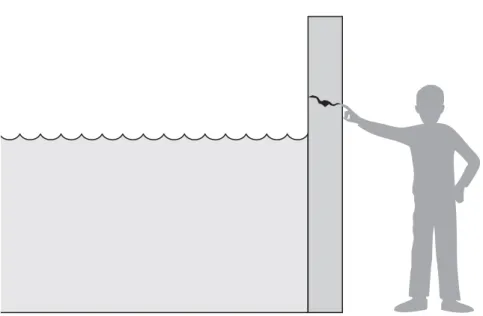
Athreat to a computing system is a set of circumstances that has the potential to cause loss or harm. To see the difference between a threat and a vulnerability, consider the illustration in Figure 1-1. Here, a wall is holding water back. The water to the left of the wall is a threat to the man on the right of the wall: The water could rise, over-flowing onto the man, or it could stay beneath the height of the wall, causing the wall to collapse. So the threat of harm is the potential for the man to get wet, get hurt, or be drowned. For now, the wall is intact, so the threat to the man is unrealized.
However, we can see a small crack in the wall—a vulnerability that threatens the man’s security. If the water rises to or beyond the level of the crack, it will exploit the vulnerability and harm the man.
There are many threats to a computer system, including human-initiated and computinitiated ones. We have all experienced the results of inadvertent human er-rors, hardware design flaws, and software failures. But natural disasters are threats, too; they can bring a system down when the computer room is flooded or the data cen-ter collapses from an earthquake, for example.
A human who exploits a vulnerability perpetrates an attackon the system. An at-tack can also be launched by another system, as when one system sends an overwhelm-ing set of messages to another, virtually shuttoverwhelm-ing down the second system’s ability to function. Unfortunately, we have seen this type of attack frequently, as denial-of-service attacks flood servers with more messages than they can handle. (We take a closer look at denial of service in Chapter 7.)
How do we address these problems? We use a control as a protective measure. That is, a control is an action, device, procedure, or technique that removes or reduces a vul-nerability. In Figure 1-1, the man is placing his finger in the hole, controlling the threat of water leaks until he finds a more permanent solution to the problem. In general, we can describe the relationship among threats, controls, and vulnerabilities in this way:
Athreatis blocked by control ofavulnerability.
Much of the rest of this book is devoted to describing a variety of controls and under-standing the degree to which they enhance a system’s security.
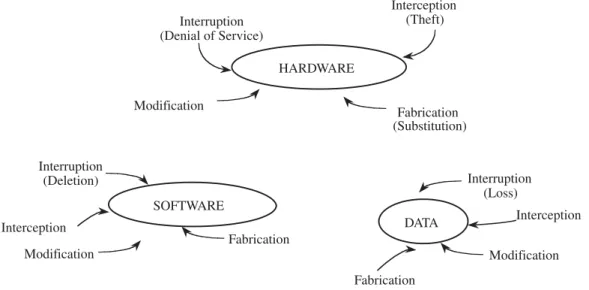
To devise controls, we must know as much about threats as possible. We can view any threat as being one of four kinds: interception, interruption, modification, and fab-rication. Each threat exploits vulnerabilities of the assets in computing systems; the threats are illustrated in Figure 1-2.
Modification Fabrication Interruption Interception
• Aninterception means that some unauthorized party has gained access to an asset. The outside party can be a person, a program, or a computing system. Ex-amples of this type of failure are illicit copying of program or data files, or wiretapping to obtain data in a network. Although a loss may be discovered fairly quickly, a silent interceptor may leave no traces by which the interception can be readily detected.
• In an interruption,an asset of the system becomes lost, unavailable, or unus-able. An example is malicious destruction of a hardware device, erasure of a program or data file, or malfunction of an operating system file manager so that it cannot find a particular disk file.
• If an unauthorized party not only accesses but tampers with an asset, the threat is a modification.For example, someone might change the values in a data-base, alter a program so that it performs an additional computation, or modify data being transmitted electronically. It is even possible to modify hardware. Some cases of modification can be detected with simple measures, but other, more subtle, changes may be almost impossible to detect.
• Finally, an unauthorized party might create a fabricationof counterfeit objects on a computing system. The intruder may insert spurious transactions to a net-work communication system or add records to an existing database. Sometimes these additions can be detected as forgeries, but if skillfully done, they are vir-tually indistinguishable from the real thing.
These four classes of threats—interception, interruption, modification, and fabrica-tion—describe the kinds of problems we might encounter. In the next section, we look more closely at a system’s vulnerabilities and how we can use them to set security goals.
Method, Opportunity, and Motive
A malicious attacker must have three things:
• method:the skills, knowledge, tools, and other things with which to be able to pull off the attack
• opportunity:the time and access to accomplish the attack
• motive:a reason to want to perform this attack against this system
(Think of the acronym “MOM.”) Deny any of those three things and the attack will not occur. However, it is not easy to cut these off.
Knowledge of systems is widely available. Mass-market systems (such as the Microsoft or Apple or Unix operating systems) are readily available, as are common products, such as word processors or database management systems. Sometimes the manufacturers release detailed specifications on how the system was designed or oper-ates, as guides for users and integrators who want to implement other complementary products. But even without documentation, attackers can purchase and experiment with many systems. Often, only time and inclination limit an attacker.
Many systems are readily available. Systems available to the public are, by defini-tion, accessible; often their owners take special care to make them fully available so
that if one hardware component fails, the owner has spares instantly ready to be pressed into service.
Finally, it is difficult to determine motive for an attack. Some places are what are called “attractive targets,” meaning they are very appealing to attackers. Popular targets include law enforcement and defense department computers, perhaps because they are presumed to be well protected against attack (so that a successful attack shows the at-tacker’s prowess). Other systems are attacked because they are easy. (See Sidebar 1-2 on universities as targets.) And other systems are attacked simply because they are there: random, unassuming victims.
Protecting against attacks can be difficult. Anyone can be a victim of an attack per-petrated by an unhurried, knowledgeable attacker. In the remainder of this book we discuss the nature of attacks and how to protect against them.
1.3 THE MEANING OF COMPUTER SECURITY
We have seen that any computer-related system has both theoretical and real weak-nesses. The purpose of computer security is to devise ways to prevent the weaknesses from being exploited. To understand what preventive measures make the most sense, we consider what we mean when we say that a system is “secure.”
Sidebar 1-2 Why Universities Are Prime Targets
U
niversities make very good targets for attack, according to an Associated Press story from June 2001 [HOP01]. Richard Power, editorial director for the Computer Security Institute, has reported that universities often run systems with vulnerabilities and little monitoring or man-agement. Consider that the typical university research or teaching lab is managed by a faculty member who has many other responsibilities or by a student manager who may have had little training. Universities are havens for free exchange of ideas. Thus, their access controls typically are configured to promote sharing and wide access to a population that changes significantly every semester.A worse problem is that universities are really loose federations of departments and re-search groups. The administrator for one group’s computers may not even know other adminis-trators, let alone share intelligence or tools. Often, computers are bought for a teaching or research project, but there is not funding for ongoing maintenance, either buying upgrades or in-stalling patches. Steve Hare, managing director of the computer security research group at Pur-due University, noted that groups are usually strapped for resources.
David Dittrich, a security engineer at the University of Washington, said he is certain that cracker(s) who attacked the eBay and CNN.com web sites in 2000 first practiced on university computers. The large and frequently changing university student body gives the attacker great opportunity to maintain anonymity while developing an attack.
Security Goals
We use the term “security” in many ways in our daily lives. A “security system” pro-tects our house, warning the neighbors or the police if an unauthorized intruder tries to get in. “Financial security” involves a set of investments that are adequately funded; we hope the investments will grow in value over time so that we have enough money to survive later in life. And we speak of children’s “physical security,” hoping they are safe from potential harm. Just as each of these terms has a very specific meaning in the context of its use, so too does the phrase “computer security.”
When we talk about computer security, we mean that we are addressing three important aspects of any computer-related system: confidentiality, integrity, and availability.
• Confidentialityensures that computer-related assets are accessed only by au-thorized parties. That is, only those who should have access to something will actually get that access. By “access,” we mean not only reading but also view-ing, printview-ing, or simply knowing that a particular asset exists. Confidentiality is sometimes called secrecyorprivacy.
• Integrity means that assets can be modified only by authorized parties or only in authorized ways. In this context, modification includes writing, changing, changing status, deleting, and creating.
• Availabilitymeans that assets are accessible to authorized parties at appropriate times. In other words, if some person or system has legitimate access to a par-ticular set of objects, that access should not be prevented. For this reason, avail-ability is sometimes known by its opposite, denial of service.
Security in computing addresses these three goals. One of the challenges in building a secure system is finding the right balance among the goals, which often conflict. For example, it is easy to preserve a particular object’s confidentiality in a secure system simply by preventing everyone from reading that object. However, this system is not secure, because it does not meet the requirement of availability for proper access. That is, there must be a balance between confidentiality and availability.
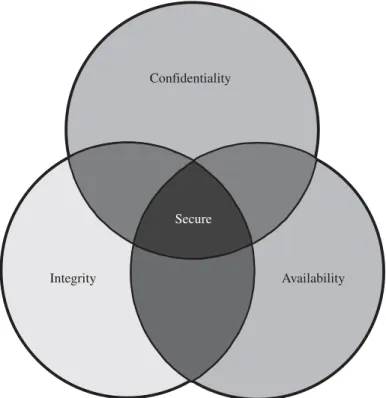
But balance is not all. In fact, these three characteristics can be independent, can overlap (as shown in Figure 1-3), and can even be mutually exclusive. For example, we have seen that strong protection of confidentiality can severely restrict availability. Let us examine each of the three qualities in depth.
Confidentiality
You may find the notion of confidentiality to be straightforward: Only authorized peo-ple or systems can access protected data. However, as we see in later chapters, ensuring confidentiality can be difficult. For example, who determines which people or systems are authorized to access the current system? By “accessing” data, do we mean that an authorized party can access a single bit? the whole collection? pieces of data out of context? Can someone who is authorized disclose those data to other parties?
Confidentiality is the security property we understand best because its meaning is narrower than the other two. We also understand confidentiality well because we can relate computing examples to those of preserving confidentiality in the real world.
Integrity
Integrity is much harder to pin down. As Welke and Mayfield [WEL90, MAY91, NCS91b] point out, integrity means different things in different contexts. When we survey the way some people use the term, we find several different meanings. For ex-ample, if we say that we have preserved the integrity of an item, we may mean that the item is
• precise • accurate • unmodified
• modified only in acceptable ways • modified only by authorized people • modified only by authorized processes • consistent
Confidentiality
Integrity Availability
Secure
• internally consistent • meaningful and usable
Integrity can also mean two or more of these properties. Welke and Mayfield recog-nize three particular aspects of integrity—authorized actions, separation and protection of resources, and error detection and correction. Integrity can be enforced in much the same way as can confidentiality: by rigorous control of who or what can access which resources in what ways. Some forms of integrity are well represented in the real world, and those precise representations can be implemented in a computerized environment. But not all interpretations of integrity are well reflected by computer implementations.
Availability
Availability applies both to data and to services (that is, to information and to informa-tion processing), and it is similarly complex. As with the noinforma-tion of confidentiality, dif-ferent people expect availability to mean different things. For example, an object or service is thought to be available if
• It is present in a usable form.
• It has capacity enough to meet the service’s needs.
• It is making clear progress, and, if in wait mode, it has a bounded waiting time. • The service is completed in an acceptable period of time.
We can construct an overall description of availability by combining these goals. We say a data item, service, or system is available if
• There is a timely response to our request.
• Resources are allocated fairly so that some requesters are not favored over others.
• The service or system involved follows a philosophy of fault tolerance, whereby hardware or software faults lead to graceful cessation of service or to work-arounds rather than to crashes and abrupt loss of information.
• The service or system can be used easily and in the way it was intended to be used.
• Concurrency is controlled; that is, simultaneous access, deadlock management, and exclusive access are supported as required.
As you can see, expectations of availability are far-reaching. Indeed, the security community is just beginning to understand what availability implies and how to ensure it. A small, centralized control of access is fundamental to preserving confidentiality and integrity, but it is not clear that a single access control point can enforce availabil-ity. Much of computer security’s past success has focused on confidentiality and in-tegrity; full implementation of availability is security’s next great challenge.
Vulnerabilities
When we prepare to test a system, we usually try to imagine how the system can fail; we then look for ways in which the requirements, design, or code can enable such fail-ures. In the same way, when we prepare to specify, design, code, or test a secure sys-tem, we try to imagine the vulnerabilities that would prevent us from reaching one or more of our three security goals.
It is sometimes easier to consider vulnerabilities as they apply to all three broad cat-egories of system resources (hardware, software, and data), rather than to start with the security goals themselves. Figure 1-4 shows the types of vulnerabilities we might find as they apply to the assets of hardware, software, and data. These three assets and the connections among them are all potential security weak points. Let us look in turn at the vulnerabilities of each asset.
Hardware Vulnerabilities
Hardware is more visible than software, largely because it is composed of physical ob-jects. Because we can see what devices are hooked to the system, it is rather simple to attack by adding devices, changing them, removing them, intercepting the traffic to them, or flooding them with traffic until they can no longer function. However, design-ers can usually put safeguards in place.
But there are other ways that computer hardware can be attacked physically. Com-puters have been drenched with water, burned, frozen, gassed, and electrocuted with power surges. People have spilled soft drinks, corn chips, ketchup, beer, and many other kinds of food on computing devices. Mice have chewed through cables. Particles of dust, and especially ash in cigarette smoke, have threatened precisely engineered moving parts. Computers have been kicked, slapped, bumped, jarred, and punched.
DATA
Interruption (Loss)
Interception
Modification Fabrication
Modification
HARDWARE Interruption
(Denial of Service)
Interception (Theft)
Fabrication (Substitution)
Interruption (Deletion)
Interception
SOFTWARE
Modification
Fabrication
Although such attacks might be intentional, most are not; this abuse might be consid-ered “involuntary machine slaughter”: accidental acts not intended to do serious dam-age to the hardware involved.
A more serious attack, “voluntary machine slaughter” or “machinicide,” usually in-volves someone who actually wishes to harm the computer hardware or software. Ma-chines have been shot with guns, stabbed with knives, and smashed with all kinds of things. Bombs, fires, and collisions have destroyed computer rooms. Ordinary keys, pens, and screwdrivers have been used to short-out circuit boards and other compo-nents. Devices and whole systems have been carried off by thieves. The list of the kinds of human attacks perpetrated on computers is almost endless.
In particular, deliberate attacks on equipment, intending to limit availability, usually involve theft or destruction. Managers of major computing centers long ago recognized these vulnerabilities and installed physical security systems to protect their machines. However, the proliferation of PCs, especially laptops, as office equipment has resulted in several thousands of dollars’ worth of equipment sitting unattended on desks outside the carefully protected computer room. (Curiously, the supply cabinet, containing only a few hundred dollars’ worth of pens, stationery, and paper clips, is often locked.) Sometimes the security of hardware components can be enhanced greatly by simple physical measures such as locks and guards.
Laptop computers are especially vulnerable because they are designed to be easy to carry. (See Sidebar 1-3 for the story of a stolen laptop.) Safeware Insurance reported 600,000 laptops stolen in 2003. Credent Technologies reported that 29 percent were
Sidebar 1-3 Record Record Loss
T
he record for number of personal records lost stands at 26.5 million.Yes, 26.5 million records were on the hard drive of a laptop belonging to the U.S. Veterans Administration (V.A.) The lost data included names, addresses, social security numbers, and birth dates of all veterans who left the service after 1975, as well as any disabled veterans who filed a claim for disability after 1975, as well as some spouses. The data were contained on the hard drive of a laptop stolen on 3 May 2006 near Washington D.C. A V.A. employee took the lap-top home to work on the data, a practice that had been going on for three years.
The unasked, and therefore unanswered, question in this case is why the employee needed names, social security numbers, and birth dates of all veterans at home? One supposes the em-ployee was not going to print 26.5 million personal letters on a home computer. Statistical trends, such as number of claims, type of claim, or time to process a claim, could be determined without birth dates and social security numbers.
Computer security professionals repeatedly find that the greatest security threat is from insiders, in part because of the quantity of data to which they need access to do their jobs. The V.A. chief testified to Congress that his agency had failed to heed years of warnings of lax security procedures. Now all employees have been ordered to attend a cybersecurity training course.
stolen from the office, 25 percent from a car, and 14 percent in an airport. Stolen lap-tops are almost never recovered: The FBI reports 97 percent were not returned [SAI05].
Software Vulnerabilities
Computing equipment is of little use without the software (operating system, con-trollers, utility programs, and application programs) that users expect. Software can be replaced, changed, or destroyed maliciously, or it can be modified, deleted, or mis-placed accidentally. Whether intentional or not, these attacks exploit the software’s vulnerabilities.
Sometimes, the attacks are obvious, as when the software no longer runs. More sub-tle are attacks in which the software has been altered but seems to run normally. Whereas physical equipment usually shows some mark of inflicted injury when its boundary has been breached, the loss of a line of source or object code may not leave an obvious mark in a program. Furthermore, it is possible to change a program so that it does all it did before, and then some. That is, a malicious intruder can “enhance” the software to enable it to perform functions you may not find desirable. In this case, it may be very hard to detect that the software has been changed, let alone to determine the extent of the change.
A classic example of exploiting software vulnerability is the case in which a bank worker realized that software truncates the fractional interest on each account. In other words, if the monthly interest on an account is calculated to be $14.5467, the software credits only $14.54 and ignores the $.0067. The worker amended the software so that the throw-away interest (the $.0067) was placed into his own account. Since the ac-counting practices ensured only that all accounts balanced, he built up a large amount of money from the thousands of account throw-aways without detection. It was only when he bragged to a colleague of his cleverness that the scheme was discovered.
Software Deletion
Software is surprisingly easy to delete. Each of us has, at some point in our careers, ac-cidentally erased a file or saved a bad copy of a program, destroying a good previous copy. Because of software’s high value to a commercial computing center, access to software is usually carefully controlled through a process called configuration man-agementso that software cannot be deleted, destroyed, or replaced accidentally. Con-figuration management uses several techniques to ensure that each version or release retains its integrity. When configuration management is used, an old version or release can be replaced with a newer version only when it has been thoroughly tested to verify that the improvements work correctly without degrading the functionality and perfor-mance of other functions and services.
Software Modification
Software is vulnerable to modifications that either cause it to fail or cause it to perform an unintended task. Indeed, because software is so susceptible to “off by one” errors, it is quite easy to modify. Changing a bit or two can convert a working program into a failing one. Depending on which bit was changed, the program may crash when it be-gins or it may execute for some time before it falters.
With a little more work, the change can be much more subtle: The program works well most of the time but fails in specialized circumstances. For instance, the program may be maliciously modified to fail when certain conditions are met or when a certain date or time is reached. Because of this delayed effect, such a program is known as a logic bomb. For example, a disgruntled employee may modify a crucial program so that it accesses the system date and halts abruptly after July 1. The employee might quit on May l and plan to be at a new job miles away by July.
Another type of change can extend the functioning of a program so that an innocu-ous program has a hidden side effect. For example, a program that ostensibly structures a listing of files belonging to a user may also modify the protection of all those files to permit access by another user.
Other categories of software modification include
• Trojan horse: a program that overtly does one thing while covertly doing another
• virus:a specific type of Trojan horse that can be used to spread its “infection” from one computer to another
• trapdoor:a program that has a secret entry point
• information leaks in a program: code that makes information accessible to unauthorized people or programs
More details on these and other software modifications are provided in Chapter 3. Of course, it is possible to invent a completely new program and install it on a com-puting system. Inadequate control over the programs that are installed and run on a computing system permits this kind of software security breach.
Software Theft
This attack includes unauthorized copying of software. Software authors and distribu-tors are entitled to fair compensation for use of their product, as are musicians and book authors. Unauthorized copying of software has not been stopped satisfactorily. As we see in Chapter 11, the legal system is still grappling with the difficulties of inter-preting paper-based copyright laws for electronic media.
Data Vulnerabilities
Hardware security is usually the concern of a relatively small staff of computing center professionals. Software security is a larger problem, extending to all programmers and analysts who create or modify programs. Computer programs are written in a dialect intelligible primarily to computer professionals, so a “leaked” source listing of a pro-gram might very well be meaningless to the general public.
Printed data, however, can be readily interpreted by the general public. Because of its visible nature, a data attack is a more widespread and serious problem than either a hardware or software attack. Thus, data items have greater public value than hardware and software because more people know how to use or interpret data.
By themselves, out of context, pieces of data have essentially no intrinsic value. For example, if you are shown the value “42,” it has no meaning for you unless you know what the number represents. Likewise, “326 Old Norwalk Road” is of little use unless
you know the city, state, and country for the address. For this reason, it is hard to mea-sure the value of a given data item.
On the other hand, data items in context do relate to cost, perhaps measurable by the cost to reconstruct or redevelop damaged or lost data. For example, confidential data leaked to a competitor may narrow a competitive edge. Data incorrectly modified can cost human lives. To see how, consider the flight coordinate data used by an airplane that is guided partly or fully by software, as many now are. Finally, inadequate security may lead to financial liability if certain personal data are made public. Thus, data have a definite value, even though that value is often difficult to measure.
Typically, both hardware and software have a relatively long life. No matter how they are valued initially, their value usually declines gradually over time. By contrast, the value of data over time is far less predictable or consistent. Initially, data may be valued highly. However, some data items are of interest for only a short period of time, after which their value declines precipitously.
To see why, consider the following example. In many countries, government ana-lysts periodically generate data to describe the state of the national economy. The re-sults are scheduled to be released to the public at a predetermined time and date. Before that time, access to the data could allow someone to profit from advance knowl-edge of the probable effect of the data on the stock market. For instance, suppose an analyst develops the data 24 hours before their release and then wishes to communicate the results to other analysts for independent verification before release. The data vul-nerability here is clear, and, to the right people, the data are worth more before the scheduled release than afterward. However, we can protect the data and control the threat in simple ways. For example, we could devise a scheme that would take an out-sider more than 24 hours to break; even though the scheme may be eminently break-able (that is, an intruder could eventually reveal the data), it is adequate for those data because confidentiality is not needed beyond the 24-hour period.
Data security suggests the second principle of computer security.
Principle of Adequate Protection: Computer items must be protected only until they lose their value. They must be protected to a degree consistent with their value.
This principle says that things with a short life can be protected by security measures that are effective only for that short time. The notion of a small protection window ap-plies primarily to data, but it can in some cases be relevant for software and hardware, too.
Sidebar 1-4 confirms that intruders take advantage of vulnerabilities to break in by whatever means they can.
Figure 1-5 illustrates how the three goals of security apply to data. In particular, confidentiality prevents unauthorized disclosure of a data item, integrity prevents unauthorized modification, and availabilityprevents denial of authorized access.
Data Confidentiality
Data can be gathered by many means, such as tapping wires, planting bugs in output devices, sifting through trash receptacles, monitoring electromagnetic radiation, brib-ing key employees, inferrbrib-ing one data point from other values, or simply requestbrib-ing the
Sidebar 1-4 Top Methods of Attack
I
n 2006, the U.K. Department of Trade and Industry (DTI) released results of its latest annual survey of businesses regarding security incidents [PWC06]. Of companies surveyed, 62 per-cent reported one or more security breaches during the year (down from 74 perper-cent two years earlier). The median number of incidents was 8.In 2006, 29 percent of respondents (compared to 27 percent in 2004) reported an acciden-tal security incident, and 57 percent (compared to 68 percent) reported a malicious incident. The percentage reporting a serious incident fell to 23 percent from 39 percent.
The top type of attack was virus or other malicious code at 35 percent (down significantly from 50 percent two years earlier). Staff misuse of data or resources was stable at 21 percent (versus 22 percent). Intrusion from outside (including hacker attacks) was constant at 17 percent in both periods, incidents involving fraud or theft were down to 8 percent form 11 percent, and failure of equipment was up slightly to 29 percent from 27 percent.
Attempts to break into a system from outside get much publicity. Of the respondents, 5 percent reported they experienced hundreds of such attacks a day, and 17 percent reported “several a day.”
Data Data Data
Data
Confidentiality Integrity Availability
Secure Data FIGURE 1-5 Security of Data.
data. Because data are often available in a form people can read, the confidentiality of data is a major concern in computer security.
Data are not just numbers on paper; computer data include digital recordings such as CDs and DVDs, digital signals such as network and telephone traffic, and broad-band communications such as cable and satellite TV. Other forms of data are biometric identifiers embedded in passports, online activity preferences, and personal informa-tion such as financial records and votes. Protecting this range of data types requires many different approaches.
Data Integrity
Stealing, buying, finding, or hearing data requires no computer sophistication, whereas modifying or fabricating new data requires some understanding of the technology by which the data are transmitted or stored, as well as the format in which the data are maintained. Thus, a higher level of sophistication is needed to modify existing data or to fabricate new data than to intercept existing data. The most common sources of this kind of problem are malicious programs, errant file system utilities, and flawed com-munication facilities.
Data are especially vulnerable to modification. Small and skillfully done modifica-tions may not be detected in ordinary ways. For instance, we saw in our truncated in-terest example that a criminal can perform what is known as a salami attack: The crook shaves a little from many accounts and puts these shavings together to form a valuable result, like the meat scraps joined in a salami.
A more complicated process is trying to reprocess used data items. With the pro-liferation of telecommunications among banks, a fabricator might intercept a mes-sage ordering one bank to credit a given amount to a certain person’s account. The fabricator might try to replaythat message, causing the receiving bank to credit the same account again. The fabricator might also try to modify the message slightly, changing the account to be credited or the amount, and then transmit this revised message.
Other Exposed Assets
We have noted that the major points of weakness in a computing system are hardware, software, and data. However, other components of the system may also be possible tar-gets. In this section, we identify some of these other points of attack.
Networks
Networks are specialized collections of hardware, software, and data. Each network node is itself a computing system; as such, it experiences all the normal security prob-lems. In addition, a network must confront communication problems that involve the interaction of system components and outside resources. The problems may be intro-duced by a very exposed storage medium or access from distant and potentially un-trustworthy computing systems.
Thus, networks can easily multiply the problems of computer security. The chal-lenges are rooted in a network’s lack of physical proximity, use of insecure shared media, and the inability of a network to identify remote users positively.
Access
Access to computing equipment leads to three types of vulnerabilities. In the first, an intruder may steal computer time to do general-purpose computing that does not attack the integrity of the system itself. This theft of computer services is analogous to the stealing of electricity, gas, or water. However, the value of the stolen computing vices may be substantially higher than the value of the stolen utility products or ser-vices. Moreover, the unpaid computing access spreads the true costs of maintaining the computing system to other legitimate users. In fact, the unauthorized access risks af-fecting legitimate computing, perhaps by changing data or programs. A second vulner-ability involves malicious access to a computing system, whereby an intruding person or system actually destroys software or data. Finally, unauthorized access may deny service to a legitimate user. For example, a user who has a time-critical task to perform may depend on the availability of the computing system. For all three of these reasons, unauthorized access to a computing system must be prevented.
Key People
People can be crucial weak points in security. If only one person knows how to use or maintain a particular program, trouble can arise if that person is ill, suffers an accident, or leaves the organization (taking her knowledge with her). In particular, a disgruntled employee can cause serious damage by using inside knowledge of the system and the data that are manipulated. For this reason, trusted individuals, such as operators and systems programmers, are usually selected carefully because of their potential ability to affect all computer users.
We have described common assets at risk. In fact, there are valuable assets in almost any computer system. (See Sidebar 1-5 for an example of exposed assets in ordinary business dealings.)
Next, we turn to the people who design, build, and interact with computer systems, to see who can breach the systems’ confidentiality, integrity, and availability.
Sidebar 1-5 Hollywood at Risk
D
o you think only banks, government sites, and universities are targets? Consider Hollywood. In 2001, Hollywood—specifically the motion picture industry—was hit with a series of at-tacks. Crackers entered computers and were able to obtain access to scripts for new projects, and digital versions of films in production, including Ocean’s 11 at Warner Brothers and The One at Columbia Pictures. The attackers also retrieved and made public executives’ e-mail messages.But, as is true of many computer security incidents, at least one attacker was an insider. Global Network Security Services, a security consulting firm hired by several Hollywood compa-nies to test the security of their networks, found that an employee was copying the day’s (digital) film, taking it home, and allowing his roommate to post it to an Internet site.
1.4 COMPUTER CRIMINALS
In television and film westerns, the bad guys always wore shabby clothes, looked mean and sinister, and lived in gangs somewhere out of town. By contrast, the sheriff dressed well, stood proud and tall, was known and respected by everyone in town, and struck fear in the hearts of most criminals.
To be sure, some computer criminals are mean and sinister types. But many more wear business suits, have university degrees, and appear to be pillars of their communi-ties. Some are high school or university students. Others are middle-aged business ex-ecutives. Some are mentally deranged, overtly hostile, or extremely committed to a cause, and they attack computers as a symbol. Others are ordinary people tempted by personal profit, revenge, challenge, advancement, or job security. No single profile captures the characteristics of a “typical” computer criminal, and many who fit the pro-file are not criminals at all.
Whatever their characteristics and motivations, computer criminals have access to enormous amounts of hardware, software, and data; they have the potential to cripple much of effective business and government throughout the world. In a sense, then, the purpose of computer security is to prevent these criminals from doing damage.
For the purposes of studying computer security, we say computer crime is any crime involving a computer or aided by the use of one. Although this definition is ad-mittedly broad, it allows us to consider ways to protect ourselves, our businesses, and our communities against those who use computers maliciously.
The U.S. Federal Bureau of Investigation regularly reports uniform crime statistics. The data do not separate computer crime from crime of other sorts. Moreover, many companies do not report computer crime at all, perhaps because they fear damage to their reputation, they are ashamed to have allowed their systems to be compromised, or they have agreed not to prosecute if the criminal will “go away.” These conditions make it difficult for us to estimate the economic losses we suffer as a result of com-puter crime; our dollar estimates are really only vague suspicions. Still, the estimates, ranging from $300 million to $500 billion per year, tell us that it is important for us to pay attention to computer crime and to try to prevent it or at least to moderate its effects.
One approach to prevention or moderation is to understand who commits these crimes and why. Many studies have attempted to determine the characteristics of com-puter criminals. By studying those who have already used comcom-puters to commit crimes, we may be able in the future to spot likely criminals and prevent the crimes from occurring. In this section, we examine some of these characteristics.
Amateurs
Amateurs have committed most of the computer crimes reported to date. Most embez-zlers are not career criminals but rather are normal people who observe a weakness in a security system that allows them to access cash or other valuables. In the same sense, most computer criminals are ordinary computer professionals or users who, while doing their jobs, discover they have access to something valuable.
When no one objects, the amateur may start using the computer at work to write let-ters, maintain soccer league team standings, or do accounting. This apparently inno-cent time-stealing may expand until the employee is pursuing a business in accounting, stock portfolio management, or desktop publishing on the side, using the employer’s computing facilities. Alternatively, amateurs may become disgruntled over some nega-tive work situation (such as a reprimand or denial of promotion) and vow to “get even” with management by wreaking havoc on a computing installation.
Crackers or Malicious Hackers
Systemcrackers,2often high school or university students, attempt to access
comput-ing facilities for which they have not been authorized. Crackcomput-ing a computer’s defenses is seen as the ultimate victimless crime. The perception is that nobody is hurt or even endangered by a little stolen machine time. Crackers enjoy the simple challenge of try-ing to log in, just to see whether it can be done. Most crackers can do their harm with-out confronting anybody, not even making a sound. In the absence of explicit warnings not to trespass in a system, crackers infer that access is permitted. An underground net-work of hackers helps pass along secrets of success; as with a jigsaw puzzle, a few iso-lated pieces joined together may produce a large effect. Others attack for curiosity, personal gain, or self-satisfaction. And still others enjoy causing chaos, loss, or harm. There is no common profile or motivation for these attackers.
Career Criminals
By contrast, the career computer criminal understands the targets of computer crime. Criminals seldom change fields from arson, murder, or auto theft to computing; more often, criminals begin as computer professionals who engage in computer crime, find-ing the prospects and payoff good. There is some evidence that organized crime and in-ternational groups are engaging in computer crime. Recently, electronic spies and information brokers have begun to recognize that trading in companies’ or individuals’ secrets can be lucrative.
Recent attacks have shown that organized crime and professional criminals have discovered just how lucrative computer crime can be. Mike Danseglio, a security proj-ect manager with Microsoft, said, “In 2006, the attackers want to pay the rent. They don’t want to write a worm that destroys your hardware. They want to assimilate your computers and use them to make money” [NAR06a]. Mikko Hyppönen, Chief Re-search Officer with the Finnish security company f-Secure, agrees that today’s attacks often come from Russia, Asia, and Brazil and the motive is now profit, not fame [BRA06]. Ken Dunham, Director of the Rapid Response Team for Verisign says he is “convinced that groups of well-organized mobsters have taken control of a global billion-dollar crime network powered by skillful hackers” [NAR06b].
2The security community distinguishes between a “hacker,” someone who (nonmaliciously) programs, manages, or uses computing systems, and a “cracker,” someone who attempts to access computing systems for malicious purposes. Crackers are the “evildoers.” Now, hackerhas come to be used outside security to mean both benign and malicious users.
Snow [SNO05] observes that a hacker wants a score, bragging rights. Organized crime wants a resource; they want to stay and extract profit from the system over time. These different objectives lead to different approaches: The hacker can use a quick-and-dirty attack, whereas the professional attacker wants a neat, robust, and undetected method.
As mentioned earlier, some companies are reticent to prosecute computer criminals. In fact, after having discovered a computer crime, the companies are often thankful if the criminal quietly resigns. In other cases, the company is (understandably) more con-cerned about protecting its assets and so it closes down an attacked system rather than gathering evidence that could lead to identification and conviction of the criminal. The criminal is then free to continue the same illegal pattern with another company.
Terrorists
The link between computers and terrorism is quite evident. We see terrorists using computers in three ways:
• targets of attack: denial-of-service attacks and web site defacements are popu-lar for any political organization because they attract attention to the cause and bring undesired negative attention to the target of the attack.
• propaganda vehicles: web sites, web logs, and e-mail lists are effective, fast, and inexpensive ways to get a message to many people.
• methods of attack: to launch offensive attacks requires use of computers. We cannot accurately measure the amount of computer-based terrorism because our definitions and measurement tools are rather weak. Still, there is evidence that all three of these activities are increasing. (For another look at terrorists’ use of computers, see Sidebar 1-6.)
1.5 METHODS OF DEFENSE
In Chapter 11, we investigate the legal and ethical restrictions on computer-based crime. But unfortunately, computer crime is certain to continue for the foreseeable fu-ture. For this reason, we must look carefully at controls for preserving confidentiality, integrity, and availability. Sometimes these controls can prevent or mitigate attacks; other, less powerful methods can only inform us that security has been compromised, by detecting a breach as it happens or after it occurs.
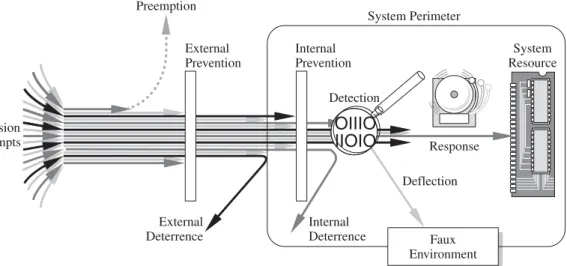
Harm occurs when a threat is realized against a vulnerability. To protect against harm, then, we can neutralize the threat, close the vulnerability, or both. The possibility for harm to occur is called risk. We can deal with harm in several ways. We can seek to
• prevent it,by blocking the attack or closing the vulnerability • deter it,by making the attack harder but not impossible
• deflect it,by making another target more attractive (or this one less so) • detect it,either as it happens or some time after the fact
Of course, more than one of these can be done at once. So, for example, we might try to prevent intrusions. But in case we do not prevent them all, we might install a de-tection device to warn of an imminent attack. And we should have in place incident re-sponse procedures to help in the recovery in case an intrusion does succeed.
Controls
To consider the controls or countermeasures that attempt to prevent exploiting a com-puting system’s vulnerabilities, we begin by thinking about traditional ways to enhance physical security. In the Middle Ages, castles and fortresses were built to protect the people and valuable property inside. The fortress might have had one or more security characteristics, including
• a strong gate or door, to repel invaders
• heavy walls to withstand objects thrown or projected against them • a surrounding moat, to control access
• arrow slits, to let archers shoot at approaching enemies Sidebar 1-6 The Terrorists, Inc., IT Department
I
n 2001, a reporter for The Wall Street Journalbought a used computer in Afghanistan. Much to his surprise, he found the hard drive contained what appeared to be files from a senior al Qaeda operative. Cullison [CUL04] reports that he turned the computer over to the FBI. In his story published in 2004 in The Atlantic, he carefully avoids revealing anything he thinks might be sensitive.The disk contained more than 1,000 documents, many of them encrypted with relatively weak encryption. Cullison found draft mission plans and white papers setting forth ideological and philosophical arguments for the attacks of 11 September 2001. There were also copies of news stories on terrorist activities. He also found documents indicating that al Qaeda were not originally interested in chemical, biological, or nuclear weapons, but became interested after reading public news articles accusing al Qaeda of having those capabilities.
Perhaps most unexpected were e-mail messages of the kind one would find in a typical of-fice: recommendations for promotions, justifications for petty cash expenditures, arguments con-cerning budgets.
The computer appears to have been used by al Qaeda from 1999 to 2001. Cullison notes that Afghanistan in late 2001 was a scene of chaos, and it is likely the laptop’s owner fled quickly, leaving the computer behind, where it fell into the hands of a secondhand merchant who did not know its contents.
But this computer illustrates an important point of computer security and confidentiality: We can never predict the time at which a security disaster will strike, and thus we must always be prepared as if it will happen immediately.
• crenellations to allow inhabitants to lean out from the roof and pour hot or vile liquids on attackers
• a drawbridge to limit access to authorized people
• gatekeepers to verify that only authorized people and goods could enter Similarly, today we use a multipronged approach to protect our homes and offices. We may combine strong locks on the doors with a burglar alarm, reinforced windows, and even a nosy neighbor to keep an eye on our valuables. In each case, we select one or more ways to deter an intruder or attacker, and we base our selection not only on the value of what we protect but also on the effort we think an attacker or intruder will ex-pend to get inside.
Computer security has the same characteristics. We have many controls at our dis-posal. Some are easier than others to use or implement. Some are cheaper than others to use or implement. And some are more difficult than others for intruders to override. Figure 1-6 illustrates how we use a combination of controls to secure our valuable re-sources. We use one or more controls, according to what we are protecting, how the cost of protection compares with the risk of loss, and how hard we think intruders will work to get what they want.
In this section, we present an overview of the controls available to us. In later chap-ters, we examine each control in much more detail.
Encryption
We noted earlier that we seek to protect hardware, software, and data. We can make it particularly hard for an intruder to find data useful if we somehow scramble the data so that interpretation is meaningless without the intruder’s knowing how the scrambling was done. Indeed, the most powerful tool in providing computer security is this scram-bling or encoding.
Intrusion Attempts
Detection Internal Prevention External
Prevention
External Deterrence
Internal Deterrence
Response Preemption
System Perimeter
System Resource
Faux Environment
OIIIO
IIOIO
Deflection
Encryptionis the formal name for the scrambling process. We take data in their normal, unscrambled state, called cleartext, and transform them so that they are unin-telligible to the outside observer; the transformed data are called enciphered text or ciphertext. Using encryption, security professionals can virtually nullify the value of an interception and the possibility of effective modification or fabrication. In Chapters 2 and 12 we study many ways of devising and applying these transformations.
Encryption clearly addresses the need for confidentiality of data. Additionally, it can be used to ensure integrity; data that cannot be read generally cannot easily be changed in a meaningful manner. Furthermore, as we see throughout this book, encryption is the basis of protocolsthat enable us to provide security while accomplishing an impor-tant system or network task. A protocol is an agreed-on sequence of actions that leads to a desired result. For example, some operating system protocols ensure availability of resources as different tasks and users request them. Thus, encryption can also be thought of as supporting availability. That is, encryption is at the heart of methods for ensuring all aspects of computer security.
Although encryption is an important tool in any computer security tool kit, we should not overrate its importance. Encryption does not solve all computer security problems, and other tools must complement its use. Furthermore, if encryption is not used properly, it may have no effect on security or could even degrade the performance of the entire system. Weak encryption can actually be worse than no encryption at all, because it gives users an unwarranted sense of protection. Therefore, we must under-stand those situations in which encryption is most useful as well as ways to use it effectively.
Software Controls
If encryption is the primary way of protecting valuables, programs themselves are the second facet of computer security. Programs must be secure enough to prevent outside attack. They must also be developed and maintained so that we can be confident of the programs’ dependability.
Program controls include the following:
• internal program controls:parts of the program that enforce security restric-tions, such as access limitations in a database management program
• operating system and network system controls:limitations enforced by the op-erating system or network to protect each user from all other users
• independent control programs:application programs, such as password check-ers, intrusion detection utilities, or virus scanncheck-ers, that protect against certain types of vulnerabilities
• development controls: quality standards under which a program is designed, coded, tested, and maintained to prevent software faults from becoming ex-ploitable vulnerabilities
We can implement software controls by using tools and techniques such as hard-ware components, encryption, or information gathering. Softhard-ware controls frequently affect users directly, such as when the user is interrupted and asked for a password before being given access to a program or data. For this reason, we often think of
software controls when we think of how systems have been made secure in the past. Because they influence the way users interact with a computing system, software con-trols must be carefully designed. Ease of use and potency are often competing goals in the design of a collection of software controls.
Hardware Controls
Numerous hardware devices have been created to assist in providing computer secu-rity. These devices include a variety of means, such as
• hardware or smart card implementations of encryption • locks or cables limiting access or deterring theft • devices to verify users’ identities
• firewalls
• intrusion detection systems
• circuit boards that control access to storage media
Policies and Procedures
Sometimes, we can rely on agreed-on procedures or policies among users rather than enforcing security through hardware or software means. In fact, some of the simplest controls, such as frequent changes of passwords, can be achieved at essentially no cost but with tremendous effect. Training and administration follow immediately after es-tablishment of policies, to reinforce the importance of security policy and to ensure their proper use.
We must not forget the value of community standards and expectations when we consider how to enforce security. There are many acts that most thoughtful people would consider harmful, and we can leverage this commonality of belief in our poli-cies. For this reason, legal and ethical controls are an important part of computer secu-rity. However, the law is slow to evolve, and the technology involving computers has emerged relatively suddenly. Although legal protection is necessary and desirable, it may not be as dependable in this area as it would be when applied to more well-understood and long-standing crimes.
Society in general and the computing community in particular have not adopted for-mal standards of ethical behavior. As we see in Chapter 11, some organizations have devised codes of ethics for computer professionals. However, before codes of ethics can become widely accepted and effective, the computing community and the general public must discuss and make clear what kinds of behavior are inappropriate and why.
Physical Controls
Some of the easiest, most effective, and least expensive controls are physical controls. Physical controls include locks on doors, guards at entry points, backup copies of im-portant software and data, and physical site planning that reduces the risk of natural disasters. Often the simple physical controls are overlooked while we seek more so-phisticated approaches.