Guide to Enterprise Telework
and Remote Access Security
Recommendations of the National Institute
of Standards and Technology
Karen Scarfone
Paul Hoffman
Guide to Enterprise Telework and Remote
Access Security
Recommendations of the National
Institute of Standards and Technology
Karen Scarfone
Paul Hoffman
Murugiah Souppaya
NIST Special Publication 800-46 Revision 1
C O M P U T E R S E C U R I T Y
Computer Security Division
Information Technology Laboratory
National Institute of Standards and Technology Gaithersburg, MD 20899-8930
June 2009
U.S. Department of Commerce
Gary Locke, Secretary
National Institute of Standards and Technology
Reports on Computer Systems Technology
The Information Technology Laboratory (ITL) at the National Institute of Standards and Technology (NIST) promotes the U.S. economy and public welfare by providing technical leadership for the nation’s measurement and standards infrastructure. ITL develops tests, test methods, reference data, proof of concept implementations, and technical analysis to advance the development and productive use of information technology. ITL’s responsibilities include the development of technical, physical,
administrative, and management standards and guidelines for the cost-effective security and privacy of sensitive unclassified information in Federal computer systems. This Special Publication 800-series reports on ITL’s research, guidance, and outreach efforts in computer security and its collaborative activities with industry, government, and academic organizations.
Certain commercial entities, equipment, or materials may be identified in this document in order to describe an experimental procedure or concept adequately. Such identification is not intended to imply recommendation or endorsement by the
National Institute of Standards and Technology, nor is it intended to imply that the entities, materials, or equipment are necessarily the best available for the purpose. National Institute of Standards and Technology Special Publication 800-46 Revision 1
Acknowledgments
The authors, Karen Scarfone of the National Institute of Standards and Technology (NIST), Paul Hoffman of the VPN Consortium, and Murugiah Souppaya of NIST, wish to thank their colleagues who reviewed drafts of this document and contributed to its technical content, particularly Tim Grance of NIST and Janet Cugini. Thanks also go to the individuals and organizations that provided feedback during the public comment period, particularly Simon Burson, Anthony Grieco (Cisco Systems), Kurt Roemer (Citrix), Steven Sprague (Wave Systems), and representatives from the Department of Justice, the Department of Labor, the Department of State, the Federal Aviation Administration, and the Financial Management Service (U.S. Treasury). The authors would also like to acknowledge that NIST Special Publication (SP) 800-114, User’s Guide to Securing External Devices for Telework and Remote Access, which was authored by Karen Scarfone and Murugiah Souppaya, was a major source of material for this publication.
Table of Contents
Executive Summary... ES-1
1. Introduction ...1-1
1.1 Authority...1-1 1.2 Purpose and Scope ...1-1 1.3 Audience ...1-1 1.4 Document Structure ...1-1
2. Overview of Enterprise Telework and Remote Access Security ...2-1
2.1 Vulnerabilities, Threats, and Security Controls ...2-1 2.2 Remote Access Methods ...2-3 2.2.1 Tunneling...2-4 2.2.2 Application Portals...2-5 2.2.3 Remote Desktop Access ...2-6 2.2.4 Direct Application Access ...2-8 2.3 Summary of Key Recommendations ...2-9
3. Remote Access Solution Security...3-1
3.1 Remote Access Server Security ...3-1 3.2 Remote Access Server Placement ...3-1 3.2.1 Intermediary Remote Access Servers ...3-2 3.2.2 Endpoint Remote Access Servers...3-3 3.3 Remote Access Authentication, Authorization, and Access Control ...3-3 3.3.1 Authentication...3-4 3.3.2 Authorization...3-5 3.3.3 Access Control for Network Communications ...3-6 3.3.4 Access Control for Applications...3-7 3.4 Remote Access Client Software Security ...3-7 3.5 Summary of Key Recommendations ...3-8
4. Telework Client Device Security...4-1
4.1 Securing Telework PCs ...4-2 4.2 Securing Telework Consumer Devices ...4-4 4.3 Protecting Data on Telework Client Devices...4-4 4.3.1 Encrypting Data at Rest...4-5 4.3.2 Using Virtual Machines...4-5 4.3.3 Backing Up Data on Telework Devices ...4-6 4.4 Summary of Key Recommendations ...4-6
5. Security Considerations for the Telework and Remote Access Life Cycle ...5-1
5.1 Initiation...5-1 5.1.1 Permitted Forms of Remote Access ...5-2 5.1.2 Restrictions on Telework Client Devices and Remote Access Levels...5-2 5.1.3 Additional User Requirements...5-4 5.2 Development...5-5 5.3 Implementation ...5-5 5.4 Operations and Maintenance...5-7 5.5 Disposal ...5-7
5.6 Summary of Key Recommendations ...5-7
Appendix A— Glossary ... A-1
Appendix B— Acronyms and Abbreviations ... B-1
Appendix C— Resources ... C-1
List of Figures
Figure 2-1. Tunneling Architecture...2-4 Figure 2-2. Portal Architecture ...2-5 Figure 2-3. Remote Desktop Access Architecture ...2-7 Figure 2-4. Direct Application Access Architecture ...2-8
Executive Summary
Many organizations’ employees and contractors use enterprise telework technologies to perform work from external locations. Most teleworkers use remote access technologies to interface with an
organization’s non-public computing resources. The nature of telework and remote access technologies— permitting access to protected resources from external networks and often external hosts as well— generally places them at higher risk than similar technologies only accessed from inside the organization, as well as increasing the risk to the internal resources made available to teleworkers through remote access.
All the components of telework and remote access solutions, including client devices, remote access servers, and internal resources accessed through remote access, should be secured against expected threats, as identified through threat models. Major security concerns include the lack of physical security controls, the use of unsecured networks, the connection of infected devices to internal networks, and the availability of internal resources to external hosts. This publication provides information on security considerations for several types of remote access solutions, and it makes recommendations for securing a variety of telework and remote access technologies. It also gives advice on creating telework security policies.
To improve the security of their telework and remote access technologies, organizations should implement the following recommendations:
Plan telework security policies and controls based on the assumption that external environments contain hostile threats.
An organization should assume that external facilities, networks, and devices contain hostile threats that will attempt to gain access to the organization’s data and resources. Organizations should assume that telework client devices, which are used in a variety of external locations and are particularly prone to loss or theft, will be acquired by malicious parties who will attempt to recover sensitive data from them. Options for mitigating this type of threat include encrypting the device’s storage and not storing sensitive data on client devices. Organizations should also assume that communications on external networks, which are outside the organization’s control, are susceptible to eavesdropping, interception, and
modification. This type of threat can be mitigated, but not eliminated, by using encryption technologies to protect the confidentiality and integrity of communications, as well as authenticating each of the
endpoints to each other to verify their identities. Another important assumption is that telework client devices will become infected with malware; possible controls for this include using anti-malware technologies, using network access control solutions that verify the client’s security posture before granting access, and using a separate network at the organization’s facilities for telework client devices brought in for internal use.
Develop a telework security policy that defines telework and remote access requirements.
A telework security policy should define which forms of remote access the organization permits, which types of telework devices are permitted to use each form of remote access, and the type of access each type of teleworker is granted. It should also cover how the organization's remote access servers are administered and how policies in those servers are updated.
As part of creating a telework security policy, an organization should make its own risk-based decisions about what levels of remote access should be permitted from which types of telework client devices. For example, an organization may choose to have tiered levels of remote access, such as allowing
a limited set of resources, and other PCs and types of devices (e.g., cell phones, personal digital assistants [PDA]) to access only one or two lower-risk resources, such as Web-based email. Having tiered levels of remote access allows an organization to limit the risk it incurs by permitting the most-controlled devices to have the most access and the least-controlled devices to have minimal access.
There are many factors that organizations should consider when setting policy regarding levels of remote access to grant; examples include the sensitivity of the telework, the level of confidence in the telework client device’s security posture, the cost associated with telework devices, the locations from which telework is performed, and compliance with mandates and other policies. For telework situations that an organization determines are particularly high-risk, an organization may choose to specify additional security requirements. For example, high-risk telework might be permitted only from organization-issued and secured telework client devices that employ multi-factor authentication and storage encryption. Organizations may also choose to reduce risk by prohibiting telework and remote access involving particular types of information, such as highly sensitive personally identifiable information (PII).1
Ensure that remote access servers are secured effectively and are configured to enforce telework security policies.
Remote access servers provide a way for external hosts to gain access to internal resources, so their security is particularly important. In addition to permitting unauthorized access to resources, a
compromised server could be used to eavesdrop on remote access communications and manipulate them, as well as to provide a “jumping off” point for attacking other hosts within the organization. It is
particularly important for organizations to ensure that remote access servers are kept fully patched and that they can only be managed from trusted hosts by authorized administrators. Organizations should also carefully consider the network placement of remote access servers; in most cases, a server should be placed at an organization’s network perimeter so that it acts as a single point of entry to the network and enforces the telework security policy before any remote access traffic is permitted into the organization’s internal networks.
Secure telework client devices against common threats and maintain their security regularly.
There are many threats to telework client devices, including malware and device loss or theft. Generally, telework client devices should include all the local security controls used in the organization’s secure configuration baseline for its non-telework client devices.2 Examples are applying operating system and application updates promptly, disabling unneeded services, and using antimalware software and a personal firewall. However, because telework devices are generally at greater risk in external
environments than in enterprise environments, additional security controls are recommended, such as encrypting sensitive data stored on the devices, and existing security controls may need to be adjusted. For example, if a personal firewall on a telework client device has a single policy for all environments, then it is likely to be too restrictive in some situations and not restrictive enough in others. Whenever possible, organizations should use personal firewalls capable of supporting multiple policies for their telework client devices and configure the firewalls properly for the enterprise environment and an external environment, at a minimum.
Organizations should ensure that all types of telework client devices are secured, including PCs, cell phones, and PDAs. For PCs, this includes physical security (for example, using cable locks to deter theft). For devices other than PCs, security capabilities and the appropriate security actions vary widely by
1 More information on protecting PII is available from draft NIST Special Publication 800-122, Guide to Protecting the
Confidentiality of Personally Identifiable Information (PII) (http://csrc.nist.gov/publications/PubsSPs.html). 2
device type and specific products, so organizations should provide guidance to device administrators and users who are responsible for securing telework consumer devices on how they should secure them.
1. Introduction
1.1 Authority
The National Institute of Standards and Technology (NIST) developed this document in furtherance of its statutory responsibilities under the Federal Information Security Management Act (FISMA) of 2002, Public Law 107-347.
NIST is responsible for developing standards and guidelines, including minimum requirements, for providing adequate information security for all agency operations and assets; but such standards and guidelines shall not apply to national security systems. This guideline is consistent with the requirements of the Office of Management and Budget (OMB) Circular A-130, Section 8b(3), “Securing Agency Information Systems,” as analyzed in A-130, Appendix IV: Analysis of Key Sections. Supplemental information is provided in A-130, Appendix III.
This guideline has been prepared for use by Federal agencies. It may be used by nongovernmental organizations on a voluntary basis and is not subject to copyright, though attribution is desired. Nothing in this document should be taken to contradict standards and guidelines made mandatory and binding on Federal agencies by the Secretary of Commerce under statutory authority, nor should these guidelines be interpreted as altering or superseding the existing authorities of the Secretary of Commerce, Director of the OMB, or any other Federal official.
1.2 Purpose and Scope
The purpose of this document is to assist organizations in mitigating the risks associated with the enterprise technologies used for telework, including remote access servers, telework client devices, and remote access communications. The document emphasizes the importance of securing sensitive
information stored on telework devices and transmitted through remote access across external networks. This document provides recommendations for creating telework-related policies and for selecting, implementing, and maintaining the necessary security controls for remote access servers and clients.
1.3 Audience
This document is primarily intended for security, system, and network engineers and administrators, as well as computer security program managers, who are responsible for the technical aspects of preparing, operating, and securing remote access solutions and telework client devices. Portions of the document are also intended for higher-level management, such as the individuals responsible for creating telework policies. The material in this document is technically oriented, and it is assumed that readers have at least a basic understanding of remote access, networking, network security, and system security.
1.4 Document Structure
The remainder of this document is organized into the following sections:
Section 2 provides an overview of enterprise telework and remote access security. It discusses general vulnerabilities and threats against telework and remote access solutions. It also describes the high-level architectures of common remote access methods and the security characteristics of each architecture.
Section 3 presents recommendations for securing remote access solutions, including server security, server placement, and client software security. It also covers authentication, authorization, and access control for remote access solutions.
Recommendations for securing telework client devices and protecting data on them are presented in Section 4.
Section 5 discusses security throughout the telework and remote access life cycle. Examples of topics addressed in this section include telework security policy creation, design and implementation considerations, and operational processes that are particularly helpful for security.
The document also contains appendices with supporting material. Appendices A and B contain a glossary and an acronym list, respectively. Appendix C lists resources that may be useful for gaining a better understanding of telework and remote access security.
2.
Overview of Enterprise Telework and Remote Access Security
Many people telework (also known as telecommuting), which is the ability for an organization’s employees and contractors to perform work from locations other than the organization’s facilities. Teleworkers use various client devices, such as desktop and laptop computers, cell phones, and personal digital assistants (PDA), to read and send email, access Web sites, review and edit documents, and perform many other tasks. Most teleworkers use remote access, which is the ability for an organization’s users to access its non-public computing resources from external locations other than the organization’s facilities.
This section of the publication provides an overview of security concerns for enterprise telework and remote access technologies. It explains the primary vulnerabilities and threats specific to telework and remote access security, and recommends mitigation strategies for those threats. It also discusses the most commonly used types of remote access methods, examines their major vulnerabilities, and recommends security controls to mitigate threats.
2.1 Vulnerabilities, Threats, and Security Controls
Telework and remote access solutions typically need to support several security objectives. These can be accomplished through a combination of security features built into the remote access solutions and additional security controls applied to the telework client devices and other components of the remote access solution. The most common security objectives for telework and remote access technologies are as follows:
Confidentiality—ensure that remote access communications and stored user data cannot be read by unauthorized parties
Integrity—detect any intentional or unintentional changes to remote access communications that occur in transit
Availability—ensure that users can access resources through remote access whenever needed. To achieve these objectives, all of the components of telework and remote access solutions, including client devices, remote access servers, and internal servers accessed through remote access, should be secured against a variety of threats. General security recommendations for any IT technology are provided in NIST Special Publication (SP) 800-53, Recommended Security Controls for Federal Information Systems.3 Specific recommendations for securing telework and remote access technologies are presented in this publication and are intended to supplement the controls specified in SP 800-53. Telework and remote access technologies often need additional protection because their nature generally places them at higher exposure to external threats than technologies only accessed from inside the
organization. Before designing and deploying telework and remote access solutions, organizations should develop system threat models for the remote access servers and the resources that are accessed through remote access. Threat modeling involves identifying resources of interest and the feasible threats, vulnerabilities, and security controls related to these resources, then quantifying the likelihood of successful attacks and their impacts, and finally analyzing this information to determine where security controls need to be improved or added. Threat modeling helps organizations to identify security requirements and to design the remote access solution to incorporate the controls needed to meet the
3 These recommendations are linked to three security categories—low, moderate, and high—based on the potential impact of a security breach involving a particular system, as defined in Federal Information Processing Standard (FIPS) 199,
security requirements. Major security concerns for these technologies that would be included in most telework threat models are as follows:
Lack of Physical Security Controls. Telework client devices are used in a variety of locations outside the organization’s control, such as employees’ homes, coffee shops, hotels, and conferences. The mobile nature of these devices makes them likely to be lost or stolen, which places the data on the devices at increased risk of compromise. When planning telework security policies and controls, organizations should assume that client devices will be acquired by malicious parties who will attempt to recover sensitive data from the devices. The primary mitigation strategies are either to encrypt the client device’s storage so that sensitive data cannot be recovered from it by unauthorized parties, or to not store sensitive data on client devices. Even if a client device is always in the possession of its owner, there are other physical security risks, such as an attacker looking over a teleworker’s shoulder at a coffee shop and viewing sensitive data on the client device’s screen.
Unsecured Networks. Because nearly all remote access occurs over the Internet, organizations normally have no control over the security of the external networks used by telework clients. Communications systems used for remote access include telephone and Digital Subscriber Line (DSL) modems, broadband networks such as cable, and wireless mechanisms such as IEEE 802.11, WiMAX, and cellular networks.4 These communications systems are susceptible to eavesdropping, which places sensitive information transmitted during remote access at risk of compromise. Man-in-the-middle (MITM) attacks may also be performed to intercept and modify communications. Organizations should plan their remote access security on the assumption that the networks between the telework client device and the organization, including teleworkers’ home networks, cannot be trusted. Risk from use of unsecured networks can be mitigated, but not eliminated, by using encryption technologies to protect the confidentiality and integrity of communications, as well as using mutual authentication mechanisms to verify the identities of both endpoints.
Infected Devices on Internal Networks. Telework client devices, particularly laptops, are often used on external networks and then brought into the organization and attached directly to the
organization’s internal networks. Also, an attacker with physical access to a client device may install malware on the device to gather data from it and from networks and systems that it connects to. If a client device is infected with malware, this malware may spread throughout the organization once the client device is connected to the internal network. Organizations should assume that client devices will become infected and plan their security controls accordingly. In addition to using appropriate anti-malware technologies from the organization’s secure configuration baseline, such as antimalware software on client devices, organizations should consider the use of network access control (NAC) solutions that verify the security posture of a client device before allowing it to use an internal network. Organizations should also consider using a separate network for telework client devices, instead of permitting them to directly connect to the internal network.
External Access to Internal Resources. Remote access provides external hosts with access to internal resources, such as servers. If these internal resources were not previously accessible from external networks, making them available via remote access will expose them to new threats,
particularly from untrusted client devices and networks, and significantly increase the likelihood that they will be compromised. Each form of remote access that can be used to access an internal resource increases the risk of that resource being compromised. Organizations should carefully consider the balance between the benefits of providing remote access to additional resources and the potential
4
Because of this assumption of lack of security of the network connection, this publication does not address leased lines, dial-up and DSL modems, or other communications mechanisms that can be secured at the data link layer. If an organization uses a data link mechanism that adds security, the type of security described in this document would be on top of that data link security, but would not interact with it.
impact of a compromise of those resources. Organizations should ensure that any internal resources they choose to make available through remote access are hardened appropriately against external threats5 and that access to the resources is limited to the minimum necessary through firewalling and other access control mechanisms.
The rest of this section describes remote access technologies and discusses security considerations for each, focusing on the elements described above.
2.2 Remote Access Methods
Organizations have many options for providing remote access to their computing resources. For the purposes of this publication, the remote access methods most commonly used for teleworkers have been divided into four categories based on their high-level architectures: tunneling, portals, remote desktop access, and direct application access. The remote access methods in all four categories have some features in common:
They are all dependent on the physical security of the client devices.
They can use multiple types of server and user authentication mechanisms. This flexibility allows some remote access methods to work with an organization’s existing authentication mechanisms, such as passwords or certificates. Some remote access methods have standardized authentication mechanisms, while others use implementation-specific mechanisms.
They can use cryptography to protect the data flowing between the telework client device and the organization from being viewed by others. This cryptographic protection is inherent in VPNs and cryptographic tunneling in general, and it is an option in most remote desktop access and direct application access systems.
They can allow teleworkers to store data on their client devices. For example, most tunnel, portal, and remote desktop access systems offer features for copying files from computers inside the organization to the teleworker's client device. This allows the teleworker to work with the data locally, such as in a locally installed word processor. Some applications that can be reached through direct application access also allow transmitting files to the teleworker. Data may also be stored on client devices inadvertently, such as through operating system page files or Web browser caches. It is important that all data sent to the teleworker through remote access be covered by the organization's data
distribution and data retention policies.
Sections 3 and 4 provide more details on remote access authentication, communications encryption, and client data security.
Additional information on the four categories of remote access methods is provided below. When
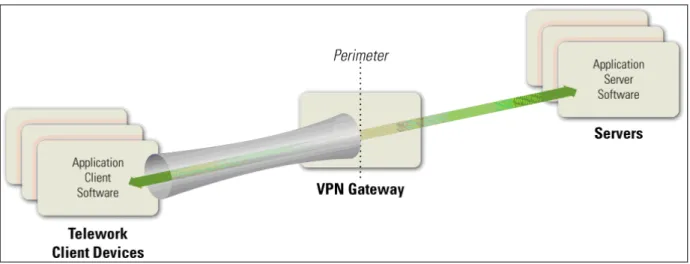
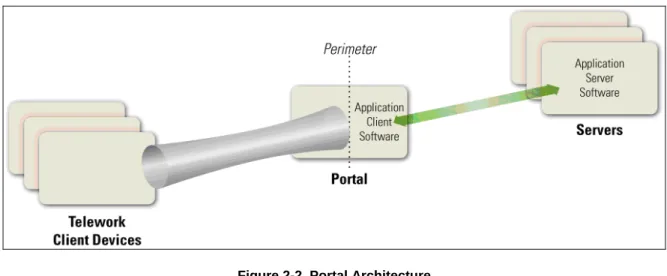
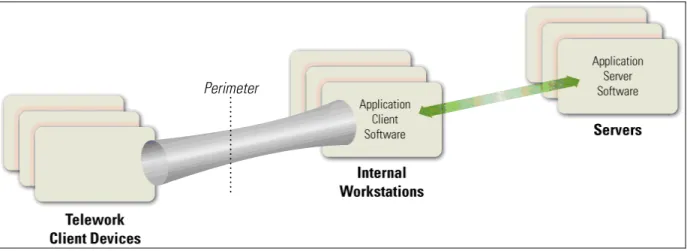
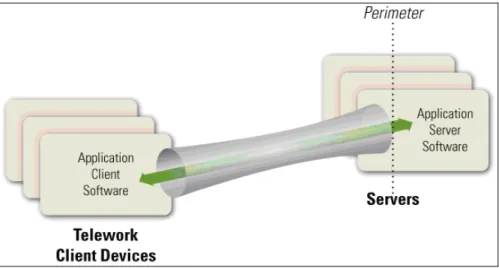
planning a remote access solution, organizations should carefully consider the security implications of the remote access methods in each category, in addition to how well each method may meet operational requirements. The figures in this section show some of the operational and security properties of the four categories of remote access methods. In the figures, the flared pipe is the cryptographically-protected communications that originate with the teleworker’s device. The arrow and the application software labels indicate the flow of communications between the application client and server software. The dotted vertical line shows the perimeter of the organization’s network; everything to the left of the dotted line represents the Internet, while to the right of the dotted line is the internal network.
5
Sources of hardening information include the National Checklist Repository (http://checklists.nist.gov/) and NIST SP 800-123, Guide to General Server Security (http://csrc.nist.gov/publications/PubsSPs.html).
2.2.1 Tunneling
Many remote access methods offer a secure communications tunnel through which information can be transmitted between networks, including public networks such as the Internet. Tunnels are typically established through virtual private network (VPN) technologies. Once a VPN tunnel has been established between a teleworker’s client device and the organization’s VPN gateway, the teleworker can access many of the organization’s computing resources through the tunnel. To use a VPN, users must either have the appropriate VPN software on their client devices or be on a network that has a VPN gateway system on it. In Figure 2-1, a VPN client is installed on each of the client devices, and there is a single VPN gateway that runs the VPN server software. The pipe represents a secure remote access connection (tunnel) between a client device and the VPN gateway. Through this tunnel, application client software (e.g., email client, word processor, web browser, database client) installed on the client device
communicates with application server software residing on servers within the organization.6 The VPN gateway can take care of user authentication, access control (at the host, service, and application levels), and other security functions for teleworkers.
Figure 2-1. Tunneling Architecture
Tunnels use cryptography to protect the confidentiality and integrity of the transmitted information between the client device and the VPN gateway. Tunnels can also authenticate users, provide access control (such as restricting which protocols may be transmitted or which internal hosts may be reached through remote access), and perform other security functions. However, although remote access methods based on tunneling protect the communications between the client device and the VPN gateway, they do not provide any protection for the communications between the VPN gateway and internal resources. Also, in tunneling solutions, the application client software and data at rest resides on the client device, so they are not protected by the tunneling solution and should be protected by other means.
The types of VPNs most commonly used for teleworkers are Internet Protocol Security (IPsec) and Secure Sockets Layer (SSL) tunnels.7 Tunneling may also be achieved by using Secure Shell (SSH), although this is less commonly used and is often considered more difficult to configure and maintain than IPsec or SSL tunnel VPNs. All three forms of tunneling mentioned in this section can protect many
6
This architecture, with the VPN gateway and the application servers being on separate hosts, is the most commonly used tunneling solution for remote access. However, the VPN gateway and the application servers could be on a single host. 7
Another, more commonly used form of SSL VPNs uses a portal architecture. Section 2.2.2 discusses SSL portal VPNs. An SSL tunnel VPN generally uses a plug-in installed within a Web browser that supports tunneling within an SSL connection.
protocols at once. More information on IPsec VPNs and SSL tunnel VPNs are available from NIST SP 800-77, Guide to IPsec VPNs and NIST SP 800-113, Guide to SSL VPNs, respectively.8
Many communication encryption protocols can be expanded into tunneling protocols in the same way that SSL is used for SSL VPNs. For example, some systems use the SSH protocol to create tunnels, although the method for doing so is not yet standardized. In general, standardized tunneling protocols can be configured to have the same cryptographic strength and to use the same (or functionally similar) mechanism for authenticating the two parties to each other. Different tunneling systems can tunnel various protocols; for example, IPsec has standardized extensions that allow it to tunnel Layer 2 protocols such as the Point-to-Point Protocol (PPP) and Multiprotocol Label Switching (MPLS). In general, almost any communication encryption protocol can be made to tunnel almost any layer.
The VPN gateway can control access to the parts of the network and the types of access that the teleworker gets after authentication. For example, a VPN might allow a user to only have access to one subnet, or to only run particular applications on certain servers on the protected network. In this way, even though the cryptographic tunnel ends at the VPN gateway, the gateway can add additional routing to the teleworker's traffic to only allow access to some parts of the internal network.
VPNs are usually established and managed by VPN gateway devices owned and managed by the organization being protected. In some cases, organizations outsource their VPNs to trusted third parties. Such a third party might simply manage the VPN gateway that is owned by the organization, but other third parties offer services where they own and control the VPN gateway. In the latter case, the organization should evaluate the security of the proposed solution and ensure it will support the organization’s security policy.
2.2.2 Application Portals
Another category of remote access solutions involves portals. A portal is a server that offers access to one or more applications through a single centralized interface. A teleworker uses a portal client on a telework client device to access the portal. Most portals are web-based—for them, the portal client is a regular web browser. Figure 2-2 shows the basic portal solution architecture. The application client software is installed on the portal server, and it communicates with application server software on servers within the organization. The portal server communicates securely with the portal client as needed; the exact nature of this depends on the type of portal solution in use, as discussed below.
Figure 2-2. Portal Architecture
8
In terms of security, portals have most of the same characteristics as tunnels: portals protect information between client devices and the portal, and they can provide authentication, access control, and other security services. However, there is an important difference between tunnels and portals—the location of the application client software and associated data. In a tunnel, the software and data are on the client device; in a portal, they are on the portal server. A portal server transfers data to the client device as rendered desktop screen images or web pages, but data is typically stored on the client device much more temporarily than data for a tunneled solution is. (However, portals can be configured to allow clients to download content from the portal and store it on the client device or other locations outside the secure remote access environment.) Having the application client software centralized gives an organization more control over how the software and data is secured as opposed to more distributed remote access solutions. Portals limit the access a teleworker has to particular application clients running on the portal itself. Those applications further limit the access the teleworker has to the servers inside the network. There are a few types of portal solutions commonly used for remote access. A web-based portal provides a user with access to multiple web-based applications from a single portal web site. An SSL portal VPN is a common form of web-based portal. Another type of portal solution is terminal server access, which gives each teleworker access to a separate standardized virtual desktop. The terminal server simulates the look and feel of a desktop operating system and provides access to applications. Terminal server access requires the teleworker either to install a special terminal server client application on the client device or to use a Web-based interface, often with a browser plug-in or other additional software provided by the organization. Another similar remote access method, called virtual desktop access, involves the user connecting to a system that contains virtual images of standardized, non-simulated operating systems and desktops. When the teleworker is finished with a remote access session, the virtual image is discarded so that the next user will have a clean virtual desktop.
The mechanism for providing an interface to the teleworker varies among portals. For example, terminal server access and virtual desktop access present a standardized virtual desktop to the teleworker, while SSL portal VPNs present each application through a web page. The nature of this interface is important because it relates to the storage, temporary or permanent, of data. For many portals, the user interface is virtual, and after the user session is over, that instance of the interface is essentially destroyed and a clean version used for the next session. Some portals, such as SSL portal VPNs, can be configured to establish a secure virtual machine on the client device, restrict all remote access data to reside within that virtual machine, and then securely destroy the virtual machine instance and all the data that existed within it when the session ends. This helps to ensure that sensitive information does not inadvertently become stored on a telework client device, where it could possibly be recovered by a future compromise.
2.2.3 Remote Desktop Access
A remote desktop access solution gives a teleworker the ability to remotely control a particular desktop computer at the organization, most often the user’s own computer at the organization’s office, from a telework client device. The teleworker has keyboard and mouse control over the remote computer and sees that computer’s screen on the local telework client device’s screen. Remote desktop access allows the user to access all of the applications, data, and other resources that are normally available from their computer in the office. Figure 2-3 shows the basic remote desktop access architecture. A remote desktop access client program or web browser plug-in is installed on each telework client device, and it connects directly with the teleworker’s corresponding internal workstation on the organization’s internal network.
Figure 2-3. Remote Desktop Access Architecture
There are two major styles of remote desktop access: direct between the telework client and the internal workstation, and indirect through a trusted intermediate system. However, direct access is often not possible because it is prevented by many firewalls. For example, if the internal workstation is behind a firewall performing network address translation (NAT), the telework client device cannot initiate contact with the internal workstation unless either the NAT allows such contact9 or the internal workstation initiates communications with the external telework client device (e.g., periodically checking with the client device to see if it wants to connect).
Indirect remote desktop access is performed through an intermediate server. This server is sometimes part of the organization's firewall, but is more often run by a trusted commercial or free third-party service outside the organization's network perimeter. Usually there are separate connections between the telework client device and the service provider, and between the service provider and the internal workstation, with the intermediate server handling the unencrypted communications between the separate connections. The security of this intermediate server is very important, because it is responsible for properly authenticating teleworkers and preventing unencrypted traffic from being accessed by unauthorized parties. Also, if the organization’s security policy requires particular kinds of authentication (such as the two-factor
authentication required by federal agencies), the intermediate server should support this authentication in both directions. Before implementing an indirect remote desktop access solution, an organization should evaluate the security provided by the service provider, especially possible threats involving the
intermediate server and the potential impact of those threats. The organization can then identify compensating controls to mitigate the threats, such as applying a second level of communications
encryption at the application layer, and determine under what circumstances the intermediate system may be used, such as for low-risk activities.
The remote desktop access software protects the confidentiality and integrity of the remote access communications and also authenticates the user to ensure that no one else connects to the internal workstation. However, because this involves end-to-end encryption of the communications across the organization’s perimeter, the contents of the communication are hidden from the network security controls at the perimeter, such as firewalls and intrusion detection systems. For many organizations, the increased risk caused by this is not worth the benefits, and direct connections from external client devices to internal workstations are prohibited.
9
Another serious security issue with remote desktop access software is that it is decentralized; instead of the organization having to secure a single VPN gateway server or portal server, the organization instead has to secure each internal workstation that may be accessed through remote desktop access. Because these internal workstations can be accessed from the Internet, either directly or indirectly, they generally need to be secured nearly as rigorously as full-fledged remote access servers, yet such workstations were usually not designed with that degree of security in mind. Applying compensating controls for each workstation to raise its security to an acceptable level often involves a significant amount of time and resources, as well as acquisition of additional security controls. Also, authentication solutions such as two-factor authentication capabilities may need to be deployed to each internal workstation using remote desktop access.
Generally, remote desktop access solutions should only be used for exceptional cases after a careful analysis of the security risks. The other types of remote access solutions described in this section offer superior security capabilities.
2.2.4 Direct Application Access
Remote access can be accomplished without using remote access software. A teleworker can access an individual application directly, with the application providing its own security (communications encryption, user authentication, etc.) Figure 2-4 shows the high-level architecture for direct application access. The application client software installed on the telework client device initiates a connection with a server, which is typically located at the organization’s perimeter (e.g., in a demilitarized zone [DMZ]).
Figure 2-4. Direct Application Access Architecture
One of the most common examples of direct application access is web-based access to email, also known as webmail. The teleworker runs a web browser and connects to a web server that provides email access. The web server runs HTTP over SSL (HTTPS) to protect the communications, and the webmail
application on the server authenticates the teleworker before granting access to the teleworker’s email. For cases such as webmail that use a ubiquitous application client (e.g., a web browser), direct application access provides a highly flexible remote access solution that can be used from nearly any client device. For the same reasons discussed in Section 2.2.3, the direct application access architecture is generally only acceptable if the servers being accessed by the teleworkers are located on the organization’s network perimeter, and not internal networks. Servers on the perimeter are directly accessible from the Internet, so they should be well-secured to reduce the likelihood of compromise. Many organizations choose to
provide direct application access to only a few lower-risk applications that are widely used, such as email, and use tunnel or portal methods to provide access to other applications, particularly those that would be at too much risk if they were directly accessible from the Internet.
2.3 Summary of Key Recommendations
The following list presents some of the key recommendations from this section of the document.
To support confidentiality, integrity, and availability, all of the components of telework and remote access solutions, including client devices, remote access servers, and internal servers accessed through remote access, should be secured against a variety of threats. (Section 2.1)
Before designing and deploying telework and remote access solutions, organizations should develop system threat models for the remote access servers and the resources that are accessed through remote access. (Section 2.1)
When planning telework security policies and controls, organizations should assume that client devices will be acquired by malicious parties who will attempt to recover sensitive data from the devices. (Section 2.1)
Organizations should plan their remote access security on the assumption that the networks between the telework client device and the organization, including teleworkers’ home networks, cannot be trusted. (Section 2.1)
Organizations should assume that client devices will become infected with malware and plan their security controls accordingly. (Section 2.1)
Organizations should carefully consider the balance between the benefits of providing remote access to additional resources and the potential impact of a compromise of those resources. Organizations should ensure that any internal resources they choose to make available through remote access are hardened appropriately against external threats and that access to the resources is limited to the minimum necessary through firewalling and other access control mechanisms. (Section 2.1)
When planning a remote access solution, organizations should carefully consider the security implications of the remote access methods in each of the four categories described in Section 2.2, in addition to how well each method may meet operational requirements. (Section 2.2)
3.
Remote Access Solution Security
This section presents recommendations for securing remote access solutions. It focuses on remote access server security and server placement. It also discusses authentication, authorization, and access control. Recommendations for securing remote access client software are presented in this section, while recommendations for telework client device security are presented in Section 4.
3.1 Remote Access Server Security
Because remote access servers, such as VPN gateways and portal servers, provide ways for external hosts such as telework devices to gain access to internal resources, their security is particularly important. In addition to permitting unauthorized access to resources, a compromised server could be used to eavesdrop on remote access communications and manipulate them, as well as a “jumping off” point for attacking other hosts within the organization. Recommendations for general server security are available from NIST SP 800-123, Guide to General Server Security. Remote access servers should be kept fully patched, operated using an organization-defined security configuration baseline, and only managed from trusted hosts by authorized administrators.
VPN gateways and portals can run many services and applications, such as firewalls, antimalware software, and intrusion detection software. Organizations should carefully consider the security of any solutions that involve running a remote access server on the same host as other services and applications. Such solutions may offer benefits, such as equipment cost savings, but a compromise of any one of the services or applications could permit an attacker to compromise the entire remote access server. Placing the remote access server on a separate, dedicated host reduces the likelihood of a remote access server compromise and limits its potential impact. Using a separate host may also be advisable if the remote access server is likely to place other services and applications at significantly increased risk. An
organization should also consider using multiple remote access solutions if its remote access users have vastly different security needs, such as one group accessing typical low-risk resources and another group accessing mission-critical confidential data.
The security of stored data is another important consideration for remote access server security. For portal servers that may temporarily store sensitive user data, wiping such data from the server as soon as it is no longer needed can reduce the potential impact of a compromise of the server. The need to wipe sensitive data from remote access servers should be determined based on a risk assessment.
3.2 Remote Access Server Placement
Major factors organizations should consider when determining where to place a remote access server include the following:
Device Performance. Remote access services can be computationally intensive, primarily because of encryption and decryption. Providing remote access services from a device that also provides other services may put too high of a load on the server during peak usage, causing service disruptions. The performance impact caused by encryption and key exchange can be reduced by performing them on hardware-based cryptographic accelerator chips. These chips can be located on computer
motherboards or add-on cards.
Traffic Examination. Because the contents of encrypted remote access communications cannot be examined by network firewalls, intrusion detection systems, and other network security devices, it is generally recommended that the remote access architecture be designed so that an unencrypted form
of the communications can be examined by the appropriate network and/or host-based security controls.
Traffic Not Protected by the Remote Access Solution. Organizations should carefully consider the threats against network traffic that is not protected by the remote access solution, such as traffic passed between a remote access server and internal resources.
NAT. The use of NAT can cause operational problems for some remote access solutions. For
example, any remote access system that requires the teleworker to connect directly to a host inside the network, such as a remote desktop system or a VPN with its public endpoint inside the network, cannot work with a NAT without special configuration that may or may not work. NATs also prevent the use of applications that require addresses not to change (e.g., embed addresses in the application content). Protocols and mechanisms that break through NATs to solve particular access problems often introduce their own security problems, such as possibly allowing access to different hosts inside the NAT at different times. Some newer NAT technologies, particularly those involving IPv6, are not yet well understood and their security properties not yet fully analyzed.
Organizations should carefully consider the placement of their remote access servers. Some remote access servers, such as VPN gateways, generally act as intermediaries between telework devices and the
organization’s internal computing resources. Other hosts providing remote access services, such as direct application access and remote desktop access solutions, are true endpoints for remote access
communications. Both categories of remote access servers are discussed below.
Remote access servers are usually placed at an organization's network perimeter. Such placement is common because the organizational security policies most often apply to the entire network of an organization. Even if a particular security policy applies to one sub-network of the organization, most remote access servers can restrict access to sub-networks and therefore can be placed at the organization's perimeter. In some network layouts, it is better to put a remote access server inside the perimeter, at the boundary of a sub-network. The rest of this section describes when such a network layout might be appropriate.
3.2.1 Intermediary Remote Access Servers
Intermediate remote access servers connect external hosts to internal resources, so they should usually be placed at the network perimeter. The server acts as a single point of entry to the network from the perimeter and enforces the telework security policy. If remote access is needed to a particular sub-network within the organization, there are generally two options: place the remote access server at the edge of the sub-network—where the sub-network joins the full network—or place it at the perimeter of the full network and use additional mechanisms to restrict the teleworkers to only be able to access the specified sub-network. The value of placing the remote access server at the network perimeter versus the sub-network perimeter differs for the four types of remote access methods:
Tunneling servers usually give administrators sufficient control over the internal resources to which a teleworker has access, such that there is little advantage to setting up a tunneling server at the edge of a sub-network, as opposed to the network perimeter.
Portal servers run the application client software on the servers themselves. Placing them at the network perimeter has a similar effect as placing them at the edge of a sub-network because the remote access user is only running applications on the portal server, not on servers inside the network.
Remote desktop access does not involve remote access servers, so there is no issue with the placement of the remote access server.
Direct application access servers run the application server software on the servers themselves. Placing them at the network perimeter has a similar effect as placing them at the edge of a sub-network because the remote access user is only running applications on the direct application access server, not on servers inside the network.
Thus, the only types of remote access servers that may be appropriate to place at the sub-network perimeter are portal servers and direct application access servers, but even in those two cases, it is often better to run those on the organization’s perimeter so that the organization’s firewall can control access to these servers for all workers, not just teleworkers. Further, to simplify management of the network and the network’s security policy, running all remote access servers at the network perimeter is also advisable. Therefore, organizations should place remote access servers at the network perimeter instead of the sub-network perimeter unless there are compelling reasons to do otherwise.
If a network has a firewall at the perimeter, remote access servers on that network should be directly connected to, or in the same physical device as, the firewall so as to not circumvent the firewall’s security policy. In the case that the two devices are the same, there is of course no question about the placement of the remote access server. However, if the remote access server is a different device than the firewall, the network planner must decide where to place the remote access server. If the firewall has a DMZ
associated with it, then that DMZ is likely the best location for the remote access server, otherwise the server should be outside the firewall if the network topology allows for it. Both of these placements provide logical separation between the remote access server and the internal networks. To reduce the potential impact of a compromise of the remote access server, organizations should restrict
communications between the server and internal networks. The server should only be able to initiate communications with the internal hosts and services specifically authorized for remote access usage, and only the appropriate internal hosts (e.g., trusted hosts used to administer the remote access server) should be able to initiate communications with the remote access server.
If the remote access server must be placed inside the firewall, the firewall’s security policy should be adjusted to allow only the necessary traffic from teleworkers (and only teleworkers) to get to the remote access server. This could involve limiting incoming traffic to only the IP addresses or address ranges used by teleworkers’ home networks if those networks have stable addresses, for example. Setting up such a precise policy for mobile telework client devices can be difficult to maintain and error-prone. Also, because all remote access communications should be encrypted, as discussed in Section 4, network security controls would be unable to monitor the contents of the communications. Therefore, this solution should be avoided.
3.2.2 Endpoint Remote Access Servers
Endpoint remote access servers should be placed in the organization’s DMZ whenever possible. This allows a perimeter firewall to limit access to the servers from both external and internal hosts, and avoids the security issues discussed in Section 2.2.3 involved in allowing external traffic to pass directly into the internal network. Implementations of remote desktop access solutions usually rely on internal
workstations to provide remote access services, so the use of such solutions is not generally recommended.
3.3 Remote Access Authentication, Authorization, and Access Control
Most of the computing resources used through remote access are available only to an organization’s users, and often only a subset of those users. To ensure that access is restricted properly, remote access servers should authenticate each teleworker before granting any access to the organization’s resources, and then use authorization technologies to ensure that only the necessary resources can be used. Authentication can
also be used to confirm the legitimacy of telework client devices and remote access servers. Access control technologies are also needed to restrict access to network communications and applications. This section provides additional details on remote access authentication, authorization, and access control.
3.3.1 Authentication
There are many ways to authenticate remote access users, such as with passwords10, digital certificates, or hardware authentication tokens. If passwords are the only form of authentication for a remote access solution, then generally the remote access solution’s authentication mechanism should be different from the organization’s other authentication mechanisms, such as email or directory service passwords, unless direct application access is being used. Having different passwords reduces the impact that a compromise of remote access credentials would have on other information resources, and vice versa, and it is
particularly important if users are entering passwords into telework devices not controlled by the organization. However, having different passwords for remote access and other systems is often not enforceable11, and it should be assumed that some users will use the same passwords for both. Organizations with higher security needs or with concerns about the security of passwords should consider using authentication that does not rely solely on passwords, such as multifactor authentication. Federal agencies are required to “allow remote access only with two-factor authentication where one of the factors is provided by a device separate from the computer gaining access”, according to OMB Memorandum 07-16, Safeguarding Against and Responding to the Breach of Personally Identifiable Information.12 Such two-factor authentication currently tends to be implemented through the use of a cryptographic token and a password, because other authentication methods are often not available on telework client devices. For example, most mobile devices do not have biometric capabilities, smart card readers, or other additional authentication capabilities. This is particularly true for client devices not issued by the organization.
Many organizations require teleworkers to reauthenticate periodically during long remote access sessions, such as after each 8 hours of a session or after 30 minutes of idle time. This helps organizations confirm that the person using remote access is authorized to do so. OMB M-07-16 requires Federal agencies to “use a ‘time-out’ function for remote access and mobile devices requiring user re-authentication after thirty minutes of inactivity”.13 Remote access servers vary in their support for authentication methods and session timeouts, so additional mechanisms may be needed to implement and enforce these policies. Additional information on the types of user authentication methods appropriate for remote access can be found in NIST SP 800-63, Electronic Authentication Guideline and OMB M-04-04, E-Authentication Guidance for Federal Agencies.14
Whenever feasible, organizations should implement mutual authentication, so that a remote access user can verify the legitimacy of a remote access server before providing authentication credentials to it. An example is verifying a digital certificate presented by the remote access server to ensure that the server is controlled by the organization. User digital certificates can be used in many remote access systems, although the systems vary in the way that they handle certificates. Most user digital certificates have the private key associated with the certificate protected by a password. Some remote access methods, such as
10
For more information and recommendations specific to passwords, see draft NIST SP 800-118, Guide to Enterprise Password Management (http://csrc.nist.gov/publications/PubsSPs.html).
11
In some cases, it can be enforced by using a centralized password management system for both the remote access passwords and the other systems’ passwords. Many centralized password management systems can ensure that the same password is not used for two different systems.
12
OMB M-07-16 is available at http://www.whitehouse.gov/omb/memoranda/fy2007/m07-16.pdf. 13 NIST SP 800-53 also has a security control for this, Access Control 11 (AC-11), Session Lock. 14
SP 800-63 is available at http://csrc.nist.gov/publications/PubsDrafts.html. OMB M-04-04 is available at
IPsec and SSL VPN technologies, include mandatory server authentication during the setup of the secure communications channel. Server authentication is most important for remote access methods where a user is manually establishing the remote access connection, such as typing a URL into a Web browser. Section 3.4 presents additional information on this.
3.3.2 Authorization
After verifying the identity of a remote access user, organizations may choose to perform checks
involving the telework client device to determine which internal resources the user should be permitted to access. These checks are sometimes called health, suitability, screening, or assessment checks. The most common way of implementing this is having the remote access server perform “health checks” on the teleworker's client device. These health checks require software on the user’s system that is controlled by the remote access server to verify compliance with certain requirements from the organization’s secure configuration baseline, such as the user’s antimalware software being up-to-date, the operating system being fully patched, and the user’s system being owned and controlled by the organization.
Some remote access solutions can also determine if the device has been secured by the organization and what type of device it is (e.g., desktop/laptop, PDA, video game system). Based on the results of these checks, the organization can determine whether the device should be permitted to use remote access and what level of access should be granted. If the user has acceptable authorization credentials but the client device does not pass the health check, the user and device may be granted limited access to the internal network, no network access at all, or access to a quarantine network so that the security deficiencies can be fixed. This decision can also be based on the part of the network that the device is trying to access; an organization might have more stringent policies for more sensitive data.
Authorization based on the type of device that is used and the device’s properties is referred to as network access control (NAC). NAC is a security policy enforcement mechanism, not a true security protection mechanism. The mechanisms used to accomplish NAC are still changing as products mature. Examples of checks include verifying the presence of security patches, confirming that antimalware software is
enabled and up-to-date, and ensuring that a personal firewall is enabled and blocking incoming traffic. However, many health checks are performed in ways that can be trivially circumvented by malware, so organizations should not rely on NAC to stop determined attackers from gaining network access. Organizations should use NAC whenever feasible to detect major security policy violations in telework client devices and to prevent teleworkers from inadvertently using the wrong device for telework. Some NAC solutions can also be used to control which internal resources each client device may access and whether remediation actions have to be performed on a client device before it is permitted access.
For organizations that want to restrict or prohibit remote access by telework devices on external networks other than teleworkers’ home networks, having organization-controlled security devices on home
networks may be particularly helpful. An example of such a policy is allowing access to a particular Web server from anywhere, but disallowing access to a sensitive resource from all locations other than
authorized home networks. Some organizations choose to do this because external networks, such as those at hotels, airport lounges, and coffee shops, may have more prevalent and serious threats than home networks. Such policies can be implemented effectively if the organization has a security device deployed on the home network, but otherwise are often impractical. Home network IP addresses often change, unless a teleworker has a fixed IP address,15 and teleworkers are usually unaware of their address changing or what the new address is. Maintaining a list of permitted IP address may take significant resources. Also, errors in the list and failures to update it promptly may prevent teleworkers from using
15
Many Internet service providers (ISP) that provide home access do not allow users to have a fixed IP address, and most ISPs that do permit fixed IP addresses charge a monthly fee for this service.
resources that they are authorized to access. An alternative strategy is to prompt users to report their location when signing into a remote access system; because this information cannot be verified, organizations should not rely on it for security purposes.
3.3.3
Access Control for Network Communications
A major component of controlling access to network communications and protecting their content is the use of cryptography. At a minimum, any sensitive information passing over the Internet, wireless networks, and other untrusted networks should have its confidentiality and integrity preserved through use of cryptography. Federal agencies are required to use cryptographic algorithms that are NIST-approved and contained in FIPS-validated modules. The FIPS 140 specification, Security Requirements for Cryptographic Modules, defines how cryptographic modules are validated.16 It is important to note that for a remote access system to be considered compliant to FIPS 140, both sides of the interaction must have passed FIPS 140 validation. Many remote access systems, such as SSL VPNs, support the use of remote access client software from other vendors, so there may be two or more distinct validation certificates for a particular remote access system.17
Some remote access methods, such as IPsec and SSL VPNs, often inherently include NIST-approved mechanisms for encrypting communications and verifying their integrity. Other remote access methods may use Transport Layer Security (TLS) or other NIST-approved cryptographic mechanisms to provide protection. Remote access methods that do not offer NIST-approved mechanisms for protecting the confidentiality and integrity of communications should have additional NIST-approved protection applied, such as tunneling the remote access method’s communications within a VPN or running the communications over TLS. Remote access methods that offer both NIST-approved and non-NIST-approved cryptographic mechanisms should disable the use of all non-non-NIST-approved cryptographic
mechanisms if possible. This is usually achieved through configuration of the remote access server. All remote access methods should conform to the key strength requirements listed in NIST SP 800-56A,
Recommendation for Pair-Wise Key Establishment Schemes Using Discrete Logarithm Cryptography. Access control for network communications may also involve determining which traffic should be protected. Some remote access solutions offer options for this; for example, many VPN clients have a feature called split tunneling which, if enabled, will tunnel all communications involving the
organization’s internal resources through the VPN, thus protecting them, but will exclude all other communications from going through the tunnel. Split tunneling increases efficiency for communications and reduces load on the remote access solution, but it also prevents the organization from examining much of the teleworkers’ network traffic and from protecting the confidentiality and integrity of that traffic. Further, using split tunneling could result in a telework device that has two active Internet
interfaces—for example, a PC connected to Ethernet and wireless network simultaneously—inadvertently becoming a bridge between a trusted and an untrusted network. This presents a significant security risk and is a violation of most organizations’ security policies. For teleworkers using VPNs on untrusted networks, particularly higher-risk networks such as wireless hotspots, organizations should consider disabling split tunneling capabilities so that attackers cannot eavesdrop on any of the teleworkers’ network communications.
For their teleworkers’ home networks, some organizations provide VPN gateways, firewall appliances, or other security devices that are configured to enforce the organization’s security policies. This gives organizations greater control over telework security but may also involve significant costs in purchasing, deploying, managing, and maintaining the security devices. Also, because most home networks used for
16 The current version of FIPS 140 is 140-2. It is available from http://csrc.nist.gov/publications/PubsFIPS.html. 17
Note that SSL version 3.0 and below are not NIST-approved; only SSL version 3.1 and above (also known as TLS version 1.0 and above) are approved.