The Inevitable Unicode
Project
CONTENTS
The Inevitable Unicode Project ... 1
What is Unicode? ... 2
Why should I adopt Unicode? ... 2
Planning System Resources for Unicode System ... 3
What should you know about Endians in Unicode conversion? ... 4
What resources do I need to convert my non-Unicode system to Unicode?... 4
Converting MDMP systems to Unicode means more complexity? ... 5
Unicode conversion project phases ... 7
A. Planning ... 7
B. Execution... 7
C. Finalization ... 7
I) Unicode Preparation steps ... 7
II) Unicode conversion ... 9
III) Post-conversion steps...10
Summary ...10
About the Author ...11
T i k k a n a A k u r a t i , U n i c o d e S A P . c o m
What is Unicode?
Following description from Unicode.org best describes what Unicode is.
“Computers store letters and other characters by assigning a number for each one. Unicode provides a unique number for every character, no matter what the platform, no matter what the program, no matter what the language. “
The old standard code pages have the following disadvantages:
They cover only a subset of all characters
Different codepages have
incompatibilities between each other. Data exchange is restricted between code pages
There are simply too many code pages. Unicode has the capability to support all the languages in the world in one code page! It supports 65,000 characters and has room to support an additional 1 million characters.
Why should I adopt
Unicode?
Whether you like it or not Unicode is here to stay and you will be lured to adopt Unicode, because of following reasons and situations: ECC6 (NW70) and after, new installations will only be possible with Unicode.
If your company is supporting multiple regions of the world, in most probability
you might be using MDMP in your SAP system. MDMP systems deploy more than one system code page on the application server. This has the flaw that the data would become corrupt if a user logs onto one language and tries to work with data in another language. Multiple Display/Multiple Processing (MDMP) support is dropped by SAP starting with NW2004s.
Many companies are adopting Service Oriented Architecture standards providing Web Services to enable global interoperability. These standards require Unicode.
SAP provides full Unicode support starting from Web Application Server (Web AS) 6.20. Current releases of NetWeaver and mySAP Business Suite run Unicode-enabled.
Unicode is mandatory for SAP systems deploying Java applications.
Planning System
Resources for Unicode
System
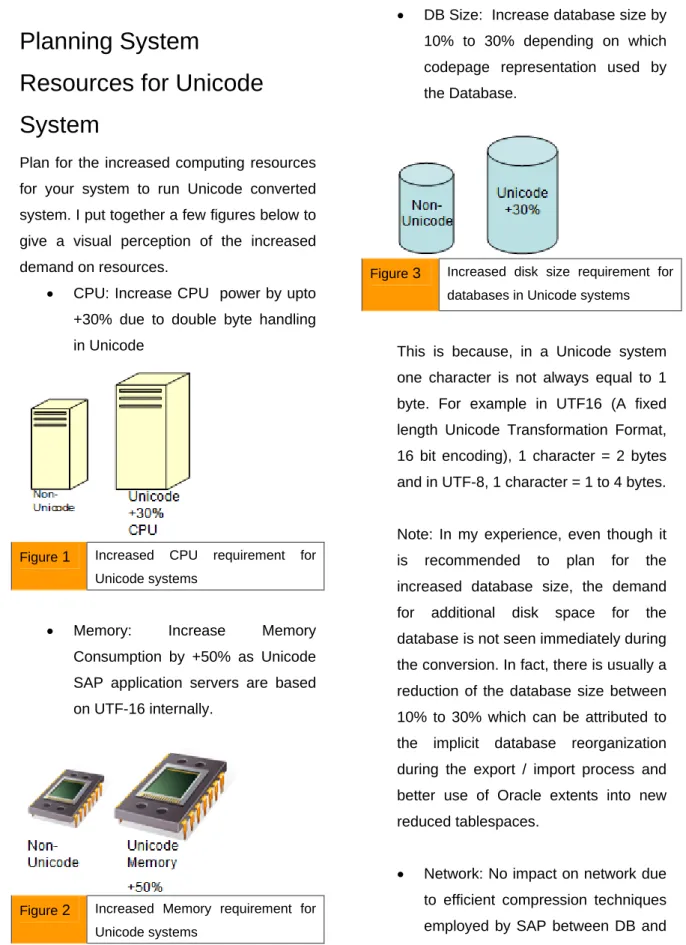
Plan for the increased computing resources for your system to run Unicode converted system. I put together a few figures below to give a visual perception of the increased demand on resources.
CPU: Increase CPU power by upto +30% due to double byte handling in Unicode
Figure 1 Increased CPU requirement for Unicode systems
Memory: Increase Memory Consumption by +50% as Unicode SAP application servers are based on UTF-16 internally.
Figure 2 Increased Memory requirement for Unicode systems
DB Size: Increase database size by 10% to 30% depending on which codepage representation used by the Database.
Figure 3 Increased disk size requirement for databases in Unicode systems
This is because, in a Unicode system one character is not always equal to 1 byte. For example in UTF16 (A fixed length Unicode Transformation Format, 16 bit encoding), 1 character = 2 bytes and in UTF-8, 1 character = 1 to 4 bytes.
Note: In my experience, even though it is recommended to plan for the increased database size, the demand for additional disk space for the database is not seen immediately during the conversion. In fact, there is usually a reduction of the database size between 10% to 30% which can be attributed to the implicit database reorganization during the export / import process and better use of Oracle extents into new reduced tablespaces.
Network: No impact on network due to efficient compression techniques employed by SAP between DB and application servers.
What should you know
about Endians in Unicode
conversion?
When converting to Unicode, the export code page must correspond to the Endianness of the target system. But what is an Endian, and how many Endians are out there? Fortunately there are only two Endians. The word “Endian” has to do with where the most significant byte (MSB) comes first or in other words where big “end” comes first. If the MSB comes at the lowest address and the least significant byte at the highest address then you are dealing with Big Endian. Little Endian is the other type of arrangement of MSB ordering. That is if the least significant byte of the number is stored in memory at the lowest address and the most significant byte at the highest address then it is Little Endian. An example would be the following:
0xAABBCC would be stored as follows:
Address Big Endian Little Endian 2 CC AA 1 BB BB 0 AA CC
The export code page should match the Endianness of the machine that runs R3load to import data.
Here is a table that helps which code page to use:
Code page
Endian
type Machine Architecture
4103
Little Endian
Alpha, Intel X86 (and clones),X86_64, Itanium
(Wind o w s+Linux),So la ris_X86_64
4102
Big Endian
IBM 390, AS/400, PowerPC (AIX),Linux on zSeries (S/390), Linux on Power, Solaris_SPARC, HP PA-RISC, Itanium (HP-UX)
What resources do I need
to convert my non-Unicode
system to Unicode?
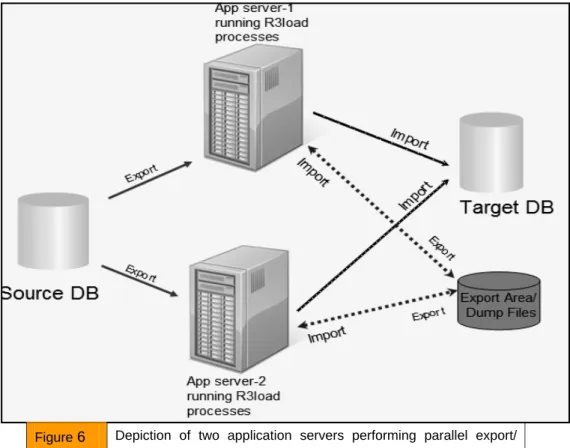
Unicode conversion projects need thorough planning and meticulous execution. A good project plan can help you immensely in the long run. For large systems’ conversion process, you need at least one more system that is similar to your non-Unicode system. Your non-Unicode system is usually called the Source and other system is called the Target. You would convert and export your source system to dump files on a shared disk space and import into the target system. The export and import above can happen in parallel if you use Unicode conversion tools like Migration Monitor (MigMon) and/or Distribution Monitor (DistMon) to speed up the process. Good experience using these tools is essential for a successful conversion.
Here is a quick list of the essential resources you need:
1) Additional system for preparing an empty target Unicode system. (You will import your Unicode converted data into this system).
2) Additional disk space for common export area and for running language scans for a source MDMP system. 3) ABAP team to convert your non –
Unicode programs to Unicode compatibility.
4) Language team to map the vocabulary in different languages in your system to proper languages/codepages.
5) Testing team to test interfaces and/or scenario based verifications.
6) A dedicated Unicode conversion specialist. (If you are going to use CU&UC – Combined Upgrade and Unicode Conversion, then Knowledge of Upgrades is also essential).
Converting MDMP systems
to Unicode means more
complexity?
Unicode preparation of MDMP systems has additional steps of scanning the database
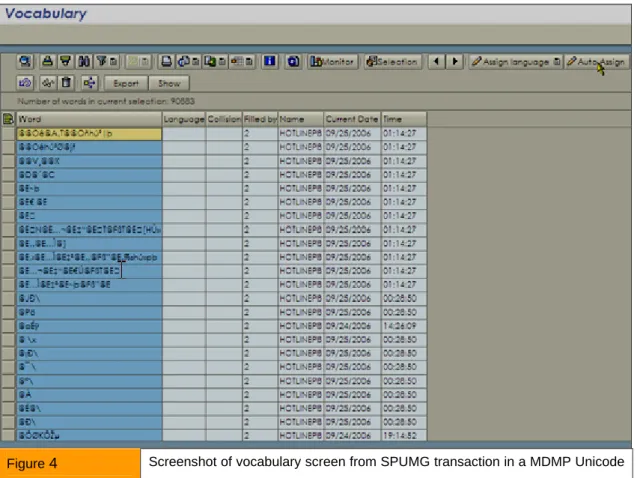
for vocabulary that needs to be mapped to different languages. These scans can take a long time depending on the size and nature of your MDMP system. The assignment of languages to the collected vocabulary can be done through automatical methods and manual effort. SAP provides tools like SPUMG / SPUM4 and SUMG for such vocabulary work. The vocabulary mapping is often an underestimated task in the MDMP-Unicode projects. To give an idea of how long this manual task of vocabulary work may take, here is an example.
In one MDMP – Unicode conversion project following were Vocabulary work related resource numbers:
Database size: 2 TB
Vocabulary collected: 183,475 unique words Vocabulary team size: 10
Figure 4 Screenshot of vocabulary screen from SPUMG transaction in a MDMP Unicode conversion project.
Unicode conversion project
phases
The project mainly consists of three phases: A. Planning
B. Execution or Unicode conversion C. Finalization
A. Planning
In this phase, you start building your project team, check the pre-requisites for Unicode conversion, gather requirements for system resources, plan the downtime for conversion and start enabling customer developments to Unicode compatibility.
B. Execution
This is the phase where the conversion happens and where the export / import of your non-Unicode system happen during a downtime.
The project phase “B. Execution of Unicode conversion” also referred to as “Realization” phase is the longest phase in the project. There are three main activities that should happen in this phase:
I. Unicode preparation steps
o Vocabulary fixes
o ABAP program fixes
o 3rd party tools and interfaces fixes II. Unicode conversion
III. Post-conversion steps
C. Finalization
During this phase your Unicode system is given to teams for functional, technical testing and validation. The testing can involve custom testing scripts focusing on different languages and the vocabulary that exists in your system.
Test and re-test. You should validate your system with respect to the ABAP changes that happened during the project and all interfaces that connect to your Unicode system. A “scenario based” verification methodology can be employed to validate data consistency.
I) Unicode Preparation steps
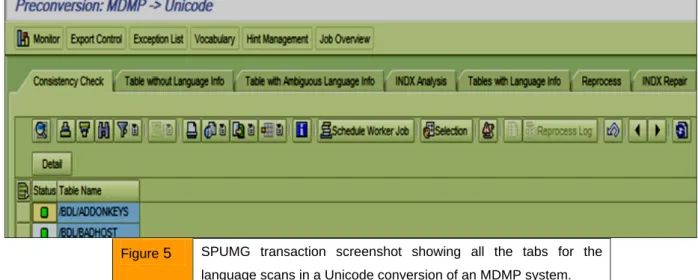
Activities in this phase are performed on the source system. There are three major activities in this phase that take most of the time.Vocabulary fixes: You should collect the vocabulary in your system that needs determination of the codepage they should belong to. The language/ vocabulary scans are performed in this phase which can take up considerable computer time to run. See Figure 5 for the scans that you will need to go through in transaction SPUMG (or SPUM4 if your source system is 46C MDMP). Once the vocabulary is scanned the vocabulary work is performed by your language/vocabulary team in this phase.
Basis Tip: Plan for extra space to increase PSAPTEMP and PSAPUNDO tablespaces for the scans to complete without fail.
ABAP program fixes: you should also enable all your ABAP programs to Unicode compatible syntax in this phase. The ABAP enablement of your programs can take considerable time as well depending on how many custom programs you have in the system. SAP provides the transaction UCCHECK to
identify all the programs that need to be adjusted for Unicode compatibility.
3rd party tools and interfaces fixes: you should also address the compatibility of your future Unicode system with the existing interfaces and third party tools. Thorough testing should be done for compatibility issues with a test Unicode system in your environment. Some of the often found third party tools are Vertex, BSI, RWD, BMC and IXOS. Find Unicode compatible releases of these to install in your Unicode system.
Figure 5 SPUMG transaction screenshot showing all the tabs for the language scans in a Unicode conversion of an MDMP system.
II) Unicode conversion
This phase involves export and import of your non-Unicode system to the target Unicode system; hence the system downtime begins in this phase.
It is best to use tools like Distribution Monitor,
Migration Monitor, Table Splitter, OrderBy and Package Splitter to speed up the conversion process. Please note that the actual Unicode conversion of your data happens during the export by R3load. Plan for extra disk space for the export dump files and other Unicode tools to be stored.
Figure 6 Depiction of two application servers performing parallel export/ import from Source DB to Target DB
III) Post-conversion steps
This phase involves steps after the import of the Unicode data into your target system. The steps are performed in the target system. If your source system is MDMP, then your language team will need to perform final vocabulary adjustments in a transaction called SUMG on the target system.
Summary
Unicode conversion projects are often under-estimated. A Unicode conversion project should be treated the same if not more complex than a typical Upgrade project. A high level view of the Unicode project and some key project steps were given in this article. There are many topics that you will come across during an Unicode Conversion project (for example archiving, data reduction, performance tuning for
reduced conversion downtime, adoption of new tablespace naming convention and/or custom tablespace names etc.,). The side benefits of a Unicode project are reduced number of tablespaces and a defragmented database. A unicode conversion enables your company to benefit from new technologies and support all languages in the world.
Resources
> https://service.sap.com/Unicode> https://service.sap.com/globalization
About the Author
Tikkana Akurati holds a Masters degree in Computer and Information Sciences. He has 20 years of experience in IT. Tikkana has played many roles in the area of SAP Basis for more than 10 years. His current focus is on SAP upgrades and Unicode conversions. He has completed many Unicode conversion projects as an independent consultant from SAP America. He can be reached at Ph: 847-804-2970 or via email to