BASIC TCP/IP
NETWORKING
When you communicate to someone or something else, you need to be
able to speak a language that the listener understands. Networking
re-quires that both the sender and receiver use the same networking
pro-tocols and languages.
—Joe
1
C
HAPTER
O
BJECTIVES
In this chapter, you will learn about:
✔
The Current System TCP/IP Values
Page 2
✔
Accessing Other TCP/IP Hosts
Page 18
W
hen you first set up your UNIX system, it may automatically at-tempt to set up networking. Most newer versions of UNIX work this way. The earlier versions of UNIX were more oriented toward termi-nals than networking. Networking packages were often an afterthought. This chapter introduces you to the concepts of networking and will help you to understand some of the steps that are done by your system during installation.L A B 1 . 1
THE CURRENT SYSTEM
TCP/IP VALUES
L
AB1.1
L
AB
O
BJECTIVES
After this Lab, you will be able to:
•
Use
ifconfig
•
Use
netstat
This Lab discusses netstatand other commands used to determine your basic network characteristics. You will need access to an existing network. You will determine the values discussed in the introductory network dis-cussion.
You can set up your network in one or more of the following ways: 1. Manual—You need to edit UNIX files (enter commands from
a prompt) and then restart the various network daemons or re-boot your system.
2. Install—During the install process, you are prompted to set up or change the networking features.
3. Menu—You can use a menu to set up the system parameters needed.
In this Lab, you will be introduced to the simplest way of setting up your network. Later discussions will build upon this and show you how to set up your network parameters automatically by using other servers. The most common manual methods and concepts are discussed. Because your system will probably allow you to set up networking when you install the operating system, much of the discussion also involves how to change your system values.
Look in the man pages for the following:
/etc/hosts hostname telnet ifconfig tcp/ip ethernet netstat traceroute ping ifconfigTCP/IP
By far the most common way to connect your UNIX box to a network is with ethernet and TCP/IP. While other networking schemes will work and are often used, your system will practically always start off with these two. TCP/IP stands for Transmission Control Protocol/Internet Protocol. The name refers to the two layers of the networking proto-col that are used and are discussed very well in many books about the Internet and networking. The Internet is a TCP/IP-based network, so an understanding of networking will help you to better understand how your system will work on the Internet. The standard version of TCP/IP is called IPv4. There is a newer version of TCP/IP that allows for many more hosts and is called IPv6. This text will only talk about IPv4 networks.
TCP/IP ADDRESS
The TCP/IP network address can be broken down into the following grouping:
WWW.XXX.YYY.ZZZ
This is made up of 4 groups of 3 numbers. Each group of numbers can vary from 0 to 255—not 0 to 999—because this number is actually based on a series of binary numbers. These numbers can be either 0 or 1, and each group can only have 8 binary numbers. In mathematical terms, this is 28, which equals 256. Because there are 256 numbers from 0 to 255,
this gives us our addresses.
■
FOR EXAMPLE:
The following are TCP/IP addresses: 9.7.254.117
172.16.1.3 210.1.19.99
L
ABHowever, in practice, the numbers 0 and 255 are not used for the address of a host. The number 0 is typically reserved for the network address.This is the address used by routers and other hosts to access the network.
■
FOR EXAMPLE:
The following are network addresses: 9.0.0.0
172.16.0.0 210.1.19.0
BROADCAST ADDRESS
The number 255 is used as part of the broadcast address. This is the ad-dress that is used to send general information from a server to other servers on the network. All servers will, in turn, listen on this address for information that is being sent out. Basically, wherever you have a 0 in the network address, you can replace it with a 255.
■
FOR EXAMPLE:
9.255.255.255 172.16.255.255 210.1.19.255
NETWORK CLASSES
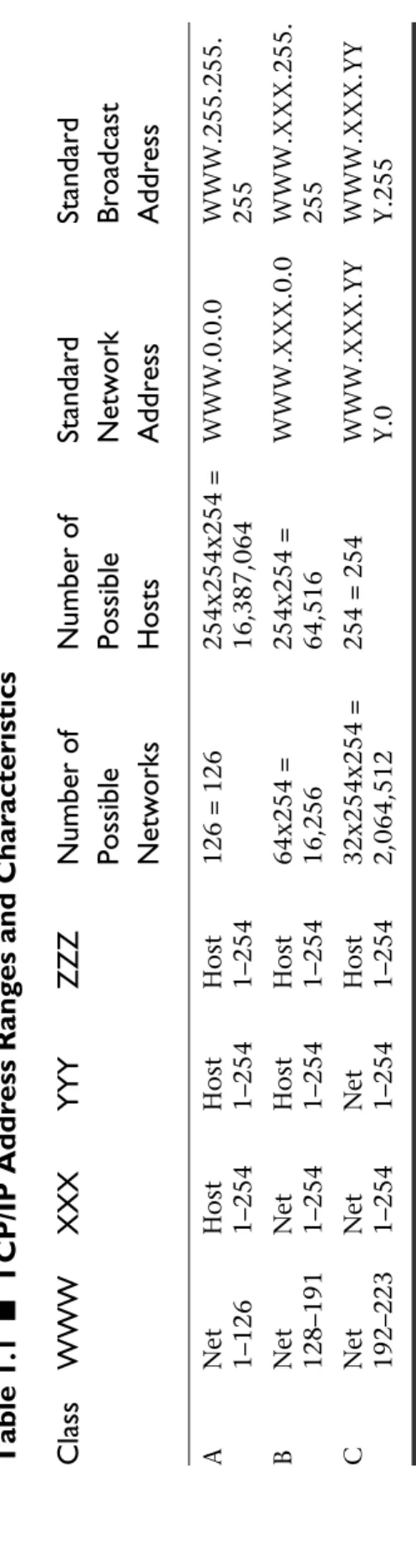
TCP/IP networks are broken up into three classes in order to set the maxi-mum number of hosts per network and the maximaxi-mum number of net-works. The value used for WWW (the first group of three numbers) will determine its network class. The classes will differ in the number of possi-ble networks and the number of hosts per network. In Tapossi-ble 1.1, the val-ues for XXX, YYY, and ZZZ will vary from 1 to 254. The table summarizes the features of the various classes of networks.
The remaining values for XXX, ranging from 224 to 254, are used for spe-cial types of networks. You will note that the XXX value of 127 is not listed in Table 1.1. This is a special address called the loopbackor local ad-dress; it is used by the host to connect to itself and can be used even if you have not set up a Network Interface Card (NIC). The only address that is used in this range is 127.0.0.1.
L
ABL
AB1.1
Table 1.1
■
TCP/IP Address Ranges and Characteristics
Class
WWW
XXX
YYY
ZZZ
Number of
Number of
Standard
Standard
Possible Possible
Network
Broadcast
Networks
Hosts
Address
Address
A Net Host Host H ost126 = 126
254x254x254 = WWW.0.0.0 WWW.255.255. 1–126 1–254 1–254 1–254 16,387,064 255 B Net Net Host H ost 64x254 = 254x254 = WWW.XXX.0.0 WWW.XXX.255. 128–191 1–254 1–254 1–254 16,256 64,516 255 C Net Net Net Host 32x254x254 =
254 = 254
WWW.XXX.YY WWW.XXX.YY 192–223 1–254 1–254 1–254 2,064,512 Y.0 Y.255
5
■
FOR EXAMPLE:
Table 1.2 is an example of how you might set up networks in the various classes.
PUBLIC ADDRESS RANGES
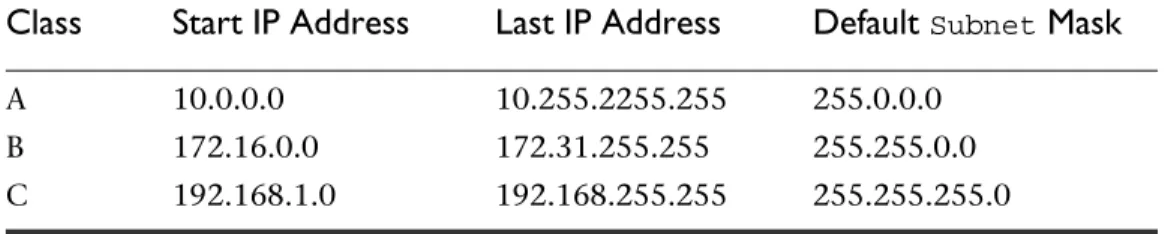
There is a range of IP addresses for each class that is available for use by any-one, without registration. This information is shown in Table 1.3. These IP addresses are not routed to the Internet and can be used internally. You can use them on the internal intranet side of a router or firewall without a prob-lem. Your router or firewall can be set up to route traffic easily to the Inter-net from your LAN or WAN. However, your hosts that use these addresses cannot be accessed directly from the Internet; they need a more sophisti-cated gateway to access your internal WAN or LAN.
NETMASK
The netmask signifies the part of the address used for the network and the part used for the host address. Here you need to convert the informa-tion to a binary format. If you think about the TCP/IP addresses in a bi-nary format, the number will become a series of 4 groups of 8 numbers of 0 or 1. The number 255.255.255.255 would look like the following:
11111111.11111111.11111111.11111111
L
AB1.1
Table 1.3
■Public Unregistered Network Ranges
Class
Start IP Address
Last IP Address
Default
SubnetMask
A 10.0.0.0 10.255.2255.255 255.0.0.0 B 172.16.0.0 172.31.255.255 255.255.0.0 C 192.168.1.0 192.168.255.255 255.255.255.0
Table 1.2
■Sample Network Characteristics
Network Broadcast
Class
Address
WWW XXX YYY
ZZZ
Address
Address
A 9.7.254.117 9 7 254 117 9.0.0.0 9.255.255.255 B 172.16.1.3 172 16 1 3 172.16.0.0 172.16.255.255 C 210.1.19.99 210 1 19 99 210.1.19.0 210.1.19.255
The number 0.0.0.0 becomes:
00000000.00000000.00000000.00000000
The netmask will vary from 0.0.0.0 to 255.255.255.255.
By default, each network class has a standard netmask.In Table 1.4, the
1’s represent the space used for the network address. The 0’s represent the space used for the host address. The values are summarized in Table 1.4.
SUBNET
It is possible to take some of the digits that are used for the host address and create what is called a subnet.This allows you to do routing to create many smaller networks by splitting up the address range that is assigned to host addresses. In Table 1.4, every 0 that is changed to a 1 is used to create a new network and subnet.
■
FOR EXAMPLE:
An example of setting up a subnetmask for a class A is:
11111111.11111111.00000000.00000000
This is a netmaskof 255.255.0.0 and would create 28, or 256, additional
subnetworks under whatever class A network this is applied to. Note that for simplicity, you will change the 0’s to 1’s going from left to right. Oth-erwise, the network becomes very complicated. A good example is:
11111111.11111111.100000000.00000000 or 255.255.128.0
This is 29, or 512, subnetworks in a class A network. But the following
netmaskis not proper because there is a 1 between the 0’s: 11111111.11111111.00000001.00000000 or 255.255.1.0
L
AB1.1
Table 1.4
■Default Binary Representation of the Netmasks
Class
Netmask Netmaskin binary format
A 255.0.0.0 11111111.00000000.00000000.00000000 B 255.255.0.0 11111111.11111111.00000000.00000000 C 255.255.255.0 11111111.11111111.11111111.00000000
ROUTING
The last important concept to consider is routing, which is sending a packet of information from one networkor subnetto another. A router has at least two networks or subnets attached to it. Each network is identified by:
1. A unique IP address on the Network Interface Card (NIC)
2. A netmask
By applying the netmaskto the IP address, both the network address and the range of addresses available for the network can be determined.
■
FOR EXAMPLE:
Consider the following: IP address 172.16.1.1
Netmask255.255.255.0
If you take the 0’s in the netmask and replace the corresponding number in the IP address with 0’s, you will have the network address. If you re-place all the same numbers with 255, or all 1’s you will have the broad-cast address. So a netmask of 255.255.255.0, applied to a network of 172.16.1.3, creates a network of 172.16.1.0, with 254 hosts and a broad-cast address of 172.16.1.255. The possible addresses of a host on the net-work with this netmaskwill vary from 172.16.1.1 to 172.16.1.254.
Both the address of the network interface card and the
netmaskmust
be chosen so that there is no possibility that a particular address can be
on two different networks or
subnets. Otherwise, the router will not
L
AB1.1
The Whole Truth
Note that a netmaskof 255.255.255.0 for a class A subnetis not
exactly the same as a class C subnet, although the netmask is
the same, and the number of hosts on this subnetare the same
as on a class C network. Some of the network addresses may not be valid combinations or routable because of the way that
the netmask works. You will need to apply your netmask to
your addresses and examine the resulting network address. Fur-ther discussion of this is beyond the scope of this text.
know where to route the packets and will probably ignore those
pack-ets or send them to the first address that is available.
THE IFCONFIG COMMAND
The ifconfigcommand returns the status of the network interfaces. By using the -aoption, you can find the status all the network interfaces.
■
FOR EXAMPLE:
# ifconfig -a
lo0: flags=849<UP,LOOPBACK,RUNNING,MULTICAST> mtu
8232 inet 127.0.0.1 netmask ff000000
eth0 Link encap:Ethernet HWaddr 00:AA:00:27:33:38 inet addr:172.16.1.1 Bcast:172.16.1.255
Mask:255.255.255 UP BROADCAST RUNNING MULTICAST
MTU:1500 Metric RX packets:133005 errors:0 dropped:0 overruns:0 frame TX packets:3572 errors:0 dropped:0 overruns:0 carrier collisions Interrupt:10 Base address:0x300
The ifconfigcommand returns the information about the ports. Some of the items above will be discussed later or can be looked up on your own. If you look at the above display, the most important things to look at are:
• lo0, eth0—These are the network interfaces that have TCP/IP activated for them.
• UP—This means that the interface is up. If it is down, then it is
DOWN.
• BROADCAST—The broadcast address is enabled.
• inet addr—This is the Internet address; for eth0it is 172.16.1.1.
• Mask—This was described earlier; for eth0it is 255.255.255.0.
• HWaddr—This is the hardware address of the network interface card. Every NIC has a unique hardware address assigned to it by the manufacturer. For this card the hardware address is
00:AA:00:27:33:38.
• Interruptis the Interrupt Request value and is commonly called the IRQ. For eth0the IRQ is 10.
• Base addressis the base address of the hardware device and is the address that the computer uses to talk to the hardware for basic communications. For eth0it is 0x300.
L
ABThe
ifconfigwill not give the same results in all versions of UNIX. In
AIX, an error is actually produced with some options of
ifconfigthat
are normally used in other versions of UNIX.
THE NETSTAT COMMAND
The netstat command will return basic information about your net-work. The following results will be seen from running the netstat -nr
command:
Kernel IP routing table
Destination Gateway Genmask Flags MSS Window irtt Iface 172.16.1.0 0.0.0.0 255.255.255.0 U 1500 0 0 eth0 127.0.0.0 0.0.0.0 255.0.0.0 U 3584 0 0 lo 0.0.0.0 10.131.173.1 0.0.0.0 UG 1500 0 0 eth0
This is broken down as follows:
• Destinationis the name of the network to which you are
sending information. As you get more familiar with netstat, you will see that this can help you get to a remote network. You will notice the default route goes through a host with the address 10.131.173.1.
• Gateway is the port or network interface card that is used to
pass the information to the destination.
• Flags, Ref and Userefer to characteristics of the network
and can be ignored for now.
If your network has no access to other networks, then the default route
line may not exist in your results. You may also see several lines for the
default entry. Your system will try the first default route entry, then the
second default route, and so on, until it exhausts the list of default
routes.
You will notice that there are three lines that begin with:
• 172.16.1.0—This is the network that is set up for your Network Interface Card, which in this case is 172.16.1.1.
• 127.0.0.1—This is the loopback address for the localhost. • 0.0.0.0—In the first position on the line, it indicates the entry
for the default route. In the second position on the line, it means that there is no defined gateway, and the card itself is
L
ABthe actual gateway. This may be different from other versions of UNIX that you are used to.
L
AB
1.1 E
XERCISES
1.1.1 U
SE IFCONFIGLog in with your normal user id. For this Exercise, you will use the
-aoption.
Do the following command:
ifconfig -aThis returns information about your ports.
a)
What are the results of the
ifconfig -acommand?
b)
What is the address of your network interface card?
c)
What is the broadcast address of your network interface card?
d)
What is the ethernet hardware address of your network interface
card?
You can enter the command to get results for a particular port just by
specify-ing the device name. Do the followspecify-ing command:
ifconfig lo0
L
ABe)
How does this differ from the results in Question a?
1.1.2 U
SE NETSTATFor this Exercise, you will use an option to
netstatin order to more clearly
display the network information. Do the following:
netstat -nra)
What are the results from the
netstat -nrcommand?
b)
What is the network that your system is on?
c)
What is your loopback result line?
Now do the following:
netstat -rd)
What are the results from the
netstat -rcommand?
L
ABe)
How do the results from the
netstat -rcommand in Question d
differ from the
netstat -nrcommand?
L
AB
1.1 E
XERCISE
A
NSWERS
1.1.1 A
NSWERSa) What are the results of the ifconfig -acommand? Answer: You should see something similar to the following:
# ifconfig -a
lo0: flags=849<UP,LOOPBACK,RUNNING,MULTICAST> mtu 8232 inet 127.0.0.1 netmask ff000000
eth0 Link encap:Ethernet HWaddr 00:AA:00:27:33:38 inet addr:172.16.1.1 Bcast:172.16.1.255
Mask:255.255.255 UP BROADCAST RUNNING MULTICAST
MTU:1500 Metric RX packets:133005 errors:0 dropped:0 overruns:0 frame TX packets:3572 errors:0 dropped:0 overruns:0 carrier collisions Interrupt:10 Base address:0x300
b) What is the address of your network interface card?
Answer: Using the sample results in Question a, you would determine from the follow-ing output that the network interface card address is 172.16.1.12:
eth0 Link encap:Ethernet HWaddr 00:AA:00:27:33:38 inet addr:172.16.1.1 Bcast:172.16.1.255
Mask:255.255.255 UP BROADCAST RUNNING MULTICAST
MTU:1500 Metric RX packets:133005 errors:0 dropped:0 overruns:0 frame TX packets:3572 errors:0 dropped:0 overruns:0 carrier collisions Interrupt:10 Base address:0x300
c) What is the broadcast address of your network interface card? Answer: In this Exercise’s example, you would see 172.16.1.255.
L
ABd) What is the ethernet hardware address of your network interface card?
Answer: In this Exercise’s example, you would see 0:10:4b:8c:91:79.
e) How does this differ from the results in Question a?
Answer: In question a you saw the results for all your network interfaces. ifconfig lo0 will return the results for the local loopback interface only.
1.1.2 A
NSWERSa) What are the results from the netstat -nrcommand? Answer: You should see results similar to the following:
$ netstat -nr
Kernel IP routing table
Destination Gateway Genmask Flags MSS Window irtt Iface 172.16.1.0 0.0.0.0 255.255.255.0 U 1500 0 0 eth0 127.0.0.0 0.0.0.0 255.0.0.0 U 3584 0 0 lo 0.0.0.0 10.131.173.1 0.0.0.0 UG 1500 0 0 eth0
b) What is the network that your system is on?
Answer: Your results will vary, but in this Exercise’s example, your network is 172.16.1.0, because that is the network to which your port is attached.
c) What is your loopback result line?
Answer: Your loopback address is 127.0.0.1, as seen on the third line in Question a’s answer.
d) What are the results from the netstat -rcommand? Answer: The results are as follows:
[root@tux /root]# netstat -r Kernel IP routing table
Destination Gateway Genmask Flags MSS Window irtt Iface 172.16.1.0 * 255.255.255.0 U 1500 0 0 eth0 127.0.0.0 * 255.0.0.0 U 3584 0 0 lo default remote1.mynet.net 0.0.0.0 UG 1500 0 0 eth0 [root@tux /root]#
e) How do the results from the netstat -rcommand in Question d dif-fer from the netstat -nrcommand?
L
ABAnswer: The netstat -r command uses the DNS or network names of hosts or de-vices. When you enter the command, it will go to your local nameserver (which we will discuss later) and resolve the IP address with a name whenever possible. If the name-server does not return a name, then you will just see an IP address.
Note that if your nameserver or access to your nameserver is down, then
the netstatcommand may just sit there and hang until it times out.
L
AB
1.1 S
ELF
-R
EVIEW
Q
UESTIONS
In order to test your progress, you should be able to answer the following ques-tions.
The command netstat -nrwas executed. Use the following results to answer the first five questions that follow.
Destination Gateway Flags Ref Use Interface ——————————— ———————— —————— ——— ———— ————————— 10.1.1.0 10.1.1.12 U 3 1 eth1
224.0.0.0 10.1.1.12 U 3 0 eth1 default 10.1.1.1 UG 0 0 eth1 default 10.1.1.2 UG 0 0 eth1 127.0.0.1 127.0.0.1 UH 0 6 lo0
1) The Interface reference lo0refers to the loopback interface.
a) _____True
b) _____False
2) Which of the following is the address of the network interface card?
a) _____0.1.1.0
b) _____10.1.1.12
c) _____10.1.1.1
d) _____10.1.1.2
e) _____127.0.0.1
3) There is only one default route for this host.
a) _____True
b) _____False
4) When the host cannot find a specified hostname or IP address on the local network, which address will it access next to continue the search?
a) _____10.1.1.0
b) _____10.1.1.12
c) _____10.1.1.1
L
ABd) _____10.1.1.2
e) _____127.0.0.1
5) If the host fails to find the host after accessing the address in Ques-tion 4, which address will it then access?
a) _____10.1.1.0
b) _____10.1.1.12
c) _____10.1.1.1
d) _____10.1.1.2
e) _____127.0.0.1
The command ifconfig -a was executed. Use the following results to answer the next five questions:
# ifconfig -a
lo0: flags=849<UP,LOOPBACK,RUNNING,MULTICAST> mtu 8232 inet 127.0.0.1 netmask ff000000
eth0: flags=863<UP,BROADCAST,NOTRAILERS,RUNNING, MULTICAST> mtu 1500 inet 10.1.1.11 netmask ffffff00 broadcast 10.255.255.255 ether 0:10:4b:8c:91:80
eth1: flags=863<UP,BROADCAST,NOTRAILERS,RUNNING,MUL-TICAST> mtu 1500 inet 10.1.1.12 netmask ffffff00 broadcast 10.255.255.255 ether 0:10:4b:8c:91:79
6) How many network interface cards does the host have?
a) _____0
b) _____1
c) _____2
d) _____3
e) _____4
7) What is the IP address of the loopback interface?
a) _____127.0.0.1
b) _____0:10:4b:8c:91:80
c) _____0:10:4b:8c:91:79
d) _____10.1.1.11
e) _____10.1.1.12
L
AB8) What is the IP Network Class of the host?
a) _____A
b) _____B
c) _____C
d) _____D
e) _____E
9) What is the ethernet hardware address of the first NIC card on the host?
a) _____127.0.0.1
b) _____0:10:4b:8c:91:80
c) _____0:10:4b:8c:91:79
d) _____10.1.1.11
e) _____10.1.1.12
10) What is the netmaskof the NIC cards expressed as a grouping of four decimal numbers?
a) _____255.255.255.0
b) _____255.0.0.0
c) _____255.255.0.0
d) _____0.0.0.0
e) _____255.255.255.255
Quiz answers appear in Appendix A, Section 1.1.
L
ABL A B 1 . 2
ACCESSING OTHER
TCP/IP HOSTS
L
AB1.2
L
AB
O
BJECTIVES
After this Lab, you will be able to use:
•
ping
•
traceroute
•
nslookup
This Lab discusses ping, traceroute, nslookup,and other commands to determine your access to other TCP/IP hosts. You will need access to a network that is already in existence. You will learn how to determine the values that were discussed in the introductory network discussion in Lab 1.1.
THE PING COMMAND
The pingcommand can be used to test whether you have a route to, and
can access, a host. It does not show the actual network route, which is the purpose of traceroute. You can use the command with various op-tions, so you just send one packet and see if it is returned. You can also send packets in fixed intervals of time, such as every five seconds, and test the average length of time for a packet to travel to the destination. Different versions of UNIX will have different options set as the default. Some will pingonce and some will ping continuously.
The pingcommand has the format:
■
FOR EXAMPLE:
The -I option followed by a number, for example 5, says to ping on a
continual basis with each ping separated by 5 seconds. You can vary the rate just by changing the number. In Linux, by default, ping will continu-ously ping approximately every second.
The destination_host in this example is either the IP address or host-name of a destination host.
THE TRACEROUTE COMMAND
The traceroute command can be used to show the actual network
route. When you send information from a source location to a destina-tion, the packets of computer data will move from one system or router to another, then another, until it reaches its destination. You can think of it as hopping like a rabbit. In fact, the term hoptells you how many lo-cations the data will go through.
The traceroutecommand will give you the time that it takes to get to each location. The time to reach the destination will be a lot longer than it takes for the pingcommand to reach the destination. This is because it
expects a response from each location along the way, and it will also try to do a name resolution on each location instead of just an IP address. You can think of it as doing a pingfrom each location along the way.
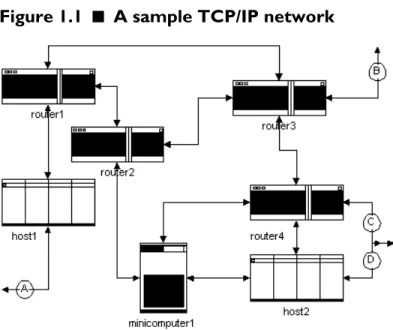
You can see a representation of the process in Figure 1.1.
L
AB1.2
In order to analyze what traceroute does, and to understand routing concepts, take a look at Figure 1.1. Notice that each line has arrows point-ing both directions. This means that each link is bi-directional and that the data can flow in both directions. In addition, assume for now that
host1, minicomputer1,and host2can all act as routers, which means they can send packets of information to other ports to which they are connected. We will now discuss several possible routes for packet.
A packet of data going from point A to router1 it must go through
host1. There is one possible route. For a packet to go from point A to
router2, it will go through host1 and router1. However, if the link from router1torouter2is down, it can also follow this path:
point A→router1→router3→router2
Another possible route would be:
point A → router1 → router3 → router4 → minicomputer1 → router2
(Remember minicomputer1can route in this example.)
This is one of the useful features of a router: If a route is either down or saturated, the data can be routed through a different route. In this exam-ple, the hosts are acting as routers (this is one of the features of the host software—Linux and most versions of UNIX have this feature built in). Using traceroute, we can get the time that it takes to get to each point
in the route and return from that point. We can also get the name of the host along the way. This allows us to trace the packets and can be a useful diagnostic tool if one of the connections in the route goes down.
■
FOR EXAMPLE:
Let’s do a traceroutefrom host1to host2.One route is:
host1→router1→router3→router4→host2
For the purposes of determining the time to each point, you can break this down into the following steps:
host1→router1→host1 host1→router3→host1
L
ABhost1→router4→host1 host1→host2→host1
Let’s execute the traceroute command. An example output of the
com-mand executed on host1 is: # traceroute host2
traceroute to host2 (10.97.13.95)
1 router1 (10.25.35.17) 6ms 5ms 5ms 2 router3 (10.115.45.19) 15ms 12ms 10ms 3 10.15.35.98 (10.15.35.98) 28ms 25ms 20ms 4 host2 (10.97.13.95) 38ms 28ms 26ms
Notice that as you get further away from host1, the longer it takes for the packet to return, which is consistent with the earlier description. You will also notice that the third line has 10.15.35.98 and no network name. This means that host1 could not determine the DNS or network name for router4, so it just returns the IP address. The second and third columns are additional checks for each point, since the first check or col-umn is always slowed down by searching for the name on the name-server.
THE NSLOOKUP COMMAND
Before you start making changes or setting up a new system, it is impor-tant to know how the nameservices are being handled. The nslookup
command can be used to help you determine how your system is resolv-ing names. It will not tell you whether the /etc/hosts, nameservices or NIS are consulted first. But it is a quick way to look at your system and to start to get a feel for how nameservices is set up.
When you enter the nslookupcommand, you will see results similar to the following:
# nslookup
Default Server: nuprxy01.my.myisp.net Address: 172.16.1.15
>
Generally, this gives the name of the nameserver that you are using. If it comes back with a Default Serverentry, it means your system has the
L
ABproper initial file set up for DNS, or Domain Name Services, to handle name-to-IP address conversion. These results mean your nameservices are being done by another server and that your box is referring all unresolv-able names to that box. If this entry returns the loopback address, this means that your local server is either the nameserver or you are not using nameservices at all and just the files are there. If DNS is running, you can still use the /etc/hosts file for the names of other hosts; however, you
may need to adjust some files to determine whether the /etc/hosts or DNS are consulted first for anything other than the local hostname. Fur-ther discussion of DNS, oFur-ther than nslookup, will be done in Chapter 4.
L
AB
1.2 E
XERCISES
1.2.1
PINGThis Exercise shows you how to use the
pingcommand, and it will also show
you an option that allows you to ping a remote host at regular intervals. You
should login with your normal user id.
Your
pingcommand may not be in the same place as in other versions
of UNIX or Linux. The most common directories will be
/bin,/usr/bin, /sbin, /usr/sbin, /usr/ucb
and
/etc. If you have a
public domain version of the command, it may be in the
/usr/local/bin
directory. You may need to execute the command
with the absolute pathname or change your search path to include
those directories.
a)
Where is the
pingcommand located on your system?
b)
How did you find the
pingcommand?
Keeping in mind the command’s location, do the following command:
ping hostnameL
ABwhere hostname is the name of an IP device on your network. It can be a
server, workstation, router, or even a network printer. You can also ping
yourself at 127.0.0.1 or use your own hostname.
c)
What kind of results do you get from the
pingcommand?
Now do the following in Linux:
/bin/ping -i5 hostname
where hostname is the name of a host on your network.
d)
Now what are the results of the
pingcommand with the
option -i5?
1.2.2
TRACEROUTEThis Exercise shows you how to use the
traceroutecommand, and it will
also show you how to determine the route to get to a destination host. You
should login with your normal user id.
Note that
traceroutemay not be available at all on your version
of UNIX. There are, however, a number of freeware versions of
traceroute. You might consider downloading and installing thesever-sions. You can do a search for
traceroutewith a number of Web
tools. Sometimes there are binary versions ready to be installed and
run.
A good Internet host to check a route to is
rs.internic.net. This host is
al-ways up. If your network does not have Internet access, or you want to check
the route to local hosts first, then you can use a local host first.
The first thing you should do is
pingthe host to see if it is up and is accessible
from your host. Do the following command with the appropriate absolute path
location of the
pingcommand if necessary:
L
ABping rs.internic.net
a)
What kind of results did you get from the
ping rs.internic. netcommand?
b)
Did you see “host unreachable” or a similar message?
c)
What do you think is the cause of “host unreachable” or a similar
message?
If you got a “host unreachable” message, choose another host or one on your
local network. (You can always ping yourself, but
traceroutewon’t be very
useful.)
Now you are ready to check the route to the host. Run the following
com-mand:
traceroute rs.internic.net
d)
Where is the
traceroutecommand located on your system?
e)
What kind of results did you get from the
traceroutecommand?
L
ABf)
If your
pingcommand works, but
tracerouteeither fails or takes
a long time, what would be a possible cause?
g)
How would you solve the problem in Question f?
1.2.3
NSLOOKUPThis Exercise shows you how to use the
nslookupcommand, and it also helps
you to determine what nameservices you are running.
You will again need to determine the location of the
nslookupcommand.
Most versions of UNIX allow a regular user to use
nslookup, but do not have
the file in the normal user search path. Therefore, you will again need to
search for it on your system. Log in with your normal user id.
a)
Where is the
nslookupcommand is located on your system?
b)
What kind of results do you get from the
nslookupcommand?
c)
If you got an error from the
nslookupcommand in Question b,
what do you think is the cause?
L
ABd)
How would you fix any errors from the
nslookupcommand in
Question b?
e)
If you didn’t get any errors after typing the
nslookupcommand in
Question b, what is your prompt?
Now enter the following at the
nslookupprompt:
rs.internic.net
f)
What are your results after typing
rs.internic.net?
g)
If you got an error from entering
rs.internic.netin
Ques-tion f, what do you think is the cause?
h)
How would you fix any errors from the
nslookupcommand in
Question f?
i)
If you didn’t get any errors after typing the
nslookupcommand in
Question f, what is your prompt on the screen?
L
ABNow enter the following at the
nslookupprompt:
quit
j)
What are your results after typing
quit?
k)
Based on what you know about UNIX, how would you then exit
from
nslookup?
L
AB
1.2 E
XERCISE
A
NSWERS
1.2.1
A
NSWERSa) Where is the pingcommand located on your system?
Answer: It can be in /bin,/usr/bin,/sbin,/usr/sbin,/usr/ucb,/usr/
local/bin,/etc, or some other directory.
b) How did you find the pingcommand?
Answer: The whereiscommand is a useful command to look for files, but it may only find files that are in your search path already, so you may need to look manually for the file.
You can do this by going to the directory with the cd command. As an
example, type the command cd /usr/sbinto go to the /usr/sbin di-rectory. When you get there, type the command ls ping. This will show whether the file is there or not.
c) What kind of results do you get from the pingcommand?
In Linux, the pingcommand will ping every second, which will look something like this:
L
AB[myid@wheels myid]$ ping myserver
PING myserver (172.16.1.12): 56 data bytes
64 bytes from 172.16.1.12: icmp_seq=0 ttl=255 time=4.1 ms 64 bytes from 172.16.1.12: icmp_seq=1 ttl=255 time=2.8 ms …
myserver ping statistics
—-10 packets transmitted, —-10 packets received, 0% packet loss round-trip min/avg/max = 2.8/2.9/4.1 ms
[myid@wheels myid]$
Note that this command will ping repeatedly until it is stopped. You can stop it by pressing Ctrl+C.
d) Now what are the results of the pingcommand with the option -i5?
Answer: In Linux, the ping command with the option -i 5will repeatedly ping every second.
[myid@wheels myid]$ ping -i5 myserver PING myserver (172.16.1.2): 56 data bytes
64 bytes from 172.16.1.2: icmp_seq=0 ttl=255 time=4.3 ms 64 bytes from 172.16.1.2: icmp_seq=1 ttl=255 time=2.9 ms 64 bytes from 172.16.1.2: icmp_seq=2 ttl=255 time=2.9 ms myserver ping statistics
—-3 packets transmitted, —-3 packets received, 0% packet loss round-trip min/avg/max = 2.9/3.3/4.3 ms
[myid@wheels myid]$
1.2.2
A
NSWERSa) What kind of results did you get from the ping rs.internic.net
command?
Answer: You should see results similar to the following: [myid@wheels myid] ping rs.internic.net
Pinging rs.internic.net [198.41.0.6] with 32 bytes of data: Reply from 198.41.0.6: bytes=32 time=67ms TTL=243
Reply from 198.41.0.6: bytes=32 time=48ms TTL=243 Reply from 198.41.0.6: bytes=32 time=46ms TTL=243 Reply from 198.41.0.6: bytes=32 time=55ms TTL=243 [myid@wheels myid]
L
ABb) Did you see “host unreachable” or a similar message?
Answer: You may or may not get this message. If you do get this message, see the an-swer to the next question.
c) What do you think is the cause of “host unreachable” or a similar mes-sage?
Answer: A “host unreachable” message would be caused by the fact that the host is ei-ther actually unreachable, or it takes so long for the packet of information to get to the destination that the pingprocess will timeout. In the second case, it is possible to set some parameters or options to allow for extra time to reach the destination.
d) Where is the traceroutecommand located on your system?
Answer: It canbe in /bin, /usr/bin, /sbin, /usr/sbin, /usr/ucb,
/usr/local/bin, /etc,or some other directory.
e) What kind of results did you get from the traceroutecommand?
Answer: A partial display of the results of the traceroutecommand is as follows:
L
AB1.2
traceroute to rs.internic.net (6.0.41.198), 30 hops max, 12 byte packets 1 10.131.129.206 (24.131.129.206) 12 ms 15 ms 9 ms
2 h2-0.mynextnet.net (10.0.192.253) 32 ms 24 ms 22 ms 3 f0-0-0.mynextnet.net(10.0.48.1) 20 ms 24 ms 13 ms 4 h2-0.mynextnet.net (10.0.2.10) 29 ms 23 ms 19 ms
5 a1-0-1.cleveland1-br2.mynextnet.net (10.0.2.6) 35 ms 19 ms 36 ms 6 h4-0.nyc1-br2.mynextnet.net (10.0.2.14) 29 ms 35 ms 81 ms
7 h1-0.nynap.mynextnet.net (10.0.1.26) 41 ms 63 ms 28 ms 8 sprint-nap.disa.mil (192.157.69.45) 39 ms 51 ms 42 ms 9 137.209.200.205 (137.209.200.205) 34 ms 51 ms 59 ms
. . . and so forth.
f) If your pingcommand works, but tracerouteeither fails or takes a long time, what would be a possible cause?
Answer: There may be a failure of nameservices for some hosts along the way. If you look at the display for Question d, you will see that some addresses resolve to names and some remain only as addresses. If the name resolution takes too long, the
traceroutecommand may timeout.
g) How would you solve the problem in Question f?
Answer: You can allow additional time with some versions of traceroute by using an option to control this value. You can also use the traceroute -n host com-mand to prevent the traceroutecommand from trying to resolve the IP addresses to names.
1.2.3
A
NSWERSa) Where is the nslookupcommand located on your system?
Answer: It can be in /bin, /usr/bin, /sbin, /usr/sbin, /usr/ucb, /usr/
local/bin, /etc,or some other directory.
b) What kind of results do you get from the nslookupcommand? Answer: You should see some results similar to the following:
# nslookup
Default Server: nuprxy01.my.myisp.net Address: 172.16.1.15
>
c) If you got an error from the nslookupcommand in Question b, what do you think is the cause?
Answer: There are several kinds of errors that could result. Some of the errors could be as follows:
• default server not found—This usually means that the proper files are not set up or that the server IP address is not correct.
• unable to execute the command—Either the file doesn’t
exist, its rights are not set properly, or you don’t have rights to execute it.
• file not found—It can’t find the file. This can happen— even if you specify the proper path—if there are some attribute issues, wrong terminal settings, or some environment set up problems.
d) How would you fix any errors from the nslookupcommand in Ques-tion b?
Answer: Some possible fixes for the above problems are:
• default server not found—Correct the proper files. Be-cause we will talk about DNS later, you will want to refer back here later on to make sure things are set okay.
L
AB• unable to execute the command—You need to examine all
the file attributes of the nslookupcommand and look at the
at-tributes of the directories where it is located and those above it.
• file not found—You need to be sure that nslookupis in your
search path. You can determine your search path by the com-mand echo $PATH.
Besides looking for and fixing those items in the previous messages, you might want to look at your environment by executing the stty -a com-mand and looking at your terminal settings. If things don’t look right, you can type stty sane to reset the terminal attributes. You can also type set from the Korn shell or printenvfrom the C shell and look for
anything abnormal. You can also type alias to see if the command has
been aliased in the C or Korn shells.
e) If you didn’t get any errors after typing the nslookupcommand in Question b, what is your prompt?
Answer: You should see the following prompt: >
f) What are your results after typing rs.internic.net? Answer: You should see the following on the screen:
> rs.internic.net
Server: mynameserver.mydomain.com Address: 172.16.1.45
Name: rs.internic.net Address: 198.41.0.6 >
g) If you got an error from entering rs.internic.netin Question f, what do you think is the cause?
Answer: There are several kinds of errors that could result. Some of the errors could be as follows:
L
AB• unable to access server—The nameserver is not avail-able. This is usually accompanied by a timeout message. • hostname not found—The hostname could not be resolved
to an IP address.
h) How would you fix any errors from the nslookupcommand in Ques-tion f?
Answer: Some possible fixes for the problems are:
• unable to access server—Be sure that the default server is set properly. This will be discussed in the chapter on DNS, but be sure that it is the correct one. If you are not certain, you might contact your network administrator for the correct name.
• hostname not found—You need to be sure that you entered
a valid name. You should also check for typing errors.
i) If you didn’t get any errors after typing the nslookupcommand in Question f, what is your prompt on the screen?
Answer: You should see the following prompt again: >
j) What are your results after typing quit?
Answer: You should see results similar to the following: hostname not found
Unfortunately, you cannot use quit, exit, or any of the standard UNIX commands to exit from nslookup. It interprets any strings that are not part of the nslookupoptions as being names of IP hosts and tries to
interpret them.
k) Based on what you know about UNIX, how would you then exit from
nslookup?
Answer: You would need to press either Ctrl+C or Ctrl+D to exit from the com-mand.
L
ABL
AB
1.2 S
ELF
-R
EVIEW
Q
UESTIONS
In order to test your progress, you should be able to answer the following
questions.
The command to ping another host was executed. Use the following results to
answer the first five questions that follow.
[myid@wheels /home/myid]$ ping mohawk PING mohawk (172.16.1.2): 56 data bytes
64 bytes from 172.16.1.2: icmp_seq=0 ttl=255 time=2.7 ms 64 bytes from 172.16.1.2: icmp_seq=1 ttl=255 time=2.9 ms 64 bytes from 172.16.1.2: icmp_seq=2 ttl=255 time=2.9 ms 64 bytes from 172.16.1.2: icmp_seq=3 ttl=255 time=2.9 ms mohawk ping statistics
—-4 packets transmitted, —-4 packets received, 0% packet loss round-trip min/avg/max = 2.7/2.8/2.9 ms
1) The ping message is being responded to by a server called mohawk.
a) _____True
b) _____False
2) The address of the network interface card on mohawk is 172.16.1.2.
a) _____True
b) _____False
3) The time to get a response from the remote host is approximately how long?
a) _____0
b) _____2.9
c) _____4
d) _____64
e) _____255
4) What was the number of packets sent?
a) _____0
b) _____2.9
c) _____4
d) _____64
e) _____255
5) The ttlvalue refers to the IP packet time to live.
a) _____True
b) _____False
L
ABLook at Figure 1.1 to answer the following 3 questions.
6) The shortestroute to go from the circled points A to B involves going through how many different IP devices?
a) _____0
b) _____1
c) _____2
d) _____3
e) _____4
7) Assuming that all the hosts can route, how many different routes are there from the circled point A to point B without circling back over the same point?
a) _____0
b) _____2
c) _____4
d) _____5
e) _____6
8) Assuming that all the hosts can route except minicomputer1,how many dif-ferent routes are there from the circled point A to point B without circling back over the same point?
a) _____0
b) _____2
c) _____4
d) _____5
e) _____6
Use the following results to answer the next two questions.
traceroute to host2 (10.97.13.95)
1 router1 (10.25.35.17) 6ms 5ms 5ms 2 router3 (10.115.45.19) 15ms 12ms 10ms 3 10.15.35.98 (10.15.35.98) 28ms 25ms 20ms 4 host2 (10.97.13.95) 38ms 28ms 26ms
9) What is the IP address of the destination IP device?
a) _____10.97.13.95
b) _____10.25.35.17
c) _____10.115.45.19
d) _____10.15.35.98
e) _____10.1.1.12
10) How many IP devices, hosts, routers or other devices will a packet travel through to get to the destination? (You can ignore the source and destination devices.)
L
ABa) _____0 b) _____2 c) _____3 d) _____4 e) _____5
Use the following results to answer the next four questions. # nslookup
Default Server: ropxy01.my.myisp.net Address: 172.16.1.3
> www.myserver.com
Server: ropxy01.my.myisp.net Address: 172.16.1.3
Name: wwwwabc123.myserver.com Address: 192.9.49.33
Aliases: www.myserver.com >
11) What is the IP address of www.myserver.com?
a) _____172.16.1.3
b) _____192.9.49.33
c) _____wwwwabc123.myserver.com
d) _____ropxy01.my.myisp.net
e) _____none of the above
12) www.myserver.comis really an alias for what server name?
a) _____172.16.1.3
b) _____192.9.49.33
c) _____wwwwabc123.myserver.com
d) _____ropxy01.my.myisp.net
e) _____none of the above
L
AB13) What is the hostnameof the DNS nameserver in the above list?
a) _____172.16.1.3
b) _____192.9.49.33
c) _____wwwwabc123.myserver.com
d) _____ropxy01.my.myisp.net
e) _____none of the above
14) What is the IP addressof the DNS nameserver in the above list?
a) _____172.16.1.3
b) _____192.9.49.33
c) _____wwwwabc123.myserver.com
d) _____ropxy01.my.myisp.net
e) _____none of the above
Quiz answers appear in Appendix A, Section 1.2.
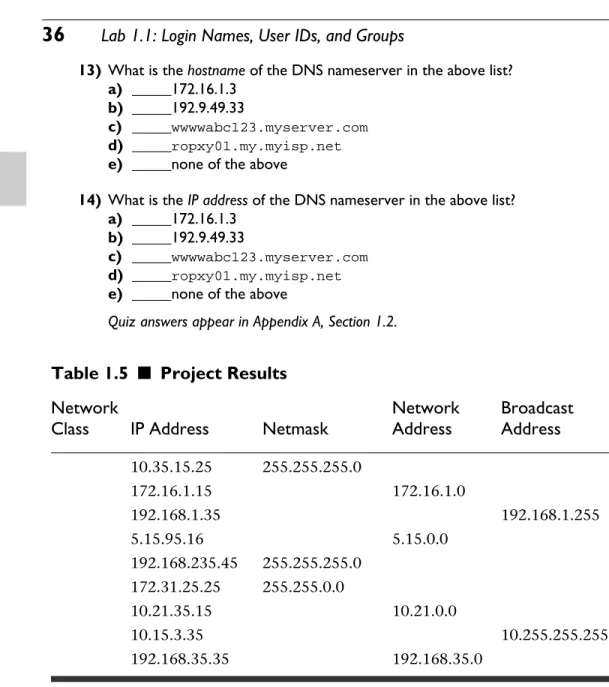
Table 1.5
■
Project Results
Network Network
Broadcast
Class
IP Address
Netmask
Address
Address
10.35.15.25 255.255.255.0
172.16.1.15 172.16.1.0
192.168.1.35 192.168.1.255
5.15.95.16 5.15.0.0
192.168.235.45 255.255.255.0 172.31.25.25 255.255.0.0
10.21.35.15 10.21.0.0
10.15.3.35 10.255.255.255
192.168.35.35 192.168.35.0
L
ABC H A P T E R 1
TEST YOUR THINKING
1) Fill in the Table 1.5 with network characteristics that are missing. You can assume default values only if absolutely required.
2) Design a network based on the IP addresses. Be sure to consider:
a) Network Class
b) NIC IPaddress
c) netmask
d) network address
e) broadcast address
f ) Any additional characteristics you might need to give answers to the com-mands you will have learned in this chapter.
3) What will be the results of executing the following commands:
a) ifconfigcommand