A Novel Design of Audio CAPTCHA for Visually
Impaired Users
Mrim Alnfiai
Taif University College of Computer & Information Technology Taif, Saudi Arabia
Department of IT, College of CIT, Taif University, Taif – Al-Haweiah- P. O. Box 888, ZIP code 21974, Taif, KSA
Abstract: CAPTCHAs are widely used by web applications for the purpose of security and privacy. However, traditional text-based CAPTCHAs are not suitable for sighted users much less users with visual impairments. To address the issue, this paper proposes a new mechanism for CAPTCHA called HearAct, which is a real-time audio-based CAPTCHA that enables easy access for users with visual impairments. The user listens to the sound of something (the “sound-maker”), and he/she must identify what the sound-maker is. After that, HearAct identifies a word and requires the user to analyze a word and determine whether it has the stated letter or not. If the word has the letter, the user must tap and if not, they swipe. This paper presents our HearAct pilot study conducted with thirteen blind users. The preliminary user study results suggest the new form of CAPTCHA has a lot of potential for both blind and visual users. The results also show that the HearAct CAPTCHA can be answered in a shorter time than the text-based CAPTCHAs because HearAct allows users to solve the CAPTCHA using gestures instead of typing. Thus, participants preferred HearAct over audio-based CAPTCHAs. The results of the study also show that the success rate of solving the HearAct CAPTCHA is 82.05% and 43.58% for audio CAPTCHA. A significant usability differences between the System Usability score for HearAct CAPTCHA method was 88.07 compared to audio CAPTCHA was 52.11%. Using gestures to solve the CAPTCHA challenge is the most preferable feature in the HearAct solution. To increase the security of HearAct, it is necessary to increase the number of sounds in the CAPTCHA. There is also a need to improve the CAPTCHA solution to cover wide range of users by adding corresponding image with each sound to meet deaf users’ needs; they then need to identify the spelling of the sound maker’s word.
Keywords: CAPTCHA, Accessibility, Usability, Audio CAPTCHA, Image CAPTCHA, Visually Impaired users.
1.
Introduction
According to the World Health Organization, approximately 217 million people live with some type of visual impairment and 36 million people live with no vision across the globe [1]. The WHO also stated that the rate of people with vision impairment will increase due to population growth and aging [1]. The number of blind people is significant and their interactions with the internet are considerable. Simultaneously, the percentage of security and privacy attacks on the internet has increased since the number of developed applications has increased as stated by the Symantec Corporation World Headquarters [56]. Therefore, there is a need to develop and adopt new security and privacy protection techniques to minimize online threats. However, improving the security mechanisms of websites negatively affects the usability of the sites; adding more features to improve the security level of a site will increase accessibility issues for people with no or low vision. One of the security mechanisms widely used to prevent spam on most websites is CAPTCHA (Completely Automatic Public Turing Test to Tell Computer and Human Apart).
Most web applications use the CAPTCHA as a mechanism to ensure that the user solving the questions is a human being and not a software robot or a computer program [2]. The main objective of the CAPTCHA is to prevent illegitimate automated form submissions. The common CAPTCHAs are visually-based methods where the user receives an image that has distorted text that the user is asked to decipher. This task might be accessible for sighted users where they can see the letters through the distortion. However, people with no or low vision are unable to interpret the distorted text as they cannot see the provided image, nor can the screen reader discern the twisted text. Thus, due to the use of CAPTCHAs as protective measures, blind people are blocked from having access to certain online resources. To overcome these difficulties, blind and visually impaired people usually ask for assistance from their friends to solve CAPTCHAs and access the applications, which raises a serious privacy issue. Researchers have proposed audio CAPTCHAs as an alternative method for this population [3][4]. In the audio CAPTCHA, a sound clip of the twisted text is provided and the user must type the spoken text in the specified box. To prevent an attack using speech recognition software, the CAPTCHA may utilize background noise or multiple voices. Despite these improvements, the audio CAPTCHA is still not very accessible to blind people [4][5][6]. One reason for this barrier is that blind users must concentrate carefully while the audio is played to identify or memorize the content, which is a difficult task especially if the text or numerical sequence is lengthy. The second reason is that they also need to visually locate where they must enter the CAPTCHA answer, which can also be a difficult task, especially while focusing on what they are hearing. Another reason is that keyboard strokes are used to navigate through web page contents: these keyboard strokes are read at the same time as the audio CAPTCHA is being spoken, thus causing audio interference [4][7][8]. Therefore, the rate of audio challenges that are successfully completed by blind people is less than 50% [4]. This rate shows that the audio CAPTCHA is still not accessible for this population. The usability challenges that blind people have faced while solving CAPTCHAs indicate a serious need to develop a new method that meets blind people’s abilities and security concerns.
efficiently solve CAPTCHAs by designing the CAPTCHA interface based on blind users’ abilities. It aims to address the main issue confronting visually impaired users while solving visual and textual CAPTCHAs. In doing so, it should ultimately improve the accessibility and usability of CAPTCHA for people with vision impairment.
This research proposes and evaluates the HearAct CAPTCHA method, a novel mechanism designed for blind users. The CAPTCHA is an audio clip in which the user must identify the sound-maker, then identify whether the name of the sound-maker contains a particular letter, also identified auditorily. If the word has the letter, users should tap. If the word does not have the letter, users should swipe right. Users can swipe down to change or update the given challenge task to another. For example, a user would receive a challenge such as “does the sound-maker end with letter ‘z’?”. The user will analyze the sound-maker letters that describe the sound. If the word ends with letter z, the user should tap if not the user should swipe right.
The user must do four challenge tasks to gain access to the desired web application in a limited time frame. Using gestures including tapping and swiping to solve the CAPTCHA permits users to easily and quickly complete the tasks. They can also complete the tasks with fewer errors as they can act immediately after hearing the sound.
I also conducted a preliminary comparative evaluation study between HearAct CAPTCHA and the traditional audio CAPTCHA. The main goal of the study is to evaluate the accessibility and usability of the prototype. The results show that blind users were generally satisfied with the new CAPTCHA form and could utilize it efficiently. The results suggest also the potential of combined audio/visual-based CAPTCHAs for improving accessibility and security design for all users. The initial result that all users can successfully solve the CAPTCHA at least 95% of the time also shows that the HearAct is a very promising approach.
2.
Related Work
The significant security challenges that face blind users while browsing the internet is solving CAPTCHAs because most existing CAPTCHAs are not accessible and the input methods to solve CAPTCHAs often require outside assistance [2][3]. Several CAPTCHA approaches have been proposed to enhance the usability of security protection mechanisms. There are four fundamental types of CAPTCHAs including text-based schemes, image-based schemes, video-based schemes and audio-based schemes [9]. However, all types have difficulties for people with no or low vision. In the following section, a variety of CAPTCHA mechanisms are discussed in relation to whether they match blind people abilities.
Text-based CAPTCHA is the most widely used mechanism in websites. The text-based CAPTCHA presents twisted text where users must identify the text and type it in the text box. Twisted texts are recognizable by human beings, but unrecognizable by pattern recognition programs because available recognition methods are not able to filter twisted texts [4][5][10][11][12][13]. Most well-known web sites like Google, Yahoo and Microsoft use the text-based CAPTCHA as the main security method to allow users to proceed to websites. However, the text-based CAPTCHA is not accessible for blind and visually impaired users.
Image-based approach presents a set of images and asks users to type the common word associated with the images to access a website [2][14]. The images are distorted to prevent image recognition algorithms from recognizing the challenge tasks. This approach is a recognition-based technique. Another type of image-based CAPTCHA relies on an anomaly-based technique. This type shows a sequence of images and asks users to find the anomalous image (the anomaly CAPTCHA). Recent image-based CAPTCHAs require users to select images out of a group of pictures. The image-based CAPTCHAs are not accessible for the blind or visually impaired population because they require visual perception for the challenge task which this population is unable to perform.
Unfortunately, the existing text-based and image-based CAPTCHAs prevent blind and visually impaired users from proceeding to websites because the screen reader accessibility software is not able to detect and filter the distorted texts and images [15]. Therefore, software developers proposed audio CAPTCHAs as accessible mechanisms for blind and visually impaired users.
The video-based mechanism is a CAPTCHA that uses motion video to differentiate between human users and automated access by bots. The video CAPTCHA is very complicated for software to detect or attack, but simple for humans to understand. An example of this type of CAPTCHA is NuCaptcha. No user studies have been conducted to examine the accessibility of the video-based CAPTCHA for people with no vision [16].
Audio-based schemes (or sound schemes) play a spoken text and the user must type the letters or numbers in a text box. The user must carefully listen to a garbled voice and identify the numbers or characters that are being spoken [17][18][19][20]. The audio CAPTCHA is mainly based on the limitations of speech recognition software, especially the difficulty in filtering background noise from spoken sound. Though spoken texts are recognizable by humans as well as speech recognition software, developers add heavy background noise to make it more difficult for bots to recognize. As known, audio CAPTCHAs were developed essentially to assist people with low or no vision in solving CAPTCHA instead of recognizing the visual CAPTCHAs, but the improvement in security by increasing the volume and adding multiple sounds decreases the usability for human users. Several studies found that audio CAPTCHAs pose more challenges for blind users as they are very difficult to solve and time consuming since blind users need to listen intently to the audio challenge [4]. Another limitation associated with audio-based methods is that the audio interference plays alongside both the audio challenge and the screen reader software.
Another user study conducted by Bigham et al. (2009) examined the existing audio CAPTCHAs to determine the main usability concerns [4]. The study was conducted with 89 blind users and evaluated 10 different audio CAPTCHAs. In this study, only 43% of the first attempts to solve the audio CAPTCHA were correct.
Other researchers proposed semantic audio, which requires users to solve the CAPTCHA by suggesting a title for a given sound [21][22]. Ximenes et al. developed a CAPTCHA method using “Knock Knock Jokes” by making puns on words that are presented on CAPTCHA question [23]. In addition, a researcher used “Phonemic Restoration” concept by distorting sounds using white noise [24].
In 2017, the HuMan CAPTCHA mechanism developed by Kuppusamy and Aghila, which is semantic in nature and includes a preemption feature that allows users to stop the CAPTCHA challenge audio as soon as the solution is recognized [25]. It also incorporates personalization into the CAPTCHA by enabling users to answer CAPTCHA challenges that interest them. Here, users are expected to approach solving the challenges through interest rather than considering it an encumbrance. In addition, users can stop the audio task as soon as the answer is recognized. The outcome of the user study shows that the success rate is 92.46% and score of system usability scale is 82.44% for visually impaired users and 82.63% for sighted users. In a recent study, Davidson and Renaud (2014) developed jCAPTCHA, which is an audio CAPTCHA that uses words as text out of their original contexts [26]. They made grammatical noise around the words by using words out of context to fool language-based software. Therefore, there is no need to add background noise over the spoken CAPTCHA. The grammatical noise works as an alternative to the background noise. The jCAPTCHA was tested by 169 screen reader users and 3 sighted users and the result reported that the success rate for visually impaired users is 83.78% and the average time to solve the CAPTCHA by visually impaired users is 31.46 seconds.
In addition, WebVisum is a tool developed to improve blind people’s web experiences while solving CAPTCHAs for the FireFox web browser. It is a web browser add-on feature that automatically solves CAPTCHAs on the browser. The main advantage of this feature is that blind users do not need a help from a third-party person to access online sources. However, this feature does not consider malicious purposes, thus it does not meet security requirements for websites [27]. No evaluation study has been conducted to examine the effectiveness of WebVisum against current CAPTCHAs. Yet, Sauer et al. (2010) stated that blind people reported in their evaluation study of WebVisum that they did not find its feature very useful or helpful for solving CAPTCHAs [28]. There is also a variety of audio CAPTCHA solutions for blind users that do not rely on typing the answer or providing textual input in the second phase. For example, Shirali-Shahreza et al. developed the HearSay CAPTCHA mechanism which provides audio of a voice saying words, and the user should say the heard word [6]. The evaluation study reported that the success rate of the HearSay model is 83% [6]. Another audio CAPTCHA example is called SoundRight, developed by [29]. The SoundRight CAPTCHA used a sequence of 10 audio clips of objects or animal sounds and then the user is required to detect each time a given sound occurs and must indicate they heard the sound by pressing a key. SoundRight is a real-time audio-based
challenge that gives users a limited time frame in which to answer. For example, if the challenge task is a bell sound, users are asked to identify each time they hear the bell sound before the time runs out. The evaluation study with 20 blind users indicates that the SoundsRight CAPTCHA is easy to use, and the success rate is reported as 95%. To make it more secure, Olalere et al. improved the SoundsRight CAPTCHA by adding background noise and the user study shows that blind users could solve the CAPTCHA challenges better than sighted users [30].
Another interesting CAPTCHA method uses multimodal challenge tasks by using images with corresponding audio clips to permit easy access for both blind and sighted people [31]. To solve the task, users view the image and/or listen to the corresponding audio clip, and then select the concept from a list of options that are organized in a drop-down menu. For example, a picture of a lion might be accompanied by a recording of a lion’s roar. The preliminary study showed that this approach is valuable for people with no vision with the support of screen reader software [28][32]. Sauer, Holman, and Lazar (2010) developed the HIPUU (Human Interaction Proof, Universally Usable) method as an improvement on Holman et al.’s (2007) prototype [28][55]. It uses images with corresponding audio clips to show tasks. In this method, users can either view the picture and/or listen to the corresponding audio clip and then identify the content. This method also allows users to solve the CAPTCHA through two different input methods, which are either menu-based or text-menu-based inputs. The evaluation study was conducted with both blind and sighted users and found that the success rate of solving this CAPTCHA is approximately 90% [29]. This result also highlighted that the input strategies, such as menu-based or text-based inputs, would improve the accessibility of the HIPUU. However, it might consume time when blind users listen to the menu elements. To improve the robustness of security, Sauer Lazar and Hochheiser (2010) improved the HIPUU CAPTCHA by increasing the number of challenge tasks [28]. Users are required to solve three or four challenges on the same web page. Users can solve the challenges using either the drop-down menu or free text entry. The evaluation study reported that the success rate of completing the CAPTCHA tasks by blind and sighted users is 90%. The study also found that users spend a shorter time to solve the improved CAPTCHA than text-based and audio-based methods [28]. However, blind users need to listen to all options that are available in the dropdown menu, which is time consuming. If blind users choose to answer the challenge using text-based input, spelling errors are the main concern. It also requires users to do several tasks to solve a CAPTCHA challenge.
Although several research projects have been proposed to improve the usability of CAPTCHA for both blind and sighted users, security concerns are the main factor that developers need to meet while developing a solution [10][33][34][35][36].
for people with no vision on smartphone devices. This difficulty highlights the importance of providing an accessible solution to differentiate between humans and computers. However, CAPTCHAs do not have to be limited to existing approaches. Researchers can develop any method that users with disabilities can perform and computers cannot do. Thus, the main goal of the research is to provide accessible way for blind users on smartphone devices that can be solved with less steps using gestures.
Solving existing CAPTCHA requires two interaction phases, which are the challenge tasks that is presented to users and the typing phase when users enter their answers to the challenge tasks. The text- and image-based CAPTCHA methods are similar in the first and second phase where they display the challenge task through text or image and require users to answer the challenges through typing. The audio-based method is different in only the first phase where it enables users to listen to the given tasks, which might be easier for blind users to recognize, and the second phase is similar to other methods. The HearAct technique is different from the previous methods in both the first and second phases because it allows users to listen to the provided sound and identify it; additionally, they can solve the challenge tasks using gestures in the second phase. The proposed HearAct model incorporates preemption features allowing users to stop the audio clips as soon as they identify the sound maker, this feature will shorten the time spent to solve the challenges.
3.
Design of HearAct CAPTCHA
Researchers have proposed CAPTCHA methods that are audio-based, where users are required to listen to a voice with background noise and then identify and type the numbers or words that are read. The HearAct steps
1.ask users to listen to the sound that an associated thing makes
2.identify what the sound-maker is called
3.listen to a letter and determine whether the word has the stated letter or not
a. if the word contains the stated letter, users can tap b. if the word does not have the stated letter, users can swipe
4. repeat these steps four times
For example, users are required to tap if the word of the given sound has the letter ‘a’, then users will listen to an audio recording of a cat sound “meow,” and then users are required to identify what or whom makes the given sound. Users will recognize that the sound belongs to a cat then they will check if the word ‘cat’ has the letter ‘a’ and then they tap. The application will then move to the following challenge task.
However, multiple words might be used to describe the same sound maker: such as car and vehicle; cat and kitten; dog and puppy, thus I used an algorithm in the implementation that provides questions lead to the same answers for multiple words that describe a sound maker. For example: a user listens to dog or puppy sound, the user will receive a question like that does the sound maker has letter x? The answer will be no for both words “dog” or “puppy”. This algorithm will prevent a confusing issue for the users. The proposed approach is different from existing methods in both the identification and solving phases. In the first phase, the challenge task requires users to identify a word
associated with the sound-maker. Then, users are asked to determine if the word (the sound-maker) contains a particular letter. In the second phase, users can use accessible gestures to solve the CAPTCHA task instead of typing the answer. The used gestures are tap and swipe, which are the most accessible gestures for blind people [37] [38][39].
The main differences in this approach from the previous audio CAPTCHA methods is that the input method in the HearAct technique is based on gestures and no typing task is required. To make the CAPTCHA very complicated for recognition software to decide and easy for humans to solve, users are required to perform a simple cognitive task when they analyze the spelling of a word and then they can tap or swipe.
3.1 Selection of Audio Sounds
The researcher collects a set of sounds that are commonly known and recognizable for general users without being easily confused with other sounds. The main sounds used in the HearAct method are animal sounds, door closing sounds, train sounds and piano sounds. Most of the audio sounds were extracted from the SoundJay website [40].
To implement this CAPTCHA, I used 20 audio sounds in the sound library for the initial prototype, but it can be increased easily. I used 20 files just for the initial prototype. The list of the sounds is used in the implemented CAPTCHA is common.
3.2 CAPTCHA task complexity
The main objective of the HearAct CAPTCHA is to make the CAPTCHA useable and accessible for people with no or low vision. In HearAct, users are required to solve four CAPTCHA tasks. The main reason for asking users to recognize and analyze four tasks is to increase the complexity of the CAPTCHA. Graig et al. stated that increasing CAPTCHA task complexity will make a CAPTCHA more secure and resilient against threats [41]. To make the text-based and image-based CAPTCHA more secure, developers use a set of ways including different characters’ size, width, location [42]. HearAct follows the same theory by requiring users to solve four tasks to enhance its security and make it more resilient against attacks. Although asking users to perform a set of tasks will improve the CAPTCHA security level, it will also increase the cognitive load and require users to spend more time completing the tasks.
3.3 Implementation of HearAct
The prototype tool developed is a web-based technique. It was implemented on an android platform and uses simple interfaces. I chose to build the HearAct concept on an android platform that works on Google’s operating system for several reasons, which are the android platform is open source and it enables developers to develop several functions without any barriers. However, this concept can be implemented in any other platform versions, such as iOS, Android, and Windows phones.
word of the sound-maker?”. After that, users hear a car sound and are required to check whether the word ‘car’ contains the letter ‘o’, so their reaction will be to swipe to the right. If the word has the letter ‘o’, users can tap and then the CAPTCHA tool will automatically move to the next task until users perform four tasks (four with the same procedures.
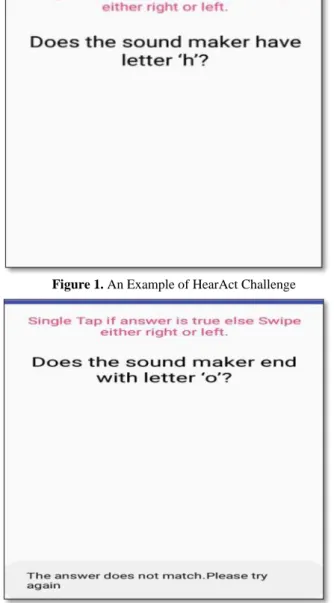
In the implemented tool, a set of sounds were used and a group questions were created and are stored in an array list and are presented randomly to the user (as shown in Figure 1). That means the same sound may be used multiple times in the same test with different questions. Examples of CAPTCHA questions are as follow.
Does the sound maker have letter ‘a’? Does the sound maker start with letter ‘b’? Does the sound maker end with letter ‘c’?
Does the sound maker word contain two letters ‘d’?
Figure 1. An Example of HearAct Challenge
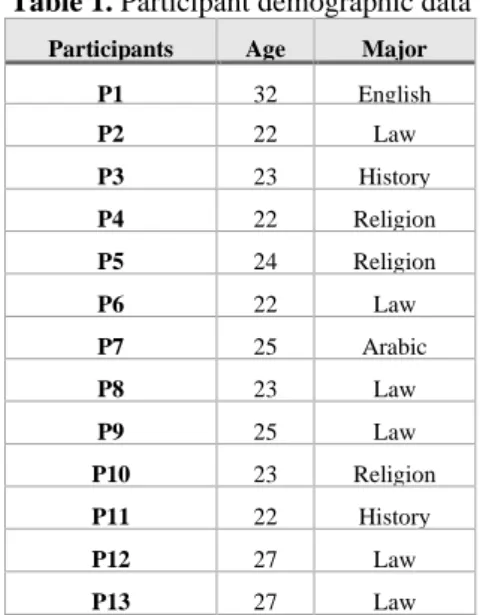
Figure 2. An Example of an error alert in HearAct Challenge Figure 1 shows an example of task in HearAct CAPTCHA, where users hear a telephone sound and should analyze the spelling of “Telephone”, then tap because the word “telephone” contains the letter “h”. If users enter a wrong answer, the CAPTCHA will read out “please try again” and users will receive another four tasks (as shown in Figure 2). Then, the application immediately presents another question.
The audio files that have been used during the implementation
of the proposed HearAct CAPTCHA have the following features:
- They were taken from the Sound Jay website [40]. - No background noise has been added to the audio files - They have equal duration, which is 3 seconds
- Each time a CAPTCHA question is produced, the application randomly selects the audio file
A list of audio clips was used to implement the HearAct CAPTCHA method. Examples of used sounds in the application hair dryer, train, rain, clock, fire alarm, bell, camera, wind, bus, and horse sounds.
To improve the accessibility of the mechanism, the presented CAPTCHA questions are read out by text to speech (TTS) method. This method allows blind and visually impaired people interact easily with the CAPTCHA interface.
3.4 HearAct Security
Software developers need to take into account at least three factors while designing a CAPTCHA solution: distortion levels, challenge type, and size. Most blind users found it extremely difficult to solve a CAPTCHA after a high level of background noise or distortion. Thus, in the HearAct CAPTCHA, challenge type and size are the main factors that have been used to make the solution secure and accessible. Users need to solve four questions under each challenge and if users failed to solve one question, they will receive a new CAPTCHA challenge, making it very difficult and costly for an automated bot to attack. In addition, humans can identify the sound-maker in a short time; adding a time frame while solving CAPTCHA is another feature that enhances the HearAct security level.
3.5 Advantages of HearAct
Easy to use because it is based on gestures (tap and swipe) which most users can easily perform. Simple, users are not required to have any experience to solve the CAPTCHA task. Fast, users can act immediately after recognizing the sound without any requirement to type in the answer. Blind users spend a lot of time completing typing tasks [39]. Gestures are the most accessible way for blind users to interact with smartphone applications. Another reason HearAct is quicker than other CAPTCHA methods are that the CAPTCHA question is announced before the audio clips are played so it is not necessary to listen to the whole CAPTCHA audio while trying to identify who or what is the sound maker. Once users identify the sound maker and analyze the existence of the target letter, they can answer the CAPTCHA and move on to the remaining tasks. Users can pass the remaining parts of the CAPTCHA, as soon as the answer is identified.
4.
User Study
4.1 Participants
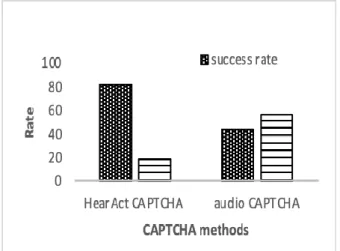
I collected participants’ demographic information including age, gender, educational level, and the time they spend using the internet. The HearAct CAPTCHA was evaluted with 13 blind users, all 13 participants were female. The age range of blind participants was between 22 and 32 years old. Two of the participants graduated from Taif University and 11 of the participants are students at Taif University and regularly surf the web and use smartphones between 3 – 6 hours (as shown in Table 1). All of the participants usually surfed the web on their smartphone devices with the support of Voice Over service. I recruited participants through the Taif University accessibility center.
Table 1. Participant demographic data
Participants Age Major
P1 32 English
P2 22 Law
P3 23 History
P4 22 Religion
P5 24 Religion
P6 22 Law
P7 25 Arabic
P8 23 Law
P9 25 Law
P10 23 Religion
P11 22 History
P12 27 Law
P13 27 Law
The comparative study conducted with 13 blind students. The number of participants is few. Even though the number of blind students at Taif university is high, but they did not participate in other activities at the university. However, researchers have highlighted that having five participants in a study is sufficient sample size to determine most of usability concerns related to an application [43]. Another researcher stated that nine participants are capable to expose 95% of the usability problems [44]. Thus, I believe that 13 participants are sufficient to expose the usability of the CAPTCHA method and identify its strengths and weaknesses.
4.2 Study Design
The comparative study used a within-subjects design in which participants used both HearAct CAPTCHA and audio CAPTCHA methods. The order of CAPTCHA mechanisms alternated between participants. The experiment required each participant to solve three CAPTCHA challenges for each method. The CAPTCHA challenges were presented randomly to participants.
The core objective of this study was to examine and compare the usability of the CAPTCHA methods in term of completion time, success rate, type of errors and System Usability Scale (SUS) scores as well as determine the limitations and strengths of the differing CAPTCHA methods by answering the following questions:
a. What is the success rate of the HearAct CAPTCHA and audio CAPTCHA?
b.What is the solving time (completion time) of HearAct CAPTCHA and audio CAPTCHA?
c. Which is easier: solving the CAPTCHA by gestures or by typing the text in the specified position? Which is faster: solving by gestures or typing?
d.Was it easy to understand the CAPTCHA questions for HearAct CAPTCHA and audio CAPTCHA?
e. What are the strengths and limitations of the two CAPTCHA methods?
4.3 Study Procedures
The evaluation study was conducted at Taif University to examine and compare the proposed HearAct CAPTCHA with audio CAPTCHA mechanism. The order of CAPTCHA mechanisms was alternatively tested across participants. The evaluation study involved five sessions, which are a pre-test questionnaire, a training session, a test session, usability questionnaire, and an interview session about the usability of CAPTCHA method and strengths and limitations associated with CAPTCHA mechanisms. Blind participants held the phone the way they wanted. All participants completed five sessions; all five sessions took approximately one hour. The evaluation study goals and procedures were discussed with participants at the beginning of the study. After that, the participants signed the consent form. In the pre-questionnaire, I collected participants’ demographic data including age, educational level and the time length that they spend surfing the Internet. In the training session, I explained the concept of CAPTCHA methods and demonstrated how they work. Then, users were guided when solving a CAPTCHA challenge to familiarize themselves with the CAPTCHA techniques. The training session took 10 minutes.
In the test session, participants were required to solve five CAPTCHA challenges independently and the challenges were presented randomly. The test session took 20 to 30 minutes to complete. In the test session, participants listened to the CAPTCHA question, then they solved the CAPTCHA challenge. Then, they immediately started solving another CAPTCHA challenge until they completed five questions. Participants were asked to perform these steps five times in order for us to clearly understand users’ solving behaviors. The task performance of each participants including time and interactions with touchscreen were video recorded in order to assess completion time, success rate and error types respectively. The records helped researchers determining where the participants faced problems while solving the CAPTCHA questions. The video recording was also used to determine where users faced difficulties when listening and answering the CAPTCHA challenges. All collected data was analyzed as a part of this study.
4.4 Apparatus
To examine the HearAct CAPTCHA and audio CAPTCHA mechanisms, I implemeneted the HearAct applicatin on an alcatel mobile phone device, which is running an android platform version 8.1.0. The implemented HearAct application allowed users to hear the CAPTCHA questions as it implemented Text-to-speech function. Then, users solved the questions by using gestures, such as tapping or swipping to the right. In addition, Users were allowed to wear earphone while solving the CAPTCHA challenges.
For the audio CAPTCHA, I used the character recognition CAPTCHA script that was provided from phpcaptcha.org website and can be integrated into any website (as shown in Figure 3) [48].
Figure 3. Traditional audio CAPTCHA method
I used a screen recorder application that recorded task performance while using the CAPTCHA. It also recorded the entire time of listening to the sound, listening to the question about the sound maker, and entering the gesture answer for all 4 questions. The main purpose of calculating the differences between the end and the start times is to record the completion time of solving the CAPTCHA challenges. In addition, the recorded clips enabled researcher to understand the challenges that users faced while understanding and answering the CAPTCHA tasks. I used also a camera to record the users while solving the CAPTCHA challenges to fully understand users’ behaviours when using the application.
5.
Result
5.1 Success Rate
The success rate is determined when a user solves all 4 questions under one CAPTCHA challenge correctly. However, the failure rate is determined once the user answer one question incorrectly and he/she receive alert message saying “Try again”. Then, the user starts again with four new questions.
The HearAct CAPTCHA method was more accurate and has a high success rate than audio CAPTCHA. The success rate for the HearAct is 82.05% and 43.58% for the audio CAPTCHA. On the other hand, the failure rate for the HearAct is 17.94% and 56.41% for the audio CAPTCHA (as shown in Figure 4).
Most participants solved the HearAct CAPTCHA challenges correctly from the first attempt. However, some participants made errors while solving the HearAct tasks during one of the three attempts. The main two reasons behind the occurred errors are that some users are not able to recognize the sound
maker (they might be not familiar with the sound). The second reason is that they do not know the spelling of the sound maker word.
Figure 4. Success rate and error rate for both CAPTCHAs
Regarding the audio CAPTCHA, the error rate was very high, it was higher than the success rate for most participants. This indicates that audio CAPTCHA tasks including listing and memorizing characters are still difficult to be resolved completely and independently by blind users. The study shows the causes of these errors: the background noise makes it very difficult to identify the CAPTCHA letters and numbers. Participants were required to memorize the given CAPTCHA and then insert it in the answer field. If participants missed one digit and inserted the CAPTCHA text wrong, they would not be able to access the resource. Some participants were looking for the position of the answer and they accidently pressed the unwanted button. In short, memorizing a set of letters and numbers requires a lot of cognitive effort for this population as they cannot see the digits while typing the answer to the CAPTCHA challenge. Another point is that locating a specific object on a touch screen is a difficult task and usually visually impaired users move their fingers until they find the wanted object. The most important cause of error is that the limitations of a QWERTY keyboard for blind users; blind users need to locate the letter on the keyboard with the support of the voice over service and then double tap to insert it. This process may cause users to double tap on the nearest key and cause an error.
5.2 Completion Time
Table 2. The average time for HearAct and audio CAPTCHA to solve three CAPTCHAs for each participant
Survey questions CAPTCHA HearAct CAPTCHA Audio
1. I think that I would like to use
this system frequently. 3.6923 1
2. I found the system unnecessarily
complex. 3.3076 1.5384
3. I thought the system was easy to
use. 3.6154 0.9231
4. I think that I would need the
support of a technical person to be able to use this system.
3.5385 0.4615
5. I found the various functions in
this system were well integrated. 3.8462 3.3846
6. I thought there was too much
inconsistency in this system. 3.3077 3.3076
7. I would imagine that most
people would learn to use this system very quickly.
3.6154 3.3846
8. I found the system very
cumbersome to use. 3.3846 3.2307
9. I felt very confident using the
system. 3.0769 0.7692
10.I needed to learn a lot of things
before I could get going with this system.
3.8462 2.8461
The average time that users spent solving a HearACT CAPTCHAs is 55.35 seconds seconds (as shown in Figure 5). Each HearAct CAPTCHA has four questions under one challenge to make it difficult for machine learning techniques to attack. The maximum time they spent answering one HearAct CAPTCHA is 95 seconds and the minimum time is 31 seconds. The longer task time was partly due to cognitive thinking about the spelling of words or due to listening to the whole audio clip.
Figure 5. Average completion time for CAPTCHAs
Figure 5 shows the average time blind users spent solving the HearAct is 55.35 seconds and they spent 140 seconds solving the audio CAPTCHA (STD = 0.084). Participants spent long time solving audio CAPTCHA due to the need to listen to the audio clip several times in order to memorize it and the time spent to locate submit button. There were significant differences between the time users spent solving HearAct CAPTCHA versus the time they spent solving audio CAPTCHA (t-test= 0.0009).
There was no significant improvement between the completion time of HearAct CAPTCHA in the first, second and third attempts. The average completion times are 58, 78 and 75 seconds, for the three attempts respectively. Similarly, there was no significant difference between the completion time of audio CAPTCHA during the three
attempts. The average completion times are 135, 119 and 125 seconds, for the three attempts respectively.
5.3 System Usability Survey Result
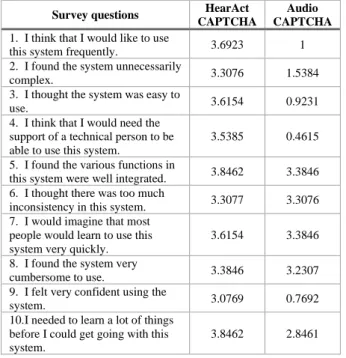
At the end of each CAPTCHA mechanism, participants were asked to orally answer system usability survey (SUS), which contains 10 questions used to measure system usability and learnability using subjective questionnaire [46]. Participants answered these questions based on a scale from 1 to 5. Table 3 shows the result of SUS for HearAct CAPTCHA for all participants.
Table 3: Result of system usability survey of HearAct and audio CAPTCHAs
The SUS includes 5 positive points, which are used to maximize the answer value and 5 negative points to reduce the value. The result of the SUS questionnaire is calculated between 0-100. The SUS results for HearAct CAPTCHA method was 88.07 which indicates the HearAct CAPTCHA is very usable for blind users and meet their satisfaction. Unlike, the overall SUS results for audio CAPTCHA were calculated as 52.11, which highlights it requires serious attention to enhance the method usability. The usability was significantly higher for the HearAct CAPTCHA method compared to the audio CAPTCHA (paired t-test; p = 0.004, SD=1.14).
Table 3 shows that most participants felt they were able to learn and understand both CAPTCHA techniques without a previous training. That is, most users were able to understand the concept of CAPTCHAs. However, how they solved the CAPTCHA challenges shows the difference. As shown in Table 3, most participants found audio CAPTCHA is not easy to use and they require an assistance to solve it. Unlike, HearAct CAPTCHA blind participants are willing to use it frequently and find it easy to use. This result might be due to the usage of gestures to solve the CAPTCHA challenges as they found solving CAPTCHA by gestures is more accessible than typing the answer using a QWERTY keyboard. overall, 9 questions out of 10 from the SUS for the HearAct is higher than audio CAPTCHA. HearAct and audio CAPTCHAs were a little bit similar in the score of the fifth and seventh questions. As a result, the usability of
Participant number
Average time for HearAct CAPTCHA
Average time for audio CAPTCHA
p1 48.33 Seconds 154 seconds
p2 31.66 Seconds 91 seconds
p3 38.33 Seconds 68 seconds
p4 12.33 Seconds 191 seconds
p5 70.33 Seconds 67 seconds
p6 95.33 Seconds 88 seconds
p7 60.66 Seconds 68 seconds
p8 54.66 Seconds 194 seconds
p9 60.33 Seconds 72 seconds
p10 91.66 Seconds 196 seconds
p11 58.33 Seconds 170 seconds
p12 56.33 Seconds 89 seconds
p13
p13 0.41333333
0.41333333
CAPTCHA method has a huge impact on the accuracy and completion time of solving the CAPTCHA challenges.
5.4 Interview result
Elven participants reported that they have faced difficulties while solving CAPTCHA challenges. P7 stated that “solving CAPTCHA needs several attempts, I face difficulty in typing the text and finding its place.” P3 stated that “I could not distinguish the spoken letters from the background noise.” Some participants highlighted the limitation of supporting different languages in CAPTCHA mechanisms, and P12 stated that “the sound was not clear enough and it is not available in other language for non-English speakers.” Eight participants reported that they could not access a website because of the CAPTCHA challenge. To overcome this obstacle, they choose to surf another website providing similar information or they ask friends for help to solve the CAPTCHA.
Participants also highlighted the limitations of HearAct CAPTCHA: remembering the spelling of certain words, some sounds are unfamiliar, and that it only supports English Language. In addition, participants discussed the audio CAPTCHA limitations: users must memorize a list of random numbers or letters, difficulty of distinguishing the letters from the noisy background sounds, the use of a QWERTY keyboard, and requiring users to visually locate buttons. To improve the HearAct CAPTCHA, participants provided some suggestions for usability. They suggested developing the CAPTCHA mechanisms with different languages and building and integrating the mechanisms in different platforms.
Participants also provided some suggestions to improve the audio CAPTCHA, which are providing shorter audio CAPTCHAs, reducing the background noise, and supporting different languages. P8 suggested for screen reader users that “when a user presses the read button, the program should wait for a minute or 30 seconds, then start reading the verification code, to avoid overlapping sounds.”
5.5 Types of Errors
For HearAct CAPTCHA, the minimum number of steps to solve the challenge is four steps. For audio CAPTCHA, 10 steps are needed to solve the CAPTCHA including (pressing audio icon, listening to spoken CAPTCHA characters, tapping on the input field, typing 6 characters, tap on submit button) [49].
Three type of errors participants made when they used the HearAct CAPTCHA include:
1. they did not recognize the sound 2. they did not know the word spelling
3. the did not read the whole questions carefully however, errors in the audio CAPTCHA are associted with the diffciulty finding the location of audio icon, input field and submit button. As a result, sometimes they hit a wrong operation accessidently like updating button. The length of chaptcha is another causes of error and negatively affect the accuracy of the CAPTCHA [50][51][52]. Blind users need to memorize the set of characters and then type them, if the length of CAPTCHA is long, they might forget some characters when typing the response.
5.6 User Preferences
At the end of the study, the researcher asked participants about their preferences and the reason behind them. All users reported highly satisfactory feedback regarding the new
HearAct CAPTCHA mechanism. They found the HearAct method easy to use and very accessible. They also reported that using HearAct is preferable over the traditional audio-based CAPTCHAs. None of the participants selected the audio CAPTCHA as their preference. Participant 9 reported that “I prefer the HearAct CATCHA because it relies on gestures and reduces the use of memory.” P13 stated that “using gestures is a powerful idea, makes HearAct CAPTCHA much easier to use and makes it faster.”
6.
Discussion
The proposed HearAct CAPTCHA is significantly secure against machine learning attacks since users have to identify the sound maker and determine the existence of the target letter. It is very difficult for an automated application to complete this process and to then analyze the spelling of the word using machine learning methods.
Regading the accuracy, the success rate of HearAct CAPTCHA is 82.05%, which is twice as much as the success rate of the traditional audio CAPTCHA 46% [10][32][41]. In term of effectivness, the completion time of the HearAct is 55.35 seconds quicker than the traditional audio CAPTCHA as evidenced by the fact that the average time participants spent solving audio CAPTCHA is 65.64 seconds [10]. A reason behinds spending long time solving audio CAPTCHA is repeating listening to the audio question in order to memorize all the digits. As Yamaguchi also found that Japanese users with visual impairments tried 10 times to solve an audio CAPTCHA, but no one passed the challenge [53][54].
Another previpusly proposed CAPTCHA for visually impaired called HIPUU, its success rate 92.46% and its completion time is 59.9 seconds [28]. The result of HIPUU study, which is conducted with native English participants is approxmatily similar to the result of HearACT CAPTCHA study where it is conducted with nonnnative English. As Bursztein et al. found that native English speakers solve audio CAPTCHA faster than non native speakers [34]. This is due to the HearAct CAPTCHA mechanism which allows participants to solve the challenges using gestures. Gestures need less time to perform and are more accessible for users than typing. During the three attempts, the completion time was not significantly improved over time for either of the CAPTCHA mechanisms.
The audio CAPTCHA took longer time to solve due to several reasons: Navigation to CAPTCHA elements requires more time to do. Users need to locate the play audio button to run the audio, users need to carefully listen to the played audio and focus, repeating listening the audio question several times until users identify all CAPTCHA digits is time consuming, and users need to locate the location of the submit button. The most importantly reason is that when blind users type the answer of audio CAPTCHA, they spend a long time to type a text using a QWERTY keyboard. Anoother critcial reason that confuses blind users is interfering between the spoken CAPTCHA and VoiceOver output. Similarly, Aiswarya and Kuppusamy reported that the screen reader service has talk over the audio clip when users listen the CAPTCHA challenge [49].
82.44% for visually impaired users. The questionare indicated that the main problem blind users face when solving audio CAPTCHA is typing the recognized letters. As researchers disccussed in detail the typing issues that blind usersface when typing on small touch screen device [39]. The finding is also supported by Jiang and Dogan results where they stated the completed time of CAPTCHA is affected by user familirity with typing on smartphone deives [50].
We observed from the video recorder, participants pause before touching the screen when solving the HearAct CAPTCHA. This pause occurs due to participants were listening to question and spending time to undrstand it. This suggests that conducting a study with a native English speakers, which might have a better completion time. All participants preferred the HearAct CAPTCHA due to the accessibility of the input method and the limitation of barriers such as distortd text and background noise. The one weakness in this solution is that users need to know the spelling of the word that describes who or what is making the sound. However, there is a purpose for this cognitive task; bots need a significant amount of time to process all these tasks, and thus have no analysis advantage over human users.
HearAct CAPTCHA uses natural sounds, which are difficult to guess by bots. Another reason makes the HearAct CAPTCHA secure is that the length of sound clips that is used in the CAPTCHA is fixed and known. It is currently about 12 seconds for all the 4 questions under one challenge. This means if the HearAct CAPTCHA system receives answer in in less than the incorrect period of time, it will be rejected. As a result, if bots repeatsound answering the HearAct CAPTCHA questions will be wasting of time.
7.
Conclusion
This paper presents an accessible form of CAPTCHA for visually impaired users using gestures to solve CAPTCHA challenges as an alternative to traditional audio CAPTCHA. The study shows that the success rate of HearAct CAPTCHA is higher than audio CAPTCHA and the completion time is faster than audio CAPTCHA. It also shows that HearAct CAPTCHA is more preferable than traditional audio CAPTCHA. This is a breakthrough compared to traditional audio-based CAPTCHAs, which are not suitable for visually
impaired users.
In the future, there are certainly chances for improvement to the HearAct CAPTCHA mechanism by addressing given recommendations and suggestions. I will also build the HearAct concept with multiple languages across different platforms and build it as a plugin that can be integrated into most web browsers, for example, Chrome, FireFox, Safari, and IE. Then, conducting a user study to find out the effect of language and culture on the user performance while solving the HearAct CAPTCHA.
Planned further critical development of the HearAct prototype includes adding more audio clips to enhance the robustness of the website security to make it more resistant to hacking.
To make the HearAct CAPTCHA accessible for all population including people with hearing impairment, I will improve the HearAct by presenting images related to the played sound to enable them solving the CAPTCHA challenge using their abilities.
This study had some limitations including a small sample size, even though I believe 13 users cover the majority of usability and accessibility concerns of the prototype and determine its strengths and weaknesses. In addition, I will compare the proposed solution with other existing audio CAPTCHAs to measure the correlations between them.
8.
Acknowledgement
We thank Taif University Accessibility Center and the study volunteers.
References
[1] WHO. (2018). Blindness and vision impairment. Retrived from http://www.who.int/news-room/fact sheets/detail/blind ness-and-visual-impairment. (11 October 2018)
[2] Ahn, L., Blum, M., and Langford, J. (2004). Telling humans and computers apart automatically. Communications of the ACM, February 2004. Vol. 47 (2) 57-60.
[3] Holman, J., Lazar, J. and Feng, J. (2008). Investigating the Security-Related Challenges of Blind Users on the Web. In Langdon, P., Clarkson, J., and Robinson, P ed. Designing Inclusive Futures, Springer-Verlag, London, 129-138. [4] Bigham, J. and Cavender, A. 2009. Evaluating existing audio
CAPTCHAs and an interface optimized for non-visual use. Proceedings of ACM Conference on Human Factors in Computing Systems (CHI), 1829-1838.
[5] Bursztein, E. Moscicki, A. Fabry, C. Bethard, S. Mitchell, J. C. and Jurafsky, D. (2014). Easy does it: More usable captchas, Proceedings of the 32nd annual ACM conference on Human factors incomputing systems - CHI '14.
[6] Shirali-Shahreza, S., Penn, G., Balakrishnan, R., Ganjali, Y. (2013). Seesay and hearsay captcha for mobile interaction. In: Proceed- ings of the SIGCHI Conference on Human Factors in Computing Systems, pp. 2147–2156.
[7] Sauer, G., Lazar, J., Hochheiser, H., and Feng, J. (2010). Towards A Universally Usable Human Interaction Proof: Evaluation of Task Completion Strategies. ACM Trans. Access. Comput. 2, 4, Article 15 (June 2010), 32 pages. DOI=http://dx.doi.org/10.1145/1786774.1786776
[8] Kulkarni, S. and Fadewar, H., “Audio CAPTCHA Techniques: A Review,” in Proceedings of the Second International Conference on Computational Intelligence and Informatics. Singapore: Springer Singapore, 2018, pp. 359–368.
[9] Lazar, J., Feng, J., Adelegan, O., Giller, A., Hardsock, A., Horney, R., Jacob, R., Kosiba, E., Martin, G., Misterka, M. et al. (2010). Assessing the usability of the new radio clip-based human interaction proofs. In Proceedings of ACM SOUPS Symposium On Usable Privacy and Security, Pp.1–2, 2010. [10]Alsuhibany, A. S. (2016). Evaluating the Usability of
Optimizing Text-based CAPTCHA Generation. International Journal of Advanced Computer Science and Applications, Vol. 7, No. 8, 2016
[11]H. S. Baird, A. L. Coates, and R. J. Fateman, “Pessimalprint: a reverse turing test,” International Journal on Document Analysis and Recognition, vol. 5, no. 2-3, pp. 158–163, 2003. [12]M. Chew and H. S. Baird, “Baffletext: A human interactive
proof,” in Document Recognition and Retrieval X, vol. 5010, pp. 305–317, International Society for Optics and Photonics, 2003.
[13]Z. Hu, S. Gnatyuk, T. Okhrimenko, S. Tynymbayev, M. Iavich, “High-Speed and Secure PRNG for Cryptographic Applications,” International Journal of Computer Network and Information Security (IJCNIS), Vol. 12, No. 3, pp.1-10, 2020.
[15]S. Solanki, G. Krishnan, V. Sampath and J. Polakis, "In (Cyber) Space Bots can Hear You Speak: Breaking Audio CAPTCHAs using OTS Speech Recognition," Proceedings of the 10th ACM Workshop on Artificial Intelligence and Security, 2017, pp. 69-80.
[16]NuCAPTCHA. (December 26, 2018). Adaptive Captcha Authentication. Retrieved from http://www.nucaptcha.com/ [17]G. Sauer, H. Hochheiser, J. Feng, and J. Lazar, “Towards a
universally usable captcha,” in Proceedings of the 4th Symposium on Usable Privacy and Security, vol. 6, p. 1, 2008.
[18]J. Tam, J. Simsa, S. Hyde, and L. V. Ahn, “Breaking audio captchas,” in Advances in Neural Information Processing Systems, pp. 1625–1632, 2009.
[19]H. Gao, H. Liu, D. Yao, X. Liu, and U. Aickelin, “An audio captcha to distinguish humans from computers,” in Electronic Commerce and Security (ISECS), 2010 Third International Symposium on, pp. 265–269, IEEE, 2010.
[20]H. Meutzner and D. Kolossa, "A non-speech audio CAPTCHA based on acoustic event detection and classification," 2016 24th European Signal Processing Conference (EUSIPCO),
Budapest, 2016, pp. 2250-2254.
doi: 10.1109/EUSIPCO.2016.7760649
[21]Holman, J., Lazar, J., Feng, J.H., D’Arcy, J.: Developing usable captchas for blind users. In: Proceedings of the 9th International ACM SIGACCESS Conference on Computers and Accessibility, pp. 245–246. ACM (2007).
[22]S. Shirali-Shahreza, G. Penn, R. Balakrishnan, and Y. Ganjali, “SeeSay and HearSay CAPTCHA for Mobile Interaction,” in Proceedings of the SIGCHI Conference on Human Factors in Computing Systems, ser. CHI ’13. ACM, 2013, pp. 2147–2156.
[23]P. Ximenes, A. Santos, M. Fernandez, and J. Celestino, Joaquim, “A CAPTCHA in the Text Domain,” in On the Move to Meaningful Internet Systems 2006: OTM 2006 Workshops, ser. LNCS, vol. 4277. Springer- Verlag, 2006, pp. 605–615.
[24]C. Fukuoka, T. Nishimoto, and T. Watanabe, “Investigation of Speech CAPTCHA System Using Phonemic Restoration (Japanese),” Techni- cal Report of Institute of Electronics, Information and Communication Engineers of Japan, vol. 108, no. 332, pp. 83–88, Nov 2008.
[25]Kuppusamy, K. S. and Aghila, G. (2018). HuMan: an accessible, polymorphic and personalized CAPTCHA interface with preemption feature tailored for persons with visual impairments. Universal Access in the Information Society Journal.17 (4). P. 841—864
[26]Davidson, M., Renaud, K., Li, S.: jCAPTCHA: accessible human validation. In: Miesenberger, K., Fels, D.,
Archambault, D.,
Penˇa ́z,P.,Zagler,W.(eds.)ComputersHelpingPeoplewith Special Needs, ICCHP 2014. Lecture Notes in Computer Science, vol 8547, pp. 129–136. Springer, Cham (2014). [27]WEBVISUM. (2009). Web visum (vision, in latin) is your
eyes for the Web. Retrieved from
http://www.webvisum.com/.
[28]Sauer, G., Holman, J., Lazar, J., et al. (2010). Accessible Privacy and Security: A Universally Usable Human-Interaction Proof. Universal Access in the Information Society, 9,3. 239-248.
[29]Jonathan Lazar, Jinjuan Feng, Tim Brooks, Genna Melamed, Brian Wentz, Jon Holman, Abiodun Olalere, and Nnanna Ekedebe. 2012. The SoundsRight CAPTCHA. (2012). An improved approach to audio human interaction proofs for blind users. In Proceedings of the SIGCHI Conference on Human Factors in Computing Systems (CHI '12). ACM, New
York, NY, USA, 2267-2276. DOI:
https://doi.org/10.1145/2207676.2208385
[30]Olalere, A., Feng, J.H., Lazar, J., Brooks, T. (2014). Investigating the effects of sound masking on the use of audio captchas. Behav. Inf. Technol. 33(9), 919–928
[31]Jonathan Holman, Jonathan Lazar, Jinjuan Heidi Feng, John D'Arcy, Developing usable CAPTCHAs for blind users, Proceedings of the 9th international ACM SIGACCESS conference on Computers and accessibility, October 15-17,
2007, Tempe, Arizona,
USA [doi>10.1145/1296843.1296894]
[32]Sauer, G., Lazar, J., Hochheiser, H., et al. 2010. Towards A Universally Usable Human Interaction Proof: Evaluation of Task Completion Strategies. ACM Transactions on Accessible Computing, 2,4. 1-32.
[33]Yan, J. and Ahmad, A. S. E. (2008). Usability of CAPTCHAs or usability issues in CAPTCHA design, Proceedings of the 4th symposium on Usable privacy and security - SOUPS '08, 2008.
[34]Bursztein, E., Martin, M., and Mitchell, J. (2011). Text-based CAPTCHA strengths and weaknesses, Proceedings of the 18th ACM conference on Computer and communications security - CCS '11, 2011.
[35]Choi, J. (2018). POSTER: I Can’t Hear This Because I Am Human: A Novel Design of Audio CAPTCHA System. ASIACCS’18, June 4–8, 2018, Incheon, Republic of Korea [36]Rezvan Pakdel, Norafida Ithnin and Mohammad Hashemi.
(2011). CAPTCHA: A Survey of Usability Features. Research Journal of Information Technology, 3: 215-228. Doi: 10.3923/rjit.2011.215.228
[37]Alnfiai, M. and Sampalli, S. (2016). An Evaluation of SingleTapBraille Keyboard: A Text Entry Method that Utilizes Braille Patterns on Touchscreen Devices. In Proceedings of the 18th International ACM SIGACCESS Conference on Computers and Accessibility (ASSETS '16). ACM, New York, NY, USA, 161-169. DOI: http://dx.doi.org/10.1145/2982142.2982161
[38]Alnfiai, M., Sampalli, S. (2017). BrailleTap: Developing a Calculator Based on Braille Using Tap Gestures. The 19th International Conference on Human-Computer Interaction (HCI International 2017).
[39]Alnfiai, M., Sampalli, S. (2017). BrailleEnter: A Touch Screen Braille Text Entry Method for the Blind. The 8th International Conference on Ambient Systems, Networks and Technologies (ANT 2017), Procedia, Computer Science. [40]SoundJay. (2018). 3000SoundEffects. Retrieved from
https://www.soundjay.com/door-sounds-1.html.
[41]Graig, S. Jonathan, L. Harry, H. Jinjuan. F. (2010). Towards a universally usable human interaction proof: evaluation of task completion strategies, ACM Trans. Access. Comput. 2(2010). 15:1-15:32.
[42]Chen J, Luo X, Guo Y, Zhang Y, Gong D. A Survey on Breaking Technique of Text-Based CAPTCHA. SECURITY
AND COMMUNICATION NETWORKS. 2017.
doi:10.1155/2017/6898617.
[43]John P. Santell, 2006. Medication errors in intensive care units. US PHARMACIST 31, 5: 56.
[44]Robert A. Virzi. 1992. Refining the test phase of usability evaluation: how many subjects is enough?. In Human Factors: The Journal of the Human Factors and Ergonomics Society 34, 4: 457- 468.
[45]Brooke, J., et al.: Sus-a quick and dirty usability scale. Usability Evalu. Ind. 189(194), 4–7 (1996)
[46]Brooke, J. 1996. SUS - A quick and dirty usability scale. In Usability Evaluation in Industry, Jordan, P.W., Thomas, B., Weerdmeester, B.A. and McClelland, A.L. (eds.). Taylor & Francis, London, UK, 189 - 194.
[47]von Ahn, L., Blum, M., Langford, J.. Telling humans and computers apart automatically. Communications of the ACM 47, 2, 56-60 (Feb. 2004).
[48]Phillips, D. (2015). Securimage. Retrieved from https://www.phpcaptcha.org/try-securimage/
[50]Jiang, N., Dogan, H.: A gesture-based captcha design supporting mobile devices. In: Proceedings of the 2015 British HCI Conference, pp. 202–207. ACM (2015)
[51]Reynaga, G., Chiasson, S. and van Oorschot, P. C. 2015. Exploring the Usability of CAPTCHAS on Smartphones: Comparisons and Recommendations. In Proceedings of 2015 Network and Distributed System Security (NDSS) Symposium (San Diego, CA, USA, February 8 - 11, 2015). NDSS '15. Internet Society, Reston, VA, USA.
[52]Bursztein, E., Moscicki, A., Fabry, C., Bethard, S., Mitchell, J. C. and Jurafsky, D. 2014. Easy does it: more usable CAPTCHAs. In Proceedings of the SIGCHI Conference on Human Factors in Computing Systems April 26 - May 1, 2014). CHI '14. ACM, New York, NY, 2637-2646. DOI=http://doi.acm.org/10.1145/2556288.2557322. [53]Yamaguchi, M.: A generating method of accessible verbal
questions with online documents for substitution of captcha-like tests. Verbal Interface & Interaction 15(4), 337–352 (2013) (Japanese)
[54]M. Yamaguchi, T. Nakata, T. Okamoto, and H. Kikuchi, “An Accessible CAPTCHA System for People with Visual Disability – Generation of Human/Computer Distinguish Test with Documents on the Net,” in Universal Access in Human-Computer Interaction. Design for All and Accessibility Practice, C. Stephanidis and M. Antona, Eds. Springer International Publishing, 2014, pp. 119–130.
[55]J. Holman, J. Lazar, J. H. Feng, and J. D’Arcy, “Developing Usable CAPTCHAs for Blind Users,” in Proceedings of the 9th International ACM SIGACCESS Conference on Computers and Accessibility, ser. Assets ’07. ACM, 2007, pp. 245–246.
[56]Symantec Corporation World Headquarters. (2018) Internet Security Threat Report (ISTR). Retrieved from https://www.symantec.com/content/dam