Supporting Workflow in a Course Management System
Chavdar Botev
Hubert Chao
Theodore Chao
Raymond Doyle
Sergey Grankin
Jon Guarino
Saikat Guha
Pei-Chen Lee
Dan Perry
Christopher Re
Ilya Rifkin
Tingyan Yuan
Dora Abdullah
Kathy Carpenter
David Gries
Andrew C. Myers
Jayavel Shanmugasundaram
ABSTRACT
CMS, a secure and scalable web-based course management sys-tem developed by the Cornell University Computer Science De-partment, helps manage the workflow associated with running a course. Our goal in designing the system was to simplify, stream-line, and automate all workflow aspects, such as course creation and importing students into it, student group management, assignment submission, assignment of graders, grading, regrade requests, and preparation of final grades. In contrast, other course management systems that we are aware of provide only specialized solutions for specific components, such as grading. This system is increasingly widely used for course management at Cornell University. The sys-tem was designed to support large courses with low administrative overhead. In this paper we describe the design of the system and the features that were found to be useful, and articulate its design principles.
Keywords
Courseware
1.
INTRODUCTION
CMS is a course management system developed in the Computer Science Department at Cornell University that has been developed and used over the past two years. Managing a large course is a complex task. Many factors may contribute to this complexity: many students; a course staff including several roles such as structors, teaching assistants, staff assistants, and graders; both in-dividual and group assignments; formation and disbanding of stu-dent project groups during the course; large, multipart assignments whose grading may be partitioned across problems, across recita-tion secrecita-tions, or both; large student assignment submissions com-prising many files; student requests for regrading; posting of scores and final grades; tracking the progress of these various steps and notifying students where appropriate.
Although existing course management systems support some of these tasks, we are not aware of any system that supports the work-flow associated with running a course to the degree that CMS does. For instance, the widely used Blackboard system [1] supports on-line file submissions and grades but does not support assigning
Permission to make digital or hard copies of all or part of this work for personal or classroom use is granted without fee provided that copies are not made or distributed for profit or commercial advantage and that copies bear this notice and the full citation on the first page. To copy otherwise, to republish, to post on servers or to redistribute to lists, requires prior specific permission and/or a fee.
SIGCSE 2005 St. Louis, Missouri USA
Copyright 2005 ACM ...$5.00.
grading responsibilities, tracking regrade requests, or group assign-ments. While such systems do ease the burden of course manage-ment, they also introduce new sources of complexity because users must manually tie together information maintained by the system, such as grades, with information maintained outside the system, such as groups and regrade requests.
The main technical challenge we faced in designing a workflow-oriented course management system was scalability: making the system work effectively for a large number of courses, each with possibly a large number of students and a large course staff. Our solution to this challenge involved several ideas. The key prin-ciple was decentralization and loose coordination, so that course staff involvement in common course-related tasks was reduced as much as possible. For example, to make the creation of student project groups scalable, we devised an invitation-based group cre-ation model in which students are able to create their own groups without course staff involvement (although staff can also directly manage groups if desired). Similarly, to make regrading scalable, the system directly routes regrade requests to the appropriate grader without requiring any action by other course staff. We describe other ways to achieve scalability later in the paper.
Besides scalability, we had the following design goals:
• Portability: CMS is web-based and can be run on any
oper-ating system platform using a web browser.
• Security: CMS users (students and course staff) are
authen-ticated using Kerberos authentication. CMS also supports a fine-grained access control model, with several levels of ac-cess for course staff. Decentralized workflow management makes fine-grained access control particularly important.
• History: CMS maintains a history of all events so that
users can view the history of changes. Information is never deleted.
• Selective overriding: Some policies and rules implemented
by CMS can be overridden on a case-by-case basis. For ex-ample, a course administrator can override the deadline for submission of an assignment for a particular student.
• Consistent, powerful GUI: It is important that the system be
easy to learn, but also that it provide the power to get work done efficiently. This is accomplished by providing relatively few distinct views of course information, but making these views consistent with one another, information-rich, and hy-perlinked to allow convenient switching between views.
• Integration with other software: CMS seamlessly
inte-grates with university software for performing authentication and obtaining information about courses and students. Class lists can be imported and final grades exported using a simple ASCII format compatible with Excel.
CMS is implemented in PHP and runs in a standard 3-tier ar-chitecture with multiple application servers connected to a high-performance database server. In Fall 2004, CMS is being used by more than 1900 students in 40 courses in computer science, en-gineering, and economics. Some of these courses are large, with more than 400 students. Although CMS was originally designed with large courses in mind, many small courses have also cho-sen to use CMS because of its comprehensive workflow manage-ment. A demonstration version of CMS is available for public use athttp://www3.csuglab.cornell.edu/cmsdemo. Secure au-thentication is disabled in this demonstration installation.
The rest of this paper is organized as follows. Sections 2, 3, and 4 describe how workflow is supported for the CMS administrator, course staff, and students, respectively. Section 5 discusses related work, and Section 6 presents our conclusions.
2.
CMS ADMINISTRATOR WORKFLOW
The CMS administrator is responsible for adding courses to the system and for reporting course grades at the end of each semester. The associated workflow is simple. To add a new course, the CMS administrator enters the IDs of the course and the course instructor; CMS automatically contacts the university systems to obtain in-formation about the course, such as the course name and the course instructor. Further details about a course, such as information about the course staff and students, are delegated to course staff. Thus, it is easy for the CMS administrator to set up a large number of courses. Similarly, at the end of the semester, the CMS adminis-trator simply activates the reporting feature for active courses and CMS automatically exports the final grades in a format appropriate for the university grade management system.
3.
COURSE STAFF WORKFLOW
The major portion of course administration falls on teaching as-sistants and administrative staff, and can be time-consuming and error-prone. CMS helps simplify and automate these processes.
Managing Course Staff. Large courses usually have a large course
staff with several different roles: for example, a principal instructor, assistant instructors, a staff assistant, graduate teaching assistants, undergraduate lab consultants, and graders. To permit decentral-ized management, it is important that staff members receive only rights appropriate to their staff role, following the principle of least privilege [4]. CMS supports this fine-grained control of privilege by with four levels of access: (1) the ability to create assignments and edit their information, (2) the ability to manage student groups, (3) the ability to grade, and (4) complete administrative access in-cluding control of staff membership and privilege levels. Any of these privileges can be granted to any staff member. Staff can be added simply by giving their university ID; an LDAP lookup then retrieves all necessary information from the university system, and access rights are assigned with a few mouse clicks.
Managing students. Students can be added to a course either by
a bulk upload, perhaps from the university’s file for the course, or individually. In both cases, only the university ID of the student is given, and all other information is retrieved from university system using an LDAP lookup. A student may decide to drop a course — in that case, the student can be removed. However, no information about the student is lost, and if the student decides to re-enroll, a click of the mouse button in the CMS will do the trick.
Managing assignments. To create a new assignment, a web form
is used to enter the relevant information, including (1) the assign-ment description and associated files, (2) the deadline for
submis-sion, (3) a short grace period during which submissions will not be considered late, (4) whether late submissions are allowed, (5) the size of a group and who forms the groups (staff or students), (6) the assignment and source files, (7) the maximum score and the weight for the assignment, (8) whether assignment statistics should be shown, (9) the names of the files that the student should submit, and (10) whether regrades are allowed, whether they are tracked by CMS, and the deadline for a regrade. This information can be changed at any time.
To track the workflow involved in managing an assignment, as-signments can be in one of four states: hidden from students (used during assignment creation), shown to students and available for submission, closed to submission but with grades hidden (used dur-ing graddur-ing), and closed to submission with grades shown to stu-dents. Even though an assignment is closed to submission, a staff member can override this setting to allow an individual student or group of students to submit, and can even submit files on their be-half. This flexibility helps when a student has a good reason to submit their assignment after the deadline or has submitted the as-signment outside CMS.
Exams. Exams are a special case of assignments, for which
stu-dents usually don’t submit files online. The bulk upload feature for grades is particularly useful for exams: a text file of student IDs and grades, compatible with Microsoft Excel, can be uploaded into an assignment or exam. CMS performs consistency checks before allowing bulk uploads: e.g., validating student IDs.
Grading and regrading. For each assignment, a course staff
mem-ber assigns a set of students (or a set of groups, in case of group as-signments) to each grader. Figure 1 shows a snapshot of the CMS page that supports this functionality. Student or student groups are selected using check boxes and assigned to a grader selected using a pull-down menu. This page also provides an overview of the files submitted by each group and flags late submissions.
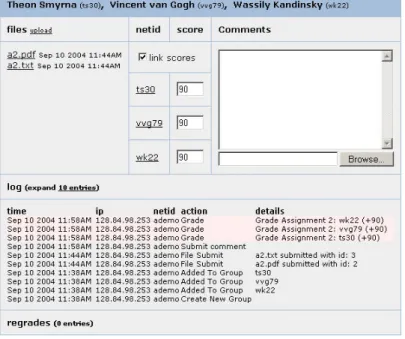
Each grader downloads the files for the students/groups assigned to the grader, grades the assignments, produces a feedback file for each one, and finally uploads the assignment grades and the feed-back files (individually or all together). Online grading seems to promote more extensive, detailed feedback. Although a grader is assigned to each student/group, any staff person with the proper access level can grade the submission; this is useful for exceptional cases. The CMS page to enter the grades and comments for a single group is shown in Figure 2.
CMS provides direct support for regrading. A student wanting a regrade can submit a regrade request explaining their position; the appropriate grader is alerted and can handle it appropriately.
A log is maintained of all events associated with an assignment, including submission of files, uploading of grades and feedback files, regrade requests, and answers to regrade requests. This log supports complex queries. This capability is useful for grading dis-putes, for identifying staff errors, and for other special cases.
Administrative views of the students Often a course has several
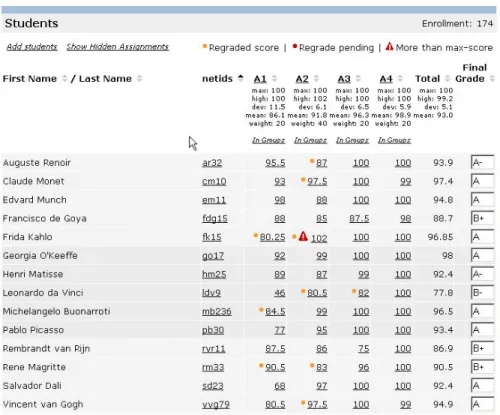
assignments and exams concurrently in various stages of devel-opment, submission, or grading. It becomes important to easily see what has and hasn’t been done. Figure 3 shows a snapshot of the administrative student view, which provides this information. The administrative student view shows a list of all the students, their names, students IDs, grades on all assignments and tests, to-tal scores, and final grades (if available). Final grades can also be entered in this view at the end of the semester.
Unanswered requests for regrades are marked with a small red dot; answered ones with a gray dot. One can also change the view to see only students who have an outstanding regrade request, who
Figure 1: Assigning a Set of Students to a Grader
Figure 3: Administrative View of Students
Figure 5: Student Group Formation
are missing a particular assignment, and other conditions of inter-est. Thus, course staff receive an overall picture as well as more detailed information.
4.
STUDENT WORKFLOW
A student enrolled in more than one course using CMS has a single portal — a single webpage — that gives access to all the courses. The student can even access courses that they took in pre-vious semesters, if the department allows it.
Managing course information. CMS provides an overview page
for each course in which a student is enrolled. This page shows the student’s grades and statistics for each assignment and exam. If a total weighted score is produced, the student can see the weights as-signed to each assignment and exam, as well as their total score so far, and the statistics for the total score. Finally, when final course grades have been assigned, the students can see them. Figure 4 shows a snapshot of this page.
Different instructors have different opinions on what information students should be able to see, and can therefore control it. For example, the staff controls when the grades on an assignment or exam becomes viewable, whether the students see the statistics for an assignment or exam, and when (if ever) the students can see their weighted total score or the final grade.
CS also has many ways to notify students about important events. For example, the overview page shows upcoming assignments, due dates, and the time left on the next assignment. Students also re-ceive automatic email notification about events such as availability of grades, feedback on an assignment, and actions on their regrade request. Students can selectively turn off this notifications if they wish. Thus, CMS is a management tool for students as well as staff.
Managing assignments. CMS provides various ways for a student
to manage course assignments. First, CMS provides the ability for students to obtain assignment writeups and other needed files such as source code from the course overview page.
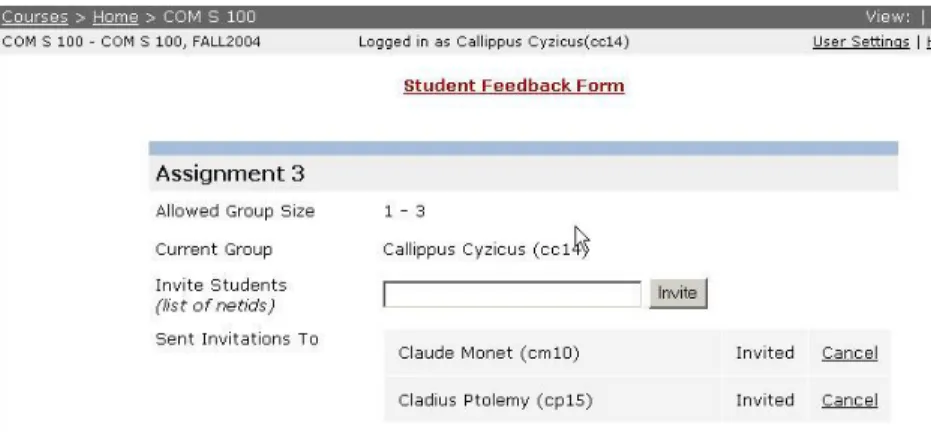
Second, for a group assignment, students can form (and disband, if it becomes necessary) their own groups. This frees the course staff from a time-consuming chore. Students form groups using an invitation-based model; a student wishing to form a group invites other students to join the group. The other students are notified of this request, and can either accept or decline the invitation. Fig-ure 5 shows a snapshot of the student group management page. If desired, course staff can disable group formation by students and can create groups themselves.
Third, CMS allows students to submit files as part of completing
an assignment. Since students may make mistakes when submitting files, they may submit files for an assignment any number of times. CMS keeps a history of all submitted files. It is also possible for a student to verify that the last recorded submission matches files on their own computer.
When grades and feedback for an assignment become available, the student can view the grades and feedback for the assignment, along with statistics about the overall class performance. If desired, regrade requests can be submitted and will be automatically routed to the appropriate grader.
5.
RELATED WORK
Many course management systems have been developed; for a good overview and comparison of these systems, see the Edutools website [2]. However, none of these systems support the entire workflow associated with managing a course. The SakaiProject [3] is a related ongoing project that aims to capture course workflow by integrating separate existing pieces of software that support differ-ent functionality. In contrast, CMS is an already operational system designed from the ground up to support a fully integrated workflow.
6.
CONCLUSIONS AND FUTURE WORK
CMS is a versatile system designed to support course workflow management. CMS is in production use and, in our experience, has greatly simplified the task of managing a course as compared to other course management systems. It has undergone considerable refinement during the two years it has been in use, in response to faculty and student feedback.
We are currently in the process of moving our PHP-based CMS system to Java using the J2EE platform in order to make the system more extensible. The new version of the system will also provide students with a more unified view of the different courses in which they are enrolled. The new system is expected to be available in Spring 2005.
7.
REFERENCES
[1] Blackboard - http://www.blackboard.com. [2] Edutools - http://www.edutools.info/course. [3] Sakaiproject - http://www.sakaiproject.org.
[4] J. H. Saltzer. Protection and the control of information sharing in Multics. Comm. ACM, 17(7):388–402, July 1974.