Teradata Database
Introduction to Teradata Warehouse
Release 12.0 B035-1091-067A March 2010Teradata, BYNET, DBC/1012, DecisionCast, DecisionFlow, DecisionPoint, Eye logo design, InfoWise, Meta Warehouse, MyCommerce, SeeChain, SeeCommerce, SeeRisk, Teradata Decision Experts, Teradata Source Experts, WebAnalyst, and You’ve Never Seen Your Business Like This Before are trademarks or registered trademarks of Teradata Corporation or its affiliates.
Adaptec and SCSISelect are trademarks or registered trademarks of Adaptec, Inc. AMD Opteron and Opteron are trademarks of Advanced Micro Devices, Inc.
BakBone and NetVault are trademarks or registered trademarks of BakBone Software, Inc. EMC, PowerPath, SRDF, and Symmetrix are registered trademarks of EMC Corporation. GoldenGate is a trademark of GoldenGate Software, Inc.
Hewlett-Packard and HP are registered trademarks of Hewlett-Packard Company. Intel, Pentium, and XEON are registered trademarks of Intel Corporation.
IBM, CICS, DB2, MVS, RACF, Tivoli, and VM are registered trademarks of International Business Machines Corporation. Linux is a registered trademark of Linus Torvalds.
LSI and Engenio are registered trademarks of LSI Corporation.
Microsoft, Active Directory, Windows, Windows NT, and Windows Server are registered trademarks of Microsoft Corporation in the United States and other countries.
Novell and SUSE are registered trademarks of Novell, Inc., in the United States and other countries. QLogic and SANbox trademarks or registered trademarks of QLogic Corporation.
SAS and SAS/C are trademarks or registered trademarks of SAS Institute Inc. SPARC is a registered trademarks of SPARC International, Inc.
Sun Microsystems, Solaris, Sun, and Sun Java are trademarks or registered trademarks of Sun Microsystems, Inc., in the United States and other countries.
Symantec, NetBackup, and VERITAS are trademarks or registered trademarks of Symantec Corporation or its affiliates in the United States and other countries.
Unicode is a collective membership mark and a service mark of Unicode, Inc.
UNIX is a registered trademark of The Open Group in the United States and other countries.
Other product and company names mentioned herein may be the trademarks of their respective owners.
THEINFORMATIONCONTAINEDINTHISDOCUMENTISPROVIDEDONAN “AS-IS” BASIS, WITHOUTWARRANTYOFANYKIND, EITHER EXPRESSORIMPLIED, INCLUDINGTHEIMPLIEDWARRANTIESOFMERCHANTABILITY, FITNESSFORAPARTICULARPURPOSE, OR NON-INFRINGEMENT. SOMEJURISDICTIONSDONOTALLOWTHEEXCLUSIONOFIMPLIEDWARRANTIES, SOTHEABOVEEXCLUSION MAYNOTAPPLYTOYOU. INNOEVENTWILL TERADATA CORPORATIONBELIABLEFORANYINDIRECT, DIRECT, SPECIAL, INCIDENTAL, ORCONSEQUENTIALDAMAGES, INCLUDINGLOSTPROFITSORLOSTSAVINGS, EVENIFEXPRESSLYADVISEDOFTHEPOSSIBILITYOF SUCHDAMAGES.
The information contained in this document may contain references or cross-references to features, functions, products, or services that are not announced or available in your country. Such references do not imply that Teradata Corporation intends to announce such features, functions, products, or services in your country. Please consult your local Teradata Corporation representative for those features, functions, products, or services available in your country.
Information contained in this document may contain technical inaccuracies or typographical errors. Information may be changed or updated without notice. Teradata Corporation may also make improvements or changes in the products or services described in this information at any time without notice.
To maintain the quality of our products and services, we would like your comments on the accuracy, clarity, organization, and value of this document. Please e-mail: [email protected]
Any comments or materials (collectively referred to as “Feedback”) sent to Teradata Corporation will be deemed non-confidential. Teradata Corporation will have no obligation of any kind with respect to Feedback and will be free to use, reproduce, disclose, exhibit, display, transform, create derivative works of, and distribute the Feedback and derivative works thereof without limitation on a royalty-free basis. Further, Teradata Corporation will be free to use any ideas, concepts, know-how, or techniques contained in such Feedback for any purpose whatsoever, including developing, manufacturing, or marketing products or services incorporating Feedback.
Preface
Purpose
This book provides an introduction to Teradata Warehouse covering the following broad topics:
• The data warehouse and the active Teradata Warehouse • The relational model and Teradata Database architecture • Teradata Database hardware and software architecture
• Teradata Database RASUI (reliability, availability, serviceability, usability, and installability)
• Communication between the client and Teradata Database • Data definitions and data manipulation using SQL
• SQL application development
• Data distribution and data access methods • Concurrent control and transaction recovery • The data dictionary
• International character support • Query and database analysis tools
• Database security and system administration • Managing and monitoring Teradata Database
Audience
This book is intended for users interested in a broad overview of Teradata Warehouse. Such individuals may include database users or administrators.
Supported Software Release
This book supports Teradata® Database 12.0.Prerequisites
Prerequisites
To gain an understanding of Teradata Warehouse, you should be familiar with the following: • Basic computer technology
• System hardware
• Teradata Tools and Utilities
Changes to This Book
Date Description
Teradata Database 12.0 March 2010
• Corrected the cross reference for more information on TPump in Chapter 8. • Changed MAVG to AVG in the Ordered Analytical Functions section in
Chapter 8. Teradata
Database 12.0 September 2007
• Updated book per Teradata Database 12.0 features, including: • Teradata Active System Management (Teradata ASM) • External stored procedures with SQL
• Java external stored procedures
• Index Wizard support for Partitioned Primary Index (PPI) • Multilevel PPI
• Unicode data dictionary • Online archive
• Additional EXPLAIN plan detail • Revised description of JDBC
• Added documentation of Backup/Archive/Restore (BAR), including documentation of Open Teradata Back (OTB) products
• Revised documentation of Archive/Recovery utility
• Revised documentation of client attachment methods to Teradata Database • Revised description of resource usage monitoring
• Deleted documentation of WinCLI, which is not supported in Release 12.0. Teradata
Database V2R6.2 September 2006
• Reorganized parts of the book.
• Revised / amplified the chapter with respect to: • The data warehouse
• Teradata Warehouse
• Database objects, database and users • International language support • Query and database analysis tools • Teradata Database security
• Updated book per V2R6.2-specific features, including Write-Ahead Logging (WAL).
Additional Information
Additional Information
Additional information that supports this product and Teradata Database is available at the following Web sites.
Type of Information Description Source
Overview of the release
Information too late for the manuals
The Release Definition provides the following information:
• Overview of all the products in the release
• Information received too late to be included in the manuals
• Operating systems and Teradata Database versions that are certified to work with each product
• Version numbers of each product and the documentation for each product • Information about available training
and support center
http://www.info.teradata.com/
Click General Search. In the Publication Product ID field, enter 1725 and click Search to bring up the following Release Definition:
• Base System Release Definition
B035-1725-067K
Additional
information related to this product
Use the Teradata Information Products Publishing Library site to view or download the most recent versions of all manuals. Specific manuals that supply related or additional information to this manual are listed.
http://www.info.teradata.com/
Click General Search, and select Software - Teradata Database for a list of all of the publications for this release.
CD-ROM images This site contains a link to a downloadable CD-ROM image of all customer
documentation for this release. Customers are authorized to create CD-ROMs for their use from this image.
http://www.info.teradata.com/
Click General Search. In the Title or Keyword field, enter CD-ROM, and Click Search.
Ordering information for manuals
Use the Teradata Information Products Publishing Library site to order printed versions of manuals.
http://www.info.teradata.com/
Click How to Order under Print & CD Publications. General information
about Teradata
Teradata home page provides links to numerous sources of information about Teradata. Links include:
• Executive reports, case studies of customer experiences with Teradata, and thought leadership
• Technical information, solutions, and expert advice
• Press releases, mentions and media resources
References to Microsoft Windows and Linux
References to Microsoft Windows and Linux
This book refers to “Microsoft Windows” and “Linux.” For Teradata Database 12.0, these references mean the following:• “Windows” is Microsoft Windows Server 2003 32-bit and Microsoft Windows Server 2003 64-bit.
• “Linux” is SUSE Linux Enterprise Server 9 and SUSE Linux Enterprise Server 10. Teradata plans to release Teradata Database support for SUSE Linux Enterprise Server 10 before the next major or minor release of the database. Therefore, information about this SUSE release is included in this document. The announcement regarding availability of SUSE Linux Enterprise Server 10 will be made after Teradata Database 12.0 GCA. Please check with your account representative regarding SUSE Linux Enterprise Server 10 availability in your location.
Table of Contents
Preface
. . . .3Purpose . . . .3
Audience . . . .3
Supported Software Release . . . .3
Prerequisites . . . .4
Changes to This Book . . . .4
Additional Information . . . .5
References to Microsoft Windows and Linux . . . .6
Chapter 1: The Data Warehouse
. . . 19What is a Data Warehouse? . . . 19
What is an Active Data Warehouse? . . . 19
Strategic Queries . . . 20
Tactical Queries . . . 20
The Active Teradata Warehouse . . . 20
Active Load . . . 20
Active Access. . . 21
Active Events . . . 21
Active Workload Management . . . 21
Active Enterprise Integration . . . 22
Active Availability . . . 22
SECTION 1
Teradata Warehouse Overview
Chapter 2: Teradata Warehouse
. . . 25What is Teradata Database? . . . 25
Designing Teradata Database . . . 25
Teradata SQL . . . .26
Character Support . . . .26
Teradata Database as a “Single Data Store” . . . .26
Teradata Database Capabilities . . . .27
Teradata Database Server Software . . . .28
Software Installation . . . .28
Teradata Tools and Utilities. . . .29
Teradata Utilities for Network-Attached Clients . . . .29
Application Programming Interfaces for Network-Attached Clients . . . .29
Teradata Tools and Utilities for Channel-Attached Clients. . . .30
Load and Export Utilities . . . .31
Database Management and Query Analysis Tools . . . .32
Teradata Meta Data Services . . . .34
Preprocessors . . . .34
Teradata Query Director . . . .34
Storage Management Utilities. . . .34
Client Platforms . . . .35
Installation Guides for Teradata Tools and Utilities. . . .35
For More Information . . . .35
Chapter 3: Teradata Database Model
. . . .39What is a Relational Model?. . . .39
What is a Relational Database? . . . .39
Set Theory and Relational Database Terminology . . . .39
Tables, Rows, and Columns . . . .40
Table Constraints . . . .40
Permanent and Temporary Tables . . . .40
Global Temporary Tables . . . .40
Volatile Tables . . . .41
Derived Tables . . . .41
Rows and Columns . . . .41
SECTION 2
Teradata Database Architecture
Chapter 4: Teradata Database Hardware and Software
Architecture
. . . 45 SMP and MPP Platforms . . . 45 The BYNET. . . 46 Boardless BYNET . . . 47 Disk Arrays . . . 47 Logical Units. . . 47Pdisks and Vdisks. . . 47
Cliques . . . 47
Hot Standby Nodes. . . 48
Virtual Processors . . . 49
Parsing Engine . . . 49
Access Module Processor . . . 50
AMP Clusters . . . 51
Request Processing . . . 51
The Dispatcher . . . 52
The AMPs . . . 53
Example: SQL Statement . . . 54
Parallel Database Extensions . . . 54
Trusted Parallel Applications . . . 55
PDE and MPP Systems . . . 55
Start and Stop PDE . . . 55
Teradata Database File System. . . 55
Workstation Types and Available Platforms . . . 56
System Console . . . 56
Administration Workstation. . . 56
Teradata Graphical User Interface. . . 56
How Teradata Database GUI Communicates with Teradata Database . . . 57
Running Teradata Database GUI . . . 57
Teradata General Security Service . . . 57
For More Information . . . 57
Chapter 5: Teradata Database RASUI
. . . 59Vproc Migration . . . .59
Fallback Tables . . . .60
AMP Clusters . . . .61
One-Cluster Configuration. . . .61
Smaller Cluster Configuration . . . .61
Journaling . . . .62
Backup/Archive/Restore . . . .63
Table Rebuild Utility . . . .64
Hardware Fault Tolerance . . . .65
Teradata Replication Solutions . . . .66
For More Information . . . .67
Chapter 6: Communication Between the Client and
Teradata Database
. . . .69Attachment Methods . . . .69
Network Attachment Methods . . . .69
Java Database Connectivity. . . .69
Open Database Connectivity . . . .70
.NET Data Provider . . . .70
CLIv2 for Network-Attached Systems . . . .70
OLE DB Provider for Teradata . . . .71
Preprocessor2 . . . .71
Illustrating Network Attachment Methods . . . .71
Channel Attachment Method . . . .71
What CLIv2 for Channel-Attached Clients Does . . . .72
Teradata Director Program. . . .72
Teradata Database Server . . . .72
For More Information . . . .73
SECTION 3
Using Teradata Database
Chapter 7: Database Objects, Databases and Users
. . . .77Tables . . . .77
Queue Tables . . . .77
Event Processing. . . 78
Views . . . 78
What is in a View? . . . 78
Why Use Views? . . . 78
Restrictions on Using Views . . . 79
Teradata Database Stored Procedures. . . 79
Why Use Teradata Database Stored Procedures? . . . 79
Elements of a Teradata Database Stored Procedure . . . 80
External Stored Procedures . . . 80
Creating External Stored Procedures . . . 80
Java External Stored Procedures and JAR Files . . . 81
Macros . . . 81
SQL Statements Related to Macros . . . 81
Single-User and Multi-User Macros . . . 81
Macro Processing . . . 81
Triggers . . . 82
Types of Triggers . . . 82
When Do Triggers Fire?. . . 82
ANSI-Specified Order . . . 83
Why Use a Trigger? . . . 83
User-Defined Functions . . . 83
Creating User-Defined Functions . . . 84
Table Function . . . 84
User-Defined Types . . . 84
Functions That Operate on UDTs . . . 85
User-Defined Methods . . . 85
Instance Methods . . . 85
Constructor Methods . . . 85
Databases and Users . . . 86
Databases and Users. . . 86
Creating a Finance and Administration Database . . . 86
For More Information . . . 88
Chapter 8: SQL
. . . 89Why SQL? . . . 89
Types of SQL Statements . . . 89
Data Definition Language Statements . . . 90
Data Control Language Statements . . . 91
SQL Statement Syntax . . . .92
Statement Execution . . . .93
Statement Punctuation. . . .93
The SELECT Statement . . . .94
SELECT Statement and Set Operators . . . .94
SELECT Statement and Joins . . . .94
SQL Data Types. . . .95
Data Type Phrase . . . .95
Teradata Database and ANSI-Compliant Data Types . . . .95
Data Type Attributes . . . .96
Teradata Database Recursive Query . . . .97
SQL Functions. . . .97
Scalar Functions . . . .97
Aggregate Functions . . . .98
Ordered Analytical Functions. . . .98
Cursors. . . .99
For More Information . . . .99
Chapter 9: SQL Application Development
. . . .101SQL Applications . . . .101
Client Applications . . . .101
Embedded SQL Applications . . . .101
Macros as SQL Applications . . . .102
SQL Used to Create a Macro. . . .102
Macro Usage . . . .103
SQL Used to Modify a Macro . . . .103
SQL Used to Delete a Macro . . . .104
Teradata Database Stored Procedures as SQL Applications . . . .104
SQL Used to Create Stored Procedures . . . .104
Stored Procedure Example. . . .104
SQL Used to Execute a Stored Procedure . . . .105
DDL Statements with Stored Procedures . . . .105
The EXPLAIN Request Modifier . . . .106
How EXPLAIN Works. . . .106
How Is EXPLAIN Useful? . . . .106
Simple EXPLAIN Example . . . .106
Third-Party Development . . . .108
TS/API Products. . . .108
Workload Management Application Programming Interface. . . 108
For More Information . . . 111
Chapter 10: Data Distribution and Data Access Methods
. . . 113Teradata Database Indexes. . . 113
Primary Indexes . . . 114
Primary Indexes and Data Distribution. . . 114
Primary Key . . . 114
Foreign Key. . . 114
How Are Primary Indexes and Primary Keys Related?. . . 115
Partitioned Primary Indexes . . . 115
Multilevel Partitioned Primary Index . . . 116
How Do Partitioned and Nonpartitioned Primary Indexes Compare? . . . 116
Secondary Indexes. . . 116
Secondary Index Subtables . . . 117
How Do Primary and Secondary Indexes Compare? . . . 117
Join Indexes . . . 117
Single-Table Join Indexes . . . 118
Multitable Join Indexes . . . 118
Aggregate Join Indexes . . . 118
Sparse Join Indexes . . . 118
Hash Indexes . . . 119
Index Specification . . . 119
Creating Indexes. . . 119
Strengths and Weaknesses of Various Types of Indexes . . . 120
Hashing . . . 122
Identity Column . . . 122
Normalization . . . 123
Normal Forms . . . 123
First, Second, and Third Normal Forms . . . 123
Referential Integrity . . . 124
Referential Integrity Terminology . . . 124
Referencing (Child) Table . . . 124
Referenced (Parent) Table. . . 125
Why Is Referential Integrity Important? . . . 125
Chapter 11: Concurrency Control and Transaction
Recovery
. . . .127What is Concurrency Control? . . . .127
Transactions . . . .127
Definition of a Transaction . . . .127
Definition of Serializability . . . .128
Transaction Semantics. . . .128
ANSI Mode Transactions . . . .128
Teradata Mode Transactions . . . .129
Locks . . . .129
Overview of Teradata Database Locking . . . .130
Why Do Database Management Systems Require Locking? . . . .130
Lock Levels . . . .130
Levels of Lock Types . . . .131
Automatic Database Lock Levels . . . .131
Deadlocks and Deadlock Resolution . . . .132
Host Utility Locks . . . .132
HUT Lock Types . . . .133
HUT Lock Characteristics . . . .133
Recovery and Transactions . . . .133
System and Media Recovery . . . .134
System Restarts. . . .134
Transaction Recovery . . . .134
Down AMP Recovery . . . .135
Two-Phase Commit Protocol . . . .135
For More Information . . . .135
Chapter 12: The Data Dictionary
. . . .137What is the Data Dictionary? . . . .137
Data Dictionary Content. . . .137
What is in a Data Dictionary Table?. . . .138
Data Dictionary Views . . . .141
Who Uses Data Dictionary Views? . . . .141
SQL Access to the Data Dictionary . . . .142
Chapter 13: International Language Support
. . . 145Character Set Overview . . . 145
What Is a Repertoire?. . . 145
Character Representation . . . 146
External and Internal Character Sets. . . 146
Character Data Translation. . . 146
What Teradata Database Supports . . . 147
Teradata Database Character Data Storage . . . 147
Internal Server Character Sets. . . 147
User Data . . . 147
Object Names in the Data Dictionary . . . 147
Language Support Modes. . . 148
Overriding the Default Character Set for User Data. . . 148
Standard Language Support Mode . . . 149
LATIN Character Set . . . 149
Compatible Languages. . . 149
Japanese Language Support Mode . . . 149
Advantages of Storing User Data Using UNICODE. . . 150
User DBC Default Character Type . . . 150
Extended Support . . . 150
For More Information . . . 150
Chapter 14: Query and Database Analysis Tools
. . . 151Teradata Visual EXPLAIN . . . 151
Teradata System Emulation Tool . . . 152
Teradata Index Wizard . . . 152
Demographics. . . 153
Teradata Statistics Wizard . . . 153
Query Capture Facility . . . 154
QCD Schema Improvement . . . 154
Teradata Index Wizard Support . . . 154
Database Query Log . . . 154
Target Level Emulation . . . 155
Database Object Use Count . . . 156
SECTION 4
Managing and Monitoring Teradata Database
Chapter 15: Teradata Database Security
. . . .161Security Library . . . .161 Security Features . . . .161 Security Mechanisms . . . .162 User Authentication . . . .163 Logon Formats . . . .164 Logon Controls . . . .164 Password Format . . . .164 Password Controls . . . .165 External Authentication . . . .165 User Authorization . . . .166 Roles . . . .167 Profiles . . . .167 Encryption . . . .168 Logon Encryption . . . .168 Message Encryption . . . .168
Data Integrity Checking . . . .168
Directory Management of Users . . . .169
Supported Directories . . . .169
Directory User Logons. . . .169
Integrating Directory Users. . . .169
Directory Managed Roles . . . .169
Profiles for Directory Users. . . .170
Directory Tools . . . .170
Monitoring Access to the Database . . . .170
Defining a Security Policy . . . .171
Publishing a Security Policy . . . .171
For More Information . . . .172
Chapter 16: System Administration
. . . .173Roles and Profiles . . . .173
Session Management . . . .174
Session Requests. . . .174
Logon Operands. . . 174
Administrative and Maintenance Utilities . . . 175
For More Information . . . 178
Chapter 17: Database Management Tools and Utilities
. . . 179Data Archiving Utilities . . . 179
Open Teradata Backup . . . 179
Teradata Archive/Recovery Utility . . . 180
Data Load and Export Utilities . . . 180
Teradata Parallel Transporter . . . 180
Teradata Parallel Data Pump . . . 181
Teradata MultiLoad . . . 181
Teradata FastLoad . . . 181
Teradata FastExport Utility. . . 182
OLE DB Access Module. . . 182
Teradata Parallel Transporter Application Programming Interface . . . 183
Basic Teradata Query. . . 183
Session and Configuration Management Tools . . . 183
System Resource and Workload Management Tools and Protocols . . . 184
Write Ahead Logging . . . 184
Ferret Utility . . . 185
Priority Scheduler . . . 185
Teradata MultiTool . . . 186
Teradata Active System Management . . . 186
Teradata SQL Assistant. . . 190
For More Information . . . 191
Chapter 18: Aspects of System Monitoring
. . . 193Teradata Manager . . . 193
Teradata Database Graphical User Interface . . . 196
Resource Usage Monitoring. . . 197
Resource Usage Data Gathering . . . 198
How to Control Collection and Logging of ResUsage Data. . . 198
ResUsage Tables and Views. . . 198
ResUsage Data Categories . . . 199
ResUsage Macros . . . 199
Performance Monitoring . . . .199
Account String Expansion. . . .199
TDPTMON. . . .200
System Management Facility . . . .200
Workload Management Application Programming Interface. . . .200
For More Information . . . .200
Chapter 19: Teradata Meta Data Services
. . . .203What is Metadata?. . . .203
Types of Metadata. . . .203
Teradata Meta Data Services . . . .204
Creating Teradata Meta Data Repository . . . .205
Connecting to Teradata Meta Data Repository. . . .205
For More Information . . . .206
Glossary
. . . .207CHAPTER 1
The Data Warehouse
This chapter presents an overview of Teradata Warehouse. Topics include:
• What is a data warehouse? • What is an active data warehouse? • The active Teradata Warehouse
What is a Data Warehouse?
Initially, the data warehouse was a historical database, enterprise-wide and centralized, containing data derived from an operational database.
The data in the data warehouse was: • Subject-oriented
• Integrated
• Usually identified by a timestamp
• Nonvolatile, that is, nothing was added or removed
Rows in the tables supporting the operational database were loaded into the data warehouse (the historical database) after they exceeded some well-defined date.
Data could be queried, but the responses returned only reflected historical information. In this sense, a data warehouse was initially static, and even if a historical data warehouse contained data that was being updated, it would still not be an active data warehouse.
What is an Active Data Warehouse?
An active data warehouse:
• Provides a single up-to-date view of the enterprise on one platform.
• Represents a logically consistent store of detailed data available for strategic, tactical, and event driven business decision making.
• Relies on timely updates to the critical data - as close to real time as needed.
• Supports short, tactical queries that return in seconds, alongside of traditional decision support.
The Active Teradata Warehouse
Strategic Queries
Strategic queries represent business questions that are intended to draw strategic advantage from large stores of data.
Strategic queries are often complex queries, involving aggregations and joins across multiple tables in the database. They are sometimes long-running and tend not to have a strict service level expectation.
Strategic queries are sometimes ad hoc. They may require significant database resources to execute and they are often submitted from third-party tools.
Tactical Queries
Tactical queries are short, highly tuned queries that facilitate action-taking or decision-making in a time-sensitive environment. They usually come with a clear service level expectation and consume a very small percentage of the overall system resources.
Tactical queries are usually repetitively executed and take advantage of techniques such as request (query plan) caching and session-pooling.
The Active Teradata Warehouse
As an active data warehouse, Teradata Warehouse provides both Strategic Intelligence and Operational Intelligence.
• Strategic Intelligence entails delivering intelligence through tools and utilities and query mechanisms that support strategic decision-making.
This includes, for example, providing users with simple as well as complex reports throughout the day which indicate the business trends that have occurred and that are occurring, which show why such trends occurred, and which predict if they will continue to occur.
• Operational Intelligence entails delivering intelligence through tools and utilities and query mechanisms that support front-line or operational decision-making.
This includes, for example, ensuring aggressive Service Level Goals (SLGs) with respect to high performance, data freshness, and system availability.
Active Load
Teradata Warehouse is able to load data actively and in a non-disruptive manner and, at the same time, process other workloads.
Teradata Warehouse delivers Active Load through methods that support continuous data loading. These include streaming from a queue, more frequent batch updates, and moving changed data from another database platform to Teradata Warehouse.
The Active Teradata Warehouse
These methods exercise such Teradata Database features as queue tables and triggers, and use FastLoad, MultiLoad and TPump utilities.
Teradata Warehouse can effectively manage a complex workload environment on a “single version of the truth.”
Active Access
Teradata Warehouse is able to access analytical intelligence quickly and consistently in support of operational business processes.
But the benefit of Active Access entails more than just speeding up user and customer requests. Active Access provides intelligence for operational and customer interactions consistently.
Active Access queries, also referred to as tactical queries, support tactical decision-making at the front-line. Such queries can be informational, such as simply retrieving a customer record or transaction, or they may include complex analytics.
Active Events
Teradata Warehouse is able to detect a business event automatically, apply business rules against current and historical data, and initiate operational actions when appropriate. This enables enterprises to reduce the latency between the identification of an event and taking action with respect to it. Active Events entails more than event detection.
When notified of "something important,” Teradata Warehouse presents users with
recommendations for appropriate action. The analysis done for users may prescribe the best course of action or give them alternatives from which to choose.
Active Workload Management
Teradata Warehouse is able to manage mixed workloads dynamically and to optimize system resource utilization to meet business goals.
Teradata Active System Management (Teradata ASM) is a portfolio of products that enables the real-time system management required for delivering Active Enterprise Intelligence. Teradata ASM assists the database administrator in analyzing and establishing workloads and resource allocation to meet business needs. Teradata ASM facilitates monitoring workload requests to ensure that resources are used efficiently and that dynamic workloads are prioritized automatically.
Teradata ASM also provides state-of-the-art techniques to visualize the current operational environment and to analyze long-term trends. Teradata ASM enables database administrators to set SLGs, to monitor adherence to them, and to take any necessary steps to reallocate resources to meet business objectives.
The Active Teradata Warehouse
Active Enterprise Integration
Teradata Warehouse is able to integrate itself into enterprise business and technical architectures, especially those that support business users, partners, and customers. This simplifies the task of coordinating enterprise applications and business processes. For example, a Teradata event, generated from a database trigger, calls an external stored procedure. It publishes a message via a WebSphere MQ-Series message bus. The message is delivered to a JMS queue on a Web Logic application server. Teradata Application Platform (Teradata AP) receives the JMS message, notifies the user via their UI and activates a TAP service or schedules a job for later execution.
Active Availability
Teradata Warehouse is able to meet business objectives for its own “uptime.” Moreover, it assists customers in identifying application-specific availability, recoverability, and performance requirements based on the impact of enterprise downtime.
Teradata Warehouse recommends strategies for evolving business continuity. Such strategies range, for example, from Teradata “single system” availability through its support for large cliques, hot standby nodes, and fallback.
CHAPTER 2
Teradata Warehouse
This chapter presents an overview of Teradata Warehouse and its components. Topics include:
• What is Teradata Database?
• Teradata Database as “single data store” • Teradata Database capabilities
• Teradata Database server software • Software Installation
• Teradata Tools and Utilities
What is Teradata Database?
Teradata Database is an information repository supported by tools and utilities that make it, as part of Teradata Warehouse, a complete and active relational database management system.
Designing Teradata Database
Teradata developers designed Teradata Database from mostly off-the-shelf hardware components. The result was an inexpensive, high-quality system that exceeded the performance of conventional relational database management systems. The hardware
components of Teradata Database evolved from those of a simple database machine into those of a general-purpose, massively parallel computer running the database software as a Trusted Parallel Application (TPA).
The architecture includes both single-node, Symmetric Multi-Processing (SMP) systems and multinode, Massively Parallel Processing (MPP) systems in which the distributed functions communicate by means of a fast interconnect structure. The interconnect structure in the current architecture is the BYNET for MPP systems and the boardless BYNET for SMP systems.
Attachment Methods
To support its role in the active warehouse environment, Teradata Database can use either of two attachment methods to connect to other operational computer systems as illustrated in the following table.
Teradata Database as a “Single Data Store”
Teradata SQL
SQL is the language of relational database communication. Teradata SQL, which is broadly compatible with ANSI SQL, extends the capabilities of SQL by adding Teradata-specific extensions to the generic SQL statements.
To manipulate data in Teradata Database, you issue appropriate Teradata SQL statements. You can access, store, and operate on data using Teradata SQL.
When you develop applications for Teradata Database, you should use the most current Teradata SQL syntax because it is the most ANSI-compliant. Teradata SQL still supports older applications written in previous non-ANSI-compliant versions of Teradata SQL. You can run transactions in either Teradata or ANSI mode and these modes can be set or changed.
For more information about SQL and Teradata SQL, see Chapter 8: “SQL.”
Character Support
Teradata Database has an international customer base. To accommodate communications in different languages, Teradata Database supports non-Latin character sets, including, among others, Japanese and Chinese.
For detailed information about international character set support, see Chapter 13: “International Language Support.”
Teradata Database as a “Single Data Store”
A design goal of Teradata Database was to provide a single data store for a variety of client architectures. This approach greatly reduces data duplication and inaccuracies that can creep into data that is maintained in multiple stores.This approach to data storage is known as the single version of the truth, and Teradata Database implements this through heterogeneous client access. Clients can access a single copy of enterprise data and Teradata Database takes care of such things as data type translation, connections, concurrency, workload management, and so on.
The following figure illustrates the idea of heterogeneous client access, where mainframe clients, network-attached workstations, and personal computers can access and manipulate the same database simultaneously. In this figure, the mainframe is attached via channel connections and other systems are attached via network connections.
This attachment method… Allows the system to be attached…
network to intelligent workstations and other computers and
devices through a Local Area Network (LAN).
channel directly to an I/O channel of a mainframe
Teradata Database Capabilities
Teradata Database Capabilities
Teradata Database allows users to view and manage large amounts of data as a collection of related tables. Some of the capabilities of Teradata Database are listed in the following table.
UNIX Workstation Local Area Network
Channel Windows Workstation IBM Mainframe Teradata Database (Single Data Store)
Linux Workstation
1091G001
Teradata Database provides… That…
capacity includes:
• Scaling from gigabytes to terabytes of detailed data stored in billions of rows.
• Scaling to thousands of millions of instructions per second (MIPS) to process data.
parallel processing makes Teradata Database faster than other
relational systems.
single data store • can be accessed by network-attached and
channel-attached systems.
• supports the requirements of many diverse clients.
fault tolerance automatically detects and recovers from hardware
failures.
data integrity ensures that transactions either complete or
rollback to a stable state if a fault occurs.
scalable growth allows expansion without sacrificing performance.
SQL serves as a standard access language that permits
Teradata Database Server Software
Teradata Database Server Software
Teradata Database software resides on the server and implements the relational database environment. The server software includes the following functional modules.
Software Installation
The Parallel Upgrade Tool (PUT) automates much of the installation process for Teradata Database software. There are two major operational modes for PUT.
This module… Provides…
Database Window a tool that you can use to control the operation of
Teradata Database.
Teradata Gateway communications support.
The server-resident program provides a pathway for applications running on network-attached clients to access Teradata Database. Teradata Database Gateway runs as a separate operating system task. The Gateway software validates messages from clients that generate sessions over the network and it controls encryption.
Parallel Data Extensions (PDE) a software interface layer on top of the operating system that enables the database to operate in a parallel environment.
For more information about PDE, see “Parallel Database Extensions” on page 54.
Teradata Database management software the following modules:
• Parsing Engine (PE), which includes: • Session controller
• Parser • Optimizer • Step Generator • Dispatcher
• Access module processor (AMP) • Teradata Database file system
For more information about Teradata Database file system, see “Teradata Database File System” on page 55.
Teradata Tools and Utilities
Teradata Tools and Utilities
Teradata Tools and Utilities is a comprehensive suite of tools and utilities designed to operate in the client environment. Using them, users of client systems can access Teradata Database.
Note: Teradata Database runs with or without a channel- or network-attached client.
Moreover, the computer on which the utilities are installed can be running Teradata Database software as well.
Teradata Utilities for Network-Attached Clients
The following table describes utilities for network-attached clients and what each utility provides.
Application Programming Interfaces for Network-Attached Clients
The following table describes Application Programming Interfaces (APIs) for network-attached clients and what each provides.The operational mode… Does the following…
Major upgrade upgrades one or more software products to the next
version.
Patch upgrade applies patch packages to one or more software
products.
This utility… Provides… For…
Basic Teradata Query (BTEQ) an interactive and batch query processor/report generator
network-attached clients.
Teradata SQL Assistant a means of retrieving data from any ODBC-compliant database server and of manipulating and storing the data on your desktop PC
Teradata Tools and Utilities
Teradata Tools and Utilities for Channel-Attached Clients
The following table describes tools and utilities on channel-attached clients and what each tool or utility provides.
This utility… Provides… For…
ODBC Driver for Teradata access to Teradata Database from various tools, increasing the portability of access
network-attached clients.
OLE DB Provider for Teradata an interface for accessing and manipulating all types of data Teradata Data Connector a block-level I/O interface to one or
more access modules that interface to hardware storage devices, software messaging systems, and OLE Database data sources
Teradata Driver for JDBC Interface platform-independent,
Java-application access to Teradata Database from various tools increasing portability of data
.NET Data Provider an interface to Teradata Call-Level Interface Version 2 (CLIv2) to connect, execute commands, and retrieve results from Teradata Database
Teradata Call-Level Interface Version 2 (CLIv2)
callable service routines that provide the interface between applications and Teradata Database Gateway, the interface between CLI and the server
Teradata Tools and Utilities
Load and Export Utilities
The following table describes utilities to be used to load data into and export data from Teradata Database.
This utility… Provides… For…
Basic Teradata Query (BTEQ) an interactive and batch query processor/report generator
channel-attached clients.
IBM Customer Information Control System (CICS) Interface for Teradata
an interface that enables CICS macro or command-level application programs to access Teradata Database resources
Host Utility Consoles (HUTCNS) access to a number of AMP-based utilities
IBM IMS Interface for Teradata provides an Information Management System (IMS) interface to Teradata Database
Teradata Archive/Recovery (Teradata ARC)
a means to save and restore data
Teradata Call-Level Interface Version 2 (CLIv2)
a collection of callable service routines that provide the interface between applications and Teradata Database Gateway, the interface between CLI and the server
Teradata Director Program (TDP) a high-performance interface for messages sent between the client and Teradata Database
Teradata Preprocessor2 (PP2) for Embedded SQL
a method of accessing data stored in Teradata Database
Teradata Transparency Series/ Application Programming Interface (TS/API)
gateway services allowing products that access either DB2 or SQL/DS databases to access data stored on Teradata Database
Teradata Tools and Utilities
Database Management and Query Analysis Tools
The following table describes database management and query analysis tools and what each tool provides.
This utility… Provides… For…
Teradata FastExport a means of reading large volumes of data from Teradata Database
channel- and network-attached clients.
Teradata FastLoad high-performance data loading from
client files into empty tables
Teradata MultiLoad high-performance data maintenance,
including inserts, updates, and deletions to existing tables Teradata Tools and Utilities access
modules, including:
• Teradata OLE DB Access Module • Teradata Access Module for JMS • Named Pipes Access Module • Teradata WebSphere MQ Access
Module
a group of block-level I/O interface to data residing on a specific external data storage device
Teradata Parallel Data Pump (TPump) continuous update of tables; performs insert, update, and delete operations or a combination of these operations on multiple tables using the same source feed
Teradata Parallel Transporter (Teradata PT)
a means to load data into and export data from any accessible database in Teradata Database or other data store for which an access operator or an access module exists
Teradata Parallel Transporter Application Programming Interface (Teradata PT API)
a set of programming interfaces for loading and exporting to and from Teradata systems, which exists as a functional library that is part of client applications
Teradata Tools and Utilities
This tool… Provides… For…
Teradata Administrator an interface that you can use to perform database administration tasks
network-attached clients.
Teradata Dynamic Workload Manager (Teradata DWM)
a means to set up rules, including workload limits on accounts, users, and objects, such as databases and tables, that manage database access, increase database efficiency, and enhance workload capacity Teradata Index Wizard analyses of various SQL query
workloads and suggests candidate indexes to enhance performance of those queries
Teradata Manager a graphical-based systems
management platform containing a suite of specialized tools and applications for monitoring and controlling Teradata Database resource usage on one or more systems
Teradata MultiTool an interface to various Teradata Database utilities
Teradata Performance Monitor an orderly presentation of performance, usage, status,
contention, and availability data for Teradata Database at the overall, resource, and session levels
Teradata Query Scheduler a means to manage requests input to Teradata Database and keep the database running at optimum performance levels. The product consists of client, server, and administrator components, plus a separate database within Teradata Database.
Teradata Statistics Wizard automation for collecting workload statistics, or selecting recommended indexes or columns for statistics collection or re-collection Teradata System Emulation Tool
(Teradata SET)
the capability to examine the query plans generated by the test system Optimizer as if the queries were processed on the production system Teradata Visual EXPLAIN (Teradata
VE)
a simplified depiction of the execution plan of complex SQL statements
Teradata Tools and Utilities
Teradata Meta Data Services
The following table describes Teradata Meta Data Services (Teradata MDS).
Preprocessors
The following table describes utilities that enable applications to access Teradata Database by interpreting SQL statements in C, COBOL, or Programming Language 1 (PL/I) programs.
Teradata Query Director
The following table describes Teradata Query Director (Teradata QD).
Storage Management Utilities
The following table describes storage management utilities and what each utility provides. Teradata Workload Analyzer (Teradata
WA)
provides recommendations on workload definitions and operating rules to ensure that database
performance meets Service Level Goals (SLG)
network-attached clients.
This tool… Provides… For…
This utility… Provides… For…
Teradata MDS provides an infrastructure for
managing Teradata Warehouse metadata and for creating tools to interchange metadata with external operational systems, Extraction Transformation and Load (ETL) tools, business intelligence tools, database modeling tools, and any other metadata sources
network-attached clients.
This preprocessor… Provides a mechanism for… For…
Teradata C Preprocessor embedding SQL in C programs channel- and network-attached clients. Teradata COBOL Preprocessor embedding SQL in COBOL programs channel-attached and some
network-attached clients.
Teradata PL/I Preprocessor embedding SQL in PL/I programs channel-attached clients.
This utility… Provides… For…
Teradata QD a program that routes sessions for high
availability purposes
For More Information
Client Platforms
For a list of supported platform environments for Teradata Tools and Utilities, see Teradata Tools and Utilities 12.0 Supported Platforms and Product Versions.
Installation Guides for Teradata Tools and Utilities
The following are installation guides for Teradata Tools and Utilities: • Teradata Tools and Utilities Installation Guide for IBM z/OS
• Teradata Tools and Utilities Installation Guide for IBM VM
• Teradata Tools and Utilities Installation Guide for UNIX and Linux
• Teradata Tools and Utilities Installation Guide for Microsoft Windows
For More Information
For more information on the topics presented in this chapter, see the following Teradata Database and Teradata Tools and Utilities books.
This utility… Provides… For…
Archive/Recovery (Teradata ARC) a means of archiving data to tape and restoring tape data to Teradata Database
channel- and network-attached clients.
Open Teradata Backup (OTB) includes the following:
• BakBone NetVault
• Symantec VERITAS NetBackup Extension for Teradata
• Tivoli Storage Manager for Teradata
open architecture products for backup and restore functions for Windows and Linux clients
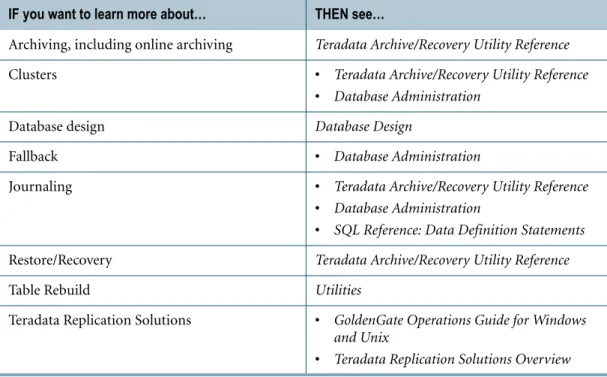
IF you want to learn more about… THEN see…
Archive/Recovery utility Teradata Archive/Recovery Utility Reference
Backup/Archive/Restore (BAR), including Open Teradata Backup (OTB) products
Teradata BAR Solutions Guide
BTEQ Basic Teradata Query Reference
CICS Interface for Teradata IBM CICS Interface for Teradata Reference
CLIv2 • Teradata Call-Level Interface Version 2
Reference for Channel-Attached Systems
• Teradata Call-Level Interface Version 2 Reference for Network-Attached Systems
For More Information
Host utility consoles • Utilities
• Database Administration
IMS Interface for Teradata IBM IMS/DC Interface for Teradata Reference
JDBC Teradata Driver for the JDBC Interface User
Guide
Load and export utilities • Teradata FastExport Reference
• Teradata FastLoad Referencee
• Teradata MultiLoad Reference
• Teradata Parallel Data Pump Reference
ODBC Teradata ODBC Driver User Guide
OLE DB Provider OLE DB Provider for Teradata Installation and
User Guide
SQL SQL Reference: Fundamentals
Teradata Administrator Teradata Administrator User Guide
Teradata Database architecture Database Design
Teradata Data Connector Teradata Tools and Utilities Access Module Reference
Teradata Director Program Teradata Director Program Reference
Teradata Dynamic Workload Manager Teradata Dynamic Workload Manager User Guide
Teradata Index Wizard Teradata Index Wizard User Guide
Teradata Manager • Teradata Manager User Guide
• Teradata Manager Installation Guide
Teradata Meta Data Services • Teradata Meta Data Services Installation and Administration Guide
• Teradata Meta Data Services Programmer Guide
Teradata MultiTool Graphical User Interfaces: Database Window and
Teradata MultiTool
Teradata .NET Data Provider .NET Data Provider for Teradata
Teradata Parallel Transporter, including Teradata Parallel Transport Application Programming Interface
• Teradata Parallel Transporter Application Programming Interface Programmer Guide
• Teradata Parallel Transporter Operator Programmer Guide
• Teradata Parallel Transporter Operator Reference
• Teradata Parallel Transporter Reference
• Teradata Parallel Transporter User Guide
For More Information
Teradata Performance Monitor • Teradata Manager User Guide
• Resource Usage Macros and Tables
• Database Administration
Teradata Preprocessor2 for Embedded SQL • Teradata Preprocessor2 for Embedded SQL Programmer Guide
• SQL Reference: Stored Procedures and Embedded SQL
Teradata Query Director Teradata Query Director User Guide
Teradata Query Scheduler • Teradata Query Scheduler Administrator
Guide
• Teradata Query Scheduler User Guide
Teradata SQL Assistant Teradata SQL Assistant for Microsoft Windows User Guide
Teradata Statistics Wizard Teradata Statistics Wizard User Guide
Teradata System Emulation Tool • Database Design
• Teradata System Emulation Tool User Guide
Teradata Tools and Utilities access modules Teradata Tools and Utilities Access Module Reference
Teradata Visual EXPLAIN Teradata Visual Explain User Guide
Teradata Workload Analyzer Teradata Workload Analyzer User Guide
TS/API products Teradata Transparency Series/ Application
Programming Interface User Guide
CHAPTER 3
Teradata Database Model
This chapter describes the concepts on which relational databases are modeled and discusses some of the objects that are part of a relational database.
Topics include:
• What is a relational model? • What is a relational database? • Tables, rows, and columns
What is a Relational Model?
The relational model for database management is based on concepts derived from the mathematical theory of sets. Roughly speaking, set theory defines a table as a relation. The number of rows is the cardinality of the relation, and the number of columns is the degree. Any manipulation of a table in a relational database has a consistent, predictable outcome, because the mathematical operations on relations are well-defined.
By way of comparison, database management products based on hierarchical, network, or object-oriented architectures are not built on rigorous theoretical foundations. Therefore, the behavior of such products is not as predictable as that of relational products.
The SQL Optimizer in the database uses relational algebra to build the most efficient access path to requested data. The Optimizer can readily adapt to changes in system variables by rebuilding access paths without programmer intervention. This adaptability is necessary because database definitions can change from time to time.
What is a Relational Database?
Users perceive a relational database as a collection of objects, that is, as tables, views, macros, stored procedures, and triggers that are easily manipulated using SQL directly or specifically developed applications.
Set Theory and Relational Database Terminology
Relational databases are a generalization of the mathematics of set theory relations. Thus, the correspondences between set theory and relational databases are not always direct.
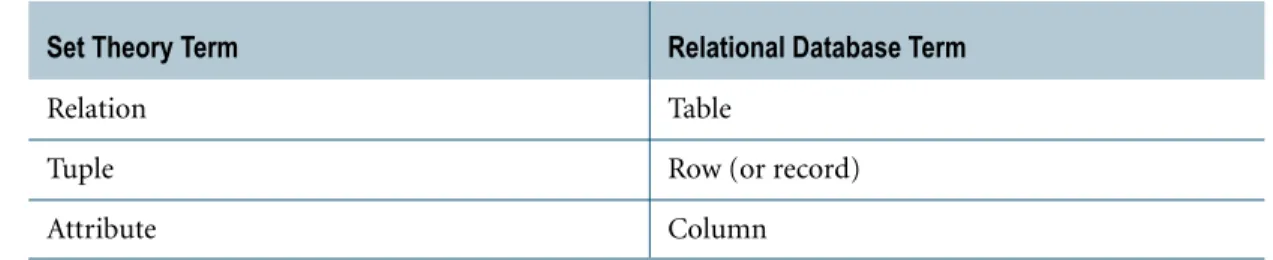
The information in the following table notes the correspondence between set theory and relational database terms.
Tables, Rows, and Columns
Tables, Rows, and Columns
Tables are two-dimensional objects consisting of rows and columns. Data is organized in table format and presented to the users of a relational database. References between tables define the relationships and constraints of data inside the tables themselves.
Table Constraints
You can define conditions that must be met before Teradata Database writes a given value to a column in a table. These conditions are called constraints. Constraints can include value ranges, equality or inequality conditions, and intercolumn dependencies. Teradata Database supports constraints at both the column and table levels.
During table creation and modification, you can specify constraints on single-column values as part of a column definition or on multiple columns using the CREATE and ALTER TABLE statements.
Permanent and Temporary Tables
To manipulate tabular data, you must submit a query in a language that the database
understands. In the case of Teradata Database, the language is SQL. You can store the results of multiple SQL queries in tables. Permanent storage of tables is necessary when different sessions and users must share table contents.
When tables are required for only a single session, you can request that the system create temporary tables. Using this type of table, you can save query results for use in subsequent queries within the same session. Also, you can break down complex queries into smaller queries by storing results in a temporary table for use during the same session. When the session ends, the system automatically drops the temporary table.
Global Temporary Tables
Global temporary tables are tables that exist only for the duration of the SQL session in which they are used. The contents of these tables are private to the session, and the system
automatically drops the table at the end of that session. However, the system saves the global temporary table definition permanently in the Data Dictionary. The saved definition may be shared by multiple users and sessions with each session getting its own instance of the table.
Set Theory Term Relational Database Term
Relation Table
Tuple Row (or record)
For More Information
Volatile Tables
If you need a temporary table for a single use only, you can define a volatile table. The definition of a volatile table resides in memory but does not survive across a system restart. Using volatile tables improves performance even more than using global temporary tables because the system does not store the definitions of volatile tables in the Data Dictionary. Privilege checking is not necessary because only the creator can access the volatile table.
Derived Tables
A special type of temporary table is the derived table. You can specify a derived table in an SQL SELECT statement. A derived table is obtained from one or more other tables as the result of a subquery. The scope of a derived table is only visible to the level of the SELECT statement calling the subquery.
Using derived tables avoids having to use the CREATE and DROP TABLE statements for storing retrieved information and assists in coding more sophisticated, complex queries.
Rows and Columns
A column always contains the same kind of information. For example, a table that has information about employees would have columns for the first name and last name, and nothing other than the employee names should be placed in those columns.
A row is one instance of all the columns in a table. For example, each row in the employee table would contain, among other things, the first name and the last name for that employee. The rows and columns in a table represent entities or relationships.
An entity is a person, place, or thing about which the table contains information. The table mentioned in the previous paragraphs contains information about the employee entity. Each table holds only one kind of row. The relational model requires that each row in a table be uniquely identified. To accomplish this, you define a primary key to identify each row in the table. For more information about primary keys, see “How Are Primary Indexes and Primary Keys Related?” on page 115.
For More Information
For more information on the topics presented in this chapter, see the following Teradata Database books.
If you want to learn more about… THEN see…
Relational model Database Design
Tables, rows, and columns • SQL Reference: Fundamentals
CHAPTER 4
Teradata Database Hardware and
Software Architecture
This chapter briefly describes Teradata Database hardware components and software architecture.
The hardware that supports Teradata Database software is based on Symmetric Multi-Processing (SMP) technology.
The hardware can be combined with a communications network that connects the SMP systems to form Massively Parallel Processing (MPP) systems.
Topics include:
• SMP and MPP platforms • Disk arrays
• Cliques
• Hot standby nodes • Virtual processors • Request processing
• Parallel Database Extensions • Teradata Database file system
• Workstation types and available platforms • Teradata Graphical User Interface
• Teradata General Security Service (TDGSS)
SMP and MPP Platforms
SMP and MPP Platforms
These platforms use virtual processors (vprocs) that run a set of software processes on a node under the Parallel Database Extensions (PDE). For information about PDE, see “Parallel Database Extensions” on page 54.
Vprocs provide the parallel environment that enables Teradata Database to run on SMP and MPP systems. Vprocs come in two types:
• Access Module Processors (AMPs) • Parsing Engines (PEs).
For more detailed information on vprocs see “Virtual Processors” on page 49.
The BYNET
At the most elementary level, you can look at the BYNET as a switched fabric that loosely couples all the SMP nodes in a multinode system. But the BYNET has capabilities that range far beyond those of a simple system bus.
The BYNET possesses high-speed logic that provides bi-directional broadcast, multicast, and point-to-point communication and merge functions.
A multinode system has at least two BYNETs. This creates a fault-tolerant environment and enhances interprocessor communication. Load-balancing software optimizes the
transmission of messages over the BYNETs. If one BYNET should fail, the second can handle the traffic.
Component Description Function
Processor Node A hardware assembly containing several, tightly coupled, central processing units (CPUs) in an SMP configuration. An SMP node is connected to one or more disk arrays with the following installed on the node:
• Teradata Database software • Client interface software • Operating system
• Multiple processors with shared-memory
• Failsafe power provisions An MPP configuration is a
configuration of two or more loosely coupled SMP nodes.
Serves as the hardware platform upon which the database software operates.
BYNET Hardware interprocessor network to
link nodes on an MPP system. Note: Single-node SMP systems use a software-configured virtual BYNET driver to implement BYNET services.
Implements broadcast, multicast, or point-to-point
communication between processors, depending on the situation.
Disk Arrays
Boardless BYNET
Single-node SMP systems use Boardless BYNET (or virtual BYNET) software to simulate the BYNET hardware driver.
Disk Arrays
Teradata Database employs Redundant Array of Independent Disks (RAID) storage technology to provide data protection at the disk level. You use the RAID management software to group disk drives into RAID LUNS (Logical Units) to ensure that data is available in the event of a disk failure. Redundant implies that either data, functions, or components are duplicated in the architecture of the array.
Logical Units
The RAID Manager uses drive groups. A drive group is a set of drives that have been configured into one or more LUNs. Each LUN is uniquely identified.
The operating system recognizes a LUN as a disk and is not aware that it is actually writing to spaces on multiple disk drives. This technique allows RAID technology to provide data availability without affecting the operating system.
The PDE translates LUNs into virtual disks (vdisks) using slices (in MP-RAS) or partitions (in Microsoft Windows or Linux).
Pdisks and Vdisks
A pdisk is the portion of a LUN that is assigned to an AMP. For information about the role that AMPs play in Teradata Database architecture, see “Virtual Processors” on page 49. Each pdisk is uniquely identified and independently addressable.
The group of pdisks assigned to an AMP is collectively identified as a vdisk.
Using vdisks instead of direct connections to physical disk drives permits the use of RAID technology without affecting Teradata Database.
Cliques
The clique is a feature of some MPP systems that physically groups nodes together by multiported access to common disk array units. Inter-node disk array connections are made using FibreChannel (FC) buses.
FC paths enable redundancy to ensure that loss of a processor node or disk controller does not limit data availability.
The nodes do not share data. They only share access to the disk arrays. The following figure illustrates a four-node standard clique.
Hot Standby Nodes
A clique is the mechanism that supports the migration of vprocs under PDE following a node failure. If a node in a clique fails, then vprocs migrate to other nodes in the clique and continue to operate while recovery occurs on their home node. For more detailed information on vprocs see “Virtual Processors” on page 49.
PEs for channel-attached hardware cannot migrate because they are dependent on the hardware that is physically attached to the node to which they are assigned.
PEs for LAN-attached connections do migrate when a node failure occurs, as do all AMPs.
Hot Standby Nodes
The Hot Standby Node feature allows spare nodes to be incorporated into the production environment so that Teradata Database can take advantage of the presence of the spare nodes to improve availability and maintain performance levels.
A hot standby node is a node that: • Is a member of a clique.
• Does not normally participate in the trusted parallel application (TPA). • Can be brought into the TPA to compensate for the loss of a node in the clique. Configuring a hot standby node can eliminate the system-wide performance degradation associated with the loss of a single node in a single clique. When a node fails, the Hot Standby