Chapter 3
Operators and Control Flow
n this chapter, you will learn about operators, control flow statements, and the C#
preprocessor. Operators provide syntax for performing different calculations or
ac-tions appropriate for the operands within the calculation. Control flow statements
provide the means for conditional logic within a program or looping over a section of
code multiple times. After introducing the if control flow statement, the chapter looks
at the concept of Boolean expressions, which are embedded within many control flow
statements. Included is mention of how integers will not cast (even explicitly) to bool
and the advantages of this restriction. The chapter ends with a discussion of the C# pre-processor directives.
mm 3
Operators
Now that you have been introduced to the predefined data types (refer to Chapter 2), you can begin to learn more about how to use these data types in combination with op-erators in order to perform calculations. For example, you can make calculations on var-iables that you have declared.
B E G I N N E R T O P I C
Operators
Operators are used to perform mathematical or logical operations on values (or
vari-ables) called operands to produce a new value, called the result. For example, in
List-ing 3.1 the subtraction operator, -‐, is used to subtract two operands, the numbers 4 and
2. The result of the subtraction is stored in the variable difference.
I
Listing 3.1: A Simple Operator Example int difference = 4 – 2;
***Production, Beginner Topic ends here***
Operators are generally broken down into three categories: unary, binary, and ter-nary, corresponding to the number of operands 1, 2, and 3, respectively. This section co-vers some of the most basic unary and binary operators. Introduction to the ternary op-erator appears later in the chapter.
Plus and Minus Unary Operators (
+
,-‐
)Sometimes you may want to change the sign of a numerical value. In these cases, the
unary minus operator (-‐) comes in handy. For example, Listing 3.2 changes the total
cur-rent U.S. debt to a negative value to indicate that it is an amount owed.
Listing 3.2: Specifying Negative Values1 //National Debt to the Penny decimal debt = -‐15236332233848.35M;
Using the minus operator is equivalent to subtracting the operand from zero.
The unary plus operator (+) rarely2 has any effect on a value. It is a superfluous
addi-tion to the C# language and was included for the sake of symmetry. Arithmetic Binary Operators (
+
,-‐
,*
,/
,%
)Binary operators require two operands. C# uses infix notation for binary operators: The operator appears between the left and right operands. The result of every binary opera-tor other than assignment must be used somehow: for example, by using it as an oper-and in another expression such as an assignment.
1. As of January 12, 2012, according to www.treasurydirect.gov.
2. The unary + operator is defined to take operands of type int, uint, long, ulong, float, double, and decimal
(and nullable versions of those types). Using it on other numeric types such as short will convert its operand to one of these types as appropriate.
Language Contrast: C++̶Operator-Only Statements
In contrast to the rule mentioned above, C++ will allow a single binary expression to form the entirety of a statement, such as 4+5;, to compile. In C#, only call, increment, decrement, and object creation expressions are allowed to be the entirety of a statement.
The subtraction example in Listing 3.3 is an example of a binary operator—more spe-cifically, an arithmetic binary operator. The operands appear on each side of the arith-metic operator and then the calculated value is assigned. The other aritharith-metic binary operators are addition (+), division (/), multiplication (*), and remainder (%)—sometimes called the mod operator.
Listing 3.3: Using Binary Operators class Division
{
static void Main() { int numerator; int denominator; int quotient; int remainder;
System.Console.Write("Enter the numerator: "); numerator = int.Parse(System.Console.ReadLine());
System.Console.Write("Enter the denominator: "); denominator = int.Parse(System.Console.ReadLine());
quotient = numerator / denominator; remainder = numerator % denominator;
System.Console.WriteLine(
"{0} / {1} = {2} with remainder {3}",
numerator, denominator, quotient, remainder); }
}
OUTPUT 3.1 Enter the numerator: 23 Enter the denominator: 3 23 / 3 = 7 with remainder 2
In the highlighted assignment statements above, the division and remainder opera-tions are executed before the assignments. The order in which operators are executed is
determined by their precedence and associativity. The precedence for the operators
used so far is as follows.
***Production, please ensure that the items in the following numbered list are num-bered sequentially, starting with 1.***
1. *, /, and % have highest precedence.
2. + and -‐ have lower precedence.
3. = has the lowest precedence of these six operators.
Therefore, you can assume that the statement behaves as expected, with the division and remainder operators executing before the assignment.
If you forget to assign the result of one of these binary operators, you will receive the compile error shown in Output 3.2.
OUTPUT 3.2
... error CS0201: Only assignment, call, increment, decrement, and new object expressions can be used as a statement
B E G I N N E R T O P I C
Parentheses, Associativity, Precedence, and Evaluation
When an expression contains multiple operators it can be unclear what precisely the
op-erands of each operator are. For example, in the expression x+y*z clearly the expression
x is an operand of the addition and z is an operand of the multiplication. But is y an
op-erand of the addition or the multiplication?
Parentheses allow you to unambiguously associate an operand with its operator. If
you wish y to be a summand, you can write the expression as (x+y)*z; if you want it to
be a multiplicand, you can write x+(y*z).
However, C# does not require you to parenthesize every expression containing more than one operator; instead, the compiler can use associativity and precedence to figure
similar operators are parenthesized; precedence determines how dissimilar operators are parenthesized.
A binary operator may be “left-associative” or “right-associative,” depending on whether the expression “in the middle” belongs to the operator on the left or the right.
For example, a-‐b-‐c is assumed to mean (a-‐b)-‐c, and not a-‐(b-‐c); subtraction is
there-fore said to be “left-associative.” Most operators in C# are left-associative; the assign-ment operators are right-associative.
When the operators are dissimilar, the precedence for those operators is used to
de-termine which side the operand in the middle belongs to. For example, multiplication has higher precedence than addition, and therefore, the expression x+y*z is evaluated as x+(y*z) rather than (x+y)*z.
It is often still a good practice to use parentheses to make the code more readable even when use of parentheses does not change the meaning of the expression. For
ex-ample, when performing a Celsius-to-Fahrenheit temperature conversion,
(c*9.0/5.0)+32.0 is easier to read than c*9.0/5.0+32.0, even though the parentheses are completely unnecessary.
Guidelines
DO use parentheses to make code more readable, particularly if the operator precedence is not clear to the casual reader.
Clearly, operators of higher precedence must execute before adjoining operators of
lower precedence: in x+y*z the multiplication must be executed before the addition
be-cause the result of the multiplication is the left-hand operand of the addition. However, it is important to realize that precedence and associativity affect only the order in which the operators themselves are executed; they do not in any way affect the order in which the operands are evaluated.
Operands are always evaluated left-to-right in C#. In an expression with three
meth-od calls such as A()+B()*C(), first A() is evaluated, then B(), then C(), then the
multipli-cation operator determines the product, and then the addition operator determines the
sum. Just because C() is involved in a multiplication and A() is involved in a
lower-precedence addition does not imply that method invocation C() happens before method
***Production, Beginner Topic ends here***
Language Contrast: C++: Evaluation Order of
Oper-ands
In contrast to the rule mentioned above, the C++ specification allows an implementation broad latitude to decide the evaluation order of oper-‐ ands. When given an expression such as A()+B()*C(), a C++ compiler can choose to evaluate the function calls in any order, just so long as the product is one of the summands. For example, a legal compiler could evaluate B(), then A(), then C(), then the product, and then the sum.
Using the Addition Operator with Strings
Operators can also work with non-numeric operands. For example, it is possible to use the addition operator to concatenate two or more strings, as shown in Listing 3.4.
Listing 3.4: Using Binary Operators with Non-‐Numeric Types class FortyTwo
{
static void Main() {
short windSpeed = 42; System.Console.WriteLine(
"The original Tacoma Bridge in Washington\nwas " + "brought down by a "
+ windSpeed + " mile/hour wind."); }
}
Output 3.3 shows the results of Listing 3.4.
OUTPUT 3.3
The original Tacoma Bridge in Washington was brought down by a 42 mile/hour wind.
should be careful not to use the addition operator with strings that require localization. Composite formatting is preferred (refer to Chapter 1).
Guidelines
DO favor composite formatting over the addition operator for concate-‐ nating strings.
Using Characters in Arithmetic Operations
When introducing the char type in the preceding chapter, we mentioned that even
though it stores characters and not numbers, the char type is an integral type (“integral”
means it is based on an integer). It can participate in arithmetic operations with other
integer types. However, interpretation of the value of the char type is not based on the
character stored within it, but rather on its underlying value. The digit 3, for example,
contains a Unicode value of 0x33 (hexadecimal), which in base 10 is 51. The digit 4, on
the other hand, contains a Unicode value of 0x34, or 52 in base 10. Adding 3 and 4 in
Listing 3.5 results in a hexadecimal value of 0x167, or 103 in base 10, which is equivalent
to the letter g.
Listing 3.5: Using the Plus Operator with the char Data Type int n = '3' + '4';
char c = (char)n;
System.Console.WriteLine(c); // Writes out g.
Output 3.4 shows the results of Listing 3.5.
OUTPUT 3.4 g
You can use this trait of character types to determine how far two characters are from
each other. For example, the letter f is three characters away from the letter c. You can
determine this value by subtracting the letter c from the letter f, as Listing 3.6
Listing 3.6: Determining the Character Difference between Two Characters int distance = 'f' – 'c';
System.Console.WriteLine(distance);
Output 3.5 shows the results of Listing 3.6.
OUTPUT 3.5 3
Special Floating-‐Point Characteristics
The binary floating-point types, float and double, have some special characteristics,
such as the way they handle precision. This section looks at some specific examples, as well as some unique floating-point type characteristics.
A float, with seven decimal digits of precision, can hold the value 1,234,567 and the
value 0.1234567. However, if you add these two floats together, the result will be
rounded to 1234567, because the exact result requires more precision than the seven sig-nificant digits that a float can hold. The error introduced by rounding off to seven dig-its can become large compared to the value computed, especially with repeated calcula-tions. (See also the upcoming Advanced Topic, Unexpected Inequality with Floating-Point Types.)
Note that internally the binary floating-point types actually store a binary fraction, not a decimal fraction. This means that “representation error” inaccuracies can occur with a simple assignment, such as double number = 140.6F. The exact value of 140.6 is the frac-tion 703/5, but the denominator of that fracfrac-tion is not a power of two, and therefore, it cannot be represented exactly by a binary floating-point number. The value actually rep-resented is the closest fraction with a power of two in the denominator that will fit into the 16 bits of a float.
Since the double can hold a more accurate value than the float can store, the C#
compil-er will actually evaluate this expression to double numbcompil-er = 140.600006103516 because
140.600006103516 is the closest binary fraction to 140.6 as a float. This fraction is slight-ly larger than 140.6 when represented as a double.
Guidelines
required; use the decimal floating-‐point type instead.
A D V A N C E D T O P I C
Unexpected Inequality with Floating-Point Types
Because floating-point numbers can be unexpectedly rounded off to nondecimal frac-tions, comparing floating-point values for equality can be quite confusing. Consider List-ing 3.7.
Listing 3.7: Unexpected Inequality Due to Floating-‐Point Inaccuracies decimal decimalNumber = 4.2M; double doubleNumber1 = 0.1F * 42F; double doubleNumber2 = 0.1D * 42D; float floatNumber = 0.1F * 42F; Trace.Assert(decimalNumber != (decimal)doubleNumber1); // Displays: 4.2 != 4.20000006258488 System.Console.WriteLine( "{0} != {1}", decimalNumber, (decimal)doubleNumber1); Trace.Assert((double)decimalNumber != doubleNumber1); // Displays: 4.2 != 4.20000006258488 System.Console.WriteLine( "{0} != {1}", (double)decimalNumber, doubleNumber1); Trace.Assert((float)decimalNumber != floatNumber); // Displays: (float)4.2M != 4.2F System.Console.WriteLine( "(float){0}M != {1}F", (float)decimalNumber, floatNumber); Trace.Assert(doubleNumber1 != (double)floatNumber); // Displays: 4.20000006258488 != 4.20000028610229 System.Console.WriteLine( "{0} != {1}", doubleNumber1, (double)floatNumber); Trace.Assert(doubleNumber1 != doubleNumber2); // Displays: 4.20000006258488 != 4.2 System.Console.WriteLine( "{0} != {1}", doubleNumber1, doubleNumber2); Trace.Assert(floatNumber != doubleNumber2); // Displays: 4.2F != 4.2D
System.Console.WriteLine( "{0}F != {1}D", floatNumber, doubleNumber2); Trace.Assert((double)4.2F != 4.2D); // Display: 4.19999980926514 != 4.2 System.Console.WriteLine( "{0} != {1}", (double)4.2F, 4.2D); Trace.Assert(4.2F != 4.2D); // Display: 4.2F != 4.2D System.Console.WriteLine( "{0}F != {1}D", 4.2F, 4.2D);
Output 3.6 shows the results of Listing 3.7.
OUTPUT 3.6 4.2 != 4.20000006258488 4.2 != 4.20000006258488 (float)4.2M != 4.2F 4.20000006258488 != 4.20000028610229 4.20000006258488 != 4.2 4.2F != 4.2D 4.19999980926514 != 4.2 4.2F != 4.2D
The Assert() methods alert the developer whenever their argument evaluates to
false. However, of all the Assert() calls in this code listing, only half have arguments
that evaluate to true. In spite of the apparent equality of the values in the code listing,
they are in fact not equivalent due to the inaccuracies of a float.
Guidelines
AVOID using equality conditionals with binary floating-‐point types. Either subtract the two values and see if their difference is less than a tolerance, or use the decimal type.
***Production, Advanced Topic ends here***
You should be aware of some additional unique floating-point characteristics as well. For instance, you would expect that dividing an integer by zero would result in an error,
and it does with data types such as int and decimal. The float and double types instead
Out-put 3.7.
Listing 3.8: Dividing a Float by Zero, Displaying NaN float n=0f;
// Displays: NaN
System.Console.WriteLine(n / 0);
OUTPUT 3.7 NaN
In mathematics, certain mathematical operations are undefined, including dividing zero by itself. In C#, the result of dividing the float zero by zero results in a special “Not
a Number” value; all attempts to print the output of such a number will result in NaN.
Similarly, taking the square root of a negative number with System.Math.Sqrt(-‐1) will
result in NaN.
A floating-point number could overflow its bounds as well. For example, the upper
bound of the float type is approximately 3.4 x 1038. Should the number overflow that
bound, the result would be stored as “positive infinity” and the output of printing the
number would be Infinity. Similarly, the lower bound of a float type is –3.4 x 1038, and
computing a value below that bound would result in “negative infinity,” which would
be represented by the string -‐Infinity. Listing 3.9 produces negative and positive
infini-ty, respectively, and Output 3.8 shows the results.
Listing 3.9: Overflowing the Bounds of a float // Displays: -‐Infinity System.Console.WriteLine(-‐1f / 0); // Displays: Infinity System.Console.WriteLine(3.402823E+38f * 2f); OUTPUT 3.8 -‐Infinity Infinity
Further examination of the floating-point number reveals that it can contain a value very close to zero, without actually containing zero. If the value exceeds the lower
threshold for the float or double type, the value of the number can be represented as
positive, and is represented in output as -‐0 or 0.
Compound Assignment Operators (
+=
,-‐=
,*=
,/=
,%=
)Chapter 1 discussed the simple assignment operator, which places the value of the right-hand side of the operator into the variable on the left-right-hand side. Compound assignment operators combine common binary operator calculations with the assignment operator. Take Listing 3.10, for example.
Listing 3.10: Common Increment Calculation int x = 123;
x = x + 2;
In this assignment, first you calculate the value of x + 2 and then you assign the
cal-culated value back to x. Since this type of operation is relatively frequent, an assignment
operator exists to handle both the calculation and the assignment with one operator. The
+= operator increments the variable on the left-hand side of the operator with the value
on the right-hand side of the operator, as shown in Listing 3.11.
Listing 3.11: Using the += Operator int x = 123;
x += 2;
This code, therefore, is equivalent to Listing 3.10.
Numerous other combination assignment operators exist to provide similar function-ality. You can also use the assignment operator with subtraction, multiplication, division and the remainder operators (Listing 3.12 demonstrates).
Listing 3.12: Other Assignment Operator Examples x -‐= 2;
x /= 2; x *= 2; x %= 2;
Increment and Decrement Operators (
++
,-‐-‐
)C# includes special unary operators for incrementing and decrementing counters. The increment operator, ++, increments a variable by one each time it is used. In other words, all of the code lines shown in Listing 3.13 are equivalent.
Listing 3.13: Increment Operator spaceCount = spaceCount + 1; spaceCount += 1;
spaceCount++;
Similarly, you can also decrement a variable by one using the decrement operator,-‐-‐
. Therefore, all of the code lines shown in Listing 3.14 are also equivalent.
Listing 3.14: Decrement Operator lines = lines -‐ 1;
lines -‐= 1; lines-‐-‐;
B E G I N N E R T O P I C
A Decrement Example in a Loop
The increment and decrement operators are especially prevalent in loops, such as the
while loop described later in the chapter. For example, Listing 3.15 uses the decrement
operator in order to iterate backward through each letter in the alphabet.
Listing 3.15: Displaying Each Character’s Unicode Value in Descending Order char current;
int unicodeValue;
// Set the initial value of current. current='z';
do {
// Retrieve the Unicode value of current. unicodeValue = current;
System.Console.Write("{0}={1}\t", current, unicodeValue);
// Proceed to the previous letter in the alphabet; current-‐-‐;
}
while(current>='a');
Output 3.9 shows the results of Listing 3.15.
OUTPUT 3.9
q=113 p=112 o=111 n=110 m=109 l=108 k=107 j=106 i=105 h=104 g=103 f=102 e=101 d=100 c=99 b=98 a=97
The increment and decrement operators are used to control how many times a par-ticular operation is performed. Notice also that in this example, the increment operator
is used on a character (char) data type. You can use increment and decrement operators
on various data types as long as some meaning is assigned to the concept of the “next” or “previous” value for that data type.
***Production, Beginner Topic ends here***
We saw that the assignment operator first computes the value to be assigned, and then causes the assignment. The result of the assignment operator is the value that was assigned. The increment and decrement operators are similar: They compute the value to be assigned, perform the assignment, and result in a value. It is therefore possible to use the assignment operator with the increment or decrement operator, though doing so carelessly can be extremely confusing. See Listing 3.16 and Output 3.10 for an example.
Listing 3.16: Using the Post-‐Increment Operator int count = 123;
int result; result = count++;
System.Console.WriteLine(
"result = {0} and count = {1}", result, count);
OUTPUT 3.10
result = 123 and count = 124
You might be surprised that result was assigned the value that was count before
count was incremented. Where you place the increment or decrement operator deter-mines whether the assigned value should be the value of the operand before or after the
calculation. If you want the value of result to be the value assigned to count, you need
to place the operator before the variable being incremented, as shown in Listing 3.17.
Listing 3.17: Using the Pre-‐Increment Operator int count = 123;
int result; result = ++count;
System.Console.WriteLine(
Output 3.11 shows the results of Listing 3.17.
OUTPUT 3.11
result = 124 and count = 124
In this example, the increment operator appears before the operand, so the result of
the expression is the value assigned to the variable after the increment. If count is 123,
++count will assign 124 to count and produce the result 124. By contrast, the postfix
in-crement operator count++ assigns 124 to count and produces the value that count held
before the increment: 123. Regardless of whether the operator is postfix or prefix, the
variable count will be incremented before the value is produced; the only difference is
which value is produced. The difference between prefix and postfix behavior appears in Listing 3.18. The resultant output is shown in Output 3.12.
Listing 3.18: Comparing the Prefix and Postfix Increment Operators class IncrementExample
{
public static void Main() {
int x = 123;
// Displays 123, 124, 125.
System.Console.WriteLine("{0}, {1}, {2}", x++, x++, x); // x now contains the value 125.
// Displays 126, 127, 128
System.Console.WriteLine("{0}, {1}, {2}", ++x, ++x, x); // x now contains the value 128.
} }
OUTPUT 3.12 123, 124, 125 126, 127, 128
As Listing 3.18 demonstrates, where the increment and decrement operators appear relative to the operand can affect the result produced by the expression. The result of the prefix operators is the value that the variable had before it was incremented or decre-mented. The result of the postfix operators is the value that the variable had after it was incremented or decremented. Use caution when embedding these operators in the mid-dle of a statement. When in doubt as to what will happen, use these operators inde-pendently, placing them within their own statements. This way, the code is also more
readable and there is no mistaking the intention.
Language Contrast: C++̶Implementation-Defined Behavior
Earlier we discussed how in C++, the operands in an expression can be evaluated in any order, whereas in C# they are always evaluated left to right. Similarly, in C++ an implementation may legally perform the side effects of increments and decre-‐ ments in any order. For example, in C++ a call of the form M(x++, x++) where x begins as 1 can legally call M(1,2) or M(2,1) at the whim of the compiler; C# will always call M(1,2) because C# makes two guarantees: first, that the arguments to a call are always computed left to right, and second, that the assignment of the in-‐ cremented value to the variable always happens before the value of the expression is used. C++ makes neither guarantee.
Guidelines
AVOID confusing usages of the increment and decrement operators. DO be cautious when porting code between C, C++, and C# that uses increment and decrement operators; C and C++ implementations need not follow the same rules as C#.
A D V A N C E D T O P I C
Thread-Safe Incrementing and Decrementing
In spite of the brevity of the increment and decrement operators, these operators are not atomic. A thread context switch can occur during the execution of the operator and can cause a race condition. You could use a lock statement to prevent the race condition. However, for simple increments and decrements, a less expensive alternative is to use
the thread-safe Increment() and Decrement() methods from the Sys-‐
per-forming fast thread-safe increments and decrements. See Chapter 19 for more details.
***Production, Advanced Topic ends here***
Constant Expressions and Constant Locals
The preceding chapter discussed literal values, or values embedded directly into the
code. It is possible to combine multiple literal values in a constant expression using
op-erators. By definition, a constant expression is one that the C# compiler can evaluate at compile time (instead of calculating it when the program runs) because it is composed entirely of constant operands. Constant expressions can then be used to initialize con-stant locals, which allow you to give a name to a concon-stant value (similar to the way local variables allow you to give a name to a storage location). For example, the computation of the number of seconds in a day can be a constant expression that is then used in other expressions by name.
The const keyword in Listing 3.19 declares a constant local. Since a constant local is
by definition the opposite of a variable—“constant” means “not able to vary”—any
at-tempt to modify the value later in the code would result in a compile-time error.
Guidelines
DO NOT use a constant for any value that can possibly change over time. The value of pi and the number of protons in an atom of gold are constants; the price of gold, the name of your company, and the version number of your program can change.
Note that the expression assigned to secondsPerWeek is a constant expression because all the operands in the expression are also constants.
Listing 3.19: Declaring a Constant
pickup
Introducing
Flow
Control
number in its binary form. Even such a simple program, however, cannot be written without using control flow statements. Such statements control the execution path of the program. This section discusses how to change the order of statement execution based on conditional checks. Later on, you will learn how to execute statement groups repeat-edly through loop constructs.
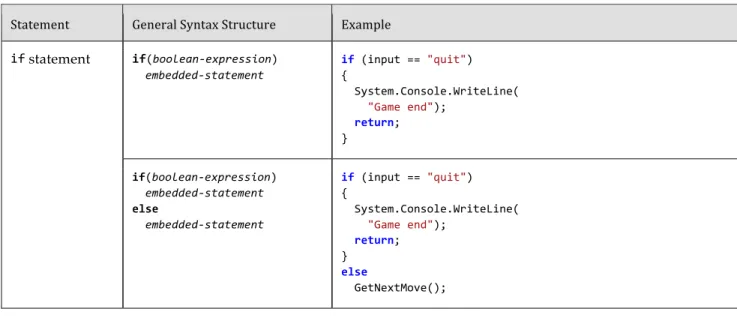
A summary of the control flow statements appears in Table 3.1. Note that the General Syntax Structure column indicates common statement use, not the complete lexical structure.
An embedded-‐statement in Table 3.1 may be any statement other than a labeled state-ment or a declaration, but it is typically a block statestate-ment.
Each C# control flow statement in Table 3.1 appears in the tic-tac-toe3 program and is
available in Appendix B and for download with the rest of the source code listings from the book. The program displays the tic-tac-toe board, prompts each player, and updates with each move.
The remainder of this chapter looks at each statement in more detail. After covering the if statement, it introduces code blocks, scope, Boolean expressions, and bitwise op-erators before continuing with the remaining control flow statements. Readers who find the table familiar because of C#’s similarities to other languages can jump ahead to the section titled C# Preprocessor Directives or skip to the Summary section at the end of the chapter.
Table 3.1: Control Flow Statements
Statement General Syntax Structure Example
if statement if(boolean-‐expression) embedded-‐statement if (input == "quit") { System.Console.WriteLine( "Game end"); return; } if(boolean-‐expression) embedded-‐statement else embedded-‐statement if (input == "quit") { System.Console.WriteLine( "Game end"); return; } else GetNextMove();
while statement while(boolean-‐expression) embedded-‐statement while(count < total) { System.Console.WriteLine( "count = {0}", count); count++; } do while statement do embedded-‐statement while(boolean-‐expression); do { System.Console.WriteLine( "Enter name:"); input = System.Console.ReadLine(); } while(input != "exit");
for statement for(for-‐initializer; boolean-‐expression; for-‐iterator) embedded-‐statement
for (int count = 1; count <= 10; count++) { System.Console.WriteLine( "count = {0}", count); } foreach
statement foreach expression) (type identifier in embedded-‐statement
foreach (char letter in email) { if(!insideDomain) { if (letter == '@') { insideDomain = true; } continue; } System.Console.Write( letter); } continue statement continue;
switch statement switch(governing-‐type-‐ expression) { ... case const-‐expression: statement-‐list jump-‐statement default: statement-‐list jump-‐statement } switch(input) { case "exit": case "quit": System.Console.WriteLine( "Exiting app...."); break; case "restart": Reset();
goto case "start"; case "start": GetMove(); break; default: System.Console.WriteLine( input); break; }
break statement break;
goto statement goto identifier;
goto case const-‐expression;
goto default;
The remainder of this chapter looks at each statement in more detail. After covering the if statement, it introduces code blocks, scope, Boolean expressions, and bitwise operators before continuing with the remaining control flow statements. Readers who find the table familiar because of C#’s similarities to other languages can jump ahead to the section ti-tled C# Preprocessor Directives or skip to the Summary section at the end of the chapter.
if
StatementThe if statement is one of the most common statements in C#. It evaluates a Boolean
expression(an expression that results in either true or false) called the condition. If the
condition is true, the consequence statement is executed. An ifstatement may
option-ally have an elseclause that contains an alternative statement to be executed if the
con-dition is false. The general form is as follows:
if (condition)
consequence-‐statement else
Listing 3.20: if/else Statement Example
class TicTacToe // Declares the TicTacToe class. {
static void Main() // Declares the entry point of the program. {
string input;
// Prompt the user to select a 1-‐ or 2-‐player game. System.Console.Write (
"1 – Play against the computer\n" + "2 – Play against another player.\n" + "Choose:"
);
input = System.Console.ReadLine();
if(input=="1")
// The user selected to play the computer. System.Console.WriteLine(
"Play against computer selected."); else
// Default to 2 players (even if user didn't enter 2). System.Console.WriteLine(
"Play against another player."); }
}
In Listing 3.20, if the user enters 1, the program displays "Play against computer select-‐
ed.". Otherwise, it displays "Play against another player.".
Nested
if
Sometimes code requires multiple if statements. The code in Listing 3.21 first
deter-mines whether the user has chosen to exit by entering a number less than or equal to 0; if not, it checks whether the user knows the maximum number of turns in tic-tac-toe.
Listing 3.21: Nested if Statements class TicTacToeTrivia
{
static void Main() {
int input; // Declare a variable to store the input.
System.Console.Write(
"What is the maximum number " + "of turns in tic-‐tac-‐toe?" + "(Enter 0 to exit.): ");
// int.Parse() converts the ReadLine() // return to an int data type.
input = int.Parse(System.Console.ReadLine());
if (input <= 0)
// Input is less than or equal to 0. System.Console.WriteLine("Exiting..."); else
if (input < 9)
// Input is less than 9. System.Console.WriteLine(
"Tic-‐tac-‐toe has more than {0}" + " maximum turns.", input); else
if(input>9)
// Input is greater than 9. System.Console.WriteLine(
"Tic-‐tac-‐toe has fewer than {0}" + " maximum turns.", input);
else
// Input equals 9. System.Console.WriteLine( "Correct, tic-‐tac-‐toe " + "has a max. of 9 turns."); }
}
Output 3.13 shows the results of Listing 3.21.
OUTPUT 3.13
What is the maximum number of turns in tic-‐tac-‐toe? (Enter 0 to exit.): 9 Correct, tic-‐tac-‐toe has a max. of 9 turns.
Assume the user enters 9 when prompted at line 14. Here is the execution path. 1. Line 16: Check if input is less than 0. Since it is not, jump to line 20. Line 20: Check if input is less than 9. Since it is not, jump to line 26.
Line 26: Check if input is greater than 9. Since it is not, jump to line 33. 1. Line 33: Display that the answer was correct.
Listing 3.21 contains nestedif statements. To clarify the nesting, the lines are
indent-ed. However, as you learned in Chapter 1, whitespace does not affect the execution path. Without indenting and without newlines, the execution would be the same. The code
Listing 3.22: if/else Formatted Sequentially if (input < 0)
System.Console.WriteLine("Exiting..."); else if (input < 9)
System.Console.WriteLine(
"Tic-‐tac-‐toe has more than {0}" + " maximum turns.", input); else if(input < 9)
System.Console.WriteLine(
"Tic-‐tac-‐toe has less than {0}" + " maximum turns.", input); else
System.Console.WriteLine(
"Correct, tic-‐tac-‐toe has a maximum " + " of 9 turns.");
Although the latter format is more common, in each situation use the format that results in the clearest code.
Each if statement listing above omits the use of braces. However, as discussed next,
this is not in accordance with the guidelines, which advocate the use of code blocks except, perhaps, in the simplest of single-line scenarios.
Code
Blocks
(
{}
)
In the previous if statement examples, only one statement follows if and else: a single
System.Console.WriteLine(), similar to Listing 3.23.
Listing 3.23: if Statement with No Code Block if(input < 9)
System.Console.WriteLine("Exiting");
With curly braces, however, we can combine statements into a single statement called a block statement or code block, allowing the grouping of multiple statements into a single statement that is the consequence. Take, for example, the highlighted code block in the radius calculation in Listing 3.24.
Listing 3.24: if Statement Followed by a Code Block class CircleAreaCalculator
{
static void Main() {
double radius; // Declare a variable to store the radius. double area; // Declare a variable to store the area.
System.Console.Write("Enter the radius of the circle: ");
// double.Parse converts the ReadLine() // return to a double.
radius = double.Parse(System.Console.ReadLine());
if(radius>=0) {
// Calculate the area of the circle. area = 3.14*radius*radius;
System.Console.WriteLine(
"The area of the circle is: {0}", area); }
else {
System.Console.WriteLine(
"{0} is not a valid radius.", radius); }
} }
Output 3.14 shows the results of Listing 3.24.
OUTPUT 3.14
Enter the radius of the circle: 3 The area of the circle is: 28.26
In this example, the if statement checks whether the radius is positive. If so, the area of
the circle is calculated and displayed; otherwise, an invalid radius message is displayed.
Notice that in this example, two statements follow the first if. However, these two
statements appear within curly braces. The curly braces combine the statements into a code block, which is itself a single statement.
If you omit the curly braces that create a code block in Listing 3.24, only the statement immediately following the Boolean expression executes conditionally. Subsequent
statements will execute regardless of the if statement’s Boolean expression. The invalid
code is shown in Listing 3.25.
Listing 3.25: Relying on Indentation, Resulting in Invalid Code if(radius>=0)
area = 3.14 * radius *radius; System.Console.WriteLine(
In C#, indentation is for code readability only. The compiler ignores it, and therefore, the previous code is semantically equivalent to Listing 3.26.
Listing 3.26: Semantically Equivalent to Listing 3.25 if(radius>=0)
{
area = 3.14*radius*radius; }
System.Console.WriteLine(
"The area of the circle is: {0}", area);
Programmers should take great care to avoid subtle bugs such as this, perhaps even going so far as to always include a code block after a control flow statement, even if there is only one statement. In fact, the guideline is to avoid omitting braces, except
pos-sibly for the simplest of single-line if statements.
Although unusual, it is possible to have a code block that is not lexically a direct part of a control flow statement. In other words, placing curly braces on their own (without a conditional or loop, for example) is legal syntax.
Guidelines
AVOID omitting braces, except for the simplest of single-‐line if statements.
A D V A N C E D T O P I C
Math Constants
In Listing 3.25 and Listing 3.26, the value of pi as 3.14 was hardcoded—a crude
approx-imation at best. There are much more accurate definitions for pi and E in the Sys-‐
tem.Math class. Instead of hardcoding a value, code should use System.Math.PI and Sys-‐
tem.Math.E.
***Production, Advanced Topic ends here***
Code
Blocks,
Scopes,
and
Declaration
Spaces
inter-changeable. The scope of a named thing is the region of source code in which it is legal to refer to the thing by its unqualified name. The scope of a local variable is exactly the text of the code block that encloses it, which explains why it is common to refer to code blocks as “scopes.”
Scopes are often confused with declaration spaces. A declaration space is a logical
container of named things in which two things may not have the same name. A code block not only defines a scope, it also defines a local variable declaration space; it is ille-gal for two local variable declarations with the same name to appear in the same decla-ration space. Similarly, it is not possible to declare two methods with the signature of Main() within the same class. (Though the rule is relaxed somewhat for methods; two methods may have the same name in a declaration space provided that they have differ-ent signatures.) A code block not only defines a scope, it also defines a local variable dec-laration space. That is to say, within a block a local can be mentioned by name and must be the unique thing that is declared with that name in the block. Outside the declaring block there is no way to refer to a local by its name; the local is said to be “out of scope” outside the block.
In short: A scope is used to determine what thing a name refers to; a declaration space determines when two things declared with the same name conflict with each
oth-er. In Listing 3.27, declaring the local variable message inside the block statement
em-bedded in the if statement restricts its scope to the block statement only; the local is
“out of scope” when its name is used later on in the method. To avoid the error, you must declare the variable outside the if statement.
Listing 3.27: Variables Inaccessible outside Their Scope class Program
{
static void Main(string[] args) {
int playerCount; System.Console.Write(
"Enter the number of players (1 or 2):"); playerCount = int.Parse(System.Console.ReadLine()); if (playerCount != 1 && playerCount != 2)
{
string message =
"You entered an invalid number of players."; }
else {
// ... }
// Error: message is not in scope. System.Console.WriteLine(message); }
}
Output 3.15 shows the results of Listing 3.27.
OUTPUT 3.15 ...
...\Program.cs(18,26): error CS0103: The name 'message' does not exist in the current context
The declaration space throughout which a local’s name must be unique includes all the child code blocks textually enclosed within the block that originally declared the lo-cal. The C# compiler prevents the name of a local variable declared immediately within a method code block (or as a parameter) from being reused within a child code block. In
Listing 3.27, because args and playerCount are declared within the method code block,
they cannot be declared again anywhere within the method.
The name message refers to this local variable throughout the scope of the local
varia-ble: that is, the block immediately enclosing the declaration. Similarly, playerCount
re-fers to the same variable throughout the block containing the declaration, including
within both of the child blocks that are the consequence and alternative of the if
state-ment.
Language Contrast: C++̶Local Variable Scope
In C++, a local variable declared in a block is in scope from the point of the declaration statement through the end of the block; an attempt to refer to the local variable before its declaration will fail to find the local because the local is not in scope. If there is another thing with that name “in scope,” the C++ language will resolve the name to that thing, which might not be what you intended. In C#, the rule is subtly different; a local is in scope throughout the entire block in which it is declared, but it is illegal to refer to the local before its declaration. That is, the attempt to find the local succeeds and the usage is then treated as an error. This is just one of C#’s many rules that attempt to prevent errors common in C++ pro-‐ grams.
Boolean
Expressions
The parenthesized condition of the if statement is a Boolean expression. In Listing 3.28,
the condition is highlighted.
Listing 3.28: Boolean Expression if(input < 9)
{
// Input is less than 9. System.Console.WriteLine(
"Tic-‐tac-‐toe has more than {0}" + " maximum turns.", input); }
// ...
Boolean expressions appear within many control flow statements. Their key
charac-teristic is that they always evaluate to true or false. For input<9 to be allowed as a
Boolean expression, it must result in a bool. The compiler disallows x=42, for example,
because it assigns x and results in the value that was assigned, instead of checking
whether the value of the variable is 42.
Language Contrast: C++̶Mistakenly Using
=
in Place
of
==
C# eliminates a coding error common in C and C++. In C++, Listing 3.29 is allowed.
Listing 3.29: C++, But Not C#, Allows Assignment As a Condition if(input=9) // Allowed in C++, not in C#.
System.Console.WriteLine(
"Correct, tic-‐tac-‐toe has a maximum of 9 turns.");
Although at a glance this appears to check whether input equals 9, Chap-‐ ter 1 showed that = represents the assignment operator, not a check for equality. The return from the assignment operator is the value assigned to the variable—in this case, 9. However, 9 is an int, and as such it does
not qualify as a Boolean expression and is not allowed by the C# compil-‐ er. The C and C++ languages treat integers that are nonzero as true, and integers that are zero as false. C#, by contrast, requires that the condition actually be of a Boolean type; integers are not allowed.
Relational and Equality Operators
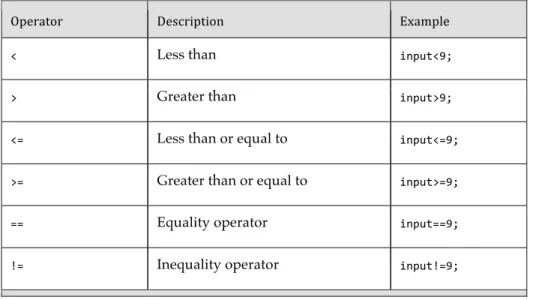
Relational and equality operators determine whether a value is greater than, less than,
or equal to another value. Table 3.2 lists all the relational and equality operators. All are binary operators.
Table 3.2: Relational and Equality Operators
Operator Description Example
< Less than input<9;
> Greater than input>9;
<= Less than or equal to input<=9; >= Greater than or equal to input>=9;
== Equality operator input==9;
!= Inequality operator input!=9;
The C# syntax for equality uses ==, just as many other programming languages do.
For example, to determine whether input equals 9 you use input==9. The equality
opera-tor uses two equal signs to distinguish it from the assignment operaopera-tor, =. The exclama-tion point signifies NOT in C#, so to test for inequality you use the inequality operator, !=.
Relational and equality operators always produce a bool value, as shown in
Listing 3.30: Assigning the Result of a Relational Operator to a bool Variable bool result = 70 > 7;
In the tic-tac-toe program (see Appendix B), you use the equality operator to
deter-mine whether a user has quit. The Boolean expression of Listing 3.31 includes an OR (||)
logical operator, which the next section discusses in detail.
Listing 3.31: Using the Equality Operator in a Boolean Expression if (input == "" || input == "quit")
{
System.Console.WriteLine("Player {0} quit!!", currentPlayer); break;
}
Logical Boolean Operators
The logical operators have Boolean operands and produce a Boolean result. Logical
op-erators allow you to combine multiple Boolean expressions to form more complex
Bool-ean expressions. The logical operators are |, ||, &, &&, and ^, corresponding to OR, AND,
and exclusive OR. The | and & versions of OR and AND are only rarely used for Boolean logic, for reasons which we discuss below.
OR Operator (
||
)In Listing 3.31, if the user enters quit or presses the Enter key without typing in a value,
it is assumed that she wants to exit the program. To enable two ways for the user to
re-sign, you use the logical OR operator, ||.
The || operator evaluates Boolean expressions and results in a true value if either
op-erand is true (see Listing 3.32).
Listing 3.32: Using the OR Operator
if((hourOfTheDay > 23) || (hourOfTheDay < 0))
System.Console.WriteLine("The time you entered is invalid.");
It is not necessary to evaluate both sides of an OR expression because if either
oper-and is true, the result is known to be true regardless of the value of the other operand.
Like all operators in C#, the left operand is evaluated before the right one, so if the left
portion of the expression evaluates to true, the right portion is ignored. In the example
above, if hourOfTheDay has the value 33, (hourOfTheDay > 23) will evaluate to true and
Short-circuiting an expression also occurs with the Boolean AND operator. (Note that the pa-rentheses are not necessary here; the logical operators are of higher precedence than the relational operators. However, it is clearer to the novice reader to parenthesize the subexpressions for clarity.)
*** Please ensure short-circuiting ends up in the index ***
AND Operator (
&&
)The Boolean AND operator, &&, evaluates to true only if both operands evaluate to true.
If either operand is false, the result will be false. Listing 3.33 writes a message if the
given variable is both greater than 10 and less than 24.4 Similarly to the OR operator, the
AND operator will not always evaluate the right side of the expression. If the left
oper-and is determined to be false, the overall result will be false regardless of the value of
the right operand, so the runtime skips evaluating the right operand.
Listing 3.33: Using the AND Operator
if ((10 < hourOfTheDay) && (hourOfTheDay < 24)) System.Console.WriteLine(
"Hi-‐Ho, Hi-‐Ho, it's off to work we go.");
Exclusive OR Operator (
^
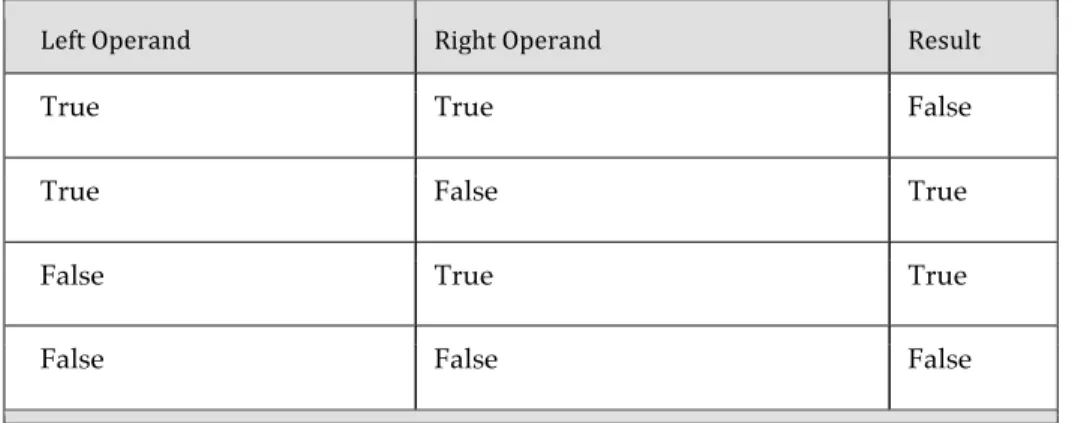
)The caret symbol, ^, is the “exclusive OR” (XOR) operator. When applied to two Boolean
operands, the XOR operator returns true only if exactly one of the operands is true, as
shown in Table 3.3.
Table 3.3: Conditional Values for the XOR Operator
Left Operand Right Operand Result
True True False
True False True
False True True
False False False
Unlike the Boolean AND and Boolean OR operators, the Boolean XOR operator does
not short-circuit: It always checks both operands, because the result cannot be determined unless the values of both operands are known. Note that the XOR operator is exactly the same as the Boolean inequality operator.
Logical Negation Operator (
!
)The logical negation operator, or NOT operator, !, inverts a bool value. This operator is
a unary operator, meaning it requires only one operand. Listing 3.34 demonstrates how it works, and Output 3.16 shows the results.
Listing 3.34: Using the Logical Negation Operator bool valid = false;
bool result = !valid; // Displays "result = True".
System.Console.WriteLine("result = {0}", result);
OUTPUT 3.16 result = True
To begin, valid is set to false. You then use the negation operator on valid and assign
the value to result.
Conditional Operator (
?:
)In place of an if-else statement used to select one of two values, you can use the
condi-tional operator. The conditional operator uses both a question mark and a colon; the general format is as follows:
condition ? consequence : alternative
The conditional operator is a “ternary” operator because it has three operands: con-‐
dition, consequence, and alternative. (As it is the only ternary operator in C#, it is
of-ten called “the ternary operator,” but it is clearer to refer to it by its name than by the number of operands it takes.) Like the logical operators, the conditional operator uses a
form of short-circuiting. If the condition evaluates to true, the conditional operator
evaluates only consequence. If the conditional evaluates to false, it evaluates only al-‐
ternative. The result of the operator is the evaluated expression.
Listing 3.35 is an example of how to use the conditional operator. The full listing of this program appears in Appendix B.
Listing 3.35: Conditional Operator public class TicTacToe {
public static string Main() {
// Initially set the currentPlayer to Player 1; int currentPlayer = 1;
// ...
for (int turn = 1; turn <= 10; turn++) { // ... // Switch players currentPlayer = (currentPlayer == 2) ? 1 : 2; } } }
The program swaps the current player. To do this, it checks whether the current value is
2. This is the conditional portion of the conditional expression. If the result of the
condi-tion is true, the conditional operator results in the “consequence” value 1. Otherwise, it
results in the “alternative” value 2. Unlike an if statement, the result of the conditional
operator must be assigned (or passed as a parameter). It cannot appear as an entire statement on its own.
Guidelines
CONSIDER using an if/else statement instead of an overly complicated conditional expression.
The C# language requires that the consequence and alternative expressions in a con-ditional operator be consistently typed, and that the consistent type be determined
without examination of the surrounding context of the expression. For example, f ?
"abc" : 123 is not a legal conditional expression because the consequence and alterna-tive are a string and a number, neither of which is convertible to the other. Even if you say object result = f ? "abc" : 123; the C# compiler will still flag this expression as