REMOTE DEMONSTRATION OF PACKAGING
Prof. Akram Hossain, Purdue University, Calumet (Tech)Akram Hossain is a professor in the department of Engineering Technology and director of the Center for Packaging Machinery Industry at Purdue University Calumet, Hammond, IN. He worked eight years in industry at various capacities. He is working with Purdue University Calumet for the past 24 years. He consults for industry on process control, packaging machinery system control and related disciplines. He is a senior member of IEEE. He served in IEEE/Industry Application Society for 15 years at vari-ous capacities. He served as chair of manufacturing Systems Development Applications Department of IEEE/IAS. He authored more than 25 refereed journal and conference publications. In 2009 he as PI received NSF-CCLI grant entitled A Mechatronics Curriculum and Packaging Automation Laboratory Facility. In 2010 he as Co-PI received NSF-ATE grant entitled Meeting Workforce Needs for Mechatron-ics Technicians. From 2003 through 2006, he was involved with Argonne National Laboratory, Argonne, IL in developing direct computer control for hydrogen-powered automotive. He is also involved in several direct computer control and wireless process control related research projects. His interests are in the area of industrial transducer, industrial process control, modeling and simulation of Mechatronics devices and systems, wireless controls, statistical process control, computer aided design and fabrication of printed circuit board, programmable logic controllers, programmable logic devices and renewable energy related projects.
Dr. Mohammad A. Zahraee, Purdue University, Calumet (Tech)
Dr. Mohammad A. Zahraee became assistant dean for Graduate Studies at School of Technology in 2010. He holds bachelor’s degree in Mechanical Engineering from Southern Illinois University, an M.S. in Struc-tural Engineering, and a Ph.D. in Engineering Mechanics both from University of Illinois at Chicago. Mo-hammad joined Purdue University Calumet in 1989 and was the chair of the Manufacturing Engineering Technologies and Supervision from 1996 through 2007. He was also acting head of Electrical Engineering Technology from 2000 through December 2006. Zahraee served ABET (Accreditation Board for Engi-neering, Technology, Computing, and Applied Sciences) from 1992 through 2010 as a program evaluator, commissioner (Accreditation Team Chair), as well as the national chair of the Technology accreditation commission of ABET during 2009-2010. A professor of Mechanical Engineering Technology, Moham-mad chairs the Graduate Education Council in the school of technology, advises all incoming graduate students, and approves all graduation audits for MS students. M.S. in technology at Purdue University Calumet has 150 students, the second largest enrollment for such degree.
c
REMOTE DEMONSTRATION OF PACKAGING
MACHINERY & MECHATRONICS SYSTEMS
VIA PUBLIC NETWORK
ABSTRACT
The ability of remotely operating and visually demonstrating a packaging machine is quite attractive to an OEM (Original Equipment Manufacturer). Currently, the customer needs to come to the OEM development site to see the live demo of the packaging machine. Also the ability of remotely debugging and tuning of a packaging machine is quite advantageous for an OEM. We have developed a relatively inexpensive solution to operate a packaging machine remotely from the HMI (Human Machine Interface) panel (local to the machine) and visually seeing the operation of various parts of the machine through a camera vision system (one or more cameras). Similarly, the process of remote debugging, downloading modified version of programs to remotely located Programmable Logic Controllers, HMI unit are the subject matters of the paper. This paper will discuss specifications of software and hardware tools necessary for the solution and step by step operation of each of these tools for the implementation.
INTRODUCTION
The impetus for this research project came when a packaging machinery company engineer was struggling with his work load of attending and servicing machine located at different parts of the county. When a packaging machine ceases to work or is not working properly at a customer site, it is the responsibility of the OEM to attend the problem at its own cost within the warranty period. Although cost of services are paid for by the customer after the warranty period, yet OEM has the obligation to provide the services necessary to put the machine in desired operating mode. Generally, an OEM has many packaging machines located at different parts of the
country. For larger OEM companies their machines could be even located at different parts of the world. Since the breakdowns and malfunction for such machine are quite unpredictable, the OEM may not have sufficient number of experts to travel to different customer sites to take care of the problem. Through this approach an OEM expert can resolve most of the problems without traveling to customer site and can tackle several customers’ problems within a span of a day. Another potential barrier for performing such repairs and tunings are accessing customer
machines through public network because of local firewalls on both sides. Also, for an OEM it is desirable to have an inexpensive solution by utilizing commonly available hardware and
software.
Many papers, short articles, and websites outline how the concept works. However, the
application of such approaches for manufacturing companies that minimizes the cost and saves personnel travel and shipping of large equipment has not been implemented. Also, this design,
unlike the previous ones, does not use a dedicated, distance limited, variable limited, wireless system which uses a continuous communication of the host computer and the distant machinery. This paper successfully demonstrates the applied research performed for a packaging machinery company with a potential to save thousands of dollars annually in travel and shipping. This system can be used by the OEM to demonstrate their products, located at their premises, to their customer at a distant location. Using this system, OEM personnel can access their own
production floor at their premises and operate the main functions of the machine for real time demonstration from any place such as a trade show. This system will also enable the OEM to access their machine located at customer site for debugging and tuning.
The goal of this project was therefore to design a complete system with necessary software and hardware tools that will allow the OEM to access the machine for debugging, tuning, and demonstration purposes under the following constraints:
1) The software should be commonly available and inexpensive.
2) The communication system will work through the public network (high speed internet) and will not be affected by local firewalls.
3) The solution will work with Microsoft Windows based operating systems only.
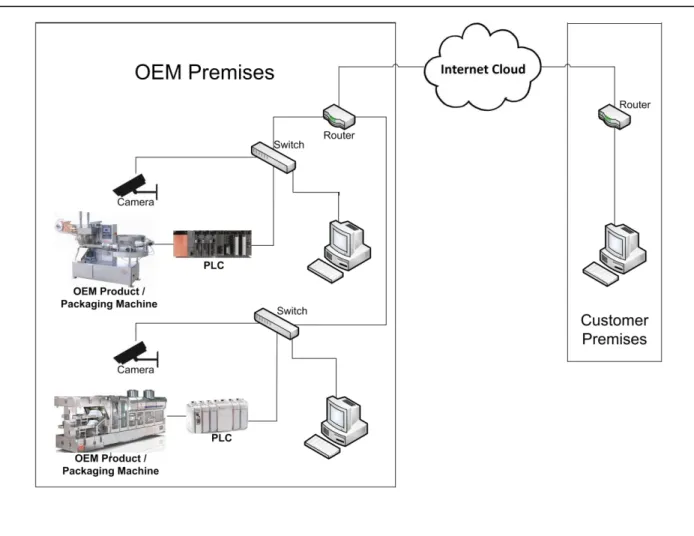
4) The design will also facilitate real time video and audio of the machines being demonstrated. Figure 1 shows the general setup of the communication network that was implemented for this project. This setup is for the case of demonstrating the capabilities of the machine for a prospective customer at an exposition. Furthermore, a scaled down version of the system including a conveyor, servomotors, and camera vision system was built to demonstrate the capabilities of this design.
WHY SUCH SYSTEM IS IMPORTANT FOR PACKAGING MACHINERY MANUFACTURERS
The concept developed in this work saves both time and money for an OEM in several ways. The following are three of many scenarios that the OEM has plans to use the proposed work.
Scenario one: a packaging machine located at a customer site is not functioning properly and requires debugging. In this case packaging machine designers/developers all need to travel to customer site to fix the problem. If two or three such machines are having problems, it becomes more difficult for this set of design/development engineers to go to all three sites and fix the problem. In each of these cases travel time, travel expenses and availability of a particular design/development engineer become limiting factors. Scenario two: ability todemonstrate one or more packaging machines, located at OEM development site, from the exposition site is also quite advantageous. Currently, one or two packaging machines are shipped to the exposition site in knocked down condition and reassembled to make the demonstration. In some situations if a particular machine is under development and cannot be taken to the exposition site, its operation videos are taken and played at the exposition site to prospective customers. Scenario three: An OEM personnel or a salesperson is traveling to a distant location to demonstrate a packaging machine to a prospective customer. The packaging machine is almost completed but located on
OEM premises. The concept could be very useful at this time in demonstrating the machine remotely before inviting the customer to the site.
In each of these above cases the ability of remotely operating, debugging, and demonstrating a packaging machine is desirable and would be cost saving for an OEM developer of packaging machinery.
Figure 1: Proposed Communication Network for Remotely Controlling and Demonstrating Packaging Machinery Systems
HARDWARE TOOLS
Following is the hardware used for setting up the scaled down version:
1) IP Camera – wired or wireless, having both types of network ready unit. Wired unit will be faster than the wireless unit. For the purpose of the demonstration of the packaging machine, the camera unit should be mounted on a fixed stand. The camera unit could also be mounted on a tripod. For our prototype, a Sony SNC-RZ25N IP Camera with 18x optical zoom was used. When buying camera hardware, important features to consider are: network capability,
multiple unit capability, high optical zoom (not just digital zoom capability), high resolution, MPEG4 capability (streaming image over limited bandwidths), JPEG compression, 360º camera movement coupled with PTZ (Pan, Tilt and Zoom) features.
2) Wired or wireless router with gigabit through-port capability, preferably NETGEAR. For our prototype we used a NETGEAR – RangeMax Dual-Band Wireless-N Gigabit Router with 4-Port Gigabit Ethernet Switch, Model WNDR3700.
3) High Resolution Monitor(s), at least 27” Full HD 1080p widescreen LCD Monitor for the host computer. Views in distant computer monitor will depend on the resolution of the host computer monitor. For our prototype we used twoViewsonic Model VA2703 monitors, one for the host computer and one for the distant computer. These computers are used to control the machine.
In addition, a high resolution large (at least 40” to 52”) Full HD 1080p widescreen LED monitor, working as a cloned to the distant computer monitor is needed to show the operation of the machine.
4) Two unmanaged switches. For our prototype NETGEAR ProSafe Plus Switch, 8-Port Gigabit Ethernet – Model: GS108E was used.
SOFTWARE TOOLS
The software used for setting up the prototype are:
1) LogMeIn – Yearly license need to be purchased from https://secure.logmein.com/
2) IP Camera Software Tool – Specific to IP camera acquired for the project.
3) Other Software Tools – Application software tools that will be used to operate the packaging machine must be located in the host computer. If Rockwell Allen-Bradley Programmable Logic Controllers (PLC) and Allen-Bradley PanelView™ Plus 600 Graphic Terminal are used to operate the machine, then the host computer must have the following software tools:
a. FactoryTalk® Tools
b. FactoryTalk® View ME (Machine Edition)
c. FactoryTalk® Studio d. RSLogix 5000 and
e. Other Rockwell software tools necessary for the operation of the machine.
HOW LOGMEIN PROCESS IS DIFFERENT FROM VNC AND VPN VIEWER[1][2][3][4]
In computing, Virtual Network Computing (VNC) is a graphical desktop sharing system that uses the RFB (remote frame buffer) protocol to remotely control another computer. It transmits the keyboard and mouse events from one computer to another, relaying the graphical screen updates back in the other direction, over a network. Popular uses for this technology include remote technical support and accessing files on one's work computer from one's home computer, or vice versa. A very common application of VNC is in remote system administration, where it is used
to allow administrators to take control of employee machines to diagnose and fix problems, or to access and administer server machines without making a trip to the console.
VNC is also widely used in educational contexts, for example to allow a distributed group of students simultaneously to view a computer screen being manipulated by an instructor, or to allow the instructor to take control of the students' computers to provide assistance1. However, the disadvantage of VNC is that it cannot easily go through the local network firewall. Network administrator need to be informed or requires prearrangement to create a hole in the firewall for VNC to work [2][3][4]
A Virtual private network (VPN) is a technology for using the Internet or another intermediate network to connect computers to isolated remote computer networks that would otherwise be inaccessible. A VPN provides varying levels of security so that traffic sent through the VPN connection stays isolated from other computers on the intermediate network, either through the use of a dedicated connection from one "end" of the VPN to the other, or through encryption. VPNs can connect individual users to a remote network or connect multiple networks together. For example, users may use a VPN to connect to their work computer terminal from home and access their email, files, images, etc.
Through VPNs, users are able to access resources on remote networks, such as files, printers, databases, or internal websites. VPN remote users get the impression of being directly connected to the central network via a point-to-point link. However, problem with VPN is that it also requires permission from the network administrator.
On the other hand, LogMeIn remote access products use a proprietary remote desktop protocol that is transmitted via SSL (Secure Sockets Layer, a protocol for encrypting information over the Internet). An SSL certificate is created for each remote desktop and is used to cryptographically secure communications between the remote desktop and the accessing computer.
Users access remote desktops using either the LogMeIn Ignition stand-alone application or a web portal (A web portal is a web site that brings information from diverse sources in a unified way). The web portal requires either an ActiveX plugin for Internet Explorer, or an extension for Firefox (the LogMeIn plug-in for Firefox), or an extension for Safari (the LogMeIn plug-in for Safari), failing that it falls back to requiring Java in order to run a Java program, and failing that it falls back to "a screen-shot-based HTML remote control". The web portal also provides status information for the remote computers and, optionally, remote computer management functions.
Note 1:LogMeIn Ignition – software for facilitating access to computers running LogMeIn host software from Windows, iOS, or Android devices
Note 2: A web portal is a web site that brings information from diverse sources in a unified way). The service connects the remote desktop and the local computer using SSL over TCP
(Transmission Control Protocol) or UDP (User Datagram Protocol) and utilizes NAT traversal techniques to achieve peer-to-peer connectivity when available.
Thus using LogMeIn for accessing the remote computer, it requires no permission for the network administrator. However, remote computer that is being accessed must have licensed version of the LogMeIn software tool installed.
There are public-network-independent wireless systems available for remotely operating and controlling machinery systems. However, they are limited in power and/or distance.[2][5]
PROCEDURE TO INSTALL AND OPERATE SOFTWARE TOOLS
1) Install the software tools in the host computer. The host computer is the computer that will be accessed from other distant computers, iPads, or IPhones. One can access the host computer having LogMeIn Pro software tool through a public network from any computer, iPad, or iPhone located anywhere in the world.
2) Packaging machines that need to be demonstrated or accessed for tuning or debugging must be connected to the host computer either directly or through a wired network. Programmable Logic Controller (PLC), Human Machine Interface (HMI) and any other networkable
hardware tools controlling the machine should also be on the same network as the packaging machine.
3) IP Camera software tool must be installed in the host computer.
4) IP Camera needs to be connected to the host computer through a wired network. Wireless connection will but data transfer rate could be significantly less.
STEPS NEEDED TO DEMONSTRATE PACKAGING MACHINERY SYSTEM Steps to Login to the Host Computer
a) Go to www.LogMeIn.com website and log-in to the account that was created earlier. Use your credential for the LogMeIn account.
b) After log-in, the Host Computer or list of host computers will appear. You may add or subtract computers depending on the number of licenses acquired.
c) Log-in to the desired host computer to which the packaging machine is connected. This log-in will require a username and password credentials necessary to get in to the host computer. This is the exact same credential that one uses locally to get to the host computer. The credentials are for the host computer to log-in to the local area network.
d) Once log-in on to the host computer is complete, all software tools located in the host computer will be available for operation and execution from the remote computer. Files can then be transferred between the host and the distant computer using file transfer utilities located under LoMeIn software tools..
e) HMI unit, Programmable Logic Controller (PLC), and the host computer can be operated from the remote computer or iPad. However, both iPad and the remote computer cannot access the host computer machine simultaneously. When an iPad is used to load the HMI screen, the iPad works like a remote control unit having an HMI screen displayed on it. An HMI unit is generally mounted on a fixed stand on the other hand an iPad can be carried around.
Steps to Operate HMI Unit from the Distant Computer or iPad
a) Invoke Allen-Bradley FactoryTalk® View ME Edition software tool located at the host computer from the distant computer.
b) Click on “Load Application” button on the dialog box.
c) When prompted, locate filename.mer file (.mer file is the machine edition HMI file that runs just like HMI unit but from the computer terminal) and click on file name and wait to see the file name to appear in the “Current application” dialogue box as shown in the following screen shot.
d) As the filename.mer appear in the “Current application” box, click on “Run Application” button. At this point the HMI screen will appear on the host computer terminal and in turn, is available to be operated from the distance computer or IPad.
e) At this point the HMI associated with the “mer” file just loaded will appear on the remote computer terminal. The following diagram shows an example of an HMI screen seen on the distant computer terminal, on an iPad, or an iPhone screen. Picture on the left is the main page of the HMI screen and the picture on the right is the HMI page that appears when “GO TO POWERFLEX 4 MONITOR” button is pressed.
f) This HMI screen and all the buttons on it will work like the HMI unit used to operate the packaging machine.
g) To load the HMI screen on to an iPad or an iPhone and use the iPad or iPhone as a remote control device to operate the machine (just as they are usually initiated from the HMI Screen), one needs to remember the following points: For this process to work the camera software tools window and the Allen-Bradley Factory Talk View ME Station tool window both must work in Window mode and must not be minimized at the bottom. On the iPad or iPhone, the HMI screen is zoomed in and in the big screen monitor the camera vision is
zoomed in. Thus the big screen monitor will display the camera views, The iPad or iPhone will only display the HMI screen and the iPad will work like a remote control unit for operation. For the above feature to work one must remember that two computer would be necessary. One will be used to access the camera software the view could be viewed on a large screen extended monitor and the second host computer could be used to access the HMI unit by an iPad.
Steps to Log in to Camera Control Tools
Camera software tool located in the host computer could be accessed to control the camera from a remote computer, an iPhone or an iPad.
The user first needs to log into LogMeIn account in www.LogMeIn.com server then to the host computer that has camera control software tool. The following are a few screen shots for how to login and what will be seen along the process.
After login to camera control tool in the host computer, a screen showing the IP address of the camera will appear. This screen shows the camera IP address because camera is also within the same local area network as the host. Double clicking on the MAC Address ( Media Access Control address) and IP Address will bring up a new screen with the camera name(s). The user then is able to select the camera of his choice. The following screen shows the actual view of the Mechatronics Laboratory where all the equipment and host computer are located for the prototype setup.
The camera control located on the left of the screen can be used to zoom on to any equipment or object in the laboratory. We zoomed on to two servomotor located on the far table. The camera has PTZ (Pan-Tilt-Zoom) features. The following screen shows zoomed view of the two servomotors.
The following two screen shots shows Rockwell RSLogix 5000 software tools and ladder program that controls these two servomotors that is located in CompactLogix® PLC memory.
The following screen shot shows the cam instruction (MAPC, Motion Axis Position Cam) and cam profile being is accessed and modified from the remote computer terminal.
CONCLUSION
A system was proposed and designed for an OEM of packaging machinery to help them for remote product demonstration, debugging, and tuning of heavy packaging machinery system. The proposed set up uses software tools that are commonly available and inexpensive. The communication system works through the public network (high speed internet, wired or wireless) and will not be affected by local firewalls. The solution works with Microsoft Windows based operating systems only. The design also facilitates real-time video and audio of the machines being demonstrated.
The advantage is that while controlling the host machine, there is no intrusion to the operation of the machine. The machine operation, although controlled from distance, is not affected by the distance since everything done is local to the machine, except the single command transfers (such as “Run”, “Stop”, etc.) There is also no need for any extra expensive device (such as sensors) to be added to the machinery. The solution has a potential to save thousands of dollars for the manufacturer in travel costs, and travel time by the OEM personnel, or shipping of extra machinery to trade shows.
REFERENCES
[1] Virtual_Network_Computing (VNC), Virtual_private_network (VPN) Wikipedia, the free encyclopedia, and LogMeIn,
http://en.wikipedia.org/wiki/Virtual_Network_Computing http://en.wikipedia.org/wiki/Virtual_private_network http://en.wikipedia.org/wiki/LogMeIn
[2] Hossain, Akram, Fathizadeh, Masoud, A Reliable Wireless Link Coupled with Computer Based Virtual Instrumentation for Control Applications, ASEE Annual Conference, Honolulu, HI, June 24, 2007.
[3] Latif, Niaz, Akram Hossain, A New Breed of Interactive and Distributed Classroom Environments for Freshman and Sophomore Technology Coursers, ASEE Annual Conference, Austin, TX, July 2009
[4] Hossain, Akram, Niaz Latif, Synchronous Delivery of Engineering Technology Courses to a Remote Location issues and challenges related to Technology and students’ learning, ASEE Annual Conference, Pittsburgh, PA, June 24, 2008.
[5] Hossain, Akram, Vijay Mahajan, Remotely Reconfigurable, Secure Wireless Mesh Network for Bidirectional Data Communication, ASEE Annual Conference, Austin, TX, July 2009