OpenText Web Experience
Management
Technical White Paper
Product Management
April 2011
Abstract
This white paper talks about the OpenText Web Experience Management product. It offers a detailed presentation of the content management and the presentation management capabilities along with an overview of the product architecture.
Contents
Executive Summary ... 4
Content Repository Services ... 5
Content repository: physical layer ... 5
Content repository: logical layer ... 6
User Interfaces ... 13
Content workspaces... 13
Preview environment ... 14
Content editing ... 16
Inline editing ... 20
Rich text editing... 23
Content selection ... 25
Shared productivity tools ... 26
Search and advanced search ... 29
Management console ... 30
Content Management Services ... 31
Site management ... 31
Rich media management ... 32
Internationalization management ... 35 Library services ... 37 Content security ... 38 Workflow management ... 39 Content analytics... 41 Content auditing ... 43
Web and social analytics ... 44
Presentation Management Services ... 47
Dynamic delivery model ... 47
Page templating ... 47
Page assembly model ... 48
Page design model ... 51
Smart lists ... 52
Navigation management ... 54
Portal-based delivery model ... 55
Personalization... 58
Content targeting ... 58
Content recommendations ... 59
Search engine optimization ... 59
Integration with social content ... 60
Site search ... 61
High performance caching ... 62
Content Staging Services ... 64
Content publishing (logical) ... 64
Content deployment (physical) ... 66
Product Architecture ... 68 J2EE application ... 68 Supported platforms ... 68 Configuration management ... 68 Extensibility ... 69 Java APIs ... 70
Web APIs (RESTful)... 70
Executive Summary
As organizations’ web strategies evolve, their content management systems must keep pace. A scalable web strategy requires tools that meet the demands of the fast-changing web experience, supplying rich features and supporting the complexity of robust websites while remaining easy to use and allowing for rapid content creation, management, and publishing by line of business owners.
With that in mind, and with more than 16 years of experience in managing mission critical web initiatives, OpenText Web Experience Management enables large organizations to easily deliver the freshest and most relevant content to end-users while improving online experience and performance and optimizing the online channel for marketing purposes. Web Experience Management is an enterprise-grade content management solution, designed from the ground up to serve the requirements of demanding organizations. Web Experience Management combines:
A large set of features for creating engaging online experiences, combining
structured content, rich media content, user-generated content, and business content
An out-of-the-box approach to web content lifecycle management, all managed
from a best-of-breed, web-based application
A native dynamic delivery model, a must have for highly personalized experiences with targeted content that is always up to date
A flexible approach to a content repository that enables organizations to leverage
existing content and data by putting it under management
A robust set of content staging mechanisms to deliver the content to various applications and web initiatives
A standards-based J2EE architecture to fit in the most demanding IT organization
Content Repository Services
Content repository: physical layer
At the heart of any content management system are the methods used to store content in a repository. OpenText’s approach has always been to give complete freedom to its customers in the way they structure their repositories.
At the root of this assumption lies the fact that in many cases, the content to be put under management already exists somewhere within the information system, most frequently in the form of database records and files, and that the most efficient approach is to put this content under management wherever it lives, rather than forcing a migration into a proprietary repository.
The next assumption is that for creating dynamic and engaging web experiences, content is better stored in a relational format. As a result, Web Experience Management natively enables customers to implement management for existing data found in arbitrary
databases or file systems all within a single instance of the product.
As we will see later in this document, these assumptions are also applicable to the delivery side when content is retrieved and presented within online experiences. This approach ensures that content is kept in a standard format over time, that can be accessed either inside or outside the realm of the OpenText content management application.
This respect of standards is also instrumental in Web Experience Management’s ability
to provide high-end scalability by using standard database or application server features in this area (e.g., table indexes for performance or application server clustering for high availability)
Figure 1: Repository overview
Content repository: logical layer
In order to organize the content management process, Web Experience Management provides a number of out-of-the-box object types on top of its physical repository. The primary object types exposed to business users are:
Site: A logical container for content instances and channels representing a site structure, and ultimately the online ―endpoint‖ for the published content (most frequently a website)
Channel: A logical node in a site structure to which content items can be
associated, and ultimately a page accessible from the site navigation tree
Content type: A logical definition for a piece of structured content that ultimately
results in a form editable by business users for creating or editing content Web Experience Management includes a number of out-of–the-box
content types to serve common content management and presentation management requirements (e.g., images, videos, pages, regions, components, themes, and more)
Content instance: An individual piece of content created from a given content
Static file: An individual file uploaded and managed as such by the content management system
All file formats are supported, though some formats such as images and videos come with extra features such as metadata extraction
Category: A logical node in a global classification that can be assigned to
content items, ultimately used to drive personalization rules or web analytics reports
Each of the object types above are defined by a variable number of attributes (e.g., name and description are default attributes for each object), and can be configured by the customer if needed.
Instances of the object types above are called ―managed objects‖, which obey a number
of common rules and properties when it comes to the content lifecycle and the security model (e.g., logical placement in the repository, approval and publishing rules)
From a class hierarchy standpoint, these object instances can be represented as follows:
Figure 2: Base object types class diagram
Primarily, the ―content‖ hierarchy, the place where all content items are
organized into a set of folders and subfolders
Also known as ―projects‖ in previous versions
Secondarily, the ―site‖ hierarchy, a place where all content items are associated
to a set of channels and sub channels representing the site navigation structure and the elements associated to each page on the site
Finally, the ―classification‖, or tree of categories, to which content items are
associated and whose primary intent is to provide a content taxonomy independent from the folder and channel hierarchy
We will see later in this document that each one of the hierarchies below is accessible via a dedicated ―management workspace‖, the content workspace, the site workspace, and the category workspace, respectively.
Content type modeling
The golden rule of content management is to maintain complete separation between
the content and its presentation. This rule is core to content repurposing strategies and
multi-channel capabilities, so that the same piece of content can be rendered in multiple formats and on differing devices.
Web Experience Management strictly complies with this rule by formalizing a concept of
business content type, providing content editing and management capabilities outside
of any ―presentation‖ context.
One of the key steps in a project consists of modeling these content types. Customers configure content types mapped to their own business objects, from ―articles‖ to ―products‖, from ―documents‖ to ―media assets‖. This operation is generally done by business analysts through an interface named the ―Content Type Modeler‖ (CTM), and
may require the assistance of a database administrator to expose or to configure the underlying database schema.
Within the CTM, a business analyst can select in which database schema(s) the content will be stored, and which attributes need to be exposed to the content contributors, also selecting the associated user interface controls, validation, and presentation rules for each attribute.
Web Experience Management enables:
Unlimited number of content types per product instance Unlimited number of attributes per content type
Mapping to simple and complex database structures (from one to many tables, related by one to many and/or many to many relationships)
Unlimited number of content relationships in between any arbitrary piece of content, a very important concept due to its later use by the approval and publishing process
This modeling operation happens without any coding required.
Figure 3: Content type modeler
Each content type has a number of global properties, such as: A unique XML name for the content type
A unique XML name for each attribute, along with a ―Bean‖ name when instances are exposed as JavaBeans in a dynamic delivery environment supporting J2EE scripting technologies
A Java™ class which can override the default ―content instance‖ class for
specialized behaviour, for instance, overriding some of the base methods such as the ―commit‖ one to add custom application logic
A set of icons for quick identification of content instances from this type in the content workspaces
A set of default workflows to trigger when instances get created or updated A set of dynamically generated capabilities to secure the read, write, and delete
operations, for instance, of this specific type
At the end of the day, the content type is automatically turned into a web form for content editing and content instances are dynamically exposed as JavaBeans for usage within presentation assets and templates.
System metadata
Each instance of any of the object types listed above is named a ―managed object‖. All managed objects share a number of common metadata:
A Global Unique IDentifier (GUID)
Some security-related information (access control list) The creation date and the creator
The modification date and the modifier Its path within the content hierarchy Its approval status
Its publishing status (can be multi-valued if published to multiple ―stages‖ as described later in this document)
The scheduled publish and scheduled unpublish dates The ―last published‖ and ―last unpublished‖ dates
Content items that are content instances and files share an additional set of common metadata:
A list of site and channel associations, used to drive the publishing process and the site navigation
A list of categories, used to drive personalization rules and web analytics reports A list of dependencies presented in the form of:
Other items referring to the current one All the items referred by the current one
A workflow history, with all ongoing and completed processes for the current item The locking status, to prevent concurrent editing of the current item
A list of ―vanity URLs‖, a set of individually created, friendly URLS for the current item used later as URLs to landing pages
Figure 4: System metadata, publishing dates
Customer metadata
As discussed above, content types are mapped to a set of database tables. Each column in these tables automatically becomes a ―data source attribute‖ for the associated
content instances. All the main database data types, including BLOBs and CLOBs, are supported by Web Experience Management.
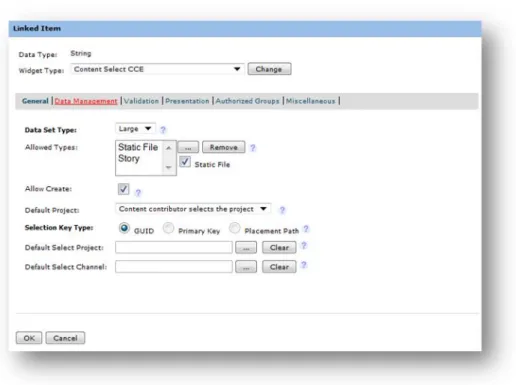
In order to control the values these database columns can accept, a business analyst can pick from a large list of user interface ―widgets‖ within the content type modeler. The
widgets can be grouped in three main categories: Widgets to directly input some content:
Date, text, text area, rich text, data select
Widgets to reference another piece of content (for instance, an article with a reference to a thumbnail image)
File, content select, channel select
Widgets to define a nested structure within the content type (for instance, an article made of multiple pages or an article with multiple links)
Data relator, content relator
Figure 5: Sample widget configuration
Each widget also supports a number of widget configuration variables. The following bullet points contain a number of common examples:
Data select and data multi-select widgets:
SQL statement and J2EE data source to automatically populate the fields with the list of options
Content select widget:
List of supported content types and default selection folders for the selection (e.g., just images to be picked from the /Images folder) Rich text:
Reference to a CSS style sheet to be used for restricting the list of styles available in the rich text editor
Option for end-users to add inline links to pages, content items, or channels within the rich text
Option for end-users to add inline media items (images and videos) within the rich text
User Interfaces
Content workspaces
Web Experience Management provides an out-of-the-box ―content management
application‖, exposing all the concepts commonly referred to as the ―content
workspaces‖.
The content workspaces are implemented as a cutting-edge web application entirely
built on AJAX technology, contributing to a fast and enjoyable content editing
experience without the need for full page refreshes (similar to the technology introduced by Gmail™ for web-based applications) or pop-up windows.
Designed with years of experience in organizing and managing web content in an enterprise context at their foundation, Web Experience Management includes six workspaces for content managers. These workspaces support a ―content-centric‖
approach to content management where content is created, managed, and published independently from any presentation information, which is beneficial for organizations with a large volume of content for which a ―page-centric‖ approach isn’t possible. The six workspaces are:
Site workspace: For managing content and channel navigation for a site
Type workspace: For managing content by type via support for advanced filtering capabilities (e.g., all articles with the French locale)
Folder workspace: For managing content and the folder hierarchy in the main repository
Categories workspace: For managing content by category
Task workspace: For accessing all assigned tasks in the running workflows Presentation workspace: For managing all the presentation assets leveraged to
assemble pages on your websites
Each of these workspaces is organized in a unified manner, with a left hand side tree view and a grid presenting the content for the currently selected node with a ribbon at the top to access some productivity tools.
Figure 6: Site workspace
The grid component is highly configurable, allowing users to sort, filter, and order the content presented in the lists as desired. It presents all the operations possible in the current context, such as move, copy, and delete within the folder workspace.
Figure 7: Dynamic filtering within a content grid
Search features are available across all workspaces, providing contextual results. For instance, searching within a site workspace will automatically scope the search results to the site you are currently working with. Search is available both in simple and
advanced/parametric form.
Preview environment
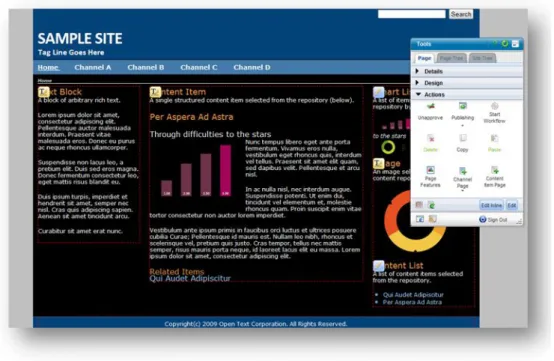
The preview environment presents the exact image of the final production site, with all the content currently under management in place so that business users can ―see‖ exactly how the content will look like once approved and published. It offers a ―page-centric‖ model for managing content and websites.
The preview environment can be accessed both directly and indirectly from the
associated site workspace for the customers relying on OpenText Semantic Navigation
when it comes to presentation management.
Figure 8: Preview environment, in-context editing tools
For content contributors, the preview environment is the primary place for ―in-context”
and “inline” editing, that is adding, updating, or removing content directly from the
pages being previewed. The preview environment is also enabled with all the actions required to approve and publish pages, eliminating the need to switch back to the content workspaces.
For presentation managers, the preview environment is the primary place for configuring the various page templates used by content contributors to create pages. It is also the place where they can visually apply layouts and themes to individual pages or page templates.
The preview environment is equipped with management tools designed not to interfere with the underlying page’s design, by using innovative overlaytechniques compatible with most web designs. These controls can be completely hidden or minimized for a realistic preview experience. There are two main sets of controls in this environment:
A floating menu that presents details on the current object (including approval publish and workflow status), with various design options including themes,
templates, or layouts selection, and a set of page level actions such as approval, publishing, or page creation
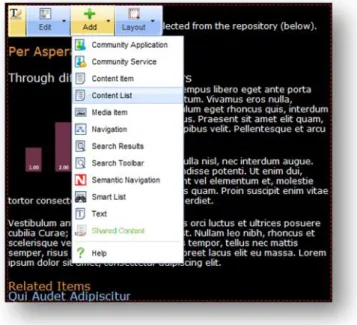
A set of ―region‖ menus for individually adding or editing content and components within regions prepared for this purpose via the associated page template
Figure 9: Preview environment, region menu
Content editing
While browsing and searching features are critical for identifying the set of content to work with, providing content managers with a great experience when it comes to editing the content itself is a ―must have‖ for any enterprise web content management solution. Entirely built on innovative AJAX technologies, the Web Experience Management
―content editor‖ provides fast and efficient ways for editing. This content editor is
accessible both from the content workspaces and from the preview environment as an overlay window on top of the current page.
Special attention has been given to presenting content management operations such as editing, saving, or closing in the same fashion as they are within popular desktop applications such as Microsoft® Office (e.g., ―Save‖, ―Save and Close‖, or selecting a folder when saving a content item for the first time).
Figure 10: Content editor
The content editor is organized in two areas:
1. A primary area made of multiple tabs distributing the fields that can be edited into logical groups,
2. A secondary area for the system properties, such as channel associations and versions, presented in a palette that can be:
Floating or docked at the top of the editor Used in parallel of the main content editing task
Figure 11: Property panel within the content editor (docked)
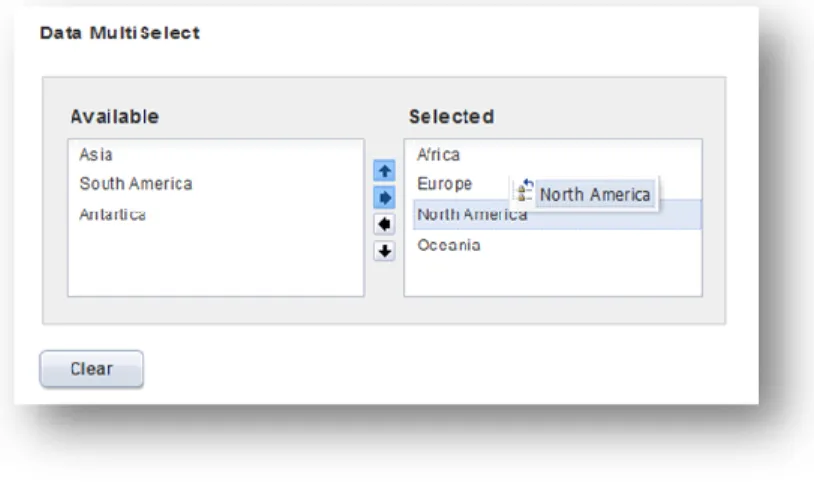
Each field can be edited via a set of user interface widgets. The user will quickly find familiar tools like date pickers and type-ahead features within lists. For fields that support multiple values or values that can be ordered, a drag-and-drop mode is supported.
Figure 12:Content editor widget with drag-and-drop support
Each field comes with configurable text for inline help and tooltips. Also special attention has been provided to validation rules, which are exposed inline within the editor to save time for editors when validation fails (e.g., for required fields).
Figure 13: Content editor inline validation rules
When it comes to editing complex structures, such as content types with nested values (e.g., an article with multiple pages, each page with multiple paragraphs), the content editor provides a drill-down interface with a breadcrumb trail always available to identify the level being currently edited. All of these operations may be performed inline, without a single pop-up window or page refresh.
Figure 14: Editing of nested content structures
Inline editing
Web Experience Management also supports the ability to edit content directly within the preview environment, a mode known as ―inline editing‖. This mode is especially adapted to users with limited knowledge of the product who need to be able to make quick changes and reviews.
The inline editing mode can be enabled from any page from the preview environment, either by double-clicking on the area to edit or by switching to the global editing mode for the current page.
Figure 15: Switching to inline editing mode
The inline editing mode can be used for editing text, rich text, and image content. When editing text and rich text, the formatting options are available as per the associated theme for the current page, in order to control the overall CSS structure for the page.
Figure 16: Inline editing for text and rich text
When used for an image, the inline editing mode lets end-users either: Apply effects to images (resizing, cropping)
Select a different image Upload a new image
Figure 17: Inline editing for images
The inline editing mode can be used for updating multiple content items displayed on a single page in just one operation.
Rich text editing
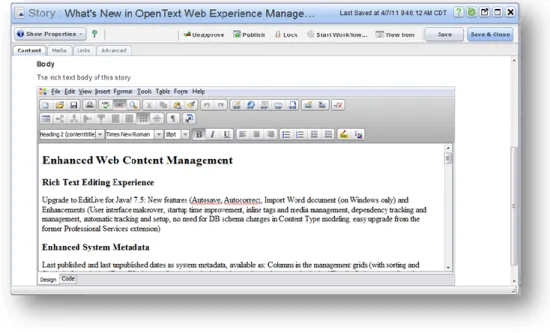
As part of the content type modeling operations, some attributes can be marked as supporting rich text editing. The resulting fields within the content editor will provide content contributors with a rich text editing environment supporting similar capabilities as Microsoft Word, including the ability to receive content from Office applications with automatic HTML clean-up.
The use of formatted content in a content management application is often questioned and debated, as the number one rule of content management is to separate content from presentation; however, should customers decide to do so, Web Experience Management provides a simple way of keeping this content under control. As an example, the editor can be configured for enforcing a predefined list of CSS styles.
The Web Experience Management rich text editor supports all major browsers. It can also be used in full screen mode. Other popular features are the spellchecker, the
accessibility report that provides an assessment of WAI compliance for the fragment of text being edited, and the ability to import content directly from Microsoft Word.
Figure 18: Rich text editing
The rich text editor is configurable in a number of ways and supports the insertion of logical links to other content items in the repository, including images and video files.
Once these items are referenced within the rich text, the system automatically tracks this dependency in order to avoid any broken link on your website.
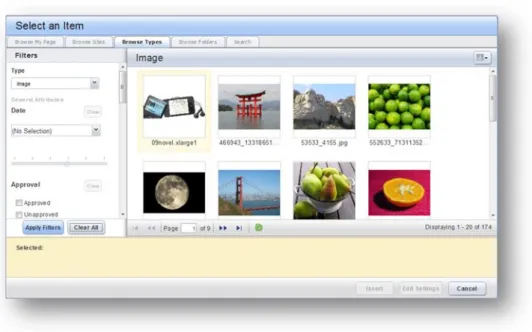
Specialized icons and menus options are available for inserting: Links to pages, channels, and content items
Inline media items such as images or videos
Figure 19: Selecting an image to insert in the rich text area
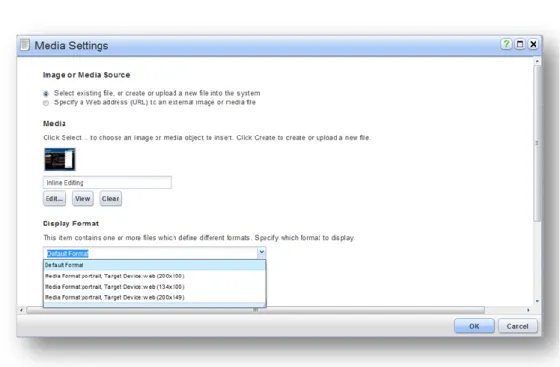
Each of the linked items has associated properties, such as the ALT text or the desired format for images and videos.
Figure 20: Defining the properties for an image within a rich text area
Content selection
Because the web is network of interrelated pieces of information, a content
management solution must be good at creating references between content items and provide end-users with quick ways of finding and selecting items.
There are a large number of places within Web Experience Management where selecting content is possible, for instance:
Selecting target channels and categories for a content item Selecting related content items for another one
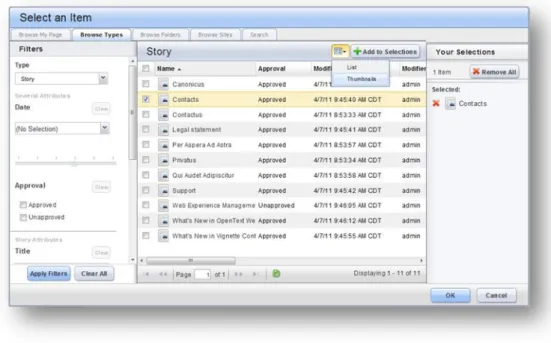
Web Experience Management provides a very powerful ―contentpicker‖ that adjusts the
list of items that can be selected contextually (for instance, just presenting ―articles‖ if it is the only type of content that can be selected in a given context).
Figure 21: Content selection
Selecting content can be done via many dimensions: Based on site and channel assignments Based on folders
Based on content types with advanced filtering capabilities Using full text search
Using predefined queries like ―recently updated or uploaded‖
The content picker also features a ―thumbnail view‖ particularly adapted to the selection
of media items.
Shared productivity tools
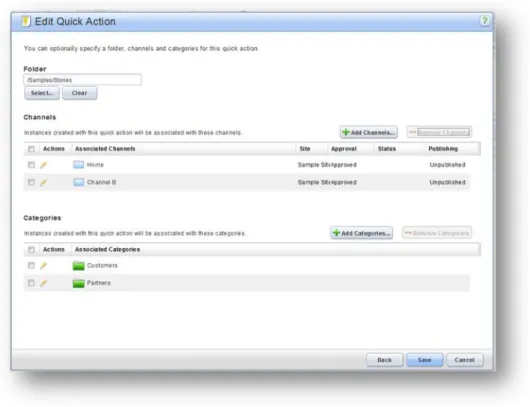
For some customers, content contribution is such a frequent task that end-users frequently repeat specific operations. To help reduce this redundancy, Web Experience Management includes a number of productivity tools accessible from the ribbon anywhere, anytime, to automate some of these operations.
A content type to use
An individual content item to restart from, to be used as a template A default folder for saving new instances
A set of default channels and categories
Figure 22: Defining defaults for a quick action
Additionally, shortcuts—a special kind of bookmarks to specific channels, folders, or
content items that the current contributors keep getting back to—may be defined. Finally, saved searches can be created by end-users after defining simple or advanced search criteria.
The various productivity tools (quick actions, shortcuts, and saved searches) can be accessed anywhere, anytime from the content workspaces ribbon.
Figure 23: Quick actions within the content workspaces ribbon
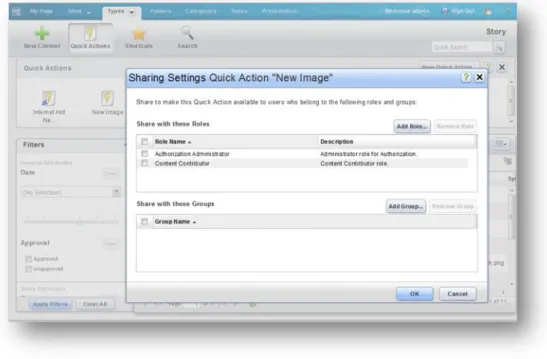
Also, while the productivity tools can be defined by individuals, they can be shared to other individuals (via groups or roles) if required. This is especially convenient for system administrators who can ―prepare‖ the best environment to get their end-users started with the product.
Figure 24: Sharing productivity tools to other users
Also, within the content workspaces, all pages can be bookmarked with standard browser functionality.
Figure 25: URLs to various places in the content workspaces
Search and advanced search
Web Experience Management includes an enterprise-class search engine for the purpose of indexing content and files and searching through the managed content. Supported technologies are OpenText Common Search Installer and Autonomy® IDOL through a connector interface that can be used to integrate with third party engines as well, such as Microsoft Fast, Endeca® Search, or Google™ Search Appliance.
Content indexing is done automatically and is object-based; each piece of created or updated content is dynamically posted to the search engine for indexing as per its content type definition. At content modeling time, it is possible to specify for each attribute if it is to be indexed or not, becoming searchable. All types of attributes can be indexed and later used in advanced search queries from the user interface or via the search API.
Figure 26: Advanced search query builder
The search indexing and querying mechanisms follow simple principles both in the management stage and in multiple production stages when it comes to site search features.
Search operations are available across the content workspaces. Defining complex parametric searches can be a burden if done again and again, so it is possible to ―save‖ a search at any point. Saved searches can be accessed from the ribbon or from the ―My
Figure 27: Managing content from saved searches
Management console
In Web Experience Management, the management console refers to a place where technical administrators can perform a number of system administration operations that are not exposed to business users in the main content workspaces. These operations include:
Defining content types in the content type modeller Defining and assigning roles in the product
Supervising the publishing processes in the job console Supervising the workflow processes in the workflow console Accessing the system monitoring and auditing reports
Figure 28: Management console for administrative tasks
Content Management Services
Site management
Although Web Experience Management is natively designed for publishing content to
multiple channels, most of the managed content is destined for one or more websites.
With this in mind, Web Experience Management offers a number of site management features. At the heart of these multi-site management features is the native management of any number of ―site‖ structures within the product, with a hierarchy of channels which typically drives the navigation tree of the website. These features take into account the enterprise reality where hundreds of sites need to be consolidated into one system and where content is often shared across many sites.
In order to simplify the management of a large number of sites, Web Experience
Management includes the concept of ―site templates‖. A site template is a predefined site
structure with predefined channels, presentation assets, and previously associated content that can be quickly initialized as new sites by business users through a very simple ―site creation wizard‖.
Figure 29: Creating a new site from a site template
Additionally, the solution supports cloning of existing sites, with a large number of options to choose from, including:
Sharing or cloning the content to the target site Sharing or cloning the presentation assets Setting new security options on the target site
Rich media management
While Web Experience Management offers comprehensive content-type modeling capabilities, it also provides out-of-the-box content types for the management of rich
media assets across online channels.
More specifically, four content types are proposed: Images
Podcasts
Rich Internet applications (e.g., Flash® or Silverlight™) Videos
For each of these content types, the system includes all the default metadata required for managing and publishing these elements, such as media classes, readiness status, values for description, ALT tags, and rights management. Metadata can be extracted automatically from the uploaded assets, such as the image type, size, or format. Media assets are managed from standard workspaces with specialized filtering capabilities.
Also, each of these content types has some specific media management features to offer, most notably the image and video content types.
For instance, when it comes to images:
Thumbnails are automatically generated for ease of management and selection
in the content workspaces
Additional formats from different sizes and resolutions can be generated either manually or according to predefined automations
Images can be uploaded in bulk either from the content workspaces or from a desktop client based on air technology
Figure 31: Bulk upload for images
Figure 32: Image effects
Similarly, when it comes to videos:
Thumbnails are automatically extracted from video frames
Videos can be ingested in a large number of source formats
Videos can be natively transformed to a Flash format for streaming and serving
via a customizable Flash player later on
These media assets are easily selected from other content items through a set of dedicated widgets to choose individual or multiple assets.
Figure 33: Image selection widget
Internationalization management
Any enterprise web content management initiative is likely to require the management of sites and content in multiple languages to meet global business needs (also known as
globalization requirements), along with exposing its user interfaces and features into
multiple languages to serve a global base of end-users (also known as localization
requirements). OpenText’s commitment to standards helps delivering on both fronts. First, Web Experience Management is entirely built on UTF-8 standard for storing, presenting, indexing, and searching content, which makes it possible to manage content in any language worldwide.
Second, the user interface relies on standard J2EE resource bundles for any end-user facing message, making it possible to deploy new language packs very easily. Web Experience Management comes with language packs for the primary languages supported by OpenText ECM suite, such as English, French, German, and Spanish. Additionally, end-users can choose a preferred locale, which drives not only the
language for the user interface but also regional preferences such as date formats across the management features.
Figure 34: Localized user interface
Finally, Web Experience Management supports several models when it comes to managing sites and content in multiple languages:
Through the content type modelling capabilities, a single content instance can be managed in multiple languages so that all translations follow the same
lifecycle (workflow, approval, publishing)
Through the content relationship capabilities, multiple content instances can be related to a parent content instance so that each individual translation can have its own lifecycle
Translation management software is also commonly integrated as part of the workflow processes. Sample integrations are provided, with Google Translation, for instance.
Figure 35: Editing a translation
Library services
Web Experience Management can be usedcollaboratively by multiple users working on the same set of content. To facilitate this collaboration, Web Experience Management features a number of library services commonly found in content management
applications.
As an example, end-users can manually lock (or reserve) each individual piece of content to prevent another person from editing it simultaneously. Locking can also be triggered automatically as part of a workflow.
Versioning of content is another library service available within Web Experience
Management. End-users can manually create new versions for each individual piece of content, any of which can be restored if necessary in the future. Comparing two arbitrary versions of content is also possible. Versioning operations can be included in workflow processes if desired.
Figure 36: Versioning history and properties
Content security
In collaborative environments used across the enterprise, the proper security model for managed content is needed.
To control the level of operations that can be performed by each user, Web Experience Management relies on two concepts: roles and authorized groups.
Each container (such as a folder) in the repository and each channel in the site can be secured with a list of groups defining who is authorized to perform any work within that area. When combined with roles, this determines which operations are possible in this context for any given user.
Roles are a combination of elementary capabilities. The system comes with almost 200 native capabilities, with a number of capabilities generated on demand. As an example, each time a new content type is created, so are three new capabilities to control the READ, WRITE, and DELETE operations for this new content type.
Web Experience Management ships with a dozen of out-of-the-boxrole definitions based on the most common combinations of capabilities. Some examples of out-of-the-box roles include:
Content contributor Content supervisor Presentation manager Application developer
Custom roles can be created easily for specific business needs and context.
Figure 37: Roles and capabilities
In order to facilitate integration into the information system, Web Experience Management does not include user or group management. Rather, it natively leverages users and
groups within an enterprise directory (Lightweight Directory Access Protocol
(LDAP)-compliant or active directory), so there is no need to replicate users.
Workflow management
Web Experience Management includes a highly flexible enterprise-grade workflow to configure the application according to existing business and editorial processes. Created from a visual design environment, these processes can support:
Manual or automated activities Static or dynamic assignees Conditional branching
Parallel branching with synchronization steps Workflow nesting and looping
The workflow engine is XPDL-compliant, which ensures its output is modeled according to industry standards.
Figure 38: Workflow modeler
Workflows can be started manually or automatically. For instance, it is possible to define a workflow to be automatically started when a specific type of content is created or updated. In this typical case, the workflow payload contains this individual piece of content.
However, a workflow process supports a much larger concept of payload. All of the ―managed objects‖ discussed in this document can go through a workflow, alone or grouped with other objects.
While workflows are typically used to drive the content creation, approval, and publishing processes, they can be extended to serve a variety of business cases (e.g., content translation).
To access running workflows, as well as for task management, end-users have access to a personal task workspace, listing all the pending tasks they have within the system. By default, this list is sorted showing the most recently assigned tasks at the top, similar to the email inbox model.
Once assigned to a task, an end-user can accept or decline the task and then complete the task later. All workflow events (actions, users) are tracked and audited and available in the workflow history properties.
Notes and comments can also be added to a running process at any point. These notes
are automatically added to the email notifications that go out when users are assigned to a new task.
Figure 39: Task workspace
Content analytics
Web Experience Management can be coupled with a powerful text mining engine, OpenText Content Analytics. As a result, metadata can be automatically or manually extracted from the content itself:
Concepts and topics
Tonality (positive, neutral, negative)
Facets selected from a predefined taxonomy (e.g., places, people, and organizations)
Figure 40: Automatic metadata extraction
This automatic metadata extraction can then be used for multiple purposes: Categorization: Browsing and managing content per category
SEO: Automatically generating keywords
Personalization: Defining targeting rules according to this metadata Rich search experience: Semantic navigation on your websites
Figure 41: Semantic navigation
Content auditing
Web Experience Management also comes with an operational auditing solution that reduces the cost, complexity, and burden of complying with corporate, legal, and regulatory auditing requirements. It gives organizations the ability to track and report when and what changes occur by whom.
It also provides the ability for organizations to optimize their Web Content Management (WCM) operations by identifying trends within their content model and user activities.
Figure 42: Auditing console and reports
The audit module provides historical views of all Creation, Read, Update, and Delete
events on any object in the system, including sites, channels, content items, and content
types. Further, the audit module automatically archives every edited version for auditing purposes.
Figure 43: Audit logs for a content item
The audit module provides operational auditing on user-related events such as search queries, login operations, configuration changes, and role updates. The workflow engine and processes are also monitored, including all start and completion status updates for manual and automatic activities.
All of this collected information is persisted in a specific data mart on top of which the audit module provides a web-based reporting console with several different types of canned reports (evolution, top, and distribution). Typical reports could include:
Most frequently edited content instances Less frequently updated content types Average duration of workflow processes Number of login operations over time
All operations (including read) of any given user in the system in between certain dates
Web and social analytics
Web Experience Management provides an optional OpenText Web & Social Analytics
module that plugs into the content auditing reporting platform to provide a holistic view of visitor’s click stream activities and social interactions within Web Experience
Management sites and pages. Web & Social Analytics is a web analytics platform that provides real-time visitor and social interaction reporting that provides organizations the ability to optimize their online initiatives by identifying actionable trends within their visitor population. In addition to out-of-the-box reports, the platform also provides the ability to easily set up, capture, and report on custom events that occur in the browser or on the applications server that are specific to how the organization operates their business.
Figure 44: Auditing console and reports
In addition to providing web analytic reports, the solution also provides organizations the ability to easily establish Key Performance Indicator (KPI) goals that measure the organization’s performance in achieving site and marketing program goals.
Figure 45: Auditing console and reports
A unique capability of Web & Social Analytics solution is its ability to integrate with third-party social sites such as Facebook® and Twitter to monitor the organization’s visitor
activities within their accounts in the third party site. This information is key to
understanding an organization’s earned media impact across multiple online channels.
Figure 46: Page views within Facebook account
All of the collected click stream and social collected information is in the same data mart as the content auditing solution to provide a single reporting user experience for all of the organization’s auditing, web, and social reporting needs.
Presentation Management Services
Dynamic delivery model
Web Experience Management is natively built for dynamic content delivery. Pages are assembled ―on demand‖ at the time they are requested by a ―content consumer‖. This is very different from many other WCM solutions that rely on a pre-publishing generation process, where the managed content has to be rendered, generally in HTML or XML form, before it can be ―consumed‖ from a web application like a browser.
There are several critical advantages to using a dynamic delivery model, including: Changes to the managed content are automatically reflected on the consuming
applications without the need for ―regenerating‖ a potentially large amount of pages (e.g., adding a node to a navigation structure, impacting all pages on a website)
Delivered pages can vary in content (known as personalization) based on specific characteristics such as the user’s profile, his preferred locale, or his browser agent without having to generate beforehand all the combinations that are likely to be used on the site
Internal links within pages are built dynamically so there’s no risk of broken links
Page templating
While Web Experience Management can be used solely for managing content, it also capitalizes on years of experience in managingthepresentation of this content. At the heart of the presentation management capabilities lies the fundamental concept of
templating. Templating provides the ability to apply predefined and reusable page
templates to fragments of content.
In Web Experience Management, page templates can be applied to: Channels for those pages that build the site navigation tree up
Content types, so that all instances from this specific content type are presented using the same page template
Page templates are created, configured, and managed directly from the preview
environment. A page template is a managed object as well as created from a system
content type, so all the web content lifecycle is applicable too (approval, publishing). As a consequence, a change a page template can dynamically impact tens of thousands of pages at the same time.
Figure 47:Editing a page template with default content
Page assembly model
In order to facilitate the creation and management of page templates by business users, Web Experience Management relies on a logical ―page model‖ to deconstruct individual pages into reusable elements. Each of these elements is based on ―system‖ content
types, and all instances are ―managed objects‖ that go through the same process as any piece of content in the product:
Regions define which places in the page template are suitable to receive content
components. Regions can be locked or unlocked to allow some variations at the page level. They can also be preconfigured with default content components and for supporting a subset of content components types only. Regions can contain any number of content components. These components are managed in an ordered list.
Components define which content to display in a specific area. The product
includes a number of out-of-the-box components but also supports the registration of new components. Out-of-the-box content components include:
Text: A block of rich text
Media: A component for selecting media assets
Navigation: A component for presenting all or a subset of the site navigation tree
Smart list: A component designed to retrieve a list of content from the repository (formerly known as the query component)
Content item: A component to surface an individual piece of content which can be manually selected or contextually derived from the template Content list: A component for manually presenting an ordered list of
content items
Figure 48: Adding a component to a region
Regions and components can be shared and reused across page templates; for
instance, a navigation bar component is likely to be used in all page templates for a given site.
Page templates can also be shared across a number of sites from the ―presentation
Figure 49: Presentation workspace
The arrangements or regions and components can easily be visualized from the page tree in the preview environment. From this view, the end-users can move components around as well as reordering them. Locked regions belonging to the parent template or unlocked regions are clearly identified.
Page design model
On top of the logical page model comes a design model to control the overall page look and feel. Again, these elements are built on system content types and can be reused in multiple contexts:
Themes control the overall appearance of the page. They are made of the web
assets such as CSS style sheets and images that will ultimately be included in the page HTML
Page layouts control the placement of regions on the page, for instance, a two
column or a three column layout
Region layouts control the placement of components in a region, for instance, a
2x2 grid for components
Page features control the execution of micro functionalities at the page level,
such as
Including a Facebook or Twitter widget
Inserting an observation script (e.g., Google Analytics)
Display views control the HMTL generated for a given component, for instance,
an ordered list of articles might have a couple of display views available: Titles only
Titles and summary
Titles, summary, and thumbnail image
Figure 51: Selecting a new theme for a page
Web Experience Management ships with several “samples” for themes and page
layouts, built on industry best practices. For instance, page layouts are entirely built on
CSS styles for positioning.
Smart lists
Smart lists are probably the mostimportant component that can be added to pages or templates as they provide a user interface for defining queries to retrieve content from the content repository.
A smart list is the basic building block that will display all the content instances
associated with the current channel when placed within a page template.
A smart list is defined by the following criteria: A selection of content types to retrieve A set of conditions to filter the content A maximum number of results
A sort order
Conditions can handle both system metadata and customer metadata, for instance: System metadata:
All articles categorized as ―important‖ All articles associated to the ―home‖ channel All articles published in the last seven days Customer metadata:
All articles where title starts with A
Figure 52: Editing a smart list
More importantly, the conditions can include contextual values that will vary depending on:
The page where the smart list is executed if positioned in the page template All articles associated to the current channel
The current user profile (attributes, groups, or segments)
All articles with categories selected as a preference by the current user Any number of request attributes
All articles compatible with the current user agent (e.g., mobile device, type of browser)
Figure 53: Contextual values in smart lists
Navigation management
Daily WCM operations frequently require reorganizing the overall site navigation tree
by adding, removing, or reordering entries in this hierarchy. In Web Experience Management, channels are used to describe the primary objects showing up in the navigation bars.
Each channel defines a page on the site. Content instances can be associated to channels so that they ultimately are linked from this ―channel page‖ without showing up
in the site navigation, resulting in ―item pages‖. The channel hierarchy can be managed
Figure 54: Navigation management from the site tree
Channels can be marked as active or inactive, allowing the temporary removal of a node in the site hierarchy without changing all the content associations. Additionally, channels
are natively ordered, with drag-and-drop reordering possible from the site tree as well.
Channels, like all object types in the system, support customer-specific attributes that can be used later on the site (e.g., images or translations to be associated to the channels)
Portal-based delivery model
All the presentation management capabilities discussed so far are applicable to two different types of delivery environments, referred to as the ―dynamic site‖ and the
―dynamic portal‖ models.
In the dynamic site model, page templates are made of very simple JSP files in which a library of tags can be used to describe the placeholders for the regions that will ultimately include the content components
In the dynamic portal model, page templates are represented by portal pages,
made of portlets. In this case, OpenText projects standard portlets that
automatically become manageable regions
On one hand, Web Experience Management uniquely equips portal-based environments with:
Templating In-context editing
Preview and staging capabilities
On the other hand, Web Content Management is automatically augmented by some of
the key portal capabilities, such as:
Ability to combine the web content portlets with other application portlets Ability to leverage the portal users, user profiles, and groups management for
personalization features
Ability to leverage the portal authorization model to show/hide certain portlets and content to different audiences
Figure 55: Portal page combining content portlets and third party portlets
The dynamic portal features are supported not only by OpenText Portal but also
third-party portal solutions such as IBM® WebSphere® Portal, Oracle® Aqualogic Portal or
Liferay® Portal.
Mobile-based delivery model
All the presentation management capabilities discussed so far are natively applicable to
mobile websites that can be managed exactly the same way as ―regular‖ websites. To
simplify this management, Web Experience Management provides a concept of ―format‖
Figure 56: Format management
Web Experience Management also easily integrates with the Wecomm application platform for delivering content within native mobile applications. Thanks to this platform,
mobile applications are developed generically only once and later executed as native
applications on thousands of devices. In the context of this integration, the platform is fed with content served from the Web API.
Figure 56: Managing mobile app content
Experience Optimization Services
Personalization
The dynamic nature of the Web Experience Management content delivery model is a
perfect fit for handling complex personalization requirements. Each page being
delivered and each region or component being rendered can dynamically leverage the ―context‖ of the current request to determine which content to present.
The solution supports various types of personalization techniques:
For first-access users, the ability to ―branch‖ to a landing page that matches the
current device or the user’s preferred language
For guest users, the ability to track the user behaviour with standards-based
session mechanisms
For registered users, the ability to deliver content based on the current user
profiles and preferences, groups, or segments
Figure 57: Smart list based on preferences in the current user profile
Content targeting
Another popular optimization technology relies on content targeting techniques where content managers explicitly select target segments at the time content is created and published. Later on the site, end-users are only exposed to the content that has been assigned to the segments to which they belong.
The list of segments can be provided by Portal or integrated from third party segmentation engines.
Content recommendations
Web Experience Management can also be deployed conjointly with a powerful content
recommendations engine:
First, observation tags positioned in the page templates are responsible for tracking the current user behaviour, such as the click path through the site or the time spent on each page,
Second, the recommendation engine can automatically build a list of relevant ―next pages‖ based on this behavioural analysis, anticipating the most likely operations. This technology is also known as intent-based recommendations. For content managers and site administrators, these features come with a management console to control these recommendations, including the ability to pin a specific page at the top of the recommendations or to prevent specific items from appearing in
recommendations.
This console also provides comprehensive reports on the most popular items, click-paths, and recommendations.
Search engine optimization
Search Engine Optimization (SEO) is required to make sure your sites are properly
recognized, referenced, and indexed by popular web search engines like Google or
Bing™.
A proper SEO strategy is the combination of multiple techniques. Web Experience Management provides out-of-the-box support for:
Friendly URLs automatically generated from the channel or content instance
names (e.g., http://www.site.com/news for a channel and
http://www.site.com/news/important-news for a content item)
Vanity URLs manually created by business users and serving as landing pages
in various communications and marketing campaigns (e.g.,
http://www.site.com/specialoffer that would go to different channels or content items over time). Vanity URLs are managed objects created from system content types, hence they can have their own lifecycle independent from the one for the channel or content item they are pointing to
Search metadata management, including the keyword and description META
Figure 58: Defining the SEO metadata for a specific page
Integration with social content
Web Experience Management is natively integrated with OpenText Social Communities
for online initiatives combining ―managed‖ and ―user-generated‖ content.
Social Communities provides two main sets of services and applications that can be added to pages and templates:
1. Community tools
A set of commenting, rating, tagging, and usage analysis services that can be associated with any published content
2. Web 2.0 applications
A set of social applications for sites, including blogs, wikis, discussion forums, image libraries, video libraries, file sharing, and social groups
These services and applications are designed to be compatible with both inside and outside the firewall requirements. For instance, all the social applications are equipped with advanced moderation capabilities and management features for the end-user. These are deployed in the form of components that can be added to regions within pages and pages templates. When added to page templates, the associated service or application automatically recognizes the current ―web content‖ context so that a new service or application instance is automatically created for each page using a template. For instance, adding a commenting service to a page template used for displaying articles
Social Communities is compatible with the Web Experience Management publishing
mechanism. An article listed as ―best rated‖ on the production website would be removed
automatically from the best-rated articles component if unpublished from the site.
Figure 59: Page with Social Communities components (commenting and blogging)
Site search
Web Experience Management indexes managed content as well as content published to target websites. This indexing mechanism is tied to the publishing process, so the index
is always up to date and there is no risk of broken links in the search results within the
site.
The indexing process covers content instances and the static files; so all
―attachments‖ are indexed as well, including Microsoft Office documents and Acrobat® PDF files.
Because the search happens in a dynamic delivery environment, it is possible to control the pages to which the search results would go. For instance, if a single article gets associated with multiple pages on multiple sites, the web designer can decide which of these pages the search results should go to, instead of seeing multiple duplicate results. The site search functionality is also exposed as a set of components that can be added to the site pages and page templates:
A search toolbar component is the entry point to the search experience
A search results component is the placeholder for listing the search results
Figure 60: Search toolbar and search results components
High performance caching
In order to be able to support high volumes of traffic, a dynamic delivery solution like Web Experience Management relies on several layers of caching mechanisms:
Object-level caching, in which any object returned by the API is cached first in
memory (Level 1 caching) and persisted to a local disk if required (Level 2 caching), which greatly reduces the load on the database and the application server
Fragment-level caching, in which the HTML for rendered regions and
components is cached as well to avoid regenerating these fragments before the associated content is updated or deleted
Page-level caching (also known as ―web tier‖ caching), is provided through the
optional high-performance delivery module. When this feature is enabled, dynamically delivered pages can be captured as static HTML files on a front-end web server, so what is in reality a dynamic site becomes as fast as a static site with most requests hitting the web server tier only. Web tier caching is frequently considered when:
High volumes of web traffic would translate into high hardware costs or a large number of CPUs
Each of these caching mechanisms can be tuned in a number of ways. They also come with automatic dependency management and associated cache flushing notifications so that obsolete entries are removed from the cache when needed.
Content Staging Services
To serve enterprise requirements, Web Experience Management includes powerful content staging capabilities to allow any number of web applications to be served with managed content. These services have alogical layer exposed to business users and a
physical layer defined by system administrators.
Content publishing (logical)
Publishing operations are exposed to business users in one of three ways: Through simple “publish” and “unpublish” actions, both in the content
workspaces and in the preview environment
Through ―scheduled publishing‖ and ―scheduled unpublishing‖ dates that can be set on any managed object
Indirectly in the context of a workflow where publishing happens automatically The golden rule of publishing in Web Experience Management is that all managed objects have an approval status which can be either approved, unapproved, or given a custom value defined by the customer; however, only approved content can leave the management environment to reach a delivery environment. This ensures that
unapproved content never makes it to a production website.
At the time that a publishing (or unpublishing) action is triggered, a ―publishing job‖ is created by system, regrouping in a snapshot not only the item being published, but also all its dependents. For instance, publishing an article might result in publishing the article itself along with the images used as illustrations and the other articles referenced by the published item. If one or many of the related items are not approved, then the user is exposed to a ―publishing issue resolution wizard” explaining why the publish operation is not possible yet and proposing resolution steps to the end-user. In many cases, this publishing operation is a one click operation.
Figure 61: Publishing issue resolution wizard
Web Experience Management guarantees the deployment of the associated data as a single ―transaction‖: deployment succeeds or fails globally.
Publishing jobs are put in the queue and are deployed to ―stages‖. A stage is a logical
concept that maps to a set of physical targets described in the next chapter. Each Web Experience Management installation can manage any number of delivery stages, while the stage where content management occurs is named the ―management stage‖.
Popular configurations include:
One management stage (content workspaces and preview environment) One QA stage (where content can be deployed first to approval)
Multiple production stages (e.g., one for intranet content, one for Internet content, one for enterprise portals)
Figure 62: Deployment workflow
The sequencing of the deployment operations between stages is highly configurable
and driven by the workflow engine, in the form of a ―deployment workflow‖ (as opposed to a content workflow).
Content deployment (physical)
A logical stage is comprised of one of multiple physical Content Delivery Servers (CDSs). Multiple CDSs are commonly used for parallel deployment to multiple targets to meet
high availability and disaster recovery requirements, as each publishing job is
delivered independently to each of the CDSs configured for the stage.
Thanks to the queuing mechanisms provided by Web Experience Management, some elements in a CDS can be down, but publishing will resume automatically when the element is up again. This is very convenient for delivery environments where updating or upgrading one CDS can be done while the other one is still ―live‖.
Content deployment within a CDS is managed by a standalone process called a ―Deployment Agent‖ (DA). The DA is responsible for:
Writing database records into the target database schema
Writing static files into target file system (e.g., a web server doc root) By default, managed content is deployed strictly in the same form as in the content repository. For instance, publishing an article with two associated images, each of them