International Journal of Computing and Digital Systems
ISSN (2210-142X) Int. J. Com. Dig. Sys. 4, No.3 (July-2015)Cross-platform Mobile Applications with Web Technologies
Christos Bouras
1,2, Andreas Papazois
2, and Nikolaos Stasinos
21
Research Unit 6, Computer Technology Institute & Press “Diophantus”, Patras 26504 , Greece
2
Computer Engineering & Informatics Department, University of Patras, Patras 26504, Greece Received 21 Nov. 2014, Revised 19 Jan. 2015, Accepted 7 Mar. 2015, Published 1 July 2015
Abstract: The extended use of smart mobile devices has become an integral part of daily life leading to the expansion of mobile application development. Currently, the majority of mobile applications are native applications that need an initial installation prior to being utilized. In addition, for a given application, a separate software development process could be required for each mobile platform, which subsequently increases dramatically the corresponding effort and cost. With the emergence of HTML5 these issues can be addressed efficiently, since web technologies allow the application development in a cross-platform manner. An important benefit is that users can have easy and immediate access the application without any need for downloading and installation. In this manuscript, we investigate the potentials of mobile application development with web technologies and we present a development framework that we have designed and implemented. This framework utilizes the most important state-of-art web technologies for the support of mobile devices. It can be used for the implementation of mobile web applications and also for the investigation and experimentation on the main features that HTML5 offers for this specific type of devices.
Keywords: mobile web application, HTML5, framework, cross-platform, social networks
1. INTRODUCTION
The use of smart mobile devices, such as smartphones and tablets, has become an integral part of daily life leading the development of innovative mobile applications to a great expansion. Currently, there are several different platforms for mobile application development with the iOS and Android being the dominant among them. Each of these platforms requires separate software development process, based on different tools, SDK and programming languages to implement the same functionality, which is an activity that subsequently increases dramatically the corresponding effort [1]. This fact has a negative effect on the lifecycle of the mobile application development since several issues usually arise, including:
Multiple software implementations, since different production lines should be maintained for the various mobile platforms supported. Inconsistencies between versions for different
devices and platforms, due to differences in the implementation process and other device or platform limitations.
Longer quality control process, given the need for testing the application’s behavior in different contexts, i.e., platforms, devices, etc..
From a user's point of view, each native mobile application requires downloading and installation prior to its usage, which adds an overhead of time and memory resources even for applications that are rarely used [2]. Application’s upgrade becomes also an issue for similar reasons since it should also be performed onto the end-device in a non-transparent way after end-user’s consent to download and install new version.
The emergence of HTML5 introduced a new paradigm for the mobile application development and there are several reasons why the popularity of HTML5 for mobile application development is increasing steadily [3]. HTML5 supports interfaces to the various mobile device sensors and operations and thus it can provide nearly the same functionality as the native applications. Additionally, through new features such as application cache and file system, selected data can be stored so that the application can be executed even when the mobile device is not connected to a data network. Given that the mobile application runs on a web browser, application portability is assured in a cross-platform manner saving a large amount of costs for the software development http://dx.doi.org/10.12785/ijcds/040302
process [4]. Last but not least, with mobile web applications users are not obliged to install any software to access the application features [5]. The significance of HTML5 as a technology for mobile application development has increased in light of Adobe's cease of developments on Flash Player for mobile browsers and its turn to invest on HTML5 instead [6].
In this manuscript, we present the design and implementation of a framework built for experimentation on mobile web application development. This framework is a set of tools that make use of the most important features and provides indicative methodologies of their use. We use it to investigate the potentials of the HTML5 technology for mobile application development and to explore new fields of services and functionalities that can be engineered. Part of this study is also the investigation and proposal of best practices as well as ideas for future work on mobile applications based on HTML5. The main purpose of this framework is to provide the developer with simple and easy to implement features of HTML5 in a cross-platform aspect. Most of the features of the framework are essential for a modern mobile application. They make use of the information a device can provide and also features such as social network interaction and data on the cloud are presented. It should be noted that the application that demonstrates the features of the framework is publicly available online at “RU6 Mobile Group: Mobile Apps”, at the following URL: http://ru6.cti.gr/mobile/apps.php to be used by interested researchers or web engineers. Additionally, the applications features are briefly demonstrated in the demo-video created for this purpose and being available in website “RU6 Mobile Group: Mobile apps demo video”, and more specifically at the following URL: http://ru6.cti.gr/mobile/uploads/demo_html5app.mp4.
This manuscript is structured as follows: In Section 2 we presented a scientific and technical review of the
current work in the field of cross-platform web application development. In Section 3 we present the architectural design of the framework for mobile web application development as well as selected important implementation issues. Section 4 provides details on the most important features offered by the framework. In Section 5 we present the conclusions of our study and, finally, in Section 6 we close by summarizing some possible future steps that can follow this work.
2. RELATED WORK
Web technologies are becoming popular in the frame of mobile application development. In fact, the capabilities and the development process with HTML5 are so significant that platforms for building native applications using web technologies are also becoming dominant. Some related interesting examples are PhoneGap, whose corporate website is at:
http://phonegap.com/, and Apache Cordova, whose
website is at: http://cordova.apache.org/, that have been both extensively documented by relevant technical literature [7], [8], and [9].
A. PhoneGap
Adobe PhoneGap is a tool that provides the capability of building a web application into a native one. It is based on Apache Cordova, which firstly developed by Adobe and it is an open source project. Apart from the packaging of the web application into a native one, something that gives access to developers to each platform’s applications stores, PhoneGap provides interfaces to many native features and services that may not be supported by HTML5 and all these in JavaScript language. For example with can have access to device’s SD card, to the native notification system and many more. The platforms that
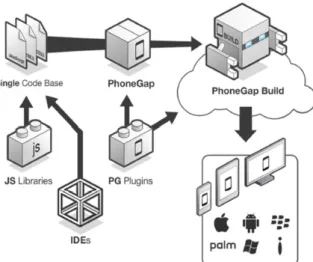
are supported until now are Android, BlackBerry, iOS, Windows Phone, Windows 8 and Tizen. Furthermore there are many plugins that offer additional features while Adobe has developed a Cloud service that converts and packages any web application into a native application without being necessary for the developers to get into the building process by their self and learning additional tools. Below there are pictures of the building tool and the development process in PhoneGap.
B. Parse
It is a cloud framework that offers backend services for web application and more specifically focus on mobile devices. It has APIs for many different platforms such as iOS, OSX, Android, Windows Phone, Windows 8, JavaScript, etc.. What makes Parse unique is that it consists a cloud-based service something that make its features easy to access and utilize. Some of Parse’s main features are:
Store and manage data on the cloud (Parse Data) Register/Login mechanism
Security mechanism for data which provides access lists for user’s read/write capability Analytics service (Parse analytics) Push notification system
Social networks integration such as Facebook/ Twitter login
Cloud Code (server-side like services) Application hosting
Basics services are free of charge with some kind of limitations in the number of requests per app and per time. There are paid plans too. Below we can see the Cloud Code Editor web interface.
C. jQuery Mobile
It is a client side framework for mobile devices and touchscreens. jQuery mobile is a user interface library that provides the proper tools for easy and fast application’s user interface development. You can create buttons, menu lists, navigation bar and more. It is based on HTML5 and on jQuery JavaScript framework. The main goal of this project is to support as many devices as possible. Additionally jQt (or JQTouch) is a lightweight plugin based on jQuery that can be used for mobile web development in iOS, Android, Blackberry and WebOS devices. It supports only the WebKit browser engine and it also provides user interface themes.
D. Sencha Touch
It is another mobile application framework, which is open source and is based on HTML5. It supports the following platforms: Android, iOS, Blackberry, Windows Phone and others. It provides a theming engine and tools for user interface development and it also supports the creation of hybrid applications with Apache Cordova. E. Titanium Appcelerator
It is a mobile application development framework. The main difference here is that it produces native code and so a real native application. The programming API is based on JavaScript and HTML5 and provides specific SDK for every supported platform. The supported platforms are: iOS, Android, Windows, as well as the Blackberry. The major drawback here is that the developer may need to have working knowledge application development on the native platform.
3. OUR FRAMEWORK
In this section we present the architectural specifications of the developed framework as well as selected important implementation issues.
A. Architectural Design
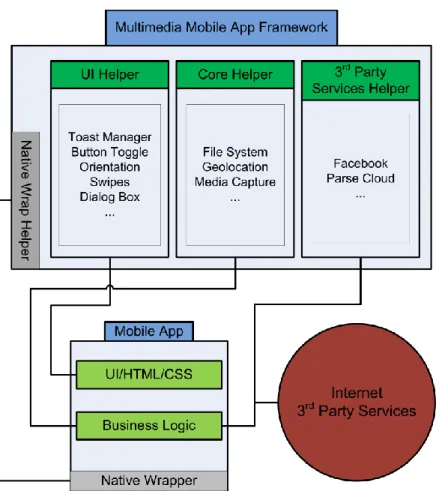
The design of the framework has followed a modular approach with clear interfaces between the discrete system architectural elements. The prime objective of the architectural design process was the development of an easily extendable framework that could be efficiently employed by independent engineers or research teams. Thus, the framework's architecture has been divided into 3 main sections/components, namely: the UI Helper, the Core Helper and the 3rd Party Services Helper.
The main concept is that every module refers to a specific group of provided services and features. It is important to mention that each one of the framework’s helpers constitutes an autonomous component and can be used separately. Therefore, in cases where not all components are needed for the development of the requested functionality, any unnecessary loading of unneeded code is prevented. Figure 2 depicts the system's overall architecture with the short descriptions of the various components provided in the corresponding blocks.
The rest of this subsection provides a thorough description of each one of the three components, which are included in the framework’s architectural design. It also describes another important system’s component, which is the Native Wrapper.
1) UI Helper
This component refers to the provided features that are relevant to the user interface. It contains the basic user interface functions that a modern application must have in
Figure 2. Framework's overall architectural design.
order to provide a high user experience. Consequently this component is related with the HTML and CSS code of the application. The features provided are: Toast Manager, Orientation Manager, Swipes, Button Toggle and Dialog Box.
a) Toast Manager: It provides a quick, small and custom graphic on-screen notification that can be used to provide simple application information to the user. Provides a way for the application to communicate with its user and provide feedback for the user’s interactions.
b) Orientation Manager: It provides the appropriate interface to handle the change of the device's orientation. This can be used to adjust the interface according to the hand-held device's position. Todays mobile devices and tablets are held in different ways (portrait or landscape) and so the application has to adjust in order to provide a better user experience.
c) Button Toggle: It provides a function to handle the change in the status of a button, clicked to non-clicked and vice versa. In many applications there is need for toggle buttons. This module provides the appropriate solution for this issue to be handled with ease.
d) Swipes: It provides functions to integrate and handle swipe events on a specific element. Swipe left and right are supported. Any other kind of swipe can be supported too. This module enriches the user’s experience with the application providing gestures for common interactivity.
e) Dialog Box: It provides a custom dialogue interaction interface to confirm or inform the user for various application actions. This is a method to communicate with the user so he/she can provide the proper feedback to the application to continue or not its runtime routine.
2) Core Helper
This component relates to the business logic of the application and provides services related to the core functionality of it. The main features it offers are File System, Geolocation and Media Capture.
a) File System: This feature provides an easy way for basic file functionality like creating file or folder, deleting and more without getting into HTML5. Today, most applications need to store and manage their data either created by the application alone or their users.
With HTML5 File System API and subsequently with this module data can be stored on user’s devices without the need to maintain a database on a server.
b) Geolocation: This feature provides a simple function to get device's location. A very useful module for creating location aware application and services utilizing user’s location.
c) Media Capture: It offers a way to get and handle media files captured directly from device. User can user the device’s camera in order to take photos, videos or audio and use it in the application to share them with other users, edit them, store them or any other possible action.
3) 3rd Party Services Helper
This component contains functions that are based on 3rd party on-line services. This also relates to the business logic of the application especially with the part that communicates with other services on the Internet. Here, the two main services are Facebook and Parse integration.
a) Facebook Service: This feature provides basic Facebook JavaScript SDK functions such as login with Facebook account, uploading and downloading photos and videos, sending requests, wall posts, user details and more. All this in a simple and easy way to integrate and use. Social network connectivity is a must for modern applications not only from a user’s aspect of view but from a developer’s too as he can make more know and popular his/her application.
b) Parse Cloud Service: This feature provides easy access and manipulation of cloud data on the Parse Cloud and also a user database based on the Facebook login method. The user can use his/her Facebook or Twitter account credentials to login. In addition, Parse provides a back-end solution based in JavaScript and without the need to invest in expensive equipment which will be hard to be maintained. Using Parse each user can have their data available in every different device may use.
4) Native Wrapper
This component offers the appropriate modifications in order the services of the framework can be integrated without additional coding or changes in a native application built with Cordova or PhoneGap. This module helps the developers to build fast and with no or minimal additional effort their native packages of their applications. In this way application developers can have access to the native application stores of each platform and promote their application to even larger audience. Having access to native application stores is very important because users can find much more easily the application and so can be known to more people. Especially when it comes to paid applications, this can also raise the profit due to the increase of purchases.
B. Implementation
The main technology used in the developed framework is the HTML5, which consists of new JavaScript API's, CSS3 attributes and new HTML elements. Most of the functions provide a “success” callback with which the developer can handle the output of the function. The features make use of HTML5 File API including directories and system, Geolocation API, HTML Media Capture, CSS3 new features, Facebook and Parse JavaScript SDKs, as well as more other tools. Since these features have to be supported by the browser in order to be executed, latest versions of modern web browsers are recommended and preferably Google Chrome. Apache Cordova, preferably version 2.9.0, can support additionally cross-platform implementation.
In the rest of this subsection, the individual technologies and services provided are further analyzed from implementation point of view.
1) Core Module
The core module provides File System, Geolocation and Media Capture functions.
a) mfwk_initFS(size): With this function the developer initiates the file system providing the desired size of it.
b) mfwk_saveFileToFS(filename, file, success): This function can be used in order to save a file in the initiated file system providing the file name, the data of the file and a success callback to handle the successful run of the function.
c) mfwk_getFileFromFS(filepath, success): It is a funtion that provides the file path we can get the data of the file, from the file system, which is included in the success callback function as data URL.
d) mfwk_deleteFile(filepath, success): With this function, a file can be deleted given its path. A success callback is provided also.
e) mfwk_createDir(path): A directory can be created with this function. The specific path should be given by the developer.
f) mfwk_getDirContents(dir, success): This function can be used to get the specific directory contents which are returned as an array in the success callback.
g) mfwk_getCurPosition(success): It returns the latitude, longitude, accuracy and time-stamp as an object in the success callback.
h) mfwk_insertInputElement_init(elementId, type): This function initiates the specified type input element in a specific element, usually a div element. Type can be photo, video or audio. One time per page should be used in order to avoid conflicts.
i) mfwk_onInput(type, handleFiles): With this function we can handle the input file which is returned with handleFiles callback.
2) UI Module
The UI module provides functions for features such as Toast Notifications, Button Toggle, Orientation Change Event, Swipe Events and Dialogue Box. All those features are relative to the user interface of the application and are meant to provide a better user experience. Additionally integrating Bootstrap we can give a much more beautiful and rich user experience through a better UI.
a) mfwk_drawToast(message, delay): This function provides a simple and quick notification graphic that appears for a specific period of time on the screen to inform the user about something.
b) mfwk_toggleBtn(touchElmnt, toggleElmnt, imgOnPath, imgOffPath, toggleOn, toggleOff): Provides a method to specify an image according to the button status and the appropriate callbacks.
c) mfwk_orientChange(portrait, landscape): A function with callbacks for portrait and landscape orientation management.
d) mfwk_initTouchEvents(touchElement,
enableSwipeEffect, onRightSwipeEnd, onLeftSwipeEnd): With this function we can enable swipe events on a specific HTML element. Two swipes are supported, right and left with the appropriate callbacks to handle them. Additionally a default swipe effect has been created that applies to the selected element. For example, this effect is useful for navigating through photos or other media files. e) mfwk_init_dialogBoxMsg(customCSS,enableDef ault): This function initiates the dialogue confirmation box for user feedback. The developer can enable the default css file or load his own one.
f) mfwk_postMsg(msg, okBtnPressed): Shows the dialogue box on screen of the application with the defined message and a callback is provided to handle the ok button pressed.
g) mfwk_closeDialog(): This function closes a given dialogue box that has been previously appeared in the user screen.
h) mfwk_enableCancel(): With this function the developer can issue and enables the cancel button on the dialogue box.
i) mfwk_disableCancel(): With this function the developer can disable the cancel button on the dialogue box.
3) ParseFB Module
This module offers functions providing easy access to features and services from Facebook JavaScript SDK and Parse JavaScript SDK. Its main role is to make it easier for the developer to implement 3rd party services. It can be abstractly divided into two sections the Parse one and the social networks one. The Parse section refers to the implemented Parse services. It offers Parse Cloud data and users management. The social networks’ one contains
Facebook services but others can be implemented too, such as of Twitter and Google+.
a) parseFb_init(parseJSlink, parseAppid, parseJSid, fbAppId, cordova, initDone): It initiates Facebook and parse SDK. Also if cordova variable is true it enables the Cordova support. initDone is the callback function in which we can handle the completion of the initiation.
b) parseFb_checkFBloginStatus(onConnected, onNotAuthorized, onNotLoggedin, onNotLoggedinParse): With this function we can check the login status of the current user. It specifically checks if the user is logged in Parse and then in Facebook. Four callback functions are provided as you can infer from the function's variables.
c) parseFb_login(permissions, onSignUp, onLogIn, onErrorLoggedIn, ferror): It attempts to login a user with his Facebook account credentials. There are three callbacks to handle the outcome of the login attempt. If the user doesn't exist in the Parse Cloud user database it will automatically sign up the specific user. The onSignUp and onLogIn callback include the Parse User object in them. onErrorLoggedIn contains two error strings. Finally ferror can be used in case permissions variable is undefined.
d) parseFb_meDetails(success): This function's callback contains Facebook's user details such as name, Facebook user ID and profile picture URL.
e) parseFb_fqlquery(query, success, unsuccess): With this function you can directly send a query for Facebook data and use the callbacks to handle them. The success callback contains a response array with the data. unsuccess can be used when no data was found.
f) parseFb_wallPost(name, caption, description, link, picture, postDone, postNotDone): It can be used for posting on logged-in user's wall something. There are four variables of what we can post and two callback functions. postDone contains a response object with post information.
g) parseFb_sendRequestViaMultiFriendSelector(m essage, success, unsuccess): This function can be userd to send an app request to multiple users using the multi-friend selector dialog.
h) parseFb_sendRequestToFriends(message, fbUsers, success, unsuccess): With this function we can send application request to specific predefined Facebook users. The users Facebook IDs have to be defined.
i) parseFb_getAlbumIds(uid, success, error): Given the Facebook user ID the success callback contains the number of album IDs and the response album data, also containing the actual album IDs.
j) parseFb_getAlbumCover(auid, success, error): It constitutes a success callback contains the album cover URL.
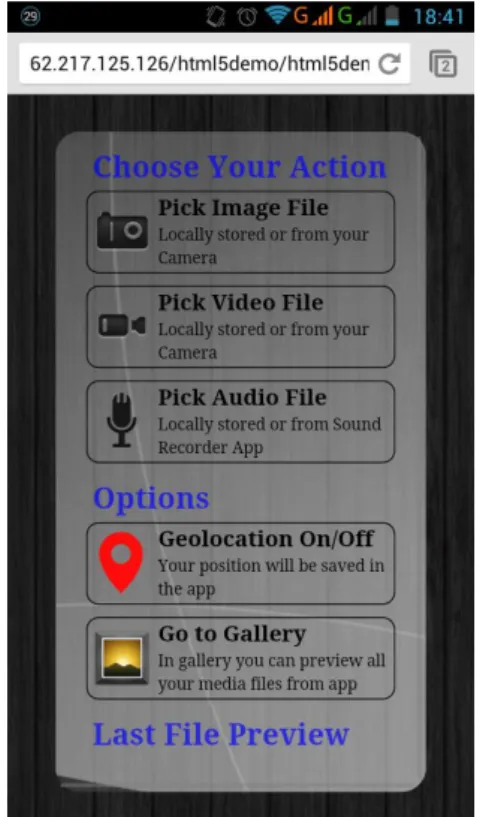
Figure 3. Demo application's main menu.
f) parseFb_getAlbumPhotos(auid, success, error): Given a specific album ID, the success callback contains photos data for this album.
g) parseFb_createNewRow(parse_class, data, usersAcl, parse_success, parse_error): This function will create a new row in the defined parse_class with the given data and user access control list. Two callback functions are provided.
h) parseFb_getRow(className, columnName, data, success, unsuccess): It finds the rows with a specific value in columnName in specific Parse Class.
i) parseFb_changecolumnValue(className, columnName, data, newData, success, unsuccess): It finds a specific column data and changes its value to newData. A single call of this specific function is only applicable for one row.
4. FEATURES DEMONSTRATION
In order to better present the capabilities provided by the implemented framework, we developed an indicative demo application, which indicatively utilizes the most important features included within the framework. In this section, the use case of the development of this mobile web application is presented in order to:
Demonstrate our framework's features from a more practical perspective.
Highlight the best practices and provide recommendation that concern the efficient utilization of the framework’s functionality. Provide an insight into the framework’s possible
future usages.
The presentation has been organized into four different subsections, namely: “User Interface”, “Offline Use”, “Access to Sensors & Devices”, as well as “External Interfaces”. Each of the subsections is dedicated to a separate group of provided features.
B. User Interface
The User Interface provides access and manipulation of the application's features, i.e., the user can either capture a new photo or record a new video or a new audio file. Each of the above functions calls the appropriate native application of the device's OS and then the file is transferred to the web application. The last file that was created can be shown to the last file “preview” field. Moreover the user has the ability to save the current device's position with the file. After the completion of each function a simple “toast” notification will appear for a short time. We also have the ability to hide the address bar of the browser for a more efficient usage of the available free screen space. Figure 3 depicts the application's main menu, which consists a toolbox providing access to the various supported activities.
In the gallery page the user can preview the photos or play the video or audio files that he created with the application. The application has the ability to handle the device's orientation change so that the photos and the videos can be displayed correctly and fit to the new screen width/height. Additionally the user can use touch swipe gestures (left or right) to navigate to the next or previous file. For functions such as file upload, Facebook file share or file deletion the application asks for the confirmation of the user with a dialog box. Immediately after the completion of these functions, a simple notification appears. Finally we created a zoom-in/out effect for the navigation in the gallery.
Finally, it is important to mention that we adjust the content of the web page according to the device's screen height and width so that we do not have very big or very small display scaling and keep the display of the content usable of every screen size.
C. Offline Use
A very important feature of a web application is the ability to run offline without the need of a data connection such as Wi-Fi, 3G, GPRS, etc. This enables the user to have immediate access to the application from his browser, everywhere he is, without the need of mobile network or wireless network access at all. We also have to consider the benefits we gain of the decrease of the server
load as the application run locally on the user's device. Only the requests that cannot be served locally will be sent to the server. The application has full functionality while offline, excluding the functions that must have
access to Internet. The user can take photos, record video or audio even save the current location or preview or manage his files in gallery and all that while been offline.
(a) (b)
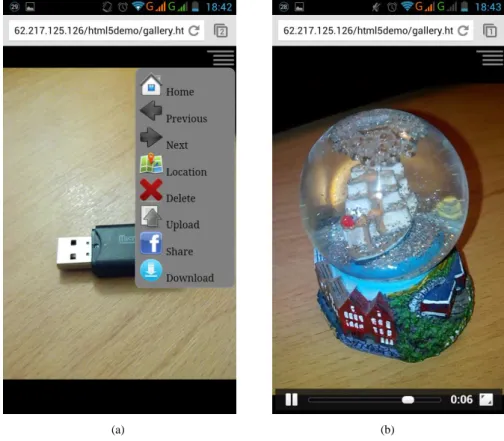
Figure 4. (a) Image gallery and menu (b) Video playback.
Figure 4(a) depicts an image stored in user's gallery as well as the navigation menu with its various options, whereas Figure 4(b) presents the video playback feature of the application through standard web technologies.
One other important functionality is the ability to store files in the application. The user now has the ability to write and read big or small files, such as photos, videos, stored in the application while those files been available every time he needs them.
D. Access to Sensors & Devices
A very useful capability is the access to the device's hardware from the web application. We now have the ability to use the device's camera either to directly live stream the input we get from it or to use a native application to gain access to the camera, i.e., photo or video. The native application sends to our application the final file. The same applies to the microphone too.
Furthermore we have the ability to detect the points that the user touches in the application because the touch events been transferred to it. This functionality is really useful because we can improve the user's experience with the application adding new features such as the ability to drag elements in application or to create swipe gesture
events making the User Interface more usable and impressive. Of course such a feature is really important for web games too.
Another device that we can access is the GPS. We can now utilize the position of the device that the application is running. This feature might be really useful in applications that deliver content and information to user because now they can personalize that content considering his current location. Possible examples are applications for finding nearest hospitals, bar or media capturing applications etc. Figure 5 illustrates the file position on a map as it is determined by the corresponding device, through the Geolocation API.
Furthermore, it offers access the device's sensors such as orientation, gyroscope, acceleration or compass. Therefore information such as the orientation or the motion of the device are available and enables the web engineer to adjust the displayed content of a website or web application properly depending on how the user holds the device, i.e., landscape or portrait, or use these information from the sensors to manipulate web-based games.
A. External Interfaces
The user has the ability to share his content to social networks such as Facebook or to upload his files to a file
Figure 5. File location on map.
repository server. To upload his files to Facebook the user has to log in with his account credits and then he can upload a photo or video on his profile page so that his friends can see it too. The files will be saved in a specific user's album with the same name as the application's name we set and also in the feed news and profile page the upload event will be displaying the specific application that was used. Something like that can bring new users to our application. Additionally, the application can be used from the Facebook applications page directly. Figure 6(a) illustrates the upload completion of a file on Facebook and Figure 6(b) depicts an item uploaded by the application in the Facebook user's album, as it is shown on user's profile.
Finally, the application has the functionality to upload files on a server, an ability that can be used to build a backend service, i.e., streaming video files, multimedia file hosting, etc.
5. CONCLUSIONS
In this manuscript, we present a novel framework for mobile application development using the state-of-art web technologies. First, we present the results of our scientific and technology review of the most important existing similar systems and we provide an insight on the potentials of modern web technologies for the mobile application development. An important conclusion is that,
indeed, all the important features provided by mobile platforms and devices can be developed under one platform, web, which is well known, easily adaptable to many developers around the globe and less costly too. Additionally, during our state-of-art review, we explore the new fields of services and functionalities that can be offered through the HTML5 technology and could be efficiently employed during our subsequent development process.
Next, we thoroughly present the mobile web framework that we designed and implemented. The framework is presented from architectural point of view. Apart from its software design we also provide an overview of it implementation aspects, i.e., its fundamental functions and the application programming interfaces that the framework makes use of. Additionally, along with the presentation of the architecture and implementation of the developed framework, we also investigate and propose best practices for mobile application development with the aid of HTML5.
HTML5 proved to be an excellent technology for mobile application development. Its main strengths are that it can offer more or less the same functionality as the native installable applications do, but in a platform-independent manner, and that it creates applications that do not require installation on the mobile device prior to its use. Furthermore integrating services such as Parse, developers can make use of backend features without the need of additional costly equipment. Moreover using social network’s services like Facebook, users can share their experiences from the application with each other making the whole communication with the application more interactive and connected to real life. Additionally using cross-platform utilities like Cordova or PhoneGap developers can also have access to each platform’s application store promoting their applications to even bigger audience. This is something that can also be achieved through social networks.
6. FUTURE WORK
Since popularity of HTML5 is growing in the grounds of mobile application development [10], it is expected that mobile web application development will be a field of wide technological interest. This in turn will boost the support of new HTML5 features into mobile web browsers. Therefore the developed framework could be widely used since its features will certainly be widely supported from the various browsing engines.
A possible use of the developed framework could be in the frame of an HTML5 laboratory that makes use of the most important features and provides indicative methodologies of their use, therefore for demonstration as well as for experimentation purposes. Possible future steps that can follow this work could extend the current framework in order to support new capabilities of modern mobile web browsers. This activity would require a tight
follow-up of the new features supported by the web browsers as well as monitoring the progress of the standardization process of the web technologies. Several
(a) (b)
Figure 6. (a) Process of Facebook file sharing. (b)Video shared in Facebook.
new features of HMTL5 and possibly additional social networks can be added to the framework. In addition, further best practices may be identified on them as well as on the existing features. The cross-platform support can be further enhanced and also polyfills can be developed to support devices and platforms that there is no other way to be supported. Last but not least, a much richer user interface can be built using or integrating HTML5 UI Frameworks such as Bootstrap.
Finally, it should be noted that the framework along with a demo-video are publicly available through our website: “RU6 Mobile Group: Mobile Apps”, available at: http://ru6.cti.gr/mobile/apps.php. Interested researchers and engineers can utilize the current implementation in order to utilize it and also to further expand its functionality and to develop new features.
REFERENCES
[1] N. P. Huy, and D. vanThanh, “Evaluation of mobile app paradigms. In: Proceedings of the 10th International Conference on Advances in Mobile Computing & Multimedia (MoMM '12), New York, NY, USA, ACM, 2012, pp. 25-30.
[2] P. E. Dickson, “Cabana: a cross-platform mobile development system. In: Proceedings of the 43rd ACM technical symposium on Computer Science Education (SIGCSE '12), New York, NY, USA, ACM, 2012, pp. 529-534.
[3] H. Heitkotter, S. Hanschke, and T. Majchrzak, “Evaluating cross-platform development approaches for mobile applications”,
Cordeiro, J., Krempels, K.H., eds.: Web Information Systems and Technologies. Volume 140 of Lecture Notes in Business Information Processing. Springer Berlin Heidelberg, 2013, pp. 120-138.
[4] J. Cho, J.Jeong, and E. Seo, “Twob: a two-tier web browser architecture optimized for mobile network,” 10th International Conference on Advances in Mobile Computing & Multimedia (MoMM '12), New York, NY, USA, ACM, 2012, pp. 267-270. [5] M. Firtman, Programming the Mobile Web. O'Reilly Media,
Incorporated, 2013.
[6] J. Ozer, “Adobe to Discontinue Development of Flash Player on Mobile Devices, ” StreamingMedia.com, Nov. 2011, available online at: http://www.streamingmedia.com/Articles/News/Online-
Video-News/Adobe-to-Discontinue-Development-of-Flash-Player-on-Mobile-Devices-78818.aspx.
[7] R. Ghatol and Y. Patel, Beginning PhoneGap: Mobile Web Framework for JavaScript and HTML5, Apress, 2012
[8] R. Mahesh Babu, M. Kumar, R. Manoharan, M. Somasundaram, S. Karthikeyan, “Portability of mobile applications using phonegap: A case study,” International Conference on Software Engineering and Mobile Application Modelling and Development (ICSEMA 2012), 2012.
[9] T. Green and M. Clawson, “Edge animate goes mobile,” Foundation Adobe Edge Animate. Apress 2012, pp. 335-362. [10] C. Casale, “The Future of HTML5: Five Predictions”, AccuSoft,
June 2013, available online at:
http://blog.accusoft.com/2013/june/the-future-of-html5-five-predictions.
Christos Bouras is Professor in the University of Patras, Department of Computer Engineering and Informatics. Also he is a scientific advisor of Research Unit 6 in Computer Technology Institute and Press - Diophantus, Patras, Greece. His research interests include Analysis of Performance of Networking and Computer Systems, Computer Networks and Protocols, Mobile and Wireless Communications, Telematics and New Services, QoS and Pricing for Networks and Services, e-learning, Networked Virtual Environments and WWW Issues. He has extended professional experience in Design and Analysis of Networks, Protocols, Telematics and New Services. He has published more than 400 papers in various well-known refereed books, conferences and journals. He is a co-author of 9 books in Greek and editor of 1 in English. He has been member of editorial board for international journals and PC member and referee in various international journals and conferences. He has participated in R&D projects.
Andreas Papazois obtained his diploma, MSc and PhD from Computer Engineering and Informatics Dept., University of Patras, Greece. He is currently an R&D engineer at Research Unit 6: Networks Telematics and New Services, Computer Technology Institute and Press - Diophantus. Andreas has also worked as Telecommunication Systems Engineer in Intracom Telecom S.A.. His research interests include Web Services, Mobile Telecommunication Networks, Error Control techniques, Quality of Service and Multicast Transmission. He has published several research papers in various well-known refereed conferences, books and scientific journals. He has also been a reviewer for various international journals and conferences.
Nikolaos Stasinos obtained his diploma in Computer Engineering from Computer Engineering and Informatics Dept., University of Patras, Greece. He is currently a Software Engineer in Velti SA Athens at the Innovation and Product Development Department. He has also been member of the Research Unit 6: Networks Telematics and New Services, Computer Technology Institute and Press - Diophantus as an undergraduate student. His main area of interest is mobile applications and web services.