www.ijcsit-apm.com International Journal of Computer Science & Information Technology 1 IJCSIT, Volume 1, Issue 5 (October, 2014) e-ISSN: 1694-2329 | p-ISSN: 1694-2345
A STUDY OF CLOUD COMPUTING
MODELS AND ITS FUTURE
Tamanna Roy
Rayat & Bahra Institute of Engineering & Technology, Punjab, India [email protected]
Abstract:This paper describes the basic concept of cloud computing, its advantages, disadvantages and future goals. The ready availability of cloud storage and compute services provides an attractive option for research information. The NIST Model has categorized cloud architecture into service and deployment models along with some essential characteristics. Service models are used in describing the type of services that the service provider is offering whether it is a Infrastructure, Platform or Software. Deployment models are used to refer the location and management of infrastructure. This includes public, private, community and hybrid cloud. Lastly there are few points that describes the future uses of cloud i.e. ways how clouds will change by 2020. In this we see that some of the
demerits of today’s cloud computing infrastructure have
been overcome.
Keywords: Deployment models, NIST, Service Models, hybrid.
I. INTRODUCTION TO CLOUD COMPUTING Cloud computing shed light on how internet architectures are constructed and managed. It provides a distinct way to remotely manage computer resources. There are various cloud service providers namely Google, IBM, Microsoft, Amazon etc. One has to create an account with one of these cloud service providers to deploy application systems into cloud. As the data centers of cloud computing are rapidly growing, cloud computing is rising fast. To provide services, cloud computing uses internet- based technologies. Cloud can be used as a metaphor (likely similar) for the internet. It offers the illusion of infinite computing resources available on demand with the elimination of upfront commitment from users and payment for the use of computing resources in a short term basis as needed [1]. Furthermore, it does not require the node providing a service to be present once its service is deployed [1]. The applications and services that run on a distributed network using virtualized resources and accessed by common internet protocols and networking standards is known as cloud computing [2]. As large service companies are and popularizing and on the other hand internet is also growing, cloud computing systems are enabled at a massive scale.
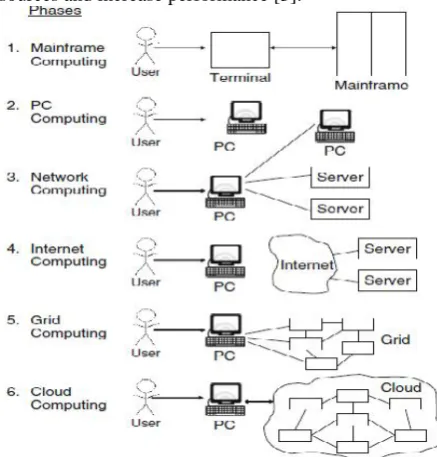
In phase 1, many users shared powerful mainframes using dummy terminals [3]. In phase 2, standalone PCs became more powerful enough to meet the majority of
users’ needs [3]. In phase 3, PCs, laptops, and servers
were connected together through local networks to share resources and increase performance [3].
Figure 1: Six computing paradigms- from mainframe computing to internet computing, to grid computing and cloud
computing [3]
In phase 4, local networks were connected to other local networks forming a global network such as the internet to utilize remote applications and resources. In phase 5, grid computing provided shared computing power and storage through a distributed computing systems. In phase 6, cloud computing further provides shared resources on the internet in a scalable and simple way [3]. After comparing all the six, it seems that cloud computing returns to the original mainframe computing paradigm. The main difference between the mainframe computing and cloud computing is that in mainframe computing it offers finite computing power where as in cloud computing it offers infinite computing power.
II. DEFINING CLOUD COMPUTING Cloud computing turns the technology, service and application to self-service utility. The word cloud refers to two essential concepts:
Virtualization: It virtualizes systems by pooling and sharing resources. Costs are accessed on a metered basis, multi-tenancy is enabled and storage can be provisioned as needed from centralized architecture.
NIST definition of Cloud Computing
The definition issued by the U.S. National Institute of Standards and Technology (NIST) September, 2011 is a good starting point for the definition of cloud computing. It has a set of working definitions that separates cloud computing into service models and deployment models along with their essential characteristics. The definition starts with:
Cloud computing is a model for enabling ubiquitous, convenient, on-demand network access to a shared pool of configurable computing resources (e.g., networks, servers, storage, applications, and services) that can be rapidly provisioned and released with minimal management effort or service provider interaction [4].
Figure: Architecture of NIST model of cloud computing [5].
Originally the NIST Model did not require a cloud to use virtualization to pool resources, nor did it require the support of multi-tenancy (multi-tenancy is the sharing of resources among two or more clients). Virtualization and multi-tenancy is not used in the latest version of NIST Model.
The NIST definition of cloud computing lists five essential characteristics of cloud computing. It is reasonable to assume that missing one of these essential characteristics means a service or computing capability cannot be considered as cloud computing.
1. On-Demand Self Service: A consumer can unilaterally provision computer capabilities such as server time and network storage, as needed automatically without requiring human interaction with each service provider.
2. Broad Network Access: Capabilities are available over the network and accessed through standard mechanisms that promote use by heterogeneous thin or thick client platforms.
3. Resource Pooling: The provider’s computing
resources are pooled to serve multiple consumers using a multi-tenant model, with different physical and virtual resources dynamically assigned to consumers. There is a sense of location independence in that the consumer generally has no control or knowledge over the exact location of the provided resources but may be able to specify location at a higher level of abstraction.
4. Rapid Elasticity: Capabilities can be elastically provisioned and released in some cases automatically, to scale outward and inward demand. To the consumer the capabilities available for provisioning often appear to be unlimited. 5. Measured Service: Cloud systems automatically
control and optimize resource by leveraging a metering capability of service. This can be done on a pay-per use of charge-per use basis.
FEATURES OF CLOUD COMPUTING
User Centric: Once we are connected to the cloud, whatever is present there- images, documents, applications etc becomes ours. The data is not restricted to us only. We can share the the data with others.
Task Centric: Rather than focusing on application that it can provide , it focuses on what we need and how the application help us.
Powerful: Connecting hundreds and thousands of computers together in a cloud creates a wealth of computing power impossible with a single desktop PC.
Accessible: Because data is stored in cloud, users can instantly retrieve more information from multiple responsibilities.
Intelligent: With all the various data stored on the cloud, data mining and analysis are necessary to access that information in an intelligent manner. Programmable: Many of the tasks necessary with
cloud computing must be automated.
III. CLOUD COMPUTING ADVANTAGES Lower Cost Computers For Users: As the
application runs on the cloud not on the desktop PC, the processing power and hard disk space demanded by traditional desktop are not required. This reduces the client side costs with increased efficiency, hard disk space, less memory and more efficient processor.
Improved Performance: As maximum
applications runs on the cloud, so with fewer applications running on the desktop PC will automatically increase and improve performance of the PC. Computers in a cloud computing system will run and boot faster.
Lower IT Infrastructure Costs: Cloud computing also reduces the costs of large IT companies. The companies having peak needs and is unable to handle the resources can also use the cloud services.
Free Maintenance Issues: Cloud computing reduces both the hardware and software costs of all large scale and small scale companies. As the requirement of hardware reduces for those using cloud services maintenance costs automatically reduces.
www.ijcsit-apm.com International Journal of Computer Science & Information Technology 3 Instant Software Updates: With this advantage
the users are no longer facing the choice between obsolete software and high upgrade costs. We are provided with the latest version whenever we are accessing a web-based application without needing to pay for or download an upgrade.
Unlimited Storage Capacity: Virtual storage capacity is offered by cloud. We may consider a case that when our laptop PC or desktop PC is going out of storage space capacity we can here use cloud to store our required data.
Increased Data Safety: Unlike in our laptop PC or desktop if the hard disc is crashed data stored in the memory is also lost whereas in cloud numerous copies of data is stored so that if a storage space crashes data is not lost. It can be accessed from other locations. The security also increased as locations where the data is stored is not accessed by users.
Easier Group Collaboration: Sharing documents directly leads to collaboration of documents. This leads to working of several people under one project as a group, no matter from whatever place they are connecting to each other. They can use cloud services to connect to one another and work as single group.
Universal Access To Documents: Whenever we place a document in the cloud, we can access it from anywhere by staying connected to the cloud. All documents are instantly available from wherever we are.
Latest Version Availability: This a document related advantage of cloud computing. The cloud always hosts the latest version of our documents, we are never in danger of having an outdated version on the computer we are working on.
DISADVANTAGES OF CLOUD COMPUTING Requires A Constant Internet Connection: It
is impossible to use applications and services of cloud computing without an internet connection. Internet helps in connecting both our applications and documents. Without an internet
we can’t access anything even our own document.
Doesn’t Work Well With Low Speed
Connections: Similarly a low speed internet connection also does not work well and cloud computing is often impossible. Web-based applications generally require a lot of bandwidth to download. Thus cloud computing is not good for slow or broad-band impaired connections. Can Be Slow: Web-based applications can
sometimes be slower even in fast internet connections reason being everything about the program, from the interface to the document we are working on has to be sent back and forth from our computer to the computers in the cloud. Stored Might Not Be Secured: Data is stored in cloud with cloud computing. But there are some security issues that may lead to damage of users data.
IV. SERVICE MODELS
Service model describes the types of services that the service provider is offering. To build and host distributed applications, cloud computing applications are categorized into set of layers. These layers include Infrastructure, Platform, and Software. To create cloud based applications, a client use these layers to build the applications depending upon the type and level of service being offered. These services are useful in categorizing not only cloud computing capabilities, but specific vendor offerings, products and services.
Virtual computing systems and networks are created using Infrastructure as a Service. A hosted application that is universally available, usually through a browser over the internet represents Softwaare as a Srevice. It helps in direct interaction between the user and the software. A development environment upon which application may be built is known as Platform as a Service in cloud computing. A model is provided which is used to create complex applications. Some of these applications are: Customer Relation Management (CRM) and Enterprise Resource Planning (ERP) system.
Infrastructure as a Service (IaaS)
In this model the cloud provider manages and controls the underlying infrastructure as storage, network and computing resources. The end user is able to deploy, run and control software, which may include operating system and applications and possibly limited control of selecting network components. Vendors of IaaS has created a hardware utility service where the user provisions virtual resources as required. To meet the requirements, the developer interacts with the IaaS model to create virtual private servers, virtual private storage, virtual private network etc. and then populates these virtual private systems with the applications and services it needs to complete its solution [6]. Here virtualized resources are mapped to real systems. Example: Amazon Elastic Cloud Compute (EC2)
EC2 provides complete control over a customer’s
computing resources so new severs can be set and booted up in a very short span of time. Their capacity can be scaled quickly through a simple web service interface.
Platform as a Service (PaaS)
The second major layer of cloud computing is known as platform as a service, sometimes also known as middleware. The underlying idea of this category is that all the development takes place here saving both time and resources of the company.
In platform as a service cloud computing model, the cloud provider offers and manages programming languages, frameworks, libraries, services and tools to create and deploy applications. The cloud provider also manages and controls the underlying cloud infrastructure including network, servers, storage and operating systems.
Example: force.com
underlying requirements so that the users have to focus only on the design of the application.
Software as a Service (SaaS)
In this cloud computing model, application is hosted as a service to customers who access it via the internet. Cloud provider manages and controls the underlying cloud infrastructure including, storage, network, operating system, application platform etc. the applications are accessible from various client devices through either a web browser or a program interface. These applications feature automatic updates and upgrades. As all users have same versions of software so each user system is compatible with others. It supports multiple users and provides a shared data model through a multi- tenancy model.
Example: Google apps
These are typical implementation of SaaS model. It enables users to communicate, collaborate and cerate software easily by providing with similar functionality. The communication functionality consists of google mail and google talk, which allow communication through e-mail and instant messaging and voice calls.
V. DEPLOYMENT MODELS
Deployment models refers to the location and management of the infra structure. The NIST defines the cloud computing into four deployment models:
Private Cloud
This kind of infrastructure is exclusively provisioned for the use by a single organization that comprises of multiple users. It can be managed internally or by a third- party, and can be hosted either internally or externally [7]. It requires a significant level of engagement. Self- run data centers are generally capital intensive [7]. Private cloud represents an enabling as well as a transitional step towards the border adoption of IT services in public cloud.
Puiblic Cloud
When the services are rendered over a network that is open for public use is known as public cloud [7]. Public cloud services may be free or offered on a pay- per-usage model. The cloud infrastructure is provisioned for open use by the general public. Public cloud is the first deployment model of cloud services to enter into the IT industry. Generally public cloud service providers own and operate the infrastructure at their data center and access is generally via the internet [7].
Community Cloud
The Cloud infrastructure is provisioned for exclusive use by a specific community of consumers from organizations that have shard concerns. The community cloud aspires to combine distributed resource provision form grid computing, distributed control from digital ecosystems and sustainability from green computing with the use cases of cloud computing. In the community cloud each user would inherently possess a unique identity, which combined with the structure of community cloud. The community cloud is not owned and controlled by one organization, and therefore not dependent on the failure of any one organization. Hybrid Cloud
The hybrid cloud infrastructure is a composition of two or more distinct cloud infrastructures (private,
community or public) that remain unique entities, but are bound together by standardized technology that enables data and application portability [7]. Varied use cases for hybrid cloud composition exists, such as an organization may store sensitive client data in house on a private cloud application, but interconnect that application to a business intelligence application provided on a public cloud as a software service.
VI. TEN WAYS CLOUD WILL CHANGE BY 2020 1. Software Floats Away From Hardware: A
highly abstracted space will be there where software is written in such a way that it goes through several filters before it interacts with hardware [9][8].
2. Modular Software: With the growth in the size and complexity of individual programs, the software development process will place an emphasis on modular software. As a they interact with multiple clouds.
3. Social Software: Along with modular shift, software could take on traits currently found in social media applications like Facebook.
4. Commodity Hardware Rules: The transition to low cost hardware will be in full swing. By breaking infrastructure down into basic components, replacements and upgrades can be done quickly.
5. Low- Power Processors And Cheaper Clouds:
We’re around a year away to form a low- power ARM chips coming to market with a 64- bit compatibility. Once that happens enterprise software will be developed for RISC chips [8] [9]. 6. Faster Interconnects: The needs like massively
distributed applications and a rise in the core count of high- end processors will converge to bring superfast interconnects into the datacenter.
7. Datacenters Become Ecosystems: Cloud datacenters will become much like a living organism with different states. Automation of basic tasks, such as patching and updating equipment, will mean the data center in the sense that changes and corrections are automatically made.
8. Clouds Consolidate: Fierce competition between a few large providers could be a good thing, as it would still drive each of them to experiment with radical technologies [8].
9. The General Shift: A new generation services would emerge into companies, and they will have been raised in a cloudy as-a-service world. This new generation may lead to shake up in how businesses bill themselves for IT [8].
10. Clouds Will Startify: Today cloud are differentiated by whether they provide IaaS, PaaS or SaaS service capabilities. But in future we are expecting that more specialized clouds will emerge [8].
REFERENCES
1. Liladhar R. Rewatkar, Ujwal A. Lanjewar,
“Implementation of Cloud Computing on Web
Application”, International Journal of Computer
www.ijcsit-apm.com International Journal of Computer Science & Information Technology 5 2. Hosam Al Hakami, Hamza Aldabbas, and Tariq
Alwada’n., “Comparison between cloud and grid
computing: review paper”, International Journal on
Cloud Computing: Services and Architecture (IJCCSA),Vol.2, No.4, August 2012
3. http://d1smfj0g31qzek.cloudfront.net/abovethecloud.pdf 4. Book: Bible ; Chapter-1 ; Page-24
5. Book: Handbook of cloud computing ; Chapter-1; Page-4
6. www.service-architecture.com/articles/cloud-computing/cloud_computing_definition.html 7. Book: Bible; Chapter-1; Page- 26
8. Book: Bible; Chapter-4; Page-84
9. http://www.zdnet.com/article/cloud-computing-10-ways-it-will-change-by-2020/2/