Link Resolver System
By
Md Ehtesham
Guided by
Dr. A R D Prasad
Associate Professor
Documentation Research & Training Centre
Project I
A guided research project submitted in partial fulfillment of
the course leading to the Award of
“Associateship in Documentation and Information
Science”
2005 -2007
Documentation Research and Training Centre
Indian Statistical Institute
Link Resolver System
By
I hereby declare that the project report entitled “OpenURL Link Resolver System”
which is being submitted in partial fulfillment of the course requirements leading to
the award of Associateship in Documentation and Information Science (ADIS) in
Documentation Research and Training Centre (DRTC), Indian Statistical Institute,
Bangalore Center (ISIBC). This is the result of the work carried out by me under the
guidance and supervision of Dr. A.R.D Prasad.
I further declare that I or any other person has not previously submitted this project to
any other institution/university for any other degree/diploma.
(Md Ehtesham)
It is certified that this project has been prepared under my guidance and supervision.
(Dr. A.R.D Prasad)
Place: Bangalore
I take this opportunity to express my gratitude to my Mother and Father and
to the almighty for giving me everything what I am now and for the ability to work.
I seize this opportunity to evince my earnest gratitude to my guide Dr.
A.R.D Prasad for his complete guidance in every aspect and being such an ideal
and an inspiring figure all along always propelling to work hard and to be
contributive –I evince in him my reverence .
I thank Prof. & Head Dr. I. K. Ravichandra Rao, Documentation Research
and Training Centre (DRTC) for his encouragement and guidance throughout the
course. I pay my gratitude to Prof. K.S.Raghavan for his moral support and
valuable suggestion. It is also an opportunity for me to pay my respect to Dr.
Devika P Madalli for her support at every step in this course whenever I needed,
and of course for this project her suggestions were invaluable. I thank her earnestly.
I am thankful to the Research Scholars Nabonita Guha, Bishwanath Dutta
and Anand Kumar Pandey for their suggestions and help in completion of this
project.
At last, but by no means the least, I express my sincere thank all of my
friends who always have their best opinion for me, encouraging and helping out
whenever it is needed. I will miss them. And, my juniors, I can hardly forget their
enthusiasm, appreciation, cooperation, assistance that have been a great
encouragement to me.
Thank you all.
Contents
Chapter 1
1
Introduction to OpenURL………..…..…..1
1.1 Why
OpenURL……….…...2
1.2
About this project……….………...3
1.3 Objective
of
the
Study………..………..3
1.4
Scope of the Project……….….……….3
1.5 Methodology……….
4
1.6 Chapterization………4
Chapter 2
2 OpenURL
Standard……….………...8
2.1 History
of
OpenURL………...8
2.2
Need of OpenURL………...9
2.3
Basic terms and concepts……….10
2.4
What does OpenURL consists of?...11
2.5
How OpenURL works?...11
2.6 Significance
of
OpenURL………12
2.7
Issues and challenges………...13
Chapter 3
3 OpenURL Link Resolver Systems……….…………...14
3.1 Open Source OpenURL Link Resolver systems……...…….18
4.1
Installation of CUFTS………...……...23
4.2
Installation of GODOT……….…..……….37
4.3
Installation of dbWiz……….…..………….……55
Chapter 5
5 CUFTS
Administration………..…..62
5.1 Creating
New
Site………..……..63
5.2 Creating
User
Accounts………..……….64
5.3
Menu bars on CUFTS Administration Page…..…………..65
5.4 Changing
Site……….…….……….66
5.5 Local
Resources……….….……….66
5.6
Editing Resources (ERM)……….….…………..67
5.6.1
General Settings………...…68
5.6.2
Basic ERM……….…………..…69
5.6.3
Date/Costs……….…………...69
5.6.4
Statistics……….………..……69
5.6.5
Admin Info……….…………..…69
5.6.6
Terms………...…69
5.6.7
Contacts………...69
5.6.8
Misc……….…70
5.7
Managing the Global Resources – Add or Edit…………...70
5.7.1
Adding New Global Resource……….70
5.7.2
Editing Global Resource………..…71
5.7.3
Title list Maintenance………..71
5.7.4
Exporting title lists………...73
5.7.5
Activating CrossRef………...73
5.7.6
Activating unique local resource………….…75
5.9
CUFTS Public Services………....78
5.9.1
Journal Search………..…79
5.9.2
Resource Comparison………..79
Chapter 6
6 Godot
Administration……….………..81
6.1
Godot Configuration Tool………....83
6.2 Administration
Main
Page………...83
6.3
Adding New Site ……….84
6.4 Adding
New
Account ……….85
6.5 Site
Configuration………86
6.5.1
General Configuration……….…86
6.5.2
Sites that use Godot……….87
6.5.3
Sites that lend………...97
6.5.4
Site Holdings………....97
6.5.5
Site Catalogue………..……99
6.6 Templates………..……….100
6.7 Sandbox……….……….100
6.8 Style
Sheets……….…………...101
Chapter 7
7 dbWiz
Administration……….………...102
7.1
Administration Main Page……….102
7.2 Adding
Site……….103
7.3 Creating
New
Account………...103
7.4 Changing
Site………..…...104
7.6
Adding or Editing Provider of the resources……...……..107
7.7 dbWiz
Site
Configuration………..108
7.8 Configure
Search
Profile………....108
7.9 Configure
Search
Resources………..109
7.10 Configure
Search
Options………..……111
7.11 Configure
Search
Result Status Messages………….……111
7.12 Configure Display Options………112
7.13 Configure Authorization ID’s………112
7.14 General Settings Configuration………..113
7.15 Templates………..……….…113
7.16 StyleSheets………..………...114
Chapter 8
8 dbWiz
Search………..….………..115
8.1 Basic
Search……….….……….…115
8.2 Advanced
Search……….………...115
8.3
dbWiz Search Result……….……….116
Chapter 9
Conclusion
...118
Chapter 1
1 Introduction
to
OpenURL
OpenURL is a type of URL that contains resource metadata for use, primarily
in libraries and consortia. It is a mechanism for transporting metadata and
identifiers describing a publication, for the purpose of context sensitive
linking. The OpenURL is indeed, a way of organizing meta-data in a URL and
pointing it to a destination. It describes the cited object. It helps in accessing
appropriate copy of reference resources.
In other words OpenURL is a standard for encoding generic search terms such
as author, title, ISBN, etc into a URL. This enables systems that support
OpenURL to format search requests and supply results. OpenURL defines the
request standard, and then the appropriate copy is returned to the user, usually
in the form of a web page, where the links to various resources of library is
displayed which the user can select as per his choice, the user can also put the
inter library loan request if full text is not available or if appropriate copy is
not available, not only this the user also gets the link to check that particular
resource on the web in various search engines such as: Google, teoma etc.
In the heterogeneous and networked information environment, the libraries
have access to various online resources, electronic journals, online databases
etc. There is a need to interlink all the resources of the library in order to
manage the collection of the library and save the time of the users to browse
1.1
Why OpenURL
In the present distributed information environment libraries have access to
multiple Abstracting and indexing databases and other discovery resources.
There has been rapid growth in e-journal collection of the libraries. Therefore,
there is a need to interlink all the available resources of the library but various
problems come into the picture such as:
¾ Links to the resources are controlled by the external information
services.
¾ Links are not sensitive to the user’s context which causes the
appropriate copy problem.
¾ Links are dependent on vendor’s of the resources agreements
¾ Links don’t cover the complete collection.
Some other important problems are:
¾ Libraries have no control over the links; therefore libraries are losing
the core part of organizing information task.
¾ Expensive collection are not being used optimally
¾ Users are not being well served.
Therefore to resolve these problems we can opt for OpenURL. OpenURL
provide links that transports metadata about the referenced item to another
1.2
About this project
This project is undertaken as partial fulfillment of my two year ADIS course at
DRTC, ISI. In this project I have studied, installed, configured and integrated
“OpenURL link Resolver” bits and pieces of open source software such as:
¾ CUFTS knowledge base
¾ GODOT Link Resolver
¾ dbWiz federated search interface.
The basic aim of my project is to install some open source tool to manage the
resources link of libraries and consortia, develop link resolver system to
provide the user with the appropriate copy of resources, create single search
interface and Inter Library Loan request system.
In this project I have configured “OpenURL Link Resolver System” and here,
the complete documentation work from installation to configuration has been
given.
1.3
Objective of the Study
The objective of the present study is to develop OpenURL Link Resolver
system in order to manage the links of online resources (Collections) of the
libraries or consortia and provide seamless access to the appropriate copy of
referenced resources.
1.4
Scope of the Project
Scope of the project is to install and configure OpenURL Link Resolver
software, GODOT Link Resolver software and dbWiz federated search system
software.
1.5
Methodology
To develop OpenURL Link Resolver System I have installed configured and
integrated bits and pieces of open source OpenURL Link Resolver softwares
such as: CUFTS, GODOT and dbWiz.
1.6
Chapterization
Chapter 1
1 Introduction to OpenURL
1.1 Why OpenURL
1.2 About this project
1.3 Objective of the Study
1.4 Scope of the Project
1.5 Methodology
1.6 Chapterization
Chapter 2
2 OpenURL Standard
2.1 History of OpenURL
2.2 Need of OpenURL
2.3 Basic terms and concepts
2.4 What does OpenURL consists of?
2.5 How OpenURL works?
2.6 Significance of OpenURL
Chapter 3
3 OpenURL Link Resolver Systems
3.1 Open Source OpenURL Link Resolver systems
Chapter 4
4 Installation of OpenURL Softwares
4.1 Installation of CUFTS
4.2 Installation of GODOT
4.3 Installation of dbWiz
Chapter 5
5 CUFTS Administration
5.1 Creating New Site
5.2 Creating User Accounts
5.3 Menu bars on CUFTS Administration Page
5.4 Changing Site
5.5 Local Resources
5.6 Editing Resources (ERM)
5.6.1 General Settings
5.6.2 Basic ERM
5.6.3 Date/Costs
5.6.4 Statistics
5.6.5 Admin Info
5.6.6 Terms
5.6.7 Contacts
5.6.8 Misc
5.7 Managing the Global Resources – Add or Edit
5.7.1 Adding New Global Resource
5.7.2 Editing Global Resource
5.7.3 Title list Maintenance
5.7.4 Exporting title lists
5.7.6 Activating unique local resource
5.8 CUFTS Journal Database (CJDB)
5.9 CUFTS Public Services
5.9.1 Journal Search
5.9.2 Resource Comparison
Chapter 6
6 Godot Administration
6.1 Godot Configuration Tool
6.2 Administration Main Page
6.3 Adding New Site
6.4 Adding New Account
6.5 Site Configuration
6.5.1 General Configuration
6.5.2 Sites that use Godot
6.5.3 Sites that lend
6.5.4 Site Holdings
6.5.5 Site Catalogue
6.6 Templates
6.7 Sandbox
6.8 Style Sheets
Chapter 7
7 dbWiz Administration
7.1 Administration Main Page
7.2 Adding Site
7.3 Creating New Account
7.4 Changing Site
7.5 Adding and activating resources from the Global resources
7.6 Adding or Editing Provider of the resources
7.7 dbWiz Site Configuration
7.9 Configure Search Resources
7.10 Configure Search Options
7.11 Configure Search Result Status Messages
7.12 Configure Display Options
7.13 Configure Authorization ID’s
7.14 General Settings Configuration
7.15 Templates
7.16 Style Sheets
Chapter 8
8 dbWiz Search
8.1 Basic Search
8.2 Advanced Search
8.3 dbWiz Search Result
Chapter 9
Conclusion
Chapter 10
Chapter 2
2 OpenURL
Standard
US National Information Standards Organization (NISO) has developed and
proposed OpenURL and its data container (the Context - Object) as
international ANSI standard Z39.88. On 22 June 2006, OCLC was named the
maintenance agency for this standard. The OpenURL standard is designed to
support mediated linking from information resources (sources) to library
services (targets). A "link resolver", or "link-server", parses the elements of an
OpenURL and provides links to appropriate services as identified by a library.
A source is generally a bibliographic citation or bibliographic record, used to generate an OpenURL. A target is a resource or service that helps, satisfy user's information needs.
Examples: Full-text repositories; abstracting, indexing, and citation databases;
online library catalogs; and other Web resources and services.
2.1
History of OpenURL
OpenURL is a standard for encoding generic search terms such as author, title,
ISBN, etc into a URL. This enables systems that support OpenURL to format
search requests and supply results. OpenURL defines the request standard, and
then the appropriate copy is returned to the user, usually in the form of a web
page.
OpenURL was initially developed to support Resolver technology (Resolvers
are software servers that guide the user to the most appropriate source of
- combined with a knowledge base of available information - to create links to
resources in a format accepted by the publisher. OpenURL is mainly used for
this function, although any application wishing to receive bibliographic-style
search requests via URLs can utilize it.
OpenURL Version 0.1, released in 2000, is the most generally used, although
this has since been superseded by Version 1.0, defined in the NISO Standard
Z39.88 to provide more complex encoding to satisfy the needs of electronic
journal publishing.
2.2
Need of OpenURL
As we know Libraries often have access to dozens of Abstracting and
Indexing (A&I) databases, these databases are linked to the full text of articles,
but are unaware of what publications the library has actually subscribed to. It’s
often difficult or too time consuming for a library to reflect these holdings in
their library catalog. Because of this, once a citation is in the hands of the
users, finding that item is not always straightforward. To resolve this problem
many libraries purchase A-Z lists of their electronic journal holdings from
companies such as Serials Solutions, but this is also of not great use.
In today’s Internet world, patrons want as few clicks as possible between
identifying a citation that they want and getting to the full text of that item. It
is sometimes even unacceptable if the library has the journal in print but not
electronically—many users want electronic full text only. If an item can’t be
clicked to right away, it doesn’t exist for some users.
Without OpenURL: A patron searches a source, which may or may not
contain links to the target (or the target itself, e.g. full text); the patron takes
that citation, then searches for the target in the library catalog, ejournal A-Z
With OpenURL: A patron searches a source, usually an A&I database and
find citations for items that are needed (targets). In between the sources and
targets, software called a Link Resolver or Link Server sits that accepts links
(OpenURLs) sent by the sources and presents the user with links to individual
targets.
2.3
Basic terms and concepts
OpenURL is a type of URL that contains resource metadata for use, primarily
in libraries and consortia. It is a way of organizing meta-data in a URL and
pointing it to a destination. It is a standard for encoding generic search terms
such as author, title, ISBN, etc into a URL
The following are the basic terms:
¾ OpenURL – A NISO standard (Z39.88), by which web links (URLs) are created containing metadata, allowing the linking directly to
reference resources
¾ Source – A citation database where an image or link appears; this link is an OpenURL that points to a link resolver.
¾ Targets – The items listed in the results window: the full text databases, Catalog, Ask-a-Librarian, and Google.
¾ Link Resolver – Software that interprets an OpenURL and creates links to targets.
¾ Base URL – The URL of a link resolver server.
2.4
What does OpenURL consists of?
An OpenURL consists of a base URL, which addresses the user's institutional
link-server, and a query-string, which contains the bibliographic data, typically
in the form of key-value pairs. For example:
http://resolver.example.edu/cgi?genre=book&isbn=0836218310&title=
The+Far+Side+Gallery+3
is a version 0.1 OpenURL describing a Gary Larson book whose title is “The
Far Side Gallery”
http://resolver.example.edu/cgi is the base URL of an example link-server. In
version 1.0, this same link becomes somewhat longer:
http://resolver.example.edu/cgi?url_ver=Z39.88-2004&rft_val_fmt=info:ofi/fmt:kev:mtx:book&rft.isbn=0836218310&
rft.btitle=The+Far+Side+Gallery+3
2.5
How OpenURL works?
OpenURL is indeed a way of organizing data in a URL. It describes the cited
object. There is a link resolver pointer in the OpenURL, which process the
OpenURL. For example each library has one link resolver to which all their
OpenURL’s point.
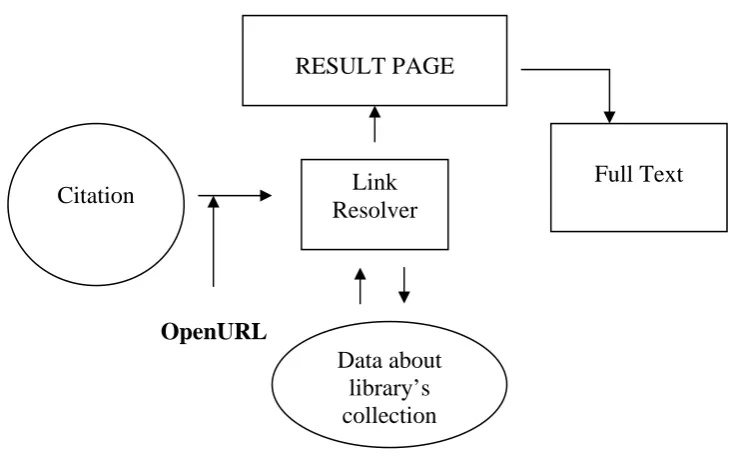
OpenURL works as part of a broader linking system in the following
steps:
Step I – The OpenURL from the reference resources carries sets of metadata
OpenURL
RESULT PAGE
Link Resolver
Full Text
Data about library’s collection Citation
Fig. How OpenURL works
Step II – The link resolver compares the data about the item described in the
OpenURL with data about what is held in our library’s collection. At this stage
it also checks the access rights.
Step III – Based on the results of step II, the link resolver displays the options
that are available to the patron.
Step IV – Patron selects the best option. Ideally, this is a link directly to the
full – text of the article. If that is not available, He may be linked to the
journal, or a link to search for the item via interlibrary loan or a document
delivery service.
2.6 Significance of OpenURL
OpenURL helps the information providers to equip their products for optimal
The OpenURL enables library-controlled links to a multiplicity of resources
related to a citation and is designed for localized linking.
The OpenURL is enhanced by interaction with the Digital Object Identifier
(DOI) system. It transports metadata and identifiers describing a publication,
for the purpose of context-sensitive linking.
OpenURL helps link resolver system for linking within an institutional context
and interpret the incoming HTTP request in the form of OpenURLs, take the
local holdings and access privileges of that institution (usually a library) into
account, and display links to appropriate resources in the form of a WebPages.
It allows the library to provide a range of library-configured links and
services, including links to the full-text, a local catalogue to check print
holdings, document delivery or ILL services, databases, search engines, etc.
2.7
Issues and challenges
¾ Noisy/Insufficient data from sources
¾ Diverse and constantly changing targets
¾ Lack of integrated Open Source software for Link Resolving
Chapter 3
4
OpenURL Link Resolver systems
Besides the few Open source OpenURL Link Resolver systems, presently
there are number of commercial vendors who are providing this OpenURL
Link resolving service. They charge a handsome amount for this service. The
prominent among them are Ex Libris SFX® link server.
SFX™ -- Ex Libris (USA), Inc.
The Ex Libris SFX™ technology, fully integrated in MetaLib®, provides
context-sensitive reference linking from retrieved records to related resources
and services and thus seamlessly links heterogeneous sources of scholarly
information. With SFX™, libraries can define rules that allow SFX™ to
dynamically create links that fully integrate their information resources
regardless of who hosts them -- the library itself or external information
providers.
It is the most widely-used link server and the linking solution of choice for
over 1.000 libraries worldwide, SFX – the original OpenURL link resolver – is
and innovative tool for interconnecting library – controlled resources and
services. SFX provides users with context – sensitive links to services that
librarians define on the basis of their institute’s e-collection and policies. Such
services, which are dynamically created, can include links to the full text of an
article, the OPAC (for local holdings), preferred document-delivery suppliers,
related Web-based resources and services, local information repositories, and
a range of other services.
For library patrons, SFX means quick and reliable access to the resources
• The extensive SFX knowledge base is constantly updated so users
always have access to the most current resources.
• A range of delivery options--full-text, print holdings, e-books, and
others--offer users multiple ways to obtain the information they need.
• Multiple customizable access points--A-Z List and Citation Linker -
streamline the information discovery process
For librarians, SFX provides a complete set of tools to easily localize and
customize access to resources, keep them up-to-date, and track the usage of
these resources.
• Extensive customization options allow libraries to provide a solution
that best fits user requirements.
• Built-in consortia support enables leveraging of common resources
without duplicating management effort.
• A comprehensive reporting package provides real-time visibility into
usage patterns and trends.
• Optional MARC enhancement service
Article Linker™ -- Serials Solutions™, Inc.
"Serials Solutions™ Article Linker™ is a full-feature OpenURL link resolver
that seamlessly links the all your library resources. When patron finds a
citation or reference to a specific article, Article Linker™ supplies the best
available path to the content, anywhere in your collection."
EBSCO CustomLinks™ and EBSCO SmartLinks™ -- EBSCO Publishing
"With EBSCO CustomLinks™ libraries can easily create and manage multiple
customized links to relevant Web-based resources." These resources may
include library OPAC's, ILL services, book vendors, linking servers, and
search engines in a customizable interface. "EBSCO SmartLinks™
Journal Linker™ -- Serials Solutions™, Inc.
"Included with a subscription to Serials Solutions™ E-Journal A.M.S. or full
MARC records services. Serials Solutions'™ Journal Linker™ provides the
most important benefit of OpenURL servers – context specific linking. Journal
Linker™ enables you and your patrons to easily link from abstracts and
indexes to the full-text of the cited journal, anywhere in your collection."
LinkFinderPlus™ -- Endeavor Information Systems, Inc.
LinkFinderPlus™ is a comprehensive linking system that makes the research
process more efficient by providing the user with a link to the full text of
articles from a citation on a publisher or database website using OpenURL, a
standard format. It can also link them to related electronic resources, such as
search engines, online booksellers and other resources and services as defined
by the library. LinkFinderPlus™ is available as a standalone system, with
ENCompass™, or as the LinkFinderPlus™ Subscription Service hosted by
Endeavor.
LinkSource™ -- EBSCO Publishing
LinkSource™ is an OpenURL resolver designed specifically with the needs of
research-oriented institutions in mind. Researchers are just a simple
mouse-click away from a comprehensive menu of links related to their search result.
Using LinkSource’s simple menu-driven interface, libraries can add specific
item level linking to a wide variety of online information resources.
OL² ™ -- Fretwell-Downing Informatics (FDI)
OL² ™ offers customers a way of linking from a citation or a search result to
show the user whether the article is available from any of their electronic
information services or physical library holdings. OL² ™ can be used in two
ways: as a plug-in to ZPORTAL™ which creates a direct route from
information discovery to content delivery [or] as a reference linking tool that
1Cate -- Openly Informatics, Inc.
"The 1Cate Project (that's one-cate) was started by Openly Informatics to
provide the information industry with a platform for open, interoperable
development of link-server software. Just pick your data sources and library
configurations, give them a web-page design, and they'll create and host a
1Cate e-journal access and linking system for your institution, including
CrossRef, OpenURL, and JournalSeek linking, title search, and alphabetical
title lists."
SirsiResolver™ -- SIRSI Corporation
Sirsi Resolver™ lets your library bring together all the information resources
available to your users through the latest and most powerful OpenURL
reference linking. With Sirsi Resolver™, related information available from
different providers can now be integrated into one seamless response to a
user’s query. Sirsi Resolver™ makes the citation information come alive by
returning the full text of the article, professional reviews, author information -
virtually any related information, free or licensed, to which the library has
access.
TOUR, TDNet OpenURL Resolver – TDNet
TOUR is introduced as a: complementary service to the TDNet's Electronic
Journals Management system for journal holdings management,
complementary service to TES - TDNet eContents Searcher - for federated
searching on OpenURL and non OpenURL databases, [and] stand alone link
resolving from OpenURL databases. TDNet is a custom-made e-journal
service, tailored to include all and only your chosen titles, and to reflect your
current access arrangements for every title on the system. TDNet provides
direct access to: Full-text, table of contents, back year archives, publisher
WebBridge, Millennium Access Plus (MAP) -- Innovative Interfaces Inc.
"WebBridge offers a smart linking capability, which seamlessly enables
libraries to link together information resources. This can include content
enrichment such as book-jacket images and book reviews, but can also include
linking to the most appropriate copy of full-text journal articles or e-books etc.
Links are dynamic, contextual, and library-defined. Compatible with emerging
linking initiatives such as OpenURL, CrossRef, and DOI (Digital Object
Identifier).
4.1
Open Source OpenURL Link Resolver systems
OpenResolver – UKOLN
OpenResolver is an open source CGI script for resolving OpenURLs. UKOLN
is the UK Office for Library and Information Networking.
We can get OpenResolver source code from:
ftp://ftp.ukoln.ac.uk/metadata/tools/openresolver/
Simon Fraser University reSearcher software suite for
OpenURL Link Resolver System
We can host and manage the links of the resources of our library by
developing the OpenURL Link Resolver system using bits and pieces of Open
Source reSearcher Software suite developed by SFU such as:
¾ CUFTS knowledge base
¾ GODOT Link Resolver
CUFTS knowledge base
CUFTS is an open source (GPL) Serial Management; online knowledgebase
of full text journal collections, OpenURL link resolver is designed for use by
library consortia. CUFTS has been developed at the Simon Fraser University
Library for the Council of Prairie and Pacific University Libraries (COPPUL).
It supports multiple sites from one server, online management tools, usage
statistics, and supports a knowledgebase of multiple resources with unlimited
title records. Sites can individually activate resources which they have access
to, as well as subserts of titles for packages to which they only have partial
subscriptions.
CUFTS is written entirely in Perl, uses PostgreSQL as a database, and Apache
for a webserver. Resources are written as simple plugin modules so adding
new resources and types of linking is easy. CrossRef support for DOI linking
through DOI.org is included, as well as some example resources for linking to
web searches and library catalogues (for holdings searches). While the focus is
on on-line journals, the system can be expanded to also support ebooks and
other document types.
The CUFTS knowledgebase is also usable for things other than link resolving.
Here you'll find a few other tools that have been developed using the
knowledgebase. These link to the main CUFTS database at Simon Fraser
University, but should be publicly usable.
Journal Search
Journal Search allows you to quickly find journal titles in over 245 different
electronic collections listed in CUFTS. Search by journal title or ISSN to find
out which collections include a journal, and what coverage dates are available.
Resource Comparison
Resource Comparison provides rapid analysis of journal titles and coverage
Pick two resources and find out what the overlap is and what titles are unique
to each resource.
cufts2marc
Create brief USMARC records for titles in CUFTS collections.
GODOT Link Resolver
GODOT stands for Generalized Online Documents, Ordering, and Texts.
GODOT is free, open source software created at Simon Fraser University and
the University of Manitoba and funded by COPPUL (the Council of Prairie
and Pacific University Libraries). COPPUL libraries have been using
GODOT since 1997.
T
GODOT is a full-text OpenURL link resolver and interlibrary holdings locator
and requesting system.
GODOT places a link in your databases, searches the CUFTS knowledgebase
for fulltext, your library cat for local print holdings, and other library
catalogues that you define for remote holdings. GODOT works closely with
your ILL system to facilitate ILL requesting.
Godot is Open source (GPL) link resolver software, which provides direct
links to the fulltext collection using the CUFTS knowledge base, holdings
from library catalogues, databases and other resources. It is a unique tool
which works as integrated library system, manages links of all library
resources both full text as well as printed. It also works as interlibrary loan
request system and provide direct or mediated interlibrary loan requests by the
users.
GODOT is web-based software which enables library patrons to view your
as other library's holdings. This is combined with the ability to request
documents not in your collection via Interlibrary Loan.
When a patron clicks on a link, GODOT parses the citation and runs it
against:
• your library's catalogue, looking for electronic and print matches;
• CUFTS, Godot's new knowledge base, which contains over 125 title
lists for e-journal collections and full text databases;
• union databases or catalogues of libraries that you select for potential
Interlibrary Loans, whether mediated or direct, using Z39.50
broadcast searching.
The resulting GODOT screen shows your patron where they can locate the
document sought, either within a full text database, in an online journal to
which you have rights, in a paper copy within the library, or from a lending
library. Where available, GODOT provides direct to article linking for full
text articles carried by your institution.
If a patron chooses to order a document, they will not have to re-key their
citation information. GODOT can also be configured to retrieve information
from a library's patron records allowing for proper authenticaton.
The web-based configuration tool has many options, so you can configure
GODOT as per your library's needs.
dbWiz Federated Search Interface
dbWiz is an open source development project of the Simon Fraser University
Library. It is a kind federated search engine, allows researchers to search
multiple databases, web sites, catalogues, and other online resources form a
dbWiz Features
• simultaneous (parallel) searching
• searches various database types:
o Z39.50 targets
o SOAP targets
o SQL databases
o WEB databases
• gives users to ability to limit resources searched to defined subset
o only resources that contain fulltext articles
• modular design allows addition of drivers to search other kinds of
databases
• customizable settings:
o choose which databases to search o select which web pages to search o select default web search engine
o ability to easily organize databases in catagories and to ranking
each database
o ability to easily customize the look and feel of the search
CHAPTER 4
4
Installation of OpenURL softwares
4.1 CUFTS
Installation
Download
CUFTS Serial Management software which redirects the http request of
OpenURL links can be downloaded through:
Anonymous SVN checkout of CUFTS trunk:
svn co http://cufts2.lib.sfu.ca:7999/CUFTS/trunk/CUFTS in the command
prompt.
Prerequisites for CUFTS installation
Perl 5.6+, 5.8.8 – CUFTS software is written in Perl therefore we need the
Perl and its various modules, CUFTS itself may not depend on a particular
version of Perl but some of the modules it uses depends.
Postgresql – CUFTS uses the backend database of Postgresql. Tested with
7.4.1 and other versions 8.1.4 should work with other versions also.
Apache web server – CUFTS need Apache web server to run its application.
Tested with 1.3.29, 2.0 and 2.2 should work with other versions. Leave
HostnameLookups on if you want to use domain name to site mapping.
Various Perl Modules
CUFTS needs various Perl Modules which are easily available from CPAN.
The installation script checks for these and let you know what is not installed.
There is others - check the install script output to be sure. We can use "perl
util/install.pl -m" to check for necessary modules without running the full
install.
For e.g.
[root@localhost CUFTS]$ perl util/install.pl -m
CUFTS needs a number of Perl modules to work...
Checking for module Business::ISSN... found
Checking for module Catalyst... found
Checking for module Catalyst::Plugin::FillInForm... found
Checking for module Class::Accessor... found
Checking for module Class::DBI... found
Checking for module Class::DBI::AbstractSearch... found
Checking for module Class::DBI::Plugin::CountSearch... found
Checking for module Class::DBI::Plugin::FastDelete... found
Checking for module Class::DBI::Plugin::Type... found
Checking for module Class::DBI::Sweet... found
Checking for module Date::Calc... found
Checking for module Exception::Class... found
Checking for module Exception::Class::DBI... found
Checking for module Getopt::Long... found
Checking for module HTML::Entities... found
Checking for module HTML::FillInForm... found
Checking for module LWP::UserAgent... found
Checking for module MARC::Record... found
Checking for module MIME::Lite... found
Checking for module Net::SMTP... found
Checking for module SQL::Abstract... found
Checking for module Template... found
Checking for module Term::ReadLine... found
Checking for module Text::CSV... found
Checking for module URI::Escape... found
Checking for module URI::OpenURL... found
Checking for module XML::Parser::Lite::Tree... found
Checking for module XML::RAI... found
Great, you seem to have everything necessary!
If you plan on running under Apache with mod_perl, these modules will be
useful as well...
Checking for module Apache::DBI... found
Installation Procedure
Before installing, we need to have a basic system up running with
PostgreSQL, Perl, DBI, and Apache.
To install CUFTS we need to pick a couple of locations for the system to
install files to. First is a location for the main installation to go - this includes
modules, title lists, logs, etc. It should not be in a web accessible location if
possible. This location is refered to as the base directory in the installation
script.
"/usr/local/CUFTS" is a good location if we have access to write there.
We also need to pick a location in a web accessible and CGI enabled directory
for the CGI files to go. The CGI files are symlinked from the main installation
directory during installation.
Once we have these locations picked we can run the installation script from
[root@localhost CUFTS]# perl util/install.pl
Note: Running the install script as root is not necessary, but it makes it
easier by allowing the system to chown the log files and other web writable files to the web server account.
The install script will start configuring and installation of CUFTS. It will ask
number of question like this.
Configuring CUFTS
=================
First, some comments about installation...
* The CUFTS installation needs access to DBI under Perl and the PostgreSQL
Command line tools to install the database. You can continue without these,
but you will have to set up the database by hand.
* CUFTS needs to write to a few directories as the web server for session
tracking, logs, etc. If you are not running as root, you will have to chown these
directories manually, or allow the installation script to make them world
writable.
If you need to set up PostgreSQL or DBI, or switch to root, you can exit now.
Continue with installation?
[Y/n]: Y
Checking for necessary tools.
DBI installed... yes.
DBD::Pg installed... yes.
PostgreSQL tools available... yes.
Finished preliminary checks.
What directory will CUFTS be run from (CUFTS base directory) ?
[/usr/local/CUFTS]: (Here we can give the full path of our desired location to install CUFTS base directory)
Installing CUFTS in: /usr/local/CUFTS
Please answer the following setup questions. Entering nothing will maintain
the current settings... (Install script will ask number of question which we have to answer to proceed)
CUFTS Database name: CUFTS2
[CUFTS2]: (Name of the pgsql database)
CUFTS Database user: cufts
[cufts]: (Name of the databases user, should not be ‘root’ and the database user should have privilege to create new database)
CUFTS Database password: root123
[root123]:
Mail host for outgoing CUFTS mail: localhost.localdomain
[localhost.localdomain]:
Mail should be from: [email protected]
Do you want to update the configuration file with the new settings?
[Y/n]: Y
CUFTS needs the web server to be able to write to several directories for
things such as logs and uploaded title lists. If you have root access you can set
these directories to be owned by the web server owner. If not, they should be
set world writable.
It appears you are running as root. Would you like to change ownership of the
directories?
User which the web server runs as? (Here we have to give the web server user
name)
[nobody]: apache
Setting 'uploads'... ok.
Setting 'logs'... ok.
Setting 'data'... ok.
Setting 'CJDB/root/sites'... ok.
Setting 'Resolver/root/sites'... ok.
Now we have to answer few questions such as:
Do you want to configure the web applications?
[Y/n]: Y
Do you have access to update your web server's config file?
[Y/n]: Y
Is your web server running Apache 1.3.x w/ mod_perl?
[Y/n]: n
Is your web server running Apache 2.0.x w/ mod_perl 2.x?
[Y/n]: Y
httpd.conf file created. Copy the following line into your Apache config file:
(We need to copy this line in the Apache config file “httpd.conf”)
Include /usr/local/CUFTS/util/httpd.conf
If you do NOT have Apache::DBI installed, you should comment out
the 'use Apache::DBI' line from /usr/local/CUFTS/util/startup.pl
Directory installation complete. Would you like to install the database?
(Now the database installation starts)
Trying DBI connection... not found.
Creating CUFTS database. If you have entered a password above, you will be
asked to enter it again.
Password: (Here we need to give the password of the database)
Database created.
Creating CUFTS database tables and seeding database. Ignore the NOTICE:
lines.
You may be asked for the password again.
Password for user cufts: (Here we need to give the password of the database again)
NOTICE: CREATE TABLE will create implicit sequence
"accounts_sites_id_seq" for serial column "accounts_sites.id"
NOTICE: CREATE TABLE / PRIMARY KEY will create implicit index
"accounts_sites_pkey" for table "accounts_sites"
NOTICE: CREATE TABLE will create implicit sequence "accounts_id_seq"
for serial column "accounts.id"
NOTICE: CREATE TABLE / PRIMARY KEY will create implicit index
"accounts_pkey" for table "accounts"
NOTICE: CREATE TABLE will create implicit sequence
"hidden_fields_id_seq" for serial column "hidden_fields.id"
NOTICE: CREATE TABLE / PRIMARY KEY will create implicit index
"hidden_fields_pkey" for table "hidden_fields"
NOTICE: CREATE TABLE will create implicit sequence
"journal_details_id_seq" for serial column "journal_details.id"
NOTICE: CREATE TABLE / PRIMARY KEY will create implicit index
"journal_details_pkey" for table "journal_details"
NOTICE: CREATE TABLE will create implicit sequence
"journals_auth_issns_id_seq" for serial column "journals_auth_issns.id"
NOTICE: CREATE TABLE / PRIMARY KEY will create implicit index
NOTICE: CREATE TABLE will create implicit sequence
"journals_auth_id_seq" for serial column "journals_auth.id"
NOTICE: CREATE TABLE / PRIMARY KEY will create implicit index
"journals_auth_pkey" for table "journals_auth"
NOTICE: CREATE TABLE will create implicit sequence
"journals_auth_titles_id_seq" for serial column
"journals_auth_titles.id"NOTICE: CREATE TABLE / PRIMARY KEY will
create implicit index "journals_auth_titles_pkey" for table
"journals_auth_titles"
NOTICE: CREATE TABLE will create implicit sequence "journals_id_seq"
for serial column "journals.id"
NOTICE: CREATE TABLE / PRIMARY KEY will create implicit index
"journals_pkey" for table "journals"
NOTICE: CREATE TABLE will create implicit sequence
"local_journal_details_id_seq" for serial column "local_journal_details.id"
NOTICE: CREATE TABLE / PRIMARY KEY will create implicit index
"local_journal_details_pkey" for table "local_journal_details"NOTICE:
CREATE TABLE will create implicit sequence "local_journals_id_seq" for
serial column "local_journals.id"
NOTICE: CREATE TABLE / PRIMARY KEY will create implicit index
"local_journals_pkey" for table "local_journals"
NOTICE: CREATE TABLE will create implicit sequence
"local_resource_details_id_seq" for serial column "local_resource_details.id"
NOTICE: CREATE TABLE / PRIMARY KEY will create implicit index
"local_resource_details_pkey" for table "local_resource_details"
NOTICE: CREATE TABLE will create implicit sequence
"local_resources_services_id_seq" for serial column
"local_resources_services.id"
NOTICE: CREATE TABLE / PRIMARY KEY will create implicit index
"local_resources_services_pkey" for table "local_resources_services"
NOTICE: CREATE TABLE will create implicit sequence
NOTICE: CREATE TABLE / PRIMARY KEY will create implicit index
"local_resources_pkey" for table "local_resources"
NOTICE: CREATE TABLE will create implicit sequence
"resource_details_id_seq" for serial column "resource_details.id"
NOTICE: CREATE TABLE / PRIMARY KEY will create implicit index
"resource_details_pkey" for table "resource_details"
NOTICE: CREATE TABLE will create implicit sequence
"resources_services_id_seq" for serial column "resources_services.id"
NOTICE: CREATE TABLE / PRIMARY KEY will create implicit index
"resources_services_pkey" for table "resources_services"
NOTICE: CREATE TABLE will create implicit sequence "resources_id_seq"
for serial column "resources.id"
NOTICE: CREATE TABLE / PRIMARY KEY will create implicit index
"resources_pkey" for table "resources"
NOTICE: CREATE TABLE will create implicit sequence
"resource_types_id_seq" for serial column "resource_types.id"
NOTICE: CREATE TABLE / PRIMARY KEY will create implicit index
"resource_types_pkey" for table "resource_types"
NOTICE: CREATE TABLE will create implicit sequence
"searchcache_id_seq" for serial column "searchcache.id"
NOTICE: CREATE TABLE / PRIMARY KEY will create implicit index
"searchcache_pkey" for table "searchcache"
NOTICE: CREATE TABLE will create implicit sequence "services_id_seq"
for serial column "services.id"
NOTICE: CREATE TABLE / PRIMARY KEY will create implicit index
"services_pkey" for table "services"
NOTICE: CREATE TABLE will create implicit sequence
"site_details_id_seq" for serial column "site_details.id"
NOTICE: CREATE TABLE / PRIMARY KEY will create implicit index
"site_details_pkey" for table "site_details"
NOTICE: CREATE TABLE will create implicit sequence
NOTICE: CREATE TABLE / PRIMARY KEY will create implicit index
"site_domains_pkey" for table "site_domains"
NOTICE: CREATE TABLE will create implicit sequence "site_ips_id_seq"
for serial column "site_ips.id"
NOTICE: CREATE TABLE / PRIMARY KEY will create implicit index
"site_ips_pkey" for table "site_ips"
NOTICE: CREATE TABLE will create implicit sequence "sites_id_seq" for
serial column "sites.id"
NOTICE: CREATE TABLE / PRIMARY KEY will create implicit index
"sites_pkey" for table "sites"
NOTICE: CREATE TABLE will create implicit sequence "stats_id_seq" for
serial column "stats.id"
NOTICE: CREATE TABLE will create implicit sequence
"cjdb_accounts_id_seq" for serial column "cjdb_accounts.id"
NOTICE: CREATE TABLE / PRIMARY KEY will create implicit index
"cjdb_accounts_pkey" for table "cjdb_accounts"
NOTICE: CREATE TABLE will create implicit sequence
"cjdb_associations_id_seq" for serial column "cjdb_associations.id"
NOTICE: CREATE TABLE / PRIMARY KEY will create implicit index
"cjdb_associations_pkey" for table "cjdb_associations"
NOTICE: CREATE TABLE will create implicit sequence
"cjdb_issns_id_seq" for serial column "cjdb_issns.id"
NOTICE: CREATE TABLE / PRIMARY KEY will create implicit index
"cjdb_issns_pkey" for table "cjdb_issns"
NOTICE: CREATE TABLE will create implicit sequence
"cjdb_journals_id_seq" for serial column "cjdb_journals.id"
NOTICE: CREATE TABLE / PRIMARY KEY will create implicit index
"cjdb_journals_pkey" for table "cjdb_journals"
NOTICE: CREATE TABLE will create implicit sequence
"cjdb_lcc_subjects_id_seq" for serial column "cjdb_lcc_subjects.id"
NOTICE: CREATE TABLE / PRIMARY KEY will create implicit index
NOTICE: CREATE TABLE will create implicit sequence
"cjdb_links_id_seq" for serial column "cjdb_links.id"
NOTICE: CREATE TABLE / PRIMARY KEY will create implicit index
"cjdb_links_pkey" for table "cjdb_links"
NOTICE: CREATE TABLE will create implicit sequence
"cjdb_relations_id_seq" for serial column "cjdb_relations.id"
NOTICE: CREATE TABLE / PRIMARY KEY will create implicit index
"cjdb_relations_pkey" for table "cjdb_relations"
NOTICE: CREATE TABLE will create implicit sequence
"cjdb_subjects_id_seq" for serial column "cjdb_subjects.id"
NOTICE: CREATE TABLE / PRIMARY KEY will create implicit index
"cjdb_subjects_pkey" for table "cjdb_subjects"
NOTICE: CREATE TABLE will create implicit sequence "cjdb_tags_id_seq"
for serial column "cjdb_tags.id"
NOTICE: CREATE TABLE / PRIMARY KEY will create implicit index
"cjdb_tags_pkey" for table "cjdb_tags"
NOTICE: CREATE TABLE will create implicit sequence
"cjdb_titles_id_seq" for serial column "cjdb_titles.id"
NOTICE: CREATE TABLE / PRIMARY KEY will create implicit index
"cjdb_titles_pkey" for table "cjdb_titles"
Done with basic database setup. (Now basic database setup is done we can initialize or load the database with example global resources and journal lists)
Initialize the database with example global resources and journal lists?
[Y/n]: Y
Loading global databases... this may take a while...
done!
Building first journals auth table...
done!
Checking for module Business::ISSN... found
Checking for module Catalyst... found
Checking for module Catalyst::Plugin::FillInForm... found
Checking for module Class::Accessor... found
Checking for module Class::DBI... found
Checking for module Class::DBI::AbstractSearch... found
Checking for module Class::DBI::Plugin::CountSearch... found
Checking for module Class::DBI::Plugin::FastDelete... found
Checking for module Class::DBI::Plugin::Type... found
Checking for module Class::DBI::Sweet... found
Checking for module Date::Calc... found
Checking for module Exception::Class... found
Checking for module Exception::Class::DBI... found
Checking for module Getopt::Long... found
Checking for module HTML::Entities... found
Checking for module HTML::FillInForm... found
Checking for module LWP::UserAgent... found
Checking for module MARC::Record... found
Checking for module MIME::Lite... found
Checking for module Net::SMTP... found
Checking for module SQL::Abstract... found
Checking for module String::Approx... found
Checking for module Template... found
Checking for module Term::ReadLine... found
Checking for module Text::CSV... found
Checking for module URI::Escape... found
Checking for module URI::OpenURL... found
Checking for module XML::Parser::Lite::Tree... found
Checking for module XML::RAI... found
Great, you seem to have everything necessary!
If you plan on running under Apache with mod_perl, these modules
will be useful as well...
DONE!
(Now we can restart the Apache after adding this line in the httpd.conf file)
Include /usr/local/CUFTS/util/httpd.conf
(But it may complain that various missing perl module can’t locate. Therefore we can install these modules through CPAN Æ have patience)
[root@localhost CUFTS]#
perl -MCPAN -e 'install Perl6::Export::Attrs'
perl -MCPAN -e 'install Unicode::String'
perl -MCPAN -e 'install XML::DOM'
perl -MCPAN -e 'install XML::Parser::PerlSAX'
perl -MCPAN -e 'install XML::RegExp'
perl -MCPAN -e 'install Catalyst::Plugin::Static::Simple'
perl -MCPAN -e 'install MIME::Types'
perl -MCPAN -e 'install Catalyst::Plugin::FormValidator'
perl -MCPAN -e 'install Data::FormValidator'
perl -MCPAN -e 'install Regexp::Common'
perl -MCPAN -e 'install File::MMagic'
perl -MCPAN -e 'install Catalyst::Plugin::Session::State::Cookie'
perl -MCPAN -e 'install Test::MockObject'
perl -MCPAN -e 'install UNIVERSAL::isa'
perl -MCPAN -e 'install UNIVERSAL::can'
perl -MCPAN -e 'install Catalyst::Plugin::Session'
perl -MCPAN -e 'install Catalyst::Plugin::Session::State::Cookie'
perl -MCPAN -e 'install Catalyst::Plugin::Session::Store::FastMmap'
perl -MCPAN -e 'install Catalyst::Engine::Apache2::MP20'
perl -MCPAN -e 'install Catalyst::View::TT'
perl -MCPAN -e 'install Catalyst::Plugin::Prototype'
perl -MCPAN -e 'install Pod::Escapes'
perl -MCPAN -e 'install Net::LDAPS'
Note: Though the installer script attempts to load Global resources but it is not loaded therefore we need to run this command separately.
(We can load the global resources by putting the following command)
perl util/import_global_sync.pl sql/CUFTS/init/examples.tgz
(Then we have to run the following command for building first journals auth table)
perl util/build_journals_auth.pl
4.2
GODOT Installation
Download
The latest version of GODOT link resolver software can be downloaded
through Anonymous SVN checkout of GODOT trunk:
svn checkout http://cufts2.lib.sfu.ca:7999/godot/trunk godot
Prerequisites for GODOT installation
Perl 5.6+, 5.8.8 – GODOT software is written in Perl therefore we need the
Perl and its various modules, GODOT itself may not depend on a particular
version of Perl but some of the modules it uses depends.
PostgreSQL – GODOT uses the backend database of Postgresql. Tested with
7.4.1 and other versions 8.1.4 should work with other versions also.
Apache/mod_perl – GODOT need Apache/mod_perl to run its application.
Tested with 1.3.26/mod_perl 1, 2.0/mod_perl 2 and 2.2 should work with
other versions. GODOT does seem to run on Apache 2.x/mod_perl 2.
YAZ – GODOT needs Perl module Net::Z3950 which in turn uses the YAZ
Z39.50 programmer’s toolkit. We can download YAZ freely from
http://www.indexdata.com/yaz/ and install.
CUFTS – GODOT uses the CUFTS knowledge base to do full-text linking.
Perl modules – GODOT needs number of perl modules. The install script
checks the required modules. Alternatively we can check it by running the
script, perl util/install.pl –m without running the full install. We can get these
GODOT consists of various scripts, which is run by apache/mod_perl
server such as:
1. hold_tab.cgi – It provides public interface which searches full-text and
print holdings and offers authenticated ILL requesting.
2. rw_export.cgi – It provides public interface for export of citations to
Reworks.
3. config.cgi – It provides the interface for site and template
configuration options.
4. sandbox.cgi – It is meant to see template and css changes.
5. para_server.pl – it helps in parallel searching of full-text and print
holdings. Used by hold_tab.cgi.
6. Update_cache.pl – It updates the site profile object cache.
Installation Procedure
For installation we have to run the command
“perl util/install.pl”
[root@localhost godot]# perl util/install.pl
Configuring GODOT
=================
Checking for necessary tools. NB [The script will check and detect for
various prerequisites]
DBI installed... yes.
DBD::Pg installed... yes.
PostgreSQL tools available... yes.
YAZ tools available...
yaz-config: yes
Which version of mod_perl are you using (1 or 2)?
[2]: Y
script checks for various perl modules]
Checking for module Apache::DBI... found
Checking for module Apache::Session::File... found
Checking for module CGI... found
Checking for module CGI::Cookie... found
Checking for module Carp... found
Checking for module Class::Accessor... found
Checking for module Class::DBI... found
Checking for module Class::DBI::AbstractSearch... found
Checking for module Class::DBI::Iterator... found
Checking for module Class::DBI::Query... found
Checking for module Class::DBI::Relationship... found
Checking for module Class::Data::Inheritable... found
Checking for module DBD::Pg... found
Checking for module DBI... found
Checking for module Data::Dump... found
Checking for module Data::Dumper... found
Checking for module Error... found
Checking for module Exception::Class... found
Checking for module Exception::Class::DBI... found
Checking for module Exporter... found
Checking for module File::Basename... found
Checking for module FileHandle... found
Checking for module LWP::UserAgent... found
Checking for module MARC::Record... found
Checking for module ModPerl::Registry... found
Checking for module Net::Z3950... found
Checking for module POSIX... found
Checking for module Parallel::ForkManager... found
Checking for module SQL::Abstract... found
Checking for module Socket... found
Checking for module Template::Constants... found
Checking for module Template::Stash... found
Checking for module Text::Normalize::NACO... found
Checking for module Text::Striphigh... found
Checking for module Text::Template... found
Checking for module Time::HiRes... found
Checking for module Time::Local... found
Checking for module URI::Escape... found
Checking for module URI::URL... found
Great, you seem to have everything necessary!
Finished preliminary checks.
NB [Script has already checked the required modules and now it will ask various question for the process of installation such as:]
Current working directory is: /usr/local/godot
Into what directory do you want to install GODOT?
NB [Here we have to give the path of the directory where we want to install our godot, ideal is /usr/local/godot]
[/usr/local/godot]:
Installing GODOT in: /usr/local/godot
Next we need to install two packages -- GODOT and GODOTConfig.
--- Installing the GODOT package ---
We will now customize GODOT/BasicConfig.pm for the GODOT package.
/usr/local/godot/GODOT/lib/GODOT/BasicConfig.pm in
/usr/local/godot/GODOT/lib/GODOT/BasicConfig.pm.backup.
Do you want to use the current or the installation values as the default?
[C/i]: i (Here we have to select ‘i’ if we are installing godot for the first time)
Default site key [BVAS]: DRTC (Here we have to give our default desired
site name)
Used in request id to differentiate requests from different GODOT
installations. [GODOT]: (Here we have to give our request id)
ID to use for session manager [GODOT]:
Root GODOT directory [/usr/local/godot]: (Here we have to give GODOT
directory path or to keep it default we need to press enter)
Request number file directory [/usr/local/godot/GODOT/reqno]:
Session file directory [/usr/local/godot/GODOT/sessions]:
Global template directory [/usr/local/godot/GODOT/templates]:
Sandbox objects directory [/usr/local/godot/GODOT/sandbox/objects]:
Log files [/usr/local/godot/GODOT/logs/godot.log]:
Port on which parallel server is running [3790]: (Here we have to give the port number, by default it is 3790)
URL for CUFTS server []: http://210.212.1.38/CUFTS/Resolver/site(Here we need to specify URL of our CUFTS server for full text linking)
Email address for parser errors []: [email protected]
Email address for general errors []: [email protected]
Email address for error messages []: [email protected]
Sendmail [/usr/lib/sendmail -t -n]:
Updating the configuration file with the new settings...
Done (BasicConfig.pm file has been updated)
GODOT needs the web server to be able to write to several directories for things such as logs and request number files. If you have root access you can set these directories to be owned by the web server owner. If not, they should be set to world writable.
/usr/local/godot/GODOT/reqno
/usr/local/godot/GODOT/sessions
/usr/local/godot/GODOT/sessions/lock
/usr/local/godot/GODOT/sandbox/objects
/usr/local/godot/GODOT/logs
It appears you are running as root. Would you like to change ownership of
the directories?
[Y/n]: (Say Y to change the ownership)
User which the web server runs as? (Here we should change the ownership of the directories to apache)
[nobody]: apache
Setting '/usr/local/godot/GODOT/reqno'... ok.
Setting '/usr/local/godot/GODOT/sessions'... ok.
Setting '/usr/local/godot/GODOT/sandbox/objects'... ok.
Setting '/usr/local/godot/GODOT/logs'... ok.
Configuring the web tree...
Now we have to:
Enter the full path for where the GODOT CGI files will be located. It should
be under the web tree, and the directory must be able to execute CGI scripts:
[]: /var/www/html/GODOT
Linking into web tree:
done
--- Installing the GODOTConfig package ---
The script will now customize GODOTConfig/BasicConfig.pm for the
GODOTConfig package.
Making a backup copy of
/usr/local/godot/GODOTConfig/lib/GODOTConfig/BasicConfig.pm in
/usr/local/godot/GODOTConfig/lib/GODOTConfig/BasicConfig.pm.backup.
Do you want to use the current or the installation values as the default?
[C/i]: i (Here we have to select ‘i’ if we are installing godot for the first time)
Base directory for configuration tool [/usr/local/godot]:
Global template directory for GODOT [/usr/local/godot/GODOT/templates]:
Site specific template directory for GODOT
[/usr/local/godot/GODOTConfig/site_templates]:
Global CSS directory for GODOT