Knowledge Management
Abstract
Knowledge gained from usability testing is often applied merely to the immediate product under test and then forgotten—at least at an organizational level. This article describes a usability knowledge management system (KMS) based on principles of pattern language and use-case writing that offers a way to turn lessons learned from usability testing into organizational knowledge that can be leveraged across different projects and different design teams.
Keywords
Usability data analysis, knowledge management, pattern language
Background
In 2000 I concluded my doctoral research at the University of Georgia that examined how cross-functional teams (designers, developers, and
stakeholders) created knowledge within the process of conducting usability tests (Hughes, 2000). One of the findings of that study was although these teams created considerable knowledge that could have been applied to other products or used by other teams, they did not capture, retain, and redistribute that knowledge in any formal way.
Permission to make digital or hard copies of all or part of this work for personal or classroom use is granted without fee provided that copies are not made or distributed for profit or commercial advantage and that copies bear this notice and the full citation on the first page. To copy otherwise, or republish, to post on servers or to redistribute to lists, requires prior specific permission and/or a fee. Copyright 2005, UPA.
Michael Hughes, PhD
Upon completing that research, I began seeking ways to apply knowledge learned from usability tests toward other products or within other development teams. Specifically, I focused on how to apply principles of knowledge management and the design of knowledge management systems (KMS) to the specific knowledge domain of usability test findings. I started the
development of such a system while Director of Usability for a Web application consulting firm, and I have continued its development as a User Experience Design Team Lead for a company that develops Web-based financial software. This article shares lessons I have learned while trying to capture and reuse knowledge gained from usability tests. It is not intended to represent an empirically validated
methodology; rather, it is meant to serve as a starting point for others to examine if some of the principles I have found useful can also be applied to their own practice.
In this article, I describe how pattern language, a way of communicating design principles in actionable form, can be applied to describe knowledge created in usability tests and how principles from use-case writing can be applied to categorize and retrieve that
knowledge. I illustrate a practical application of these principles by describing a simple KMS that uses
Microsoft Access ®, the database application within the Microsoft Office Professional suite, to store and search for appropriate patterns.
Knowledge Creation within Usability Testing
This section discusses how knowledge is created within organizations in general and presents findings from my own research about how knowledge is created within usability tests.Knowledge within Organizations
Nonaka and Takeuchi (1995) categorize knowledge within an enterprise along the dimension of individual, group, and organizational. Knowledge, thus
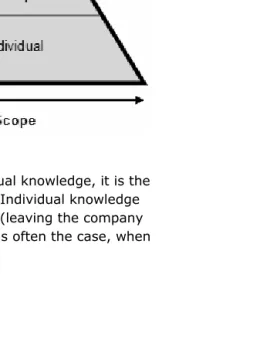
categorized, can be measured along the two scales shown in figure 1 (Hughes, 2002). One axis is the scope of the knowledge, that is, how much is known. The second axis is the durability of the knowledge, that is, how long it stays known (or remembered). The pyramid shape illustrates a conceptual distribution throughout an enterprise, the majority of knowledge being contained in the form of individual knowledge and less being in the form of group and organizational knowledge.
figure 1. Scales of knowledge
individuals forget what they have learned or fail to apply it to new situations.
Group knowledge is collectively constructed and shared within teams or departments. Group knowledge is more durable than individual knowledge because it is
distributed and replicated among team members. The team acts as a single organism, each member carrying the team’s knowledge in much the same way that each cell in an organism carries the total DNA for that organism. Much of the knowledge created by usability testing is group knowledge—knowledge created by the collective activity of members of a development team and relevant stakeholders observing and processing the actions of users. Of course, as teams dissipate and members move on, group knowledge can be lost.
Organizational knowledge is knowledge that exists at the enterprise level. It is embodied in formal standards, policies, and structured repositories. It is the most durable, being the least dependent on the persistence of individuals within the enterprise or on the continuity
of teams. O’Dell and Grayson (1998) give credit to organizational expert Leif Edvinsson of Skandia in applying the term structural knowledge to this level of knowledge, so named because it often resides in tools and physical artifacts, such as knowledge management systems and documentation.
Any time individual or group knowledge can be elevated to organizational knowledge it gains value in two ways: 1. It becomes more durable and, therefore, more
applicable over the life of the enterprise. 2. It can be more widely leveraged by others not
directly involved in its creation.
Knowledge Creation in Usability Teams
My research on learning within teams of developers and stakeholders conducting usability tests revealed that usability testing was effective at creating both
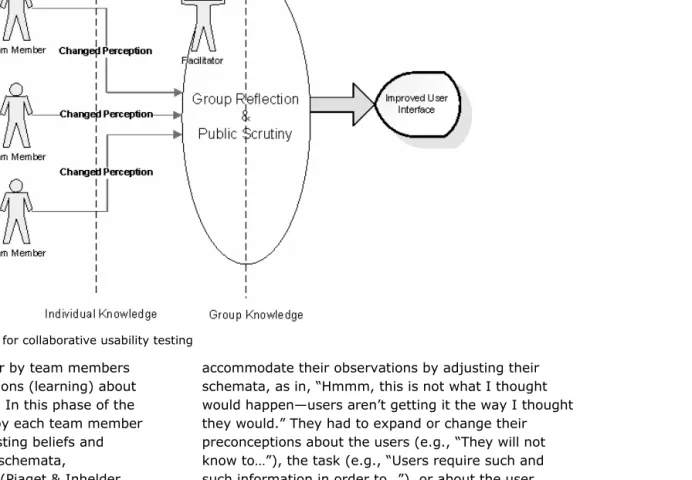
figure 2. A knowledge creation model for collaborative usability testing
Individual observations of the user by team members often resulted in changed perceptions (learning) about the user, the task, or the product. In this phase of the learning, the observations made by each team member interacted with the observer’s existing beliefs and experiences. Piaget’s concepts of schemata,
assimilation, and accommodation (Piaget & Inhelder, 1969) are useful constructs for describing this personal aspect of team members’ learning. At times, team members assimilated their observations into existing schemata (models of how things are or how things work) as in, “This makes sense in light of what I know about our users or about how our other products work.” At other times, however, team members had to
accommodate their observations by adjusting their schemata, as in, “Hmmm, this is not what I thought would happen—users aren’t getting it the way I thought they would.” They had to expand or change their preconceptions about the users (e.g., “They will not know to…”), the task (e.g., “Users require such and such information in order to…”), or about the user interface (e.g., “The navigation needs more
affordances.”) These changed perceptions represented a growth in individual knowledge.
collaboratively designed. These activities embodied group reflection on the data, and suggestions were held up to public scrutiny as the team struggled to create solutions. These are two critical elements of team learning (Brooks, 1994; Argyris, Putnam, & Smith, 1985). The result, an improved user interface and its design rationale, is an artifact of group knowledge.
Usability Knowledge Transfer
What was missing from the groups I observed, both in my research and in my practice as a usability
consultant, was the extension of what was learned at the individual and group level into organizational knowledge. An important contributing factor to this omission is that usability teams are usually focused on the specific business objective of getting a product developed within a schedule. Usability testing is much like action research. “In action research, a researcher works with a group to define a problem, collect data to determine whether or not this is indeed the problem, and then experiments with potential solutions to the problem” (Watkins & Brooks, 1994, p. 8). Once the immediate problem is solved, there is often little motivation or dedication of resources to convert lessons learned into design principles that can be codified and later reused.
Ironically, this missing last step might be where usability knowledge has its greatest value. Senge (1990) quotes Arie De Geus, head of planning for Royal Dutch/Shell, as saying, “The ability to learn faster than your competitors may be the only sustainable
competitive advantage” (p. 5). So the greatest advantage to come from usability testing may be the ability to leverage lessons learned from one
development team about a given product into the
development of other products or to the work of other development teams. Usability knowledge increases in value when it can be applied beyond the problem at hand, informing future design work as well. But Watkins and Marsick (1993) make the observation, “…often an employee gains real insights into a recurring problem but has no way of passing these insights on to someone else struggling with a similar problem” (p. 17). They describe the ideal process as, “…a cyclical process of creating knowledge (the change or
innovation), disseminating it, implementing the change, and then institutionalizing what is learned by making it part of the organization’s routines [italics added]” (p.21). This institutionalization of knowledge is the missing step noted in my own research—the elevation of usability knowledge from individual and group knowledge to organizational knowledge.
There are several formal ways that usability knowledge could be saved and transferred (beyond the social transmission of knowledge as team members move on to other projects and other teams). Formal standards, e.g., style guides, are one, and a recognized body of heuristics is another. Both have advantages, but they also have some disadvantages. A disadvantage of standards is although they can provide efficient and detailed prescriptions of what to do, often the insight that led to their creation (the why to do it) is lost, and they can be misapplied to problems where the standard is not the appropriate solution. As described by Patton (1978) in discussing paradigms, “…their strength [is] that it makes action possible, their weakness [is] that the very reason for action is hidden in the unquestioned assumptions of the paradigm” (p. 206). The
abstraction and generalization. For example, a common heuristic is, “Use clear language.” What designer ever used unclear language on purpose? So although heuristics can be applied across a wide variety of applications, they can sometimes be so vague as to have little prescriptive or diagnostic value.
After completing my doctoral studies and returning to industry, I chose to explore how to capture and distribute usability knowledge within a knowledge management system. I was influenced in this direction partly because I went to work for a consulting company that encouraged the use of knowledge management tools and partly out of a personal interest in such tools. The rest of this article deals with the application of a KMS approach to usability knowledge, not because it is superior to a standards approach or a heuristics
approach, but because it can be one more tool available to usability professionals to leverage knowledge gained in the course of conducting usability tests.
A Knowledge Management Approach
In this section I discuss the nature and requirements of a KMS and how techniques of pattern language and use cases can be applied to the description of usability knowledge.
Requirements of a KMS
A knowledge management system is a software application and set of associated processes that enable an organization to identify, store, and retrieve
knowledge assets. Knowledge assets are “things we know” not widely known outside of our organization that add value in the form of increased efficiencies or competitive advantage. Two critical aspects that define a KMS are how the knowledge is stated and how it is
retrieved. How knowledge is stated provides context for its application. Knowledge is information that can be acted on (Nonaka & Takeuchi, 1995), and, as such, it requires context. How knowledge is retrieved is largely a function of how users can search within the KMS and what attributes are used in the metadata. Metadata (data about the data) are the keywords and other search criteria that allow the user to tell the system to retrieve knowledge about a particular point of focus or need.
To build an effective KMS, you must start by visualizing how it will be used. That vision should drive what knowledge goes into it, how that knowledge is structured, and how to build a metadata scheme that will facilitate efficient retrieval of that knowledge. I did none of those things at first, and I ended up with a black hole that sucked in data and information and gave nothing back in return. My biggest mistakes were the following:
I tried to do too much with the system—Beyond creating a KMS, I tried to create a tool that would track the administrative information about each test, create worksheets for mid-process activities (e.g., findings meetings and actions meetings), and provide any number of conceivable reports.
I made it overly complex—My first-generation tool was a relational database consisting of several database tables that were logically linked in various ways. In the end, it went beyond my limited lay person’s skills and was hard to manage.
facilitator where these categories were useful in grouping findings before the action meeting to decide solutions. In practice, they did not prove to be useful metadata tags for retrieving relevant entries around a specific design problem. Designers did not say, “I need a label for this button, let’s search the KMS for what we’ve learned about terminology.” Even if they had done so, it is unlikely that the results would have related to the particular button application they were working with. (This is an example of where a well-defined standard or style guide is probably a more useful tool than a KMS would be.)
Perhaps the greatest problem I had with my first generation KMS was that the entries lacked context. As such, it was difficult to tag knowledge with meaningful metadata that could aid a designer in retrieving useful knowledge. The breakthrough that led to the second generation KMS that I describe in this article was my career shift from a usability test facilitator (essentially acting in the role of an outside consultant to the design team) to that of a user experience designer (a member of the design team). This shift in roles advanced my understanding of the KMS requirements in several important ways:
It gave me a designer’s insight into what knowledge would be useful.
It got me involved in writing use cases.
It introduced me to pattern languages.
When a KMS Can Benefit Designers
There are essentially three instances where a usability KMS can be useful to a designer:
1. At the beginning of a conceptual design phase, where the question is a broad one about the user
task, e.g., “What have we learned about when users want to…?” or about a product being revised or upgraded, e.g., “What problems have we seen with product so and so?”
2. During the design phase when specific interactions are being designed, e.g., “What have we learned about entering phone numbers?”
3. After a usability test to see if a problem has been encountered and solved previously, e.g., “Have we seen this before, and what did we do about it?”
Use Cases
A use case is a method for capturing functional requirements and describing the interaction between a system and its users (called actors). It involves (among other things):
Identifying a goal and the primary actor who wishes to meet that goal
Describing the main steps and system responses in meeting that goal
Identifying alternate ways the goal can be achieved
Anticipating ways the actor or system can fail to meet the goal
Automatic Payment, etc. The scenarios used in usability tests are typically scenarios in the use-case sense of the term, and thus they can be useful indicators of user goals (contexts).
Pattern Language
The concept of pattern language as a guide to design was introduced by Christopher Alexander (1977) and was directed toward the field of architecture. He
describes a pattern language as a collection of patterns, each of which describes a relationship between (a) a certain context, (b) forces that recur within that context, and (c) spatial configurations that allow these forces to resolve themselves. Eventually software designers were drawn to patterns as ways to capture best design practices (cf. Gamma. Helm, Johnson, & Vlissides, 1995). Pattern language has become especially popular with user interaction designers (cf. Van Duyne, Landay & Hong, 2003 and Tidwell, 2005). Because patterns are based in context and relate solutions to problems, I decided to experiment with stating usability findings and the resultant solutions as patterns using the structure shown in table 1.
To relate this structure to Alexander’s framework, the “Users wanted to…” constitute the context of the pattern, the combination of “User Action” and “System Action” constitutes the forces that recur within that context, and the “Solution” describes the configuration that allows the forces to resolve themselves.
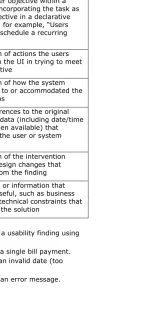
table 1. Usability finding pattern
Pattern
Component Description
Users wanted
to… Statement of the scenario or a specific user objective within a scenario, incorporating the task as a user objective in a declarative statement, for example, “Users wanted to schedule a recurring payment.”
User Action Description of actions the users took within the UI in trying to meet their objective
System Action Description of how the system responded to or accommodated the user actions
Data Cross-references to the original
reports or data (including date/time stamps when available) that illuminate the user or system actions
Solution Description of the intervention taken or design changes that resulted from the finding Comments Other data or information that
could be useful, such as business drivers or technical constraints that influenced the solution
The following is an example of a usability finding using this pattern format:
Users wanted to… Schedule a single bill payment.
User Action Typed in an invalid date (too early).
Data ABC Bank Report: September 2004
Solution Automatically populate date field with earliest available pay date
when user types in the Amount field.
Comment Many users pay at earliest available date—making earliest pay date a good default.
In this pattern format, the problem statement is a combination of the user goal (schedule a bill payment), the action the user took (entered an invalid date), and the system response (returned an error message). Any usability problem can be stated as a mismatch
involving two or all three of those components. The data section refers back to the data source of the problem, in this case a report from a usability test conducted by ABC Bank (not the actual name). The solution succinctly describes how the problem was solved. The Comment section helps elaborate on the rationale for the particular solution.
The following example shows how this same pattern can be used to capture a gap between user expectation and product functionality. The user actions were remarks that came from the think-aloud protocol. In this case, the data are the time stamps and log entries from the tests.
Users wanted to… Schedule a bill payment from Financial View.
User Action Remark [See Data]
System Action Function not available
Data Financial View: October 2005
02 - 00:09:58 - Tries to click scheduled bill payment - how do I schedule a bill payment?
03 - 00:44:21 - user - "I see that you can do Schedule BillPay.. so if the FI offered that, they could schedule it for me."
04 - 00:40:01 - user - if this is software to only organize things, it would be nice to go and schedule the bill on a future date
Solution None
Comment
Even though no solution was offered based on the outcome of this test (because of time and technology constraints), the knowledge that users wanted to be able to schedule a bill payment from the Financial View module was useful knowledge that could inform future designs for that product.
A Usability KMS
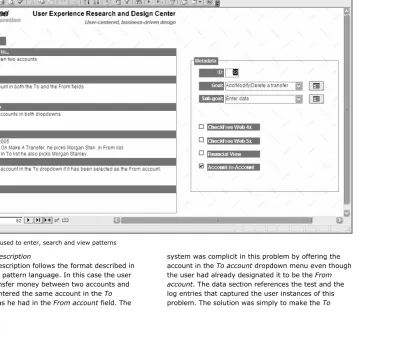
figure 3. Form used to enter, search and view patterns
The Pattern Description
The pattern description follows the format described in the section on pattern language. In this case the user wanted to transfer money between two accounts and accidentally entered the same account in the To account field as he had in the From account field. The
account dropdown menu dynamic and not allow it to list an account that had been selected in the From account. The pattern is a succinct description of how the user
goal, user action, and system action combined to create a problem; a traceability path back to the directly observed data; and a description of the solution.
Metadata
Table 2 describes the metadata elements used.
table 2. Metadata elements
Element Description
ID A system-generated index number to give each pattern a unique identifier.
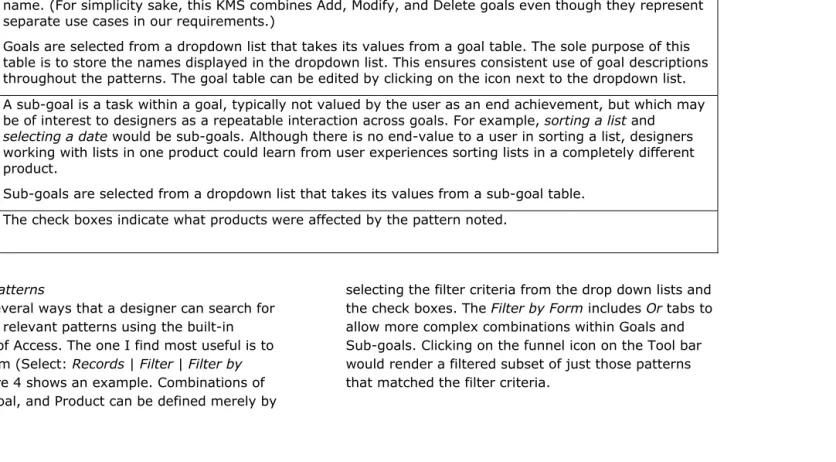
Goal A goal is the result of an end-to-end procedure that represents what a user would view as a unit of accomplishment, e.g., Pay a Bill, Add a Payee, or View Bill History. A goal is the equivalent of a use-case name. (For simplicity sake, this KMS combines Add, Modify, and Delete goals even though they represent separate use cases in our requirements.)
Goals are selected from a dropdown list that takes its values from a goal table. The sole purpose of this table is to store the names displayed in the dropdown list. This ensures consistent use of goal descriptions throughout the patterns. The goal table can be edited by clicking on the icon next to the dropdown list. Sub-goal A sub-goal is a task within a goal, typically not valued by the user as an end achievement, but which may
be of interest to designers as a repeatable interaction across goals. For example, sorting a list and selecting a date would be sub-goals. Although there is no end-value to a user in sorting a list, designers working with lists in one product could learn from user experiences sorting lists in a completely different product.
Sub-goals are selected from a dropdown list that takes its values from a sub-goal table. Product
List The check boxes indicate what products were affected by the pattern noted.
Retrieving Patterns
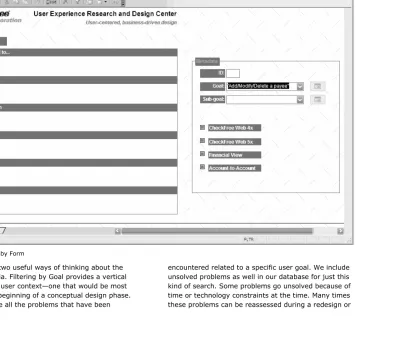
There are several ways that a designer can search for and retrieve relevant patterns using the built-in capabilities of Access. The one I find most useful is to Filter by Form (Select: Records | Filter | Filter by Form). Figure 4 shows an example. Combinations of Goal, Sub-goal, and Product can be defined merely by
figure 4. Filter by Form
I have found two useful ways of thinking about the filtering criteria. Filtering by Goal provides a vertical picture of the user context—one that would be most useful at the beginning of a conceptual design phase. One would see all the problems that have been
upgrade release. This vertical search allows the designer to ask, “What do we know about or what haven’t we solved when users want to do such and such a task?”
Filtering by Sub-goal gives a horizontal picture of how devices or interactions have been problematic
regardless of user goal. For example, designers who intend to use a calendar widget might filter the patterns by the Sub-goal of Select a date to see what problems they should anticipate or what lessons-learned they can take advantage of. In this case, the designers would not select a Goal or Product to filter by.
Other ways to search the database would be to do a text search or generate a query. The Filter by Form is by far the easiest and most productive method.
The Underlying Structure
The KMS I’ve described has a simple structure of three tables: one to contain the patterns, one to maintain the list of goal names, and one to maintain the list of sub-goal names. Table 3 defines the fields used in the Patterns table. The Goal and Sub-goal tables are one-column tables that contain the names of allowable entries. These two tables are not part of the KMS, per se, but merely facilitate consistent data entry into the form.
These are the only elements required to have a working usability KMS. I have enhanced this configuration slightly by adding a query and reporting option, and by creating forms for adding new Goal or Sub-goal names and otherwise editing those two lists.
table 3. Patterns table fields
Field Name Data Type
Scenario ID AutoNumber
Scenario Memo
User Action Memo
System Action Memo
Data Memo Solution Memo Comments Memo Goal Text Sub-goal Text <Product A> Yes/No
<Product B> Yes/No <Product C> Yes/No
The report presents the pattern and the metadata for each pattern that matches a query. This is useful for presenting information to the team at the start of a design session. Reports and forms can be created using Wizards in Access and then edited to customize them to your desired look and requirements.
Owning the KMS
All knowledge management systems have two inherent challenges they must overcome:
Getting someone to put the knowledge into the system
The easiest solution is to put someone in charge of the KMS whose responsibilities are two-fold:
To enter new patterns into the KMS after every
usability test and to cross-reference existing patterns if appropriate with the newly acquired data
To prepare for design sessions by searching the KMS for relevant patterns and presenting those patterns during the design sessions. (The report is a useful tool for this objective.)
A logical candidate for this role is whoever manages or administers usability testing within an enterprise. Another candidate would be a lead designer on a project or the User Experience designer for a project.
Conclusion
Usability tests create valuable knowledge assets that can offer competitive advantages to the organization that creates them. The value of these assets can be substantially increased if they are elevated to organizational knowledge, and a knowledge management system is one way to do this.
The value of a KMS is dependent on how context rich the contents are and how easily a designer can retrieve relevant knowledge. A pattern language approach provides rich context, and use-case concepts of actors with goals and scenarios as instances of those goals can provide useful metadata tagging schemes. Lastly, someone must own the responsibility of building and maintaining the KMS and also for mining it for relevant knowledge at appropriate times in the design cycle.
Future work in this area could be the exploration and sharing of different patterns to capture usability information as well as a longitudinal study that
observes how designers apply such knowledge in their projects.
Practitioners’ Takeaway
Here are some practical implications of this discussion:
• A usability KMS does not have to be complicated; it just has to be useful for informing design decisions.
• Patterns are a practical way to abstract usability findings so they can be generalized across other projects and other teams.
• Use-case and scenario names can provide useful metadata structures for retrieving usability patterns.
• My KMS is not your KMS: Patterns and metadata that make my knowledge useful in the kinds of applications I design might not be the same patterns that make your knowledge useful. Create patterns that work for your design needs.
References
Alexander, C., Ishikawa, S., Silverstein, M., Jacobson, M., Fiksdahl-King, I., & Schlomo, A. (1977). A pattern language: Towns, buildings, construction. Boston: Addison-Wesley.
Argyris, C., Putnam, R., & Smith, M. (1985) Action science: Concepts, methods, and skills for research and intervention. San Francisco: Jossey-Bass.
Brooks, A. (1994). Power and the production of knowledge: Collective team learning in work organizations. Human Resource Development Quarterly, 5(3) 213-235
Hughes, M. (2000). Team usability testing of web-based training: The interplay of team learning and personal expertise. Unpublished doctoral dissertation, University of Georgia.
Hughes, M. (2002). Moving from information transfer to knowledge creation. Technical Communication 49(3) 275-285.
Nonaka, I., & Takeuchi, H. (1995). The knowledge creating company. New York: Oxford University Press O’Dell, C., & Grayson, Jr., C. (1998). If only we knew what we know: The transfer of internal knowledge and best practice. New York: Free Press.
Patton, M. Q. (1978). Utilization-focused evaluation. Beverly Hills, CA: Sage.
Piaget, J., & Inhelder, B. (1969) The psychology of the child. New York: Basic Books
Senge, P. (1990). The fifth discipline: The art and practice of the learning organization. New York: Doubleday.
Tidwell, J. (2005) Designing interfaces: Patterns for effective interaction design. Cambridge, MA: O’Reilly Van Duyne, D., Landay, J., & Hong, J. (2003) The design of sites: Patterns, principles, and processes for crafting customer-centered web experience. Boston: Addison-Wesley
Watkins, K. E., & Brooks, A. (1994) A framework for using action technologies. In A. Brooks and K. E. Watkins (Eds.) The emerging power of action inquiry technologies (pp.99-111). San Francisco: Jossey-Bass Watkins, K. E., & Marsick, V. (1993). Sculpting the learning organization: Lessons in the art and science of systematic change. San Francisco: Jossey-Bass.
Michael Hughes has a Masters degree in Technical and Professional Communication from Southern Polytechnic State University and a PhD in Instructional Technology