- Routing Information Protocol -
RIP (Routing Information Protocol)
RIP is a standardized Distance Vector protocol, designed for use on smaller networks. RIP was one of the first true Distance Vector routing protocols, and is supported on a wide variety of systems.
RIP adheres to the following Distance Vector characteristics:
• RIP sends out periodic routing updates (every 30 seconds)
• RIP sends out the full routing table every periodic update
• RIP uses a form of distance as its metric (in this case, hopcount)
• RIP uses the Bellman-Ford Distance Vector algorithm to determine the best “path” to a particular destination
Other characteristics of RIP include:
• RIP supports IP and IPX routing.
• RIP utilizes UDP port 520
• RIP routes have an administrative distance of 120.
• RIP has a maximum hopcount of 15 hops.
Any network that is 16 hops away or more is considered unreachable to RIP, thus the maximum diameter of the network is 15 hops. A metric of 16 hops in RIP is considered a poison route or infinity metric.
If multiple paths exist to a particular destination, RIP will load balance between those paths (by default, up to 4) only if the metric (hopcount) is
equal. RIP uses a round-robin system of load-balancing between equal
metric routes, which can lead to pinhole congestion.
RIP Versions
RIP has two versions, Version 1 (RIPv1) and Version2 (RIPv2).
RIPv1 (RFC 1058) is classful, and thus does not include the subnet mask
with its routing table updates. Because of this, RIPv1 does not support
Variable Length Subnet Masks (VLSMs). When using RIPv1, networks
must be contiguous, and subnets of a major network must be configured with identical subnet masks. Otherwise, route table inconsistencies (or worse) will occur.
RIPv1 sends updates as broadcasts to address 255.255.255.255.
RIPv2 (RFC 2543) is classless, and thus does include the subnet mask with
its routing table updates. RIPv2 fully supports VLSMs, allowing discontiguous networks and varying subnet masks to exist.
Other enhancements offered by RIPv2 include:
• Routing updates are sent via multicast, using address 224.0.0.9 • Encrypted authentication can be configured between RIPv2 routers
• Route tagging is supported (explained in a later section) RIPv2 can interoperate with RIPv1. By default:
• RIPv1 routers will sent only Version 1 packets
• RIPv1 routers will receive both Version 1 and 2 updates
• RIPv2 routers will both send and receive only Version 2 updates We can control the version of RIP a particular interface will “send” or “receive.”
RIPv1 Basic Configuration
Routing protocol configuration occurs in Global Configuration mode. On Router A, to configure RIP, we would type:
Router(config)# router rip
Router(config-router)# network 172.16.0.0 Router(config-router)# network 172.17.0.0
The first command, router rip, enables the RIP process.
The network statements tell RIP which networks you wish to advertise to other RIP routers. We simply list the networks that are directly connected to our router. Notice that we specify the networks at their classful boundaries, and we do not specify a subnet mask.
To configure Router B:
Router(config)# router rip
Router(config-router)# network 172.17.0.0 Router(config-router)# network 172.18.0.0
The routing table on Router A will look like:
RouterA# show ip route
<eliminated irrelevant header>
Gateway of last resort is not set
C 172.16.0.0 is directly connected, Ethernet0
C 172.17.0.0 is directly connected, Serial0
R 172.18.0.0 [120/1] via 172.17.1.2, 00:00:00, Serial0
The routing table on Router B will look like:
RouterB# show ip route
<eliminated irrelevant header>
Gateway of last resort is not set
C 172.17.0.0 is directly connected, Serial0
C 172.18.0.0 is directly connected, Ethernet0
Limitations of RIPv1
The example on the previous page works fine with RIPv1, because the networks are contiguous and the subnet masks are consistent. Consider the following example:
This particular scenario will still work when using RIPv1, despite the fact that we’ve subnetted the major 10.0.0.0 network. Notice that the subnets are contiguous (that is, they belong to the same major network), and use the same subnet mask.
When Router A sends a RIPv1 update to Router B via Serial0, it will not include the subnet mask for the 10.1.0.0 network. However, because the 10.3.0.0 network is in the same major network as the 10.1.0.0 network, it will notsummarize the address. The route entry in the update will simply state “10.1.0.0”.
Router B will accept this routing update, and realize that the interface receiving the update (Serial0) belongs to the same major network as the route entry of 10.1.0.0. It will then apply the subnet mask of its Serial0 interface to this route entry.
Router C will similarly send an entry for the 10.2.0.0 network to Router B. Router B’s routing table will thus look like:
RouterB# show ip route
Gateway of last resort is not set
10.0.0.0/16 is subnetted, 4 subnets
C 10.3.0.0 is directly connected, Serial0
C 10.4.0.0 is directly connected, Serial1
R 10.1.0.0 [120/1] via 10.3.5.1, 00:00:00, Serial0
Limitations of RIPv1 (continued)
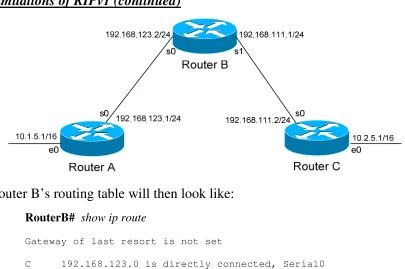
Consider the following, slightly altered, example:
We’ll assume that RIPv1 is configured correctly on all routers. Notice that our networks are no longer contiguous. Both Router A and Router C contain
subnets of the 10.0.0.0 major network (10.1.0.0 and 10.2.0.0 respectively).
Separating these networks now are two Class C subnets (192.168.123.0 and 192.168.111.0).
Why is this a problem? Again, when Router A sends a RIPv1 update to Router B via Serial, it will not include the subnet mask for the 10.1.0.0 network. Instead, Router A will consider itself a border router, as the 10.1.0.0 and 192.168.123.0 networks do not belong to the same major network. Router A will summarize the 10.1.0.0/16 network to its classful boundary of 10.0.0.0/8.
Router B will accept this routing update, and realize that it does not have a directly connected interface in the 10.x.x.x scheme. Thus, it has no subnet mask to apply to this route. Because of this, Router B will install the summarized 10.0.0.0 route into its routing table.
Limitations of RIPv1 (continued)
Router B’s routing table will then look like:
RouterB# show ip route
Gateway of last resort is not set
C 192.168.123.0 is directly connected, Serial0
C 192.168.111.0 is directly connected, Serial1
R 10.0.0.0 [120/1] via 192.168.123.1, 00:00:00, Serial0
[120/1] via 192.168.111.2, 00:00:00, Serial1
That’s right, Router B now has two equal metric routes to get to the
summarized 10.0.0.0 network, one through Router A and the other through Router C. Router B will now load balance all traffic to any 10.x.x.x network between routers A and C. Suffice to say, this is not a good thing. ☺
It gets better. Router B then tries to send routing updates to Router A and Router C, including the summary route of 10.0.0.0/8. Router A’s routing table looks like:
RouterA# show ip route
Gateway of last resort is not set
C 192.168.123.0 is directly connected, Serial0
10.0.0.0/16 is subnetted, 1 subnet
C 10.1.0.0 is directly connected, Ethernet0
Router A will receive the summarized 10.0.0.0/8 route from Router B, and will reject it. This is because it already has the summary network of 10.0.0.0 in its routing table, and it’s directly connected. Router C will respond
RIPv2 Configuration
RIPv2 overcomes the limitations of RIPv1 by including the subnet mask in its routing updates. By default, Cisco routers will use RIPv1. To change to Version 2, you must type:
Router(config)# router rip
Router(config-router)# version 2
Thus, the configuration of Router A would be:
RouterA(config)# router rip
RouterA(config-router)# version 2
RouterA(config-router)# network 10.0.0.0 RouterA(config-router)# network 192.168.123.0
Despite the fact that RIPv2 is a classless routing protocol, we still specify networks at their classful boundaries, without a subnet mask.
However, when Router A sends a RIPv2 update to Router B via Serial0, by default it will still summarize the 10.1.0.0/16 network to 10.0.0.0/8. Again, this is because the 10.1.0.0 and 192.168.123.0 networks do not belong to the same major network. Thus, RIPv2 acts like RIPv1 in this circumstance…
…unless you disable auto summarization:
RouterA(config)# router rip
RouterA(config-router)# version 2
RouterA(config-router)# no auto-summary
RIP Timers
RIP has four basic timers:
Update Timer (default 30 seconds) – indicates how often the router will
send out a routing table update.
Invalid Timer (default 180 seconds) – indicates how long a route will
remain in a routing table before being marked as invalid, if no new updates are heard about this route. The invalid timer will be reset if an update is received for that particular route before the timer expires.
A route marked as invalid is not immediately removed from the routing table. Instead, the route is marked (and advertised) with a metric of 16, indicating it is unreachable, and placed in a hold-down state.
Hold-down Timer (default 180seconds) – indicates how long RIP will
“suppress” a route that it has placed in a hold-down state. RIP will not accept any new updates for routes in a hold-down state, until the hold-down timer expires.
A route will enter a hold-down state for one of three reasons:
• The invalid timer has expired.
• An update has been received from another router, marking that route with a metric of 16 (or unreachable).
• An update has been received from another router, marking that route with a higher metric than what is currently in the routing table. This is to prevent loops.
Flush Timer (default 240seconds) – indicates how long a route can remain
in a routing table before being flushed, if no new updates are heard about this route. The flush timer runs concurrently with the invalid timer, and thus will flush out a route 60 seconds after it has been marked invalid.
RIP Timers Configuration and Example
Consider the above example. Router A receives a RIP update from Router B that includes network 172.18.0.0. Router A adds this network to its routing table:
RouterA# show ip route
Gateway of last resort is not set
C 172.16.0.0 is directly connected, Ethernet0
C 172.17.0.0 is directly connected, Serial0
R 172.18.0.0 [120/1] via 172.17.1.2, 00:00:00, Serial0
Immediately, Router A sets an invalid timer of 180 seconds and flush timer of 240 seconds to this route, which run concurrently. If no update for this route is heard for 180 seconds, several things will occur:
• The route is marked as invalid in the routing table.
• The route enters a hold-down state (triggering the hold-down timer).
• The route is advertised to all other routers as unreachable. The hold-down timer runs for 180 seconds after the route is marked as invalid. The router will not accept any new updates for this route until this hold-down period expires.
If no update is heard at all, the route will be removed from the routing table once the flush timer expires, which is 60 seconds after the route is marked as invalid. Remember that the invalid and flush timers run concurrently.
To configure the RIP timers:
Router(config)# router rip
Router(config-router)# timers basic 20 120 120 160
The timers basic command allows us to change the update (20), invalid (120), hold-down (120), and flush (240) timers. To return the timers back to their defaults:
RIP Loop Avoidance Mechanisms
RIP, as a Distance Vector routing protocol, is susceptible to loops.
Let’s assume no loop avoidance mechanisms are configured on either router. If the 172.18.0.0 network fails, Router B will send out an update to Router A within 30 seconds (whenever its update timer expires) stating that route is unreachable (metric = 16).
But what if an update from Router A reaches Router B before this can happen? Router A believes it can reach the 172.18.0.0 network in one hop (through Router B). This will cause Router B to believe it can reach the failed 172.18.0.0 network in two hops, through Router A. Both routers will continue to increment the metric for the network until they reach a hop count of 16, which is unreachable. This behavior is known as counting to infinity.
How can we prevent this from happening? There are several loop avoidance mechanisms:
Split-Horizon – Prevents a routing update from being sent out the interface
it was received on. In our above example, this would prevent Router A from sending an update for the 172.18.0.0 network back to Router B, as it
originally learned the route from Router B. Split-horizon is enabled by default on Cisco Routers.
Route-Poisoning – Works in conjunction with split-horizon, by triggering
an automatic update for the failed network, without waiting for the update timer to expire. This update is sent out all interfaces with an infinity metric for that network.
Hold-Down Timers – Prevents RIP from accepting any new updates for
RIP Passive Interfaces
It is possible to control which router interfaces will participate in the RIP process.
Consider the following scenario. Router C does not want to participate in the RIP domain. However, it still wants to listen to updates being sent from Router B, just not send any updates back to Router B:
RouterC(config)# router rip
RouterC(config-router)# network 10.4.0.0 RouterC(config-router)# network 10.2.0.0 RouterC(config-router)# passive-interface s0
The passive-interface command will prevent updates from being sent out of the Serial0 interface, but Router C will still receive updates on this interface.
We can configure all interfaces to be passive using the passive-interface default command, and then individually use the no passive-interface
command on the interfaces we do want updates to be sent out:
RouterC(config)# router rip
RouterC(config-router)# network 10.4.0.0 RouterC(config-router)# network 10.2.0.0
RIP Neighbors
Recall that RIPv1 sends out its updates as broadcasts, whereas RIPv2 sends out its updates as multicasts to the 224.0.0.9 address. We can configure specific RIP neighbor commands, which will allow us to unicast routing updates to those neighbors.
On Router B:
RouterB(config)# router rip
RouterB(config-router)# network 10.3.0.0 RouterB(config-router)# network 10.4.0.0 RouterB(config-router)# neighbor 10.3.5.1 RouterB(config-router)# neighbor 10.4.5.1
Router B will now unicast RIP updates to Router A and Router C.
However, Router B will still broadcast (if RIPv1) or multicast (if RIPv2) its updates, in addition to sending unicast updates to its neighbors. In order to prevent broadcast/multicast updates, we must also use passive interfaces:
RouterB(config)# router rip
RouterB(config-router)# passive-interface s0 RouterB(config-router)# passive-interface s1 RouterB(config-router)# neighbor 10.3.5.1 RouterB(config-router)# neighbor 10.4.5.1
The passive-interface commands prevent the updates from being
RIPv2 Authentication
RIPv2 supports authentication to secure routing updates.
The first step is creating a shared authentication key that must be identical on both routers. This is accomplished in global configuration mode:
RouterA(config)# key chain MYCHAIN RouterA(config-keychain)# key 1
RouterA(config-keychain-key)# key-string MYPASSWORD
RouterB(config)# key chain MYCHAIN RouterB(config-keychain)# key 1
RouterB(config-keychain-key)# key-string MYPASSWORD
The first command creates a key chain called MYCHAIN. We must then associate a key to our keychain. Then we actually configure the shared key using the key-string command.
We then apply our key chain to the interface connecting to the other router:
RouterA(config)# interface s0
RouterA(config-if)# ip rip authentication key-chain MYCHAIN
RouterB(config)# interface s0
RouterB(config-if)# ip rip authentication key-chain MYCHAIN
If there was another router off of Router B’s Ethernet port, we could create a
separate key chain with a different key-string. Every router on the RIP domain does not need to use the same key chain, only interfaces directly connecting two (or more) routers.
The final step in configuring authentication is identifying which encryption to use. By default, the key is sent in clear text:
RouterA(config)# interface s0
RouterA(config-if)# ip rip authentication mode text
Or we can use MD5 encryption for additional security:
RouterA(config)# interface s0
RouterA(config-if)# ip rip authentication mode md5
Altering RIP’s Metric
Consider the above example. Router B has two paths to get to the
192.168.100.0 network, via Router A and Router C. Because the metric is equal (1 hop), Router B will load balance between these two paths.
What if we wanted Router B to only go through Router A, and use Router C only as a backup? To accomplish this, we can adjust RIP’s metric to make one route more preferred than the other.
The first step is creating an access-list on Router B that defines which route we wish to alter:
RouterB(config)# ip access-list standard MYLIST
RouterB(config-std-nacl)# permit 192.168.100.0 0.0.0.255
Next, we tell RIP how much to offset this route if received by Router C:
RouterB(config)# router rip
RouterB(config-router)# offset-list MYLIST in 4 s1
We specify an offset-list pointing to our access list named MYLIST. We will increase the routing metric by 4 for that route coming inbound to interface
Serial 1.
Thus, when Router C sends an update to Router C for the 192.168.100.0 network, Router B will increase its metric of 1 hop to 5 hops, thus making Router A’s route preferred.
We could have also configured Router C to advertise that route with a higher metric (notice the out in the offset-list command):
RouterC(config)# ip access-list standard MYLIST
RouterC(config-std-nacl)# permit 192.168.100.0 0.0.0.255 RouterC(config)# router rip
Interoperating between RIPv1 and RIPv2
Recall that, with some configuration, RIPv1 and RIPv2 can interoperate. By default:
• RIPv1 routers will sent only Version 1 packets
• RIPv1 routers will receive both Version 1 and 2 updates
• RIPv2 routers will both send and receive only Version 2 updates If Router A is running RIP v1, and Router B is running RIP v2, some additional configuration is necessary.
Either we must configure Router A to send Version 2 updates:
RouterA(config)# interface s0
RouterA(config-if)# ip rip send version 2
Or configure Router B to accept Version 1 updates.
RouterB(config)# interface s0
RouterB(config-if)# ip rip receive version 1
Notice that this is configured on an interface. Essentially, we’re configuring the version of RIP on a per-interface basis.
We can also have an interface send or receive both versions simultaneously:
RouterB(config)# interface s0
RouterB(config-if)# ip rip receive version 1 2
We can further for RIPv2 to send broadcast updates, instead of multicasts:
RouterB(config)# interface s0
Triggering RIP Updates
On point-to-point interfaces, we can actually force RIP to only send routing updates if there is a change:
RouterB(config)# interface s0.150 point-to-point RouterB(config-if)# ip rip triggered
Again, this is only applicable to point-to-point links. We cannot configure RIP triggered updates on an Ethernet network.
Troubleshooting RIP
Various troubleshooting commands exist for RIP.
To view the IP routing table:
Router# show ip route
<eliminated irrelevant header>
Gateway of last resort is not set
C 172.16.0.0 is directly connected, Ethernet0
C 172.17.0.0 is directly connected, Serial0
R 172.18.0.0 [120/1] via 172.17.1.2, 00:00:15, Serial0
R 192.168.123.0 [120/1] via 172.16.1.1, 00:00:00, Ethernet0
To view a specific route within the IP routing table:
Router# show ip route 172.18.0.0
Routing entry for 172.18.0.0/16
Known via “rip”, distance 120, metric 1
Last update from 172.17.1.2 on Serial 0, 00:00:15 ago
To debug RIP in real time:
Troubleshooting RIP (continued)
To view information specific to the RIP protocol:
Router# show ip protocols
Routing Protocol is "rip"
Sending updates every 30 seconds, next due in 20 seconds Invalid after 180 seconds, hold down 180, flushed after 240 Outgoing update filter list for all interfaces is not set Incoming update filter list for all interfaces is not set Incoming routes will have 4 added to metric if on list 1 Redistributing: connected, static, rip
Default version control: send version 1, receive any version Interface Send Recv Triggered RIP Key-chain Ethernet0 1 1 2
Serial0 1 2 1 2
Automatic network summarization is in effect Maximum path: 4
Routing for Networks: 172.16.0.0
172.17.0.0
Routing Information Sources:
Gateway Distance Last Update 172.17.1.2 120 00:00:17 Distance: (default is 120)
This command provides us with information on RIP timers, on the RIP versions configured on each interface, and the specific networks RIP is advertising.
To view all routes in the RIP database, and not just the entries added to the routing table:
Router# show ip rip database
7.0.0.0/8 auto-summary 7.0.0.0/8