E-Workbook System Based On Raspberry Pi
Shweta Sitaphale1, Prof. S.B. Jamge2
P.G. Student, Dept. of ElectronicsEngineering, Walchand Institute of Technology, Solapur, Maharashtra, India1
Professor, Dept. of ElectronicsEngineering, Walchand Institute of Technology, Solapur, Maharashtra, India2
ABSTRACT: In education, tutorial is essential part of student’s learning experience. The traditional methods of giving tutorial, checking, marking, grading is done through the paperwork and students have to carry their tutorial note-books every day to attempt tutorial in teaching period. The present traditional method is very time consuming for teacher. This paper presents an efficient method that automatically tutorial distribution over student, tutorial checking, marking and grading has been done through paperless. The whole system is built on Raspberry pi along with Wi-Fi adapter is used for wireless communication. The raspberry pi is configured and setup as a web server with IP address as teacher unit which develop web page for performing tutorial. Teacher can upload a tutorial onto a server through web page wirelessly. Map the IP address of each student devices to give access to attempt tutorial. So by entering IP address of server in web browser, student can access tutorial to attempt, which displays the result automatically at that instant by this system.
KEYWORDS:Raspberry Pi; Web Server; PHP; Paperless Tutorial; automatic tutorial checking.
I. INTRODUCTION
The use of technology in the classroom has rapidly expanded over the last few years and now education technologies, both wired and wireless, exist to aid the student and teacher. Today, a range of technologies exist to support teaching and learning. [1, 2]
Teaching school pre-calculate has traditionally been carried forth using methodology such as teaching large sections, usually it is complemented with separate and smaller tutoring sections, it may use printed materials with exercises to be studied on the student’s time, solving problems either in tutoring labs or in working groups. In this methodology involves the student in learning only to the extent that they have to “pay attention” and “listen” to the material presented in class. The student does not take an active part in the traditional learning process. The introduction of electronic workbooks, intelligent tutors, and computer assisted instruction into these traditional settings could result in higher involvement on the student’s part, and hopefully higher achievement. [4] Clearly superior teaching depends on good preparation & teach detail concept of any topic. But most of the teachers working hour is spent in giving tutorial, checking, marking, attendance and other school duties. Many teachers are sent emails after midnight because there was no other time to do this and also teachers don't have time to look after their own children. [17]
In education, tutorial is essential part of student’s learning experience. Traditionally these have been hand written into notebook & that will be checked by teachers manually. In recent year, electronic based technology has superseded much of the hand-written work with word processed tutorials and reports becoming standard practice. Traditional methods of giving tutorial, checking, marking, attendance is very time consuming, so by scrapping unnecessary paperwork and traditional procedure, we are making it easier than ever for teachers to focus on teaching and learning and getting the very best for their pupils.
We can propose this web based paperless E-workbook system which is save teacher’s time by automatic checking of tutorial, alternatively useful for students by reducing weight of school bag by eliminating paperwork tutorial.
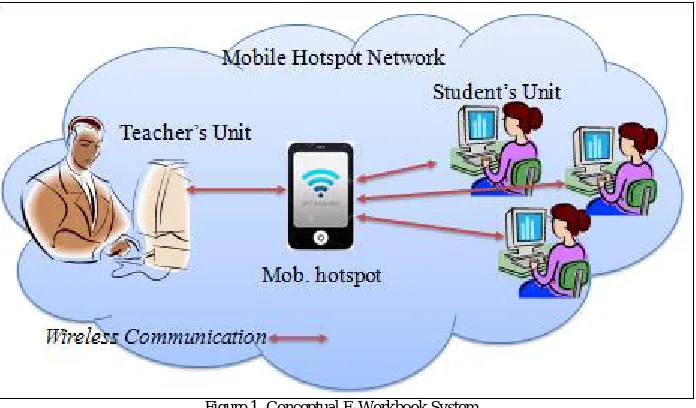
In this proposed system, such technologies will considered and a student workbook (question-written answer notebook in paper format) used for automatic checking of class tutorial. E-Workbook can be basically having three unit one is teacher unit, another is student unit and access point which provide mobile hotspot connection between above two unit for wireless communication which is illustrating from the below figure.1
student’s system which contains multiple choices of questions. The students just enter their roll no. or name which is use for identity and start to attempt a tutorial. Student get the result at that instant they submitting the tutorial answers on their system. And the teacher gets the result of each student automatically without an explicit need to personally checking the tutorial and manually collates the results after they submit the tutorial on their system respectively. The data transreceiving between both the unit can be done through wireless communication in hotspot network which created by mobile hotspot. The developed E-workbook system is paperless which saves teachers time by automatic checking of class tutorials and alternatively reduces weight of school bags of the student.
Figure 1. Conceptual E-Workbook System
The paper is structured as follows. Section I has introduced the paper and the focus of the work. Section II has discussed about the previous work that has been carried out by various researchers. Section III describes about the methodology of the project. Section IV discuss about system performance for the proposed work & Section V discuss the experimental results.
II. RELATEDWORK
In [1] author used the RFID to enabled student workbook, which was discussed and a prototype system presented. The workbook is a question-answer notebook in traditional paper format in which hand written solutions to student exercises are written. An embedded RFID tag in the workbook is then used for the student to store his/her solutions to the attempted questions. The use of the embedded tag in student assessment was presented. In [2] paper, author was considered and discussed the RFID based experiment connection to a remote. A case study design consisting of a digital combinational logic circuit, where the experiment details were stored within an RFID smart card, was provided in order to demonstrate one possible scenario linking the remote laboratory to experiment set-up on an RFID smart card. But the most important think is RFID doesn’t have enough memory to store much data, so it is not possible for real time implementation. In [5] this paper they are presenting a novel 2-section educational learning environment was developed and is presented herein such as traditional and online server. The present study is the proof-of-concept for a novel software platform, which has been designed and implemented for use with the Raspberry Pi hardware. Everyone knows the traditional method in education system, and the second section of the platform operates on an online server, and provides software support while allowing for administered exchange of educational material amongst educators a novelty on its own. It incorporates rich text, multimedia, and custom applications. In [6], the proposed system represents an authoring system which allows the instructor to submit his own learning multimedia material which is enhanced with enjoyment and fun, such as multimedia files, video, flash, sound, colors, text, animation and images. Therefore enjoyment and fun are the major requirements of eLMs which will expected to be generated by the system and teacher provide these study material to every student by manually. However Visual Programming is used with multimedia components.
III.HARDWARE&SOFTWAREDESIGNDESCRIPTION
with IP i.e. TCP/IP for data transfer between two unit (teacher unit & student unit) in system created network. The system is use smart phone for providing hotspot connection between devices to create network. TCP/IP is connection oriented protocol in which they first setup connection between all devices and then create communication path between all devices based on IP addresses. In this software structure of system, create web page to develop this paperless E-workbook system by using web page developing language i.e. html embedded PHP language and linux programming to program raspberry pi. A website developed using PHP which is embedded with HTML language going to be burnt in Raspberry Pi. For programming the Raspberry Pi and controlling parameter, we have used linux programming Language. Hence embedded web server is a cost efficient solution for the Real web server and is very useful for small scale application.
IV.PROPOSEDSYSTEM
The proposed system is developed an electronic student workbook with the help of suitable software application running in raspberry Pi & Wi-Fi adapter to provide wireless communication for duplex data transmission between teacher unit & students unit through the access point, if they are available in one network. The E-workbook is question-answer workbooks in traditional paper format i.e. multiple choices of questions (MCQ). If teacher wish to gives a tutorial questions to student, they first create file which contain questions with choice of answers on his/her PC along with summery of correct answers & sent only MCQ to every student on their device through wireless communication. The MCQ are displayed on their students PC after them requesting on web page. Once the students attempt the questions, they submit the summery of answers on the web page with roll number or name. The roll number & name are use for identity. After submitting answers, the system is instantly provide the results for the individual student and the class as a whole with the help of this system and save that result of each student with identity into excel sheet which is access by teacher only. This all will be done without any paper work which is helpful to achieve our goal.
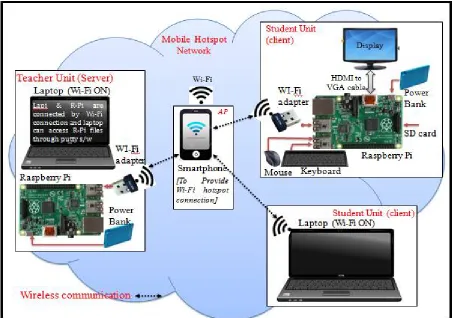
Here we can illustrate how E-Workbook system is work with the help of this below figure 2. In this figure we can seen, the system having one teacher unit which act as server, multiple student unit which is consider as client and smart phone act as access point which create hotspot network to provide hotspot connection between devices.
In our system basically have two units to design one for teacher and another for student. In teacher unit having R-Pi which can run web page designed software application so it act as server and Wi-Fi adapter used for wireless communication. In this paper we considering teacher have laptop which is wirelessly connected to server R-Pi with the help of Wi-Fi adapter. The teacher can access server R-Pi files by putty software in windows OS. In Student unit can replacing computer by low cost R-Pi along with required devices like keyboard, mouse, Wi-Fi adapter & display. Student can also use remote devices like laptop, tablet or mobile. The E-Workbook system use TCP transport protocol conjunction with IP for data transmission. TCP is connection oriented protocol in which they first setup connection between devices then create communication path between devices before the data transmitted. To setup connection between all devices in E-Workbook system we used smart phone to provide hotspot connection with secure id & password. Then devices may connect to hotspot connection by just entering their id & password into their Wi-Fi configuration, then device will automatically connect to that hotspot connection. Now to create communication path, we just have to map IP addresses of all devices into server including teacher & student device. Now this is system created network which we can say mobile hotspot network. The data transmission & reception between devices can be done in this network through this hotspot connection. So we have to do these much of arrangements to achieve our goal, for that just turn on the server R-Pi, other devices and connect to mobile hotspot. The Hyper Text Transfer Protocol or HTTP protocol is used for the communication between web server and web browser. This protocol defines all the basic frame work of web communications by handling requests and also by providing control information to be transferred between web browser and web server. To obtain a web document, the browser and server should establish a connection at Port 80. The HTML embedded PHP web page displayed when the configured IP address entered on the web browser is shown.
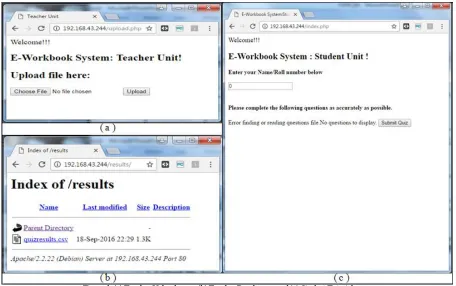
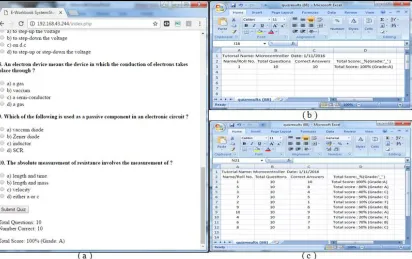
Now teacher can request for upload web page by just entering host IP address on web browser, server will runs the upload php file and serves the web page to upload file shown in fig.4 (a). Teacher can used this page to upload question with summery of answer file to display question for student to attempt shown in figure 5. Once teacher can upload files into server that file will saved into server automatically which can be retrieve on student request. When a student requests on web browser for this tutorial questions, the server serves the data through a webpage as displayed in fig.6. The data will be questions and their choice of answers. Students get the attempt tutorial result on their web page at that instant once they submitted with the help of server software application shown in fig.7 (a). And most important teacher can get the each student result record automatically without any man work on their result web page shown in fig.7 (b) . The result of all students is available in excel sheet which can contain student roll no./name, total questions, correct answers and percentage along with grade which can shown in fig.7 (c)
V. SOFTWAREDESIGN
Figure 3. Flow chart
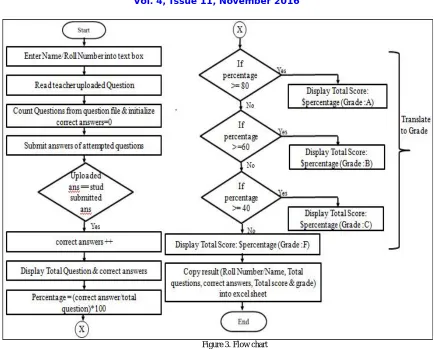
The proposed system used PHP web page developing language to design web page for both unit. The paperless tutorial with automatic tutorial checking has been done in above flow, can be illustrating from flow chart shown in figure 3. Student just enter Roll No./Name used for identity. Then system read teacher uploaded tutorial file and count number of questions to display on web page. Submit Quiz button pressed by student then system will start to compare uploaded correct answer summery & student submitted answers summery, if they equal then increment correct answer counting to display in result. The percentage will be calculated from total question and correct answers. According to percentage the grade will be assigned i.e. A, B, C, F. Then result will be automatically display on student web page which can contain Total Questions, Correct Answers, Total Score(Grade) and copy that result into excel sheet which access by teacher only along with their identity.
VI.EXPERIMENTALRESULTS
The developed paperless E-Workbook system is used to perform tutorial with the help of software designed web pages. Web page design is not only for teacher to upload tutorial question file but also for download result recorded excel sheet but also for student to attempt tutorial is as shown in figure 4.
Figure 4. (a) Teacher Uploads page (b) Teacher Result page and (c) Student Tutorial page
Figure 5 Display “Successfully Uploaded” message after teacher uploading tutorials file.
Figure 5. Teacher Upload page after uploading Questions & Answers file
Figure 6. Student Tutorial page after teacher uploads tutorial question
Figure 7 (a) Shows student page on which they obtain a result after submitting selected answers by using ‘Submit Quiz’ button. Result consist of “Total Questions, Correct Answers, Total Score”, (b) Shows excel sheet in which result automatically copied after submitting their tutorial. (c) Shows example of 10 student result record in excel sheet at they submitted tutorial.
VII. CONCLUSION
We have implemented paperless E-workbook system which supports teaching-learning experiment, and indirectly saves teacher’s time by automatic checking of class tutorial and alternatively reduces weight of school bag by eliminating paper work.
The system is developed by implementing a web server using Raspberry Pi to design web page for attempt paperless tutorial without internet access. The paperless tutorial workbook is a new method to attempt tutorial in education environment which designed here for the real time implementation. The smart phone provides hotspot connection for data transreceiving between all Wi-Fi adapters through wireless communication. It supports online supervision and control only on private mobile hotspot Network (LAN) which is created by smart-phone. The whole system has low-cost, good openness and portability and also it is easy to maintain and upgrade. It is possible to interconnect different kind of remote computers to server to perform paperless tutorial.
REFERENCES
1. Ian Grout and Alexandre César Rodrigues da Silva “Concept design for a RFID enabled student workbook”, IEEE 11th International
Conference on Remote Engineering and Virtual Instrumentation (REV), 2014,p.7-10
2. Ian Grout, Ciara Murphy and Alexandre César Rodrigues da Silva, “Remote Laboratory Experiment Access via an RFID Interface",
Proceedings of the REV 2012 conference, Bilbao, Spain, 4th July – 6th July 2012
3. Wu Ling, Luo Xiangze, Wu Wendi, “The Design and Implementation of a teacher-student interaction system based on ZigBee and RFID”,
978-1-4244-8039-5/11/ ©2011 IEEE
4. Jesus H. Trespalacios, Manuel A. Pe‘rez-Quiiiones, “Teaching Functions to Pre-Calculus Students: An Electronic-Workbook”, 29th
ASEE/IEEE Frontiers in Education Conference, San Juan, Puerto Rico,0-7803-5643, November 10 - 13, 1999
5. Nikolaos K. Ioannou, Ph.D., George D. Papadopoulos, George S. Ioannidis, Ph.D., Athanasios E. Tapeinos, “A novel Educational Platform,
based on the Raspberry-Pi Optimised to assist the teaching and learning of younger students”, 2014 International Conference on Interactive Collaborative Learning (ICL), Dubai, UAE, 978-1-4799-4437- ©2014 IEEE, 03-06 December 2014
6. Qabas Abdal Zahraa Jabbar, “Enjoyable e-Learning Modules: Developing and Evaluating”, International Journal of Computer Applications
(0975 – 8887) Volume 145 – No.7, July 2016 42
7. Michael Bradford, Cristina Muntean, Pramod Pathak, “An Analysis of Flip-Classroom Pedagogy in First Year Undergraduate Mathematics for
Computing”, 978-1-4799-3922-0/14/$31.00 ©2014 IEEE
8. Prof. C.R. Dongarsane, Mr.Khandekar Ketan Ramesh, Mr. Ingavale Tejas Ramesh, Mr. Havaldar Amar Dilip, “ Embedded Web server using
TCP/IP protocol”, International Research Journal of Engineering and Technology (IRJET) Volume: 03 Issue: 02 Feb-2016
9. Bhuvaneswari S., Sahaya Anselin Nisha A., “Implementation of Tcp/Ip on Embedded Webserver Using Raspberry Pi In Industrial
Application”, International Journal of Advanced Research in Computer and Communication Engineering Vol. 3, Issue 3, March 2014
10. Amol A. Dharmapurikar, R.B. Waghmare, “Design & Implementing A Secured Wireless Communication System By Using GPRS &
Raspberry Pi In Automation”, International Journal of Science, Technology & Management, Volume No.04, Issue No. 03, March 2015 ISSN (online): 2394-1537
11. L. Priya1, V. Maheswari2,‖ Design and Realization of Embedded Web Server based on Arm 11 and Raspbian Wheezy‖, International Journal
for Scientific Research & Development| Vol. 2, Issue 01, 2014. 12. https://www.RaspberryPi.org/downloads/
13. https://www.w3school.org/ 14. http://www.php.net/
15. http://php.net/manual/en/install.php
16. http:/www.dailymail.co.uk/news/article-2114118/Heavy-school-bags-deforming-children-growing-numbers-suffer-irreversible-problems.html/
17. http://www.theguardian.com/education/2013/apr/02/limit-teaching-four-hours-a-day-union
BIOGRAPHY
Ms. Shweta Doulat Sitaphale has received B.E. degree in Electronics and Telecommunication Engineering Department, BIGCE from Solapur University in 2013. She is currently pursuing M.E. from the Electronics Engineering Department, Solapur University. Her main areas of interest are Embedded systems and Networking.