WebObjects Overview
Apple Computer, Inc.
© 2000–2002 Apple Computer, Inc. All rights reserved.
No part of this publication may be reproduced, stored in a retrieval system, or transmitted, in any form or by any means, mechanical, electronic, photocopying, recording, or otherwise, without prior written permission of Apple Computer, Inc., with the following exceptions: Any person is hereby authorized to store documentation on a single computer for personal use only and to print copies of documentation for personal use provided that the documentation contains Apple’s copyright notice. The Apple logo is a trademark of Apple Computer, Inc.
Use of the “keyboard” Apple logo (Option-Shift-K) for commercial purposes without the prior written consent of Apple may constitute trademark infringement and unfair competition in violation of federal and state laws.
No licenses, express or implied, are granted with respect to any of the technology described in this book. Apple retains all intellectual property rights associated with the technology described in this book. This book is intended to assist application developers to develop applications only for Apple-labeled or
Apple-licensed computers
Every effort has been made to ensure that the information in this document is accurate. Apple is not responsible for typographical errors.
Apple Computer, Inc. 1 Infinite Loop Cupertino, CA 95014 408-996-1010
Apple, the Apple logo, Mac, and WebObjects are trademarks of Apple Computer, Inc., registered in the United States and other countries. Enterprise Objects and Enterprise Objects Framework are trademarks of NeXT Software, Inc., registered in the United States and other countries.
Java and all Java-based marks are trademarks or registered trademarks of Sun Microsystems, Inc. in the United States and other countries. Apple Computer, Inc. is independent of Sun Microsystems, Inc.
Simultaneously published in the United States and Canada
Even though Apple has reviewed this manual, APPLE MAKES NO
WARRANTY OR REPRESENTATION, EITHER EXPRESS OR IMPLIED, WITH RESPECT TO THIS MANUAL, ITS QUALITY, ACCURACY,
MERCHANTABILITY, OR FITNESS FOR A PARTICULAR PURPOSE. AS A RESULT, THIS MANUAL IS SOLD “AS IS,” AND YOU, THE PURCHASER, ARE ASSUMING THE ENTIRE RISK AS TO ITS QUALITY AND ACCURACY.
IN NO EVENT WILL APPLE BE LIABLE FOR DIRECT, INDIRECT, SPECIAL, INCIDENTAL, OR CONSEQUENTIAL DAMAGES RESULTING FROM ANY DEFECT OR INACCURACY IN THIS MANUAL, even if advised of the possibility of such damages.
THE WARRANTY AND REMEDIES SET FORTH ABOVE ARE EXCLUSIVE AND IN LIEU OF ALL OTHERS, ORAL OR WRITTEN, EXPRESS OR IMPLIED. No Apple dealer, agent, or employee is authorized to make any modification, extension, or addition to this warranty.
3
Contents
Figures and Tables 7
Chapter 1
About This Book
9Why Read This Book 9
Further Investigations 10
Installed Developer Documentation 11
Online Documentation 11
Chapter 2
What Is WebObjects?
13Dynamic HTML Publishing 13
Web-Enabled Client-Server Applications 16
HTML-Based WebObjects Applications 16
Java Client Applications 17
Rapid Development 19
Direct to Web 19
Direct to Java Client 20
The WebObjects Advantage 20
Streamlined Database Access 20
Separation of Presentation, Logic, and Data 21
State Management 21
Modular Development 22
Pure Java 22
Scalability and Performance 22
Chapter 3
Enterprise Objects
25What Is an Enterprise Object? 25
Enterprise Objects and the Model-View-Controller Paradigm 28
4
C O N T E N T S
WebObjects Support for Enterprise-Object Instances 31
The Enterprise Objects Advantage 34
Chapter 4
HTML-Based Applications
37A Programmer’s View of WebObjects 37
Separating Presentation Code from Event-Handling Logic 38
Dynamic Elements 39
Reusing Components 40
Maintaining State 41
Separating Presentation Code from Business Logic 41
The WebObjects Architecture 43
Developing a WebObjects HTML Application 44
Project Builder 45
WebObjects Builder 46
Guidelines for Choosing the HTML-Based Approach 47
Chapter 5
Direct to Web Applications
49How Direct to Web Works 55
Developing a Direct to Web Application 58
The Direct to Web Assistant 58
Further Customizing Your Direct to Web Application 61
Advantages of the Direct to Web Approach 62
Limitations 63
Guidelines for Choosing Direct to Web 64
Chapter 6
WebObjects Desktop Applications
65Java Client Features 66
Better User Experience 67
Object Distribution 67
The Best of WebObjects 67
Deployment Options 68
Rapid Application Development 68
C O N T E N T S
5
Two Approaches to Java Client 71
Choosing an Approach 74
Java Client Architecture 76
Managing the User Interface 79
Data Synchronization Between Client and Server 79
Dynamic User Interface Generation 81
Java Client and Other Three-Tier Systems 81
Development Tasks and Tools 83
Designing Enterprise Objects for Java Client 83
Creating the User Interface (Non-Direct) 84
Customizing the User Interface (Direct Approach) 85
Chapter 7
J2EE Integration
87Enterprise JavaBeans 88
JSP and Servlets 89
JNDI 89
Chapter 8
Choosing Your Approach
91Internet and Intranet Deployment 91
User Interface Requirements 92
Rich Widget Selection and Fast Response Times 92
Specific Layout and Flow Requirements 92
Rapid Development Considerations 93
Combining Approaches 94
Combining HTML-based and Java Client Approaches 94
Adding Rapid Development 95
Summary 95
Where to Go From Here 96
Glossary
977
Figures and Tables
Chapter 2
What Is WebObjects?
13Figure 2-1 A static publishing site 14
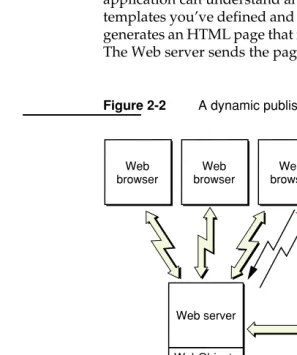
Figure 2-2 A dynamic publishing site 15
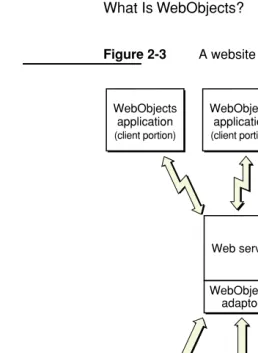
Figure 2-3 A website running Java Client applications 18
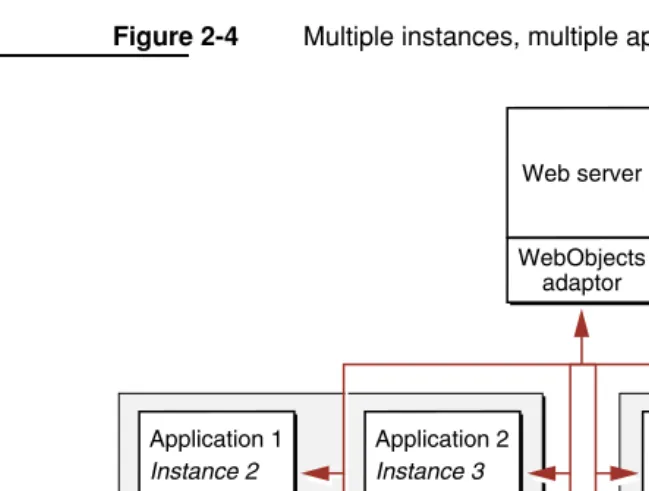
Figure 2-4 Multiple instances, multiple applications 23
Chapter 3
Enterprise Objects
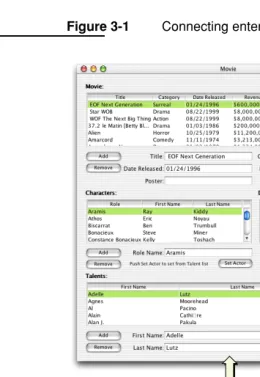
25Figure 3-1 Connecting enterprise objects to data and the user interface 27
Figure 3-2 Mapping between an enterprise object class and a single table 30
Figure 3-3 Mapping relationships 31
Figure 3-4 Implementing business logic in enterprise objects 34
Figure 3-5 Implementing business logic in the user interface application 35
Figure 3-6 Implementing business logic in the database 36
Chapter 4
HTML-Based Applications
37Figure 4-1 The files of a WebObjects component 39
Figure 4-2 How enterprise objects relate to a WebObjects component 42
Figure 4-3 WebObjects HTML-based application communication chain 43
Figure 4-4 Project Builder 45
Figure 4-5 WebObjects Builder 46
Table 4-1 Example Dynamic Elements 40
Chapter 5
Direct to Web Applications
49Figure 5-1 A login page 49
Figure 5-2 A query-all page 50
Figure 5-3 A query page 51
8
F I G U R E S A N D T A B L E S
Figure 5-5 An inspect page 52
Figure 5-6 An edit page 53
Figure 5-7 An edit relationship page 53
Figure 5-8 The menu header 54
Figure 5-9 An example Neutral look page 54
Figure 5-10 An example Basic look page 55
Figure 5-11 Determining attributes from the entity 56
Figure 5-12 The Direct to Web rule system 57
Figure 5-13 The Direct to Web Assistant 59
Figure 5-14 The Entities pane of the Direct to Web Assistant 60
Figure 5-15 The Rule Editor 61
Chapter 6
WebObjects Desktop Applications
65Figure 6-1 A sample Java Client application 66 Deployment Options 68
When To Choose Java Client 69
Figure 6-4 Java Client’s distributed, multitier architecture 76
Figure 6-5 Architecture of a Java Client application 77
Figure 6-6 Architecture of a Direct to Java Client application 78
Figure 6-7 Data flow in a Java Client application 80
Figure 6-8 Composing a user interface with Interface Builder 85
Why Read This Book 9 C H A P T E R 1
1
About This Book
WebObjects is an application server with tools, technologies and capabilities to create Internet and intranet applications. It has an object-oriented architecture that promotes quick development of reusable components. WebObjects is extremely scalable and supports high transaction volumes.
This book introduces the architecture, technologies, development tools, and development approaches of WebObjects to developers and others interested in how WebObjects works.
Why Read This Book
WebObjects Overview is written for developers who want to start using WebObjects. However, anyone interested in WebObjects technology will benefit by reading this book.
For the most part, this book does not assume you have a background in
object-oriented programming. However, WebObjects is based on object-oriented frameworks written in Java, an object-oriented language. You should be familiar with object-oriented programming if you intend to write WebObjects applications. There are many books available on the subject if you aren’t.
10 Further Investigations C H A P T E R 1
About This Book
Because WebObjects provides four distinct approaches to developing applications, this book discusses them one by one, and compares their pros and cons to help you decide which approach is appropriate for your application.
This book has the following chapters:
■ “What Is WebObjects?” (page 13) introduces the technologies of WebObjects and how they fit together.
■ “Enterprise Objects” (page 25) describes the objects that lie at the heart of all WebObjects applications and encapsulate your application’s business logic and data.
■ “HTML-Based Applications” (page 37) describes the approach that allows you to create HTML applications for the World Wide Web.
■ “Direct to Web Applications” (page 49) describes the rapid development version of the HTML-based application approach.
■ “WebObjects Desktop Applications” (page 65) describes the approach with which you can produce a graphical user interface application that runs on a client machine.
■ “J2EE Integration” (page 87) explains how WebObjects implements Enterprise JavaBeans and how it integrates with JavaServer Pages (JSP) and servlets.
■ “Choosing Your Approach” (page 91) summarizes the pros and cons of these approaches, and then outlines the process you should go through to decide which approach or combination of approaches is appropriate for your environment.
Further Investigations
This book serves as a starting point. It surveys the technologies of WebObjects without providing the details. This section lists sources of WebObjects information for software developers. It is by no means an exhaustive list, and Apple’s
C H A P T E R 1
About This Book
Further Investigations 11
Installed Developer Documentation
When you install the WebObjects Developer package on your computer, the Installer puts developer documentation into the following locations:
■ Frameworks. Information inextricably associated with a framework is usually installed in a localized subdirectory of the framework. This method of
packaging ensures that the documentation moves with the framework when it is moved (or is copied) to another location. It also makes it possible to have localized versions of the documentation (although development and deployment tools are localized for English only).
■ Development tools. Help information for applications such as Project Builder and Interface Builder is installed with the application. When users request it from the Help menu, the application launches Help Viewer to display it.
■ Example code. A variety of sample programs are installed in /Developer/ Examples/JavaWebObjects ($NEXT_ROOT/Developer/Examples/JavaWebObjects on Windows 2000) showing you how to perform common tasks using WebObjects.
■ All information that is not specific to frameworks or development applications is installed in /Developer/Documentation/WebObjects ($NEXT_ROOT/
Documentation/Developer on Windows 2000). On Mac OS X, the Installer also creates symbolic links to the framework documentation in this location.
To access the developer documentation on Mac OS X, you open the WOHomePage.html
file in your Web browser. This file is located in the /Developer/Documentation/ WebObjects directory.
To access the developer documentation on Windows 2000, you use the
WOInfoCenter application. To access the WOInfoCenter, go to the Start menu and select Program > WebObjects > WOInfoCenter.
Online Documentation
Dynamic HTML Publishing 13 C H A P T E R 2
2
What Is WebObjects?
From an information technology perspective, WebObjects is a scalable,
high-availability, high-performance application server. From the viewpoint of a developer, though, WebObjects is an extensible object-oriented platform upon which you can rapidly develop and deploy Web applications that integrate existing data and systems. WebObjects is especially suited to dynamically publishing data on the Web and bringing the increased connectivity of the Web to traditional client-server and desktop applications.
The Web was created to simplify access to electronically published documents. Originally just static text pages with hyperlinks to other documents, Web pages quickly evolved into highly graphical animated presentations. Along the way, a degree of interactivity was introduced, allowing people browsing the Web to fill out forms and thereby supply data to the server.
WebObjects allows you to take the next logical step. With it, you can produce full-fledged Web-accessible applications, for use either across the Internet or within a corporate intranet. These applications can be HTML-based, and thus accessible through a Web browser, or can have the full interactivity of a stand-alone application.
Dynamic HTML Publishing
14 Dynamic HTML Publishing C H A P T E R 2
What Is WebObjects?
A typical website is organized like Figure 2-1. A user’s Web browser requests pages using URLs (Uniform Resource Locators). These requests are sent over the network to the HTTP server, which analyzes each request and selects the appropriate Web page to return to the user’s browser. This Web page is simply a text file that contains HTML code. Using the HTML tags embedded within the file received from the HTTP server, the browser renders the page.
Figure 2-1 A static publishing site
Static publishing sites are easy to maintain. There are a number of tools in the market that allow you to create HTML pages with a relatively small amount of effort. And as long as the content of your pages doesn’t change too often, it isn’t that difficult to keep them up-to-date. Dynamic publishing sites, however, are a different story. Without WebObjects it could take a small army to keep a breaking news site up to date.
WebObjects was designed from the beginning to allow you to quickly and easily publish dynamic data over the Web. You create HTML templates that indicate where on the Web page the dynamic data is to be placed, and a WebObjects application fills in the content when your application is accessed. The process is much like a mail merge. The information your Web pages publish can reside in a database or some other permanent data storage (files, perhaps), or it can even be calculated or generated at the time a page is accessed. The pages are also highly interactive—you can fully specify the way the user navigates through them.
Web browser Web browser Web browser Web server Request http://www.apple.com <HTML> <Head> . . .
Static HTML pages
Response
C H A P T E R 2
What Is WebObjects?
Dynamic HTML Publishing 15
Figure 2-2 shows a WebObjects-based dynamic publishing site. Again, the request (in the form of a URL) originates with a client browser. If the HTTP server detects that the request is to be handled by WebObjects, it passes the request to an HTTP adaptor. The adaptor packages the incoming request in a form the WebObjects application can understand and forwards it to the application. Based upon
templates you’ve defined and the relevant data from the data store, the application generates an HTML page that it passes back through the adaptor to the Web server. The Web server sends the page to the client browser, which renders it.
Figure 2-2 A dynamic publishing site
Relational database Web server
WebObjects adaptor
WebObjects
application Templates
Static HTML pages Web
browser
Web browser Web
browser
Request
http://store.apple.com/...
Response
16 Web-Enabled Client-Server Applications C H A P T E R 2
What Is WebObjects?
This type of WebObjects application is referred to as “HTML-based,” since the result is a series of dynamically generated HTML pages.
Instead of using an HTTP adaptor, you can deploy applications through servlet containers. This approach allows you take advantage of your servlet server’s application deployment facilities. For more information on this approach, see “JSP and Servlets” (page 89).
Web-Enabled Client-Server Applications
Although the majority of websites primarily publish static data, the number of sites that publish dynamic content is growing rapidly. Many corporations use intranets, the Internet, or both to provide easy access to internal applications and data. An online store selling books, music, or even computers is one example of a
Web-enabled client-server application.
Web-enabled applications can have huge advantages over traditional applications. Clients don’t have to install the application, which not only saves client disk space but ensures that the user always has the most up-to-date version of the application. As well, the client computers can be Macintosh computers, PCs, or workstations— anything that can run a Web browser with the necessary capabilities.
WebObjects allows you to develop two different flavors of Web-enabled
application: HTML-based applications and Java Client applications. HTML-based applications are analogous to Common Gateway Interface (CGI) applications and consist of dynamically-generated HTML pages accessed through a Web browser. Java Client moves part of your application to the client-side computer and enlists Sun’s Java Foundation Classes (JFC) to give it the rich user interface found in a more traditional desktop application.
HTML-Based WebObjects Applications
When you need to develop an HTML-based application like a shopping cart, you can create it quickly and easily with the WebObjects development tools.
C H A P T E R 2
What Is WebObjects?
Web-Enabled Client-Server Applications 17
buttons, checkboxes, and tables) to complex ones (for example, toolbars). The set of components that you can use with WebObjects is extensible, so you can create components that can be reused across all of your Web applications.
Your application isn’t entirely built out of components. You create WebObjects applications from a combination of components and Java classes. You put your application-specific business logic in some of these classes. WebObjects provides the rest of them.
The basic structure of an HTML-based Web application matches that of a dynamic publishing site that uses WebObjects. Thus, Figure 2-2 (page 15) applies to
HTML-based Web applications as well.
Java Client Applications
When you need the fast and rich user interface of desktop client-server applications, you can partition your application so that a portion of it—including all or part of the user interface—runs in Java directly on the client. Client-server communication is handled by WebObjects. WebObjects applications that are partitioned in this way are known as Java Client applications.
Java Client distributes the objects of your WebObjects application between the application server and one or more clients—typically Java applications. It is based on a distributed multi-tier client-server architecture where processing duties are divided between a client, an application server, a database server, and an HTTP server. With a Java Client application, you can partition business objects containing business logic and data into a client side and a server side. This partitioning can improve performance and at the same time help to secure legacy data and business rules.
Figure 2-3 (page 18) illustrates a Java Client application in which the client portion is running as an application installed on the user’s computer. As with an
HTML-based WebObjects application, the application can communicate with the server side using HTTP. In addition, Java Client passes objects between a portion of your application residing on the user’s computer and the portion of your
18 Web-Enabled Client-Server Applications C H A P T E R 2
What Is WebObjects?
Figure 2-3 A website running Java Client applications
Java Client allows your application to look and feel like a traditional desktop application and still take full advantage of the power of WebObjects.
WebObjects application (server portion)
WebObjects application (server portion) WebObjects
application (client portion)
WebObjects application (client portion)
WebObjects application (client portion)
WebObjects application (server portion)
Web server
WebObjects adaptor
HTTP
Relational database
<HTML> <Head>
. . .
C H A P T E R 2
What Is WebObjects?
Rapid Development 19
Rapid Development
WebObjects is both powerful and flexible. With that power and flexibility, however, comes a certain degree of complexity. For many applications, whether HTML-based or Java Client–based, it’s more important to develop the application quickly than strive for maximum flexibility or polish. As an example, a simple data-browsing and editing application, intended only for internal use by a system administrator, probably wouldn’t warrant the same degree of effort you would put into an Internet-enabled application accessible by the general public. To simplify the development of applications like the former, WebObjects includes a set of rapid-development technologies: Direct to Web and Direct to Java Client.
Direct to Web and Direct to Java Client are similar in approach. Their primary difference is in how the application interacts with the end user. Direct to Web creates HTML-based WebObjects applications, whereas Direct to Java Client creates WebObjects applications that employ Java Client to partition the application between server and client. Both are useful not only for creating simple database browser applications, but in many situations can also serve as rapid prototyping tools. Because Direct to Web and Direct to Java Client both allow customization on various levels, they are well-suited for bootstrapping and creating your
mission-critical applications.
Direct to Web
Direct to Web is a system for creating HTML-based WebObjects applications that access a database. All Direct to Web needs to create the application is a model of the database, which you can build using EOModeler (a data-modeling tool).
20 The WebObjects Advantage C H A P T E R 2
What Is WebObjects?
Out of the box, Direct to Web generates Web pages for nine common database tasks, including querying, editing, and listing. To do this, Direct to Web uses a
task-specific component called a template that can perform the task on any entity. The templates, in conjunction with a set of rules (which you can customize), are the essential elements of your Direct to Web application.
Direct to Web is highly customizable. For example, you can change the appearance of the standard templates, mix traditional HTML-based WebObjects components with Direct to Web pages, and create custom components and templates that implement specialized behavior.
Direct to Java Client
Like Direct to Web, Direct to Java Client generates a user interface for common database tasks using rules to control program flow and it has an assistant that allows you to modify your applications at runtime. The primary difference between Direct to Web and Direct to Java Client is the type of application each produces: Direct to Java Client produces Java Client applications that have the fast and rich user interfaces associated with desktop applications. Thus, Direct to Java Client applications have the same client-side requirements that other Java Client applications do.
The WebObjects Advantage
WebObjects encapsulates a number of key technologies that give it a significant advantage over other application servers.
Streamlined Database Access
C H A P T E R 2
What Is WebObjects?
The WebObjects Advantage 21
mechanism for cleanly instantiating business objects directly from database tables. WebObjects handles all the interactions with the database including fetching, caching, and saving. This allows you to write your business logic against actual objects independent of the underlying datasource. You can modify schemas, add or change databases, or even use totally a different storage mechanism without needing to rewrite your application.
WebObjects applications can access any database with a JDBC 2.0 driver. JDBC is an interface between Java platforms and databases.
Separation of Presentation, Logic, and Data
An ideal Web application development system simplifies maintenance and encourages code reuse by enforcing a clean separation of presentation (HTML), logic (Java), and data (SQL). This modularity is inherent in the WebObjects programming model, which uses reusable components to generate Web pages directly from enterprise objects without the need to embed scripts or Java code inside your HTML. A component contains a template, which you—or a professional Web designer—can lay out and edit using standard Web authoring tools. A component can also implement custom behavior using a separate Java source file. Neither the template nor the Java source file includes model-specific information.
State Management
The HTTP protocol used on the Web is inherently stateless; that is, each HTTP request arrives independently of earlier requests, and it is up to Web applications to recognize which ones come from an individual user or session. Therefore, most Web applications of consequence—as well as some of the more interesting dynamic publishing sites—need to keep state information, such as login information or a shopping basket, associated with each user session.
22 The WebObjects Advantage C H A P T E R 2
What Is WebObjects?
Modular Development
The power of WebObjects comes from a tightly integrated set of tools and
frameworks, facilitating the rapid assembly of complex applications. At the heart of this system is Project Builder, an integrated development environment (IDE) that manages your Java business logic and tracks all the supporting models and components. As mentioned above, WebObjects also includes powerful assistants and frameworks that allow the rapid creation of HTML or Java Client applications directly from the database. Advanced developers can tap into the Java APIs underlying WebObjects’ frameworks, allowing virtually unlimited customization and expandability.
Pure Java
WebObjects applications are 100% Pure Java, which means they can be deployed on any platform with a certified Java 2 virtual machine.
Scalability and Performance
Static websites and traditional client-server applications have one strong suit: they both leverage the power of the client platform, minimizing the load on the server. It doesn’t take all that much processing power to serve up a set of static Web pages. Dynamic Web applications, although a tremendous advance over static pages, require additional server power to access the dynamic data and construct the Web pages or Java Client user interface on the fly.
The WebObjects application server is both efficient and scalable. With WebObjects, if more power, reliability, or failover protection is needed, you can run multiple instances of your application, either on one or on multiple application servers (see
C H A P T E R 2
What Is WebObjects?
The WebObjects Advantage 23
Figure 2-4 Multiple instances, multiple applications
Application server 1
Application server 2
Application 1 Instance 1
Application 1 Instance 3 Application 1
Instance 2
Application 2 Instance 3
Application 1 Instance 4
Application 1 Instance 4 Application 2 Instance 5
Application 2 Instance 2
Application 1 Instance 1
Web server
What Is an Enterprise Object? 25 C H A P T E R 3
3
Enterprise Objects
As mentioned in “What Is WebObjects?” (page 13), WebObjects applications gain much of their usefulness by interacting with a persistent data store, that is, a datasource, which is usually a database. In WebObjects, database tables are represented as collections of Java classes called enterprise objects. Enterprise objects contain the bulk of your application’s business logic, the part of the application you write regardless of which of the four approaches you take.
This chapter introduces enterprise objects, describes how they map to a database, outlines how WebObjects supports and interacts with them, and enumerates the advantages of the Enterprise Objects approach over other approaches available in the industry. You may wish to read the first section,“What Is an Enterprise Object?”
(page 25), and the last section, “The Enterprise Objects Advantage” (page 34), and skip the rest of the chapter, which is written for those familiar with relational databases.
What Is an Enterprise Object?
An enterprise object is like any other object in that it couples data with the methods for operating on that data. However, an enterprise object class has certain
characteristics that distinguish it from other classes:
■ It has properties that map to stored or persistent data; an enterprise object instance typically corresponds to a single row or record in a database table.
26 What Is an Enterprise Object?
In addition to providing classes that manage a set of enterprise-object instances in memory, WebObjects defines an API to which enterprise objects must conform, as well as default implementations for this API. As a result, you only need to
concentrate on the parts of your enterprise-object classes specific to your application.
To maximize the reusability and extensibility of your objects, they shouldn’t embed knowledge of the user interface or database alongside the business logic. For example, if you embed knowledge of your user interface, you can’t reuse the objects because each application’s user interface is different. Similarly, if you embed knowledge of your database, you’ll have to update your objects every time you modify the database’s schema.
What Is an Enterprise Object? 27
Figure 3-1 Connecting enterprise objects to data and the user interface
WebObjects provides a database-to-objects mapping, called a model, so your objects are independent of the database. WebObjects also provides an
objects-to-interface mapping so they are independent of the user interface. This approach allows you to create libraries of enterprise objects that can be used in as
Relational database WebObjects
28 What Is an Enterprise Object?
many applications as you need, with any user interface, and with any database server. Therefore, you can concentrate on coding the logic of your business while WebObjects takes care of the rest.
For example, you could create an enterprise object called Customer that defines such business rules as customers must have a work or home phone number, or customers cannot spend more than their credit limit. Without rewriting your business logic, you could use these objects in a public, Web-based application and an internal customer service application. You could also switch the database that serves the customer data.
Enterprise Objects and the Model-View-Controller
Paradigm
A common and useful paradigm for object-oriented applications, particularly business applications, is Model-View-Controller (MVC). Derived from
Smalltalk-80, MVC proposes three types of objects in an application, separated by abstract boundaries, and communicating with each other across those boundaries.
Model objects represent special knowledge and expertise. For example, model objects can hold a company's data and define the logic that manipulates that data. Model objects are not directly displayed. They often are reusable, distributed, persistent, and portable to a variety of platforms.
View objects represent things visible on the user interface (for example, windows, buttons, and so on). A view object is ignorant of the data it displays. View objects in general are reusable, which helps in providing consistency between applications.
Acting as a mediator between model and view objects in an application is the controller object. There is usually one per application or window. A controller object communicates data back and forth between the model objects and view objects. Since what a controller does is very specific to an application, it is generally not reusable even though it often constitutes much of an application's code.
Mapping Your Enterprise Objects to Database Tables 29
Because of the controller's central mediating role, model objects need not know about the state and events of the user interface, and view objects need not know about the programmatic interfaces of model objects.
From the perspective of this paradigm, enterprise objects are model objects. However, WebObjects also extends the MVC paradigm. Enterprise objects are also independent of their persistent storage mechanism. Enterprise objects do not need to know about the database that holds their data, and the database doesn’t need to know about the enterprise objects.
Mapping Your Enterprise Objects to Database Tables
Enterprise objects make use of a separate file, known as a model, to specify a mapping between tables in the database and your enterprise-object classes. This is formally called an entity-relationship (E-R) model. You use EOModeler to create and maintain these models. With EOModeler you can
■ read the data dictionary from a database to create a default model, which can then be tailored to suit the needs of your application
■ define data entities that represent the tables in your database
■ define the attributes of each entity; these attributes usually correspond to columns on a table
■ specify relationships between entities and referential integrity rules for these relationships
■ generate source code files (enterprise-object classes) for the entities you specify
■ define fetch specifications (queries) that you can invoke by name in your applications
■ create, modify, or delete tables or databases
A model represents a level of abstraction above the database. The
30 Mapping Your Enterprise Objects to Database Tables
Figure 3-2 Mapping between an enterprise object class and a single table
In actual practice, the mapping is more flexible than this. For example:
■ You can map an entity to a single table, a subset of a table, or to more than one table. For instance, you can map a Person entity’s firstName and lastName
attributes to a PERSON table but its streetAddress, city, state and zipCode
attributes to an ADDRESS table.
■ Generally, an attribute is mapped to a single column, but the
column-to-attribute correspondence is similarly flexible. You can map an attribute to a derived column, such as price * discount or salary * 12. ■ You can map an entity to one or more tables.
In addition to mapping tables to entities and columns to attributes, WebObjects maps primary and foreign key columns to relationships between objects.
WebObjects defines two types of relationships—to-ones and to-manys—which are both illustrated in Figure 3-3. The relationship a MovieRole has to its Movie is a to-one relationship, while the relationship a Movie has to its MovieRoles is a to-many.
1132 Feldman Corey
1028 Farina Dennis
TALEN
T_ID LAST_NAME FIRST_NAME
TALENT
Talent lastName "Farina"
WebObjects Support for Enterprise-Object Instances 31
Figure 3-3 Mapping relationships
WebObjects Support for Enterprise-Object Instances
After your program has accumulated changes to enterprise-object instances, WebObjects analyzes the instances, generates the necessary database operations (SQL code), and executes those operations to synchronize the database with
Movie
movieRoles
movie
movie
NSMutableArray
1132 Ash 501 703 ToySto
1028 R
ipley 501 501 Alien
TALENT_ID MOVIE_ROLE MOVIE_ID MOVIE_ID TITLE MOVIE_ROLE MOVIE
MovieRole
32 WebObjects Support for Enterprise-Object Instances
in-memory enterprise-object instances. WebObjects has mechanisms for ensuring the integrity of your data is maintained between your application and the datasource without sacrificing performance or flexibility:
Validation
A good part of your application’s business logic is usually validation (for example, verifying that customers don’t exceed their credit limits, return dates don’t come before their corresponding check-out dates, and so on). In your enterprise-object classes, you implement methods that check for invalid data, and WebObjects automatically invokes them before saving anything to the datasource.
Referential-integrity enforcement
In your model you can specify rules governing the relationships between entities, such as whether a to-one relationship is optional or mandatory. You can also specify delete rules—actions that must occur when an enterprise-object instance is deleted. For example, if you have a Department entity, you can specify that when instances of it are deleted, all the related employees in that department are also deleted (a cascading delete), all the employees in that department are updated to have no department (nullify), or the department deletion is rejected if it has any employees (deny).
Automatic primary and foreign key generation
You do not need to maintain database artifacts such as primary and foreign key values in your application; WebObjects keeps track of them for you. Primary and foreign keys aren’t usually meaningful parts of a business model; rather, they’re attributes created in a relational database to express relationships between entities. Key values can be generated and propagated automatically.
Transaction management
WebObjects Support for Enterprise-Object Instances 33
Locking
WebObjects offers three types of locking: pessimistic, optimistic, and on-demand. Pessimistic locking uses your database server’s native locking mechanism to lock rows as they’re fetched and prevents update conflicts by never allowing two users to look at the same
enterprise-object instance at the same time. Optimistic locking doesn’t detect update conflicts until you try to save changes to the database; if a row has changed since it was originally fetched, the save operation is cancelled. On-demand locking is a mixture of the other two: it locks a row after you fetch it but before you attempt to modify it. The lock can fail for one of two reasons: either the row has changed since you fetched it (optimistic locking), or because someone else already has a lock on the row (pessimistic locking).
Faulting
When WebObjects fetches a row, it creates enterprise-object instances representing the destinations of the corresponding entity’s
relationships. By default, WebObjects doesn’t immediately fetch data for the destination objects of relationships, however. Fetching is fairly expensive, and further, if WebObjects fetched rows related to the one explicitly asked for, it would also have to fetch the rows related to those, and so on, until all of the interrelated rows in the database had been retrieved. For many applications, this would be a waste of time and resources. To avoid this, WebObjects creates empty destination objects, called faults, that fetch their data the first time they’re accessed. This process, known as faulting, is automatic.
Uniquing
34 The Enterprise Objects Advantage
The Enterprise Objects Advantage
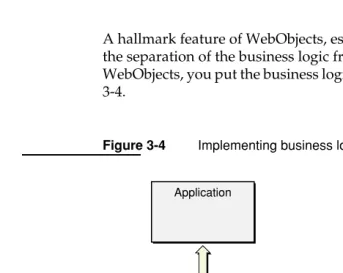
A hallmark feature of WebObjects, especially in comparison to other solutions, is the separation of the business logic from the datasource and the user interface. In WebObjects, you put the business logic in the enterprise objects, as shown in Figure 3-4.
Figure 3-4 Implementing business logic in enterprise objects
Another approach (Figure 3-5) is to implement business logic in the Web or desktop application. The WebObjects approach betters this approach in the following ways:
■ It offers greater reuse. In WebObjects, you code your business logic once, and each application that accesses your database can use it. You don’t have to re-code your business logic into each screen or Web page.
Relational database WebObjects
Application
...
...
The Enterprise Objects Advantage 35
■ It’s more maintainable. With WebObjects, you don’t have to duplicate your business logic. Thus you can easily make substantial changes to your rules without resorting to finding and fixing every affected page in every affected application. You can also easily track changes to your schema.
■ It improves data integrity. In WebObjects, you don’t need to rely on all application developers to implement the business rules correctly. If one application has an error, it is less likely to corrupt your database.
■ It scales better. In WebObjects, you can improve your application’s
performance without having to provide your users with faster systems. Instead, you can simply move some computation-intensive processing to fast computers.
Figure 3-5 Implementing business logic in the user interface application
Another approach (Figure 3-6) is to implement your business rules in the
database—with stored procedures, rules, constraints, and triggers, for example. The WebObjects approach betters this approach in the following ways:
■ It offers improved interactivity. If you implement your business rules in the datasource, you need to make a round trip to the database every time the user performs an action. Alternatively, you can batch up database changes, which prevents the user from receiving immediate feedback. In WebObjects
applications, changes immediately appear in the user interface, but you access the database only when saving these changes or fetching data.
Application
Relational database
36 The Enterprise Objects Advantage
■ It improves back-end portability. Database vendors have different ways of implementing logic. If you have to support more than one database and you’re using WebObjects, you don’t have to implement the logic multiple times and thus suffer maintenance problems.
■ Java is a good development language. With WebObjects, you program in Java, an industrial-strength language designed from the ground up to be
object-oriented. The programmable variants of SQL usually have some object-oriented features, but are basically procedural languages.
Figure 3-6 Implementing business logic in the database
Application
Relational Database
A Programmer’s View of WebObjects 37
4
HTML-Based Applications
The HTML-based application approach allows you to create applications that dynamically generate HTML pages. WebObjects provides graphical tools and a set of flexible frameworks with which you can develop elaborate applications. This chapter describes how a WebObjects HTML application works, the parts of a WebObjects application the programmer sees, the advantages of using this approach, and what the development process is like.
A Programmer’s View of WebObjects
The following features of WebObjects ease the development of HTML-based Web applications:
■ The HTML and code reside in separate files. An object called a component
represents a Web page and consists of separate files for HTML and Java code.
■ WebObjects provides dynamic versions of static HTML elements. These are called dynamic elements.
■ You can reuse HTML and Java code. Components can be embedded within other components as if they were dynamic elements.
■ WebObjects automatically maintains state information. WebObjects
overcomes the inherent statelessness of HTTP and maintains session state (like a shopping cart) and application state (like application statistics).
38 A Programmer’s View of WebObjects
These advantages are discussed in more detail in the sections that follow.
Separating Presentation Code from Event-Handling
Logic
In WebObjects, a Web page is represented by a component, an object that has both content and behavior. A component can also represent a portion of a page but usually represents an entire page, so the word page is used interchangeably with the word component.
Components consist of
■ a template in HTML code that specifies how the component looks. This file can be edited by any HTML editor or text editor.
■ event-handling logic that specifies how the component acts. You specify this with a standard Java source file.
■ bindings that associate the component’s layout specification (HTML code) with its event-handling methods. These bindings are stored in a text file.
Separating the presentation code, event-handling logic, and bindings makes it much easier to maintain a Web application. A graphic artist can modify the presentation code, thus modifying the appearance of the page, without breaking its event-handling logic. A programmer can completely rewrite the event-handling logic without accidentally changing the page’s layout.
You do not need to edit all three files separately. WebObjects Builder, a graphical component editing tool provided with WebObjects Development, edits the template, bindings, and event-handling code files simultaneously, relieving you of having to manually synchronize them. WebObjects Builder is described in more detail in “WebObjects Builder” (page 46).
A Programmer’s View of WebObjects 39
Figure 4-1 The files of a WebObjects component
Dynamic Elements
The template file in Figure 4-1 looks like any other HTML file except for the element with the <WEBOBJECT> tag. In this example, this tag represents a dynamic element. Dynamic elements are the basic building blocks of a WebObjects HTML application. They link an application’s behavior with the HTML page shown in the Web browser, and their contents are defined at runtime. A dynamic element appears in the template as a <WEBOBJECT> tag with a corresponding </WEBOBJECT> closing tag.
<HTML>
<HEAD><TITLE>Greeting</TITLE></HEAD> <BODY>
Hello <WEBOBJECT NAME=String1></WEBOBJECT>! <P></BODY>
</HTML>
import com.webobjects.appserver.*;
public class Greeting extends WOComponent { protected String userName;
public Greeting(WOContext context) { super(context);
}
public String userName() { return userName;
}
public void setUserName(String newUserName) { userName = newUserName;
} }
String1 : WOString { value = userName; }
Component (Greeting.wo)
Template (Greeting.html)
Code (Greeting.java)
40 A Programmer’s View of WebObjects
Some dynamic elements have no HTML counterpart; WORepetition and WOConditional are examples. Table 4-1 lists some of the more commonly used dynamic elements.
Reusing Components
You can embed a component within another component. For example, a component might represent only the header or footer of a page; you can nest it inside of a component that represents the rest of the page. A component designed to be nested within another component is called a reusable component, shared component, or Table 4-1 Example Dynamic Elements
Element Name Description
WOBrowser selection list that displays multiple items at a time
WOCheckBox checkbox user interface control
WOConditional determines whether a portion of the component (or Web page) is generated
WOForm container element that generates a fill-in form
WOHyperlink generates a hypertext link
WOImage displays an image
WORadioButton represents a toggle switch
WORepetition container element that repeats its contents (that is,
everything between the <WEBOBJECT...> and </WEBOBJECT...>
tags in the template file) a given number of times
WOResetButton button that clears a form
WOString dynamically generated string
WOSubmitButton submit button
WOText multiline field for text input and display
A Programmer’s View of WebObjects 41
subcomponent. Like dynamic elements, reusable components appear in the template as a <WEBOBJECT> tag with a corresponding </WEBOBJECT> closing tag, allowing you to extend WebObjects’s repertoire of dynamic elements.
The WOExtensions framework provided with WebObjects contains many useful reusable components like tables, radio button matrices, tab panels, and collapsible content. In addition, Direct to Web provides reusable components for editing, listing, selecting, inspecting, and querying enterprise-object instances.
Maintaining State
In addition to the components, each WebObjects application has a number of
sessions and an application object.
A session represents a period during which a particular user is accessing your application. Because users on different client computers (or multiple browser windows) may be accessing your application at the same time, a single application typically hosts more than one session at a time. Session objects encapsulate the state of a single session. These objects persist beyond the HTTP request-response cycle, and store (and restore) the pages of a session, the values of session variables, and any other state that components need to persist throughout a session. In addition, each session has its own copy of the components that its user has requested.
Session variables can be used in shopping cart applications to represent the items in the shopping cart. Email applications can use session variables to keep track of whether the user has logged in or not.
The application object is responsible for interfacing with an HTTP adaptor and forwarding HTTP requests to a dispatcher that, in turn, passes them to the appropriate session and component. The application object also passes the HTML response from the active component back to the adaptor. In addition, the
application object manages sessions, application resources, and components.
Separating Presentation Code from Business Logic
42 A Programmer’s View of WebObjects
component’s bindings file relates the component’s enterprise-object instances to the attributes of its dynamic elements. Figure 4-2 shows how enterprise objects relate to a component in a WebObjects application.
Figure 4-2 How enterprise objects relate to a WebObjects component
Server
Component
Template
Code Bindings
...
...
...
...
partNum W4378
color Red
size XL
The WebObjects Architecture 43
The WebObjects Architecture
When you run a WebObjects application, it communicates with the Web browser using the process illustrated in Figure 4-3.
Figure 4-3 WebObjects HTML-based application communication chain
Relational database
SQL Data
Web browser
WebObjects application
WebObjects Web server
44 Developing a WebObjects HTML Application
Here is a brief description of the elements involved in the communication process:
■ A Web browser. WebObjects supports all Web browsers that conform to HTML 3.2. Of course, if your application uses more advanced features like JavaScript or QuickTime, the users’ browsers must support these features.
■ A Web server. WebObjects supports any HTTP server that uses the Common Gateway Interface (CGI), the Netscape Server API (NSAPI), the Internet Server API (ISAPI), or the Apache module API. Although necessary for deployment, you don’t actually need a Web server while you develop your WebObjects applications. Alternatively, you can deploy WebObjects applications as servlets inside a servlet container. See “JSP and Servlets” (page 89) for more information. ■ An HTTP adaptor. The HTTP adaptor connects WebObjects applications to the Web by acting as an intermediary between Web applications and HTTP servers. Note that the HTTP adaptor may not be a separate process but a Web server plugin. An HTTP adaptor is not needed when an application is deployed as a servlet.
■ A WebObjects application instance. The application instance receives incoming requests and responds to them, usually by returning a dynamically generated HTML page. You can run multiple instances of an application when one instance is insufficient to handle the application’s user load. The application process is made up of your business code and the WebObjects frameworks.
Developing a WebObjects HTML Application
Developing a WebObjects application is a matter of creating your templates, bindings, and Java code files. Although these files are text based and thus could be created using a text editor, WebObjects provides graphical tools that simplify the entire process. The sequence of tasks used to create a WebObjects HTML
application with these tools is as follows:
■ Create a model using EOModeler.
■ Create a project using Project Builder.
■ Edit your components with WebObjects Builder.
Developing a WebObjects HTML Application 45
Project Builder
As its name implies, Project Builder manages all of the constituent parts of your application, including source code files, WebObjects components, frameworks, makefiles, graphics and sound files, and the like. You use Project Builder to edit your code files, compile, debug, and launch your application for development testing. Project Builder’s assistant helps you create new WebObjects components. You also can launch the other development tools from within Project Builder.
Figure 4-4 (page 45) shows Project Builder in use.
46 Developing a WebObjects HTML Application
WebObjects Builder
You use WebObjects Builder to edit your application’s components. WebObjects Builder allows you to graphically edit a component’s HTML template. If you prefer, you can switch to the source view from which you can edit the template as an HTML text file. WebObjects Builder also allows you to graphically bind the dynamic elements on your template to variables and methods within your code; you simply drag from a variable to the dynamic element as shown in Figure 4-5
(page 46).
Guidelines for Choosing the HTML-Based Approach 47
Guidelines for Choosing the HTML-Based Approach
The WebObjects HTML approach has the following advantages:
■ Portability. Any user with a Web browser can access a WebObjects HTML application.
■ Flexibility. You can create intricate HTML-based applications with relative ease.
■ Reduced system administration. With the HTML-based application approach, you can publish data such as breaking news and stock prices without having to rewrite the HTML code each time, reducing the number of people necessary to keep the website up-to-date.
In some cases, you can use the Direct to Web rapid development system to create an HTML-based application. Direct to Web works particularly well for data-driven applications, prototypes, and internal applications. See “Direct to Web
49
5
Direct to Web Applications
Direct to Web is a technology that creates HTML-based Web applications that use enterprise objects and consequently access databases. All you need to provide is the model that specifies the database-to-objects mapping and Direct to Web instantly creates an application.
Direct to Web applications have a particular structure. Every Direct to Web application begins on a login page (Figure 5-1). By default, this page provides an interface to authenticate the user but does not actually perform any authentication. Because the login page is a standard WebObjects component, you can change its behavior.
50
After the user logs in, Direct to Web displays its first dynamically generated page: a query-all page (Figure 5-2). This page allows the user to specify the enterprise objects he or she wants to work with. The user can query for any type of enterprise object that is visible in the application (the developer decides which types are visible and which are not).
Figure 5-2 A query-all page
51
Figure 5-3 A query page
52
Figure 5-4 A list page
Note that each Movie enterprise object on the list page in Figure 5-4 has an Edit button, which indicates that Movie objects are read-write. The developer can configure whether a type of enterprise object is read-only or read-write.
If the Movie objects are read-only, an Inspect button appears on each row instead of an Edit button. If the user clicks the Inspect button next to one of the enterprise objects, Direct to Web displays an inspect page for the object (Figure 5-5) that reveals more detailed information about the object.
Figure 5-5 An inspect page
53
Figure 5-6 An edit page
The user edits a relationship using an edit-relationship page (Figure 5-7), which edits to-many and to-one relationships.
Figure 5-7 An edit relationship page
54
Figure 5-8 The menu header
Every Direct to Web application appears in one of three looks. A look is a visual theme, and affects the layout and appearance of the pages. The example pages you have seen are in the Basic look. Direct to Web also supports two other looks: the Neutral look (Figure 5-9) and the WebObjects look (Figure 5-10 (page 55)).
How Direct to Web Works 55
Figure 5-10 An example Basic look page
How Direct to Web Works
As you have seen, Direct to Web applications have a fixed structure. They consist of a set of task pages (for example, query, list, and edit pages) that work for any type of enterprise object. These task pages are created using special WebObjects components called Direct to Web templates.
A Direct to Web template uses information from the entities of the enterprise objects it displays. An entity is the piece of the model that specifies how a table maps to a specific enterprise object. The Direct to Web template takes advantage of the entity’s property information (that is, information about the entity’s attributes and
56 How Direct to Web Works
Direct to Web template displaying a list page for Movie objects can determine that it needs to display the title, release date, category, and other attributes for each movie on the page (Figure 5-11).
Figure 5-11 Determining attributes from the entity
Direct to Web applications can be configured using a Java applet called the Direct to Web Assistant. The configuration information is stored as a database of rules. Rules say something like “if the task page is a list page and the entity is the Movie entity, do not display the banner.” Each rule has a priority and rules with higher priority override rules with lower priority. Direct to Web defines a set of default rules that define the basic application behavior. You can define higher priority rules
Product objects
Server
partNum W4378
color Red
size XL
retail 48.99
Product attributes
Name External type
partNum VARCHAR2
color VARCHAR2
size VARCHAR2
retail NUMBER
Product entity
...
...
...
.
...
How Direct to Web Works 57
that override the default rules for special cases. This is exactly what the Direct to Web Assistant does. Figure 5-12 shows the relationship between the Direct to Web template, the rule system, the rule database, and the Direct to Web Assistant.
Figure 5-12 The Direct to Web rule system
Note that when you configure your application with the Direct to Web Assistant, you don’t need to recompile your code to try your changes. Direct to Web is not a code generation wizard. It generates Web pages at runtime based on the templates and the rules.
Rules
Server
Direct to Web template
Template
Bindings
Code
58 Developing a Direct to Web Application
Developing a Direct to Web Application
There are four steps to creating a Direct to Web application:
■ Create a Direct to Web project using Project Builder.
■ Create a model using EOModeler.
■ Customize your Direct to Web application using the Direct to Web Assistant (optional).
■ Further customize your Direct to Web application (optional).
Of the four steps, the last two are unique to Direct to Web and are discussed in more detail below.
The Direct to Web Assistant
Developing a Direct to Web Application 59
Figure 5-13 The Direct to Web Assistant
60 Developing a Direct to Web Application
Figure 5-14 The Entities pane of the Direct to Web Assistant
Developing a Direct to Web Application 61
Figure 5-15 The Rule Editor
Further Customizing Your Direct to Web Application
If you need to customize your application beyond what you can do with the Direct to Web Assistant, you can use these methods:
■ Freeze a page. When you want to change the appearance or function of a single page in your Direct to Web application, you can freeze the page with the Direct to Web Assistant. The page becomes a WebObjects component in your project with an HTML template, a Java source file, and a bindings file. You can edit it with WebObjects Builder just as you would any other component. The downside is that you can’t customize frozen pages with the Direct to Web Assistant.
62 Advantages of the Direct to Web Approach
you instruct the Direct to Web Assistant to generate a Direct to Web template, modify the template, and tell the assistant to use your customized template instead of the standard one. As mentioned earlier, a Direct to Web template is an ordinary WebObjects component and can be edited using WebObjects Builder. Unlike frozen pages, Direct to Web pages based your custom template can be customized with the assistant.
■ Modify the page wrapper and menu header. The page wrapper component is included in your project and determines the text and elements that are common to every page in your application except the login page. It contains the menu header appropriate for the look. Figure 5-8 (page 54) shows the menu header for the Basic look. The menu header is another component in your project.
■ Mix WebObjects and Direct to Web pages. You can navigate to a Direct to Web page from a WebObjects page and vice versa. You can also embed certain Direct to Web functions within a WebObjects page. These capabilities extend the flexibility of Direct to Web considerably.
■ Perform other customizations. You can change almost anything in a Direct to Web application because it is just a WebObjects application with some extra functionality. However, you need to know the details of the Direct to Web architecture.
Advantages of the Direct to Web Approach
Direct to Web applications are just specialized HTML-based WebObjects
applications and so they have the same advantages: portability and reduced system administration. What Direct to Web adds to the HTML-based WebObjects approach is the ability to dynamically generate all of the Web pages, relieving you of designing and coding them yourself. As a consequence, Direct to Web has the following advantages over the HTML-based WebObjects approach:
■ It flattens the learning curve for developing applications.
■ It reduces the time required to develop applications.
■ It reduces the likelihood of errors.
■ It increases the maintainability and adaptability of applications.
Limitations 63
■ It allows you to focus on business logic instead of on the user interface.
Also, Direct to Web applications are constructed using well-tested Apple technology, which increases the stability of applications and reduces the time required to test applications before deploying them.
Limitations
Direct to Web is an HTML-based technology. As a result, Direct to Web user interfaces are highly portable but suffer the limited interactivity provided by HTML forms.
Because Direct to Web generates your applications for you, the applications have a number of additional limitations.
First, the programming model is indirect. You provide a model and Direct to Web assembles the application for you. The Web page generation is performed by a “magic box.” You don’t have to know what’s going on. This makes it really easy to get started programming with Direct to Web. But for certain customizations, the learning curve gets very steep very fast.
The machinery for generating Web pages is an entirely new layer on top of the WebObjects HTML-based application technology. This layer adds complexity that regular HTML-based applications don’t have, and you might have to learn the details of it to get certain results. In fact, making fundamental changes to a Direct to Web application can be a lot of work. Note, however, that you can typically reuse this work in later applications.
64 Guidelines for Choosing Direct to Web
Guidelines for Choosing Direct to Web
If your application requires a fast graphical user interface similar to that of a desktop application, you need to use one of the Java Client approaches (Java Client or Direct to Java Client). Direct to Web produces HTML-based applications.
Direct to Web is particularly suited for mission-critical applications, prototypes, and intranet applications where development time is critical and the limitations that Direct to Web imposes on the flow and user interface are not an issue. Although you can customize the application, you first need to familiarize yourself with the WebObjects HTML-based application approach and possibly Direct to Web.
65
6
WebObjects Desktop
Applications
WebObjects recognizes the need for distributed, three-tier application solutions with more complex, rich, and responsive user interfaces than HTML allows. So, in addition to HTML-based WebObjects applications, you can also write Java-based WebObjects desktop applications which use Swing for the user interface. These applications can be deployed either as applets running in a web browser or as real desktop applications running in the client’s Java Virtual Machine (though
deploying as desktop applications is highly recommended). This feature of WebObjects is called Java Client.
66 Java Client Features
Figure 6-1 A sample Java Client application
WebObjects Java Client is a three-tier network application solution that allows you to develop platform-agnostic desktop applications with database access and rich user interfaces. Java Client applications are WebObjects applications: they share much of their API with traditional HTML-based WebObjects applications, such as Enterprise O