An Infrastructure for Creating Web Automation Applications
Wen Heng Yen
1, Hao-Ren Ke
2, and Wei-Pang Yang
31
Degree Program of Electrical Engineering and Computer Science,
National Chiao Tung University,
1001 Ta Hsueh Rd., Hsinchu, TAIWAN 30050, R.O.C.
[email protected]2
University Library, National Chiao Tung University,
1001 Ta Hsueh Rd., Hsinchu, TAIWAN 30050, R.O.C.
3
Dept. of Computer & Information Science, National Chiao Tung University,
1001 Ta Hsueh Rd., Hsinchu, TAIWAN 30050, R.O.C.
Dept. of Information Management, National Dong Hwa University,
1, Sec. 2, Da Hsueh Rd., Shou-Feng, Hualien, TAIWAN 97401, R.O.C.
Abstract. With the growth of the World Wide Web (WWW), many people nowadays spend a lot of time performing various tasks with browsers, most of these tasks repetitive and tedious. Many applications are created to reorganize and simplify the usage of Web resources, which are called Web automation applications. This paper proposes an infrastructure to create Web automation applications, the WIS (Web Integration Solution) system. WIS integrates a diversity of tools and technologies to provide a software environment for developing Web automation services. Developers can use this tool to create various Web automation applications. We show the versatility of WIS by implementing three exemplary services. The first is a metasearcher system that provides a single search interface for several indexing and abstract databases. The second is a cataloguing tool to simplify the task of retrieving bibliographic data from the Web; this tool is also integrated with a book-recommendation system for libraries. The third is a Web site checking system that periodically checks if some critical Web sites are working correctly, no matter how complex the check procedure is.
Keywords: User Surrogates; Web Agent; Web Automation
1 Introduction
The World Wide Web (WWW) provides a vast amount of information and plentiful services, and continues to grow at a staggering rate. Because of its explosive growth, people are spending more and more time on the Web, performing various tasks, many of these tasks repetitive and tedious. The following is some typical scenarios:
z I daily check several sources, including online news, Usenet newsgroups, and bulletin board systems (BBS) for some specific topics.
z Some WWW sites recommend several books to me, but I don't know where the best places to retrieve them are.
z I want to buy a second-hand notebook that fits some requirements. There are several places where I could find them and I don't want to miss any good buy.
From the above scenarios, it can be concluded that: (1) many tasks are repetitive; (2) a user may not know where to start surfing in the Internet; (3) many tasks involve several resources in different sites. What we need in these scenarios are agents, or Web automation applications, which act as our surrogates to perform these laborious tasks. A good surrogate should have the following benefits: (1) let nontechnical users be able to exploit the information available on the Web without being overwhelmed by technical detail; (2) free users from repetitive browsing tasks; (3) reformat and recombine the information from various Web sites to best fit a user's task.
common needs of Web automation applications; (2) creates an infrastructure, which is called WIS, that integrates these essentials together in a single tool suitable for the creation of a wide range of Web automation applications; (3) provides technological solutions for the challenges imposed by Web automation tasks; (4) constructs some applications to show the feasibility of this architecture.
2 Related Work
We define Web automation as user surrogates operating on existing Web resources to simplify users' tasks. Many applications have been created to act as user surrogates, and we discuss some related works to clarify the scope of what we mean by Web automation.
Search is a very common task in the Web. A metasearcher is an application that helps users perform search on multiple search engines. It provides a single interface for the multiple target search engines, and lets the user search these targets simultaneously with the same query. Many types of metasearchers exist today, with different capabilities (search ability, results display, and so on) and purposes. The Metacrawler [1] is a metasearcher that searches general-purpose Web search services such as Lycos and Google. Our previous works, the Unisearch [7] and VUCS, search different target collections: the first abstract online databases, and the second online public access catalogs of multiple libraries. Metalib [15] is a library portal that lets institutions manage hybrid information resources under one umbrella. The resources that may be managed by MetaLib include library catalogs, reference databases, digital repositories, and subject-based Web gateways. Metasearchers are not necessarily to work only in the server side; some are created as desktop applications. The Copernic Agent [2] is an example of such a desktop metasearcher application. As source Web sites tend to change over time in many aspects, profiles of Web sites need to be updated to keep them accessible. Installed Copernic Agents keep up to date by downloading these profiles periodically from the Copernic Web site.
Price comparison sites collect data from various online stores and produce a report for the buyer about the interested good. BestWebBuys [14] covers several kinds of products such as books, music, video, electronics and bikes, and uses dozens of stores as sources. BestBookDeal [13] focuses only on books, searching and comparing prices among 61 online bookstores to make sure that the buyer gets the best price. It claims to get real-time information about books, pricing, shipping cost, shipping time, sales tax and availability, saving the user from searching every online bookstore.
Many business systems are available for transforming the Web browser from an occasionally informative accessory into an essential business tool. Business organizations that have previously been unable to agree on middleware and data interchange standards for direct communication are agreeing on communication through HTTP and HTML, which needs human intervention (Figure 1). The need of manual operation may become highly inefficient when a lot of transcription or copy-and-paste operations are part of the daily job. The goal of the Web Interface Definition Language (WIDL) [6] is to enable automation of interactions with HTML/XML documents and forms, accepting the Web to be utilized as a universal integration platform without efficiency problems.
WIDL uses the XML standard to define interfaces and services, mapping existing Web content into program variables, allowing the resources of the Web to be made available for integration with business systems. It brings to the Web what is similar in IDL concepts that were implemented in standards such as CORBA for distributed computing. WIDL describes and automates interactions with services hosted by Web servers on intranets, extranets and the Internet.
3 The WIS Platform
3.1 Common Needs of Web Automation Applications and Solutions
Fig.1. The need for Web automation
To reuse services, the first issue that needs to be solved is interoperability. Many protocols have been proposed for interoperation. The increasing interest in the metasearcher area introduces various protocols, such as Z39.50, OAI, and OpenURL. But there are always services that do not support these protocols, since their orginal purpose is for interaction with human users, not machines. The result is that the only thing we may be sure about Web services is that they use well-known Web technologies that a competent Web browser will surely do its job. The most common is the HTTP protocol and the HTML presentation language. Additional mechanisms such as cookies, security and scripts make the picture of the common interoperation even more complicated. But to meet the goal that the ideal Web automation tool needs to be of common purpose, these are the only things that can be relied.
By choosing to only use common Web technologies, a problem arises: the user interface of Web services usually changes with the time. For example, many sites have advertisements that by their nature change frequently. For the human user it is not a big problem because he/she can understand their meaning and skip them. But it is difficult for a computer to really "understand" the interface of a Web service. Intelligent solutions are hard to be designed for general purpose. WIDL instead provides a language to describe the position of the required data with more chance to skip unwanted changes. The WIS infrastructure uses the WIDL solution, with some modifications.
Parallel processing is a common need of Web automation applications. In a typical metasearcher for example, when the user submits a query, the query is dispatched to various sources at the same time, so that every source can do its job in parallel with others. When a source terminates its job, the results are returned and the agent can do further processing while there may still be sources performing the request.
From the metasearcher example, it seems that only the main process needs to have the privilege of creating other process. But there may be cases in which a process may need to create sub-processes, and messaging between any one of the processes is needed. The WIS system supports any arbitrary arrangement of processes due to its various scopes. Scopes are to be discussed in detail in the next sections.
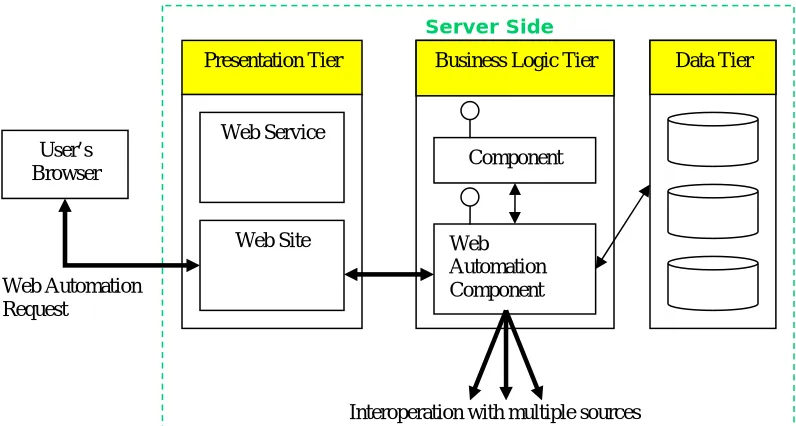
In a Web automation application, the need to interoperate with various sources at the same time may consume the resources of a server significantly. In a three-tier architecture, the business-logic tier accomplishes the Web automation tasks (Figure 2). For example, in our previous work, the VUCS system, the automation component is implemented as a DCOM object. When a user performs a search, the interface program requests the Web automation DCOM object, which interoperates with the target resources. To scale up to a large number of users, computing power can be increased by adding more servers in the business-logic tier; but the network may eventually become the bottleneck of the system when multiple users are performing Web automation tasks in the server.
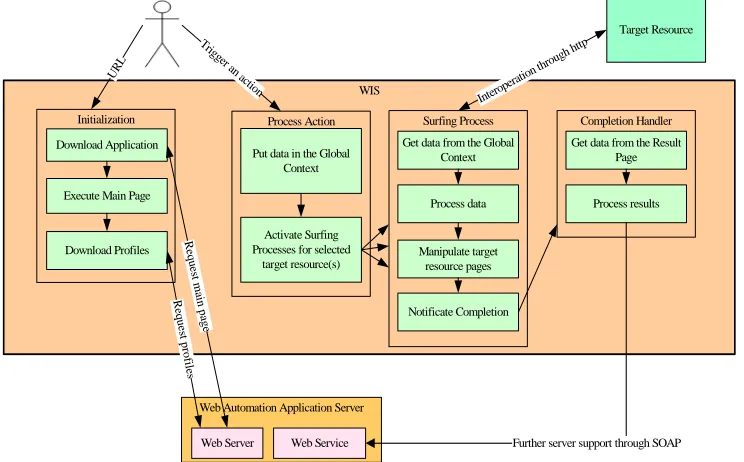
The solution provided by WIS for this problem is to permit Web automation tasks being performed at the client side, which reduces the load in the business-logic tier. From Figure 3 we can see that WIS replaces the position of the Web browser. It is especially efficient when users are widely spread in the network because the Web automation task will mainly spend local network bandwidth, saving the bandwidth of the server. But for this architecture to work, some issues need to be solved.
By removing the Web automation task from the business-logic tier, a new problem arises. When in the business logic tier, the Web automation component could easily work with other components and interact with the data tier. For example, in our book recommendation system, the Web automation's task involves reading hyperlinks stored in the database, extracting the metadata from the online bookstores, and writing the new information back to the database. WIDL is mainly designed to run at the server, integrated with the enterprise system, and any protocol could be used since it needs the supplement of a traditional programming language. But with the Web automation task moved to the client side, there needs to be a way to keep the interaction with the enterprise system. Web service technology plays this role by exporting functionality from the enterprise system to WIS. Whenever the Web automation needs support from the enterprise system, it acquires interface information by the WSDL [10] (Web Service Description Language) document and then with the definition, functions at the server side can be called by using SOAP [9] (Simple Object Access Protocol) messages. Thus the Web automation task running on WIS can access whatever function it needs from the server, from anywhere in the network.
Web Site A
Web Site B
Web Site C
User’s Browser Human Interaction
Human Transcription
Fig.2. Web automation in a three-tier model
Fig. 3. Three-tier model of WIS
The business logic issue in the WIS architecture is solved, but there is still problem with the interface. In the traditional three-tier model, modifications to interfaces can be easily done at the presentation tier. When the user requests a Web automation task from the server, an entire new page is passed back to the browser whenever the server finishes it. But when entire Web automation tasks are running at the client side, how can WIS create whole new pages to show the progress or changes, which varies a lot from application to application? A solution would be to go back to the two-tier model, where clients are designed for specific applications, making the business logic work tightly with the presentation in the desktop. With this approach, WIS will come with different tailored interfaces for different applications, and the maintenance nightmare of updating hundreds or thousands of desktops comes back. Another solution is to use HTML interfaces instead of hard-coded interfaces, which are downloaded from the server. To refresh the interface, the Web automation process can request the server to construct a new page for it according to the parameters given and send it back. In this way WIS can keep its generality and compliance with the three-tier model. Better performance can be achieved by using DHTML, preventing the need of the round-trip every time the interface needs a refresh. The Web automation process can notify the user about any change without having to reload entire pages from the server. Any kind of report can be created by this way.
Many Web automation tasks are repetitive and need to be executed periodically. In the Website checking application, the check task is performed by intervals determined by the site manager. The solution provided by WIS comes from DHTML, which provides timed function call.
Data returned from sources needs further processing before presenting them to the user. Users' requests to the Web automation application need processing before sending to sources. In a metasearcher for example, the query given by the user is translated to a format that the target resource accepts, which may be different for
Presentation Tier Business Logic Tier Data Tier
Web Service
Web Site
Component
Web Automation Component User’s
WIS
Web Automation Request Interoperation with
multiple sources
SOAP
Server Side Client Side
Server Side
Presentation Tier Business Logic Tier Data Tier
Web Service
Web Site
Component
Web Automation Component User’s
Browser
Web Automation Request
every resource. Results from every resource may have many differences, such as different date formats and lack or availability of some fields. Reranking will need even further computing. The WIDL, which plays only the role of an interface definition language, let this work to the complementary programming language. Because we did not figured out a single tool that can process so many variations in data processing of different automation applications, WIS uses a common programming language and allows the developer using JavaScript or Java applets to perform the transformation task.
With the architecture described above, WIS moves the Web automation task from the server to the client, distributing even more the workload without affecting the convenience of a counterpart browser. WIS substitutes the browser while still having the advantage of being a common client for the various applications. There is no need to have a special version of WIS for every application since it is designed with the concern of supporting any application, keeping the original idea of a common client that simplifies the deployment of new applications.
3.2 The WIS Infrastructure
A WIS application is composed of several pieces working together to accomplish the Web automation needs, which are called WIS components. WIS components are located at the server and downloaded to the WIS client whenever a user starts a Web automation application. Every WIS component is acquired by a URL, so WIS components does not necessarily need to be in a single server; it can be located in different locations, adding more management possibilities.
WIS components can be divided in two distinctly different categories: WIS pages and WIS profiles.
WIS pages are similar to Web pages, with the difference that it contains code proprietary to WIS and cannot be displayed in ordinary Web browsers. Its main function is to provide interface to the user. The first WIS component that a WIS client gets from the server is the WIS application main page. It provides a starting point for the Web automation application, which can do initializations such as downloading WIS profiles. WIS pages can contain HTML, DHTML, JavaScript or Java applets.
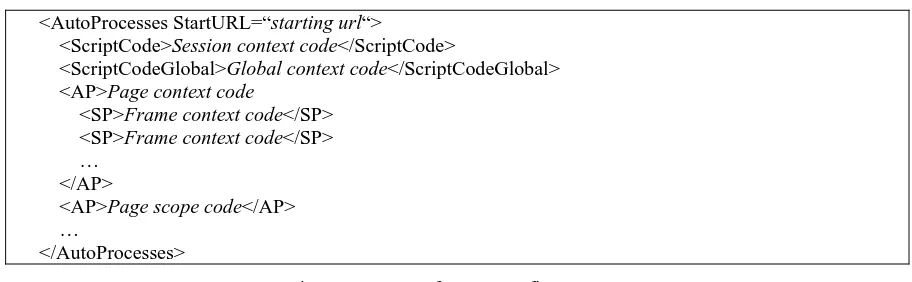
WIS profiles are documents written in XML and can contain WIS defined profiles or profiles specifically defined for a specific Web automation application. Profiles specified by the developer may contain any information such as the setup parameters for the automation application. WIS proprietary profiles are understood by WIS and consist of two types: WIS surfing process and WIS extraction definition. The WIS surfing process (Figure 4) defines the process of interoperation with a resource. The WIS extraction definition tells WIS how to get desired data from pages returned by sources and uses part of the WIDL definition.
<AutoProcesses StartURL=“starting url“>
<ScriptCode>Session context code</ScriptCode>
<ScriptCodeGlobal>Global context code</ScriptCodeGlobal> <AP>Page context code
<SP>Frame context code</SP> <SP>Frame context code</SP> …
</AP>
<AP>Page scope code</AP> …
</AutoProcesses>
Fig. 4. Structure of a WIS Surfing Process
A typical Web automation application works as follows. The user first selects a Web automation application by giving the URL of the WIS application main page. Once the application is downloaded, the main page performs initializations, usually downloading the profiles needed. After initialization is finished, the user can interact with the Web automation application interface. The Web automation application will then create WIS sessions as many as needed to accomplish the required task. Every WIS session performs interoperation with a target resource according to the description in the WIS surfing process. A WIS session can also be used to load other WIS pages from the Web automation application server and display to the user.
3.3 Data Extraction from HTML Pages
WIS adopts WIDL for data elements extraction from HTML pages, but with some enhancements.
When a user wants to find something in a HTML page that has changed, he/she first identifies unchanged parts, such as titles, which were associated with the wanted data in past versions. Whenever the unchanged part is found, it is very likely that the desired part of the page is located nearby. The <REGION> element with the SINGLE attribute tells WIS what probably will not change in the HTML page, and thus can serve as a reference point.
Object references in WIDL uses an object model to provide access to elements and properties of HTML. To access a child property or element of the parent, the dot operator is used. WIS introduces another operator, the parent operator (^), which returns the parent of the element. It is useful with the reference element. For example, in an online bookstore we may find that the element with the text "ISBN" is the most likely to not change, and the rest of demanded data surrounds it. The following defines it as a reference element:
<REGION NAME="RefEle" SINGLE="li['ISBN']" />
The parent operator returns the element <UL> containing the <LI> element with the ISBN, which is also the parent of other variables. To get other variables such as title and author, we can use the parent operator with the reference element:
<VARIABLE NAME="Title" REFERENCE="RefEle^li ['Title'].text" /> <VARIABLE NAME="Author" REFERENCE="RefEle^li ['Author'].text" />
If the title is in a higher level of the document object hierarchy, the variable definition can be obtained through a series of parent operators:
<VARIABLE NAME="Title" REFERENCE="RefEle^^^text" />
WIDL provides several types of indexing, but only one type can be used at the same time. There are occasions that a single indexing method is not sufficient to match wanted elements and multiple conditions must be given to filter out undesired elements. WIS solves this by providing multiple indexing, with every condition separated with a comma. For example, the following defines a variable that has the class attribute with value "small" and contains the text "Price":
<VARIABLE NAME="Price" REFERENCE="td[class='small','Price'].text" />
4 WIS Example Applications
4.1 Unisearch 2
The Unisearch [7] is metasearcher system for online databases provided in CONCERT [20]. It performs the translation of queries and dispatches queries to various sources, but does not combine the returned results. Using WIS to create Unisearch 2 still accomplishes the requirements of Unisearch plus some improvements. Exploiting WIS's data extraction capability, Unisearch 2 improves Unisearch by organizing the results and then returning the organized results to the user.
In WIS, the Unisearch application makes connections from the client side, thus respecting the access policies and statistic mechanisms of sources. Depending only on HTTP, its creation does not need the cooperation of source providers. Figure 6--Figure 8 show the Unisearch 2.
4.2 Book Recommendation System for Library
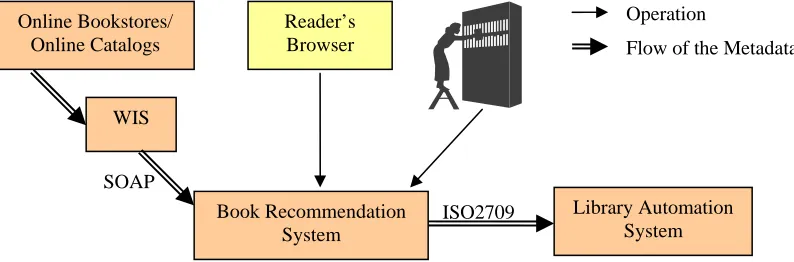
With the recommendation system (Figure 11) described in this Section, the metadata is passed directly from machine to machine, increasing efficiency and convenience (Figure 10). No more manual transcriptions are needed.
Fig. 6. Unisearch 2 search interface Fig. 7. Results returned by Unisearch 2
Fig. 8. Collected results using Unisearch 2 Fig. 11. Submitting the URL of the recommend book
4.3 Web Site Checking System
Many Web sites need to keep online 24 hours, without any interruption; otherwise business opportunities may be lost and users unsatisfied with the poor service quality. For simple sites, a connectivity check to the first page may be sufficient. But nowadays many sites have dynamic pages with complex code behind and a plenty of functions. A check to the first page is then no more sufficient; the manager of the site may have to go through many steps until he/she can be sure that everything operates normally. Manipulations such as login test and search test may be required.
The Web site checking example checks two sites at the moment. One is the Taiwan mirror site of IDS (http://www.csa.com.tw), which is a mirror site of multiple online abstract databases produced by CSA and serves Taiwan users. Another is MyLibrary@NCTU (http://mylibrary.e-lib.nctu.edu.tw), which provides information about various resources in National Chiao Tung University plus personalization services. The test for the mirror site of IDS is a search procedure, and for MyLibrary is database browsing verification and a login procedure.
Fig. 9. Conventional book recommendation process
Fig. 10. Automated book recommendation process
5 Conclusion and Future Work
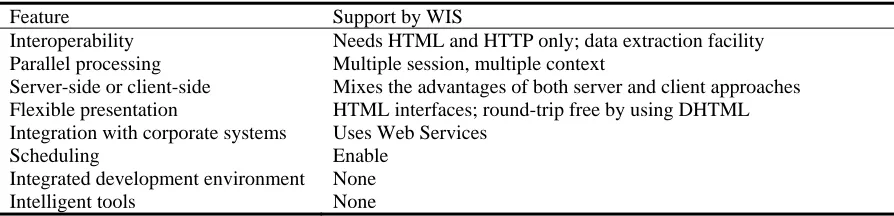
Based on the common needs of Web automation applications, this paper proposes an infrastructure to create Web automation applications, without being limited to any specific kinds of applications. A general Web automation creation solution should consider the follow issues, and Table 3 shows how these design considerations are supported by WIS.
z Interoperability: the core concept of Web automation applications is to reuse existing Web resources. From the interoperation aspect, Web automation applications can adopt standard interoperation protocols (such as OAI and Z39.50), or rely only on the common HTTP protocol. Standard interoperation protocols are not supported by many Web resources; on the other hand, using the common HTTP protocol gives access to all Web resources, but problems such as complexity of Web sites and volatility of the interfaces need to be solved.
z Parallel processing: Web automation applications usually need to interact with several Web resources at the same time.
z Server-side or client-side Web automation execution: execution in server side has the advantage of easier deployment, maintenance and management, but puts limit to performance scalability. Execution in client side gives the contrary.
z Flexible presentation: a flexible interface is necessary so that the tool can fulfill different design needs.
z Integration with corporate systems: Web automation applications may need to work with enterprise servers.
z Scheduling: Web automation tasks are usually repetitive and thus may need scheduled execution.
z Integrated development environment: modern application creation tools provide integrated debugging, wizards and others.
z Intelligent tools: Web automation applications are to replace human labor, so intelligence is a desirable characteristic of an agent.
WIS is an initiative to make the creation of Web automation applications easier, but there are still much more functions to be incorporated into WIS.
An integrated development environment (IDE) is a good target for the next step, which gives the possibility of massive creation of Web automation applications. The software industry has benefited much from IDEs, and so can be the field of Web automation applications, pushing us to the era of "service reuse". There are several issues that can be considered in an IDE for Web automation application creation:
Flow of the Metadata Operation
Online Bookstores/ Online Catalogs
Reader’s Browser
Library Automation System WIS
Book Recommendation System
ISO2709 SOAP
Manual Transcription Online Bookstores/
Online Catalogs
Reader’s Browser
Library Automation System Manual Transcription
z Integrated debugger for easier troubleshoot of applications.
z Authoring tool: editors and GUI tools with drag-and-drop capability.
z Wizards: there are some related works [3][5] that emphasizes the creation of Web automation tasks by learning the surfing steps from the user's interaction with the source. But it is doubtful that the computer can realize everything that the user has done because the complexities of Web applications, which may contain scripts with dynamic content that are not so easy to be detected. Thus implementing this facility as a wizard is a viable solution, which serves as a starting point for the creation phase. The developer can then make changes to the generated code to fix the incorrect parts.
Web automation applications are related with agents to work in place of human interaction, which in many cases need some sort of intelligence. For example, intelligent metasearchers should analyze returned results and organize them by reranking and summarizing. These intelligent features are usually designed for specific situations, a characteristic that keeps them out of the API set of WIS. Intelligent tools of common purpose for Web automation applications are a matter of future research.
Table 3. Design considerations and WIS support
Feature Support by WIS
Interoperability Needs HTML and HTTP only; data extraction facility Parallel processing Multiple session, multiple context
Server-side or client-side Mixes the advantages of both server and client approaches Flexible presentation HTML interfaces; round-trip free by using DHTML Integration with corporate systems Uses Web Services
Scheduling Enable Integrated development environment None
Intelligent tools None
References
[1] E. Selberg, O. Etzioni, "The Metacrawler Architecture for Resource Aggregation on the Web", IEEE Expert, pp.11-14, Jan.-Feb. 1997.
[2] M.W. Spalti, "Finding and Managing Web Content with Copernic 2000", Library Computing, Westport, pp. 217-221, Volume 18, no. 3, September 2000.
[3] A. Sugiura, K. Yoshiyuki, "Internet Scrapbook: Automating Web Browsing Tasks by Programming-by-Demonstration", Computer Networks and ISDN Systems, Volume: 30, Issue: 1-7, pp. 688-690, April 1998.
[4] C. H. Tseng, S. S. Huang, H. R. ke, and W. P. Yang, "Information Extraction for Documents with Common Structure in Virtual Union Catalog Systems," Journal of Internet Technology, vol. 2, no. 1, pp. 59-68, 2001. [5] B. Krulwich, "Automating the Internet - Agent as User Surrogates," IEEE Internet Computing, Volume: 1,
Issue: 4, pp 34-38, July-Aug. 1997.
[6] M.G.. Wales, "WIDL: Interface Definition for the Web", IEEE Internet Computing, Volume 3, Issue 1, Jan.-Feb. 1999.
[7] W.H. Yen, M.J. Hwang, H.R. Ke, "Integrated Search of Digital Library", Proceedings of 2000 Taiwan Area Network Conference, pp.484-491, October 2000.
[8] WIDL, http://www.w3.org/TR/NOTE-widl-970922. [9] SOAP, http://www.w3.org/TR/SOAP/.
[10] Web Services Description Language, http://www.w3.org/TR/wsdl. [11] Microsoft Scripting Technologies, http://msdn.microsoft.com/scripting/.
[12] Meta-Search Engines, http://www.lib.berkeley.edu/TeachingLib/Guides/Internet/MetaSearch.html. [13] BestBookDeal, http://www.bestbookdeal.com.
[14] BestWebBuys, http://www.bestWebbuys.com. [15] Metalib, http://www.exlibrisgroup.com/metalib.htm.
[16] A Gentle Introduction to XML, http://www.tei-c.org/P4X/SG.html. [17] Scripting Technologies, http://msdn.microsoft.com/scripting/default.asp.
[18] "Document Object Model (Core) Level 1", World Wide Web Consortium, http://www.w3.org/TR/2000/WD-DOM-Level-1-20000929/.
[19] "Document Object Model (Core) Level 2", World Wide Web Consortium, http://www.w3.org/TR/2000/REC-DOM-Level-2-Core-20001113/.