Suite 64
Integrated
Communications
Exchange
SLT User Guide
PCS
digital
Advanced Features
Competitive Pricing
Proven Performance
The information contained in this document is proprietary and is subject to all relevant copyright, patent and other laws protecting intellectual property, as well as any specific agreement protecting PCS Digital, LLC. (herein referred to as the “Manufacturer”) rights in the
aforesaid information. Neither this document nor the information contained herein may be published, reproduced or disclosed to third parties, in whole or in part, without the express,
prior, written permission of the Manufacturer. In addition, any use of this document or the information contained herein for any purposes other than those for which it was disclosed is
strictly forbidden.
The Manufacturer reserves the right, without prior notice or liability, to make changes in equipment design or specifications.
Information supplied by the Manufacturer is believed to be accurate and reliable. However, no responsibility is assumed by the Manufacturer for the use there of nor for the rights of third
parties which may be affected in any way by the use thereof.
Any representation(s) in this document concerning performance of the Manufacturerʹs product(s) are for informational purposes only and are not warranties of future performance
either express or implied. The Manufacturerʹs standard limited warranty, stated in its sales contract or order confirmation form, is the only warranty offered by the Manufacturer in
relation thereto.
This document may contain flaws, omissions or typesetting errors; no warranty is granted nor liability assumed in relation thereto unless specifically undertaken in the Manufacturerʹs sales
contract or order confirmation. Information contained herein is periodically updated and changes will be incorporated into subsequent editions. If you have encountered an error, please
notify the Manufacturer. All specifications are subject to change without prior notice.
Record of Revisions
Revision Date of Issue Supercedes Major Changes - Brief Description
Initial Release May, 2005 N/A
Version 1 Issue 2
SLT User Guide
TC-1
TC
1 Introduction ...1‐1
1.1 About Suite 64 ...1‐1 1.2 Document Overview ...1‐1
2 Single Line (Analog) Telephone Features...2‐1
2.1 Account Code ...2‐4
2.2 Alarm / Wake Up (Extension) ...2‐4 2.3 Automatic Line Select ...2‐5
2.4 Call Back...2‐6 2.5 Call Brokering (Handling Two Calls) ...2‐6
2.6 Call Forward (Extension)...2‐7 2.7 Call Park (Answer) ...2‐8
2.8 Call Pick Up (Directed and Group)...2‐8 2.9 Call Operator/Attendant...2‐9
2.10 Caller ID ...2‐10
2.11 Camp On (Extension) ...2‐10 2.1 Conference (SLT)...2‐11 2.12 Conference Room (Meet Me) ...2‐11
2.13 Default Set...2‐12 2.14 Do Not Disturb...2‐13
2.15 Extension Password / Phone Lock...2‐13
2.16 Flash (CO Line) ...2‐14 2.17 Forced Intercom Tone Ring ...2‐14 2.18 Hold {FLASH} ...2‐15
2.19 Hotline...2‐15 2.20 Intercom Call (To Another Extension) ...2‐16
2.21 Intrusion (Extension/CO Line)...2‐16
2.22 Last Number Radial ...2‐17 2.23 Meet Me Page ...2‐17 2.24 Messaging (Call Me)...2‐18
2.25 Monitor (Extension/CO Line[Privacy Alert])...2‐18 2.26 Outgoing Call (CO Line)...2‐19
2.27 Paging ...2‐19
TC-2
SLT User Guide
TC
Suite 64 User Guide
1-1
In
tr
oduc
tion
1
1
Introduction
The Suite 64, is a versatile, Digital Hybrid Key Telephone System that includes many advanced features. The System Configuration is comprised of a Main Service Unit and optional expansion boards per specific configuration
requirement. The components of a basic system include a KSU Main Service Unit with either a 31‐Button, 28‐Button or an Analog (SLT) Telephones.
The purpose of this document is to provide operational instructions on the use of an SLT Telephone used in conjuction with the Suite 64 Telephone System. It is divided into the following sections:
Section 1 ‐ Introduction ‐ this section describes the basic Suite 64 system, an an overview of this manual and the applicable documentation.
Section 2 ‐ Telephone Setup ‐ this section provides descriptions of the setups of an SLT Telephone including Alarms, Call Forwarding, Do Not Disturb, and Phone
Locking and Unlocking among other setups.
Section 3 ‐ Making Calls‐ this section provides operational descriptions of the basic call features such as Intercom, Speed Dial, Conference, Paging and Last
Number Redial, among other features.
Section 4 ‐ Calling Features‐ this section provides operational descriptions of some of the in‐progress call features such as Hold, Call Park, Intrusion, Camp
On (Extension), and Monitor among other topics. 1.1
About Suite 64
1-2
Suite 64 SLT User GuideIn
tr
oduc
tion
1
SLT User Guide
2-1
Single Li n e (A n al og) Te le ph on e Featur es2
2
Single Line (Analog) Telephone Features
Single Line Telephone
All standard (2500) Single line or Analog telephone devices can be attached to an analog port within the system. Devices designed to receive Caller ID, will receive station to station caller Identification and if supplied, Telephone Company Caller ID can be received with the Caller ID card. (Telephone Company Caller ID may require a subscription). Additionally, several of the features available for the Digital extensions are also available for an analog device.
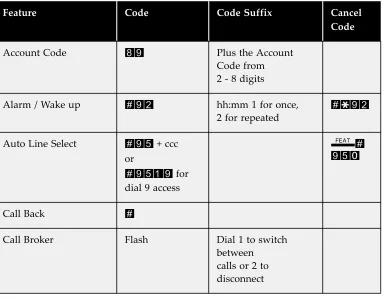
Table 2-1 SLT Feature Codes
Feature Code Code Suffix Cancel Code
Account Code 89 Plus the Account
Code from 2 ‐ 8 digits
Alarm / Wake up #92 hh:mm 1 for once,
2 for repeated
#*92
Auto Line Select #95 + ccc or
#9519 for
dial 9 access
f# 950
Call Back #
Call Broker Flash Dial 1 to switch
between
calls or 2 to
2-2
SLT User Guide Single Li n e (A n al og) Te le ph on e Featur es2
Call Forward Busy Forward Direct Forward Follow From No Answer Follow To
#2(x) #21 #22 #23 #24 #25
1 = CO, 2= CO/ICM,
3= ICM
#*2(x)
Call Park (Answer) #73 Extension Number
where
the call is parked
Call Pick up (Different
Group)
260 - 267
Call Pick up (Directed)
(Suffix Code)
Ext + 6
Call Pick up (Same
Group)
*
Camp on (Suffix Code) Ext + 4
Conference Flash + 3
Conference Room
(Meet Me)
860 - 867
Default Set #69*
Do Not Disturb #4
Extension Password #97 pppp (0000 ‐ 9999) #97
pppp
Flash #3
Forced Intercom Tone
Ring
*
Hold Flash
Hot Line #9* (Extension Number
or Speed Bin)
+ 0 ‐ 9 (Seconds
Delay)
Flash +
#*9*
SLT User Guide
2-3
Single
Li
n
e
(A
n
al
og)
Te
le
ph
on
e
Featur
es
2
Intrusion Ext + 8
Last Number Radial #8
Meet Me Page #59
Messaging (Call Me) #96 + Ext Extension number #*96
Monitor Ext + 1
Operator 0
Outside Call 9
Paging 200 - 209
Phone Lock See Extension
Password
Pulse to DTMF *
Speed Dial Extension 500 - 549
Speed Dial System 600 - 699
2-4
SLT User GuideSingle
Li
n
e
(A
n
al
og)
Te
le
ph
on
e
Featur
es
2
Feature Code: 89
Description
SLT extension users can elect, or be required to enter an account code before making a call. This will associated the call with a specific account number in the Station Message Detail Reporting (SMDR). The Account Code must be entered before making the call. The account code length is predetermined and
programmed to be between 2 and 8 digits.
Activate
Dial 89 + valid account code, wait for dial tone.
Feature Code: #92
Description
SLT extension users can activate an alarm, or wake up call, on their telephone to remind them of special appointments, events, etc. When the alarm activates, the telephone will begin ringing. After the alarm rings, it is automatically canceled if set to once, or reset if it is set for repeatedly. When programmed for repeated the alarm will sound at the same time everyday.
Activate
1. Go off Hook
2. Dial #92, hhmm (24hr format), then 1 for once, 2 for repeated daily. 3. A confirmation tone is heard.
2.1
Account Code
SLT User Guide
2-5
Single
Li
n
e
(A
n
al
og)
Te
le
ph
on
e
Featur
es
2
Cancel
1. Go off Hook
2. Dial #*92.
3. A confirmation tone is heard.
Feature Code: #951 + ccc (ccc = CO Line 700 ‐ 752)
Feature Code: #95 + 1 + 9 (Line Group 1)
Description
Auto Line Select allows SLT extension users can select to go off hook directly to a CO Line or CO Line group. This is used when the analog device primarily makes CO Line calls, and not Intercom calls, such as a FAX machine. For intercom features, or to make an intercom call, the analog device must do a hook flash, then make the call.
Activate
1. Go off Hook
2. Dial #951700 (for CO Line 1) or #9519 for CO Line group 1. 3. A confirmation tone is heard ‐ Hang up.
Cancel
1. Go off Hook
2. Press the Hook Switch, Flashing the CO Line 3. Dial #950.
4. A confirmation tone is heard ‐ Hang up.
2-6
SLT User GuideSingle
Li
n
e
(A
n
al
og)
Te
le
ph
on
e
Featur
es
2
Feature Code: #
Description
The Call Back feature allows extension users to queue a busy outside line for use when it becomes available.
Activate
The extension user dials # to activate the Call Back feature when they encounter a busy CO Line or extension.
Feature Code: {FLASH} + 2
Description
Call Brokering allows extension users to toggle between callers. While connected to a call press {FLASH} (the dedicated flash button or the hook‐switch flash). Dial CO Line code, wait for dial tone, and then dial second number.
Activate
To switch back and forth between the calls, press {FLASH}. To disconnect, simply hang up
2.4
Call Back
SLT User Guide
2-7
Single
Li
n
e
(A
n
al
og)
Te
le
ph
on
e
Featur
es
2
Feature Code: #2(x)
Description
Extension users may forward incoming CO Line or Intercom calls to another destination such as a voice mail. All call forwarding is enabled and disabled in the same fashion.
Activate
2.6
Call Forward (Extension)
Forward Type Entry Disable Busy #21 + (Dest) + (CO/ICM) #*21 Direct #22 + (Dest) + (CO/ICM) #*22
Follow from #23 + (CO/ICM) + (frmpswd) #*23 + (Dest) + (frmpswd) No Answer #24 + (Dest) + (CO/ICM) + t #*24
Follow to #25 + (CO/ICM) #*25
Dest = Destination ‐ Enter a valid Extension or UCD Group, for 253 for voice mail
CO/ICM = Type of calls to be forwarded. 1=CO only, 2=Both CO and Intercom, 3=Intercom only. t = Time = After this time expires calls will be fowarded to the new destination.
2-8
SLT User GuideSingle
Li
n
e
(A
n
al
og)
Te
le
ph
on
e
Featur
es
2
Feature Code: #73
Description
The Call Park/Call Park Answer feature allows extension users to Park or Answer a
parked call from any extension. Call Park is a systemic location where calls can be
placed on hold, allowing any extension to retrieve the call, even if that extension does
not have access to the CO Line.
Activate (Park a Call)
Dial #73 + extension number where the call is to be parked.
Deactivate (Retrieve a Parked call)
Dial #73 + extension number where the call was parked.
Dial #73 to answer the parked call from the same extension that parked the
call.
Feature Code: Directed Ext + 6
Feature Code: Group,*, 260 ‐ 267
Description
There are two types of call pick up, Directed and Group Directed call pick up allows an extension user to answer another extension when it is audibly ringing,. The extension user may pickup that call by dialing the extension number, when a busy signal is heard, the extension user dials the directed call pickup code 6, to pick up the call.
There are nine (9) Pickup Groups; all extensions are assigned to one of the nine groups. Any Extension within a Pickup Group can dial * to pick up a ringing call within that group. It is important to know that the first ringing call or any call
2.7
Call Park (Answer)
SLT User Guide
2-9
Single
Li
n
e
(A
n
al
og)
Te
le
ph
on
e
Featur
es
2
ringing in the group will be answered by dialing this code, so directed call pick up may be the better option.
Occasionally it is necessary to pick up calls that are not in the same pick up group. The system allows extension users from other groups to dial a code 260
‐267, to pick up an audibly ringing call from another group.
Activate
Call Pickup ‐ Directed: An extension user dials a ringing extension number, listen for the busy signal, then dial 6.
Group Call Pickup:
Within the same group ‐ An extension user dials a ringing extension number, listen for the busy signal, then dial *.
From another group ‐ An extension user dials a ringing extension number, listen for the busy signal, then dials the group number of the ringing extension 260 ‐267.
Feature Code: 0
Description
The extension that is programmed as the Attendant may receive internal calls via a programmed Operator Code.
Activate
Dial 0
2-10
SLT User GuideSingle
Li
n
e
(A
n
al
og)
Te
le
ph
on
e
Featur
es
2
The Caller ID feature requires a Caller ID (CID) service subscription from the telephone company. The Suite 64 system will receive Type 1 Caller ID (FSK) data from the telephone company on all outside lines and will display this data on any ringing Caller ID equipped Single Line Device.
All analog ports support Calling Party and Telephone Company Caller ID. Caller ID telephones will receive Calling Party, internal station‐to‐station, Caller ID and requires no additional hardware. A Caller ID board and a subscription to a Telephone Company’s Caller ID service is required to receive Caller ID on the desired CO Line.
The analog port is a ‐24V DC circuit and provides twenty‐five (25) – cycle (frequency) ringing for the attached devices.
Feature Code: 4
Description
When calling an extension that is busy, the caller can select to use the Camp On feature. Camp on, sends a audible tone, which alerts the busy extension user of the waiting call.
Activate
When calling a busy extension, dial 4 to initiate a Camp on, wait for them to answer.
2.10
Caller ID
SLT User Guide
2-11
Single
Li
n
e
(A
n
al
og)
Te
le
ph
on
e
Featur
es
2
Feature Code: {FLASH} + 3
Description
Single Line Extensions can establish a conference with one internal and one external, or two internal or two external parties. The extension user calls the first party, presses flash, then dials the second party. When the second party answer, the extension user presses, flash followed by 3 to establish the conference.
Activate
While on a call ‐ press {FLASH} (hook‐switch flash). Make a second call.
Press {FLASH} (hook‐switch flash), then dial 3.
Feature Code: 860 ‐ 867
Description
The Conference Room (Meet Me) feature allows up to 4 internal or external parties join in one conversation. The system provides eight separate conference rooms which are entered by dialing the location (860 ‐ 867) and can be accessed by any extension. Additionally, Outside parties can join the conference using the automated attendant by dialing the bridge number at the Auto Attendant greeting.
Transfer a caller to Conference Room
1. While connected to another extension or CO Line, momentarily press the hook‐switch (or press the FLASH button).
2. Wait for dial tone, then dial the Meet Me Conference (860 ‐ 867). 3. Hang up to complete the transfer.
2.1
Conference (SLT)
2-12
SLT User GuideSingle
Li
n
e
(A
n
al
og)
Te
le
ph
on
e
Featur
es
2
Join a Enter the Conference Room
Dial the desired Conference Room to join (860 ‐ 867).
Feature Code: #69*
Description
The Default Set feature is used to clear all active settings, such as Call Forward, DND, Auto Line Select and Hot line, at an analog telephone extension.
Activate
This code must be dialed from intercom dial tone, which will require the extension user to press {flash} when going off hook, specifically if Hot Line or Auto Line Select are enabled. The extension user dials #69* to disable the following features.
The following extension parameters are reset to the value shown:
LNR = empty
SNR = No Saved Number
Memo = No Saved Number
Telephone Lock = No
Auto Hold = No
Page Receive = Yes
Busy Ring = Yes
Auto Line Select = Null (none)
Hotline = NULL (none)
SLT User Guide
2-13
Single
Li
n
e
(A
n
al
og)
Te
le
ph
on
e
Featur
es
2
Feature Code: #4
Description
Do Not Disturb (DND) blocks all intercom and CO line calls from ringing an extension. DND can be only be activated from intercom dial tone. Extensions with a higher Class Of Service can override the active Do Not Disturb condition. When DND is active the extension user will hear special intercom (short stutter tone), followed by continuous dial tone when going off hook.
Activate
Dial #4 to toggle on and off DND.
Feature Code: #97
Description
All analog extensions in the system have an associated User Passwords. Passwords are used to activate Phone Lock and Call Forward Remote.
Activate
From intercom dial tone, dial #97, password (0000 set at factory), press # to lock and * to unlock.
To change the password, dial #97, password (0000 set at factory), then the new password (0000 ‐ 9999).
2.14
Do Not Disturb
2-14
SLT User GuideSingle
Li
n
e
(A
n
al
og)
Te
le
ph
on
e
Featur
es
2
Feature Code: #3
Description
The Flash CO Line feature, is used with a call waiting feature from your telephone company. CO Line flash is used to generate a hook switch signal to the telephone company to answer the waiting call.
Activate
While connected to a CO Line, momentarily press the hook switch (Flash) then dial #3 to envoke a CO Line feature, such as Call Waiting.
Feature Code: *
Description
Extension users can force another extension to ring, using the Forced Intercom Tone Ring feature. After an extension answers using Voice Announce the calling extension user may change the alert signal from Voice Announce to Tone Ring. This is helpful because internal calls that are answered in Voice Announce Mode, will not forward.
Similarly, if an extension is ringing, the calling extension user can change the call alert from ringing to Voice Announce with privacy.
Activate
When you call an extension that is in Voice Announce mode and wish to tone ring that extension, dial *
2.16
Flash (CO Line)
SLT User Guide
2-15
Single
Li
n
e
(A
n
al
og)
Te
le
ph
on
e
Featur
es
2
.
Description
Active calls can be placed on hold by Analog devices by pressing the {Flash} button. Once on hold the extension user can dial another extension, CO Line or activate a Page. The extension user can take the call off hold, but pressing the {Flash} button again.
Place a call on hold:
While on a call, press {Flash} (hook‐switch flash). Hang up. The line is placed on System (Common) hold.
Retrieve a call on hold:
Press {FLASH} (hook‐switch flash).
Feature Code: #9*
Description
The Hot Line feature ‐ also called Off hook Preference or Prime Line Pick up ‐ allows the user to access an extension or Speed Dial Directory number simply by going off hook. Locations, extensions or speed dial bin numbers, can be dialed immediately or after a delay of up to 10 seconds. If a call is ringing at the extension, the ringing call will be answered when the extension user lifts the handset or pressing the speaker button
Activate
From Intercom dial tone, dial #9* + Ext (Extension Number or Speed Bin Number 500 ‐ 549 or 600 ‐ 699) + 0 – 9 (0 – 9 second delay).
Whenever the extension goes off‐hook, this destination is called.
Cancel
Go off hook, press {Flash} Dial #*9*
2.18
Hold {FLASH}
2-16
SLT User GuideSingle
Li
n
e
(A
n
al
og)
Te
le
ph
on
e
Featur
es
2
Feature Code: 401-‐464
Description
Listen for dial tone and dial the extension number.
Feature Code: 8
Description
If granted in programming, the Intrusion feature allows an extension user to enter into an existing conversation by dialing a code or pressing a preprogrammed button. Intrusion can be initiated on either a busy CO Line or a busy extension. Intrusion is an excellent training tool, and is commonly used with UCD.
Activate
The extension user dials the extension or CO Line to join.
At the busy signal the extension user dials 8 to join in on the existing conversation.
2.20
Intercom Call (To Another Extension)
SLT User Guide
2-17
Single
Li
n
e
(A
n
al
og)
Te
le
ph
on
e
Featur
es
2
Feature Code: #8
Description
The Last Number Radial feature, or LNR, automatically dials the last number dialed from the telephone and retains up to sixteen (16) digits. The extension user may choose a specific outside line by first pressing the desired outside line button or allow the LNR to automatically select the CO Line.
Activate
Dial #8.
Feature Code: #59
Description
Any internal or external page announcement can be answered using a Meet Me Page code. After hearing a page announcement, an extension user can dial the Meet Me Page code from any telephone and be connected to the person paging.
Activate
While a page is currently in progress, dial #59.
2.22
Last Number Radial
2-18
SLT User GuideSingle
Li
n
e
(A
n
al
og)
Te
le
ph
on
e
Featur
es
2
Feature Code: #96
Description
Extension users may alert a busy or unattended SLT Telephone of a call attempt by using the Messaging feature. Additionally, SLT extension users can notify other extensions by dialing the extension number, then the messaging code #96.
Activate
Sending a Message to an extension:
Dial #96 + the Extension Number.
To Cancel a Message:
Dial #*96 + the Extension Number
Feature Code: EXT +1
Description
When granted in programming, an extension user can join, and Monitor an existing conversation by dialing a code. A busy extension can only be monitored by an authorized extension. Authorized extensions are extensions that have a more privileged Monitor Class of Service, than the extension being monitored.
Although, side tone is heard, the microphone transmit is suspended, so the Single Line Telephone cannot join in on the conversation.
2.24
Messaging (Call Me)
SLT User Guide
2-19
Single
Li
n
e
(A
n
al
og)
Te
le
ph
on
e
Featur
es
2
Activate
Dial the Extension or CO Line to be monitored.
When the busy tone is played, dial 1 to monitor the conversation.
Feature Code: 9
Description
Outside Lines can be accessed by dialing the specific outside line group 9.
Activate
Dial CO Line code (other codes may be applicable).
Listen for CO Line dial tone; then dial the telephone number.
Feature Code:
All Page Tenant 1200
Page Zones 1 ‐ 8 201‐208 Page all tenants209
Description
There are three types of paging All Page 200 (internal & External) within tenant 1, Page Zones and Page All Tenants. All Page will page any idle extension within tenant group 1 (Default page group) as well as the external paging system. All extensions are assigned to one of eight Page Groups. The page groups’ last number corresponds to the desired page group.
2.26
Outgoing Call (CO Line)
2-20
SLT User GuideSingle
Li
n
e
(A
n
al
og)
Te
le
ph
on
e
Featur
es
2
Table 2.1-1: Page groups and Dial codes:
Page All Tenants will page all idle extensions, in all groups, and all tenants. Any extension user can make a public announcement to all extensions or to a group of extensions.
Activate
Go off hook, dial the Page access code 200 to page the external paging system, and all extensions in tenant group 1. Dial 201 ‐ 208 to page a speicific page group. Dial 209 to page all tenants, all groups.
Feature Code: *
Description
When the system is connected to Dial Pulse (Rotary) outside lines, the extension user may manually force the system to send DTMF tones.
Activate
After a Dial Pulse (rotary) call is made on a CO line, press *. Any digits dialed following the * will be sent in DTMF (Tone) mode.
Page Group Dial Code 1 201 2 202 3 203 4 204 5 205 6 206 7 207 8 208
SLT User Guide
2-21
Single
Li
n
e
(A
n
al
og)
Te
le
ph
on
e
Featur
es
2
Feature Code:
Extension: 500 ‐ 519
System: 600 ‐ 699
Description
The Speed Dial feature allows extension users to store frequently dialed numbers. There are 20 speed bins per extension and 100 system speed bins that can be shared by all extensions.
Setup
To program a station speed dial bin:
1. Dial #1 + 500 ‐ 519 + Dial the desired telephone number. 2. Press Flash (hook‐switch flash)
3. A confirmation tone is heard.
Dial a number using a speed dial bin:
1. Dial the Speed Dial bin 500 ‐ 519 or system speed dial bin 600 ‐ 699
2-22
SLT User GuideSingle
Li
n
e
(A
n
al
og)
Te
le
ph
on
e
Featur
es
Index
| Suite 64 Installation, Programming & Maintenance Manual |