IJEDR1802138
International Journal of Engineering Development and Research (
www.ijedr.org
)
755
E-ball Technology
Adarsh Kumar Student
Computer Science and Engineering, Sikkim Manipal Institute Of Technology, Majitar, India
_____________________________________________________________________________________________________
Abstract— The size of computer is reducing from its first development in 19th century because it is very difficult and tedious work to manage the bulky size computer. A new computer is designed by Apostol Tnokovski recently which has all characteristics of existing computer and This is named as 'E-ball'. It is smallest personal computer in this time, spherical in shape having 6 inches diameter only. E-Ball computer has all component of pre-existing computer like keyboard, mouse, webcam, DVD recorder, larger screen display etc. It is designed in specific way that it can be placed on two stands. It is opened by pressing and holding two buttons which are located at each side of E-Ball computer at the same instant. It is possible that this new entity having different way of using it can change the life of people completely in upcoming days.
Keywords— E-ball, virtual keyboard, wireless optical mouse, projector, Paper Sheet Holder
_____________________________________________________________________________________________________
1. Introduction
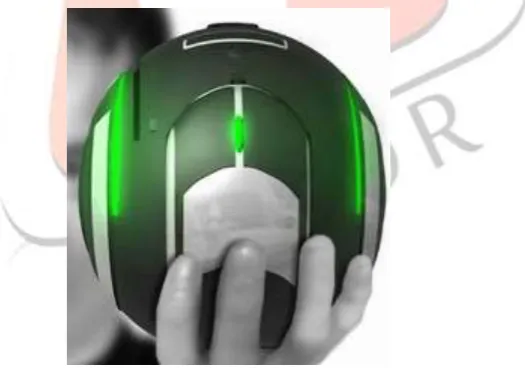
E-Ball Computer is designed by Apostol Tnokovski who is a Macedonian product designer. It is spherical in shape and smallest one among laptops and desktops. Due to small in size, It is easy to operate, handle and movable. The diameter of this computer is 6 inches only which also make it very attractive and unique. Only Microsoft Windows Operating System is compatible with this E-ball computer. E-ball computer is design in such a way that it can be placed on two stands, opened by pressing and holding two buttons which are located at each side of this computer at same instant. The E-ball concept uses virtual keyboard which is activated by pressing specific button. After opening the E-ball computer, optical mouse can be detached from body of E-ball computer by pressing detaching mouse button. This computer does not have any external display unit. It uses a projector for the purpose of display which is simply pop up by pressing and holding the button. The software interface of this computer is iconic, unique and user friendly. This computer can be used in suitable place like home, office.
Fig. 1. E-ball Computer
2. Elements of E-ball computer
‒ It has dual core processor ‒ It has 5 GB RAM
‒ It has 350-600 GB of hard disk drive. ‒ It has two speakers of 50W.
‒ It contains integrated graphics and sound card. ‒ It has LAN and WAN card.
IJEDR1802138
International Journal of Engineering Development and Research (
www.ijedr.org
)
756
Fig. 2. Element of E-ball computer3. Some important components of E-ball computer
i) Optical mouse:
It is wireless device which uses the light emitting diode for purpose of tracking movement of optical mouse. It completes the demand of E-ball computer properly. It can be easily carried from one place to another place.
Fig. 3. Optical Mouse
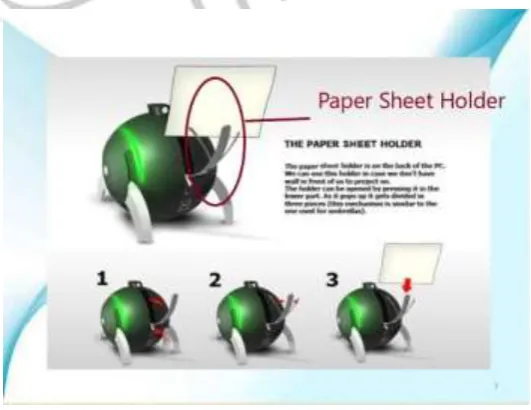
ii) Paper Sheet Holder:
If there is no wall for projection of computer screen. Then, use paper sheet as screen for that purpose. This paper sheet is kept in paper holder which is place at back of E-ball computer. It is opened by pressing its lower part.
Fig. 4. Paper Sheet Holder
IJEDR1802138
International Journal of Engineering Development and Research (
www.ijedr.org
)
757
There are two types of projector for E-ball computer:-I. Liquid Crystal Display:
It is used to display visual data like some kind of videos, image, computer data and some other result or output. It does not produce light itself. It uses light of other source. It takes help of meta-halide lamp to send light through prism or a series of dichroic that divide the light into three polysilicon panels. i.e. red, blue and green for video signal.
Fig. 5. Liquid Crystal Display Projector
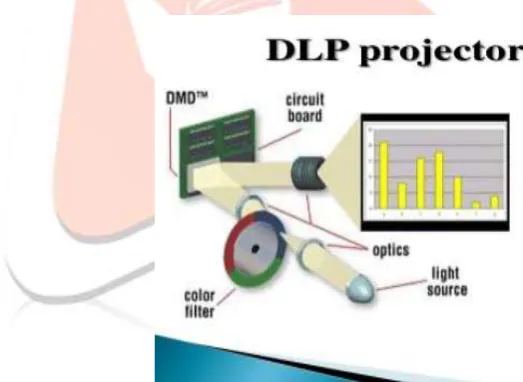
II. Digital Light Processing:
It is a projector which uses digital micro-mirror device. It is based on micro-electro-mechanical technology. The image is created by small mirror. These mirror can be that much small Digital Micro Mirror pixel pitch may be 5.4 micrometre or less.
Fig. 6. Digital Light Processing Projector
iv) Virtual Keyboard:
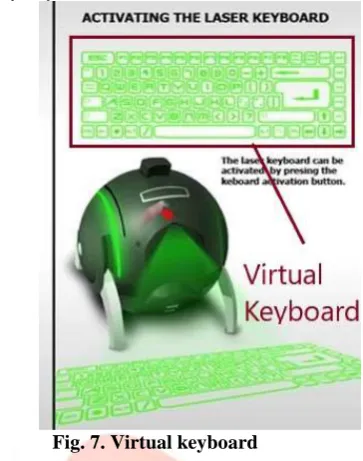
As its name already suggest, It is not a physical device. It simply appears on flat surface (which is consider good for virtual keyboard). It is started by pressing specific button and use laser ray technique for its implementation. When user of E-ball computer touches the virtual key, the optical device detect stroke and send it to E-ball computer. There are many advantages of using virtual keyboard. For instance, text entry is fast, no external hardware and more secure etc.
Three components of virtual keyboard are:-
I. IR-Light Source:
The main purpose of IR-Light Source is to emit infrared rays which overlap area that is covered by virtual keyboard. Naked eyes cannot detect such rays.
II. Sensor Module:
IJEDR1802138
International Journal of Engineering Development and Research (
www.ijedr.org
)
758
III. Pattern projector:
It is simply use to present virtual keyboard on the flat surface. Virtual keyboard is just an image of real of qwerty-keyboard.
Fig. 7. Virtual keyboard
4. The following steps explain working principle of E-ball Computer
‒ E-ball computer is placed using two stands on suitable surface.
‒ It is opened by pressing and holding two buttons which are located at each side of E-ball computer at same instant. ‒ Detach the wireless optical mouse from the body of E-ball computer by pressing detaching mouse button.
‒ The virtual keyboard is activated by pressing the keyboard activation button.
‒ Press a front button so that projector will pop up and a computer screen will be focused on wall. Navigation button can be used to adjust size, shape of screen. If wall is not there, in that case, use paper holder by pressing back lower part of E-ball computer and paper sheet.
‒ Now E-ball computer is ready to use.
5. Advantages of E-ball computer
‒ It is very small in size. Therefore, it is portable. ‒ It is user friendly.
‒ It is very flexible, accurate and more secure than older computers. ‒ It is very to use and handle.
‒ It has large memory that can be used to store huge amount of data.
6. Disadvantages of E-ball computer
‒ Only Microsoft Windows operating system will be used on E-ball computer. No other operating system can be used. ‒ Cost of E-ball computer is very high.
‒ It is very sophisticated in term of hardware. Even any minor issue will be very difficult to detect and resolve.
7. Conclusion
E-ball computer is very attractive and easy to use and handle. It has high internal complexity which might be resolve in future. It can be widely used in few years. It will take time to come in market and use for general purpose but Truly, It is future of new computer’s world .
8. References
[1] Deepa.B, Sri Bharathi.N and Tamilarasi.R, http://www.ijtrd.com/papers/IJTRD6588.pdf [2] Ashish Tanwar1, Litty Thomas2 ,
http://www.ijarse.com/images/fullpdf/1412875273_8_Research_Paper.pdf
IJEDR1802138
International Journal of Engineering Development and Research (
www.ijedr.org
)
759
[9] https://www.technotification.com/wp-content/uploads/2014/09/1927778454.2.jpg[10] http://www.seminarsonly.com/computer%20science/E-Ball-Technology_clip_image002_0000.jpg
[11] https://image.slidesharecdn.com/e-balltechnologypptb-130322112731-phpapp01/95/e-ball-technology-ppt-b-7-638.jpg?cb=1363951695