INTRODUCTION
For the last century, there has been a substantial growth in e-business systems and applications. Yet there has not been a similar growth
www.orientjchem.org
An International Open Free Access, Peer Reviewed Research Journal CODEN: OJCHEG 2015, Vol. 31, No. (4): Pg. 2215-2221
A Flexible Conceptual Framework
for Supporting Collaborative Work
AIMAN TURANI
Associate Professor, Faculty of Computer Science and Engineering, Taibah University, Medina, KSA *Corresponding author E-mail: [email protected]
http://dx.doi.org/10.13005/ojc/310446
(Received: August 06, 2015; Accepted: September 22, 2015)
ABSTRACT
Many practitioners and researcher have stated that the widespread of Computer Support of Collaborative work has not been as successful as hoped. There have been many challenges that have faced managers and team members when conducting collaborative work sessions in the virtual environment. Collaboration Script is considered a relatively a new approach in assisting designing successful collaboration sessions. Collaboration Script is a script that formally defines the flow of activities that are needed during a collaboration session. Yet, researchers have been uncertain regarding the complexity nature of such scripts. The key strength of the proposed framework is in its ability to derive a collaborative scripting language that can describe complex designs and in the same time keeps its simplicity. The resulted scripting language should be similar to software programming scripting languages and in the same time based on profound collaboration techniques. Team leaders and managers with basic programming skills should be able to adopt and use such language in a short time and in the same time not afraid of designing complex team collaboration sessions. The proposed framework is composed of four main layers. The First layer is based on well known collaborative techniques that contain a set of mini-activities which are located in the second layer. The third layer formulates the notation and rules of the proposed scripting language. It encloses the required components and commands that should be used in such script. The forth layer provides the needed support to implement such scripts by providing appropriate set of collaborative and supportive tools.
Key words: CSCW, Collaboration Script, Collaborative Techniques, Team Collaboration.
in applications that facilitate connectivity among employees1. Many researchers in this field are
Running an activity-based session at the online environment is even more challenging. It requires more time to prepare and more effort. In face-to-face, a team manager can guide and control a session more easily3. In the online environment,
there is the presence of distance and delays feeling which may cause sudden interruptions, unbalanced participations, losing motivation, etc.
Computer Supported Collaborative Work (CSCW) is relatively a recent trend within e-business domain4. It emphasizes the significance
of social interactions5. In this area, valuable
knowledge is supposed to be developed when employees interact and collaborate with each others. CSCW as a concept facilitates and supports the development of effective collaborative working environment6. A collaborative working environment
should include various services and resources. Services are mainly collaboration-based tools, such as chat, Q/A, forums, etc., that are used during the online sessions to facilitate group based activities. Resources, in the other hand could be presented in many formats, such as text, image, audio, and video7.
Recently, CSCW has shifted its focus from the usage of technology as a communication tool and how it could be used toward building effective knowledge communities that are governed by rules of participation and by distribution of tasks8. Tasks
in collaboration sessions are considered to be the main components or building blocks. Basically, any collaboration session is composed of a set of task-oriented activities. Schneider9, for instance, had
suggested six main general activities that could be used to compose various collaboration sessions.
CSCW Conceptual Framework
The main objective of this research is to design a conceptual framework that can be used to derive the definition of a flexible and simple collaboration scripting language that could be used to facilitate team collaboration. The proposed framework is defined according to the following characteristics:
´ Based on a well known set of collaboration techniques.
´ A limited set of scripting commands and objects that can be easily remembered and used.
´ Extensibility in which new techniques and objects can be added easily.
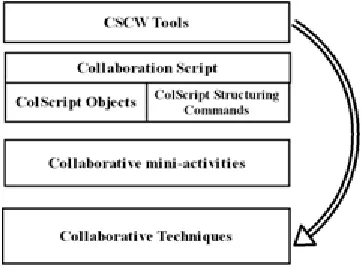
As shown in figure 1, the framework consists of four main layers, Collaboration techniques layer, Collaborative mini-activities layer, CSCW objects and CSCW structuring commands layer and CSCW tools layer.
Fig. 1: CSCW Conceptual Framework
As a start, we have analyzed the structure of the following common collaboration techniques10:
Infor mal Group Discussion, Round Table Discussion, Brainstorming, Group Nomination, Panel, Jigsaw, Case-study, Buzz Group, Team-Pair-Solo, Think-Pair-Share, Pyramid, Debate, Pro/ Contra, and Role-play technique.
It is noticeable that these techniques consist of many mini-activities that frequently occur
11. These mini-activities can be considered as the
main components in constructing collaboration techniques. When we decomposed these techniques into smaller pieces (min-activities), we assumed that these mini-activities should be broken down to the lowest level of granularity and in the same time they should keep their own objectives, time frame, resources, and executers.
After analyzing the above techniques, the following set of mini-activities were identified, which define the second layer of the conceptual framework:
Annotating, Reading, Writing, Thinking, Searching, Reporting, Asking, Answering , Voting, Directing , Group-Forming, and Timing.
These mini-activities are also common not to the above techniques, but to a wider range of similar collaboration techniques.
The third layer is composed of CSCW objects and CSCW structuring commands. Analyzing the above min-activities, it is noticeable that they contain different design objects, such as group structures, roles, feedbacks, timeframes, resources, etc. The CSCW objects are considered as the session’s building-blocks where the CSCW structuring commands are considered as the skeleton that ties these objects together. This layer’s goal is to facilitate the description of the flow of the activities in a formal way. It could range from a simple design, such as a linear sequence of mini-activities toward a more complex design that includes several conditions and loops. CSCW structuring commands should have the ability to describe sequencing, conditions, repetition, activities, activity’s input/ output, group formation, etc.
The fourth layer in this framework is composed from a set of software tools that could be used to facilitate the implantation of the proposed collaboration scripts. Each mini-activity that is described in the collaboration script would be supported with an appropriate CSCW tool during the session’s runtime.
CSCW Objects
As mentioned earlier, these objects should attain all dimensions within collaboration mini-activities. They should define participants’ roles, resources and activity types, etc. Currently, CSCW Objects are consisted of five main objects: Role Object, Group Object, Feedback Object, Time/Date Object, and Resources Object.
The first object is the Role Object. This object could be used to assign roles to a collaboration session. Chairperson, Debater, Expert, etc. are sample of roles that participants could take during a session. It enables tasks to be linked to roles during the session’s runtime.
The second object is the Group Object. This object is a core object since collaborative work sessions are based on group collaboration. This object would be used to enable session’s designers to form groups based on specific group structure. The group’s structure in this object would be based on roles that has been already defined and on their sizes. For flexibility, there could be more than one formation during a session. In some cases, participants would temporary leave their group and join another group (e.g. Jigsaw Technique). The following characteristics should be maintained in this object to enable maximum flexibility:
´ The group formation should not only base on roles, but it could be also based on other groups. For example two small groups could be combined and form a larger group during a session, or one large group could be broken down to two small groups.
´ The group formation could be also based on other groups’ roles. For example, a certain role in all groups would temporary leave and form their own group (e.g. Expert group within Jigsaw Technique).
´ Participants could change their roles to new roles if required.
´ The formation could be applied only once on a single group. For example, in a small session with a limited number of members who can form only a single group or a session containing several groups of different structures running in the same time. ´ In addition, the formation could be applied
repetitively on the entire session’s members and create multiple instances of that group formation. In this case, all formed groups would have the same structure and the number of the formed groups would depend on the number of participants.
The third object is the feedback object. This object would allow participants to deliver their responses during the sessions. To allow various types of feedback, certain characteristics should be taken into consideration such as:
´ The responses types could be close or open. ´ The close type should facilitate single,
double or more feedback’s option.
choices, checkboxes, drop down lists, etc. ´ The representation of the open type should
also include many forms, such as text, number, file, etc.
´ It should be able accommodate single feedback coming from a specific participant or multiple feedbacks coming from many participants at the same time.
The fourth object is the Resources objects. It would provide participants with the reading materials that are needed during a session. The Resources could have many forms, such as a text document, image, audio file, or a video file. The resources could be assigned statically prior to session’s runtime or dynamically during the session. The last object in this list is the Time/Date object. This object would allow instructional designers to specify dates and time of each task. Usually tasks need to be finished within a limited duration. In some cases, specific tasks are initiated at a specific date or time.
CSCW Command
There are five structuring commands in this layer which are: groupformation, input, output, loop, and the doactivity command.
The groupformation command would allow groups to be assembled according to a specific structure at a certain point within a session. This command would allow participants to change their group formation during a session. This command is related to the Group object which specifies the group structure.
The input command would enable session’s members to send their feedbacks at a specific point in the session. The input command should include who will send that input, what is the feedback type, and when that input is finalized. This command is related to the Feedback object that was discussed earlier.
The output command would be used to direct participants on a following task or to present a material that they should read. This command should include in addition to the message and reading material, the participant/s on whom this message will be presented to, and how to move out
of this message. In addition, the output command should specify if the message will remain until a new message replace it, or it will disappear after leaving that step. The output command is related to the Resources object.
The loop command would be used to enable a task or a group of tasks to be repeated for a certain count or until a certain condition fails. It would enable, for an instance, to output all answers that were received in a previous step sequentially one by one in front of all group’s members. Another example is where all participants are asked to present their thoughts one by one in front of each others.
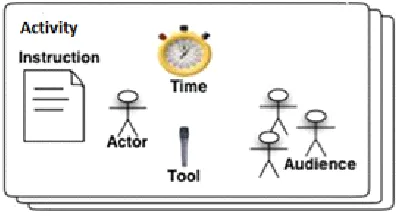
The doactivity command is the last command in this list. It is an essential command that would be used to assign collaborative tasks. Most of the collaborative work session’s steps are based on perfor ming these collaborative tasks. This command should include the instruction that clarifies the task, the performer of this task, the audience who will watch this performance, the tool that is needed to implement this task, and the exit condition that finalizes this task. These structural elements are shown in figure2.
Fig. 2: The doactivity structural elements
A list of mini-activities is presented in table1 that are described using the doactivity command. For further clarification, the structural elements of this command are populated according to the following examples.
CollaborationTools Layer
Mini activity Performer Audience Exit Condition
Presenting Group Leader All Group Specific time, or when the leader hits the finish
Members button
Icebreaking All Group All Group Specific time, or when the facilitator hits the
Members Members finish button
Reflecting All Group Members/a All Group Specific time, or when the facilitator/ specific role Members specific role hits the finish button
Discussing, All Group All Group Specific time, or when the facilitator/ all group
Members Members members hit the finish button
Evaluating All Group All Group Specific time, or when the facilitator hits the
Members Members finish button
Debriefing Group Leader All Group Specific time, or when the leader hits the finish
Members button
Ideas- All Group All Group Specific time, or when the facilitator hits the
Generating Members Members finish button
Annotating Group Members All Group Specific time, or when the facilitator hits the
Members finish button
Answering Group members/ All Group Specific time, or when the facilitator/all group specific role Members members hit the finish button
Asking Specific role Group members Specific time, or when the specific role hit the / specific role finish button
Reporting All Group Members/ Group leader Specific time, or when the Group leader hits
specific role the finish button
Mini activity Structuring Command CSCW Tool
Icebreaking, Doactivity Chatting tool
Reflecting, Doactivity Chatting tool
Discussing, Doactivity Chatting tool, Whiteboard tool
Evaluating, Doactivity Chatting tool, Whiteboard tool
Debriefing, Doactivity Chatting tool, Whiteboard tool
Ideas-Generating Doactivity Chatting tool, Whiteboard tool
Annotating Doactivity Chatting tool, Whiteboard tool
Presenting Doactivity Chatting tool, Screen sharing
Ideas-Selecting Input Input tool – text input type
Voting Input Input tool – number input type
Reading Input Input tool – text input type
Answering Input Input tool – text/number input type
Writing Output Output tool- text output type
Asking Output Output tool- text output type
Reporting Output Output tool- text/file output type
File-sharing input/output Input/output tool – file I/O type
Thinking Output Output tool- message output type
Searching Output Output tool- message output type
Directing Output Output tool- message output type
would be presented. For each line of code in the script, a specific tool would be used to facilitate the implementation of that step. There are two types of tools in this layer: Supportive tools and collaboration tools. Supportive tools are used to support certain commands. For example, an input component tool would be used to allow user to input their feedback according to the input type. The collaborative tools are used to implement the doactivity command. There are various types of collaboration tool that could be used depending on the nature of the activity. For instance, a chat tool could be used to facilitate a discussion activity. A collaboration tool could be a text chatting tool, audio chatting tool, video chatting tool, voting tool, a whiteboard tool, screen sharing tool, etc. Table 2 represents a list of supportive and collaboration tools that could be used to support various mini-activities.
CONCLUSION
The main focus of this paper was to define a conceptual framework that could be used to derive a flexible and simple collaborative scripting language that could be used in supporting collaboration sessions in a for mal way. The proposed conceptual framework is composed of four main layers. The first two layers were based on collaboration techniques and the mini-activities
within. The third layer has formulated the structure and rules for such script. A set of five objects and five structuring commands were described in this paper which covers most aspects of mini-activities’ requirements. These objects were Role Object, Group Object, Feedback Object, Collaboration Tools object, Time Object and Resources Object. The structuring commands were groupformation, input, output, loop, and the doactivity command. The fourth layer represented the CSCW tools that could be used to facilitate scripting these commands and objects.
In the future work, we will continue on the formulation of this language and on the completion an application framework that will be used to support the implementation of such script. We hope that adapting such approach will enhance the widespread of CSCW in general and make designing collaborative work sessions more flexible and easy.
ACKNOWLEDGEMENTS
We would like to owe thanks to TAIBAH University, College of Computer Science and Engineering (CCSE), KSA for supporting this research
REFERENCES 1. D. Pierre, S. Jarvela, and F. Fischer, “The
evolution of research on computer-supported collaborative lear ning”, Technology-enhanced learning. Springer Netherlands, , 2009. 3-19
2. H. France, P. Béatrice, “Understanding and analysing activity and learning in virtual communities” , Journal of Computer Assisted Learning, 2003. 19.4: 474-487,
3. W. Geyer, H. Richter, L. Fuchs, & S. Poltrock, “A team collaboration space supporting capture and access of virtual meetings”. In Proceedings of the 2001 International ACM SIGGROUP Conference on Supporting Group Work 2001.188-196
4. K. Schmidt, C. Simonee,” Coordination mechanisms: Towards a conceptual foundation of CSCW systems design”,
Computer Supported Cooperative Work (CSCW), 1996. 5: 155-200,
5. F. Rennie, M. Tara, “E-learning and social networking handbook: Resources for higher education”, Routledge, (2013).
6. J. Grudin, “Why CSCW applications fail: problems in the design and evaluation of organizational interfaces”, In Proceedings of the 1988 ACM conference on Computer-supported cooperative work, 1988., 85-93 7. May 2015, IMS Learning Design Information
Model, http://www.imsglobal.org/ learningdesign/ldv1p0/imsld_infov1p0.html 8. Szücs, “Distance and e-learning in transition: Learning innovation, technology and social challenges”, John Wiley & Sons, (2013).þ 9. D. Schneider, S. Paraskevi , and F. Catherine
Management Systems in Education: A new chance for socio-constructivist scenarios.” Proceedings of the 3rd Congress on Information and Communication Technologies in Education. (2002).þ 10. E. Barkley, K. Cross. P. Major, C. Howell,
“Collaborative learning techniques: A handbook for college faculty”, John Wiley & Sons, (2014).þ