Security and Law
Security and Law
Volume 12 Number 1 Article 7
3-31-2017
Find Me If You Can: Mobile GPS Mapping Applications Forensic
Find Me If You Can: Mobile GPS Mapping Applications Forensic
Analysis & SNAVP the Open Source, Modular, Extensible Parser
Analysis & SNAVP the Open Source, Modular, Extensible Parser
Jason Moore
Ibrahim Baggili
University of New Haven, [email protected]
Frank Breitinger
Follow this and additional works at: https://commons.erau.edu/jdfsl
Part of the Computer Engineering Commons, Computer Law Commons, Electrical and Computer Engineering Commons, Forensic Science and Technology Commons, and the Information Security Commons
Recommended Citation Recommended Citation
Moore, Jason; Baggili, Ibrahim; and Breitinger, Frank (2017) "Find Me If You Can: Mobile GPS Mapping Applications Forensic Analysis & SNAVP the Open Source, Modular, Extensible Parser," Journal of Digital Forensics, Security and Law: Vol. 12 : No. 1 , Article 7.
DOI: https://doi.org/10.15394/jdfsl.2017.1414
Available at: https://commons.erau.edu/jdfsl/vol12/iss1/7
This Article is brought to you for free and open access by the Journals at Scholarly Commons. It has been
accepted for inclusion in Journal of Digital Forensics, Security and Law by an authorized administrator of Scholarly Commons. For more information, please contact [email protected].
FIND ME IF YOU CAN: MOBILE GPS MAPPING
APPLICATIONS FORENSIC ANALYSIS & SNAVP
THE OPEN SOURCE, MODULAR, EXTENSIBLE
PARSER
Jason Moore, Ibrahim Baggili and Frank Breitinger
Cyber Forensics Research and Education Group (UNHcFREG) Tagliatela College of Engineering
University of New Haven, West Haven CT, 06516, United States e-Mail: [email protected], {IBaggili, FBreitinger}@newhaven.edu
ABSTRACT
The use of smartphones as navigation devices has become more prevalent. The ubiquity of hand-held navigation devices such as Garmins or Toms Toms has been falling whereas the ownership of smartphones and their adoption as GPS devices is growing. This work provides a comprehensive study of the most popular smartphone mapping applications, namely Google Maps, Apple Maps, Waze, MapQuest, Bing, and Scout, on both Android and iOS. It details what data was found, where it was found, and how it was acquired for each application. Based on the findings, the work allowed for the construction of a tool capable of parsing the data from all of the aforementioned applications as well as creating maps of the locations attained. It was discovered that much data relating to the user’s navigation history, be it addresses, latitude longitude points, etc., were stored on the user’s device. It was also found that in almost all cases, discerning whether the user had actually traveled to a destination from the mapping application data was not possible.
Keywords: Mapping application forensics, iOS forensics, Android forensics, GPS forensics, Waze forensics, Google Maps forensics, Apple Maps forensics, MapQuest forensics, Scout forensics, Bing forensics.
1.
INTRODUCTION
In 2015, global smartphone ownership reached 1.859 billion people. This is expected to rise to over 2 billion by the end of 2016, and by the end of 2018 smartphone penetration is projected to increase to just over 36% of the global popula-tion (2.48 billion users) (Statista,2016). Smart-phones have surpassed the ownership level of per-sonal computers and have become a main ele-ment of crime scene investigations (Umale, Desh-mukh, & Tambhakhe, 2014). McMillan, Glis-son, and Bromby (2013) conducted research in the United Kingdom which illustrated the rise of criminal activities involving smartphones at an
average rate of growth of ten cases per year from 2006 to 2011.
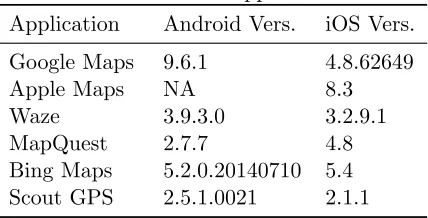
A segment of applications that has gone largely unnoticed by the research community is that of mapping applications. Paralleled with the increase in smartphone adoption as naviga-tion devices has been the decrease in the use of hand-held navigation devices like Garmins (Statista, 2012). In the United States alone, Google Maps and Apple Maps, have 64.5 and 42 million users, respectively (Buczkowski, 2014), while the remaining applications seen in Table1
signifi-cant penetration in the mobile domain (Statista,
2015).
The nature of mapping applications, navigat-ing a user to a destination, directnavigat-ing users around traffic, etc., makes them likely to hold data on where the user has been, what time they were there, their traveling tendencies, etc., some even offer chatting services with other users (see Ta-ble2). It is apparent why data such as this may be of importance to investigators and as such is the reason for the examination of the highly adopted mapping applications listed in Table 1.
Table 1: Tested applications
Application Android Vers. iOS Vers.
Google Maps 9.6.1 4.8.62649
Apple Maps NA 8.3
Waze 3.9.3.0 3.2.9.1
MapQuest 2.7.7 4.8
Bing Maps 5.2.0.20140710 5.4
Scout GPS 2.5.1.0021 2.1.1
At the time of writing this paper, literature on the forensics of smartphone mapping applica-tions was sparse. Our work aimed at filling the gap in the scientific literature.
Our research informs practitioners, researchers and the digital forensics community at large on methods of extracting data from the applications in Table2. It identified the digital forensic arti-facts that can be found by analyzing each of these applications and resulted in a tool that can be used to analyze potential digital evidence from the applications.
Manual retrieval of data from these applica-tions would take a considerable amount of time and expertise. Not all of the files associated with these applications can be opened and read by hu-man eyes. Some files need to be decoded, some have no structure making them difficult to follow, and certain files contain data of interest which is hidden amongst an immense amount of irrelevant data.
Smart NAVigation Parser (SNAVP), the tool constructed during this research (see Sec. 5), combats all of these issues by i) outputting an
organized, searchable, sortable, and easy to read Excel file where all of the data related to these applications can be found ii) eliminating the need to have a person with the expertise needed to decode/translate certain files to a human read-able format, and iii) removing the need for an investigator to manually search through a de-vice’s forensic image to locate and extract ev-idence. The tool also contributes a framework to the digital forensics community that can eas-ily be built upon to include new versions of the tested applications as well as any new mapping applications released in the future.
In the remainder of the paper we first discuss related work in Sec. 2. We then describe our methodology in Sec. 3. We later share our find-ings of the artifacts found from the various map-ping applications in Sec.4. The constructed ex-tensible SNAVP tool is then described in Sec.5. We lastly present future work and limitations in Sec. 6and conclusions in Sec.7.
2.
RELATED WORK
2.1 Hand-held satellite navigationdevices
Research has been conducted in the area of hand-held satellite navigation devices such as Garmins, TomToms, and Magellans (Van Eijk & Roeloffs, 2010; Arbelet, 2014). Past work il-lustrated the importance of the digital evidence that could be extracted from these devices such as where the user has been, how they got there, who owns them, favorite addresses, etc. (Last,
2009). Evidence such as this may lead to a number of important discoveries during investi-gations including behavioral profiles of those who have used the device (Colombini, Colella, Cas-tiglione, & Scognamiglio,2012).
Table 2: Application features
Application Navigation Directions Chatting ETA Home/Work Address Favorites Location Sharing
Google Maps X X - - X X
-Apple Maps X X - - - X
-Waze X X X X X - X
MapQuest X X - - X -
-Bing Maps - X - - - -
-Scout GPS X X X X X X
-2.2 Mobile phone forensics
McMillan et al.(2013) conducted a survey which found that calls and Short Message Service (SMS) data held the most evidential importance during investigations, however, user and applica-tion data were also found to be of high impor-tance. Much of the work in the mobile forensics domain has focused on discovering these types of data on various Operating Systems (Hoog,2011;
Casey, Bann, & Doyle,2010;Sim˜ao, S´ıcoli, Melo, Deus, & Sousa J´unior,2011).
For instance, Al Mutawa, Baggili, and Mar-rington (2012) investigated the forensic arti-facts that could be extracted from different so-cial media applications such as Facebook, Twit-ter and MySpace. Furthermore, researchers such as Mahajan, Dahiya, and Sanghvi (2013) and Thing, Ng, and Chang (2010) examined what digital forensic artifacts could be recov-ered from different messaging services and ap-plications such as WhatsApp and Viber. Newer studies focused on examining the network foren-sic implications of similar social-messaging appli-cations (Karpisek, Baggili, & Breitinger, 2015;
Walnycky, Baggili, Marrington, Moore, & Bre-itinger,2015).
Maus, H¨ofken, and Schuba (2011) conducted a study concerning geodata on Android phones where they used geodata from all applications on a device which stored location data in an attempt to provide the investigator with a viewable map of where the user had been.
However, retrieving data from mobile devices has comes with several challenges for researchers and investigators (Bennett, 2012). The na-ture of smartphones, the Central Processing
Unit (CPU) architecture, their processing and memory resources, as well as the sheer num-ber of used Operating Systems (OS), severely complicates the forensic acquisition and analy-sis of these devices (Barmpatsalou, Damopoulos, Kambourakis, & Katos,2013).
The process gets more complex when one takes into account the high rate of change in the mobile field (new applications, application versions, OS versions, etc.), the number of different devices that are in use, and the lack of software, hard-ware and interface standardization (Lessard & Kessler,2010; Baggili, Mislan, & Rogers,2007).
Casey and Stellatos (2008) also noted that en-cryption of the data on these devices is becom-ing more prevalent havbecom-ing notable implications on digital forensic investigations. These chal-lenges present investigators and researchers with a difficult task whenever a mobile device is being examined.
2.2.1 Android forensics
The challenges posed by Android devices stem from the wide array of versions the platform sup-ports. Many developers and companies put their own twist on the platform when releasing their devices leading to every device/Android version combination to possess unique characteristics. A minor difference in the Android version may re-quire extensive testing and validation of tools be-fore they can be deemed be-forensically sound on a given system (Hoog,2011).
Android forensics is an active area of re-search. For example,Vidas, Zhang, and Christin
focused on discovering different anti-forensic methods used on Android devices. Albano, Cas-tiglione, Cattaneo, and De Santis (2011) devel-oped a technique that provided the ability to modify and erase, securely and selectively, dig-ital evidence on an Android device using simple software tools that are commonly seen on *nix-like operating systems such as Android.
The analysis of phone memory has also been of importance to Android forensics as valuable data such as passwords, text messages, etc. may be contained within the memory (Thing et al.,
2010). Many tools have been created to aid in this process.
Several plugins for Volatility – an advanced memory forensics framework – were created to read data such as passwords, chat messages, user names, and e-mail (Macht, 2013). Sylve, Case, Marziale, and Richard (2012) designed a kernel module for dumping memory that addressed the difficulties in developing device-independent ac-quisition tools while Leppert (2012) focused on acquiring and analyzing heap-dumps of Android applications.
2.2.2 iOS forensics
Breaking the security barriers of the newer ver-sions of iOS devices so that physical images may be acquired without jailbreaking the device has become increasingly difficult (Belenko & Skl-yarov,2011). Jailbreaking involves removing re-strictions on the device so that a physical im-age may be acquired, however, this process al-ters data on the device itself possibly tainting its forensic value. One would have to know that none of the user data was altered and that the exact alteration of any other data on the device be known for an acquisition method to be con-sidered forensically sound.
The difficulty of acquiring a physical image of an iOS device has made other extraction meth-ods more prominent when dealing with newer iOS devices. A common approach leverages the iPhone backup files created with the iTunes backup utility (Bader & Baggili,2010;Morrissey & Campbell,2010). This method only acquires data that has been synchronized by the backup protocol, but as stated by Hoog and Strzempka
(2011) most of the allocated data can be re-trieved using this method. This method was de-termined to be the premier method for logical acquisition for iOS devices (Tso, Wang, Huang, & Wang,2012). Another often used approach is logical extraction. This procedure extracts ac-tive folders and files directly from the iPhone, but does not retrieve any data from the unallo-cated space.
3.
METHODOLOGY
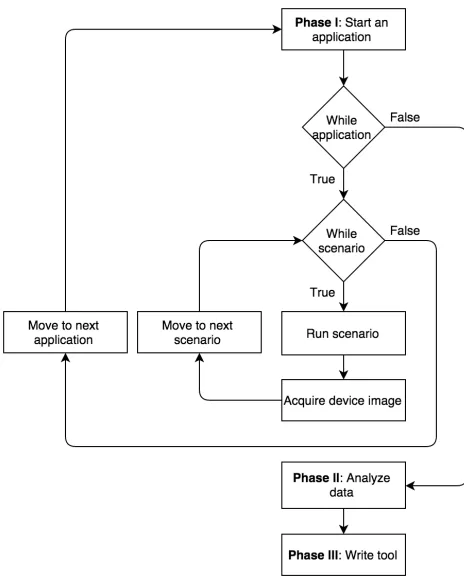
The methodology used in this research followed the guidelines for forensically examining artifacts presented by NIST (Kent, Chevalier, Grance, & Dang, 2006). The smartphones that were used in our examination were a Samsung S4 Active (SGH-i537) running Android version 4.4.2 and an iPhone 4s Model A1387 running iOS 8.2. To-wards the end of the research, the Samsung S4 Active stopped turning on and could no longer be used, therefore, a Samsung Galaxy S4 Zoom (SM-C101) running Android version 4.4.2 was used when investigating Google Maps and Bing. Our research methodology was broken into three phases data creation and acquisition (Sec.3.1), data analysis (Sec. 3.2), and tool cre-ation (Sec. 3.3). The high level methodology is portrayed in Fig. 1.
3.1 Phase I: data creation and acquisition
Several actions were performed on each applica-tion. These actions were chosen based on the fea-tures of each application shown in Table2. Each action was recorded and logged so that any data on the mobile device resulting from the given ac-tion could be discerned.
The devices were acquired using .XRY1. .XRY is software which forensically extracts data from a variety of mobile devices. A device image was acquired after each entry shown in Table3. The Samsung S4 Active and the Samsung Galaxy S4 Zoom were physically acquired, while all of the images of the iPhone 4S were logical due to phys-ical acquisition of the iPhone 4s not being
sup-1
Figure 1: High level methodology for Android and iOS
ported by any tools at the time of conducting the acquisition.
We note that although we used different ac-quisition methods on the devices, our work’s scope focused on the allocated space, making the method of extraction not as significant as it would be had any of the data discovered was found in unallocated space.
3.2 Phase II: data analysis
Analysis of the acquired forensic images was completed using a variety of tools. .XRY and Cellebrite were used to mount and explore the acquired images to discover files related to the tested applications.
Once files were identified, several tools were utilized to inspect the file contents. WinHex2, a universal hexidecimal editor, was used to identify file headers and inspect the content of files that
2
http://www.x-ways.net/winhex/, last accessed 2015-11-23
Table 3: Actions performed
# Recorded action
1 A fresh install of the application 2 A location was inserted into the
appli-cation and traveled to
3 A location was inserted into the appli-cation and not traveled to
4 Application specific features such as sending messages, sharing locations, etc.
were not recognized by .XRY.
DB Browser for SQLite3is a visual open source tool that allows for the creation, design, editing, and viewing of database files that are compatible with SQLite. This tool was used to explore the contents of any SQlite database encountered.
XML files were inspected with Sublime Text, a text editor for code, markup, and prose4, while any binary plist files encountered were inspected using a combination of Xcode 7, a powerful IDE 5, and the Terminal.
3.3 Phase III: Smart Navigation Parser (SNAVP)
SNAVP, the tool created during this research was designed to parse out as much of the data as pos-sible that was found based on our findings. It was designed as a command line tool with mod-ularity and extensiblity in mind so that addi-tional parsers may be added it to it at any time. SNAVP is discussed in further detail in Sec. 5.
4.
RESULTS
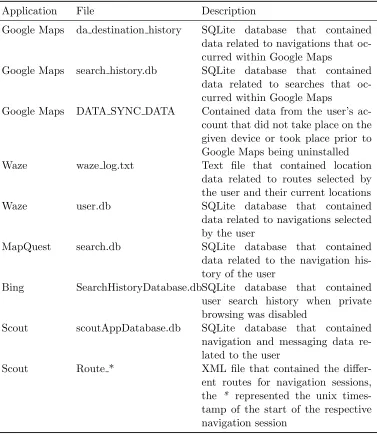
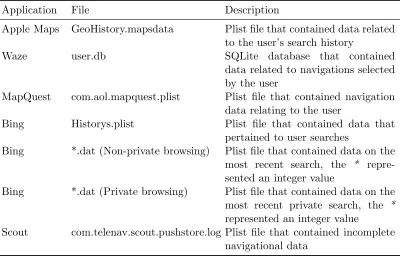
This section describes the results of the artifacts found in detail. For a summary of the artifacts found, refer to Table5 and Table 6.
3
http://sqlitebrowser.org/, last accessed 2015-12-09
4
http://www.sublimetext.com/, last accessed 2015-12-07
5
4.1 Google Maps - Android
Google Maps contained four files of evidentiary value: da destination history, search history.db,
com.google.android.apps.maps preferences.xml,
and DATA SYNC DATA.
da destination history was a SQLite database file that contained location data related to the starting and ending locations that the user se-lected to retrieve directions to. In order for data to be present in this database the user had to have selected navigate after entering in locations.
search history.db, another SQLite database, held the user’s search data. This meant that navigation was not necessary for data to appear in this database, the data was entered as soon as the user searched for any location within Google Maps.
com.google.android.apps.maps preferences.xml
was an XML file that contained the user’s preferences and more specifically the last user account name to use Google Maps.
DATA SYNC DATA contained cloud data
based on the user account that was using the application. So, for example, if a user had saved a search using a different device, that location would be found in this file so that it could be used on any device as long as the user was signed into Google Maps.
4.2 Google Maps - iOS
No data that related to the user’s searches, nav-igation, or saved locations were found on the iPhone, however, the file com.google.Maps.plist
did include the user’s last known location along with what seemed to be other files of interest. In
com.google.Maps.plist was a reference to a plist file called1436530344726.plist. The name of the plist file, 1436530344726, was in the form of a Unix timestamp that converted to July 10, 8:12 AM EST, the time at which the last search oc-curred while using Google Maps.
4.3 Apple Maps
Only one file, GeoHistory.mapsdata, was found to contain data related to the user’s actions in Apple Maps. GeoHistory.mapsdata was a plist file that held data pertaining to what the user had searched for within the application as well as
Yelp reviews for the given locations if applicable.
4.4 Waze - Android
The files waze log.txt, user.db, tiles nt.db, and
tts.db were found to hold data related to the user’s activity while using the Waze application.
waze log.txt contained an immense amount of data. The file was separated into active sessions which were defined as the time from when the user had opened the Waze application to when they closed out of it. Three different actions were found to cause aRoutingRequest within this file i) when a route was requested by the user ii) when GPS signal was lost and then found again during navigation, and iii) when rerouting occurred during navigation. A RoutingRequest
contained a starting and ending location in the form of latitude and longitude points for the re-quested route, and the two lines directly above eachRoutingRequest contained a timestamp and current location of the user.
user.db was a SQLite database that contained a plethora of data including the destination the user had received directions to, the time at which the directions were requested, and the Estimated Time of Arrivals (ETAs) that were sent or re-ceived. It is critical to note that the data men-tioned appeared in the database at the time nav-igation was selected within Waze; meaning that there was no way to discern whether the user had actually traveled to the destination form the data found in this database.
tiles nt.db was a SQLite database that con-tained data which related to images of the pieces of maps that were needed for navigation sessions. An approach to relate the entries in this database to the many locations that were navigated to was not discovered and warrants future research.
tts.db was another SQLite database. It held paths to the audio direction files that were used during navigation, i.e. turn right, continue straight, etc. However, a way to link the entries in this table to specific navigation sessions was not found.
(2014) found that the messages could be found in the device’s memory.
4.5 Waze - iOS
The only file found on the logical image of the iPhone was user.db. This SQLite database had the exact same structure and data as its Android counterpart (see Sec.4.4).
4.6 MapQuest - Android
A SQLite database named search.db contained all of the data pertaining to the places that the user navigated to while using MapQuest. Three fields within thesearch table were found to hold the most importance in this research.
Two fields contained UNIX timestamps. The
ctime field referred to when the user had
searched for directions, while theatime field ferred to the time that MapQuest actually re-trieved the directions that were queried.
The third field was titled json and was a json field that contained the address and longitude and latitude coordinates of the destination along with auserInput key that held the text that the user had actually searched for.
4.7 MapQuest - iOS
The data that related to the user’s navigation history while using MapQuest was found in the file com.aol.mapquest.plist. This plist file con-tained data such as latitude and longitude co-ordinates and addresses of destinations searched for or marked as a favorite by the user. How-ever, there were no timestamps associated with these entries and the data structure was the same whether the destination was actually traveled to or not.
4.8 Bing Maps
Bing Maps was unique in that it was not a stand alone mapping application; the Bing Maps seg-ment was just a part of the overall Bing appli-cation. As the purpose of this research was to test mapping applications, only the Bing Maps portion of the application was tested. Further, Bing had the option to search privately, and if the user was in private mode, Bing claimed that the users search history would not be stored by the application.
4.8.1 Bing Maps - Android
A single SQLite database file, SearchHistory-Database.db, held the user’s search history when private browsing was not enabled. It had a sim-ple structure of three tables with the table of in-terest being SearchHistory. The NAME field in this table referred to the text that was searched for and the LAST field correlated with the time that the search occurred.
4.8.2 Bing Maps - iOS
The iOS version of Bing was found to hold sev-eral files that contained data regarding the ac-tions performed by the user, a History.plist file along with multiple*.dat files.
History.plist contained the search history of the user as long as private searching was not en-abled. Any search that occurred while private searching was enabled did not result in an en-try in Historys.plist. For an entry to be made here, the location had to be searched for using the search bar of the Bing Maps application. If the “get directions” icon was pressed prior to searching for a location then that location would not appear inHistorys.plist.
The*.dat files, where the * represents an inte-ger value, were found at two locations. The non-private version of the*.dat file was stored in the
Documents/Journal directory. This directory
did not exist until a search had occurred within the application, while the private version of these files were stored in the Documents/PriJournal
directory, and similar to the non-private version, the PriJournal directory did not exist until a search had occurred when privacy was enabled.
It was found that the highest numbered *.dat
file contained data on the most recent location that was searched by the user, with or without private browsing enabled.
4.9 Scout - Android
Two files were found which contained data deemed of evidentiary value, a SQLite database namedscoutAppDatabase.dband an XML file ti-tled Route *.
chat sessions, the messages themselves, config-uration data, the address along with the longi-tude and latilongi-tude coordinates of locations that were navigated to, and usernames of friends of the user.
A differentRoute * file was created each time a location was navigated to where the * was re-placed by the UNIX timestamp of when the nav-igation session was first created. Within the file was detailed information about every route that was offered to the user for a given destination and also specified the exact route that the user had chosen. Each route was broken up into seg-ments, thereby allowing one to reconstruct each given route by combining their respective seg-ments.
Unfortunately, in both files, the location data was created at the time that navigation was re-quested, making it difficult to discern whether the user had actually traveled to the destination.
4.10 Scout - iOS
Only one plist file, namely
com.telenav.scout.push store.log was found
to hold data related to user’s navigation, how-ever, the data within this file was incomplete. For example, the file held the UNIX timestamp of when the navigation was started and only the final direction of the navigation session, i.e. in one of the test scenarios, the only direction found was “Turn left to Ruden St” (the final direction before the user would reach their actual destination). Because of this, the se-quence of actions performed on the iOS device were completed several times as to ensure that the lack of data was not caused by an error, but still, only incomplete data was found in
com.telenav.scout.pushstore.log.
Our findings helped us construct the basis for a parser for all of these applications which we discuss in the Sec. 5that follows.
5.
SMART NAVIGATION
PARSER (SNAVP)
In its initial release, SNAVP was designed as a command line tool that took one required pa-rameter and one optional papa-rameter. The
re-quired parameter was signified by a -i and took the location of the input, i.e. a file, a directory, a device image, a zip file etc., as an argument. The optional parameter was signified by a-o and was the location where the program would write its output to. If no argument was provided for the output location, the output defaulted to the current working directory.
After the input was received, the program pro-ceeded to determine the nature of the input, i.e. whether it is a tar file, an image file, a single file, or a directory. The type of input determined the next steps, a tar file would have to be unpacked, an image would have have to be mounted, etc., however, we note that not all image files were mountable (see Sec. 6). Each file in the input was then iterated over and had its file header or extension checked to determine if it was a file of interest.
A file of interest was defined as a binary plist (bplist), a sqlite database, a text file, or an XML file. These were all of the file types from the tested applications that were found to hold digi-tal evidence of forensic value. If a file was of in-terest, the parsers would run their validity check against the file, and if passed, the parser would then parse the file and send the parsed data back to the main program where it would be written out to an Excel file.
The first sheet of every Excel file, titled
Parsers Ran(see Figure2), lists the parsers that were run on the input given, provide the file path to the file that they were run on and the color of the marks for each respective application that can be seen on the All Applications Map (Fig-ure 3). The data retrieved from each individual parser was contained on its own respective sheet within the created Excel document.
5.1 Program structure
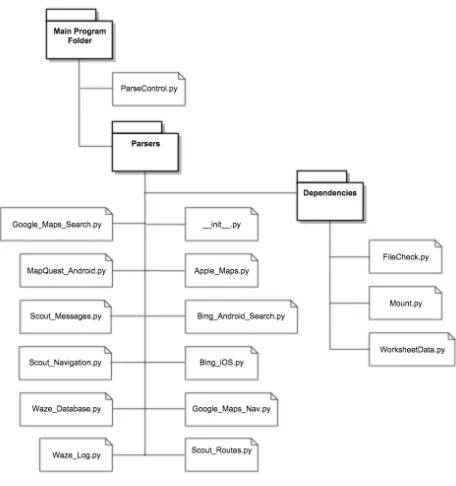
The first file shown in Figure 4 is ParseCon-trol.py. This file controlled the overall program. It received the user’s input, ran the necessary parsers, collected the data, created the map files, and wrote it all out to an Excel file.
Figure 2: First sheet of SNAVP output
Figure 3: All applications map
sqlite, plist, or xml. This was determined by using the file header and/or the file extension. The action ofMount.py is determined by the in-put that was given. If the inin-put was an image file, Mount.py would attempt to mount the file so that its contents could be read. If the input was a tar or zip file, it would extract the data to a given folder so that it may be read, etc.
WorksheetData.py contained theWorksheetData
class. This class was used to store the data from the individual parsers in a manner that ParseC-ontrol.py could interpret.
The Parsers folder contained all of the indi-vidual parsers that could be executed. As men-tioned in Sec. 3.3, SNAVP was designed in a modular manner. To add a new parser to the tool, one would only have to add the parser file to this folder, and add the file name to theinit.py
file. As long as the parser created followed the
WorksheetData class, it would be correctly
inte-Figure 4: SNAVP structure
grated into SNAVP.
5.2 Dependencies
• The Sleuth Kit - is a C library along with a collection of command line tools that al-low the analysis of disk images. Many tools, such as Autopsy, use The Sleuth Kit behind the scenes 6. SNAVP used The Sleuth Kit to mount image files and extract files of
in-6
terest so that they may be parsed.
• pytsk3 - is a Python package that is a Python binding for The Sleuth Kit 7. This allowed SNAVP to programmatically mount images so that they could be searched to de-termine if any files of interest resided on the image. Those files were then extracted and parsed if applicable.
• pygmaps - is another Python package that is a Python wrapper for Google Maps8. This provided SNAVP with the capability to gen-erate HTML files that plot given coordinates on Google Maps.
• ccl-bplist - is a Python module that helps deal with binary plist files (bplists) 9. SNAVP utilized this module when attempt-ing to parse any bplists that it encountered.
• XlsxWriter - is a Python module that al-lowed the creation of Excel XLSX files 10. This module was used to organize and pro-duce the parsed data into an Excel work-book in a meaningful manner.
6.
LIMITATIONS & FUTURE
WORK
The rate at which new versions of applications are released is overwhelming. SNAVP was tested on the specific application versions shown in Ta-ble 1. This does not mean it will not work on other versions, however, it is possible that new and old versions of these applications have dif-ferent file names, schemas for their files, etc. To combat this challenge SNAVP was created in a modular manner so that new parsers may be added to support any new or old versions of the tested applications as well as any additional GPS applications.
7
pytsk3, https://github.com/py4n6/pytsk, last ac-cessed 2015-09-29
8
pygmaps, https://code.google.com/p/pygmaps/, last accessed 2015-09-29
9
ccl-bplist, https://code.google.com/p/ ccl-bplist/, last accessed 2015-09-29
10
XlsxWriter,http://xlsxwriter.readthedocs.org/, last accessed 2015-09-29
It is also important to note that the data that all of these applications were tested with was minimal in comparison to real data. The tool may error out on larger sets of data as not all pos-sibilities could be accounted for with such small sets of test data.
When a device image file was used as input, not all of the images were mountable. For exam-ple, .XRY used a proprietary file type .xry that caused the program to error out when attempt-ing to mount the image. Therefore, any image file that could not be mounted resulted in the user having to manually locate and extract the files of interest, then use the directory that the files were placed in as the input to the tool.
All of the latitude longitude points mapped by SNAVP were only accurate within the United States. Many of the applications did not put the decimal point in the latitude or longitude coordinate when it was saved; SNAVP had to perform this action. The decimal points vary in location depending on the actual latitude or lon-gitude, therefore, the tool only guaranteed accu-racy when it placed the decimal point for loca-tions that were in the United States.
7.
CONCLUSION
An immense amount of potential digital evidence related to the examined applications were dis-covered during this research (summarized in Ta-ble 5 and Table 6). This data could hold great evidentiary value during different types of inves-tigations. The timestamps combined with the current locations in Waze can place users in cer-tain vicinities at cercer-tain times thereby corrobo-rating a story or an alibi. Knowing the route that a user had taken (data from the Scout ap-plication) can be used to locate evidence the sus-pect may have dropped along a route or locate cameras that may be used to track a suspect.
data mentioned in this work was found in unal-located space on the devices.
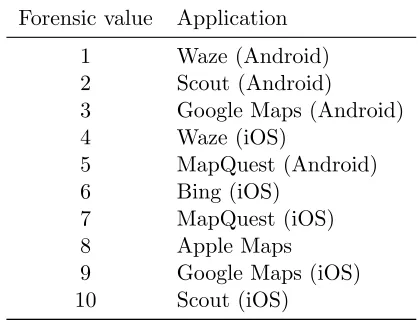
Table 4: Determined forensic value ranking of applications
Forensic value Application
1 Waze (Android)
2 Scout (Android)
3 Google Maps (Android)
4 Waze (iOS)
5 MapQuest (Android)
6 Bing (iOS)
7 MapQuest (iOS)
8 Apple Maps
9 Google Maps (iOS)
10 Scout (iOS)
The Android version of Waze topped the list. In addition to the starting and ending naviga-tional points, it was found to periodically store the current location of the user. Scout for An-droid was next, it was found to store all of the routes given to the user for a navigation session along with the route that was chosen by the user. It also contained messages that were sent be-tween users on the application. Google Maps was ranked third because it stored the starting and ending location of provided routes. Only the top rated applications provided a starting location.
Applications ranked 4 through 6 were all sim-ilar as they provided data about the locations that were searched for or navigated to. Notwith-standing, they did not provide starting locations. MapQuest for iOS and Apple Maps were ranked 7th and 8th respectively. They both provided
data on the user’s search and navigation history but they did not store any timestamps with the data making it difficult to determine a timeline for the user. Google Maps for iOS ranked slightly ahead of Scout due to being able to determine the user’s last location right before exiting Google Maps. The iOS version of Scout came in last as almost no data that related to the locations searched for or navigated to were found on the device. Note that the Android version of Bing is not listed in Table 4 since it could not be fully
examined during this research.
The downfall to the data that was found on the devices was that actual travel was never re-quired for data to be saved. Most of the tested applications stored their data when it was either searched for or navigated to. This could hurt cases as the user cannot be placed at a particu-lar point or on a particuparticu-lar route without some other form of corroborating evidence. Again, the Android version of Waze was the only application that was found to store the user’s current loca-tion at different times; this data was found in Waze’s log file. To combat this challenge, future work could attempt to correlate GPS locations from multiple devices, as well as GPS log data from the OS with the ones found from the stud-ied applications.
As mentioned in Sec. 2, valuable data was found on handheld navigation devices such as TomToms and Magellans. In fact, the data found was very similar to that which was found in this study. As with the data found on the smart-phones, data such as locations entered to, home, work, and favorite addresses could be found on handheld navigation devices, however, there was one immense benefit gained from the data found on handheld navigation devices as opposed to the data found on smartphones. With handheld navigation devices one was able to differentiate whether a location in the GPS was actually trav-eled to (Nutter,2008).
Although being able to differentiate between these two circumstances may be of importance, the rest of the mapping data found on the smart-phones was decidedly similar to that found on handheld navigation devices. Thus, as it has been discussed by Strawn (2009) that GPS de-vices have helped prosecutors win cases, one may argue that the mapping data found on the smart-phones during this research would still be of paramount importance during investigations.
REFERENCES
communica-tion and applicacommunica-tions (bwcca), 2011 inter-national conference on (pp. 380–385). Al Mutawa, N., Baggili, I., & Marrington, A.
(2012). Forensic analysis of social network-ing applications on mobile devices. Digital Investigation,9, S24–S33.
Arbelet, A. (2014). Garmin satnav foren-sic methods and artefacts: an exploratory study.(Unpublished doctoral dissertation). Edinburgh Napier University.
Bader, M., & Baggili, I. (2010). iphone 3gs foren-sics: Logical analysis using apple itunes backup utility. Small scale digital device forensics journal,4(1), 1–15.
Baggili, I. M., Mislan, R., & Rogers, M. (2007). Mobile phone forensics tool testing: A database driven approach. International Journal of Digital Evidence, 6(2), 168– 178.
Barmpatsalou, K., Damopoulos, D., Kam-bourakis, G., & Katos, V. (2013). A critical review of 7 years of mobile device forensics.
Digital Investigation,10(4), 323–349. Belenko, A., & Sklyarov, D. (2011). Evolution
of ios data protection and iphone forensics: from iphone os to ios 5. In Blackhat abu dhabi conference.
Bennett, D. (2012). The challenges facing com-puter forensics investigators in obtaining information from mobile devices for use in criminal investigations. Information Secu-rity Journal: A Global Perspective, 21(3), 159–168.
Buczkowski, A. (2014). The us mobile
app report - google maps app 64.5m
users, apple maps 42m -
geoawe-someness. Retrieved 2015-9-29, from
http://geoawesomeness.com/the-us -mobile-app-report-google-maps-app -64-5m-users-apple-maps-42m/
Casey, E., Bann, M., & Doyle, J. (2010). Intro-duction to windows mobile forensics. digi-tal investigation,6(3), 136–146.
Casey, E., & Stellatos, G. J. (2008). The impact of full disk encryption on digital forensics.
ACM SIGOPS Operating Systems Review,
42(3), 93–98.
Cohan, P. (2013). Four reasons google
bought waze. Retrieved 6.16.2015,
from http://www.forbes.com/sites/ petercohan/2013/06/11/four-reasons -for-google-to-buy-waze/
Colombini, C. M., Colella, A., Castiglione, A., & Scognamiglio, V. (2012). The digital profiling techniques applied to the analysis of a gps navigation device. In Innovative mobile and internet services in ubiquitous computing (imis), 2012 sixth international conference on (pp. 591–596).
Distefano, A., Me, G., & Pace, F. (2010). Android anti-forensics through a local paradigm. digital investigation, 7, S83– S94.
Hoog, A. (2011). Android forensics: inves-tigation, analysis and mobile security for google android. Elsevier.
Hoog, A., & Strzempka, K. (2011). iphone and ios forensics: Investigation, analysis and mobile security for apple iphone, ipad and ios devices. Elsevier.
Karpisek, F., Baggili, I., & Breitinger, F. (2015). Whatsapp network forensics: Decrypting and understanding the whatsapp call sig-naling messages. Digital Investigation,15, 110–118.
Kent, K., Chevalier, S., Grance, T., & Dang, H. (2006). Guide to integrating forensic tech-niques into incident response.NIST Special Publication, 800–86.
Last, D. (2009). Gps forensics, crime, and jam-ming. GPS World.
Leber, J. (2013). A shrinking garmin navigates the smartphone storm. Mar.
Leppert, S. (2012). Android memory dump analysis. Student Research Paper, Chair of Computer Science,1.
Lessard, J., & Kessler, G. (2010). Android foren-sics: Simplifying cell phone examinations. Macht, H. (2013). Live memory forensics on
an-droid with volatility. Friedrich-Alexander University Erlangen-Nuremberg.
Mahajan, A., Dahiya, M., & Sanghvi, H. (2013). Forensic analysis of instant messenger ap-plications on android devices. arXiv preprint arXiv:1304.4915.
Forensic analysis of geodata in android smartphones. In International confer-ence on cybercrime, security and digital forensics, http://www. schuba. fh-aachen. de/papers/11-cyberforensics. pdf.
McMillan, J. E. R., Glisson, W. B., & Bromby, M. (2013). Investigating the increase in mobile phone evidence in criminal activi-ties. InSystem sciences (hicss), 2013 46th hawaii international conference on (pp. 4900–4909).
Morrissey, S., & Campbell, T. (2010). ios forensic analysis for iphone, ipad, and ipod touch (Vol. 23). Springer.
Nutter, B. (2008). Pinpointing tomtom location records: A forensic analysis. Digital Inves-tigation,5(1), 10–18.
Sim˜ao, A. M. d. L., S´ıcoli, F. C., Melo, L. P. d., Deus, F. E. G. d., & Sousa J´unior, R. T. d. (2011). Acquisition and analysis of digital evidencein android smartphones.
Statista. (2012). People who use their cell phone for maps/gps navigation (usa), 2012. Retrieved 2015-9-29, from http:// www.statista.com/statistics/231615/ people-who-use-their-cell-phone-for -maps-gps-navigation-usa/
Statista. (2015). Mobile apps: U.s.
smartphone audience reach 2015
— statistic. Retrieved 2015-9-29,
from http://www.statista.com/
statistics/281605/reach-of-leading -us-smartphone-apps/
Statista. (2016). Number of smartphone users* worldwide from 2014 to 2019 (in
millions). Retrieved 20.1.2016, from
http://www.statista.com/statistics/ 330695/number-of-smartphone-users -worldwide/
Storozuk, D. (2014). Waze forensics a
digital forensic capstone research
project. Retrieved 7.6.2015, from
http://wazeforensics.blogspot.com/ Strawn, C. (2009). Expanding the potential for
gps evidence acquisition. Small Scale Dig-ital Device Forensics Journal,3(1), 1–12. Sylve, J., Case, A., Marziale, L., & Richard,
G. G. (2012). Acquisition and analysis
of volatile memory from android devices.
Digital Investigation,8(3), 175–184. Thing, V. L., Ng, K.-Y., & Chang, E.-C. (2010).
Live memory forensics of mobile phones.
digital investigation,7, S74–S82.
Tso, Y.-C., Wang, S.-J., Huang, C.-T., & Wang, W.-J. (2012). iphone social networking for evidence investigations using itunes foren-sics. InProceedings of the 6th international conference on ubiquitous information man-agement and communication (p. 62). Umale, M. M. N., Deshmukh, A., & Tambhakhe,
M. (2014). Mobile phone forensics chal-lenges and tools classification: A review.
International Journal on Recent and Inno-vation Trends in Computing and Commu-nication,2(3), 622–626.
Van Eijk, O., & Roeloffs, M. (2010). Foren-sic acquisition and analysis of the random access memory of tomtom gps navigation systems. Digital Investigation, 6(3), 179– 188.
Vidas, T., Zhang, C., & Christin, N. (2011). Toward a general collection methodology for android devices. digital investigation,
8, S14–S24.
Table 5: Android - summary of results
Application File Description
Google Maps da destination history SQLite database that contained data related to navigations that oc-curred within Google Maps
Google Maps search history.db SQLite database that contained data related to searches that oc-curred within Google Maps
Google Maps DATA SYNC DATA Contained data from the user’s ac-count that did not take place on the given device or took place prior to Google Maps being uninstalled
Waze waze log.txt Text file that contained location
data related to routes selected by the user and their current locations
Waze user.db SQLite database that contained
data related to navigations selected by the user
MapQuest search.db SQLite database that contained
data related to the navigation his-tory of the user
Bing SearchHistoryDatabase.dbSQLite database that contained
user search history when private browsing was disabled
Scout scoutAppDatabase.db SQLite database that contained
navigation and messaging data re-lated to the user
Scout Route * XML file that contained the
Table 6: iOS - summary of results
Application File Description
Apple Maps GeoHistory.mapsdata Plist file that contained data related to the user’s search history
Waze user.db SQLite database that contained
data related to navigations selected by the user
MapQuest com.aol.mapquest.plist Plist file that contained navigation data relating to the user
Bing Historys.plist Plist file that contained data that
pertained to user searches
Bing *.dat (Non-private browsing) Plist file that contained data on the most recent search, the * repre-sented an integer value
Bing *.dat (Private browsing) Plist file that contained data on the most recent private search, the *
represented an integer value