http://www.sciencepublishinggroup.com/j/ijssn doi: 10.11648/j.ijssn.s.2017050501.14
Novel Application to Managing Windows Embedded
Firewall Programmatically in Network Security
Salah-ddine Krit
1, Elbachir Haimoud
21
Professor of Informatics–Physics at Polydisciplinary Faculty of Ouarzazate, Department Mathematics and Informatics and Management, Laboratory of Engineering Sciences and Energy, Ibn Zohr University, Agadir, Morocco
2
Department Mathematics and Informatics and Management, Polydisciplinary Faculty of Ouarzazate, Ouarzazate, Morocco
Email address:
[email protected] (Salah-ddine K.), [email protected] (Elbachir H.)
To cite this article:
Salah-ddine Krit, Elbachir Haimoud. Novel Application to Managing Windows Embedded Firewall Programmatically in Network Security.
International Journal of Sensors and Sensor Networks. Special Issue: Smart Cities Using a Wireless Sensor Networks. Vol. 5, No. 5-1, 2017, pp. 18-24. doi: 10.11648/j.ijssn.s.2017050501.14
Received: March 24, 2017; Accepted: March 25, 2017; Published: June 9, 2017
Abstract:
Due to the increasing threat of network attacks, Firewall has become crucial elements in network security, and have been widely deployed in most businesses and institutions for securing private networks. The function of a firewall is to examine each packet that passes through it and decide whether to letting them pass or halting them based on preconfigured rules and policies, so firewall now is the first defense line against cyber attacks. However most of people doesn't know how firewall works, and the most users of windows operating system doesn't know how to use the windows embedded firewall. This paper explains how firewall works, firewalls types, and all you need to know about firewall policies, then presents a novel application (Quds Wall) developed by authors that manages windows embedded firewall and make it easy to use.Keywords:
Firewall, Packet, Packets Filtering, Firewall Policies, Firewall Rules, Windows Embedded Firewall, Computer Security, Network, Firewall Exception, Open Port, Authorize Application1. Introduction
The Main function of a firewall is to protect the network from an untrusted network, by filtering the packets passing throw it, the process of filtering those packets is done across a secure policy.
A firewall in a computer network performs a role that is very similar to that of a firewall in a building. Just as a firewall made out of concrete protects one part of a building, a firewall in a network ensures that if something bad happens on one side of the firewall, computers on the other side won’t be affected. Unlike a building firewall, which protects against a very specific threat (fire), a network firewall has to protect against many different kinds of threats like Viruses, Worms, DoS [1]
2. Terms and Vocabulary
In order to understand how firewall works, we have to know a little about networks, here is some important terms:
Firewall: S. Cobb [2] define a firewall as a collection of components or a system that is placed between two networks
and possesses the following properties:
All traffic from inside to outside, and vice-versa, must pass through it.
Only authorized traffic, as defined by the local security policy, is allowed to pass through it.
The firewall itself is immune to penetration typical firewall implementation [3].
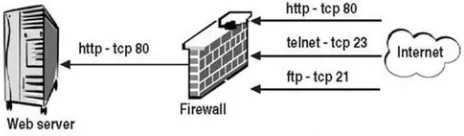
Figure 1. A typical firewall implementation.
TCP/IP: In order to understand the TCP/IP we quote from this article [4]: TCP is a protocol that runs on top of IP. IP takes care of delivering packets. For the remainder of this article, it is relevant that each IP packet contains two addresses: the address of the source of the packet and the address of the destination of the packet. TCP adds a reliable, connection oriented service to IP. It makes sure that there is a reliable data stream between source and destination. TCP avoids duplication of transmitted data and avoids delivering data out of order. In order to be able to setup multiple connections between two hosts, TCP adds so-called ports to IP addresses. These ports identify the connection endpoints on the source and destination. The combination of source port, source address, destination port and destination address are unique for every TCP connection. TCP uses a three-way handshake to setup a connection. The source sends a packet with a special flag set called the SYN flag and with the so-called sequence number field (or for short seq field) set to some initial value. These sequence numbers are used to uniquely identify each octet (the network lingo for 8 bits) of data in the connection. Counting starts at the initial sequence number. If the destination is willing to accept the connection, it sends a packet back with the SYN flag set as well. Furthermore another flag, called the ACK flag, is set. When the ACK flag is set, the value in the acknowledgment (or ack) field is equal to the number of the next unreceived octet. In this case the ACK flag acknowledges the first packet which only contains the SYN flag but has no payload octets. To be able to acknowledge this packet anyway, the SYN flag is also counted as one octet of data. The third packet then acknowledges the second packet by also having its ACK flag set and with the ACK field set to the appropriate value.
3. Firewalls Types
3.1. Packet Filtering
The most common type of firewall is packet filter, it’s also called Network layer firewalls or stateless firewall. A stateless firewall treats each network frame or packet individually. The technique used in this kind of firewalls looks at each packet entering or leaving a network, accepting or rejecting it based on established rules, If a packet matches the packet filter's set of rules, the packet may be forwarded to its destination, or dropped. It compares each packet received to a set of established criteria such as:
Type of protocol: such as IP, TCP, UDP..
Source and destination IP address: The source address is the 32-bit IP address of the host which created the packet, The destination address is the 32-bit IP address of the host the packet is destined for, for example all packets from source address 192.168.1.1 to 192.168.1.100 might be accepted, but all other packets might be dropped.
Source and destination port: for example all TCP packets originating from or destined to port 25 (SMTP port) might be accepted, but all TCP packets destined for port 21 (FTP port) might be rejected.
Direction of traffic: incoming or outgoing.
Figure 2. Direction of traffic.
a network filter firewall protecting a web server The advantages of this type of firewall are: Simple to configure
Transparency to users. High speed
But it has many disadvantages: - Lack of authentication
- Vulnerable to many attack types such as DOS attack, IP address spoofing, Tiny Fragment attack...
3.2. Circuit-Level Gateways
Monitor the TCP handshaking going on between the local and remote hosts to determine whether the session being initiated is legitimate whether the remote system is considered "trusted". They don't inspect the packets themselves, however.
Applies security mechanisms when a TCP or UDP connection is established. Once the connection has been made, packets can flow between the hosts without further checking [5].
3.3. Stateful Filters
connection, a part of an existing connection, or is an invalid packet, To do this, the firewall keeps an entry, in a cache, for each open flow. When the first packet of a new flow is seen by the firewall (this is the so-called SYN packet in a TCP flow meaning synchronize, and ACK which is the acknowledgement that a connection between hosts has already been established, and so on), the firewall matches it against the rule-base.
Figure 3. Stateful firewall in a network.
3.4. Application Layer
An application layer firewall -sometimes called Application proxy firewall- is a network security system that protects network resources by filtering messages at the application layer. An application proxy is more complicated in operation than a packet filtering firewall. The application proxy understands the application protocol and data, and intercepts any information intended for that application. On the basis of the amount of information available to make decisions, the application proxy can authenticate users and judge whether any of the data could pose a threat. The price to be paid for this more comprehensive function is that users or clients often have to be reconfigured to them, sometimes a complicated process, with a consequent loss of transparency. Application proxies are referred to as proxy services, and the host machines running them as application gateways [6]. IT combines some of the attributes of packet-filtering firewalls with those of circuit-level gateways. They filter packets not only according to the service for which they are intended (as specified by the destination port), but also by certain other characteristics such as HTTP request string. While application-level gateways provide considerable data security, they can dramatically impact network performance.
3.5. Multilayer Inspection Firewalls
Multilayer firewalls work by retaining the status (state) assigned to a packet by each firewall component through which it passes on the way up the protocol stack. This gives the user maximum control over which packets are allowed to reach their final destination, but again affects network
performance, although generally not so dramatically as proxies do.
Figure 4. Application-Gateway strategy.
4. Firewalls Policies
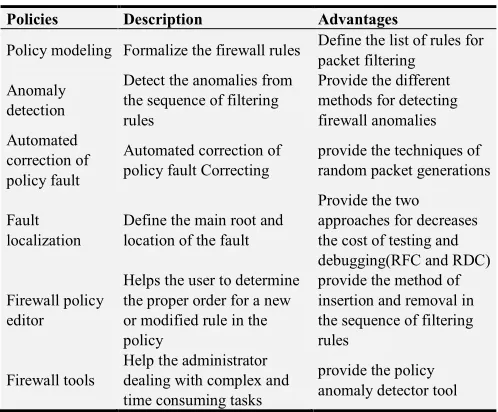
Table 1. Firewall Policies Comparison between various firewall policies.
Policies Description Advantages
Policy modeling Formalize the firewall rules Define the list of rules for packet filtering
Anomaly detection
Detect the anomalies from the sequence of filtering rules
Provide the different methods for detecting firewall anomalies Automated
correction of policy fault
Automated correction of policy fault Correcting
provide the techniques of random packet generations
Fault localization
Define the main root and location of the fault
Provide the two approaches for decreases the cost of testing and debugging(RFC and RDC)
Firewall policy editor
Helps the user to determine the proper order for a new or modified rule in the policy
provide the method of insertion and removal in the sequence of filtering rules
Firewall tools
Help the administrator dealing with complex and time consuming tasks
provide the policy anomaly detector tool
Firstly we have to understand the difference between firewall policies and firewall rules, policies are the abstract, high level definitions of what traffic should and shouldn't be allowed. Firewall rules are the translation of policies into practical configuration.
condition that each packet is matched against. As it turns out, network traffic is matched against a list of firewall rules in a sequence, or chain, from first to last. More specifically, once a rule is matched, the associated action is applied to the network traffic in question. In our example, if an accounting employee attempted to establish an SSH connection to the server they would be rejected based on rule 2, before rule 3 is even checked. A system administrator, however, would be accepted because they would match only rule 3 [7].
5. Application QudsWall
Introduction to QudsWall
As we said before Firewall is the first defense line against cyber attacks, and windows is the most operating system used around the world, on the other hand Microsoft has integrated a firewall in its windows operating systems, but it's difficult and complicated to use for most windows users, quoting from Rubin [8]: “The single most important factor of your firewall’s security is how you configure it.”. So we propose a novel application for managing windows embedded firewall and make it easy to use, we called it "QudsWall", Our application QudsWall works on windows 7 and higher. Many articles talks about controlling windows embedded firewall for XP and above programmatically, otherwise there is lake of resources in how to control windows embedded firewall for windows 7 and higher programmatically. in this Article we will describe how to do it.
Figure 5. QudsWall application Main Window.
For managing the Windows embedded firewall programmatically, there are 3 ways for developers (also coders and programmers). The easiest (the dumbest) one is by using the netsh tool which can located at c:\\windows\system32\netsh.exe and passing arguments to it for example:
Switching OFF the windows embedded firewall: string fwOFF = "advfirewall Set allprofiles state off"; string pathNetsh = "c:\\windows\\system32\\netsh.exe"; System.Diagnostics.Process.Start(System.IO.Path.Combin e(ppDomain.CurrentDomain.BaseDirectory, pathNetsh), fw
The second way, is by changing the registry keys, but it’s tiring a little. So we still have one way which –we think- it’s the perfect one, this way is based on Microsoft Libraries, to
do this you need to choose a programming language that supports the DotNET such as VB.NET or Csharp. Our Application QudsWall is developped in Csharp.
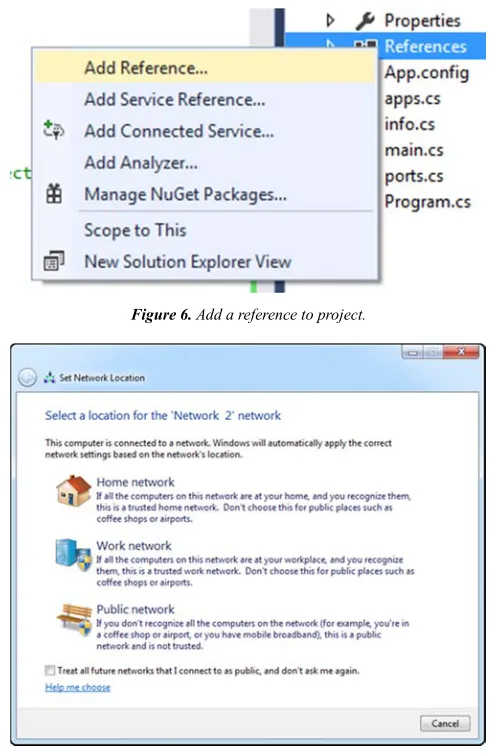
First of all, you will need to add a reference in your project to the COM assemblies:
FirewallAPI.dll (located at
c:\\windows\system32\FirewallAPI.dll), and hnetcfg.dll located at the same directory.
Figure 6. Add a reference to project.
Figure 7. Windows asks to choose a profile.
How to add a reference to your project
Then import this 3 libraries (included in the previous files) to your project:
using NATUPNPLib; using NETCONLib; using NetFwTypeLib;
here are some features of QudsWall, and how to reach it: Switch ON/OFF the Windows Embedded Firewalls
Before doing that we need to understand, we need to understand that there is 3 profiles of Windows embedded firewall
Private Profile
This refers to the home network, or when you are not connected to any network.
For public places (campus, hotel, restaurant...), here comes most cyber threats, you have to be mindful while configuring this profile.
Domain Profile
Usually refers for workplaces, it’s a perfect place where
network worms spreads.
When you connect to a network for the first time Windows asks you to choose a profile as shown in the next picture.
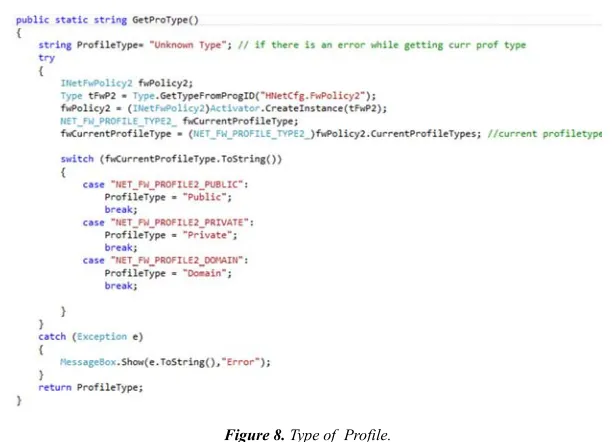
Now let’s check what is the current profile:
Figure 8. Type of Profile.
The function GetProType() returns the current profile type
Let’s get back on how to activate the windows embedded firewall¸ let’s enable/disable the current profile:
Figure 9. Enable/disable the current profile.
Switch ON/OFF the windows embedded firewall depending on the Boolean sw. Add/Delete firewall rules
Applying rules is the main occupation of the firewall, you create firewall rules to allow your computer to send traffic to, or receive traffic from, programs, or computers...
Let’s suppose that we want to block any TCP connection from our computer to the Facebook web server, here is how to implement that:
Blocking any connection to the Facebook web server You can delete this rule later by:
firewallPolicy.Rules.Remove("Block80TCP");
the object “Rule” that we created has many attributes and methods by which you can configure your rules properly, for example:
rule.direction: takes the value
net_fw_rule_direction_.net_fw_rule_dir_in for incoming connection, and net_fw_rule_direction_.net_fw_rule_dir_out for outcoming, and
net_fw_rule_direction_.net_fw_rule_dir_max for both of them.
rule.action: takes the value
net_fw_action_.net_fw_action_allow for allowing the connection, and net_fw_action_.net_fw_action_block for
blocking it.
rule.enabled: true to activate the rule or false to deactivate it.
Rule.Profiles: here you can choose the profile to add the rule to.
Rule.RemotePorts: it’s evident from its name.
Rule.Protocol: here you puts the protocol assigned number from the IANA[9], for example 1 refers to ICMP, 6 for TCP, 17 for UDP, 27 for UDP...
View/Add applications exception to the firewall
Most of time the user need to know what are application that are allowed to connect to the internet and exchange data with other networks, let’s get the list of applications that allowed to connect via the windows embedded firewall:
Figure 11. firewall Policy.Rules.Remove.
getting the list of application exceptions.
As you can see, we used the list of application to fill a ListBox item.
Now let’s add a firewall exception, let’s add our application chiroRAT.exe to list of authorized applications:
Figure 12. Add a firewall exception.
Authorize an application
Let’s take our example chiroRAT.exe
AuthApp("AuthChiroRAT", @"C:\Users\Bachir\Desktop\chiroRAT.exe"); Now chiroRAT has internet access.
Open Port
Figure 13. Authorize an application.
Open port function
"Scope" refers to the set of computers that can use this port opening, so Port.Scope can take the values: NET_FW_SCOPE_.NET_FW_SCOPE_ALL,
NET_FW_SCOPE_.NET_FW_SCOPE_LOCAL_SUBNET, or NET_FW_SCOPE_.NET_FW_SCOPE_CUSTOM;
If i want to open the port 1000 in my machine for the protocol UDP and let all computer use this port, calling the OpenPort will be something like that:
OpenPort(“UDP1000”,1000,
NET_FW_SCOPE_.NET_FW_SCOPE_ALL,
NET_FW_IP_PROTOCOL_.NET_FW_IP_PROTOCOL_U DP);
6. Conclusion
Firewalls are really substantial in any secure network, however using firewalls is necessary and not sufficient. Because firewalls can't protect against attacks that don't go through the firewall for example internal attacks, and can not defend against social engineering attacks that's why you must use so many security system (IDS, UFW, DMZ, Antiviruses..) in order to maintain your network security. however if you didn't switched on and properly configure your computer firewall you will be exposed to cyber attacks. We have succesfully implemented controlling the windows embedded Firewall with the application QudsWall using C#. The application has been tested in the live local network at the Polydisciplinary Faculty of Ouarzazate. Future work includes extension of this application to cover all windows security components, and make it powerful as possible. For specific information regarding IT security, and how to protect
yourself from cyber attacks, consult our paper titled "Review On The IT Security: Attack And Defense" [10].
References
[1] Brian Komar, Ronald Beekelaar, Joern Wettern "Firewalls for Dummies", p 10, August 2001
[2] S. Cobb "Establishing firewall policy", Published in: Southcon/96. Conference Record, June 1996
[3] Figure is property of https://www.axiatp.com/managed-firewall
[4] Guido van Rooij "Real Stateful TCP Packet Filtering in IP Filter", pp 1-2
[5] B. Gambrel, "Networking Fundamentals", published by Wiley, p173 2011
[6] Habtamu Abie "An Overview of Firewall Technologies", p 3, January 2000
[7] Er. Smriti Salaria, Er. Nishi Madaan "Firewall and Its Policies Management", IJCSMC, Vol. 3, Issue. 4, p 366, April 2014
[8] Y. BARTAL, A. MAYER, K. NISSIM, A. WOOL "Firmato: A Novel Firewall Management Toolkit", 20th IEEE Symposiumon Security and Privacy, Oakland, p 2, May 1999
[9] Internet Assigned Numbers Authority,
http://www.iana.org/assignments/protocol-numbers/protocol-numbers.xhtml