IJEDR1402145
International Journal of Engineering Development and Research (www.ijedr.org)2184
Master Model Automation Using NX Unigraphics
Customization
1
Jayesh Palekar,
2S SaravananPillai,
3Prof. H.P. Khairnar
1Student, M.Tech CAD CAM & Automation, 2Manager-Design, 3Assistant Professor 1,3Mechanical Engineering Department, Veermata Jijabai Technological Institute, Mumbai, India
2
Heavy Engineering Department, Larsen & Toubro, Powai, Mumbai, India
1[email protected], 2[email protected], 3[email protected] ________________________________________________________________________________________________________ Abstract - The parametric model updation in 3D modeling software is very complicated and time consuming process. Updating the assemblies having hundreds of sub-assemblies and parts is very critical job in modern era of CAD-CAM industries. Even a single error in the input can create lots of problem in the final output may be a fatal errors which cannot be retrieve easily. Due to that whole Product Lifecycle Management get delayed which cause would cost to company.This paper will illustrate how the customization of the NX Unigraphics models with the help of NX open programing will result reduction of human errors, cycle time, repetitive work and graphics power to enhance design benefits to the company.
IndexTerms - Master Model, Parametric Model, NX Unigraphics, NX Open, Customization, Part Files Updation, API (Application Programing Interface).
I.INTRODUCTION
NX Unigraphics is leading geometric parametric modeling CAD software. It provides a broad set of CAD solutions for the design of complex mechanical products. The Insight NX (Unigraphics) CAD Driver component creates a direct native link to NX, allowing the user to modify CAD geometry, extract relevant output parameters, and export neutral geometry files automatically and without using the CAD system interface. This component can be used together with Insight design drivers to perform NX CAD optimization.
The NX Unigraphics component provides support for native part (PRT) files. It supports input parameters including sketch dimensions, feature dimensions, pattern dimensions, and GD&T dimensions. These entire databases are linked to each other. (Knowledge Fusion Tool of Unigraphics Automation).
Updating these parametric models manually is time consuming and complicated job. For the files having large number of parameters and large space required more time and graphics to process the data. Due to which modeling and designing get delayed, affecting the product lifecycle.
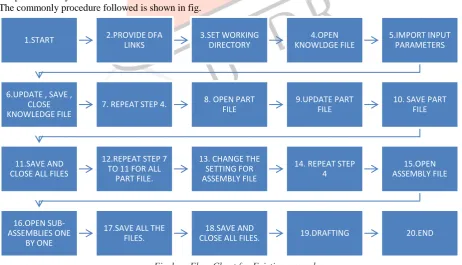
The commonly procedure followed is shown in fig.
Fig 1. Flow Chart for Existing procedure
Doing the things manually following problems are raised:- 1. Single input error result in the fatal error.
1.START 2.PROVIDE DFA
LINKS 3.SET WORKING DIRECTORY 4.OPEN KNOWLDGE FILE 5.IMPORT INPUT PARAMETERS
6.UPDATE , SAVE , CLOSE KNOWLEDGE FILE
7. REPEAT STEP 4. 8. OPEN PART
FILE
9.UPDATE PART FILE
10. SAVE PART FILE
11.SAVE AND CLOSE ALL FILES
12.REPEAT STEP 7 TO 11 FOR ALL
PART FILE.
13. CHANGE THE SETTING FOR ASSEMBLY FILE
14. REPEAT STEP 4 15.OPEN ASSEMBLY FILE 16.OPEN SUB-ASSEMBLIES ONE BY ONE
17.SAVE ALL THE FILES.
18.SAVE AND
IJEDR1402145
International Journal of Engineering Development and Research (www.ijedr.org)2185
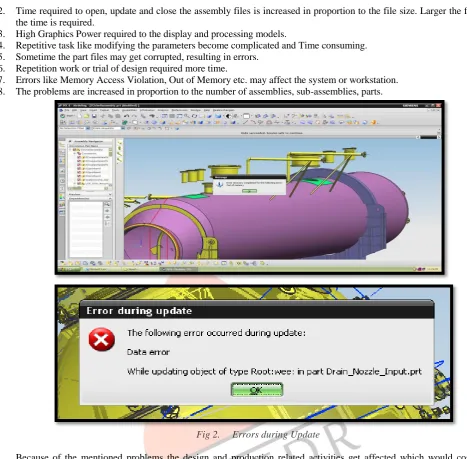
2. Time required to open, update and close the assembly files is increased in proportion to the file size. Larger the file morethe time is required.
3. High Graphics Power required to the display and processing models.
4. Repetitive task like modifying the parameters become complicated and Time consuming. 5. Sometime the part files may get corrupted, resulting in errors.
6. Repetition work or trial of design required more time.
7. Errors like Memory Access Violation, Out of Memory etc. may affect the system or workstation. 8. The problems are increased in proportion to the number of assemblies, sub-assemblies, parts.
Fig 2. Errors during Update
Because of the mentioned problems the design and production related activities get affected which would cost to the company. So this is one of the major and important part of the product life cycle.
The best way of reducing human interaction and time consumption is doing things automatically. NX Unigraphics can be customized as per the requirements with the help of various tools of customization. NX programming and customization software tools help companies extend and tailor NX solution capabilities to their specific needs. Supporting the knowledge-driven automation capabilities of NX, these tools can be employed by product development personnel and application developers.
II.CUSTOMIZATION APPROACH
The NX Unigraphics has various ways of Automations eg. Knowledge Fusion, GRIP programming, Macros, NX Open, journals, User Defined Objects etc. One of the easiest and economical ways is NX Open using Microsoft Visual Studio. NX offers an API for use with Microsoft‟s .NET framework. Built on the Common API, this interface provides programmatic access to NX core application functionality, making it possible to create advanced automation programs using any of the .NET-compliant languages, including Visual Basic .NET and C#. Because the API is built on the .NET framework, users can take full advantage of all the benefits provided by that framework.
IJEDR1402145
International Journal of Engineering Development and Research (www.ijedr.org)2186
Fig 3. General Plan
We proposed one API (Application Programing Interface) application with the help of the Microsoft Visual Studio. Within a single click application accept the user inputs (dimensions, parameters, etc.). Then these inputs transferred to the expression file, models updated in the background and the errors generated during process compiled in the error report. Through error report we can identify which file has error or which file which part is failed. Later that part can be modified individually.
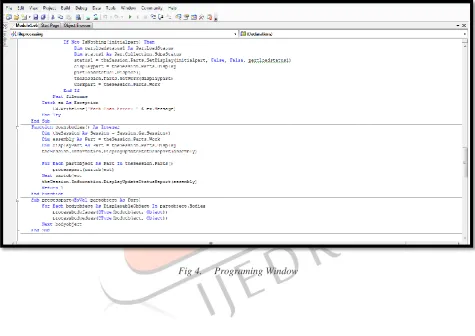
For programing purpose we used VB.Net language. To get idea about the basic functioning and programing of operation that has to be atomized, we used the „Journal‟ tool in the unigraphics. The Journal capability is a rapid automation tool that records, edits and replays interactive NX sessions. It produced a scripted file from an interactive session of NX which can be run at a later time to replay the session. These sessions can be edited and enhanced with simple programming constructs and user interface components to produce a rapidly generated customized program. Then all edited journals compiled to form a single program. These edited journals were relating to set the working directories, to provide the required DFA links and data files, to open, save and close the part files. For updation of a part file logic developed, which process each and every part of the assembly, body, surface, edge in sequence. To record the geometrical error generated while updating the part file used listingwindow class which record the strings and text messages.
IJEDR1402145
International Journal of Engineering Development and Research (www.ijedr.org)2187
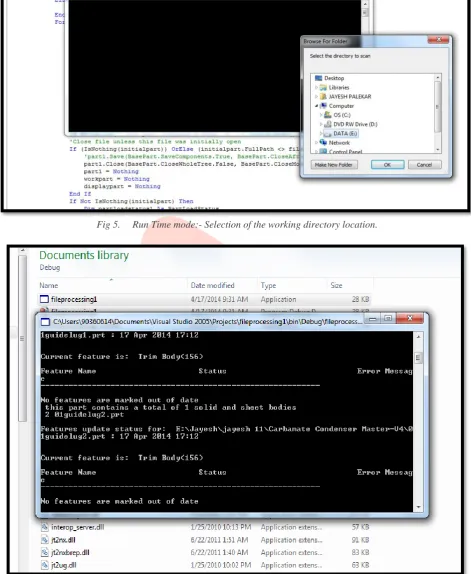
Fig 5. Run Time mode:- Selection of the working directory location.
Fig 6. Run Time mode: - Recording of errors generation (Output File)
IJEDR1402145
International Journal of Engineering Development and Research (www.ijedr.org)2188
PROCESS EXISTING PROPOSED
1. Excel Input Manual Manual
2. Transfer of Excel Data to Text Manual Manual
3. Setting working directory and providing required
library links Manual Automatic
4. Importing Excel Input Manual Automatic
5. Opening Model Files Manual Automatic
6. Updating Model Files Manual Automatic
7. Error Report Generation Automatic (Individual) Automatic (Combined)
8. Saving Model Files Manual Automatic
9. Closing Model Files Manual Automatic
10. Drafting Manual Manual
Table1- Comparison of existing and proposed system
III.RESULT
Due to the automation we get following benefits:-
1. Time required for the operation is reduced tremendously. For one random part file size of 8MB having 3 sub-assemblies, 45 parts and 180 features, we got the following time analysis.
PROCESS EXISTING SYSTEM
TIME(Sec)
PROPOSED SYSTEM TIME(Sec)
1. Setting working directory and providing required
library links 60 Within fraction of sec
2. Importing Excel Input 30 Within fraction of sec
3. Opening Model File 30 10
4. Updating Model File 300 60
5. Saving Model File 120 25
6. Closing Model File 30 10
Total 570 105
Table2- Comparison of existing and proposed system (Time Analysis)
Approximately 75% to 80% man hours are saved.
2. Operations are generated in the background (in MS dos mode), no need of opening the unigraphics environment hence no need of the graphics, so the operations are quicker and graphics power is saved. Other computer operation can be performed simultaneously because of the less RAM is required for the operation.
3. All the errors are compiled together, which can be retrieved in later stage. 4. Large part files can be handled easily.
5. Repetitive design tasks can be easily performed.
6. The error generation due to graphics consumption (like Out of Memory) is less. As the system is beneficial, we came across some issues on which we are working on it.
IJEDR1402145
International Journal of Engineering Development and Research (www.ijedr.org)2189
2. To make the set up file of the application which can be used on all workstations where no need of unigraphics software orhaving less graphic powers.
IV.CONCLUSION
We tested the application for various inputs parameters and designing conditions and came across the following conclusion, how the customization approach is beneficial to the designing department of the company,
1. As time saved for the operation the Product Lifecycle Time is reduced. 2. Drawing generation tasks from parametric models become efficient. 3. Designing cost to the company is reduced.
4. Percentage of the error generation is reduced.
V.REFERENCES
[1] Ming C. Leu, Akul Joshi, “NX5 FOR ENGINEERING DESIGN”, Missouri University of Science and Technology Rolla, Missouri 65409
[2] Randy H. Shih, “Parametric Modeling with UGS NX5”, Oregon Institute of Technology [3] “OPEN API STUDENT GUIDE”, Feb-2004, MT13110-Unigraphics NX2
[4] “NX V6.0 Help Guide and Release Notes”, Siemens PLM [5] MSDN Help Guide
[6] SIEMENS – UGS PLM Software, http://www.plm.automation.siemens.com/en_us/ [7] NX Journaling- http://www.nxjournaling.com/
[8] Siemens: UG/NX Forum- http://www.eng-tips.com/threadminder.cfm?pid=561