Evaluating the Effects of Interactivity in a Post-Editing Workbench
Nancy Underwood, Bartolomé Mesa-Lao, Mercedes García Martínez, Michael Carl
Center for Research and Innovation in Translation and Translation Technology Copenhagen Business School, Denmark
E-mail: [email protected], [email protected], [email protected], [email protected]
Vicent Alabau, Jesús González-Rubio, Luis A. Leiva, Germán Sanchis-Trilles, Daniel Ortíz-
Martínez, Francisco Casacuberta
Departamento de Sistemas Informáticos y Computación Universitat Politècnica de València, Spain
E-mail: [email protected], [email protected], [email protected], [email protected], [email protected], [email protected]
Abstract
This paper describes the field trial and subsequent evaluation of a post-editing workbench which is currently under development in the EU-funded CasMaCat project. Based on user evaluations of the initial prototype of the workbench, this second prototype of the workbench includes a number of interactive features designed to improve productivity and user satisfaction. Using CasMaCat’s own facilities for logging keystrokes and eye tracking, data were collected from nine post-editors in a professional setting. These data were then used to investigate the effects of the interactive features on productivity, quality, user satisfaction and cognitive load as reflected in the post-editors’ gaze activity. These quantitative results arecombined with the qualitative results derived from user questionnaires and interviews conducted with all the participants.
Keywords: post-editing, machine translation, evaluation, interactive translation prediction.
1.
Introduction
This paper describes a field trial and subsequent evaluation of a post-editing workbench which is currently under development in the EU-funded CasMaCat project. Based on user evaluations of the initial prototype of the workbench, this second prototype features a number of interactive options designed to improve productivity and user satisfaction. The workbench also includes facilities for logging keystrokes and eye-tracking data, which were used to collect process information from post-editing sessions carried out in a professional setting.
After describing some background research (Section 2), the salient features of the CasMaCat workbench are presented in Section 3. The field trial is described in Section 4 and we present preliminary analyses of the data collected in the field trial in Section 5. Our analyses focus on whether and how the introduction of interactive features affect time (productivity), quality, user satisfaction and gaze behaviour.
2.
Background and related work
As machine translation (MT) has been improved over recent decades, language service providers are gradually adopting new workflows where the human translator is asked to post-edit MT outputs in order to attain different levels of quality. In recent years a variety of post-editing tools has been developed and evaluated (e.g. Aziz et al.2012, Federico et al. 2012, Roturier et al. 2013).
Many of such post-editing tools include key-logging, which facilitates research into the translation and post-editing processes. Empirical human translation process research started in the 1980s (Lörscher1991). Since then, research has developed in a direction which analyses, describes and models translator behaviour using eye-tracker and keyboard logging devices. While eye movements give a picture of how meaning is constructed from a string of source text symbols, typing behaviour reflects how the meaning is constructed in the target language (Carl et al. 2011).
In the quest for new types of assistance to the human post-editor, the CasMaCaT tool features interactive machine translation (IMT). Previous IMT systems include Langlais et al. (2000) and Barrachina et al. (2009), which incorporate a prediction model that interactively suggests translations to the human translator as she types. Similar work was carried out by Koehn (2010). Langlais et al. (2002) performed a human evaluation on their interactive prototype emulating a realistic working environment in which the users could obtain alternative renditions as they were typing to fix MT outputs. In this study, post-editors’ productivity decreased by 17%, but they appreciated such an interactive system and declared that it could help them to improve their productivity after proper training.
3.
The CasMaCat workbench
The CasMaCat workbench is designed to support post-editing of machine translation outputs. The user is presented with a GUI in which the left-hand window displays the source text (ST) while the right-hand one contains the target text to be post-edited (TT). Texts are split into segments (corresponding to sentences and headings in the text) so that the translator post-edits one segment at a time. Once the post-editor is satisfied with the translation, she can approve it by clicking on the TRANSLATED button or save it for future revision using the DRAFT button. The user can see several segments on the screen at one time and can scroll back and forth to choose which segment to post-edit. It is always possible to return to previously saved translations and re-edit them.
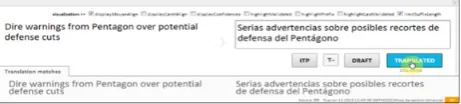
The workbench contains a fully-fledged MT engine which, when interactivity is enabled, can search for alternative translations whilst the user is post-editing. Thus, as the user types, the MT system can suggest alternative target translations which the user can interactively accept or edit or request a new alternative translation using the mouse-wheel. In addition, the translator can also choose to enable a number of advanced visualization options such as displaying the correspondences between source and target words, displaying the confidence level of the translation proposed by the MT engine or highlighting words edited by the user. Figure 1 shows a screenshot of the system where the user can choose to enable the various visualization options available when post-editing.
Figure 1: Visualization options in the CasMaCat GUI
The workbench also includes facilities for logging system configuration and user activity data including keystrokes and gaze obtained using an eye-tracking device. The data collected in the field trial is described in Carl et al. (2014) and it is now publicly available in the CRITT Translation Process Research Database (TPR-DB)1 under the study name CFT13.
4.
The Field Trial
The field trial was carried out in June 2013 under the auspices of the Celer Soluciones2, a partner in the CasMaCat project.
1This resource is available from the following website:
CRITT Translation Process Database (TPR-DB) [on-line] <http://bridge.cbs.dk/platform/?q=CRITT_TPR-db>. [Last accessed: March 20, 2014].
2 CELER Soluciones SL is a language service provider based in
Madrid.
4.1 Participant profiles
The field trial involved nine Spanish post-editors and four reviewers. The post-editors were all freelance translators employed by Celer Soluciones and all but one had previous experience of post-editing MT as a professional service. Of the reviewers, there were two in-house and one freelance reviewer, as well as freelance translator. More specific data on all the participants’ age, level of experience, professional education, etc., is also available in the CRITT TPR-DB (metadata folder).
4.2 Experimental design
In order to assess and compare the effects of enabling interactivity and visualization options, each participant in the trial was required to work with three different configurations of the workbench’s GUI:
Traditional post-editing with no assistance during the process (PE).
Post-editing through basic interactive translation prediction (ITP), where the post-editors were presented with alternative ways to complete sentences as they typed their changes.
Post-editing through advanced interactive translation prediction (AITP) featuring different visualisations (e.g. suffix length, confidence measure and word alignments) while the translator interactively post-edited the raw MT output.
Each participant post-edited nine different texts making a total of 81 post-editing sessions in all. The source texts were short news items in English from the corpus news-commentary 2012 (Callison-Burch et al. 2008). They were approximately 1,000 words long comprising between 30 and 63 segments and they were pre-translated into Spanish by a statistical MT system and then loaded into the CasMaCat workbench for the participants to post-edit.
The nine texts were divided into three sets of three texts each (Datasets 1, 2 and 3) which were used during the different phases of the experiment. For each participant three post-editing sessions (using the texts from Dataset 1) were carried out at the offices of Celer Soluciones where the eye-tracker was used to record gaze behaviour, whilst their other 6 sessions (using Datasets 2 and 3) were performed at home where no eye-tracking was available.
GUI
Participant PE ITP AITP
01 text 1.1 text 2.1 text 3.1 02 text 2.1 text 3.1 text 1.1 03 text 3.1 text 1.1 text 2.1 04 text 3.1 text 1.1 text 2.1 05 text 1.1 text 2.1 text 3.1 06 text 2.1 text 3.1 text 1.1 07 text 2.1 text 3.1 text 1.1 08 text 3.1 text 1.1 text 2.1 09 text 1.1 text 2.1 text 3.1
Table 1: Text/GUI distribution in the field trial
Before starting their tasks, participants were introduced to the workbench and its different GUIs. They were given time to familiarise themselves with the tool and try out the different visualization options. In the case of the AITP GUI, the participants themselves chose which extra options they would enable when post-editing (e.g. source and target word alignments).
The sessions recorded at the Celer Soluciones offices were then revised by the reviewers. Each of the reviewers was assigned to review the work of two or three of the post-editors.
After each session participants were asked to fill out a questionnaire and were then interviewed in depth after all sessions at Celer Soluciones were completed.
5.
Analysis of the field trial results
The results of the field trial logged in the CasMaCat workbench have been pre-processed into various types of data reflecting the participants’ activities such as the duration and number of manual insertions and deletions, pauses and gaze fixations. This enabled us to analyse the data at the individual word and segment level as well as the session level.5.1 Time
The raw logging data includes time stamps which enable us to calculate the duration of keystrokes and gaze events. However, in the sessions carried out at home a few participants registered very long pauses (up to several hours) which indicate that these sessions were interrupted. In order to prevent these pauses from contorting the rest of the data, we first experimented with removing pauses of over 5 seconds. Pauses of a length between one and five seconds have been used in previous studies to fragment the text production rhythm into typing or processing units (Alves and Vale 2009, Lacruz et al. 2012, Carl 2012). However, this focus on typing activity including only such small pauses had the effect of excluding legitimate pauses in keyboard activity where the post-editor was nevertheless working on the task. It emerged that there was a greater contribution of short pauses to the total post-editing time when using the ITP and AITP GUIs
compared to the PE GUI and as a result, removing pauses of more than 5 seconds increases the relative differences between traditional and interactive post-editing. Therefore for the purposes of comparison we calculated the durations of user activity excluding pauses lasting over 200 seconds.
Figure 2 shows a comparison between the total duration of the post-editing sessions with the duration excluding pauses over 200 seconds.
Figure 2: Post-editing time in seconds: total duration vs duration excluding pauses
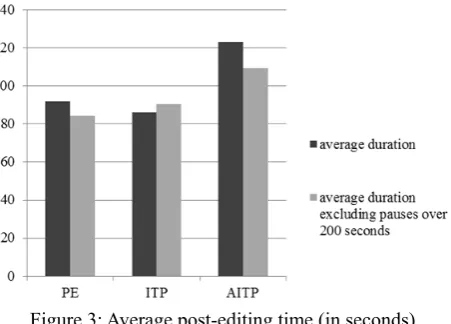
Although this greatly reduces the total duration of all the post-editing sessions, at the segment level, excluding pauses of over 200 seconds does not cause such significant differences in the average post-editing time per segment as can be seen in Figure 3.
Figure 3: Average post-editing time (in seconds) per segment
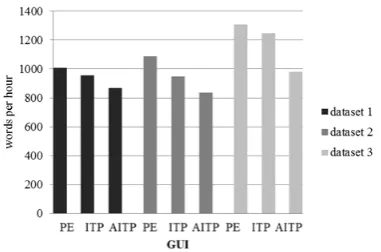
Nevertheless, such a coarse-grained metric does not provide a true measure of the productivity potential of the tool. Firstly, the text segments were of various lengths and thus a finer-grained metric based on the average time taken per word was employed next. Secondly, the tool was new for all participants and analysing the data in the light of the order in which the post-editors performed their tasks indicates an improvement in speed as the as users become more familiar with the workbench.
Figure 4: Words per hour and GUI for each dataset
Figure 4 shows the average productivity (words per hour) for each GUI distributed across the different datasets. Since the different datasets were post-edited in order, by focusing on the different datasets we are able to see the changes in productivity over time. As can be seen in Figure 4, the productivity for each type of GUI averaged over all participants does indeed increase over time. This would support the hypothesis that, even over this short period of time there is a general learning effect. Nevertheless these results still show a marked difference in productivity depending on the GUI being used, so that in Dataset 3 participants on average still apparently perform better with the basic post-editing GUI than with the interactive GUIs.
However drilling down to the results for individual post-editors and texts reveals some interesting results and further supports the idea that productivity using the tool will improve over time. Of the nine participants in the trial, four demonstrated consistent productivity improvements when using the interactive GUIs. Figure 5 shows the example of Participant 09.
Figure 5: Words per hour and GUI for Participant 09
Participant 09 not only improved her productivity in general, but by the last phase of the field trial (when post-editing Dataset 3) also increased productivity when interactivity and visualisation were enabled achieving 1058, 1188 and 1620 words per minute with PE, ITP and AITP respectively. A similar pattern of results was observed with Participants 01, 04 and 06. The other five participants (02, 03, 05, 07, and 08) performed more erratically.
In order to investigate the learning effect more thoroughly our next step is to carry out a longitudinal study where users will test the tool for a longer period of time (e.g. four weeks).
5.2 Quality
We were also interested in assessing whether the different GUIs affected the perceived quality of the post-edited texts. The quality of the post-edited texts was assessed both quantitatively, by counting the revisions made by the reviewers, and qualitatively by manually scoring the quality of each segment.
5.2.1 Revisions by reviewers
As described above, the texts which were post-edited at the Celer Soluciones (Dataset 1) were also revised by reviewers. The amount of revisions which were made by the reviewers may be interpreted as a measure of the quality of the post-edited text. The analysis was based on revisions made at the word level rather than characters because this typically has a much closer relation with both semantic quality and style than individual character differences.
However simply counting the overall number of insertions and deletions by reviewers revising the texts would not take into account the differing lengths of the texts in the dataset. Therefore a relative value in terms of % was used. Figure 6 shows the overall percentage of words changed by reviewers in each GUI.
Figure 6: Revisions by reviewers % of words changed per GUI
translations when using a GUI with interactivity enabled (ITP and AITP) compared with the traditional non-interactive mode (PE).
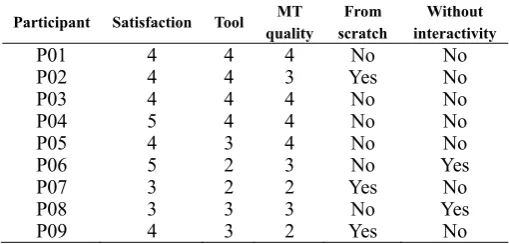
On the whole, when asked whether they would prefer to translate from scratch rather than post-edit, participants tended to give the same response irrespective of the GUI they were using. Thus three participants consistently said they would prefer to translate from scratch, whilst four would rather post-edit. However two participants (03 and 08) who preferred to translate from scratch when using the traditional post-editing mode (PE) changed their minds after working with the interactive GUIs
When working with the ITP GUI six of the nine participants reported that they would prefer to work without interactivity, but this changed substantially when they were working with the AITP GUI where only two participants stated that they would prefer to work without interactivity.
5.3.2 User interviews
The views expressed by the post-editors in the final interview about interactivity while post-editing were mixed. On the one hand, five of them explicitly commented that they would have preferred to post-edit without any kind of interactivity. For them, many of the auto-completions suggested by the workbench were a nuisance rather than a help. Touch typists commented that they often didn’t even look at the suggestions provided by the system thinking that they would be faster. Indeed, the logged data show a number of cases where the systems predictions are overwritten by the post-editor entering exactly the same text.
On the other hand, four post-editors said that, although they would need more time to become more familiar with interactivity while post-editing, they think it is a promising feature to improve their productivity. For this second group of users, interactivity was viewed as something positive, although they would need more experience with the workbench in order to make the most out of it.
5.4 Gaze behaviour
The data collected by the eye-tracker was used to investigate where the post-editors tended to direct their attention during the post-editing session.
Unfortunately the eye-tracking data for two of the participants was found to be unreliable. Participant 01 suffered from nystagmus which distorts the eye-tracking data, whilst the typing skills of Participant 06 were so poor that he spent most of the sessions looking at the keyboard. Therefore the gaze data from these two participants was also excluded from the evaluation.
The average duration of gaze fixations in the source and target windows for the remaining seven participants were
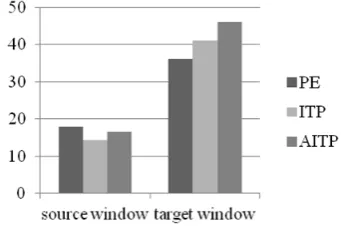
calculated for each GUI. Users exhibited a marked difference in the amount of time which they gazed at the source and target windows, as can be seen in Figure 7.
Figure 7: Average gaze fixations per segment in seconds
It is not surprising that in all cases, post-editors registered longer gaze fixations in the target window than in the source window. The main task of the post-editor is to edit the MT output presented in the target window and therefore it would be expected that more attention would be directed at that window than if the subject was translating the text in the source window from scratch.
More interesting, however, is the fact that enabling interactivity and advanced visualization options causes both an increase in gaze fixations in the target window and a corresponding decrease in the source window. In the traditional post-editing mode (PE) the average gaze fixation was 18,037 ms in the source window vs. 36,139 ms in the target window, compared to 14,422 vs. 41,052 ms when interactivity was enabled (ITP) and 16,569 vs. 45,999 when extra visualizations options were enabled (AITP). It seems likely that this is due at least partly to the increased activity occasioned by the interactivity in the target window and the next logical step would be to drill down and consider the behaviour of individual post-editors and correlate this with their translation styles and the visualisation options which were chosen in the AITP GUI.