ND-70923 (E) ISSUE 1 STOCK # 151992
Q-SIG System Manual
®
LIABILITY DISCLAIMER
NEC America, Inc. reserves the right to change the specifications, functions, or features, at any time, without notice.
NEC America, Inc. has prepared this document for use by its employees and customers. The information contained herein is the property of NEC America, Inc. and shall not be reproduced without prior written approval from NEC America, Inc.
NEAX and Dterm are registered trademarks of NEC Corporation. Copyright 2000
NEC America, Inc.
ISSUE 1 ISSUE 2 ISSUE 3 ISSUE 4
DATE JULY, 2000 DATE DATE DATE
ISSUE 5 ISSUE 6 ISSUE 7 ISSUE 8
DATE DATE DATE DATE
NEAX2000 IVS2
Q-SIG System Manual Revision Sheet 1/1
PAGE No.
ISSUE No.
1 2 3 4 5 6 7 8
i 1 ii 1 iii 1 iv 1 1 1 2 1 3 1 4 1 5 1 6 1 7 1 8 1 9 1 10 1 11 1 12 1 13 1 14 1 15 1 16 1 17 1 18 1 19 1 20 1 21 1 22 1 23 1 24 1 25 1 26 1 27 1 28 1 29 1 30 1 31 1 32 1 33 1 34 1 35 1 36 1 37 1 38 1 39 1 40 1 41 1 42 1 43 1 44 1 45 1 46 1 47 1 48 1 49 1 50 1 51 1 52 1 53 1 54 1 55 1 56 1 57 1 58 1 59 1 60 1 61 1 62 1 63 1 64 1 65 1 66 1 67 1 68 1 PAGE No. ISSUE No.
NEAX2000 IVS
2Q-SIG System Manual
TABLE OF CONTENTS
Page
LIST OF FIGURES . . . iii
LIST OF TABLES . . . iv
INTRODUCTION . . . 1
PURPOSE . . . . . 1
OUTLINE OF THIS MANUAL . . . 1
REFERENCE MANUALS . . . 2
CHAPTER 1 GENERAL INFORMATION . . . 3
SYSTEM OUTLINE . . . 4
Summary . . . 4
Physical Interface 30DTI . . . . 5
Physical Interface 24DTI . . . . 5
Interworking with Other Network . . . 6
SYSTEM CONFIGURATION . . . 7
30DTI . . . . . . 8
DCH . . . . . . . 8
24DTI . . . . . . 8
DCH . . . . . . . 8
PLO . . . . . . . 9
CARD NAME AND FUNCTION . . . 10
SYSTEM CAPACITY . . . 11
SYSTEM CONDITIONS . . . 12
Time Slot Assignment Condition . . . 12
Time Slot Allocation for DTI/DCH Card . . . 13
SERVICE FEATURES . . . 14
Connected Destination Indication . . . 14
Transit Counter Relaying . . . 16
CHAPTER 2 INSTALLATION . . . 17
PRECAUTIONS . . . 18
STATIC ELECTRICITY GUARD . . . 18
REQUIRED EQUIPMENT . . . 21
INSTALLATION PROCEDURE . . . 22
TABLE OF CONTENTS
Page
CHAPTER 3 SYSTEM DATA PROGRAMMING . . . 31
HOW TO READ THIS CHAPTER. . . 32
DTI ASSIGNMENT . . . 33
DCH ASSIGNMENT . . . 37
TANDEM CONNECTION ASSIGNMENT. . . 38
CONNECTED DESTINATION INDICATION ASSIGNMENT . . . 39
CHAPTER 4 CIRCUIT CARD INFORMATION . . . 41
HOW TO READ THIS CHAPTER. . . 42
MOUNTING LOCATION OF CIRCUIT CARD . . . 43
LIST OF REQUIRED CIRCUIT CARD . . . 44
PN-CP14 (MP) . . . 45
PN-30DTC-A (DTI) . . . . 50
PN-24DTA-C (DTI) . . . . 56
PN-SC01 (DCH) . . . 62
PZ-M542 (CONN) . . . . 65
LIST OF FIGURES
Figure Title Page
Figure 1-1 System Outline of Q-SIG . . . 4
Figure 1-2 Physical Interface . . . 5
Figure 1-3 Physical Interface . . . 5
Figure 1-4 Interworking with Other Network . . . 6
Figure 1-5 System Configuration of Q-SIG . . . 7
Figure 1-6 Clock Supply Route Configuration . . . 9
Figure 1-7 Accommodation of DTI/DCH/ICH/BRT/PRT into TDSW . . . 12
Figure 1-8 Time Slot Allocation for DTI . . . 13
Figure 1-9 Connected Destination Indication . . . 14
Figure 1-10 Transit Counter . . . 16
Figure 2-1 Static Electricity Guard (1 of 2) . . . 18
Figure 2-2 Installation Procedure for Q-SIG . . . 22
Figure 2-3 Cable Connection via MDF . . . 26
Figure 2-4 Location of the AP Slots and the LTC Connectors for DTI . . . 27
Figure 2-5 Example of MDF Cross Connection for DTI . . . 28
Figure 2-6 Cable Connection via the CONN Card . . . 29
Figure 2-7 Example of Coaxial Cable Connection . . . 30
LIST OF TABLES
Table Title Page
Table 1-1 Q-SIG Card Name and Function . . . 10
Table 1-2 System Capacity for Q-SIG . . . 11
Table 2-1 Required Equipment for Q-SIG . . . 21
INTRODUCTION
Purpose
INTRODUCTION
PURPOSE
This manual describes the hardware installation and programming procedure for the Q-SIG System on the NEAX2000 IVS2.
OUTLINE OF THIS MANUAL
This manual consists of the following chapters:
CHAPTER 1 GENERAL INFORMATION
This chapter explains the Q-SIG system outline, system configuration, the name and functions of circuit cards required, system capacity, system conditions, and available service features.
CHAPTER 2 INSTALLATION
This chapter explains the hardware installation procedure to provide Q-SIG interface on the PBX.
CHAPTER 3 SYSTEM DATA PROGRAMMING
This chapter explains the programming procedure to provide Q-SIG feature on the PBX.
CHAPTER 4 CIRCUIT CARD INFORMATION
INTRODUCTION
Reference Manuals
REFERENCE MANUALS
Refer to the following manuals during installation:
Installation Procedure Manual: Describes the installation procedure of the PBX system.
Command Manual: Describes Customer Administration Terminal (CAT)
operation, command function and setting data required for programming the system, and Resident System Program.
CHAPTER 1
GENERAL INFORMATION
CHAPTER 1 GENERAL INFORMATION
System Outline
SYSTEM OUTLINE
Summary
This feature allows the PBX to provide basic connection service for interfacing with the other PBX by using Layer 3 protocol which conforms to ETS 300 172. ETS 300 172 is standardized for private telecommunication network as Inter-exchange signaling protocol for circuit mode basic services by European Telecommunication Standards Institute (ETSI). The Q-SIG protocol creates Layer 3 messages between Q reference points expected as conceptual point for inter-office signalling.
Figure 1-1 System Outline of Q-SIG
PBX
DTI Data Link
Layer Physical Layer
Call Control
Protocol Control
Q
PBX
DTI Data Link Layer Physical Layer
Call Control
Protocol Control Q
DTI Q-reference point
Layer 3
Layer 1
NOTE: Conforming to Q921-a (PBX-PBX Interface)
CHAPTER 1 GENERAL INFORMATION
System Outline
Physical Interface 30DTI
On the Q-SIG system, a 2 Mbps digital interface is used for the interface trunk.
A D Channel Handler is required for each physical interface. A single data link channel can control a maximum of 30 B Channels.
Figure 1-2 Physical Interface
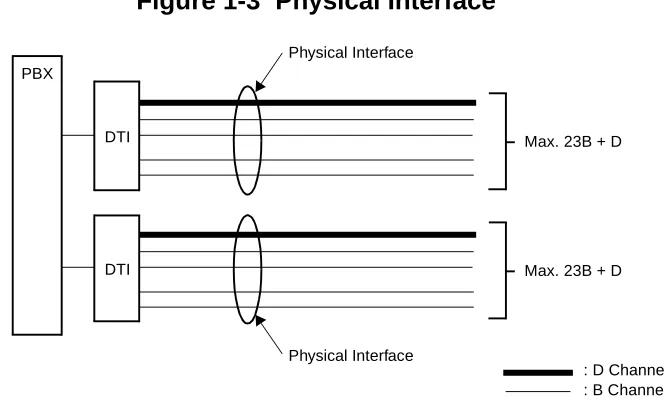
Physical Interface 24DTI
On the Q-SIG system, a 1.544 Mbps digital interface is used for the interface trunk.
A D Channel Handler is required for each physical interface. A single data link channel can control a maximum of 23 B Channels.
Figure 1-3 Physical Interface
Physical Interface
: D Channel : B Channel DTI
PBX
DTI
Physical Interface
Max. 30B + D
Max. 30B + D
Physical Interface
DTI PBX
DTI
Max. 23B + D
CHAPTER 1 GENERAL INFORMATION
System Outline
Interworking with Other Network
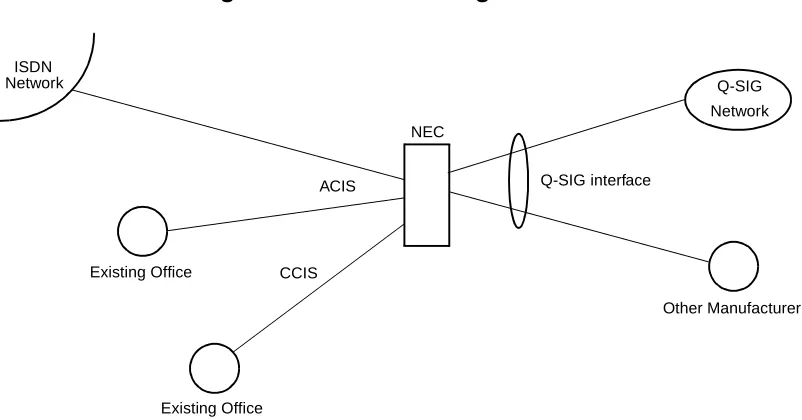
The PBX can be connected with the other manufacturer’s PBX by the Q-SIG interface, and the Q-SIG network can interwork with the other network.
Figure 1-4 Interworking with Other Network
NEC ISDN
Q-SIG Network
ACIS
Existing Office
Existing Office CCIS
Q-SIG interface
Other Manufacturer
NOTE: Interworking between Q-SIG and CCIS is not available.
CHAPTER 1 GENERAL INFORMATION
System Configuration
SYSTEM CONFIGURATION
Figure 1-5 shows the system configuration of the Q-SIG system.
Figure 1-5 System Configuration of Q-SIG
CLOCK PBX
30B/23B SLT
FP MP
30-CHANNEL PCM/23B DIGITAL LINE
DTI: 30/24-Channel Digital Trunk Interface DCH: D Channel Handler
PLO: Phase Locked Oscillator D
TDSW DCH
DTI
PLO LC
NETWORK Dterm
DLC
CHAPTER 1 GENERAL INFORMATION
System Configuration
30DTI
The Digital Trunk Interface (DTI) interfaces the PBX directly to 30-channel PCM transmission line. The 30-DTI has the following functions.
• Unipolar/Bipolar Conversion (HDB3 Format) • Signaling Insertion/Extraction
• Alarm Detection/Insertion
• Digital PAD on Voice Signal Transmission
• Cyclic Redundancy Checking (based on ITU-T Rec. G704)
• Channel Associated Signaling (based on ITU-T Rec. Q421 Digital R2 Signaling Code)
For connection of a 30-DTI and transmission line, either coaxial cable or twisted pair cable can be used.
DCH
The D Channel Handler (DCH) provides the D Channel signaling interface through the DTI to a Q-SIG network, and it is responsible for signaling between the PBX and the network under control of the system MP.
A DCH can control a maximum of 30 B Channels.
24DTI
The Digital Trunk Interface (DTI) interfaces the PBX directly to 24-channel PCM transmission line. The 24-DTI has the following functions.
• Unipolar/Bipolar Conversion (AMI Format) • Alarm Detection/Insertion
• Digital PAD on Voice Signal Transmission
• Cyclic Redundancy Checking (based on ITU-T Rec. G704)
For connection of a 24-DTI and transmission line, a twisted pair cable can be used.
DCH
The D Channel Handler (DCH) provides the D Channel signaling interface through the DTI to a Q-SIG network, and it is responsible for signaling between the PBX and the network under control of the system MP.
CHAPTER 1 GENERAL INFORMATION
System Configuration
PLO
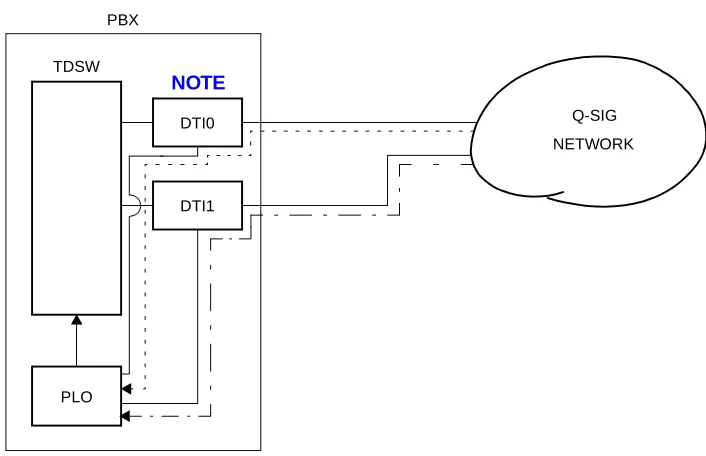
The Phase Locked Oscillator (PLO) equipped on the MP card is responsible to synchronize the system to Q-SIG clocks.
The PLO generates the clock signals according to the source clocks received from network. The source clock signals are extracted at DTI cards and supplied to the PLO. Two clock routes are available; one is the Route 0 to receive clock signals from DTI0, and the other is a standby Route 1 (DTI1) to receive clock signals when no clock signals appear on the Route 0. When clock signals come from neither the Route 0 nor the Route 1, the PLO keeps generating the clock signals with the frequency of previous source clock. The PLO can receive different frequency of source clocks from the Route 0 and Route 1.
Figure 1-6 shows an example of clock supply route.
Figure 1-6 Clock Supply Route Configuration
PBX TDSW
DTI1
PLO
NETWORK DTI0
: CLOCK SIGNAL SUPPLY ROUTE 0 : CLOCK SIGNAL SUPPLY ROUTE 1
Q-SIG
CHAPTER 1 GENERAL INFORMATION
Card Name and Function
CARD NAME AND FUNCTION
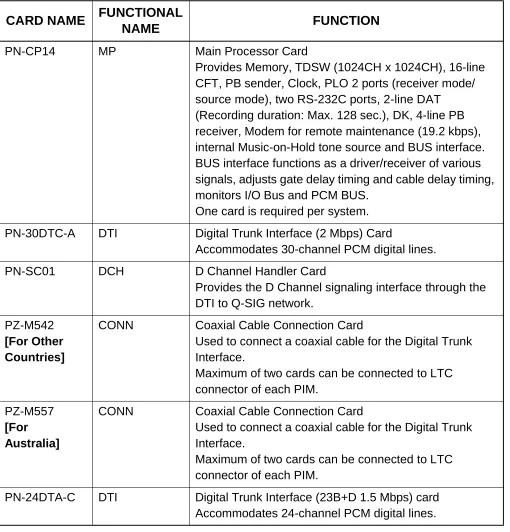
Table 1-1 shows the circuit card name and function for Q-SIG.
Table 1-1 Q-SIG Card Name and Function
CARD NAME FUNCTIONAL
NAME FUNCTION
PN-CP14 MP Main Processor Card
Provides Memory, TDSW (1024CH x 1024CH), 16-line CFT, PB sender, Clock, PLO 2 ports (receiver mode/ source mode), two RS-232C ports, 2-line DAT (Recording duration: Max. 128 sec.), DK, 4-line PB receiver, Modem for remote maintenance (19.2 kbps), internal Music-on-Hold tone source and BUS interface. BUS interface functions as a driver/receiver of various signals, adjusts gate delay timing and cable delay timing, monitors I/O Bus and PCM BUS.
One card is required per system.
PN-30DTC-A DTI Digital Trunk Interface (2 Mbps) Card
Accommodates 30-channel PCM digital lines.
PN-SC01 DCH D Channel Handler Card
Provides the D Channel signaling interface through the DTI to Q-SIG network.
PZ-M542 [For Other Countries]
CONN Coaxial Cable Connection Card
Used to connect a coaxial cable for the Digital Trunk Interface.
Maximum of two cards can be connected to LTC connector of each PIM.
PZ-M557 [For Australia]
CONN Coaxial Cable Connection Card
Used to connect a coaxial cable for the Digital Trunk Interface.
Maximum of two cards can be connected to LTC connector of each PIM.
PN-24DTA-C DTI Digital Trunk Interface (23B+D 1.5 Mbps) card
CHAPTER 1 GENERAL INFORMATION
System Capacity
SYSTEM CAPACITY
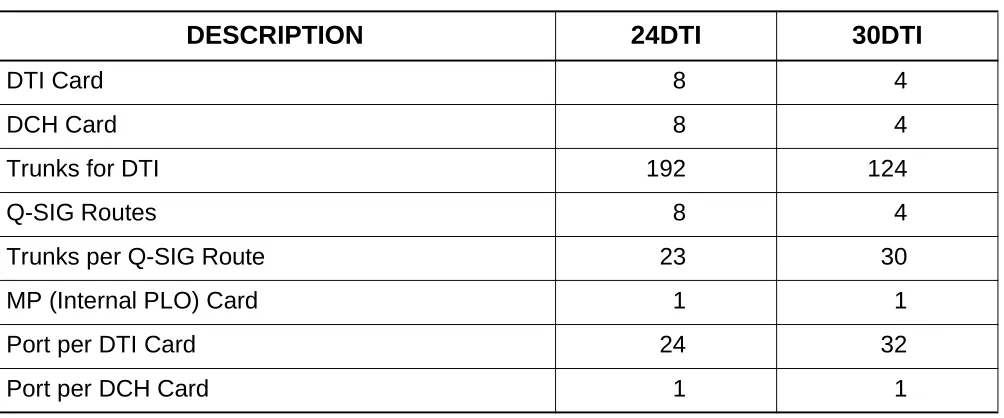
Table 1-2 System Capacity for Q-SIG
DESCRIPTION 24DTI 30DTI
DTI Card 8 4
DCH Card 8 4
Trunks for DTI 192 124
Q-SIG Routes 8 4
Trunks per Q-SIG Route 23 30
MP (Internal PLO) Card 1 1
Port per DTI Card 24 32
CHAPTER 1 GENERAL INFORMATION
System conditions
SYSTEM CONDITIONS
Time Slot Assignment Condition
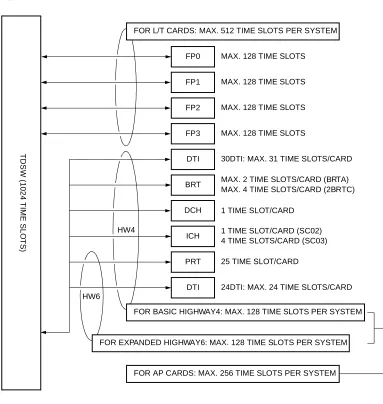
As shown in Figure 1-7, the 30DTI/DCH card uses the time slot on the basic Highway 4.
Therefore, the total number of time slots for all 30DTI/DCH cards must be 128 time slots or less including all other application processor cards, which use the Highway 4.
The 24DTI/PRT card can use the time slot on both the basic and expanded Highway 4 and 6.
Figure 1-7 Accommodation of DTI/DCH/ICH/BRT/PRT into TDSW
PRT
T
D
S
W
(102
4 T
IM
E
SLO
T
S)
FP0
FP1
FP2
FP3
DTI
DCH
FOR L/T CARDS: MAX. 512 TIME SLOTS PER SYSTEM
FOR BASIC HIGHWAY4: MAX. 128 TIME SLOTS PER SYSTEM 1 TIME SLOT/CARD
MAX. 128 TIME SLOTS
MAX. 128 TIME SLOTS
MAX. 128 TIME SLOTS
MAX. 128 TIME SLOTS
30DTI: MAX. 31 TIME SLOTS/CARD
BRT
ICH
DTI
MAX. 2 TIME SLOTS/CARD (BRTA) MAX. 4 TIME SLOTS/CARD (2BRTC)
25 TIME SLOT/CARD
24DTI: MAX. 24 TIME SLOTS/CARD 1 TIME SLOT/CARD (SC02) 4 TIME SLOTS/CARD (SC03)
FOR EXPANDED HIGHWAY6: MAX. 128 TIME SLOTS PER SYSTEM HW4
HW6
CHAPTER 1 GENERAL INFORMATION
System conditions
Time Slot Allocation for DTI/DCH Card
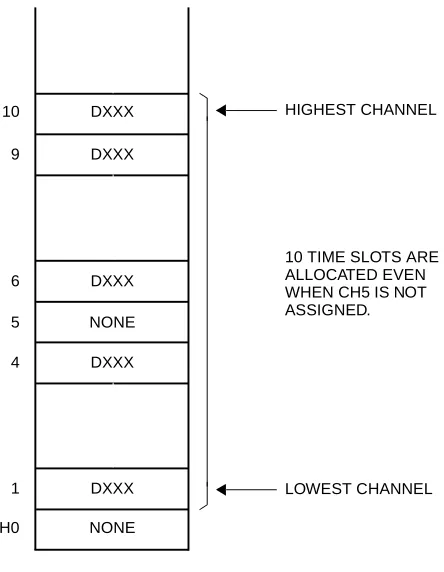
On each DTI card, the system recognizes the lowest and highest channel numbers to which trunk numbers have been assigned, and allocates time slots to all the channels within them. If trunk numbers are assigned to discontinuous channels in this case, the system also allocates time slots to channels not assigned.
For example, as shown in Figure 1-8, even when Channel 1 through Channel 10 have been assigned by the system data programming (CM07 YY=01) excepting Channel 5, the system allocates a total of 10 time slots for all the ten channels. Therefore, to avoid allocation of unnecessary time slots, it is recommended that consecutive channels are assigned on each DTI card.
In the case of the DCH card, one time slot is allocated for setting up a fixed path between the DTI and the DCH by assigning Channel 16 of the DTI as the D Channel.
Figure 1-8 Time Slot Allocation for DTI
10 9
6 5 4
1 CH0
DXXX DXXX
DXXX NONE DXXX
DXXX NONE
LOWEST CHANNEL HIGHEST CHANNEL
CHAPTER 1 GENERAL INFORMATION
Service Features
SERVICE FEATURES
Connected Destination Indication
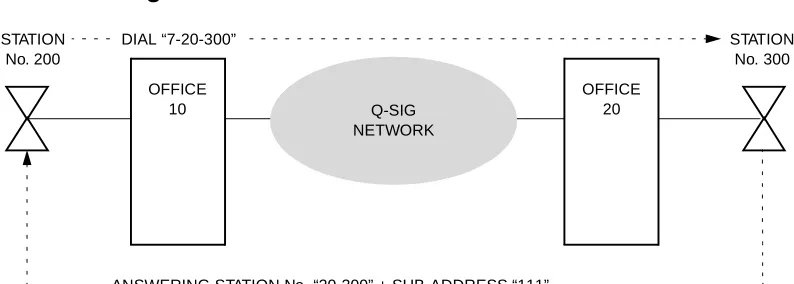
This feature allows the LCD on the calling station/Attendant Console to indicate the connected destination number (answering station number) and the sub-address sent from the opposite office.
Figure 1-9 Connected Destination Indication
• The LCD does not indicate the answering station number and sub-address number if the numbers are not sent from the opposite office.
• If the calling station is an ISDN terminal or a terminal which has no indicator, the answering station number and sub-address number cannot be indicated.
• If the answering station number exceeds 16 digits, the first 15 digits and “*” are indicated on the Dterm LCD. “*” means existence of more than 15 digits.
STATION No. 200
OFFICE
10 Q-SIG
NETWORK
STATION No. 300 OFFICE
20 DIAL “7-20-300”
<EXAMPLE OF INDICATION>
When dialing:
When answered:
• Dterm
720300 2: 27 PM TUE 23
• ATTCON 720300
01: 00 111 20300
Sub-address No. (Max. 8 digits)
Answering station No. (Max. 16 digits) Duration of the call
20300
CHAPTER 1 GENERAL INFORMATION
Service Features
• If the sub-address exceeds 8 digits, the first 8 digits and “*” are indicated on the Dterm LCD. “*” means existence of more than 8 digits.
• The sub-address of the answering station is not indicated on the Attendant Console LCD.
• If the answering station number exceeds 6 digits, the last 6 digits are indicated on the Attendant Console LCD.
CHAPTER 1 GENERAL INFORMATION
Service Features
Transit Counter Relaying
Transit counter is used as the information which informs the number of stages on tandem connection. On the Q-SIG network, the transit Counter 0 is sent from the calling office. The tandem office sends the transit counter to the destination office adding 1 to the value of received transit counter. In this manner, the transit counter value increases according to the number of the stages of tandem connection.
Figure 1-10 Transit Counter
• This feature is available when the all PBXs in the network are connected to each other by Q-SIG interface.
• The transit counter values 0 through 31 are available.
• If the tandem office does not receive the transit counter from the opposite office, the tandem office sends the transit counter as “0” to next office.
TRC=0 TRC=1 TRC=2 TRC=3 TRC=3
Q-SIG NETWORK CALLING
OFFICE
TANDEM OFFICE
TANDEM OFFICE
TANDEM OFFICE
DESTINATON OFFICE
CHAPTER 2
INSTALLATION
CHAPTER 2 INSTALLATION
Precautions
PRECAUTIONS
STATIC ELECTRICITY GUARD
You must wear a grounded wrist strap to protect circuit cards from static electricity.
Figure 2-1 Static Electricity Guard (1 of 2)
• WHEN PLUGGING/UNPLUGGING A CIRCUIT CARD
• WHEN HOLDING A CIRCUIT CARD
PBX
WRIST STRAP
FRAME GROUND SCREW
CARD FRONT
CHAPTER 2 INSTALLATION
Precautions
Figure 2-1 Static Electricity Guard (2 of 2)
• WHEN MAKING A SWITCH SETTING ON A CIRCUIT CARD
• WHEN CARRYING A CIRCUIT CARD
The mark shown below is attached to the sheet for the work in which circuit cards are handled. When engaging in such work, the installer must be careful not to cause damage by static electricity.
WEAR A WRIST STRAP AND PERFORM THE WORK ON A GROUNDED
CONDUCTIVE WORK SURFACE. CIRCUIT
CARD
WHEN CARRYING A CIRCUIT CARD AROUND, KEEP THE CARD IN A CONDUCTIVE POLYETHYLENE BAG. CIRCUIT
CARD
CONDUCTIVE POLYETHYLENE BAG
ATTENTION
Contents Static Sensitive Handling
CHAPTER 2 INSTALLATION
Precautions
Caution
You must hold the edge of a circuit card when plugging or unplugging the circuit card. If you touch another area, you may be exposed to hazardous voltages.
CARD FRONT
NEVER TOUCH THE
CHAPTER 2 INSTALLATION
Required Equipment
REQUIRED EQUIPMENT
Table 2-1 shows the equipment required to provide Q-SIG interface to the system.
Table 2-1 Required Equipment for Q-SIG
EQUIPMENT DESCRIPTION QUANTITY REMARKS
PN-30DTC-A (30-DTI)
(Australia/Japan)
30-Channel DTI Card 1-4
PN-24DTA-C (24-DTI) (U.S.)
24-Channel DTI Card 1-4
PN-SC01 (DCH)
D Channel Handler Card 1-4
PZ-M542/M557(CONN) Coaxial Cable Connection
Card
1-4 2 cards/PIM
CHAPTER 2 INSTALLATION
Installation Procedure
INSTALLATION PROCEDURE
Install the equipment for Q-SIG according to the procedure in Figure 2-2.
Figure 2-2 Installation Procedure for Q-SIG
END START
MOUNTING DTI AND DCH CARD
MOUNTING CONN CARD
NOTE: This procedure is required when you provide CONN card to connect a coaxial cable for 24-DTI/30-DTI.
DTI CABLE CONNECTION VIA MDF
DTI CABLE CONNECTION VIA CONN CARD SELECTION OF PLO
Page 23
Page 24 NOTE
Page 25
Page 26
Page 29 NOTE
CHAPTER 2 INSTALLATION
Installation Procedure
Mounting DTI and DCH Card
(1) Before mounting the 24-DTI/30-DTI card and DCH card, set the MB
switch to UP position, and set the other switches to appropriate position.
See CHAPTER 4,Page 41.
(2) Mount the 24-DTI/30-DTI card and the DCH card in the following AP slots on PIM0-PIM7.
PIM0: AP00-AP10 slots PIM1-7: AP00-AP11 slots
NOTE: The DTI card (DTI0, DTI1) which sends a clock signal to PLO of the MP card must be mounted in the AP slots on PIM0.
(3) After mounting the card, set the MB switch to DOWN position to put the card in service. ATTENTION Contents Static Sensitive Handling
CHAPTER 2 INSTALLATION
Installation Procedure
Mounting CONN Card
When providing CONN (PZ-M542/M557) card to connect a coaxial cable for 24-DTI/30-DTI, do the following installation.
(1) Confirm the correct switch setting of the CONN card. See CHAPTER 4, Page 41.
(2) Mount the CONN card to LTC connector on BWB in the PIM which accommodates DTI
cards.
CHAPTER 2 INSTALLATION
Installation Procedure
Selection of PLO in MP Card
(1) Confirm the correct switch settings of MP card. See CHAPTER 4, Page 41.
CHAPTER 2 INSTALLATION
Installation Procedure
DTI Cable Connection via MDF
When you use a twisted-pair cable, connect the cable to a CSU via the MDF as shown in Figure 2-3.
• Location of AP Slots and LTC Connectors for DTI - Page 27
• Example of MDF Cross Connection for DTI - Page 28
Figure 2-3 Cable Connection via MDF
CSU MDF
LTC0/LTC1/LTC2/LTC3
TWISTED-PAIR CABLE 24-DTI
BWB PBX
(SHIELD TYPE)
MAX. 400 m (1310 ft.) CONNECTOR
CHAPTER 2 INSTALLATION
Installation Procedure
Figure 2-4 shows LTC connector corresponds with the AP slots, and DTI pin assignment for each AP slot.
Figure 2-4 Location of the AP Slots and the LTC Connectors for DTI
CHAPTER 2 INSTALLATION
Installation Procedure
Figure 2-5 shows an example of the cable connection when the 24-DTI/30-DTI card is mounted in the AP05 slot of PIM0.
Figure 2-5 Example of MDF Cross Connection for DTI
17 18 19 20 RA TA 42 43 44 45 RB TB LTC1 (J) 42 43 44 45 RB TB 17 18 19 20 RA TA LTC1 (P) PIM 0
J P MDF
CHAPTER 2 INSTALLATION
Installation Procedure
DTI Cable Connection via CONN Card
When you use an coaxial cable, connect the cable to a CSU via the CONN (PZ-M542/M557) card as shown in Figure 2-6.
Figure 2-6 Cable Connection via the CONN Card
CSU
LTC0/LTC1/LTC2/LTC3
COAXIAL CABLE 30-DTI
BWB PBX
MAX. 6 dB loss at 1024 kHz CONN
CHAPTER 2 INSTALLATION
Installation Procedure
Figure 2-7 shows an example of the cable connection when the 24-DTI/30-DTI card is mounted in the AP05 slot of PIM0.
Figure 2-7 Example of Coaxial Cable Connection
2 COAXIAL CONNECTOR 1 LTC1 CONNECTOR
17 18 19 20 RA TA 42 43 44 45 RB TB LTC1 (J) 17 18 19 20 RB TB 42 43 44 45 RA TA LTC1 (P) PIM 0
J P CONN
CHAPTER 3
SYSTEM DATA
PROGRAMMING
CHAPTER 3 SYSTEM DATA PROGRAMMING
How to Read This Chapter
HOW TO READ THIS CHAPTER
In the programming procedure, the meaning of (1), (2) and markings are as follows.
(1) : 1st Data
(2) : 2nd Data
: Initial Data
With the system data clear command (CM00, CM01), the data with this marking is automatically assigned for each command.
: System Initialization
After entering the data, system reset is required (Depress SW1 on the MP card).
: DCH Initialization
A reset of the DCH card is required after data setting. Set the Make Busy switch to UP and then Down.
INITIAL
CHAPTER 3 SYSTEM DATA PROGRAMMING
DTI Assignment
DTI ASSIGNMENT
DESCRIPTION DATA
Assign an AP number to the DTI card. The AP number must match the SENS switch setting on the DTI card.
• (1) (2)
Y=0
04-15, 20-31: AP No. 09: DTI card
Assign a Q-SIG trunk number to each channel number on the DTI card.
The system allocates time slots to consecutive channels from lowest to highest channel number assigned. To minimize the number of time slots allocated, assign trunk numbers to the consecutive channels on each card. Never skip channels in CM07.
• (1)
(2)
YY=01 XX ZZ
XX: 04-15, 20-31: AP No. assigned by CM05 Y=0
ZZ: 01-15, 17-31: Channel No. of DTI
NOTE 1
D000-D255: Trunk No.
Trunk No. already assigned by CM10 cannot be used.
Assign the access code for Q-SIG to LCR Group 0-3.
• (1) (2)
Y=0-3 Numbering Plan Group 0-3 X-XXXX: Access code
A126-A129: LCR Group 0-3 CM07
CM20 START
CM05
A
INITIAL
CHAPTER 3 SYSTEM DATA PROGRAMMING
DTI Assignment
DESCRIPTION DATA
Assign a trunk route to each Q-SIG trunk used for voice channel (B Channel), and also to signaling channel (D Channel).
• (1)
(2)
YY=00
000-255: Trunk No. assigned by CM07 YY=01
00-63: Trunk Route No.
NOTE 1: DTI route must be separated
from analog trunk routes.
NOTE 2: The trunk routes for D Channel
must be different from the trunk routes for B Channel.
Assign the trunk route data to each Q-SIG incoming trunk used for voice channel only. • • • • (1) (2)
YY=02 Day Mode YY=03 Night Mode YY=40 Mode A YY=41 Mode B
000-255: Trunk No. assigned by CM07 YY=01
04: Direct-In Termination 21: Dial-in Termination
Assign CIC (Circuit Identification Code) number to each Q-SIG trunk used for voice channel only.
NOTE: CIC number must not be as-signed to the trunk number of D Channel: TS 16 (30DTI).
• (1)
(2)
YY=07
000-255: Trunk No. assigned by CM07 YY=01
000-029: CIC No.
EXAMPLE OF 30DTI
B Channel trunk No.: D100-D114, D116-D130
D Channel trunk No.: D115 (1) 100-114, 116-130 (2) 000-014, 015-029 EXAMPLE OF 24DTI
B Channel trunk No.: D100-D122 D Channel trunk No.: D123 (1) 100-122
(2) 123 CM30
A
CHAPTER 3 SYSTEM DATA PROGRAMMING
DTI Assignment
DESCRIPTION DATA
Assign the trunk route data to the DTI route number assigned by CM30 Y=00.
NOTE: CM35 YY=00, 04, 05, 09, 15 and 19 should be assigned to only the B Channel trunk routes. For D Channel trunk route, no data setting is required.
• (1) (2)
YY=00 Kind of Trunk Route
00-63: B Channel Trunk Route No. 04: Tie Line trunk
•
(1) (2)
YY=04
Answer Signal from distant office 00-63: B Channel Trunk Route No. 2: Answer signal arrives
•
(1) (2)
YY=05
Release Signal from distant office 00-63: B Channel Trunk Route No. 1 : Release signal arrives
• (1) (2)
YY=09 Incoming Connection Signaling 00-63: B Channel Trunk Route No. 08: ISDN/Q-SIG
•
(1) (2)
YY=15 Kind of Call Termination Indicator Key/Lamp on ATT 00-63: B Channel Trunk Route No. 00-07: C.O. Incoming 0-7
YY=19 DTI PAD [For Australia]
• (1) (2)
YY=19
00-63: B Channel Trunk Route No. 0-3: Programmable PAD
(See CM42) 4-7 : Fixed PAD CM35
B
T/R : Transmitter PAD/Receiver PAD + : Gain
CONNECTION PATTERNS
PAD DATA OF DTI [dB]
CHAPTER 3 SYSTEM DATA PROGRAMMING
DTI Assignment
DESCRIPTION DATA
YY=19 DTI PAD
[For North America/Other Countries]
Assign Q-SIG to the B Channel trunk routes and the D Channel trunk route.
•
(1)
(2)
YY=90
Assignment of DTI route for Q-SIG 00-63: B Channel /D Channel Trunk
Route No. 5: Q-SIG (ETS300 172)
Assign the LAPD mode of the D Channel trunk route.
This data setting must not be identical with the opposite PBX.
If the opposite PBX is defined as a “Network Mode”, set this data to 1 (User Mode).
• (1) (2)
YYY=113
00-63: D Channel Trunk Route No. 0 : Network Mode
1 : User Mode
END CM35
C
T/R : Transmit PAD/Receive PAD + : Gain
– : Loss CONNECTION
PATTERNS
PAD DATA OF DTI [dB]
DAT A=4 (T/R) DAT A=5 (T/R) DAT A=6 (T/R) DAT A=7 (T/R)
Station-DTI –3/–8 –3/–3 –3/–3 –3/–8 Tone-DTI 0/0 0/0 0/0 0/0 COT/DID/LDT/ODT
(2W E&M)-DTI 0/0 0/0 0/0 0/0 ODT (4W E&M)-DTI +3/–3 0/0 0/0 +3/–3 DTI-DTI 0/–6 0/0 0/–6 0/0
CHAPTER 3 SYSTEM DATA PROGRAMMING
DCH Assignment
DCH ASSIGNMENT
DESCRIPTION DATA
Assign an AP number to the DCH card. The AP number must match the SENS switch setting on the DCH card.
• (1) (2)
Y=0
04-15, 20-31: AP No. 32: DCH card for Q-SIG
Assign the DCH number to the AP number of DCH assigned by CM05.
• (1) (2)
YY=08 0-7: DCH No.
04-15, 20-31: AP No. assigned by CM05 Y=0
Assign the DCH number to the Q-SIG trunk route assigned by CM30 YY=00.
NOTE: This data should be assigned to only the B Channel trunk routes.
• (1) (2)
YY=93 Assignment of DCH
00-63: B Channel Trunk Route No. 00-07: DCH No. assigned by CM06
Assign the trunk number assigned by CM07 YY=01 to each DCH number for providing D Channel path between DTI and DCH.
• (1) (2)
YY=00
0-7: DCH No. assigned by CM06 000-255: Trunk No. assigned by CM07 YY=01
CM06
CM35
CMA9 START
END CM05
INITIAL
CHAPTER 3 SYSTEM DATA PROGRAMMING
Tandem Connection Assignment
TANDEM CONNECTION ASSIGNMENT
To provide Tandem Connection (Tie Line to Q-SIG, Q-SIG to Tie Line), do the following programming.
DESCRIPTION DATA
Specify whether the busy tone is sent to a calling party of Q-SIG when a called party is busy in the tandem connection (Q-SIG to COT).
(1) (2)
407
0 : Available (BT) 1 : Not available (RBT)
Specify the combination of trunk routes allowing the tandem connection.
(1)
(2)
XX YY
XX : 00-63 (Incoming Trunk Route) YY : 00-63 (Outgoing Trunk Route) 0 : Allow
1 : Restricted
Specify the timing start when making a Q-SIG call from a station (PB/DP telephone, Dterm) or Attendant Console for the tandem connection.
NOTE 1: By using this command, a
Q-SIG call is available even if “#” is not dialed.
NOTE 2: This command is effective for
dialing a called number. When dialing a called party
subaddress, this command is not effective.
• (1) (2)
Y=0 57
03-14: 3-14 sec. (1 sec. increments) If no data is set, the timing start is not effective.
CM41 START
END CM08
CHAPTER 3 SYSTEM DATA PROGRAMMING
Connected Destination Indication Assignment
CONNECTED DESTINATION INDICATION ASSIGNMENT
To send own office number with the answering station (single line telephone, Dterm) number to the calling party, do the following programming.
DESCRIPTION DATA
Assign the own office number sent with the answering station number, if required.
• (1) (2)
YY=01
0-7: DCH No.
0-999: Own Office No. START
END CMA9
CHAPTER 4
CIRCUIT CARD
INFORMATION
CHAPTER 4 CIRCUIT CARD INFORMATION
How to Read This Chapter
HOW TO READ THIS CHAPTER
This chapter explains each circuit card used in this system about the following items. Explanations are given in alphabetical order of the circuit card names within each circuit card category (Control, Application Processor, and Line/Trunk).
(1) Locations of Lamps, Switches, and Connectors
The locations of lamps, switches, and connectors of each circuit card are shown by a face layout.
(2) Lamp Indications
The name, color, and functions of each indicator lamp equipped on each circuit card are described in a table.
(3) Switch Settings
The name, settings, and functions of each switch equipped on each circuit card are described in a table.
CHAPTER 4 CIRCUIT CARD INFORMATION
Mounting Location of Circuit Card
MOUNTING LOCATION OF CIRCUIT CARD
This section explains the conditions for mounting circuit cards for the Q-SIG. Figure 4-1 shows circuit card mounting slots allocated in the PIM.
Figure 4-1 Mounting Location of Circuit Card
*1: PN-CP14 (MP) card on the MP12 slot on PIM0.
*2: The following application processor card mounted on the AP00-AP11 slots on PIM0-7. PN-24DTA-C (DTI)
PN-30DTC-A (DTI) PN-SC01 (DCH)
*3: PZ-M542/PZ-M557 (CONN) card on the LTC0-LTC3 connectors on the PIM which accommodates 24DTI/30DTI card.
CHAPTER 4 CIRCUIT CARD INFORMATION
List of Required Circuit Card
LIST OF REQUIRED CIRCUIT CARD
Table 4-1 shows the required circuit cards to be explained in this section.
*MB = Make Busy
Table 4-1 List of Required Circuit Card
NAME (FUNCTIONAL
NAME)
LAMP
X: PROVIDED –: NOT
PROVIDED
SWITCH X: PROVIDED –: NOT
PROVIDED
EXTRACTION/ INSERTION WITH POWER ON X: ALLOWED
: ALLOWED AFTER MB* –: NOT
ALLOWED
REFERENCE PAGE
PN-CP14 (MP) X X – Page 45
PN-30DTC-A (DTI) X X Page 50
PN-24DTA-C (DTI) X X Page 56
PN-SC01 (DCH) X X Page 62
PZ-M542 (CONN) – X X Page 65
CHAPTER 4 CIRCUIT CARD INFORMATION
List of Required Circuit Card
PN-CP14 (MP)
Locations of Lamps, Switches, and Connectors
CONN: To CONNR connector on PZ-M537 (EXPMEM)
Lamp Indications
LAMP
NAME COLOR FUNCTION
RUN Green Flashes at 120 IPM while this card is operating normally.
CLK Green Remains lit while receiving clock signals to the PLO.
SW3 RUN SW1
SW2
CLK VR
DK JACK CONN
SW4
JP0 JP1
CHAPTER 4 CIRCUIT CARD INFORMATION
List of Required Circuit Card
Switch Settings
NOTE 1: Set the groove on the switch to the desired position.
Caution
When the operating power is being supplied to this circuit card, do not plug/unplug this circuit card into/from its mounting slot.
SWITCH NAME SWITCH NUMBER
SETTING
POSITION FUNCTION CHECK
SW3 (Rotary SW)
NOTE 1
0-F
On Line
(Call processing is in progress)
2 Off Line (Call processing is stopped)
• I/O port: As per CM40 YY=08
3 Off Line (Call processing is stopped)
• I/O port: 9600 bps (Fixed)
5
NOTE 2
Off Line (Call processing is stopped) • I/O port: 9600 bps
6
NOTE 2
Off Line (Call processing is stopped) • I/O port: 19200 bps
7
NOTE 2
Off Line (Call processing is stopped) • I/O port: 38400 bps
8
NOTE 2
Off Line (Call processing is stopped) • I/O port: 57600 bps
B For clearing the office data
C For setting the resident system
program
1, 4, 9 A, D-F
Not used
(Continued) 0
CHAPTER 4 CIRCUIT CARD INFORMATION
List of Required Circuit Card
SWITCH NAME SWITCH NUMBER
SETTING
POSITION FUNCTION CHECK
SW1 (Push SW) For initializing CPU
SW2
(Piano Key SW) 1
ON A-law (Australia)
OFF µ-law (North America)
2, 3
Selection of PLO0 input (Phase Locked Oscillator) • For clock receiver office:
• For clock source office:
SW2-2 SW2-3
OFF OFF
4 ON
When using RS1 port for built-in MODEM
OFF When using RS1 port for RS-232C
(Continued) 4
3 2 1 OFF
ON
SW2-2 SW2-3 FUNCTION
OFF OFF 1.5 MHz clock
[For PN-24DTA-C/PN-24PRTA] ON OFF 192 kHz clock
[For PN-BRTA] OFF ON 2 MHz clock
CHAPTER 4 CIRCUIT CARD INFORMATION
List of Required Circuit Card
SWITCH NAME SWITCH NUMBER
SETTING
POSITION FUNCTION CHECK
SW4 (Dip SW) 1 Not used
2 Not used
3, 4
Selection of PLO1 input (Phase Locked Oscillator) • For clock receiver office:
• For clock source office:
SW4-3 SW4-4
OFF OFF
VR (Rotary SW) Variable Resister for External Hold
Tone Source
(0 - 20 Kohms : Clockwise)
DK (Connector) 02 Ground detection
01 Ground sending
(Continued) 1 2 3 4
ON
OFF
OFF
SW4-3 SW4-4 FUNCTION
OFF OFF 1.5 MHz clock
[For PN-24DTA-C/PN-24PRTA] ON OFF 192 kHz clock
[For PN-BRTA] OFF ON 2 MHz clock
[For PN-30DTC-A/PN-2BRTC] ON ON Not used
20 0
CHAPTER 4 CIRCUIT CARD INFORMATION
List of Required Circuit Card
The figure in the SWITCH NAME column and the position in in the SETTING POSITION
column indicate the standard setting of the switch. When the switch is not set as shown by the
figure and , the setting of the switch varies with the system concerned.
SWITCH NAME SWITCH NUMBER
SETTING
POSITION FUNCTION CHECK
JP0 (Jumper pin)
UP Not used
(Memory backup OFF)
For normal operation (Memory backup ON)
JP1 (Jumper pin)
For using internal tone source
DOWN For using external tone source
Front
DOWN
Front
CHAPTER 4 CIRCUIT CARD INFORMATION
List of Required Circuit Card
PN-30DTC-A (DTI)
Locations of Lamps, Switches and Connectors
SENS RUN MB
SW
PCM FRM MFRM RMT MRMT AIS BL
JP JPS
CHAPTER 4 CIRCUIT CARD INFORMATION
List of Required Circuit Card
Lamp Indications
LAMP
NAME COLOR FUNCTION
RUN Green Flashes at 120 IPM when this card is normally operating.
PCM Red Remains lit when detecting PCM signal loss.
FRM Red Remains lit when detecting Frame Alignment signal loss.
MFRM Red Remains lit when detecting Multi-Frame Alignment signal loss on
time Slot 16.
RMT Red Remains lit when receiving the alarm from a distant office
because Frame Alignment signal loss has been detected at the distant office.
MRMT Red Remains lit when receiving the alarm from a distant office
because Multi-Frame Alignment signal loss has been detected at the distant office.
AIS Red Remains lit when indicating that the pattern of consecutive “1” is
being received. The distant office transmits this signal for a loop-back test distant.
BL Red B Channel status
ON : More than10 channels are busy
OFF : All channels are idle
CHAPTER 4 CIRCUIT CARD INFORMATION
List of Required Circuit Card
Switch Settings
SWITCH NAME
SWITCH NUMBER
SETTING
POSITION FUNCTION CHECK
SENS (Rotary SW)
NOTE 1
4-F Set the switch to match the AP Number (04-31) to
be set by CM05.
0-3 Not used
MB (Toggle SW)
NOTE 2
UP For make-busy
For normal operation
(Continued) F
4 AP No.
SW-8: ON 04 05 06 07 08 09 10 11 12 13 14 15
SW-8: OFF 20 21 22 23 24 25 26 27 28 29 30 31
SW No. 4 5 6 7 8 9 A B C D E F
ON
CHAPTER 4 CIRCUIT CARD INFORMATION
List of Required Circuit Card
SW
(Piano Key SW) 1
NOTE 3 NOTE 4
ON Source clock signal from network is
sent to the PLO 0 input on MP card.
OFF
Source clock signal from network is not sent to the PLO 0 input on MP card
2
NOTE 3 NOTE 4
ON Source clock signal from network is
sent to the PLO 1 input on MP card.
OFF
Source clock signal from network is not sent to the PLO 1 input on MP card.
3
ON Remote loop-back
For normal operation
4
ON Local loop-back (AIS send)
For normal operation
5
ON Transmission line cable:
Coaxial cable (75 ohms)
Transmission line cable: Twisted-pair cable (120 ohms)
6
Always set to OFF 7
8 ON AP No. 04-15
OFF AP No. 20-31
(Continued) SWITCH NAME SWITCH NUMBER SETTING
POSITION FUNCTION CHECK
CHAPTER 4 CIRCUIT CARD INFORMATION
List of Required Circuit Card
The figure in the SWITCH NAME column and the position in in the SETTING POSITION
column indicate the standard setting of the switch. When the switch is not set as shown by the
figure and , the setting of the switch varies with the system concerned.
NOTE 1: Set the groove on the switch to the desired position.
NOTE 2: When the power is on, flip the MB switch to ON (UP position) before plugging/ unplugging the circuit card.
JPS
(Jumper pin)
Balanced transmission (For twisted-pair cable)
DOWN TA is grounded on the transmission
line (For coaxial cable)
JPR
(Jumper pin)
Balanced transmission (For twisted-pair cable)
DOWN RA is grounded on the transmission
line (For coaxial cable)
JP
(Jumper pin) RIGHT Line impedance: 75 ohms
(For coaxial cable)
Line impedance: 120 ohms (For twisted-pair cable)
(Continued)
SWITCH NAME
SWITCH NUMBER
SETTING
POSITION FUNCTION CHECK
UP
UP
CHAPTER 4 CIRCUIT CARD INFORMATION
List of Required Circuit Card
NOTE 3: Set the SW-1 and SW-2 as follows:
NOTE 4: When the PBX is a clock source office, set the SW-1 and SW-2 on all the DTI cards mounted in PIM0 to “OFF”.
NOTE 5: Mount the DTI card which receives a source clock signal into PIM0.
CONDITIONS
DTI0 DTI1 DTI2 DTI3
REMARKS SW
-1
SW -2
SW -1
SW -2
SW -1
SW -2
SW -1
SW -2
When one DTI is
provided. ON OFF – – – – – –
MP card will receive the clock signal from DTI0 at its PLO0 input.
When more than one DTI is
provided.
ON OFF OFF ON OFF OFF OFF OFF
CHAPTER 4 CIRCUIT CARD INFORMATION
List of Required Circuit Card
PN-24DTA-C (DTI)
Locations of Lamps, Switches, and Connectors
SENSE RUN MB
CRC PCM FRM RMT AIS BL SW1
SW0
JRR1
AISS MAS
JPR0
CHAPTER 4 CIRCUIT CARD INFORMATION
List of Required Circuit Card
Lamp Indications
LAMP
NAME COLOR FUNCTION
RUN Green Flashes at 120 IPM while this card is operating normally.
CRC Red Remains lit when detecting Cyclic Redundancy Checking (CRC)
errors.
PCM Red Remains lit when detecting PCM signal loss.
FRM Red Remains lit when detecting Frame Alignment signal loss.
RMT Red Remains lit when receiving Frame Alignment signal loss alarm
from a distant office.
AIS Red Remains lit when a pattern of consecutive “1” is received. The
distant office transmits this signal for a loop-back test.
BL Red B Channel status
ON : More than 10 channels are busy
OFF : All channels are idle
Flash (60 IPM) : Only one channel is busy
CHAPTER 4 CIRCUIT CARD INFORMATION
List of Required Circuit Card
Switch Settings
SWITCH NAME SWITCH NUMBER
SETTING
POSITION FUNCTION CHECK
SENSE (Rotary SW)
NOTE 1
0-3 Not used
4-F Set the switch to match the AP Number (04-31) to
be set by CM05.
MB (Toggle SW)
NOTE 2
UP For make-busy
For normal operation
(Continued) F
4
AP No. SW1-4: ON 04 05 06 07 08 09 10 11 12 13 14 15 SW1-4: OFF 20 21 22 23 24 25 26 27 28 29 30 31
SW No. 4 5 6 7 8 9 A B C D E F
ON
CHAPTER 4 CIRCUIT CARD INFORMATION
List of Required Circuit Card
SW0
(Piano Key SW) 1
NOTE 3 NOTE 4
ON Source clock signal from network is
sent to the PLO 0 input on MP card.
OFF
Source clock signal from network is not sent to the PLO 0 input on MP card.
2
NOTE 3 NOTE 4
ON Source clock signal from network is
sent to the PLO 1 input on MP card.
OFF
Source clock signal from network is not sent to the PLO 1 input on MP card.
3
ON Remote loop-back
For normal operation
4
ON Local loop-back (AIS send)
For normal operation
5
Set equalizer according to the cable length between the PBX and the MDF. OFF 6 OFF 7 OFF
8 Not used
(Continued)
SWITCH NAME SWITCH NUMBER
SETTING
POSITION FUNCTION CHECK
OFF ON 5 6 7 8 1 2 3 4 OFF OFF ON OFF
80-120m (262.5-394 ft.) SW0-5 SW0-6 SW0-7 CABLE LENGTH
ON ON
0-40m (0-131.2 ft.) 40-80m (131.2-262.5 ft.)
CHAPTER 4 CIRCUIT CARD INFORMATION
List of Required Circuit Card
SW1
(Piano Key SW)
NOTE 4
1 Not used
2 Not used
3 Not used
4
ON AP No. 04-15
OFF AP No. 20-31
JPR0 (Jumper pin)
UP Neutral grounding on the receiving
line is provided.
Neutral grounding on the receiving line is not provided.
JPR1 (Jumper pin) Line impedance: 100 ohms
Left Line impedance: 110 ohms
JPS (Jumper pin)
UP Neutral grounding on the
transmit-ting line is provided.
Neutral grounding on the transmit-ting line is not provided.
MAS (Jumper pin) UP Clock Source
Clock Receiver
AISS (Jumper pin) AIS signal is sent out when
make-busy or power on.
DOWN AIS signal is not sent out when
make-busy or power on.
SWITCH NAME SWITCH NUMBER
SETTING
POSITION FUNCTION CHECK
4 3 2 1 OFF
ON
OFF
OFF
OFF
DOWN
Right
DOWN
DOWN
CHAPTER 4 CIRCUIT CARD INFORMATION
List of Required Circuit Card
NOTE 1: Set the groove on the switch to the desired position.
NOTE 2: When the power is on, flip the MB switch to ON (UP position) before plugging/ unplugging the circuit card.
NOTE 3: Set SW0-1 and SW0-2 as follows:
NOTE 4: When the PBX is a clock source office, set the SW0-1 and SW0-2 on all the DTI cards mounted in PIM0 to “OFF”.
NOTE 5: Mount the DTI card which receives a source clock signal into PIM0. CONDITIONS
DTI0 DTI1 DTI2 DTI3 DTI4
REMARKS SW
0-1 SW 0-2
SW 0-1
SW 0-2
SW 0-1
SW 0-2
SW 0-1
SW 0-2
SW 0-1
SW 0-2
When one DTI is
provided. ON OFF – – – – – – – –
MP card will receive the clock signal from DTI0 at its PLO0 input.
When more than one DTI is pro-vided.
ON OFF OFF ON OFF OFF OFF OFF OFF OFF
MP card will receive the clock signal from DTI0 at its PLO0 input, under normal conditions.
CHAPTER 4 CIRCUIT CARD INFORMATION
List of Required Circuit Card
PN-SC01 (DCH)
Locations of Lamps, Switches and Connectors
Lamp Indications
LAMP
NAME COLOR FUNCTION
RUN Green Flashes at 120 IPM while this card is operating normally.
LC Green Remains lit when communications are normally ongoing with the
D Channel data links connected.
LPB Green Not used
SENS RUN MB
CHAPTER 4 CIRCUIT CARD INFORMATION
List of Required Circuit Card
Switch Settings
SWITCH NAME
SWITCH NUMBER
SETTING
POSITION FUNCTION CHECK
SENS (Rotary SW)
NOTE 1
4-F Set the switch to match the AP Number (04-31) to
be set by CM05.
0-3 Not used
MB (Toggle SW)
NOTE 2
UP For make-busy
For normal operation
SW0
(Piano Key SW) 1 Always set to OFF
2 Always set to OFF
3 Always set to OFF
4
ON AP No. 04-15
OFF AP No. 20-31
(Continued) F
4 AP No.
SW0-4: ON 04 05 06 07 08 09 10 11 12 13 14 15
SW0-4: OFF 20 21 22 23 24 25 26 27 28 29 30 31
SW No. 4 5 6 7 8 9 A B C D E F
ON
DOWN
4 3 2 1 OFF
ON
OFF
OFF
CHAPTER 4 CIRCUIT CARD INFORMATION
List of Required Circuit Card
The figure in the SWITCH NAME column and the position in in the SETTING POSITION
column indicate the standard setting of the switch. When the switch is not set as shown by the
figure and , the setting of the switch varies with the system concerned.
NOTE 1: Set the groove on the switch to the desired position.
NOTE 2: When the power is on, flip the MB switch to ON (UP position) before plugging/ unplugging the circuit card.
SW1 (Dip SW)
1 Always set to OFF
2 Always set to OFF
3 Always set to OFF
4 Always set to OFF
5 Always set to OFF
6 Always set to OFF
7 Always set to OFF
8 Always set to OFF
SWITCH NAME
SWITCH NUMBER
SETTING
POSITION FUNCTION CHECK
1 2 3 4 5 6 7 8 ON
OFF
OFF
OFF
OFF
OFF
OFF
OFF
CHAPTER 4 CIRCUIT CARD INFORMATION
List of Required Circuit Card
PZ-M542 (CONN)
Locations of Lamps, Switches and Connectors
Lamp Indications
This card has no lamps.
JP
2
RCV21 FOR No.2 CIRCUIT
LT
C
JP1 LT TO LTC CONNECTOR
ON BWB IN PIM TO CHAMP
CONNECTOR (MDF)
JP
0
TRS21
TRS01 FOR No.0 CIRCUIT
COAXIAL CONNECTOR RCV01
RCV11 FOR
No.1 CIRCUIT
CHAPTER 4 CIRCUIT CARD INFORMATION
List of Required Circuit Card
Switch Settings
The figure in the SWITCH NAME column and the position in in the SETTING POSITION
column indicate the standard setting of the switch. When the switch is not set as shown by the figure and , the setting of the switch varies with the system concerned.
SWITCH NAME SWITCH NUMBER
SETTING
POSITION FUNCTION CHECK
JP0 For coaxial connectors
(No.0 circuit)
LEFT For champ connector
(LT connector) (No.0 circuit)
JP1 For coaxial connectors
(No.1 circuit)
LEFT For champ connector
(LT connector) (No.1 circuit)
JP2 For coaxial connectors
(No.2 circuit)
LEFT For champ connector
(LT connector) (No.2 circuit) RIGHT
RIGHT
CHAPTER 4 CIRCUIT CARD INFORMATION
List of Required Circuit Card
PZ-M557 (CONN)
Locations of Lamps, Switches and Connectors
Lamp Indications
This card has no lamps.
JP
2
RCV20 FOR
No.2 CIRCUIT
LT
C
JP1 LT TO LTC CONNECTOR
ON BWB IN PIM TO CHAMP
CONNECTOR (MDF)
JP
0
TRS20
TRS00 FOR
No.0 CIRCUIT
COAXIAL CONNECTOR RCV00
CHAPTER 4 CIRCUIT CARD INFORMATION
List of Required Circuit Card
Switch Settings
The figure in the SWITCH NAME column and the position in in the SETTING POSITION
column indicate the standard setting of the switch. When the switch is not set as shown by the figure and , the setting of the switch varies with the system concerned.
SWITCH NAME SWITCH NUMBER
SETTING
POSITION FUNCTION CHECK
JP0 For coaxial connectors
(No.0 circuit)
LEFT For champ connector
(LT connector) (No.0 circuit)
JP1 For coaxial connectors
(No.1 circuit)
LEFT For champ connector
(LT connector) (No.1 circuit)
JP2 For coaxial connectors
(No.2 circuit)
LEFT For champ connector
(LT connector) (No.2 circuit) RIGHT
RIGHT