Facilitating Collaborative Analysis in SWAN
EnricoBocchi1,Diogo Castro1,HugoGonzalez1, MassimoLamanna1,Pere Mato1, Jakub Moscicki1,DaniloPiparo1, andEnricTejedor1,∗
1CERN. 1 Esplanade des Particules, Meyrin, Switzerland
Abstract.SWAN (Service for Web-based ANalysis) is a CERN service that allows users to perform interactive data analysis in the cloud, in a “software as a service” model. It is built upon the widely-used Jupyter notebooks, al-lowing users to write - and run - their data analysis using only a web browser. By connecting to SWAN, users have immediate access to storage, software and computing resources that CERN provides and that they need to do their analy-ses.
Besides providing an easier way of producing scientific code and results, SWAN is also a great tool to create shareable content. From results that need to be reproducible, to tutorials and demonstrations for outreach and teaching, Jupyter notebooks are the ideal way of distributing this content. In one single file, users can include their code, the results of the calculations and all the relevant textual information. By sharing them, it allows others to visualize, modify, personalize or even re-run all the code.
In that sense, this paper describes the efforts made to facilitate sharing in SWAN.
Given the importance of collaboration in our scientific community, we have brought the sharing functionality from CERNBox, CERN’s cloud storage ser-vice, directly inside SWAN. SWAN users have available a new and redesigned interface where they can share “Projects”: a special kind of folder containing notebooks and other files, e.g., like input datasets and images. When a user shares a Project with some other users, the latter can immediately see and work with the contents of that project from SWAN.
1 Introduction
For several years, High Energy Physics (HEP) has been facing unprecedented challenges in data storage, processing and analysis. As an example, the Large Hadron Collider (LHC) experiments at CERN [1] generate about 1 PB/s of raw data, which, after filtering and pro-cessing, results in hundreds of petabytes per year. During the last decade, the Worldwide LHC Computing Grid (WLCG) [2] has provided the infrastructure to store, distribute and analyse all this data.
Nevertheless, HEP is not the only community that has to confront with the big data chal-lenge. Other examples in science include astronomy [3] and bioinformatics [4]. Industry is clearly leading the way in the field, especially big companies like Google, Amazon or Facebook, which mine customers’ data for sales and marketing purposes [5]. Smaller-size
organisations also have the means to collect and analyse fairly big amounts of data, mainly thanks to open source tools like Hadoop [6].
Among the directions explored by those communities, there is a noticeable trend towards web-based interactive analysis, where the user interacts with an on-line service by means of a web-browser [7–10]. Even big IT companies are already offering services based on this model [11–13]. This “software as a service” provisioning model allows users to focus on the solution of a problem in question rather than on installation, configuration and operational matters. Furthermore, such services are often backed up by computing and data resources that are hosted “in the cloud”.
Following the aforementioned trend, the Service for Web based data ANalysis (SWAN) [14] was created: a cloud-based interactive data analysis platform at CERN, ac-cessible via a web interface. Such interface is built on top of the Jupyter [15] notebook plat-form for interactive data analysis, which supports multiple programming languages; at the time of writing, SWAN users can write their notebooks in four languages: C++, Python, R and Octave. Moreover, SWAN is integrated with CERN’s storage [16, 17] and software [18] technologies.
SWAN boosts the productivity of scientists and engineers by allowing them to focus solely on the solution of their problems without investing resources in the creation, con-figuration and maintenance of software and hardware environments.
Furthermore, it is crucial for a service like SWAN to facilitate collaborative analysis among its users: in most cases, notebooks are intended to be shared, to show others what one did. In that sense, this paper describes how the SWAN interface was completely redesigned with a central concept in mind: sharing of work between scientists. Thanks to this redesign, it is now possible to encapsulate notebooks and other files in projects, share them easily with other colleagues so they can inspect, modify, run or even reshare those notebooks on SWAN. Under the hood, the CERNBox [17] cloud storage system provides the foundations to make this file sharing possible.
This paper is structured as follows. Section 2 introduces CERNBox, the cloud storage of SWAN. Section 3 describes the new sharing interface of SWAN. Section 4 explains how SWAN is promoting collaborative analysis also in education. Finally, Section 5 discusses some conclusions and future work.
2 Cloud Storage as Home
Cloud storage is one of the building blocks of the SWAN service. When logging into SWAN, users are immediately presented with the contents of their CERNBox space, which acts as their home directory. Consequently, any notebook or other type of file that is produced on SWAN is stored on the CERNBox of that user. This provides the service with persistency: users can work on their notebooks for the time they need, leave the service, come back later to resume their work and find their files on CERNBox. A quota of 1 TB of storage space on CERNBox is granted to every user, all of it fully accessible from SWAN.
organisations also have the means to collect and analyse fairly big amounts of data, mainly thanks to open source tools like Hadoop [6].
Among the directions explored by those communities, there is a noticeable trend towards web-based interactive analysis, where the user interacts with an on-line service by means of a web-browser [7–10]. Even big IT companies are already offering services based on this model [11–13]. This “software as a service” provisioning model allows users to focus on the solution of a problem in question rather than on installation, configuration and operational matters. Furthermore, such services are often backed up by computing and data resources that are hosted “in the cloud”.
Following the aforementioned trend, the Service for Web based data ANalysis (SWAN) [14] was created: a cloud-based interactive data analysis platform at CERN, ac-cessible via a web interface. Such interface is built on top of the Jupyter [15] notebook plat-form for interactive data analysis, which supports multiple programming languages; at the time of writing, SWAN users can write their notebooks in four languages: C++, Python, R and Octave. Moreover, SWAN is integrated with CERN’s storage [16, 17] and software [18] technologies.
SWAN boosts the productivity of scientists and engineers by allowing them to focus solely on the solution of their problems without investing resources in the creation, con-figuration and maintenance of software and hardware environments.
Furthermore, it is crucial for a service like SWAN to facilitate collaborative analysis among its users: in most cases, notebooks are intended to be shared, to show others what one did. In that sense, this paper describes how the SWAN interface was completely redesigned with a central concept in mind: sharing of work between scientists. Thanks to this redesign, it is now possible to encapsulate notebooks and other files in projects, share them easily with other colleagues so they can inspect, modify, run or even reshare those notebooks on SWAN. Under the hood, the CERNBox [17] cloud storage system provides the foundations to make this file sharing possible.
This paper is structured as follows. Section 2 introduces CERNBox, the cloud storage of SWAN. Section 3 describes the new sharing interface of SWAN. Section 4 explains how SWAN is promoting collaborative analysis also in education. Finally, Section 5 discusses some conclusions and future work.
2 Cloud Storage as Home
Cloud storage is one of the building blocks of the SWAN service. When logging into SWAN, users are immediately presented with the contents of their CERNBox space, which acts as their home directory. Consequently, any notebook or other type of file that is produced on SWAN is stored on the CERNBox of that user. This provides the service with persistency: users can work on their notebooks for the time they need, leave the service, come back later to resume their work and find their files on CERNBox. A quota of 1 TB of storage space on CERNBox is granted to every user, all of it fully accessible from SWAN.
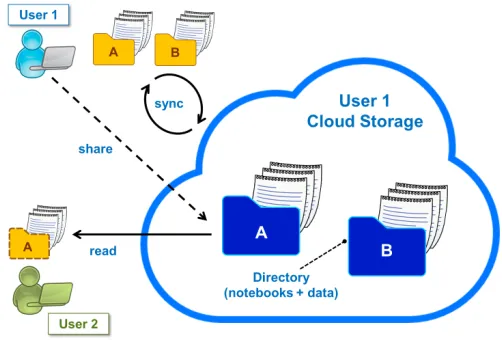
Furthermore, CERNBox provides the foundations for synchronization and sharing on SWAN. On the one hand, SWAN users have the possibility to install a CERNBox client on their machines, which will automatically synchronize the contents of their CERNBox space to a folder on their machine. This can be useful for offline inspection of notebooks or any other type of result produced on SWAN. Moreover, any file that users write on their local CERNBox folder will be automatically synchronized up to the cloud, and therefore they will be able to use that file from SWAN as well.
On the other hand, CERNBox allows the sharing of files and folders between users. This can be done via the CERNBox graphical interface, where users can see what was shared with them. The synchronization and sharing capabilities of CERNBox are depicted in Figure 1.
Figure 1.Synchronization and sharing features of CERNBox.
3 SWAN’s New Interface for Sharing
In order to make it easier for SWAN users to exploit the sharing capabilities of CERNBox, the SWAN service interface was completely redesigned. The main goal of this redesign was to allow sharing of work directly from SWAN, instead of requiring to use the CERNBox interface for that purpose. This change significantly reduced the effort to create shareable content and communicate it to others and thus it was fundamental to fully enable collaborative analysis in SWAN.
The next subsections present the changes applied to the SWAN interface to establish sharing as a central concept.
3.1 Project: The Unit of Sharing
Oftentimes, a notebook is not fully self-contained: it might need input files in order to cor-rectly execute. In practice, this means that sharing a single notebook file may not be enough for another person to be able to run that notebook. Similarly, a notebook can also produce some result files that are intended to be persisted in storage and shown to future observers of it. Consequently, it is often better to group notebooks and other types of files in folders, where each folder contains all the data that is required for the notebooks to run and/or results that need to be preserved.
In that sense, the redesign of the SWAN interface introduced the concept of Project, a special folder where notebooks and other files can be stored. A SWAN user, then, organizes their work in projects, producing one or more notebooks and placing any other required file in them as well.
Figure 2.A project is a folder that can contain notebooks and other types of files. In addition, a project can be easily shared with other colleagues: it is enough to specify their names and click on “Share”.
3.2 The Share Tab
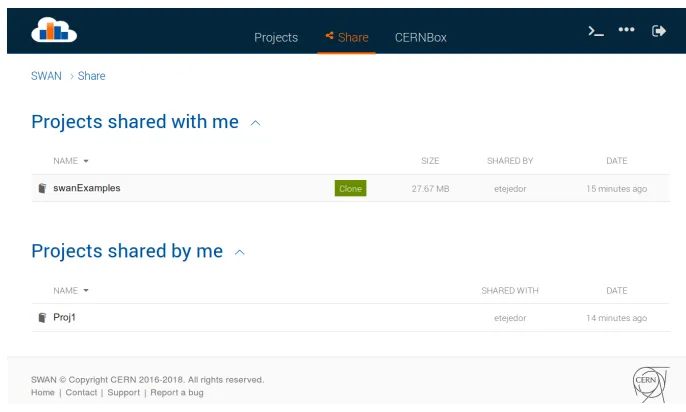
When user A shares a project with user B, the latter will immediately be able to see that project in the SWAN interface. For that purpose, users can check which projects were shared with them and which ones they are currently sharing with others in the Share Tab.
The Share Tab offers some information about each project, namely the name of the project, size, who shared it or with whom it was shared, and date on which it was shared. Figure 3 depicts a view of the Share Tab.
Figure 2.A project is a folder that can contain notebooks and other types of files. In addition, a project can be easily shared with other colleagues: it is enough to specify their names and click on “Share”.
3.2 The Share Tab
When user A shares a project with user B, the latter will immediately be able to see that project in the SWAN interface. For that purpose, users can check which projects were shared with them and which ones they are currently sharing with others in the Share Tab.
The Share Tab offers some information about each project, namely the name of the project, size, who shared it or with whom it was shared, and date on which it was shared. Figure 3 depicts a view of the Share Tab.
Figure 3.The Share Tab can be viewed to know about the projects one shared/others shared with us. If a recipient user is interested in a shared project, they can click “Clone” to copy that project to their CERNBox space.
3.3 Inspecting and Accepting a Shared Project
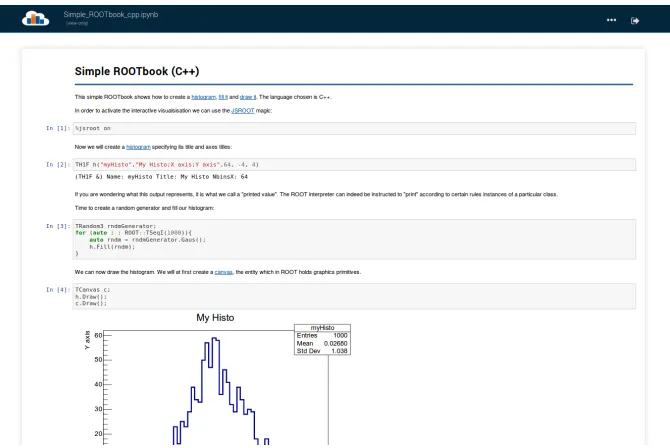
Once a user receives a shared project, they can inspect it by clicking on its name on the Share Tab. SWAN allows to browse the files of the project and to open its notebooks in read-only (view) mode. This operation can be useful for the recipient user to decide whether they are interested in the shared project or not. Figure 4 shows an example of a static view of a notebook.
Figure 4.Before cloning a shared project, a SWAN user can inspect its contents and open its notebooks statically.
After inspecting a shared project, if the recipient user decides to accept it, they need tocloneit: by clicking on the “Clone” button for a project (see Figure 3), the contents of that project will be copied from the sharer’s CERNBox space into the space of the user that accepted it. From that point on, the latter will be able to work with the contents of that project from SWAN in a normal way, editing and running the corresponding notebooks at their convenience, since now that user owns a copy of the project.
The “share by copy” model described above is necessary because, at the time of writ-ing, Jupyter does not support concurrent editing of notebooks. If two users worked on the same shared notebook file at the same time, both modifying it, they would constantly over-write each other’s changes. Therefore, the current model ensures notebooks can be edited on SWAN in a safe way.
4 Sharing in Education
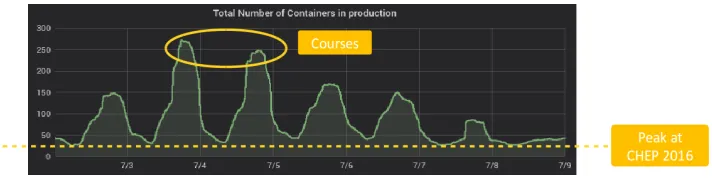
was first presented [14]. Figure 5 shows the number of user sessions in SWAN during a week of July 2018.
One of the fields where SWAN particularly shines is education: a number of courses are organized every year that rely on SWAN to run a set of exercises in the form of notebooks. Thanks to SWAN, students do not need to install anything on their machines, since a web browser is enough to connect to SWAN and benefit from all its features, i.e. for what con-cerns provision of software, storage, computing and collaborative work by means of the new interface. The effect of the aforementioned courses in the number of concurrent user sessions in SWAN can be observed in Figure 5.
Figure 5.Evolution in the number of daily SWAN user sessions from July 3rd to 9th, 2018. The peak number at the time of CHEP 2016 is also shown for comparison purposes. The number of daily users grows when some course with notebook exercises is organized, e.g. for CERN summer students.
4.1 The Up2U Project
The collaborative and educational aim of SWAN goes beyond CERN borders: CERN is one of the partners of the European project “Up to University” (Up2U) [19], whose goal is to create a bridge between high schools and higher education. Up2U aims to expose high school students to the very same tools that they will use at the university or those that professional scientists are already using.
Given the demonstrated value of the SWAN service for education and collaborative work, and in the context of the Up2U project, SWAN is being leveraged as a tool to produce and reuse high-quality educational notebooks among students, teachers and scientists. SWAN reaches out to the academic community and even secondary schools, helping in preparing young students for their future career in science.
In order to facilitate the adoption of SWAN as a tool for education, a version of SWAN that is easily installable on premises is already available, called ScienceBox [20]. Part of the installation of ScienceBox involves deploying a private instance of CERNBox, for which user accounts can be created. On the other hand, the new sharing capabilities described in this paper are also being ported to ScienceBox.
5 Conclusions and Future Work
was first presented [14]. Figure 5 shows the number of user sessions in SWAN during a week of July 2018.
One of the fields where SWAN particularly shines is education: a number of courses are organized every year that rely on SWAN to run a set of exercises in the form of notebooks. Thanks to SWAN, students do not need to install anything on their machines, since a web browser is enough to connect to SWAN and benefit from all its features, i.e. for what con-cerns provision of software, storage, computing and collaborative work by means of the new interface. The effect of the aforementioned courses in the number of concurrent user sessions in SWAN can be observed in Figure 5.
Figure 5.Evolution in the number of daily SWAN user sessions from July 3rd to 9th, 2018. The peak number at the time of CHEP 2016 is also shown for comparison purposes. The number of daily users grows when some course with notebook exercises is organized, e.g. for CERN summer students.
4.1 The Up2U Project
The collaborative and educational aim of SWAN goes beyond CERN borders: CERN is one of the partners of the European project “Up to University” (Up2U) [19], whose goal is to create a bridge between high schools and higher education. Up2U aims to expose high school students to the very same tools that they will use at the university or those that professional scientists are already using.
Given the demonstrated value of the SWAN service for education and collaborative work, and in the context of the Up2U project, SWAN is being leveraged as a tool to produce and reuse high-quality educational notebooks among students, teachers and scientists. SWAN reaches out to the academic community and even secondary schools, helping in preparing young students for their future career in science.
In order to facilitate the adoption of SWAN as a tool for education, a version of SWAN that is easily installable on premises is already available, called ScienceBox [20]. Part of the installation of ScienceBox involves deploying a private instance of CERNBox, for which user accounts can be created. On the other hand, the new sharing capabilities described in this paper are also being ported to ScienceBox.
5 Conclusions and Future Work
This paper has presented the efforts in promoting collaborative analysis in the SWAN service. A new interface has already been introduced in production in order to make of sharing a first class citizen in SWAN. Now users can organize their work in projects, which can contain notebooks and other types of file, and share those projects easily from the SWAN interface. In addition, they can inspect the projects that were shared with them and clone those projects to their own CERNBox space.
The work on facilitating collaborative analysis has also been applied to the education field, in particular in the context of the Up2U European project, with the aim of preparing high school students for their future career in science by exposing them early to professional tools.
The future work on this topic is mainly concerned with the support for sharing without cloning, i.e. allowing multiple users to simultaneously work on the same project files. This requires a system for concurrent editing of notebooks, which is being discussed in the context of the new version of Jupyter, called JupyterLab [21]. In addition, better reproducibility is also a target: projects could be enriched with metadata about the software packages (and their versions) that were used to produce the notebooks and results contained in those projects.
References
[1] European Organisation for Nuclear Research, http://www.cern.ch [2] Worldwide LHC Computing Grid, http://wlcg.web.cern.ch
[3] The Square Kilometre Array (SKA Telescope), http://www.skatelescope.org [4] EMBL - European Bioinformatics Institute, http://www.ebi.ac.uk
[5] X. He, J. Pan, O. Jin, T. Xu, B. Liu, T. Xu, Y. Shi, A. Atallah, R. Herbrich, S. Bowers et al.,Practical Lessons from Predicting Clicks on Ads at Facebook, inProceedings of the Eighth International Workshop on Data Mining for Online Advertising(ACM, New York, NY, USA, 2014), ADKDD’14, pp. 5:1–5:9, ISBN 978-1-4503-2999-6, http: //doi.acm.org/10.1145/2648584.2648589
[6] T. White, Hadoop: The Definitive Guide (O’Reilly Media, Inc., 2012), ISBN 1449311520, 9781449311520
[7] Wakari: Web-based Python Data Analysis,http://wakari.io
[8] SageMathCloud: Collaborative Computational Mathematics, http://cloud. sagemath.com
[9] Plotly: Make charts and dashboards online,http://plot.ly
[10] Microsoft Azure Machine Learning,http://studio.azureml.net
[11] Google Colaboratory,https://colab.research.google.com
[12] IBM Data Science Experience,https://datascience.ibm.com
[13] Microsoft Azure Notebooks,https://notebooks.azure.com
[14] E. Tejedor, D. Piparo, J. Moscicki, L. Mascetti, P. Mato, M. Lamanna,SWAN: a Service for Web-Based Data Analysis in the Cloud, inProceedings of the 22nd International Conference on Computing in High Energy and Nuclear Physics (CHEP 2016)(Journal of Physics: Conference Series, 2016)
[15] Jupyter: Open source, interactive data science and scientific computing, http:// jupyter.org
[16] A. Peters, E. Sindrilaru, G. Adde, Journal of Physics: Conference Series664, 042042 (2015)
[17] L. Mascetti, H.G. Labrador, M. Lamanna, J. Moscicki, A. Peters, Journal of Physics: Conference Series664, 062037 (2015)
[18] J. Blomer, C. Aguado-Sánchez, P. Buncic, A. Harutyunyan, Journal of Physics: Confer-ence Series331, 042003 (2011)
[19] Up To University European Project,https://up2university.eu/
[20] ScienceBox,http://sciencebox.web.cern.ch/sciencebox/