© 2015, IRJET.NET- All Rights Reserved
Page 371
SURVEY ON SMARTPHONE VIRTUALIZATION TECHNIQUES
Shakuntala P. Kulkarni
1, Prof Sachin Bojewar
21
PG Scholar, Department of the Computer Engineering, ARMIET, Maharashtra, India
2Associate Professor, Department of the Information Technology, VIT, Maharashtra, India
---***---Abstract -
This modern era has witnessed a shift ofusers from desktop computers to smart handheld devices. Smartphones are used for various purposes such as calling, messaging, sending mails, for checking news updates, web browsing, visiting social networking sites and for location-specific information. Android is an open-source mobile platform. Developers develop applications and users readily install them. In increasing the productivity of a business, Smartphone can play a very important role. Now a day’s Smartphone come with additional computational power and added storage space. Users can perform many tasks while on move. Use of Smartphone in IT and business world has increased. An employee of a company can always remain connected to his company by his smartphone. Due to this the usage of the Smartphone by a company employee has increased as he can do several tasks when he is not physically present in the company. Productivity of the company can be increased if employees use Smartphone for official work outside offices, so companies provide Smartphone for its employees. In other words, employees are carrying office in their pockets. But the major disadvantage of having Smartphone in corporate use is data leakage and data loss through applications. Many workers carry different phones for work and personal use to avoid security issues. The best technique which can be used to overcome this problem is virtualization. Using virtualization one can create different profiles in the same smartphone. These profiles are guided by security policies in the same phone. In this paper, different types of virtualization techniques used in a smartphone to overcome security issues are discussed.
Key Words:
Virtualization, Para-virtualization,
Android, Smartphone, Cells, ViMo, Security policy,
access control
1. INTRODUCTION
A Smartphone is a mobile phone which has an advanced operating system. It is a phone which can perform many
functions of personal computer with added functionality of making calls. It has features like telephone, messaging, email, location specific applications, camera, touchscreen user interface, calendar management, news, media player, games, Web browsing, GPS navigation unit, motion sensors, mobile payment mechanisms, high-speed mobile broadband 4G LTE. Therefore, users have started shifting from tradition desktops to Smartphone. Now a day’s the computational power and storage capacity of phone has also increased compared to earlier versions of phone. Hence, companies provide employees with Smartphone through which they can work even when they are not in offices, thereby increasing the productivity of the company. There are 1.5 billion Android applications available in application store for users to download. These easy to download applications are risky as applications may be malicious and may access sensitive and confidential data of the user. Data leaks and data loss are the problems in using Smartphone in corporate world. So as a safety measure, employees carry different phones for work and personal use.
Solution for this problem is isolation. Isolation means separating application and data related to work from personal data. In the same phone, two security environments have to be created, one security environment for sensitive work data, trusted applications and other one for entertainment and personal application. Second environment is not allowed to access data from the first environment. Hence, the sensitive corporate data can be safeguarded. Isolation can be implemented using virtualization techniques. By using virtualization techniques [12] it is possible to run different instances of same OS separately on same device. Virtualization [12] is very effective when it is used for personal computers. But it becomes resource demanding for mobile phones. Another approach that can be used here is Para-virtualization. Para-virtualization [3] is less resource demanding in Smartphone.
© 2015, IRJET.NET- All Rights Reserved
Page 372
like security and hardware resource utilization can beaddressed by virtualization. Resources on a computer are divided into multiple execution environments during Virtualization. Concepts such as time sharing, partitioning, simulation, emulation etc. are used during Virtualization. In smart phones, Virtualization can play a major role for example even if one of the virtual phone stops working then the user can switch to the other virtual phone and can continue their work.
2. DIFFERENT TECHNIQUES OF VIRTUALIZATION
Virtualization [12] is a technique, using which one can create different security environment which are isolated from each other, and these environments are indistinguishable from the OS point of view. Such isolation of environment is brought about by hypervisor. Hypervisor is also responsible for carrying out activities of virtual machines. Virtualization has many advantages in personal computers. Virtualization increases security and it reduces the cost of deployment of applications. Hence, it is used in personal computers. But now a day’s, a shift from personal computers to handheld device is witnessed. So, virtualization is implemented in mobile Smartphone also. It has many advantages in Smartphone. In Smartphone, by using virtualization, one can create separate environment for different types of application thereby increasing the security of phone. [12]Virtualization techniques can be classified into two types:- i) Full Virtualization: - It is a virtualization
technique in which guest OS runs directly on virtual machine. Guest OS is unaware that it is running in virtual environment.
ii) Para-Virtualization: - In this, modification in guest OS is required. The modifications which are needed are: - system call interface, memory management and interrupt handling. Performance of Para-virtualization is high as compared to full virtualization.[3]
Para-virtualization can be used for mobile phones. Para virtualization reduces virtualization overhead by nearly 5%. There are many benefits in using Para-virtualization like reduced development cost of phones, less overhead. [3]
2.1 Cells
‘Cells’ [1] is a light-weight virtualization architecture which creates multiple virtual Smartphone in a single physical Smartphone. These virtual Smartphones run simultaneously in isolated manner. Even if any malicious application is running in one virtual Smartphone, other virtual Smartphones remain unaffected. It creates a model such that a physical Smartphone has one foreground virtual phone which is displayed and multiple background virtual phones which are not displayed at that time. VoIP service is used by Cells. There is no need to use multiple
SIM cards in multiple virtual Smartphones as by VoIP, Cells gives telephone numbers to each virtual Smartphones. Cellular network are used to make calls. Calls are routed through VoIP as it is essential to provide caller ID functionality to both incoming and outgoing calls for each virtual phone. Therefore, a combination of VoIP and cellular network is used by Cells to make and receive calls. [1]
Each virtual phone in Cells is isolated from each other to maintain security. Foreground virtual Smartphone has direct access to hardware and it does not require exclusive access whereas background virtual Smartphones have shared access. For example, if Bluetooth connectivity is requested by foreground virtual phone, then background virtual phone will not request Bluetooth connectivity. [10][11] A name space is mapped with every virtual phone. A virtual phone can use hardware resources only from its private name space [11]. There is a mechanism which checks whether each virtual phone is using its own namespace and the hardware resources allocated to it. This way Cells provide security mechanism through creating virtual phones.
Fig -1: Overview of architecture of Cells
[image:2.595.324.536.379.541.2]© 2015, IRJET.NET- All Rights Reserved
Page 373
the user experience and performance of an application issame as native phone. [1]
Performance Evaluation is as follows.
Experimental work is observed to examine the effectiveness of the above mentioned techniques. To check effectiveness of Cells, four virtual phones were created on a single phone. On the first virtual phone a game was played e.g. Angry Bird, another game was played on second virtual phone e.g. Racing game, on third virtual phone some official work with numbers was done in a spreadsheet, on fourth virtual phone user listened to music. It was observed that, there was no noticeable change in performance of the phone. In short, there was no degradation of performance because of many virtual phones running on same hardware. It was observed that overhead and power consumption was also very low, performance was very good and there was strong OS isolation. Experimentation was done by running 5 virtual phones on same Nexus 1 and Nexus-S. No overhead was observed. Human User Interface testing was done and it was observed that there was no degradation in performance of the phone.
2.2 ThinVisor
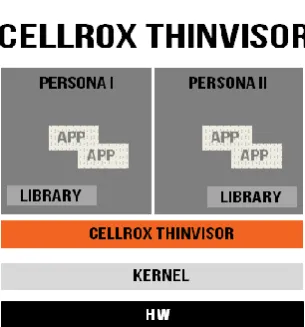
Smartphone have become very important these days. Many users carry multiple Smartphone, one for work and other for personal use. This is to safeguard the sensitive work data from loss or leakage. Cellrox introduces a light-weight virtualization technology named ThinVisor. [9] By this technology it is possible for users to run multiple virtual phones in a single Smartphone. These multiple virtual phones are called Personas. These personas are such that they look like separate individual phone. Virtual phones can access all functionality as a normal phone like power management, telephony functionality etc. All personas are separate and secure from each other. If one of the personas is running some malicious application, then that malicious application will not affect other persona. Cellrox’s ThinVisor technology uses lightweight operating system virtualization. Instead of developing a new complex hypervisor, existing Linux operating system kernel is incorporated in Android phones.
Only a single Persona is displayed in foreground of the device. Other Personas are continuously running in the background. User can easily switch between background and foreground personas. This can be done by swiping up and down fore screens of the Personas .A trigger for appearance of a Persona in foreground can also be set, for example a text message can be a trigger for a Persona to appear in foreground. Auto lock can be used by user to type a password to bring background Persona to foreground.
Configuration of each persona can be set to have direct access rights. Customized settings can also be done according to devices. For example,
1. Applications having No Access in a given persona absolutely cannot have an access to that particular feature of the mobile.
2. When a given Persona running in background can access a device with the Persona in foreground then that access is called as a shared access.
3. If a given Persona is running in the foreground and the other background Personas have no access to the device then such an access setting is called as Exclusive Access. This prevents leakage of information and eaves dropping. Exclusive Access can be used along with No Access in order to guarantee that background Personas cannot move to the foreground violating the exclusive rights. ThinVisor forces Android’s Virtualization to prevent rise of attack in one Persona from compromising the entire device.
Implementation of ThinVisor gives three important benefits such as transparency, performance and security. Transparency is provided by ThinVisor because ThinVisor runs below operating system level. Due to this, Android application can run unmodified in virtualize mode. Security provided ThinVisor is equivalent to that of hypervisor. Hypervisor has enormous performance cost, but ThinVisor does not. File system in ThinVisor is based on unioning. Unioning is used to maximize the sharing of common read-only code. Unioning minimizes memory consumption; more personals can be created with less overhead. ThinVisor supports all available hardware like cameras, sensors etc. No modification in Android applications is required to run on ThinVisor. ThinVisor supports multiple personas in one phone, and those personas run without any performance degradation. [9]
Fig -2: Architecture of Cellrox ThinVisor
Performance evaluation is as follows:-
[image:3.595.357.510.489.653.2]© 2015, IRJET.NET- All Rights Reserved
Page 374
racing game was played; some work in spreadsheet wasdone in third persona and in last one listening to music was done. It was observed that all the personas perform without any degradation in performance. Many experimental evaluations were done, having personas from one to five, each time personas run as if the other persona didn’t exist. Overhead was small in all cases.
2.3 ViMo
ViMo [5] stands for Virtualization for Mobile. Full virtualization technique is used by ViMo. Hence, no modification is done in guest OS. In ViMo virtualization, ARM is divided in two virtual modes. Applications are present in the one virtual mode and guest OS is present in other. ARM supervisor has five main components, namely, Code tracer, CPU virtualizer, memory virtualizer, virtual interrupt controller, scheduler. Critical instructions which are processed by CPU virtualizer are detected by Code Tracer. Memory of one virtual machine from other is isolated by Memory Virtualizer. The interrupts from virtual machines are handled by virtual interrupt controller. Virtual machines are switched by Scheduler. [5][11]
In ViMo, tasks are performed in different modes like secure mode, normal mode. [11] Separating the tasks provides security. In secure mode special task which require high security are performed. In normal mode, normal tasks which do not require high security are performed. By creating different modes, one intends to separate the hardware resources. Each mode is assigned specific hardware resources. Tasks executing in secure mode can access all hardware resources but tasks in normal mode cannot access resources of secure mode. Switching from secure mode to normal mode or from normal mode to secure mode is possible only with the help of monitor mode.
Performance evaluation is as follows:- Smartphone is used very frequently. So there should be very less overhead. In ViMo it is observed that there is 33% overhead. This overhead is due to switching between OS and ViMo. But 33% overhead is not acceptable in Smartphone.[11]
2.4 Enforcing Security policies
Architecture of Android has 5 layers. Lower most layers is kernel layer, above it is hardware abstraction layer, above it are libraries, above libraries is application framework layer and the top most layer is Application layer. Android security framework defines mandatory access control (MAC) in kernel layer and role-based access control (RBAC) in frame work layer. In this mechanism, users are allowed to define their security policies to safeguard their phone from untrusted application. Users are allowed to specify fine-grained access control to manage accessing untrusted applications. MAC [2] mechanism limits
applications to perform task according to security policies only. Applications are restricted from performing unwanted task, and hence damage cannot be done. In RBAC [2], each activity is associated with set of actions and responsibilities, these actions and responsibility are called role. Each application on Android platform is authorized with regard to roles. Users define roles, each application is related to roles; hence RBAC is better method of blocking or permitting tasks. [2]
Security Mechanism is as follows:-
Linux DAC and Android Permissions are the two security mechanisms used in android. Every file is associated with an owner user, group ID and three tuples of read, write and execute. First tuple is enforced on the owner, second on the user belonging to the group and the third tuple is enforced on the other users. This enforcement of tuples is done by kernel. One application can never access files created by the other applications. Each application has a low privileged Linux user ID and a single application runs in a single process and has an access to its own files only. If an application wants to access a resource, it has to take permissions from the user. These permissions need to be mentioned in Androidmanifest.xml file. Permission checking is a part of API implementation of Android and not a part of standalone application. The above mentioned mechanisms of security are insufficient to defending increasing kinds of security threats Linux Security Module (LSM [13]) is a light weight security framework for Linux kernel. It has various access control models such as SELinux, Smack, etc. which can be helpful if introduced in android.
2.5 TISSA
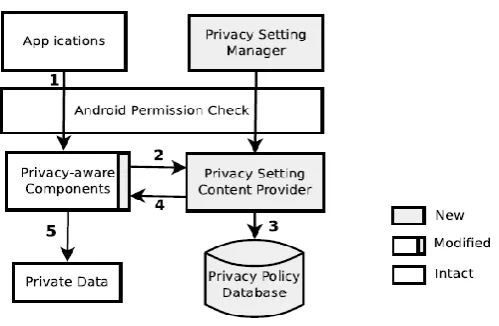
Taming Information-Stealing Smartphone Applications (TISSA) [7] provides new privacy mode. These privacy modes are flexible and user controlled in a fine-grained manner. Modes dictate what kind of personal information can an application access. Access granted to an application can be anytime changed at run-time. [7]
There is a need for a privacy mode in Smartphone to protect private information of the user. Accessibility of application to private information can be fine-tuned by privacy mode. If a user wants to install an untrusted application, he can install that application and also control its access. User can specify what types of information can the application access, and also adjust it during runtime. User can change the access permission given to application while installing at runtime. There are constraints in Smartphone such as less memory and less power management. TISSA is memory and energy efficient. [7]
Performance Evaluation is as follows:-
© 2015, IRJET.NET- All Rights Reserved
Page 375
implemented on more than 12 Android devices which hadapplications leaking private information. 24 applications from Android market were chosen.
Fig -3: Architecture of TISSA
Out of 24, 13 applications leaked private information of the user. Experiment was performed on TISSA with selected 24 applications to check the effectiveness of TISSA. Before starting with the application, privacy setting was set as ‘default’. Default means that all applications will be considered as untrusted applications. Result showed that TISSA was able to identify the 13 information leaking applications. One application names WisdomQuotes Lite [7] was run on a device twice; first without TISSA protection and another time with TISSA protection. When the application was run without TISSA protection, with help of TaintDroid it was known that, the particular application leaks IMEI number of the user phone to the developer company whose IP address was written in destination address. Same application was run with TISSA protection. Privacy setting for the particular application was changed to bogus. When WisdomQuotes Lite application was run, IMEI number was sent to developer’s company, but that number was bogus and not of the test phone. Results show that TISSA was very effective in protecting private information.
2.6 TrustDroid
Application Coloring During installation procedure we call TrustDroid [14] Policy Manager to verify certificate in application package and determine the colors suited for the new application. Certificate is extracted from apk and verified. If verification fails then the installation is aborted. If installation succeeds then a remote call is made from the package manager to the policy manager informing about the success of installation. The newly installed application is isolated from the other applications at ICC levels according to the color of the application.
TrustDroid tries to provide an efficient means to enforce domain isolation. Applications are isolated by trust levels. If two applications have different trust levels then they are
not able to communicate with each other. Different levels of android stack are targeted firstly by mediating the IPC traffic by TrustDroid and are target to domain policies so that malicious applications cannot use interface of applications. Secondly fine grained data filtering is done on application data and data stored in common databases. This prevents unauthorized access to data. Thirdly, TrustDroid lessens the impact of kernel exploits Finally communications through sockets connections are forced to domain boundaries. [14]
3. CONCLUSIONS
In this paper we compared six smart phones virtualization techniques. Those are Cells, ThinVisor, ViMo, Enforcing Security policies, TISSA and TrustDroid. The basic functionality of all the techniques like architecture, security and implementation is discussed. Experimentation carried out to check the efficiency of these techniques is discussed.. In future, we plan to explore these techniques for other functionalites like compatibility, scalability etc.
REFERENCES
[1] J. Andrus, C. Dall, A.V. Hof, O. Laadan, and J. Nieh, Cells: A Virtual Mobile Smartphone Architecture, Proc. 23rd ACM Symp. Operating Systems Principles (SOSP ’11), pp. 173-187, 2011.
[2] Tao Guo, Puhan Zhang, Hongliang Liang and Shuai Shao, Enforcing Multiple Security Profiles for Android,
System 2nd International Symposium on Computer,
Communication, Control and Automation, 2013. [3] Y. Xu, F. Bruns, E. Gonzalez, S. Traboulsi, K. Mott, and
A. Bilgic, Performance Evaluation of Para-Virtualization on Modern Mobile Phone Platform, Proc. Int’l Conf. Computer, Electrical, and Systems Science and Eng. (ICCESSE ’10), 2010
[4] S. Bugiel, L. Davi, A. Dmitrienko, S. Heuser, A.-R. Sadeghi, and B. Shastry, Practical and Lightweight Domain Isolation on Android, Proc. First ACM Workshop Security and Privacy in Smartphones and Mobile Devices (SPSM ’11), pp. 51-62, 2011.
[5] S.C. Oh, K.H. Kim, K.W. Koh and C.W. Ahn "ViMo (Virtualization for Mobile): A Virtual Machine Monitor Supporting Full Virtualization For ARM Mobile Systems," Proc. Advanced Cognitive Technologies and Applications, COGNITIVE, 2010. [6] C. Dall and J. Nieh, KVM for ARM, Proc. Ottawa Linux
Symp., 2010.
[7] Y. Zhou, X. Zhang, X. Jiang, and V. Freeh, Taming Information-Stealing Smartphone Applications (on Android), Proc. Fourth Int’l Conf. Trust and Trustworthy Computing (TRUST ’11), pp. 93-107, 2011.
[image:5.595.40.290.143.306.2]© 2015, IRJET.NET- All Rights Reserved
Page 376
http://www.ok-labs.com/assets/image_library/virtualization-for-embedded-systems1983. pdf, 2007.
[9] White Paper, The ThinVisor Mobile Device Virtualization Architecture, CELLROX, November 2011.
[10]C. Dall, J. Andrus, A. Van’t Hof, O. Laadan, and J. Nieh, “The Design, Implementation, and Evaluation of Cells: A Virtual Smartphone Architecture,” ACM Transactions on Computer Systems (TOCS), 30(3), pp. 1–31, Aug. 2012.
[11]Abdul Sammad Amad, Rashid Mehmood, Sanam Shahla Rizvi and Mohammad Daud Awan, An Analysis on Virtualization Techniques in Smartphones
[12]V. Munshi, Virtualization: Concepts and Applications, The ICFAI University Press, 2006.
[13]Susilo, W.: “Securing Handheld Devices”. In: 10th IEEE International Conference on Networks (August 2002)
[14]W. Enck, P. Gilbert, B.-G. Chun, L.P. Cox, J. Jung, P. McDaniel, and A.N. Sheth, Taintdroid: An Information- flow Tracking System for Realtime Privacy Monitoring on Smartphones, Proc. Ninth USENIX Conf. Operating Systems Design and Implementation (OSDI ’10), pp. 1-6, 2010.
BIOGRAPHIES
Shakuntala P. Kulkarni received her Bachelor of Engineering degree in 2012 from University of Mumbai. Since 2013 she has been working towards Master of Engineering degree from University of Mumbai.