WRL
Research Report 98/2
Prefiltered Antialiased
Lines Using Half-Plane
Distance Functions
Robert McNamara
Joel McCormack
Norman P. Jouppi
Corporation and has the potential to open new business opportunities. Research at WRL ranges from Web search
engines to tools to optimize binary codes, from hardware and software mechanisms to support scalable shared
memory paradigms to graphics VLSI ICs. As part of WRL tradition, we test our ideas by extensive software or
hardware prototyping.
We publish the results of our work in a variety of journals, conferences, research reports and technical notes.
This document is a research report. Research reports are normally accounts of completed research and may
in-clude material from earlier technical notes, conference papers, or magazine articles. We use technical notes for
rapid distribution of technical material; usually this represents research in progress.
You can retrieve research reports and technical notes via the World Wide Web at:
http://www.research.compaq.com/wrl/
You can request research reports and technical notes from us by mailing your order to:
Technical Report Distribution
Compaq Western Research Laboratory
250 University Avenue
Palo Alto, CA 94301 U.S.A.
You can also request reports and notes via e-mail. For detailed instructions, put the word “Help” in the
sub-ject line of your message, and mail it to:
Prefiltered Antialiased Lines Using Half-Plane Distance Functions
Robert McNamara
1, Joel McCormack
2, Norman P. Jouppi
2Abstract
We describe a method to compute high-quality antiali-ased lines by adding a modest amount of hardware to a fragment generator based upon half-plane edge functions. (A fragment contains the information needed to paint one pixel of a line or a polygon.) We surround an antialiased line with four planar edge functions to create a long, thin, rectangle. We scale the edge functions so that they com-pute signed distances from the four edges. For each frag-ment within the antialiased line, the four distances to the fragment are combined and the result indexes an intensity table. The table is computed by convolving a filter kernel with a prototypical line at various distances from the line’s edge. Because the convolutions aren’t performed in hard-ware, we can use wider, more complex filters with better high-frequency rejection than the narrow box filter com-mon to supersampling antialiasing hardware. The result is smoother antialiased lines.
Our algorithm is parameterized by the line width and filter radius. These parameters do not affect the rendering algorithm, but only the setup of the edge functions. Our algorithm antialiases line endpoints without special han-dling. We exploit this to paint small blurry squares as ap-proximations to small antialiased round points. We do not need a different fragment generator for antialiased lines, and so can take advantage of all optimizations introduced in an existing half-plane fragment generator.
1. Introduction
A device that displays an array of discrete pixels, such as a CRT monitor or a flat-panel LCD, has a finite fre-quency response. The abrupt step transition from a back-ground color to a line color and back again—a square wave—requires an infinite frequency response to reproduce
correctly. Typical line-drawing algorithms sample a line at the center of each pixel, so that a pixel displays either the background color or the line color. This point sampling allows the irreproducible high frequencies to manifest themselves (alias) at lower frequencies. Line edges appear staircased and jagged rather than smooth and continuous. When animated, these aliasing artifacts are even more ob-jectionable, as they seem to crawl along the line edges.
Antialiasing techniques apply a low-pass filter to the desired scene in order to attenuate these high frequencies, and thus display smooth line edges. With filtering, a pixel’s color is computed by convolving the filter with the desired scene. That is, the pixel color is a weighted aver-age of an area of the desired scene around the pixel’s cen-ter, and so a pixel near a line edge is a blend of the back-ground color and the line color.
Antialiasing trades one artifact for another—filtering blurs the edge of the line. A good filter blurs less than a poor filter for the same degree of high-frequency rejection, but usually requires a more complex weighting and sam-ples a larger area. Prefiltering techniques hide this com-plexity from hardware by delegating to software the work of convolving the filter with a prototypical line at several distances from the line. The results are used to create a table that maps the distance of a pixel from a line into an intensity. The table can be constructed once at hardware design time, or for more accuracy can be recomputed each time an application selects a different line width, filter ra-dius, or filter kernel (weighting function).
This paper describes a way to draw antialiased lines using prefiltering. We use four half-plane edge functions, as described by Pineda [8], to surround a line, creating a long, thin rectangle. We scale these functions so that each computes a signed distance from the edge to a pixel. Scal-ing requires computScal-ing the reciprocal of the length of the line, but only to a few bits of precision. We push the edge functions out from the line by an amount that depends upon the filter radius, so that the antialiased line, which is wider and longer than the original line, is surrounded by the scaled edge functions. We evaluate the four edge functions at each pixel within the antialiased line, and the resulting distances index one or more copies of a table to yield inten-sities. We show several ways to combine the distances and intensities, as combinations that yield better-looking line endpoints have a higher implementation cost. We also show how to exploit the combination of nicely rounded endpoints and varying line and filter widths to approximate small antialiased circles (e.g., OpenGL antialiased wide points [9]) by painting blurry squares with an appropriate filter radius.
1
Compaq Computer Corporation Systems Research Center, 130 Lytton Avenue, Palo Alto, CA 94301.
2Compaq Computer Corporation Western Research
Labo-ratory, 250 University Avenue, Palo Alto, CA 94301. [Joel.McCormack, Norm.Jouppi]@Compaq.com.
This report is a superset of Prefiltered Lines Using
Half-Plane Distance Functions, published in Proceedings of the 2000 EUROGRAPHICS/SIGGRAPH Workshop on Graph-ics Hardware.
This paper first reviews some filter theory (Wolberg [11] is good source for more detail) and Pineda’s work [8]. We then show how to turn edge functions into distance functions that depend upon the line width and filter radius. We show how different combinations of distance functions affect the quality of line endpoints, and how to paint small antialiased points. We compare our algorithm with previ-ous work. Finally, we present the details of the complete algorithm along with precision requirements and our con-clusions.
2. Filtering and Prefiltering
A finite impulse response (FIR) low-pass filter maps an ideal infinite-resolution image onto a discrete array of pixels by weighted averaging (convolving) a small area of the image around the center of each pixel. We refer to this area as the footprint of the filter; if the filter is circularly symmetric then the filter’s radius determines its footprint. The weighting function is called the filter kernel.
The simplest possible kernel—point-sampling—uses a single point in the scene for each pixel, and produces the aliased line and polygon edges seen with low-end graphics accelerators.
Supersampling examines the image at a large number of discrete points per pixel, applying the appropriate filter weight at each sample point. But even high-end antialias-ing hardware [1][7] tends to use a square box filter of ra-dius ½. This filter weights all portions of the image within the footprint equally, and has poor high-frequency rejec-tion. Further, such implementations sample the desired image with only 8 or 16 points per pixel, and so can vary widely from the true analytic convolution result.
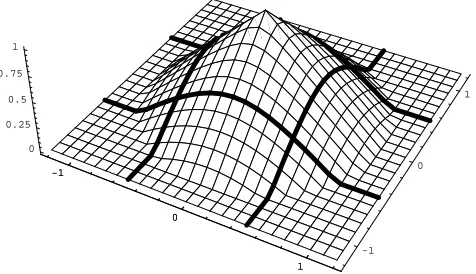
More sophisticated kernels use more complex weight-ings, and reduce aliasing artifacts more effectively and with less blurring than a box filter. The best practical filters have a two or three pixel radius, with negative weights in some regions. Filters with a smaller radius and non-negative weights limit quality somewhat, but improve drawing efficiency and match OpenGL semantics, where an unsigned alpha channel represents pixel intensity. One good compromise is a cone with a radius of one pixel, that is, a circularly symmetric linear filter.
Figure 1 shows this filter. The grid lines are spaced at distances of1/
10of a pixel, with unit pixel distances labeled on the x and y axes. Bold lines demarcate pixel “bounda-ries,” for readers who think of pixels as tiny squares. This kernel has a maximum value h at the center of the pixel.
A filter with only positive weights that is too narrow (its radius r is too small) leaks a good deal of high fre-quency energy, resulting in lines with a “ropy” appearance. A filter that is too wide creates fat blurry lines. In practice, the “best” filter radius is chosen by gathering a bunch of people around a screen and asking which lines they like best. Since one person’s smoothness is another person’s blurriness, our algorithm allows loading data for an arbi-trary filter, with programmable radius and weights.
We wish to paint an antialiased approximation to a de-sired line Ld, which has an intensity of 1 at all points inside
the line, and an intensity of 0 at all points outside the line1. Since all points inside the desired line have unit intensity, the convolution at each pixel simplifies to computing the volume of the portion of the filter kernel that intersects Ld
(which has unit height). To create an antialiased line Laa
we place the filter kernel at each pixel inside or near the desired line Ld, and compute the pixel’s intensity as the
[image:4.612.322.560.64.201.2]volume of the intersection of the kernel with the line. Figure 2 shows a desired line with a width of one pixel, intersected with the filter kernel placed at a pixel center. The portion of the line that doesn’t intersect the filter ker-nel is shown slightly raised for clarity of illustration only. Since the left and right edges of the filter kernel extend beyond the sides of the line, they have been shaved off. The intensity for the pixel is the volume of the filter kernel
1 Our algorithm is not limited to white lines on black
backgrounds. The antialiased intensity is used as an alpha value to blend the background color and the line color. Our algorithm also paints good-looking depth-cued lines, which change color along their length, even though it does not quite correctly compute colors near the line endpoints.
-1
0
1
-1 0
1
0 0.25
0.5 0.75
1
-1
0
1
Figure 1: A conical filter kernel of radius 1 centered on a pixel. The height at any (x, y) point is the relative
weight that the ideal image contributes to the pixel.
-1
0
1
-1 0
1
0 0.25
0.5 0.75
1
-1
0
[image:4.612.322.559.261.398.2]1
WRL RESEARCHREPORT98/2 PREFILTEREDANTIALIASEDLINESUSINGHALF-PLANEDISTANCEFUNCTIONS
3 that remains. Note that the antialiased line Laawill light up
pixels “outside” the desired line Ldwith some intensity less
than 1.
In theory, the height h of the kernel should be chosen to normalize the filter kernel volume to one, so that filter-ing doesn’t change the overall brightness of the line. In practice, this makes antialiased lines seem slightly dim. A filter with a diameter wider than the line always spills over the edges of the line, and so no pixel has the maximum intensity of 1. Though nearby pixels slightly light up to compensate, the antialiased line nonetheless appears dim-mer than the equivalent aliased line. We’ve chosen the height h in the following examples so that when the filter kernel is placed over the middle of a line, the intensity is 1. This is an esthetic decision, not an algorithmic requirement, though it does slightly simplify some of the endpoint com-putations described below in Section 5.
A prefiltered antialiasing implementation need not compute the volume of the intersection of a filter kernel with a desired line at each pixel in the antialiased line. Instead, for a given line width and filter kernel we can pre-compute these convolutions at several distances from the line, and store the results in a table.
For now, we’ll ignore pixels near line endpoints, and assume the filter intersects only one or both of the long edges of Ld. The orientation of the line has no effect upon
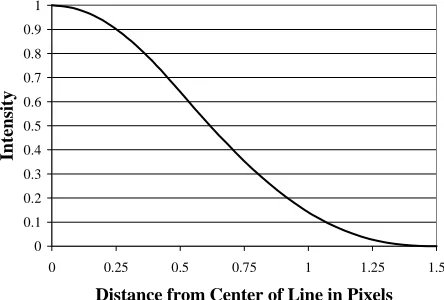
[image:5.612.67.289.554.704.2]its intersection volume with a circularly symmetrical fil-ter—only the distance to the line matters. Gupta & Sproull [3] summarized the two-dimensional volume integral as a one-dimensional function. Its input is the distance between a pixel center and the centerline of the desired line. Its output is an intensity. This mapping has a minimum inten-sity of 0 when the filter kernel is placed so far away that its intersection with the desired line is empty. The mapping has a maximum intensity when the filter kernel is placed directly on the centerline. If the filter’s diameter is smaller than the line width, this maximum intensity is also reached at any point where the filter kernel is completely contained within the line. This mapping is then reduced to a discrete table; we have found 32 5-bit entries sufficient to avoid sampling and quantization artifacts.
Figure 3 shows a graph of such a mapping, where the filter kernel is a cone with a radius of one pixel, the desired line’s width is one pixel, and the height of the filter kernel has been chosen so that the maximum intensity value is 1.0. The horizontal axis is the perpendicular distance from the centerline of the desired line, the vertical axis is the inten-sity value for that distance. When the filter is placed over the center of the line (distance 0), the intersection of the filter kernel with the line is as large as possible, and so the resulting intensity is at the maximal value. When the filter is placed a distance of 1.5 pixels from the center of the line, the intersection of the filter with the line is empty, and so the resulting intensity is 0.
3. Half-Plane Distance Functions
In order to use a distance to intensity table, we need a way to efficiently compute the distance from a pixel to a line. We were already using half-plane edge functions [5][8] to generate fragments for polygons and aliased lines in the Neon graphics accelerator [6]. Thus, it was natural and cost-effective to slightly modify this logic to compute distances for antialiased lines.
Given a directed edge from a point (x0, y0) to a point
(x1, y1), we define the edge function E(x, y):
∆x = (x1– x0)
∆y = (y1– y0)
E(x, y) = (x – x0)*∆y – (y – y0)*∆x
Given the value of E at a particular (x, y), it is easy to incrementally compute the value of E at a nearby pixel. For example, here are the four Manhattan neighbors:
E(x+1, y) = E(x, y) +∆y E(x–1, y) = E(x, y) –∆y E(x, y+1) = E(x, y) –∆x E(x, y–1) = E(x, y) +∆x
An edge function is positive for points to the right side of the directed edge, negative for points to the left, and zero for points on the edge. We surround a line with four edge functions in a clockwise fashion; only pixels for which all four edge functions are positive are inside the line.
An edge function indicates which side of the edge a point lies, but we need to know the distance from an edge to a point (x, y). Careful examination of the edge function shows that it does compute the distance to a point (x, y), but that this distance is multiplied by the distance between (x0, y0) and (x1, y1). By dividing an edge function E by the
distance between (x0, y0) and (x1, y1), we can derive a
dis-tance function D:
D(x, y) = E(x, y) * 1/ sqrt(∆x2+∆y2)
The fragment generation logic we use for aliased ob-jects has four edge function evaluators. The setup se-quence for an aliased line initializes these evaluators with four edge functions that surround the aliased line. If we surround an antialiased line in a similar manner, no
0 0.1 0.2 0.3 0.4 0.5 0.6 0.7 0.8 0.9 1
0 0.25 0.5 0.75 1 1.25 1.5
Distance from Center of Line in Pixels
Intensi
ty
changes are needed in the logic used to traverse objects. Changes are limited to the setup of the edge evaluators for antialiased lines, which differs from aliased line setup in two ways. First, we multiply the values loaded into the edge evaluators by the reciprocal of the length of the de-sired line, so that the edge evaluators compute Euclidean distances that we can later map into intensities. When we refer to the four distance functions D0through D3,
remem-ber that these distance functions are computed by the same edge evaluators that aliased lines use. Second, we “push” the edge evaluators out from the desired line, as the antiali-ased line is longer and wider than the desired line.
Figure 4 shows how the edge evaluators are positioned for antialiased lines. The grid demarcates pixel boundaries. The solid line Lm is the one-dimensional (zero width)
mathematical line segment between the endpoints (x0, y0)
and (x1, y1). The dashed line Ldis the desired line, with a
width w of one pixel (measured perpendicularly to the mathematical line Lm). The four distance functions D0, D1, D2, and D3 surround the antialiased line Laa, which is
lightly shaded. Each distance function computes a signed distance from an edge or end of the antialiased line to a point. Points toward the inside of the antialiased line have a positive distance; points away from the antialiased line have a negative distance. A fragment has non-zero inten-sity, and thus is part of the antialiased line Laa, only if each
of the four distance functions is positive at the fragment. We derive the position of each distance function from the desired line’s endpoints (x0, y0) and (x1, y1), its width w,
and the filter radius r. The two side distance functions D0
and D2are parallel to the mathematical line Lmand on
op-posite sides of it. (“D is parallel to Lm” means that the line
described by D(x, y) = 0 is parallel to Lm.) Their distance
from the mathematical line is ½ w + r. The ½ w term is the distance that the desired line Ldsticks out from the
mathe-matical line. The r term is the distance from the desired line Ldat which the filter kernel has an empty intersection
with the desired line. The two end cap distance functions
D1 and D3 are perpendicular to the mathematical line Lm.
Their distance from the start and end points of Lmis r. The
end caps can optionally be extended an additional distance of ½ w to make wide antialiased lines join more smoothly.
Gupta & Sproull map the distance between a fragment and the mathematical line Lminto an intensity. In contrast,
we have introduced four distances, one from each edge of the antialiased line Laa. This is convenient for reusing
frag-ment generation logic, but has other advantages as well. The next two sections show how the four distance functions can easily accommodate different line widths and filter radii, and how they nicely antialias line endpoints without special casing them.
4. Varying Line and Filter Widths
We would like to support various line widths and filter radii in a uniform manner. We therefore don’t actually use the Euclidean distance functions described above. Instead, we scale distances so that a scaled distance of 1 represents the Euclidean distance from the edge of the antialiased line to the point at which the filter function first reaches its maximum intensity. This scaling is dependent upon both the filter radius and the line width, and falls into two cases.
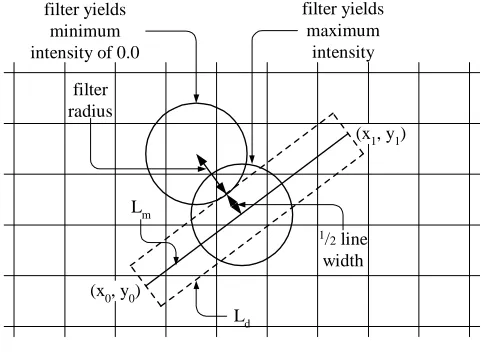
In one case, the filter diameter is equal to or larger than the line width, so the filter kernel can’t entirely fit in-side the desired line, as shown in Figure 5. The grid de-marcates pixels. The solid line is the infinitely thin mathematical line Lmbetween provided endpoints (x0, y0)
and (x1, y1). The thick dashed line is the desired line Ld,
with a width w of one pixel. The circles represent the
foot-(x0, y0)
(x1, y1)
D0= 0 D1= 0
D3= 0 D2= 0
Lm
Ld
[image:6.612.53.291.447.688.2]Laa
Figure 4: An antialiased line surrounded by four four distance functions. All four functions have
a positive intensity within the shaded area.
(x0, y0)
(x1, y1)
filter radius
1/2line
width filter yields
minimum intensity of 0.0
filter yields maximum
intensity
Lm
[image:6.612.317.559.510.686.2]Ld
Figure 5: Scaling when the filter is wider than the desired line. Minimum intensity occurs when the filter is at
WRL RESEARCHREPORT98/2 PREFILTEREDANTIALIASEDLINESUSINGHALF-PLANEDISTANCEFUNCTIONS
5 print of the filter, which also has a radius r of one pixel. The minimum intensity occurs when the filter is located at least r pixels outside the edge of the desired line, and so does not overlap the desired line Ld. The maximum
inten-sity occurs when the filter is centered on Lm, and so is
lo-cated ½ w pixels inside the edge of the desired line. Our scaled distance of 1 corresponds to a Euclidean distance of the filter radius r plus ½ the desired line width w. In this case, the table entries (which map distances from the near-est line edge into intensities) automatically compensate for the filter “falling off” the opposite line edge farther away.
In the other case, the desired line is wider than the fil-ter diamefil-ter, as shown in Figure 6. The desired line has a width w of three pixels, while the filter’s radius r is still one pixel. Again, the minimum intensity occurs when the filter is r pixels outside the edge of the desired line. But the maximum intensity is reached as soon as the filter footprint is completely inside the desired line, at a distance of r pix-els inside the edge of the desired line. A scaled distance of 1 corresponds to a Euclidean distance of 2r pixels.
Thus, we compute the scaled distance functions as:
if (w > 2 * r) {
filter_scale = 1 / (2 * r);
} else {
filter_scale = 1 / (r + ½ w);
}
scale = filter_scale * 1/ sqrt(∆x2+∆y2)
D(x, y) = E(x, y) * scale
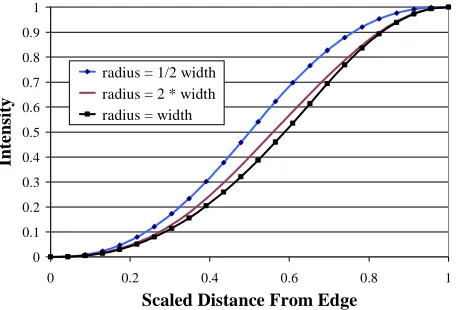
Measuring distance from the edges of the antialiased line (where the action is), combined with scaling, means that the distance-to-intensity function no longer depends upon the exact values of w and r, but only upon their ratio. Figure 7 shows the mapping for three different ratios.
If the intensity mapping table is implemented in a RAM, recomputing the mapping each time the ratio
changes yields the best possible results. (A high-resolution summed area table of the filter kernel [2] provides an effi-cient way of computing a new distance to intensity table, especially for the two-dimensional table described below in Section 5.)
In practice, we can accommodate the typical range of ratios using a single mapping and still get visually pleasing (though slightly inaccurate) results. At one extreme, the maximum filter radius will probably not exceed 2; larger radii result in excessive blurring. Coupled with a minimum line width of 1, the largest possible r/w ratio is 2. At the other extreme, all r/w ratios of ½ or smaller use the same mapping.
5. Line Endpoints
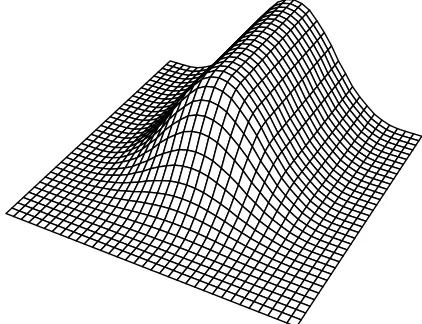
We have so far begged the question of how to map the values of the four distance functions at a fragment’s posi-tion into an intensity. The answer is intimately related to how accurately we antialias the line’s endpoints. All tech-niques described in this section compute the same, correct intensity for fragments sufficiently distant from the line’s two endpoints, but differ substantially near the endpoints. In general, the more complex implementations compute better-looking endpoints. Figure 8 shows a 3D graph of the correct intensities, computed by convolving the filter kernel at each point on a fine grid near a line endpoint.
The simplest mapping takes the minimum of the four distances at a fragment, and then indexes the intensity table to get the fragment’s intensity. Figure 9 shows the result, which looks something like a chisel. This makes line end-points appear more square than they should, which is par-ticularly noticeable when many short lines are drawn close together, such as in stroke fonts.
Allowing one distance function to modulate another decreases intensities near the antialiased line’s corners. We improved endpoint quality considerably by taking the minimum of the two side distance functions D0 and D2,
taking the minimum of the two end distance functions D1
and D3, and multiplying the two minima to get a composite
(x0, y0)
(x1, y1)
filter radius
filter radius
filter yields minimum intensity of 0.0
filter yields maximum intensity
[image:7.612.53.293.497.699.2]Lm Ld
Figure 6: Scaling when the filter is narrower than the desired line. Maximum intensity occurs at distance r inside the desired line.
0 0.1 0.2 0.3 0.4 0.5 0.6 0.7 0.8 0.9 1
0 0.2 0.4 0.6 0.8 1
Scaled Distance From Edge
In
te
n
si
ty
[image:7.612.327.555.549.704.2]radius = 1/2 width radius = 2 * width radius = width
distance, which we use to index the distance to intensity table. Figure 10 shows the result, which more closely matches the desired curve. However, note also that the center of the line near the endpoint shows a slightly sharp peak, rather than a smoothly rounded top, and that the end-point resembles a triangular wedge. This difference is in-distinguishable from the exact convolutions for lines of width one, but is slightly noticeable on lines of width three.
We can remove the peak with another increase in im-plementation complexity. Rather than multiplying the side minimum by the end minimum, we duplicate the distance to intensity table, look up an intensity for each minimum, then multiply the resulting intensities. Figure 11 shows the result. It is hard to visually distinguish this from the de-sired curve. Subtracting the dede-sired curve from the multi-plied intensity curve shows that the multimulti-plied intensities don’t tail off as quickly as the ideal curve, and so the end-points stick out slightly further than desired.
The most accurate mapping leverages the relatively small number of entries in the distance to intensity table. We can use a two-dimensional table that maps the side
minimum distance and the end minimum distance into the correct intensity that was computed by convolution. This results in the ideal curve shown in Figure 8. Since this two-dimensional table is symmetric around the diagonal, nearly half of the table can be eliminated. A 32 x 32 table is plenty big—we could detect no improvement using lar-ger tables. A 32 x 32 table requires 1024 entries, or only 528 entries if diagonal symmetry is exploited. A 16 x 16 table, which more closely matches the resolution of many hardware antialiasing implementations, requires 256 en-tries, or only 136 entries if diagonal symmetry is exploited.
[image:8.612.339.553.311.472.2] [image:8.612.74.288.326.486.2]It is instructive to contrast these small tables with Gupta & Sproull’s [3] endpoint tables. For integer end-points, their table uses 17 rows, each composed of six en-tries for the six pixels most affected near the endpoint, for a total of 102 entries. They state that allowing four bits of subpixel precision for endpoints requires a 17x17x17x6 table, with a total of 29,478 entries! In reality, the table would be even larger, as some subpixel endpoint positions can substantially affect more than six nearby pixels.
Figure 8: Ideal intensities near an endpoint computed via convolution create a smoothly rounded tip.
Figure 9: Intensities using the minimum distance function create an objectionable “chisel” tip.
Figure 10: Intensities from multiplying the minimum side distance by the minimum end distance slightly
[image:8.612.339.550.527.689.2]but noticeably project the center of the endpoint.
Figure 11: Intensities from multiplying the minimum side intensity by the minimum end intensity are
[image:8.612.77.289.537.700.2]WRL RESEARCHREPORT98/2 PREFILTEREDANTIALIASEDLINESUSINGHALF-PLANEDISTANCEFUNCTIONS
7
6. Antialiased Points
OpenGL wide antialiased points [9] should be ren-dered by convolving a filter kernel with a circle of the specified diameter. With a circularly symmetric filter, the resulting intensities are circularly symmetric around the center of the antialiased point—intensity is strictly a func-tion of the distance from the center of the circle. We might have implemented a quadratic distance evaluator and a spe-cial distance to intensity table for antialiased points. Or we could have left antialiased points up to software. Instead, we observed that most applications paint relatively small antialiased points, and that we could use the programmable line width and filter radius to paint small slightly blurry squares as an approximation to small slightly blurry points.
If the filter radius is large enough compared to the square, the antialiased intensities are nearly circularly symmetric, as the corners of the antialiased square have intensities that are effectively zero. Figure 12 and Figure 13 show intensity plots of an antialiased square when the
filter radius is equal to the square’s width. Each intensity is computed by multiplying the end minimum intensity by the side minimum intensity, as described above in Section 5. Figure 12 is the usual 3D plot; Figure 13 is a contour plot showing iso-intensity curves. Each iso-intensity curve shows the set of (x, y) locations that have the same intensity value; the different curves represent intensity level of 0.1, 0.2, etc. Note that only the lowest intensity curve deviates noticeably from a circle. This deviation is undetectable on the display, and the antialiased square is indistinguishable from an antialiased circle.
[image:9.612.334.547.317.446.2]If we always use a one to one ratio between square size and filter radius, in order to make the antialiased square look circular, and then paint larger and larger squares, eventually the filter radius becomes so large that the an-tialiased square line appears unacceptably blurred. We can accommodate slightly larger squares by limiting the filter radius to some maximum that doesn’t blur things too much, then allow the size of the square to increase a bit beyond
[image:9.612.72.279.318.446.2]Figure 12: Intensities are nearly circularly symmetric when the square size is equal to filter radius.
Figure 13: Contour lines when the square size is equal to filter radius.
[image:9.612.340.544.490.691.2]Figure 14: Intensities are slightly non-circular at low inten-sities when the square size is 1.5 times the filter radius.
[image:9.612.79.276.494.686.2]this. The antialiased “point” gradually becomes more like a square with rounded corners, but it takes awhile for this to become objectionable. Figure 14 and Figure 15 show an antialiased square whose width is 1.5 times the filter radius; most of the contour lines still look like circles. For typical displays, we’ve found that antialiased squares up to about five or six pixels in size look quite good. (Note that this may increase the filter radius beyond the 2 pixels “maxi-mum” hypothesized previously in Section 4, but that this does not increase the maximum r/w ratio beyond 2, as the square size is increasing, too.)
7. Comparison With Previous Work
Our algorithm owes much to Gupta & Sproull [3], but differs in several important ways. We compute four dis-tances from a pixel to the edges and endpoints of the line; they use a single Bresenham-based distance to the center of the line. We combine distances before table lookup, and/or intensities after table lookup, in a fashion that automatically antialiases line endpoints; they handle endpoints as a spe-cial case using a spespe-cial table. We allow non-integer end-points by adding a few bits of precision to computations; non-integer endpoints explode their special endpoint table into infeasibility. We support different line widths and filter radii via setup computations that merely alter the edge functions’ increments and initial values; they require changing rendering operations to paint different numbers of pixels on each scanline, and a new endpoint table with a different number of entries.
Turkowski [10] proposes two distance functions, one along the length of the line and one perpendicular to that. Along the length of the line, he obtains results identical to us. At the endpoints, his algorithm can paint better-looking wide lines, as he defines the endpoints to be semicircles. Unfortunately, this requires using a CORDIC evaluation to compute a distance at each pixel location, which is much more expensive than our two-dimensional table lookup or our limited precision multiply.
Neither of the two previous techniques map directly into a fragment generator based on half-plane edge func-tions, though Turkowski’s work could conceivably be wedged into such a design. Two other techniques, both used in half-plane fragment generators, are worth noting.
The PixelVision chip [5] paints antialiased lines by linearly ramping the intensity from 0 at one edge of a line to 1 at the center, and then back down to 0 at the other edge. Due to a lack of gamma correction on this hardware, this results in a filter with a very sharp central cusp, with poor high-frequency rejection. It computes the edges of an antialiased line as ±½ the width in the horizontal direction for x-major lines, and in the vertical direction for y-major lines, rather than perpendicular to the line. This results in antialiased lines that change width as they rotate, and are nearly 30% too narrow at 45°. Finally, it simply truncates endpoints to the nearest integer, so that several small lines drawn in close proximity look ragged.
The RealityEngine [1] and InfiniteReality [7] treat pix-els as squares, and allow an antialiased line intensity to be computed as the intersection of a line with a pixel’s square. The result is a separable (square) box filter with a radius of ½. This narrow linear filter results in ropiness (blurry staircasing) along the length of the line.
Figure 16 shows a starburst pattern of one-pixel wide lines2, magnified 2.3 times to show greater detail, and an-tialiased using a regular 4 x 4 subpixel grid like that in the RealityEngine. Although the 16 sample points allow 17 levels of intensity, lines that are almost vertical or horizon-tal tend to have intensities that poorly match the pixel area covered by the line. Since their edges nearly parallel a col-umn or row of 4 sample points, a slight increase in area coverage from one pixel to another may jump up to four intensity levels. (The RealityEngine does allow sample points to be lit with an “area sample” algorithm, which mitigates this problem, at the expense of other artifacts due to lighting up sample points that are outside the object.)
Figure 17 shows the same starburst with 8 supersample points, but arranged in a less regular sparse pattern on an 8 x 8 subpixel grid, similar to InfiniteReality. One sample point is used on each row and column of the subpixel grid, and each quadrant contains two samples. Since half as many sample points are used, there are only 9 levels of intensity, which makes lines at about 40°noticeably more aliased. However, the intensity more accurately matches the area covered by near horizontal and vertical lines, and so those are slightly improved.
Figure 18 shows the starburst painted with our algo-rithm; the two minimum distances are multiplied to get a single distance that is then mapped into an intensity. Since we accurately represent distances to the line edges and di-rectly map that to an intensity, we do not suffer the large intensity jumps that plague supersampling. Since we use a wider filter with better high-frequency rejection, we also paint lines with less aliasing (stairstepping) than existing supersampling hardware.
Our technique is susceptible to artifacts when different colored lines are near or cross each other. We treat each line independently: the precomputed convolution assumes a line interacts only with the constant background, and not with other lines. If the OpenGL [9] frame buffer raster operation COPY is naïvely used, these artifacts are severe, as the second line overwrites much of the previous line. The OpenGL blending function (SRC_ALPHA,
2All image examples have been grouped onto a single
WRL RESEARCHREPORT98/2 PREFILTEREDANTIALIASEDLINESUSINGHALF-PLANEDISTANCEFUNCTIONS
9
DST_ONE_MINUS_SRC_ALPHA) combines the new line
with existing information from the frame buffer:
dst = src_alpha * src + (1 – src_alpha) * dst
This blending reduces such artifacts. However, the most recently painted line still tends to underweight any previously painted lines nearby, and our technique cannot use any Z depth information to give a sense of far and near at line intersections. These artifacts are unnoticeable when all antialiased lines are the same color, but give misleading depth cues when different portions of a wireframe object area are painted with different colors.
Supersample techniques have one nice advantage over our algorithm, as they maintain information about the sub-pixel coverage and Z depth values of both lines, and then compute a filtered pixel value based upon this information. However, maintaining equivalent rendering speed requires scaling frame buffer memory capacity and bandwidth up by the number of sample points.
And note that typical hardware supersampling is still subject to large errors in color due to the narrow box filter. As an artificially worst case example, consider several ver-tically adjacent horizontal lines, each 1.05 pixels in width, alternating between red and green. This pattern is just be-low the Nyquist limit (the highest theoretically reproduci-ble frequency with a perfect reconstruction filter), but far beyond the highest reproducible frequency of any actual display device. Since any attempt to display individual lines will show aliasing artifacts, a perfect filter matched to the display would render the entire scene as a muddy yel-low.
Figure 19 shows such alternating lines rendered three different ways. The left portion was rendered using a 4x4 dense supersampling pattern. When a line’s y coordinate is vertically near the center of a pixel, the pixel displays in-correctly as a nearly saturated red or green, because the adjacent lines contribute almost nothing to the pixel’s color. But when a line’s y coordinate is nearly equidistant between two pixel centers, the pixels display as the correct muddy yellow, because adjacent red and green lines are almost equally weighted. Lines with intermediate y coor-dinates result in intermediate colors.
The middle and right portions of Figure 19 were ren-dered with our algorithm, blending new line information with existing frame buffer information using (SRC_ALPHA, DST_ONE_MINUS_SRC_ALPHA). In the middle portion, we painted all red lines, then all green lines. It shows less variation in color than the supersam-pling images due to the wider filter. But the color is heav-ily biased away from yellow and toward green, as the more recently painted green lines underweight the contribution of the previously painted red lines. In the right portion, we painted lines from bottom to top. While the average color is now correct, the variations in color are larger.
Figure 20 shows crossing lines of like (top half) and different (bottom half) colors, painted with a 4x4 super-sampling pattern. The starburst lines are nearer than the horizontal lines in the left half, and the horizontal lines are
nearer in the right half. In the top half, there is no way to show which line is nearer when lines cross. The brain must use other cues, like perspective foreshortening (not present in this flat image), to discern this information. In the bot-tom half, the near lines clearly paint over the far lines, yielding additional clues as to depth relationships. Such a situation might occur when different subassemblies of a wireframe image (engine block, pistons, etc.) are displayed with different colored lines.
Figure 21 shows how our algorithm paints the same pattern of crossing lines. Like-colored lines cross smoothly, without noticeable artifacts, and again with no sense of near and far. However, different colored lines can provide false depth cues. The most recently painted line appears nearer than older lines, regardless of actual depth. We tried the OpenGL blending function (SRC_ALPHA,
DST_ONE), which fully weights existing frame buffer
in-formation. We hoped that when different colored lines crossed, this would create a neutral blend with no depth cues. However, this blending function can make one color line look like it is always nearer than another color line, regardless of the order that they are painted, and so still provides incorrect depth cues. Further, this blending func-tion erroneously brightens the intersecfunc-tion of like-colored lines.
Rendering high quality images without artifacts re-quires (1) using a wide, non-box filter like our algorithm, and (2) maintaining accurate geometry information for each line or surface that is visible within a pixel, like supersam-pling with many sample points. We suggest that future supersampling hardware could adopt more sample points over a wider area, such that adjacent pixels’ sample points overlap one another, and that these sample points be weighted unequally. The weighting requires at least a small multiplier per sample point, but current silicon fabri-cation technology makes this feasible. Allowing sample points to extend farther from a pixel center requires gener-ating more fragments for a line or surface, but it is easy to increase the fragment generation rate by increasing the number of fragments generated in parallel. More problem-atic is the increased memory capacity and bandwidth re-quirements of current supersampling hardware when the number of sample points is increased. We suggest that this problem is tractable if a sample point mask, rather than a single sample point, is associated with each color/Z entry, as described by Jouppi & Chang in [4]. This technique allows many sample points with just a few color/Z entries per pixel.
8. Algorithm Details
1.
Compute x and y deltas∆x = x1– x0;
∆y = y1– y0;
2.
Compute the length of the line and the reciprocal square root. The length and reciprocal square root need only a few bits of precision, and can use a small table lookup after a normalizing shift.length2=∆x2+∆y2; if (length20 == 0) {
We’re done with this line }
reciprocal_sqrt = 1 / sqrt(length2);
3.
Compute a scale factor for turning ∆x and ∆y into scaled distances. We want a scaled distance of 1 to represent the Euclidean distance from an edge at which the filter function first reaches its maximum value. We must compensate for this stretching or compression of Euclidean distances when we “push” the sides and ends of the line out in steps 8 and 9 below.if (w > 2 * r) {
filter_scale = 1/ (2 * r);
} else {
filter_scale = 1 / (r + ½ w);
}
scale = reciprocal_sqrt * filter_scale;
4.
Compute the scaled increments for use with the dis-tance function. These multiplies must be high preci-sion, in order to keep the slope of the antialiased line sufficiently close to the slope of the desired line.∆sx =∆x * scale;
∆sy =∆y * scale;
5.
Compute the scaled increments for each distance func-tion. Referring back to Figure 4, D0is to the left of themathematical line from (x0, y0) to (x1, y1). D1is at the
end of the line, a little past (x1, y1). D2is to the left of
the line from (x1, y1) to (x0, y1). D3is at the beginning
of the line, a little past (x0, y0). The antialiased line is
thus surrounded by the distance functions in a clock-wise fashion. Note that the start and end distance functions D1and D3reverse the roles of∆sx and∆sy,
as they are perpendicular to the original line.
D0.inc.x = +∆sy;
D0.inc.y = –∆sx;
D1.inc.x = –∆sx;
D1.inc.y = –∆sy;
D2.inc.x = –∆sy;
D2.inc.y = +∆sx;
D3.inc.x = +∆sx;
D3.inc.y = +∆sy;
6.
Compute the initial (x, y) position from which frag-ment generation will proceed. The details of proce-dure InitialPosition are not relevant, except that we generate fragments from (x1, y1) toward (x0, y0) so as tomaximize the number of fragments generated before generating fragments that overlap the previous con-nected line.
(xinitial, yinitial) = InitialPosition(x1, y1);
7.
Compute the x and y distances from the initial position to the starting and ending points of the line. We actu-ally compute the reverse subtract for the deltas, as the initial position’s coordinate are chosen to be less than or equal to the endpoint coordinates. The reverse sub-tract yields small nonnegative numbers for ∆xend and∆yend, which can reduce some setup time later on.
∆xstart= x0– xinitial;
∆ystart= y0– yinitial;
∆xend= x1– xinitial;
∆yend= y1– yinitial;
8.
Compute the initial value of the two side edge distance evaluators D0 and D2 at position (xinitial, yinitial). We“push” the two side edges out by the Euclidean dis-tance ½w + r from the mathematical line Lmthat goes
from (x0, y0) to (x1, y1). The ½w is obvious: if we want
a line that is w pixels wide centered around Lm, we
need half the line width on either side. We addition-ally push the side edges out by r, because that is the distance from the desired line where the intensity should be 0. Since D0and D2are parallel to the
origi-nal line, we can compute this initial value from the point (x0, y0) or (x1, y1). Since we have chosen an
ini-tial point for fragment generation that is near the line endpoint (x1, y1), ∆xend and ∆yend are small numbers.
We use these small numbers in the computations shown here so that hardware takes fewer cycles to multiply them by the increments. Finally, remember that the distance functions are not operating in Euclid-ean distance, but are scaled by filter_scale.
side_push = (½w + r) * filter_scale;
∆sides = (∆xend*∆sy) – (∆yend*∆sx);
D0.current = side_push –∆sides;
D2.current = side_push +∆sides;
9.
Compute the initial values of the start and end edge distance evaluators D3and D1at position (xinitial, yinitial).We “push” the start and end edges out a distance of the filter radius from the start and end points, as that is the distance at which the intensity should be 0. To make connected lines somewhat prettier, we can also push out an by additional w/2.
if (project_ends) {
cap_push = side_push;
} else {
cap_push = r * filter_scale;
WRL RESEARCHREPORT98/2 PREFILTEREDANTIALIASEDLINESUSINGHALF-PLANEDISTANCEFUNCTIONS
11
∆start = (∆ystart*∆sy) + (∆xstart*∆sx);
D3.current = cap_push –∆start;
∆end = (∆xend*∆sx) + (∆yend*∆sy);
D1.current = cap_push +∆end;
10.
Visit all fragments in the antialiased line (the traversal algorithm is not relevant). For each fragment visited, evaluate the four distance functions, clamp them to the range 0.0 to 1.0, and attach the four clamped distances to the fragment.11.
For each generated fragment, with associated clamped distances D0, D1, D2, and D3, convert the four distancesinto a single intensity. We show all four methods for computing an intensity described above in Section 5.
if (use minimum of all four function for combining) {
intensity = integral_table_1D
[min(D0, D1, D2, D3)];
} else if (multiply side minimum by end minimum) {
intensity = integral_table_1D
[min(D0, D2) * min(D1, D3)];
} else if (multiply intensities) {
intensity = integral_table_1D[min(D0, D2)]
* integral_table_1D[min(D1, D3)];
} else if (two-dimensional distance to intensity table) {
intensity = integral_table_2D
[min(D0, D2), min(D1, D3)];
}
9. Precision Requirements
When rendering aliased objects, each edge evaluator must compute its value exactly, as the four results must determine unequivocally if a fragment is contained inside an object. If the supported address space is 2mx 2mpixels, with an additional n bits of subpixel precision, each x and y coordinate requires m+n bits. Each edge evaluator requires a sign bit, 2m integer bits, and n fractional bits. (An evaluator doesn’t need 2m+1 integer bits, because it is im-possible for both terms of the edge function to be at oppo-site ends of their ranges simultaneously. An edge evaluator doesn’t need 2n fractional bits, because only n fractional bits change when moving from one fragment to another.)
Unlike edge functions, distance functions and the sub-sequent derivation of intensity are subject to several sources of error. Since antialiased lines are inherently blurred, most of these errors won’t create a visual problem as long as sufficient precision is maintained. We discuss the following sources of errors:
• The error in the computation of x and y increments for the evaluators, and the subsequent accumulation of this error, which alters the slope of the line and thus moves the position of one endpoint;
• the number of entries in the distance to intensity table, which affects the magnitude of intensity changes;
• overflow of the distance function, which most likely causes some fragments in the antialiased line to be ig-nored; and
• error in the computation of the reciprocal square root, which alters the width of the line.
When the scaled x and y increments ∆sx and ∆sy
(computed in Section 8, Step 4 above) are rounded to some precision, their ratio is altered. In the worst case, one in-crement is just over ½ the least significant bit (lsb), the other has just under ½ the lsb. They round in different di-rections, creating nearly a bit of difference between the two. If a line extends diagonally from (0, 0) to (2m, 2m), we add the ∆sy error into the edge accumulator 2m–1 times, and subtract the ∆sx error 2m–1 times, thus affecting the bottom m+1 bits of an edge evaluator. The net effect is to change the slope of the line, which moves the endpoint farthest from the starting position. We therefore require
m+1 bits to confine the error, and must allocate these bits
sufficiently far below the binary point of the edge accumu-lator so that one endpoint doesn’t move noticeably. Limit-ing endpoint movement to1/
32of a pixel seems sufficient. But how many bits in an edge accumulator represents 1/
32 of a pixel? The distance functions operate in a scaled space. If we limit the largest filter radius to four pixels, then the minimum filter_scale (computed above in Section 8, Step 3) is1/
8. And so we require 5+3=8 more bits below the binary point in addition to the m+1 accumulation error bits.
We also need enough bits to index the distance to in-tensity table so that the gradations in inin-tensity aren’t large enough to be noticeable. We tried four bits (16 table en-tries of four bits), which is typical of many antialiasing implementations, but found we could detect Moiré effects when displaying a starburst line pattern. Using five bits (32 table entries of five bits) eliminated these patterns com-pletely—we couldn’t reliably tell the difference between five and more bits. Fortunately, we need not add these five bits to the eight already required to limit endpoint move-ment—the index bits lie just below the binary point, and so they overlap the top five of the eight bits that limit endpoint movement.
Finally, we need enough integer bits above the binary point to accumulate the worst-case maximum value. Again, we are operating in a scaled space, and so must al-low for the worst possible filter_scale. If the minimum allowed line width is one pixel, and the minimum allowed filter radius is ½ pixel, then at these limits scaled distances are equivalent to Euclidean distances. In the worst case of a line diagonally spanning the address space, at one end-point we are sqrt(2)*2mpixels from the other endpoint. So we need a sign bit plus another m+1 bits.
We still need to determine precision requirements for the reciprocal square root. Gupta & Sproull [3] have a similar term in their algorithm, which they imply must be computed to high precision. In truth, high precision is un-necessary in both their algorithm and ours. Note that a distance function divides the x and y increments of an edge function by the same value. Errors in the reciprocal square root change the mapping of Euclidean space into scaled space, and thus change only the apparent width of the line. The reciprocal square root need only be accurate enough to make these width differences between lines unnoticeable; five or six bits of precision seem sufficient.
10. Conclusions
We have described an algorithm for painting antiali-ased lines by making modest additions to a fragment gen-erator based upon half-plane edge functions. These edge functions are commonly used in hardware that antialiases objects via supersampling, but these implementations in-variably use a narrow box filter that has poor high-frequency rejection. Instead, we implement higher quality filters by prefiltering a line of a certain width with a filter of a certain radius to create a distance to intensity mapping. This prefiltering can be done once at design time for a read-only table, or whenever the line width to filter radius ratio changes for a writable table. We don’t require special han-dling for endpoints, nor large tables for subpixel endpoints. By scaling Euclidean distances during antialiased line setup, we can accommodate a wide range of filter radii and line widths with no further algorithm changes. We can exploit these features to paint reasonable approximations to small antialiased circles. The resulting images are gener-ally superior to typical hardware supersampling images.
We implemented a less flexible version of this algo-rithm in the Neon graphics accelerator chip [6]. Additional setup requirements are small enough that antialiased line performance is usually limited by fragment generation rates, not by setup. High-quality antialiased lines paint at about half the speed of aliased lines. An antialiased line touches roughly three times as many pixels as an aliased line, but this is somewhat offset by increased efficiency of fragment generation for the wider antialiased lines. The additional logic for antialiasing is reasonable: Neon com-putes the antialiased intensity for four fragments in parallel, with an insignificant increase in real estate over the existing logic devoted to traversing object and interpolating vertex data.
11. Acknowledgements
James Claffey, Jim Knittel, and Larry Seiler all had a hand in implementing antialiased lines for Neon. Keith Farkas made extensive comments on several drafts of this paper.
References
[1] Kurt Akeley. RealityEngine Graphics. SIGGRAPH
93 Conference Proceedings, ACM Press, New York,
August 1993, pp. 109-116.
[2] Frank C. Crow. Summed-Area Tables for Texture Mapping. SIGGRAPH 84 Conference Proceedings,
ACM Press, New York, July 1984, pp. 207-212.
[3] Satish Gupta & Robert F. Sproull. Filtering Edges for Gray-Scale Devices. SIGGRAPH 81Conference
Pro-ceedings, ACM Press, New York, August 1981, pp.
1-5.
[4] Norman P. Jouppi & Chun-Fa Chang. Z3: An Eco-nomical Hardware Technique for High-Quality An-tialiasing and Transparency. Proceedings of the 1999
EUROGRAPHICS/SIGGRAPH Workshop on Graph-ics Hardware, ACM Press, New York, August 1999,
pp. 85-93.
[5] Brian Kelleher. PixelVision Architecture, Technical Note 1998-013, System Research Center, Compaq Computer Corporation, October 1998, available at http://www.research.digital.com/SRC/publications/ src-tn.html.
[6] Joel McCormack, Robert McNamara, Chris Gianos, Larry Seiler, Norman Jouppi, Ken Correll, Todd Dut-ton & John Zurawski. Neon: A (Big) (Fast)
Single-Chip 3D Workstation Graphics Accelerator. Re-search Report 98/1, Western ReRe-search Laboratory, Compaq Computer Corporation, Revised July 1999, available at http://www.research.compaq.com/wrl/ techreports/pubslist.html.
[7] John S. Montrym, Daniel R. Baum, David L. Dignam & Christopher J. Migdal. InfiniteReality: A Real-Time Graphics System. SIGGRAPH 97 Conference
Proceedings, ACM Press, New York, August 1997,
pp. 293-302.
[8] Juan Pineda. A Parallel Algorithm for Polygon Rasterization. SIGGRAPH 88 Conference
Proceed-ings, ACM Press, New York, August 1988, pp. 17-20.
[9] Mark Segal & Kurt Akeley. The OpenGL Graphics
System: A Specification (Version 1.2), 1998, available
at http://www.sgi.com/software/opengl/manual.html.
[10] Kenneth Turkowski. Anti-aliasing through the Use of Coordinate Transformations. ACM Transactions on
Graphics, Volume 1, Number 3, July 1982, pp.
215-234.
[11] Wolberg, George. Digital Image Warping, IEEE
WRL RESEARCHREPORT98/2 PREFILTEREDANTIALIASEDLINESUSINGHALF-PLANEDISTANCEFUNCTIONS
[image:15.612.56.293.61.252.2] [image:15.612.317.561.63.200.2]13 Figure 16: 4x4 dense supersampling aliases noticeably.
Figure 17: 8x sparse supersampling also aliases noticeably.
[image:15.612.318.557.269.441.2]Figure 18: Our algorithm exhibits only slight ropiness.
Figure 19: Alternating adjacent red and green lines, 1.05 pixels in width. 4x4 supersampling (left) has large varia-tions in color. Our algorithm painting first red, then green lines (middle), has a greenish bias. Our algorithm painting
bottom to top (right) has large variations in color.
Figure 20: 4x4 supersampling paints crossing lines of like color (top half) with no sense of near and far. Lines of dif-ferent colors (bottom half) display near lines over far lines.
[image:15.612.55.292.279.469.2] [image:15.612.56.292.494.686.2] [image:15.612.319.559.495.658.2]